rumenjordanov/reconai
GitHub: rumenjordanov/reconai
一款结合确定性规则引擎与本地LLM的命令行侦察工具,帮助渗透测试人员高效完成资产发现、漏洞关联和攻击路径分析。
Stars: 1 | Forks: 0
# ReconAI
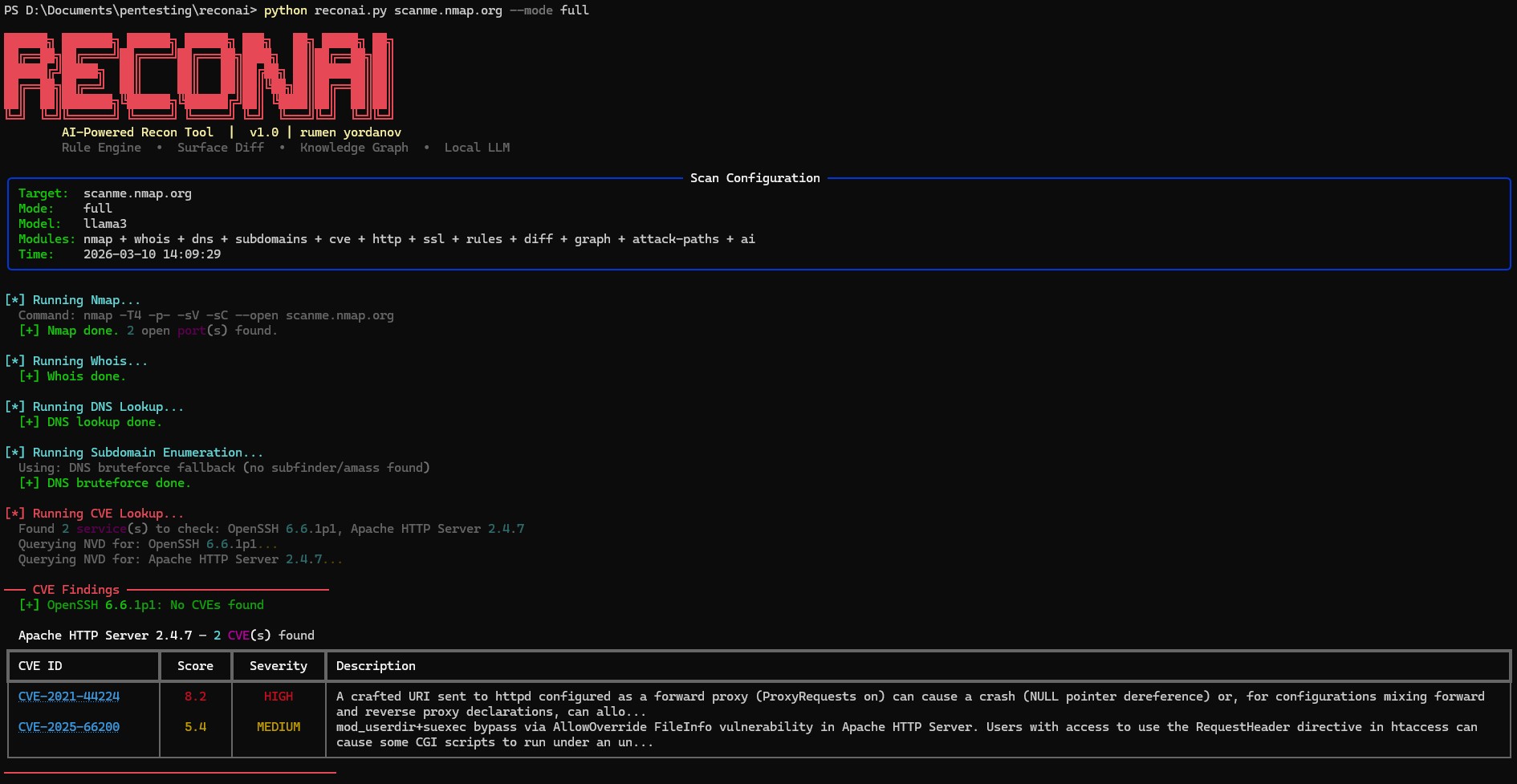
## 功能介绍
| 模块 | 描述 |
|---|---|
| **Nmap + Whois + DNS** | 核心侦察 — 端口扫描、注册商信息、DNS 记录 |
| **子域名枚举** | subfinder / amass / DNS 暴力破解回退 |
| **CVE 查询** | 解析服务版本,查询 NVD 获取真实 CVE 及严重性评分 |
| **HTTP 分析** | 技术检测、安全头审计、敏感路径探测 |
| **SSL/TLS 检测** | 证书有效性、过期时间、TLS 版本、弱加密套件检测 |
| **规则引擎** | 18 条确定性规则,从扫描数据中检测攻击机会 |
| **AI 攻击路径** | 本地 LLM 将规则确认的候选项扩展为完整的利用链 |
| **表面差异对比** | 将当前扫描与历史记录进行比较 — 检测新端口、CVE、子域名 |
| **知识图谱** | 可查询的基础设施图谱,支持导出为 JSON、Graphviz、Neo4j Cypher |
| **AI 总结** | Ollama LLM 最终分析 — 数据不离开您的设备 |
## 扫描示例
ReconAI 生成的示例输出。
- 📡 **scanme.nmap.org(完整侦察示例)**
[查看示例](screenshots/scanme/scanme_example.md)
- 🌐 **testphp.vulnweb.com(Web 应用分析)**
[查看示例](screenshots/vulnweb/vulnweb_example.md)
## 规则引擎
确定性规则在 LLM 之前触发 — AI 仅解释规则已从证据中确认的内容:
```
Rule Engine — 4 matches 2 CRITICAL 1 HIGH 3 quick wins
RULE TITLE SEVERITY QUICK WIN
GIT_EXPOSED Git Repository Exposed CRITICAL YES
MYSQL_EXPOSED MySQL Exposed on Port 3306 CRITICAL YES
SSH_OPEN SSH Open — Credential Attack HIGH no
MISSING_HEADERS Critical Security Headers Missing MEDIUM no
```
**18 条内置规则:** GIT_EXPOSED, ENV_EXPOSED, SSH_OPEN, FTP_OPEN, TELNET_OPEN, SMB_OPEN, MYSQL_EXPOSED, REDIS_EXPOSED, MONGODB_EXPOSED, PHPMYADMIN_EXPOSED, ADMIN_PANEL_EXPOSED, SWAGGER_EXPOSED, ACTUATOR_EXPOSED, WORDPRESS_DETECTED, APACHE_CRITICAL_CVE, OPENSSL_CRITICAL_CVE, MISSING_SECURITY_HEADERS, SSL_WEAK_CONFIG
添加新规则 = 编写一个函数 + 将其添加到 `rule_engine.py` 的 `RULE_REGISTRY` 中。
## 攻击面差异对比
每次扫描后存储基线,并显示发生的变化:
```
Attack Surface Diff
Comparing: 2026-03-09 10:00 → 2026-03-10 14:32
NEW SERVICES
+ 6379/tcp redis Redis 7.0.5
NEW VULNERABILITIES
+ [CRITICAL] CVE-2023-28425 (CVSS 9.8) on Redis 7.0.5
REMOVED SERVICES
- 21/tcp ftp vsftpd 3.0.3
NEW SUBDOMAINS
+ api.internal.example.com
TECHNOLOGY CHANGES
+ Cloudflare CDN
```
历史记录以纯 JSON 格式存储在 `.reconai_history/` 中 — 每个目标一个文件,保留完整历史。
## 知识图谱
所有侦察数据建模为图谱并呈现为 ASCII 树:
```
🌐 example.com
├── HAS_SERVICE
│ ├── ⚙️ OpenSSH 6.6.1p1 :22
│ │ └── HAS_CVE 💀 CVE-2016-0777 [HIGH 8.8]
│ └── ⚙️ Apache 2.4.7 :80
│ ├── HAS_CVE 💀 CVE-2021-41773 [CRITICAL 9.8]
├── RUNS_TECH
│ ├── 🔧 PHP
│ └── 🔧 WordPress
└── EXPOSES_PATH
├── 📁 /.git/HEAD [200]
└── 📁 /phpmyadmin [200]
```
使用 `--export-graph` 导出 → JSON, Graphviz DOT, Neo4j Cypher。
## 系统要求
- Python 3.8+
- Nmap
- Ollama(用于 AI 功能)
- 8GB+ 内存(推荐 16GB)
- 约 5GB 磁盘空间用于 AI 模型
## 安装说明
### 步骤 1 — 克隆仓库
```
git clone https://github.com/rumenjordanov/reconai.git
cd reconai
```
### 步骤 2 — 设置文件夹结构
克隆或解压 ZIP 后,您的文件夹必须如下所示:
```
reconai/
├── reconai.py
├── requirements.txt
├── README.md
├── LICENSE
├── .gitignore
└── modules/
├── __init__.py
├── scanner.py
├── subdomains.py
├── cve_lookup.py
├── http_analyzer.py
├── ssl_inspector.py
├── rule_engine.py
├── surface_diff.py
├── attack_paths.py
├── knowledge_graph.py
├── ai_analyst.py
└── reporter.py
```
### 步骤 3 — 安装 Python 依赖
```
pip install -r requirements.txt
```
### 步骤 4 — 安装 Nmap
**Windows:**
1. 从 https://nmap.org/download.html 下载
2. 运行安装程序 — 勾选 **"Add Nmap to PATH"**
3. 打开一个新的终端并验证:`nmap --version`
**Linux (Debian/Ubuntu):**
```
sudo apt install nmap
```
**macOS:**
```
brew install nmap
```
### 步骤 5 — 安装 Ollama
**Windows:**
1. 从 https://ollama.com/download 下载并运行安装程序
2. Ollama 作为后台服务安装 — 自动启动
3. 验证:`ollama --version`
**Linux:**
```
curl -fsSL https://ollama.com/install.sh | sh
```
**macOS:**
```
brew install ollama
```
### 步骤 6 — 拉取 AI 模型
```
ollama pull llama3 # Recommended (~4.7GB)
ollama pull mistral # Lighter option (~4GB)
ollama pull deepseek-coder # Better for code/exploit reasoning
```
### 步骤 7 — 验证一切正常
```
python --version # should be 3.8+
nmap --version # any version
curl http://localhost:11434 # should print: Ollama is running
```
## 使用方法
```
# 完整扫描 — 运行所有模块
python reconai.py example.com
# 完整模式 — 添加子域名枚举 + 深度端口扫描
python reconai.py example.com --mode full
# 隐蔽模式 — 速度较慢,更安静
python reconai.py example.com --mode stealth
# 导出知识图谱 (JSON + Graphviz + Neo4j)
python reconai.py example.com --export-graph
# 查询知识图谱
python reconai.py example.com --query "nginx CVE"
python reconai.py example.com --query "sensitive path"
python reconai.py example.com --query "vulnerability CRITICAL"
# 重置此目标的扫描历史基线
python reconai.py example.com --clear-history
# 跳过特定模块
python reconai.py example.com --no-cve
python reconai.py example.com --no-diff
python reconai.py example.com --no-rules
python reconai.py example.com --no-graph
python reconai.py example.com --no-paths
python reconai.py example.com --no-ai
# 使用不同的 AI 模型
python reconai.py example.com --model mistral
# 将报告保存到特定文件
python reconai.py example.com --output my_report.md
# 自定义 SSL 端口
python reconai.py example.com --ssl-port 8443
```
## 所有选项
```
positional arguments:
target Target domain or IP (e.g. example.com or 192.168.1.1)
optional arguments:
--mode quick | full | stealth (default: quick)
--no-cve Skip CVE lookup
--no-http Skip HTTP analysis
--no-ssl Skip SSL inspection
--no-rules Skip rule engine
--no-diff Skip attack surface diff
--no-graph Skip knowledge graph
--no-paths Skip AI attack path generation
--no-ai Skip AI summary
--query QUERY Query the knowledge graph after scanning
--export-graph Export graph as JSON, DOT, and Cypher files
--clear-history Delete stored scan history for this target
--history-dir DIR Directory for scan history (default: .reconai_history)
--model Ollama model to use (default: llama3)
--output FILE Save report to specific file
--ollama-url Ollama API URL (default: http://localhost:11434)
--ssl-port Port for SSL inspection (default: 443)
```
## 合法的免费练习目标
仅扫描您拥有或获得明确授权测试的系统。
| 目标 | 备注 |
|---|---|
| `scanme.nmap.org` | Nmap 官方测试主机 — 完全授权 |
| `testphp.vulnweb.com` | Acunetix 故意设计的易受攻击 Web 应用 |
| `localhost` | 通过 Docker 本地运行 DVWA 或 Metasploitable |
```
# 最快的本地实验室设置
docker run -d -p 80:80 vulnerables/web-dvwa
python reconai.py localhost --mode full --export-graph
```
## 免责声明
本工具仅用于**授权渗透测试和教育目的**。
仅对您有明确许可测试的系统使用。
作者不对任何滥用行为负责。
## 许可证
MIT — 详见 [LICENSE](LICENSE)
标签:AI安全工具, AI风险缓解, CTI, CVE查询, DNS分析, GitHub, HTTP安全头检测, LLM评估, Nmap, Ollama, SSL/TLS检测, Whois查询, 侦察工具, 子域名枚举, 密码管理, 插件系统, 攻击路径分析, 数据统计, 无线安全, 暴露面检测, 本地大模型, 端口扫描, 系统安全, 网络安全, 网络安全审计, 虚拟驱动器, 逆向工具, 隐私保护