Abhiram-Rakesh/Three-Tier-EKS-Terraform
GitHub: Abhiram-Rakesh/Three-Tier-EKS-Terraform
一个端到端的 DevSecOps 示例项目,演示如何在 AWS EKS 上通过 IaC、CI/CD 与 GitOps 实现安全、可观测的生产级部署。
Stars: 18 | Forks: 16
# H&M Fashion Clone — AWS EKS 上的 DevSecOps
## 架构图
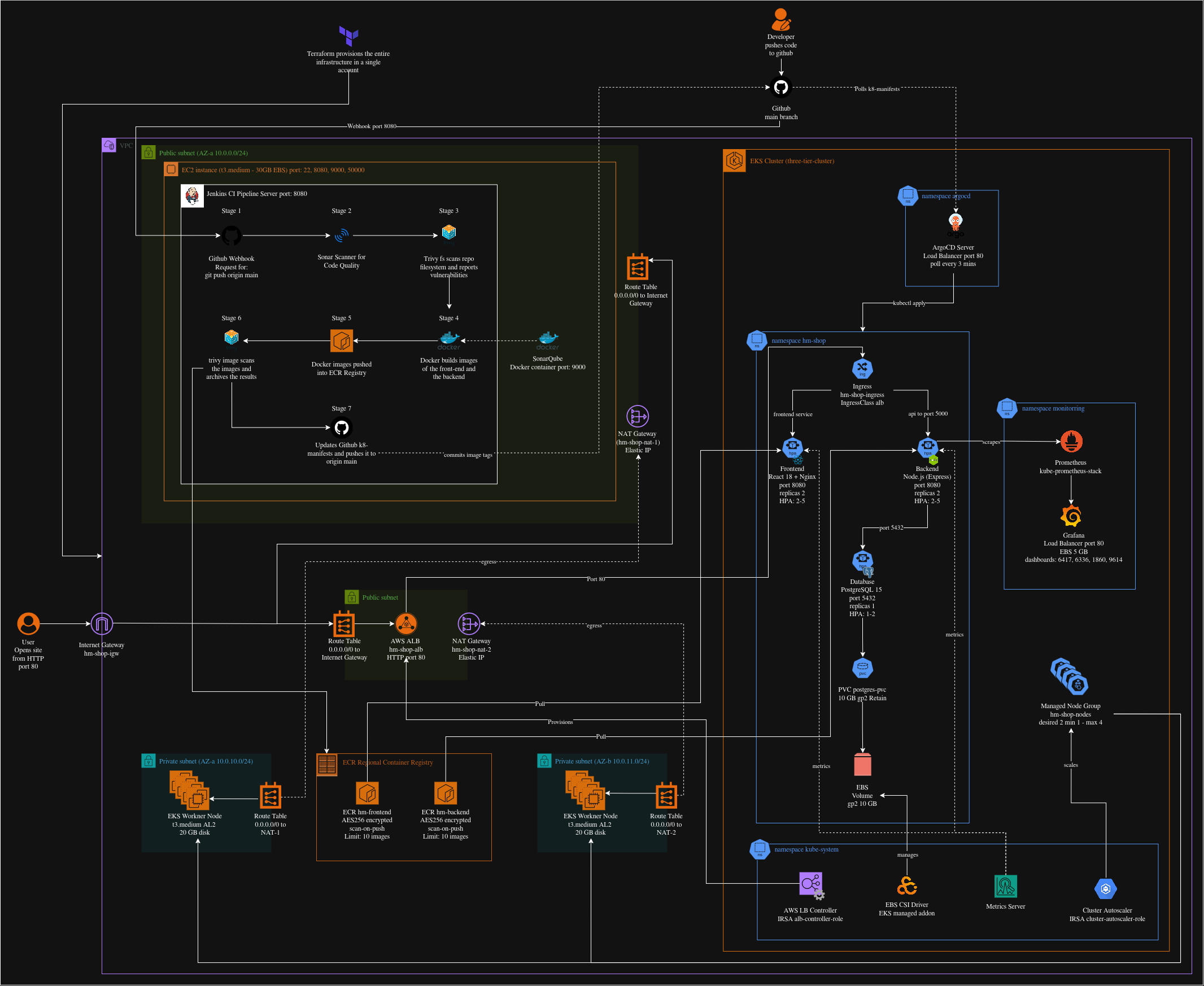
## 技术栈
| 层 | 技术 | 用途 |
|----------------|-----------------------------|---------------------------------------|
| 前端 | React 18 + Nginx 1.25 | 通过 Nginx 反向代理提供 SPA |
| 后端 | Node.js 18 + Express | 带 JWT 认证的 REST API |
| 数据库 | PostgreSQL 15 | 关系型存储,EBS 后端 PVC |
| 存储 | AWS EBS gp2(动态) | PostgreSQL 数据的持久卷 |
| 容器构建 | Docker(多阶段) | 非 root 镜像,最小攻击面 |
| CI | Jenkins(EC2 上) | 6 阶段安全加固流水线 |
| CD / GitOps | ArgoCD(集群内) | 轮询 GitHub,自动同步清单 |
| IaC | Terraform >= 1.5 | VPC、EKS、ECR、IAM、EC2 |
| 容器注册表 | AWS ECR 私有 | 私有镜像存储,支持推送时扫描 |
| ECR 认证 | IRSA | IAM 角色绑定到 K8s ServiceAccount |
| 代码质量 | SonarQube LTS 社区版 | 静态分析 + 质量门禁 |
| 依赖扫描 | Trivy | 文件系统与容器镜像漏洞扫描 |
| 监控 | Prometheus + Grafana | 指标收集与仪表盘 |
| 入口 | AWS ALB 控制器 + IngressClass| 面向互联网的 ALB,路径路由 |
| HPA | autoscaling/v2 | 基于 CPU 与内存的自动伸缩 |
| 集群伸缩 | Cluster Autoscaler | 节点级扩容 |
## 先决条件
### 本地机器要求
#### 1. AWS CLI v2
AWS CLI 允许你通过终端与 AWS 服务交互。
```
curl "https://awscli.amazonaws.com/awscli-exe-linux-x86_64.zip" -o awscliv2.zip
unzip awscliv2.zip
sudo ./aws/install
aws --version
# Expected: aws-cli/2.x.x Python/3.x.x Linux/...
```
配置凭证:
```
aws configure
# AWS Access Key ID [None]: AKIAIOSFODNN7EXAMPLE
# AWS Secret Access Key [None]: wJalrXUtnFEMI/K7MDENG/bPxRfiCYEXAMPLEKEY
# Default region name [None]: ap-south-1
# Default output format [None]: json
```
- **验证:** `aws sts get-caller-identity` 返回你的账户 ID 和 ARN。
#### 2. Terraform >= 1.5
Terraform 以声明方式创建所有 AWS 基础设施。
```
wget -O- https://apt.releases.hashicorp.com/gpg | sudo gpg --dearmor -o /usr/share/keyrings/hashicorp-archive-keyring.gpg
echo "deb [signed-by=/usr/share/keyrings/hashicorp-archive-keyring.gpg] https://apt.releases.hashicorp.com $(lsb_release -cs) main" | sudo tee /etc/apt/sources.list.d/hashicorp.list
sudo apt-get update && sudo apt-get install terraform
terraform --version
# Expected: Terraform v1.5.x or higher
```
- **验证:** `terraform --version` 显示 1.5+。
#### 3. kubectl
用于与 EKS 集群交互的 Kubernetes 命令行工具。
```
KUBECTL_VER=$(curl -fsSL https://dl.k8s.io/release/stable.txt)
curl -fsSLO "https://dl.k8s.io/release/${KUBECTL_VER}/bin/linux/amd64/kubectl"
sudo install -o root -g root -m 0755 kubectl /usr/local/bin/kubectl
kubectl version --client
# Expected: Client Version: v1.29.x
```
- **验证:** `kubectl version --client` 显示版本号。
#### 4. Helm v3
Helm 是 Kubernetes 的包管理器 — 用于安装 ALB 控制器、自动伸缩器、Prometheus 和 Grafana。
```
curl https://raw.githubusercontent.com/helm/helm/main/scripts/get-helm-3 | bash
helm version
# Expected: version.BuildInfo{Version:"v3.x.x", ...}
```
- **验证:** `helm version` 显示 v3.x。
#### 5. Docker
Docker 构建前端和后端的容器镜像。
```
sudo apt-get install -y docker.io
sudo systemctl enable docker && sudo systemctl start docker
sudo usermod -aG docker $USER
newgrp docker
docker --version
# Expected: Docker version 24.x.x, build ...
```
- **验证:** `docker run hello-world` 无权限错误完成。
#### 6. 支持工具(jq、git、curl)
```
sudo apt-get install -y jq git curl
jq --version # jq-1.6
git --version # git version 2.x.x
curl --version # curl 7.x.x
```
#### 7. 用于 Jenkins SSH 的 EC2 密钥对
需要 SSH 密钥对以访问 Jenkins EC2 进行设置(第 12 步)。
```
# Create the key pair in ap-south-1
aws ec2 create-key-pair --key-name hm-eks-key --region ap-south-1 --query KeyMaterial --output text > hm-eks-key.pem
chmod 400 hm-eks-key.pem
```
- **验证:** `ls -la hm-eks-key.pem` 显示 `-r--------` 权限。
#### 8. GitHub 仓库
将本仓库 Fork 或克隆到你的 GitHub 账户下:
```
git clone https://github.com/Abhiram-Rakesh/Three-Tier-EKS-Terraform.git
cd Three-Tier-EKS-Terraform
```
或新建仓库:
```
git init
git remote add origin https://github.com/Abhiram-Rakesh/Three-Tier-EKS-Terraform.git
git add . && git commit -m "Initial commit"
git push -u origin main
```
### AWS IAM 要求
你的 IAM 用户/角色需要附加以下策略以便 Terraform 创建基础设施:
| 策略 | 用途 |
|------|------|
| `AmazonEKSFullAccess` | 创建与管理 EKS 集群 |
| `AmazonEC2FullAccess` | 配置 EC2、VPC、子网、安全组 |
| `AmazonVPCFullAccess` | 创建 VPC、子网、路由表、NAT 网关 |
| `AmazonECR_FullAccess` | 创建 ECR 仓库与生命周期策略 |
| `IAMFullAccess` | 创建 IRSA 角色、OIDC 提供者、策略 |
| 内部 ECR 拉取策略 | 允许节点从 ECR 拉取(由 irsa.tf 添加) |
## 部署 — 分步说明
### 第 1 步 — 克隆仓库
```
git clone https://github.com/Abhiram-Rakesh/Three-Tier-EKS-Terraform.git
cd Three-Tier-EKS-Terraform
```
预期输出:
```
Cloning into 'Three-Tier-EKS-Terraform'...
remote: Enumerating objects: 87, done.
Receiving objects: 100% (87/87), done.
```
- **成功指示:** `ls` 显示 Jenkinsfile、terraform/、k8s_manifests/、app/
### 第 2 步 — 配置基础设施(Terraform)
```
cd terraform
terraform init -input=false
terraform plan -out=tfplan -input=false
terraform apply tfplan
```
预期输出(apply 末尾):
```
Apply complete! Resources: 34 added, 0 changed, 0 destroyed.
Outputs:
cluster_endpoint = "https://XXXXXXXXXXXXXXXX.gr7.ap-south-1.eks.amazonaws.com"
ecr_frontend_url = "123456789012.dkr.ecr.ap-south-1.amazonaws.com/hm-frontend"
ecr_backend_url = "123456789012.dkr.ecr.ap-south-1.amazonaws.com/hm-backend"
ecr_pull_role_arn_frontend = "arn:aws:iam::123456789012:role/hm-shop-frontend-ecr-role"
ecr_pull_role_arn_backend = "arn:aws:iam::123456789012:role/hm-shop-backend-ecr-role"
alb_controller_role_arn = "arn:aws:iam::123456789012:role/hm-shop-alb-controller-role"
jenkins_public_ip = "13.233.x.x"
aws_account_id = "123456789012"
```
导出输出为 Shell 变量:
```
export AWS_ACCOUNT_ID=$(terraform output -raw aws_account_id)
export ECR_FRONTEND=$(terraform output -raw ecr_frontend_url)
export ECR_BACKEND=$(terraform output -raw ecr_backend_url)
export JENKINS_IP=$(terraform output -raw jenkins_public_ip)
cd ..
```
- **成功指示:** `aws eks list-clusters --region ap-south-1` 显示 `three-tier-cluster`。
### 第 3 步 — 配置 kubectl
```
aws eks update-kubeconfig --region ap-south-1 --name three-tier-cluster
kubectl get nodes
```
预期输出:
```
NAME STATUS ROLES AGE VERSION
ip-10-0-10-xx.ap-south-1.compute.internal Ready 2m v1.29.x
ip-10-0-11-xx.ap-south-1.compute.internal Ready 2m v1.29.x
```
- **成功指示:** 两个节点均显示 `STATUS=Ready`。
### 第 4 步 — 安装 AWS EBS CSI 驱动
**为何关键:** 若无 EBS CSI 驱动,PostgreSQL PersistentVolumeClaim 将永远处于 `Pending`,Pod 无法启动。
```
aws eks create-addon --cluster-name three-tier-cluster --addon-name aws-ebs-csi-driver --region ap-south-1
# Poll until ACTIVE
watch aws eks describe-addon --cluster-name three-tier-cluster --addon-name aws-ebs-csi-driver --region ap-south-1 --query "addon.status" --output text
```
预期输出(2–3 分钟后):
```
ACTIVE
```
验证驱动 Pod 是否运行:
```
kubectl get pods -n kube-system | grep ebs
```
预期:
```
ebs-csi-controller-xxxxxxxxx-xxxxx 6/6 Running 0 2m
ebs-csi-node-xxxxx 3/3 Running 0 2m
ebs-csi-node-xxxxx 3/3 Running 0 2m
```
- **成功指示:** `ACTIVE` 状态且控制器 Pod 处于 `Running`。
### 第 5 步 — 应用 StorageClass 和 IngressClass
```
kubectl apply -f k8s_manifests/storageclass.yaml
kubectl apply -f k8s_manifests/ingressclass.yaml
kubectl get storageclass
kubectl get ingressclass
```
预期输出:
```
NAME PROVISIONER RECLAIMPOLICY VOLUMEBINDINGMODE ALLOWVOLUMEEXPANSION
hm-ebs-gp2 ebs.csi.aws.com Retain WaitForFirstConsumer true
NAME CONTROLLER PARAMETERS AGE
alb ingress.k8s.aws/alb 5s
```
- **成功指示:** `hm-ebs-gp2` StorageClass 与 `alb` IngressClass 出现。
### 第 6 步 — 安装 AWS 负载均衡器控制器
```
# Get VPC ID
VPC_ID=$(aws eks describe-cluster --name three-tier-cluster --region ap-south-1 --query "cluster.resourcesVpcConfig.vpcId" --output text)
helm repo add eks https://aws.github.io/eks-charts
helm repo update
helm upgrade --install aws-load-balancer-controller eks/aws-load-balancer-controller --namespace kube-system --set clusterName=three-tier-cluster --set region=ap-south-1 --set vpcId=${VPC_ID} --set serviceAccount.create=true --set serviceAccount.name=aws-load-balancer-controller --set "serviceAccount.annotations.eks\.amazonaws\.com/role-arn=arn:aws:iam::${AWS_ACCOUNT_ID}:role/hm-shop-alb-controller-role" --wait
kubectl get deployment -n kube-system aws-load-balancer-controller
kubectl get pods -n kube-system | grep aws-load-balancer
```
预期:
```
NAME READY UP-TO-DATE AVAILABLE AGE
aws-load-balancer-controller 2/2 2 2 60s
```
- **成功指示:** 部署显示 `2/2 READY`。
### 第 7 步 — 安装集群自动伸缩器
```
helm repo add autoscaler https://kubernetes.github.io/autoscaler
helm repo update
helm upgrade --install cluster-autoscaler autoscaler/cluster-autoscaler --namespace kube-system --set autoDiscovery.clusterName=three-tier-cluster --set awsRegion=ap-south-1 --set rbac.serviceAccount.create=true --set rbac.serviceAccount.name=cluster-autoscaler --set "rbac.serviceAccount.annotations.eks\.amazonaws\.com/role-arn=arn:aws:iam::${AWS_ACCOUNT_ID}:role/hm-shop-cluster-autoscaler-role" --wait
kubectl get deployment -n kube-system cluster-autoscaler
```
- **成功指示:** `cluster-autoscaler` 部署显示 `1/1 READY`。
### 第 8 步 — 安装 Metrics Server(自动伸缩所需)
**原因:** 若无 Metrics Server,HorizontalPodAutoscaler 无法读取 CPU/内存指标,目标将显示 ``。
```
kubectl apply -f https://github.com/kubernetes-sigs/metrics-server/releases/latest/download/components.yaml
# Wait ~60s then verify
kubectl top nodes
```
预期输出:
```
NAME CPU(cores) CPU% MEMORY(bytes) MEMORY%
ip-10-0-10-xx.ap-south-1.compute.internal 120m 6% 820Mi 27%
ip-10-0-11-xx.ap-south-1.compute.internal 115m 5% 790Mi 26%
```
- **成功指示:** `kubectl top nodes` 显示 CPU% 与 MEMORY%(无错误)。
### 第 9 步 — 注入 AWS 账户 ID 到清单
K8s 清单包含 `` 占位符,用于 ECR 镜像 URL 与 IRSA 角色 ARN。请替换为真实账户 ID:
```
export AWS_ACCOUNT_ID=$(aws sts get-caller-identity --query Account --output text)
export GITHUB_USER=
# Replace in all K8s manifests
find k8s_manifests/ -name "*.yaml" -exec sed -i "s||${AWS_ACCOUNT_ID}|g" {} \;
# Replace GitHub username in ArgoCD application
sed -i "s||${GITHUB_USER}|g" argocd/application.yaml
# Replace in Jenkinsfile
sed -i "s||${AWS_ACCOUNT_ID}|g" Jenkinsfile
sed -i "s||${GITHUB_USER}|g" Jenkinsfile
# Commit and push so ArgoCD can read the updated manifests
git add k8s_manifests/ argocd/ Jenkinsfile
git commit -m "CI: Inject AWS Account ID ${AWS_ACCOUNT_ID} into manifests"
git push origin main
```
- **成功指示:** `grep '' k8s_manifests/**/*.yaml` 无输出。
### 第 10 步 — 安装 ArgoCD
```
kubectl create namespace argocd
kubectl apply -n argocd -f https://raw.githubusercontent.com/argoproj/argo-cd/stable/manifests/install.yaml
# Wait for ArgoCD server to be ready
kubectl wait deployment/argocd-server --namespace argocd --for=condition=Available --timeout=180s
# Get initial admin password
ARGOCD_PASS=$(kubectl -n argocd get secret argocd-initial-admin-secret -o jsonpath="{.data.password}" | base64 -d)
echo "ArgoCD password: ${ARGOCD_PASS}"
# Deploy the hm-shop Application
kubectl apply -f argocd/application.yaml
```
**公开 ArgoCD:**
默认 ArgoCD 服务为 `ClusterIP`。需改为 `LoadBalancer` 以直接访问:
```
kubectl patch svc argocd-server -n argocd -p '{"spec": {"type": "LoadBalancer"}}'
# Wait for the external IP to be assigned (1-3 minutes)
kubectl get svc argocd-server -n argocd --watch
```
获取 `EXTERNAL-IP` 后:
```
ARGOCD_URL=$(kubectl get svc argocd-server -n argocd -o jsonpath='{.status.loadBalancer.ingress[0].hostname}')
echo "ArgoCD URL: https://${ARGOCD_URL}"
```
在浏览器打开 `https://`。ArgoCD 会将 HTTP 重定向至 HTTPS 并使用自签名证书 — 浏览器会出现证书警告。点击 **Advanced → Proceed anyway** 继续。
凭证:
- 用户名:`admin`
- 密码:上方 `ARGOCD_PASS`的输出
**ArgoCD 自动操作:** 它会每 3 分钟轮询仓库的 `k8s_manifests/` 路径。Jenkins 推送新镜像标签(Stage 7)后,ArgoCD 检测到提交并自动应用清单,完成 GitOps 闭环。
- **成功指示:** ArgoCD UI 显示 `hm-shop` 应用状态为 `Synced` 且 `Healthy`。
### 第 11 步 — 验证应用 Pod
```
kubectl get pods -n hm-shop --watch
```
预期输出(全部 Running):
```
NAME READY STATUS RESTARTS AGE
backend-xxxxxxxxx-xxxxx 1/1 Running 0 3m
backend-xxxxxxxxx-yyyyy 1/1 Running 0 3m
frontend-xxxxxxxxx-xxxxx 1/1 Running 0 3m
frontend-xxxxxxxxx-yyyyy 1/1 Running 0 3m
postgres-xxxxxxxxx-xxxxx 1/1 Running 0 5m
```
检查 HPA:
```
kubectl get hpa -n hm-shop
```
预期:
```
NAME REFERENCE TARGETS MINPODS MAXPODS REPLICAS
backend-hpa Deployment/backend 15%/70%, 20%/80% 2 5 2
frontend-hpa Deployment/frontend 10%/70%, 15%/80% 2 5 2
postgres-hpa Deployment/postgres 8%/80%, 12%/85% 1 2 1
```
检查入口(最多等待 5 分钟获取 ALB):
```
kubectl get ingress -n hm-shop
```
预期:
```
NAME CLASS HOSTS ADDRESS PORTS AGE
hm-shop-ingress alb * k8s-hmshop-xxxx.ap-south-1.elb.amazonaws.com 80 5m
```
- **成功指示:** 所有 Pod 处于 `Running`,HPA 显示真实百分比(非 ``),入口 `ADDRESS` 字段已填充。
### 第 12 步 — 设置 Jenkins EC2
#### 12a — 获取 Jenkins EC2 IP
```
JENKINS_IP=$(aws ec2 describe-instances --filters "Name=tag:Name,Values=jenkins-server" "Name=instance-state-name,Values=running" --query "Reservations[0].Instances[0].PublicIpAddress" --region ap-south-1 --output text)
echo "Jenkins IP: ${JENKINS_IP}"
```
#### 12b — 所需安全组端口
| 端口 | 协议 | 来源 | 用途 |
|------|------|------|------|
| 22 | TCP | 0.0.0.0/0 | SSH 访问 |
| 8080 | TCP | 0.0.0.0/0 | Jenkins Web UI |
| 9000 | TCP | 0.0.0.0/0 | SonarQube Web UI |
| 50000| TCP | 0.0.0.0/0 | Jenkins Agent JNLP 端口 |
这些由 Terraform 在 `vpc.tf` 中自动创建。
#### 12c — 引导 Jenkins EC2
SSH 登录 Jenkins EC2 并安装各工具:
```
ssh -i hm-eks-key.pem ubuntu@${JENKINS_IP}
```
**Java 17:**
```
sudo apt-get update && sudo apt-get install -y openjdk-17-jdk
java -version
# openjdk version "17.0.x"
```
**Jenkins:**
```
# The jenkins.io-2023.key URL is outdated — Jenkins rotated their signing key.
# Fetch the actual key used to sign the repo directly from a keyserver.
gpg --keyserver keyserver.ubuntu.com --recv-keys 5E386EADB55F01504CAE8BCF7198F4B714ABFC68
gpg --export 5E386EADB55F01504CAE8BCF7198F4B714ABFC68 | sudo tee /usr/share/keyrings/jenkins-keyring.gpg > /dev/null
echo "deb [signed-by=/usr/share/keyrings/jenkins-keyring.gpg] https://pkg.jenkins.io/debian-stable binary/" | sudo tee /etc/apt/sources.list.d/jenkins.list > /dev/null
sudo apt-get update && sudo apt-get install -y jenkins
sudo systemctl enable jenkins && sudo systemctl start jenkins
sudo systemctl status jenkins
# Active: active (running)
```
**Docker:**
```
sudo apt-get install -y docker.io
sudo usermod -aG docker jenkins
sudo usermod -aG docker ubuntu
sudo systemctl restart jenkins
docker --version
# Docker version 24.x.x
```
**AWS CLI v2:**
```
curl "https://awscli.amazonaws.com/awscli-exe-linux-x86_64.zip" -o awscliv2.zip
sudo apt install unzip
unzip awscliv2.zip && sudo ./aws/install
aws --version
# aws-cli/2.x.x
```
**kubectl:**
```
KUBECTL_VER=$(curl -fsSL https://dl.k8s.io/release/stable.txt)
curl -fsSLO "https://dl.k8s.io/release/${KUBECTL_VER}/bin/linux/amd64/kubectl"
sudo install -o root -g root -m 0755 kubectl /usr/local/bin/kubectl
kubectl version --client
```
**Node.js 18:**
```
curl -fsSL https://deb.nodesource.com/setup_18.x | sudo -E bash -
sudo apt-get install -y nodejs
node --version
```
**SonarScanner 5.0.1.3006:**
```
SONAR_VERSION="5.0.1.3006"
curl -fsSLO "https://binaries.sonarsource.com/Distribution/sonar-scanner-cli/sonar-scanner-cli-${SONAR_VERSION}-linux.zip"
sudo unzip -q "sonar-scanner-cli-${SONAR_VERSION}-linux.zip" -d /opt/
sudo ln -sf "/opt/sonar-scanner-${SONAR_VERSION}-linux/bin/sonar-scanner" /usr/local/bin/sonar-scanner
sonar-scanner --version
```
**Trivy:**
```
curl -fsSL https://aquasecurity.github.io/trivy-repo/deb/public.key | sudo gpg --dearmor -o /usr/share/keyrings/trivy.gpg
echo "deb [signed-by=/usr/share/keyrings/trivy.gpg] https://aquasecurity.github.io/trivy-repo/deb generic main" | sudo tee /etc/apt/sources.list.d/trivy.list
sudo apt-get update && sudo apt-get install -y trivy
trivy --version
```
**vm.max_map_count(SonarQube 所需):**
```
sudo sysctl -w vm.max_map_count=524288
echo 'vm.max_map_count=524288' | sudo tee -a /etc/sysctl.conf
```
#### 12d — 获取 Jenkins 初始密码
```
sudo cat /var/lib/jenkins/secrets/initialAdminPassword
# Output: a32-character hex string e.g. 3d4f2bf07a6c4e8...
```
#### 12e — Jenkins 浏览器设置
1. 打开 `http://:8080`
2. 粘贴初始管理员密码
3. 点击 **Install suggested plugins** 并等待约 3 分钟
4. 创建管理员用户:填写用户名、密码、完整名称、邮箱
5. 点击 **Save and Finish** → **Start using Jenkins**
- **成功指示:** Jenkins 仪表盘加载并显示 “Welcome to Jenkins!”
### 第 13 步 — 设置 SonarQube
**在 Jenkins EC2 上启动 SonarQube:**
```
ssh -i hm-eks-key.pem ubuntu@${JENKINS_IP}
docker run -d --name sonarqube --restart unless-stopped -p 9000:9000 -e SONAR_ES_BOOTSTRAP_CHECKS_DISABLE=true -v sonarqube_data:/opt/sonarqube/data sonarqube:lts-community
```
等待约 60 秒后,打开 `http://:9000`。
**首次登录:**
1. 用户名:`admin`,密码:`admin`
2. 按提示修改密码
3. 点击 **Create a local project** → 项目键:`hm-fashion-clone`,显示名:`H&M Fashion Clone`
4. 点击 **Set up project for clean code**
**生成 Token:**
1. 点击头像(右上角)→ **My Account** → **Security**
2. **Generate Tokens**:名称 `jenkins-token`,类型 `User Token`
3. 点击 **Generate** — **立即复制 Token**(仅显示一次)
**在 Jenkins 中安装插件(安装 SonarQube 服务器前必须完成):**
导航至:**Jenkins → Manage Jenkins → Plugins → Available**
搜索并安装:
- `pipeline-stage-view`
- `git`
- `github`
- `github-branch-source`
- `docker-workflow`
- `docker-plugin`
- `sonar`
- `credentials-binding`
- `pipeline-utility-steps`
- `ws-cleanup`
- `build-timeout`
- `timestamper`
- `ansicolor`
- `workflow-aggregator`
点击 **Install** 并等待重启。`sonar` 插件必须安装后,才能在下一步配置 SonarQube 服务器。
- **成功指示:** Jenkins 重启后,14 个插件均显示 **Installed**。
**将 Token 添加到 Jenkins:**
1. Jenkins → **Manage Jenkins** → **Configure System**
2. 滚动到 **SonarQube servers** → **Add SonarQube**
3. 名称:`SonarQube`,服务器 URL:`http://:9000`
4. 服务器认证 Token → **Add** → **Jenkins** → 类型 **Secret text** → 粘贴 Token
5. 点击 **Save**
**在 SonarQube 中创建指向 Jenkins 的 Webhook:**
这对于 `waitForQualityGate()` 步骤至关重要,否则流水线会在质量门禁处无限等待。
1. 进入 **Administration** → **Configuration** → **Webhooks**
2. 点击 **Create**
3. 填写:
- 名称:`Jenkins`
- URL:`http://:8080/sonarqube-webhook/`
- 密钥:留空(除非 Jenkins 中已配置)
4. 点击 **Create**
- **成功指示:** 流水线可通过测试,不会在质量门禁阶段挂起。
### 第 14 步 — 配置 Jenkins 凭证
导航至:**Jenkins → Manage Jenkins → Credentials → System → Global credentials → Add Credentials**
| ID | 类型 | 值 | 安全说明 |
|----|------|----|----------|
| `aws-access-key` | 密文 | AWS 访问密钥 ID | 切勿使用个人管理员密钥 |
| `aws-secret-key` | 密文 | AWS 秘密访问密钥 | 每 90 天轮换 |
| `sonar-token` | 密文 | SonarQube 用户 Token | 泄露后立即再生 |
| `git-credentials` | 用户名/密码 | GitHub 用户名 + PAT | PAT 需 `repo` 与 `admin:repo_hook` 权限 |
**IAM 用户 — 所需策略:**
仅附加一个 AWS 托管策略:**不要使用内联策略**
| 策略名称 | ARN |
|----------|-----|
| `AmazonEC2ContainerRegistryPowerUser` | `arn:aws:iam::aws:policy/AmazonEC2ContainerRegistryPowerUser` |
此策略授予 `ecr:GetAuthorizationToken` 及所有仓库的读写权限,不包含删除仓库或生命周期策略等破坏性操作。EKS/kubectl 访问由 Jenkins EC2 实例配置文件处理,该用户仅用于 ECR。
- **成功指示:** 4 个凭证均出现在全局凭证列表中。
### 第 15 步 — 创建 Jenkins 流水线任务
1. Jenkins 仪表盘 → **New Item**
2. 输入名称:`hm-fashion-pipeline`
3. 选择 **Pipeline** → 点击 **OK**
4. **Build Triggers**:勾选 **GitHub hook trigger for GITScm polling**
5. **Pipeline**:
- 定义:`Pipeline script from SCM`
- SCM:`Git`
- 仓库 URL:`https://github.com//Three-Tier-EKS-Terraform.git`
- 凭据:选择 `git-credentials`
- 分支:`*/main`
- 脚本路径:`Jenkinsfile`
6. 点击 **Save**
- **成功指示:** Jenkins 仪表盘出现流水线任务。
### 第 16 步 — 配置 GitHub Webhook
1. 进入:`://github.com/Abhiram-Rakesh/Three-Tier-EKS-Terraform/settings/hooks/new`
2. 填写:
- Payload URL:`http://:8080/github-webhook/`
- 内容类型:`application/json`
- 事件:选择 **Just the push event**
3. 点击 **Add webhook**
4. GitHub 将发送 Ping — 在 Webhook 页面应显示绿色 ✓
- **成功指示:** GitHub 页面显示绿色对勾,Jenkins 触发一次构建。
### 第 17 步 — 触发首次流水线运行
```
git commit --allow-empty -m "CI: trigger first pipeline run"
git push origin main
```
在 Jenkins 观察流水线(`http://:8080/job/hm-fashion-pipeline/`):
| 阶段 | 关注点 |
|------|--------|
| Stage 1(SonarQube) | 质量门禁结果 — 必须为 **PASSED** |
| Stage 2(Trivy FS) | 结果表格,流水线继续执行 |
| Stage 3(构建) | `Successfully built `(两个镜像) |
| Stage 4(ECR 推送) | `The push refers to repository [...]` |
| Stage 5(Trivy 镜像) | 扫描结果作为构件归档 |
| Stage 6(GitOps) | 出现 `CI: Update image tags to build-1 [skip ci]` 提交 |
流水线完成后,ArgoCD 在 3 分钟内检测到新提交并自动部署更新镜像。
- **成功指示:** 6 个阶段均为绿色,ArgoCD 应用状态显示 `Synced`。
### 第 18 步 — 安装监控栈
```
kubectl create namespace monitoring
helm repo add prometheus-community https://prometheus-community.github.io/helm-charts
helm repo add grafana https://grafana.github.io/helm-charts
helm repo update
# Install Prometheus stack
helm upgrade --install prometheus prometheus-community/kube-prometheus-stack --namespace monitoring --values monitoring/prometheus-values.yaml --wait
# Install Grafana
helm upgrade --install grafana grafana/grafana --namespace monitoring --values monitoring/grafana-values.yaml --wait
```
**访问 Grafana:**
Grafana 以 `LoadBalancer` 服务形式部署。等待 NLB 分配(安装后约 2–5 分钟):
```
kubectl get svc grafana -n monitoring --watch
```
获取 `EXTERNAL-IP` 后:
```
GRAFANA_URL=$(kubectl get svc grafana -n monitoring -o jsonpath='{.status.loadBalancer.ingress[0].hostname}')
echo "Grafana URL: http://${GRAFANA_URL}"
```
在浏览器打开 `http://`。
凭证:
- 用户名:`admin`
- 密码:在 `monitoring/grafana-values.yaml` 中设置的 `adminPassword`
预置仪表盘(**H&M Shop** 文件夹下):
- Kubernetes Cluster(6417)
- Kubernetes Pods(6336)
- Node Exporter Full(1860)
- Nginx Ingress(9614)
- **成功指示:** Grafana 加载完成,4 个仪表盘显示实时数据。
### 第 19 步 — 访问应用
```
# Get the ALB URL
ALB_URL=$(kubectl get ingress hm-shop-ingress -n hm-shop -o jsonpath='{.status.loadBalancer.ingress[0].hostname}')
# Test the API health endpoint
curl http://${ALB_URL}/api/health
```
预期 JSON 响应:
```
{
"status": "healthy",
"timestamp": "2024-01-15T10:30:00.000Z",
"service": "hm-backend",
"database": {
"status": "connected",
"latency_ms": 2
},
"uptime_seconds": 120
}
```
在浏览器打开应用:
```
echo "Application URL: http://${ALB_URL}"
```
- **成功指示:** 浏览器加载 H&M Fashion Clone 首页并显示商品列表。
## 日常运维
### 查看日志
```
# Backend logs (follow)
kubectl logs -f deployment/backend -n hm-shop
# Frontend logs
kubectl logs -f deployment/frontend -n hm-shop
# PostgreSQL logs
kubectl logs -f deployment/postgres -n hm-shop
# All pods in namespace
kubectl logs -f -l app=backend -n hm-shop --all-containers=true
```
### 手动伸缩与观察 HPA
```
# Scale backend manually
kubectl scale deployment backend --replicas=4 -n hm-shop
# Watch HPA react
kubectl get hpa -n hm-shop --watch
```
### 查看安全扫描结果
Trivy 结果作为 Jenkins 构建产物归档。访问地址:
`http://:8080/job/hm-fashion-pipeline//artifact/`
### 手动触发流水线
```
git commit --allow-empty -m "CI: manual trigger"
git push origin main
```
### ArgoCD 同步检查与强制同步
```
# Check sync status
kubectl get application hm-shop -n argocd
# Force sync immediately (don't wait 3 minutes)
kubectl patch application hm-shop -n argocd --type merge -p '{"operation":{"sync":{"syncStrategy":{"hook":{"force":true}}}}}'
```
### 滚动重启
```
kubectl rollout restart deployment/frontend -n hm-shop
kubectl rollout restart deployment/backend -n hm-shop
kubectl rollout status deployment/backend -n hm-shop
```
### 连接 PostgreSQL CLI
```
# Get the postgres pod name
POSTGRES_POD=$(kubectl get pod -n hm-shop -l app=postgres -o jsonpath='{.items[0].metadata.name}')
# Open psql
kubectl exec -it ${POSTGRES_POD} -n hm-shop -- psql -U hmuser -d hmshop
# Once inside psql:
\dt -- list tables
SELECT COUNT(*) FROM products;
SELECT * FROM orders LIMIT 5;
\q -- quit
```
## 清理环境
### 手动清理(按顺序执行)
```
# 1. Uninstall Helm releases FIRST (triggers controller-managed LB deletion)
helm uninstall grafana -n monitoring
helm uninstall prometheus -n monitoring
helm uninstall cluster-autoscaler -n kube-system
helm uninstall aws-load-balancer-controller -n kube-system
# 2. Delete namespaces (triggers ALB + EBS cleanup)
kubectl delete namespace hm-shop argocd monitoring --timeout=120s
# 3. Explicitly delete all ALBs and NLBs in the VPC via AWS CLI
# Kubernetes controllers sometimes leave LBs behind after namespace deletion.
# Terraform cannot delete the VPC while any LB ENIs still exist in subnets.
VPC_ID=$(aws ec2 describe-vpcs --region ap-south-1 --filters "Name=tag:Name,Values=hm-shop-vpc" --query "Vpcs[0].VpcId" --output text)
echo "VPC: ${VPC_ID}"
LB_ARNS=$(aws elbv2 describe-load-balancers --region ap-south-1 --query "LoadBalancers[?VpcId=='${VPC_ID}'].LoadBalancerArn" --output text)
if [ -n "$LB_ARNS" ]; then
for ARN in $LB_ARNS; do
echo "Deleting LB: $ARN"
aws elbv2 delete-load-balancer --region ap-south-1 --load-balancer-arn $ARN
done
echo "Waiting 60s for LBs to finish deleting..."
sleep 60
else
echo "No load balancers found in VPC."
fi
# 4. Delete any leftover Target Groups (LBs must be gone first)
TG_ARNS=$(aws elbv2 describe-target-groups --region ap-south-1 --query "TargetGroups[*].TargetGroupArn" --output text)
if [ -n "$TG_ARNS" ]; then
for TG in $TG_ARNS; do
aws elbv2 delete-target-group --region ap-south-1 --target-group-arn $TG 2>/dev/null && echo "Deleted TG: $TG"
done
fi
# 5. Delete any remaining ENIs in the VPC (LBs leave ENIs behind on deletion)
ENI_IDS=$(aws ec2 describe-network-interfaces --region ap-south-1 --filters "Name=vpc-id,Values=${VPC_ID}" --query "NetworkInterfaces[*].NetworkInterfaceId" --output text)
if [ -n "$ENI_IDS" ]; then
for ENI in $ENI_IDS; do
echo "Deleting ENI: $ENI"
aws ec2 delete-network-interface --region ap-south-1 --network-interface-id $ENI 2>/dev/null || echo " Skipped $ENI (still in use or already gone)"
done
else
echo "No leftover ENIs found."
fi
# 6. Terraform destroy
cd terraform
terraform destroy -auto-approve
```
## 环境变量参考
| 变量 | 设置位置 | 值 | 说明 |
|------|----------|----|------|
| `AWS_REGION` | Shell / Jenkinsfile | `ap-south-1` | 所有资源位于孟买 |
| `CLUSTER_NAME` | Jenkinsfile env | `three-tier-cluster` | EKS 集群名称 |
| `AWS_ACCOUNT_ID` | Shell(步骤 9) | 12 位数字 ID | 用于构建 ECR URL |
| `REGISTRY` | Jenkinsfile env | `.dkr.ecr.ap-south-1.amazonaws.com` | 步骤 9 替换后设置 |
| `GIT_REPO` | Jenkinsfile env | 你的 GitHub 仓库 URL | 首次运行前更新 |
| `DB_PASSWORD` | K8s 密钥 `backend-secret` | 在 `k8s_manifests/database/secret.yaml` 中设置 | 生产环境请轮换 |
| `JWT_SECRET` | K8s 密钥 `backend-secret` | 在 `k8s_manifests/database/secret.yaml` 中设置 | 生产使用前修改 |
## 故障排查
### 1. PostgreSQL Pod 卡在 `Pending`
**症状:**
```
NAME READY STATUS RESTARTS
postgres-xxx-xxx 0/1 Pending 0
```
**诊断:**
```
kubectl describe pod -n hm-shop -l app=postgres | grep -A 5 Events
# Look for: "no volume plugin matched" or "waiting for first consumer"
```
**修复:**
```
# Verify EBS CSI Driver is ACTIVE
aws eks describe-addon --cluster-name three-tier-cluster --addon-name aws-ebs-csi-driver --region ap-south-1 --query "addon.status" --output text
# If not ACTIVE, check node role has AmazonEBSCSIDriverPolicy attached
aws iam list-attached-role-policies --role-name three-tier-cluster-node-role --query "AttachedPolicies[].PolicyName"
```
### 2. ALB 未创建(Ingress ADDRESS 始终为空)
**症状:** `kubectl get ingress -n hm-shop` 长时间无 ADDRESS。
**诊断:**
```
kubectl logs -n kube-system -l app.kubernetes.io/name=aws-load-balancer-controller --tail=50
```
**修复:**
```
# Check VPC subnets have correct tags
aws ec2 describe-subnets --filters "Name=vpc-id,Values=" --query "Subnets[*].{ID:SubnetId,Tags:Tags}"
# Public subnets need: kubernetes.io/role/elb = 1
# Private subnets need: kubernetes.io/role/internal-elb = 1
# Verify ALB Controller IRSA role
kubectl get sa -n kube-system aws-load-balancer-controller -o yaml | grep role-arn
```
### 3. ArgoCD 不同步
**症状:** ArgoCD UI 显示 `OutOfSync` 或 `Unknown`。
**诊断:**
```
kubectl describe application hm-shop -n argocd | grep -A 10 "Conditions"
```
**修复:**
```
# Check repoURL in application.yaml matches your GitHub repo exactly
cat argocd/application.yaml | grep repoURL
# Check ArgoCD can reach GitHub
kubectl exec -it deployment/argocd-server -n argocd -- argocd-util repo ls
# Force a sync
kubectl patch application hm-shop -n argocd --type merge -p '{"metadata":{"annotations":{"argocd.argoproj.io/refresh":"hard"}}}'
```
### 4. Jenkins Stage 5 失败(ECR 认证错误)
**症状:** `no basic auth credentials` 或 `denied: Your authorization token has expired`
**诊断:**
```
# Check Jenkins aws-access-key credential is set
# Jenkins → Manage Jenkins → Credentials → look for aws-access-key
```
**修复:**
```
# Verify the IAM user has ECR permissions
aws iam list-attached-user-policies --user-name
# Should include: AmazonEC2ContainerRegistryPowerUser
# Test ECR login manually on Jenkins EC2
ssh -i hm-eks-key.pem ubuntu@${JENKINS_IP}
aws ecr get-login-password --region ap-south-1 | docker login --username AWS --password-stdin ${AWS_ACCOUNT_ID}.dkr.ecr.ap-south-1.amazonaws.com
# Expected: Login Succeeded
```
### 5. HPA 显示 `` 目标
**症状:**
```
NAME TARGETS MINPODS MAXPODS
backend-hpa /70% 2 5
```
**诊断:**
```
kubectl top pods -n hm-shop
# If this fails: Metrics Server is not running
```
**修复:**
```
# Check Metrics Server pods
kubectl get pods -n kube-system | grep metrics-server
# Reinstall if missing
kubectl apply -f https://github.com/kubernetes-sigs/metrics-server/releases/latest/download/components.yaml
# Wait 60 seconds then check HPA again
kubectl get hpa -n hm-shop
```
### 6. SonarQube 质量门禁失败
**症状:** Stage 1 失败,显示 `QUALITY GATE STATUS: FAILED`
**诊断:**
```
# Open SonarQube dashboard
# http://:9000/dashboard?id=hm-fashion-clone
# Look at the Issues tab for specific violations
```
**修复:**
- 审查 SonarQube 仪表板中的代码问题
- 常见问题:代码异味、认知复杂度高、测试覆盖率低
- 临时允许流水线继续:在 SonarQube 中 **Quality Gates → Conditions** 提高阈值或切换为更宽松的门禁
### 7. Jenkins 触发无限构建循环
**症状:** 流水线成功后立即再次触发,形成无限循环。
**原因:** Jenkins 不原生支持 `[skip ci]` 提交信息约定(这是 GitHub Actions 的特性)。流水线推送新标签会触发 webhook 再次构建。
**修复:** 在 `Jenkinsfile` 的 `pipeline` 块顶部添加提交信息检查:
```
pipeline {
agent any
stages {
stage('Check Skip CI') {
steps {
script {
def commitMsg = sh(script: 'git log -1 --pretty=%B', returnStdout: true).trim()
if (commitMsg.contains('[skip ci]')) {
currentBuild.result = 'SUCCESS'
error('Skipping CI — commit message contains [skip ci]')
}
}
}
}
// ... rest of your stages
}
}
```
这会在检测到自身标签更新提交时干净退出,打破循环。
### 8. GitHub Webhook 返回 404
**症状:** GitHub webhook 投递显示红色 ✗,响应 404。
**诊断:** 检查 Jenkins 是否可从公网访问(不是 localhost):
```
curl -I http://:8080/github-webhook/
# Expected: HTTP/1.1 200
```
**修复:**
```
# Verify port 8080 is open in Jenkins security group
aws ec2 describe-security-groups --filters "Name=group-name,Values=hm-shop-jenkins-sg" --region ap-south-1 --query "SecurityGroups[0].IpPermissions"
# Verify Jenkins GitHub plugin is installed
# Jenkins → Manage Jenkins → Plugins → Installed → search "github"
# Verify webhook URL format (must end with /github-webhook/)
# Correct: http://13.233.x.x:8080/github-webhook/
# Incorrect: http://13.233.x.x:8080/github-webhook (no trailing slash)
```
标签:ArgoCD, AWS ALB, AWS EKS, CI/CD 流水线, DevSecOps, Docker, EBS, EC2, ECR, ECS, GitOps, GNU通用公共许可证, Grafana, HPA, IaC, Ingress, Jenkins CI/CD, JWT认证, MITM代理, Node.js, PostgreSQL, React, SEO 时尚电商, SonarQube, Syscalls, Terraform, 三层次架构, 上游代理, 依赖扫描, 前端SPA, 多阶段构建, 安全扫描, 安全防御评估, 容器安全扫描, 时尚电商, 时序注入, 模型提供商, 测试用例, 生产级部署, 监控, 自动伸缩, 自定义脚本, 自定义请求头, 请求拦截, 非root容器