berabuddies/agentflow
GitHub: berabuddies/agentflow
AgentFlow 是一个用依赖图编排多个 AI 编码智能体的 Python 框架,支持并行扇出、迭代循环、远程执行和智能体微调,解决大规模智能体协作与自动化流水线问题。
Stars: 1318 | Forks: 280
# AgentFlow
在依赖图中编排 codex、claude 和 kiki agent,支持并行扇出、迭代循环以及通过 SSH/EC2/ECS 远程执行。
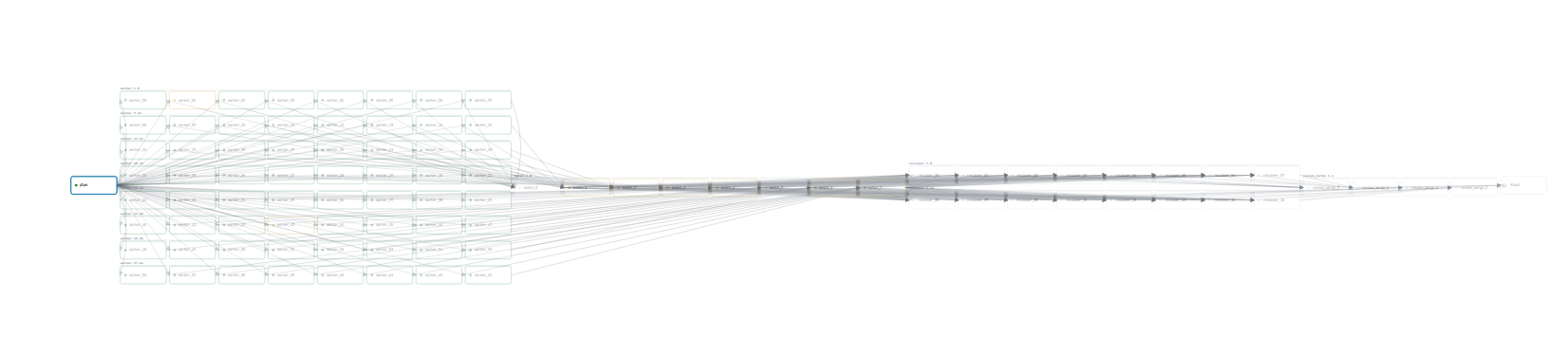
*94节点流水线:计划 → 64个工作节点 → 8个批次合并 → 16个审查节点 → 4个审查合并 → 综合汇总*
## 安装 / 升级
一行命令:
```
curl -fsSL https://raw.githubusercontent.com/shouc/agentflow/master/install.sh | bash
```
此操作将安装 agentflow,将其添加到 PATH 中,并为 Codex 和 Claude Code 安装相应的技能。
或手动安装:
```
python3 -m venv .venv && . .venv/bin/activate
pip install -e .[dev]
```
## 快速入门
```
from agentflow import Graph, codex, claude
with Graph("my-pipeline", concurrency=3) as g:
plan = codex(task_id="plan", prompt="Inspect the repo and plan the work.", tools="read_only")
impl = claude(task_id="impl", prompt="Implement the plan:\n{{ nodes.plan.output }}", tools="read_write")
review = codex(task_id="review", prompt="Review:\n{{ nodes.impl.output }}")
plan >> impl >> review
print(g.to_json())
```
```
agentflow run pipeline.py --output summary
```
或者直接询问 Codex(agentflow 技能会自动安装):
```
codex "Use agentflow to fan out 10 codex agents, each telling a unique joke, then merge their outputs and pick the funniest one. Write the pipeline and run it."
```
## 并行扇出
使用 `fanout()` 将一个节点扇出为多个并行副本:
```
from agentflow import Graph, codex, fanout, merge
with Graph("code-review", concurrency=8) as g:
scan = codex(task_id="scan", prompt="List the top 5 files to review.")
review = fanout(
codex(task_id="review", prompt="Review {{ item.file }}:\n{{ nodes.scan.output }}"),
[{"file": "api.py"}, {"file": "auth.py"}, {"file": "db.py"}],
)
summary = codex(task_id="summary", prompt=(
"Merge findings:\n{% for r in fanouts.review.nodes %}{{ r.output }}\n{% endfor %}"
))
scan >> review >> summary
print(g.to_json())
```
`fanout(node, source)` 根据类型进行分派:
- `int` -- N 个相同副本:`fanout(node, 128)`
- `list` -- 每个元素一个副本:`fanout(node, [{"repo": "api"}, ...])`
- `dict` -- 笛卡尔积:`fanout(node, {"axis1": [...], "axis2": [...]})`
使用 `merge(node, source, size=N)`(按批次)或 `merge(node, source, by=["field"])`(按分组)进行合并与归约。
## 迭代循环
结合 `on_failure` 循环运行,直到满足停止条件:
```
from agentflow import Graph, codex, claude
with Graph("iterative-impl", max_iterations=5) as g:
write = codex(
task_id="write",
prompt="Write a Python email validator.\n{% if nodes.review.output %}Fix: {{ nodes.review.output }}{% endif %}",
tools="read_write",
)
review = claude(
task_id="review",
prompt="Review:\n{{ nodes.write.output }}\nIf complete, say LGTM. Otherwise list issues.",
success_criteria=[{"kind": "output_contains", "value": "LGTM"}],
)
write >> review
review.on_failure >> write # loop until LGTM or max_iterations
print(g.to_json())
```
## 通过 Pi 使用本地与外部模型
将 `pi` 编码 agent 作为执行目标,与 `codex` 和 `claude` 并列使用。Pi 会将请求路由
至 Anthropic、OpenAI、Groq、Cerebras、xAI、DeepSeek、Gemini、OpenRouter、Bedrock
等平台,并通过其兼容 OpenAI 或 Anthropic 的通信协议连接到本地端点(LMStudio、Ollama)。
```
from agentflow import Graph, codex, pi
with Graph("mixed") as g:
# External: Claude via Pi
review = pi(
task_id="review",
prompt="Review {{ nodes.impl.output }}",
model="anthropic/claude-sonnet-4-6:high",
)
# Local: LMStudio (add the provider once in ~/.pi/agent/models.json)
scan = pi(
task_id="scan",
prompt="Scan the repo for TODOs.",
model="lmstudio/qwen/qwen3.6-27b",
tools="read_only",
)
```
对于一次性的内联提供者配置(例如远程 LMStudio 主机),通过 `provider={...}` 传入完整的
`ProviderConfig`,AgentFlow 会为本次运行生成一个作用域限定的
`models.json`。请参阅 `examples/pi_local_lmstudio.py`。
## 远程执行
在远程机器上运行 agent —— 零配置:
```
# EC2 (auto-discovers AMI, key pair, VPC)
codex(task_id="remote", prompt="...", target={"kind": "ec2", "region": "us-east-1"})
# ECS Fargate (auto-discovers VPC, builds agent image)
codex(task_id="remote", prompt="...", target={"kind": "ecs", "region": "us-east-1"})
# SSH
codex(task_id="remote", prompt="...", target={"kind": "ssh", "host": "server", "username": "deploy"})
```
跨节点共享实例:
```
plan = codex(task_id="plan", prompt="...", target={"kind": "ec2", "shared": "dev-box"})
impl = codex(task_id="impl", prompt="...", target={"kind": "ec2", "shared": "dev-box"})
plan >> impl # same EC2 instance, files persist
```
## 共享草稿板
跨所有 agent 的共享内存文件:
```
with Graph("campaign", scratchboard=True) as g:
shards = fanout(codex(task_id="fuzz", prompt="..."), 128)
```
## 微调 Agent 演化
使用已完成的 Codex 运行记录作为训练数据,创建可复用的微调 agent:
```
from agentflow import Graph, codex, evolve
with Graph("improve-codex", working_dir=".") as g:
source = codex(task_id="plan", prompt="Inspect this repo and summarize the main risks.")
tuned = evolve(source, target="codex", optimizer="codex")
print(g.to_json())
```
运行顺序:
```
agentflow run pipeline.py
agentflow evolve -n --target codex --profile codex --optimizer codex
agentflow tuned-agents
agentflow tuned-agent codex_tuned --output json
```
成功的演化会存储在 `.agentflow/tuned_agents//versions//` 目录下,包含复制的追踪记录、克隆的代码仓库以及版本元数据。微调 agent 目前仅在本地执行目标上解析。
## 示例
| 示例 | 功能说明 |
|---|---|
| `airflow_like.py` | 基础流水线:计划 → 实现 → 审查 → 合并 |
| `code_review.py` | 跨文件扇出代码审查,合并审查结果 |
| `dep_audit.py` | 审计每个依赖项的安全/许可证问题 |
| `test_gap.py` | 查找未测试模块,为每个模块建议测试用例 |
| `multi_agent_debate.py` | Codex 对决 Claude:独立解决 + 交叉互评 |
| `release_check.py` | 并行发布关卡:测试 + 安全 + 更新日志 |
| `iterative_impl.py` | 编写 → 审查 → 修复循环,直到审查通过 (LGTM) |
| `airflow_like_fuzz_batched.py` | 128 分片扇出,包含批次合并与周期性监控 |
| `airflow_like_fuzz_grouped.py` | 矩阵扇出与分组归约器 |
| `ec2_remote.py` | 在远程 EC2 实例上运行 codex |
| `ecs_fargate.py` | 在 ECS Fargate 上运行 codex |
## 图优化轮次
使用顶层的 `optimizer` 和 `n_run` 对您的图执行多轮优化。当您希望 AgentFlow 允许优化器在轮次之间重写图时,请使用此功能;验证步骤仅检查编辑后的流水线是否能够加载并通过 schema 验证,而不检查这些编辑在语义上是否更优。
每一轮的产物和日志存储在 `.agentflow/runs//optimization/round-XXX/` 目录下。
```
from agentflow import Graph, codex
with Graph(
"optimization-demo",
optimizer="codex",
n_run=2,
concurrency=2,
) as g:
plan = codex(task_id="plan", prompt="Outline the tasks required to finish the ticket.")
review = codex(task_id="review", prompt="Review the plan for missing steps or risks.")
summary = codex(task_id="summary", prompt="Summarize the approved plan and next actions.")
plan >> review >> summary
print(g.to_json())
```
## 命令行界面 (CLI)
```
agentflow run pipeline.py # run a pipeline
agentflow run pipeline.py --output summary
agentflow evolve -n plan # evolve a tuned agent from prior Codex traces
agentflow tuned-agents # list locally registered tuned agents
agentflow tuned-agent codex_tuned # inspect one tuned agent
agentflow inspect pipeline.py # show expanded graph
agentflow validate pipeline.py # check without running
agentflow templates # list starter templates
agentflow init > pipeline.py # scaffold a starter
agentflow serve # start the local web UI and API on 127.0.0.1:8000
```
## Web UI 与 API 安全
`agentflow serve` 默认绑定到 `127.0.0.1`。
Web API 仅针对 `/api/runs` 和 `/api/runs/validate` 接受 `application/json` 请求,并且默认情况下在这两个端点上禁用了 `pipeline_path`。这可以防止面向浏览器的控制台仅通过引用路径就执行任意的本地 `.py` 流水线文件。
如果您在受信任的本地环境中特意希望 Web API 从文件系统路径加载流水线,请显式启用:
```
AGENTFLOW_API_ALLOW_PIPELINE_PATH=1 agentflow serve
```
该启用选项仅适用于受信任的、由操作员控制的工作流。
## 致谢
* [gepa](https://github.com/gepa-ai/gepa)
* [kiss-ai](https://github.com/ksenxx/kiss_ai)
* [claude-code-telegram](https://github.com/RichardAtCT/claude-code-telegram)
* [linux.do](https://linux.do)
标签:AI编程, AI风险缓解, Claude, Codex, CVE检测, DAG, DLL 劫持, EC2, ECS, Fanout, IaC, Kimi, LLM, Petitpotam, PE 加载器, Python, SSH, Terraform, Unmanaged PE, 人工智能, 代码审查, 任务编排, 任务调度, 内存分配, 多智能体编排, 大语言模型, 工作流引擎, 并行计算, 开源, 无后门, 有向无环图, 用户模式Hook绕过, 远程执行, 逆向工具