intentweave/intentweave
GitHub: intentweave/intentweave
一个语义知识提取平台,通过 CARI 索引与知识图谱将代码、文档与 Git 历史关联起来,支持智能查询与架构分析。
Stars: 2 | Forks: 0
# IntentWeave
**语义知识提取平台** — 从文档和代码中构建可查询的知识图谱,
为日常使用提供零成本代码感知检索索引。
IntentWeave 提供两个互补的系统:
1. **CARI(Code-Aware Retrieval Index)** — 从代码的 AST、文档关键词和 Git 历史构建轻量级 SQLite 索引。
无需调用 LLM、无需外部服务、无成本。生成排名的文件检索、跨层连接发现、CI 漂移检测,以及 **交互式架构可视化**(自动推断层级、社区和依赖分析)。
2. **知识图谱(KG)** — 使用 LLM 从自然语言文档中提取实体、决策和关系。
持久化到 Neo4j 以支持丰富的语义查询、影响分析和文档健康检查。
两者均可通过 CLI、MCP 工具(GitHub Copilot)、REST API 和 React UI 使用。
[](LICENSE)
## 快速开始
### CARI — 零成本索引(无需 LLM,无需 Neo4j)
```
npm install -g @intentweave/cli
cd /path/to/your/project
iw init
iw index build # < 3 seconds for most projects
iw index retrieve "authentication" # ranked file retrieval
iw index connections "AuthService" # cross-layer connection discovery
iw index check --changed src/auth.ts # CI drift detection
iw index report # coverage, staleness, hidden couplings
```
### 架构分析与可视化
```
# 自动推断导入图中的架构层
iw index layers-infer
# 根据推断的层边界验证导入
iw index layers-check
# 生成独立的交互式 HTML 架构报告
iw index export --html
# 使用 LLM 生成的层和目录名称(可选)
iw index export --html --provider openai --model gpt-4o-mini
```
HTML 报告渲染一个 **分层、空间化的架构视图**:
- 文件按其推断的架构层级定位(底层在底部,入口点在上部)
- 节点大小与传递依赖数成正比 —— 越大表示影响越高
- 通过标签传播检测进行颜色编码的社区聚类,并提供 **三种可切换模式**:
结构(导入 + 共同变更)、语义(全共同出现)、时间(仅 Git 共同变更)
- 带有层级违规的导入边以红色反向箭头绘制
- 三种视图:**层级**(分层布局)、**社区**(力导向图)、**依赖**(根聚焦)
- 垂直切片检测 —— 点击社区以高亮其跨层功能切片
- 架构层级内的子层级划分
- 可选 LLM 为层级(“HTTP 层”、“数据访问层”)和目录(“CLI 子命令”、“
流水线阶段”)命名并附上架构描述
- 无服务器依赖 —— 可作为单个自包含 HTML 文件分享
#### 层级视图 — 自动推断的架构层级
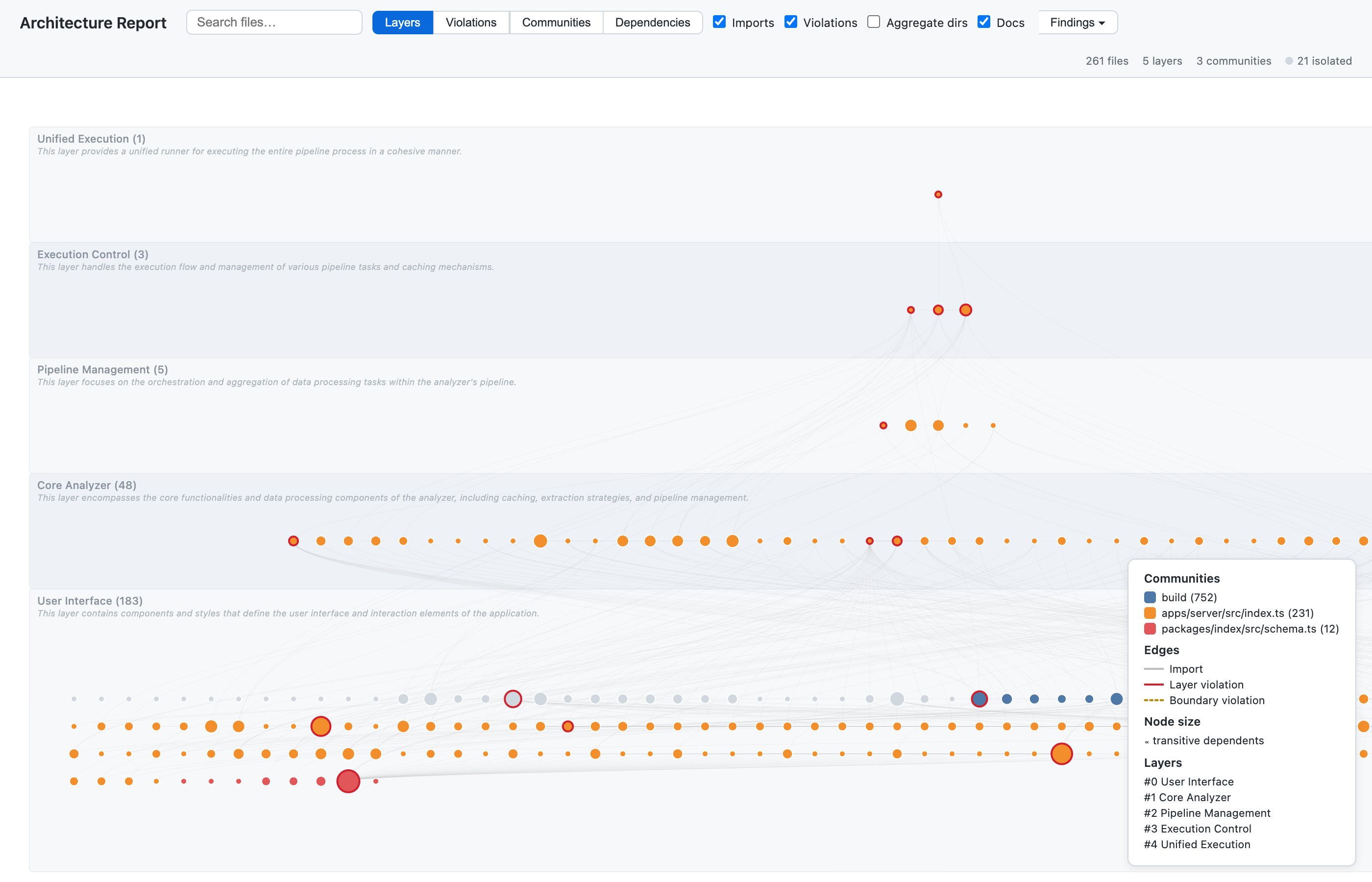
文件被组织到自动推断的层级中,并带有 LLM 生成的名称和描述。
节点大小反映传递依赖数;颜色表示社区聚类。
#### 社区视图 — 力导向图
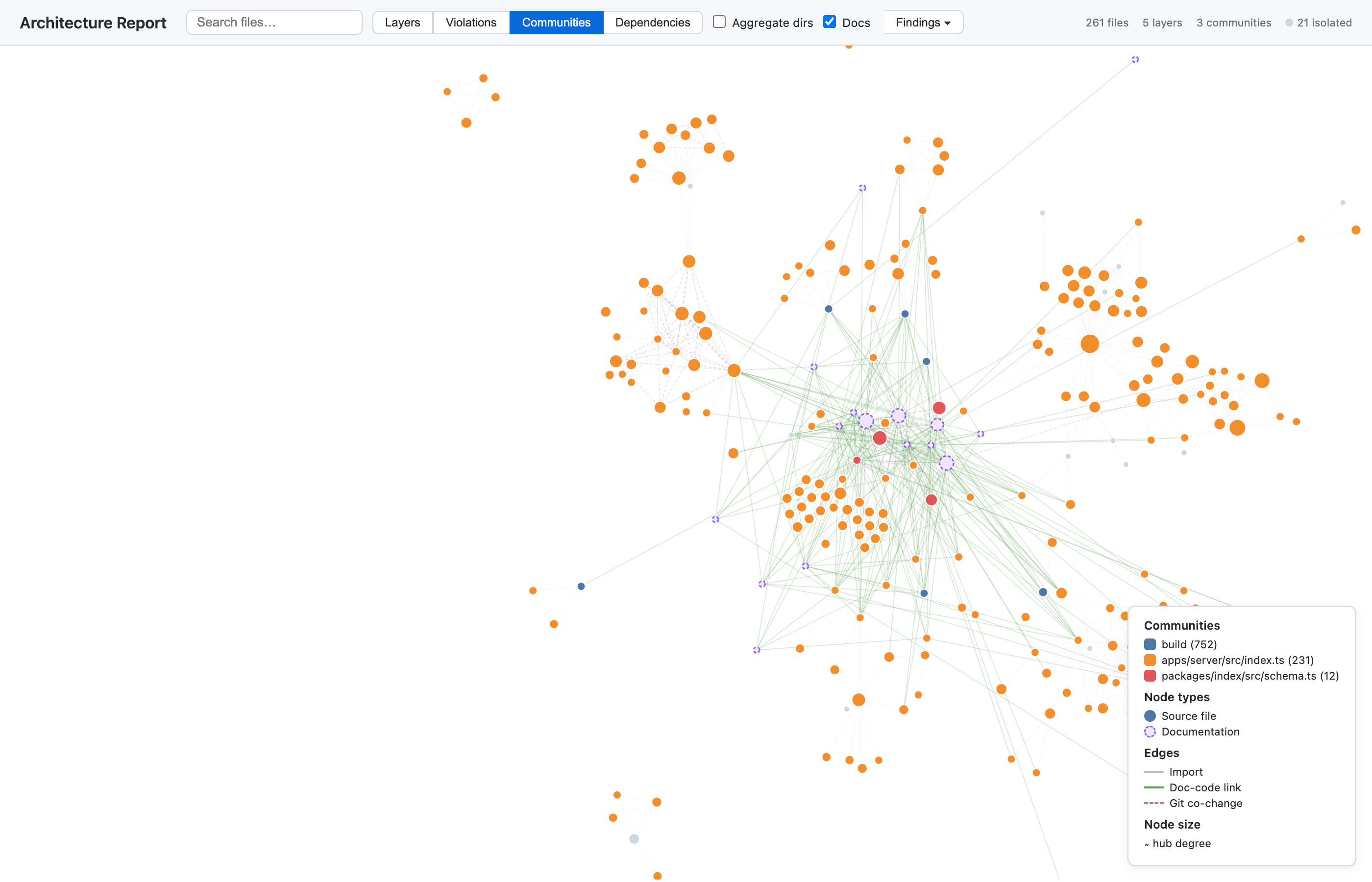
力导向布局揭示社区聚类、文档-代码链接和导入关系。
#### 依赖视图 — 根聚焦的依赖树
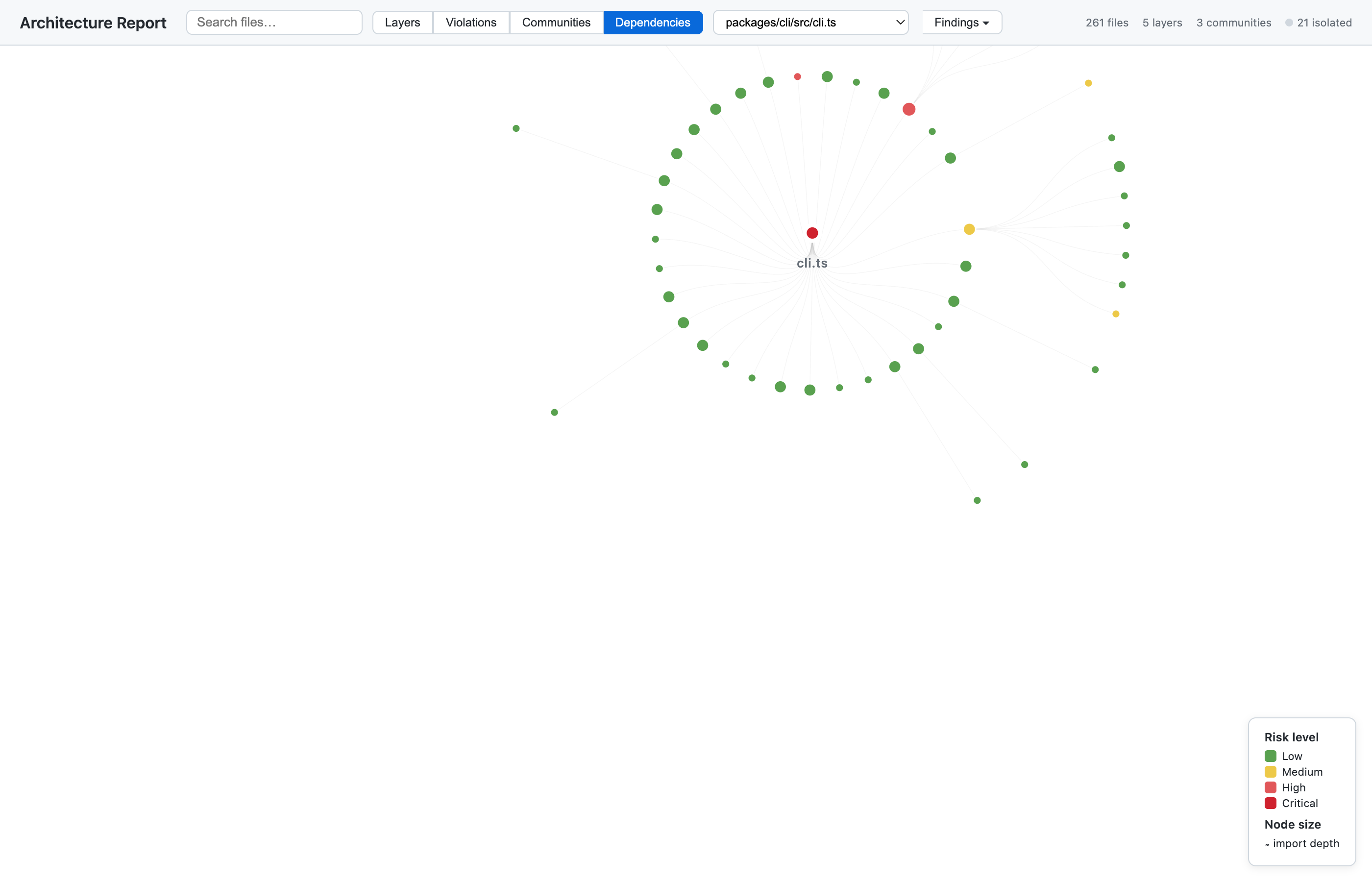
从任意根文件探索完整的依赖树,按风险等级着色。
两种深度模式:
- `--depth structured`(默认) — 仅标题、粗体文本、代码片段。快速且精确。
- `--depth full` — 增加正文扫描并使用 IDF 噪声过滤。+72% 更多注释。
### 知识图谱 — LLM 语义提取
### 从 npm 安装
```
npm install -g @intentweave/cli
iw --help
```
或使用 `npx` 而不安装:
```
npx @intentweave/cli run docs/*.md --track open -i -v
```
### 首次项目设置
```
cd /path/to/your/project
# 初始化工作区
iw init
# 启动 Neo4j(需要 Docker)
docker run -d --name neo4j \
-p 7474:7474 -p 7687:7687 \
-e NEO4J_AUTH=neo4j/intentweave \
neo4j:5
# 在文档上运行提取管道
export NEO4J_PASSWORD=intentweave
export OPENAI_API_KEY=sk-...
iw run docs/*.md --track open --provider openai -i --persist -v
# 查询知识图谱
iw query "What are the main components?"
```
### 从源码(开发)
```
git clone https://github.com/intentweave/intentweave.git
cd intentweave
pnpm install && pnpm build
# 使用开发包装器(更改无需构建)
./iw.sh run docs/*.md --track open -i -v
```
### 启动服务
```
cd apps/server
cp .env.example .env # edit NEO4J_PASSWORD and OPENAI_API_KEY
pnpm dev
# → 🧠 IntentWeave 服务器监听于 http://0.0.0.0:3000
# → 📖 API 文档: http://localhost:3000/docs
# → ❤️ 健康状态: http://localhost:3000/health
```
## REST API
所有端点位于 `/api/` 下。服务默认运行在 3000 端口。
### 查询知识图谱
**自然语言**(需要 `OPENAI_API_KEY`):
```
curl -X POST http://localhost:3000/api/query \
-H 'Content-Type: application/json' \
-H 'x-session-id: my-project' \
-d '{"question": "What decisions were made about the database?"}'
```
```
{
"results": [
{
"decision": "Neo4j",
"type": "decision",
"predicate": "DECIDED_FOR",
"target": "graph database"
}
],
"cypher": "MATCH (a:Canon)-[r:CANON_REL {predicate: \"DECIDED_FOR\"}]->(b:Canon) WHERE ...",
"summary": "- **Neo4j** was decided for as the graph database\n- ...",
"count": 3
}
```
**原始 Cypher**(无需 LLM):
```
curl -X POST http://localhost:3000/api/query \
-H 'Content-Type: application/json' \
-d '{"cypher": "MATCH (n:Canon:Entity) RETURN n.name, n.type LIMIT 10"}'
```
### 构建 RAG 上下文
**基于主题**(需要 `OPENAI_API_KEY`):
```
curl -X POST http://localhost:3000/api/context \
-H 'Content-Type: application/json' \
-H 'x-session-id: my-project' \
-d '{"topic": "authentication architecture"}'
```
**实体种子**(无需 LLM):
```
curl -X POST http://localhost:3000/api/context \
-H 'Content-Type: application/json' \
-H 'x-session-id: my-project' \
-d '{"entity": "React", "hops": 3}'
```
**导出全部**实体:
```
curl -X POST http://localhost:3000/api/context \
-H 'x-session-id: my-project' \
-H 'Content-Type: application/json' \
-d '{"all": true}'
```
### 列出实体
```
# 会话中的所有实体
curl 'http://localhost:3000/api/entities?session=my-project'
# 按类型过滤
curl 'http://localhost:3000/api/entities?session=my-project&type=decision&limit=20'
# 按名称搜索
curl 'http://localhost:3000/api/entities?session=my-project&search=auth'
```
### 运行提取流水线
```
curl -X POST http://localhost:3000/api/run \
-H 'Content-Type: application/json' \
-d '{
"files": ["docs/*.md"],
"track": "open",
"provider": "openai",
"incremental": true,
"persist": true,
"verbose": true
}'
```
返回 202 及运行摘要,包括 `runId`、工件数量、实体/关系总数和持续时间。
### 持久化到 Neo4j
```
# 持久化最近运行
curl -X POST http://localhost:3000/api/persist \
-H 'Content-Type: application/json' \
-d '{"latest": true}'
# 持久化特定运行
curl -X POST http://localhost:3000/api/persist \
-H 'Content-Type: application/json' \
-d '{"runId": "run-2026-03-08-abc12345"}'
```
### 影响分析
```
curl -X POST http://localhost:3000/api/impact \
-H 'Content-Type: application/json' \
-H 'x-session-id: my-project' \
-d '{"files": ["src/auth.ts"], "hops": 2}'
```
### 文档健康
```
curl -X POST http://localhost:3000/api/doc-health \
-H 'Content-Type: application/json' \
-H 'x-session-id: my-project' \
-d '{"files": ["docs/ARCHITECTURE.md"]}'
```
### 图谱模式
```
curl http://localhost:3000/api/schema
```
返回规范谓词、实体类型和关系文档。
## CLI
```
# 运行提取管道
iw run docs/*.md --track open --provider openai -i -v
# 以自然语言查询知识图谱
iw query "What are the main components?"
# 使用原始 Cypher 查询
iw query --cypher "MATCH (n:Canon:Entity) RETURN n.name, n.type LIMIT 20"
# 构建 RAG 上下文
iw context "authentication architecture" -s my-project
# 实体种子上下文
iw context -e "React" --hops 3 -s my-project
# 影响分析
iw impact src/auth.ts -s my-project
# 文档健康检查(CARI 默认 — 无需 Neo4j)
iw doc-health
iw doc-health --neo4j -s my-project # full KG mode
# 跨层代码链接
iw xlink . --session my-project --persist
# 持久化到 Neo4j
iw persist --latest -v
# --- CARI(无 LLM,无 Neo4j)---
# 构建轻量级索引
iw index build
iw index build --depth full # include body text with IDF filtering
# 查询索引
iw index retrieve "authentication" # ranked file retrieval
iw index connections "AuthService" # cross-layer connections + gaps
iw index check --changed src/auth.ts # CI drift detection
iw index report # corpus-wide health dashboard
# 增量更新(仅更改文件)
iw index update
```
更多 CARI 查询可作为 CLI 子命令、MCP 工具和程序化 API 使用:
| CLI 命令 | MCP 工具 | 功能说明 |
| ------------------------------------------ | -------------------------- | ---------------------------------------------------------- |
| `iw index clones` | `cari_clones` | 精确代码克隆检测(相同主体哈希) |
| `iw index structural-clones` | `cari_structural_clones` | 类型 2 克隆(相同控制流,不同标识符) |
| `iw index circular-imports` | `cari_circular_imports` | 检测导入循环(A → B → C → A) |
| `iw index unused-exports` | `cari_unused_exports` | 未被任何地方导入的导出符号 |
| `iw index hotspot-priority` | `cari_hotspot_priority` | 按文档更新频率低且文档少的文件进行优先级排序 |
| `iw index todos` | `cari_todos` | TODO/FIXME/HACK/XXX 清单,包含文件、行和类型 |
| `iw index module-coverage` | `cari_module_coverage` | 每个目录的文档覆盖率百分比 |
| `iw index orphaned-sections` | `cari_orphaned_sections` | 文档节中所有引用均未解析的情况 |
| `iw index doc-completeness` | `cari_doc_completeness` | 每个文档的覆盖度:已覆盖 vs. 所引用文件中的总导出 |
| `iw index cross-group-drift` | `cari_cross_group_drift` | 文档组之间的实体覆盖冲突 |
| `iw index mentions-of ` | `cari_mentions_of` | 查找代码或外部实体在文档中的提及 |
| `iw index annotations-for ` | `cari_annotations_for` | 列出某文档文件的所有注释 |
| `iw index test-coverage` | `cari_test_coverage` | 将测试文件映射到源文件,查找未测试的导出 |
| `iw index hubs` | `cari_hubs` | 枢纽节点/中心节点分析(度中心性) |
| `iw index communities` | `cari_communities` | 社区检测(结构/语义/时间模式) |
| `iw index surprises` | `cari_surprises` | 复合评分排序的意外连接 |
| `iw index rationale` | `cari_rationale` | WHY/NOTE/IMPORTANT/DESIGN 清单 |
| `iw index terminology` | `cari_terminology` | 术语不一致检测 |
| `iw index dep-depth` | `cari_dep_depth` | 传递导入深度及扇入/扇出风险 |
| `iw index boundary-violations` | `cari_boundary_violations` | 跨包内部导入检测 |
| `iw index layers-infer` | `cari_layers_infer` | 从导入图自动推断架构层级 |
| `iw index layers-check` | `cari_layers_check` | 根据层配置验证导入 |
| `iw index layers-check --compare` | — | 当前与应有层级的三列差异对比 |
| `iw index conformance` | — | 接口一致性漂移(缺少方法、不匹配) |
| `iw index dead-features` | — | 死功能检测(未使用 + 未 + 已过期) |
| `iw index api-surface` | — | API 表面变更日志(新增、移除、签名变更) |
| `iw index focus ` | `cari_focus` | 以目标实体为中心的聚焦架构视图 |
| `iw index export --html` | — | 生成独立的交互式架构报告 |
| `iw index export --html --provider openai` | `cari_layers_name` | 为报告提供 LLM 生成的层级与目录名称 |
| `iw index export --focus ` | — | 聚焦的 Graphviz SVG 架构报告 |
### MCP(GitHub Copilot 集成)
IntentWeave 为 VS Code Copilot 提供 MCP 工具:
| 工具 | 用途 | 关键参数 |
| --------------- | ----------------------------- | ------------------------- |
| `kg_query` | 自然语言或 Cypher 查询 | `question`, `cypher?`, `limit?` |
| `kg_context` | 从图谱构建 RAG 上下文 | `topic?`, `entity?`, `hops?` |
| `kg_entities` | 列出/搜索实体 | `type?`, `search?`, `limit?` |
| `kg_impact` | 语义影响分析 | `files`, `hops?` |
| `kg_doc_health` | 文档新鲜度 | `files?` |
| `kg_schema` | 图谱模式描述 | (无) |
**CARI 工具**(无需 Neo4j 或 LLM):
| 工具 | 用途 | 关键参数 |
| -------------------------- | ---------------------------------------- | -------------------------- |
| `cari_retrieve` | 按主题或符号进行排名的文件检索 | `query`, `scope?`, `limit?` |
| `cari_connections` | 跨层连接发现 + 缺口 | `entity`, `include?`, `limit?` |
| `cari_check` | 已变更文件的 CI 漂移检测 | `changed`, `severity?` |
| `cari_clones` | 精确代码克隆检测 | (无) |
| `cari_structural_clones` | 类型 2 克隆检测 | (无) |
| `cari_circular_imports` | 导入循环检测 | (无) |
| `cari_unused_exports` | 未使用的导出符号 | `limit?` |
| `cari_hotspot_priority` | 高变更低文档文件的优先级排序 | `limit?` |
| `cari_todos` | TODO/FIXME/HACK/XXX 清单 | `kind?`, `limit?` |
| `cari_module_coverage` | 每个目录的文档覆盖率百分比 | (无) |
| `cari_orphaned_sections` | 所有引用未解析的文档节 | (无) |
| `cari_doc_completeness` | 文档与所引用导出之间的完备性评分 | (无) |
| `cari_cross_group_drift` | 文档组之间的实体覆盖冲突 | (无) |
| `cari_mentions_of` | 实体 → 文档提及 | `entityId`, `minConfidence?` |
| `cari_annotations_for` | 文件 → 所有注释 | `filePath`, `minConfidence?` |
| `cari_test_coverage` | 测试到源的映射 + 缺口 | `limit?` |
| `cari_hubs` | 枢纽节点/中心节点分析 | `limit?` |
| `cari_communities` | 社区检测(结构/语义/时间模式) | `mode?`, `resolution?`, `limit?` |
| `cari_surprises` | 意外连接排名 | `limit?` |
| `cari_rationale` | WHY/NOTE/IMPORTANT/DESIGN 清单 | `kind?`, `limit?` |
| `cari_terminology` | 术语不一致检测 | `limit?` |
| `cari_dep_depth` | 传递导入深度分析 | `limit?` |
| `cari_boundary_violations` | 包边界违规检测 | (无) |
| `cari_layers_infer` | 自动推断架构层级 | (无) |
| `cari_layers_check` | 根据层配置验证导入 | `allowSkipLayer?` |
| `cari_layers_name` | LLM 生成的层级与目录名称 | `provider`, `model?`, `api_key?` |
| `cari_focus` | 以目标实体为中心的聚焦架构视图 | `target`, `hops?`, `maxNodes?` |
启动 MCP 服务:
```
iw mcp --session my-project -v
```
VS Code 通过 `.vscode/mcp.json` 自动发现:
```
{
"servers": {
"intentweave-kg": {
"command": "npx",
"args": ["@intentweave/cli", "mcp", "--session", "my-project", "-v"]
}
}
}
```
## 架构
```
apps/
server/ → Runnable server (composes core + open)
packages/
core/ → @intentweave/core — types, predicates, interfaces
analyzer/ → @intentweave/analyzer — pipeline engine (IN→FX→KX→GX)
index/ → @intentweave/index — CARI SQLite index (annotator, IDF, queries)
cli/ → @intentweave/cli — `iw` commands + MCP server
server-core/ → @intentweave/server-core — Fastify + Neo4j + middleware
server-open/ → @intentweave/server-open — open track API routes
profiles/ → @intentweave/profiles — extraction profile packs
ast-extractor/ → @intentweave/ast-extractor — tree-sitter TS/JS extraction
swift-parser/ → @intentweave/swift-parser — tree-sitter Swift extraction
python-parser/ → @intentweave/python-parser — tree-sitter Python extraction
```
### 服务插件架构
服务采用分层插件模型构建:
```
┌──────────────────────────────────────────┐
│ @intentweave/server-core │
│ Fastify 5 + Neo4j pool + context MW │
│ Health + SSE + OpenAPI (Swagger) │
└──────────┬───────────────────────────────┘
│
┌──────────▼───────────────────────────────┐
│ @intentweave/server-open │
│ POST /api/query — KG query (NL+Cypher)│
│ POST /api/context — RAG context │
│ POST /api/run — pipeline execution │
│ POST /api/persist — Neo4j persistence │
│ POST /api/impact — impact analysis │
│ POST /api/doc-health — doc freshness │
│ GET /api/entities — entity listing │
│ GET /api/schema — graph schema │
│ POST /api/xlink — code linking │
└──────────────────────────────────────────┘
```
## 流水线
### 开放轨道(IN → FX → KX → GX)
无模式知识提取:
1. **IN** — 切分文档(语义 Markdown 切分,约 16k 字符/块)
2. **FX** — 自由提取(LLM 并行提取每块的原始三元组)
3. **KX** — 规范化(实体 + 谓词标准化,批量 40)
4. **GX** — 全局合并(跨文档实体去重)
### 特性
- **增量缓存** — SHA-256 内容寻址,跳过未变更文件
- **快速关键词扫描** — 并行文件 I/O(64 并发读取),组合正则预过滤,单次 `indexOf` 匹配,提前终止。数秒内扫描 3500+ 文件,而非数分钟
- **批量失败检测** — 连续 3 次失败即中止
- **网络弹性** — 两阶段重试,批次冷却
- **令牌/成本预估** — 在提交 LLM 调用前进行估算
- **增量持久化** — 仅将变更写入 Neo4j
- **配置包** — 领域特定提取规则
## 配置
### 环境变量
| 变量 | 默认值 | 说明 |
| --------------- | ----------------------- | ------------------------------ |
| `NEO4J_URI` | `bolt://localhost:7687` | Neo4j Bolt URI |
| `NEO4J_USERNAME` | `neo4j` | Neo4j 用户名 |
| `NEO4J_PASSWORD` | _(必需)_ | Neo4j 密码 |
| `NEO4J_DATABASE` | `neo4j` | Neo4j 数据库名称 |
| `IW_SESSION` | `default` | 默认会话 ID |
| `IW_WORKSPACE_ROOT` | _(可选)_ | 工作区根(启用运行/持久化) |
| `OPENAI_API_KEY` | _(可选)_ | OpenAI 密钥(启用自然语言查询 + 主题) |
| `IW_LLM_MODEL` | `gpt-4o-mini` | 用于自然语言查询的 LLM 模型 |
| `PORT` | `3000` | 服务端口 |
| `HOST` | `0.0.0.0` | 服务主机 |
| `LOG_LEVEL` | `info` | 日志级别 |
| `CORS_ORIGIN` | `*` | CORS 源(逗号分隔) |
## 开发
```
pnpm install # Install all packages
pnpm build # Build all (uses Turbo)
pnpm test # Run all tests (1200+ tests)
pnpm dev # Dev mode with hot reload
pnpm typecheck # Type check all packages
pnpm format # Format with Prettier
pnpm format:check # Verify formatting
```
### 发布
所有 `@intentweave/*` 包均可发布到 npm:
```
# 首先构建所有内容
pnpm build
# 发布所有包(pnpm 解析 workspace:* → 实际版本)
pnpm -r publish --access public
# 或发布单个包
pnpm --filter @intentweave/cli publish --access public
```
### 项目
- **11 个包** + 1 个应用
- **1240+** 个测试,全部通过
- **TypeScript 5.6**,ESM,严格模式
- **Fastify 5**,Neo4j 5,SQLite(better-sqlite3)、Turbo、pnpm 工作区
- **31 种 CARI 查询模式** + 带多模式社区功能的交互式 HTML 架构报告
- **34 个 MCP 工具** 用于 GitHub Copilot 集成
## 许可证
Apache-2.0 —— 参见 [LICENSE](LICENSE)
## 贡献
参见 [CONTRIBUTING.md](CONTRIBUTING.md)。所有贡献需签署 [CLA](CLA.md)。
标签:AST解析, CI漂移检测, GitHub Copilot, MCP工具, Neo4j, React UI, REST API, SEO: 代码文档知识图谱, SEO: 语义知识提取, SQLite索引, WebSocket, 代码分析, 依赖分析, 健康检查, 凭证管理, 分层推断, 导入图, 技术栈: JavaScript, 技术栈: Node.js, 技术栈: TypeScript, 文档分析, 架构可视化, 自动化攻击, 语义检索, 跨层连接发现, 零成本检索