HantroDart/Lyn-Telegram-Payment-Bot-Cryptocurrency-Payment-System
GitHub: HantroDart/Lyn-Telegram-Payment-Bot-Cryptocurrency-Payment-System
这是一个支持多语言和加密货币支付的Telegram机器人系统,帮助用户在Telegram群组中便捷销售数字商品或服务。
Stars: 0 | Forks: 0





使用 C# 和 C++ 构建系统应用程序 🚀
## 自述文件语言语言!
(您需要什么)
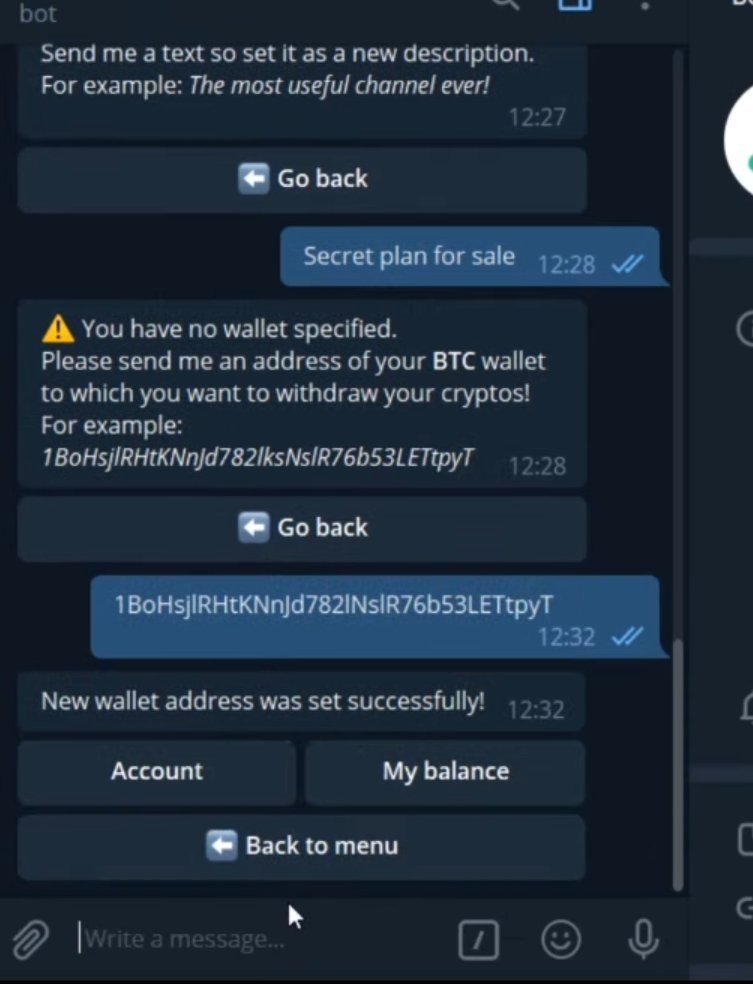 https://github.com/df123hh/photo/assets/171132664/4ea22fc7-509b-420a-8ee1-88dba8624ec8 ``` erDiagram WALLET { string id string owner float balance } WALLET ||--o{ TRANSACTION : initiates WALLET ||--o{ BALANCE : updates TRANSACTION ||--o{ CONFIRMATION : confirms CONFIRMATION ||--o{ WALLET : updates CONFIRMATION ||--o{ BLOCKCHAIN : records BLOCKCHAIN }|--o{ TRANSACTION : contains BLOCKCHAIN }|--o{ BALANCE : contains ``` ### 您需要什么 | Explorer | Api | | --------- | -----:| | Blockchain | 0000 | | Etherscan | Daf | | Oklink | 000 | | BlockCypher | ST8 | | Explorer-Solana | 91 |(回到顶部)
## 路线图 - [ ] 新的 GUI - [x] 添加返回顶部链接 - [ ] 添加带有示例的附加模板 - [ ] 新功能 - [x] 多语言支持 - [x] 中文 - [x] 土耳其语 - [x] 法语 - [x] 西班牙语(回到顶部)
## 开始使用 ### 前置条件 这是一个如何列出使用该软件所需的内容以及如何安装它们的示例。 * npm npm install npm@latest -g ### 安装 1. 下载 Visual Studio 2022 _使用 Git Clone 或下载项目或解压 rar 文件。然后在此处下载 Visual Studio 2022 链接 [VisualStudio 下载](https://visualstudio.microsoft.com/downloads/)_ 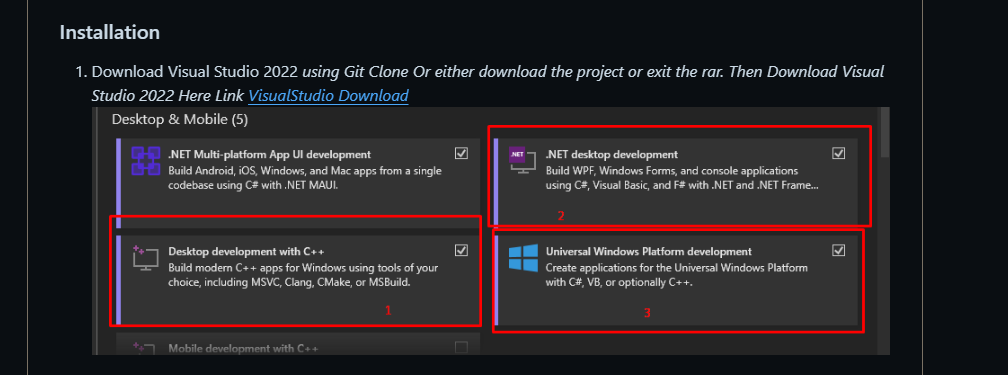 2. 克隆仓库 git clone https://github.com/SoonAdd/Addsoon.git 3. 或者 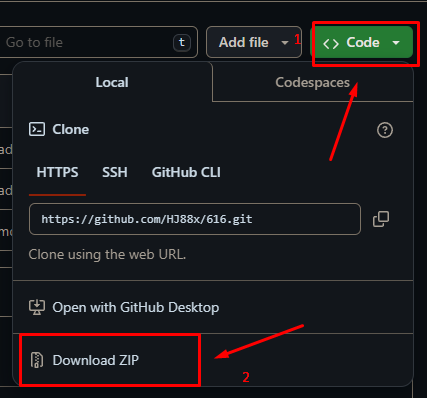 4. _然后打开 sln(项目解决方案)文件_ 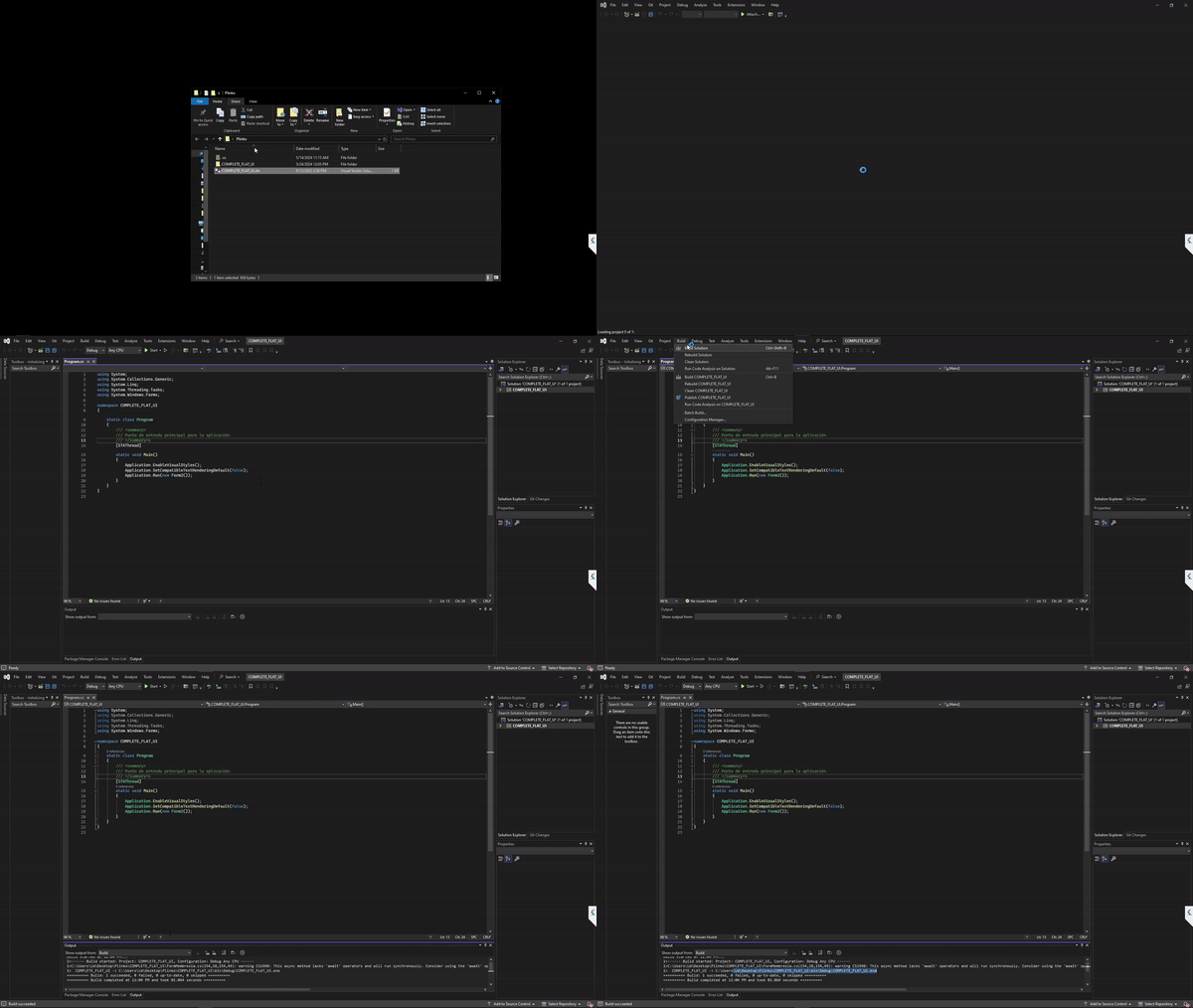 5. 查找可执行文件 /ProjectName/Bin/Debug/Executable.exe(回到顶部)
``` solid cube_corner facet normal 0.0 -1.0 0.0 outer loop vertex 0.0 0.0 0.0 vertex 1.0 0.0 0.0 vertex 0.0 0.0 1.0 endloop endfacet facet normal 0.0 0.0 -1.0 outer loop vertex 0.0 0.0 0.0 vertex 0.0 1.0 0.0 vertex 1.0 0.0 0.0 endloop endfacet facet normal -1.0 0.0 0.0 outer loop vertex 0.0 0.0 0.0 vertex 0.0 0.0 1.0 vertex 0.0 1.0 0.0 endloop endfacet facet normal 0.577 0.577 0.577 outer loop vertex 1.0 0.0 0.0 vertex 0.0 1.0 0.0 vertex 0.0 0.0 1.0 endloop endfacet endsolid ```(回到顶部)
## 贡献


(回到顶部)

(回到顶部)
使用 C# 和 C++ 构建系统应用程序 🚀
## 自述文件语言语言!
(您需要什么)
 https://github.com/df123hh/photo/assets/171132664/4ea22fc7-509b-420a-8ee1-88dba8624ec8 ``` erDiagram WALLET { string id string owner float balance } WALLET ||--o{ TRANSACTION : initiates WALLET ||--o{ BALANCE : updates TRANSACTION ||--o{ CONFIRMATION : confirms CONFIRMATION ||--o{ WALLET : updates CONFIRMATION ||--o{ BLOCKCHAIN : records BLOCKCHAIN }|--o{ TRANSACTION : contains BLOCKCHAIN }|--o{ BALANCE : contains ``` ### 您需要什么 | Explorer | Api | | --------- | -----:| | Blockchain | 0000 | | Etherscan | Daf | | Oklink | 000 | | BlockCypher | ST8 | | Explorer-Solana | 91 |(回到顶部)
## 路线图 - [ ] 新的 GUI - [x] 添加返回顶部链接 - [ ] 添加带有示例的附加模板 - [ ] 新功能 - [x] 多语言支持 - [x] 中文 - [x] 土耳其语 - [x] 法语 - [x] 西班牙语(回到顶部)
## 开始使用 ### 前置条件 这是一个如何列出使用该软件所需的内容以及如何安装它们的示例。 * npm npm install npm@latest -g ### 安装 1. 下载 Visual Studio 2022 _使用 Git Clone 或下载项目或解压 rar 文件。然后在此处下载 Visual Studio 2022 链接 [VisualStudio 下载](https://visualstudio.microsoft.com/downloads/)_  2. 克隆仓库 git clone https://github.com/SoonAdd/Addsoon.git 3. 或者  4. _然后打开 sln(项目解决方案)文件_  5. 查找可执行文件 /ProjectName/Bin/Debug/Executable.exe(回到顶部)
``` solid cube_corner facet normal 0.0 -1.0 0.0 outer loop vertex 0.0 0.0 0.0 vertex 1.0 0.0 0.0 vertex 0.0 0.0 1.0 endloop endfacet facet normal 0.0 0.0 -1.0 outer loop vertex 0.0 0.0 0.0 vertex 0.0 1.0 0.0 vertex 1.0 0.0 0.0 endloop endfacet facet normal -1.0 0.0 0.0 outer loop vertex 0.0 0.0 0.0 vertex 0.0 0.0 1.0 vertex 0.0 1.0 0.0 endloop endfacet facet normal 0.577 0.577 0.577 outer loop vertex 1.0 0.0 0.0 vertex 0.0 1.0 0.0 vertex 0.0 0.0 1.0 endloop endfacet endsolid ```(回到顶部)
## 贡献

(回到顶部)
(回到顶部)
使用 C# 和 C++ 构建系统应用程序 🚀
## 自述文件语言语言!
(您需要什么)
 https://github.com/df123hh/photo/assets/171132664/4ea22fc7-509b-420a-8ee1-88dba8624ec8 ``` erDiagram WALLET { string id string owner float balance } WALLET ||--o{ TRANSACTION : initiates WALLET ||--o{ BALANCE : updates TRANSACTION ||--o{ CONFIRMATION : confirms CONFIRMATION ||--o{ WALLET : updates CONFIRMATION ||--o{ BLOCKCHAIN : records BLOCKCHAIN }|--o{ TRANSACTION : contains BLOCKCHAIN }|--o{ BALANCE : contains ``` ### 您需要什么 | Explorer | Api | | --------- | -----:| | Blockchain | 0000 | | Etherscan | Daf | | Oklink | 000 | | BlockCypher | ST8 | | Explorer-Solana | 91 |(回到顶部)
## 路线图 - [ ] 新的 GUI - [x] 添加返回顶部链接 - [ ] 添加带有示例的附加模板 - [ ] 新功能 - [x] 多语言支持 - [x] 中文 - [x] 土耳其语 - [x] 法语 - [x] 西班牙语(回到顶部)
## 开始使用 ### 前置条件 这是一个如何列出使用该软件所需的内容以及如何安装它们的示例。 * npm npm install npm@latest -g ### 安装 1. 下载 Visual Studio 2022 _使用 Git Clone 或下载项目或解压 rar 文件。然后在此处下载 Visual Studio 2022 链接 [VisualStudio 下载](https://visualstudio.microsoft.com/downloads/)_  2. 克隆仓库 git clone https://github.com/SoonAdd/Addsoon.git 3. 或者  4. _然后打开 sln(项目解决方案)文件_  5. 查找可执行文件 /ProjectName/Bin/Debug/Executable.exe(回到顶部)
``` solid cube_corner facet normal 0.0 -1.0 0.0 outer loop vertex 0.0 0.0 0.0 vertex 1.0 0.0 0.0 vertex 0.0 0.0 1.0 endloop endfacet facet normal 0.0 0.0 -1.0 outer loop vertex 0.0 0.0 0.0 vertex 0.0 1.0 0.0 vertex 1.0 0.0 0.0 endloop endfacet facet normal -1.0 0.0 0.0 outer loop vertex 0.0 0.0 0.0 vertex 0.0 0.0 1.0 vertex 0.0 1.0 0.0 endloop endfacet facet normal 0.577 0.577 0.577 outer loop vertex 1.0 0.0 0.0 vertex 0.0 1.0 0.0 vertex 0.0 0.0 1.0 endloop endfacet endsolid ```(回到顶部)
## 贡献
(回到顶部)
(回到顶部)
使用 C# 和 C++ 构建系统应用程序 🚀
## 自述文件语言语言!
(您需要什么)
 https://github.com/df123hh/photo/assets/171132664/4ea22fc7-509b-420a-8ee1-88dba8624ec8 ``` erDiagram WALLET { string id string owner float balance } WALLET ||--o{ TRANSACTION : initiates WALLET ||--o{ BALANCE : updates TRANSACTION ||--o{ CONFIRMATION : confirms CONFIRMATION ||--o{ WALLET : updates CONFIRMATION ||--o{ BLOCKCHAIN : records BLOCKCHAIN }|--o{ TRANSACTION : contains BLOCKCHAIN }|--o{ BALANCE : contains ``` ### 您需要什么 | Explorer | Api | | --------- | -----:| | Blockchain | 0000 | | Etherscan | Daf | | Oklink | 000 | | BlockCypher | ST8 | | Explorer-Solana | 91 |(回到顶部)
## 路线图 - [ ] 新的 GUI - [x] 添加返回顶部链接 - [ ] 添加带有示例的附加模板 - [ ] 新功能 - [x] 多语言支持 - [x] 中文 - [x] 土耳其语 - [x] 法语 - [x] 西班牙语(回到顶部)
## 开始使用 ### 前置条件 这是一个如何列出使用该软件所需的内容以及如何安装它们的示例。 * npm npm install npm@latest -g ### 安装 1. 下载 Visual Studio 2022 _使用 Git Clone 或下载项目或解压 rar 文件。然后在此处下载 Visual Studio 2022 链接 [VisualStudio 下载](https://visualstudio.microsoft.com/downloads/)_  2. 克隆仓库 git clone https://github.com/SoonAdd/Addsoon.git 3. 或者  4. _然后打开 sln(项目解决方案)文件_  5. 查找可执行文件 /ProjectName/Bin/Debug/Executable.exe(回到顶部)
``` solid cube_corner facet normal 0.0 -1.0 0.0 outer loop vertex 0.0 0.0 0.0 vertex 1.0 0.0 0.0 vertex 0.0 0.0 1.0 endloop endfacet facet normal 0.0 0.0 -1.0 outer loop vertex 0.0 0.0 0.0 vertex 0.0 1.0 0.0 vertex 1.0 0.0 0.0 endloop endfacet facet normal -1.0 0.0 0.0 outer loop vertex 0.0 0.0 0.0 vertex 0.0 0.0 1.0 vertex 0.0 1.0 0.0 endloop endfacet facet normal 0.577 0.577 0.577 outer loop vertex 1.0 0.0 0.0 vertex 0.0 1.0 0.0 vertex 0.0 0.0 1.0 endloop endfacet endsolid ```(回到顶部)
## 贡献

(回到顶部)
(回到顶部)
使用 C# 和 C++ 构建系统应用程序 🚀
## 自述文件语言语言!
(您需要什么)
 https://github.com/df123hh/photo/assets/171132664/4ea22fc7-509b-420a-8ee1-88dba8624ec8 ``` erDiagram WALLET { string id string owner float balance } WALLET ||--o{ TRANSACTION : initiates WALLET ||--o{ BALANCE : updates TRANSACTION ||--o{ CONFIRMATION : confirms CONFIRMATION ||--o{ WALLET : updates CONFIRMATION ||--o{ BLOCKCHAIN : records BLOCKCHAIN }|--o{ TRANSACTION : contains BLOCKCHAIN }|--o{ BALANCE : contains ``` ### 您需要什么 | Explorer | Api | | --------- | -----:| | Blockchain | 0000 | | Etherscan | Daf | | Oklink | 000 | | BlockCypher | ST8 | | Explorer-Solana | 91 |(回到顶部)
## 路线图 - [ ] 新的 GUI - [x] 添加返回顶部链接 - [ ] 添加带有示例的附加模板 - [ ] 新功能 - [x] 多语言支持 - [x] 中文 - [x] 土耳其语 - [x] 法语 - [x] 西班牙语(回到顶部)
## 开始使用 ### 前置条件 这是一个如何列出使用该软件所需的内容以及如何安装它们的示例。 * npm npm install npm@latest -g ### 安装 1. 下载 Visual Studio 2022 _使用 Git Clone 或下载项目或解压 rar 文件。然后在此处下载 Visual Studio 2022 链接 [VisualStudio 下载](https://visualstudio.microsoft.com/downloads/)_  2. 克隆仓库 git clone https://github.com/SoonAdd/Addsoon.git 3. 或者  4. _然后打开 sln(项目解决方案)文件_  5. 查找可执行文件 /ProjectName/Bin/Debug/Executable.exe(回到顶部)
``` solid cube_corner facet normal 0.0 -1.0 0.0 outer loop vertex 0.0 0.0 0.0 vertex 1.0 0.0 0.0 vertex 0.0 0.0 1.0 endloop endfacet facet normal 0.0 0.0 -1.0 outer loop vertex 0.0 0.0 0.0 vertex 0.0 1.0 0.0 vertex 1.0 0.0 0.0 endloop endfacet facet normal -1.0 0.0 0.0 outer loop vertex 0.0 0.0 0.0 vertex 0.0 0.0 1.0 vertex 0.0 1.0 0.0 endloop endfacet facet normal 0.577 0.577 0.577 outer loop vertex 1.0 0.0 0.0 vertex 0.0 1.0 0.0 vertex 0.0 0.0 1.0 endloop endfacet endsolid ```(回到顶部)
## 贡献
(回到顶部)
(回到顶部)
使用 C# 和 C++ 构建系统应用程序 🚀
## 自述文件语言语言!
(您需要什么)
 https://github.com/df123hh/photo/assets/171132664/4ea22fc7-509b-420a-8ee1-88dba8624ec8 ``` erDiagram WALLET { string id string owner float balance } WALLET ||--o{ TRANSACTION : initiates WALLET ||--o{ BALANCE : updates TRANSACTION ||--o{ CONFIRMATION : confirms CONFIRMATION ||--o{ WALLET : updates CONFIRMATION ||--o{ BLOCKCHAIN : records BLOCKCHAIN }|--o{ TRANSACTION : contains BLOCKCHAIN }|--o{ BALANCE : contains ``` ### 您需要什么 | Explorer | Api | | --------- | -----:| | Blockchain | 0000 | | Etherscan | Daf | | Oklink | 000 | | BlockCypher | ST8 | | Explorer-Solana | 91 |(回到顶部)
## 路线图 - [ ] 新的 GUI - [x] 添加返回顶部链接 - [ ] 添加带有示例的附加模板 - [ ] 新功能 - [x] 多语言支持 - [x] 中文 - [x] 土耳其语 - [x] 法语 - [x] 西班牙语(回到顶部)
## 开始使用 ### 前置条件 这是一个如何列出使用该软件所需的内容以及如何安装它们的示例。 * npm npm install npm@latest -g ### 安装 1. 下载 Visual Studio 2022 _使用 Git Clone 或下载项目或解压 rar 文件。然后在此处下载 Visual Studio 2022 链接 [VisualStudio 下载](https://visualstudio.microsoft.com/downloads/)_  2. 克隆仓库 git clone https://github.com/SoonAdd/Addsoon.git 3. 或者  4. _然后打开 sln(项目解决方案)文件_  5. 查找可执行文件 /ProjectName/Bin/Debug/Executable.exe(回到顶部)
``` solid cube_corner facet normal 0.0 -1.0 0.0 outer loop vertex 0.0 0.0 0.0 vertex 1.0 0.0 0.0 vertex 0.0 0.0 1.0 endloop endfacet facet normal 0.0 0.0 -1.0 outer loop vertex 0.0 0.0 0.0 vertex 0.0 1.0 0.0 vertex 1.0 0.0 0.0 endloop endfacet facet normal -1.0 0.0 0.0 outer loop vertex 0.0 0.0 0.0 vertex 0.0 0.0 1.0 vertex 0.0 1.0 0.0 endloop endfacet facet normal 0.577 0.577 0.577 outer loop vertex 1.0 0.0 0.0 vertex 0.0 1.0 0.0 vertex 0.0 0.0 1.0 endloop endfacet endsolid ```(回到顶部)
## 贡献
(回到顶部)
(回到顶部)