dzerik/melitta-barista-ha
GitHub: dzerik/melitta-barista-ha
一款基于 Home Assistant 的咖啡机蓝牙集成,实现对 Melitta 与 Nivona 咖啡机的自动发现、状态监控、AI 配方生成与维护操作。
Stars: 9 | Forks: 1
# Melitta Barista & Nivona 适用于 Home Assistant
[](https://my.home-assistant.io/redirect/hacs_repository/?owner=dzerik&repository=melitta-barista-ha&category=integration)
[](https://github.com/dzerik/melitta-barista-ha/releases)
[](https://github.com/dzerik/melitta-barista-ha/releases)
[](https://github.com/dzerik/melitta-barista-ha/actions/workflows/tests.yml)
[](https://github.com/dzerik/melitta-barista-ha/actions)
[](LICENSE)
[](https://hacs.xyz)
[](https://www.home-assistant.io/)
[](#)
[](#supported-brands-and-models)
[](#localization)
一款用于控制 **Melitta Barista T/TS Smart** 和 **Nivona NICR/NIVO 8xxx** 咖啡机的自定义 Home Assistant 集成。通过低功耗蓝牙(BLE)连接,两种品牌均基于共享的 Eugster/Frismag OEM 栈,因此单一集成即可驱动任意一款。实时监控机器状态、冲泡配方、调节设置、触发维护、生成 AI 配方——所有操作均可通过 Home Assistant 仪表板完成。
## 支持的品牌与型号
### Melitta(稳定版)
| 型号 | 类型 ID | BLE 前缀 | 配方 | 豆仓 |
|------|---------|----------|------|------|
| **Barista T Smart** | 258 | 8301, 8311, 8401 | 21 | 1(单仓) |
| **Barista TS Smart** | 259 | 8501, 8601, 8604 | 24 | 2(双仓) |
### Nivona(Alpha — 需要测试者)
| 系列 | 代表型号 | MyCoffee | 强度 | 备注 |
|------|----------|----------|------|------|
| **600** | NICR 660 / 670 / 675 / 680 | 1 | 3 | — |
| **700** | NICR 756 / 758 / 759 / 768 / 769 / 778 / 779 / 788 / 789 | 4 | 3 | 香气平衡 |
| **79x** | NICR 790–797, 799 | 4 | 5 | 香气平衡 |
| **900** | NICR 920 / 930 | 4 | 5 | 流体 ml×10 异常 |
| **900-light** | NICR 960 / 965 / 970 | 4 | 3 | — |
| **1030** / **1040** | NICR 1030 / 1040 | 4 | 5 | — |
| **8000** | NIVO 8101 / 8103 / 8107 | 4 | 5 | 不同的冲泡操作码 |
品牌和机器型号会自动从 BLE 广告中识别(Melitta 前缀为 `8xxx…`,Nivona 为 `NIVONA-NNNNNNNNNN-----`),并通过 BLE 协议确认。Nivona 固件不公开配方编辑操作码,因此 Nivona 条目的配方/自由配方/用户配置实体会被隐藏。
## Nivona(Alpha)— 需要测试者
**状态**:Nivona `BrandProfile` 在 v0.41.0 中已 **代码完成并通过加密验证**,验证向量来自上游 [mpapierski/esp-coffee-bridge](https://github.com/mpapierski/esp-coffee-bridge),但维护者**不拥有 Nivona 机器**,无法在真实硬件上验证 BLE 联机互通。该版本在 GitHub 上标记为预发布。
**软件层面已验证**:
- 与公开向量 `FA 48 D1 7B → 7E 6E`(上游 NICR 756)对比的 HU 握手验证器
- RC4 运行时密钥 `NIV_060616_V10_1*9#3!4$6+4res-?3`(从 `de.nivona.mobileapp` 3.8.6 恢复)
- 7 个系列的能力条目,包含各系列的冲泡操作码、强度等级、流体缩放
- 所有已知型号代码(4 位用于 NIVO 8xxx,3 位用于 NICR 6xx/7xx/79x/9xx)的序列前缀分词
**应在真实硬件上确认**:
- [ ] BLE 配对 + D-Bus 绑定完成
- [ ] `HU` 会话在真实设备上成功建立
- [ ] `HX` 状态轮询返回合理的 `process`/`manipulation`/`progress` 值
- [ ] `HZ` 取消冲泡在活跃冲泡时生效
- [ ] `HY` 提示确认(冲水/移杯)正常工作
- [ ] `HD` 寄存器重置返回 ACK
- [ ] `HI` 特性位在有响应或超时优雅处理(两者均可)
**如何帮助**:
1. 在 HACS 中启用 **Pre-releases**(在 HACS 设置中),安装本仓库,更新至 **v0.41.0**。
2. 通过常规配置流程配对 Nivona 设备,应能自动发现。
3. [提交问题](https://github.com/dzerik/melitta-barista-ha/issues/new) 并附上型号、固件版本及过滤 `melitta_barista` 的日志片段。
加密与握手结构与 Melitta 相同;风险主要来自各固件系列在冲泡负载字节和状态寄存器 ID 上的细微差异。
## 功能特性
- **多品牌、多型号** — Melitta Barista T/TS Smart 与 Nivona NICR/NIVO 8xxx(Alpha)自动从 BLE 广告识别;按能力过滤实体
- **实时状态监控** — 机器状态、冲泡活动、进度百分比、所需用户操作以及通过 BLE 推送通知的机器提示
- **21 或 24 款内置配方**(Melitta)— 从下拉菜单选择并一键冲泡(TS 型号额外提供 3 款)
- **自由配方**(Melitta)— 构建包含两种可配置组件(咖啡/牛奶/水)的自定义饮品,可调节强度、香气、温度、份量和杯数
- **重置配方至出厂默认值**(Melitta,v0.33.0+)— HD 操作码按钮并自动刷新缓存的配方属性
- **确认机器提示**(v0.34.0+)— 专用的 `Confirm Prompt` 按钮 + `awaiting_confirmation` 二进制传感器 + 可选**全局自动确认**用于软提示(移杯、冲水);硬件阻塞式提示(加水、倒空托盘)仍需手动操作
- **维护操作** — 一键清洁、深度清洁、除垢、滤杯插入/更换/移除、蒸发、断电
- **取消进行中的冲泡** — HZ 操作码,点击即可在任意运行过程中取消
- **机器设置控制** — 水硬度、冲泡温度、自动关机定时器、节能模式、自动选豆(TS 型号)
- **功能能力读取**(HI,v0.32.0+)— 诊断传感器暴露机器能力位(如 `IMAGE_TRANSFER`),在未响应的固件上优雅降级
- **用户配置档**(Melitta)— 读取并编辑机器上的用户配置档名称
- **杯数统计**(Melitta)— 总计 + 按配方统计,冲泡完成后刷新
- **BLE 自动发现** — 集成自动检测 Melitta 或 Nivona 机器
- **加密 BLE 协议** — Eugster EFLibrary 栈(AES 客户密钥引导 + RC4 流密码),各品牌 HU 验证表
- **🤖 AI 咖啡品酒师** — 基于配置的豆仓、牛奶类型及糖浆/配料,使用任意 HA 对话代理(OpenAI、Anthropic、Google)生成个性化配方。内置 31 款欧洲咖啡预设(含 Lavazza、Melitta、Illy、Dallmayr、Tasty Coffee 等)
- **自定义 Lovelace 卡片** — 独立的卡片组件,[melitta-barista-card](https://github.com/dzerik/melitta-barista-card) 可通过 HACS(前端 > 自定义存储库)安装
- **独立 PWA** — 全屏 React 渐进式 Web 应用,适用于平板与 kiosk 展示:[melitta-barista-app](https://github.com/dzerik/melitta-barista-app)
- **29 种语言** — 完整本地化支持,覆盖所有欧洲与斯拉夫语言
- **🧪 ESP32 BLE 模拟器**(独有)— 捆绑的 ESP-IDF 固件可在 BLE 层模拟真实 Nivona 机器(ADV、AD00 服务、加密帧、HU 握手、HX 状态、HE 冲泡)。可在不依赖物理设备的情况下开发、配对并冲泡,同时支持 Home Assistant 与官方 Nivona Android 应用。详见 [`esp_emulator/`](esp_emulator/)
## 支持的配方
| # | 配方 | T | TS | # | 配方 | T | TS |
|---|------|---|-----|---|------|---|-----|
| 1 | Espresso | + | + | 13 | Dead Eye | -- | + |
| 2 | Ristretto | + | + | 14 | Cappuccino | + | + |
| 3 | Lungo | + | + | 15 | Espresso Macchiato | + | + |
| 4 | Espresso Doppio | + | + | 16 | Caffe Latte | + | + |
| 5 | Ristretto Doppio | + | + | 17 | Cafe au Lait | + | + |
| 6 | Cafe Creme | + | + | 18 | Flat White | + | + |
| 7 | Cafe Creme Doppio | + | + | 19 | Latte Macchiato | + | + |
| 8 | Americano | + | + | 20 | Latte Macchiato Extra | + | + |
| 9 | Americano Extra | + | + | 21 | Latte Macchiato Triple | + | + |
| 10 | Long Black | + | + | 22 | Milk | + | + |
| 11 | Red Eye | -- | + | 23 | Milk Froth | + | + |
| 12 | Black Eye | -- | + | 24 | Hot Water | + | + |
### Nivona 各系列配方(Alpha)
Nivona 机器出厂即搭载**固定**的系列配方(不支持配方编辑)。下表中的选择器 ID 为机器端冲泡命令所使用的字节值。
| 系列 | 配方 |
|------|------|
| **600** | Espresso、Coffee、Americano、Cappuccino、Frothy Milk、Hot Water |
| **700** | Espresso、Cream、Lungo、Americano、Cappuccino、Latte Macchiato、Milk、Hot Water |
| **79x** | Espresso、Coffee、Americano、Cappuccino、Latte Macchiato、Milk、Hot Water |
| **900** / **900-light** | Espresso、Coffee、Americano、Cappuccino、Caffè Latte、Latte Macchiato、Hot Milk、Hot Water |
| **1030** | Espresso、Coffee、Americano、Cappuccino、Caffè Latte、Latte Macchiato、Hot Water、Warm Milk、Hot Milk、Frothy Milk |
| **1040** | Espresso、Coffee、Americano、Cappuccino、Caffè Latte、Latte Macchiato、Hot Water、Warm Milk、Frothy Milk |
| **8000** | Espresso、Coffee、Americano、Cappuccino、Caffè Latte、Latte Macchiato、Milk、Hot Water |
来源:`brands/nivona.py` 中的各系列配方表,源自上游 [mpapierski/esp-coffee-bridge](https://github.com/mpapierski/esp-coffee-bridge/blob/main/src/nivona.cpp) 的逆向工程。
## 系统要求
- **Home Assistant** 2024.1 或更新版本
- **蓝牙适配器** — 对 Home Assistant 主机可访问的 BLE 适配器(内置或 USB 蓝牙 Dongle)
- **支持的机器** — 下列之一:
- Melitta Barista T Smart 或 Melitta Barista TS Smart(稳定版)
- Nivona NICR 6xx / 7xx / 79x / 9xx / 1030 / 1040 或 NIVO 8xxx(Alpha 版)
- **BLE 范围** — Home Assistant 主机需在蓝牙有效范围内(通常不超过 10 米)
## 安装
### 通过 HACS(推荐)
1. 在 Home Assistant 实例中打开 HACS。
2. 前往 **Integrations**,点击右上角三点菜单。
3. 选择 **Custom repositories**。
4. 添加仓库地址:`https://github.com/dzerik/melitta-barista-ha`
5. 选择分类 **Integration** 并点击 **Add**。
6. 在 HACS 中搜索 “Melitta Barista Smart & Nivona” 并安装。
7. 重启 Home Assistant。
### 手动安装
1. 从 [GitHub 发布页面](https://github.com/dzerik/melitta-barista-ha/releases) 下载最新版本。
2. 将 `custom_components/melitta_barista` 目录复制到 Home Assistant 的 `config/custom_components/` 目录。
3. 重启 Home Assistant。
## 自定义 Lovelace 卡片
提供独立的 Lovelace 卡片组件,包含配方按钮、状态显示与进度条,可通过以下方式单独安装:
**[melitta-barista-card](https://github.com/dzerik/melitta-barista-card)** — 通过 HACS(前端 > 自定义存储库)安装或手动安装。
## 独立 PWA(平板 / kiosk)
提供独立的 React PWA 用于控制咖啡机:
**[melitta-barista-app](https://github.com/dzerik/melitta-barista-app)** — 完整的全屏渐进式 Web 应用,适用于壁挂式平板与 kiosk 展示。
- 通过 WebSocket API 连接 Home Assistant,使用长期访问令牌
- 自动从 HA 实体中识别 Melitta 机器
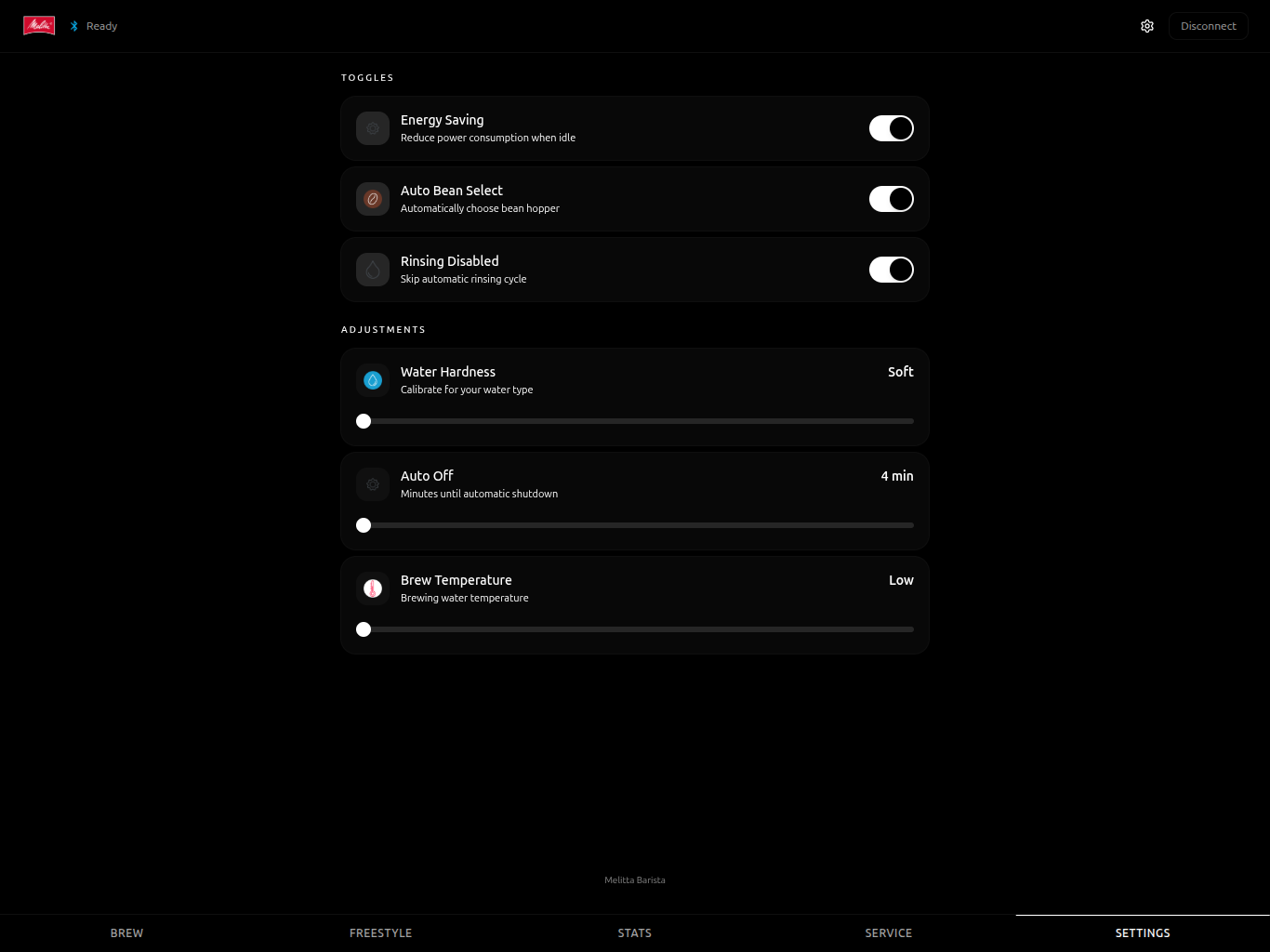
- 五个标签页:**Brew**(冲泡)、**Freestyle**(自由配方)、**Stats**(统计)、**Service**(维护)、**Settings**(设置)
- 实时冲泡进度与取消支持
- 可安装为任意设备(Android、iOS、桌面)的 PWA
- 深色咖啡主题 UI,针对触摸优化
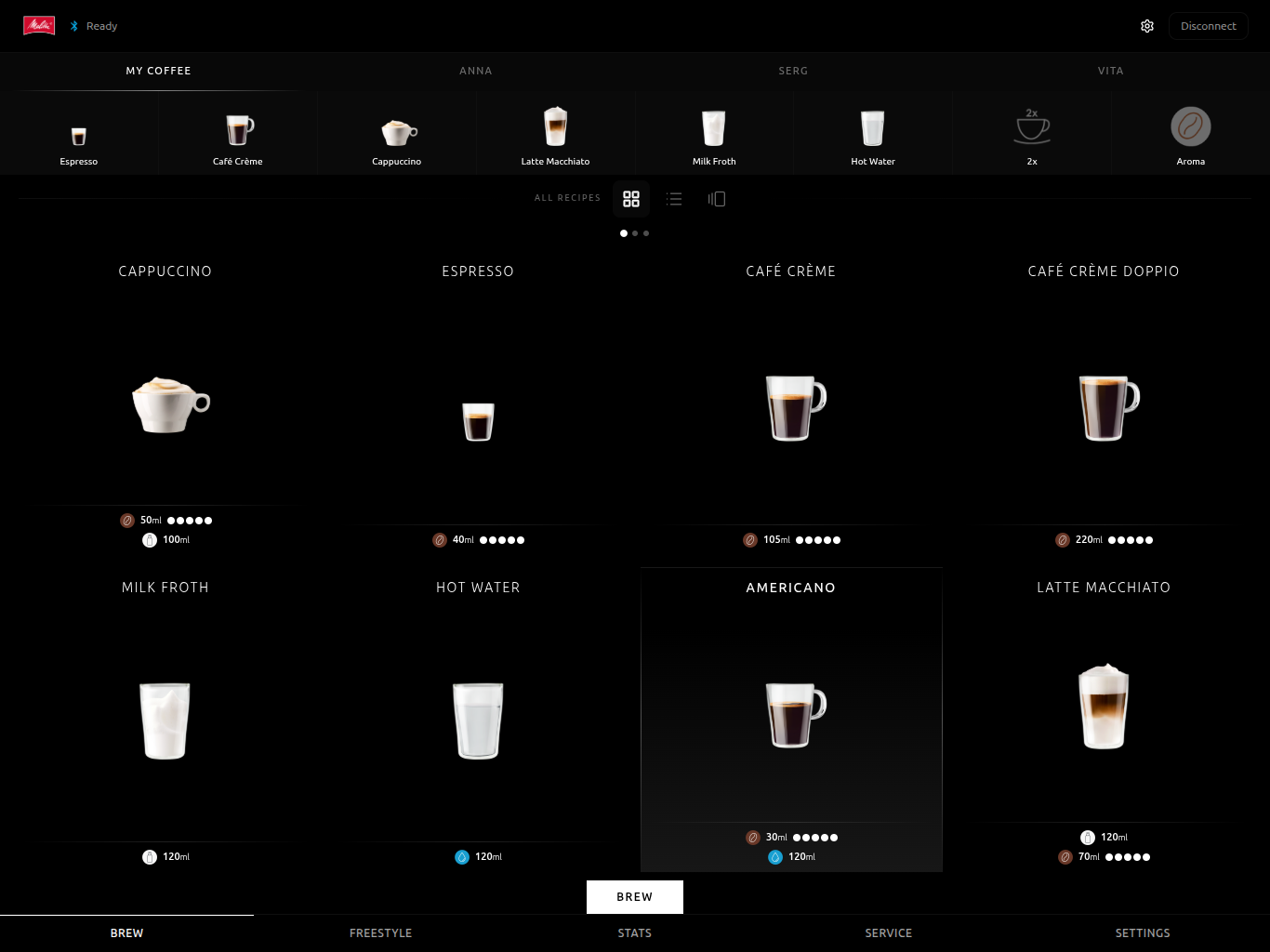
### Brew(冲泡)
浏览所有可用配方,支持网格、列表或轮播视图。顶部提供收藏配方与用户配置的快捷按钮。选择配方后点击 **Brew** 即可开始。
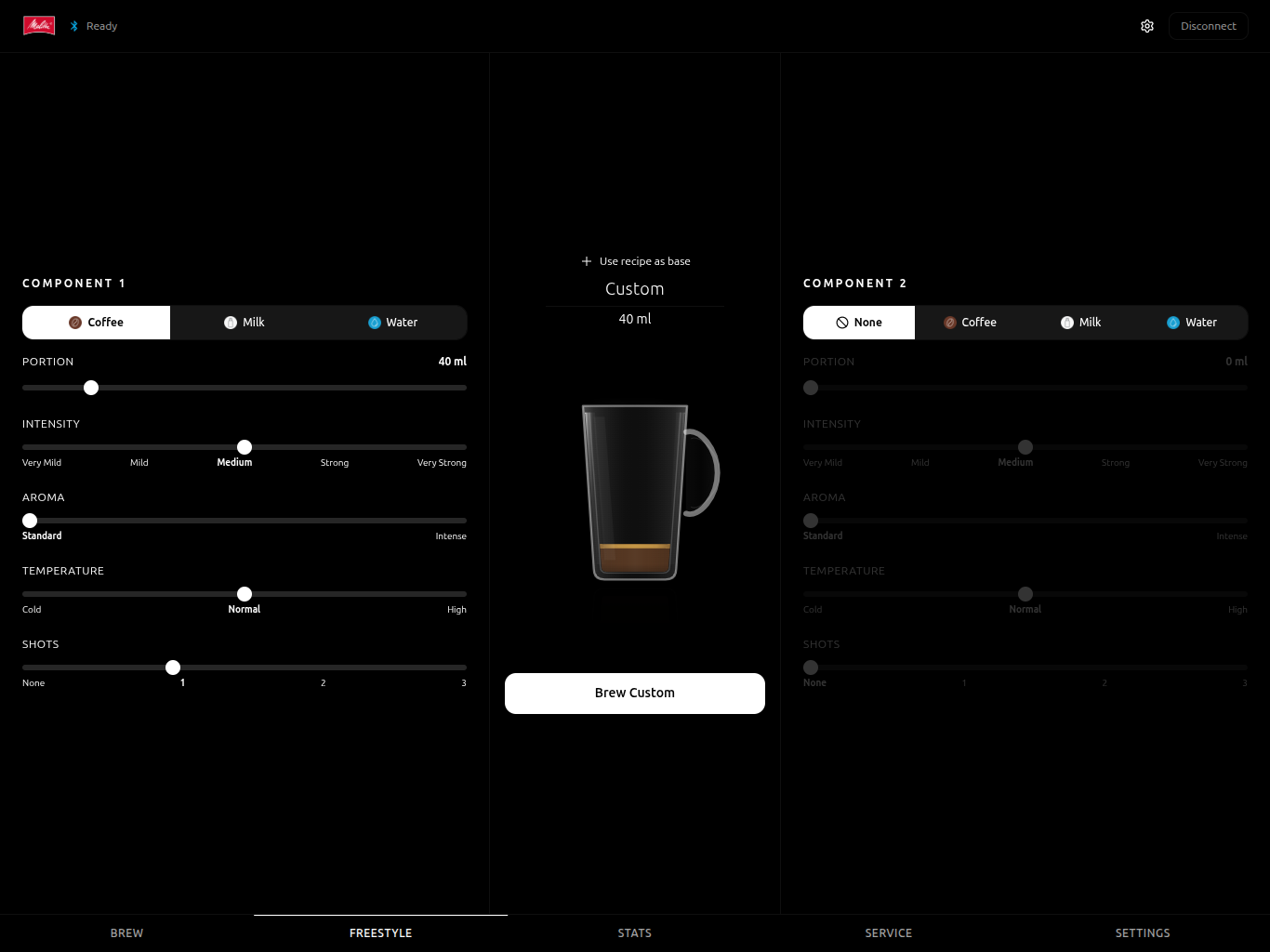
### Freestyle(自由配方)
从零开始构建自定义饮品。两组可配置组件,支持调整流程类型、份量、强度、香气、温度与杯数。每项调节时实时预览玻璃杯画面。
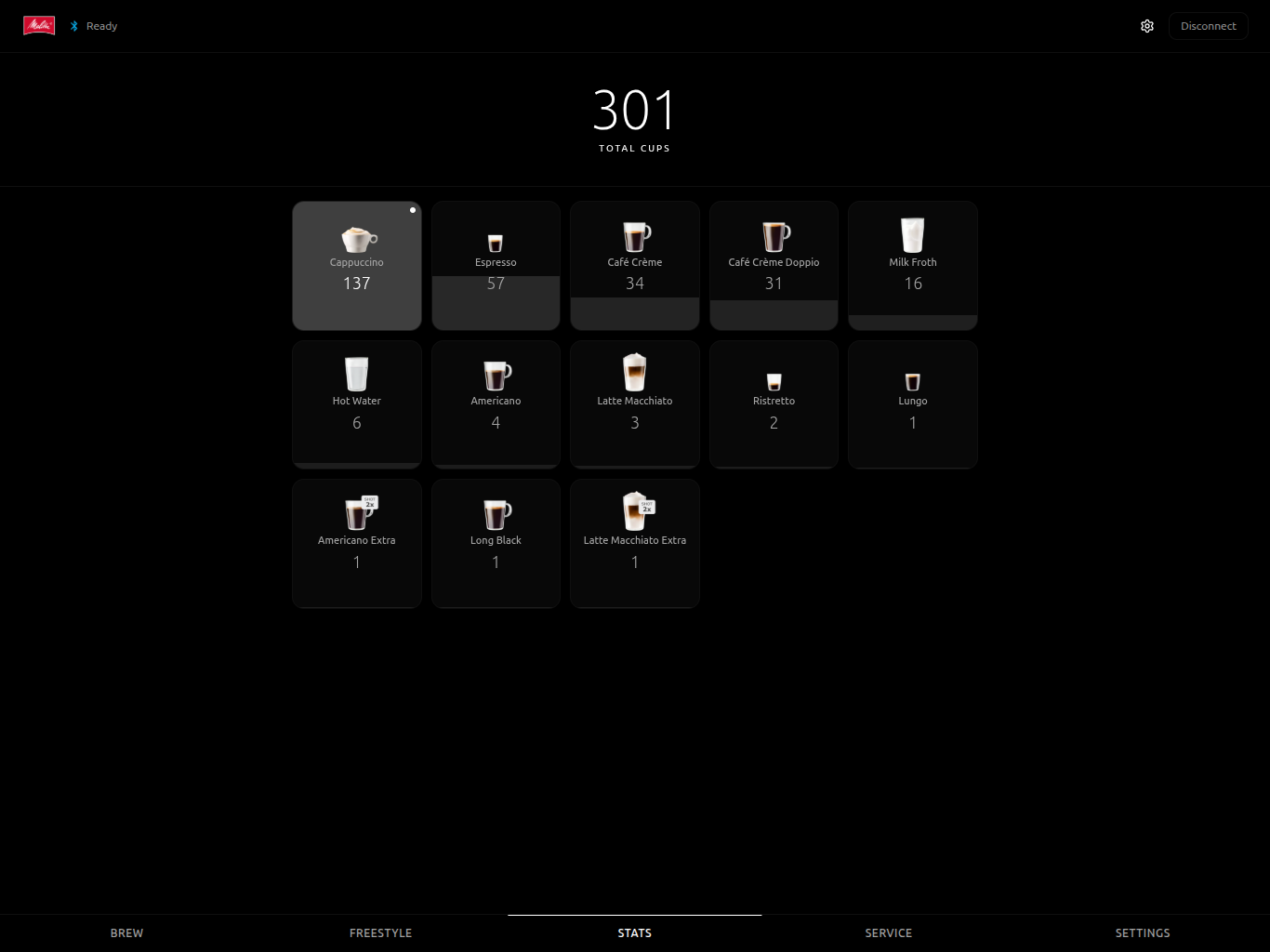
### Stats(统计)
杯数统计仪表盘,展示总冲泡量与按配方统计的进度条。
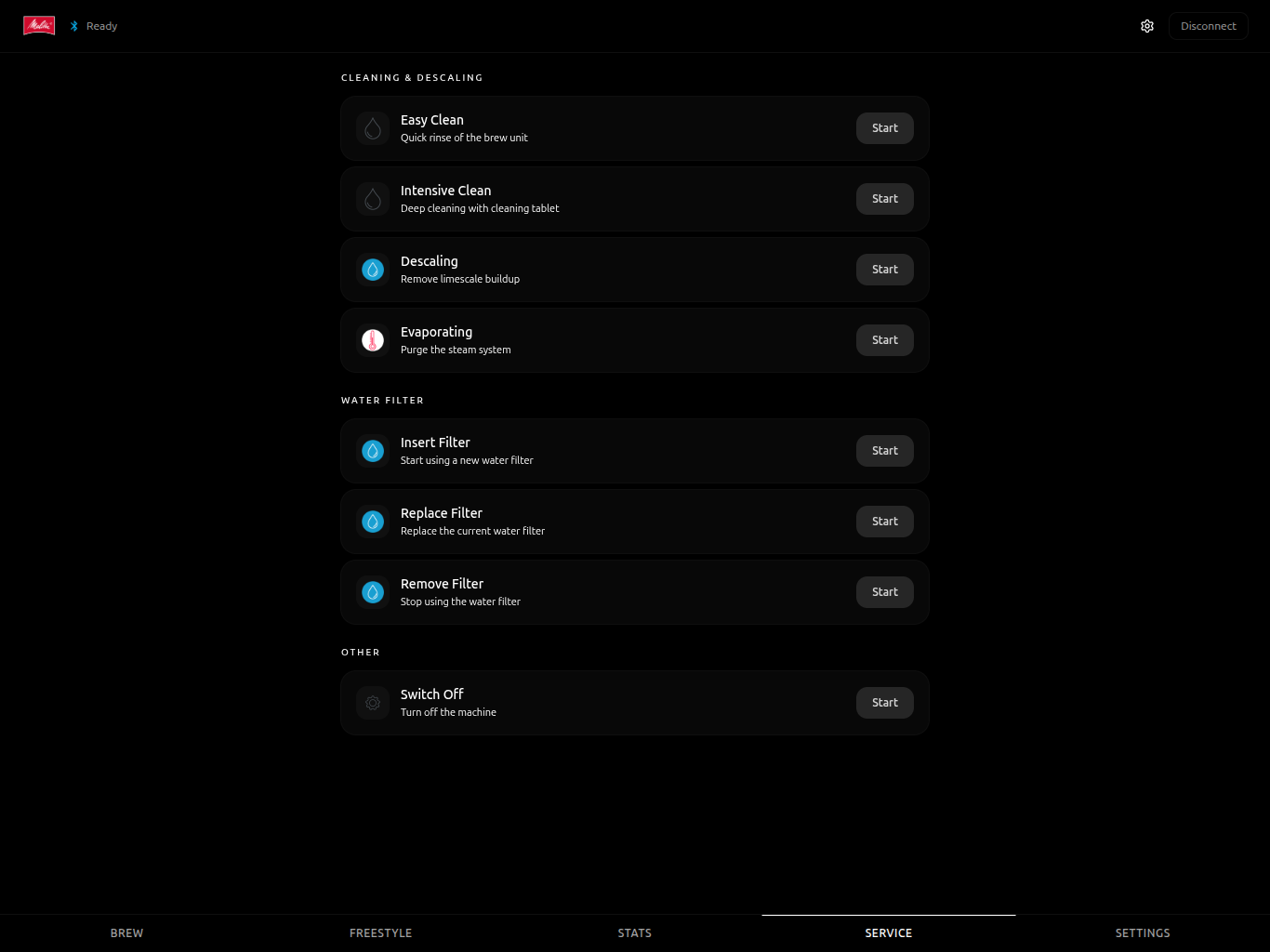
### Service(维护)
维护操作:快速清洁、深度清洁、除垢、蒸发、水滤管理、断电。
### Settings(设置)
机器配置:节能模式、自动选豆、冲洗开关、水硬度、自动关机时间、冲泡温度。
## ESP32 BLE 模拟器(独有)
本仓库提供一个 **捆绑的 ESP-IDF 固件**([`esp_emulator/`](esp_emulator/)),可在 BLE 层模拟真实 Nivona 机器 —— 适用于开发、配对、冲泡测试与压力测试,无需任何物理设备。
据维护者所知,尚无其他开源 Home Assistant 咖啡机集成提供其所驱动硬件的配对模拟器。
**模拟内容**:
- 广告字节级一致的 ADV + 扫描响应(公司 ID `0x0319`、客户 ID `0xFFFF`、Eugster 厂商负载、SR 中的 DIS) — 被 HA 与官方 **Nivona Android 应用** 共同识别为真实设备
- GATT:AD00 服务,含 AD01(写)、AD02(通知)、DIS(0x180A)及其厂商/型号/序列号
- 协议:完整的 Eugster/EFLibrary 栈 — 帧解析、RC4 流密码、AES 客户密钥引导、HU 握手及各品牌验证表、HR/HW/HX/HE/HA/HB 操作码
- 状态:小型 FSM 在 HE 冲泡期间驱动 `process`/`progress`(NIVO 8000 为 3 → 4 → 3,其余系列为 8 → 11 → 8),并发出未请求的 HX 通知
**你将获得**:
- 在 HA 上完成配对 → 识别 → 冲泡的端到端流程(无需硬件)
- BLE 客户端的回归测试、配置流程与品牌感知 HX 解析器
- 多品牌架构的基准验证:因为模拟器在实验台上“说 Nivona”,旁边是真实的 Melitta,可确保协议差异不会静默回归
支持目标:**ESP32-C6**(首选)与 **ESP32-S3**。使用 `idf.py -p /dev/ttyUSB0 flash monitor` 烧录。完整设置、引脚图与排错请参考 [`esp_emulator/README.md`](esp_emulator/README.md)。
## 配置
### 第一步:在机器上启用蓝牙
请参考机器手册,确保蓝牙功能已开启。
### 第二步:添加集成
1. 在 Home Assistant 中进入 **Settings** > **Devices & Services** > **Add Integration**。
2. 搜索 **Melitta Barista Smart & Nivona**。
3. 若 BLE 扫描已发现设备,将自动列出;否则可手动输入 MAC 地址。
### 第三步:配对设备
该集成需要与咖啡机进行 BLE 配对(绑定)。设置过程中会提示在机器上启用配对模式:
1. 在机器上打开 **Settings** > **Bluetooth** / **Connectivity**。
2. 启用 **配对模式** — 机器上的 BLE 图标应开始闪烁。
3. 在 Home Assistant 确认对话框中点击 **Submit**。
4. 集成将自动连接并配对。若机器弹出确认,请接受。
若设备已预先配对(例如通过 `bluetoothctl`),集成会自动识别并跳过配对步骤。
### 手动配对(通过 bluetoothctl)
若自动配对失败,可通过 SSH 在 Home Assistant 主机上手动配对:
```
bluetoothctl
remove F1:2C:72:3F:75:ED # Replace with your machine's MAC address
scan on # Wait for the machine to appear
pair F1:2C:72:3F:75:ED
trust F1:2C:72:3F:75:ED
info F1:2C:72:3F:75:ED # Verify: Paired: yes, Bonded: yes, Trusted: yes
exit
```
随后按上述流程在 Home Assistant 中添加集成。
配置完成后,集成会为该设备创建一个包含所有适配实体的设备对象。
## 实体参考
### 传感器
| 实体 | 描述 |
|------|------|
| State | 当前机器状态:Ready、Brewing、Cleaning、Descaling、Off 等 |
| Activity | 当前子流程:Grinding、Extracting、Steaming、Dispensing Water、Preparing |
| Progress | 冲泡或清洁进度百分比 |
| Action Required | 所需用户操作:Fill Water、Empty Trays、Brew Unit Removed、Move Cup to Frother、Flush Required |
| Connection | BLE 连接状态:Connected 或 Disconnected(诊断) |
| Firmware | 机器报告的固件版本(诊断) |
| Features | 来自 HI 响应的机器能力位,以及原始字节属性(诊断,默认禁用) |
| Total Cups | 总冲泡计数,按配方细分(仅 Melitta) |
### 二进制传感器
| 实体 | 描述 |
|------|------|
| Awaiting Confirmation | 当机器显示用户确认提示(填水、移杯、冲洗等)时为 `on`,与 `Confirm Prompt` 按钮联动(PROBLEM 设备类) |
### 选择器
| 实体 | 描述 |
|------|------|
| Recipe | 所有可用配方的下拉菜单(Melitta T 为 21 款,TS 为 24 款) |
| Profile | 当前激活的用户配置档 |
| Freestyle Process 1 | 第一组件流程:coffee、milk 或 water |
| Freestyle Intensity 1 | 第一组件强度:very_mild、mild、medium、strong、very_strong |
| Freestyle Temperature 1 | 第一组件温度:cold、normal、high |
| Freestyle Shots 1 | 第一组件份数:none、one、two、three |
| Freestyle Process 2 | 第二组件流程(同第一组件,支持 none) |
| Freestyle Intensity 2 | 第二组件强度 |
| Freestyle Temperature 2 | 第二组件温度 |
| Freestyle Shots 2 | 第二组件份数(0 表示禁用) |
### 按钮
| 实体 | 品牌 | 描述 |
|------|------|------|
| Brew | Melitta | 冲泡当前选中的配方。机器处于 Ready 状态且配方已选时可用 |
| Brew Freestyle | Melitta | 使用当前自由配方参数进行冲泡 |
| Cancel | both | 取消当前运行中的操作(HX) |
| Confirm Prompt | both | 通过 HY 确认机器提示(移杯、冲洗等);仅在 `awaiting_confirmation` 为 on 时可用 |
| Reset Recipe | Melitta | 将当前配方重置为出厂默认(HD),并自动刷新缓存属性 |
| Easy Clean | both | 启动简易清洁流程(配置项) |
| Intensive Clean | both | 启动深度清洁流程(配置项) |
| Descaling | both | 启动除垢流程(配置项) |
| Filter Insert / Replace / Remove | both | 水滤操作(配置项) |
| Evaporating | both | 蒸汽蒸发流程(配置项) |
| Switch Off | both | 关闭机器(配置项) |
### 数值
| 实体 | 范围 | 描述 |
|------|------|------|
| Water Hardness | 1–4 | 除垢计划的水硬度等级 |
| Auto Off After | 15–240 min | 空闲自动关机时间 |
| Brew Temperature | 0–2 | 冲泡温度等级:0=Cold、1=Normal、2=High |
| Freestyle Portion 1 | 5–250 ml | 第一组件份量(毫升) |
| Freestyle Portion 2 | 0–250 ml | 第二组件份量(毫升,0 表示禁用) |
### 开关
| 实体 | 型号 | 描述 |
|------|------|------|
| Energy Saving | T、TS | 启用/禁用节能模式(配置项) |
| Auto Bean Select | TS 仅限 | 启用/禁用自动选豆(配置项) |
| Rinsing Disabled | T、TS | 启用/禁用自动冲洗(配置项) |
### 文本
| 实体 | 型号 | 描述 |
|------|------|------|
| Profile 1–4 Name | T | 用户配置档名称(可读写,配置用) |
| Profile 1–8 Name | TS | 用户配置档名称(可读写,配置用) |
| Freestyle Name | T、TS | 自定义配方名称 |
## 服务
集成提供五项自定义服务。
### `melitta_barista.reset_recipe`(Melitta)
通过 HD 操作码重置配方至出厂默认值。配方缓存会自动刷新,UI / PWA 将立即显示出厂值。
| 参数 | 类型 | 必填 | 描述 |
|------|------|------|------|
| `entity_id` | string | 是 | 目标机器的任意按钮实体 |
| `recipe_id` | int (200–223) | 否 | 目标配方;默认为当前选中项 |
### `melitta_barista.confirm_prompt`
通过 HY 确认活跃的机器提示(例如“移杯至打奶泡”、“需要冲洗”)。若无可确认提示,将抛出 `ServiceValidationError`。
| 参数 | 类型 | 必填 | 描述 |
|------|------|------|------|
| `entity_id` | string | 是 | 目标机器的任意按钮实体 |
### `melitta_barista.brew_freestyle`
使用完整可配置参数进行自由配方冲泡。
| 参数 | 类型 | 必填 | 描述 |
||------|------|------|
| `entity_id` | string | 是 | 任意 Melitta 设备实体 |
| `name` | string | 是 | 配方显示名称 |
| `process1` | string | 是 | 主流程:coffee、milk 或 water |
| `intensity1` | string | 否 | 强度:very_mild、mild、medium、strong、very_strong |
| `aroma1` | string | 否 | 香气:standard、intense |
| `temperature1` | string | 否 | 温度:cold、normal、high |
| `shots1` | string | 否 | 份数:none、one、two、three |
| `portion1_ml` | int | 否 | 份量(毫升,20–300) |
| `process2` | string | 否 | 副流程(同主流程,支持 none) |
| `two_cups` | bool | 否 | 是否双杯(默认 false) |
### `melitta_barista.brew_directkey`
使用当前激活配置档的 DirectKey 配方进行冲泡。
| 参数 | 类型 | 必填 | 描述 |
|------|------|------|------|
| `entity_id` | string | 是 | 任意 Melitta 设备实体 |
| `category` | string | 是 | espresso、cafe_creme、cappuccino、latte_macchiato、milk、milk_froth、water |
| `two_cups` | bool | 否 | 是否双杯(默认 false) |
### `melitta_barista.save_directkey`
将配方保存至 DirectKey 配置档槽位。
| 参数 | 类型 | 必填 | 描述 |
|------|------|------|------|
| `entity_id` | string | 是 | 任意 Melitta 设备实体 |
| `category` | string | 是 | 与 `brew_directkey` 相同的类别 |
| `profile_id` | int | 否 | 配置档 ID(默认当前激活档) |
| (recipe params) | — | 否 | 同 `brew_freestyle` 参数 |
## 选项
通过 **Settings → Devices & Services → Melitta Barista Smart & Nivona → Configure** 进行配置。
### 基础设置
| 参数 | 默认值 | 范围 | 描述 |
|------|--------|------|------|
| 轮询间隔 | 5s | 1–60s | 轮询机器状态的频率 |
| 重连延迟 | 5s | 1–60s | 重连尝试的初始延迟 |
| 重连最大延迟 | 300s | 30–3600s | 重连退避上限 |
| 轮询错误断开 | 3 | 1–20 | 连续错误后强制断开 |
| 帧超时 | 5s | 2–30s | BLE 命令响应超时 |
| **自动确认软提示** | off | bool | 启用时自动发送 HY(移杯/冲水);硬件提示(加水/倒空托盘)仍需手动 |
### 高级设置
| 参数 | 默认值 | 范围 | 描述 |
|------|--------|------|------|
| BLE 连接超时 | 15s | 5–60s | 建立 BLE 连接超时 |
| 配对超时 | 30s | 10–120s | 配对阶段超时 |
| 配方重试 | 3 | 1–10 | 读写配方重试次数 |
| 初始连接延迟 | 3s | 0–30s | 配置后首次连接等待时间 |
## 数据更新机制
| 数据 | 方法 | 频率 |
|------|--------|------|
| 机器状态 | BLE 推送通知 | 约每 5 秒 |
| 杯数统计 | 每次冲泡完成后读取 | 冲泡完成时 |
| 配置档数据 | 连接时读取一次 | 连接时 |
| 设置 | 实体配置时读取 | 按需 |
## AI 咖啡品酒师
基于任意 Home Assistant 对话代理(OpenAI、Anthropic、Google、本地 LLM)生成个性化的 espresso/latte/cappuccino 配方。
**工作原理**:
1. 在集成的 WebSocket API(或配套 [PWA](https://github.com/dzerik/melitta-barista-app) 的 Sommelier 标签页)中配置豆仓、牛奶类型及糖浆/配料。
2. 可选添加槽位、饮食习惯与机器配置(杯量、饮食偏好)。
3. 集成将配置 + 当前 HA 上下文(天气、心情、场合)传递给所选对话代理。
4. 代理返回三条结构化配方,供 Melitta Freestyle 构建器使用——点击即可冲泡。
**内置内容**:31 款欧洲咖啡预设(含 Lavazza、illy、Melitta、Dallmayr、Tasty Coffee 等)。可通过 WebSocket API 扩展。
**需求**:至少配置一个 `conversation` 集成(例如 [OpenAI Conversation](https://www.home-assistant.io/integrations/openai_conversation/))。
**API**:29 项 WebSocket 命令用于管理豆仓、牛奶、收藏、历史与生成。详见配套 [PWA 仓库](https://github.com/dzerik/melitta-barista-app) 的 Sommelier UI。
## 架构
集成采用**三层抽象**(v0.40.0+)以保持清晰分离:
1. **BLE 传输层**(共享)— 配对、重连、读写 GATT 特征
2. **Eugster/EFLibrary 核心层**(共享)— 帧格式 `0x53…0x45`、反码校验、RC4 流密码、`HU/HV/HR/HW/HX/HE/HZ/HY/HD/HI/HA/HB` 操作码
3. **品牌配置层**(可插拔)— RC4 运行时密钥、HU 验证表、广告正则、仅 Melitta 支持的操作码扩展(`HC`/`HJ`)、各系列能力
新增第三方 Eugster OEM 品牌(如公开逆向工程出现)只需在 `brands/` 中添加一个文件。参考 [`docs/adr/001-brand-profile-abstraction.md`](docs/adr/001-brand-profile-abstraction.md)。
## 使用场景
- **智能家庭仪表盘** — 在 HA 仪表盘监控咖啡机状态、杯数统计与维护提醒
- **晨间流程** — 通过 HA 自动化定时冲泡
- **家庭配置档** — 切换不同用户的个性化饮品
- **维护提醒** — 收到除垢、滤杯更换等通知
- **Kiosk 模式** — 使用 [独立 PWA](https://github.com/dzerik/melitta-barista-app) 在壁挂式平板运行
## 自动化示例
### 晨间 Espresso
```
automation:
- alias: "Morning Espresso at 7:00"
trigger:
- platform: time
at: "07:00"
condition:
- condition: state
entity_id: sensor.melitta_state
state: "ready"
action:
- service: button.press
target:
entity_id: button.melitta_brew_espresso
```
### 冲泡完成通知
```
automation:
- alias: "Coffee Ready Notification"
trigger:
- platform: state
entity_id: sensor.melitta_activity
from: "extracting"
to: "idle"
action:
- service: notify.mobile_app
data:
message: "Your coffee is ready! ☕"
```
### 维护提醒
```
automation:
- alias: "Coffee Machine Maintenance Reminder"
trigger:
- platform: state
entity_id: sensor.melitta_action_required
condition:
- condition: not
conditions:
- condition: state
entity_id: sensor.melitta_action_required
state: "none"
action:
- service: notify.mobile_app
data:
message: "Coffee machine needs attention: {{ states('sensor.melitta_action_required') }}"
```
## 卸载
1. 进入 **Settings → Devices & Services → Melitta Barista Smart & Nivona**
2. 点击三点菜单(⋮)→ **Delete**
3. BLE 连接将关闭,所有实体自动移除
4. 若通过 HACS 安装:前往 **HACS → Integrations → Melitta Barista Smart & Nivona → Uninstall**
## 本地化
集成提供 29 种语言翻译,涵盖全部欧洲与斯拉夫语言:
英语、俄语、乌克兰语、德语、波兰语、捷克语、斯洛伐克语、法语、意大利语、西班牙语、葡萄牙语、荷兰语、瑞典语、丹麦语、挪威语、芬兰语、匈牙利语、罗马尼亚语、希腊语、土耳其语、保加利亚语、克罗地亚语、塞尔维亚语、斯洛文尼亚语、波斯尼亚语、马其顿语、爱沙尼亚语、拉脱维亚语、立陶宛语。
## 已知限制
- **BLE 范围**:BLE 有效范围通常不超过 10 米。墙体等障碍物会降低信号。如 Home Assistant 主机离机器较远,建议在附近部署支持 BLE 的代理(如 ESPHome BLE 代理)。
- **单连接**:机器仅支持一个活跃 BLE 连接。若官方 Melitta App 已连接,集成将无法连接,反之亦然。
- **单 BLE 客户端**:集成作为单个 BLE 客户端运行;用户配置档名称可读写,但各配置档的配方自定义尚未公开。
- **轮询间隔**:机器状态在连接期间每 5 秒轮询一次。物理操作与状态更新间可能存在短暂延迟。
- **配方参数**内置配方使用机器存储默认值。如需完全自定义,请使用带可调流程、强度、温度、份量的自由配方构建器。
## 故障排除
**设备在设置期间未被发现**
- 确认机器上已启用蓝牙(参考机器手册)。
- 确保 Home Assistant 主机具备可用的 BLE 适配器。在主机上运行 `bluetoothctl scan on` 验证扫描是否正常。
- 将 Home Assistant 主机移近机器。
- 确保没有其他设备(例如手机上的 Melitta App)当前连接到机器。
**连接失败并提示 “D-Bus connection lost”**
- 设备尚未与主机配对。按上述配对流程操作。
- 若已配对,尝试移除并重新配对:`bluetoothctl remove && bluetoothctl pair `。
**连接频繁断开**
- BLE 连接对距离和干扰敏感。缩短主机与机器的距离。
- 考虑在机器附近使用 ESPHome 蓝牙代理。
- 检查 Home Assistant 日志中的 BLE 相关错误:**Settings** > **System** > **Logs**,过滤 `melitta_barista`。
**按钮显示为不可用**
- 配方和维护按钮仅在机器状态为 “Ready” 时可用。请检查 **State** 传感器。
- 若 **State** 传感器显示 “unavailable”,则 BLE 连接可能已断开。请检查 **Connection** 传感器。
**设置未更新**
- 数值与开关实体从机器读取值。若机器断开,将显示最后已知值。重新连接并在需要时手动刷新。
**启用调试日志**
在 `configuration.yaml` 中添加:
```
logger:
default: info
logs:
melitta_barista: debug
```
重启 Home Assistant 并复现问题,然后检查日志。
## 免责声明
本项目是一个独立的、非商业化的开源集成,仅用于个人与家庭自动化目的。
它**未**与 Melitta Group Management GmbH & Co. KG、Nivona Apparate GmbH、Eugster/Frismag AG 或其任何子公司或关联公司建立关联、认可或合作。
“Melitta”、“Barista T Smart”、“Barista TS Smart”、“Caffeo”以及 Melitta 标志是 Melitta Group Management GmbH & Co. KG 的注册商标。
“Nivona”、“NICR”、“NIVO”、“NIVO 8000”以及 Nivona 标志是 Nivona Apparate GmbH 的注册商标。
“Eugster”、“Frismag”以及相关产品名称是 Eugster/Frismag AG 的商标。
所有产品名称、标志、品牌与图形资产均为其各自所有者所有,此处仅用于识别与互操作目的。
本软件不用于商业用途或产生收入。详见 [NOTICE](NOTICE) 获取完整法律声明。
## 贡献
欢迎贡献。请在 [GitHub](https://github.com/dzerik/melitta-barista-ha) 上提交问题或拉取请求。
1. 叉取仓库。
2. 创建功能分支。
3. 提交更改并添加必要的测试。
4. 提交带有清晰变更说明的拉取请求。
## 许可证
本项目根据 [MIT 许可证](LICENSE) 授权。
标签:29 种语言, 686 测试, AI Coffee Sommelier, BLE, CI 测试, Eugster OEM, Freestyle 配方, Frismag OEM, GitHub Release, HACS, HACS 自定义, hassfest, Home Assistant 2024.1+, Home Assistant Lovelace, Home Assistant 自动化, Home Assistant 集成, Melitta Barista T, Melitta Barista TS, Nivona NICR, Nivona NIVO 8xxx, 可插拔品牌配置, 咖啡冲泡, 咖啡品鉴, 咖啡机, 咖啡机固件, 咖啡机控制, 咖啡机社区集成, 咖啡机自动化, 咖啡机设置, 品牌配置, 多语言支持, 安全测试框架, 开源集成, 无云集成, 智能家居, 本地控制, 网络调试, 翻译, 自动化, 自定义集成, 自由配方, 蓝牙低功耗, 逆向工具