alun-hub/sudo-logger
GitHub: alun-hub/sudo-logger
一款通过 mutual TLS、ed25519 ACK 和 cgroups 冻结机制强制记录所有 sudo 会话并支持 Web 回放的安全审计工具。
Stars: 0 | Forks: 0

# sudo-logger
[](https://github.com/alun-hub/sudo-logger/actions/workflows/test.yml)
[](https://codecov.io/gh/alun-hub/sudo-logger)
[](LICENSE)
[](https://github.com/alun-hub/sudo-logger/releases/latest)
**The problem:** Linux ships with no mandatory sudo audit trail. `sudo` can write logs
locally or to `sudo-logsrvd`, but logging is opt-in — an attacker who controls
`sudo.conf` can disable it entirely, or simply wait for a network outage. SOC teams
and compliance frameworks (PCI-DSS, ISO 27001, CIS L2) require that privileged
activity is *always* logged, but nothing in the standard sudo stack enforces that
guarantee.
**What sudo-logger does differently:** Every sudo session is streamed to a central
log server over mutual TLS. The server sends a cryptographic acknowledgement (ed25519)
for every I/O chunk. If acknowledgements stop arriving — network loss, server crash,
or deliberate disruption — the running process is frozen within ~800 ms via Linux
cgroups. The user sees a banner and can exit with Ctrl+C, but *no further input is
accepted until the server confirms receipt*. Logging is not optional; it is enforced
at the kernel level.
**Who should use this:** Security and compliance teams that need a provable audit
trail for privileged access (PCI-DSS, ISO 27001, HIPAA), infrastructure engineers
on Fedora/RHEL/Rocky Linux who want mandatory recording without a full PAM stack,
and organisations that need eBPF-based divergence detection to catch bypass attempts.
## Table of Contents
- [How it works](#how-it-works)
- [Why sudo-logger?](#why-sudo-logger)
- [Architecture](#architecture)
- [Security properties](#security-properties)
- [Features](#features)
- [Limitations](#limitations)
- [Requirements](#requirements)
- [Installation](#installation)
- [PKI bootstrap](#1-pki-bootstrap)
- [Server installation](#2-server-installation)
- [Client installation](#3-client-installation)
- [Configuration](#configuration)
- [Secret redaction](#secret-redaction)
- [Process sandbox](#process-sandbox)
- [Distributed storage (S3 + PostgreSQL)](#distributed-storage-s3--postgresql)
- [Web replay interface](#web-replay-interface)
- [Authentication](#authentication)
- [Role-based access control (RBAC)](#role-based-access-control-rbac)
- [SIEM forwarding](#siem-forwarding)
- [Blocking users](#blocking-users)
- [GDPR session deletion](#gdpr-session-deletion)
- [Prometheus metrics](#prometheus-metrics)
- [Sudoers management](#sudoers-management)
- [Viewing and replaying sessions](#viewing-and-replaying-sessions)
- [Developer guide](#developer-guide)
- [Repository layout](#repository-layout)
- [Building from source](#building-from-source)
- [Wire protocol](#wire-protocol)
- [ACK mechanism](#ack-mechanism)
- [Freeze mechanism](#freeze-mechanism)
- [Building RPMs](#building-rpms)
- [Container deployment (Podman)](#container-deployment-podman)
- [Kubernetes deployment](#kubernetes-deployment)
- [Performance and capacity](#performance-and-capacity)
- [Troubleshooting](#troubleshooting)
- [License](#license)
## How it works
User runs sudo
│
▼
┌─────────────────────┐
│ sudo C plugin │ Loaded by sudo for every invocation.
│ (plugin.so) │ Records stdin/stdout/tty I/O.
│ │ Blocks sudo entirely if agent is unavailable.
│ │ Freezes child process if ACKs go stale.
└────────┬────────────┘
│ Unix socket (/run/sudo-logger/plugin.sock)
▼
┌─────────────────────┐
│ sudo-logger-agent │ Local daemon running as root.
│ (Go) │ Bridges plugin ↔ server.
│ │ eBPF: records SSH/TTY login sessions and pkexec sessions.
│ │ Tracks ACK state per session.
│ │ Responds instantly to ACK queries.
│ │ Sends heartbeats every 400 ms.
└────────┬────────────┘
│ Mutual TLS (TCP 9876)
▼
┌─────────────────────┐
│ sudo-logserver │ Central server (separate machine).
│ (Go) │ Receives session data.
│ │ Writes asciinema v2 recordings.
│ │ Sends ed25519-signed ACKs per chunk.
│ │ Replies to heartbeats immediately.
└─────────────────────┘
│
▼
/var/log/sudoreplay/
/_/session.cast
When a user runs `sudo`, the plugin connects to the local agent daemon.
The agent opens a TLS connection to the remote log server. If the server
is unreachable at this point, sudo is blocked entirely — the command never
runs. If the connection succeeds, sudo proceeds and all I/O is streamed to
the server in real time. The server acknowledges every chunk and replies to
periodic heartbeat probes. If ACKs and heartbeats stop arriving (network
loss, server crash), the child process is frozen within ~800 ms — no
further input reaches it until ACKs resume or the session is killed with
Ctrl+C.
## Why sudo-logger?
The short version: `sudo_logsrvd` and `auditd` record what *did* happen.
sudo-logger enforces that everything *must* be recorded before it can happen.
| | sudo_logsrvd | auditd | sudo-logger |
|---|:---:|:---:|:---:|
| Freeze terminal if server unreachable | ✗ | ✗ | ✅ |
| Cryptographic per-chunk ACKs | ✗ | ✗ | ✅ |
| eBPF bypass detection | ✗ | partial | ✅ |
| Web replay UI with risk scoring | ✗ | ✗ | ✅ |
| SIEM forwarding (CEF / OCSF) | ✗ | ✗ | ✅ |
| Secret redaction before transit | ✗ | ✗ | ✅ |
| Ships with sudo / no install needed | ✅ | ✅ | ✗ |
| Relay / hierarchical logging | ✅ | ✗ | ✗ |
For the full comparison see [docs/comparison.md](docs/comparison.md).
For the rationale behind mandatory logging see [docs/why-mandatory-logging.md](docs/why-mandatory-logging.md).
## Architecture
### C plugin (`plugin/plugin.c`)
A sudo I/O plugin loaded via `/etc/sudo.conf`. Implements the `sudo_plugin.h`
API. Hooks into every sudo session to:
- Connect to the local agent over a Unix socket at session open
- Forward all terminal input (`log_ttyin`), output (`log_ttyout`), stdin,
stdout, and stderr as framed chunks
- Run a background monitor thread that polls ACK state every 150 ms and
writes freeze/unfreeze banners to `/dev/tty` when ACK state changes
- Block sudo entirely if the agent/server is unreachable at startup
- Terminate the active sudo session if the agent socket drops mid-session
(EPIPE/ECONNRESET/EOF detected by monitor thread → SIGTERM to sudo within 150 ms)
- Actual process freezing is performed by the agent via cgroup.freeze (see
[Freeze mechanism](#freeze-mechanism))
### Go agent (`go/cmd/agent/`)
A systemd service running as root on each client machine. Consolidates four
subsystems that share session state:
**Plugin handler** — bridges the sudo plugin (Unix socket) to the log server (TLS).
One goroutine per sudo session:
- Opens a TLS connection to the server for each new session
- Forwards SESSION_START, CHUNK, SESSION_END messages
- Receives and ed25519-verifies ACKs from the server
- Tracks ACK state per session; responds instantly to plugin ACK queries
- Sends a HEARTBEAT to the server every 400 ms; declares the connection
dead if no HEARTBEAT_ACK arrives within 800 ms (2 missed heartbeats)
- Recovers automatically when the network returns; the TCP connection
remains alive as long as the OS retransmission timeout has not expired
(typically several minutes on Linux with default settings)
- Terminates frozen sessions that have been unreachable for longer than
`freeze_timeout` (default 3 min) — sends `FREEZE_TIMEOUT` to the plugin,
which unfreezes the cgroup and prints a human-readable banner before
killing the session
- Creates a per-session cgroup subtree to freeze all child processes
- Tracks processes that escape to foreign cgroups (moved by GNOME/systemd)
and freezes them via SIGSTOP when safe (see [Freeze mechanism](#freeze-mechanism))
- Enters linger mode after `sudo` exits if GUI processes remain in the session
cgroup — holds the server connection open until all GUI processes exit, then
sends SESSION_END
**eBPF subsystem** — three kernel tracepoints loaded at startup (requires
`/sys/kernel/btf/vmlinux`; degrades gracefully to plugin-only mode if absent):
- `sys_enter_write` — captures TTY I/O from all processes in tracked cgroups (SSH/TTY login sessions and pkexec scopes); su, screen, and tmux output is captured transparently within their enclosing login session, not as separate entries
- `sys_enter_execve` — detects sudo and pkexec invocations for divergence tracking
- `sched_process_exit` — closes eBPF sessions when processes exit
**Divergence detector** — correlates eBPF sudo execve events with plugin
`SESSION_START` messages. If no match arrives within 30 seconds, sends a
`DIVERGENCE_ALERT` to the server which creates a visible `⚠ no plugin` session
in the replay UI, indicating sudo ran without the plugin logging it.
**Process sandbox** — optional eBPF LSM subsystem that enforces kernel-level
write, open-for-write, truncate, setattr, delete, rename, directory-create,
network-socket, mount, ptrace, and kill restrictions on all processes running
inside sudo session cgroups. Twenty hooks (18 LSM + 2 tracepoints) are loaded
at startup. Each hook checks whether the calling process is in a sandboxed
cgroup (`sandboxed_cgroups` BPF map) or has been PID-tracked since session start
(`sandboxed_pids` map, propagated to all descendants via `sched_process_fork`),
then applies a deny-list of protected inodes, process names, and capability
restrictions configured by the operator. The `sudo` process itself is exempt
from several restrictions to allow PAM modules to complete session setup.
Session cgroups and root PIDs are registered on session start and removed on
session end. See [Process sandbox](#process-sandbox).
**Sudoers management** — polls the log server every 15 seconds for a desired
sudoers config (`sudoers/` with `sudoers/_default` as fallback). When the
content changes it validates the new config with `visudo -c`, then atomically
renames a tmp file onto `/etc/sudoers.d/sudo-logger-managed` (server-wins). After
a successful apply it immediately sends a `MsgSudoersSnapshot` so the replay UI
reflects the new state within one poll cycle. An inotify watcher on `/etc/sudoers`
and `/etc/sudoers.d/` sends snapshots on any local change; a periodic 10-minute
tick guarantees at-least-once delivery. A `MsgHeartbeatAgent` keepalive every 30 s
drives the online/offline badge in the Sudoers tab. If the server returns no config
(not a network error), the managed file is removed and the host falls back to its
local `/etc/sudoers` alone.
Reads all settings from `/etc/sudo-logger/agent.conf` (key = value format).
### Go log server (`go/cmd/server/`)
A TLS server running on a dedicated machine. For each client connection:
- Receives session metadata and opens session.cast for writing
- Streams terminal I/O as events into session.cast
- Acknowledges every chunk with an ed25519-signed ACK
- Replies to HEARTBEAT probes immediately with HEARTBEAT_ACK
- Sessions stored via the pluggable storage backend (see below)
### Storage abstraction (`go/internal/store/`)
The log server and replay server share a pluggable `SessionStore` interface with two backends selected at startup via `--storage`:
| Backend | Flag | Use case |
|---------|------|----------|
| `local` (default) | `--storage=local` | Single-node deployment; sessions stored on local disk under `--logdir` |
| `distributed` | `--storage=distributed` | Multi-node / Kubernetes; session cast files stored in S3 (or MinIO / NetApp StorageGRID), metadata in PostgreSQL |
**Local storage** (`--storage=local`, default):
- Zero new dependencies — identical to previous behavior
- Sessions stored as `///session.cast`
- Replay server detects completed sessions via inotify (fsnotify)
**Distributed storage** (`--storage=distributed`):
- Cast files uploaded to S3 after each session closes (async, 3 retries)
- Session metadata, risk cache, and block policy stored in PostgreSQL
- During upload, cast files are buffered locally in `--buffer-dir` (suitable for a K8s `emptyDir`)
- Replay server detects completed sessions by polling `sudo_sessions` every 5 s
- Both servers can run as multiple independent replicas — no shared filesystem required
- Supports AWS S3, MinIO, and NetApp StorageGRID via configurable endpoint and path-style URLs
**Migration tool** (`go/cmd/migrate-sessions`):
One-time idempotent migrator for existing deployments switching from local to distributed storage. Walks the existing log directory, inserts metadata into PostgreSQL (`ON CONFLICT DO NOTHING`), and uploads each `session.cast` to S3. Safe to re-run.
migrate-sessions \
--logdir /var/log/sudoreplay \
--db-url postgres://user:pass@host/dbname \ # pragma: allowlist secret
--s3-bucket my-bucket \
[--s3-endpoint https://minio.internal:9000] \
[--s3-path-style] \
[--dry-run]
## Security properties
| Property | Detail |
|----------|--------|
| **Sudo blocked at start** | If the log server is unreachable when sudo runs, the session is rejected before the command executes |
| **Child process frozen on network loss** | If ACKs stop arriving, the child process is frozen within ~800 ms |
| **Freeze cannot be escaped with `fg`** | Terminal sessions are frozen via `cgroup.freeze=1` — no job-control signals involved, so `fg` cannot escape the freeze |
| **cgroup namespace isolation** | At session start the plugin calls `unshare(CLONE_NEWCGROUP)`: child processes see the session cgroup as their filesystem root for `/sys/fs/cgroup`. They cannot migrate to a parent cgroup to escape the freeze, even with `CAP_SYS_ADMIN`. The agent uses a `readyToFork` barrier to ensure `sudo` remains in the restricted cgroup until the server is ready, guaranteeing child processes are born inside the sandbox. |
| **Ctrl+C always works** | Ctrl+C and Ctrl+\ are forwarded to the child even while frozen; the session can always be killed |
| **Mutual TLS** | Both client and server authenticate with certificates signed by a shared CA; unknown clients are rejected |
| **Asymmetric ACK signing (ed25519)** | Server signs each ACK with its ed25519 private key over `sessionID \|\| seq \|\| ts_ns`; a compromised client cannot forge ACKs for other sessions or other clients |
| **ACK bound to session** | Session ID is included in every ACK signature — a valid ACK for session A cannot be replayed to unfreeze session B |
| **Host field verified against TLS certificate** | Server rejects SESSION_START if the claimed `host` does not match the CN or DNS SANs of the presenting client certificate; a compromised agent on host A cannot forge log entries attributed to host B |
| **Plugin socket peer verification** | Agent verifies via `SO_PEERCRED` that only root processes (sudo) may connect to the Unix socket, as a second layer beyond file permissions |
| **Session ID collision resistance** | Session IDs include nanosecond precision and 4 cryptographically random bytes — simultaneous sessions on the same host are always distinct |
| **Tamper-evident log storage** | Logs are written on a separate server that the sudo-running user has no access to |
| **All I/O captured** | stdin, stdout, stderr, tty input and tty output are all recorded |
| **Input validated before filesystem use** | User, host, and session ID fields are validated with strict regexes; cgroup names are validated before directory creation |
| **Log directory confinement** | iolog writer and replay server both verify the resolved session path stays within the base log directory (symlinks resolved with `EvalSymlinks`) |
| **SELinux domain confinement** | `sudo-logger-agent` runs as `sudo_agent_t` in enforcing mode; kernel-level restrictions on what the agent process can access |
| **Process sandbox (optional)** | 20 eBPF LSM/tracepoint hooks enforce a deny-list of files, devices, `/proc` entries, sockets, and process names that sudo session processes cannot open for writing, truncate, write to, setattr, delete, rename, create files inside, or kill — not bypassable even by root. Also blocks `AF_NETLINK` (firewall tampering), `mount()` (masking audit dirs), and `ptrace()` (code injection into external processes). Scoped via cgroup ID and PID tracking propagated atomically at fork time. Device IDs resolved via `/proc/self/mountinfo` for correct Btrfs subvolume support. Active by default on Fedora 38+; older or non-Fedora kernels may need `lsm=bpf`. See [Process sandbox](#process-sandbox). |
| **Active session terminated if agent dies** | If the agent socket drops mid-session (EPIPE/ECONNRESET/EOF), the plugin sends SIGTERM to sudo within 150 ms — terminating the active shell. The attacker cannot continue working unlogged; they must start a new sudo session, which is fail-closed until the agent restarts (~2 s). |
| **Incomplete session detection** | If the agent is killed mid-session, the server logs a `SECURITY:` warning, writes an `INCOMPLETE` marker, and the replay UI flags the session with a red ⚠ badge. Sessions terminated by the freeze-timeout watchdog are distinguished with an amber ⏱ badge and carry no risk score — a network outage is not a security incident. |
| **Approval token not exposed in process list** | The approval token can be loaded from a file (`-approval-token-file`) or environment variable (`SUDO_LOGGER_APPROVAL_TOKEN`) rather than passed as a CLI flag, preventing it from appearing in `ps aux` or shell history. |
| **Constant-time token comparison** | The approval API and GDPR deletion endpoint compare Bearer tokens using `crypto/subtle.ConstantTimeCompare` to prevent timing-based token enumeration attacks. |
| **RBAC enforced server-side** | Viewer vs admin role enforcement happens in HTTP middleware on every request, not only in the browser UI — direct API calls without the admin role are rejected with `403 Forbidden`. |
## Features
- Full session replay via web interface (asciinema v2 format; `sudoreplay` CLI not compatible)
- **Centralised sudoers management**: push sudoers rules to all managed hosts from the replay UI; agents validate and apply atomically via `visudo -c` and report sync status in real time. Global default template with per-host overrides; visual card editor and raw editor with syntax highlighting.
- **Just-In-Time (JIT) sudo approval**: require human justification and admin approval before sudo proceeds. Supports asynchronous requests with Mattermost/Slack notifications, interactive Approve/Deny buttons, and time-limited approval windows.
- **Role-based access control (RBAC)**: `viewer` role sees only their own sessions; `admin` role sees all sessions, access logs, and can perform approval and deletion actions. Configure authentication (Local, OIDC SSO, or Proxy) directly in the UI. Roles are mapped dynamically from OIDC groups, proxy headers, or managed locally.
- **GDPR session deletion API**: permanently removes a session recording on request. Deletion requires a `reason`, is logged with a timestamp and deleted-by field (local: `.deletion-log.jsonl`; distributed: `sudo_deletion_log` table), and is forwarded to the configured SIEM as a `session_deleted` event.
- **Automatic secret redaction**: the agent masks AWS keys, API tokens, Bearer headers, JWT tokens, URL passwords, and other secrets in terminal streams before they reach the log server. Custom regex patterns can be added via `mask_pattern` in `agent.conf`.
- Active session terminated if agent is killed mid-session — plugin detects socket drop (EPIPE/ECONNRESET) and sends SIGTERM within 150 ms
- Incomplete session detection — replay UI flags sessions where the agent was killed mid-recording
- SELinux policy for `sudo-logger-agent` (enforcing mode, ships in the `selinux/` directory)
- **Process sandbox**: eBPF LSM deny-list prevents sudo session processes from writing to, deleting, or renaming protected files/devices/sockets and from killing protected daemons — kernel-enforced, not bypassable by root (see [Process sandbox](#process-sandbox))
- Real-time streaming — no local buffering on the client
- Interactive sessions (bash, vim, etc.) fully recorded including timing
- Freeze within ~800 ms of network loss; automatic recovery when network returns
- Frozen sessions automatically terminated after configurable timeout (default 3 min) with a human-readable error banner — prevents permanent hangs when the TCP connection dies
- Terminal sessions (bash, zsh, …) frozen via `cgroup.freeze` — no job control triggered
- GUI programs with own process group (gvim, okular, …) frozen via direct SIGSTOP/SIGCONT
- cgroup namespace isolation (`CLONE_NEWCGROUP`) prevents child processes from escaping the freeze cgroup, even with `CAP_SYS_ADMIN`
- Web replay interface with Basic Auth + TLS + trusted-user-header support (works standalone or behind Pomerium/oauth2-proxy/OpenShift ingress)
- **High Performance**: designed for 500+ simultaneous sessions using asynchronous Batch Disk I/O and non-blocking ingestion
- **Industrial Stability**: zero-deadlock architecture protects heartbeats from disk I/O backpressure
- RPM packages for Fedora/RHEL with proper systemd integration
- Automatic sudo.conf configuration on client RPM install/uninstall
- Minimal footprint: one small .so on the client + one Go daemon
## Limitations
- **Recovery window limited by TCP retransmission timeout**: the agent
keeps the TCP connection alive by writing heartbeats into the kernel send
buffer even when the network is down. Recovery happens automatically when
the network returns, as long as the OS retransmission timeout has not
expired. On Linux with default settings this is typically several minutes.
If the connection is truly gone (OS gave up), automatic recovery is no
longer possible. The freeze-timeout watchdog (default 3 min) handles this
case: it terminates the frozen session, unfreezes the cgroup, and prints
a human-readable error banner so the user knows why the session ended.
Without this, a dead TCP connection would cause a permanent freeze that
could only be broken with Ctrl+C or `kill` from another terminal.
- **No session buffer on reconnect**: chunks sent during the window between
network loss and freeze detection (up to 800 ms — 2 heartbeat intervals)
may not be acknowledged. The session recording up to that point is intact
on the server.
- **Interactive pkexec sessions lost when server is unreachable**: `pkexec`
sessions with terminal I/O (e.g. `pkexec bash`) cannot be buffered if the
log server is down at session start. The kernel BPF map must be updated
immediately to capture I/O, and the cgroup scope is gone by the time the
server comes back — there is no way to replay already-streamed events.
Background pkexec commands (no TTY, e.g. `pkexec id`) are buffered in memory
for up to 10 minutes and delivered automatically on reconnect.
- **One client certificate for all clients** (default setup): the included
`setup.sh` generates one client certificate shared across all machines.
For stronger isolation, generate per-machine client certificates.
- **Root on the client machine is not fully constrained**: the agent runs as
root and can be killed by a user with a `sudo bash` shell (`unconfined_t`
in Fedora's targeted SELinux policy). When the agent dies, the plugin
detects the socket drop (EPIPE/ECONNRESET) and terminates the active sudo
session within 150 ms — the kill command itself is already in the log.
`Restart=always` brings the agent back within 2 seconds; until then,
new sudo sessions are fail-closed. The server also writes an `INCOMPLETE`
marker. This system is designed to deter and audit; a fully compromised
root at the kernel level is out of scope for any software solution.
- **No log rotation**: `/var/log/sudoreplay/` grows without bound. A sample
logrotate configuration is provided in `sudo-logserver.logrotate` — install
it to `/etc/logrotate.d/sudo-logserver`. To enforce a maximum session age,
add a cron job: `find /var/log/sudoreplay -mindepth 3 -maxdepth 3 -type d -mtime +365 -exec rm -rf {} +`
- **Escaped processes sharing bash's process group cannot be SIGSTOP'd**: if
a process escapes the session cgroup and still shares bash's process group
(pgid != own pid), SIGSTOP cannot be used — it would signal the entire
group including bash and trigger job control. The agent instead attempts
to reclaim such processes back into the session cgroup so that
`cgroup.freeze` covers them. If reclaim fails (e.g. systemd placed them in
a delegation-locked scope), they remain unfrozen. Processes that are their
own process group leader (e.g. `gvim` after `setsid`) are always
hard-frozen via SIGSTOP/SIGCONT.
- **Requires sudo 1.9+**: uses the sudo 1.9 I/O plugin API.
- **To protect directory contents, list the directory itself**: the sandbox
blocks creating new files, subdirectories, symlinks, and device nodes inside a
protected directory via `lsm/inode_create`, `lsm/inode_mkdir`,
`lsm/inode_mknod`, and `lsm/inode_symlink` hooks. You must list the *directory*
inode (e.g. `/etc/sudoers.d`) in `sandbox.yaml` — listing individual files
inside it does not prevent creation of new siblings. The directory inode itself
is also protected against write, deletion, and rename.
- **Process sandbox does not block Unix socket IPC**: `file_permission` with
`MAY_WRITE` prevents open-for-write and deletion/rename of socket files, but
it does not intercept `connect()` + `send()` — normal IPC to a listed socket
still works. The protection is against socket file replacement, not data injection.
- **Process sandbox requires BPF LSM to be active**: BPF LSM hooks are only
enforced when `bpf` appears in the kernel's active LSM list. On Fedora 38
and later `bpf` is included in the default `CONFIG_LSM` list and active
without any boot parameter changes — verify with
`grep bpf /sys/kernel/security/lsm`. On older or non-Fedora kernels, add
`lsm=bpf` (appending to any existing list) to `GRUB_CMDLINE_LINUX` in
`/etc/default/grub` and run `grub2-mkconfig -o /boot/grub2/grub.cfg`. If
BPF LSM is absent, `AttachLSM` fails and the agent logs a warning; all
other agent functions continue normally.
## Requirements
### Server
- Linux (Fedora 43 / RHEL 9+ recommended)
- Reachable on TCP port 9876 from all clients
- `sudo-logger-server` RPM or equivalent
- **Recommended**: SSD storage and `LimitNOFILE=65536` for 500+ concurrent sessions
### Client
- Linux with sudo 1.9+
- `sudo-logger-client` RPM or equivalent
- Network access to the log server
### Build dependencies
- `gcc`
- Go 1.25+
- `rpm-build` (for RPM packaging)
`sudo_plugin.h` is vendored under `plugin/include/` (ISC-licensed, from the
sudo project), so no system `sudo-devel`/`sudo-dev` package is required to
build the plugin.
## Installation
### Quick Install (Debian/Ubuntu & Fedora/RHEL/Rocky Linux)
For the fastest setup, use our one-liner install script to download and install pre-compiled packages directly:
# To install Client (Monitored Hosts)
curl -sSL https://raw.githubusercontent.com/alun-hub/sudo-logger/main/scripts/install.sh | bash -s -- client
# To install Log Server
curl -sSL https://raw.githubusercontent.com/alun-hub/sudo-logger/main/scripts/install.sh | bash -s -- server
# To install Replay Server
curl -sSL https://raw.githubusercontent.com/alun-hub/sudo-logger/main/scripts/install.sh | bash -s -- replay
For manual installation and verification details, see [INSTALLATION.md](INSTALLATION.md).
### 1. PKI bootstrap
Run once on a secure machine (CA machine). You need `openssl`.
bash setup.sh /tmp/pki logserver.example.com
Replace `logserver.example.com` with the actual hostname or IP of your
log server. This must match the DNS name clients use to connect.
This generates:
/tmp/pki/
ca/ca.crt # CA certificate (distributed to all machines)
ca/ca.key # CA private key (keep secure, not distributed)
server/server.crt # Server TLS certificate
server/server.key # Server TLS private key
client/client.crt # Client TLS certificate
client/client.key # Client TLS private key
The ACK signing key pair is generated automatically on the server when the
`sudo-logger-server` RPM is installed for the first time:
/etc/sudo-logger/ack-sign.key # ed25519 private key (server only, root:sudologger 0640)
/etc/sudo-logger/ack-verify.key # ed25519 public key (copy to all clients)
**File distribution:**
| File | Server | Client |
|------|--------|--------|
| `ca/ca.crt` | Yes | Yes |
| `server/server.crt` | Yes | No |
| `server/server.key` | Yes | No |
| `client/client.crt` | No | Yes |
| `client/client.key` | No | Yes |
| `ack-sign.key` | Yes — auto-generated | No |
| `ack-verify.key` | Yes — auto-generated | Yes — copy from server |
### 2. Server installation
# Install RPM
dnf install sudo-logger-server-1.20.16-1.fc43.x86_64.rpm
# Install certificates
cp /tmp/pki/ca/ca.crt /etc/sudo-logger/
cp /tmp/pki/server/server.crt /etc/sudo-logger/
cp /tmp/pki/server/server.key /etc/sudo-logger/
# Secure TLS private key
chown root:sudologger /etc/sudo-logger/server.key
chmod 640 /etc/sudo-logger/server.key
# ack-sign.key and ack-verify.key are generated automatically by the RPM %post
# scriptlet if they do not exist. After first start, distribute ack-verify.key
# to all clients:
# scp /etc/sudo-logger/ack-verify.key client:/etc/sudo-logger/
# Configure listen address and log directory if needed
# Defaults: LISTEN_ADDR=:9876 LOG_DIR=/var/log/sudoreplay
vim /etc/sudo-logger/server.conf
# Start service
systemctl enable --now sudo-logserver
# Verify
systemctl status sudo-logserver
journalctl -u sudo-logserver -f
### 3. Client installation
# Install RPM (automatically adds Plugin line to /etc/sudo.conf)
dnf install sudo-logger-client-1.20.124-1.fc43.x86_64.rpm
# Install certificates and ACK verify key
cp /tmp/pki/ca/ca.crt /etc/sudo-logger/
cp /tmp/pki/client/client.crt /etc/sudo-logger/
cp /tmp/pki/client/client.key /etc/sudo-logger/
scp logserver:/etc/sudo-logger/ack-verify.key /etc/sudo-logger/
# Secure TLS private key
chmod 600 /etc/sudo-logger/client.key
# Set the log server address
vim /etc/sudo-logger/agent.conf
# Change: server = logserver.example.com:9876
# Start service
systemctl enable --now sudo-logger-agent
# Verify
systemctl status sudo-logger-agent
journalctl -u sudo-logger-agent -f
# Test
sudo ls
The RPM install adds the following line to `/etc/sudo.conf`:
Plugin sudo_logger_plugin sudo_logger_plugin.so
On uninstall (`dnf remove`), this line is automatically removed.
## Configuration
### Client: `/etc/sudo-logger/agent.conf`
All agent settings live in a single `key = value` config file. Lines
starting with `#` are comments. All keys are optional — the defaults below
match a standard RPM installation.
# Address of the remote log server (required — change this).
server = logserver.example.com:9876
# TLS mutual authentication — paths to PEM-encoded files.
# Defaults match the paths installed by the RPM.
#cert = /etc/sudo-logger/client.crt
#key = /etc/sudo-logger/client.key
#ca = /etc/sudo-logger/ca.crt
#verify_key = /etc/sudo-logger/ack-verify.key
# Unix socket the sudo plugin connects to.
#socket = /run/sudo-logger/plugin.sock
# eBPF session recording (requires kernel with BTF support).
# Falls back to plugin-only mode on older kernels.
#ebpf = true
# How long to keep a session frozen when the log server is unreachable
# before abandoning it. Use Go duration syntax (e.g. 3m, 90s, 0 = never).
#freeze_timeout = 3m
# Terminate a session that has received no user input for this long.
# Useful for cleaning up sessions where the user has walked away.
# Use Go duration syntax (e.g. 30m, 2h). Set to 0 to disable (default).
#idle_timeout = 0
# Verbose debug logging to syslog/journal.
#debug = false
After editing, restart the agent:
sudo systemctl restart sudo-logger-agent.service
#### Verbose debug logging
By default, `sudo-logger-agent` only logs errors and key events (session start,
freeze/unfreeze). To enable verbose logging, set `debug = true` in
`agent.conf` and restart the agent. Then watch the full output:
journalctl -u sudo-logger-agent -f
### Server: `/etc/sudo-logger/server.conf`
# Listen address (all interfaces, port 9876)
LISTEN_ADDR=:9876
# Base directory for session logs
LOG_DIR=/var/log/sudoreplay
Additional flags can be passed via a systemd drop-in:
# /etc/systemd/system/sudo-logserver.service.d/override.conf
[Service]
ExecStart=
ExecStart=/usr/bin/sudo-logserver \
-listen ${LISTEN_ADDR} \
-logdir ${LOG_DIR} \
-cert /etc/sudo-logger/server.crt \
-key /etc/sudo-logger/server.key \
-ca /etc/sudo-logger/ca.crt \
-signkey /etc/sudo-logger/ack-sign.key \
-strict-cert-host
| Flag | Default | Description |
|------|---------|-------------|
| `-strict-cert-host` | off | Reject sessions where the `host` field in SESSION_START does not match the CN or DNS SANs of the client's TLS certificate. Recommended when each machine has its own certificate; leave off for shared-certificate setups. |
| `-health-listen addr` | *(disabled)* | Start a plain HTTP listener on `addr` (e.g. `:9877`) that serves `/healthz` (always 200), `/metrics` (Prometheus text format), and `DELETE /api/sessions/` (GDPR deletion). Disabled by default; enable in Kubernetes to replace the TCP socket liveness probe. |
| `-approval-token secret` | — | Bearer token for the JIT approval API and GDPR deletion endpoint. Prefer `-approval-token-file` or the env var to avoid the value appearing in `ps aux`. |
| `-approval-token-file file` | — | Path to a file containing the approval token (newline stripped). Evaluated at startup. |
**Secret resolution priority** (same applies to both the server approval token and the replay-server admin token):
1. CLI flag value (`-approval-token`)
2. Environment variable `SUDO_LOGGER_APPROVAL_TOKEN`
3. File path (`-approval-token-file`)
Using a file or environment variable keeps the secret out of `ps aux` and shell history.
### Secret redaction
The agent automatically redacts secrets from terminal streams (stdin, stdout, tty in/out) **before** they are sent to the log server. Redaction happens locally using a "Surgical Redactor" architecture that masks only the sensitive value while preserving key names and separators (e.g. `api_key=****************`) for context.
**Built-in patterns** (always active):
| Pattern | Examples |
|---------|---------|
| Key/value assignments | `api_key=abc123`, `AWS_SECRET_ACCESS_KEY: ...`, `"token": "*"` |
| Bearer tokens | `Authorization: Bearer eyJ...`, `Bearer ` |
| URL/CLI passwords | `postgres://user:hunter2@host/db`, `curl -u admin:pass` |
| PEM Private Keys | `-----BEGIN RSA PRIVATE KEY-----` (full block masking) | |
| Cloud Credentials | AWS (`AKIA...`), GCP API Keys (`AIza...`), Azure Storage Keys |
| Developer Tokens | GitHub PATs (`ghp_...`), Stripe keys, Vault tokens, Slack webhooks |
| JWT tokens | `eyJhbGciOi...` (full three-part dot-separated tokens) |
| Financial Data | IBAN numbers and BIC/SWIFT codes |
| Password prompts | Interactive prompts ending in `password:`, `secret:`, `token:`, etc. |
**Precision & Context:**
- **Surgical Masking:** Only the secret is hidden. Separators like `=`, `:`, and `*` are preserved.
- **Metadata Protection:** Patterns are automatically applied to the `command` and `resolved_command` fields in session metadata, preventing secrets passed as CLI arguments from appearing in the replay header.
- **Standalone Tokens:** For high-entropy tokens found outside assignments (e.g. a random AWS ID in a log), the first 4 characters are revealed (e.g. `AKIA****`) to allow administrators to distinguish between different keys.
**Adding custom patterns** in `/etc/sudo-logger/agent.conf`:
# Redact 32-char hex tokens
mask_pattern = [0-9a-f]{32}
# Redact company-internal secret prefix
mask_pattern = (?i)acme-token-[a-z0-9]{16}
Each `mask_pattern` line adds one additional Go-compatible regex. The entire match is replaced with `***`. Patterns are also applied to the `command` field in session metadata, preventing secrets passed as CLI arguments from appearing in the replay header.
### Just-In-Time (JIT) Sudo Approval
The JIT approval system allows security teams to enforce a "four-eyes" principle for sudo access. When enabled, sudo is blocked until an administrator grants access via the Replay UI or a webhook integration.
#### Features
- **Challenge-Response**: If enabled, the plugin prompts for a justification (e.g., Jira ticket ID).
- **Approval Windows**: Admins grant access for a specific duration (e.g., 30m). During this window, the user can run `sudo` on that host without further prompts.
- **Session TTL Enforcement**: Active sessions are automatically terminated by the agent when the approval window expires. A warning is shown in the terminal 60 seconds before termination.
- **Mattermost/Slack Integration**: New requests are posted to a channel. Admins can click **Approve** or **Deny** buttons directly in the chat.
- **Secure Callbacks**: Interactive buttons use HMAC-SHA256 signatures to verify that the request originated from the log server. A `webhook_secret` must be configured — without it, interactive buttons are disabled and the callback endpoint rejects all requests.
- **Exempt Rules**: Whitelist specific users or hosts that do not require approval (e.g., `root` or automated service accounts).
#### Configuration (Local mode)
Edit `/etc/sudo-logger/approval-policy.yaml`:
enabled: true
default_window: 30m
exempt:
- user: root
notifications:
webhook_url: "http://mattermost.internal:8065/hooks/..."
request_channel: "sudo-logger"
# URL where the callback should land. Must be reachable by the Mattermost server.
# For internal/containerized deployments, use an internal IP (e.g., 10.42.0.1).
replay_web_app_url: "http://replay.internal:8080"
webhook_secret: "your-secret-here" # Required for Approve/Deny buttons # pragma: allowlist secret
mention_user: true
#### Network Requirements for Interactive Buttons
For the **Approve/Deny** buttons to work:
1. **Mattermost Access**: The Mattermost server must be able to reach the `replay_web_app_url`.
2. **Internal IPs**: If using a local IP (e.g., `192.168.x.x` or `10.x.x.x`), ensure **Allow Untrusted Internal Connections to** is configured in the Mattermost System Console.
3. **Auth Bypass**: The `/api/approvals/callback` route must be exempted from any reverse-proxy authentication (e.g., `oauth2-proxy`). It is secured by its own HMAC verification.
4. **Host Headers**: If using IP-based URLs, ensure the Ingress controller allows requests without a matching DNS Host header for the callback path.
#### Configuration (Distributed mode)
In distributed mode, settings are managed via the **Settings -> JIT Approval** tab in the Replay UI and stored in PostgreSQL. This allows dynamic updates without modifying ConfigMaps or restarting pods.
### OPA JIT Policy
The OPA (Open Policy Agent) policy engine replaces the simple exempt-list in `approval-policy.yaml` with a structured rule table evaluated by an embedded Rego module. Configure it via **Settings → OPA Policy** in the Replay UI.
#### Decision priority
Rules are not evaluated in order — priority is fixed:
deny > allow > default action (challenge or allow)
A single deny rule vetoes all allow rules. If no rule matches, the configured default action applies.
#### Rule fields
| Field | Format | Description |
|-------|--------|-------------|
| Users | glob / `@group` | Username that ran sudo (`*` = all) |
| Hosts | glob / `@group` | Hostname of the monitored machine |
| Commands | glob | Full command path (e.g. `/bin/bash`, `/usr/bin/apt*`) |
| Runas | glob / `@group` | Target user sudo runs as (usually `root`) |
| Sys groups | comma-sep group names (AND) | User must belong to **all** listed OS groups — resolved via NSS (local, SSSD, LDAP, Active Directory) |
| Weekdays | subset of Mon–Sun | Restrict to specific days of the week (server clock) |
| Hour from / to | 0–23 (-1 = any) | Time window; overnight ranges (e.g. 22–06) are supported |
| Action | allow / challenge / deny | Outcome when all conditions match |
#### Local policy groups
Define named sets of users, hosts, or runas targets under the **Groups** sub-tab and reference them with `@groupname` in rule fields. This avoids repeating long member lists across multiple rules.
Group: sre-team
Members: alice, bob, sre-*
Use in rules as: `Users = @sre-team`
#### Example policy
| Comment | Users | Hosts | Commands | Runas | Sys groups | Weekdays | Time | Action |
|---------|-------|-------|----------|-------|------------|----------|------|--------|
| SRE on-call | `@sre-team` | `*` | `*` | `root` | | Mon–Fri | 20:00–06:00 | allow |
| All others | `*` | `*` | `*` | `*` | | | | challenge |
Default action: **challenge**
#### API
The policy is stored under the key `jit-policy` in the server store and exposed at:
GET /api/jit-policy → { policy, rego }
PUT /api/jit-policy ← policy JSON; validates and hot-reloads OPA
Changes take effect immediately on the next sudo invocation without a server restart.
### Distributed storage (S3 + PostgreSQL)
Pass `--storage=distributed` plus the flags below to both `sudo-logserver` and
`sudo-replay-server` when running in a multi-node or Kubernetes environment.
| Flag | Default | Description |
|------|---------|-------------|
| `--storage` | `local` | Storage backend: `local` or `distributed` |
| `--s3-bucket` | — | S3 bucket name (required for distributed) |
| `--s3-region` | `us-east-1` | AWS region (or any value for MinIO/StorageGRID) |
| `--s3-prefix` | `sessions/` | Key prefix for cast objects in the bucket |
| `--s3-endpoint` | — | Custom endpoint URL for MinIO / NetApp StorageGRID (e.g. `https://minio.internal:9000`) |
| `--s3-path-style` | `false` | Use path-style URLs — required for MinIO and NetApp StorageGRID |
| `--s3-access-key` | — | Static access key (leave empty to use `AWS_ACCESS_KEY_ID` or IAM) |
| `--s3-secret-key` | — | Static secret key (leave empty to use `AWS_SECRET_ACCESS_KEY` or IAM) |
| `--db-url` | — | PostgreSQL DSN (e.g. `postgres://user@host:5432/sudologger?sslmode=require`); pass password via `PGPASSWORD` env var or the DSN |
| `--buffer-dir` | `/var/lib/sudo-logger/buffer` | Local write-buffer directory for in-flight S3 uploads (use `emptyDir` in Kubernetes) |
**Example (MinIO):**
sudo-logserver \
--storage=distributed \
--s3-bucket=sudo-logs \
--s3-endpoint=https://minio.internal:9000 \
--s3-path-style \
--s3-access-key=minioadmin \ # pragma: allowlist secret
--s3-secret-key=minioadmin \ # pragma: allowlist secret
--db-url=postgres://sudologger:secret@postgres:5432/sudologger?sslmode=require \ # pragma: allowlist secret
--buffer-dir=/var/lib/sudo-logger/buffer \
...
**Credential priority (S3):**
1. `--s3-access-key` / `--s3-secret-key` flags (static credentials — MinIO, StorageGRID)
2. `AWS_ACCESS_KEY_ID` / `AWS_SECRET_ACCESS_KEY` environment variables
3. IAM instance profile / IRSA (when running on AWS / EKS)
**PostgreSQL schema** is applied automatically at startup with `CREATE TABLE IF NOT EXISTS` — no separate migration step required for new deployments.
**Importing risk rules into the database** — in distributed mode, risk rules are stored in PostgreSQL rather than on disk. To seed the database from an existing `risk-rules.yaml`:
sudo cat /etc/sudo-logger/risk-rules.yaml | python3 -c "
import yaml, json, sys
data = yaml.safe_load(sys.stdin)
print(json.dumps({'rules': data.get('rules', [])}))
" | curl -s -X PUT http://:8080/api/rules \
-H "Content-Type: application/json" \
--data-binary @-
After import, rules are served from the database and changes via the Settings UI are persisted there automatically.
### Tunable constants in `plugin/plugin.c`
| Constant | Default | Description |
|----------|---------|-------------|
| `AGENT_SOCK_PATH` | `/run/sudo-logger/plugin.sock` | Unix socket path |
| `ACK_TIMEOUT_SECS` | `2` | Seconds without ACK before plugin-side freeze |
| `ACK_REFRESH_SECS` | `0` | Re-query agent on every monitor poll (every 150 ms) |
| `ACK_QUERY_TIMEOUT_MS` | `100` | Max wait for ACK_RESPONSE from agent |
### Tunable constants in `go/cmd/agent/main.go`
| Constant | Default | Description |
|----------|---------|-------------|
| `ackLagLimit` | `5s` | Unacknowledged chunk age before reporting dead to plugin |
| `hbInterval` | `400ms` | Heartbeat interval; freeze declared after 2 missed replies (800 ms) |
### Agent config keys
All of these go in `/etc/sudo-logger/agent.conf`:
| Key | Default | Description |
|-----|---------|-------------|
| `freeze_timeout` | `3m` | Terminate a frozen session after this duration of server unreachability. Prevents permanent hangs when the TCP connection dies. Set to `0` to disable (not recommended). |
| `idle_timeout` | `0` | Terminate a session that has received no user input (stdin/ttyin) for this duration. Sends SIGHUP to the sudo process and closes the session. Set to `0` to disable. Use Go duration syntax, e.g. `30m`, `2h`. |
| `ebpf` | `true` | Enable eBPF session recording. Requires kernel BTF support (`/sys/kernel/btf/vmlinux`). Degrades gracefully to plugin-only mode on older kernels. |
| `mask_pattern` | — | Additional regex pattern to redact from terminal streams. Can be repeated for multiple patterns. See [Secret redaction](#secret-redaction). |
| `sandbox_config` | — | Path to a YAML deny-list for the process sandbox. Empty (default) disables sandbox enforcement. See [Process sandbox](#process-sandbox). |
| `disclaimer` | — | Text banner shown to the user at session start (e.g. an acceptable-use notice). Supports `\n`/`\t` escapes. Empty (default) shows no banner. |
| `disclaimer_color` | — | ANSI color for the disclaimer banner. One of `red`, `green`, `blue`, `orange`, `bold_red`, `bold_green`, `bold_blue`, `bold_orange`. Any other value (including empty) prints the banner uncolored. |
| `hostname` | *(auto-detected)* | Overrides the hostname reported to the log server. When empty, the agent resolves the FQDN via `os.Hostname()` plus a reverse DNS lookup, falling back to the short hostname. |
### Process sandbox
The process sandbox enforces a kernel-level deny-list on every process running
inside a sudo session cgroup. Unlike file permissions or SELinux policy, the
restrictions cannot be bypassed by the sandboxed process — not even by root —
because they are enforced by the Linux kernel's LSM framework via eBPF.
#### Requirements
| Requirement | Detail |
|-------------|--------|
| Kernel ≥ 5.7 | `lsm/` eBPF program type introduced in 5.7 |
| `CONFIG_BPF_LSM=y` | Kernel compiled with BPF LSM support |
| BPF active in LSM list | `bpf` must appear in `/sys/kernel/security/lsm` |
| `CONFIG_DEBUG_INFO_BTF=y` | Required for CO-RE (Compile Once, Run Everywhere) |
**Fedora 38 and later**: `bpf` is included in the default `CONFIG_LSM` list
and is active out of the box — no GRUB changes needed. Verify:
grep bpf /sys/kernel/security/lsm # should print a line containing "bpf"
**Older or non-Fedora kernels**: add `lsm=bpf` to `GRUB_CMDLINE_LINUX` in
`/etc/default/grub` (append to any existing `lsm=` value), then:
grub2-mkconfig -o /boot/grub2/grub.cfg
reboot
If BPF LSM is absent at runtime, the agent logs a warning at startup and
continues without sandbox enforcement — all other functionality is unaffected.
#### Enabling the sandbox
Add one line to `/etc/sudo-logger/agent.conf`:
sandbox_config = /etc/sudo-logger/sandbox.yaml
Then create `/etc/sudo-logger/sandbox.yaml` (see format below) and restart
the agent:
systemctl restart sudo-logger-agent
The agent logs a confirmation:
sandbox: LSM hooks attached (42 protected inodes, 15 protected processes)
#### Configuration file format
`sandbox.yaml` uses a simple YAML structure with seven protection categories.
All categories are optional.
protect:
# Regular files and directories — prevents write, delete, and rename.
files:
- /etc/sudoers
- /etc/sudoers.d
- /var/log/sudo-logger
# Forbidden binaries — blocked from execution inside any session.
# Useful for tools that delegate privileged actions via D-Bus or IPC
# (e.g. firewall-cmd, busctl, nmcli) where blocking by capability alone
# is not sufficient. Matched by inode so renaming the binary is blocked,
# but copying to a new path creates a new inode that is not covered.
forbidden:
- /usr/bin/firewall-cmd
- /usr/bin/busctl
- /usr/bin/gdbus
- /usr/bin/dbus-send
# No-exec directories — execution blocked for binaries residing anywhere
# under these directories. Prevents copy-bypass (copying a forbidden binary
# to /tmp and running it from there).
# WARNING: Do NOT use on Btrfs systems. On Btrfs every subvolume root
# (e.g. /home, /) has inode 256 on the same device. Adding a subvolume
# root to this list will also match / and block all execution in the session.
# Safe to use on ext4 and xfs. The agent logs a warning if inode 256 is
# detected at config load time.
noexec:
- /tmp
- /dev/shm
- /var/tmp
# Device nodes — prevents raw disk and memory access.
devices:
- /dev/mem
- /dev/kmem
- /dev/sda
# /proc entries — prevents modifying sensitive kernel parameters.
proc:
- /proc/sysrq-trigger
- /proc/sys/kernel/randomize_va_space
# Unix domain socket files — prevents deletion and replacement.
# Does not block connect()+send() IPC (see Limitations).
sockets:
- /run/sudo-logger/plugin.sock
# Process names — sessions cannot send any signal to these processes,
# including SIGKILL. This effectively prevents users from stopping
# or restarting protected systemd services (e.g. systemctl stop auditd).
# Names are capped at 15 characters (Linux TASK_COMM_LEN).
# Verify the exact truncated name with: cat /proc//comm
processes:
- sudo-logger-age # Our agent
- auditd # Audit daemon
- sssd # System Security Services Daemon
- sshd # OpenSSH server
- systemd-journal # systemd-journald truncates to 15 chars
- firewalld # Firewall daemon
A comprehensive example for Fedora systems (covering sudo, PAM, SSH, SSSD,
Kerberos, auditd, SELinux, PKI, cron, systemd units, and all major security
daemons) is included in `sandbox.yaml` in the repository root.
#### How enforcement works
At agent startup, each configured path is resolved to its inode number and
block device ID. Device IDs are obtained via `/proc/self/mountinfo` field 3
(`MAJOR(sb->s_dev):MINOR(sb->s_dev)`), which matches exactly what the kernel
reports in BPF via `inode->i_sb->s_dev` — this works correctly for Btrfs
subvolumes where `stat().st_dev` returns the subvolume's anonymous device
rather than the superblock device. The resulting `{inode, device}` pairs are
loaded into a BPF hash map (`protected_inodes`). Process names are loaded into
a second map (`protected_procs`).
Twenty hooks are then attached to the kernel:
| Hook | What it blocks |
|------|---------------|
| `lsm/file_open` | Opening a protected inode for writing (O_WRONLY / O_RDWR) |
| `lsm/file_permission` | Write or append access to a protected inode |
| `lsm/path_truncate` | Truncating a protected path via `truncate()` or `open(O_TRUNC)` |
| `lsm/inode_setattr` | Attribute changes (chmod, chown, truncate) on a protected inode |
| `lsm/inode_unlink` | Deleting a protected file |
| `lsm/inode_rename` | Renaming a protected file, or renaming onto one |
| `lsm/inode_mkdir` | Creating a directory inside a protected directory |
| `lsm/inode_create` | Creating a regular file inside a protected directory |
| `lsm/inode_mknod` | Creating a device node inside a protected directory |
| `lsm/inode_symlink` | Creating a symlink inside a protected directory |
| `lsm/task_kill` | Sending any signal to a process whose name is in `protected_procs` |
| `lsm/bpf` | Calling the `bpf()` syscall (prevents map tampering) |
| `lsm/socket_create` | Creating `AF_NETLINK` sockets (prevents firewall/route tampering) |
| `lsm/ptrace_access_check` | Attaching to/debugging processes outside the sandbox (escapes) |
| `lsm/sb_mount` | Mounting a filesystem over a protected inode (integrity) |
| `lsm/capable` | Requesting specific capabilities (`CAP_NET_ADMIN`, `CAP_AUDIT_CONTROL`, `CAP_SYS_MODULE`) |
| `lsm/unix_stream_connect` | Connecting to systemd/D-Bus control sockets when `deny_systemd_ipc` is enabled (closes the `systemd-run` / `busctl StartTransientUnit` sandbox escape) |
| `lsm/bprm_check_security` | Executing binaries in `forbidden` list or under `noexec` directories |
| `tp_btf/sched_process_fork` | Propagates PID sandbox membership from parent to child at fork time |
| `tp_btf/sched_process_exit` | Removes PID from the sandbox tracking map on process exit |
Each hook checks whether the calling process is in a sandboxed cgroup or PID
set before applying any restriction. Two complementary scoping mechanisms are
used:
- **`sandboxed_cgroups`** — the agent registers each session's cgroup ID (=
the inode of the cgroup v2 directory) at session start and removes it at
session end. This covers the normal case where processes remain in the
session cgroup.
- **`sandboxed_pids`** — the agent registers the sudo root PID at session
start. The `sched_process_fork` hook propagates this membership to every
descendant process atomically at fork time (before the child runs any
userspace code). This catches short-lived commands like `sudo pkill auditd`
where `pam_systemd` moves the process to a new session scope cgroup before
the command forks — the PAM scope migration race.
**Exemption for sudo:** the `sudo` process itself is automatically exempt from
several restrictions (socket creation, ptrace, mount, capabilities) during its
initialization phase. This allows PAM modules (like `pam_audit` or `pam_systemd`)
to interact with the kernel audit subsystem and D-Bus sockets correctly before
the user's shell is launched.
Processes outside both sets are unaffected — the hooks are global but
effectively scoped to active sessions.
When a blocked operation is attempted, the kernel returns `EPERM` to the
calling process. The session continues; only the specific operation is denied.
#### Process name truncation
Linux stores the process name (`comm`) in a 16-byte field including the null
terminator, giving a maximum of 15 usable characters. Names longer than 15
characters are silently truncated by the kernel. Verify the actual stored name
before adding an entry:
# Find the PID
pgrep -x systemd-journald
# Read the kernel-stored name
cat /proc//comm
# → systemd-journal
The agent also logs a warning when loading a name that exceeds 15 characters.
#### Limitations
- **List the directory to protect its contents**: listing a directory in
`sandbox.yaml` prevents creating new files, subdirectories, symlinks, and
device nodes inside it (`lsm/inode_create`, `lsm/inode_mkdir`,
`lsm/inode_mknod`, `lsm/inode_symlink`). Listing individual files inside a
directory does not prevent siblings from being created next to them.
- **`noexec` is not safe on Btrfs**: the noexec check walks the dentry tree
upward and compares `{inode, device}` pairs. On Btrfs every subvolume root
always has inode 256 on the same underlying block device. A standard Fedora
Btrfs layout mounts both `/` and `/home` as separate subvolumes — both
resolve to `{ino=256, dev=X}`. Adding `/home` to `noexec` therefore also
matches `/` and blocks all execution inside the session, locking it
completely. Use `noexec` only on ext4, xfs, or other non-Btrfs filesystems.
The agent emits a `WARNING` log line and the UI shows a warning when a path
with inode 256 is configured.
- **`forbidden` does not prevent copy-bypass**: binaries are matched by inode.
Copying a forbidden binary to a new path creates a new inode that is not in
the map. Pair `forbidden` with `noexec` (on non-Btrfs) to close this gap.
- **Unix socket IPC not blocked**: listing a socket path prevents its
deletion and replacement, but does not intercept `connect()` + `send()`.
Normal IPC to the socket continues to work.
- **Paths resolved at startup**: if a protected file does not exist when the
agent starts, it is skipped with a warning. Restart the agent after creating
new paths that should be protected.
- **Symlinks followed**: paths are resolved with `stat(2)`, which follows
symlinks. The underlying inode is protected, not the symlink.
## Web replay interface
`sudo-replay-server` is a lightweight HTTP server that provides a browser-based
terminal player for recorded sessions. It reads asciinema v2 session recordings written by
`sudo-logserver` and requires no database.
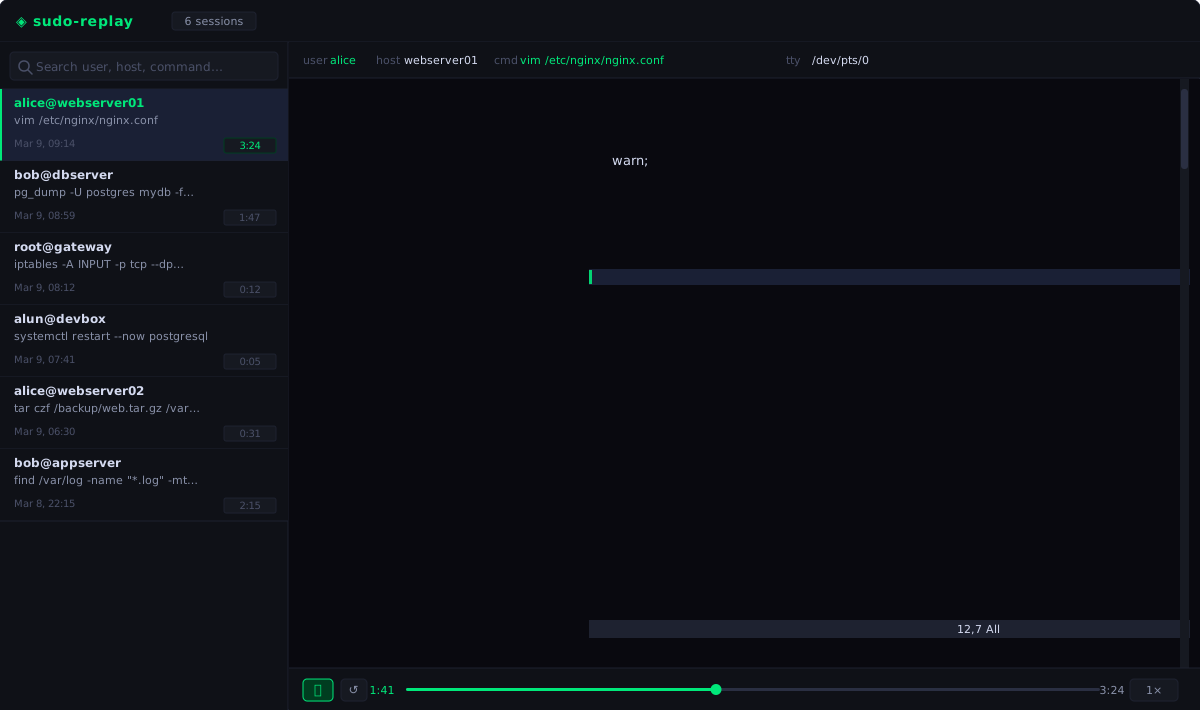
# Install RPM on the log server
dnf install sudo-logger-replay-1.20.27-1.fc43.x86_64.rpm
# Start the service (runs as sudologger, reads /var/log/sudoreplay)
systemctl enable --now sudo-replay
# Open in browser
xdg-open http://localhost:8080
**Features:**
- Session list with live search by user, host, or command
- **Full command with all arguments** shown in the session list and info bar
(e.g. `vim /etc/nginx/nginx.conf`, `pg_dump -U postgres mydb -f backup.sql`)
- Terminal player with play/pause, scrubbing, and speed control (0.25×–16×)
- Keyboard shortcuts: `Space` play/pause, `←`/`→` seek ±5 s, `R` restart
- **Summary tab** — aggregate statistics for a selectable date range: total
sessions, unique users and hosts, incomplete sessions, sessions > 2 h, High
Risk and Critical sessions. Per-user table with sortable columns (Sessions,
Avg Duration, Long, High Risk, Critical, Top Commands, Hosts). Click any
stat card to filter the table. User search box.
- **Anomalies tab** — flagged sessions by rule: incomplete sessions, High Risk
sessions (score ≥ 50), direct root shell invocations, activity outside
working hours (23:00–06:00), and sessions longer than 2 h. Sortable columns.
Each anomaly links directly to the session in the player.
- **Risk scoring** — every session is scored 0–100 based on configurable rules
in `/etc/sudo-logger/risk-rules.yaml`. Rules match against the sudo command
line and terminal output events in `session.cast` for shell sessions. Scores are cached in
`risk.json` per session and invalidated automatically when rules change.
Levels: Low (0–24) · Medium (25–49) · High (50–74) · Critical (75+). Risk
badges are shown on session cards and in the session info bar.
- **Settings tab** — browser UI for risk rules and SIEM forwarding. Rule
changes and SIEM configuration are written back immediately (disk in local
mode, PostgreSQL in distributed mode) and take effect without a server
restart. PEM certificate upload is available in local storage mode; in
distributed mode manage certificates via Kubernetes Secrets.
- **Blocked Users tab** — security teams can block individual users from running
sudo, either globally or per host. A configurable message is shown to the
blocked user at the sudo prompt. The log server enforces blocks centrally and
reloads the policy every 30 seconds. See [Blocking users](#blocking-users).
- **SIEM forwarding** — completed sessions are forwarded to an external SIEM
after the session closes. Risk score and reasons are included in every event.
See [SIEM forwarding](#siem-forwarding) below.
- **Sudoers tab** — view and edit sudoers rules for every managed host. A global
`_default` template applies to all hosts; per-host overrides show a **Modified**
badge. A visual card editor presents rules as identity cards (one per user or
group) with inline fields for hosts, run-as, commands, and options. A raw editor
with syntax highlighting is also available. A real-time diff compares the staged
config against the latest snapshot from the agent and shows a sync badge:
✓ in sync · ⏳ pending · ⚠ agent offline · ✖ apply error.
- **Role-based access control (RBAC)** — `viewer` users see only their own sessions and can replay them; `admin` users see all sessions and have access to the access log, approval actions, GDPR deletion, and configuration. Configure authentication (Local Database, OIDC SSO, or External Proxy) directly in the UI. Roles are assigned dynamically from OIDC group claims, proxy headers, or managed in the local user database. The current user's role is reflected in the `/api/me` response and used to show or hide admin-only UI tabs.
- **Auto-refresh** — session list polls for new sessions every 15 seconds and
immediately on tab focus; no manual browser refresh needed.
- **Prometheus metrics** — `/metrics` endpoint with session counts, risk level
distribution, and view counter; see [Prometheus metrics](#prometheus-metrics).
- **No external dependencies** — xterm.js and CSS are vendored into the binary;
works in air-gapped environments with no internet access
### Authentication
`sudo-replay-server` supports three authentication modes that can be combined
freely. Choose the mode that fits your deployment:
#### Mode 1: No built-in auth — deploy behind a reverse proxy
The simplest option when you already have infrastructure for authentication.
The replay server runs on localhost and the proxy handles auth and TLS.
Compatible proxies:
- **Pomerium** (identity-aware proxy, recommended)
- **oauth2-proxy** (lightweight OIDC proxy, works with any IdP: Keycloak, Azure AD, Dex, …)
- **OpenShift ingress** with built-in OAuth support
Configure the proxy to set a header with the authenticated username (e.g.
`X-Forwarded-User`) and pass `-trusted-user-header` to the replay server so
it is recorded in the access log:
# /etc/sudo-logger/replay.conf (read by sudo-replay.service via EnvironmentFile)
# All flags must be on ONE line — no line continuations.
REPLAY_ARGS=-trusted-user-header X-Forwarded-User
Then reload:
systemctl daemon-reload && systemctl restart sudo-replay
#### Mode 2: Built-in HTTP Basic Auth with TLS
Standalone deployment with no external proxy required. **Despite its name and
help text, `-htpasswd ` does not actually read that file's contents —
the value only needs to be non-empty.** It exists purely to force
authentication on even before any local user has a password set (without it,
a fresh install with zero passworded users is treated as an open deployment).
Real credentials are always managed in the local user database (the same
one used by the Bootstrap flow and **Config → Users & Auth**, accessible via
the UI or the `/api/users` API — see [Role-based access control](#role-based-access-control-rbac--enterprise-sso)),
checked via `authenticate()` against bcrypt hashes stored there — the
htpasswd file's actual bcrypt entries are never parsed. There is also no
`SIGHUP` (or any other) reload handler in the replay server; the process
only handles `SIGTERM`/`SIGINT` for graceful shutdown.
**Step 1 — Point the flag at any existing, non-empty file** (its content is
irrelevant, but a real htpasswd-style file for later external tooling
doesn't hurt):
dnf install httpd-tools
htpasswd -cB /etc/sudo-logger/replay.htpasswd alice # content unused by sudo-logger itself
chown root:sudologger /etc/sudo-logger/replay.htpasswd
chmod 0640 /etc/sudo-logger/replay.htpasswd
**Step 2 — Obtain a TLS certificate:**
Use your existing PKI, a self-signed cert, or Let's Encrypt:
# Self-signed (for internal use):
openssl req -x509 -newkey rsa:4096 -keyout replay.key -out replay.crt \
-days 365 -nodes -subj '/CN=replay.example.com'
cp replay.crt replay.key /etc/sudo-logger/
chmod 640 /etc/sudo-logger/replay.key
**Step 3 — Configure the service:**
Create `/etc/sudo-logger/replay.conf` with all flags on a single line
(systemd `EnvironmentFile` does not support line continuations):
REPLAY_ARGS=-tls-cert /etc/sudo-logger/replay.crt -tls-key /etc/sudo-logger/replay.key -htpasswd /etc/sudo-logger/replay.htpasswd
Reload and restart:
systemctl daemon-reload
systemctl restart sudo-replay
# Verify TLS is active (look for "listening on ... (TLS)"):
journalctl -u sudo-replay -n 5
**Step 4 — Create the actual login accounts** via the Bootstrap modal (first
launch) or **Config → Users & Auth** in the UI, or `POST /api/users`
(`{"username","password_hash":"","role"}`).
Rotating a password or removing a user is done the same way — through the
user database, not the htpasswd file — and takes effect immediately, no
restart or signal needed:
curl -ku alice:adminpassword -X POST https://localhost:8080/api/users \
-d '{"username":"bob","password_hash":"NewPassword123!","role":"viewer"}' # pragma: allowlist secret
curl -ku alice:adminpassword https://localhost:8080/api/sessions # test login
#### OIDC (Enterprise SSO) with Keycloak
Sudo Logger supports native OpenID Connect (OIDC) for authentication and role mapping. This allows you to integrate with identity providers like Keycloak, Okta, or Azure AD.
##### Keycloak Client Configuration
1. **Create Client**: Create a new OpenID Connect client named `sudo-replay`.
2. **Capability Config**:
* **Client authentication**: Set to **On** (Confidential access type).
* **Authorization**: **Off**.
* **Authentication flow**: Enable **Standard flow** (Authorization Code Flow).
3. **Login settings**:
* **Valid redirect URIs**: Add both `http:///api/oidc/callback` and `https:///api/oidc/callback`. Use a wildcard if needed: `https://replay.example.com/*`.
* **Web origins**: Set to `+` or your specific domain.
4. **Group Mapping**:
* To map Keycloak groups to Sudo Logger roles, create a **Client Scope** named `groups` with a **Group Membership** mapper.
* **Note**: Keycloak typically sends group names with a leading slash (e.g., `/admins`). Ensure your RBAC mapping in Sudo Logger matches this exact string.
##### Keycloak Kubernetes Deployment (Tips)
If deploying Keycloak v24+ in the same cluster:
* **Health Checks**: Set `KC_HEALTH_ENABLED=true` in environment variables; otherwise, Kubernetes readiness probes will fail with 404.
* **Proxy Headers**: Set `KC_PROXY=edge` to correctly handle `X-Forwarded-For` and `X-Forwarded-Proto` headers from Traefik/Ingress-Nginx.
* **Database**: Keycloak can share the existing PostgreSQL instance by creating a dedicated `keycloak` database.
##### Sudo Logger Configuration
Navigate to **Config -> System Auth** in the Replay UI:
1. **Auth Source**: Select `OIDC`.
2. **Issuer URL**: The full path to the realm (e.g., `https://keycloak.example.com/realms/myrealm`).
3. **Client ID**: `sudo-replay`.
4. **Client Secret**: Copy from Keycloak Client -> Credentials tab.
5. **RBAC Mapping**: Add a rule (e.g., `/admins` -> `admin`).
Once saved, the system will bypass the "Bootstrap Mode" and redirect all unauthenticated users to the identity provider.
#### Mode 3: Trusted header only (logging, no enforcement)
When a proxy handles authentication and you only want the replay server to
log who accessed it — without enforcing auth itself:
REPLAY_ARGS="-trusted-user-header X-Forwarded-User"
Every request is logged as:
access user=alice addr=10.0.0.1:52341 GET /api/sessions 200
#### Combining modes
All flags work together. Example: TLS + Basic Auth + trusted header logging,
in `/etc/sudo-logger/replay.conf`:
REPLAY_ARGS=-tls-cert /etc/sudo-logger/replay.crt -tls-key /etc/sudo-logger/replay.key -htpasswd /etc/sudo-logger/replay.htpasswd -trusted-user-header X-Forwarded-User
#### Flag reference
| Flag | Default | Description |
|------|---------|-------------|
| `-tls-cert file` | — | PEM TLS certificate (enables HTTPS, requires `-tls-key`) |
| `-tls-key file` | — | PEM TLS private key |
| `-htpasswd file` | — | Any non-empty path forces Basic Auth on even with zero passworded local users. Content is never read — real credentials live in the local user database (`/api/users`). No reload signal exists. |
| `-trusted-user-header hdr` | — | Log username from this request header (e.g. `X-Forwarded-User`) |
| `-admin-users list` | — | Comma-separated list of usernames that receive the `admin` role (e.g. `alice,bob`). All other authenticated users receive the `viewer` role. |
| `-listen addr` | `:8080` | Listen address |
| `-logdir dir` | `/var/log/sudoreplay` | Session log directory |
| `-rules file` | `/etc/sudo-logger/risk-rules.yaml` | Risk scoring rules |
| `-siem-config file` | `/etc/sudo-logger/siem.yaml` | SIEM forwarding config |
| `-logserver-admin-token secret` | — | Bearer token used when the replay server proxies admin requests (GDPR deletion) to the log server. Prefer `-logserver-admin-token-file` or `SUDO_LOGGER_ADMIN_TOKEN` env var. |
| `-logserver-admin-token-file file` | — | Path to a file containing the log server admin token (newline stripped). |
### Role-based access control (RBAC) & Enterprise SSO
Access control is permission-based, not just a fixed two-role split. There
are 12 granular permissions, and any role — built-in or custom — is just a
named subset of them:
| Permission | Grants |
|------------|--------|
| `sessions:list_own` | List your own sessions |
| `sessions:list_all` | List every user's sessions |
| `sessions:replay_own` | Replay your own sessions |
| `sessions:replay_all` | Replay any user's sessions |
| `sessions:delete` | GDPR deletion API |
| `users:read` | View users and roles |
| `users:write` | Create/edit/delete users and roles |
| `audit_log:read` | View the access log |
| `approvals:read` | View pending JIT approval requests |
| `approvals:decide` | Approve/deny JIT requests |
| `config:read` | View config (SIEM, sudoers, sandbox, retention, redaction, risk rules) |
| `config:write` | Edit config |
Two roles are built in:
| Role | Permissions |
|------|-------------|
| `admin` | All 12 (locked — cannot be edited or deleted) |
| `viewer` | `sessions:list_own` + `sessions:replay_own` (editable default) |
**Custom roles** — e.g. an `operator` that can see all sessions and decide
approvals but not touch config — are created in the UI (**Config -> Users &
Auth -> Roles**) or via the API:
GET /api/roles → list all roles
POST /api/roles → create/update a role: {"name","description","permissions"}
GET /api/roles/{name} → get one role
DELETE /api/roles/{name} → delete a custom role (built-in roles are protected)
You can only grant a permission on a role if your own account already holds
it — this prevents a `users:write`-only account from creating a role with
more privilege than itself.
#### Authentication Strategies
Authentication and RBAC are configured dynamically via the web UI under **Config -> Users & Auth**. Three strategies are supported:
1. **Local Database (Standalone)**: Users are managed directly in the UI. When running in this mode, the server uses HTTP Basic Auth.
2. **OIDC (Enterprise SSO)**: The server acts as an OIDC relying party (e.g., Okta, Keycloak, Entra ID). Roles are mapped dynamically from the `groups` claim in the ID token.
3. **External Proxy (e.g., oauth2-proxy, Pomerium)**: The server trusts headers injected by a reverse proxy.
#### First-time Setup (Bootstrap)
When starting the replay server for the first time (with an empty user database), the UI will present a **Bootstrap Modal** asking you to create the first `admin` account.
Alternatively, you can automate the seeding of the first admin account using the CLI flag:
REPLAY_ARGS=-admin-users alice,bob
This flag is only evaluated when the database is completely empty (bootstrap phase) and inserts the users into the persistent database.
#### Dynamic Role Mapping (OIDC & Proxy)
If you configure an External Proxy or OIDC, define **Group Mappings** in the UI: an ordered list of `group -> role` pairs (first match wins), evaluated against the proxy's group header (e.g. `X-Forwarded-Groups`) or the OIDC `groups` claim. This maps a group to *any* role, not just `admin` — e.g. map `sudo-oncall` to a custom `operator` role. The older single-list **Admin Groups** setting still works as a fallback: any group in that list maps to the built-in `admin` role, for backward compatibility with simpler setups.
#### Hybrid Proxy Mode
If you use an External Proxy (like `oauth2-proxy`) but do not wish to use Group headers, the replay server will read the `User Header` (e.g., `X-Forwarded-User`) and perform a lookup in the **Local Database**. This allows you to let the proxy handle authentication (MFA, SSO), while you assign a role to specific users manually in the sudo-logger UI.
The current user's role and resolved permissions are exposed at `GET /api/me`:
{"user": "alice", "logoutUrl": "", "role": "admin", "permissions": ["sessions:list_own", "sessions:list_all", "..."]}
The browser UI uses this to show or hide tabs the caller lacks permission for (Access Log, Approvals, Settings). A user without `sessions:list_all`/`sessions:replay_all` sees only their own sessions; attempts to load another user's session cast return `403 Forbidden`.
## SIEM forwarding
`sudo-replay-server` can forward a structured event to an external SIEM after
each session closes. Events are sent by the replay server (not the log server)
so that the computed **risk score** and **risk reasons** can be included.
### How it works
**Local storage mode** — the replay server watches the log directory for `ACTIVE`
marker file removal using inotify.
**Distributed storage mode** — the replay server polls the `sudo_sessions`
PostgreSQL table every 5 seconds. A PostgreSQL advisory lock
(`pg_try_advisory_lock`) ensures that only one replica forwards events when
multiple replay-server pods are running.
When a session ends (cleanly or abnormally), the server:
1. Reads session metadata from the store (file header / PostgreSQL row).
2. Computes the risk score using the configured rules.
3. Sends a structured event to the configured SIEM endpoint.
### Configuration
Configure SIEM forwarding via the **Settings tab** in the browser, or by
editing `/etc/sudo-logger/siem.yaml` directly. In distributed mode the
configuration is stored in PostgreSQL (`sudo_config` table) and the Settings UI
writes directly to the database — no shared filesystem is required.
enabled: true
transport: syslog # https | syslog | stdout
format: json # json | cef | ocsf
replay_url_base: https://replay.example.com:8080
syslog:
addr: siem.example.com:514
protocol: udp # udp | tcp | tcp-tls
# For tcp-tls only:
# ca: /etc/sudo-logger/siem-ca.crt
# cert: /etc/sudo-logger/siem-client.crt
# key: /etc/sudo-logger/siem-client.key
https:
url: https://siem.example.com/ingest
token: "" # Bearer or Splunk HEC token (optional)
ca: /etc/sudo-logger/siem-ca.crt
cert: /etc/sudo-logger/siem-client.crt
key: /etc/sudo-logger/siem-client.key
The `https` transport requires mutual TLS (client certificate mandatory).
#### Stdout transport (Kubernetes / container environments)
Set `transport: stdout` to write each event as a single JSON/CEF/OCSF line to
the container's standard output instead of pushing to an external endpoint.
The container runtime (Docker, containerd) collects the output and your log
aggregation pipeline (Fluentd, Promtail, Vector, etc.) forwards it to your SIEM.
This is the recommended transport for Kubernetes deployments: no TLS
certificates to manage, no endpoint to configure, and the replay-server pod
needs no outbound network access to the SIEM.
enabled: true
transport: stdout
format: json
replay_url_base: https://replay.example.com:8080
### Event formats
#### JSON
Flat JSON object — suitable for most modern SIEMs:
{
"session_id": "fedora-alice-12345-1712345678-ab12cd34",
"user": "alice",
"host": "fedora",
"runas": "root",
"runas_uid": 0,
"runas_gid": 0,
"command": "vim /etc/nginx/nginx.conf",
"resolved_command": "/usr/bin/vim",
"cwd": "/home/alice",
"flags": "",
"start_time": "2026-04-06T10:30:00Z",
"end_time": "2026-04-06T10:31:23Z",
"duration_s": 83.2,
"exit_code": 0,
"incomplete": false,
"risk_score": 25,
"risk_reasons": ["edit_sensitive_config"],
"replay_url": "https://replay.example.com:8080/?tsid=alice%2Ffedora_20260406-103000"
}
#### CEF
`CEF:0|sudo-logger|sudo-logger|1.0|sudo-session|Privileged Command Session|Severity|...`
Key extension fields: `rt` (start ms), `shost`, `suser`, `duser`, `duid`,
`dgid`, `dproc` (command), `cs1`=sessionId, `cs2`=cwd, `cs3`=resolvedCommand,
`cs4`=flags, `cs5`=status, `cs6`=replayUrl, `cn1`=exitCode, `cn2`=durationSec,
`cn3`=riskScore, `cs7`=riskReasons.
#### OCSF
OCSF v1.3.0 Class 3003 (Process Activity). Risk score and reasons appear in
the `unmapped` object.
### Audit events
In addition to per-session events, the replay server emits **audit events** for administrative actions. Audit events are always JSON, regardless of the `format` setting, because they do not map to CEF/OCSF session schemas.
#### `session_deleted`
Emitted when a session is deleted via the GDPR deletion API. Sent through the configured SIEM transport (https / syslog / stdout).
{
"event": "session_deleted",
"time": "2026-06-09T14:22:01Z",
"tsid": "alice/gnarg_20260609-142200",
"reason": "GDPR request #1234",
"deleted_by": "bob"
}
#### `config_reload` (log server stdout)
Emitted by the log server to stdout whenever a watched config file changes content (detected by SHA256 comparison on each 30-second reload). Suitable for capture by Fluentd, Promtail, or Vector.
{
"time": "2026-06-09T14:22:01Z",
"event": "config_reload",
"config": "approval-policy.yaml",
"sha256": "abc123...",
"source": "/etc/sudo-logger/approval-policy.yaml"
}
Config files that generate `config_reload` events: `approval-policy.yaml`, `blocked-users.yaml`, `whitelisted-users.yaml`.
### Testing with netcat
# Listen on port 514 and print raw syslog events
nc -lk 514
Set `addr: localhost:514` and `protocol: tcp` in the Settings UI, run a sudo
command, and verify the event appears within a few seconds.
### Flag reference (replay server, SIEM-related)
| Flag | Default | Description |
|------|---------|-------------|
| `-siem-config file` | `/etc/sudo-logger/siem.yaml` | SIEM forwarding configuration |
## Blocking users
Security teams can block individual users from running sudo without modifying
sudoers files on every host. When a blocked user runs sudo, they see a
configurable message and the command is denied before it executes.
### How it works
1. The security team adds a user to the **Blocked Users** tab in the replay
interface.
2. The config is written to `/etc/sudo-logger/blocked-users.yaml` (shared
between replay server and log server).
3. The log server reloads the file every 30 seconds and enforces the policy
centrally for all incoming sessions.
4. When the blocked user runs sudo, the log server denies the session during the
startup handshake — before the command is executed.
5. The plugin displays the configured block message in a red banner at the
terminal, then exits without running the command.
### Configuration
Blocks are managed via the **Blocked Users** tab in the browser UI:
- **Block message** — the text shown to blocked users. Customise this to
include a contact address or ticket reference.
- **Block all hosts** — leave all host checkboxes unchecked to block the user
everywhere.
- **Block specific hosts** — check individual hosts to block the user only on
those machines. The host list is populated from session history.
- **Reason** — an internal note (not shown to users) for audit purposes.
The underlying config file is YAML:
# /etc/sudo-logger/blocked-users.yaml
block_message: "Your sudo access has been suspended. Contact security@example.com."
users:
- username: alice
hosts: [] # empty = all hosts
reason: "Ticket SEC-123"
blocked_at: 1712425200
- username: bob
hosts: ["web-01", "db-02"] # specific hosts only
reason: "Policy violation"
blocked_at: 1712425300
### Flag reference (log server, blocking-related)
| Flag | Default | Description |
|------|---------|-------------|
| `-blocked-users file` | `/etc/sudo-logger/blocked-users.yaml` | Blocked users config (reloaded every 30 s) |
### Flag reference (replay server, blocking-related)
| Flag | Default | Description |
|------|---------|-------------|
| `-blocked-users file` | `/etc/sudo-logger/blocked-users.yaml` | Blocked users config (shared with log server) |
## GDPR session deletion
The log server exposes a `DELETE /api/sessions/` endpoint on the `-health-listen` port to permanently remove a session recording on request (e.g. a GDPR right-to-erasure request).
### Requirements
- `-health-listen` must be enabled on the log server (e.g. `-health-listen :9877`).
- An approval token must be configured on the log server (`-approval-token`, `-approval-token-file`, or `SUDO_LOGGER_APPROVAL_TOKEN` env var).
- The replay server must have `-logserver-admin-token` (or equivalent) set to the same token and must know the log server's health-listen address via `-logserver-admin` (e.g. `http://localhost:9877`).
### How it works
1. An admin user clicks **Delete session** in the replay UI (admin-only button) or calls the API directly.
2. The replay server proxies the request to the log server's `DELETE /api/sessions/` with a `Bearer` token and the provided reason.
3. The log server authenticates the request, verifies the session is not currently active, removes all files under the session directory (local) or deletes the S3 object and PostgreSQL row (distributed).
4. A deletion log entry is written:
- **Local mode:** appended to `/var/log/sudoreplay/.deletion-log.jsonl`
- **Distributed mode:** inserted into the `sudo_deletion_log` PostgreSQL table (added in schema v12)
5. A `session_deleted` SIEM event is sent from the replay server if SIEM is configured.
### API
DELETE /api/sessions/
Authorization: Bearer
Content-Type: application/json
{"reason": "GDPR request #1234"}
Responses: `204 No Content` on success, `401 Unauthorized` if the token is wrong, `400 Bad Request` if the reason is missing, `404 Not Found` if the session does not exist, `409 Conflict` if the session is currently active.
### Deletion log format
{"tsid": "alice/gnarg_20260609-142200", "reason": "GDPR request #1234", "deleted_by": "bob", "deleted_at": "2026-06-09T14:22:01Z"}
## Prometheus metrics
`sudo-replay-server` exposes a Prometheus-compatible metrics endpoint at `/metrics`.
No external library is required — the endpoint writes the standard
[Prometheus text exposition format](https://prometheus.io/docs/instrumenting/exposition_formats/)
directly.
### Available metrics
| Metric | Type | Description |
|--------|------|-------------|
| `sudoreplay_sessions_total` | Gauge | Total number of recorded sessions |
| `sudoreplay_sessions_active` | Gauge | Sessions currently being recorded |
| `sudoreplay_sessions_incomplete` | Gauge | Sessions that ended without clean termination |
| `sudoreplay_sessions_by_risk{level="low\|medium\|high\|critical"}` | Gauge | Sessions per risk level |
| `sudoreplay_session_views_total` | Counter | Session views via the replay UI since last restart |
### Scrape configuration
Add the replay server as a Prometheus scrape target:
# prometheus.yml
scrape_configs:
- job_name: sudo-replay
static_configs:
- targets: ["replay.example.com:8080"]
# If Basic Auth is enabled on the replay server:
basic_auth:
username: prometheus
password:
# If TLS is enabled:
scheme: https
tls_config:
ca_file: /etc/prometheus/ca.crt
### Example Grafana queries
# Sessions recorded per risk level
sudoreplay_sessions_by_risk
# Incomplete session ratio (alert if > 5%)
sudoreplay_sessions_incomplete / sudoreplay_sessions_total > 0.05
# Session views over time (rate per minute)
rate(sudoreplay_session_views_total[5m]) * 60
### Example output
# HELP sudoreplay_sessions_total Total number of recorded sessions.
# TYPE sudoreplay_sessions_total gauge
sudoreplay_sessions_total 1234
# HELP sudoreplay_sessions_active Sessions currently being recorded.
# TYPE sudoreplay_sessions_active gauge
sudoreplay_sessions_active 3
# HELP sudoreplay_sessions_incomplete Sessions that ended without clean termination.
# TYPE sudoreplay_sessions_incomplete gauge
sudoreplay_sessions_incomplete 12
# HELP sudoreplay_sessions_by_risk Number of sessions per risk level.
# TYPE sudoreplay_sessions_by_risk gauge
sudoreplay_sessions_by_risk{level="low"} 800
sudoreplay_sessions_by_risk{level="medium"} 300
sudoreplay_sessions_by_risk{level="high"} 100
sudoreplay_sessions_by_risk{level="critical"} 34
# HELP sudoreplay_session_views_total Total session views via the replay UI since last restart.
# TYPE sudoreplay_session_views_total counter
sudoreplay_session_views_total 567
## Sudoers management
The **Sudoers** tab in the replay UI lets operators push sudoers rules to all
managed hosts centrally — without logging into individual machines.
### Data flow
Replay UI (browser)
├─ PUT /api/sudoers/config?host=_default ← global template
└─ PUT /api/sudoers/config?host= ← per-host override
│
log server stores config in SessionStore under key sudoers/
│
agent polls that key every 15 s over the wire protocol (MsgFetchConfig)
│
├─ content changed?
│ └─ visudo -c validates → atomic rename onto
│ /etc/sudoers.d/sudo-logger-managed
│ ├─ success → sends MsgSudoersSnapshot (0x18)
│ └─ failure → sends MsgSudoersError (0x19)
│
└─ no content? (server confirmed, not a network error)
└─ removes /etc/sudoers.d/sudo-logger-managed
host falls back to local /etc/sudoers alone
agent inotify watcher (/etc/sudoers, /etc/sudoers.d/)
└─ sends MsgSudoersSnapshot on any local file change
agent periodic tick (every 10 min)
└─ sends MsgSudoersSnapshot regardless of changes (at-least-once)
agent MsgHeartbeatAgent (every 30 s)
└─ drives online/offline badge in the Sudoers tab
### Editors
**Visual editor** — presents rules as identity cards, one per user or group. Each
card shows allowed hosts, run-as user/group, commands, and options (NOPASSWD,
NOEXEC, SETENV). Click **+ Grant Access** to add a rule; expand a card to edit
or remove it. Search filters cards by principal name.
**Technical View (Raw)** — the raw sudoers text with syntax highlighting for
comments, alias keywords, tag options (`NOPASSWD:`, `ALL`), and group names.
Toggle **Edit** to type directly; toggle **Done** to return to the highlighted view.
### Sync badges
| Badge | Meaning |
|-------|---------|
| ✓ green | Agent's `/etc/sudoers.d/sudo-logger-managed` matches the staged config |
| ⏳ amber | Change pending — agent has not yet applied or reported back |
| ⚠ amber | Agent offline — no heartbeat or snapshot for > 10 min |
| ✖ red | `visudo -c` rejected the config on the agent; hover for error detail |
### Inheritance
The `_default` template applies to every host that has no override. The host list
shows a **Default** badge (inheriting) or a **Modified** badge (has override).
Deleting a host override reverts it to the default template; the agent picks this
up within one 15-second poll cycle.
### Safety guarantees
- Config is validated by `visudo -c` on the agent before any file is written.
- The managed file is written atomically (write tmp → `rename`) — no partial writes.
- Agent leaves the existing file untouched if it cannot reach the server (network error).
- Host names are validated server-side against a strict allowlist to prevent path traversal.
- The managed file is separate from `/etc/sudoers` — the system sudoers is never touched.
## Viewing and replaying sessions
Sessions are stored on the server as asciinema v2 recordings under
`/var/log/sudoreplay//_/`.
Use the web replay interface to browse and play back sessions:
# Open in browser (requires sudo-logger-replay package)
xdg-open http://localhost:8080
Each session directory contains:
session.cast — asciinema v2 recording (header + event lines)
exit_code — decimal exit status, written by log server on clean SESSION_END
ACTIVE — present while session is being recorded
INCOMPLETE — present if connection dropped mid-session
risk.json — risk score cache (written by replay server)
The `session.cast` file is compatible with the asciinema ecosystem:
# Install asciinema CLI for terminal playback
asciinema play /var/log/sudoreplay/alice/gnarg_20260404-120000/session.cast
## Developer guide
### Repository layout
sudo-logger/
├── plugin/
│ ├── plugin.c # sudo I/O plugin (C)
│ └── include/
│ └── sudo_plugin.h # vendored sudo plugin API header (ISC-licensed)
├── go/
│ ├── go.mod
│ ├── cmd/
│ │ ├── agent/
│ │ │ ├── main.go # Agent daemon entrypoint (plugin handler + eBPF)
│ │ │ ├── plugin.go # Unix socket handler for sudo plugin
│ │ │ ├── ebpf.go # eBPF ring buffer consumer + pkexec tracking
│ │ │ ├── ebpf_session.go # eBPF-tracked session bookkeeping
│ │ │ ├── divergence.go # eBPF vs plugin divergence detection
│ │ │ ├── cgroup.go # Per-session cgroup management + freeze
│ │ │ ├── groups.go # OS group resolution (NSS/SSSD/LDAP/AD) for JIT policy
│ │ │ ├── config.go # agent.conf parser
│ │ │ ├── tls.go # Client-side mTLS config
│ │ │ ├── redaction.go # Secret redaction: local + server-pushed patterns
│ │ │ ├── sudoers.go # Sudoers polling, visudo -c validation, atomic apply
│ │ │ ├── sandbox.go # eBPF LSM sandbox: load, attach, cgroup + PID registration
│ │ │ ├── sandbox_config.go # sandbox.yaml parser + inode resolver (mountinfo-based dev ID)
│ │ │ ├── sandbox_watch.go # inotify watcher: refreshes protected inodes on file replace
│ │ │ ├── sandbox_poll.go # Polls sandbox.yaml/redaction_config/sudoers from the server
│ │ │ └── bpf/
│ │ │ ├── recorder.c # eBPF tracepoint hooks (compiled via bpf2go)
│ │ │ └── sandbox.bpf.c # eBPF LSM: 20 hooks (18 LSM + 2 tracepoints)
│ │ ├── server/
│ │ │ ├── main.go # Remote log server entrypoint
│ │ │ ├── config.go # CLI flags
│ │ │ ├── handler.go # Per-connection wire protocol handling
│ │ │ ├── heartbeat.go # Agent heartbeat tracking
│ │ │ └── approval.go # JIT approval manager (policy reload, audit log)
│ │ ├── replay-server/
│ │ │ ├── main.go # Web replay interface entrypoint
│ │ │ ├── config.go # CLI flags
│ │ │ ├── routes.go # Route registration
│ │ │ ├── middleware.go # Auth/access-log HTTP middleware
│ │ │ ├── handlers_auth.go # Local/OIDC/proxy login handlers
│ │ │ ├── handlers_session.go # Session list/replay handlers
│ │ │ ├── handlers_admin.go # Config, report, sudoers, users/roles handlers
│ │ │ ├── approval_proxy.go # Proxies approval actions to the log server
│ │ │ ├── oidc.go # OIDC relying-party flow
│ │ │ ├── rbac.go # Permission/role resolution, require()/can()
│ │ │ ├── websocket.go # (reserved; not yet implemented)
│ │ │ ├── risk-rules.yaml # Default risk scoring rules
│ │ │ ├── static/ # Built SPA assets (npm run build output — not source)
│ │ │ └── ui/ # React/TypeScript SPA source
│ │ └── migrate-sessions/
│ │ └── main.go # One-time migrator: local → distributed storage
│ └── internal/
│ ├── protocol/
│ │ └── protocol.go # Shared wire protocol
│ ├── iolog/
│ │ ├── iolog.go # asciinema v2 session writer
│ │ └── redactor.go # Regex-based secret redaction engine
│ ├── policy/
│ │ ├── engine.go # OPA/Rego JIT-policy evaluation engine
│ │ └── rules.go # Rule table → compiled Rego source
│ ├── store/
│ │ ├── store.go # SessionStore / SessionWriter interfaces + New()
│ │ ├── local.go, local_*.go # Local filesystem backend (default)
│ │ └── distributed.go # S3 + PostgreSQL backend
│ ├── config/
│ │ └── secret.go # ResolveSecret: flag → env var → file priority
│ └── siem/
│ ├── config.go # YAML config loader (30 s polling)
│ ├── event.go # Event struct + JSON/CEF/OCSF formatters
│ └── sender.go # HTTPS, syslog, stdout transports; SendAudit for non-session events
├── rpm/
│ ├── sudo-logger-client.spec # RPM spec for client package
│ ├── sudo-logger-server.spec # RPM spec for server package
│ └── sudo-logger-replay.spec # RPM spec for replay web interface
├── setup.sh # PKI bootstrap script
├── sudo-logger-agent.service # systemd unit for agent
├── sudo-logserver.service # systemd unit for server
├── sudo-logserver-restart.timer # daily 03:00 restart timer (leak mitigation)
├── sudo-logserver-restart.service # oneshot unit invoked by the timer
├── sudo-replay.service # systemd unit for replay web interface
├── sudo-logserver.logrotate # logrotate config for /var/log/sudoreplay
├── agent.conf # Default client config
└── server.conf # Default server config
### Building from source
# Build the plugin
cd plugin
gcc -Wall -Wextra -O2 -fPIC -shared \
-Iinclude \
-D_GNU_SOURCE \
-o sudo_logger_plugin.so plugin.c
# Build the agent, server, and replay interface
cd go
go build -o sudo-logger-agent ./cmd/agent
go build -o sudo-logserver ./cmd/server
go build -o sudo-replay-server ./cmd/replay-server
# Build the migration tool (optional, for distributed storage deployments)
go build -o migrate-sessions ./cmd/migrate-sessions
### Wire protocol
All messages share a 5-byte frame header:
[1 byte: type][4 bytes: payload length, big-endian][N bytes: payload]
Implemented in `go/internal/protocol/protocol.go` (Go) and inline in
`plugin/plugin.c` (C).
| Type | Hex | Direction | Description |
|------|-----|-----------|-------------|
| `SESSION_START` | `0x01` | plugin → agent → server | JSON: session_id, user, host, command, ts, pid, rows, cols |
| `CHUNK` | `0x02` | plugin → agent → server | Binary: seq(8) + ts_ns(8) + stream(1) + len(4) + data |
| `SESSION_END` | `0x03` | plugin → agent → server | Binary: final_seq(8) + exit_code(4) |
| `ACK` | `0x04` | server → agent | Binary: seq(8) + ts_ns(8) + sig(64) |
| `ACK_QUERY` | `0x05` | plugin → agent | Empty — plugin requests latest ACK state |
| `ACK_RESPONSE` | `0x06` | agent → plugin | Binary: last_ack_ts_ns(8) + last_seq(8) |
| `SESSION_READY` | `0x07` | agent → plugin | Empty — server connection established, sudo may proceed |
| `SESSION_ERROR` | `0x08` | agent → plugin | String error message — server unreachable, sudo blocked |
| `HEARTBEAT` | `0x09` | agent → server | Empty — keepalive probe sent every 400 ms |
| `HEARTBEAT_ACK` | `0x0a` | server → agent | Empty — immediate reply to HEARTBEAT |
| `SERVER_READY` | `0x0b` | server → agent | Empty — session accepted, agent may send SESSION_READY |
| `SESSION_DENIED` | `0x0c` | server → agent → plugin | String block message — policy denial, sudo blocked |
| `FREEZE_TIMEOUT` | `0x0d` | agent → plugin | Empty — server unreachable beyond `-freeze-timeout`; session will be terminated |
| `SESSION_ABANDON` | `0x0e` | agent → server (new conn) | UTF-8 session_id — freeze-timeout fired; server marks session as `freeze_timeout` |
| `MsgSessionFreezing` | `0x0f` | agent → server (new conn) | UTF-8 session_id — session frozen due to network loss |
| `MsgDivergenceAlert` | `0x10` | agent → server | JSON — sudo/pkexec execve seen with no matching plugin SESSION_START within 30 s (see [Divergence detector](#go-agent-gocmdagent)) |
| `MsgSandboxAlert` | `0x11` | agent → server | JSON — process sandbox blocked an operation via kernel LSM (see [Process sandbox](#process-sandbox)) |
| `MsgFetchConfig` | `0x12` | agent → server | UTF-8 key — request a named config blob. The server only answers a fixed allowlist (`sandbox.yaml`, `redaction_config`, `sudoers/*`) — everything else gets an empty response |
| `MsgConfigData` | `0x13` | server → agent | UTF-8 YAML/JSON — response to `MsgFetchConfig` (empty = not found or not allowed) |
| `MsgSessionChallenge` | `0x14` | server → agent → plugin | JSON `SessionChallenge` — JIT approval requires a justification (see [JIT Sudo Approval](#just-in-time-jit-sudo-approval)) |
| `MsgSessionChallengeResponse` | `0x15` | plugin → agent → server | JSON `SessionChallengeResponse` — user-provided justification |
| `MsgSessionExpired` | `0x16` | agent → plugin | Empty — JIT approval window expired, session is being terminated |
| `MsgSessionWarning` | `0x17` | agent → plugin | UTF-8 seconds-remaining — JIT approval window expiring soon |
| `MsgSudoersSnapshot` | `0x18` | agent → server | JSON `SudoersSnapshot` — full snapshot of `/etc/sudoers` and `/etc/sudoers.d/` on the agent host |
| `MsgSudoersError` | `0x19` | agent → server | JSON `SudoersError` — `visudo -c` validation failure when applying a config pushed from the server |
| `MsgHeartbeatAgent` | `0x1a` | agent → server | UTF-8 host name — sudoers liveness keepalive sent every 30 s; drives online/offline badge in the Sudoers tab |
| `MsgResize` | `0x1b` | plugin → agent → server | Binary: ts_ns(8, BE) + cols(2, BE) + rows(2, BE) — terminal resize event |
**CHUNK stream types:**
| Value | Constant | Description |
|-------|----------|-------------|
| `0x00` | `STREAM_STDIN` | Standard input (non-tty) |
| `0x01` | `STREAM_STDOUT` | Standard output (non-tty) |
| `0x02` | `STREAM_STDERR` | Standard error |
| `0x03` | `STREAM_TTYIN` | Terminal input (what user typed) |
| `0x04` | `STREAM_TTYOUT` | Terminal output (what user saw) |
**ACK signing (ed25519):**
The server signs each ACK with its ed25519 private key over:
sessionID || 0x00 || seq_be(8 bytes) || ts_ns_be(8 bytes)
The null byte separates the variable-length session ID from the fixed fields.
The agent verifies the signature using the server's public key before
accepting the ACK.
This design provides two layers of protection:
1. **Network attacker** cannot inject fake ACKs to unfreeze sessions — they
lack the server's private key.
2. **Replay attack** is prevented — an ACK captured from session A cannot be
replayed against session B because the session ID is part of the signed
message. Both must match for the signature to verify.
Unlike the previous HMAC-SHA256 design (symmetric shared secret), the private
key never leaves the server. A compromised client holds only the public key
and cannot forge valid ACKs for any session on any client.
### ACK mechanism
Server ──ACK/HEARTBEAT_ACK──► Agent (ACK reader goroutine)
│ updateAck() / markAlive() / touchServerMsg()
│
Agent ──HEARTBEAT──────────► Server (heartbeat goroutine, every 400 ms)
│ markDead() if no reply within 800 ms
│
Plugin ──ACK_QUERY──────────► Agent (main loop, readAck())
Plugin ◄──ACK_RESPONSE─────── (ts=time.Now() if alive, ts=0 if dead)
The agent's `readAck()` returns:
1. `(0, lastSeq)` if `serverConnAlive == false` — connection declared dead
2. `(0, lastSeq)` if unACKed chunks exist and debt age > `ackLagLimit` (5 s)
3. `(time.Now(), lastSeq)` otherwise — server is alive and responding
Recovery: when a `HEARTBEAT_ACK` or `ACK` arrives after a dead period,
`markAlive()` sets `serverConnAlive = true`, resets `ackDebtStartNs = 0`,
and calls `cg.unfreeze()`.
### Freeze mechanism
Two complementary freeze mechanisms work together:
**Plugin-side (C):** the background monitor thread polls `ack_is_fresh()` every
150 ms and writes banners to `/dev/tty` on state transitions:
monitor thread (every 150 ms)
│
├── ack stale → write FREEZE banner to /dev/tty (once)
│
└── ack fresh again → write UNFREEZE banner to /dev/tty
The plugin does **not** send any signals. All process freezing is delegated
to the agent (cgroup-based), keeping the plugin simple and avoiding any
interaction with the kernel's job-control machinery.
**Agent-side (Go):** the agent manages a per-session cgroup subtree and
freezes processes at the cgroup level:
cgroup.freeze=1 → all processes in the session cgroup are suspended
For processes that escape the session cgroup (moved by GNOME/systemd to
`app-*.scope`), the agent tracks them and applies per-process SIGSTOP if
safe. Safety is determined by process group membership:
- **Shell processes and any escaped process with a TTY or shared process
group** (bash, zsh, helper processes sharing bash's pgid): reclaimed back
into the session cgroup so `cgroup.freeze` covers them. SIGSTOP is never
used — it would signal the whole process group, trigger job control, and
background the session. If reclaim fails (e.g. systemd placed the process
in a delegation-locked scope), the PID is tracked but not frozen.
- **Escaped GUI apps that are their own process group leader** (e.g. gvim
after `setsid`): frozen via `syscall.Kill(pid, SIGSTOP)` targeting only
that PID. On unfreeze, `syscall.Kill(pid, SIGCONT)` resumes them.
During a freeze, terminal sessions are suspended via `cgroup.freeze=1` and
the plugin writes the freeze banner to the terminal. When the network returns,
the cgroup is unfrozen and the banner clears automatically. If bash was moved
out of the session cgroup and ended up backgrounded (visible as
`[1]+ Stopped sudo bash` in the parent shell), run `fg` to restore it.
**Freeze-timeout (permanent hang prevention):** if the server connection
cannot be recovered — because the OS TCP retransmission timer expired and
the kernel closed the socket — the session would remain frozen permanently
until killed from another terminal. The agent's freeze-timeout watchdog
prevents this:
Agent detects server dead (markDead())
│
└─ frozenSince = time.Now()
Watchdog goroutine (checks every 10 s)
│
└─ time.Since(frozenSince) >= freeze-timeout (default 3 min)
│
├── cg.unfreeze() ← release cgroup freeze first
├── send FREEZE_TIMEOUT (0x0d) to plugin socket
└── close plugin connection → plugin detects EOF → kill(-pgrp, SIGTERM)
The plugin distinguishes `FREEZE_TIMEOUT` from an ordinary agent death
and prints a different banner:
[ SUDO-LOGGER: gave up waiting for log server — session terminated ]
The `freeze_timeout` config key in `agent.conf` (default `3m`) controls how
long the agent waits before giving up. Set to `0` to disable (not
recommended — sessions may hang indefinitely if the log server is
permanently unreachable).
The freeze-timeout is also the reason the plugin calls
`unfreeze_session_cgroup()` itself on receiving `FREEZE_TIMEOUT`: even if
the agent is already dead, the plugin ensures the cgroup is unfrozen so
the SIGTERM actually reaches the shell.
**Distinguishing freeze-timeout from agent-killed in the replay UI:**
When the freeze-timeout fires, the agent is still alive and knows why
the session ended. After terminating the plugin it opens a **new** TLS
connection to the server and sends `SESSION_ABANDON (0x0e)` with the
session ID:
Freeze-timeout fires
│
├── cg.unfreeze() + FREEZE_TIMEOUT → plugin → session killed
│
└── goroutine: dial server (new connection, 30 s timeout)
│
├── Success → SESSION_ABANDON(session_id)
│ Server: marks session freeze_timeout=true
│ UI: amber ⏱ badge, no risk score added
│
└── Fail (server still unreachable)
Session stays as generic INCOMPLETE
UI: red ⚠ badge (cannot distinguish)
This covers the common case — a temporary outage where the server came
back before or shortly after the timeout fired. For permanent outages
where the server never becomes reachable, the session remains as generic
INCOMPLETE (the agent cannot contact an unreachable server).
| Termination cause | Badge | Risk score | Server sees |
|-------------------|-------|-----------|-------------|
| Agent killed/crashed | ⚠ incomplete (red) | +15 | EOF/RST on active conn |
| Freeze-timeout (network outage) | ⏱ freeze-timeout (amber) | +0 | SESSION_ABANDON on new conn |
| Freeze-timeout (server still down) | ⚠ incomplete (red) | +15 | EOF/RST, no ABANDON |
`log_ttyin()` always returns 1 and never blocks. Blocking there would
prevent sudo's event loop from processing signals, breaking Ctrl+C.
### Building RPMs
The RPM spec files are in `rpm/` in the repository. Always commit all changes
before creating the tarball — `git archive` only includes committed files.
# Set up rpmbuild tree (once)
rpmdev-setuptree
# Set the version to match the Version: field in the target spec file
# (each package is versioned independently — see rpm/*.spec)
VERSION=1.20.124
# 1. Commit your changes first, then create the source tarball from HEAD
git archive --format=tar.gz --prefix=sudo-logger-${VERSION}/ HEAD \
> ~/rpmbuild/SOURCES/sudo-logger-${VERSION}.tar.gz
# 2. Build packages directly from the repo directory
rpmbuild -ba rpm/sudo-logger-client.spec
rpmbuild -ba rpm/sudo-logger-server.spec
rpmbuild -ba rpm/sudo-logger-replay.spec
# RPMs end up in:
ls ~/rpmbuild/RPMS/x86_64/
**Version bump:** increment `Release:` in the spec file for spec-only fixes.
Increment `Version:` for code changes and add a `%changelog` entry — reset
`Release:` back to `1%{?dist}` each time `Version:` changes. The three
packages are versioned independently; only bump the affected package.
## Container deployment (Podman)
The repository includes a `Dockerfile` and `docker-compose.yaml` for running
the log server and web replay interface as containers. The plugin and agent
still run natively on client machines — only the server side is containerised.
Containers run as the distroless nonroot user (UID 65532). Because rootless
Podman uses a user namespace, file ownership on bind mounts and named volumes
must be set up once with `podman unshare` before first start.
### Prerequisites
- `podman` and `podman-compose`
- A `pki/` directory with the server-side certificates (see
[PKI bootstrap](#1-pki-bootstrap))
pki/
├── ca.crt
├── server.crt
├── server.key ← must be readable only by the container user
├── ack-sign.key ← must be readable only by the container user
└── server.conf ← optional: override LISTEN_ADDR / LOG_DIR
### First-time setup
Run once after creating the `pki/` directory:
# 1. Fix ownership of pki/ so the nonroot container user (65532) can read it
podman unshare chown -R 65532:65532 ./pki/
# 2. Lock down private keys
podman unshare chmod 600 ./pki/server.key ./pki/ack-sign.key
# 3. Build the image
podman-compose build
# 4. Pre-create the log volume and fix its ownership before first start
# The replay server writes risk.json cache files here — must be read-write.
podman volume create sudo-logger_sudologs
podman unshare chown -R 65532:65532 \
$(podman volume inspect sudo-logger_sudologs --format '{{.Mountpoint}}')
# 5. Start
podman-compose up -d
### Persisting risk-scoring rule changes (Settings UI)
The default `risk-rules.yaml` is bundled inside the image. Changes saved via
the Settings tab are written back to `/etc/sudo-logger/risk-rules.yaml` inside
the container and are lost when the container is recreated.
To persist rule changes across restarts, mount a host directory:
# 1. Create a config directory and copy the default rules into it
mkdir -p config
podman run --rm --entrypoint cat sudo-logger:latest \
/etc/sudo-logger/risk-rules.yaml > config/risk-rules.yaml
# 2. Fix ownership for the nonroot container user
podman unshare chown -R 65532:65532 ./config/
# 3. Uncomment the config volume in docker-compose.yaml:
# - ./config:/etc/sudo-logger:Z
# Then restart:
podman-compose down && podman-compose up -d
### Start
podman-compose up -d
### Stop
podman-compose down # stop and remove containers, keep logs
podman-compose down -v # also delete the session log volume
### View logs
podman-compose logs -f # both services
podman logs -f sudo-logserver # logserver only
podman logs -f sudo-replay-server # replay server only
### Rebuild after code changes
podman-compose down
podman-compose build --no-cache
podman-compose up -d
### Access session logs from the host
Session recordings are stored in the named volume `sudo-logger_sudologs`, one
asciinema v2 `session.cast` file per session under `/_/`.
This is **not** sudo's native I/O log format, so the standard `sudoreplay`
tool cannot read it — use `asciinema play` instead, or the web replay UI.
To find the path on disk (e.g. for backup):
podman volume inspect sudo-logger_sudologs --format '{{.Mountpoint}}'
To replay a session directly from the host:
asciinema play \
$(podman volume inspect sudo-logger_sudologs --format '{{.Mountpoint}}')/alun/fedora_20260311-175401/session.cast
### Fixing permission errors after a failed start
If containers were previously started as root (`user: "0:0"`) or files were
created with wrong ownership, fix recursively and restart:
podman-compose down
podman unshare chown -R 65532:65532 \
$(podman volume inspect sudo-logger_sudologs --format '{{.Mountpoint}}')
podman unshare chown -R 65532:65532 ./pki/
podman-compose up -d
### Production readiness
| # | Item | Status |
|---|------|--------|
| ✅ | Distroless base image (minimal attack surface) | Good |
| ✅ | Runs as nonroot UID 65532 | Good |
| ✅ | Named volume (no bind mount permission issues) | Good |
| ✅ | `no-new-privileges` + `cap_drop: ALL` on both services | Good |
| ✅ | Resource limits (cpu/memory) on both services | Good |
| ✅ | Healthcheck on both services; `depends_on` waits for logserver | logserver via `-health-listen=:9877`; replay via `/healthz` |
| ✅ | Replay server log volume | Local storage: read-write required for `risk.json` cache. Distributed storage: read-only is fine (risk scores go to PostgreSQL) |
| ✅ | Replay server supports Basic Auth + TLS + trusted-user-header | See [Authentication](#authentication) |
## Kubernetes deployment
### Storage modes
Two deployment topologies are supported:
| Mode | Replicas | Shared storage | Use case |
|------|----------|---------------|----------|
| **Local** (default) | 1 log-server + 1 replay-server | ReadWriteOnce PVC | Small / single-team deployments |
| **Distributed** | N log-servers + M replay-servers | S3 + PostgreSQL | Multi-team, high-availability, multi-region |
### Why not standard Ingress?
sudo-logserver speaks raw TCP with mutual TLS. Standard Kubernetes Ingress
is HTTP/HTTPS only and terminates TLS — this breaks mTLS. Use a
`LoadBalancer` Service instead (TCP passthrough).
### Quick start — local storage (single node)
# 1. Create namespace
kubectl apply -f k8s/namespace.yaml
# 2. Load PKI files as a Secret (run setup.sh first)
bash k8s/create-secret.sh /path/to/pki
# 3. Deploy (uses ReadWriteOnce PVC, single replica)
kubectl apply -k k8s/
# 4. Get the external IP
kubectl get svc -n sudo-logger sudo-logserver
# 5. Update agent.conf on all clients
# LOGSERVER=:9876
### Distributed storage (horizontal scaling)
With `--storage=distributed` both servers share no local state — cast files go
to S3 and all metadata goes to PostgreSQL. This enables:
- Multiple `sudo-logserver` replicas behind a TCP load balancer
- Multiple `sudo-replay-server` replicas behind an HTTP ingress
- Zero-downtime rolling updates
**Prerequisites:** an S3-compatible bucket and a PostgreSQL 14+ database. No
manual schema migration is needed — the schema is applied automatically at
startup.
**`k8s/deploy-local.sh`** automates the whole distributed setup end to end —
namespace, TLS secret (from your `pki/` directory), PostgreSQL, MinIO, the
distributed-mode log server, and the replay server:
# PKI files expected in ../pki/ (ca.crt, server.crt, server.key, ack-sign.key)
# or /etc/sudo-logger if run on a host with an existing install.
cd k8s
bash deploy-local.sh # uses default MinIO/PostgreSQL credentials
bash deploy-local.sh --image ghcr.io/alun-hub/sudo-logger:1.25.5 # pin a specific image
bash deploy-local.sh --dry-run # preview without applying
Override the default (insecure, dev-only) MinIO/PostgreSQL credentials via
environment variables before running: `S3_ACCESS_KEY`, `S3_SECRET_KEY`,
`DB_USER`, `DB_PASSWORD`. The script deploys `postgresql.yaml` and
`minio.yaml` directly — for production, point at externally managed S3 and
PostgreSQL instead and adapt the script accordingly.
There is no working `kubectl apply -k` one-liner for distributed mode:
kustomize's default security restrictions block a kustomization from
referencing files outside its own directory, and `kubectl`'s built-in
kustomize support (unlike the standalone `kustomize` CLI) does not expose a
way to lift that restriction — so a distributed-mode overlay sharing files
with the `k8s/` directory can't be applied this way. Use `deploy-local.sh`,
or apply each file individually with `kubectl apply -f` (`namespace.yaml`,
`service.yaml`, `postgresql.yaml`, `minio.yaml`, `deployment-distributed.yaml`,
`replay-server.yaml`, plus the `sudo-logger-tls`/`sudo-logger-distributed`
Secrets — see the `kubectl create secret` commands inside `deploy-local.sh`
for the exact fields expected).
Note that local storage mode's own overlay (`k8s/kustomization.yaml`,
applied by the Quick start above) only deploys `sudo-logserver` — there is
currently no local-storage replay-server manifest in `k8s/`, since
`replay-server.yaml` is hardcoded for distributed-mode storage
(`-storage=distributed` and PostgreSQL/S3 credentials baked into its args).
**Migrate existing sessions (first deployment only):**
# Run once from any machine that can reach S3 and PostgreSQL
migrate-sessions \
--logdir /var/log/sudoreplay \
--db-url 'postgres://sudologger@postgres:5432/sudologger?sslmode=require' \ # pragma: allowlist secret
--s3-bucket sudo-logs \
--s3-endpoint https://minio.internal:9000 \
--s3-path-style \
--workers 8
### Security notes
- The container runs as UID 65532 (distroless `nonroot`) with a read-only
root filesystem and all Linux capabilities dropped.
- TLS private key and ACK signing key are mounted read-only from a Kubernetes
Secret (`defaultMode: 0400`).
- Store S3 credentials and the database URL in Kubernetes Secrets (or an
external secrets manager such as Vault or ESO), not in deployment args.
- Consider using `loadBalancerSourceRanges` in `service.yaml` to restrict
which IP ranges can reach port 9876.
## Performance and capacity
`sudo-logger` is optimized for high-density enterprise environments. Key
performance features include:
- **Asynchronous Batch Disk I/O**: the log server coalesces writes from
multiple sessions into background batches, significantly reducing IOPS
pressure.
- **Buffered I/O**: `bufio` is used on both client and server to minimize
syscall overhead.
- **Enterprise HW Capacity**: on enterprise-grade hardware (32+ cores, NVMe
storage, 10GbE), a single `sudo-logserver` node can handle **50,000+
concurrent human sessions** (low bandwidth) or **2,000–5,000 parallel
data-intensive sessions** (e.g. automated log-dumping scripts).
- **Horizontal Scalability**: in `distributed` mode, log servers are stateless
and can be scaled linearly behind a TCP load balancer.
| Resource | Per human session |
|----------|-------------------|
| Goroutines | 3 (main read loop + disk writer + ACK coalescer) |
| Memory | ~100–200 KB |
| File descriptors | 4 |
**FD limit** is the first hard limit. At 4 FD/session the default limit of
1 024 caps at ~250 sessions. Add `LimitNOFILE=65536` to the server service
file to raise this to ~15 000+ sessions.
**Known resource leak:** an agent that is killed without sending
`SESSION_END` and without the OS sending a TCP RST (e.g. VM hard-reset
with network down) leaves 3 goroutines and 2 FDs open on the server
(TLS socket + open session.cast).
The included `sudo-logserver-restart.timer` restarts the server daily at
03:00 to reclaim any leaked resources. For Kubernetes deployments, add a
liveness probe instead.
## Troubleshooting
### `sudo: error in /etc/sudo.conf: unable to load plugin`
ls -la /usr/libexec/sudo/sudo_logger_plugin.so
grep Plugin /etc/sudo.conf
# Expected: Plugin sudo_logger_plugin sudo_logger_plugin.so
### `sudo-logger: cannot connect to agent daemon`
systemctl status sudo-logger-agent
journalctl -u sudo-logger-agent -n 50
ls /run/sudo-logger/plugin.sock
### `sudo-logger: cannot reach log server: tls: ...`
- **`x509: certificate is not valid for any names`**: regenerate with the
correct server hostname: `bash setup.sh /tmp/pki your-actual-hostname`
- **`x509: certificate signed by unknown authority`**: CA cert mismatch
between client and server.
### `dbind-WARNING: AT-SPI: Error retrieving accessibility bus address`
When running GUI applications (like `gvim`) with `sudo`, you may see warnings about `org.a11y.Bus` or `Permission denied` for the accessibility bus.
**Why it happens:**
GTK applications attempt to connect to the AT-SPI (Assistive Technology) bus for accessibility features. Under `sudo`, the root process lack access to the user's session D-Bus. Additionally, `sudo-logger` uses **cgroup namespace isolation** (`CLONE_NEWCGROUP`) to sandbox the session, which further restricts the process from spawning or reaching external bus helpers. This triggers a "Permission denied" error as GTK tries to fallback to spawning its own bus.
**How to fix it:**
These features are typically not required for root-owned GUI sessions. Set
the following in your shell profile (`~/.bashrc`) or globally in
`/etc/environment`:
export NO_AT_BRIDGE=1
export NO_AT_SPI=1
The client package does **not** ship a sudoers `env_keep` entry for these
variables, so `sudo` strips them by default even if they're set in your
shell. Add one yourself:
echo 'Defaults env_keep += "NO_AT_BRIDGE NO_AT_SPI"' | sudo tee /etc/sudoers.d/99-at-spi
sudo chmod 440 /etc/sudoers.d/99-at-spi
### Terminal freezes and network has returned
If the freeze banner is visible and the network is back, the session should
resume automatically within ~400 ms once a `HEARTBEAT_ACK` arrives.
If bash was suspended by job control (visible as `[1]+ Stopped sudo bash`
in the parent shell), run `fg` to bring it back to the foreground.
### Terminal freezes and `fg`/network does not resume
If the TCP connection died (network was down long enough for the OS to
give up retransmitting — typically several minutes with Linux defaults),
the session cannot recover automatically. The freeze-timeout watchdog
will terminate it after the configured timeout (default 3 min). You can
also press Ctrl+C to kill the frozen session immediately.
### Terminal freezes immediately on session start
The agent cannot reach the server, or the `ack-verify.key` on the client
does not match the `ack-sign.key` on the server:
journalctl -u sudo-logger-agent -n 50
# On the server:
journalctl -u sudo-logserver -n 50
### Freeze is too slow after network loss
Ensure you are running client ≥ 1.3.0 and server ≥ 1.3.0. Earlier versions
used TCP keepalive only (~2 s latency). Current versions use heartbeats (~800 ms).
## License
sudo-logger is licensed under the [GNU Affero General Public License v3.0](LICENSE) (AGPL-3.0).
This means:
- You are free to use, modify, and distribute this software
- Any modifications must be released under the same license
- If you run a modified version as a network service, you must make the source available to users of that service标签:Docker镜像, EVTX分析, 子域名变形, 子域名突变, 安全合规, 审计日志, 日志审计, 测试用例, 漏洞探索, 特权访问管理, 系统运维, 网络代理, 自定义请求头