beaujeant/ProtoPoke
GitHub: beaujeant/ProtoPoke
ProtoPoke 是一个支持 TCP/UDP/SOCKS5 的代理与二进制协议分析工具,提供流量拦截、实时篡改、协议解码、会话重放、模糊测试及 AI 驱动的自动化分析能力。
Stars: 0 | Forks: 1
# ProtoPoke
[](https://docs.protopoke.net/)
一个 TCP / UDP / SOCKS5 代理与协议分析工具 —— 任意二进制协议的 Burp Suite。
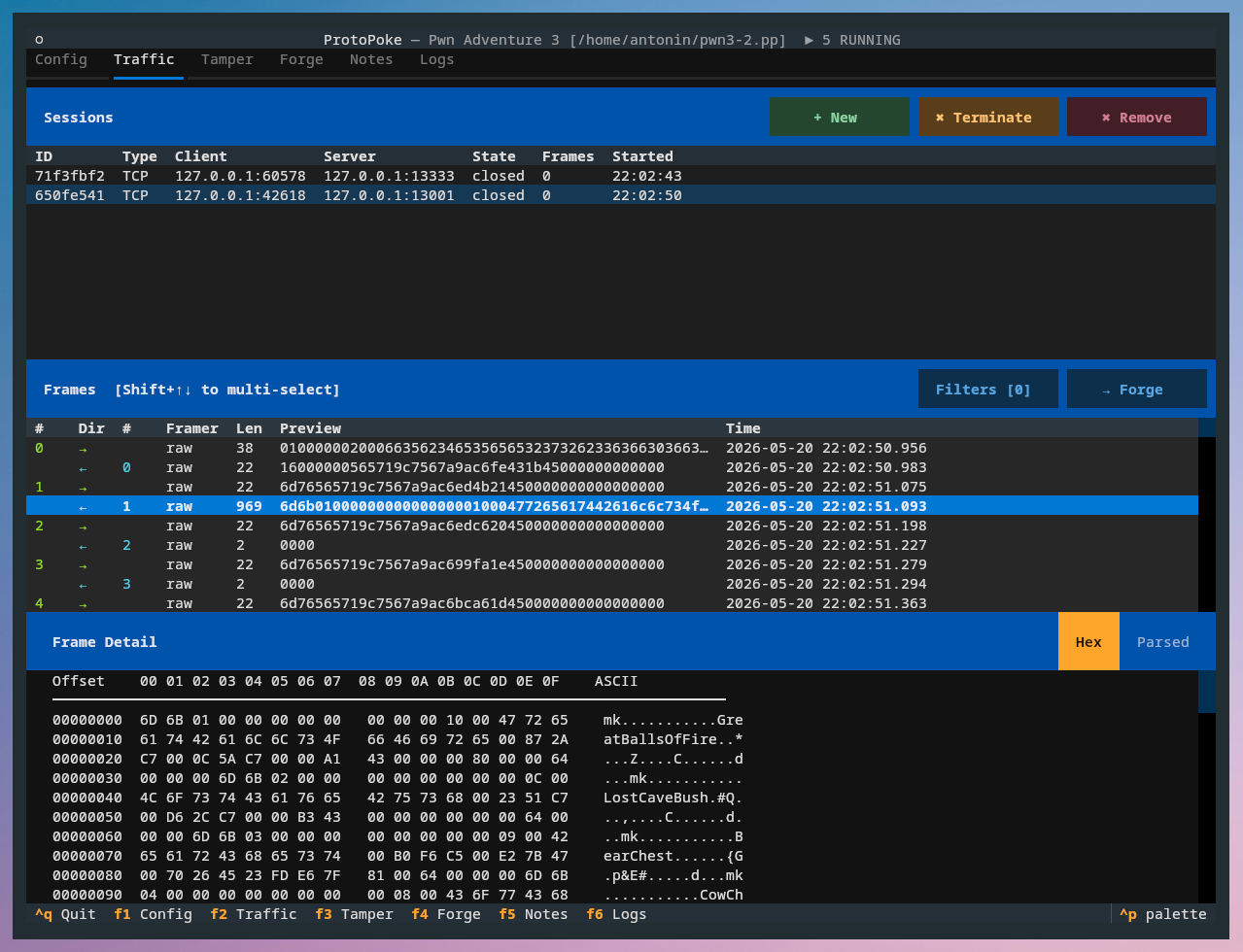
拦截任何 TCP、UDP 或 SOCKS5 代理连接,实时检查和修改数据帧,通过 YAML 定义解码二进制协议,重放会话,使用可插拔的变异器进行模糊测试,并让 AI 助手通过 MCP 驱动所有操作。
## 安装
**需要 Python 3.11 及以上版本。**
```
git clone https://github.com/beaujeant/protopoke.git
cd protopoke
```
### 使用 uv(推荐)
[uv](https://docs.astral.sh/uv/) 会创建虚拟环境并在一步内完成所有安装:
```
uv venv
uv pip install -e .
```
然后使用 `uv run protopoke` 运行命令(或者通过
`source .venv/bin/activate` 激活环境并直接调用
`protopoke`)。
### 使用 pip
```
pip install -e .
```
这将安装运行该工具所需的一切内容。可选的附加组件在使用任一安装器时操作方式相同:
```
uv pip install -e ".[mcp]" # add MCP server support
uv pip install -e ".[dev]" # add the test runner (for contributors)
pip install -e ".[mcp]" # pip equivalent
pip install -e ".[dev]"
```
## 启动 TUI
```
protopoke
```
## MCP 服务器
MCP 服务器**内嵌于 TUI 进程中**,并与 UI 使用的同一个
`ProtoPokeAPI` 实例绑定,因此 AI 助手所看到和修改的会话、规则和流量,与操作员在屏幕上看到的内容完全一致。
它通过 streamable-http 服务于 `http://:/mcp`。
安装带有 MCP 支持的版本,并启动启用了该服务器的 TUI:
```
uv pip install -e ".[mcp]" # or: pip install -e ".[mcp]"
protopoke --mcp # 127.0.0.1:7878 by default
protopoke --mcp --mcp-port 7878 # custom port
```
### 工具配置文件
`--mcp-profile` 控制服务器暴露哪些工具:
```
protopoke --mcp --mcp-profile full # default — every tool
protopoke --mcp --mcp-profile analysis # reverse-engineering subset only
```
- **`full`**(默认)暴露完整的接口:转发器生命周期、
替换/拦截规则、篡改队列、playbook、重放、模糊测试、
变量和 TLS,以及所有的检查和分析工具。
- **`analysis`** 移除操作工具,仅保留逆向工程相关的子集(会话/数据帧检查、分析助手、
知识库、只读协议定义工具,以及
发送/注入/伪造探针)——当你只想让 AI 分析流量时,这非常有助于降低其 token 成本。
该配置文件也可以在运行时从 Config 选项卡中进行更改;更改它将
重启内嵌服务器。
### Claude Desktop
Claude Desktop 只能从其配置中启动 **stdio** MCP 服务器,但
ProtoPoke 服务器使用的是 streamable-http。请使用内置的 `protopoke-mcp` stdio
桥接器,它会将 stdio 转发到正在运行的 TUI 的 HTTP 端点。
添加到 `~/Library/Application Support/Claude/claude_desktop_config.json` (macOS)
或 `%APPDATA%\Claude\claude_desktop_config.json` (Windows) 中:
```
{
"mcpServers": {
"protopoke": {
"command": "protopoke-mcp"
}
}
}
```
该桥接器默认连接到 `http://127.0.0.1:7878/mcp`。如果你迁移了
服务器,请使用 `--url`(或 `PROTOPOKE_MCP_URL`
环境变量)将其指向新地址:
```
{
"mcpServers": {
"protopoke": {
"command": "protopoke-mcp",
"args": ["--url", "http://127.0.0.1:9000/mcp"]
}
}
}
```
在启动 Claude Desktop 之前,请先使用 `protopoke --mcp` 启动 TUI。
### Claude Code
Claude Code 直接接受 HTTP 传输,因此它无需桥接器即可直接连接到服务器
URL:
```
claude mcp add --transport http protopoke http://127.0.0.1:7878/mcp
```
在连接之前,请先使用 `protopoke --mcp` 启动 TUI。
## 快速开始
```
import asyncio
from protopoke.api import ProtoPokeAPI
from protopoke.config import ForwarderConfig
async def main():
fwd = ForwarderConfig(
name="Default",
forwarder_type="tcp", # "tcp" | "udp" | "socks5"
listen_port=8080,
upstream_host="10.0.0.1",
upstream_port=9090,
tamper_enabled=True,
)
api = ProtoPokeAPI([fwd])
await api.start()
while True:
unit = await api.get_next_intercepted()
print(unit.frame.raw_bytes.hex())
api.forward(unit.id)
asyncio.run(main())
```
## 文档
完整文档可在 **[docs.protopoke.net](https://docs.protopoke.net)** 获取。
## 运行测试
```
pytest
```
标签:MCP, Python, 协议分析, 安全合规, 安全规则引擎, 底层编程, 抓包工具, 无后门, 服务管理, 权限提升, 网络代理, 逆向工具, 防御绕过