scanaislop/aislop
GitHub: scanaislop/aislop
aislop是一款专注于识别和修复AI编码代理遗留问题的代码质量工具。
Stars: 496 | Forks: 21
# aislop
**捕捉代码中AI编码代理留下的垃圾。**
[](https://www.npmjs.com/package/aislop)
[](https://www.npmjs.com/package/aislop)
[](https://github.com/scanaislop/aislop/actions/workflows/ci.yml)
[](https://scanaislop.com/scanaislop/aislop)
[](https://opensource.org/licenses/MIT)
[](https://nodejs.org)
Claude Code、Cursor、Codex和OpenCode留下的模式:在自解释代码上方的叙事注释、吞没的异常、`as any`强制类型转换、幻觉导入、重复的辅助函数、死代码、todo占位符、过大的函数。测试通过。代码审查通过。代码仍然会腐烂。
aislop可以捕捉到它们。跨越7种语言(TypeScript、JavaScript、Python、Go、Rust、Ruby、PHP)的50+规则。每项更改得分0-100。亚秒级。确定性——运行时路径中没有LLM,相同的代码输入,相同的得分输出。MIT许可,免费CLI。
## 快速开始
```
npx aislop scan
```
无需安装。适用于任何项目。几秒钟内获得您的得分。
```
npx aislop fix # auto-fix issues
npx aislop fix -f # aggressive fixes (deps, unused files)
npx aislop ci # CI mode (JSON + gate)
npx aislop hook install --claude # per-edit hook
```
**公共徽章**:在您的README中显示您的得分
```
[](https://scanaislop.com)
```
运行 `npx aislop badge` 以自动生成。在 [scanaislop.com](https://scanaislop.com)免费。
## 看看它的实际应用
### 扫描
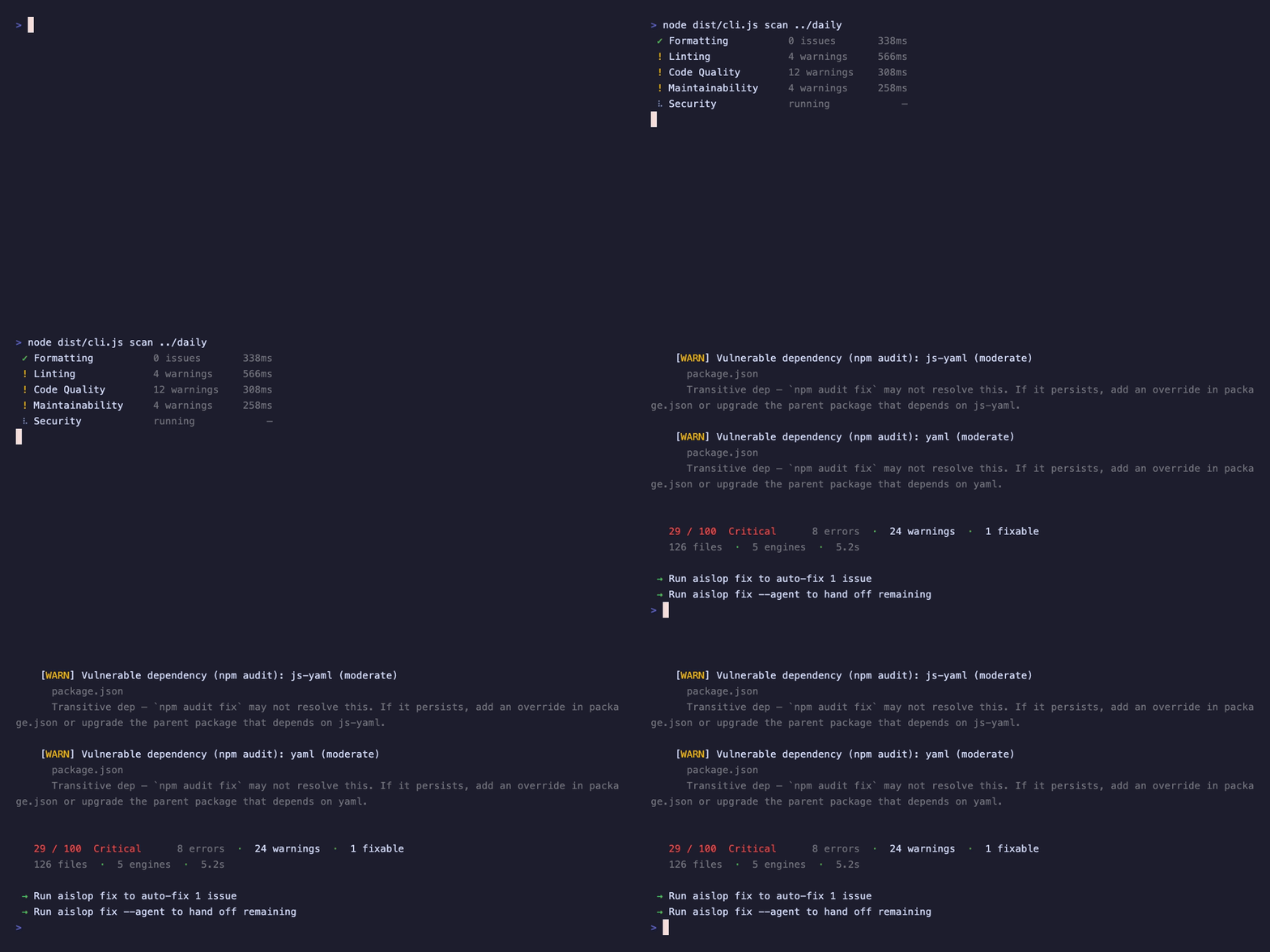
## 安装
```
# 无需安装运行
npx aislop scan
# npm
npm install --save-dev aislop
# yarn
yarn add --dev aislop
# pnpm
pnpm add -D aislop
# 全局
npm install -g aislop
```
也作为 `@scanaislop/aislop` 在GitHub Packages上提供。
## 使用方法
### 扫描
```
npx aislop scan # current directory
npx aislop scan ./src # specific directory
npx aislop scan --changes # changed files from HEAD
npx aislop scan --staged # staged files only
npx aislop scan --json # JSON output
npx aislop scan --sarif # SARIF 2.1.0 output (GitHub code scanning)
```
**排除文件**:默认排除 `node_modules`、`.git`、`dist`、`build`、`coverage`。在 `.aislop/config.yml` 中添加更多:
```
exclude:
- "**/*.test.ts"
- src/generated
```
或通过CLI:`npx aislop scan --exclude "**/*.test.ts,dist"`
**不支持的语言**:aislop仅分析上述8种语言。如果仓库主要是其他内容(C、C++、C#、Swift、Kotlin等),对少量偶然文件的评分将失真,因此aislop **保留得分** 并说明,而不是打印从未读取的代码的数字。`--json` 返回 `score: null`、`scoreable: false` 和 `coverage` 分解。
**每条规则的严重性**:通过id覆盖任何规则的严重性,或将其关闭:
```
# .aislop/config.yml
rules:
ai-slop/narrative-comment: warning # error | warning | off
ai-slop/trivial-comment: "off" # drop this rule entirely
security/hardcoded-secret: error
```
`off` 删除匹配的诊断;`error`/`warning` 在评分和报告之前重写严重性。缺少映射保持默认行为。
**内联抑制发现**:当您知道更好的方法时,使用可选的理由在 `--` 后抑制特定行:
```
// aislop-ignore-next-line ai-slop/empty-fallback -- options is validated upstream
const opts = { ...defaults, ...(input || {}) };
const legacy = doThing(); // aislop-ignore-line
```
`aislop-ignore-next-line` 覆盖下面的行,`aislop-ignore-line` 覆盖它所在的行,`aislop-ignore-file`(在文件中的任何位置)覆盖整个文件。指定一个或多个规则以缩小抑制范围,或省略它们以抑制该行上的所有规则。该指令在任何注释语法(`//`、`#`、``)中工作。抑制的发现将在评分之前删除,并且运行报告被抑制的数量。
**忽略整个路径**:在项目根目录中添加 `.aislopignore`(与 `exclude`、`#` 注释相同的glob语义):
```
src/generated
**/*.snap
legacy
```
**扩展配置**:项目配置可以扩展父配置:
```
# .aislop/config.yml
extends: ../../.aislop/base.yml
ci:
failBelow: 80 # override specific keys
```
**编辑器验证**:将您的编辑器指向 `schema/aislop.config.schema.json` 中的JSON Schema以进行自动完成和 `.aislop/config.yml` 的验证。使用 `pnpm gen:schema` 从源配置模式重新生成它。
### 修复
自动修复机械性的内容(格式化程序、未使用的导入、死代码)。对于需要上下文的问题,将剩余的问题连同完整的诊断信息一起转交给您的编码代理。
```
npx aislop fix # auto-fixes
npx aislop fix --safe # only reversible fixes (imports, comment removal, formatting)
npx aislop fix -f # aggressive: deps, unused files
```
`--safe` 限制运行到不能更改行为的修复——未使用导入的删除、导入合并、叙事注释的删除和格式化。任何删除代码或重写行为/属性的内容(控制台/死代码删除、代码审查自动修复、未使用声明和依赖项修剪)都将跳过,因此 `--safe` 运行确实是“应用并提交”。
### 转交给代理
当自动修复无法解决问题时,将剩余的问题连同完整的上下文一起转交给您的编码代理:
```
npx aislop fix --claude # Claude Code
npx aislop fix --cursor # Cursor (copies to clipboard)
npx aislop fix --gemini # Gemini CLI
npx aislop fix --codex # Codex CLI
# 也:--windsurf, --amp, --aider, --goose, --pi, --crush, --opencode, --warp, --kimi, --antigravity, --deep-agents, --vscode
npx aislop fix --prompt # print prompt (agent-agnostic)
```
### 安装钩子
在每次代理编辑后运行。反馈立即返回。
```
npx aislop hook install --claude # Claude Code
npx aislop hook install --cursor # Cursor
npx aislop hook install --gemini # Gemini CLI
npx aislop hook install --pi # pi
npx aislop hook install # all supported agents
npx aislop hook install claude cursor # specific agents
```
**运行时适配器**(扫描+反馈):`claude`、`cursor`、`gemini`、`pi`。
**仅规则**(代理读取规则):`codex`、`windsurf`、`cline`、`kilocode`、`antigravity`、`copilot`。
**质量门模式**:如果得分低于基线,则阻止。
```
npx aislop hook install --claude --quality-gate
npx aislop hook baseline # re-capture baseline
npx aislop hook status # list installed
npx aislop hook uninstall --claude # remove
```
文档:[`/docs/hooks`](https://scanaislop.com/docs/hooks)
### MCP服务器
将aislop作为Claude Desktop、Cursor、Codex的MCP工具公开:
```
// ~/.cursor/mcp.json or Claude Desktop config
{
"mcpServers": {
"aislop": {
"command": "npx",
"args": ["-y", "aislop-mcp"]
}
}
}
```
**工具**:`aislop_scan`、`aislop_fix`、`aislop_why`、`aislop_baseline`
### CI
```
npx aislop ci # JSON output, exits 1 if score < threshold
```
### 其他命令
```
npx aislop init # create .aislop/config.yml
npx aislop init --strict # enterprise-grade gate: all engines, typecheck, failBelow 85
npx aislop rules # list rules
npx aislop badge # print badge URL
npx aislop trend # show score history over time
npx aislop # interactive menu
```
**得分历史**:正常的(完整项目、交互式)`scan` 将紧凑的记录追加到 `.aislop/history.jsonl`(时间戳、得分、错误/警告计数、文件计数、CLI版本)。`aislop trend` 读取它并打印一个表格以及最近的得分的ASCII火花线。历史仅是本地副作用:它永远不会为 `--json`/`--sarif` 输出、CI或当 `AISLOP_NO_HISTORY=1` 设置时写入,因此机器输出保持清洁。
文档:[命令](docs/commands.md)
## CI集成
### 预提交
直接在暂存文件上运行:
```
npx aislop scan --staged
```
或通过捆绑的钩子将其连接到 [pre-commit](https://pre-commit.com) 框架:
```
# .pre-commit-config.yaml
repos:
- repo: https://github.com/scanaislop/aislop
rev: v0.10.2
hooks:
- id: aislop
```
### GitHub Actions
运行 `npx aislop init` 并接受工作流程提示,或手动添加:
```
name: aislop
on:
pull_request:
push:
branches: [main]
jobs:
quality-gate:
runs-on: ubuntu-latest
steps:
- uses: actions/checkout@v4
- uses: scanaislop/aislop@v0.10.2
with:
version: latest
```
`uses: scanaislop/aislop@v0.10.2` 锁定了GitHub Action包装器。`version: latest` 跟随最新的npm CLI。对于完全确定的CI,将两者都设置为相同的版本:
```
- uses: actions/checkout@v4
- uses: scanaislop/aislop@v0.10.2
with:
version: "0.10.2"
```
不带Marketplace Action的手动工作流程:
```
- uses: actions/checkout@v4
- uses: actions/setup-node@v4
with:
node-version: 20
- run: npx --yes aislop@latest ci .
```
**GitHub代码扫描(SARIF)**:生成SARIF 2.1.0报告并将其上传,以便发现出现在安全选项卡中:
```
- run: npx aislop@latest scan . --sarif > aislop.sarif
- uses: github/codeql-action/upload-sarif@v3
with:
sarif_file: aislop.sarif
```
### 质量门
在 `.aislop/config.yml` 中设置最低得分:
```
ci:
failBelow: 70
```
`aislop ci` 当得分低于阈值时退出1。文档:[CI/CD](docs/ci.md)
## 为团队
[scanaislop](https://scanaislop.com) 是团队的托管平台:
- PR门控与得分阈值
- 标准层次结构(组织→团队→项目)
- 仪表板和代理归属
- 视觉规则管理器
相同的引擎,相同的得分。CLI是MIT许可的。[了解更多→](https://scanaislop.com)
## 为什么选择aislop
AI编码工具生成的代码可以编译并通过测试,但会携带工程师不会编写的模式。`aislop` 给您一个得分,一个门控,并自动修复它可以修复的内容。
- **一个得分**:0-100,在CI中强制执行。加权,使垃圾模式比风格噪音影响更大。
- **自动修复优先**:清除格式化程序、未使用的导入、死代码机械性地。将剩余的内容连同完整的上下文一起转交给您的代理。
- **确定性**:正则表达式 + AST + 标准工具。没有LLM,没有API调用。相同的代码输入,相同的得分输出。
- **零配置启动**:`npx aislop scan` 在任何仓库上工作。添加 `.aislop/config.yml` 以调整。
## 它捕捉什么
六个确定性引擎并行运行:
| 引擎 | 检查的内容 | 如何 |
|---|---|---|
| **格式化** | 代码风格一致性 | Biome、ruff、gofmt、cargo fmt、rubocop、php-cs-fixer |
| **代码审查** | 语言特定问题 | oxlint、ruff、golangci-lint、clippy、expo-doctor |
| **代码质量** | 复杂性和死代码 | 函数/文件大小限制、深度嵌套、未使用的文件/依赖项(knip)、基于AST的未使用声明删除 |
| **AI垃圾** | AI编写的代码模式 | 叙事注释、琐碎注释、死模式、未使用的导入、`as any`、`console.log`残留、TODO占位符、通用名称 |
| **安全** | 漏洞和有风险的代码 | eval、innerHTML、SQL/Shell注入、依赖项审计(npm/pip/cargo/govulncheck) |
| **架构** | 结构性规则(可选) | 自定义导入禁令、分层规则、必需模式 |
查看完整的 [规则参考](docs/rules.md)。
## 研究
aislop规则由公共扫描和基准测试得出的失败模式塑造,而不仅仅是本地固定值。该 [研究计划](docs/research-program.md) 定义了如何运行可重复的开源扫描:锁定队列、存储原始JSON、分类发现、使用回归测试修复嘈杂的规则,并发布限制。
## 文档
[安装](docs/installation.md) · [命令](docs/commands.md) · [规则](docs/rules.md) · [配置](docs/configuration.md) · [评分](docs/scoring.md) · [CI/CD](docs/ci.md) · [遥测](docs/telemetry.md) · [研究计划](docs/research-program.md)
## 社区
[讨论](https://github.com/scanaislop/aislop/discussions) 提出问题、规则请求和误报分类 · [问题](https://github.com/scanaislop/aislop/issues) 报告错误
## 贡献
查看 [CONTRIBUTING.md](CONTRIBUTING.md)。AI助手:[AGENTS.md](AGENTS.md).
## 致谢
建立在:[Biome](https://biomejs.dev/)、[oxlint](https://oxc.rs/)、[knip](https://knip.dev/)、[ruff](https://docs.astral.sh/ruff/)、[golangci-lint](https://golangci-lint.run/)、[expo-doctor](https://docs.expo.dev/)
## 贡献者
- [@heavykenny](https://github.com/heavykenny)
- [@myke-awoniran](https://github.com/myke-awoniran)
- [@yashrajoria](https://github.com/yashrajoria)
由 `.github/workflows/contributors.yml` 自动更新。[链接提交电子邮件](https://github.com/settings/emails) 或添加到 [`.github/contributors-overrides.json`](.github/contributors-overrides.json).
## 许可证
[MIT](LICENSE).
标签:AI 编码辅助, CMS安全, Go, JavaScript, MIT 许可, OpenVAS, PHP, Python, Ruby, Ruby工具, Rust, TypeScript, 代码优化, 代码修复, 代码健康度, 代码分析, 代码审查, 代码维护, 代码评分, 代码风格, 凭证管理, 可视化界面, 安全插件, 开源框架, 持续集成, 数据可视化, 无后门, 日志审计, 知识库, 网络流量审计, 自动化攻击, 逆向工具, 错误基检测, 静态代码分析