abhishekayu/trustlens-ai
GitHub: abhishekayu/trustlens-ai
开源的可解释 AI 驱动 URL 信任评估引擎,通过 15+ 并行分析引擎生成透明评分,解决传统 URL 扫描工具「黑盒判定」的问题。
Stars: 1 | Forks: 0




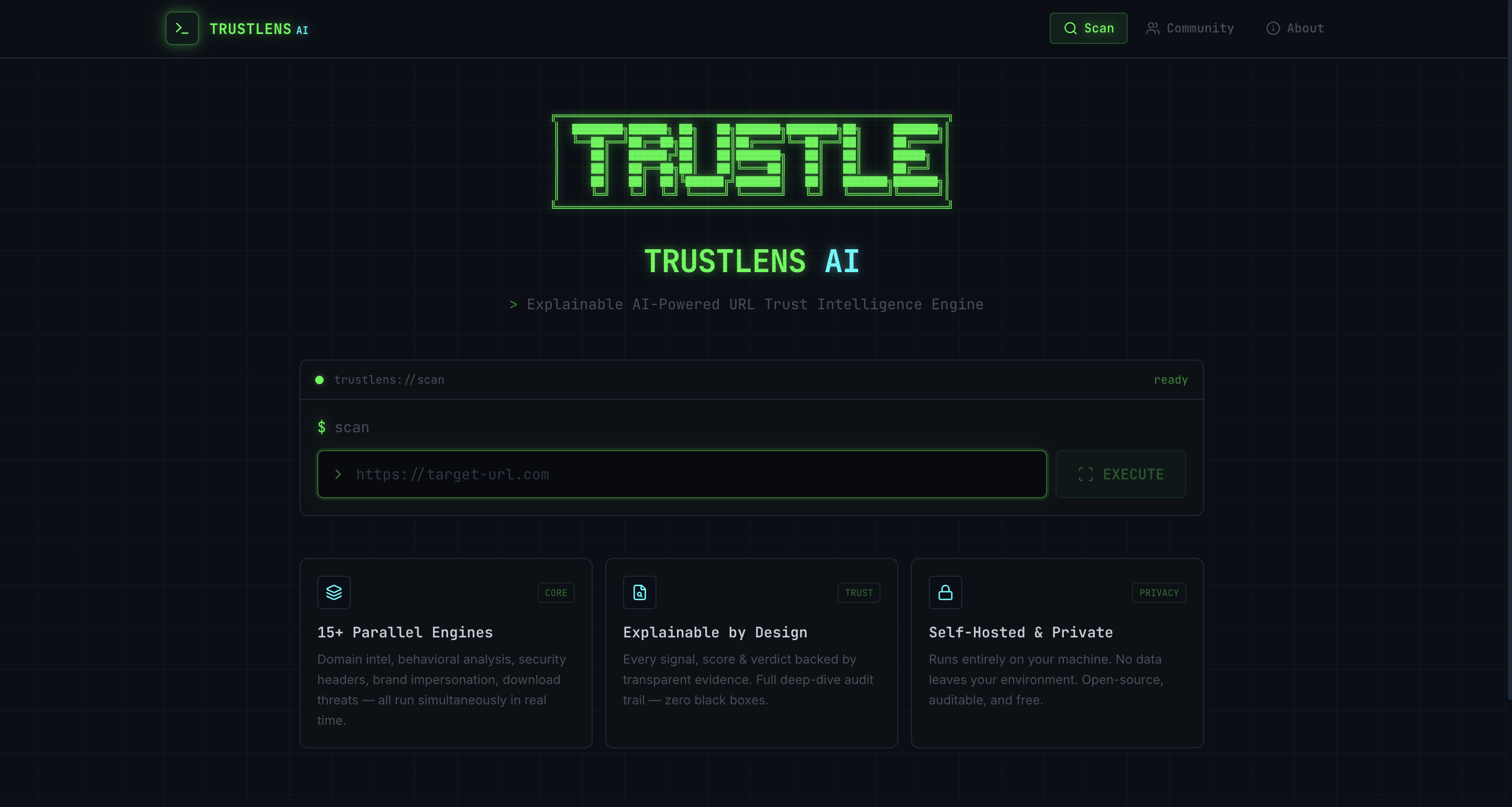
Explainable AI-Powered URL Trust Intelligence Engine
Drop any URL → get an instant, transparent trust score backed by 15+ analysis engines, AI deception classification, and full evidence breakdown.
## 目录
- [什么是 TrustLens?](#what-is-trustlens)
- [功能特性](#features)
- [架构](#architecture)
- [快速开始](#quick-start)
- [设置向导 — LLM Provider](#setup-wizard--llm-provider)
- [手动设置](#manual-setup)
- [Docker](#docker)
- [配置](#configuration)
- [API 端点](#api-endpoints)
- [分析引擎](#analysis-engines)
- [评分方法](#scoring-methodology)
- [项目结构](#project-structure)
- [技术栈](#tech-stack)
- [贡献](#contributing)
- [许可证](#license)
## 什么是 TrustLens?
TrustLens 是一个开源安全工具,通过并行运行的 **15+ 个独立分析引擎** 对任何 URL 进行分析,结合基于规则的启发式算法(70%)与 AI 咨询信号(30%),生成 0-100 的透明、可解释的信任评分。
与不透明的“安全/不安全”判定不同,TrustLens 向您展示 URL 具有风险的确切原因 —— 每一个信号、每一条规则、每一个 AI 发现都在完全透明的深度分析面板中可见。
**核心原则:**
- 🔍 **完全透明** —— 每个信号都附有证据和来源
- 🧠 **AI 仅作参考** —— AI 永远不直接决定判定结果;规则主导
- 🛡️ **反幻觉** —— AI prompt 包含注入防护栏和校准锚点
- ⚡ **实时** —— 通过异步 pipeline 并行运行 15+ 个引擎
- 🔒 **安全优先** —— SSRF 防护、输入清洗、沙盒浏览器
## 功能特性
### 核心分析
- **沙盒浏览器爬取** —— 无头 Chromium,具备智能页面加载等待(处理 SPA、加载屏幕、JS 框架)
- **AI 欺诈分类器** —— 多 Provider LLM 分析,具备反幻觉 prompt、置信度校准和注入检测
- **品牌冒充检测** —— 50+ 品牌注册表,包含 Levenshtein 拼写抢注、同形文字检测和内容相似度
- **域名情报** —— RDAP 查询、域名年龄评分(14 级)、结构分析、可疑注册商检测
- **安全头书审计** —— CSP, HSTS, X-Frame-Options, X-Content-Type-Options 分析
- **SSL 证书提取** —— 真实 TLS 连接以提取协议版本、颁发者、有效期、SAN、序列号
### 高级检测
- **行为分析** —— JS 重定向链、反分析检测、紧迫性语言、弹窗滥用、剪贴板操作、WebSocket/ServiceWorker 检测
- **追踪器与恶意软件检测** —— 24 个分析 + 17 个广告 + 15 个指纹 + 12 个恶意软件/加密矿工模式数据库
- **下载威胁扫描器** —— 检测危险文件扩展名(.exe, .ps1, .bat 等)和自动下载脚本
- **截图视觉克隆检测** —— 与已知品牌截图进行感知哈希对比
- **零日可疑评分** —— 跨 4 个子评分器的结构异常检测
- **启发式规则** —— URL 结构、表单分析、跨域提交、内容模式、重定向行为、外部资源加载
### 平台功能
- **实时页面截图** —— 智能页面加载等待后捕获,仅存储在内存中
- **社区报告** —— 众包 URL 报告,带有共识评分
- **威胁情报源** —— 自动摄取外部威胁情报源
- **企业模式** —— 品牌监控、API 密钥管理、审计日志
- **交互式设置向导** —— 首次启动时交互式选择 LLM Provider
## 架构
```
┌─────────────────────────────────────────────────────────────┐
│ React Dashboard (Vite) │
│ ScanPage → ResultsPage → ScoreGauge + SignalCards + DeepDive│
└────────────────────────┬────────────────────────────────────┘
│ REST API
┌────────────────────────▼────────────────────────────────────┐
│ FastAPI Backend │
│ │
│ ┌──────────┐ ┌──────────────────────────────────────┐ │
│ │ Queue │──▶│ Orchestrator │ │
│ └──────────┘ │ │ │
│ │ 1. Crawl (Playwright) │ │
│ │ 2. ┌─────────────────────────────┐ │ │
│ │ │ Parallel Analysis Engines │ │ │
│ │ │ ┌─────┐ ┌─────┐ ┌────────┐ │ │ │
│ │ │ │Rules│ │ AI │ │ Brand │ │ │ │
│ │ │ ├─────┤ ├─────┤ ├────────┤ │ │ │
│ │ │ │Behav│ │Domn │ │Headers │ │ │ │
│ │ │ ├─────┤ ├─────┤ ├────────┤ │ │ │
│ │ │ │Track│ │Down │ │Screen │ │ │ │
│ │ │ ├─────┤ ├─────┤ ├────────┤ │ │ │
│ │ │ │Logo │ │Pay │ │Threat │ │ │ │
│ │ │ ├─────┤ ├─────┤ ├────────┤ │ │ │
│ │ │ │Comm │ │Zero │ │Content │ │ │ │
│ │ │ └─────┘ └─────┘ └────────┘ │ │ │
│ │ └─────────────────────────────┘ │ │
│ │ 3. Scoring (70/30 hybrid) │ │
│ │ 4. AI Explanation │ │
│ │ 5. Store Results │ │
│ └──────────────────────────────────────┘ │
│ │
│ SQLite DB │ Rate Limiter │ SSRF Guard │ Audit Logger │
└─────────────────────────────────────────────────────────────┘
```
## 快速开始
### 前置条件
| 工具 | 版本 | 必需 |
| ----------- | --------------------------------------- | -------- |
| Python | 3.9+ | ✅ |
| Node.js | 18+ | ✅ |
| npm | 9+ | ✅ |
| LLM API Key | 以下任一:Gemini, OpenAI, Anthropic, Grok | ✅ |
### 一键启动
```
git clone https://github.com/abhishekayu/TrustLens.git
cd TrustLens
chmod +x start.sh
./start.sh
```
就这样。`start.sh` 脚本将:
1. 🧙 **运行设置向导** —— 交互式选择您的 LLM Provider 并输入 API Key
2. 📦 **安装所有依赖** —— 包括 Python (`pip install -r requirements.txt`) 和 Node.js (`npm install`)
3. 🎭 **安装 Playwright Chromium** —— 用于沙盒浏览器爬取
4. 🚀 **启动后端** —— FastAPI 运行于 `http://localhost:3010`
5. ⚛️ **启动仪表板** —— Vite 开发服务器运行于 `http://localhost:5173`
```
╔══════════════════════════════════════════════════╗
║ 🚀 TrustLens AI Running ║
╠══════════════════════════════════════════════════╣
║ Dashboard → http://localhost:5173 ║
║ Backend → http://localhost:3010 ║
║ API Docs → http://localhost:3010/docs ║
╠══════════════════════════════════════════════════╣
║ Press Ctrl+C to stop ║
╚══════════════════════════════════════════════════╝
```
## 设置向导 — LLM Provider
首次运行时,交互式 CLI 向导会提示您选择 AI Provider:
```
╔══════════════════════════════════════════════════════════════╗
║ ████████╗██████╗ ██╗ ██╗███████╗████████╗ ║
║ ██║ ██████╔╝██║ ██║███████╗ ██║ ║
║ ██║ ██║ ██║╚██████╔╝███████║ ██║ ║
║ L E N S A I Setup Wizard ║
╚══════════════════════════════════════════════════════════════╝
Choose your LLM provider:
1. 🤖 Grok (xAI)
2. 💎 Gemini (Google)
3. 🧠 Anthropic (Claude)
4. ⚡ OpenAI (GPT)
➤ Select provider (1-4):
```
### Provider 详情
| # | Provider | 默认模型 | API Key URL |
| --- | ---------------------- | -------------------------- | -------------------------------------------------------------------- |
| 1 | **Grok (xAI)** | `grok-3` | [console.x.ai](https://console.x.ai) |
| 2 | **Gemini (Google)** | `gemini-2.5-flash` | [aistudio.google.com/apikey](https://aistudio.google.com/apikey) |
| 3 | **Anthropic (Claude)** | `claude-sonnet-4-20250514` | [console.anthropic.com](https://console.anthropic.com/settings/keys) |
| 4 | **OpenAI (GPT)** | `gpt-4o` | [platform.openai.com/api-keys](https://platform.openai.com/api-keys) |
输入 API Key 后,向导会将配置保存到 `.env`。后续启动时,它会提供以下选项:
- **C** —— 使用保存的配置继续
- **N** —— 选择新的 LLM Provider
- **Q** —— 退出
您也可以在提示时指定自定义模型名称(例如 `gpt-4o-mini`, `claude-haiku-4-20250514`)。
## 手动设置
如果您更喜欢手动设置而不是 `./start.sh`:
### 1. 克隆并安装
```
git clone https://github.com/abhishekayu/TrustLens.git
cd TrustLens
# 创建 virtual environment (推荐)
python3 -m venv .venv
source .venv/bin/activate
# 安装 Python dependencies
pip install -r requirements.txt
# 安装 Playwright browser
python3 -m playwright install chromium
# 安装 dashboard dependencies
cd dashboard && npm install && cd ..
```
### 2. 配置环境
```
cp .env.example .env
```
编辑 `.env` 并设置您的 AI Provider + API Key:
```
TRUSTLENS_AI_PROVIDER=gemini
TRUSTLENS_GEMINI_API_KEY=your-api-key-here
TRUSTLENS_GEMINI_MODEL=gemini-2.5-flash
```
### 3. 启动后端
```
PYTHONPATH=src python3 -m uvicorn trustlens.main:app --host 0.0.0.0 --port 8000
```
### 4. 启动仪表板
```
cd dashboard
npm run dev
```
在浏览器中打开 `http://localhost:5173`。
## Docker
### 构建并运行
```
docker build -t trustlens-ai .
docker run -p 8000:8000 --env-file .env trustlens-ai
```
### Docker Compose
```
docker-compose up
```
这将启动后端(`:8000`)和仪表板(`:5173`)容器。
## 配置
所有配置均通过带有 `TRUSTLENS_` 前缀的环境变量进行。完整列表请参见 [.env.example](.env.example)。
### 关键设置
| 变量 | 默认值 | 描述 |
| ------------------------------------- | -------- | ----------------------------------------------------- |
| `TRUSTLENS_AI_PROVIDER` | `gemini` | LLM Provider:`gemini`, `openai`, `anthropic`, `grok` |
| `TRUSTLENS_CRAWLER_TIMEOUT` | `30` | 页面爬取最大秒数 |
| `TRUSTLENS_SSRF_BLOCK_PRIVATE` | `true` | 阻止私有/内部 IP |
| `TRUSTLENS_SCORE_WEIGHT_RULES` | `0.70` | 基于规则的信号权重 |
| `TRUSTLENS_SCORE_WEIGHT_AI` | `0.30` | AI 咨询信号权重 |
| `TRUSTLENS_RATE_LIMIT_REQUESTS` | `30` | 每个窗口的请求数 |
| `TRUSTLENS_RATE_LIMIT_WINDOW_SECONDS` | `60` | 速率限制窗口 |
| `TRUSTLENS_SCREENSHOT_ENABLED` | `true` | 捕获页面截图 |
| `TRUSTLENS_COMMUNITY_REPORTS_ENABLED` | `true` | 启用社区报告 |
| `TRUSTLENS_ENTERPRISE_MODE` | `false` | 企业品牌监控 |
| `TRUSTLENS_API_KEY_REQUIRED` | `false` | 需要 API Key |
| `TRUSTLENS_AUDIT_LOG_ENABLED` | `true` | 审计日志 |
## API 端点
| 方法 | 端点 | 描述 |
| ------ | ----------------------------------- | ------------------------------ |
| `POST` | `/api/analyze` | 提交 URL 进行分析 |
| `GET` | `/api/analyze/{id}` | 获取分析结果(轮询) |
| `GET` | `/api/report/{id}` | 获取格式化报告 |
| `GET` | `/health` | 健康检查 + Provider 状态 |
| `POST` | `/api/community/report` | 提交社区报告 |
| `GET` | `/api/community/consensus/{domain}` | 获取社区共识 |
| `POST` | `/api/threat-intel/feeds` | 添加威胁情报源 |
| `GET` | `/api/threat-intel/check/{domain}` | 根据情报源检查域名 |
| `POST` | `/api/keys` | 创建 API Key(企业) |
| `GET` | `/api/enterprise/brand-monitor` | 品牌监控状态 |
完整交互式文档位于 `http://localhost:3010/docs` (Swagger UI)。
## 分析引擎
TrustLens 为每次 URL 扫描**并行运行 15+ 个引擎**:
| 引擎 | 功能 | 关键信号 |
| --------------------------- | ---------------------------------------- | ------------------------------------------------------------ |
| **启发式规则** | URL 结构、表单、内容、重定向 | SSL、可疑 URL、跨域表单、隐藏 iframe |
| **AI 欺诈分类器** | LLM 驱动的钓鱼/诈骗检测 | 欺诈置信度、指标、分类器评分 |
| **品牌冒充** | 拼写抢注与品牌克隆检测 | 域名相似度、内容匹配、冒充概率 |
| **域名情报** | RDAP、年龄、TLD 风险、DNS、结构 | 域名年龄、可疑 TLD、注册商、连字符/数字分析 |
| **行为分析** | 运行时行为与规避检测 | JS 重定向、混淆、反分析、弹窗滥用 |
| **安全头** | HTTP 安全头审计 | CSP, HSTS, X-Frame-Options 存在性 |
| **SSL 证书** | 真实 TLS 证书提取与验证 | 协议版本、颁发者、有效期、SAN |
| **追踪器与恶意软件** | 分析/广告/指纹/恶意软件扫描 | 68+ 追踪器模式、加密矿工、间谍软件 |
| **下载威胁** | 危险文件扩展名检测 | .exe, .ps1, .bat, 自动下载脚本 |
| **截图克隆** | 通过感知哈希进行视觉相似度 | 与品牌截图进行 pHash/dHash 对比 |
| **零日嫌疑** | 结构异常评分 | 新颖攻击模式指标 |
| **支付检测** | 支付表单与加密货币地址扫描 | 卡字段、加密货币钱包、支付处理器 |
| **内容提取** | 深度 HTML/JS 内容分析 | 文本提取、脚本分析、元数据 |
| **社区报告** | 众包 URL 安全数据 | 社区共识、报告计数 |
| **威胁情报源** | 外部威胁情报检查 | 已知恶意域名、黑名单匹配 |
## 评分方法
```
Final Score = (Rule Score × 0.70) + (AI Score × 0.30)
```
### 规则评分组件
| 组件 | 权重 | 描述 |
| ------------------- | ------ | ----------------------------------------- |
| 启发式规则 | 30% | URL 模式、表单、内容、重定向 |
| 品牌冒充 | 25% | 与已知品牌的域名/内容相似度 |
| 行为分析 | 20% | 运行时行为与规避技术 |
| 域名情报 | 15% | 年龄、TLD、注册商、结构 |
| 安全头 | 10% | HTTP 安全头是否存在 |
### 风类别
| 分数 | 类别 | 描述 |
| ------ | ----------------- | ------------------------------------- |
| 75–100 | ✅ **安全** | 无显著风险指标 |
| 50–74 | 🟡 **低风险** | 轻微问题,可能合法 |
| 25–49 | 🟠 **可疑** | 多个令人担忧的信号 |
| 0–24 | 🔴 **高风险** | 恶意意图的确凿指标 |
### AI 置信度校准
AI 置信度根据参考锚点进行校准,以防止过度分类:
| 范围 | 含义 |
| --------- | ------------------------------------------ |
| 0.00–0.15 | 无证据 / 正常页面 |
| 0.15–0.35 | 轻微可疑元素,可能良性 |
| 0.35–0.55 | 中等关注度,多个软指标 |
| 0.55–0.75 | 有证据表明存在明显欺诈意图 |
| 0.75–0.90 | 强烈的多信号欺诈模式 |
| 0.90–1.00 | 仅保留给压倒性证据 |
## 项目结构
```
TrustLens/
├── start.sh # One-command start script
├── setup_wizard.py # Interactive LLM provider wizard
├── requirements.txt # Python dependencies
├── pyproject.toml # Project metadata & build config
├── Dockerfile # Container build (python:3.12-slim)
├── docker-compose.yml # Multi-container setup
├── .env.example # Configuration template (30+ settings)
│
├── src/trustlens/
│ ├── main.py # FastAPI app entry point
│ ├── api/
│ │ ├── routes/
│ │ │ ├── analyze.py # URL analysis endpoints
│ │ │ ├── community.py # Community reporting
│ │ │ ├── enterprise.py # Brand monitoring
│ │ │ ├── health.py # Health check
│ │ │ ├── keys.py # API key management
│ │ │ ├── report.py # Report generation
│ │ │ └── threat_intel.py # Threat intel feeds
│ │ ├── middleware/
│ │ │ ├── api_auth.py # API key authentication
│ │ │ ├── rate_limit.py # Rate limiting
│ │ │ └── domain_filter.py# Domain allowlist/denylist
│ │ └── deps.py # Dependency injection
│ │
│ ├── services/
│ │ ├── ai/ # AI provider system
│ │ │ └── __init__.py # Prompts, calibration, multi-provider
│ │ ├── analysis/
│ │ │ ├── behavioral.py # Behavioral redirect/evasion analysis
│ │ │ ├── brand_similarity.py # Brand impersonation (50+ brands)
│ │ │ ├── content_extractor.py # Content parsing engine
│ │ │ ├── domain_intel.py # RDAP, DNS, domain scoring
│ │ │ ├── download_threat_detector.py # Dangerous download detection
│ │ │ ├── logo_detection.py # Logo similarity analysis
│ │ │ ├── payment_detector.py # Payment form/crypto detection
│ │ │ ├── rules.py # Heuristic rule engine (7 rules)
│ │ │ ├── screenshot_similarity.py # Visual clone detection
│ │ │ ├── security_headers.py # Security header audit
│ │ │ ├── tracker_detector.py # Tracker/malware scanner (68+ patterns)
│ │ │ └── zeroday.py # Zero-day suspicion scoring
│ │ ├── crawler/ # Playwright browser + intelligent page-load
│ │ ├── scoring/ # Hybrid 70/30 scoring engine
│ │ ├── orchestrator.py # Analysis pipeline orchestrator
│ │ ├── queue/ # Async task queue
│ │ ├── community/ # Community reporting service
│ │ ├── enterprise/ # Brand monitoring service
│ │ └── threat_intel/ # Threat feed ingestion
│ │
│ ├── models/ # Pydantic data models
│ ├── schemas/ # API request/response schemas
│ ├── security/ # SSRF protection, URL validation
│ ├── core/ # Settings, logging config
│ ├── db/ # SQLite database layer (aiosqlite)
│ ├── observability/ # Audit logging
│ └── utils/ # Utility functions
│
├── dashboard/
│ ├── src/
│ │ ├── pages/
│ │ │ ├── ScanPage.tsx # URL input + feature cards
│ │ │ ├── ResultsPage.tsx # Score gauge + signals + AI assessment
│ │ │ ├── AboutPage.tsx # About & license
│ │ │ └── CommunityPage.tsx # Community reports
│ │ ├── components/
│ │ │ ├── DeepDive.tsx # Full transparency panel (15 sections)
│ │ │ ├── ScoreGauge.tsx # Animated circular score gauge
│ │ │ ├── SignalCard.tsx # Individual signal cards
│ │ │ ├── PipelineSteps.tsx # Real-time pipeline progress
│ │ │ ├── Layout.tsx # App shell + navigation
│ │ │ └── EvidenceTimeline.tsx # Evidence timeline
│ │ ├── services/api.ts # API client + TypeScript types
│ │ └── hooks/ # React hooks
│ ├── package.json
│ └── vite.config.ts
│
├── docs/
│ ├── ai-trust-explanation.md # AI trust scoring explained
│ ├── anti-hallucination.md # Anti-hallucination strategy
│ ├── scoring-methodology.md # Scoring algorithm details
│ └── security-model.md # Security architecture
│
├── tests/ # Test suite
└── LICENSE # MIT License
```
## 技术栈
### 后端
| 技术 | 用途 |
| ------------------------ | ------------------------------------ |
| **Python 3.9+** | 核心语言 |
| **FastAPI** | 异步 REST API 框架 |
| **Pydantic v2** | 数据验证与序列化 |
| **Playwright** | 无头浏览器爬取 (Chromium) |
| **SQLite + aiosqlite** | 异步嵌入式数据库 |
| **httpx** | 异步 HTTP 客户端 |
| **structlog** | 结构化日志 |
| **tldextract** | 域名解析与 TLD 提取 |
| **python-Levenshtein** | 用于拼写抢注的字符串相似度 |
| **Pillow + imagehash** | 截图感知哈希 |
| **cryptography** | SSL/TLS 证书操作 |
| **BeautifulSoup + lxml** | HTML 解析与内容提取 |
| **dnspython** | DNS 解析 |
### 仪表板
| 技术 | 用途 |
| ------------------- | -------------------------------------- |
| **React 19** | UI 框架 |
| **TypeScript 5.9** | 类型安全 |
| **Vite 7** | 构建工具与开发服务器 |
| **Tailwind CSS v4** | 实用优先样式(终端主题) |
| **Lucide React** | 图标库 |
| **React Router v7** | 客户端路由 |
### AI Providers(选择一个)
| Provider | SDK | 默认模型 |
| ----------------- | --------------------- | -------------------------- |
| **Google Gemini** | `google-generativeai` | `gemini-2.5-flash` |
| **OpenAI** | `openai` | `gpt-4o` |
| **Anthropic** | `anthropic` | `claude-sonnet-4-20250514` |
| **Grok (xAI)** | `openai` (兼容) | `grok-3` |
## 贡献
欢迎贡献!入门方法如下:
```
# Fork 和 clone
git clone https://github.com/your-username/TrustLens.git
cd TrustLens
# 创建 branch
git checkout -b feature/your-feature
# 开始开发
./start.sh
# 进行修改、测试,然后提交 pull request
```
### 贡献领域
- 新的分析引擎
- 额外的 AI Provider 集成
- 浏览器扩展
- 改进文档
- Bug 报告与修复
## 许可证
本项目基于 **MIT License** 许可 —— 详情请参见 [LICENSE](LICENSE) 文件。
由 Abhishek Verma 构建
标签:DNS枚举, Docker, Python, URL安全检测, Web安全, 云计算, 信任评分引擎, 可解释AI, 品牌冒充检测, 大语言模型应用, 威胁情报, 安全防御评估, 开发者工具, 恶意链接分析, 无后门, 欺诈检测, 混合评分算法, 特征检测, 生成式AI, 索引, 网络安全工具, 自托管, 蓝队分析, 规则引擎, 请求拦截, 逆向工具, 透明度报告, 钓鱼检测