comet-ml/opik-openclaw
GitHub: comet-ml/opik-openclaw
OpenClaw 官方插件,用于将 agent 运行 trace 导出至 Opik 平台以实现 LLM agent 的可观测性、成本监控与行为分析。
Stars: 704 | Forks: 88

🔭 OpenClaw Opik Observability Plugin
🔭 OpenClaw Opik Observability Plugin
OpenClaw 官方插件,用于将 agent traces 导出至
Opik,以实现可观测性与监控。
[](./LICENSE)
[](https://www.npmjs.com/package/@opik/opik-openclaw)
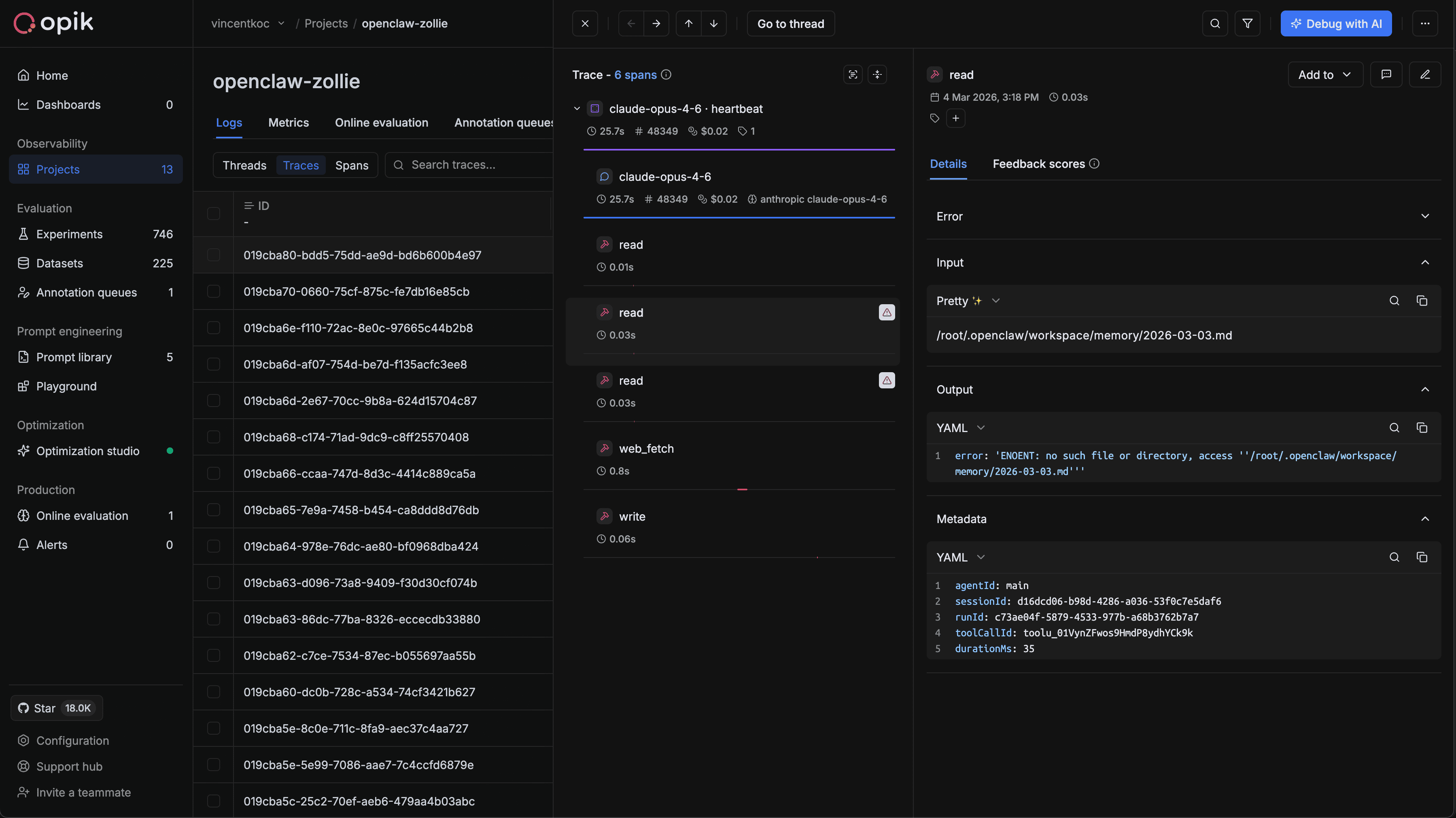
## 为什么使用此插件
[Opik](https://github.com/comet-ml/opik) 是领先的开源 LLM 与 agent 可观测性、tracing、评估和优化平台。
`@opik/opik-openclaw` 为 OpenClaw 运行添加了原生的 Opik tracing:
- LLM 请求/响应 spans
- 子 agent 请求/响应 spans
- 带有输入、输出和错误的工具调用 spans
- 运行级别的最终化元数据
- 使用量和成本元数据
该插件在 OpenClaw Gateway 进程内运行。如果您的 gateway 是远程的,请在该主机上安装并配置此插件。
## 安装与首次运行
前置条件:
- OpenClaw `>=2026.3.2`
- Node.js `>=22.12.0`
- npm `>=10`
### 1. 在 OpenClaw 中安装插件
```
openclaw plugins install clawhub:@opik/opik-openclaw
```
对于 `2023.3.23` 之前的旧版 OpenClaw,您可以使用以下命令安装 npm 包:
```
openclaw plugins install @opik/opik-openclaw
```
如果 Gateway 已经在运行,请在安装后重启。
### 2. 配置插件
```
openclaw opik configure
```
设置向导会验证 endpoint 和凭证,然后将配置写入 `plugins.entries.opik-openclaw` 下。如果您选择 Opik Cloud 且尚未拥有账号,向导现在会引导您前往免费注册流程,然后再要求您提供 API key。
### 3. 检查生效的设置
```
openclaw opik status
```
### 4. 发送测试消息
```
openclaw gateway run
openclaw message send "hello from openclaw"
```
然后在您的 Opik 项目中确认 traces。
## 配置
### 推荐的配置结构
```
{
"plugins": {
"entries": {
"opik-openclaw": {
"enabled": true,
"hooks": {
"allowConversationAccess": true
},
"config": {
// base configuration
"enabled": true,
"apiKey": "your-api-key",
"apiUrl": "https://www.comet.com/opik/api",
"projectName": "openclaw",
"workspaceName": "default",
// optional advanced configuration
"tags": ["openclaw"],
"toolResultPersistSanitizeEnabled": false,
"staleTraceCleanupEnabled": true,
"staleTraceTimeoutMs": 300000,
"staleSweepIntervalMs": 60000,
"flushRetryCount": 2,
"flushRetryBaseDelayMs": 250
}
}
}
}
}
```
### 插件信任白名单
当 `plugins.allow` 为空且发现社区插件时,OpenClaw 会发出警告。请明确固定受信任的插件:
```
{
"plugins": {
"allow": ["opik-openclaw"]
}
}
```
由于 Opik 会 trace LLM 提示词、响应、工具以及 agent 最终化事件,非捆绑安装也需要明确的对话钩子访问权限:
```
{
"plugins": {
"entries": {
"opik-openclaw": {
"hooks": {
"allowConversationAccess": true
}
}
}
}
}
```
### 环境变量回退
- `OPIK_API_KEY`
- `OPIK_URL_OVERRIDE`
- `OPIK_PROJECT_NAME`
- `OPIK_WORKSPACE`
### 记录安全默认值
`toolResultPersistSanitizeEnabled` 默认处于禁用状态。启用后,该插件会通过 `tool_result_persist` 重写持久化工具记录消息中的本地
image refs。
## CLI 命令
| 命令 | 描述 |
| --- | --- |
| `openclaw plugins install @opik/opik-openclaw` | 安装插件包 |
| `openclaw opik configure` | 交互式设置向导 |
| `openclaw opik status` | 打印生效的 Opik 配置 |
## 事件映射
| OpenClaw 事件 | Opik 实体 | 说明 |
| --- | --- | --- |
| `llm_input` | trace + llm span | 启动 trace 和 llm span |
| `llm_output` | llm span update/end | 写入 usage/output 并关闭 span |
| `before_tool_call` | tool span start | 捕获工具名称 + 输入 |
| `after_tool_call` | tool span update/end | 捕获 output/error + duration |
| `subagent_spawning` | subagent span start | 在请求者 trace 上启动 subagent lifecycle span |
| `subagent_spawned` | subagent span update | 使用 run metadata 丰富 subagent span |
| `subagent_ended` | subagent span update/end | 使用 outcome/error 完成 subagent span |
| `agent_end` | trace finalize | 关闭挂起的 spans 和 trace |
## 已知限制
本代码库不包含对 OpenClaw 核心的修改,而是依赖 OpenClaw 生态系统内的原生钩子。
## 开发
前置条件:
- Node.js `>=22.12.0`
- npm `>=10`
```
npm ci
npm run build
npm run lint
npm run typecheck
npm run test
npm run smoke
```
### 打包
该包发布了用于已安装的 OpenClaw runtime 加载的构建好的 JavaScript,
同时保留了用于开发和较旧 OpenClaw fallback 加载的 TypeScript 源数据。
`openclaw.extensions` 指向 `./index.ts`;`openclaw.runtimeExtensions`
指向 `./dist/index.js`。ClawHub 还需要明确的
`openclaw.compat.pluginApi` 和 `openclaw.build.openclawVersion` 元数据。
`npm pack` 和 `npm publish` 会通过 `prepack` 运行 `npm run build`,并且
`npm run pack:check` 会验证 tarball 契约。
Pull requests 也会 dry-run(试运行)ClawHub 包的发布工作流,并且 GitHub
releases 会将验证过的包发布到 npm 和 ClawHub。
可选的实时 gateway E2E:
```
npm run test:live
```
注意事项:
- 使用隔离的 `.artifacts/live-e2e/
标签:API集成, GNU通用公共许可证, LLM监控, MITM代理, Node.js, 可观测性, 插件, 数据追踪, 暗色界面, 自动化攻击