Nikhil0905/InsightOps
GitHub: Nikhil0905/InsightOps
InsightOps 是一个 AI 驱动的 SOC 智能引擎,将 Splunk 安全告警关联为可解释、MITRE 映射的事件,帮助分析师高效分诊。
Stars: 3 | Forks: 0
# ⚡ InsightOps
### AI 驱动的 SOC 智能引擎
[](https://python.org)
[](tests/)
[](web/server.py)
[](https://attack.mitre.org)
[](LICENSE)
**InsightOps 关联安全告警,分配确定性风险评分,映射 MITRE ATT&CK 技术,并生成供分析师直接使用的事件叙述报告——无需机器学习(ML)、不依赖黑盒,也不进行自动化响应。**
[🌐 实时仪表盘](#-interactive-web-dashboard) · [🚀 快速开始](#-quick-start) · [🏗️ 架构](#%EF%B8%8F-architecture) · [📖 文档](#-project-structure)

## 🎯 什么是 InsightOps?
InsightOps 是一个**企业级、SOC 辅助智能平台**,旨在映射现实世界的安全运营中心(SOC)工作流程——而非学术模拟。
大多数学生项目仅停留在日志获取或孤立检测阶段。InsightOps 实现了**从检测到事件的完整流水线**:
| 能力 | 描述 |
|---|---|
| 🔍 **检测工程** | 覆盖 Windows + Linux 的 11 个 MITRE ATT&CK 对齐告警 (SPL) |
| 🧠 **AI 智能引擎** | 确定性风险评分,多阶段关联,可解释性 |
| 📊 **Splunk 集成** | 通过 REST API 拉取告警,通过 HEC 写回丰富后的事件 |
| 🩺 **信号健康检查** | 流水线处理前的遥测数据新鲜度验证 |
| 🌐 **实时 Web 仪表盘** | 基于 SSE 的终端,架构可视化工具,流水线执行展示 |
| 🧪 **77 个单元测试** | 完全覆盖——无需 Splunk 连接 |
## 🏗️ 架构
InsightOps 遵循**三层 SOC 架构**:
```
┌─────────────────────────────────────────────────┐
│ Layer 1 — SOC Infrastructure │
│ Fedora Host · DC01 (Win Server 2019) · Win10 │
│ Ubuntu · Kali (Attacker) · Splunk Enterprise │
│ Centralized log collection · AD Domain │
└─────────────────────┬───────────────────────────┘
│ REST API :8089
┌─────────────────────▼───────────────────────────┐
│ Layer 2 — AI Intelligence Engine (Core) │
│ │
│ [0] Signal Health Check signal_health.py │
│ [1] Fetch Alerts ← splunk_client.py │
│ [2] Risk Scoring ← risk_scorer.py │
│ [3] Correlation ← incident_builder.py │
│ [4] Bonus Engine ← bonus_engine.py │
│ [5] Explainability ← explainer.py │
│ [6] Write to HEC ← hec_writer.py │
└─────────────────────┬───────────────────────────┘
│ HEC :8088
┌─────────────────────▼───────────────────────────┐
│ Layer 3 — Enriched Intelligence (ai_soc index) │
│ Analyst Triage Queue · SOC Overview Dashboard │
└─────────────────────────────────────────────────┘
```
## 🌐 交互式 Web 仪表盘
InsightOps 内置了一个实时 Web 仪表盘,可直接连接至 AI 引擎:
- **实时终端** — 通过 SSE 实时流式传输试运行或完整流水线的输出
- **架构可视化器** — 流水线步骤在执行时会高亮显示
- **运行测试** — 触发 pytest 套件并实时查看流式结果
- **下载日志** — 将完整的终端输出导出为 `.txt`
- **后备模拟** — 如果 Flask 服务器未运行,则播放动画试运行演示
```
# 安装 Flask(一次性)
pip install flask
# 从项目根目录启动服务器
python web/server.py
# 在浏览器中打开
open http://localhost:5000
```
## 🚀 快速开始
### 1. 克隆并安装
```
git clone https://github.com/Nikhil0905/InsightOps.git
cd InsightOps
pip install -r requirements.txt
pip install flask # for the web dashboard
```
### 2. 配置凭证
```
cp .env.example .env
# 填入你的值:
# SPLUNK_USERNAME=...
# SPLUNK_PASSWORD=...
# SPLUNK_HEC_TOKEN=...
source .env
```
### 3. 配置连接
编辑 `config/splunk.yaml`:
```
splunk_host: 10.10.10.1
management_port: 8089
hec_port: 8088
ai_soc_index: ai_soc
```
### 4. 运行
```
# Dry-run(安全 — 不会向 Splunk 写入数据)
python ai-engine/main.py --dry-run
# Full pipeline
python ai-engine/main.py
# 运行所有测试(无需 Splunk)
pytest tests/ -v
```
**预期的试运行输出:**
```
INFO Dry run enabled: no data will be sent to Splunk
--- Signal Health Check ---
[OK] linux_secure: last event 2 minutes ago
⚠️ wineventlog:security: no events in last 12 minutes
[OK] alert:InsightOps*: last event 1 minute ago
---------------------------
INFO Fetching alerts from Splunk
INFO Scored 4 alerts
INFO Correlating incidents
INFO [DRY-RUN] Would write incident af3c89d1 to Splunk HEC
INFO [DRY-RUN] Would write incident b7e21a4f to Splunk HEC
INFO Pipeline completed
```
## 🔍 检测覆盖范围
涵盖 Windows 和 Linux 平台的 11 项检测,均已映射至 MITRE ATT&CK:
| 告警 | 平台 | MITRE | 严重性 |
|---|---|---|:---:|
| 密码喷射 | Windows / Linux | T1110.003 | `HIGH` |
| SSH 暴力破解 | Linux | T1110.001 | `LOW` |
| Kerberoasting 攻击 | Windows | T1558.003 | `CRITICAL` |
| 横向移动 | Windows | T1021 | `HIGH` |
| 横向移动 (SSH 扇出) | Linux | T1021.004 | `HIGH` |
| 权限提升 | Windows | T1068 | `CRITICAL` |
| 权限提升 (sudo/SUID) | Linux | T1548.003 | `CRITICAL` |
| 持久化 (注册表/计划任务) | Windows | T1547 | `CRITICAL` |
| 持久化 | Linux | T1053.003 | `CRITICAL` |
| 凭据转储 | Windows / Linux | T1003 | `CRITICAL` |
| 勒索软件前置行为 | Windows / Linux | T1490 | `CRITICAL` |
## 📊 风险评分
每条告警会根据 4 个因素进行评分,随后事件将获得关联奖励:
```
risk_score = normalize(
severity × w_base_severity +
host_criticality × w_host_criticality +
user_privilege × w_user_privilege +
event_frequency × w_behavioral_frequency
) + correlation_bonus → capped at 100
```
**默认权重**(`config/weights.yaml`):
| 因素 | 权重 |
|---|---|
| 基础严重性 | 1.0 |
| 主机关键度 | 1.0 |
| 用户权限 | 1.0 |
| 行为频率 | 1.0 |
| 关联奖励 (基础) | 15.0 |
### 多阶段关联奖励
| 攻击链 | 奖励 |
|---|---|
| 检测到任何密码喷射 | +0.5× |
| 密码喷射 → Kerberoasting 攻击 | +1× |
| 凭据访问 → 权限提升 | +1× |
| 权限提升 → 持久化 | +1× |
| Linux 横向移动 (SSH 扇出) | +1× (若存在凭据访问则放大) |
| 任何凭据转储 | +1× |
| 权限提升/持久化/横向移动之后的前置勒索软件行为 | **上限为 100 (CRITICAL)** |
## 🧠 可解释性输出
每个写入 Splunk 的事件都包含一份完全可供人工阅读的富化 JSON:
```
{
"incident_id": "af3c89d1-...",
"risk_score": 87.5,
"plain_english_summary": "A 3-alert chain on dc01 indicates credential theft and privilege escalation...",
"mitre_techniques": [
{"technique_id": "T1110.003", "technique_name": "Brute Force: Password Spraying"},
{"technique_id": "T1558.003", "technique_name": "Steal or Forge Kerberos Tickets"},
{"technique_id": "T1068", "technique_name": "Exploitation for Privilege Escalation"}
],
"risk_score_explanation": "Score elevated by multi-stage chain correlation bonus of +30.0...",
"investigation_steps": [
"Review failed authentication events on dc01 for the time range...",
"Check for suspicious Kerberos ticket requests in Windows Security logs...",
"Investigate privilege escalation indicators on the affected host..."
]
}
```
## 🩺 信号健康检查
在每次流水线执行前自动运行。向 Splunk 查询以下数据的新鲜度:
| 信号 | Splunk 过滤器 |
|---|---|
| `linux_secure` | `sourcetype=linux_secure` |
| `wineventlog:security` | `sourcetype=wineventlog:security` |
| `alert:InsightOps*` | `source="alert:InsightOps*"` |
如果任何信号在过去 10 分钟内没有事件,则会发出警告。完全故障安全——即使 Splunk 无法连接,也绝不会阻塞流水线。
## 🧪 测试
```
pytest tests/ -v
# 77 passed in 0.17s ✓
```
所有 77 个测试均**离线**运行——无需 Splunk 连接。
| 测试文件 | 覆盖内容 |
|---|---|
| `test_risk_scorer.py` | 评分公式,上限,明细键 |
| `test_bonus_engine.py` | 所有奖励规则,叠加逻辑,勒索软件上限 |
| `test_incident_builder.py` | 告警分组,时间窗口,schema |
| `test_explainer.py` | MITRE 分类,调查步骤 |
| `test_splunk_client.py` | 所有 11 个告警分类器,用户/主机字段提取 |
## 📁 项目结构
```
InsightOps/
├── web/
│ ├── index.html Landing page + live terminal UI
│ ├── style.css Dark glassmorphism design system
│ ├── script.js SSE client + pipeline visualizer + fallback sim
│ └── server.py Flask backend — SSE streaming + gallery routes
│
├── ai-engine/
│ ├── main.py Pipeline orchestrator (6-stage flow)
│ ├── scoring/
│ │ └── risk_scorer.py 4-factor weighted risk scoring (0–100)
│ ├── correlation/
│ │ ├── incident_builder.py Alert → incident grouping
│ │ └── bonus_engine.py Multi-stage chain bonuses
│ ├── explainability/
│ │ └── explainer.py MITRE mapping, summaries, investigation steps
│ ├── health/
│ │ └── signal_health.py Telemetry freshness check
│ └── ingestion/
│ ├── splunk_client.py Alert fetch + classification
│ └── hec_writer.py Write enriched incidents to Splunk HEC
│
├── tests/ 77 unit tests (pytest), fully offline
├── config/
│ ├── splunk.yaml Connection config (no credentials)
│ └── weights.yaml Scoring weights
├── splunk/
│ └── detections/
│ └── savedsearches.conf Raw SPL for all 11 detections
├── docs/
│ ├── Images_Proof/ Live attack simulation screenshots
│ ├── Lessons_Learned.md 15 lessons from building the project
│ └── DASHBOARDS.md Splunk dashboard XML definitions
├── .env.example Credential template
├── requirements.txt
└── pytest.ini
```
## 📸 屏幕截图
### 多阶段攻击关联 — 事件分诊队列
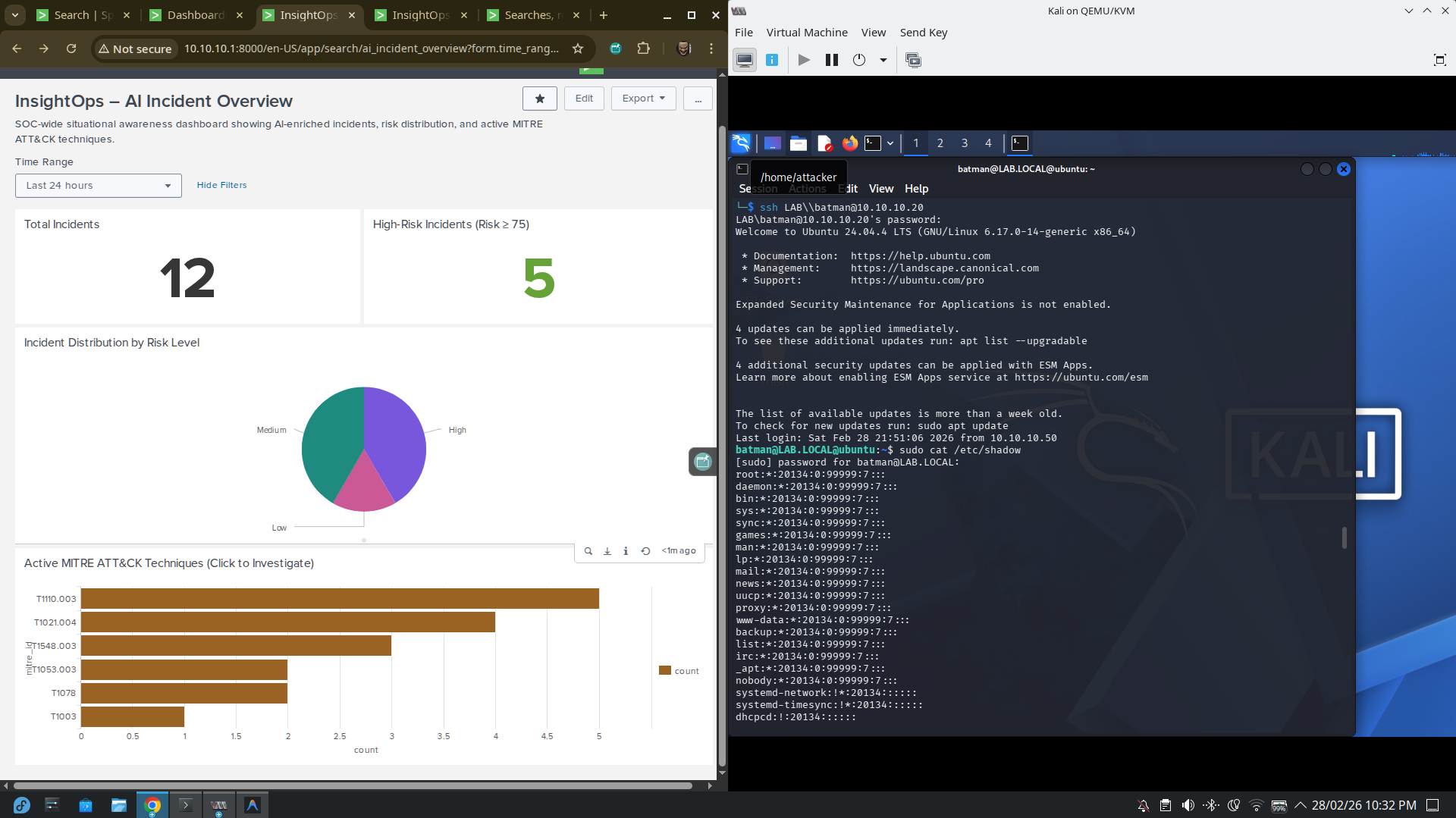
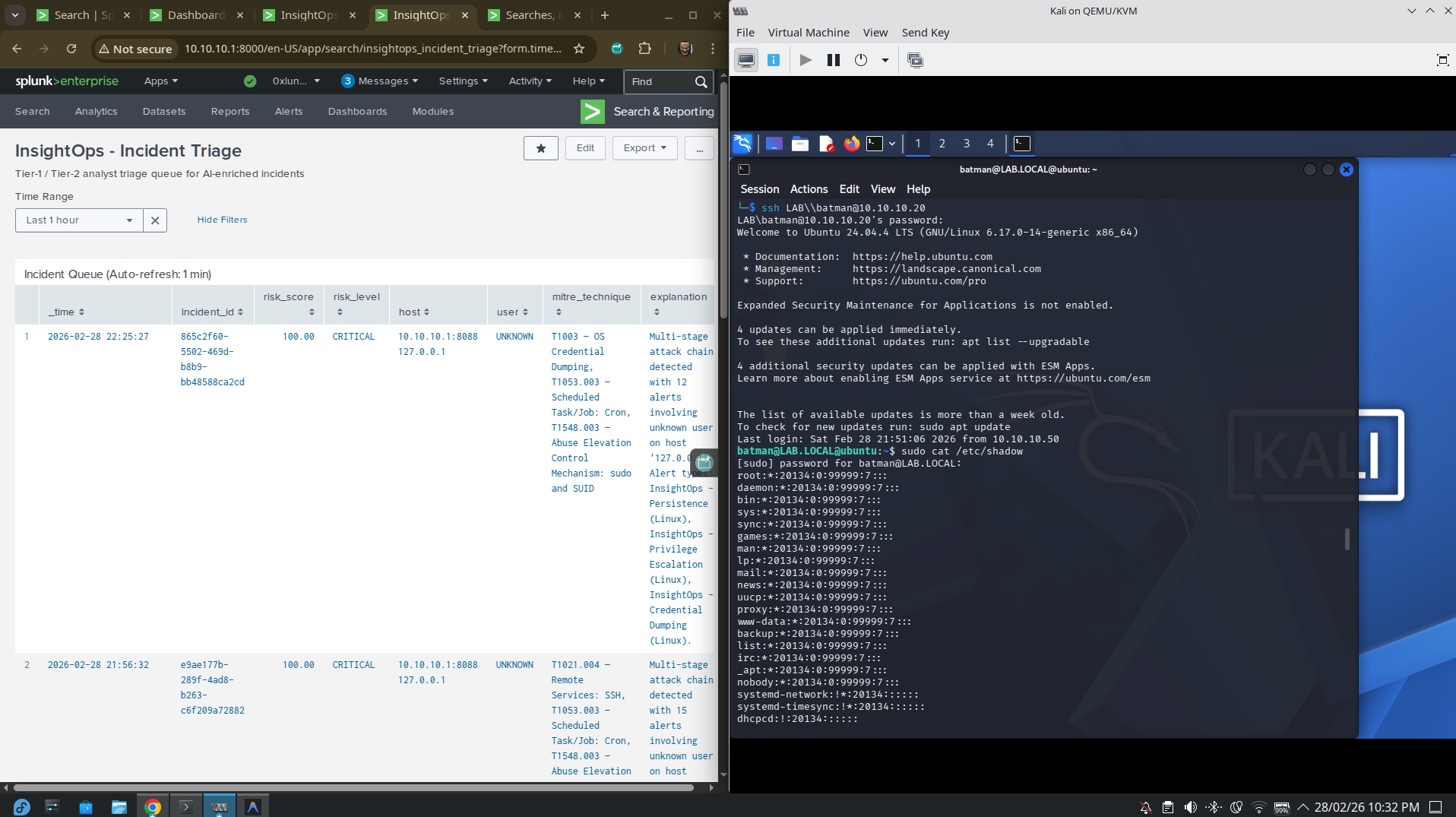
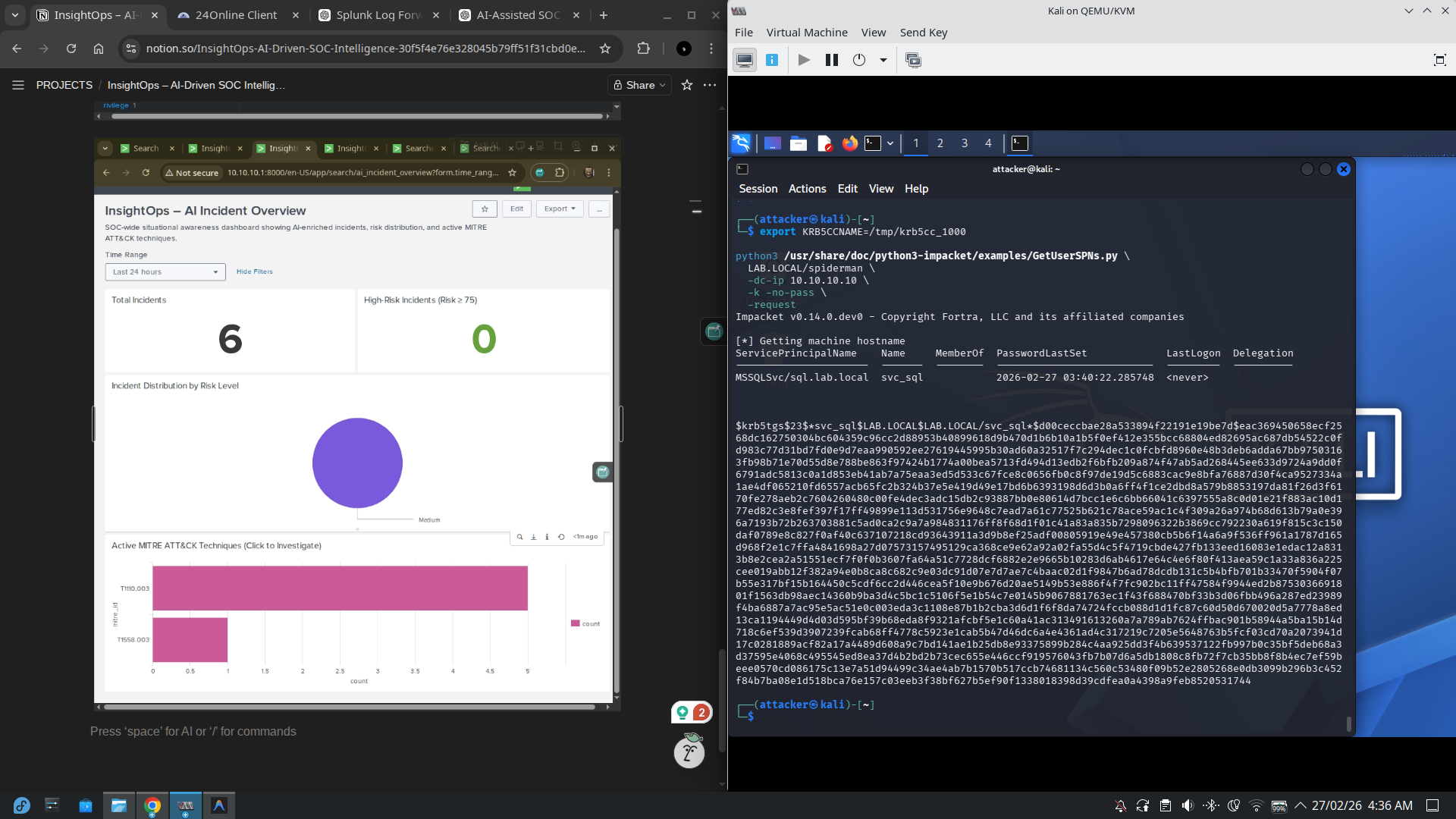
### 实时模拟:Kerberoasting 攻击与 SOC 概览
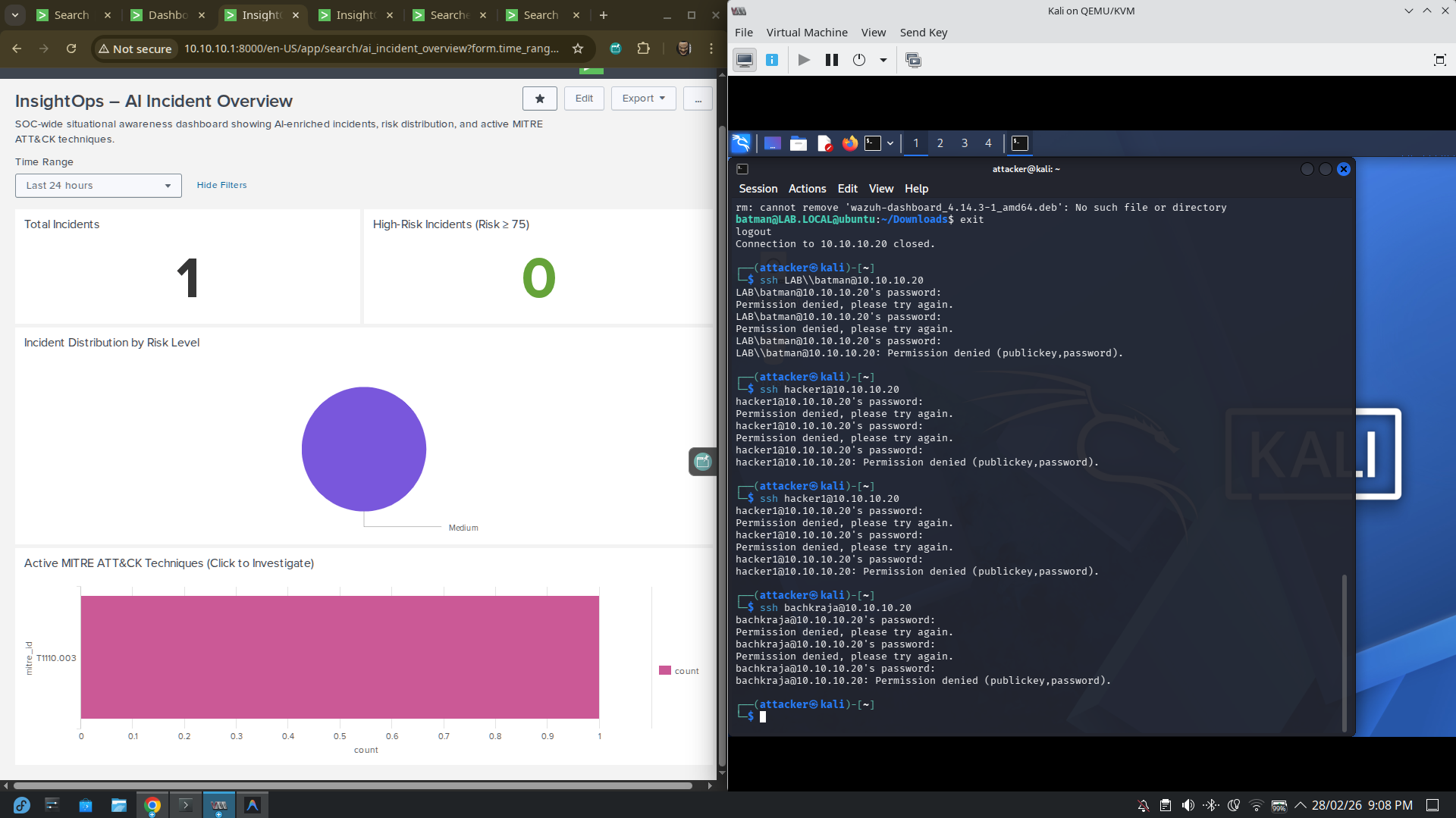
### 实时模拟:SSH 密码喷射
## 🌐 实验室网络设计
| 组件 | IP |
|---|---|
| Fedora 主机 (Splunk + AI 引擎) | `10.10.10.1` |
| DC01 — Windows Server 2019 (AD) | `10.10.10.10` |
| Ubuntu 域客户端 | `10.10.10.20` |
| Windows 10 域客户端 | `10.10.10.30` |
| Kali Linux (内部攻击者) | `10.10.10.50` |
- 内部 SOC LAN:`10.10.10.0/24`
- NAT / 互联网:`192.168.122.0/24`
- 双网卡架构,用于模拟真实的横向流量
## 🎓 学术背景
本项目作为一个**第 6 学期 B.Tech(计算机科学与工程 — 网络安全)**的作品集项目,按照生产级 SOC 工程标准构建——具备真实的 SIEM 集成、Windows + Linux 攻击杀伤链覆盖,以及超越了典型学术范围的可解释性优先设计理念。
**展示的目标岗位:**
SOC 分析师 (Tier 1/2) · 蓝队工程师 · 检测工程师 · SIEM/SOC 自动化工程师 · 初级 DFIR

*InsightOps 并不是一个仅仅“检测攻击”的工具。它是一个**保护分析师决策完整性的系统。***
标签:Cloudflare, Conpot, CSV导出, Flask, MITRE ATT&CK, Python, SOC辅助, SSE, Windows安全, 人工智能, 仪表盘, 企业安全, 企业级安全, 叙事生成, 威胁情报, 子域名变形, 安全分析平台, 安全告警, 安全规则引擎, 安全运营中心, 开发者工具, 无后门, 日志关联, 用户模式Hook绕过, 确定性分析, 网络安全, 网络映射, 网络资产管理, 逆向工具, 隐私保护, 风险评分