YuhichYOC/proxmox-openwrt-redundant-router
GitHub: YuhichYOC/proxmox-openwrt-redundant-router
基于 Proxmox 构建的双节点 OpenWrt 高可用冗余路由器部署方案,支持自动故障转移和可选的入侵检测功能。
Stars: 0 | Forks: 0
### proxmox-openwrt-redundant-router 由 Yuichi Yoshii 开发,采用 Apache License, Version2.0 授权
### 前提
本仓库中的脚本以在全新安装的 Proxmox 节点上运行为前提。
未在其他状态下进行过运行测试。
### 此脚本构建的 Proxmox 与 OpenWrt 关系图
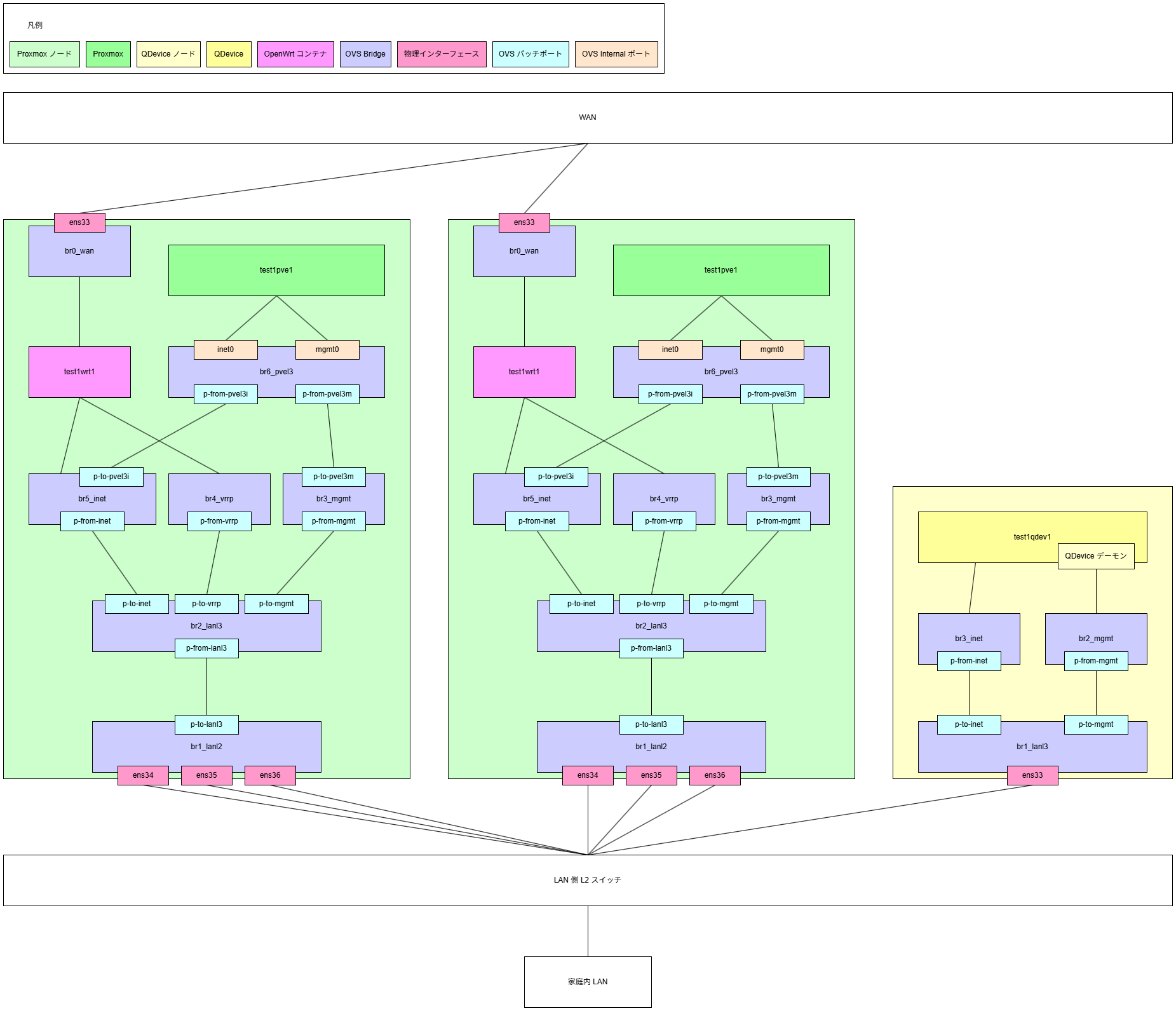
### 设置步骤
#### 节点 A
1. 在 node-A/setup.pve.sh 中填写参数
2. 在 node-A/setup.openwrt.sh 中填写参数
3. 在 node-A/openwrt/setup.sh 中填写参数
4. 生成 VRRP 密码
5. 在 node-A/openwrt/init_interfaces 中填写参数
6. 在 node-A/setup.suricata.sh 中填写参数(仅当需要 Suricata 时)
7. 在 node-A/suricata/setup.sh 中填写参数(仅当需要 Suricata 时)
8. SSH 登录到节点 A
9. 将脚本部署到节点 A
10. 运行 setup.pve.sh
- 将自动注销
11. 运行 setup.openwrt.sh
12. 如果需要 Suricata
- 运行 setup.suricata.sh
13. 如果需要 Elasticsearch & Kibana
1. 确认 Ubuntu 容器镜像已下载完成
2. 准备 SSL 证书和密钥文件
- [SSL 证书获取方法示例请看这里](https://github.com/YuhichYOC/web-articles/blob/main/articles/proxmox-acme-client.md)
3. 在 OpenWrt 中完成 Elasticsearch 容器网卡的固定 IP 设置及 DNS 记录注册
4. 运行 setup.elastic.pl
#### 节点 B
1. 在 node-B/setup.pve.sh 中填写参数
2. 在 node-B/setup.openwrt.sh 中填写参数
3. 在 node-B/openwrt/setup.sh 中填写参数
4. 在 node-B/openwrt/init_interfaces 中填写参数
5. 在 node-B/setup.suricata.sh 中填写参数(仅当需要 Suricata 时)
6. 在 node-B/suricata/setup.sh 中填写参数(仅当需要 Suricata 时)
7. SSH 登录到节点 B
8. 将脚本部署到节点 B
9. 运行 setup.pve.sh
- 将自动注销
10. 运行 setup.openwrt.sh
11. 如果需要 Suricata
- 运行 setup.suricata.sh
#### QDevice 节点
1. 在 qdev/setup.sh 中填写参数
2. SSH 登录到 QDevice 节点
3. 将脚本部署到 QDevice 节点
4. 运行 setup.sh
标签:BurpSuite集成, Cutter, DNS 反向解析, Elasticsearch, HTTP工具, IPS, LXC, Metaprompt, OpenWrt, Proxmox VE, Shell 脚本, Suricata, Ubuntu 容器, VRRP, 冗余路由, 双机热备, 后渗透, 基础设施, 威胁检测与响应, 子域名变形, 家庭实验室, 开源, 无线安全, 流量捕获, 浮动 IP, 特权提升, 现代安全运营, 网络安全, 网络安全审计, 网络拓扑, 自动化部署, 虚拟化, 越狱测试, 软路由, 隐私保护