khashashin/ogi
GitHub: khashashin/ogi
开源可视化关联分析与 OSINT 框架,通过丰富的 Transform 实现实体丰富化与图谱调查,支持 AI 辅助与插件扩展。
Stars: 220 | Forks: 27
 # OpenGraph Intel (OGI)
**开源可视化关联分析与 OSINT 框架。**
**免费、支持自托管、社区驱动。**
[](https://www.gnu.org/licenses/agpl-3.0)
[](https://github.com/khashashin/ogi/actions/workflows/ci.yml)
[](https://github.com/khashashin/ogi/actions/workflows/docker-publish.yml)
[](https://www.python.org)
[](https://www.typescriptlang.org)
[](https://react.dev)
[](https://fastapi.tiangolo.com)

[功能特性](#features) • [界面截图](#screenshots) • [快速开始](#quick-start) • [Docker](#docker) • [Transform Hub](#transform-hub) • [架构](#architecture) • [贡献指南](#contributing)
# OpenGraph Intel (OGI)
**开源可视化关联分析与 OSINT 框架。**
**免费、支持自托管、社区驱动。**
[](https://www.gnu.org/licenses/agpl-3.0)
[](https://github.com/khashashin/ogi/actions/workflows/ci.yml)
[](https://github.com/khashashin/ogi/actions/workflows/docker-publish.yml)
[](https://www.python.org)
[](https://www.typescriptlang.org)
[](https://react.dev)
[](https://fastapi.tiangolo.com)

[功能特性](#features) • [界面截图](#screenshots) • [快速开始](#quick-start) • [Docker](#docker) • [Transform Hub](#transform-hub) • [架构](#architecture) • [贡献指南](#contributing)
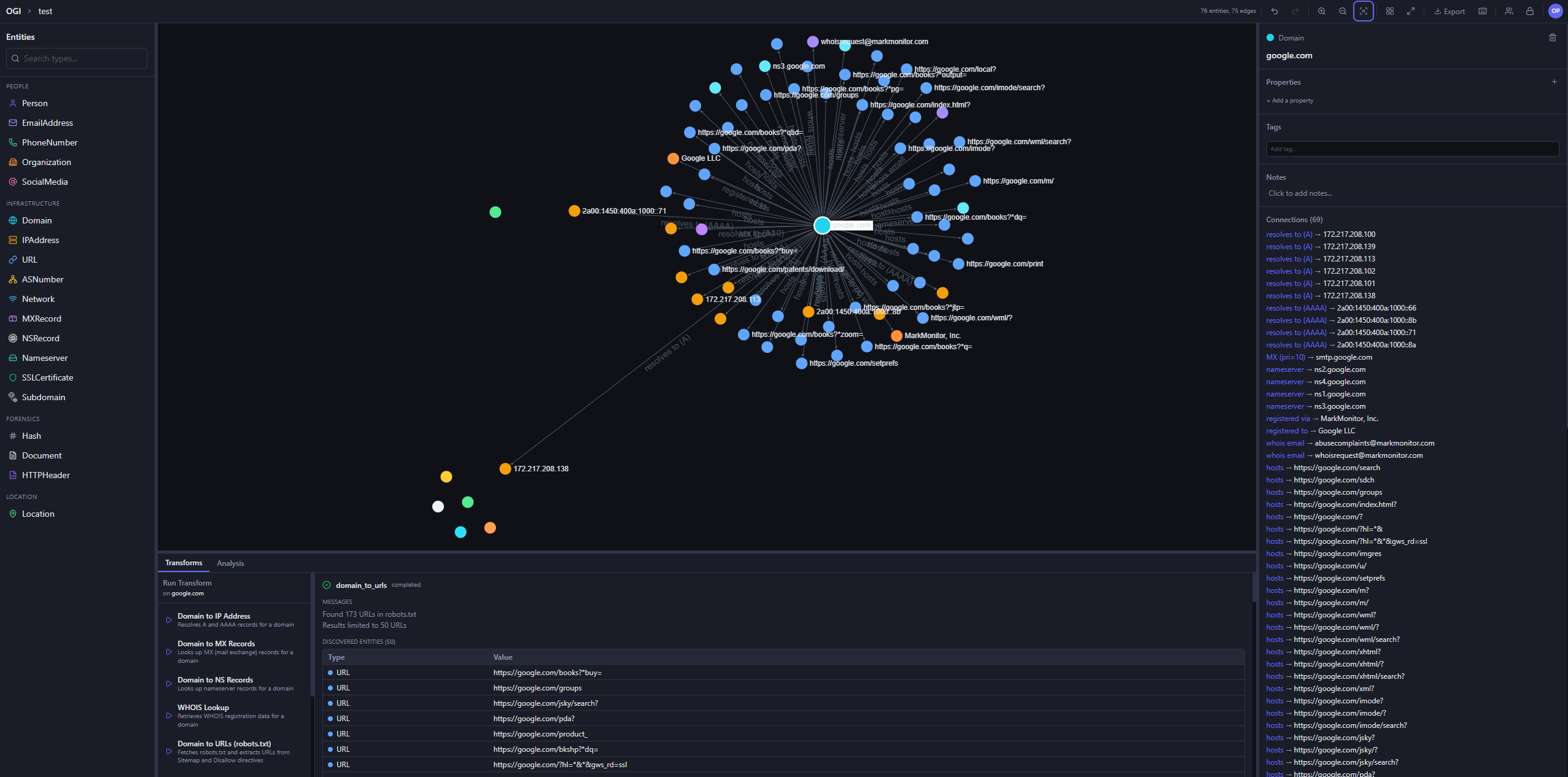
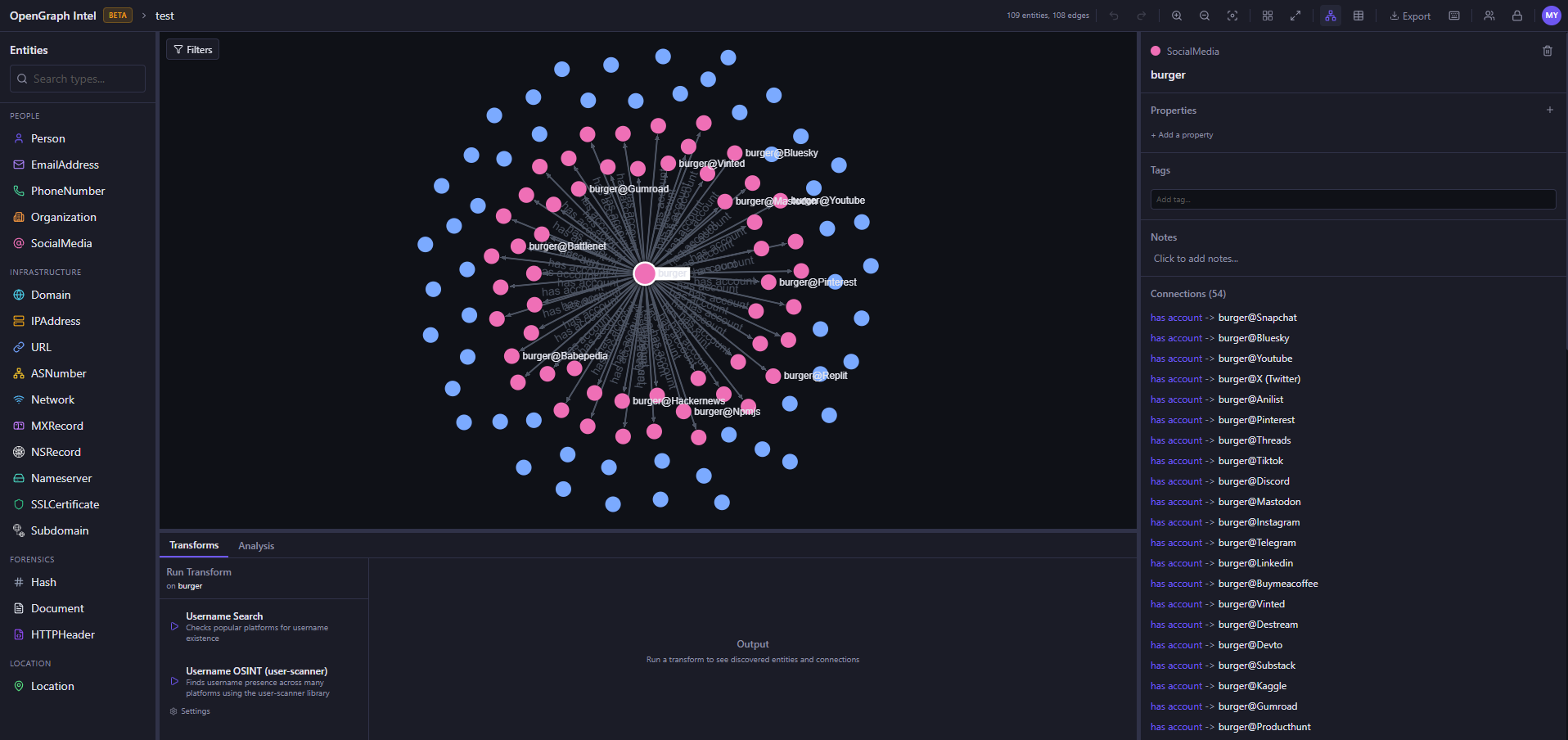
| 图谱调查 | 实体丰富化 |
| :-------------------------------------------: | :-----------------------------------------: |
|  |  |
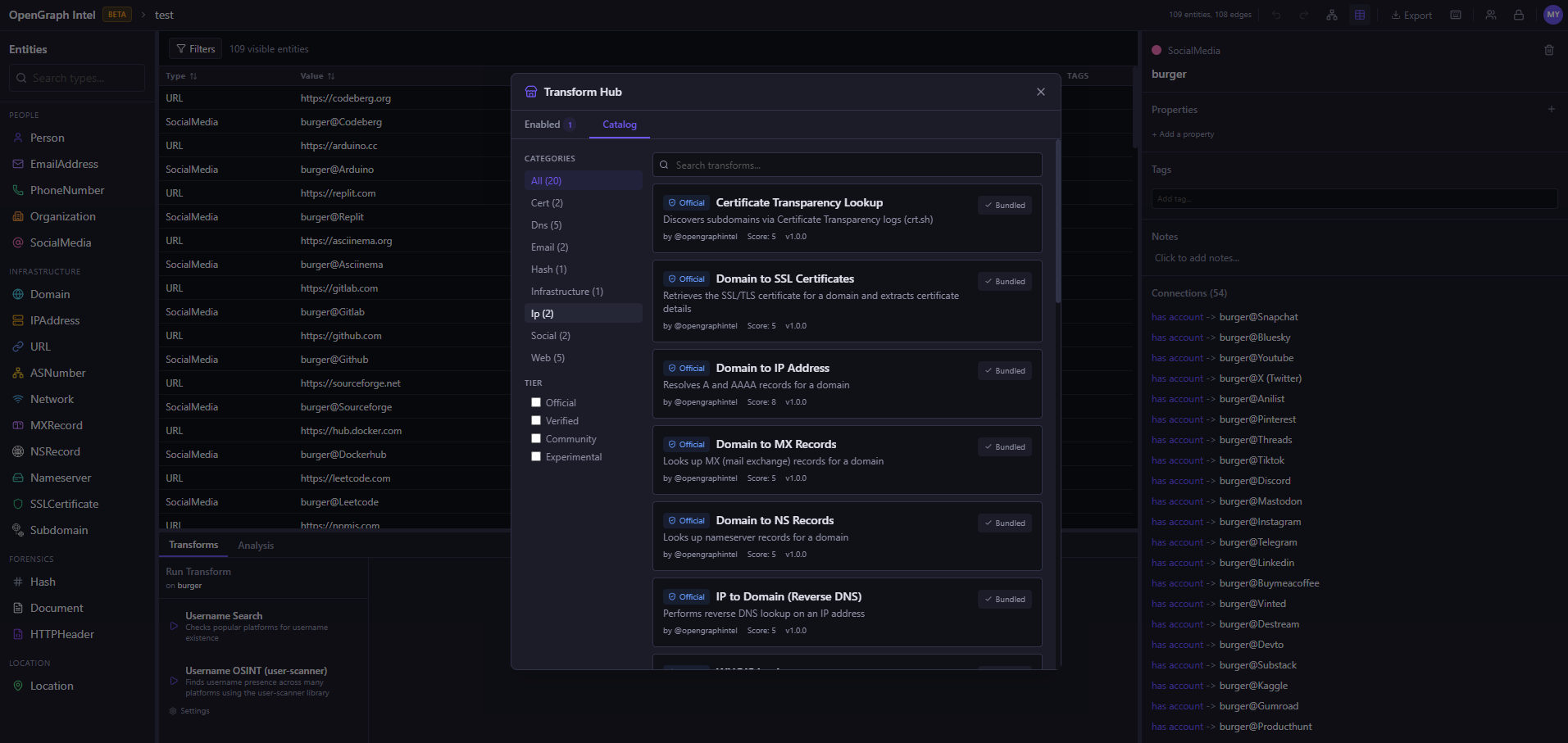
| Transform Hub | 导出 / 导入 |
| :-------------------------------------: | :-------------------------------------: |
|  | 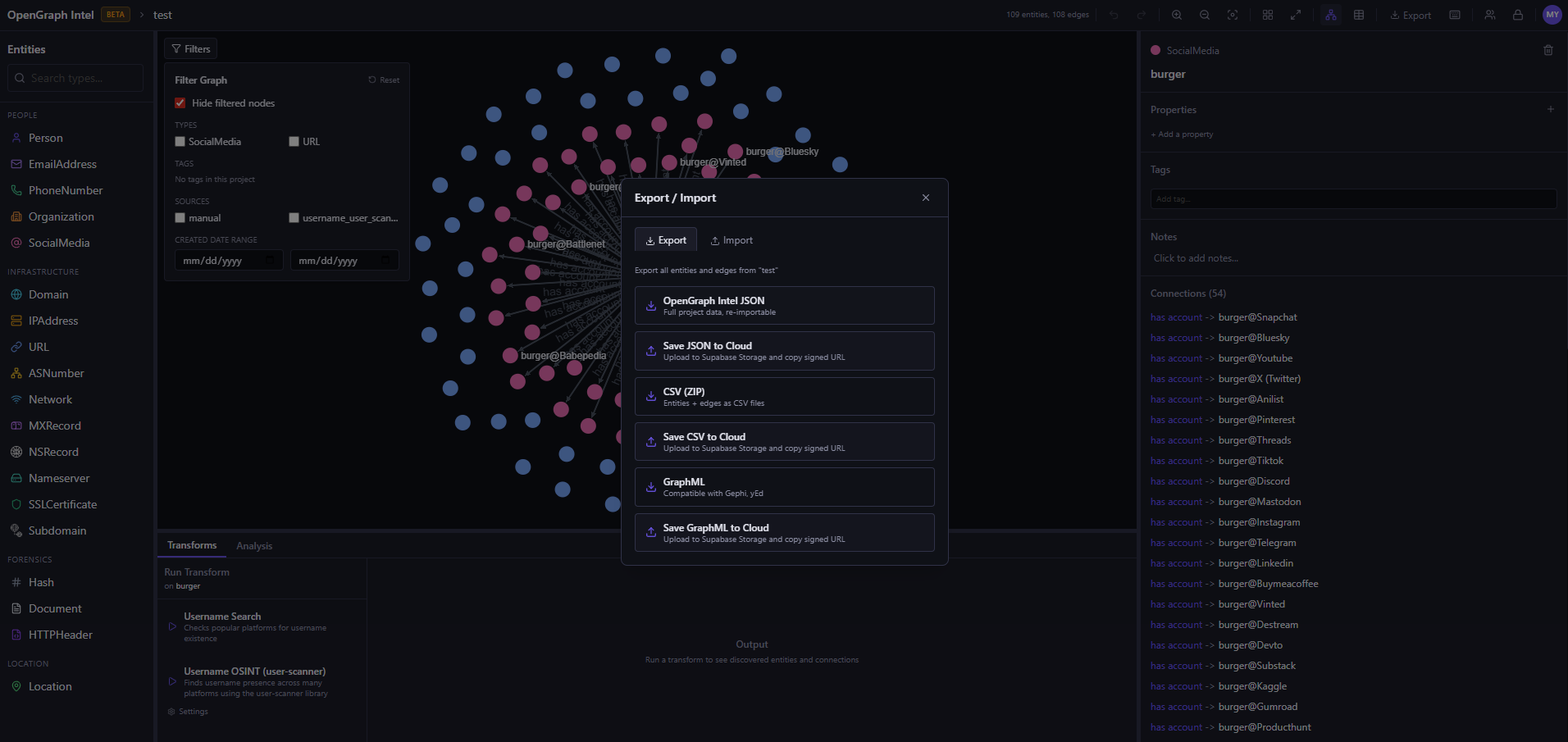 |
## 快速开始
### 前置条件
| 工具 | 版本 |
| -------------------------------- | ------- |
| [Python](https://www.python.org) | 3.14+ |
| [uv](https://docs.astral.sh/uv/) | latest |
| [Node.js](https://nodejs.org) | 20+ |
| [pnpm](https://pnpm.io) | latest |
### 后端
```
cd backend
uv sync
uv run uvicorn ogi.main:app --reload
```
API 将在 `http://localhost:8000` 上可用。
要在本地执行 Transform,Redis 和 Transform Worker 也必须运行。仅运行 Redis 是不够的。
启动 Redis:
```
docker run -d --name ogi-redis -p 6379:6379 redis:7-alpine
```
在第二个终端中启动 Transform Worker:
```
cd backend
uv run python -m ogi.worker.run_worker
```
如果您看到 `Job queue not available` 或 `Redis not available`,请验证:
- `OGI_REDIS_URL` 指向 `redis://localhost:6379/0`(用于本地基于主机的运行)
- Redis 启动后后端已重启
- 独立的 Worker 进程正在运行
- 您没有在 Docker Compose 之外使用仅限 Docker 的主机名 `redis`
如果您针对 PostgreSQL (`OGI_USE_SQLITE=false`) 运行后端,启动时将在处理请求之前自动应用 Alembic 迁移。Docker 部署在后端容器入口点中执行相同的操作。
AI Investigator 的运行由另一个独立的 Worker 处理:
```
cd backend
uv run python -m ogi.agent.run_worker
```
### 前端
```
cd frontend
pnpm install
pnpm dev
```
打开 http://localhost:5173。完成。
### AI 调查器
AI Investigator 是一个可选的、由提供商支持的工作流,可以规划 Transform 序列、请求批准,并在工作区内总结调查进度。
- 在项目中打开 `AI Investigator` 选项卡
- 在 Investigator 设置对话框中配置提供商和模型
- 将提供商 API Keys 存储在 `API Keys` 中
- 在后端旁运行独立的 `agent-worker` 进程
当前实现支持按用户的提供商配置,以及一个独立于主 API 服务器执行调查步骤的专用 Worker。
### CLI
两种支持的 CLI 运行方式:
**推荐**(无需激活):
```
cd backend
uv sync
uv run ogi --help
```
**已激活 virtualenv**(使用 `ogi` 命令):
```
cd backend
uv venv
# PowerShell:
.\.venv\Scripts\Activate.ps1
uv pip install -e .
ogi --help
```
## Docker
### 开发环境
```
cp .env.example .env
docker compose up
```
### 生产环境
使用预构建的 GHCR 镜像。
重要:[docker-compose.prod.yml](https://github.com/khashashin/ogi/blob/main/docker-compose.prod.yml) 需要外部 PostgreSQL 数据库。它不包含 `db` 服务。
如果您需要包含内置 Postgres 和 Redis 的全合一本地 Docker 技术栈,请使用:
```
docker compose up -d
```
仅当您已经拥有可访问的 PostgreSQL 实例并相应设置了 `OGI_DATABASE_URL` 时,才使用生产 Compose 文件:
```
docker compose -f docker-compose.prod.yml pull
docker compose -f docker-compose.prod.yml up -d
```
在 `.env` 中设置 `OGI_IMAGE_TAG` 以固定特定的发布镜像标签(例如 `v0.2.6`)。默认为 `latest`。
### 可配置的 Transform 上限
OGI 为 `max_results`、`max_links`、`max_urls` 和 `max_content_chars` 等设置提供了合理的每个 Transform 最大值,但这些上限现在可以集中覆盖,以便云部署可以在不硬编码本地限制的情况下强制执行它们。
在 `.env` 中使用 `OGI_TRANSFORM_SETTING_MAX_OVERRIDES`:
```
OGI_TRANSFORM_SETTING_MAX_OVERRIDES=max_results=50,max_urls=25,max_links=40,max_content_chars=20000
```
要在本地优先部署中移除特定上限:
```
OGI_TRANSFORM_SETTING_MAX_OVERRIDES=max_results=none,max_urls=none,max_links=none,max_content_chars=none
```
覆盖按 Transform 设置名称键入,适用于内置 Transforms 和使用 OGI 共享 Transform 基础/运行时的社区插件。
开发环境 Compose 服务
| 服务 | 描述 | 端口 | | -------------- | -------------------------- | ---- | | `backend` | FastAPI 应用服务器 | 8000 | | `worker` | RQ 异步任务 Worker | - | | `agent-worker` | AI Investigator Worker | - | | `frontend` | 通过 nginx 提供服务的 React 应用 | 80 | | `db` | PostgreSQL 16 | 5432 | | `redis` | Redis 7 (任务队列) | 6379 |生产环境 Compose 服务
| 服务 | 描述 | 端口 | | -------------- | -------------------------- | ---- | | `backend` | FastAPI 应用服务器 | 8000 | | `worker` | RQ 异步任务 Worker | - | | `agent-worker` | AI Investigator Worker | - | | `frontend` | 通过 nginx 提供服务的 React 应用 | 80 | | `redis` | Redis 7 (任务队列) | 6379 | `docker-compose.prod.yml` 通过 `OGI_DATABASE_URL` 期望外部 PostgreSQL 数据库。启动时插件依赖
如果您使用预构建的镜像并且插件需要额外的 Python 库,OGI 会在容器启动时从以下位置安装插件依赖: 1. `plugins/requirements.txt`(首选),或者 2. 当 `requirements.txt` 缺失时,从 `plugins/ogi-lock.json` 派生的自动生成的依赖。 **环境变量:** | Variable | Default | Description | | --------------------------------- | ------------------------------- | ----------------------------------------- | | `OGI_BOOT_REQUIREMENTS_ENABLE` | `true` | 启用/禁用启动时安装 | | `OGI_BOOT_REQUIREMENTS_FILE` | `/app/plugins/requirements.txt` | requirements 文件路径 | | `OGI_BOOT_LOCK_FILE` | `/app/plugins/ogi-lock.json` | lock 文件路径 | | `OGI_BOOT_REQUIREMENTS_STRICT` | `false` | 如果依赖缺失则启动失败 | | `OGI_BOOT_REQUIREMENTS_CACHE_DIR` | `/tmp/ogi-boot` | 生成 requirements 的临时/缓存目录 |关键环境变量
| Variable | 描述 | 默认值 | | ----------------------------------------------- | ---------------------------------------------------------------------------------------------------------------- | --------------------------------------------------- | | `OGI_APP_NAME` | 应用程序名称 | `OGI` | | `OGI_HOST` | 后端绑定主机 | `0.0.0.0` | | `OGI_PORT` | 后端端口 | `8000` | | `OGI_CORS_ORIGINS` | 允许的前端来源 `http://localhost:5173,http://localhost:3000` | | `OGI_USE_SQLITE` | 使用 SQLite 而非 PostgreSQL | `true` | | `OGI_DB_PATH` | SQLite 数据库文件路径 | `ogi.db` | | `OGI_DATABASE_URL` | PostgreSQL 连接字符串 | `postgresql://postgres:postgres@localhost:5432/ogi` | | `OGI_REDIS_URL` | 用于 RQ/Jobs 的 Redis 连接字符串 | `redis://localhost:6379/0` | | `OGI_RQ_QUEUE_NAME` | Transform 任务队列名称 | `transforms` | | `OGI_TRANSFORM_TIMEOUT` | 单个 Transform 任务超时时间(秒) | `300` | | `OGI_AGENT_WORKER_POLL_INTERVAL_SEC` | AI Investigator Worker 轮询间隔 | `2.0` | | `OGI_AGENT_CLAIM_TIMEOUT_SEC` | AI Investigator 步骤恢复的过期声明超时 | `120` | | `OGI_AUTO_RUN_MIGRATIONS` | 本地非 SQLite 应用启动时自动运行 Alembic | `true` | | `OGI_RUN_DB_MIGRATIONS` | 在容器入口点运行数据库迁移 | `false` | | `OGI_DB_MIGRATION_RETRIES` | 入口点迁移重试次数 | `30` | | `OGI_DB_MIGRATION_DELAY_SECONDS` | 入口点迁移重试之间的延迟 | `2` | | `OGI_PLUGIN_DIRS` | 插件搜索目录 | `plugins,../plugins` | | `OGI_DEPLOYMENT_MODE` | 部署模式 (`self-hosted` 或 `cloud`) | `self-hosted` | | `OGI_REGISTRY_REPO` | Transform Registry GitHub 仓库 | `opengraphintel/ogi-transforms` | | `OGI_REGISTRY_CACHE_TTL` | Registry 缓存 TTL(秒) | `3600` | | `OGI_TRANSFORM_SETTING_MAX_OVERRIDES` | Transform 设置的可选全局最大值覆盖映射 | 空 | | `OGI_GITHUB_TOKEN` | 用于 Registry/API 速率限制的可选 GitHub Token | 未设置 | | `OGI_SUPABASE_URL` | Supabase 项目 URL | 未设置 | | `OGI_SUPABASE_ANON_KEY` | Supabase 匿名/公开 Key | 未设置 | | `OGI_SUPABASE_SERVICE_ROLE_KEY` | Supabase 服务角色 Key | 未设置 | | `OGI_SUPABASE_JWT_SECRET` | Supabase JWT 密钥 | 未设置 | | `OGI_SUPABASE_REDIRECT_URL` | 前端认证流程使用的重定向 URL | 未设置 | | `OGI_ADMIN_EMAILS` | 用于 Registry/插件管理的管理员用户 | 未设置 | | `OGI_API_KEY_ENCRYPTION_KEY` | 用于加密 API Key 存储的 Fernet Key | 未设置但强烈建议 | | `OGI_API_KEY_INJECTION_ALLOW_COMMUNITY_PLUGINS` | 允许社区插件接收存储的 API Keys | `true` | | `OGI_API_KEY_INJECTION_TRUSTED_TIERS_ONLY` | 仅限将存储的 Key 注入受信任的层级 | `false` | | `OGI_API_KEY_INJECTION_ALLOWED_TIERS` | 启用仅受信任模式时允许的层级 | `official,verified` | | `OGI_API_KEY_SERVICE_ALLOWLIST` | 存储的 Key 注入的可选允许服务 | 空 | | `OGI_API_KEY_SERVICE_BLOCKLIST` | 存储的 Key 注入的可选阻止服务 | 空 | | `OGI_LLM_PROVIDER` | 默认 AI Investigator 提供商回退 | `openai` | | `OGI_LLM_MODEL` | 默认 AI Investigator 模型回退 | `gpt-4.1-mini` | | `OGI_EXPOSE_ERROR_DETAILS` | 在 500 响应中包含内部详情 | `false` | | `OGI_SANDBOX_ENABLED` | 启用沙箱执行模式 | `false` | | `OGI_SANDBOX_TIMEOUT` | 沙箱超时时间(秒) | `30` | | `OGI_SANDBOX_MEMORY_MB` | 沙箱内存限制(MB) | `256` | | `OGI_SANDBOX_ALLOWED_TIERS` | 云沙箱模式下允许的层级 | `official,verified` | | `OGI_BOOT_REQUIREMENTS_ENABLE` | 启用启动时插件依赖安装 | `true` | | `OGI_BOOT_REQUIREMENTS_FILE` | 启动 requirements 文件路径 | `/app/plugins/requirements.txt` | | `OGI_BOOT_LOCK_FILE` | 启动 lock 文件路径 | `/app/plugins/ogi-lock.json` | | `OGI_BOOT_REQUIREMENTS_STRICT` | 如果插件依赖缺失则启动失败 | `false` | | `OGI_BOOT_REQUIREMENTS_CACHE_DIR` | 启动 requirements 生成的临时/缓存目录 | `/tmp/ogi-boot` | | `OGI_FRONTEND_PORT` | 本地 Docker 前端端口映射 | `3000` | | `OGI_IMAGE_TAG` | 用于 Compose/Coolify 样式部署的生产镜像标签 | `latest` | | `OGI_BACKEND_IMAGE` | 可选的后端镜像覆盖 | `ghcr.io/khashashin/ogi-backend` | | `OGI_WORKER_IMAGE` | 可选的 Worker 镜像覆盖。默认为后端镜像,因为 Worker 和后端共享同一个镜像构建。 | `ghcr.io/khashashin/ogi-backend` | | `OGI_FRONTEND_IMAGE` | 可选的前端镜像覆盖 | `ghcr.io/khashashin/ogi-frontend` | | `OGI_CLI_BEARER_TOKEN` | 用于启用认证的后端的可选 CLI Bearer Token | 未设置 | 请参阅 [`.env.example`](.env.example) 获取完整列表。
**[报告 Bug](https://github.com/khashashin/ogi/issues) • [请求功能](https://github.com/khashashin/ogi/issues) • [讨论](https://github.com/opengraphintel/ogi-transforms/discussions)**
由 OGI 社区用 💜 制作
标签:AI代理, AV绕过, BSD, Docker, ESC4, ESC8, FastAPI, GitHub, OSINT, Python, React, Sigma 规则, SSL证书, Syscalls, TypeScript, WHOIS查询, 二进制发布, 人工智能, 关联分析, 协议探测, 可视化调查, 图形数据库, 域名分析, 威胁情报, 安全插件, 安全防御评估, 实时处理, 开发者工具, 开源工具, 情报收集, 搜索引擎查询, 数据挖掘, 无后门, 测试用例, 漏洞研究, 用户模式Hook绕过, 社会工程学, 网络安全, 自托管, 请求拦截, 逆向工具, 隐私保护