motorrin/arch-smart-update
GitHub: motorrin/arch-smart-update
一个 Bash 封装脚本,通过在 Arch Linux 更新前提供包分类、稳定性建议、新闻警报和数据库备份,帮助用户做出明智的更新决策。
Stars: 32 | Forks: 2






**厌倦了盲目运行 `pacman -Syu` 然后祈祷你的系统不要崩溃吗?**
**[跳转至安装说明](#installation)**
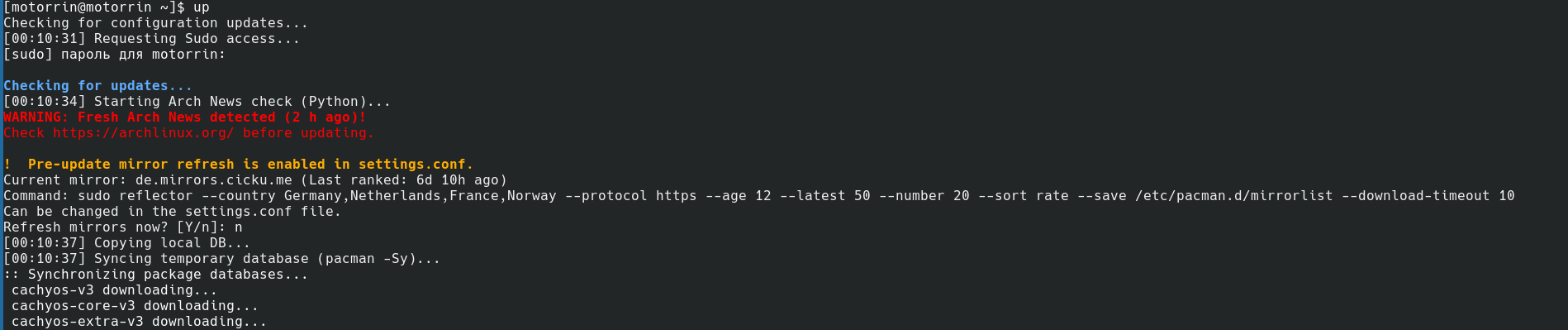
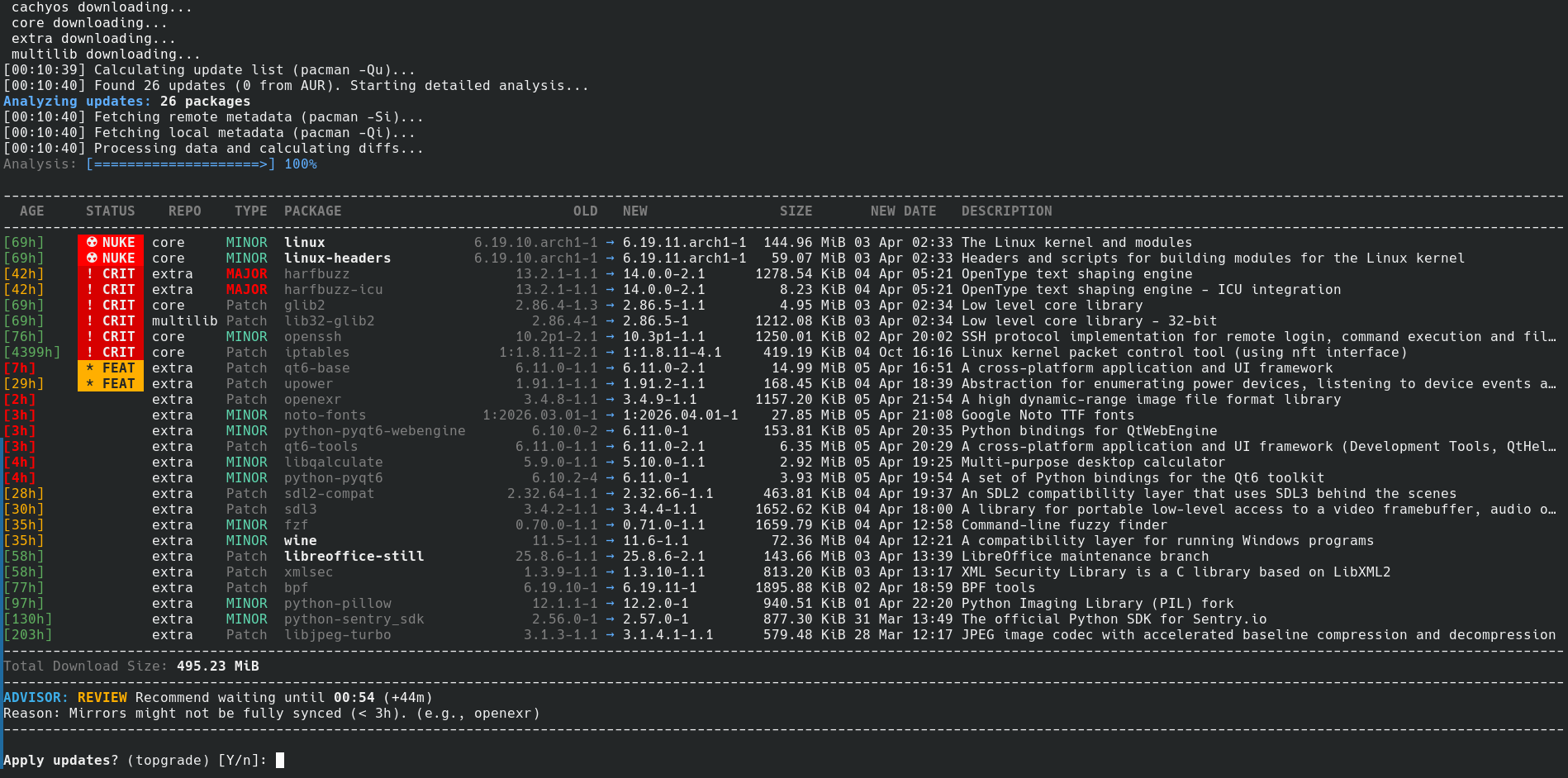
**arch-smart-update** 是一个 bash 封装脚本,旨在保护原生 **Arch Linux** 及其衍生版的系统更新安全。它不再让你盲目更新,而是通过提供**软件包构建日期**、**软件包描述**、官方 **Arch 新闻**警报,以及来自智能**更新顾问**的稳定性建议,让你完全掌控整个升级过程——让你在将实际事务直接委托给 **pacman**、**AUR helper** 或 **topgrade** 之前,能够做出明智的决定。
该脚本还支持 **EndeavourOS**(如 `eos-update`)和 **CachyOS**(如 `arch-update`)上的特定发行版工具,同时保持与其他任何基于 Arch 的系统的完全兼容性。
⚠️ **重要免责声明:** 顾问提供的更新建议是有用的指导原则,而非绝对的规则。作为 Arch Linux 用户,**你就是系统管理员**,对你的机器负有最终责任。在按下“Y”之前,请务必检查更新列表并运用你自己的判断力。对于任何崩溃的系统、无法引导的内核或数据丢失,作者概不负责!
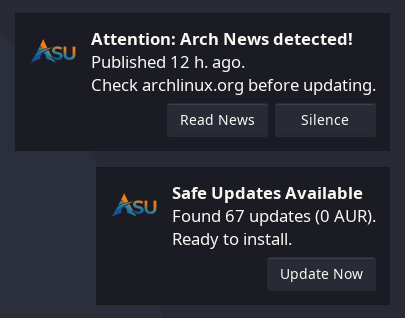
## Daemon 预览(可选,可在首次启动时激活)
## ✨ 为什么你需要这个脚本(核心功能)
- **⚡ 安全的基于 RAM 的同步 (`/tmp`):** 脚本在检查阶段绝不会触碰你正在使用的本地 pacman 数据库。所有数据库同步和计算都在你内存 (`/tmp/checkupdates-db...`) 中一个隔离的临时目录里完成。如果你决定取消更新,这能 100% 防止灾难性的“部分升级”场景。
- **🧠 智能更新顾问:** 自动分析待处理软件包的关键程度。如果会导致系统崩溃的更新(如 Linux 内核、`glibc` 或 NVIDIA 驱动)发布不到 24 小时,脚本会强烈建议你等待,确保在你应用更新之前上游是稳定的。
- **📰 Arch 新闻集成 (RSS):** 获取最新的官方 Arch Linux 新闻源。如果有需要手动干预的最新帖子,在按下“Y”之前你会收到显眼的警告。
- **🛡️ 自动 Pacman 数据库备份:** 在应用任何更改之前,自动使用快速的 Zstandard 压缩为你的 `/var/lib/pacman/local` 数据库创建一个 `.tar.zst` 备份。它会保留最近的 5 个副本,让你随时可以无缝回滚。
- **🚀 智能 Mirror 管理:** 监控你的 mirrorlist 使用时间和同步速度。如果镜像存在时间超过 7 天或超时,它会检测到不稳定情况,并提议通过 `reflector`、`eos-rankmirrors` 或 `cachyos-rate-mirrors` 自动刷新它们。
- **📊 丰富的 CLI 分析:** 显示一个格式精美、带有颜色代码的终端表格,展示更新类型 (MAJOR、MINOR、PATCH、CALVER、EPOCH)、以小时为单位的包龄、下载大小、仓库和描述。
- **🔒 智能 Lock File 移除:** 检测过期的 `/var/lib/pacman/db.lck` 文件,并检查当前是否真的有包管理器在运行。它会在可用时使用 `fuser`,或者原生提取锁定 PID 并扫描进程表 (`pgrep` / `/proc`) 作为备用方案,以安全地移除幽灵锁定。
- **🚨 IgnorePkg 冲突检查:** 如果你通过 `pacman.conf` 冻结了软件包,脚本会在后台模拟更新,并警告你因跳过软件包而导致的任何依赖破坏。
- **🧹 自动系统清理:** 可选的更新后清理,可安全移除孤立的软件包、清除未完成的下载、清空 pacman/AUR 缓存、清理 systemd journal(保留 100M)以及清除用户缩略图缓存。
- **🧩 无缝生态集成:** 全面原生支持 AUR helper(`yay`、`paru`),并与 `eos-update` 和 `topgrade` 协同工作,以处理你的 Flatpak、固件和 dotfile。
- **👻 后台 Daemon 与通知:** 你可以允许脚本使用 user systemd timer 在后台运行。它会使用 `fakeroot` 静默检查更新(无需 sudo),并通过 `libnotify` 发送交互式桌面通知。针对 Arch 新闻设有智能的 3 次通知限制,以防止垃圾信息。
- **🎛️ 统一的配置管理:** 所有自定义命令、mirror 覆盖、行为设置和用户软件包数组都从一个单独的 `settings.conf` 文件中安全地解析。你的个人设置与上游默认值隔离,在脚本更新期间永远不会被覆盖。
## ⚙️ 软件包分类与威胁等级
该脚本能识别数百个软件包(从桌面环境到基础系统组件),并将它们划分为四个威胁等级,同时计算出一个安全的“冷却”期:
- **☢️ NUKE(系统核心):** `glibc`、`linux`、`nvidia`、`systemd`、`grub`、`cryptsetup`。
- **❗ CRIT & DEs(关键服务与桌面环境):** `mesa`、`wayland`、`dbus`、`KDE Plasma`、`GNOME`、`Hyprland` 等。
- **⭐ FEAT(通用功能与实用程序):** 音频/网络协议栈、框架、EOS 应用。
- **📦 标准软件包与 AUR:**
- **💡 自定义列表:** 你不必为了将这些特定应用添加到这些类别中而等待更新!你可以使用 settings.conf 文件轻松地将自己的软件包追加到 NUKE、CRIT 或 FEAT 列表中,并且你的更改将在未来所有的脚本更新中保留。
## 📁 配置与自定义
在首次运行时,脚本会在 `~/.config/arch-smart-update/` 创建一个配置文件夹,从 GitHub 下载最新的默认模板,并帮助你设置标准功能。每当你手动启动脚本时,它会在最顶部显示你当前活动配置文件的确切路径。
为了确保你的个人设置永远不会被脚本更新覆盖,配置被划分为两种类型:
**1. 开发者管理(通过 GitHub 自动更新):**
- `packages.conf` — 已分类软件包的主列表。
- `*.default.conf` — 展示最新推荐语法的模板。
**2. 用户管理(可安全防止被覆盖):**
- `settings.conf` — 你的主配置文件。在这里你可以配置:
- **通用设置:** `PROMPT_MIRROR_REFRESH`、`MAX_BACKUP_COPIES`、`AUR_HELPER_OVERRIDE`、`ENABLE_POST_CLEANUP`。
- **Daemon 与日志:** 配置 `ENABLE_BACKGROUND_CHECK`、systemd timer 间隔以及 `GENERATE_LOGS`。
- **覆盖:** 定义 `CUSTOM_REFLECTOR_CMD` 或定义 `CUSTOM_CMDS`(例如 `flatpak update -y`)来代替标准实用程序运行。
- **用户软件包:** 将你自己的应用添加到数组中(例如 `USER_CRITICAL_PKGS=("my-important-app")`),以将它们集成到顾问的威胁等级中。
*(注意:如果你是从 3.0 之前的版本升级的,该脚本具有自动迁移工具,它会在首次运行时将你旧的碎片化文件无缝合并到新的 `settings.conf` 中)。*
每当 GitHub 上的主配置更新时,脚本都会悄悄拉取更改,而不会触碰你的自定义文件!
## 📋 依赖项
该脚本依赖于标准的系统实用程序,但请确保你已安装以下软件包:
`sudo pacman -S curl python bash tar gawk coreutils zstd util-linux`
*(注意:python 包为 Arch 新闻 RSS 检查提供 python3,zstd 是加速本地数据库备份所必需的,而 util-linux 提供了用于交互式终端模拟的 script 实用程序)。*
**可选依赖项:**
- `base-devel`(特别是 `fakeroot`)— 后台 daemon 在没有 sudo 权限的情况下同步数据库所必需的。
- `libnotify`— 在 daemon 模式下进行桌面通知所必需的。
- `psmisc`— 提供用于标准 lock file 分析的 `fuser` 实用程序(尽管脚本在缺失时具有原生的备用方案)。
## 🛠️ 安装
## 方式 1:从 AUR 安装(推荐)
该脚本已在 Arch User Repository 中正式提供。你可以使用你最喜欢的 AUR helper 进行安装:
对于 yay:
`yay -S arch-smart-update`
对于 paru:
`paru -S arch-smart-update`
## 方式 2:手动安装
如果你选择手动安装该脚本,请记住你还需要手动下载新版本以确保稳定性:
1. `cd ~`
2. `curl -O https://raw.githubusercontent.com/motorrin/arch-smart-update/main/arch-smart-update.sh`
3. `chmod +x arch-smart-update.sh`
## ❓ 我该如何使用这个脚本?
如果你是通过 AUR 安装的,该命令已全局可用:
`arch-smart-update`
如果你是手动安装的,命令为:
`~/arch-smart-update.sh`
## ⌨️ 为什么要敲这么多字母?创建一个 alias 吧!
### 1. 检查你正在使用的 shell:
`echo $SHELL`
### 2. 打开你的配置文件:
对于 bash:
`nano ~/.bashrc`
对于 zsh:
`nano ~/.zshrc`
对于 fish:
`nano ~/.config/fish/config.fish`
### 3. 将 alias 添加到文件的最末尾:
如果你是通过 AUR 安装的:
`alias up="arch-smart-update"`
如果你是手动安装的:
`alias up="$HOME/arch-smart-update.sh"`
### 4. 立即应用更改:
对于 bash:
`source ~/.bashrc`
对于 zsh:
`source ~/.zshrc`
对于 fish:
`source ~/.config/fish/config.fish`
## 🗑️ 卸载脚本
### 1. 确保后台进程没有运行:
`systemctl --user disable --now arch-smart-update.timer`
### 2. 移除脚本(根据你的安装方式运行其中一个):
AUR:
`sudo pacman -Rns arch-smart-update`
手动安装 *(如果你将其下载到了其他文件夹,请相应地更改路径)*:
`rm ~/arch-smart-update.sh`
### 3. 移除配置文件、日志、新闻缓存和图标:
`rm -rf ~/.config/arch-smart-update`
### 4. 移除生成的 systemd 文件:
`rm -f ~/.config/systemd/user/arch-smart-update.service`
`rm -f ~/.config/systemd/user/arch-smart-update.timer`
`systemctl --user daemon-reload`
### 5. 删除 Pacman 数据库备份:
`sudo rm -f /var/lib/pacman/backup/pacman_database_*.tar.zst`
`sudo rm -f /var/lib/pacman/backup/pacman_database_*.tar.gz`
### 6. 清除 AUR helper 的构建缓存(如果是通过 AUR 安装的):
`rm -rf ~/.cache/yay/arch-smart-update`
`rm -rf ~/.cache/paru/clone/arch-smart-update`
标签:Arch Linux, Bash, 应用安全, 系统更新, 运维工具, 逆向工具