Browser-based firewall config to Juniper SRX conversion a mechub project — sovereign network-security automation
A browser-based tool that converts firewall configurations into an intermediate format for review, editing, and conversion to Juniper SRX. Supports **PAN-OS XML**, **Junos SRX**, **FortiGate / FortiOS**, **Cisco ASA / FTD**, **Check Point R80+**, **SonicWall SonicOS**, **Huawei USG**, **AWS Security Groups**, **Azure NSG**, and **GCP Firewall Rules** as source formats, plus a **Greenfield** mode that builds an SRX configuration from scratch via LLM-guided interview. Paste or upload a config (or start a greenfield interview), review and edit the parsed rules through an interactive UI, optionally get AI-powered best-practice suggestions, then export as SRX set commands or XML.
Unofficial / community project. Not affiliated with, endorsed by, or supported by Juniper Networks, Palo Alto Networks, Fortinet, Cisco, Check Point, SonicWall, Huawei, HPE, Amazon Web Services, Microsoft, or Google.
## Screenshots
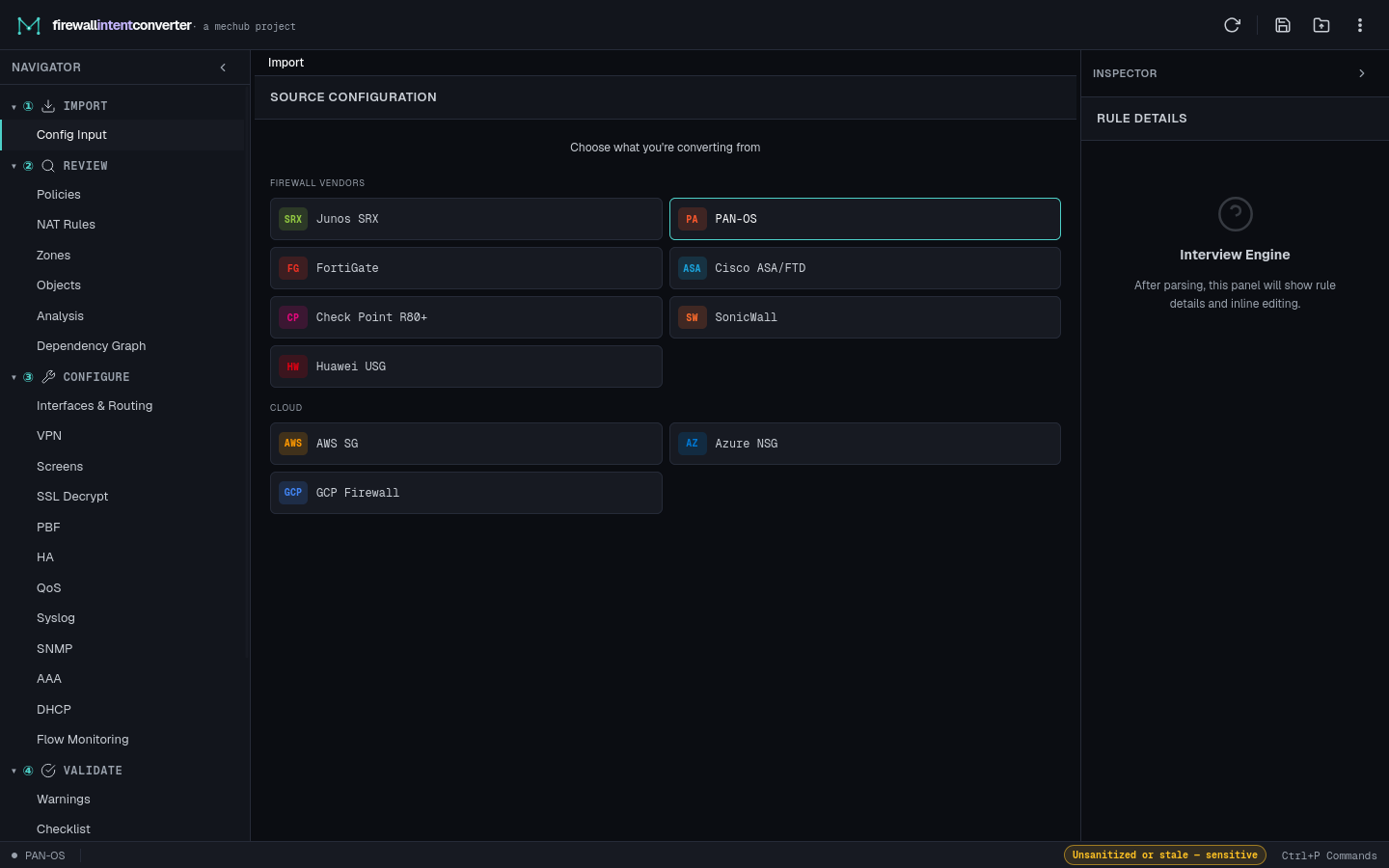
Source chooser — pick a firewall vendor, cloud platform, or start from scratch (Greenfield / SRX Best Practice).
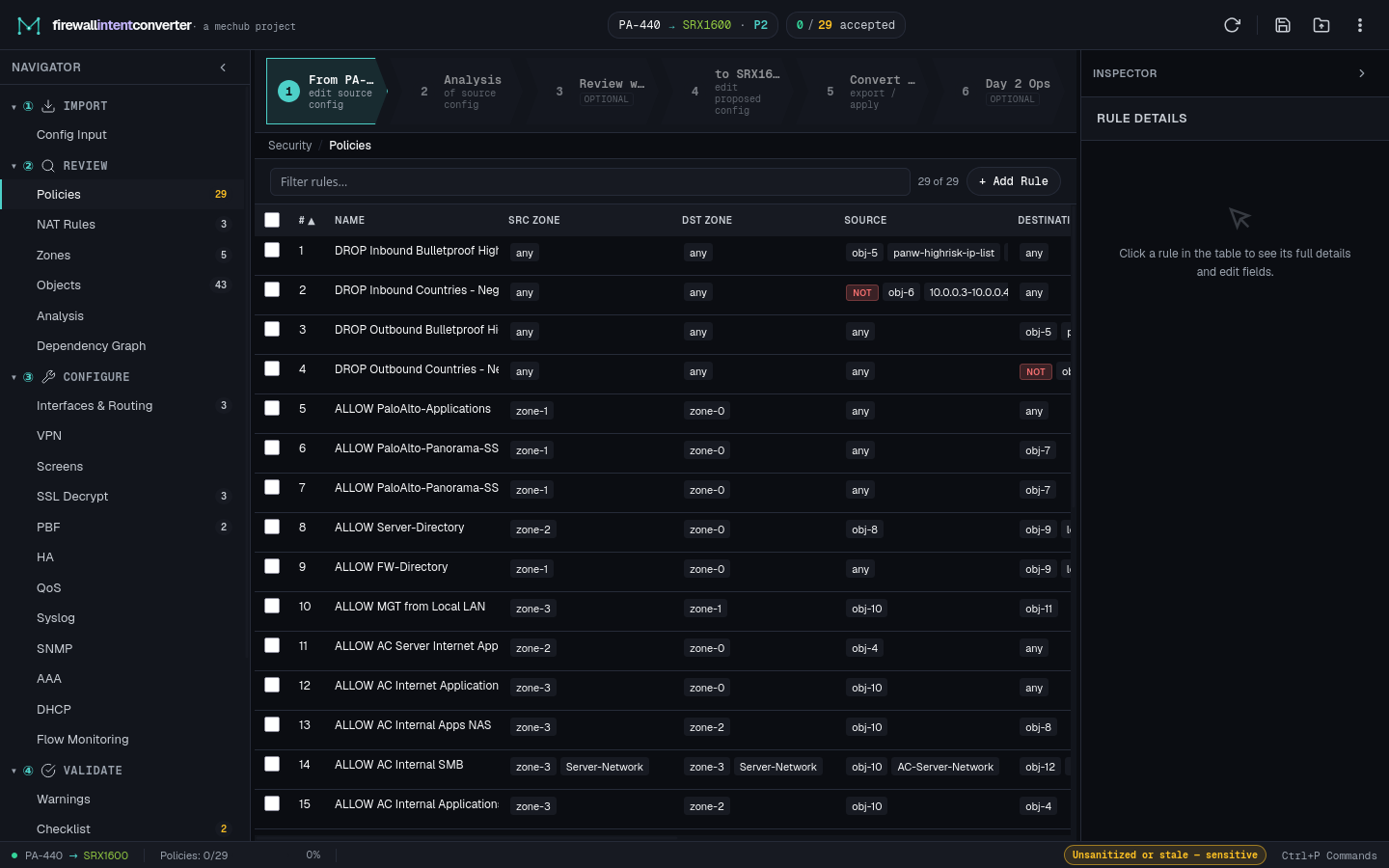
Policy review — the six-step workflow stepper, zone-grouped policy table, triage buckets, and the rule inspector.
# Quick Start
### Prerequisites
- **Node.js** 18+ and **npm** — only needed for development and building. The built app is a static SPA that runs entirely in the browser with no server required.
### Development
git clone firewallintentconverter
cd firewallintentconverter
npm install
npm run dev
Open **http://localhost:5173** in your browser. Vite serves the app with hot module replacement.
Generated SRX configuration uses a runtime-validated discriminated output object: set output is `{ format: 'set', commands: string[] }`, while XML output is `{ format: 'xml', xml: string }`. Consumers must use `src/conversion/conversion-output.js`; missing, empty, mixed, or malformed output is a blocking error and must never be converted to an empty fallback.
### Production Build
npm run build # Vite compiles to dist/
npm run preview # Preview the production build locally
The `dist/` folder is a fully self-contained static SPA — deploy it to any static file host (Nginx, Apache, S3, GitHub Pages, Netlify, etc.) or open `dist/index.html` directly from the filesystem. No server runtime required.
### Standalone Offline Build
npm run build:standalone # Builds to dist-standalone/
npm run zip:standalone # Builds + creates .zip for distribution
Produces a single-file bundle that works from `file://` with no server. LLM features and PyEZ push are stripped — parse, edit, and export only. Firefox opens it directly; Chrome needs `--allow-file-access-from-files` or a local HTTP server (`python3 -m http.server`). The `dist-standalone/README.txt` has end-user instructions.
## Usage
A six-step **workflow stepper** runs across the top of the app once a config is loaded, tracking your progress through the migration: **① Source** (edit source config) → **② Analysis** (of source config) → **③ Review w/LLM** (optional) → **④ to SRX** (edit proposed config) → **⑤ Convert & Export** → **⑥ Day 2 Ops** (optional). The left **Navigator** mirrors this with six collapsible workflow stages (① Import, ② Review, ③ Configure, ④ Validate, ⑤ Export, ⑥ Operate), and the right **Inspector** shows details for the selected rule.
### 1a. Load a Configuration (Import Mode)
On the **Import → Config Input** screen, pick your source from the tiled **Source Configuration** chooser, organized into three groups:
- **From Scratch** — *Greenfield* (LLM-guided build from a template) and *SRX Best Practice* (audit an existing SRX config)
- **Firewall Vendors** — Junos SRX, PAN-OS, FortiGate, Cisco ASA/FTD, Check Point R80+, SonicWall, Huawei USG
- **Cloud** — AWS SG, Azure NSG, GCP Firewall
After choosing a vendor, paste a configuration into the input panel or click one of the built-in sample configs. You can also **Pull from Device** to fetch the running config from a live SRX via the PyEZ Bridge. Then click **Parse**. The tool auto-detects the source format.
### 1b. Greenfield Mode (Build from Scratch)
Select the **Greenfield** tile under *From Scratch* (preselected by default). Choose a starting template from the template picker:
- **Branch Office** — Small office with trust/untrust/management zones, outbound web/DNS/NTP policies, source NAT, screen profiles, and syslog
- **Data Center** — Multi-tier architecture with trust/untrust/dmz/server/management zones, strict inter-tier segmentation, dual screen profiles
- **Campus Edge** — Enterprise edge with trust/untrust/guest/voip/management zones, guest isolation, VoIP policies, user segmentation
- **Cloud Gateway** — Hybrid cloud with trust/untrust/cloud-east/cloud-west zones, cross-cloud routing, multi-region policies
- **Blank** — Empty configuration, start from scratch with the full LLM interview
Each template pre-fills zones, security policies, NAT rules, address objects, screen profiles, syslog, static routes, and **day-0 system config** (hostname, DNS servers, NTP servers, timezone, login banner, management services). The LLM interview skips use-case discovery for template-based configs and jumps straight to refinements.
For blank configs, the LLM walks you through a structured interview:
1. **Use Case Discovery** — Deployment type, connectivity details, and requirements
2. **Configuration Building** — Zones, interfaces, address objects, security policies, NAT rules, and system config are built progressively as you answer questions
3. **Best Practices** — Use-case-aware recommendations for screen profiles, logging, default-deny rules, and more
Toggle between **from LLM Interview** and **to SRX** tabs to see the configuration building in real-time. The chat preserves its state when switching tabs.
### 1c. SRX Best Practice (Audit Mode)
Select the **SRX Best Practice** tile under *From Scratch* to audit an existing SRX configuration for best practices, compliance, and security posture — without changing hardware. Paste your SRX config and click **Parse**. A simplified model selector opens where you select the source SRX model and subscription tier (target is automatically set to match). No interface mapping is needed.
Click **Run Health Check** to send all policies to the LLM for a comprehensive audit covering:
- **PCI DSS v4.0** — Explicit deny-all, documented business justification, rule review cadence
- **NIST SP 800-41r1** — Default-deny per zone pair, denied traffic logging, network segmentation
- **CIS Juniper OS Benchmark** — Management services, NTP auth, login banners
- **Logging completeness** — Session-close on permits, session-init on denies
- **Security profile assessment** — Per-traffic-type recommendations gated by subscription tier
- **Screen profile coverage** — Zone screen assignments and recommended minimums
- **Rule hygiene** — Shadowed, redundant, overly broad, disabled, and undocumented rules
Each policy is returned unchanged but annotated with severity-tagged findings (`[CRITICAL]`, `[HIGH]`, `[MEDIUM]`, `[LOW]`, `[INFO]`) in the translation notes. Click any rule to review its findings in the right panel.
### 2. Select Hardware Models
After parsing, a modal prompts you to select the source model and target SRX model. The tool auto-detects the likely source model from interface names (PAN-OS, SRX, FortiGate, Cisco, Check Point, SonicWall, or Huawei). For FortiGate sources, all current F/G-series and legacy E-series models are available. For Cisco sources, all Firepower 1000/2100/3100/4100/4200 series, virtual appliances, and EOS ASA 5500-X models are available. For Check Point, SonicWall, and Huawei USG, full model ranges are available with throughput specs. You can also select the SRX subscription (Base/A1/A2/P1/P2). Skip this or change it later via the **Models** button.
### 3. Map Interfaces
The interface mapper shows every source interface found in the config alongside the available SRX ports on the target model. The tool auto-maps `ethernet{slot}/{port}` to `ge-0/{slot-1}/{port-1}.0` by default. Adjust as needed and click **Done**.
### 4. Review & Edit Rules
The center panel shows all security rules in a sortable, filterable table. Use the **from/to** toggle above the tabs to switch between source and target views. Click any rule to see its full details in the right panel, where every field is editable. Use the tabs to also edit Zones, Objects/Address Book, and NAT rules.
### 5. Translate with LLM (Optional)
Configure an LLM provider in **Settings** (gear icon). Click **Translate with LLM** above the policy table to send all source policies to the LLM for translation into optimized SRX-compatible policies. The LLM:
- Translates actions, zones, addresses, applications, and services to SRX equivalents
- Applies vendor-specific migration knowledge (PAN-OS, FortiGate, Cisco ASA, Check Point, SonicWall, Huawei USG)
- Maps security profiles to SRX subscription tiers (Base/A1/A2/P1/P2) and flags features requiring upgrades
- Optimizes rule ordering, merges redundant rules, and adds default deny-all cleanup rules
- Sets logging best practices (log-end for permit, log-start for deny)
During translation, the right panel shows a live progress indicator with elapsed time, chunk progress, and token estimates. In **Greenfield** mode, this button is labeled **Import LLM Config**.
### 6. Review & Accept Translated Rules
After translation, all rules appear in the "to SRX" table with **LLM Reviewed** status (blue). Click any rule to see its full details and translation notes in the right panel. Review each rule and click **Accept** to mark it as accepted. A progress counter in the navbar tracks accepted vs LLM-reviewed rules.
### 7. Convert
Click **Convert to SRX** to generate the output. Switch between **Set Commands** and **XML** formats in the bottom panel. The **Warnings** tab shows any conversion notes. Use **Push via PyEZ** to deploy directly to SRX devices.
## Features
### SRX Health Check (SRX Best Practice tile)
- **Compliance audit** — LLM-powered assessment of existing SRX configs against PCI DSS v4.0, NIST SP 800-41r1, and CIS Juniper OS Benchmark
- **12 audit categories** — Policy hygiene, logging completeness, security profiles, screen coverage, application modernization, naming conventions, NAT best practices, zone architecture, and system infrastructure
- **Severity-tagged findings** — Each policy annotated with `[CRITICAL]`, `[HIGH]`, `[MEDIUM]`, `[LOW]`, or `[INFO]` findings in translation notes
- **Subscription-aware** — Security profile recommendations gated by the deployed SRX subscription tier (Base/A1/A2/P1/P2)
- **Non-destructive** — Policies are returned unchanged; all recommendations are advisory in `_translation_notes`
- **Simplified workflow** — No hardware migration, no interface mapping. Select source model and license, run the audit
### Save/Load Projects
- **Save project** — Export the entire project state (parsed config, interface mappings, model selections, review status, warnings, LLM-translated policies) to a `.fpic.json` file via the floppy-disk icon in the navbar
- **Load project** — Import a previously saved project via the folder icon in the navbar. A confirmation modal shows project details (name, date, vendor, model, policy count) before replacing current state
- **Auto-generated naming** — Project names are auto-generated from vendor, model, and date (e.g., `PAN-OS-PA-5260-2026-02-26`) with an editable text field before download
- **Version-safe** — Project files include a version field for forward-compatible migrations. Missing state fields are filled with defaults on load
- **Full state preservation** — Saves all workflow progress including greenfield mode, health check mode, sanitization state, and warning resolutions
### Multi-Firewall Merge (Logical-Systems)
- **Multi-LS Merge mode** — Toggle between Single config and Multi-LS Merge mode via the navbar pill toggle. Merge mode lets you import multiple firewall configs and combine them into a single SRX with logical-system separation
- **Slot-based import** — Each logical-system gets its own config slot with independent vendor detection, parsing, sanitization, and interface mapping. Add/remove slots dynamically, rename logical-systems inline
- **Auto-split detection** — When a single config contains multiple routing contexts (PAN-OS multi-vsys, FortiGate multi-VDOM, SRX logical-systems/tenants), auto-split is offered to break them into separate logical-system slots
- **SRX logical-system/tenant parsing** — SRX parser detects `set logical-systems` and `set tenants` prefixes, parses each context independently with full zone/policy/NAT/address support, and tags policies with `_logical_system`
- **Cross-LS traffic detection** — Shared zone names across logical-systems are auto-detected and generate `lt-0/0/0` tunnel interface pairs with `peer-unit` linking for inter-LS communication
- **Merged output** — "Merge & Convert to SRX" produces a single output with per-LS sections (`set logical-systems LS-NAME ...`) plus cross-LS tunnel commands. Both set command and XML output formats supported
- **Config selector** — Center panel shows a config selector bar to switch between logical-system slots while editing
### Greenfield Configuration Builder
- **Template picker** — Choose from 4 pre-built deployment templates (Branch Office, Data Center, Campus Edge, Cloud Gateway) or start blank. Templates pre-fill zones, policies, NAT, screens, routes, and system config
- **Day-0 system config** — Templates include hostname, DNS servers, NTP servers, timezone, login banner, and management services (SSH/HTTPS/NETCONF). System config is emitted in both SRX set commands (`set system host-name`, `set system name-server`, etc.) and XML output (`` block)
- **LLM-guided interview** — Build an SRX configuration from scratch through a structured conversation with an AI assistant. Template-aware: skips use-case discovery when a template is loaded
- **Progressive config building** — Zones, addresses, policies, NAT, routes, screens, and system config are added to the intermediate config in real-time as the LLM collects answers
- **JSON action blocks** — LLM responses include structured action blocks (`add_zone`, `add_policy`, `add_address`, `add_nat`, `add_route`, `add_screen`, `set_system`, etc.) that auto-apply to the configuration
- **Inline action cards** — Each applied action renders as a visual card in the chat with the action type, name, and description
- **Use-case-aware** — The interview adapts to your deployment scenario (branch office, data center, campus edge, cloud gateway) with tailored zone layouts and policy recommendations
- **Real-time preview** — Toggle to the "to SRX" tab at any time to see all normal editors (Security Policies, Zones, Objects, NAT) populated with the configuration built so far
- **Seamless review** — After the interview, click **Review** to have the LLM analyze the complete built configuration for best practices and security posture
### Multi-Vendor Source Import
- **PAN-OS XML parser** — Extracts security policies, NAT rules, zones, address objects, address groups, service objects, service groups, and security profile groups from PAN-OS XML configs
- **Junos SRX parser** — Parses SRX `set` commands and hierarchical curly-brace format into the same intermediate schema (zones, address-book objects, address sets, security policies, NAT rule-sets, applications)
- **FortiGate / FortiOS parser** — Parses FortiOS `config`/`edit`/`set`/`next`/`end` block format including firewall policies, address objects, address groups, service objects, service groups, zones, VIPs (destination NAT), IP pools, central SNAT maps, and security profiles (AV, web filter, IPS, application control, SSL inspection, DNS filter, DLP, email filter)
- **Cisco ASA / FTD parser** — Parses Cisco ASA/FTD configuration including interfaces (nameif, security-level, IP), object network/service definitions, object-group network/service/protocol groups, extended access-lists with remarks, access-group bindings, and object NAT (dynamic/static). Zones are derived from interface nameif + security-level
- **Check Point R80+/R81+ parser** — Parses Check Point SmartConsole JSON export (`mgmt_cli show-access-rulebase`) including objects-dictionary with UID resolution, nested access-sections and inline layers, host/network/range/FQDN/group objects, service-tcp/udp/icmp objects, service groups, NAT rulebase (hide/static), and optional Gaia clish text for interfaces and static routes
- **SonicWall SonicOS parser** — Parses SonicWall REST API JSON export (preferred) or CLI text fallback. Handles zones with security-type mapping, IPv4/IPv6 address objects (host/network/range/FQDN/MAC), address groups, service objects, service groups, access rules with priority ordering, NAT policies (source/destination/combined), interfaces, and route policies
- **Huawei USG parser** — Parses Huawei VRP CLI (`display current-configuration`) including firewall zones with priority, `ip address-set` objects (type object and type group), `ip service-set` definitions, `security-policy` rules with zone-pair routing, `nat-policy` and `nat server` rules, `time-range` schedules, basic IKE/IPsec VPN detection, `hrp` HA configuration, and static routes
- **AWS Security Groups parser** — Parses `aws ec2 describe-security-groups` JSON output. Maps VPCs to zones, Security Groups to address groups, IpPermissions/IpPermissionsEgress to inbound/outbound policies with CIDR-based address objects
- **Azure NSG parser** — Parses `az network nsg show` JSON or ARM template format. Maps NSG security rules to policies ordered by priority, handles service tags (VirtualNetwork, AzureLoadBalancer) with placeholder warnings
- **GCP Firewall Rules parser** — Parses `gcloud compute firewall-rules list --format=json` output. Maps VPC networks to zones, target/source tags to address groups, allowed/denied arrays to permit/deny policies with priority ordering
- **Auto-detection** — Automatically identifies the source format (PAN-OS XML, Junos SRX, FortiOS, Cisco ASA, Check Point JSON, SonicWall JSON/CLI, Huawei VRP, AWS Security Group JSON, Azure NSG JSON, or GCP Firewall Rules JSON) and routes to the correct parser
- **SRX output** — Generates Juniper SRX `set` commands or hierarchical XML, including zones, address books, application mappings, security policies, NAT rule-sets, schedulers, UTM profiles (anti-virus, web-filtering, content-filtering), IDP policies, and L2 bridge-domain/family-bridge config. FortiGate Application Control generates AppFW rule-set; FortiGate DLP notes ICAP integration requirement
- **Implicit rules** — Automatically generates vendor-specific implicit rules (PAN-OS intra-zone allow + interzone deny, FortiGate intrazone per-zone + default deny, Cisco ASA security-level permits for unbound interfaces + default deny, SRX default deny). Implicit rules are visually distinguished in the UI (dimmed, italic, with "Implicit" chip) and tagged `added_by_fpic`
- **FQDN support** — Parses FQDN/dns-name address objects from all vendors and converts to SRX `dns-name`. Cisco ASA `fqdn v4`/`v6` maps to SRX `ipv4-only`/`ipv6-only`. FortiGate wildcard-fqdn (`*.example.com`) generates a warning since SRX does not support wildcard dns-name
- **L2 / transparent / virtual-wire** — Detects and converts L2 mode configurations from all vendors: PAN-OS virtual-wire pairs and L2 zones, FortiGate transparent opmode with virtual-switch and forward-domain grouping, Cisco ASA `firewall transparent` with bridge-groups and BVI interfaces, SRX bridge-domains with family bridge (round-trip). Generates SRX `set bridge-domains` and `set interfaces ... family bridge` commands. Virtual-wire pairs are mapped to bridge-domains with manual interface assignment TODOs since SRX has no native virtual-wire equivalent
- **ICMP details** — Preserves ICMP type/code through the full pipeline (parser → intermediate → converter). Generates SRX `icmp-type`/`icmp-code` instead of `destination-port` for ICMP services
- **Schedule support** — Parses schedules from all vendors (FortiGate recurring/onetime, PAN-OS schedule objects, Cisco ASA time-ranges, SRX schedulers) and converts to SRX `set schedulers scheduler` commands with `scheduler-name` references on policies
- **Nested object groups** — Correctly resolves nested address groups and service groups, emitting `address-set` (not `address`) and `application-set` (not `application`) references for group members that are themselves groups
- **Vendor-native security profiles** — FortiGate profiles (Application Control, Email Filter, DLP, DNS Filter) use FortiGate-native field names in the intermediate schema and display with correct FortiGate terminology. SRX view shows correct Junos terms (Anti-virus instead of WildFire, Anti-spam, AppSecure, DNS Security). PAN-OS profiles are mapped to SRX subscriptions: Antivirus→Flow-based AV, Anti-Spyware→Anti-malware, Vulnerability→IPS, URL Filtering→Content Security, File Blocking→Content Filtering, WildFire→noted as ATP Cloud (no direct equivalent). LLM translation sets `_srx_*` boolean flags for UI toggles with safety-net mapping from PAN-OS keys
- **Predefined Junos app detection** — Services matching Junos predefined applications (junos-ssh, junos-http, junos-https, junos-dns-udp, etc.) are automatically detected and referenced instead of generating redundant custom definitions
- **Application mapping (three-tier)** — 280+ canonical application mappings across seven vendors (PAN-OS, FortiGate, Cisco ASA/FTD, Check Point, SonicWall, Huawei USG, Junos). Emission has three tiers: (1) apps that match a Junos predefined (e.g. `junos-https`) are referenced directly; (2) apps with known ports/protocols from the canonical data but no Junos predefined (e.g. `adobe-cloud` → tcp/443, `apple-push-notifications` → tcp/5223,2195,2196) are emitted as real `set applications application` definitions or application-sets for multi-port; (3) truly-unknown apps are funneled into a single `INTERVIEW REQUIRED` block at the end with `-UNMAPPED` placeholders for manual completion. Inputs that are already valid Junos predefineds (e.g. `junos-ldap`) pass through unchanged
- **Application groups** — PAN-OS `` entries are parsed with their members and expanded during conversion. The Applications tab shows groups with expandable member lists, and the SRX view displays per-app Junos mapping (e.g., `junos-ssh`) or `custom:app:'name'` for unmapped apps
- **Sanitization (18 categories)** — One-click replacement of sensitive data across 18 data categories: password hashes, pre-shared/API keys, SNMP communities, usernames, certificates, server hostnames, BGP AS numbers, device hostname, domain names, email addresses, URLs, descriptions/comments, public IPv4 (→ RFC 5737 documentation IPs: `192.0.2.x`, `198.51.100.x`, `203.0.113.x`), private IPv4 (→ synthetic `10.x.x.x`), IPv6 (→ RFC 3849 `2001:db8::N`), zone names, interface names, and object/group names. Deterministic mapping ensures the same input always produces the same placeholder. IPs, zones, objects, and interfaces are automatically restored on export; secrets stay redacted
- **Sanitization mapping table** — Clickable sanitize badge expands a collapsible table showing all replacements: type-colored badges (Hash, Key, SNMP, User, Public IP, Private IP, IPv6, Domain, Zone, Object, Interface, Email, URL, Description, Device Name, Certificate, Hostname, BGP AS), masked originals for secrets (full values for non-secret types), placeholder codes, and restore-on-export indicator. Inline stats summary
### Post-Conversion Diff View
- **Diff tab** — New "Diff" tab in the bottom panel (alongside SRX Output and Warnings) comparing source policies vs LLM-translated policies
- **Three-pass rule matching** — Matches rules by `_rule_index`, exact name, then fuzzy name similarity (Levenshtein with 50% threshold). Unmatched source rules shown as removed, unmatched translated rules as added
- **Field-level comparison** — For each modified rule, shows a table of changed fields (action, zones, addresses, applications, services, logging, description) with source value (red) and translated value (green)
- **Color-coded status** — Added (green), Removed (red), Modified (amber), Unchanged (dimmed). Status icons, badges, and expandable detail rows
- **Filter bar** — Filter by All, Modified, Added, Removed, or Unchanged with counts
- **LLM translation notes** — Displayed inline when rules have `_translation_notes` from the LLM
### Dual Platform View
- **"from" / "to" toggle** — Switch between source view ("from PAN-OS", "from SRX", "from FortiGate", "from Cisco ASA", "from Check Point", "from SonicWall", or "from Huawei") and target view ("to SRX") above the tab bar
- **SRX-style table** — When source is SRX (or viewing the "to SRX" tab), policies display in a zone-grouped table with SRX terminology (permit/deny/reject, security-zone, address-book)
- **PAN-OS-style table** — When source is PAN-OS, the "from" tab shows the familiar PAN-OS table layout with allow/deny actions
- **FortiGate-style table** — When source is FortiGate, the "from" tab shows a FortiOS-style policy table with FortiGate terminology (ACCEPT/DENY, From/To interfaces, Schedule, NAT toggle, security profile icons for AV/WF/IPS/App/SSL/DNS/EM/DLP)
- **Cisco ASDM-style table** — When source is Cisco ASA/FTD, the "from" tab shows a Cisco ASDM-style access control table with ACE numbering, Permit/Deny actions, ACL name badges, security level indicators, protocol chips, interface labels, log status, and hit counts
- **Check Point SmartConsole-style table** — When source is Check Point, the "from" tab shows a SmartConsole-style table with section grouping, Accept/Drop actions, Track type, and Install On targets
- **SonicWall-style table** — When source is SonicWall, the "from" tab shows a zone-pair table with priority ordering, DPI status column, and Allow/Deny actions
- **Huawei USG-style table** — When source is Huawei, the "from" tab shows a zone-pair named-rule table with Permit/Deny actions and security profile indicators
- **Negate support** — Source/destination address negation flags (PAN-OS `negate-source`/`negate-destination`, SRX `except`) displayed and editable in both views
- **Profile group expansion** — PAN-OS profile group references are automatically resolved into individual security profiles
### Interactive Editing
- **IDE-style 4-panel layout** — Left sidebar navigation tree organized into 6 workflow stages (① Import → ② Review → ③ Configure → ④ Validate → ⑤ Export → ⑥ Operate), resizable center panel, collapsible right inspector, bottom status bar. 39 keyboard shortcuts including Ctrl+P command palette, Ctrl+Z/Y undo/redo, Ctrl+B panel toggles
- **Decluttered header** — Consolidated stat badges (model + license in one badge, simplified warning and progress counters) with secondary actions (Models, Interfaces, Report, Theme, Tour, Feedback, Settings) moved to an overflow menu (⋯)
- **4-bucket triage system** — Policies are auto-classified into triage buckets: ✓ Safe to Accept (green), ⚡ Needs Decision (yellow), ✕ Unsupported (red), ⏸ Blocked (gray). Filter bar with pill buttons above the policy table for quick triage filtering
- **Expandable table rows** — SRX policy table shows compact summary rows (name, zones, src/dst addresses, apps/services, subscription icons, action, triage badge) with expandable detail panels for security profiles, logging, users, and warnings
- **Security subscription icons** — Compact 2-letter colored badges in the policy table (IP=IPS, CS=Content Security, DE=Decrypt, AV=Flow-based AV, AM=Anti-malware, SI=SecIntel, SW=Secure Web Proxy, IC=ICAP Redirect) with a legend bar at the bottom
- **Inspector pinned header** — Rule name, triage badge, and unsaved changes indicator pinned at top of the inspector panel. Warning banner shown below header. Reset Changes button to undo edits
- **Inline table editing** — Double-click any cell in the policy table to edit directly
- **Right panel rule details** — Full editable form for the selected rule: action, zones, addresses, applications, services, logging, security profiles, tags, description
- **Schedule editor** — View, edit, add, and delete schedules from the Objects > Schedules tab. Each schedule shows its type (recurring/onetime), days, time range, and which rules reference it
- **Routing editor** — View, edit, add, and delete static routes from the Routing tab. Displays routing contexts (vsys/VDOM/routing-instance) and routes with destination, next-hop, type, interface, metric, and VRF
- **VPN editor** — View, edit, add, and delete VPN/IPsec tunnels from the VPN tab. Card-based editor showing IKE gateway (peer address, local interface, IKE version), IKE proposal (encryption, authentication, DH group, lifetime, auth method), IPsec proposal (protocol, encryption, authentication, PFS group, lifetime), tunnel interface, and traffic selectors/proxy IDs
- **Add / delete rules** — Create new rules or remove existing ones from the UI
### Hardware Awareness
- **Model selector** — Pick source firewall model (PAN-OS, SRX, FortiGate, Cisco, Check Point, SonicWall, or Huawei USG, including EOS/legacy models) and target SRX model from a built-in hardware database with port counts and throughput specs. Throughput numbers are best-effort from publicly available data
- **Auto-detection** — Heuristics detect the likely source model from interface naming in the config (PAN-OS `ethernet`, SRX `ge-`/`xe-`/`et-`, FortiGate `port`/`wan`/`internal`/`dmz`, Cisco `GigabitEthernet`/`Ethernet1/`/`TenGigabitEthernet`, Check Point `eth`, SonicWall `X`, Huawei `GigabitEthernet`/`XGigabitEthernet` formats)
- **FortiGate models** — Full F-series (40F through 4400F), G-series (70G through 900G), and EOS E-series (30E through 500E) with port counts and throughput specs
- **Cisco models** — Firepower 1000 series (FPR-1010 through FPR-1150), 2100 series (FPR-2110 through FPR-2140), 3100 series (FPR-3105 through FPR-3140), 4100 series (FPR-4112 through FPR-4145), 4200 series (FPR-4215 through FPR-4245), virtual (ASAv, FTDv), and EOS ASA 5500-X series (ASA-5506-X through ASA-5555-X)
- **Check Point models** — Branch through data center appliances (CP-1600 through CP-28000) with throughput specs
- **SonicWall models** — TZ series (TZ-270 through TZ-670), NSa series (NSa-2700 through NSa-6700), and NSsp series (NSsp-10700, NSsp-13700) with throughput specs
- **Huawei USG models** — USG6000E series (USG6510E through USG6680E) with GigabitEthernet and XGigabitEthernet port counts
- **EOS SRX models** — Legacy/End-of-Sale SRX models (SRX100, SRX210, SRX240, SRX550, SRX650, SRX1400, SRX3400, SRX3600, etc.) available as source models for migration projects
- **Interface mapper** — Per-zone mapping of source interfaces to SRX interfaces with auto-mapping, tunnel, and loopback support
- **SRX subscriptions** — Select the target SRX subscription level (Base, A1 Advanced Data Protection, A2 Advanced Edge Protection, P1 Premium Data Protection, P2 Premium Edge Protection) to gate feature availability and inform LLM reviews. Includes footnote explaining SDC (Security Director Cloud) and ATP (Advanced Threat Protection) capabilities
- **SRX datasheet links** — Quick-access popup with links to official HPE Juniper SRX spec sheets for all current models, grouped by tier (Branch, Enterprise, Data Center, Chassis-Based, Virtual)
- **Site identification** — Optional Site Name and Site Group fields in the model selector. Values are emitted as header comments at the top of SRX set-command and XML output, preparing for future SDC/Mist integration
### LLM Translation & Review Workflow
- **Translate with LLM** — One-click translation of all source policies to optimized SRX format using vendor-aware, subscription-aware LLM prompts. The translation prompt includes vendor-specific migration pitfalls and cross-vendor gap analysis for all 6 supported source vendors
- **Translation progress** — Real-time progress panel in the right pane showing elapsed time (live ticking timer), chunk progress, and estimated prompt/response token counts
- **Review status tracking** — Every translated rule starts as *LLM Reviewed* and must be manually accepted. Rules are auto-triaged into 4 buckets (Safe/Decision/Unsupported/Blocked) with LLM review indicated by a violet dot overlay
- **Triage filtering** — Filter the policy table by triage bucket (All / Safe / Decision / Unsupported / Blocked) with counts, plus Accepted counter — available on the "to SRX" tab
- **Accept rules** — Click any rule to review its details and translation notes, then click Accept. A progress counter in the navbar tracks accepted vs LLM-reviewed policies (`Policies: X/Y accepted`)
- **Warning review workflow** — Clickable warnings badge in the navbar shows unresolved/total count and switches to the Warnings tab on click. Each warning has Ack/Fixed/Ignore action buttons to track resolution. Resolved warnings are dimmed and filterable (All/Unresolved/Resolved). Badge turns green when all warnings are addressed
- **Subscription-aware translation** — SRX subscription tier (Base/A1/A2/P1/P2) is passed to the LLM, which maps security profiles to the correct tier and flags features requiring upgrades in `_translation_notes`
- **SSL Decryption → SSL Proxy mapping** — PAN-OS decryption rules (separate rulebase) are sent as context to the LLM during translation. The LLM sets `_srx_decrypt: true` on security rules whose traffic matches decrypt-action decryption rules. A zone-pair safety net auto-applies the flag on any allow rules the LLM missed
### LLM Integration
- **Multiple providers** — Claude (Anthropic), OpenAI, Ollama, LM Studio, or any OpenAI-compatible endpoint
- **Browser-only API keys** — All credentials stay in `localStorage` and never touch the server
- **Editable system prompts** — Separate prompts for ruleset translation (per-vendor) and greenfield interview. Prompts are stored as plain-text files in `static/prompts/` (editable on disk) with Settings UI overrides and hardcoded fallback defaults. Each has its own sub-tab in Settings with independent Reset to Default
- **Per-vendor translation prompts** — 7 vendor-specific translate prompts (PAN-OS, FortiGate, Cisco ASA, Check Point, SonicWall, Huawei USG, SRX-to-SRX) each containing that vendor's full feature equivalency matrix, specific migration pitfalls, action mapping, and security profile translation rules. Auto-selected at translation time based on detected source vendor. Editable per-vendor in Settings via dropdown selector
- **Subscription-aware translation** — SRX subscription tier is included in both the system prompt and user prompt, ensuring security profiles are correctly mapped to available features
- **Real-time progress** — Translation progress panel shows live elapsed time, chunk progress, and token estimates during LLM calls
### No-AI / Deterministic Mode
- **No-AI toggle** — Select "No AI Mode (Deterministic Only)" on the risk disclaimer at startup. Disables ALL LLM features. No data leaves the browser
- **Mode switching** — Click the green "No AI" badge in the top bar to return to the risk disclaimer and switch to any mode (Accept All, Local Only, No AI, Reject)
- **Deterministic conversion** — Full parse → analysis → convert → export workflow without any AI dependency. Uses built-in mapping tables and algorithms
- **4-button platform bar** — Persistent navigation bar on all tabs: "From XXX" | "Analysis" | "Review w/LLM" (greyed out in No-AI) | "To SRX"
- **App mappings** — 280+ canonical entry L7 application mapping table with per-vendor names (PAN-OS, FortiGate, Cisco FTD, Check Point, SonicWall, Huawei, Junos) and confidence scores. Maps vendor-specific apps (PAN-OS "ssl", FortiGate "HTTP") to Junos equivalents ("junos-https", "junos-http") or concrete custom-application definitions when the canonical has known ports. App mapping data seeded by [fatcat-converter](https://github.com/fatcat/converter) and extended with cloud SaaS, collaboration, management, VPN, database, and industrial/ICS categories
- **Deterministic profile mapping** — Security profile types (antivirus, IPS, URL filtering, etc.) mapped to SRX UTM/IDP equivalents with subscription tier requirements
- **Descriptive rule naming** — Generic rule names (e.g., "rule1", "policy-5") are auto-replaced with descriptive names like `permit-trust-to-untrust-https-1`
- **LLM hints** — When LLM is enabled, app mapping results are injected as hints into the translation prompt to reduce hallucination
### Configuration Analysis Engine
- **8 analysis checks** — Unused objects, shadowed policies, duplicates, disabled policies, logging disabled, overly permissive rules, empty groups, never-hit policies (when hit counts are pulled from a live device). Analysis engine logic adapted from [fatcat-converter](https://github.com/fatcat/converter)
- **Analysis button** — Runs analysis from any tab via the platform bar. Badge shows total finding count
- **Card-based results** — Each finding category is a collapsible card with count badge, severity indicator, bulk action dropdown (Keep/Remove/Consolidate), and per-item override toggles
- **Apply and review** — "Apply Analysis" cleans up the config based on selections and auto-switches to the SRX rules view for review before conversion
- **Pre-LLM filtering** — In LLM mode, unused objects are automatically stripped before sending to the LLM to reduce token usage
- **Available in both modes** — Analysis works identically in No-AI and LLM modes
### Conversion Features
- **Safe Junos output** — Imported, project, and AI-assisted values are treated as untrusted. Fields are validated by domain, serialized for their set/XML context, and the completed artifact is structurally validated before it can be displayed, exported, or pushed. Invalid values stop conversion with a safe intermediate field path and reason; the rejected value is not echoed
- **Security policies** — Zone-based firewall rules with source/dest addresses, applications, services, actions, logging
- **NAT** — Source NAT, destination NAT, static NAT with zone-pair rule sets
- **Address & service objects** — Named objects, groups, FQDN addresses
- **Application mapping** — PAN-OS App-ID → Junos application, custom application placeholders
- **Security profiles** — UTM policy generation from source AV, web filter, file blocking profiles using source-derived parameters (block categories, file extensions, scan settings); IDP policies with severity-specific actions mapped from source vulnerability/spyware profiles (reset-both → drop-connection, alert → no-action); SecIntel from EDL/threat feeds
- **L2 / bridge domains** — Bridge domain definitions, L2 interfaces with family bridge, VLAN IDs, IRB routing interfaces. Virtual-wire pairs mapped to bridge-domains
- **Rule optimization** — Shadow detection (fully shadowed rules), reorder recommendations (deny after broader permit), redundant rule detection (subset of earlier permit), mergeable rule suggestions (adjacent rules differing in one dimension), consolidation opportunities (3+ rules combinable with address groups)
- **Static routes** — Virtual router routes, VRF/routing-instance support, blackhole routes
- **VPN / IPsec** — IKE proposals/policies/gateways, IPsec proposals/policies/VPNs, traffic selectors, proxy IDs
- **HA → Chassis Cluster / MNHA** — Active/passive and active/active HA to SRX chassis cluster with redundancy groups, or Multinode High Availability (MNHA) for SRX4700 and supported models (SRX1500, SRX1600, SRX4100/4120/4200/4300, SRX4600, SRX5400/5600/5800, vSRX). MNHA generates `set chassis high-availability` commands with ICL, liveness detection, and services redundancy groups. SRX4700 targets automatically require MNHA. Supports 2-node, 3-node, and 4-node MNHA topologies
- **Screens / DDoS** — Zone protection profiles, DoS policies, threat detection → SRX screen ids-option
- **SNMP** — Community strings, trap groups, SNMPv3 users parsed from all vendors and converted to SRX `set snmp community`, `set snmp trap-group`, and `set snmp v3 usm` commands. Community strings pass through the sanitization pipeline
- **AAA / Authentication** — RADIUS, TACACS+, and LDAP server configuration parsed from PAN-OS, FortiGate, Cisco ASA, Huawei USG, and SRX. Converted to SRX `set system radius-server`, `set system tacplus-server`, `set access profile`, and `set system authentication-order` commands. Shared secrets flagged for manual verification
- **Syslog** — Syslog server forwarding, facility/severity mapping, TCP/TLS transport
- **DHCP** — DHCP server pools, relay helpers, address assignment
- **QoS / CoS** — Traffic shaping profiles, policy maps, scheduler maps, interface CoS bindings
- **Schedules** — Time-based rule scheduling with day-of-week and time-range support
- **User-ID / Identity policies** — `source_users` field extracted from all vendors (PAN-OS ``, FortiGate FSSO users/groups, Cisco ASA IDFW, Check Point Access Roles, SonicWall user/group, Huawei source-user). Converted to SRX `source-identity` match conditions with JIMS service placeholder config
- **LAG / LACP interfaces** — Aggregate/port-channel/Eth-Trunk interfaces parsed from all vendors (PAN-OS ``, FortiGate `type aggregate`, Cisco ASA `Port-channel`, SRX `ae`, Huawei `Eth-Trunk`, SonicWall LAG, Check Point bonding). Converted to SRX `set chassis aggregated-devices` and `set interfaces ae{N} aggregated-ether-options lacp` commands
### Export & Reporting
- **Terraform export** — Generate Junos Terraform provider resources (`junos_security_policy`, `junos_security_zone`, `junos_security_global_address_book`) from converted SRX output
- **Ansible export** — Generate `junos_config` playbooks wrapping the SRX set commands with YAML structure
- **PDF report export** — All-in-one color-coded PDF covering 8 sections: migration overview, original config, analysis changes, LLM changes, user changes, final SRX output, unconverted commands, and conversion audit trail
- **Conversion report** — 8-section tabbed report: rule count comparison, unused objects, shadowed rules, AI-disabled rules, migration delta dashboard, exportable summary, per-command conversion audit trail (with CSV export), and rollback plan
- **Conversion audit trail** — Per-command disposition tracking (deleted by analysis, deleted by user, modified by AI, passed through) with CSV export for compliance teams
- **Migration checklist** — Auto-generated pre/post migration checklist based on detected config features (certificates, JIMS, IDP, SecIntel, RADIUS, VPN, HA, syslog, NAT)
- **Hardware capacity validation** — Post-conversion validation against target SRX model limits
- **Config version diff** — Side-by-side LCS-based line diff comparing source vs converted output
- **Policy dependency graph** — Interactive force-directed SVG showing zone-policy-object relationships
- **Interface mapping templates** — Save/load interface mapping profiles per source-to-target model pair for reuse across sites
- **Rollback script generation** — Auto-generated `delete` commands for every `set` command in the SRX output
### Push & Integration
- **Push via PyEZ Bridge** — Connect to a local PyEZ Bridge server to push configurations directly to SRX devices via NETCONF. The bridge runs as a standalone Python process alongside the app (configurable in Settings)
- **Pull from Device** — Fetch running configuration from a live SRX via NETCONF (set, XML, or hierarchical text format). Uses the same PyEZ Bridge connection as push. "Pull from Device" button is available next to the file upload area in the Config Input panel
- **Policy Hit Count Analytics** — Pull security policy statistics from a live SRX via the PyEZ Bridge (`show security policies statistics detail`). Hit counts annotate policies in the analysis engine, flagging never-hit rules as candidates for removal
- **Batch Migration** — Upload multiple config files for independent parallel conversion. Each file is auto-detected, parsed, and converted to SRX output independently. Summary dashboard shows per-file status, vendor, rule count, and warnings. Download individual outputs or all results combined
- **Push to SDC** — Security Director Cloud integration (coming soon)
- **Push to Mist** — Juniper Mist Cloud integration (coming soon)
- **Convert confirmation** — Warning dialog when converting with unaccepted policies
- **Feedback / suggestions** — Chat-bubble icon in the navbar opens a feedback modal where users can submit bug reports, feature requests, or improvement ideas as pre-filled GitHub Issues
### Not Supported (Manual Migration Required)
The following features are **not converted** by this tool and must be configured manually on the target SRX:
- **User-ID / Identity Policies** — Parsed from all vendors and converted to SRX `source-identity` match conditions with JIMS placeholder config. Requires manual JIMS server setup on the SRX
- **SSL/TLS Decryption** — PAN-OS decryption rules are parsed, displayed in the SSL B&I tab, and used during LLM translation to set `_srx_decrypt` on matching security rules. However, full SRX SSL Proxy config generation (certificate management, PKI, proxy profiles) is not yet automated
- **Policy-Based Forwarding** — PAN-OS PBF rules are parsed and displayed in the PBF tab but not converted to SRX filter-based forwarding
- **Management Access** — Admin users, SSH/API access restrictions (SNMP and AAA/RADIUS/TACACS+ are now converted)
See [TODO.md](TODO.md) for the full roadmap and planned features.
## Project Structure
firewallintentconverter/
├── vite.config.js # Vite config (React, publicDir: 'static', relative base)
├── package.json
├── TODO.md # Roadmap & TODO (Rev1–Rev13)
├── index.html # Entry HTML
├── static/ # Static assets served as-is (Vite publicDir)
│ ├── logo.png # Application logo
│ └── prompts/ # Editable LLM system prompts (plain text)
│ ├── translate.txt # Default translation prompt — generic SRX rules, subscription tiers
│ ├── translate-panos.txt # PAN-OS → SRX — 19-feature equivalency matrix + pitfalls
│ ├── translate-fortigate.txt # FortiGate → SRX — 21-feature equivalency matrix + pitfalls
│ ├── translate-cisco_asa.txt # Cisco ASA → SRX — 27-feature equivalency matrix + pitfalls
│ ├── translate-checkpoint.txt # Check Point → SRX — 20-feature equivalency matrix + pitfalls
│ ├── translate-sonicwall.txt # SonicWall → SRX — 27-feature equivalency matrix + pitfalls
│ ├── translate-huawei_usg.txt # Huawei USG → SRX — 26-feature equivalency matrix + pitfalls
│ ├── translate-srx.txt # SRX → SRX — optimization, modernization, best practices
│ ├── full-review.txt # Translation instructions — vendor pitfalls, cross-vendor gaps
│ ├── greenfield.txt # Greenfield interview prompt — guided SRX config builder
│ └── translate-srx_healthcheck.txt # SRX Health Check audit prompt — compliance & best practices
├── src/ # Shared modules (imported by both browser and build)
│ ├── parsers/
│ │ ├── panos-parser.js # PAN-OS XML → intermediate JSON
│ │ ├── srx-parser.js # Junos SRX set/hierarchical → intermediate JSON
│ │ ├── fortigate-parser.js # FortiOS config/edit/set → intermediate JSON
│ │ ├── cisco-asa-parser.js # Cisco ASA/FTD → intermediate JSON
│ │ ├── checkpoint-parser.js # Check Point R80+/R81+ JSON → intermediate JSON
│ │ ├── sonicwall-parser.js # SonicWall SonicOS JSON/CLI → intermediate JSON
│ │ ├── huawei-parser.js # Huawei USG VRP CLI → intermediate JSON
│ │ ├── aws-sg-parser.js # AWS Security Groups JSON → intermediate JSON
│ │ ├── azure-nsg-parser.js # Azure NSG JSON / ARM template → intermediate JSON
│ │ ├── gcp-fw-parser.js # GCP VPC Firewall Rules JSON → intermediate JSON
│ │ └── parser-utils.js # Shared parsing helpers + vendor detection
│ ├── converters/
│ │ ├── srx-converter.js # Intermediate JSON → SRX set commands
│ │ └── srx-xml-builder.js # Intermediate JSON → SRX XML
│ ├── analysis/
│ │ ├── shadow-detector.js # Rule shadowing, optimization, and consolidation analysis
│ │ └── config-analyzer.js # Pre-conversion analysis engine (8 checks, adapted from fatcat)
│ ├── validators/
│ │ └── srx-validator.js # SRX output validation
│ ├── utils/
│ │ ├── app-mappings.js # 236-entry L7 app mapping adapter (vendor-key mapping + index)
│ │ └── profile-mappings.js # Deterministic security profile → SRX mapping table
│ ├── data/
│ │ └── app-mappings.json # Cross-vendor L7 application mappings (from fatcat-converter)
│ └── interview/
│ ├── llm-client.js # LLM client helpers
│ └── question-engine.js # Interview question logic
├── public/ # React frontend (transpiled by Vite)
│ ├── main.jsx # React entry point — wraps App in 5 context providers
│ ├── app.jsx # Layout shell (~450 lines) — keyboard shortcuts, modals, greenfield/merge handlers
│ ├── styles/
│ │ ├── main.css # Component styles (dark theme, tables, modals, editors)
│ │ ├── layout.css # 4-panel IDE layout (flex-based shell, resize handles, responsive)
│ │ ├── nav-tree.css # Left sidebar navigation tree
│ │ ├── command-palette.css # Command palette overlay
│ │ └── status-bar.css # Bottom status bar
│ ├── contexts/ # React Context providers (useReducer-based state management)
│ │ ├── ConfigContext.jsx # Core data model — intermediate config, vendors, sanitization, rules
│ │ ├── UIContext.jsx # Visual state — tabs, modals, loading, panel dimensions
│ │ ├── ConversionContext.jsx # Output state — SRX output, warnings, summary
│ │ ├── MergeContext.jsx # Multi-firewall merge — config slots, cross-LS links
│ │ └── UndoContext.jsx # History stack — undo/redo with 50-deep snapshots
│ ├── hooks/ # Custom React hooks (extracted handler logic)
│ │ ├── useConfig.js # Parse, sanitize, CRUD rules, update config sections
│ │ ├── useConversion.js # Convert to SRX, merge convert
│ │ ├── useLLM.js # LLM translate, group, bulk operations
│ │ ├── useProject.js # Save/load project files
│ │ ├── useUndoRedo.js # Undo, redo, push snapshot
│ │ ├── useResizablePanel.js # Drag-to-resize panels with localStorage persistence
│ │ └── useKeyboardShortcuts.js # 39 keyboard shortcuts with centralized registry
│ ├── components/
│ │ ├── layout/ # IDE-style 4-panel layout components
│ │ │ ├── TopBar.jsx # Brand, stats badges, action buttons
│ │ │ ├── LeftSidebar.jsx # Collapsible sidebar wrapping NavTree
│ │ │ ├── RightPanel.jsx # Collapsible inspector with InterviewPanel
│ │ │ ├── StatusBar.jsx # Bottom bar — model, rules, warnings, undo depth
│ │ │ ├── ContentRouter.jsx # Maps editTab to 17 editor components
│ │ │ ├── Breadcrumb.jsx # Path display (e.g., Security > Policies)
│ │ │ ├── ResizeHandle.jsx # Drag handle for panel borders
│ │ │ └── CommandPalette.jsx # Ctrl+P fuzzy search overlay
│ │ ├── nav/ # Navigation tree components
│ │ │ ├── NavTree.jsx # Workflow-stage nav (6 stages) with collapsible groups and count badges
│ │ │ └── NavTreeItem.jsx # Single nav item with badge
│ │ ├── shared/ # Reusable UI components
│ │ │ ├── ConfirmModal.jsx # Confirmation dialog with severity levels
│ │ │ ├── ActionChip.jsx # Color-coded permit/deny/reject chip
│ │ │ ├── Badge.jsx # Count/status badge
│ │ │ └── Tooltip.jsx # Hover tooltip
│ │ ├── ConfigInput.jsx # Import panel — paste/upload config, parse, greenfield start
│ │ ├── PolicyTable.jsx # Policy table — sortable/filterable/editable rules
│ │ ├── InterviewPanel.jsx # Rule details panel — inline editing, accept, LLM progress
│ │ ├── ZoneEditor.jsx # Zone editing
│ │ ├── ObjectEditor.jsx # Address/service object editing
│ │ ├── NATEditor.jsx # NAT rule editing
│ │ ├── RoutingEditor.jsx # Static routes, BGP, OSPF, EVPN/VxLAN editing
│ │ ├── VPNEditor.jsx # VPN/IPsec tunnel editing
│ │ ├── GreenfieldChat.jsx # LLM-guided greenfield config builder
│ │ ├── SRXOutput.jsx # SRX output display (set commands / XML)
│ │ ├── WarningsPanel.jsx # Conversion warnings + optimization suggestions
│ │ ├── AnalysisPanel.jsx # Pre-conversion analysis findings UI (card-based)
│ │ ├── DiffPanel.jsx # Source vs LLM-translated policy diff view
│ │ ├── BulkActionBar.jsx # Floating bar for multi-select rule operations
│ │ ├── ModelSelector.jsx # Modal — source/target hardware model picker
│ │ ├── InterfaceMapper.jsx # Modal — per-zone interface mapping
│ │ ├── FeedbackModal.jsx # Modal — feedback submission via GitHub Issues
│ │ ├── SaveProjectModal.jsx # Modal — project naming before download
│ │ ├── ReportModal.jsx # Modal — migration report generation
│ │ ├── LLMSettings.jsx # Modal — LLM provider config, PyEZ Bridge, system prompts
│ │ ├── GuidedTour.jsx # 6-step spotlight walkthrough for new users
│ │ └── sample-configs.jsx # Built-in sample configs (7 vendors)
│ ├── utils/
│ │ ├── engine.js # Client-side parse/convert/sanitize API boundary
│ │ ├── llm-client.js # Browser-side LLM API client (multi-provider)
│ │ ├── project-io.js # Save/load project serialization, validation, migration
│ │ ├── srx-view-transforms.js # SRX display transforms + license tier data
│ │ ├── safe-json.js # Prototype-pollution-safe JSON parsing
│ │ ├── triage.js # 4-bucket triage computation (safe/decision/unsupported/blocked)
│ │ └── auto-split.js # Multi-context auto-split and cross-LS detection
│ └── data/
│ ├── hardware-db.js # 7-vendor model database (current + EOS)
│ └── greenfield-templates.js # Pre-built greenfield templates (branch, datacenter, campus, cloud, blank)
├── tools/
│ └── pyez-bridge/ # PyEZ Bridge server for NETCONF push to SRX devices
│ ├── app.py # Flask REST API — /api/push, /api/devices, /api/health
│ ├── requirements.txt # Python dependencies (junos-eznc, flask, flask-cors)
│ └── README.md # PyEZ Bridge setup and usage instructions
└── dist/ # Production build output (generated, fully static)
## Configuration
### LLM Settings
LLM nonsecret preferences are stored in `localStorage['llm-settings']`. The API key is stored only in `sessionStorage['llm-api-key']` for the current tab session and is removed when that tab session ends. No API keys are ever sent to the project server. Supported providers:
| Provider | Key Required | Default URL |
|----------|-------------|-------------|
| Claude (Anthropic) | Yes | `api.anthropic.com` |
| OpenAI | Yes | `api.openai.com` |
| Ollama | No | `localhost:11434` |
| LM Studio | No | `localhost:1234` |
| Custom | Optional | User-specified |
### LLM System Prompts
Editable plain-text prompt files control how the LLM behaves during translation and greenfield interviews. Edit these files directly on disk — changes take effect on page reload:
| File | Purpose |
|------|---------|
| `static/prompts/translate.txt` | **Default translate** — Generic SRX translation rules, subscription tiers, security profile mapping (fallback when no vendor-specific prompt exists) |
| `static/prompts/translate-{vendor}.txt` | **Per-vendor translate** — Full feature equivalency matrix, vendor-specific pitfalls, action mapping, profile translation for each source vendor (panos, fortigate, cisco_asa, checkpoint, sonicwall, huawei_usg, srx) |
| `static/prompts/full-review.txt` | **Translate LLM instructions** — Cross-vendor migration pitfalls summary, SRX best practices, translation priorities |
| `static/prompts/greenfield.txt` | **Greenfield interview** — guided SRX config builder with use-case discovery, progressive config building via JSON action blocks, best-practice recommendations |
| `static/prompts/translate-srx_healthcheck.txt` | **SRX Health Check** — audit prompt with 12 assessment categories (PCI DSS v4.0, NIST SP 800-41r1, CIS Benchmark, logging, profiles, screens, hygiene, apps, naming, NAT, zones, system) |
**Priority order:** For translation, vendor-specific prompts take precedence: user edits in Settings UI (per-vendor localStorage) > vendor-specific file (`translate-{vendor}.txt`) > generic user edits > generic file (`translate.txt`) > hardcoded defaults. Select a vendor in the Settings prompt dropdown to view or edit its prompt. Click "Reset to Default" to revert to the on-disk version.
### PyEZ Bridge Settings
Use the Settings modal (PyEZ Bridge tab) to configure the bridge URL, test the connection, and view connected SRX devices. The runtime inventory contains only connection metadata and credential references; LLM API keys and bridge tokens entered in the UI are tab-session values. The bridge server (`tools/pyez-bridge/`) runs as a standalone Python Flask process that uses Juniper's PyEZ library for NETCONF push operations, and verifies NETCONF SSH host keys by default. See the [PyEZ Bridge setup guide](tools/pyez-bridge/README.md) for verified host enrollment, credential setup, and legacy inventory migration.
## Tech Stack
- **Frontend**: React 18, JSX (no TypeScript, no bundled CSS framework)
- **State**: 5 React Contexts with `useReducer` + 7 custom hooks
- **Parsing**: fast-xml-parser (runs in-browser)
- **Build**: Vite 8 (Rolldown bundler) with `@vitejs/plugin-react`
- **Styling**: Custom CSS with dark theme (CSS variables, no preprocessor)
- **LLM**: Direct browser-to-provider API calls (no server proxy)
- **Architecture**: Fully static SPA — all parsing, conversion, and validation runs client-side in the browser. No backend server required.
## Community Project Notice
## Trademark Disclaimer
This repository is an independent, community-driven initiative and carries no formal affiliation with Juniper Networks, Palo Alto Networks, Fortinet, Cisco, Check Point Software Technologies, SonicWall, Huawei, Hewlett Packard Enterprise, Amazon Web Services, Microsoft, or Google. The terms "Juniper," "Juniper SRX," "Junos," "PAN-OS," "Palo Alto Networks," "FortiGate," "FortiOS," "Fortinet," "Cisco," "ASA," "FTD," "Check Point," "SonicWall," "Huawei," "HPE," "AWS," "Azure," and "Google Cloud" are trademarks owned by their respective corporations. These names appear solely to identify the products and platforms with which this software integrates. Product support, licensing inquiries, and official guidance should be directed to the respective vendors.
## License
Licensed under [MIT](LICENSE).
Configuration output produced by this tool is a **migration draft requiring review**, never production-ready. Always validate generated configurations against vendor documentation and your own change-management process before deployment. No warranty is provided, express or implied.
### Contribution
Unless explicitly stated otherwise, contributions submitted for inclusion in this project are licensed under the [MIT License](LICENSE).
a mechub project · deterministic decides · the model explains · a human approves github.com/fastrevmd-lab