Syn2Much/MANTIS
GitHub: Syn2Much/MANTIS
一个部署14种协议蜜罐服务的威胁情报平台,实时捕获攻击凭据、命令和payload并提供可视化分析与自动封禁能力。
Stars: 6 | Forks: 1
# MANTIS
### 多协议网络蜜罐与威胁情报平台
[](https://python.org)
[](LICENSE)
[](README.md#supported-services)
[](README.md#architecture)
[](README.md)
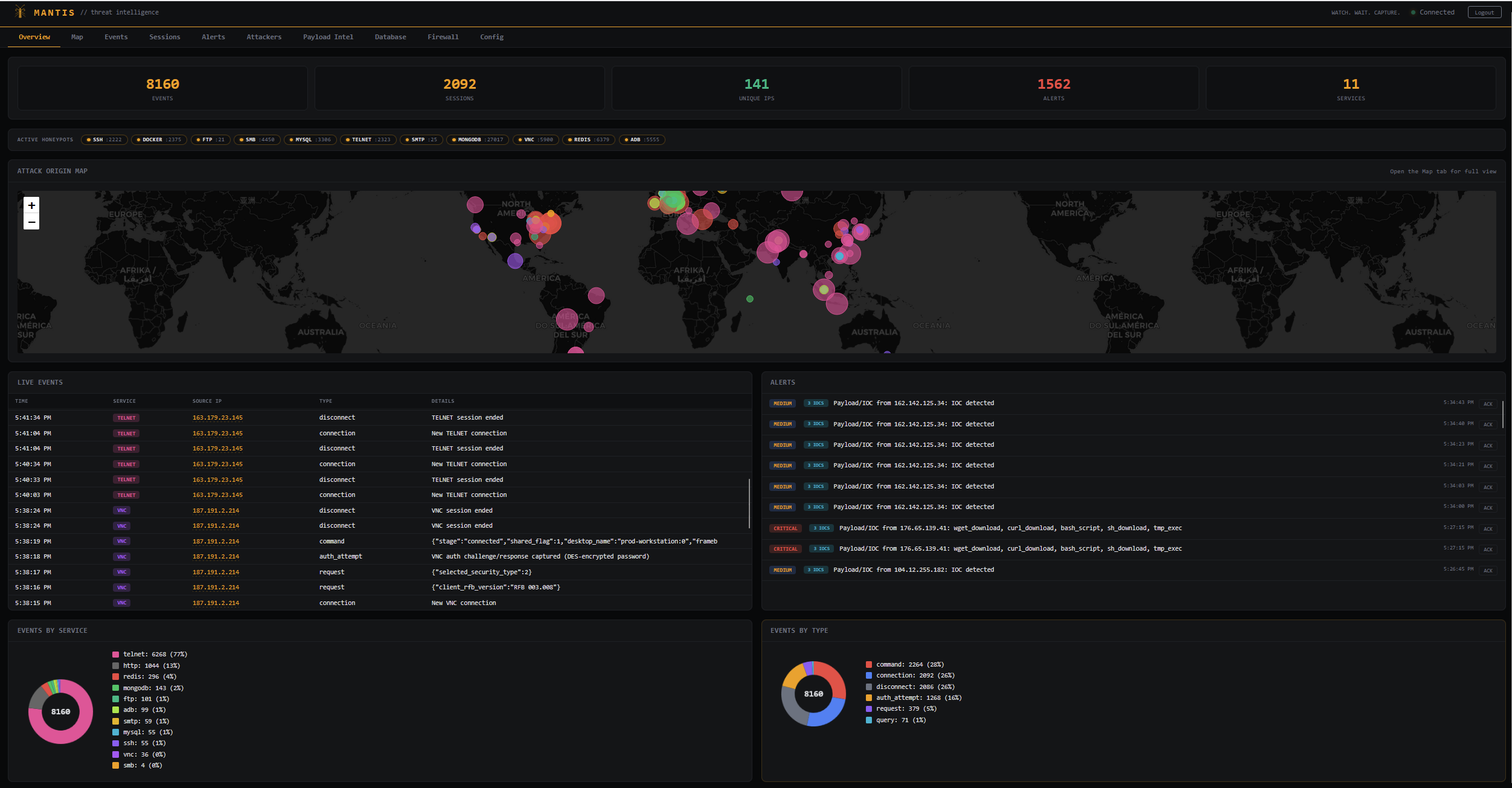
部署 14 个模拟生产系统的真实诱饵服务。实时捕获攻击者凭据、命令和负载。通过实时仪表板分析一切,包括地理定位映射、自动威胁检测和一键 IP 封禁。
完全使用 Python 构建 — 无线程,纯 asyncio 并发。
## 核心特性
|
**14 个协议级蜜罐**
SSH、Docker API、FTP、SMB、MySQL、Telnet、SMTP、MongoDB、VNC、Redis、ADB、Elasticsearch、Kubernetes API、MQTT — 每个服务都从零开始实现其 wire 协议(无外部服务器守护进程)。
|
**实时 Web 仪表板**
实时 WebSocket 事件流、可过滤日志、会话跟踪、基于严重性的警报,以及交互式攻击来源地图 — 全部在一个单页应用中,部署在 8843 端口。
|
|
**自动威胁检测**
50+ 个模式规则可检测 Log4Shell、反向 shell、加密货币挖矿程序、凭据窃取、SQL 注入、权限提升和编码负载,并提取 IOC(URL、哈希、IP)。
|
**一键防火墙**
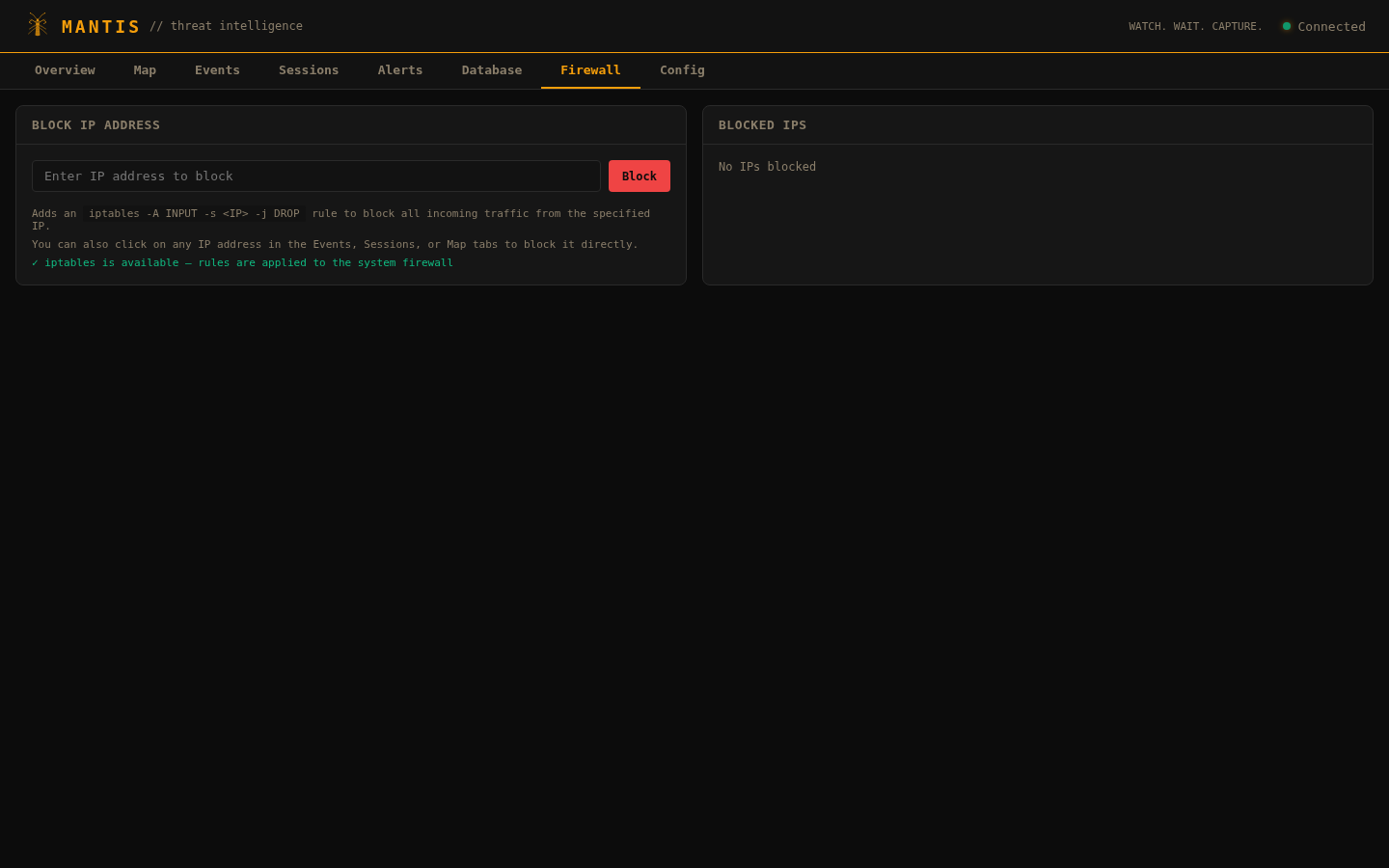
直接从仪表板通过 iptables 封禁攻击者 IP。点击事件日志中的任何 IP 即可封禁,或从专用的防火墙标签页管理规则。
|
## 快速开始
```
git clone https://github.com/Syn2Much/MANTIS.git && cd MANTIS
pip install -r requirements.txt
python main.py
```
这将启动一个交互式设置界面,您可以在其中切换服务并配置端口:
```
? Select services & configure ports (space = toggle, → = set port, enter = confirm)
❯ [x] SSH :2222
[x] DOCKER :2375
[x] FTP :21
[ ] SMB :4450
[x] MYSQL :3306
[x] TELNET :2323
[x] SMTP :25
[x] MONGODB :27017
[x] VNC :5900
[x] REDIS :6379
[x] ADB :5555
[x] ELASTIC :9200
[x] K8S :6443
[x] MQTT :1883
────────────────────────────
[x] DASHBOARD :8843
```
| 按键 | 操作 |
|-----|--------|
| **空格键** | 切换服务开/关 |
| **→** | 内联编辑端口 |
| **a** | 切换全部 |
| **回车键** | 确认并启动 |
仪表板在 **http://localhost:8843** 打开 — 默认登录凭据为 `admin` / `admin`。
### 静默模式
对于脚本化部署、systemd 或 Docker — 跳过所有提示:
```
python main.py --headless # all defaults
python main.py --headless --config profiles/default.yaml # from YAML profile
```
### CLI 选项
```
python main.py [options]
--headless Non-interactive mode (all defaults)
-c, --config FILE YAML config file path
--db PATH Database file path
-v, --verbose Debug logging
-q, --quiet Errors only
--version Show version
python main.py stats # view capture statistics
python main.py stats --db FILE # from specific database
```
## 支持的服务
| 服务 | 端口 | 捕获内容 |
|:--------|:-----|:-----------------|
| **SSH** | 2222 | 凭据、shell 命令、交互式会话回放(Paramiko) |
| **Docker** | 2375 | 容器创建/启动负载、镜像拉取、版本/信息探测(Engine API v1.41) |
| **FTP** | 21 | USER/PASS、目录遍历、文件传输尝试(RFC 959) |
| **SMB** | 4450 | SMB1/SMB2 协商、NTLM 身份验证哈希 |
| **MySQL** | 3306 | 登录凭据、SQL 查询(v10 握手协议) |
| **Telnet** | 2323 | 登录提示、交互式命令、shell 会话历史 |
| **SMTP** | 25 | AUTH LOGIN/PLAIN 凭据、MAIL FROM/RCPT TO/DATA(RFC 5321) |
| **MongoDB** | 27017 | SASL 身份验证、isMaster、listDatabases(OP_QUERY + OP_MSG wire 协议) |
| **VNC** | 5900 | DES 质询/响应身份验证捕获(RFB 3.8) |
| **Redis** | 6379 | AUTH 密码、INFO/KEYS 侦察、CONFIG SET/SLAVEOF 滥用(RESP 协议) |
| **ADB** | 5555 | Shell 命令、身份验证令牌/密钥、设备枚举(二进制协议) |
| **Elasticsearch** | 9200 | `_search` 数据窃取、`_bulk` 注入、`_scripts` RCE、`_snapshot` 渗透尝试 |
| **Kubernetes** | 6443 | Pod 创建规格、secret 读取(蜜罐 AWS 密钥)、exec RCE、命名空间枚举 |
| **MQTT** | 1883 | CONNECT 凭据、SUBSCRIBE 主题、PUBLISH 负载及 QoS(v3.1.1) |
每个服务都在 wire 级别模拟其协议,用真实响应保持攻击者的参与度。
## 仪表板
Events — Filterable log with clickable IPs across all 14 services
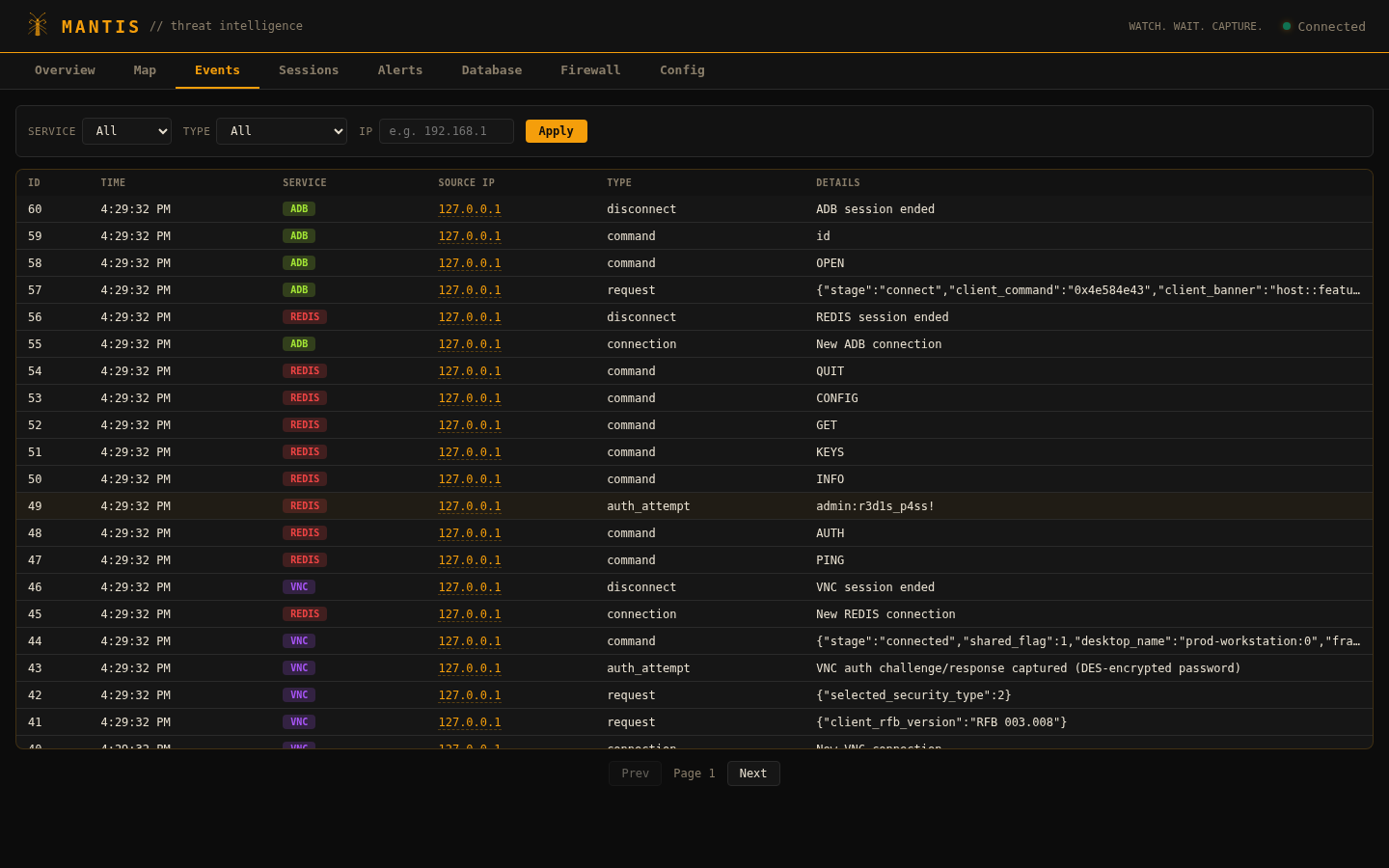
Sessions — All connections with color-coded service badges
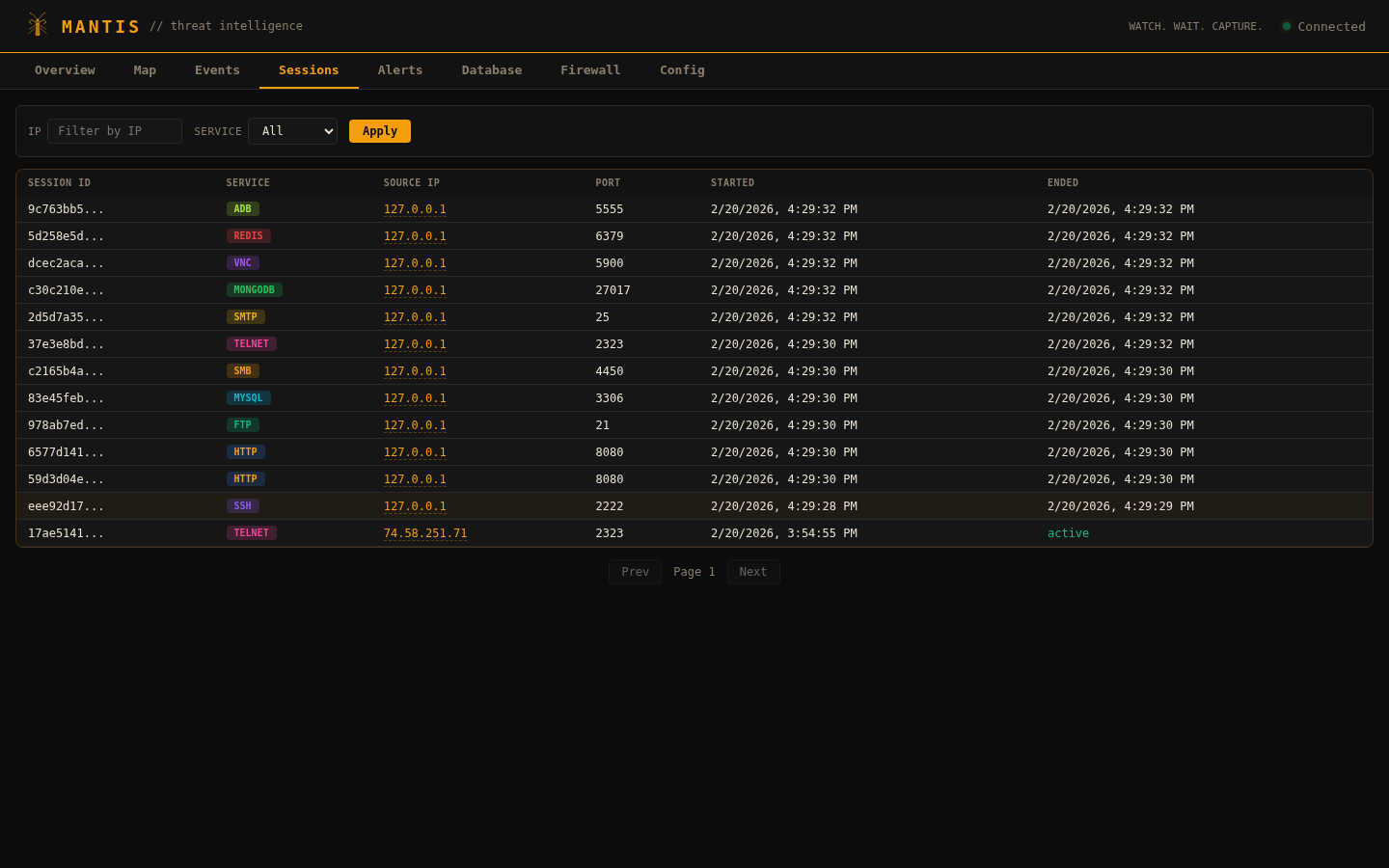
Alerts — Severity-based threat alerts with acknowledgment and drill-down
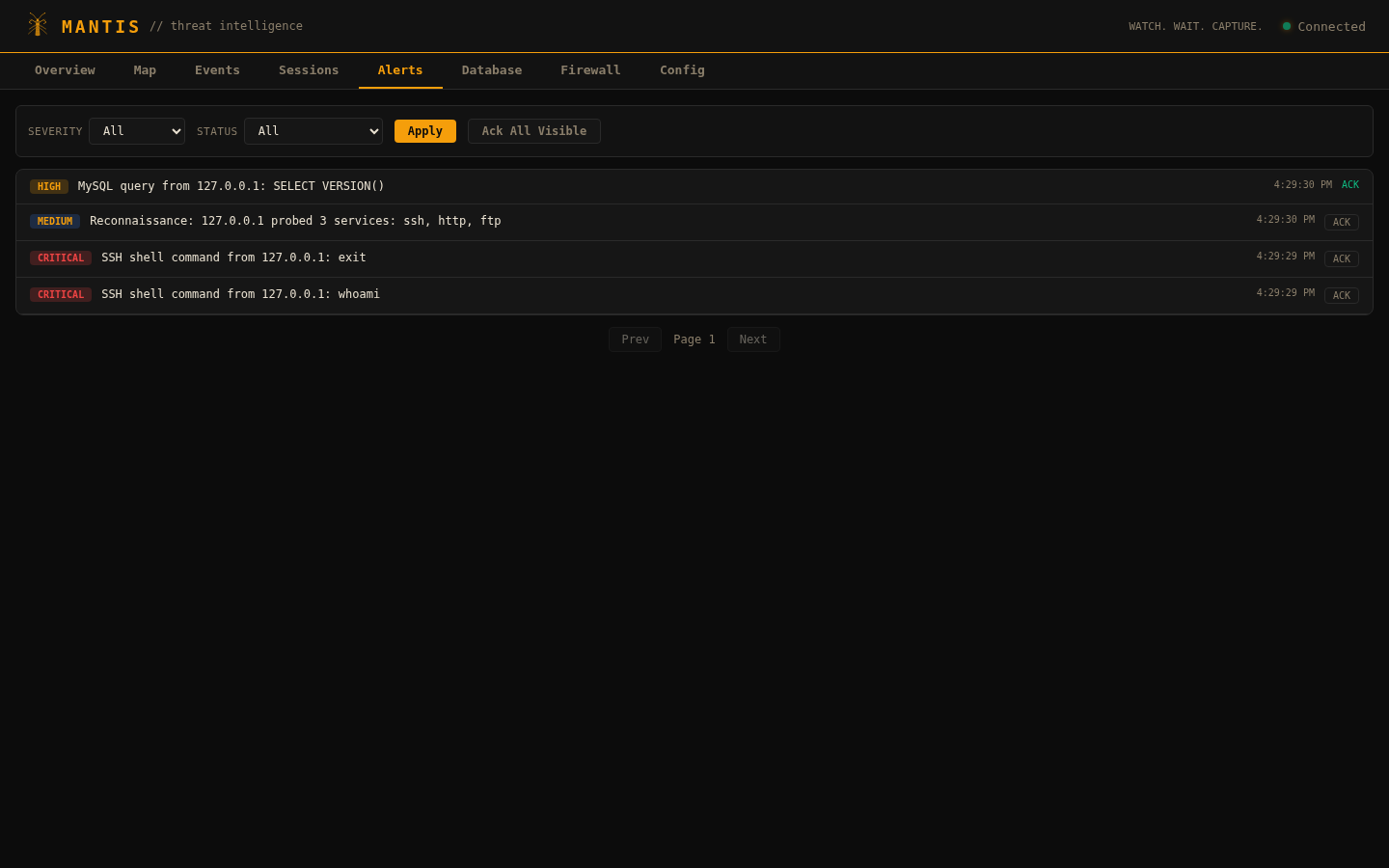
Database — Advanced search with filters, date range, and JSON export
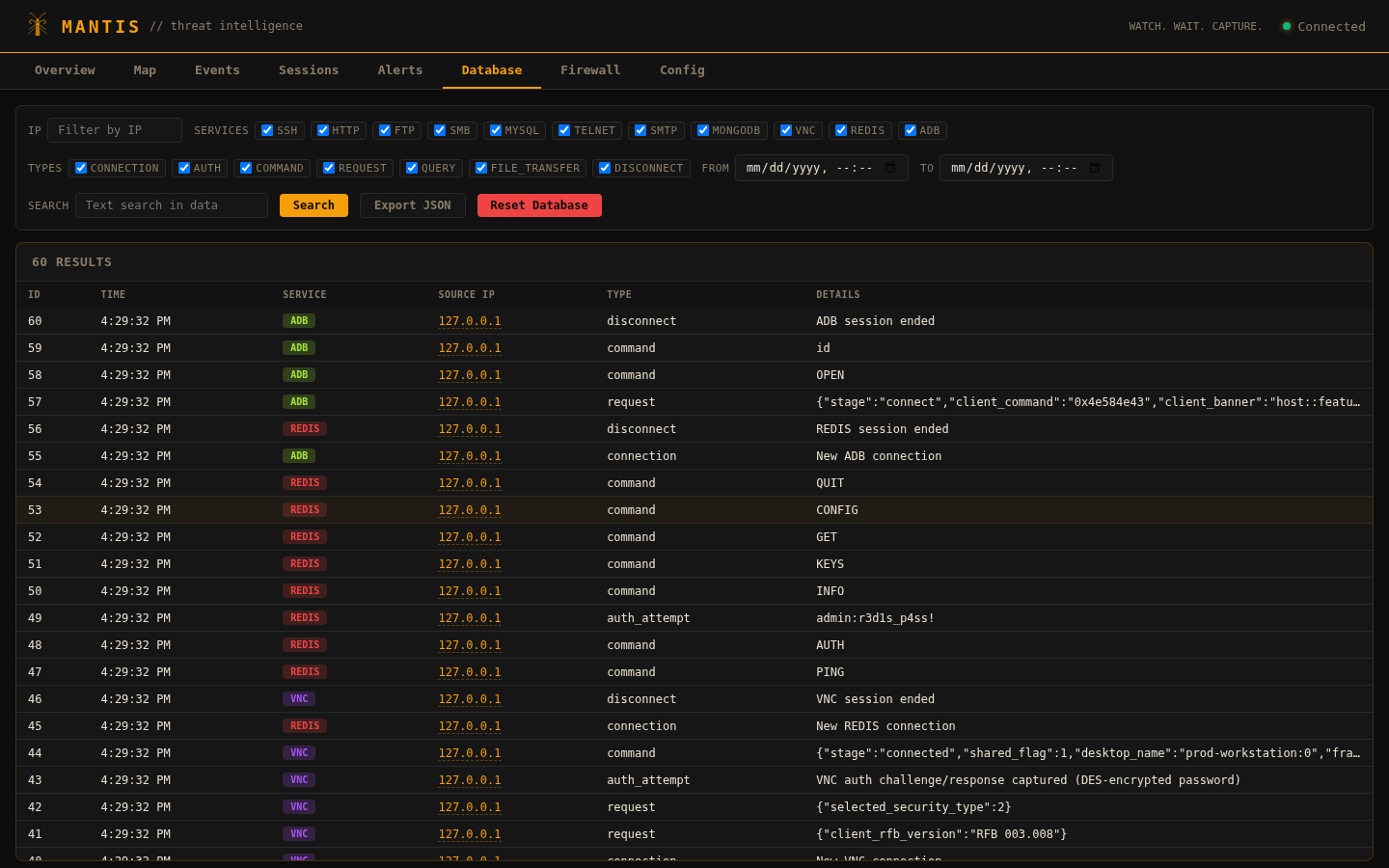
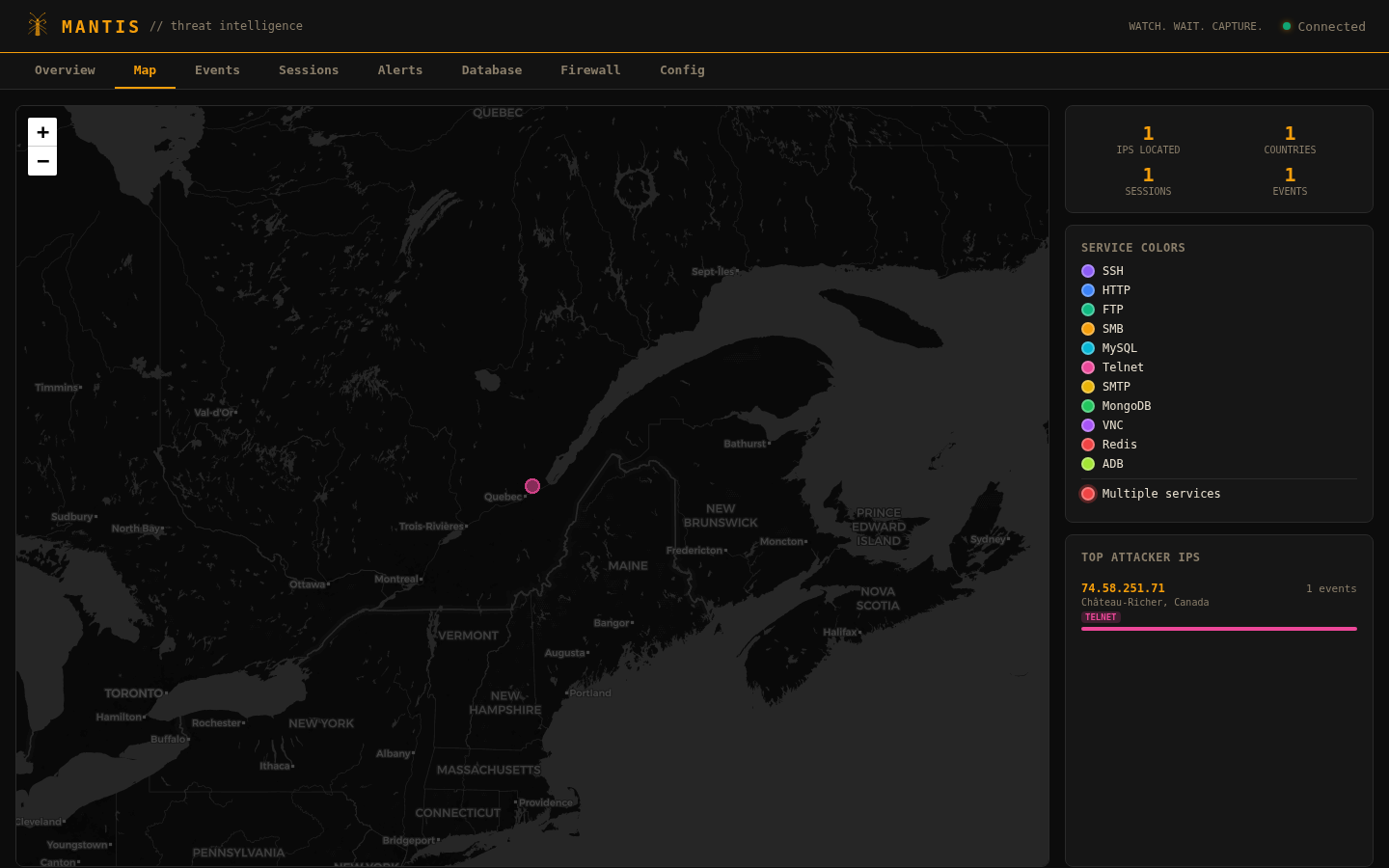
Attack Map — Geolocation of attack origins via ip-api.com
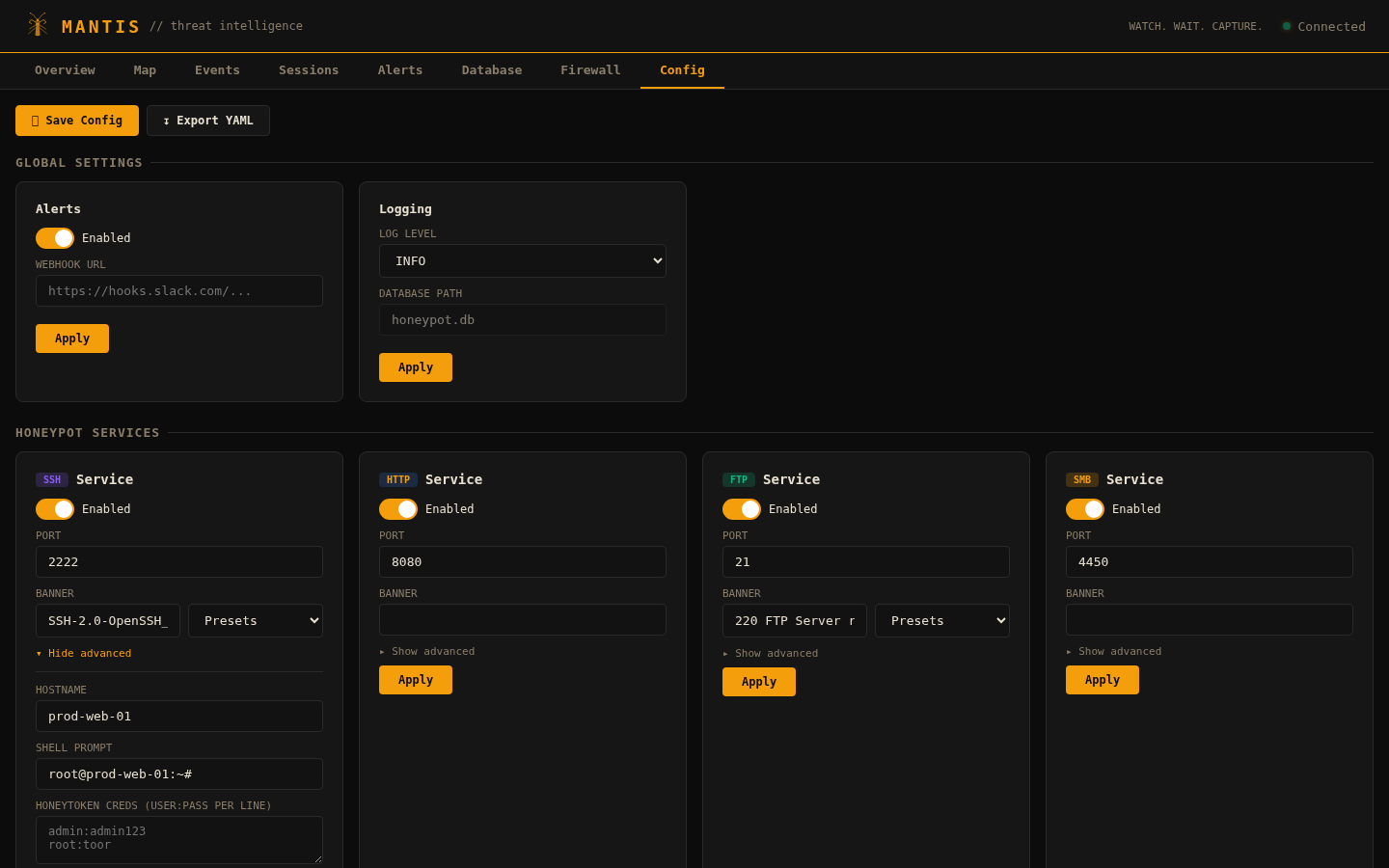
Config — Per-service settings, 79 banner presets, global config, save/export
Firewall — Block/unblock attacker IPs via iptables
## 部署配置
配置文件是 YAML 文件,控制哪些服务运行以及在哪些端口上运行。
| 配置 | 服务 | 使用场景 |
|:--------|:---------|:---------|
| **`profiles/default.yaml`** | 全部 14 个 | 完整部署,最大覆盖范围 |
| **`profiles/minimal.yaml`** | SSH + Docker | 轻量级,低资源环境 |
| **`profiles/database_trap.yaml`** | MySQL、MongoDB、Redis、FTP、SMB | 数据库重点威胁捕获 |
```
python main.py --headless --config profiles/minimal.yaml
```
您可以通过复制任何配置文件并编辑 YAML 来创建自己的配置 — 每个服务都有 `enabled`、`port`、`banner` 和协议特定的额外选项(主机名、凭据、数据库)。
## API 参考
所有端点都需要身份验证(cookie、`Authorization: Bearer
` 或 WebSocket `?token=`)。
| 端点 | 方法 | 描述 |
|:---------|:-------|:------------|
| `/api/auth` | POST | 用户名/密码登录 |
| `/api/stats` | GET | 聚合统计 |
| `/api/events` | GET | 事件(可过滤:`service`、`type`、`ip`、`limit`) |
| `/api/sessions` | GET | 会话(可过滤:`service`、`ip`、`limit`) |
| `/api/sessions//events` | GET | 特定会话的事件 |
| `/api/alerts` | GET | 警报(可过滤:severity、status) |
| `/api/alerts//ack` | POST | 确认警报 |
| `/api/geo/` | GET | GeoIP 查询 |
| `/api/map` | GET | 所有源 IP 的地图坐标 |
| `/api/attackers` | GET | 带事件计数的唯一攻击者 IP |
| `/api/ips` | GET | 所有唯一源 IP |
| `/api/payload-stats` | GET | 负载检测分析和 IOC 摘要 |
| `/api/firewall/blocked` | GET | 当前已封禁的 IP |
| `/api/firewall/block` | POST | 通过 iptables 封禁 IP `{"ip": "x.x.x.x"}` |
| `/api/firewall/unblock` | POST | 解封 IP `{"ip": "x.x.x.x"}` |
| `/api/config` | GET | 运行中的服务配置 |
| `/api/config/full` | GET | 配置 + 模式 + 横幅预设 |
| `/api/config/service/` | PUT | 更新服务的配置 |
| `/api/config/global` | PUT | 更新全局设置 |
| `/api/config/save` | POST | 将运行配置持久化到 YAML |
| `/api/config/export` | GET | 下载配置为 YAML 文件 |
| `/api/export` | GET | 完整 JSON 导出(事件、会话、警报) |
| `/api/database/reset` | POST | 清除所有捕获的数据 |
| `/ws` | WebSocket | 实时事件和警报流 |
## 测试
附带的端点测试器会探测所有 14 个服务并验证每个 API 端点:
```
python test_endpoints.py # localhost defaults
python test_endpoints.py --host 10.0.0.5 # remote host
python test_endpoints.py --skip-services # dashboard API only
```
```
MANTIS Endpoint Tester
Target: 127.0.0.1
============================================================
Honeypot Service Probes
============================================================
[PASS] SSH banner: SSH-2.0-OpenSSH_8.9p1 Ubuntu-3ubuntu0.6
[PASS] Docker /_ping: OK, /version: v20.10.24
[PASS] FTP banner: 220 FTP Server ready.
[PASS] MySQL handshake=95b, auth_resp=11b, query_resp=55b
[PASS] SMB negotiate response=133b
[PASS] Telnet banner received
[PASS] SMTP banner: 220 mail.example.com ESMTP Postfix (Ubuntu)
[PASS] MongoDB isMaster resp=186b, listDatabases resp=315b
[PASS] VNC version: RFB 003.008, auth_ok=True
[PASS] Redis ping: +PONG, auth: +OK
[PASS] ADB device: Pixel 7
[PASS] Elastic cluster: elasticsearch, version: 8.12.0
[PASS] K8s /version: v1.28.2, /api/v1: 200
[PASS] MQTT CONNACK received, session established
...
36 passed, 0 failed out of 36 checks
```
## 架构
```
main.py → honeypot/cli.py → honeypot/core.py (HoneypotOrchestrator)
│
┌───────────────┼───────────────┐
│ │ │
14 Services Dashboard Alert Engine
(async TCP) (aiohttp REST (50+ patterns,
+ WebSocket) webhook dispatch)
│ │ │
└───────┬───────┘ │
│ │
Database (SQLite) ◄───────────┘
│
GeoLocator (ip-api.com, cached)
```
```
honeypot/
├── cli.py # Interactive setup, arg parsing, logging
├── config.py # YAML loading, service schemas, 79 banner presets
├── core.py # Orchestrator — wires components, manages lifecycle
├── database.py # Async SQLite (WAL), pub/sub for WebSocket broadcast
├── models.py # EventType, ServiceType, AlertSeverity, dataclasses
├── alerts.py # 50+ detection rules, IOC extraction, webhooks
├── geo.py # IP geolocation with cache + rate limiting
├── dashboard/
│ ├── server.py # aiohttp REST API (40+ endpoints) + WebSocket
│ └── templates.py # Single-file HTML/CSS/JS dashboard (SPA)
└── services/
├── __init__.py # BaseHoneypotService ABC
└── *.py # 14 protocol implementations
```
每个服务都继承 `BaseHoneypotService` — 实现 `_handle_client()` 进行协议交互,并使用 `_log()` 将事件推送到管道(SQLite 存储 → 警报引擎 → WebSocket 广播)。
## 许可证
MIT标签:ADB蜜罐, AMSI绕过, asyncio, ATT&CK 框架, CISA项目, DAST, Docker API蜜罐, Elasticsearch蜜罐, FTP蜜罐, Honeypot, HTTP工具, IOC提取, IP封禁, Kubernetes API蜜罐, Log4Shell检测, MongoDB蜜罐, MQTT蜜罐, MySQL蜜罐, Payload分析, Python, Redis蜜罐, SMB蜜罐, SMTP蜜罐, SQL注入检测, SSH蜜罐, Telnet蜜罐, VNC蜜罐, WebSocket, 仪表板, 依赖分析, 加密货币挖矿检测, 协议分析, 命令注入, 地理定位, 威胁情报, 威胁检测, 开发者工具, 恶意软件分析, 攻击态势感知, 攻击溯源, 数据集, 无后门, 无控制台执行, 权限提升, 网络安全, 网络安全审计, 自动化响应, 蜜罐, 计算机取证, 证书利用, 进程注入, 逆向shell检测, 配置错误, 防火墙, 隐私保护