SudoPacman-Syuu/Beatrix-suite
GitHub: SudoPacman-Syuu/Beatrix-suite
Beatrix Suite 是一款命令行 Bug Bounty 搜寻与自动化渗透测试框架,通过整合多个安全工具并提供 AI 辅助来简化从侦察到漏洞利用的完整安全审计流程。
Stars: 16 | Forks: 1
# BEATRIX SUITE — The Black Mamba
   
**许可证:** 源码可用 — 非商业用途免费。商业用途需要单独的许可证。详见 [LICENSE](LICENSE)。
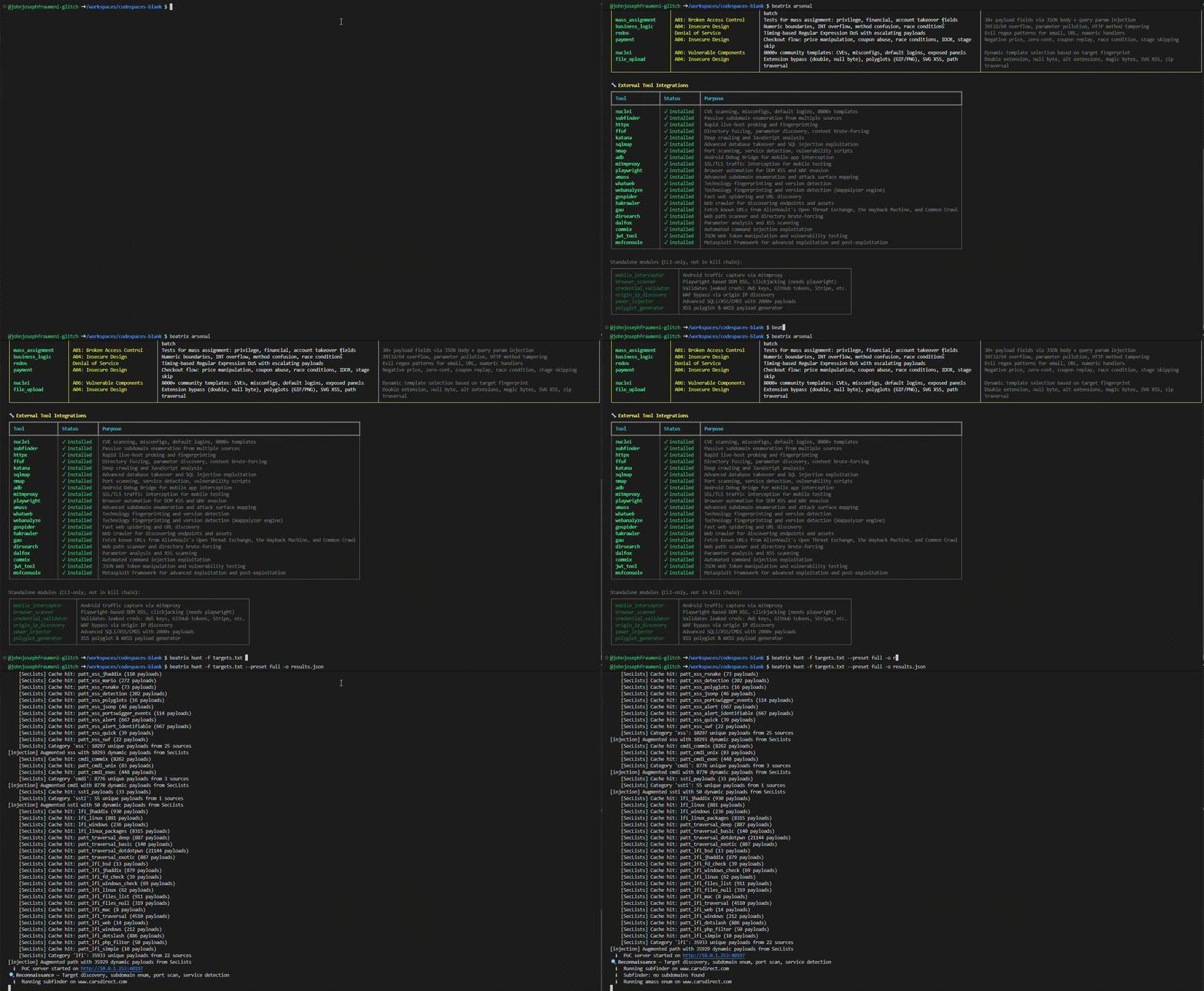
一个命令行 Bug Bounty 搜寻框架。包含 32 个扫描模块、22 个外部工具集成、57K+ payload、7 阶段 Kill Chain 方法论,以及 AI 辅助分析。目标可以是域名、URL 或原始 IP 地址。
 ## 目录
- [为什么选择 Beatrix?](#why-beatrix)
- [操作手册](#the-manual)
- [安装](#installation)
- [快速开始](#quick-start)
- [命令参考](#command-reference)
- [环境要求](#requirements)
- [预设](#presets)
- [详细输出级别](#verbosity)
- [Kill Chain](#the-kill-chain)
- [扫描模块](#scanner-modules)
- [外部工具集成](#external-tool-integrations)
- [IP 地址目标](#ip-address-targets)
- [网络测试 (Full 预设)](#network-testing-full-preset)
- [用法示例](#usage-examples)
- [认证扫描](#authenticated-scanning)
- [GitHub Secret 扫描](#github-secret-scanning)
- [验证](#validation)
- [输出格式](#output-format)
- [扫描输出目录](#scan-output-directory)
- [配置](#configuration)
- [获取帮助](#getting-help)
- [架构](#architecture)
- [免责声明](#legal)
## 为什么选择 Beatrix?
大多数 Bug Bounty 工具只能解决单一问题。而 Beatrix 解决了整个工作流程。
**Nuclei** 擅长基于模板的扫描 — 针对目标的已知 CVE 和模式。它不会进行爬取,不管理认证会话,不将工具链接在一起,也不会告诉你下一步该做什么。你仍然需要手动运行 subfinder,然后是 amass、nmap、nuclei、sqlmap、dalfox,最后手动关联输出结果。
**Burp Suite Pro** 是手动 Web 测试的行业标准。它需要 GUI,每年收费 449 美元,不支持脚本化,并且无法在 Codespaces 或 CI pipeline 这样的无头环境中运行。
Beatrix 就是那个缺失的编排层。
| 功能 | Beatrix | Nuclei | Burp Suite Pro |
|---------|:-------:|:------:|:--------------:|
| 7 阶段 Kill Chain 方法论 | ✅ | ❌ | ❌ |
| 自动登录与会话管理 | ✅ | ❌ | 手动 |
| 自主 AI 渗透测试器 (GHOST) | ✅ | ❌ | ❌ |
| 22 个外部工具编排 | ✅ | ❌ | ❌ |
| 内置 OOB / PoC 服务器 | ✅ | ❌ | ✅ (Collaborator) |
| 认证爬取 | ✅ | ❌ | ✅ |
| 支持 CLI / 利于自动化 | ✅ | ✅ | ❌ |
| 可在无头环境中运行 | ✅ | ✅ | ❌ |
| 成本 | 免费 | 免费 | $449/年 |
一条命令。每个阶段。所有工具。
```
beatrix hunt example.com --preset full
```
## 操作手册
Beatrix 自带交互式 HTML 手册,涵盖了每个命令、每个模块、所有 flag、预设以及实际工作流程:
```
beatrix manual
```
在默认浏览器中打开 — 无需联网。也可以在 [`docs/manual/index.html`](docs/manual/index.html) 找到。
## 安装
```
git clone https://github.com/SudoPacman-Syuu/Beatrix-cli.git && cd Beatrix-cli && ./install.sh
```
安装脚本会自动检测你的 Python,选择最佳安装方式,将 `beatrix` 添加到你的 PATH 中,并安装所有 21 个外部安全工具(nuclei、nmap、sqlmap、subfinder、ffuf 等)。
**安装方式优先级:**
1. **uv** (最快) — 如果缺失则自动安装
2. **venv** — 位于 `~/.beatrix` 的 Python 虚拟环境
3. **pipx** — 隔离的应用安装
4. **pip --user** — 后备方案
其他安装方法:
```
make install # same as ./install.sh via make
make install-dev # editable install for development
uv tool install . # direct uv install
pipx install . # direct pipx install
make install-venv # dedicated venv + symlink to /usr/local/bin
```
自定义 venv 位置:`BEATRIX_VENV=~/my-venv ./install.sh`
**卸载:**
```
./uninstall.sh # or: make uninstall
```
## 快速开始
```
beatrix # show all commands
beatrix hunt example.com # scan a domain
beatrix hunt 192.168.1.1 # scan an IP address
beatrix hunt -f targets.txt # scan all targets from a file
beatrix strike api.com -m cors # single module, single target
beatrix help hunt # detailed command help
beatrix arsenal # full module reference
```
## 命令参考
| 命令 | 描述 | 示例 |
|---------|-------------|---------|
| `hunt TARGET` | 全面漏洞扫描 | `beatrix hunt example.com` |
| `hunt -f FILE` | 从文件加载目标进行扫描 | `beatrix hunt -f targets.txt` |
| `strike TARGET -m MOD` | 针对目标运行单个模块 | `beatrix strike api.com -m cors` |
| `probe TARGET` | 快速存活检测 | `beatrix probe example.com` |
| `recon DOMAIN` | 仅进行侦察 | `beatrix recon example.com --deep` |
| `batch FILE -m MOD` | 批量单模块扫描 | `beatrix batch targets.txt -m cors` |
| `bounty-hunt TARGET` | OWASP Top 10 pipeline | `beatrix bounty-hunt https://api.com` |
| `rapid` | 多目标快速扫描 | `beatrix rapid -d example.com` |
| `haiku-hunt TARGET` | AI 辅助搜寻 | `beatrix haiku-hunt example.com` |
| `ghost TARGET` | 自主 AI 渗透测试器 | `beatrix ghost https://api.com` |
| `github-recon ORG` | GitHub Secret 扫描器 | `beatrix github-recon acme-corp` |
| `validate FILE` | 验证发现结果 | `beatrix validate report.json` |
| `mobile [sub]` | 移动流量拦截 | `beatrix mobile intercept` |
| `browser [sub]` | Playwright 浏览器扫描 | `beatrix browser scan https://app.com` |
| `creds [sub]` | 凭证验证 | `beatrix creds validate jwt_secret TOKEN` |
| `origin-ip DOMAIN` | 发现 CDN 背后的源 IP | `beatrix origin-ip example.com` |
| `inject TARGET` | 深度参数注入 | `beatrix inject https://api.com --deep` |
| `polyglot [sub]` | XSS polyglot 生成 | `beatrix polyglot generate` |
| `auth [sub]` | 认证和自动登录 | `beatrix auth login example.com` |
| `auth browser TARGET` | 手动浏览器登录 | `beatrix auth browser example.com` |
| `auth import TARGET FILE` | 从 HAR 或 cookie 字符串导入会话 | `beatrix auth import example.com session.har` |
| `auth sessions` | 管理已保存的会话 | `beatrix auth sessions --clear example.com` |
| `config` | 配置 | `beatrix config --show` |
| `list` | 列出模块/预设 | `beatrix list --modules` |
| `arsenal` | 完整模块参考 | `beatrix arsenal` |
| `help CMD` | 详细的命令帮助 | `beatrix help hunt` |
| `manual` | 打开 HTML 手册 | `beatrix manual` |
| `setup` | 安装外部工具 | `beatrix setup` |
## 环境要求
- **Python 3.11+**
- **Linux** (Debian、Ubuntu、Fedora、Arch 等)
21 个外部工具会在执行 `./install.sh` 时自动安装。要稍后重新安装或更新它们:
```
beatrix setup # install all missing tools
beatrix setup --check # show what is installed
```
验证安装:
```
beatrix --version
beatrix list --modules
```
## 预设
| 预设 | 描述 | 预计时间 |
|--------|-------------|-----------------|
| `quick` | 表面扫描,仅侦察 | ~5 分钟 |
| `standard` | 均衡扫描 (默认) | ~15 分钟 |
| `full` | 完整 kill chain + 全面网络侦察 | ~45-60 分钟 |
| `stealth` | 低噪声被动侦察 | ~10 分钟 |
| `injection` | 针对注入的测试 | ~20 分钟 |
| `api` | API 安全测试 | ~15 分钟 |
| `web` | 针对应用程序的 Web 测试 | ~20 分钟 |
| `recon` | 仅侦察 | ~10 分钟 |
```
beatrix hunt example.com --preset full
beatrix hunt example.com --preset injection
```
## 详细输出级别
`hunt` 和 `strike` 都接受具有三个级别的 `-v` flag。默认情况下,Beatrix 会显示阶段转换、扫描器名称以及实时接收到的发现结果。详细输出 flag 会在不需要任何配置更改的情况下,逐步展示更多细节。
```
beatrix hunt example.com -v # show all info events; log buffer raised to 200
beatrix hunt example.com -vv # show URL, parameter, and evidence for each finding as discovered
beatrix hunt example.com -vvv # route all internal debug logging to the terminal in real time
beatrix strike api.com -m cors -vvv
```
在 `-vvv` 级别下,Python 的 logging 模块会配置为 DEBUG 级别并使用 Rich handler。每一次内部扫描器操作、扫描器发出的每一个 HTTP 请求,以及所有外部工具子进程(amass、katana、gospider、dirsearch、dalfox 等)的原始 stdout 和 stderr,都会在发生时逐行流式传输到终端。通常抑制输出的工具(使用了 `-silent`、`-q` 或 `--silence` 标志)会在此模式下移除这些标志。Amass 还会接收到自己的 `-v` 标志,以输出详细的来源级枚举信息。
日志缓冲区在 `-vvv` 时是无限制的,在 `-vv` 时上限为 500 行,在 `-v` 时为 200 行(默认为 50 行)。
## Kill Chain
每次 `hunt` 都会运行 7 个阶段的方法论。各阶段按顺序执行;每个阶段的输出会作为下一阶段的输入。
**阶段 1 — CDN Bypass**
通过 IP 范围和 header 指纹识别 Cloudflare、Akamai、Fastly、CloudFront、Sucuri、Incapsula、PerimeterX、DataDome 和 Kasada。通过 DNS 历史记录、crt.sh SSL 证书、MX 记录、子域名关联、错误配置检查和 WHOIS 发现源 IP。当源 IP 被确认后,所有后续的网络扫描将直接针对该 IP,而不是 CDN 边缘节点。可选的 API 密钥(SecurityTrails、Censys、Shodan)可通过环境变量来扩展此功能。
**阶段 2 — 侦察**
通过 `subfinder` 和 `amass` 进行子域名枚举,通过 `katana`、`gospider`、`hakrawler` 和 `gau` 进行爬取(如果存在 `waymore`,则用于更深度的历史 URL 挖掘),在可用时通过 `nmap -sS -p-` 对源 IP 进行全 65535 端口 TCP 扫描,服务指纹识别,NSE 漏洞/发现/认证脚本,UDP top-50 扫描,通过 `scapy` 进行防火墙指纹识别和绕过测试,通过 `paramiko` 进行 SSH 深度审计,JS bundle 分析,endpoint 探测,通过 `kiterunner` 发现 API 路由,通过 `arjun` 挖掘隐藏参数,通过 `tlsx` 进行深度 TLS 指纹识别,通过 `whatweb` 和 `webanalyze` 进行技术指纹识别,nuclei 侦察模板,以及 nuclei 网络协议检查。
**阶段 3 — 武器化**
子域名接管(30+ 云服务)、错误信息泄露、缓存投毒、原型污染,以及在存在时通过 `nomore403` 进行系统性的 403 绕过。
**阶段 4 — 投递**
CORS、开放重定向、OAuth 重定向 URI 操纵、HTTP 请求走私(CL.TE / TE.CL / TE.TE)、WebSocket 测试。
**阶段 5 — 漏洞利用**
注入 (SQLi、XSS、CMDi),带有 `response_analyzer` 行为检测和 WAF 绕过回退(11 种 WAF 配置,具有自适应学习的 3 策略重试),SSRF、IDOR、失效的访问控制、认证绕过、SSTI、XXE、反序列化、GraphQL(在禁用内省时使用 `clairvoyance` 进行 schema 重构)、批量赋值、业务逻辑(包括单包/最后字节同步的竞态条件测试)、ReDoS、支付流程篡改、通过 `crlfuzz` 进行 CRLF 注入、nuclei 漏洞利用扫描(CVE、工作流、interactsh OOB、通过逼真的 UA 和 感知的速率限制进行 WAF 绕过)以及 nuclei headless(DOM XSS、原型污染)。Nuclei 会将大型 URL 集合抽样缩减为具有代表性的集合,并与其他扫描器共享每个主机的速率上限,因此当一个扫描器遇到 429 洪水时,会限制对同一主机上的 nuclei。SmartFuzzer 运行经过 ffuf 验证的模糊测试,并使用针对配置目标的 WAF 编码。确认的发现将升级交由 `sqlmap`、`dalfox`、`commix` 和 `jwt_tool` 处理。
**阶段 6 — 安装**
文件上传扩展名绕过、polyglot 上传、路径遍历。
**阶段 7 — C2**
通过内置的 `PoCServer`(纯 asyncio,自动绑定空闲端口)或外部的 `interactsh` 进行 OOB 回调关联。通过在阶段 5 注册的回调来确认 Blind SSRF、XXE 和 RCE。`LocalPoCClient` 提供基于偏移量的去重轮询。
**阶段 8 — 目标**
VRT 分类(Bugcrowd VRT + CVSS 3.1),通过 `PoCChainEngine` 生成漏洞利用链(关联两个或多个相关的发现结果),去重以及影响评估。
## 扫描模块
运行 `beatrix arsenal` 查看完整表格。跨越 5 个 kill chain 阶段的 32 个模块。
**阶段 1 — 侦察**
| 模块 | 功能说明 |
|--------|-------------|
| `origin_ip` | CDN 检测及通过 DNS 历史记录、SSL 证书、MX 记录、子域名关联和错误配置检查发现源 IP |
| `crawl` | 具备 soft-404 检测、表单/参数提取的深度限制爬虫 |
| `endpoint_prober` | 探测 200+ 常见的 API、管理后台和调试路径 |
| `js_analysis` | 从 JS bundle 中提取 API 路由、Secret 和 source map |
| `headers` | CSP、HSTS、X-Frame-Options 和安全 header 分析 |
| `github_recon` | GitHub 组织 Secret 扫描、git 历史分析 |
| `nmap_nse` | 全 TCP 65535 端口扫描、服务识别、NSE 漏洞/发现/认证脚本、UDP top-50 |
| `ssh_auditor` | SSH 指纹、弱 KEX/cipher/MAC 检测、默认凭证暴力破解 |
| `packet_crafter` | 防火墙指纹、源端口绕过、IP 分片绕过、TTL 映射 |
**阶段 2 — 武器化**
| 模块 | 功能说明 |
|--------|-------------|
| `takeover` | 针对 30+ 云服务的悬空 CNAME 检测 |
| `error_disclosure` | 堆栈跟踪、SQL 错误、框架调试信息泄露 |
| `cache_poisoning` | Unkeyed header 注入、fat GET、参数隐藏 |
| `prototype_pollution` | 服务端和客户端 JS 原型污染 |
**阶段 3 — 投递**
| 模块 | 功能说明 |
|--------|-------------|
| `cors` | 6 种绕过技术、凭证泄露检测 |
| `redirect` | 开放重定向检测 |
| `oauth_redirect` | OAuth 重定向 URI 操纵 |
| `http_smuggling` | CL.TE / TE.CL / TE.TE 不同步 |
| `websocket` | WebSocket origin、CSWSH、消息注入 |
**阶段 4 — 漏洞利用**
| 模块 | 功能说明 |
|--------|-------------|
| `injection` | SQLi、XSS、CMDi、LFI、SSTI — 57K+ payload、行为检测、11 种配置的 WAF 绕过 |
| `ssrf` | 44+ payload、云元数据 endpoint、内部服务访问 |
| `idor` | 顺序、UUID 和负数 ID 操纵 |
| `bac` | 方法覆盖、强制浏览、权限提升 |
| `auth` | JWT 攻击、2FA 绕过、会话管理 |
| `ssti` | 服务端模板注入(Jinja2、Twig 等) |
| `xxe` | XML 外部实体注入 |
| `deserialization` | 不安全的反序列化(Java、PHP、Python、.NET) |
| `graphql` | 内省、批处理、注入 |
| `mass_assignment` | 隐藏字段绑定利用 |
| `business_logic` | 竞态条件、边界测试 |
| `redos` | 正则表达式拒绝服务 |
| `payment` | 结账流程篡改、价格篡改 |
| `nuclei` | 多阶段扫描器 — 侦察、漏洞利用、网络、headless。带有 WAF 绕过的 18,000+ 模板 |
**阶段 5 — 安装**
| 模块 | 功能说明 |
|--------|-------------|
| `file_upload` | 扩展名绕过、polyglot 上传、路径遍历 |
## 外部工具集成
Beatrix 通过异步子进程运行器封装了 22 个外部工具。当激活 `-vvv` 时,所有运行器都支持实时输出流。
| 工具 | 阶段 | 用途 |
|------|-------|---------|
| `subfinder` | 侦察 | 被动子域名枚举 |
| `amass` | 侦察 | 主动/被动子域名枚举 |
| `nmap` | 侦察 | 全 TCP/UDP 端口扫描、NSE 脚本 |
| `katana` | 侦察 | 深度爬取、JS 渲染 |
| `gospider` | 侦察 | 快速爬取、表单和 JS 提取 |
| `hakrawler` | 侦察 | URL 发现 |
| `gau` | 侦察 | 历史 URL 收集 |
| `waymore` † | 侦察 | 超越 `gau` 的穷举式历史 URL 挖掘(Wayback、OTX、URLScan、Common Crawl) |
| `whatweb` | 侦察 | 技术指纹识别 |
| `webanalyze` | 侦察 | 基于 Wappalyzer 的技术检测 |
| `dirsearch` | 侦察 | 目录暴力破解 |
| `kiterunner` † | 侦察 | 通过真实世界的 (assetnote) 路由字典发现 API 路由 |
| `arjun` † | 侦察 | 发现隐藏的 GET/POST/JSON 参数 |
| `tlsx` † | 侦察 | TLS 证书检查和密码套件枚举 |
| `nomore403` † | 武器化 | 通过 header 操纵和路径技巧系统性绕过 403 |
| `clairvoyance` † | 漏洞利用 | 即使内省被禁用也能进行 GraphQL schema 重构 |
| `crlfuzz` † | 漏洞利用 | 专门的 CRLF 注入 / 响应拆分扫描器 |
| `sqlmap` | 漏洞利用 | 深度 SQLi 利用、数据库枚举 |
| `dalfox` | 漏洞利用 | XSS 验证、WAF 绕过 |
| `commix` | 漏洞利用 | 操作系统命令注入利用 |
| `jwt_tool` | 漏洞利用 | JWT 漏洞分析、声明篡改 |
| `metasploit` | PoC Chain | 漏洞利用搜索、资源文件生成 |
**†** 这七个工具是**可选的** — Beatrix 会自动检测你的 `PATH` 中是否存在它们,并在存在时运行,但 `./install.sh` / `beatrix setup` **不会**安装它们(它们涵盖了 21 个核心工具)。自行安装其中任何一个以解锁额外的覆盖范围;当它们缺失时,Beatrix 会优雅降级。
## IP 地址目标
Beatrix 完全支持原始 IPv4 和 IPv6 目标。仅针对域名的操作会被自动跳过:
- **跳过:** 子域名枚举、源 IP 发现、GitHub 侦察、子域名接管检查
- **激活:** 所有基于 HTTP 的扫描器(注入、CORS、SSRF、IDOR、XXE 等)、端口扫描、服务检测、防火墙测试
```
beatrix hunt 192.168.1.1
beatrix hunt 10.0.0.1 --preset full
beatrix strike http://192.168.1.1:8080/api -m injection
# IPs 在 target files 中同样有效
echo "192.168.1.1
10.0.0.2
https://172.16.0.1:443" > targets.txt
beatrix hunt -f targets.txt
```
## 网络测试 (Full 预设)
`--preset full` 会在侦察阶段运行一个 4 阶段的自适应网络 pipeline。
### CDN 绕过 (origin_ip_discovery)
在端口扫描之前运行。检测 CDN/WAF 并发现源 IP。
| 技术 | 来源 | API 密钥 | 置信度 |
|-----------|--------|---------|------------|
| DNS 历史 | ViewDNS、DNSDumpster | 否 | 0.5-0.6 |
| SSL 证书搜索 | crt.sh | 否 | 0.7 |
| MX 记录分析 | dig MX records | 否 | 0.8 |
| 子域名关联 | 40+ 绕过子域名 | 否 | 0.7 |
| 错误配置检查 | header 泄露、/server-status | 否 | 0.9 |
| 历史 WHOIS | whois | 否 | 0.4 |
| SecurityTrails 历史 | SecurityTrails API | `SECURITYTRAILS_API_KEY` | 0.85 |
| Censys 证书搜索 | Censys API | `CENSYS_API_ID` + `CENSYS_API_SECRET` | 0.8 |
| Shodan 主机搜索 | Shodan API | `SHODAN_API_KEY` | 0.75 |
发现的 IP 将被验证(带有 Host header 的 HTTP/HTTPS)。置信度最高的已验证 IP 将在所有后续网络扫描中替代 CDN 边缘节点。
### 阶段 1 — 发现 (nmap)
| 步骤 | 命令 | 超时 |
|------|---------|---------|
| 1a | `nmap -sS -p- --min-rate 3000 -T4` — 所有 65535 个 TCP 端口 | 600秒 |
| 1b | 对开放端口进行服务/版本指纹识别 | 300秒 |
| 1c | NSE `vuln and safe` — CVE、错误配置 | 600秒 |
| 1d | NSE `discovery and safe` — http-enum、ssl-cert、banners | 600秒 |
| 1e | NSE `auth and safe` — 默认凭证、匿名访问 | 600秒 |
| 1f | UDP top-50 — DNS、SNMP、NTP、SSDP | 120秒 |
### 阶段 2 — 防火墙分析 (scapy)
仅在阶段 1 发现被过滤的端口时运行。
| 步骤 | 内容 |
|------|------|
| 2a | 防火墙指纹 — SYN/FIN/NULL/XMAS/ACK/Window 探测 |
| 2b | 源端口绕过 — 来自 53/80/443/88/20 端口的 SYN |
| 2c | IP 分片绕过 — 拆分 TCP header |
| 2d | TTL 映射 — 定位防火墙跳跃点位置 |
每次成功的绕过都会产生一个 HIGH 或 CRITICAL 级别的发现。
### 阶段 3 — 服务审计 (paramiko / NSE)
| 服务 | 工具 | 检查项 |
|---------|------|--------|
| SSH | paramiko | Banner、KEX/cipher/MAC 弱点、密钥强度、20+ 默认凭证 |
| FTP | NSE | 匿名访问、跳板攻击、vsftpd 后门 |
| SMTP | NSE | 开放中继、用户枚举、NTLM 信息 |
| MySQL/Postgres | NSE | 空密码、暴力破解、版本 |
| Redis/MongoDB | NSE | 未认证访问 |
| TLS | NSE | ssl-enum-ciphers、Heartbleed、POODLE、CCS 注入 |
### 上下文流
网络结果会传播到后续阶段:
- CDN 绕过 → 发现:源 IP 替换所有 nmap 扫描的 CDN 边缘节点
- 投递:在所有发现的 HTTP 端口以及直接针对源 IP 进行 HTTP 走私测试
- 漏洞利用:在所有 HTTP 端口以及源 IP 上进行注入/SSRF/XSS
- C2:防火墙配置文件为数据泄露通道评估提供信息
### API 密钥 (可选)
```
export SECURITYTRAILS_API_KEY=your_key
export CENSYS_API_ID=your_id
export CENSYS_API_SECRET=your_secret
export SHODAN_API_KEY=your_key
```
如果没有 API 密钥,六种免费技术足以覆盖大多数目标。
## 用法示例
### 基本扫描
```
beatrix hunt example.com --preset quick
beatrix hunt example.com --preset full
beatrix hunt example.com --preset full --ai
# 基于文件的(每行一个 URL/IP,# 用于注释)
beatrix hunt -f targets.txt
beatrix hunt -f targets.txt --preset full -o ./reports
# 带有 verbosity
beatrix hunt example.com --preset full -vvv
beatrix hunt example.com --preset full -vvv -o results.json > scan.log
```
### 定点打击
```
beatrix strike https://api.example.com/v1/users -m cors
beatrix strike https://example.com/fetch?url=test -m ssrf
beatrix strike https://app.example.com -m js_analysis
beatrix strike https://api.example.com -m injection -vvv
```
### 侦察
```
beatrix recon example.com
beatrix recon example.com --deep
beatrix recon example.com --deep -j -o recon.json
```
### 批量扫描
```
# 跨多个 target 的单个 module
beatrix batch targets.txt -m cors -o ./reports
# 跨 target 文件的完整 kill chain
beatrix hunt -f targets.txt --preset full --ai -o ./reports
```
### GHOST — 自主 AI 渗透测试器
```
beatrix ghost https://api.example.com/users?id=1
beatrix ghost https://api.example.com -X POST -d '{"user":"admin"}' -o "Test for SQL injection"
beatrix ghost https://example.com -H "Authorization: Bearer TOKEN" --max-turns 50
```
## 认证扫描
Beatrix 支持通过配置文件、CLI flag、环境变量、自动登录、手动浏览器登录和 HAR 文件导入进行认证扫描。凭证会自动流向所有扫描器 — nuclei 接收 `-H` flag,OR 扫描器获取用户会话,爬虫获取 cookie。
### 自动登录
Beatrix 可以在扫描前通过探测登录 endpoint 进行身份验证,类似于 Burp Suite 的登录宏。
```
# 交互式向导(保存至 ~/.beatrix/auth.yaml)
beatrix auth login example.com
# CLI flags
beatrix hunt target.com --login-user user@example.com --login-pass 'password'
beatrix hunt target.com --login-user user@example.com --login-pass 'password' \
--login-url https://target.com/api/auth/login
# 环境变量
export BEATRIX_LOGIN_USER="user@example.com"
export BEATRIX_LOGIN_PASS="password"
export BEATRIX_LOGIN_URL="https://target.com/api/auth/login"
beatrix hunt target.com
```
自动登录的工作原理:
1. 从目标主页收集 cookie(CSRF token 等)
2. 使用 JSON payload 探测 24 个常见的 API 登录 endpoint(`/api/auth/login`、`/api/v1/session`、`/oauth/token` 等)
3. 尝试 12 个传统的表单登录 endpoint(`/login`、`/signin`、`/wp-login.php` 等)
4. 每个 endpoint 使用 10 种字段名组合(`email`/`password`、`username`/`passwd` 等)
5. 快速跳过 404;遇到 401/403 时停止(找到 endpoint,但凭证错误)
6. 检测 OTP/2FA 验证并交互式提示输入验证码
7. 捕获的会话 cookie 和 token 流向所有扫描器
8. 会话保存到 `~/.beatrix/sessions/` 并在 24 小时内重复使用
### OTP / 2FA 处理
当 Beatrix 检测到 2FA 响应时(通过扫描 JSON 中的 `requires_2fa`、`verification_required`、`otp` 等字段),它会交互式提示输入验证码。
对于 CAPTCHA、WAF 拦截或复杂的 2FA 流程,请使用手动浏览器登录或 HAR 导入:
```
# 打开浏览器,手动登录 — Beatrix 会捕获完整的 session
# (包括 HttpOnly cookies 和 localStorage tokens)
beatrix auth browser example.com
# 或者直接从 DevTools 传递 cookies
beatrix hunt example.com --cookie "session=abc123" --cookie "XSRF-TOKEN=xyz"
```
### HAR 导入
将完全认证的会话交给 Beatrix 的最简单方法是从浏览器的 DevTools 导出 HAR 文件并直接导入。这将精确捕获真实请求中出现的所有 cookie(包括 HttpOnly)、Authorization header 和 API 密钥。
```
# 1. 使用您的浏览器正常登录
# 2. DevTools → Network → 右键点击任意请求 → “Save all as HAR with content”
# 3. 导入到 Beatrix
beatrix auth import example.com session.har
# 也接受纯文本 cookie 字符串
beatrix auth import example.com cookies.txt
# 验证已导入的 session
beatrix auth show -t example.com
```
Beatrix 根据请求 URL 对 HAR 中的每一个条目进行评分(偏好经过认证的 API 调用而非静态资源),提取最佳的 `Cookie` header、`Authorization: Bearer` token 以及任何 `X-Api-Key` / `X-Auth-Token` header,然后将其作为所有扫描器都会自动拾取的常规会话文件保存。
### 从 HAR 设置 IDOR 双账号
IDOR 扫描器需要两个经过认证的账号来证明跨用户访问。无需交给 Beatrix 两组凭证(并处理两次 2FA),你可以为每个账号捕获一个 HAR,并使用 `--idor-slot` 将它们直接加载到 IDOR 插槽中:
```
# 在每个账户登录时捕获 HAR,然后每个 slot 导入一个
beatrix auth import example.com account1.har --idor-slot user1
beatrix auth import example.com account2.har --idor-slot user2
# 现在开始狩猎 — IDOR scanner 会在每次请求时在两个 session 之间切换
beatrix hunt example.com
```
每次导入都会合并到 `~/.beatrix/auth.yaml` 中的 `idor.
## 目录
- [为什么选择 Beatrix?](#why-beatrix)
- [操作手册](#the-manual)
- [安装](#installation)
- [快速开始](#quick-start)
- [命令参考](#command-reference)
- [环境要求](#requirements)
- [预设](#presets)
- [详细输出级别](#verbosity)
- [Kill Chain](#the-kill-chain)
- [扫描模块](#scanner-modules)
- [外部工具集成](#external-tool-integrations)
- [IP 地址目标](#ip-address-targets)
- [网络测试 (Full 预设)](#network-testing-full-preset)
- [用法示例](#usage-examples)
- [认证扫描](#authenticated-scanning)
- [GitHub Secret 扫描](#github-secret-scanning)
- [验证](#validation)
- [输出格式](#output-format)
- [扫描输出目录](#scan-output-directory)
- [配置](#configuration)
- [获取帮助](#getting-help)
- [架构](#architecture)
- [免责声明](#legal)
## 为什么选择 Beatrix?
大多数 Bug Bounty 工具只能解决单一问题。而 Beatrix 解决了整个工作流程。
**Nuclei** 擅长基于模板的扫描 — 针对目标的已知 CVE 和模式。它不会进行爬取,不管理认证会话,不将工具链接在一起,也不会告诉你下一步该做什么。你仍然需要手动运行 subfinder,然后是 amass、nmap、nuclei、sqlmap、dalfox,最后手动关联输出结果。
**Burp Suite Pro** 是手动 Web 测试的行业标准。它需要 GUI,每年收费 449 美元,不支持脚本化,并且无法在 Codespaces 或 CI pipeline 这样的无头环境中运行。
Beatrix 就是那个缺失的编排层。
| 功能 | Beatrix | Nuclei | Burp Suite Pro |
|---------|:-------:|:------:|:--------------:|
| 7 阶段 Kill Chain 方法论 | ✅ | ❌ | ❌ |
| 自动登录与会话管理 | ✅ | ❌ | 手动 |
| 自主 AI 渗透测试器 (GHOST) | ✅ | ❌ | ❌ |
| 22 个外部工具编排 | ✅ | ❌ | ❌ |
| 内置 OOB / PoC 服务器 | ✅ | ❌ | ✅ (Collaborator) |
| 认证爬取 | ✅ | ❌ | ✅ |
| 支持 CLI / 利于自动化 | ✅ | ✅ | ❌ |
| 可在无头环境中运行 | ✅ | ✅ | ❌ |
| 成本 | 免费 | 免费 | $449/年 |
一条命令。每个阶段。所有工具。
```
beatrix hunt example.com --preset full
```
## 操作手册
Beatrix 自带交互式 HTML 手册,涵盖了每个命令、每个模块、所有 flag、预设以及实际工作流程:
```
beatrix manual
```
在默认浏览器中打开 — 无需联网。也可以在 [`docs/manual/index.html`](docs/manual/index.html) 找到。
## 安装
```
git clone https://github.com/SudoPacman-Syuu/Beatrix-cli.git && cd Beatrix-cli && ./install.sh
```
安装脚本会自动检测你的 Python,选择最佳安装方式,将 `beatrix` 添加到你的 PATH 中,并安装所有 21 个外部安全工具(nuclei、nmap、sqlmap、subfinder、ffuf 等)。
**安装方式优先级:**
1. **uv** (最快) — 如果缺失则自动安装
2. **venv** — 位于 `~/.beatrix` 的 Python 虚拟环境
3. **pipx** — 隔离的应用安装
4. **pip --user** — 后备方案
其他安装方法:
```
make install # same as ./install.sh via make
make install-dev # editable install for development
uv tool install . # direct uv install
pipx install . # direct pipx install
make install-venv # dedicated venv + symlink to /usr/local/bin
```
自定义 venv 位置:`BEATRIX_VENV=~/my-venv ./install.sh`
**卸载:**
```
./uninstall.sh # or: make uninstall
```
## 快速开始
```
beatrix # show all commands
beatrix hunt example.com # scan a domain
beatrix hunt 192.168.1.1 # scan an IP address
beatrix hunt -f targets.txt # scan all targets from a file
beatrix strike api.com -m cors # single module, single target
beatrix help hunt # detailed command help
beatrix arsenal # full module reference
```
## 命令参考
| 命令 | 描述 | 示例 |
|---------|-------------|---------|
| `hunt TARGET` | 全面漏洞扫描 | `beatrix hunt example.com` |
| `hunt -f FILE` | 从文件加载目标进行扫描 | `beatrix hunt -f targets.txt` |
| `strike TARGET -m MOD` | 针对目标运行单个模块 | `beatrix strike api.com -m cors` |
| `probe TARGET` | 快速存活检测 | `beatrix probe example.com` |
| `recon DOMAIN` | 仅进行侦察 | `beatrix recon example.com --deep` |
| `batch FILE -m MOD` | 批量单模块扫描 | `beatrix batch targets.txt -m cors` |
| `bounty-hunt TARGET` | OWASP Top 10 pipeline | `beatrix bounty-hunt https://api.com` |
| `rapid` | 多目标快速扫描 | `beatrix rapid -d example.com` |
| `haiku-hunt TARGET` | AI 辅助搜寻 | `beatrix haiku-hunt example.com` |
| `ghost TARGET` | 自主 AI 渗透测试器 | `beatrix ghost https://api.com` |
| `github-recon ORG` | GitHub Secret 扫描器 | `beatrix github-recon acme-corp` |
| `validate FILE` | 验证发现结果 | `beatrix validate report.json` |
| `mobile [sub]` | 移动流量拦截 | `beatrix mobile intercept` |
| `browser [sub]` | Playwright 浏览器扫描 | `beatrix browser scan https://app.com` |
| `creds [sub]` | 凭证验证 | `beatrix creds validate jwt_secret TOKEN` |
| `origin-ip DOMAIN` | 发现 CDN 背后的源 IP | `beatrix origin-ip example.com` |
| `inject TARGET` | 深度参数注入 | `beatrix inject https://api.com --deep` |
| `polyglot [sub]` | XSS polyglot 生成 | `beatrix polyglot generate` |
| `auth [sub]` | 认证和自动登录 | `beatrix auth login example.com` |
| `auth browser TARGET` | 手动浏览器登录 | `beatrix auth browser example.com` |
| `auth import TARGET FILE` | 从 HAR 或 cookie 字符串导入会话 | `beatrix auth import example.com session.har` |
| `auth sessions` | 管理已保存的会话 | `beatrix auth sessions --clear example.com` |
| `config` | 配置 | `beatrix config --show` |
| `list` | 列出模块/预设 | `beatrix list --modules` |
| `arsenal` | 完整模块参考 | `beatrix arsenal` |
| `help CMD` | 详细的命令帮助 | `beatrix help hunt` |
| `manual` | 打开 HTML 手册 | `beatrix manual` |
| `setup` | 安装外部工具 | `beatrix setup` |
## 环境要求
- **Python 3.11+**
- **Linux** (Debian、Ubuntu、Fedora、Arch 等)
21 个外部工具会在执行 `./install.sh` 时自动安装。要稍后重新安装或更新它们:
```
beatrix setup # install all missing tools
beatrix setup --check # show what is installed
```
验证安装:
```
beatrix --version
beatrix list --modules
```
## 预设
| 预设 | 描述 | 预计时间 |
|--------|-------------|-----------------|
| `quick` | 表面扫描,仅侦察 | ~5 分钟 |
| `standard` | 均衡扫描 (默认) | ~15 分钟 |
| `full` | 完整 kill chain + 全面网络侦察 | ~45-60 分钟 |
| `stealth` | 低噪声被动侦察 | ~10 分钟 |
| `injection` | 针对注入的测试 | ~20 分钟 |
| `api` | API 安全测试 | ~15 分钟 |
| `web` | 针对应用程序的 Web 测试 | ~20 分钟 |
| `recon` | 仅侦察 | ~10 分钟 |
```
beatrix hunt example.com --preset full
beatrix hunt example.com --preset injection
```
## 详细输出级别
`hunt` 和 `strike` 都接受具有三个级别的 `-v` flag。默认情况下,Beatrix 会显示阶段转换、扫描器名称以及实时接收到的发现结果。详细输出 flag 会在不需要任何配置更改的情况下,逐步展示更多细节。
```
beatrix hunt example.com -v # show all info events; log buffer raised to 200
beatrix hunt example.com -vv # show URL, parameter, and evidence for each finding as discovered
beatrix hunt example.com -vvv # route all internal debug logging to the terminal in real time
beatrix strike api.com -m cors -vvv
```
在 `-vvv` 级别下,Python 的 logging 模块会配置为 DEBUG 级别并使用 Rich handler。每一次内部扫描器操作、扫描器发出的每一个 HTTP 请求,以及所有外部工具子进程(amass、katana、gospider、dirsearch、dalfox 等)的原始 stdout 和 stderr,都会在发生时逐行流式传输到终端。通常抑制输出的工具(使用了 `-silent`、`-q` 或 `--silence` 标志)会在此模式下移除这些标志。Amass 还会接收到自己的 `-v` 标志,以输出详细的来源级枚举信息。
日志缓冲区在 `-vvv` 时是无限制的,在 `-vv` 时上限为 500 行,在 `-v` 时为 200 行(默认为 50 行)。
## Kill Chain
每次 `hunt` 都会运行 7 个阶段的方法论。各阶段按顺序执行;每个阶段的输出会作为下一阶段的输入。
**阶段 1 — CDN Bypass**
通过 IP 范围和 header 指纹识别 Cloudflare、Akamai、Fastly、CloudFront、Sucuri、Incapsula、PerimeterX、DataDome 和 Kasada。通过 DNS 历史记录、crt.sh SSL 证书、MX 记录、子域名关联、错误配置检查和 WHOIS 发现源 IP。当源 IP 被确认后,所有后续的网络扫描将直接针对该 IP,而不是 CDN 边缘节点。可选的 API 密钥(SecurityTrails、Censys、Shodan)可通过环境变量来扩展此功能。
**阶段 2 — 侦察**
通过 `subfinder` 和 `amass` 进行子域名枚举,通过 `katana`、`gospider`、`hakrawler` 和 `gau` 进行爬取(如果存在 `waymore`,则用于更深度的历史 URL 挖掘),在可用时通过 `nmap -sS -p-` 对源 IP 进行全 65535 端口 TCP 扫描,服务指纹识别,NSE 漏洞/发现/认证脚本,UDP top-50 扫描,通过 `scapy` 进行防火墙指纹识别和绕过测试,通过 `paramiko` 进行 SSH 深度审计,JS bundle 分析,endpoint 探测,通过 `kiterunner` 发现 API 路由,通过 `arjun` 挖掘隐藏参数,通过 `tlsx` 进行深度 TLS 指纹识别,通过 `whatweb` 和 `webanalyze` 进行技术指纹识别,nuclei 侦察模板,以及 nuclei 网络协议检查。
**阶段 3 — 武器化**
子域名接管(30+ 云服务)、错误信息泄露、缓存投毒、原型污染,以及在存在时通过 `nomore403` 进行系统性的 403 绕过。
**阶段 4 — 投递**
CORS、开放重定向、OAuth 重定向 URI 操纵、HTTP 请求走私(CL.TE / TE.CL / TE.TE)、WebSocket 测试。
**阶段 5 — 漏洞利用**
注入 (SQLi、XSS、CMDi),带有 `response_analyzer` 行为检测和 WAF 绕过回退(11 种 WAF 配置,具有自适应学习的 3 策略重试),SSRF、IDOR、失效的访问控制、认证绕过、SSTI、XXE、反序列化、GraphQL(在禁用内省时使用 `clairvoyance` 进行 schema 重构)、批量赋值、业务逻辑(包括单包/最后字节同步的竞态条件测试)、ReDoS、支付流程篡改、通过 `crlfuzz` 进行 CRLF 注入、nuclei 漏洞利用扫描(CVE、工作流、interactsh OOB、通过逼真的 UA 和 感知的速率限制进行 WAF 绕过)以及 nuclei headless(DOM XSS、原型污染)。Nuclei 会将大型 URL 集合抽样缩减为具有代表性的集合,并与其他扫描器共享每个主机的速率上限,因此当一个扫描器遇到 429 洪水时,会限制对同一主机上的 nuclei。SmartFuzzer 运行经过 ffuf 验证的模糊测试,并使用针对配置目标的 WAF 编码。确认的发现将升级交由 `sqlmap`、`dalfox`、`commix` 和 `jwt_tool` 处理。
**阶段 6 — 安装**
文件上传扩展名绕过、polyglot 上传、路径遍历。
**阶段 7 — C2**
通过内置的 `PoCServer`(纯 asyncio,自动绑定空闲端口)或外部的 `interactsh` 进行 OOB 回调关联。通过在阶段 5 注册的回调来确认 Blind SSRF、XXE 和 RCE。`LocalPoCClient` 提供基于偏移量的去重轮询。
**阶段 8 — 目标**
VRT 分类(Bugcrowd VRT + CVSS 3.1),通过 `PoCChainEngine` 生成漏洞利用链(关联两个或多个相关的发现结果),去重以及影响评估。
## 扫描模块
运行 `beatrix arsenal` 查看完整表格。跨越 5 个 kill chain 阶段的 32 个模块。
**阶段 1 — 侦察**
| 模块 | 功能说明 |
|--------|-------------|
| `origin_ip` | CDN 检测及通过 DNS 历史记录、SSL 证书、MX 记录、子域名关联和错误配置检查发现源 IP |
| `crawl` | 具备 soft-404 检测、表单/参数提取的深度限制爬虫 |
| `endpoint_prober` | 探测 200+ 常见的 API、管理后台和调试路径 |
| `js_analysis` | 从 JS bundle 中提取 API 路由、Secret 和 source map |
| `headers` | CSP、HSTS、X-Frame-Options 和安全 header 分析 |
| `github_recon` | GitHub 组织 Secret 扫描、git 历史分析 |
| `nmap_nse` | 全 TCP 65535 端口扫描、服务识别、NSE 漏洞/发现/认证脚本、UDP top-50 |
| `ssh_auditor` | SSH 指纹、弱 KEX/cipher/MAC 检测、默认凭证暴力破解 |
| `packet_crafter` | 防火墙指纹、源端口绕过、IP 分片绕过、TTL 映射 |
**阶段 2 — 武器化**
| 模块 | 功能说明 |
|--------|-------------|
| `takeover` | 针对 30+ 云服务的悬空 CNAME 检测 |
| `error_disclosure` | 堆栈跟踪、SQL 错误、框架调试信息泄露 |
| `cache_poisoning` | Unkeyed header 注入、fat GET、参数隐藏 |
| `prototype_pollution` | 服务端和客户端 JS 原型污染 |
**阶段 3 — 投递**
| 模块 | 功能说明 |
|--------|-------------|
| `cors` | 6 种绕过技术、凭证泄露检测 |
| `redirect` | 开放重定向检测 |
| `oauth_redirect` | OAuth 重定向 URI 操纵 |
| `http_smuggling` | CL.TE / TE.CL / TE.TE 不同步 |
| `websocket` | WebSocket origin、CSWSH、消息注入 |
**阶段 4 — 漏洞利用**
| 模块 | 功能说明 |
|--------|-------------|
| `injection` | SQLi、XSS、CMDi、LFI、SSTI — 57K+ payload、行为检测、11 种配置的 WAF 绕过 |
| `ssrf` | 44+ payload、云元数据 endpoint、内部服务访问 |
| `idor` | 顺序、UUID 和负数 ID 操纵 |
| `bac` | 方法覆盖、强制浏览、权限提升 |
| `auth` | JWT 攻击、2FA 绕过、会话管理 |
| `ssti` | 服务端模板注入(Jinja2、Twig 等) |
| `xxe` | XML 外部实体注入 |
| `deserialization` | 不安全的反序列化(Java、PHP、Python、.NET) |
| `graphql` | 内省、批处理、注入 |
| `mass_assignment` | 隐藏字段绑定利用 |
| `business_logic` | 竞态条件、边界测试 |
| `redos` | 正则表达式拒绝服务 |
| `payment` | 结账流程篡改、价格篡改 |
| `nuclei` | 多阶段扫描器 — 侦察、漏洞利用、网络、headless。带有 WAF 绕过的 18,000+ 模板 |
**阶段 5 — 安装**
| 模块 | 功能说明 |
|--------|-------------|
| `file_upload` | 扩展名绕过、polyglot 上传、路径遍历 |
## 外部工具集成
Beatrix 通过异步子进程运行器封装了 22 个外部工具。当激活 `-vvv` 时,所有运行器都支持实时输出流。
| 工具 | 阶段 | 用途 |
|------|-------|---------|
| `subfinder` | 侦察 | 被动子域名枚举 |
| `amass` | 侦察 | 主动/被动子域名枚举 |
| `nmap` | 侦察 | 全 TCP/UDP 端口扫描、NSE 脚本 |
| `katana` | 侦察 | 深度爬取、JS 渲染 |
| `gospider` | 侦察 | 快速爬取、表单和 JS 提取 |
| `hakrawler` | 侦察 | URL 发现 |
| `gau` | 侦察 | 历史 URL 收集 |
| `waymore` † | 侦察 | 超越 `gau` 的穷举式历史 URL 挖掘(Wayback、OTX、URLScan、Common Crawl) |
| `whatweb` | 侦察 | 技术指纹识别 |
| `webanalyze` | 侦察 | 基于 Wappalyzer 的技术检测 |
| `dirsearch` | 侦察 | 目录暴力破解 |
| `kiterunner` † | 侦察 | 通过真实世界的 (assetnote) 路由字典发现 API 路由 |
| `arjun` † | 侦察 | 发现隐藏的 GET/POST/JSON 参数 |
| `tlsx` † | 侦察 | TLS 证书检查和密码套件枚举 |
| `nomore403` † | 武器化 | 通过 header 操纵和路径技巧系统性绕过 403 |
| `clairvoyance` † | 漏洞利用 | 即使内省被禁用也能进行 GraphQL schema 重构 |
| `crlfuzz` † | 漏洞利用 | 专门的 CRLF 注入 / 响应拆分扫描器 |
| `sqlmap` | 漏洞利用 | 深度 SQLi 利用、数据库枚举 |
| `dalfox` | 漏洞利用 | XSS 验证、WAF 绕过 |
| `commix` | 漏洞利用 | 操作系统命令注入利用 |
| `jwt_tool` | 漏洞利用 | JWT 漏洞分析、声明篡改 |
| `metasploit` | PoC Chain | 漏洞利用搜索、资源文件生成 |
**†** 这七个工具是**可选的** — Beatrix 会自动检测你的 `PATH` 中是否存在它们,并在存在时运行,但 `./install.sh` / `beatrix setup` **不会**安装它们(它们涵盖了 21 个核心工具)。自行安装其中任何一个以解锁额外的覆盖范围;当它们缺失时,Beatrix 会优雅降级。
## IP 地址目标
Beatrix 完全支持原始 IPv4 和 IPv6 目标。仅针对域名的操作会被自动跳过:
- **跳过:** 子域名枚举、源 IP 发现、GitHub 侦察、子域名接管检查
- **激活:** 所有基于 HTTP 的扫描器(注入、CORS、SSRF、IDOR、XXE 等)、端口扫描、服务检测、防火墙测试
```
beatrix hunt 192.168.1.1
beatrix hunt 10.0.0.1 --preset full
beatrix strike http://192.168.1.1:8080/api -m injection
# IPs 在 target files 中同样有效
echo "192.168.1.1
10.0.0.2
https://172.16.0.1:443" > targets.txt
beatrix hunt -f targets.txt
```
## 网络测试 (Full 预设)
`--preset full` 会在侦察阶段运行一个 4 阶段的自适应网络 pipeline。
### CDN 绕过 (origin_ip_discovery)
在端口扫描之前运行。检测 CDN/WAF 并发现源 IP。
| 技术 | 来源 | API 密钥 | 置信度 |
|-----------|--------|---------|------------|
| DNS 历史 | ViewDNS、DNSDumpster | 否 | 0.5-0.6 |
| SSL 证书搜索 | crt.sh | 否 | 0.7 |
| MX 记录分析 | dig MX records | 否 | 0.8 |
| 子域名关联 | 40+ 绕过子域名 | 否 | 0.7 |
| 错误配置检查 | header 泄露、/server-status | 否 | 0.9 |
| 历史 WHOIS | whois | 否 | 0.4 |
| SecurityTrails 历史 | SecurityTrails API | `SECURITYTRAILS_API_KEY` | 0.85 |
| Censys 证书搜索 | Censys API | `CENSYS_API_ID` + `CENSYS_API_SECRET` | 0.8 |
| Shodan 主机搜索 | Shodan API | `SHODAN_API_KEY` | 0.75 |
发现的 IP 将被验证(带有 Host header 的 HTTP/HTTPS)。置信度最高的已验证 IP 将在所有后续网络扫描中替代 CDN 边缘节点。
### 阶段 1 — 发现 (nmap)
| 步骤 | 命令 | 超时 |
|------|---------|---------|
| 1a | `nmap -sS -p- --min-rate 3000 -T4` — 所有 65535 个 TCP 端口 | 600秒 |
| 1b | 对开放端口进行服务/版本指纹识别 | 300秒 |
| 1c | NSE `vuln and safe` — CVE、错误配置 | 600秒 |
| 1d | NSE `discovery and safe` — http-enum、ssl-cert、banners | 600秒 |
| 1e | NSE `auth and safe` — 默认凭证、匿名访问 | 600秒 |
| 1f | UDP top-50 — DNS、SNMP、NTP、SSDP | 120秒 |
### 阶段 2 — 防火墙分析 (scapy)
仅在阶段 1 发现被过滤的端口时运行。
| 步骤 | 内容 |
|------|------|
| 2a | 防火墙指纹 — SYN/FIN/NULL/XMAS/ACK/Window 探测 |
| 2b | 源端口绕过 — 来自 53/80/443/88/20 端口的 SYN |
| 2c | IP 分片绕过 — 拆分 TCP header |
| 2d | TTL 映射 — 定位防火墙跳跃点位置 |
每次成功的绕过都会产生一个 HIGH 或 CRITICAL 级别的发现。
### 阶段 3 — 服务审计 (paramiko / NSE)
| 服务 | 工具 | 检查项 |
|---------|------|--------|
| SSH | paramiko | Banner、KEX/cipher/MAC 弱点、密钥强度、20+ 默认凭证 |
| FTP | NSE | 匿名访问、跳板攻击、vsftpd 后门 |
| SMTP | NSE | 开放中继、用户枚举、NTLM 信息 |
| MySQL/Postgres | NSE | 空密码、暴力破解、版本 |
| Redis/MongoDB | NSE | 未认证访问 |
| TLS | NSE | ssl-enum-ciphers、Heartbleed、POODLE、CCS 注入 |
### 上下文流
网络结果会传播到后续阶段:
- CDN 绕过 → 发现:源 IP 替换所有 nmap 扫描的 CDN 边缘节点
- 投递:在所有发现的 HTTP 端口以及直接针对源 IP 进行 HTTP 走私测试
- 漏洞利用:在所有 HTTP 端口以及源 IP 上进行注入/SSRF/XSS
- C2:防火墙配置文件为数据泄露通道评估提供信息
### API 密钥 (可选)
```
export SECURITYTRAILS_API_KEY=your_key
export CENSYS_API_ID=your_id
export CENSYS_API_SECRET=your_secret
export SHODAN_API_KEY=your_key
```
如果没有 API 密钥,六种免费技术足以覆盖大多数目标。
## 用法示例
### 基本扫描
```
beatrix hunt example.com --preset quick
beatrix hunt example.com --preset full
beatrix hunt example.com --preset full --ai
# 基于文件的(每行一个 URL/IP,# 用于注释)
beatrix hunt -f targets.txt
beatrix hunt -f targets.txt --preset full -o ./reports
# 带有 verbosity
beatrix hunt example.com --preset full -vvv
beatrix hunt example.com --preset full -vvv -o results.json > scan.log
```
### 定点打击
```
beatrix strike https://api.example.com/v1/users -m cors
beatrix strike https://example.com/fetch?url=test -m ssrf
beatrix strike https://app.example.com -m js_analysis
beatrix strike https://api.example.com -m injection -vvv
```
### 侦察
```
beatrix recon example.com
beatrix recon example.com --deep
beatrix recon example.com --deep -j -o recon.json
```
### 批量扫描
```
# 跨多个 target 的单个 module
beatrix batch targets.txt -m cors -o ./reports
# 跨 target 文件的完整 kill chain
beatrix hunt -f targets.txt --preset full --ai -o ./reports
```
### GHOST — 自主 AI 渗透测试器
```
beatrix ghost https://api.example.com/users?id=1
beatrix ghost https://api.example.com -X POST -d '{"user":"admin"}' -o "Test for SQL injection"
beatrix ghost https://example.com -H "Authorization: Bearer TOKEN" --max-turns 50
```
## 认证扫描
Beatrix 支持通过配置文件、CLI flag、环境变量、自动登录、手动浏览器登录和 HAR 文件导入进行认证扫描。凭证会自动流向所有扫描器 — nuclei 接收 `-H` flag,OR 扫描器获取用户会话,爬虫获取 cookie。
### 自动登录
Beatrix 可以在扫描前通过探测登录 endpoint 进行身份验证,类似于 Burp Suite 的登录宏。
```
# 交互式向导(保存至 ~/.beatrix/auth.yaml)
beatrix auth login example.com
# CLI flags
beatrix hunt target.com --login-user user@example.com --login-pass 'password'
beatrix hunt target.com --login-user user@example.com --login-pass 'password' \
--login-url https://target.com/api/auth/login
# 环境变量
export BEATRIX_LOGIN_USER="user@example.com"
export BEATRIX_LOGIN_PASS="password"
export BEATRIX_LOGIN_URL="https://target.com/api/auth/login"
beatrix hunt target.com
```
自动登录的工作原理:
1. 从目标主页收集 cookie(CSRF token 等)
2. 使用 JSON payload 探测 24 个常见的 API 登录 endpoint(`/api/auth/login`、`/api/v1/session`、`/oauth/token` 等)
3. 尝试 12 个传统的表单登录 endpoint(`/login`、`/signin`、`/wp-login.php` 等)
4. 每个 endpoint 使用 10 种字段名组合(`email`/`password`、`username`/`passwd` 等)
5. 快速跳过 404;遇到 401/403 时停止(找到 endpoint,但凭证错误)
6. 检测 OTP/2FA 验证并交互式提示输入验证码
7. 捕获的会话 cookie 和 token 流向所有扫描器
8. 会话保存到 `~/.beatrix/sessions/` 并在 24 小时内重复使用
### OTP / 2FA 处理
当 Beatrix 检测到 2FA 响应时(通过扫描 JSON 中的 `requires_2fa`、`verification_required`、`otp` 等字段),它会交互式提示输入验证码。
对于 CAPTCHA、WAF 拦截或复杂的 2FA 流程,请使用手动浏览器登录或 HAR 导入:
```
# 打开浏览器,手动登录 — Beatrix 会捕获完整的 session
# (包括 HttpOnly cookies 和 localStorage tokens)
beatrix auth browser example.com
# 或者直接从 DevTools 传递 cookies
beatrix hunt example.com --cookie "session=abc123" --cookie "XSRF-TOKEN=xyz"
```
### HAR 导入
将完全认证的会话交给 Beatrix 的最简单方法是从浏览器的 DevTools 导出 HAR 文件并直接导入。这将精确捕获真实请求中出现的所有 cookie(包括 HttpOnly)、Authorization header 和 API 密钥。
```
# 1. 使用您的浏览器正常登录
# 2. DevTools → Network → 右键点击任意请求 → “Save all as HAR with content”
# 3. 导入到 Beatrix
beatrix auth import example.com session.har
# 也接受纯文本 cookie 字符串
beatrix auth import example.com cookies.txt
# 验证已导入的 session
beatrix auth show -t example.com
```
Beatrix 根据请求 URL 对 HAR 中的每一个条目进行评分(偏好经过认证的 API 调用而非静态资源),提取最佳的 `Cookie` header、`Authorization: Bearer` token 以及任何 `X-Api-Key` / `X-Auth-Token` header,然后将其作为所有扫描器都会自动拾取的常规会话文件保存。
### 从 HAR 设置 IDOR 双账号
IDOR 扫描器需要两个经过认证的账号来证明跨用户访问。无需交给 Beatrix 两组凭证(并处理两次 2FA),你可以为每个账号捕获一个 HAR,并使用 `--idor-slot` 将它们直接加载到 IDOR 插槽中:
```
# 在每个账户登录时捕获 HAR,然后每个 slot 导入一个
beatrix auth import example.com account1.har --idor-slot user1
beatrix auth import example.com account2.har --idor-slot user2
# 现在开始狩猎 — IDOR scanner 会在每次请求时在两个 session 之间切换
beatrix hunt example.com
```
每次导入都会合并到 `~/.beatrix/auth.yaml` 中的 `idor.` 下,而不会破坏另一个插槽,因此这两个命令是独立的。因为 HAR 捕获的是已经认证的会话,这完全绕过了 2FA — 不会存储任何凭证。
### 机器人指纹识别目标 (浏览器认证)
某些目标(例如 Akamai 机器人管理)会对脚本化的 HTTP 客户端进行指纹识别,并且无论 cookie 是否正确,都会拦截或重定向原本有效的已认证会话。Beatrix 的 `SessionValidator` 会自动检测到这一点 — 当基于 `httpx` 的会话探测失败,但真实的 Chromium 探测成功时,已认证的扫描器请求将通过由 Playwright 支持的传输层 (`browser_transport.py`) 进行路由,该传输层共享 Chromium 真实的 TLS/网络指纹。
自动检测会对固定列表的常见认证检查路径进行采样,因此可能会遗漏特定路径的拦截。使用 `--browser-auth` 强制执行浏览器支持的认证请求:
```
beatrix hunt example.com --browser-auth
```
这使得每个请求会变慢,并且仅影响已认证的扫描器流量(不包括大量未认证的请求)。需要 Playwright(通过 `beatrix setup` 安装)。
### 会话持久化
认证后的会话将保存到 `~/.beatrix/sessions/.json` 并在 24 小时内重复使用。如果会话包含 JWT,Beatrix 还会在每次加载时额外检查 token 的 `exp` 声明 — 在 5 分钟内到期的 token 会被自动丢弃,因此过期的会话永远不会到达扫描器。在扫描期间,`SessionValidator` 会定期重新探测目标,如果会话在中途失效,则会触发重新认证。
```
beatrix auth sessions # list all saved sessions
beatrix auth sessions --clear example.com # clear one
beatrix auth sessions --clear-all # clear all
beatrix hunt example.com --fresh-login # force re-authentication
beatrix hunt example.com --manual-login # browser login for this scan
```
### 静态凭证
```
beatrix auth init # generate sample config
beatrix hunt target.com --token "Bearer eyJ..."
beatrix hunt target.com --cookie "session=abc123"
beatrix hunt target.com --header "X-API-Key: key123"
beatrix hunt target.com --auth-user admin --auth-pass password
beatrix auth show
beatrix auth show -t example.com
beatrix auth config # edit in default editor
```
认证配置支持按目标的凭证和 IDOR 双会话测试。请参阅 `~/.beatrix/auth.yaml`。
## GitHub Secret 扫描
```
beatrix github-recon acme-corp
beatrix github-recon acme-corp --quick # skip git history
beatrix github-recon acme-corp --repo acme-corp/api-server -o report.md
```
## 验证
```
beatrix validate beatrix_report.json
beatrix validate scan_results.json -v
```
接受 envelope 格式 (`{"findings": [...], "metadata": {...}}`) 和单纯的列表 (`[...]`)。
## 输出格式
所有 `-o` / `--output` JSON 导出都使用标准化的 envelope:
```
{
"findings": [
{
"title": "CORS Misconfiguration",
"severity": "high",
"confidence": "confirmed",
"url": "https://example.com/api",
"scanner_module": "cors",
"description": "...",
"evidence": "...",
"remediation": "..."
}
],
"metadata": {
"tool": "beatrix",
"version": "1.0.0",
"target": "example.com",
"total_findings": 1,
"generated_at": "2026-02-23T12:00:00Z"
}
}
```
## 扫描输出目录
每次 `hunt` 都会在当前工作目录中创建一个有组织的输出目录,并以目标和时间戳命名:
```
example.com-scan-09-Mar-2026_17-53-48/
├── scan_info.txt # target, start time, duration
├── recon/ # katana, amass, nmap, whatweb raw output
├── weaponization/ # takeover, error disclosure results
├── delivery/ # CORS, redirect, smuggling results
├── exploitation/ # sqlmap, dalfox, injection results
├── installation/ # file upload results
├── c2/ # OOB callback results
├── actions/ # VRT classification results
└── findings/ # aggregated findings JSON and summary
```
所有外部工具运行器都会自动捕获原始 stdout。扫描器结果会在每个模块完成后以 JSON 格式写入。不需要额外的 flag。
## 配置
配置文件:`~/.beatrix/config.yaml`
```
beatrix config --show
beatrix config --set scanning.rate_limit 50
beatrix config --set ai.enabled true
beatrix config --set output.dir ./my_results
```
### 配置键
| 键 | 默认值 | 描述 |
|-----|---------|-------------|
| `scanning.threads` | 50 | 并发线程数 |
| `scanning.rate_limit` | 100 | 每秒请求数 |
| `scanning.timeout` | 10 | HTTP 超时 (秒) |
| `ai.enabled` | false | 启用 AI 功能 |
| `ai.provider` | bedrock | AI 提供商 (bedrock/anthropic) |
| `ai.model` | claude-haiku | 模型名称 |
| `output.dir` | . | 默认输出目录 |
| `output.verbose` | false | 详细日志记录 |
### 环境变量
| 变量 | 用途 |
|----------|---------|
| `ANTHROPIC_API_KEY` | Anthropic API 密钥 (用于 GHOST) |
| `AWS_REGION` | Bedrock 的 AWS 区域 |
| `GITHUB_TOKEN` | 用于侦察的 GitHub token |
| `SECURITYTRAILS_API_KEY` | SecurityTrails DNS 历史 (CDN 绕过) |
| `CENSYS_API_ID` | Censys 证书搜索 (CDN 绕过) |
| `CENSYS_API_SECRET` | Censys API 密钥 (CDN 绕过) |
| `SHODAN_API_KEY` | Shodan 主机搜索 (CDN 绕过) |
## 获取帮助
```
beatrix manual # full interactive HTML manual
beatrix # quick reference
beatrix help hunt
beatrix help strike
beatrix help ghost
beatrix help bounty-hunt
beatrix arsenal # full module reference
beatrix list --modules
beatrix list --presets
```
## 架构
```
beatrix/
├── cli/main.py # CLI entry point — 26 commands via Click + Rich
├── core/
│ ├── engine.py # BeatrixEngine — orchestrates all modules
│ ├── kill_chain.py # 7-phase kill chain executor + 3-phase network pipeline
│ ├── nmap_scanner.py # Full TCP/UDP scanning, NSE scripts
│ ├── packet_crafter.py # Scapy firewall fingerprint, source-port/fragment bypass
│ ├── ssh_auditor.py # SSH fingerprint, weak crypto, default credential brute-force
│ ├── external_tools.py # 20 async subprocess tool runners with streaming support
│ ├── browser_transport.py # Chromium-backed HTTP transport for bot-fingerprinting targets
│ ├── auth_config.py # Auth credentials + SessionValidator (session liveness, browser fallback)
│ ├── types.py # Finding, Severity, Confidence, ScanContext
│ ├── seclists_manager.py # Dynamic wordlist engine (SecLists + PayloadsAllTheThings)
│ ├── oob_detector.py # OOB callback manager (LocalPoCClient + interactsh)
│ ├── poc_server.py # Built-in PoC validation server (pure asyncio)
│ ├── correlation_engine.py # MITRE ATT&CK correlation
│ ├── findings_db.py # SQLite findings storage (WAL mode)
│ ├── issue_consolidator.py # Finding deduplication
│ ├── poc_chain_engine.py # PoC generation + Metasploit integration
│ └── scan_output.py # Per-scan organized output directory
├── scanners/
│ ├── base.py # BaseScanner — rate limiting, httpx client, logging
│ ├── crawler.py # Target spider — foundation for all scanning
│ ├── origin_ip_discovery.py # CDN bypass + origin IP discovery
│ ├── injection.py # SQLi, XSS, CMDi, LFI, SSTI (57K+ payloads, WAF bypass)
│ ├── ssrf.py # 44-payload SSRF scanner
│ ├── cors.py # 6-technique CORS bypass scanner
│ ├── auth.py # JWT, OAuth, 2FA, session attacks
│ ├── idor.py # IDOR and BAC scanners
│ ├── nuclei.py # Nuclei v3 — multi-phase, authenticated, WAF bypass
│ └── ... # 30 scanner modules total
├── validators/ # ImpactValidator, ReadinessGate
├── reporters/ # Markdown, JSON, HTML chain reports
├── recon/ # ReconRunner — subfinder/amass/nmap integration
├── ai/ # GHOST agent, Haiku integration
├── integrations/ # External service clients
└── utils/ # WAF bypass, VRT classifier, response_analyzer
```
## 免责声明
此工具仅供授权的安全测试使用。仅在你拥有明确书面测试许可的目标上使用 Beatrix。在大多数司法管辖区,未经授权访问计算机系统是非法的。
## 目录
- [为什么选择 Beatrix?](#why-beatrix)
- [操作手册](#the-manual)
- [安装](#installation)
- [快速开始](#quick-start)
- [命令参考](#command-reference)
- [环境要求](#requirements)
- [预设](#presets)
- [详细输出级别](#verbosity)
- [Kill Chain](#the-kill-chain)
- [扫描模块](#scanner-modules)
- [外部工具集成](#external-tool-integrations)
- [IP 地址目标](#ip-address-targets)
- [网络测试 (Full 预设)](#network-testing-full-preset)
- [用法示例](#usage-examples)
- [认证扫描](#authenticated-scanning)
- [GitHub Secret 扫描](#github-secret-scanning)
- [验证](#validation)
- [输出格式](#output-format)
- [扫描输出目录](#scan-output-directory)
- [配置](#configuration)
- [获取帮助](#getting-help)
- [架构](#architecture)
- [免责声明](#legal)
## 为什么选择 Beatrix?
大多数 Bug Bounty 工具只能解决单一问题。而 Beatrix 解决了整个工作流程。
**Nuclei** 擅长基于模板的扫描 — 针对目标的已知 CVE 和模式。它不会进行爬取,不管理认证会话,不将工具链接在一起,也不会告诉你下一步该做什么。你仍然需要手动运行 subfinder,然后是 amass、nmap、nuclei、sqlmap、dalfox,最后手动关联输出结果。
**Burp Suite Pro** 是手动 Web 测试的行业标准。它需要 GUI,每年收费 449 美元,不支持脚本化,并且无法在 Codespaces 或 CI pipeline 这样的无头环境中运行。
Beatrix 就是那个缺失的编排层。
| 功能 | Beatrix | Nuclei | Burp Suite Pro |
|---------|:-------:|:------:|:--------------:|
| 7 阶段 Kill Chain 方法论 | ✅ | ❌ | ❌ |
| 自动登录与会话管理 | ✅ | ❌ | 手动 |
| 自主 AI 渗透测试器 (GHOST) | ✅ | ❌ | ❌ |
| 22 个外部工具编排 | ✅ | ❌ | ❌ |
| 内置 OOB / PoC 服务器 | ✅ | ❌ | ✅ (Collaborator) |
| 认证爬取 | ✅ | ❌ | ✅ |
| 支持 CLI / 利于自动化 | ✅ | ✅ | ❌ |
| 可在无头环境中运行 | ✅ | ✅ | ❌ |
| 成本 | 免费 | 免费 | $449/年 |
一条命令。每个阶段。所有工具。
```
beatrix hunt example.com --preset full
```
## 操作手册
Beatrix 自带交互式 HTML 手册,涵盖了每个命令、每个模块、所有 flag、预设以及实际工作流程:
```
beatrix manual
```
在默认浏览器中打开 — 无需联网。也可以在 [`docs/manual/index.html`](docs/manual/index.html) 找到。
## 安装
```
git clone https://github.com/SudoPacman-Syuu/Beatrix-cli.git && cd Beatrix-cli && ./install.sh
```
安装脚本会自动检测你的 Python,选择最佳安装方式,将 `beatrix` 添加到你的 PATH 中,并安装所有 21 个外部安全工具(nuclei、nmap、sqlmap、subfinder、ffuf 等)。
**安装方式优先级:**
1. **uv** (最快) — 如果缺失则自动安装
2. **venv** — 位于 `~/.beatrix` 的 Python 虚拟环境
3. **pipx** — 隔离的应用安装
4. **pip --user** — 后备方案
其他安装方法:
```
make install # same as ./install.sh via make
make install-dev # editable install for development
uv tool install . # direct uv install
pipx install . # direct pipx install
make install-venv # dedicated venv + symlink to /usr/local/bin
```
自定义 venv 位置:`BEATRIX_VENV=~/my-venv ./install.sh`
**卸载:**
```
./uninstall.sh # or: make uninstall
```
## 快速开始
```
beatrix # show all commands
beatrix hunt example.com # scan a domain
beatrix hunt 192.168.1.1 # scan an IP address
beatrix hunt -f targets.txt # scan all targets from a file
beatrix strike api.com -m cors # single module, single target
beatrix help hunt # detailed command help
beatrix arsenal # full module reference
```
## 命令参考
| 命令 | 描述 | 示例 |
|---------|-------------|---------|
| `hunt TARGET` | 全面漏洞扫描 | `beatrix hunt example.com` |
| `hunt -f FILE` | 从文件加载目标进行扫描 | `beatrix hunt -f targets.txt` |
| `strike TARGET -m MOD` | 针对目标运行单个模块 | `beatrix strike api.com -m cors` |
| `probe TARGET` | 快速存活检测 | `beatrix probe example.com` |
| `recon DOMAIN` | 仅进行侦察 | `beatrix recon example.com --deep` |
| `batch FILE -m MOD` | 批量单模块扫描 | `beatrix batch targets.txt -m cors` |
| `bounty-hunt TARGET` | OWASP Top 10 pipeline | `beatrix bounty-hunt https://api.com` |
| `rapid` | 多目标快速扫描 | `beatrix rapid -d example.com` |
| `haiku-hunt TARGET` | AI 辅助搜寻 | `beatrix haiku-hunt example.com` |
| `ghost TARGET` | 自主 AI 渗透测试器 | `beatrix ghost https://api.com` |
| `github-recon ORG` | GitHub Secret 扫描器 | `beatrix github-recon acme-corp` |
| `validate FILE` | 验证发现结果 | `beatrix validate report.json` |
| `mobile [sub]` | 移动流量拦截 | `beatrix mobile intercept` |
| `browser [sub]` | Playwright 浏览器扫描 | `beatrix browser scan https://app.com` |
| `creds [sub]` | 凭证验证 | `beatrix creds validate jwt_secret TOKEN` |
| `origin-ip DOMAIN` | 发现 CDN 背后的源 IP | `beatrix origin-ip example.com` |
| `inject TARGET` | 深度参数注入 | `beatrix inject https://api.com --deep` |
| `polyglot [sub]` | XSS polyglot 生成 | `beatrix polyglot generate` |
| `auth [sub]` | 认证和自动登录 | `beatrix auth login example.com` |
| `auth browser TARGET` | 手动浏览器登录 | `beatrix auth browser example.com` |
| `auth import TARGET FILE` | 从 HAR 或 cookie 字符串导入会话 | `beatrix auth import example.com session.har` |
| `auth sessions` | 管理已保存的会话 | `beatrix auth sessions --clear example.com` |
| `config` | 配置 | `beatrix config --show` |
| `list` | 列出模块/预设 | `beatrix list --modules` |
| `arsenal` | 完整模块参考 | `beatrix arsenal` |
| `help CMD` | 详细的命令帮助 | `beatrix help hunt` |
| `manual` | 打开 HTML 手册 | `beatrix manual` |
| `setup` | 安装外部工具 | `beatrix setup` |
## 环境要求
- **Python 3.11+**
- **Linux** (Debian、Ubuntu、Fedora、Arch 等)
21 个外部工具会在执行 `./install.sh` 时自动安装。要稍后重新安装或更新它们:
```
beatrix setup # install all missing tools
beatrix setup --check # show what is installed
```
验证安装:
```
beatrix --version
beatrix list --modules
```
## 预设
| 预设 | 描述 | 预计时间 |
|--------|-------------|-----------------|
| `quick` | 表面扫描,仅侦察 | ~5 分钟 |
| `standard` | 均衡扫描 (默认) | ~15 分钟 |
| `full` | 完整 kill chain + 全面网络侦察 | ~45-60 分钟 |
| `stealth` | 低噪声被动侦察 | ~10 分钟 |
| `injection` | 针对注入的测试 | ~20 分钟 |
| `api` | API 安全测试 | ~15 分钟 |
| `web` | 针对应用程序的 Web 测试 | ~20 分钟 |
| `recon` | 仅侦察 | ~10 分钟 |
```
beatrix hunt example.com --preset full
beatrix hunt example.com --preset injection
```
## 详细输出级别
`hunt` 和 `strike` 都接受具有三个级别的 `-v` flag。默认情况下,Beatrix 会显示阶段转换、扫描器名称以及实时接收到的发现结果。详细输出 flag 会在不需要任何配置更改的情况下,逐步展示更多细节。
```
beatrix hunt example.com -v # show all info events; log buffer raised to 200
beatrix hunt example.com -vv # show URL, parameter, and evidence for each finding as discovered
beatrix hunt example.com -vvv # route all internal debug logging to the terminal in real time
beatrix strike api.com -m cors -vvv
```
在 `-vvv` 级别下,Python 的 logging 模块会配置为 DEBUG 级别并使用 Rich handler。每一次内部扫描器操作、扫描器发出的每一个 HTTP 请求,以及所有外部工具子进程(amass、katana、gospider、dirsearch、dalfox 等)的原始 stdout 和 stderr,都会在发生时逐行流式传输到终端。通常抑制输出的工具(使用了 `-silent`、`-q` 或 `--silence` 标志)会在此模式下移除这些标志。Amass 还会接收到自己的 `-v` 标志,以输出详细的来源级枚举信息。
日志缓冲区在 `-vvv` 时是无限制的,在 `-vv` 时上限为 500 行,在 `-v` 时为 200 行(默认为 50 行)。
## Kill Chain
每次 `hunt` 都会运行 7 个阶段的方法论。各阶段按顺序执行;每个阶段的输出会作为下一阶段的输入。
**阶段 1 — CDN Bypass**
通过 IP 范围和 header 指纹识别 Cloudflare、Akamai、Fastly、CloudFront、Sucuri、Incapsula、PerimeterX、DataDome 和 Kasada。通过 DNS 历史记录、crt.sh SSL 证书、MX 记录、子域名关联、错误配置检查和 WHOIS 发现源 IP。当源 IP 被确认后,所有后续的网络扫描将直接针对该 IP,而不是 CDN 边缘节点。可选的 API 密钥(SecurityTrails、Censys、Shodan)可通过环境变量来扩展此功能。
**阶段 2 — 侦察**
通过 `subfinder` 和 `amass` 进行子域名枚举,通过 `katana`、`gospider`、`hakrawler` 和 `gau` 进行爬取(如果存在 `waymore`,则用于更深度的历史 URL 挖掘),在可用时通过 `nmap -sS -p-` 对源 IP 进行全 65535 端口 TCP 扫描,服务指纹识别,NSE 漏洞/发现/认证脚本,UDP top-50 扫描,通过 `scapy` 进行防火墙指纹识别和绕过测试,通过 `paramiko` 进行 SSH 深度审计,JS bundle 分析,endpoint 探测,通过 `kiterunner` 发现 API 路由,通过 `arjun` 挖掘隐藏参数,通过 `tlsx` 进行深度 TLS 指纹识别,通过 `whatweb` 和 `webanalyze` 进行技术指纹识别,nuclei 侦察模板,以及 nuclei 网络协议检查。
**阶段 3 — 武器化**
子域名接管(30+ 云服务)、错误信息泄露、缓存投毒、原型污染,以及在存在时通过 `nomore403` 进行系统性的 403 绕过。
**阶段 4 — 投递**
CORS、开放重定向、OAuth 重定向 URI 操纵、HTTP 请求走私(CL.TE / TE.CL / TE.TE)、WebSocket 测试。
**阶段 5 — 漏洞利用**
注入 (SQLi、XSS、CMDi),带有 `response_analyzer` 行为检测和 WAF 绕过回退(11 种 WAF 配置,具有自适应学习的 3 策略重试),SSRF、IDOR、失效的访问控制、认证绕过、SSTI、XXE、反序列化、GraphQL(在禁用内省时使用 `clairvoyance` 进行 schema 重构)、批量赋值、业务逻辑(包括单包/最后字节同步的竞态条件测试)、ReDoS、支付流程篡改、通过 `crlfuzz` 进行 CRLF 注入、nuclei 漏洞利用扫描(CVE、工作流、interactsh OOB、通过逼真的 UA 和 感知的速率限制进行 WAF 绕过)以及 nuclei headless(DOM XSS、原型污染)。Nuclei 会将大型 URL 集合抽样缩减为具有代表性的集合,并与其他扫描器共享每个主机的速率上限,因此当一个扫描器遇到 429 洪水时,会限制对同一主机上的 nuclei。SmartFuzzer 运行经过 ffuf 验证的模糊测试,并使用针对配置目标的 WAF 编码。确认的发现将升级交由 `sqlmap`、`dalfox`、`commix` 和 `jwt_tool` 处理。
**阶段 6 — 安装**
文件上传扩展名绕过、polyglot 上传、路径遍历。
**阶段 7 — C2**
通过内置的 `PoCServer`(纯 asyncio,自动绑定空闲端口)或外部的 `interactsh` 进行 OOB 回调关联。通过在阶段 5 注册的回调来确认 Blind SSRF、XXE 和 RCE。`LocalPoCClient` 提供基于偏移量的去重轮询。
**阶段 8 — 目标**
VRT 分类(Bugcrowd VRT + CVSS 3.1),通过 `PoCChainEngine` 生成漏洞利用链(关联两个或多个相关的发现结果),去重以及影响评估。
## 扫描模块
运行 `beatrix arsenal` 查看完整表格。跨越 5 个 kill chain 阶段的 32 个模块。
**阶段 1 — 侦察**
| 模块 | 功能说明 |
|--------|-------------|
| `origin_ip` | CDN 检测及通过 DNS 历史记录、SSL 证书、MX 记录、子域名关联和错误配置检查发现源 IP |
| `crawl` | 具备 soft-404 检测、表单/参数提取的深度限制爬虫 |
| `endpoint_prober` | 探测 200+ 常见的 API、管理后台和调试路径 |
| `js_analysis` | 从 JS bundle 中提取 API 路由、Secret 和 source map |
| `headers` | CSP、HSTS、X-Frame-Options 和安全 header 分析 |
| `github_recon` | GitHub 组织 Secret 扫描、git 历史分析 |
| `nmap_nse` | 全 TCP 65535 端口扫描、服务识别、NSE 漏洞/发现/认证脚本、UDP top-50 |
| `ssh_auditor` | SSH 指纹、弱 KEX/cipher/MAC 检测、默认凭证暴力破解 |
| `packet_crafter` | 防火墙指纹、源端口绕过、IP 分片绕过、TTL 映射 |
**阶段 2 — 武器化**
| 模块 | 功能说明 |
|--------|-------------|
| `takeover` | 针对 30+ 云服务的悬空 CNAME 检测 |
| `error_disclosure` | 堆栈跟踪、SQL 错误、框架调试信息泄露 |
| `cache_poisoning` | Unkeyed header 注入、fat GET、参数隐藏 |
| `prototype_pollution` | 服务端和客户端 JS 原型污染 |
**阶段 3 — 投递**
| 模块 | 功能说明 |
|--------|-------------|
| `cors` | 6 种绕过技术、凭证泄露检测 |
| `redirect` | 开放重定向检测 |
| `oauth_redirect` | OAuth 重定向 URI 操纵 |
| `http_smuggling` | CL.TE / TE.CL / TE.TE 不同步 |
| `websocket` | WebSocket origin、CSWSH、消息注入 |
**阶段 4 — 漏洞利用**
| 模块 | 功能说明 |
|--------|-------------|
| `injection` | SQLi、XSS、CMDi、LFI、SSTI — 57K+ payload、行为检测、11 种配置的 WAF 绕过 |
| `ssrf` | 44+ payload、云元数据 endpoint、内部服务访问 |
| `idor` | 顺序、UUID 和负数 ID 操纵 |
| `bac` | 方法覆盖、强制浏览、权限提升 |
| `auth` | JWT 攻击、2FA 绕过、会话管理 |
| `ssti` | 服务端模板注入(Jinja2、Twig 等) |
| `xxe` | XML 外部实体注入 |
| `deserialization` | 不安全的反序列化(Java、PHP、Python、.NET) |
| `graphql` | 内省、批处理、注入 |
| `mass_assignment` | 隐藏字段绑定利用 |
| `business_logic` | 竞态条件、边界测试 |
| `redos` | 正则表达式拒绝服务 |
| `payment` | 结账流程篡改、价格篡改 |
| `nuclei` | 多阶段扫描器 — 侦察、漏洞利用、网络、headless。带有 WAF 绕过的 18,000+ 模板 |
**阶段 5 — 安装**
| 模块 | 功能说明 |
|--------|-------------|
| `file_upload` | 扩展名绕过、polyglot 上传、路径遍历 |
## 外部工具集成
Beatrix 通过异步子进程运行器封装了 22 个外部工具。当激活 `-vvv` 时,所有运行器都支持实时输出流。
| 工具 | 阶段 | 用途 |
|------|-------|---------|
| `subfinder` | 侦察 | 被动子域名枚举 |
| `amass` | 侦察 | 主动/被动子域名枚举 |
| `nmap` | 侦察 | 全 TCP/UDP 端口扫描、NSE 脚本 |
| `katana` | 侦察 | 深度爬取、JS 渲染 |
| `gospider` | 侦察 | 快速爬取、表单和 JS 提取 |
| `hakrawler` | 侦察 | URL 发现 |
| `gau` | 侦察 | 历史 URL 收集 |
| `waymore` † | 侦察 | 超越 `gau` 的穷举式历史 URL 挖掘(Wayback、OTX、URLScan、Common Crawl) |
| `whatweb` | 侦察 | 技术指纹识别 |
| `webanalyze` | 侦察 | 基于 Wappalyzer 的技术检测 |
| `dirsearch` | 侦察 | 目录暴力破解 |
| `kiterunner` † | 侦察 | 通过真实世界的 (assetnote) 路由字典发现 API 路由 |
| `arjun` † | 侦察 | 发现隐藏的 GET/POST/JSON 参数 |
| `tlsx` † | 侦察 | TLS 证书检查和密码套件枚举 |
| `nomore403` † | 武器化 | 通过 header 操纵和路径技巧系统性绕过 403 |
| `clairvoyance` † | 漏洞利用 | 即使内省被禁用也能进行 GraphQL schema 重构 |
| `crlfuzz` † | 漏洞利用 | 专门的 CRLF 注入 / 响应拆分扫描器 |
| `sqlmap` | 漏洞利用 | 深度 SQLi 利用、数据库枚举 |
| `dalfox` | 漏洞利用 | XSS 验证、WAF 绕过 |
| `commix` | 漏洞利用 | 操作系统命令注入利用 |
| `jwt_tool` | 漏洞利用 | JWT 漏洞分析、声明篡改 |
| `metasploit` | PoC Chain | 漏洞利用搜索、资源文件生成 |
**†** 这七个工具是**可选的** — Beatrix 会自动检测你的 `PATH` 中是否存在它们,并在存在时运行,但 `./install.sh` / `beatrix setup` **不会**安装它们(它们涵盖了 21 个核心工具)。自行安装其中任何一个以解锁额外的覆盖范围;当它们缺失时,Beatrix 会优雅降级。
## IP 地址目标
Beatrix 完全支持原始 IPv4 和 IPv6 目标。仅针对域名的操作会被自动跳过:
- **跳过:** 子域名枚举、源 IP 发现、GitHub 侦察、子域名接管检查
- **激活:** 所有基于 HTTP 的扫描器(注入、CORS、SSRF、IDOR、XXE 等)、端口扫描、服务检测、防火墙测试
```
beatrix hunt 192.168.1.1
beatrix hunt 10.0.0.1 --preset full
beatrix strike http://192.168.1.1:8080/api -m injection
# IPs 在 target files 中同样有效
echo "192.168.1.1
10.0.0.2
https://172.16.0.1:443" > targets.txt
beatrix hunt -f targets.txt
```
## 网络测试 (Full 预设)
`--preset full` 会在侦察阶段运行一个 4 阶段的自适应网络 pipeline。
### CDN 绕过 (origin_ip_discovery)
在端口扫描之前运行。检测 CDN/WAF 并发现源 IP。
| 技术 | 来源 | API 密钥 | 置信度 |
|-----------|--------|---------|------------|
| DNS 历史 | ViewDNS、DNSDumpster | 否 | 0.5-0.6 |
| SSL 证书搜索 | crt.sh | 否 | 0.7 |
| MX 记录分析 | dig MX records | 否 | 0.8 |
| 子域名关联 | 40+ 绕过子域名 | 否 | 0.7 |
| 错误配置检查 | header 泄露、/server-status | 否 | 0.9 |
| 历史 WHOIS | whois | 否 | 0.4 |
| SecurityTrails 历史 | SecurityTrails API | `SECURITYTRAILS_API_KEY` | 0.85 |
| Censys 证书搜索 | Censys API | `CENSYS_API_ID` + `CENSYS_API_SECRET` | 0.8 |
| Shodan 主机搜索 | Shodan API | `SHODAN_API_KEY` | 0.75 |
发现的 IP 将被验证(带有 Host header 的 HTTP/HTTPS)。置信度最高的已验证 IP 将在所有后续网络扫描中替代 CDN 边缘节点。
### 阶段 1 — 发现 (nmap)
| 步骤 | 命令 | 超时 |
|------|---------|---------|
| 1a | `nmap -sS -p- --min-rate 3000 -T4` — 所有 65535 个 TCP 端口 | 600秒 |
| 1b | 对开放端口进行服务/版本指纹识别 | 300秒 |
| 1c | NSE `vuln and safe` — CVE、错误配置 | 600秒 |
| 1d | NSE `discovery and safe` — http-enum、ssl-cert、banners | 600秒 |
| 1e | NSE `auth and safe` — 默认凭证、匿名访问 | 600秒 |
| 1f | UDP top-50 — DNS、SNMP、NTP、SSDP | 120秒 |
### 阶段 2 — 防火墙分析 (scapy)
仅在阶段 1 发现被过滤的端口时运行。
| 步骤 | 内容 |
|------|------|
| 2a | 防火墙指纹 — SYN/FIN/NULL/XMAS/ACK/Window 探测 |
| 2b | 源端口绕过 — 来自 53/80/443/88/20 端口的 SYN |
| 2c | IP 分片绕过 — 拆分 TCP header |
| 2d | TTL 映射 — 定位防火墙跳跃点位置 |
每次成功的绕过都会产生一个 HIGH 或 CRITICAL 级别的发现。
### 阶段 3 — 服务审计 (paramiko / NSE)
| 服务 | 工具 | 检查项 |
|---------|------|--------|
| SSH | paramiko | Banner、KEX/cipher/MAC 弱点、密钥强度、20+ 默认凭证 |
| FTP | NSE | 匿名访问、跳板攻击、vsftpd 后门 |
| SMTP | NSE | 开放中继、用户枚举、NTLM 信息 |
| MySQL/Postgres | NSE | 空密码、暴力破解、版本 |
| Redis/MongoDB | NSE | 未认证访问 |
| TLS | NSE | ssl-enum-ciphers、Heartbleed、POODLE、CCS 注入 |
### 上下文流
网络结果会传播到后续阶段:
- CDN 绕过 → 发现:源 IP 替换所有 nmap 扫描的 CDN 边缘节点
- 投递:在所有发现的 HTTP 端口以及直接针对源 IP 进行 HTTP 走私测试
- 漏洞利用:在所有 HTTP 端口以及源 IP 上进行注入/SSRF/XSS
- C2:防火墙配置文件为数据泄露通道评估提供信息
### API 密钥 (可选)
```
export SECURITYTRAILS_API_KEY=your_key
export CENSYS_API_ID=your_id
export CENSYS_API_SECRET=your_secret
export SHODAN_API_KEY=your_key
```
如果没有 API 密钥,六种免费技术足以覆盖大多数目标。
## 用法示例
### 基本扫描
```
beatrix hunt example.com --preset quick
beatrix hunt example.com --preset full
beatrix hunt example.com --preset full --ai
# 基于文件的(每行一个 URL/IP,# 用于注释)
beatrix hunt -f targets.txt
beatrix hunt -f targets.txt --preset full -o ./reports
# 带有 verbosity
beatrix hunt example.com --preset full -vvv
beatrix hunt example.com --preset full -vvv -o results.json > scan.log
```
### 定点打击
```
beatrix strike https://api.example.com/v1/users -m cors
beatrix strike https://example.com/fetch?url=test -m ssrf
beatrix strike https://app.example.com -m js_analysis
beatrix strike https://api.example.com -m injection -vvv
```
### 侦察
```
beatrix recon example.com
beatrix recon example.com --deep
beatrix recon example.com --deep -j -o recon.json
```
### 批量扫描
```
# 跨多个 target 的单个 module
beatrix batch targets.txt -m cors -o ./reports
# 跨 target 文件的完整 kill chain
beatrix hunt -f targets.txt --preset full --ai -o ./reports
```
### GHOST — 自主 AI 渗透测试器
```
beatrix ghost https://api.example.com/users?id=1
beatrix ghost https://api.example.com -X POST -d '{"user":"admin"}' -o "Test for SQL injection"
beatrix ghost https://example.com -H "Authorization: Bearer TOKEN" --max-turns 50
```
## 认证扫描
Beatrix 支持通过配置文件、CLI flag、环境变量、自动登录、手动浏览器登录和 HAR 文件导入进行认证扫描。凭证会自动流向所有扫描器 — nuclei 接收 `-H` flag,OR 扫描器获取用户会话,爬虫获取 cookie。
### 自动登录
Beatrix 可以在扫描前通过探测登录 endpoint 进行身份验证,类似于 Burp Suite 的登录宏。
```
# 交互式向导(保存至 ~/.beatrix/auth.yaml)
beatrix auth login example.com
# CLI flags
beatrix hunt target.com --login-user user@example.com --login-pass 'password'
beatrix hunt target.com --login-user user@example.com --login-pass 'password' \
--login-url https://target.com/api/auth/login
# 环境变量
export BEATRIX_LOGIN_USER="user@example.com"
export BEATRIX_LOGIN_PASS="password"
export BEATRIX_LOGIN_URL="https://target.com/api/auth/login"
beatrix hunt target.com
```
自动登录的工作原理:
1. 从目标主页收集 cookie(CSRF token 等)
2. 使用 JSON payload 探测 24 个常见的 API 登录 endpoint(`/api/auth/login`、`/api/v1/session`、`/oauth/token` 等)
3. 尝试 12 个传统的表单登录 endpoint(`/login`、`/signin`、`/wp-login.php` 等)
4. 每个 endpoint 使用 10 种字段名组合(`email`/`password`、`username`/`passwd` 等)
5. 快速跳过 404;遇到 401/403 时停止(找到 endpoint,但凭证错误)
6. 检测 OTP/2FA 验证并交互式提示输入验证码
7. 捕获的会话 cookie 和 token 流向所有扫描器
8. 会话保存到 `~/.beatrix/sessions/` 并在 24 小时内重复使用
### OTP / 2FA 处理
当 Beatrix 检测到 2FA 响应时(通过扫描 JSON 中的 `requires_2fa`、`verification_required`、`otp` 等字段),它会交互式提示输入验证码。
对于 CAPTCHA、WAF 拦截或复杂的 2FA 流程,请使用手动浏览器登录或 HAR 导入:
```
# 打开浏览器,手动登录 — Beatrix 会捕获完整的 session
# (包括 HttpOnly cookies 和 localStorage tokens)
beatrix auth browser example.com
# 或者直接从 DevTools 传递 cookies
beatrix hunt example.com --cookie "session=abc123" --cookie "XSRF-TOKEN=xyz"
```
### HAR 导入
将完全认证的会话交给 Beatrix 的最简单方法是从浏览器的 DevTools 导出 HAR 文件并直接导入。这将精确捕获真实请求中出现的所有 cookie(包括 HttpOnly)、Authorization header 和 API 密钥。
```
# 1. 使用您的浏览器正常登录
# 2. DevTools → Network → 右键点击任意请求 → “Save all as HAR with content”
# 3. 导入到 Beatrix
beatrix auth import example.com session.har
# 也接受纯文本 cookie 字符串
beatrix auth import example.com cookies.txt
# 验证已导入的 session
beatrix auth show -t example.com
```
Beatrix 根据请求 URL 对 HAR 中的每一个条目进行评分(偏好经过认证的 API 调用而非静态资源),提取最佳的 `Cookie` header、`Authorization: Bearer` token 以及任何 `X-Api-Key` / `X-Auth-Token` header,然后将其作为所有扫描器都会自动拾取的常规会话文件保存。
### 从 HAR 设置 IDOR 双账号
IDOR 扫描器需要两个经过认证的账号来证明跨用户访问。无需交给 Beatrix 两组凭证(并处理两次 2FA),你可以为每个账号捕获一个 HAR,并使用 `--idor-slot` 将它们直接加载到 IDOR 插槽中:
```
# 在每个账户登录时捕获 HAR,然后每个 slot 导入一个
beatrix auth import example.com account1.har --idor-slot user1
beatrix auth import example.com account2.har --idor-slot user2
# 现在开始狩猎 — IDOR scanner 会在每次请求时在两个 session 之间切换
beatrix hunt example.com
```
每次导入都会合并到 `~/.beatrix/auth.yaml` 中的 `idor.标签:Bug Bounty, CISA项目, Python, 人工智能辅助, 可自定义解析器, 实时处理, 密码管理, 数据泄露, 无后门, 特征检测, 逆向工具