mateofumis/AndroidManifestExplorer
GitHub: mateofumis/AndroidManifestExplorer
AndroidManifestExplorer 通过解析反编译的 AndroidManifest.xml 自动发现 Android 应用的攻击面并生成可直接运行的 adb 测试 payload。
Stars: 1 | Forks: 0
# **📲 AndroidManifestExplorer**
一款高性能的静态分析工具,旨在自动化发现 Android 应用中的攻击面。通过解析反编译的 `AndroidManifest.xml` 文件,该工具能够识别暴露的组件、安全配置错误、deep-link 攻击向量以及危险的权限使用情况,并为直接的动态验证生成可直接使用的 `adb` payload。
## **🎯 安全目标**
* **攻击面映射**:识别所有导出的 Activities、Services、Broadcast Receivers 和 Content Providers。
* **隐式导出检测**:标记由于存在 intent-filter 而默认导出、且未显式声明 `android:exported="false"` 属性的组件。
* **Deep Link 分析**:提取 URI scheme、host 和 path,以辅助 intent-fuzzing 和未授权导航测试。
* **MIME-Type Intent 检测**:识别处理文件共享和内容 intent(带有 MIME type 的 `ACTION_SEND`、`ACTION_VIEW`)的 activity,并生成针对性的 ADB 命令。
* **危险权限审计**:将声明的 `` 条目与 40 多种已知的危险 Android 权限进行匹配,并提供风险描述。
* **Provider 漏洞分析**:生成 SQLi 测试 payload、LFI 目录遍历命令,并检测 `grantUriPermissions` 和 `path-permission` 的配置错误。
* **配置分析**:检测高风险应用标志,如 `debuggable="true"`、`allowBackup="true"`、`usesCleartextTraffic="true"`、`sharedUserId`、`networkSecurityConfig` 和 `testOnly="true"`。
* **JSON 输出**:将所有发现导出为结构化的 JSON,以便于 pipeline 集成和进一步处理。
## **🚀 安装说明**
### 前置条件
- Python 3.6+
- [apktool](https://apktool.org/)(用于反编译二进制 XML)
### **安装步骤**
1. 克隆仓库并安装依赖:
```
$: git clone https://github.com/mateofumis/AndroidManifestExplorer.git
$: cd AndroidManifestExplorer
$: pip install .
```
- 或者,直接安装依赖项:
```
$: pip install -r requirements.txt
```
1. 通过 PyPI 安装(支持 `pip` 或 `pipx`)
```
# 使用 pip/pip3
$: pip install AndroidManifestExplorer
# 或 pipx
$: pipx install AndroidManifestExplorer
```
## **🛠 使用工作流**
### **1. 反编译目标 APK**
该工具基于 `apktool` 的纯文本 XML 输出进行操作。
```
$: apktool d target_app.apk -o output_dir
```
### **2. 执行扫描**
对生成的 manifest 运行本探索工具:
```
$: AndroidManifestExplorer -f output_dir/AndroidManifest.xml
```
可选择将所有发现保存至 JSON 文件:
```
$: AndroidManifestExplorer -f output_dir/AndroidManifest.xml -o output.json
```
如果不安装直接运行脚本:
```
$: python3 AndroidManifestExplorer.py -f output_dir/AndroidManifest.xml
$: python3 AndroidManifestExplorer.py -f output_dir/AndroidManifest.xml -o output.json
```
## **📊 技术输出概述**
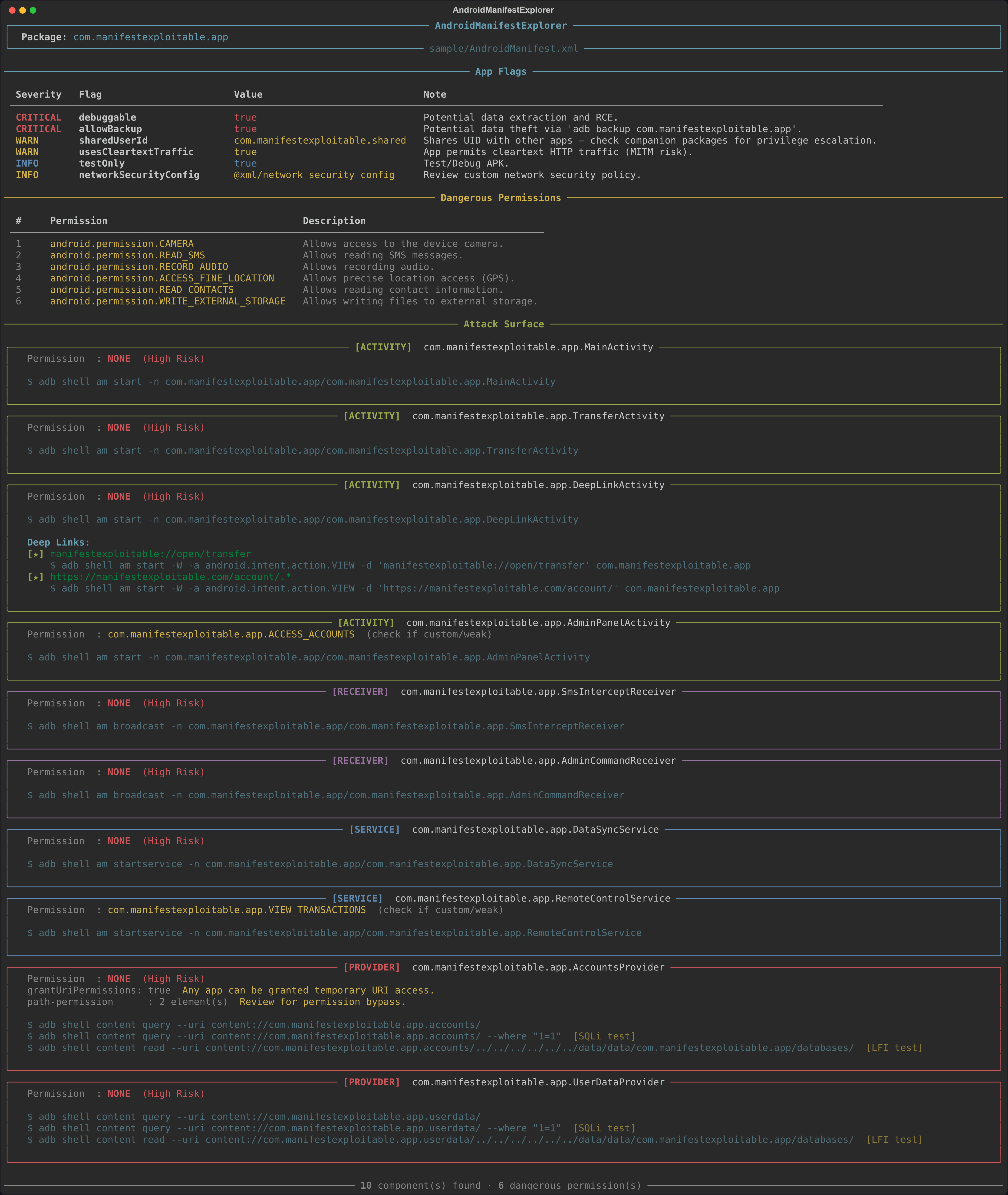
该工具会生成带有颜色高亮的 Rich 终端输出,并组织为以下几个部分:
### **应用标志**
一个按严重程度排序的表格,报告危险的应用级属性:
| 严重程度 | 标志 |
|----------|------|
| CRITICAL | `debuggable="true"` — 启用 ADB 调试、数据提取和 RCE |
| CRITICAL | `allowBackup="true"` — 允许通过 `adb backup` 提取完整数据 |
| WARN | `usesCleartextTraffic="true"` — 允许未加密的 HTTP 流量(存在 MITM 风险) |
| WARN | `sharedUserId` — 应用与其他 package 共享 Linux UID(存在权限提升风险) |
| INFO | `networkSecurityConfig` — 定义了自定义的网络安全策略,建议审查 |
| INFO | `testOnly="true"` — 测试或调试 APK |
### **危险权限**
将所有 `` 声明与 40 多种已知的 Android 危险权限(涵盖位置、相机、麦克风、联系人、短信、存储、手机状态、生物识别、蓝牙等)进行匹配,并为每个匹配项显示风险描述。
### **攻击面**
每个导出或隐式导出的组件对应一个面板,按类型进行颜色标记:
* 🟢 **Activities** (`am start -n`) — 显示保护权限、intent-filter 的 action/category/MIME type、带有可直接运行的 ADB 命令的 deep link,以及仅带有 MIME-type 的 intent(例如 `ACTION_SEND image/*`)。
* 🔵 **Services** (`am startservice -n`) — 显示保护权限和触发命令。
* 🟣 **Receivers** (`am broadcast -n`) — 显示保护权限和触发命令。
* 🔴 **Providers** (`content query --uri`) — 显示保护权限并为每个 authority 生成三个 payload:
- 普通查询:`adb shell content query --uri content:///`
- SQLi 测试:相同命令加上 `--where "1=1"`
- LFI 测试:`adb shell content read --uri content:///../../../../../../data/data//databases/`
- 如果设置了 `grantUriPermissions="true"` 或存在 `` 元素,则发出警告。
### **JSON 输出 Schema**
当提供 `-o` 参数时,发现的结果将保存为结构化的 JSON:
```
{
"package": "com.manifestexploitable.app",
"app_flags": {
"sharedUserId": "com.manifestexploitable.shared",
"debuggable": "true",
"allowBackup": "true",
"testOnly": "true",
"usesCleartextTraffic": "true",
"networkSecurityConfig": "@xml/network_security_config"
},
"dangerous_permissions": [
"android.permission.CAMERA",
"android.permission.READ_SMS",
"android.permission.RECORD_AUDIO",
"android.permission.ACCESS_FINE_LOCATION",
"android.permission.READ_CONTACTS",
"android.permission.WRITE_EXTERNAL_STORAGE"
],
"attack_surface": [
{
"type": "activity",
"name": "com.manifestexploitable.app.MainActivity",
"permission": null,
"intent_filters": [
{
"actions": [
"android.intent.action.MAIN"
],
"categories": [
"android.intent.category.LAUNCHER"
]
}
],
"adb_command": "adb shell am start -n com.manifestexploitable.app/com.manifestexploitable.app.MainActivity"
},
{
"type": "activity",
"name": "com.manifestexploitable.app.TransferActivity",
"permission": null,
"intent_filters": [],
"adb_command": "adb shell am start -n com.manifestexploitable.app/com.manifestexploitable.app.TransferActivity"
},
{
"type": "activity",
"name": "com.manifestexploitable.app.DeepLinkActivity",
"permission": null,
"intent_filters": [
{
"actions": [
"android.intent.action.VIEW"
],
"categories": [
"android.intent.category.DEFAULT",
"android.intent.category.BROWSABLE"
]
},
{
"actions": [
"android.intent.action.VIEW"
],
"categories": [
"android.intent.category.DEFAULT",
"android.intent.category.BROWSABLE"
]
}
],
"adb_command": "adb shell am start -n com.manifestexploitable.app/com.manifestexploitable.app.DeepLinkActivity",
"deep_links": [
{
"uri": "manifestexploitable://open/transfer",
"action": "android.intent.action.VIEW",
"attack_command": "adb shell am start -W -a android.intent.action.VIEW -d 'manifestexploitable://open/transfer' com.manifestexploitable.app"
},
{
"uri": "https://manifestexploitable.com/account/.*",
"action": "android.intent.action.VIEW",
"attack_command": "adb shell am start -W -a android.intent.action.VIEW -d 'https://manifestexploitable.com/account/' com.manifestexploitable.app"
}
]
},
{
"type": "activity",
"name": "com.manifestexploitable.app.AdminPanelActivity",
"permission": "com.manifestexploitable.app.ACCESS_ACCOUNTS",
"intent_filters": [],
"adb_command": "adb shell am start -n com.manifestexploitable.app/com.manifestexploitable.app.AdminPanelActivity"
},
{
"type": "receiver",
"name": "com.manifestexploitable.app.SmsInterceptReceiver",
"permission": null,
"intent_filters": [
{
"actions": [
"android.provider.Telephony.SMS_RECEIVED"
]
}
],
"adb_command": "adb shell am broadcast -n com.manifestexploitable.app/com.manifestexploitable.app.SmsInterceptReceiver"
},
{
"type": "receiver",
"name": "com.manifestexploitable.app.AdminCommandReceiver",
"permission": null,
"intent_filters": [],
"adb_command": "adb shell am broadcast -n com.manifestexploitable.app/com.manifestexploitable.app.AdminCommandReceiver"
},
{
"type": "service",
"name": "com.manifestexploitable.app.DataSyncService",
"permission": null,
"intent_filters": [
{
"actions": [
"com.manifestexploitable.app.action.SYNC"
]
}
],
"adb_command": "adb shell am startservice -n com.manifestexploitable.app/com.manifestexploitable.app.DataSyncService"
},
{
"type": "service",
"name": "com.manifestexploitable.app.RemoteControlService",
"permission": "com.manifestexploitable.app.VIEW_TRANSACTIONS",
"intent_filters": [],
"adb_command": "adb shell am startservice -n com.manifestexploitable.app/com.manifestexploitable.app.RemoteControlService"
},
{
"type": "provider",
"name": "com.manifestexploitable.app.AccountsProvider",
"permission": null,
"grantUriPermissions": "true",
"adb_command": "adb shell content query --uri content://com.manifestexploitable.app.accounts/",
"sqli_test": "adb shell content query --uri content://com.manifestexploitable.app.accounts/ --where \"1=1\"",
"lfi_test": "adb shell content read --uri content://com.manifestexploitable.app.accounts/../../../../../../data/data/com.manifestexploitable.app/databases/",
"path_permissions": [
{
"path": "/transactions",
"readPermission": "com.manifestexploitable.app.VIEW_TRANSACTIONS",
"writePermission": null
},
{
"path": "/admin",
"readPermission": "com.manifestexploitable.app.ACCESS_ACCOUNTS",
"writePermission": "com.manifestexploitable.app.ACCESS_ACCOUNTS"
}
]
},
{
"type": "provider",
"name": "com.manifestexploitable.app.UserDataProvider",
"permission": null,
"grantUriPermissions": null,
"adb_command": "adb shell content query --uri content://com.manifestexploitable.app.userdata/",
"sqli_test": "adb shell content query --uri content://com.manifestexploitable.app.userdata/ --where \"1=1\"",
"lfi_test": "adb shell content read --uri content://com.manifestexploitable.app.userdata/../../../../../../data/data/com.manifestexploitable.app/databases/"
}
]
}
```
### **预览**
## **⚖️ 免责声明**
本工具仅供专业安全研究和授权的渗透测试使用。未经事先书面许可,严禁对系统进行未经授权的使用,这可能违反当地和国际法律。开发者对因滥用此工具或由此造成的损害不承担任何责任。
标签:Android安全, 云安全监控, 攻击面挖掘, 漏洞审计, 目录枚举, 移动安全, 逆向工具, 静态分析