AppliedIR/Valhuntir
GitHub: AppliedIR/Valhuntir
一款 AI 增强的数字取证与事件响应平台,通过 MCP 协议整合大语言模型与取证工具链,在严格的人机协同审批流程下辅助安全团队完成从证据采集到报告生成的全流程调查工作。
Stars: 78 | Forks: 16

# Valhuntir
[](https://github.com/AppliedIR/Valhuntir/actions/workflows/ci.yml)
[](https://appliedir.github.io/Valhuntir/)
[](https://github.com/AppliedIR/Valhuntir/blob/main/LICENSE)
Valhuntir 取证调查平台,根据您的部署需求提供不同级别的人机协同审查和控制。CLI 和架构参考。
**[平台文档](https://appliedir.github.io/Valhuntir/)** ·
[CLI 参考](https://appliedir.github.io/Valhuntir/cli-reference/)
## Valhuntir Lite — 几分钟内即可开始使用
在最简单的形式下,Valhuntir Lite 为 Claude Code 提供了取证知识以及有关如何执行取证规则、呈现发现供人类审查以及审计所执行操作的说明。MCP 服务器通过提供权威信息(一个取证知识 RAG 和一个 Windows 分诊数据库)以及可选的 OpenCTI 威胁情报和 REMnux 恶意软件分析来提高准确性。
**快速 (Quick)** — 取证规范、MCP 包和配置。无数据库(小于 70 MB):
```
git clone https://github.com/AppliedIR/sift-mcp.git
cd sift-mcp
./quickstart-lite.sh --quick
```
**推荐 (Recommended)** — 添加 RAG 知识库(来自 23 个安全来源的 22,000 多条记录)和 Windows 分诊数据库(260 万条基线记录)。需要约 14 GB 磁盘空间:
- ~7 GB — RAG 嵌入模型所需的 ML 依赖项
- ~6 GB — Windows 分诊基线数据库(解压后 260 万行)
- ~1 GB — RAG 索引、源代码及其他所有内容
```
git clone https://github.com/AppliedIR/sift-mcp.git
cd sift-mcp
./quickstart-lite.sh
```
此一次性设置大约需要 15-30 分钟,具体取决于
互联网速度和 CPU。后续运行会重用现有的数据库和索引。
```
claude
/welcome
```
要更新现有的 Valhuntir Lite 安装,请从更新后的克隆中重新运行安装程序(第一步将进入您在初始安装时安装 sift-mcp 存储库的目录):
```
cd sift-mcp
git pull
./quickstart-lite.sh
```
安装程序是幂等的 —— 它重用现有的 venv,如果数据库
和 RAG 索引已存在则跳过,并重新部署配置文件。
#### Valhuntir Lite
```
graph LR
subgraph analyst ["Analyst Machine"]
CC["Claude Code
(human interface)"] FR["forensic-rag-mcp
Knowledge search"] WTR["windows-triage-mcp
Baseline validation"] CC -->|stdio| FR CC -->|stdio| WTR end ``` #### 带可选附加组件的 Valhuntir Lite ``` graph LR subgraph analyst ["Analyst Machine"] CC["Claude Code
(human interface)"] FR["forensic-rag-mcp
Knowledge search"] WTR["windows-triage-mcp
Baseline validation"] OC["opencti-mcp
Threat intelligence"] CC -->|stdio| FR CC -->|stdio| WTR CC -->|stdio| OC end subgraph octi ["OpenCTI Instance"] OCTI[OpenCTI] end subgraph remnux ["REMnux Workstation"] RAPI["remnux-mcp API
:3000"] RMX["remnux-mcp
Malware analysis"] RAPI --> RMX end subgraph internet ["Internet"] ML["MS Learn MCP
(HTTPS)"] ZE["Zeltser IR Writing MCP
(HTTPS)"] end CC -->|"streamable-http"| RAPI CC -->|"HTTPS"| ML CC -->|"HTTPS"| ZE OC -->|"HTTP(S)"| OCTI ``` | 连接 | 协议 | 备注 | |-----------|----------|-------| | Claude Code → forensic-rag-mcp | stdio | 本地 Python 进程,始终存在 | | Claude Code → windows-triage-mcp | stdio | 本地 Python 进程,始终存在 | | Claude Code → opencti-mcp | stdio | 本地 Python 进程,通过 HTTP(S) 连接到 OpenCTI | | opencti-mcp → OpenCTI 实例 | HTTP(S) | opencti-mcp 在本地运行,向 OpenCTI 服务器发起调用 | | Claude Code → remnux-mcp | streamable-http | 远程,位于其专用的 REMnux 工作站上 | | Claude Code → MS Learn MCP | HTTPS | `https://learn.microsoft.com/api/mcp` — .mcp.json 中的 streamable-http 类型 | | Claude Code → Zeltser IR Writing MCP | HTTPS | `https://website-mcp.zeltser.com/mcp` — .mcp.json 中的 streamable-http 类型 | 无网关,无沙箱,无拒绝规则。Claude 通过 Bash 直接运行取证工具。取证规范通过提示挂钩和参考文档得到建议和强化,但 Claude Code 可以选择忽略它们。有关详细信息和可选附加组件,请参阅 [sift-mcp README](https://github.com/AppliedIR/sift-mcp#valhuntir-lite--get-started-in-minutes)。 ## 完整版 Valhuntir — 结构化执行 对于需要更明确的人机协同审批的用例,完整的 Valhuntir 套件可通过加密签名、密码门控审批和多层控制来确保问责制并强制执行对发现结果的人工审查。 完整版 Valhuntir 与 **LLM 客户端无关** —— 通过网关连接任何兼容 MCP 的客户端。支持的客户端包括 Claude Code、Claude Desktop、LibreChat、Cherry Studio,以及任何支持带有 Bearer token 身份验证的 Streamable HTTP 传输的纯 MCP 客户端。取证规范在结构和 MCP 层面通过网关提供,而不是通过特定于客户端的提示工程,因此无论使用哪种 AI 模型或客户端主导调查,都能应用相同的严谨性。 ## 平台架构 检查员通过三个界面与 Valhuntir 交互:**LLM 客户端**(AI 辅助调查)、**检查员门户**(基于浏览器的审查和批准)和 **vhir CLI**(案例管理、证据处理和验证)。 ### 部署概述 典型的部署在单个主机上运行三个 VM:SIFT(主要工作站)、REMnux(恶意软件分析)和 Windows(取证工具执行)。检查员在 SIFT VM 上工作 —— 运行 LLM 客户端、在浏览器中运行检查员门户以及 vhir CLI。REMnux 和 Windows 是无头 worker 虚拟机。这三者通过 VM 本地网络进行通信。通过 NAT 为外部 MCP 服务提供互联网访问。 ``` graph TB subgraph host ["Host Machine"] subgraph sift ["SIFT VM"] CC["LLM Client
(human interface)"] BR["Browser
(Examiner Portal)"] CLI["vhir CLI"] GW["sift-gateway :4508"] CASE["Case Directory"] CC -->|"streamable-http"| GW BR -->|"HTTP"| GW CLI --> CASE end subgraph remnux ["REMnux VM (optional)"] RAPI["remnux-mcp :3000"] end subgraph winbox ["Windows VM (optional)"] WAPI["wintools-mcp :4624"] end CC -->|"streamable-http"| RAPI GW -->|"HTTPS"| WAPI WAPI -->|"SMB"| CASE end subgraph internet ["Internet"] ML["MS Learn MCP"] ZE["Zeltser IR Writing MCP"] OCTI["OpenCTI (if external)"] end CC -->|"HTTPS"| ML CC -->|"HTTPS"| ZE GW -.->|"HTTP(S)"| OCTI ``` REMnux 和 Windows VM 是可选的。仅 SIFT 就可跨 7 个后端提供 79 个 MCP 工具、检查员门户和完整的案例管理。 ### SIFT 平台组件 sift-gateway 将 7 个 MCP 后端聚合为 stdio 子进程,并位于单个 HTTP 端点之后。每个后端也可单独使用。检查员门户由网关提供服务,用于基于浏览器的审查和批准。 ``` graph LR GW["sift-gateway :4508"] FM["forensic-mcp
26 tools · findings, timeline,
evidence, discipline"] CM["case-mcp
15 tools · case management,
audit queries, backup"] RM["report-mcp
6 tools · report generation,
IOC aggregation"] SM["sift-mcp
6 tools · Linux forensic
tool execution"] RAG["forensic-rag
3 tools · semantic search
23K records"] WT["windows-triage
13 tools · offline baseline
validation"] OC["opencti
10 tools · threat
intelligence"] CD["Examiner Portal
browser review + commit"] FK["forensic-knowledge
shared YAML data"] CASE["Case Directory"] GW -->|stdio| FM GW -->|stdio| CM GW -->|stdio| RM GW -->|stdio| SM GW -->|stdio| RAG GW -->|stdio| WT GW -->|stdio| OC GW --> CD FM --> FK SM --> FK FM --> CASE CM --> CASE RM --> CASE CD --> CASE ``` ### 人机协同工作流 所有发现和时间线事件均由 AI 暂存为 DRAFT。只有人工检查员才能批准或拒绝它们 —— 通过检查员门户(浏览器)或 vhir CLI。这两种途径都会生成相同的 HMAC 签名批准记录。AI 无法批准自己的发现。 ``` sequenceDiagram participant AI as LLM + MCP Tools participant Case as Case Directory participant Human as Examiner
(Portal or CLI) AI->>Case: record_finding() → DRAFT AI->>Case: record_timeline_event() → DRAFT Note over Case: Staged for review Human->>Case: Review, edit, approve/reject Human->>Case: Commit (password + HMAC signing) Note over Case: Only APPROVED items
appear in reports Human->>Case: vhir report --full ``` **检查员门户**是主要的审查界面,包含 8 个选项卡:概览(调查进度和入门指南)、发现(带有来源链显示的核心审查工作流)、时间线(带有颜色编码标尺的按时间顺序排列的事件)、主机(涉及的系统,由发现聚合)、账户(涉及的用户/服务账户)、证据(带有 SHA-256 完整性验证的已注册文件)、IOC(从发现中提取的带有类别/状态过滤器的指标)和 TODOs(未完成的任务)。 检查员审查发现和时间线事件,编辑字段(置信度、理由、观察、解释、MITRE ID、IOC、标签),批准或拒绝项目,并提交决定 —— 所有这些都在浏览器中进行。每个发现都显示其证据工件以及来源链,表明哪些已注册的证据文件是输入,哪些工具处理了它们,以及提取了什么输出。键盘快捷键(`1`-`8` 切换选项卡,`j`/`k` 导航,`a` 批准,`r` 拒绝,`e` 编辑,`Shift+C` 提交)可实现快速审查。侧边栏可调整大小,搜索可匹配标题、观察、主机和账户字段。支持浅色和深色主题。 提交按钮(`Shift+C`)使用质询-响应身份验证:浏览器从检查员的密码派生出 PBKDF2 密钥,并通过 HMAC 证明其知识 —— 密码永远不会离开浏览器。从发现自动创建的时间线事件遵循该发现的批准状态,除非手动编辑。从发现中自动提取的 IOC 在所有源发现达到相同状态时级联。CLI 的 `vhir approve` 从终端提供相同的功能。使用 `vhir portal` 打开门户。 检查员在检查员门户中审查发现 —— 验证工件、观察和解释,并具有从原始证据到最终结果的完整命令审计跟踪。 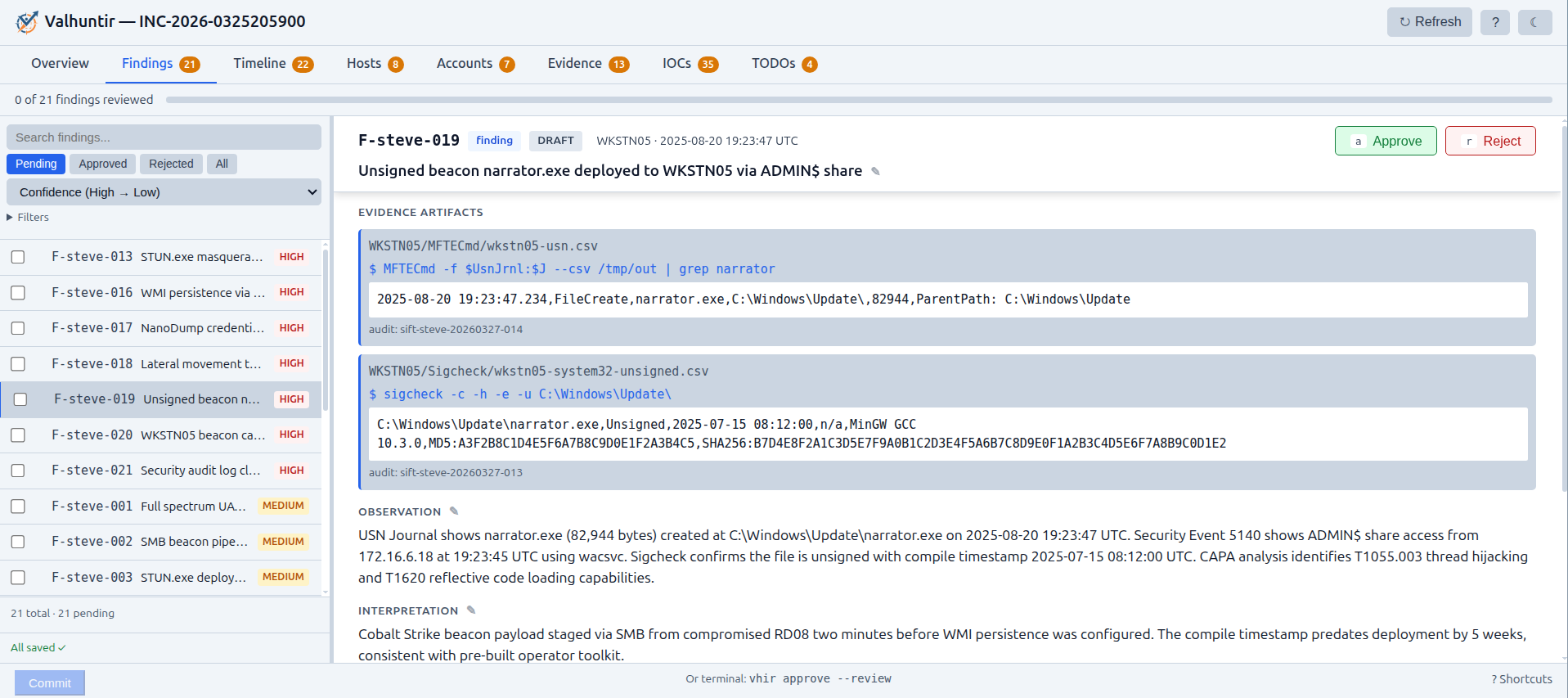 时间线视图将发现和其他可观察对象置于整个调查的时间上下文中。 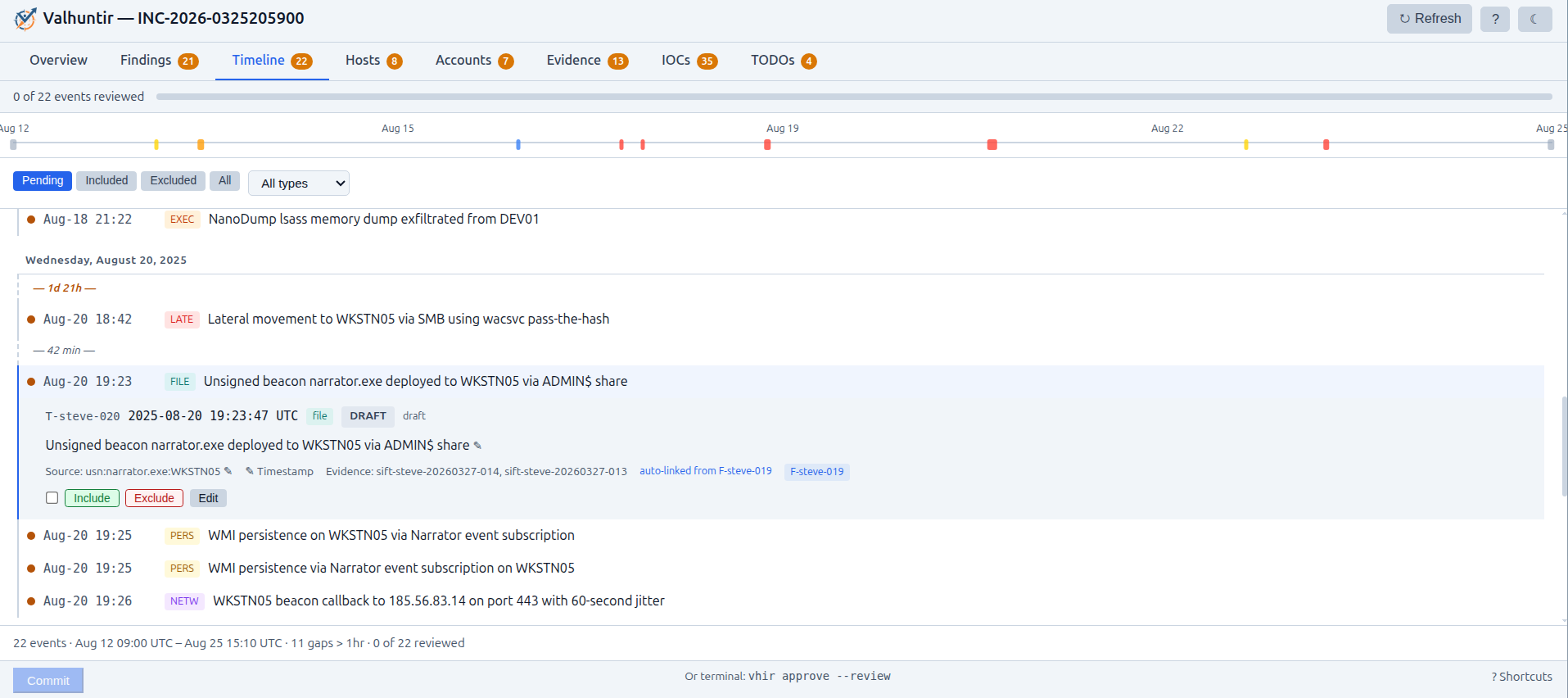 ### 运行位置 | 组件 | 运行于 | 端口 | 用途 | |-----------|---------|------|---------| | sift-gateway | SIFT | 4508 | 将 SIFT 本地的 MCP 聚合到一个 HTTP 端点之后 | | forensic-mcp | SIFT | (通过网关) | 发现、时间线、证据、TODOs、IOC、规范(26 个工具) | | case-mcp | SIFT | (通过网关) | 案例管理、审计查询、证据注册、备份(15 个工具) | | report-mcp | SIFT | (通过网关) | 带有配置文件的报告生成、IOC 聚合、MITRE 映射(6 个工具) | | sift-mcp | SIFT | (通过网关) | 受拒绝列表保护的 Linux/SIFT 取证工具执行(6 个工具) | | forensic-rag-mcp | SIFT | (通过网关) | 跨 Sigma、MITRE ATT&CK、Atomic Red Team 等的语义搜索 | | windows-triage-mcp | SIFT | (通过网关) | 离线 Windows 基线验证 | | opencti-mcp | SIFT | (通过网关) | 来自 OpenCTI 的威胁情报(10 个工具) | | 检查员门户 | SIFT | (通过网关) | 8 选项卡浏览器 UI:概览、带有来源链的发现、带有标尺的时间线、主机、账户、证据验证、IOC、TODOs。主要审查 UI。 | | wintools-mcp | Windows | 4624 | 在 Windows 上进行目录门控的取证工具执行(7 个工具) | | vhir CLI | SIFT | -- | 仅限人工:案例初始化、证据管理、验证、执行。也可通过检查员门户进行批准。远程检查员仅需 SSH 即可执行 CLI 专属操作。 | | forensic-knowledge | 任意位置 | -- | 共享的 YAML 数据包(工具、工件、规范) | 网关将每个后端公开为单独的 MCP 端点。客户端可以连接到聚合端点或单独的后端: ``` http://localhost:4508/mcp # Aggregate (all tools) http://localhost:4508/mcp/forensic-mcp http://localhost:4508/mcp/case-mcp http://localhost:4508/mcp/report-mcp http://localhost:4508/mcp/sift-mcp http://localhost:4508/mcp/windows-triage-mcp http://localhost:4508/mcp/forensic-rag-mcp http://localhost:4508/mcp/opencti-mcp ``` #### 多检查员团队 ``` graph LR subgraph e1 ["Examiner 1 — SIFT Workstation"] CC1["LLM Client
(human interface)"] BR1["Browser
(human interface)"] CLI1["vhir CLI"] GW1["sift-gateway
:4508"] MCPs1["forensic-mcp · case-mcp · report-mcp
sift-mcp · forensic-rag-mcp
windows-triage-mcp · opencti-mcp"] CASE1["Case Directory"] CC1 -->|"streamable-http"| GW1 BR1 -->|"HTTPS"| GW1 GW1 -->|stdio| MCPs1 MCPs1 --> CASE1 CLI1 --> CASE1 end subgraph e2 ["Examiner 2 — SIFT Workstation"] CC2["LLM Client
(human interface)"] BR2["Browser
(human interface)"] CLI2["vhir CLI"] GW2["sift-gateway
:4508"] MCPs2["forensic-mcp · case-mcp · report-mcp
sift-mcp · forensic-rag-mcp
windows-triage-mcp · opencti-mcp"] CASE2["Case Directory"] CC2 -->|"streamable-http"| GW2 BR2 -->|"HTTPS"| GW2 GW2 -->|stdio| MCPs2 MCPs2 --> CASE2 CLI2 --> CASE2 end CASE1 <-->|"export / merge"| CASE2 ``` ### 案例目录结构 ``` cases/INC-2026-0219/ ├── CASE.yaml # Case metadata (name, status, examiner) ├── evidence/ # Original evidence (read-only after registration) ├── extractions/ # Extracted artifacts ├── reports/ # Generated reports ├── findings.json # F-alice-001, F-alice-002, ... ├── timeline.json # T-alice-001, ... ├── todos.json # TODO-alice-001, ... ├── iocs.json # IOC-alice-001, ... (auto-extracted from findings) ├── evidence.json # Evidence registry ├── actions.jsonl # Investigative actions (append-only) ├── evidence_access.jsonl # Chain-of-custody log ├── approvals.jsonl # Approval audit trail ├── pending-reviews.json # Portal edits awaiting approval └── audit/ ├── forensic-mcp.jsonl ├── sift-mcp.jsonl ├── claude-code.jsonl # PostToolUse hook captures (Claude Code only) └── ... ``` ### 外部依赖项 - **Zeltser IR Writing MCP** — 报告生成所必需。由 `vhir setup client` 自动配置。URL:https://website-mcp.zeltser.com/mcp (HTTPS,无身份验证) ## 快速开始 ### SIFT 工作站 需要 Python 3.10+ 和 sudo 权限。安装程序会处理一切:MCP 服务器、网关、vhir CLI、HMAC 验证账本、检查员身份和 LLM 客户端配置。当您选择 Claude Code 时,将部署额外的取证控制(内核级沙箱、案例数据拒绝规则、PreToolUse 保护挂钩、PostToolUse 审计挂钩、来源执行、带 HMAC 签名的密码门控人工批准)。其他客户端仅获取 MCP 配置。 **快速** — 仅核心平台,无数据库(约 70 MB): ``` curl -fsSL https://raw.githubusercontent.com/AppliedIR/sift-mcp/main/quickstart.sh -o /tmp/vhir-quickstart.sh && bash /tmp/vhir-quickstart.sh ``` **推荐** — 添加 RAG 知识库(来自 23 个安全来源的 22,000 多条记录)和 Windows 分诊数据库(260 万条基线记录),作为预构建快照下载。需要约 14 GB 磁盘空间: - ~7 GB — RAG 嵌入模型所需的 ML 依赖项 - ~6 GB — Windows 分诊基线数据库(解压后 260 万行) - ~1 GB — RAG 索引、源代码及其他所有内容 ``` curl -fsSL https://raw.githubusercontent.com/AppliedIR/sift-mcp/main/quickstart.sh -o /tmp/vhir-quickstart.sh && bash /tmp/vhir-quickstart.sh --recommended ``` **自定义** — 单独选择包、OpenCTI 集成或带 TLS 的远程访问: ``` git clone https://github.com/AppliedIR/sift-mcp.git cd sift-mcp ./setup-sift.sh ``` ### Windows 取证工作站(可选) ``` # 选项 1: git clone git clone https://github.com/AppliedIR/wintools-mcp.git; cd wintools-mcp # 选项 2: 下载 ZIP (无需 git) Invoke-WebRequest https://github.com/AppliedIR/wintools-mcp/archive/refs/heads/main.zip -OutFile wintools.zip Expand-Archive wintools.zip -DestinationPath .; cd wintools-mcp-main ``` 然后运行安装程序: ``` .\scripts\setup-windows.ps1 ``` ## 安全注意事项 假定所有 Valhuntir 组件都运行在专用取证网络上,受防火墙保护,且不暴露于来自互联网或潜在敌对系统的传入连接。该设计假定全程使用专用的、隔离的系统。 加载到系统或其组件 VM、计算机或实例中的任何数据都面临暴露于底层 AI 的风险。请仅将您愿意发送给 AI 提供商的数据放置在这些系统上。 报告生成 需要传出的互联网连接,并可选地用于威胁情报 和文档。不应允许来自外部系统的传入连接。 Valhuntir 旨在使 AI 交互通过 MCP 工具进行,从而实现安全控制和审计跟踪。具有直接 shell 访问权限的客户端(如 Claude Code)也可以在 MCP 之外运行,但 `vhir setup client` 为 Claude Code 部署了取证控制:内核级沙箱限制 Bash 写入,拒绝规则阻止对案例数据文件的 Edit/Write,PreToolUse 挂钩防止 Bash 重定向到受保护的文件,PostToolUse 挂钩将每个 Bash 命令捕获到审计跟踪中,来源执行确保发现可追溯到证据,以及 HMAC 验证账本提供经批准的发现未被篡改的加密证明。Valhuntir 并非旨在抵御恶意 AI 或约束您部署的 AI 客户端。 ## 命令大多数 `vhir` CLI 操作通过 case-mcp、forensic-mcp 和 report-mcp 具有等效的 MCP。在使用连接 MCP 的客户端时,您可以要求 AI 处理案例管理、证据注册、报告生成等 —— AI 通过经过审计的 MCP 工具而非直接 CLI 调用来运行。 以下需要在终端 (`/dev/tty`) 进行人工交互的命令**不能**委托给 AI。这些是有意设计的人机协同检查点 —— 它们使用密码输入、交互式审查或终端确认,以确保人工检查员保留对批准、拒绝和安全敏感操作的控制权。 ### 仅限人工的命令(需要终端) 这些命令直接从 `/dev/tty` 读取,无法由 AI 客户端运行,即使通过 Bash 也不行。这是设计使然 —— 它们是人机协同控制,确保检查员审查并批准所有发现。 #### approve (批准) ``` vhir approve # Interactive review of all DRAFT items vhir approve F-alice-001 F-alice-002 T-alice-001 # Approve specific IDs vhir approve F-alice-001 --edit # Edit in $EDITOR before approving vhir approve F-alice-001 --note "Malware family unconfirmed" # Approve with examiner note vhir approve --by jane # Filter to IDs with jane's examiner prefix vhir approve --findings-only # Skip timeline events vhir approve --timeline-only # Skip findings vhir approve --review # Apply pending portal edits ``` 需要通过 `/dev/tty` 输入密码。已批准的发现使用 PBKDF2 派生密钥进行 HMAC 签名。`--review` 标志应用在检查员门户中进行的编辑(存储在 `pending-reviews.json` 中),重新计算内容哈希和 HMAC 签名,然后删除待处理文件。或者,使用门户的提交按钮 (Shift+C),它通过质询-响应身份验证执行相同的操作 —— 密码永远不会离开浏览器。 #### reject (拒绝) ``` vhir reject F-alice-003 --reason "Insufficient evidence for attribution" vhir reject F-alice-003 T-alice-002 --reason "Contradicted by memory analysis" ``` 需要通过 `/dev/tty` 确认密码。 #### exec (执行) ``` vhir exec --purpose "Extract MFT from image" -- fls -r -m / image.E01 ``` 需要 `/dev/tty` 确认。记录到 `audit/cli-exec.jsonl`。当不通过 MCP 操作时,使用此命令进行带有审计跟踪的手动工具执行。 #### backup (备份) ``` vhir backup /path/to/destination # Back up case data (interactive) vhir backup /path/to/destination --all # Include evidence + extractions vhir backup /path/to/destination --include-evidence # Include evidence files vhir backup /path/to/destination --include-extractions # Include extraction files vhir backup --verify /path/to/backup/ # Verify backup integrity ``` 创建带有 SHA-256 清单的时间戳备份。验证会根据清单检查每个文件的哈希值。`--all` 标志包含证据和提取文件(可能很大)。不带标志时,交互模式会按类别提示并提供大小估计。 #### evidence unlock (证据解锁) ``` vhir unlock-evidence # Directory chmod 755, files remain 444 vhir evidence unlock ``` 需要 `/dev/tty` 确认。解锁证据允许对证据目录进行写入。 #### 密码管理 ``` vhir config --setup-password # Set approval password (PBKDF2-hashed, min 8 chars) vhir config --reset-password # Reset password (requires current, re-signs ledger) ``` 密码输入使用通过 termios 的 `/dev/tty` 掩码输入。无回显,无标准输入 —— AI 无法读取或提供密码。 #### HMAC 验证 ``` vhir review --findings --verify # Cross-check content hashes + HMAC verification vhir review --findings --verify --mine # HMAC verification for current examiner only ``` 验证需要检查员的密码来派生 HMAC 密钥并确认完整性。 ### 所有命令 当使用连接 MCP 的客户端时,其余命令也可通过 MCP 工具 (case-mcp、forensic-mcp、report-mcp) 执行。此处列出等效的 CLI 供参考,并在 MCP 会话之外使用。 #### portal (门户) ``` vhir portal # Open the Examiner Portal in your browser ``` 打开活动案例的检查员门户。该门户是主要的审查界面 —— 检查员可以完全在浏览器中审查、编辑、批准、拒绝和提交发现。使用提交按钮 (Shift+C) 通过质询-响应身份验证应用决定。或者,`vhir approve --review` 从 CLI 应用待处理的编辑。 #### case (案例) ``` vhir case init "Ransomware Investigation" # Create a new case vhir case close INC-2026-02191200 # Close a case by ID vhir case activate INC-2026-02191200 # Set active case vhir case migrate # Migrate to flat layout (see below) ``` #### review (审查) ``` vhir review # Case summary (counts by status) vhir review --findings # Findings table vhir review --findings --detail # Full finding detail vhir review --iocs # IOCs grouped by approval status vhir review --timeline # Timeline events vhir review --timeline --status APPROVED # Filter timeline by status vhir review --timeline --start 2026-01-01 --end 2026-01-31 # Filter by date range vhir review --timeline --type execution # Filter by event type vhir review --evidence # Evidence registry and access log vhir review --audit --limit 100 # Audit trail (last N entries) vhir review --todos --open # Open TODOs ``` #### todo (待办事项) ``` vhir todo # List open TODOs vhir todo --all # Include completed vhir todo add "Run volatility on server-04" --assignee jane --priority high --finding F-alice-003 vhir todo complete TODO-alice-001 vhir todo update TODO-alice-002 --note "Waiting on third party" --priority low ``` #### evidence (证据) ``` vhir register-evidence /path/to/image.E01 --description "Disk image from workstation" vhir lock-evidence # All files chmod 444, directory chmod 555 vhir evidence register /path/to/image.E01 --description "Disk image" vhir evidence list vhir evidence verify vhir evidence log [--path]
vhir evidence lock
```
#### export / merge (导出 / 合并)
```
vhir export --file steve-findings.json # Export findings for sharing
vhir merge --file jane-findings.json # Merge another examiner's findings
```
#### report (报告)
```
vhir report --full [--save ]
vhir report --executive-summary [--save ]
vhir report --timeline [--from --to ] [--save ]
vhir report --ioc [--save ]
vhir report --findings F-alice-001,F-alice-002 [--save ]
vhir report --status-brief [--save ]
```
#### audit (审计)
```
vhir audit log [--limit 100] [--mcp sift-mcp] [--tool run_command]
vhir audit summary
```
#### service (服务)
```
vhir service status # Show running backends + health
vhir service start forensic-rag # Start a backend
vhir service stop windows-triage # Stop a backend
vhir service restart sift-mcp # Restart a backend
```
#### case migrate (案例迁移)
```
vhir case migrate # Migrate primary examiner data to flat layout
vhir case migrate --examiner alice # Specify examiner
vhir case migrate --import-all # Merge all examiners' data
```
#### config (配置)
```
vhir config --examiner "jane-doe" # Set examiner identity
vhir config --show # Show current configuration
```
#### update (更新)
```
vhir update # Pull latest, reinstall, redeploy, restart
vhir update --check # Check for updates without applying
vhir update --no-restart # Skip gateway restart after update
```
#### join (加入)
使用一次性加入代码交换网关凭据。在远程机器(分析师笔记本电脑或 Windows 取证工作站)上运行。加入代码通过 SIFT 上的 `vhir setup join-code` 生成。凭据以受限权限 (0600) 保存到 `~/.vhir/config.yaml`。
#### setup (设置)
```
vhir join --sift SIFT_URL --code CODE # Join from remote machine using join code
vhir join --sift SIFT_URL --code CODE --wintools # Join as wintools machine (registers backend)
```
#### setup client (设置客户端)
为您的 LLM 客户端生成 Streamable HTTP 配置:
```
vhir setup client # Interactive client configuration (recommended)
vhir setup test # Test MCP server connectivity
```
对于远程编排器设置(路径 2),远程检查员运行特定于平台的安装脚本,该脚本会创建一个包含 MCP 配置、取证控制和规范文档的 `~/vhir/` 工作区:
```
vhir setup client # Interactive wizard
vhir setup client --client=claude-code --sift=http://127.0.0.1:4508 -y # Local solo
vhir setup client --sift=SIFT_IP:4508 --windows=WIN_IP:4624 # SIFT + Windows
```
```
# Linux
curl -sSL https://raw.githubusercontent.com/AppliedIR/Valhuntir/main/setup-client-linux.sh \
| bash -s -- --sift=https://SIFT_IP:4508 --code=XXXX-XXXX
# macOS
curl -sSL https://raw.githubusercontent.com/AppliedIR/Valhuntir/main/setup-client-macos.sh \
| bash -s -- --sift=https://SIFT_IP:4508 --code=XXXX-XXXX
```
始终从 `~/vhir/` 或其子目录启动您的 LLM 客户端。取证控制仅在工作区内启动时适用。要卸载,请使用 `--uninstall` (Linux/macOS) 或 `-Uninstall` (Windows) 重新运行安装脚本。
Claude Desktop 的配置文件仅支持 stdio 传输。使用 [mcp-remote](https://www.npmjs.com/package/mcp-remote) 桥接器连接到网关。`vhir setup client --client=claude-desktop` 会自动生成正确的 mcp-remote 配置。
| 客户端 | 平台 | 配置文件 | 附加项 |
|--------|-----------|-------------|--------|
| Claude Code | Linux, macOS, Windows | `~/vhir/.mcp.json` 或 `~/.claude.json` (SIFT) | `CLAUDE.md`、`settings.json`、沙箱、审计挂钩 |
| Claude Desktop | macOS, Windows | `claude_desktop_config.json` (见说明) | 需要 mcp-remote 桥接器。来自 AGENTS.md 的项目说明 |
| Cherry Studio | Linux, macOS, Windows | JSON 导入(手动) | `baseUrl` 字段、`streamableHttp` 类型 |
| LibreChat | 任意 (浏览器) | `librechat.yaml` (`mcpServers` 部分) | Valhuntir 生成 `librechat_mcp.yaml` 参考以供合并 |
| 其他 | 任意 | `vhir-mcp-config.json` | 手动集成 |
Windows 上的 Claude Code 需要 Git for Windows(提供 Git Bash)或 WSL。Claude Desktop 在 Linux 上不可用。Claude Desktop 的配置文件仅支持 stdio 传输 —— `vhir setup client` 向导会自动生成 mcp-remote 桥接器配置。配置路径因平台而异:macOS 上为 `~/Library/Application Support/Claude/claude_desktop_config.json`,Windows 上为 `%APPDATA%\Claude\claude_desktop_config.json`。任何支持带有 Bearer token 身份验证头的 Streamable HTTP 传输的 MCP 客户端都可以工作 —— 该网关不特定于某个客户端。
## 检查员身份
每次批准、拒绝和命令执行都会记录检查员身份。解析顺序:
| 优先级 | 来源 | 示例 |
|----------|--------|---------|
| 1 | `--examiner` 标志 | `vhir approve --examiner jane-doe F-jane-001` |
| 2 | `VHIR_EXAMINER` 环境变量 | `export VHIR_EXAMINER=jane-doe` |
| 3 | `~/.vhir/config.yaml` | `examiner: jane-doe` |
| 4 | `VHIR_ANALYST` 环境变量 | 已弃用的回退机制 |
| 5 | 操作系统用户名 | 如果未配置则发出警告 |
## 存储库地图
| 存储库 | 用途 |
|------|---------|
| [sift-mcp](https://github.com/AppliedIR/sift-mcp) | 单体仓库:11 个 SIFT 包 (forensic-mcp、case-mcp、report-mcp、sift-mcp、sift-gateway、case-dashboard、forensic-knowledge、forensic-rag、windows-triage、opencti、sift-common) |
| [wintools-mcp](https://github.com/AppliedIR/wintools-mcp) | Windows 取证工具执行(7 个工具,31 个目录条目) |
| [Valhuntir](https://github.com/AppliedIR/Valhuntir) | CLI、架构参考 |
## 更新
### 完整版 Valhuntir
```
# Windows
Invoke-WebRequest -Uri https://raw.githubusercontent.com/AppliedIR/Valhuntir/main/setup-client-windows.ps1 -OutFile setup-client-windows.ps1
.\setup-client-windows.ps1 -Sift https://SIFT_IP:4508 -Code XXXX-XXXX
```
update 命令从两个存储库(sift-mcp 和 vhir)拉取最新代码,
重新安装所有包,重新部署取证控制,重启网关,
并运行连接性冒烟测试。
## 从 Lite 升级到完整版
两种模式共享相同的 Python venv、分诊数据库和 RAG 索引。完整版
Valhuntir 添加了网关(一个 HTTP 端点后的 7 个 MCP 后端)、4 个额外的
MCP 服务器、基于 Web 的审查
门户(检查员门户)、结构化案例管理、沙箱执行
和 HMAC 签名的批准。
要升级,请从现有的 sift-mcp 克隆中运行 `setup-sift.sh`。
安装程序重用现有的 venv 和数据库。Lite 案例数据(markdown
文件)不会自动迁移到完整的案例数据(结构化 JSON) —— 请
重新开始或手动转移发现。
## 证据处理
切勿将原始证据放置在任何 Valhuntir 系统上。仅使用具有经过验证的原始文件或备份的工作副本。Valhuntir 工作站通过连接 AI 的工具处理证据,并且加载到这些系统中的任何数据都可能传输到配置的 AI 提供商。将所有 Valhuntir 系统视为分析环境,而非证据存储。
证据完整性通过在注册时记录的 SHA-256 哈希进行验证。检查员可以选择通过 `vhir evidence lock` 将证据锁定为只读。适当的证据完整性取决于经过验证的哈希、写入阻断器和存在于本平台之外的监管链程序。
案例目录可以驻留在外部或可移动媒体上。首选 ext4 以获得完整的权限支持。NTFS 和 exFAT 可接受,但文件权限控制(只读保护)将静默失效。由于 4 GB 文件大小的限制,不鼓励使用 FAT32。
## 负责任的使用与法律
尽管已采取措施强制执行人机协同控制,但最终每位检查员都有责任确保其发现准确且完整。AI 就像十六进制编辑器一样,是由经过适当培训的事件响应专业人员使用的工具。用户有责任确保其使用符合适用的法律、法规和组织政策。仅在您获得授权分析的系统上和数据上使用。
本软件按“原样”提供,不提供任何形式的保证。有关完整条款,请参阅 [LICENSE](LICENSE)。
MITRE ATT&CK 是 The MITRE Corporation 的注册商标。SIFT Workstation 是 SANS Institute 的产品。
## 致谢
架构和方向由 Steve Anson 提供。实现由 Claude Code (Anthropic) 完成。
## 清晰声明
我从事 DFIR。我不是开发者。如果没有 Claude Code 处理实现,这个项目就不会存在。尽管在设计、测试和审查方面投入了巨大的精力,但我完全承认,在某些地方我可能是在努力工作而不是聪明地工作。我的初衷是开启关于如何利用这项技术提高事件响应效率的讨论,同时确保对准确性的最终责任仍由人工检查员承担。
## 许可证
MIT License - 详见 [LICENSE](LICENSE)
(human interface)"] FR["forensic-rag-mcp
Knowledge search"] WTR["windows-triage-mcp
Baseline validation"] CC -->|stdio| FR CC -->|stdio| WTR end ``` #### 带可选附加组件的 Valhuntir Lite ``` graph LR subgraph analyst ["Analyst Machine"] CC["Claude Code
(human interface)"] FR["forensic-rag-mcp
Knowledge search"] WTR["windows-triage-mcp
Baseline validation"] OC["opencti-mcp
Threat intelligence"] CC -->|stdio| FR CC -->|stdio| WTR CC -->|stdio| OC end subgraph octi ["OpenCTI Instance"] OCTI[OpenCTI] end subgraph remnux ["REMnux Workstation"] RAPI["remnux-mcp API
:3000"] RMX["remnux-mcp
Malware analysis"] RAPI --> RMX end subgraph internet ["Internet"] ML["MS Learn MCP
(HTTPS)"] ZE["Zeltser IR Writing MCP
(HTTPS)"] end CC -->|"streamable-http"| RAPI CC -->|"HTTPS"| ML CC -->|"HTTPS"| ZE OC -->|"HTTP(S)"| OCTI ``` | 连接 | 协议 | 备注 | |-----------|----------|-------| | Claude Code → forensic-rag-mcp | stdio | 本地 Python 进程,始终存在 | | Claude Code → windows-triage-mcp | stdio | 本地 Python 进程,始终存在 | | Claude Code → opencti-mcp | stdio | 本地 Python 进程,通过 HTTP(S) 连接到 OpenCTI | | opencti-mcp → OpenCTI 实例 | HTTP(S) | opencti-mcp 在本地运行,向 OpenCTI 服务器发起调用 | | Claude Code → remnux-mcp | streamable-http | 远程,位于其专用的 REMnux 工作站上 | | Claude Code → MS Learn MCP | HTTPS | `https://learn.microsoft.com/api/mcp` — .mcp.json 中的 streamable-http 类型 | | Claude Code → Zeltser IR Writing MCP | HTTPS | `https://website-mcp.zeltser.com/mcp` — .mcp.json 中的 streamable-http 类型 | 无网关,无沙箱,无拒绝规则。Claude 通过 Bash 直接运行取证工具。取证规范通过提示挂钩和参考文档得到建议和强化,但 Claude Code 可以选择忽略它们。有关详细信息和可选附加组件,请参阅 [sift-mcp README](https://github.com/AppliedIR/sift-mcp#valhuntir-lite--get-started-in-minutes)。 ## 完整版 Valhuntir — 结构化执行 对于需要更明确的人机协同审批的用例,完整的 Valhuntir 套件可通过加密签名、密码门控审批和多层控制来确保问责制并强制执行对发现结果的人工审查。 完整版 Valhuntir 与 **LLM 客户端无关** —— 通过网关连接任何兼容 MCP 的客户端。支持的客户端包括 Claude Code、Claude Desktop、LibreChat、Cherry Studio,以及任何支持带有 Bearer token 身份验证的 Streamable HTTP 传输的纯 MCP 客户端。取证规范在结构和 MCP 层面通过网关提供,而不是通过特定于客户端的提示工程,因此无论使用哪种 AI 模型或客户端主导调查,都能应用相同的严谨性。 ## 平台架构 检查员通过三个界面与 Valhuntir 交互:**LLM 客户端**(AI 辅助调查)、**检查员门户**(基于浏览器的审查和批准)和 **vhir CLI**(案例管理、证据处理和验证)。 ### 部署概述 典型的部署在单个主机上运行三个 VM:SIFT(主要工作站)、REMnux(恶意软件分析)和 Windows(取证工具执行)。检查员在 SIFT VM 上工作 —— 运行 LLM 客户端、在浏览器中运行检查员门户以及 vhir CLI。REMnux 和 Windows 是无头 worker 虚拟机。这三者通过 VM 本地网络进行通信。通过 NAT 为外部 MCP 服务提供互联网访问。 ``` graph TB subgraph host ["Host Machine"] subgraph sift ["SIFT VM"] CC["LLM Client
(human interface)"] BR["Browser
(Examiner Portal)"] CLI["vhir CLI"] GW["sift-gateway :4508"] CASE["Case Directory"] CC -->|"streamable-http"| GW BR -->|"HTTP"| GW CLI --> CASE end subgraph remnux ["REMnux VM (optional)"] RAPI["remnux-mcp :3000"] end subgraph winbox ["Windows VM (optional)"] WAPI["wintools-mcp :4624"] end CC -->|"streamable-http"| RAPI GW -->|"HTTPS"| WAPI WAPI -->|"SMB"| CASE end subgraph internet ["Internet"] ML["MS Learn MCP"] ZE["Zeltser IR Writing MCP"] OCTI["OpenCTI (if external)"] end CC -->|"HTTPS"| ML CC -->|"HTTPS"| ZE GW -.->|"HTTP(S)"| OCTI ``` REMnux 和 Windows VM 是可选的。仅 SIFT 就可跨 7 个后端提供 79 个 MCP 工具、检查员门户和完整的案例管理。 ### SIFT 平台组件 sift-gateway 将 7 个 MCP 后端聚合为 stdio 子进程,并位于单个 HTTP 端点之后。每个后端也可单独使用。检查员门户由网关提供服务,用于基于浏览器的审查和批准。 ``` graph LR GW["sift-gateway :4508"] FM["forensic-mcp
26 tools · findings, timeline,
evidence, discipline"] CM["case-mcp
15 tools · case management,
audit queries, backup"] RM["report-mcp
6 tools · report generation,
IOC aggregation"] SM["sift-mcp
6 tools · Linux forensic
tool execution"] RAG["forensic-rag
3 tools · semantic search
23K records"] WT["windows-triage
13 tools · offline baseline
validation"] OC["opencti
10 tools · threat
intelligence"] CD["Examiner Portal
browser review + commit"] FK["forensic-knowledge
shared YAML data"] CASE["Case Directory"] GW -->|stdio| FM GW -->|stdio| CM GW -->|stdio| RM GW -->|stdio| SM GW -->|stdio| RAG GW -->|stdio| WT GW -->|stdio| OC GW --> CD FM --> FK SM --> FK FM --> CASE CM --> CASE RM --> CASE CD --> CASE ``` ### 人机协同工作流 所有发现和时间线事件均由 AI 暂存为 DRAFT。只有人工检查员才能批准或拒绝它们 —— 通过检查员门户(浏览器)或 vhir CLI。这两种途径都会生成相同的 HMAC 签名批准记录。AI 无法批准自己的发现。 ``` sequenceDiagram participant AI as LLM + MCP Tools participant Case as Case Directory participant Human as Examiner
(Portal or CLI) AI->>Case: record_finding() → DRAFT AI->>Case: record_timeline_event() → DRAFT Note over Case: Staged for review Human->>Case: Review, edit, approve/reject Human->>Case: Commit (password + HMAC signing) Note over Case: Only APPROVED items
appear in reports Human->>Case: vhir report --full ``` **检查员门户**是主要的审查界面,包含 8 个选项卡:概览(调查进度和入门指南)、发现(带有来源链显示的核心审查工作流)、时间线(带有颜色编码标尺的按时间顺序排列的事件)、主机(涉及的系统,由发现聚合)、账户(涉及的用户/服务账户)、证据(带有 SHA-256 完整性验证的已注册文件)、IOC(从发现中提取的带有类别/状态过滤器的指标)和 TODOs(未完成的任务)。 检查员审查发现和时间线事件,编辑字段(置信度、理由、观察、解释、MITRE ID、IOC、标签),批准或拒绝项目,并提交决定 —— 所有这些都在浏览器中进行。每个发现都显示其证据工件以及来源链,表明哪些已注册的证据文件是输入,哪些工具处理了它们,以及提取了什么输出。键盘快捷键(`1`-`8` 切换选项卡,`j`/`k` 导航,`a` 批准,`r` 拒绝,`e` 编辑,`Shift+C` 提交)可实现快速审查。侧边栏可调整大小,搜索可匹配标题、观察、主机和账户字段。支持浅色和深色主题。 提交按钮(`Shift+C`)使用质询-响应身份验证:浏览器从检查员的密码派生出 PBKDF2 密钥,并通过 HMAC 证明其知识 —— 密码永远不会离开浏览器。从发现自动创建的时间线事件遵循该发现的批准状态,除非手动编辑。从发现中自动提取的 IOC 在所有源发现达到相同状态时级联。CLI 的 `vhir approve` 从终端提供相同的功能。使用 `vhir portal` 打开门户。 检查员在检查员门户中审查发现 —— 验证工件、观察和解释,并具有从原始证据到最终结果的完整命令审计跟踪。  时间线视图将发现和其他可观察对象置于整个调查的时间上下文中。  ### 运行位置 | 组件 | 运行于 | 端口 | 用途 | |-----------|---------|------|---------| | sift-gateway | SIFT | 4508 | 将 SIFT 本地的 MCP 聚合到一个 HTTP 端点之后 | | forensic-mcp | SIFT | (通过网关) | 发现、时间线、证据、TODOs、IOC、规范(26 个工具) | | case-mcp | SIFT | (通过网关) | 案例管理、审计查询、证据注册、备份(15 个工具) | | report-mcp | SIFT | (通过网关) | 带有配置文件的报告生成、IOC 聚合、MITRE 映射(6 个工具) | | sift-mcp | SIFT | (通过网关) | 受拒绝列表保护的 Linux/SIFT 取证工具执行(6 个工具) | | forensic-rag-mcp | SIFT | (通过网关) | 跨 Sigma、MITRE ATT&CK、Atomic Red Team 等的语义搜索 | | windows-triage-mcp | SIFT | (通过网关) | 离线 Windows 基线验证 | | opencti-mcp | SIFT | (通过网关) | 来自 OpenCTI 的威胁情报(10 个工具) | | 检查员门户 | SIFT | (通过网关) | 8 选项卡浏览器 UI:概览、带有来源链的发现、带有标尺的时间线、主机、账户、证据验证、IOC、TODOs。主要审查 UI。 | | wintools-mcp | Windows | 4624 | 在 Windows 上进行目录门控的取证工具执行(7 个工具) | | vhir CLI | SIFT | -- | 仅限人工:案例初始化、证据管理、验证、执行。也可通过检查员门户进行批准。远程检查员仅需 SSH 即可执行 CLI 专属操作。 | | forensic-knowledge | 任意位置 | -- | 共享的 YAML 数据包(工具、工件、规范) | 网关将每个后端公开为单独的 MCP 端点。客户端可以连接到聚合端点或单独的后端: ``` http://localhost:4508/mcp # Aggregate (all tools) http://localhost:4508/mcp/forensic-mcp http://localhost:4508/mcp/case-mcp http://localhost:4508/mcp/report-mcp http://localhost:4508/mcp/sift-mcp http://localhost:4508/mcp/windows-triage-mcp http://localhost:4508/mcp/forensic-rag-mcp http://localhost:4508/mcp/opencti-mcp ``` #### 多检查员团队 ``` graph LR subgraph e1 ["Examiner 1 — SIFT Workstation"] CC1["LLM Client
(human interface)"] BR1["Browser
(human interface)"] CLI1["vhir CLI"] GW1["sift-gateway
:4508"] MCPs1["forensic-mcp · case-mcp · report-mcp
sift-mcp · forensic-rag-mcp
windows-triage-mcp · opencti-mcp"] CASE1["Case Directory"] CC1 -->|"streamable-http"| GW1 BR1 -->|"HTTPS"| GW1 GW1 -->|stdio| MCPs1 MCPs1 --> CASE1 CLI1 --> CASE1 end subgraph e2 ["Examiner 2 — SIFT Workstation"] CC2["LLM Client
(human interface)"] BR2["Browser
(human interface)"] CLI2["vhir CLI"] GW2["sift-gateway
:4508"] MCPs2["forensic-mcp · case-mcp · report-mcp
sift-mcp · forensic-rag-mcp
windows-triage-mcp · opencti-mcp"] CASE2["Case Directory"] CC2 -->|"streamable-http"| GW2 BR2 -->|"HTTPS"| GW2 GW2 -->|stdio| MCPs2 MCPs2 --> CASE2 CLI2 --> CASE2 end CASE1 <-->|"export / merge"| CASE2 ``` ### 案例目录结构 ``` cases/INC-2026-0219/ ├── CASE.yaml # Case metadata (name, status, examiner) ├── evidence/ # Original evidence (read-only after registration) ├── extractions/ # Extracted artifacts ├── reports/ # Generated reports ├── findings.json # F-alice-001, F-alice-002, ... ├── timeline.json # T-alice-001, ... ├── todos.json # TODO-alice-001, ... ├── iocs.json # IOC-alice-001, ... (auto-extracted from findings) ├── evidence.json # Evidence registry ├── actions.jsonl # Investigative actions (append-only) ├── evidence_access.jsonl # Chain-of-custody log ├── approvals.jsonl # Approval audit trail ├── pending-reviews.json # Portal edits awaiting approval └── audit/ ├── forensic-mcp.jsonl ├── sift-mcp.jsonl ├── claude-code.jsonl # PostToolUse hook captures (Claude Code only) └── ... ``` ### 外部依赖项 - **Zeltser IR Writing MCP** — 报告生成所必需。由 `vhir setup client` 自动配置。URL:https://website-mcp.zeltser.com/mcp (HTTPS,无身份验证) ## 快速开始 ### SIFT 工作站 需要 Python 3.10+ 和 sudo 权限。安装程序会处理一切:MCP 服务器、网关、vhir CLI、HMAC 验证账本、检查员身份和 LLM 客户端配置。当您选择 Claude Code 时,将部署额外的取证控制(内核级沙箱、案例数据拒绝规则、PreToolUse 保护挂钩、PostToolUse 审计挂钩、来源执行、带 HMAC 签名的密码门控人工批准)。其他客户端仅获取 MCP 配置。 **快速** — 仅核心平台,无数据库(约 70 MB): ``` curl -fsSL https://raw.githubusercontent.com/AppliedIR/sift-mcp/main/quickstart.sh -o /tmp/vhir-quickstart.sh && bash /tmp/vhir-quickstart.sh ``` **推荐** — 添加 RAG 知识库(来自 23 个安全来源的 22,000 多条记录)和 Windows 分诊数据库(260 万条基线记录),作为预构建快照下载。需要约 14 GB 磁盘空间: - ~7 GB — RAG 嵌入模型所需的 ML 依赖项 - ~6 GB — Windows 分诊基线数据库(解压后 260 万行) - ~1 GB — RAG 索引、源代码及其他所有内容 ``` curl -fsSL https://raw.githubusercontent.com/AppliedIR/sift-mcp/main/quickstart.sh -o /tmp/vhir-quickstart.sh && bash /tmp/vhir-quickstart.sh --recommended ``` **自定义** — 单独选择包、OpenCTI 集成或带 TLS 的远程访问: ``` git clone https://github.com/AppliedIR/sift-mcp.git cd sift-mcp ./setup-sift.sh ``` ### Windows 取证工作站(可选) ``` # 选项 1: git clone git clone https://github.com/AppliedIR/wintools-mcp.git; cd wintools-mcp # 选项 2: 下载 ZIP (无需 git) Invoke-WebRequest https://github.com/AppliedIR/wintools-mcp/archive/refs/heads/main.zip -OutFile wintools.zip Expand-Archive wintools.zip -DestinationPath .; cd wintools-mcp-main ``` 然后运行安装程序: ``` .\scripts\setup-windows.ps1 ``` ## 安全注意事项 假定所有 Valhuntir 组件都运行在专用取证网络上,受防火墙保护,且不暴露于来自互联网或潜在敌对系统的传入连接。该设计假定全程使用专用的、隔离的系统。 加载到系统或其组件 VM、计算机或实例中的任何数据都面临暴露于底层 AI 的风险。请仅将您愿意发送给 AI 提供商的数据放置在这些系统上。 报告生成 需要传出的互联网连接,并可选地用于威胁情报 和文档。不应允许来自外部系统的传入连接。 Valhuntir 旨在使 AI 交互通过 MCP 工具进行,从而实现安全控制和审计跟踪。具有直接 shell 访问权限的客户端(如 Claude Code)也可以在 MCP 之外运行,但 `vhir setup client` 为 Claude Code 部署了取证控制:内核级沙箱限制 Bash 写入,拒绝规则阻止对案例数据文件的 Edit/Write,PreToolUse 挂钩防止 Bash 重定向到受保护的文件,PostToolUse 挂钩将每个 Bash 命令捕获到审计跟踪中,来源执行确保发现可追溯到证据,以及 HMAC 验证账本提供经批准的发现未被篡改的加密证明。Valhuntir 并非旨在抵御恶意 AI 或约束您部署的 AI 客户端。 ## 命令大多数 `vhir` CLI 操作通过 case-mcp、forensic-mcp 和 report-mcp 具有等效的 MCP。在使用连接 MCP 的客户端时,您可以要求 AI 处理案例管理、证据注册、报告生成等 —— AI 通过经过审计的 MCP 工具而非直接 CLI 调用来运行。 以下需要在终端 (`/dev/tty`) 进行人工交互的命令**不能**委托给 AI。这些是有意设计的人机协同检查点 —— 它们使用密码输入、交互式审查或终端确认,以确保人工检查员保留对批准、拒绝和安全敏感操作的控制权。 ### 仅限人工的命令(需要终端) 这些命令直接从 `/dev/tty` 读取,无法由 AI 客户端运行,即使通过 Bash 也不行。这是设计使然 —— 它们是人机协同控制,确保检查员审查并批准所有发现。 #### approve (批准) ``` vhir approve # Interactive review of all DRAFT items vhir approve F-alice-001 F-alice-002 T-alice-001 # Approve specific IDs vhir approve F-alice-001 --edit # Edit in $EDITOR before approving vhir approve F-alice-001 --note "Malware family unconfirmed" # Approve with examiner note vhir approve --by jane # Filter to IDs with jane's examiner prefix vhir approve --findings-only # Skip timeline events vhir approve --timeline-only # Skip findings vhir approve --review # Apply pending portal edits ``` 需要通过 `/dev/tty` 输入密码。已批准的发现使用 PBKDF2 派生密钥进行 HMAC 签名。`--review` 标志应用在检查员门户中进行的编辑(存储在 `pending-reviews.json` 中),重新计算内容哈希和 HMAC 签名,然后删除待处理文件。或者,使用门户的提交按钮 (Shift+C),它通过质询-响应身份验证执行相同的操作 —— 密码永远不会离开浏览器。 #### reject (拒绝) ``` vhir reject F-alice-003 --reason "Insufficient evidence for attribution" vhir reject F-alice-003 T-alice-002 --reason "Contradicted by memory analysis" ``` 需要通过 `/dev/tty` 确认密码。 #### exec (执行) ``` vhir exec --purpose "Extract MFT from image" -- fls -r -m / image.E01 ``` 需要 `/dev/tty` 确认。记录到 `audit/cli-exec.jsonl`。当不通过 MCP 操作时,使用此命令进行带有审计跟踪的手动工具执行。 #### backup (备份) ``` vhir backup /path/to/destination # Back up case data (interactive) vhir backup /path/to/destination --all # Include evidence + extractions vhir backup /path/to/destination --include-evidence # Include evidence files vhir backup /path/to/destination --include-extractions # Include extraction files vhir backup --verify /path/to/backup/ # Verify backup integrity ``` 创建带有 SHA-256 清单的时间戳备份。验证会根据清单检查每个文件的哈希值。`--all` 标志包含证据和提取文件(可能很大)。不带标志时,交互模式会按类别提示并提供大小估计。 #### evidence unlock (证据解锁) ``` vhir unlock-evidence # Directory chmod 755, files remain 444 vhir evidence unlock ``` 需要 `/dev/tty` 确认。解锁证据允许对证据目录进行写入。 #### 密码管理 ``` vhir config --setup-password # Set approval password (PBKDF2-hashed, min 8 chars) vhir config --reset-password # Reset password (requires current, re-signs ledger) ``` 密码输入使用通过 termios 的 `/dev/tty` 掩码输入。无回显,无标准输入 —— AI 无法读取或提供密码。 #### HMAC 验证 ``` vhir review --findings --verify # Cross-check content hashes + HMAC verification vhir review --findings --verify --mine # HMAC verification for current examiner only ``` 验证需要检查员的密码来派生 HMAC 密钥并确认完整性。 ### 所有命令 当使用连接 MCP 的客户端时,其余命令也可通过 MCP 工具 (case-mcp、forensic-mcp、report-mcp) 执行。此处列出等效的 CLI 供参考,并在 MCP 会话之外使用。 #### portal (门户) ``` vhir portal # Open the Examiner Portal in your browser ``` 打开活动案例的检查员门户。该门户是主要的审查界面 —— 检查员可以完全在浏览器中审查、编辑、批准、拒绝和提交发现。使用提交按钮 (Shift+C) 通过质询-响应身份验证应用决定。或者,`vhir approve --review` 从 CLI 应用待处理的编辑。 #### case (案例) ``` vhir case init "Ransomware Investigation" # Create a new case vhir case close INC-2026-02191200 # Close a case by ID vhir case activate INC-2026-02191200 # Set active case vhir case migrate # Migrate to flat layout (see below) ``` #### review (审查) ``` vhir review # Case summary (counts by status) vhir review --findings # Findings table vhir review --findings --detail # Full finding detail vhir review --iocs # IOCs grouped by approval status vhir review --timeline # Timeline events vhir review --timeline --status APPROVED # Filter timeline by status vhir review --timeline --start 2026-01-01 --end 2026-01-31 # Filter by date range vhir review --timeline --type execution # Filter by event type vhir review --evidence # Evidence registry and access log vhir review --audit --limit 100 # Audit trail (last N entries) vhir review --todos --open # Open TODOs ``` #### todo (待办事项) ``` vhir todo # List open TODOs vhir todo --all # Include completed vhir todo add "Run volatility on server-04" --assignee jane --priority high --finding F-alice-003 vhir todo complete TODO-alice-001 vhir todo update TODO-alice-002 --note "Waiting on third party" --priority low ``` #### evidence (证据) ``` vhir register-evidence /path/to/image.E01 --description "Disk image from workstation" vhir lock-evidence # All files chmod 444, directory chmod 555 vhir evidence register /path/to/image.E01 --description "Disk image" vhir evidence list vhir evidence verify vhir evidence log [--path
标签:AI增强, Claude, CUDA, CVE检测, DAST, DLL 劫持, HTTPS请求, IP 地址批量处理, LLM, MCP服务器, OpenCTI, PyTorch, RAG, REMnux, Ruby, Unmanaged PE, Windows取证, 人工智能, 人机协同, 大语言模型, 威胁情报, 子域名变形, 安全分析平台, 安全运营, 库, 应急响应, 开发者工具, 恶意软件分析, 扫描框架, 攻击溯源, 数字取证, 无线安全, 检索增强生成, 用户模式Hook绕过, 知识库, 网络安全, 网络安全审计, 自动化分析, 自动化脚本, 跨站脚本, 逆向工具, 隐私保护