TraderAlice/OpenAlice
GitHub: TraderAlice/OpenAlice
OpenAlice 是一个本地部署的 AI 交易代理,覆盖多资产类别从研究到平仓的完整交易生命周期。
Stars: 6161 | Forks: 983

OpenAlice
属于你一个人的华尔街。
一个 AI 交易代理,覆盖股票、加密货币、大宗商品、外汇和宏观经济 —— 从研究、建仓、持续管理到平仓退出。
 ·
·  ·
·  ·
·  ·
· 
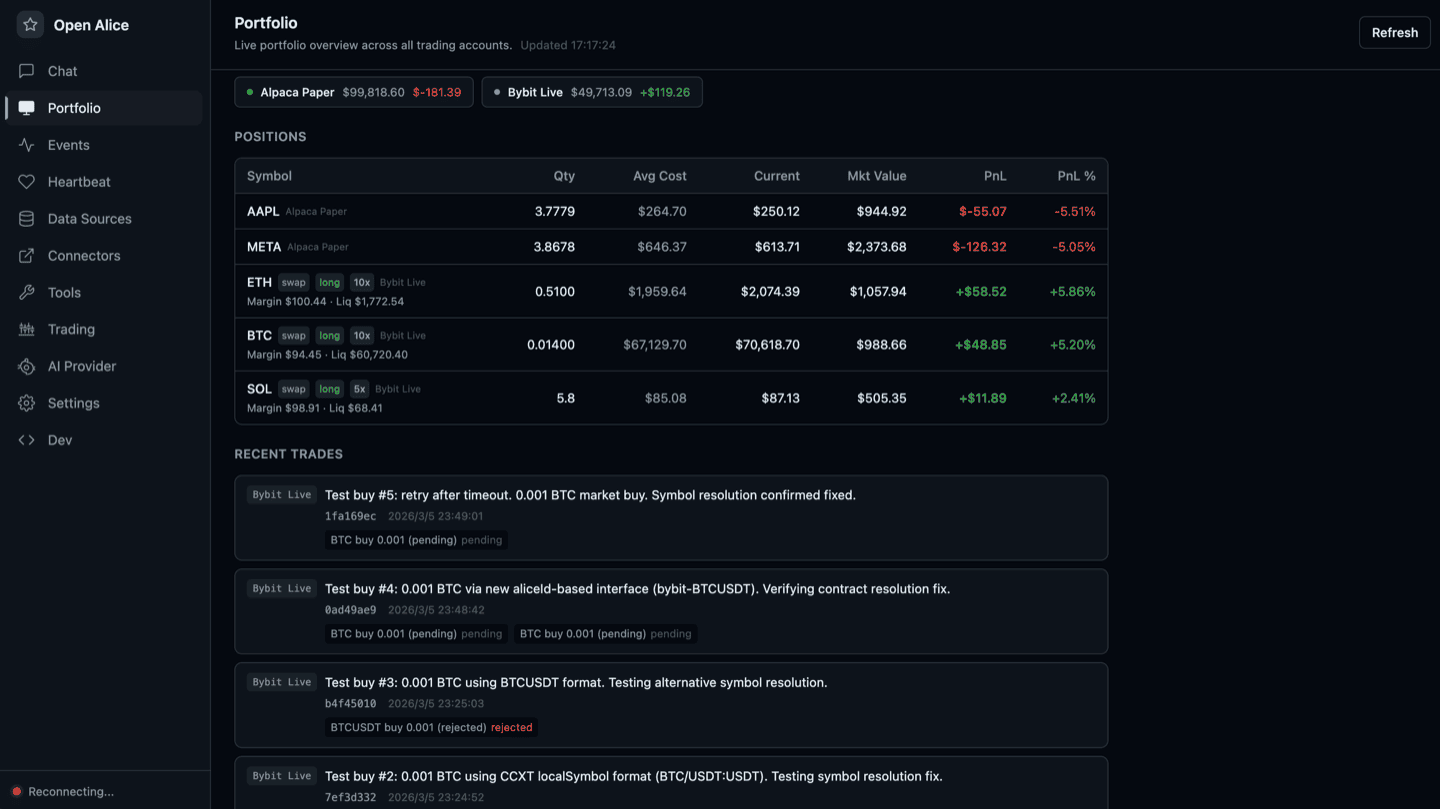
- **全维度** —— 跨资产类别进行分析和交易。多个券商整合为一个统一的工作区,让你不再受困于“看得见却交易不了”的窘境。
- **全生命周期** —— 不仅仅是入场信号。研究、仓位管理、持续监控、风险管理和平仓决策 —— Alice 全天候 24/7 覆盖整个交易生命周期。
- **完全掌控** —— 每笔交易都会经过版本历史和安全检查,并在执行前需要你的明确批准。你能看到每一步,也能随时叫停每一步。
Alice 运行在你自己的机器上,因为交易涉及私钥和真金白银 —— 这种信任是无法外包的。
## 功能
### 交易
- **统一交易账户 (UTA)** —— 多个券商(CCXT、Alpaca、Interactive Brokers)整合为统一工作区。AI 与 UTA 交互,绝不直接对接券商。
- **交易即 Git** —— 暂存订单,附带信息提交,推送以执行。完整历史记录可通过 commit hash 回溯。
- **Guard pipeline** —— 每个账户执行前的安全检查(最大仓位限制、冷却时间、标的白名单)。
- **账户快照** —— 周期性和事件驱动的状态捕获,附带资产净值曲线可视化。
### 研究与分析
- **市场数据** —— 股票、加密货币、大宗商品、外汇和宏观经济数据,**开箱即用,无需任何 API 密钥**:低频面板和数据集由托管的 **TraderHub** (https://traderhub.openalice.ai) 提供,并以你自己的提供商密钥作为备选路径。统一的跨资产标的搜索和技术指标计算器。
- **基本面研究** —— 公司简介、财务报表、财务比率、分析师预期、财报日历、内幕交易和市场异动。目前在股票领域覆盖最深,正逐步扩展至其他资产类别。
- **新闻** —— 后台 RSS 收集与归档搜索。
### 自动化
自动化通过**触发器以 headless 模式**运行工作区 —— 相同的工作区底层架构,以非交互方式根据代理和 prompt 启动,完成工作并通过收件箱(Inbox)汇报(并在 Runs 标签页中实时显示)。同一个底层架构,无论工作区是由人类打开还是由触发器启动。
触发运行的两种方式:
- **自我调度** —— 工作区在 `.alice/issue.json` 中声明自己的时间计划(间隔 / cron / 单次);一个简单的扫描器会发现声明并触发到期任务。没有中央注册表 —— 调度是代理通过编写文件完成的编码任务。
- **外部触发** —— `POST /api/workspaces/:id/headless` 允许任何外部系统(webhook 桥接、其他主机上的 cron)驱动工作区。
### 界面
- **Web UI** —— 工作区聊天、收件箱、带资产净值曲线的投资组合仪表板,以及完整的配置管理。
- **工作区** —— 按任务划分的目录 + git 仓库 + 持久终端会话,运行你选择的代理 CLI(`claude` / `codex` / `opencode` / `pi` / `shell`),并接入 OpenAlice 的 MCP 工具。任何复杂 AI 工作的推荐途径 —— 原生 prompt 缓存、原生渲染、无协议垫片。
- **收件箱** —— 工作区到用户的推送渠道。代理在工作区内部调用 `inbox_push` 以在专用标签页中呈现文档(实时渲染)以及 markdown 评论;点击回复栏即可跳回工作区继续操作。
- **MCP server** —— 为外部代理提供工具暴露。
### 更多功能!
- **多提供商 AI** —— 模型在原生代理 CLI 中运行;通过凭证库(Anthropic、OpenAI、Google、GLM、MiniMax、Kimi、DeepSeek 等)或你 CLI 自身的订阅登录引入任何提供商。
- **进化模式** —— 一种权限提升机制,赋予 Alice 包括 Bash 在内的完整项目访问权限,实现自我修改。
## 架构
OpenAlice 由一个轻量级主管进程拆分为**两个长期运行的进程**:
```
graph TB
subgraph Surfaces["Surfaces — where users interact"]
WEB[Web UI]
INB[Inbox tab]
MCPS[MCP Server]
end
subgraph Workspace["Workspace — agent's home
(dir + git + native CLI)"]
WCLI[claude / codex / opencode
pi / shell session]
end
subgraph Alice["Alice process — agent runtime + research"]
subgraph Core["Core — orchestration"]
TC[ToolCenter
+ Workspace ToolCenter]
IS[InboxStore]
CV[Credential vault
injected into workspaces]
end
subgraph AliceDomain["Domain — Alice-side"]
MD[Market Data]
AN[Analysis]
NC[News]
end
SDK[UTA SDK
HTTP client]
end
subgraph UTA["UTA service — broker carrier"]
TG2[Trading Git]
GD[Guards]
BK[Brokers]
FX[FX + Snapshots]
end
subgraph Sched["Triggers — what fires a run"]
TRIG[".alice/issue.json scanner
+ external POST"]
end
TRIG -.spawns headless run.-> Workspace
WEB --> Workspace
WEB --> INB
SDK -.HTTP.-> UTA
Workspace -->|.mcp.json| MCPS
MCPS --> TC
TC --> AliceDomain
TC --> SDK
Workspace -.inbox_push.-> IS
IS --> INB
```
**Alice 进程**掌握代理运行时、研究领域(市场数据、分析、新闻)、工作区启动器以及所有面向用户的界面。Alice **不**持有券商凭证,也不直接与交易所通信。它负责*决策* —— 研究什么、何时行动、说什么。
**UTA 服务**掌握券商连接、类 Git 的交易状态机、Guard、FX 和快照调度。AI 工具和前端通过轻量级 HTTP SDK 访问它 —— Alice 端的 `ctx.utaManager.placeOrder()` 会向 UTA 进程发送一个强类型的请求。UTA 负责*执行* —— 订单构建、执行、状态。
目前,这两者在同一主机上运行(Docker 容器或你笔记本上的 `pnpm dev`),由 Guardian 主管管理;未来 UTA 服务的设计是可分离的:在手机、家庭网络常驻盒子或任何你真正信任可用于存放券商密钥的设备上运行 UTA,而 Alice 则驻留在 VPS、你的台式机或任何方便的地方。两者的通信协议相同。其形态类似于硬件钱包 —— 持有凭证的一半小巧、隔离且固定不动;而功能丰富的客户端那一半可以随心所欲地部署。
**界面** —— Web UI(工作区聊天、收件箱标签页、投资组合仪表板)和用于外部代理的 MCP Server。这是用户查看和引导 Alice 的窗口。
**工作区** —— 一个按任务划分的目录 + git 仓库 + 持久终端会话,运行原生代理 CLI。这是非平凡 AI 工作的推荐底层架构。它通过 `.mcp.json` 中的两个 MCP server 连接到 OpenAlice:一个全局 server(完整的工具目录)和一个按工作区划分的 server(工作区级别的工具,如 `inbox_push`,wsId 携带在 URL 路径中,因此代理永远不会传输自身的身份标识)。
**核心** —— ToolCenter 是全局工具的共享注册表;WorkspaceToolCenter 持有按工作区划分的工具工厂。中央凭证库(API 密钥凭证,通过模板注入到工作区中)也位于此处。InboxStore 是收件箱标签页背后的只增不改的 JSONL —— 这是面向用户的单一推送界面。这里没有进程内的模型循环:模型在原生工作区 CLI 内部运行,而定时运行会启动一个 headless 工作区。
**Alice 端领域** —— 市场数据、分析和新闻。每个模块都通过工具注册暴露给 AI,且绝不触及券商代码。
**UTA 服务** —— 拥有 IBroker 实现(CCXT、Alpaca、Interactive Brokers、Longbridge、MockBroker)、交易即 Git 状态机、Guard、FxService、快照调度器和券商目录刷新循环。仅绑定 `127.0.0.1` —— 只有同处的 Alice 进程才能与其通信。v1 版本为同机部署;后续版本支持完全在单独的主机或设备上运行 UTA。
**Guardian** —— 主管进程,负责按顺序启动这两个进程,根据 UTA 的 `/__uta/health` 控制 Alice 的启动,并在券商配置更改时重启 UTA(它监视 UI 通过 Alice 的 BFF 写入的控制标志,因此配置更新不需要重启 Alice)。`pnpm dev`(带有 Vite 的编排器)和 Docker 入口点(以 `tini` 作为 PID 1)使用的是同一个模块。
**自动化** —— 一次运行就是一个 **headless 工作区**:以非交互方式根据代理 + prompt 启动的相同底层架构,完成工作并通过收件箱(虚线表示)回报,可在 Runs 标签页中查看。两种触发方式 —— 工作区自身的 `.alice/issue.json`(扫描器发现声明并触发到期任务;没有中央引擎),或外部 `POST /api/workspaces/:id/headless`。同一个底层架构,无论是人类还是触发器打开了工作区。
## 核心概念
**UTA (统一交易账户)** —— 核心交易抽象。每个 UTA 将券商连接、操作历史、Guard pipeline 和快照调度器封装为一个独立的账户。AI 和前端只与 UTA 交互 —— 券商只是内部实现细节。多个 UTA 就像独立的仓库:一个用于 Alpaca 美股,一个用于 Bybit 加密货币,每个都有自己的历史和 Guard。UTA 驻留在 **UTA 服务**中(参见上文架构),而不是在 Alice 进程中 —— 券商凭证被隔离在该载体中,对驱动交易决策的代理运行时永远不可见。
**交易即 Git** —— 每个 UTA 内部的工作流。暂存订单,带信息提交,然后推送以执行。Push 会运行 Guard,分发到券商,对账户状态进行快照,并记录附带 8 字符 hash 的 commit。完整的历史记录可以像 `git log` / `git show` 那样回溯。
**Guard** —— 在订单到达券商之前在 UTA 内部运行的预执行安全检查。Guard 负责执行限制(最大仓位规模、交易之间的冷却时间、标的白名单),并按账户进行配置。可以把它看作交易领域的 ESLint —— 在问题生效之前捕获它们的自动化规则。
**定时运行** —— 工作区自行声明的计划(`.alice/issue.json`;间隔 / cron / 单次),当任务到期时,它会生成一个 **headless 工作区**:相同的代理 + 一个 prompt,以非交互方式运行,通过收件箱汇报。与交互式工作使用的是同一个工作区底层架构 —— 没有单独的自主执行路径。(外部系统也可以通过 `POST` 进行一次性运行。)
**AI 提供商** —— Alice 在进程内不运行任何模型;模型循环存在于原生工作区 CLI(Claude Code / Codex / opencode / Pi)中。Alice 保留的是一个**凭证库**:API 密钥凭证,每个凭证都声明了它可以支持哪种通信格式(Anthropic Messages / OpenAI Chat Completions / OpenAI Responses),并被注入到工作区中。订阅登录(Claude Pro/Max、ChatGPT)保存在 CLI 自身的登录信息中,而不是在 Alice 中。
**数据枢纽** —— 托管的低频数据源。市场面板(宏观经济、市场异动、日历、全球宏观、美联储、航运、期限结构、板块轮动)和带密钥的数据集(FRED / EIA / BLS 序列、FMP 日历、外汇汇率)的解析顺序为 **hub → 你自己的密钥 → 报错**,因此全新安装不需要任何数据提供商账户。每个 payload 都标有它的服务路径(`hub` / `local`)和陈旧度 —— 显式标识,绝不静默处理。该 hub 是一个为了方便而存在的层级,而非确保正确性的依赖项:将其关闭(设置 › 市场数据)或将 `baseUrl` 指向自托管实例,其行为就会精准地回退到自备密钥模式。K 线和报价被刻意留在了 hub 之外 —— 实时数据来自你的券商(通过 UTA)或供应商,这才是利益所在的地方。Hub 的响应只是经过格式检查的纯数据,绝不是配置。
**工作区** —— 一个目录 + git 仓库 + 持久终端会话,运行你选择的原生代理 CLI(`claude`、`codex`、`opencode`、`pi` 或 `shell`)。OpenAlice 通过 `.mcp.json` 将其 MCP server 接入工作区,因此内部的代理既能看到工作区的本地文件,也能利用 OpenAlice 完整的工具集(交易、市场数据、新闻、分析)。工作区位于 `~/.openalice/workspaces/
/` 下 —— 每一个都是独立的临时目录,代理可以在里面读取、写入和执行 `git commit`。这是任何非简单 AI 工作的推荐底层架构:原生 prompt 缓存、原生 CLI 渲染,在你和模型之间没有协议垫片。能力扩展(浏览器自动化、第三方 CLI、自定义抓取工具)以新的工作区**模板**形式提供,而不是作为 `src/` 的依赖项,从而保持主仓库的精简。
**模板与卫星仓库** —— 工作区模板是一个引导脚本 + 初始文件集,用于构建具有特定形态的工作区(目前包括:`chat`、`auto-quant`)。模板是 OpenAlice 生态系统在不臃肿主仓库的情况下不断发展的方式:当一项新能力(研究工具包、回测框架、自定义 MCP server)值得打包时,它就会驻留在自己的**卫星仓库**中,供模板在引导期间克隆。主仓库刻意不接受生态系统 PR —— 它只拥有交易领域和工作区启动器;其他一切都通过模板引用的卫星仓库来流转。这意味着模板作者可以按照自己的节奏发布,而 OpenAlice 的 `src/` 保持精简。
**收件箱** ——工作区到用户的推送渠道。在工作区内部工作的代理调用 `inbox_push` MCP 工具,以便在专用的收件箱标签页中呈现文档(根据工作区文件实时渲染)以及 markdown 评论。用户阅读后,点击条目底部的回复栏即可跳回该工作区的会话并在那里继续对话。定时运行也会将结果投递到这里:自我调度(或外部触发)的 headless 工作区代理会像其他任何操作一样调用 `inbox_push` —— 收件箱是唯一的推送界面。
## 工作区聊天
与 Alice 聊天是在**工作区**内进行的:一个目录 + git 仓库 + 运行你选择的代理原生 CLI(`claude`、`codex`、`opencode`、`pi` 或 `shell`)的持久终端会话。CLI 进程处理所有的模型交互、prompt 缓存和渲染 —— OpenAlice 的工作就是将其 MCP server 接入工作区,并在 UI 中呈现终端。
- **原生 prompt 缓存。** Claude Code、Codex 和其他代理 CLI 实现了我们无法复制的特定于供应商的缓存控制。在长对话中,这通常可以减少 10 倍的成本。
- **原生前端。** TUI 渲染、语法高亮、差异显示 —— CLI 供应商已经为其模型调整好了这些功能。
- **完整工具集。** CLI 可以看到工作区的本地文件以及 OpenAlice 的 MCP 工具(交易、市场数据、新闻、分析)。没有“最大公约数”式的功能削减。默认情况下,市场数据不需要 API 密钥 —— 由数据枢纽提供。
- **无协议垫片。** 你和模型之间没有任何阻隔 —— CLI 能做什么,你就能做什么。
唯一的要求是:必须要在运行 OpenAlice 的主机上安装 CLI 二进制文件(Docker 镜像已捆绑 `claude` 和 `codex`)。
## 快速开始
### 0. 必备工具
| 工具 | 用途 | 安装 |
| --- | --- | --- |
| **Node.js 22+** | 运行后端 | [nodejs.org](https://nodejs.org/) · `brew install node` · `nvm install 22` |
| **pnpm 10+** | 工作区包管理器 | `npm install -g pnpm` · [pnpm.io/installation](https://pnpm.io/installation) |
| **git** | 克隆仓库 | 通常已预装。如果没有:[git-scm.com](https://git-scm.com/) |
| **Claude Code CLI** | 驱动工作区聊天的代理 CLI | [安装 Claude Code](https://docs.anthropic.com/en/docs/claude-code),然后运行一次 `claude` 以使用你的 Claude Pro/Max 订阅登录。**无需 API 密钥。** |
在 Windows 上,在选择 PowerShell、Git Bash 或 WSL2 之前,请先阅读下方的简短说明。
完整性检查:
```
node --version # v22.x.x
pnpm --version # 10.x.x or newer
claude --version # 2.x.x (Claude Code 2.x)
```
### 1. 克隆并安装依赖
```
git clone https://github.com/TraderAlice/OpenAlice.git
cd OpenAlice
pnpm install
```
首次执行 `pnpm install` 会拉取整个 monorepo 及原生依赖(主要是用于终端会话的 `node-pty`)。在正常的网络连接下大约需要 1 分钟。
### 2. 启动
```
pnpm dev
```
输出的前几行是开发编排器选择的三个 URL:
```
[dev] backend → http://localhost:47331
[dev] MCP → http://localhost:47332/mcp
[dev] UI → http://localhost:5173 (Vite picks +1 if taken)
```
在下方你会看到后端启动日志(券商连接、获取新闻订阅源、插件启动)。当你看到
```
engine: started
web plugin listening on http://localhost:47331
```
…说明后端已准备就绪。
### 3. 打开 UI
打开终端输出的 **UI** URL —— 默认为 [http://localhost:5173](http://localhost:5173)。在开发模式下不要直接打开后端端口 (47331);该路径仅提供预构建的 UI bundle,在全新的代码检出中尚不存在。
如果端口 5173 被占用,Vite 会自动选择 5174(或更高端口),并在终端打印出实际的 URL —— 请始终以终端输出为准,而不是本 README 中的端口号。
你应该会看到 Alice 的侧边栏(Ask Alice / Inbox / Workspaces / Market / News)。打开 **Ask Alice** 并开始输入 —— 无需 API 密钥,无需编辑配置文件。它使用你本地的 Claude Code 登录状态。
### 4. 遇到问题时的排查
| 症状 | 最可能的原因及解决方案 |
| --- | --- |
| 启动期间出现 `claude: command not found` | 未安装 Claude Code CLI 或其不在 PATH 中。请重温步骤 0。 |
| 后端日志显示 `Please log in to Claude` | Claude Code 会话已过期。在任意终端运行一次 `claude` 以重新认证,然后重启 `pnpm dev`。 |
| 浏览器在 5173 端口显示 *"can't connect"* | 后端仍在启动中。请等待出现 `engine: started`,然后刷新。 |
| 浏览器加载成功但一切都显示 *"disconnected"* | WebSocket 无法连接到后端。请检查终端 —— 后端可能已退出;请重启 `pnpm dev`。 |
| 端口 5173 / 47331 已被占用 | Vite 和编排器都会自动跳到下一个可用端口。请阅读终端实际打印的 URL,而不是本 README 中的数字。 |
| `pnpm: command not found` | 运行 `npm install -g pnpm` 进行全局安装。 |
仍有问题 → 请参阅[获取帮助](#getting-help)。
### Windows
OpenAlice 可以在 Windows 上从源码检出运行,但整体体验可能仍有一些粗糙之处,因为我们日常并没有天天在 Windows 上进行测试。
- **推荐:** 在克隆之前安装 [Git for Windows](https://gitforwindows.org/)。
- **备选:** 在 [WSL2](https://learn.microsoft.com/en-us/windows/wsl/install) 内部运行 OpenAlice。
内置的工作区模板使用 OpenAlice 捆绑的 Node/git 路径。一些第三方模板可能仍需要 `bash`;对于这些情况,使用 Git for Windows 或 WSL2 是最稳妥的路径。非常欢迎提交 Bug 报告。
## 安装与部署
本 README 保持了极简的顺畅流程。完整的安装文档位于 [openalice.ai/docs](https://openalice.ai/docs)。
对于本地源码检出,请使用上方的快速开始:执行 `pnpm install`,然后 `pnpm dev`,接着打开终端打印的 UI URL。OpenAlice 不需要 Postgres、Redis 或单独的数据库;默认情况下,状态以文件形式存储在 `~/.openalice` 下。
对于服务器或常驻运行的机器,推荐使用 Docker Compose。镜像捆绑了 Web UI、Alice 后端、UTA 服务、工作区模板以及 `claude` / `codex` CLI:
```
git clone https://github.com/TraderAlice/OpenAlice.git
cd OpenAlice
docker compose up -d --build
```
首次启动时,请从日志中读取管理员 token 并打开 `http://:47331`:
```
docker compose logs openalice | grep -A6 'First-run admin token'
```
然后,对你想要在容器内使用的代理 CLI 进行身份验证:
```
docker exec -it openalice claude
docker exec -it openalice codex login
```
有关详细信息,请查阅文档:
- [安装](https://openalice.ai/docs/getting-started/installation) —— 桌面端、源码和平台说明
- [Docker 部署](https://openalice.ai/docs/deployment/docker) —— 构建、首次登录、CLI 认证、更新、重置、故障排除
- [自托管与安全](https://openalice.ai/docs/deployment/self-hosting) —— 部署形态和安全边界
- [远程访问](https://openalice.ai/docs/deployment/remote-access) —— 局域网、Tailscale、Caddy、nginx 及公共互联网注意事项
- [数据与凭证](https://openalice.ai/docs/deployment/data-and-credentials) —— 数据根目录、管理员 token 轮换、密封的券商凭证、端口、备份
- [配置参考](https://openalice.ai/docs/configuration/configuration-reference) —— 每一个配置文件、字段及默认值
## 项目结构
OpenAlice 是一个使用 Turborepo 进行构建编排的 pnpm monorepo。完整的文件树请参见 [docs/project-structure.md](docs/project-structure.md)。
## 获取帮助
遇到问题了吗?以下是推荐的排查路径,大致按先后顺序排列:
1. **让 AI 代理来修复** —— Claude Code、Cursor 或任何其他编程代理都可以阅读代码库并直接修复大多数问题。这是解决 Bug 和“我该如何做 X”类问题最快的方式。
2. **[向 DeepWiki 提问](https://deepwiki.com/TraderAlice/OpenAlice)** —— 针对整个代码库的自然语言问答,非常适合用于架构问题和寻找代码切入点。
3. **社区** —— 讲英语的用户请加入 [Discord](https://discord.gg/zf4STmrQd8),讲中文的开发者请加入 [QQ 群](https://qm.qq.com/q/iSg6O4FmrC)。适用于那些 AI 无法解答的问题 —— 设计讨论、边缘情况,或者仅仅是找个地方聊聊。
## 许可证
[AGPL-3.0](LICENSE)标签:AI交易代理, MITM代理, 多资产交易, 本地部署, 网络安全研究, 自动化交易, 自动化攻击, 请求拦截, 量化交易