nnorian/log-threat-detector
GitHub: nnorian/log-threat-detector
一个解析 Windows .evtx 事件日志、基于 YAML 规则匹配 MITRE ATT&CK 技术并生成优先级警报报告的 Python 命令行检测工具。
Stars: 0 | Forks: 0
# Windows 日志威胁检测工具
一个 Python 命令行工具,用于解析 Windows 事件日志文件 (`.evtx`),根据映射到 MITRE ATT&CK 的检测规则对它们进行匹配,并生成带有优先级警报的 Markdown 报告。
本项目作为作品集构建,旨在展示清晰的架构、SOLID 原则以及实用的蓝队安全工程实践。
## 演示
```
$ python src/presentation/cli.py -f samples/credential_access.evtx
Report saved -> reports/report_20240215_143022.md
```
## 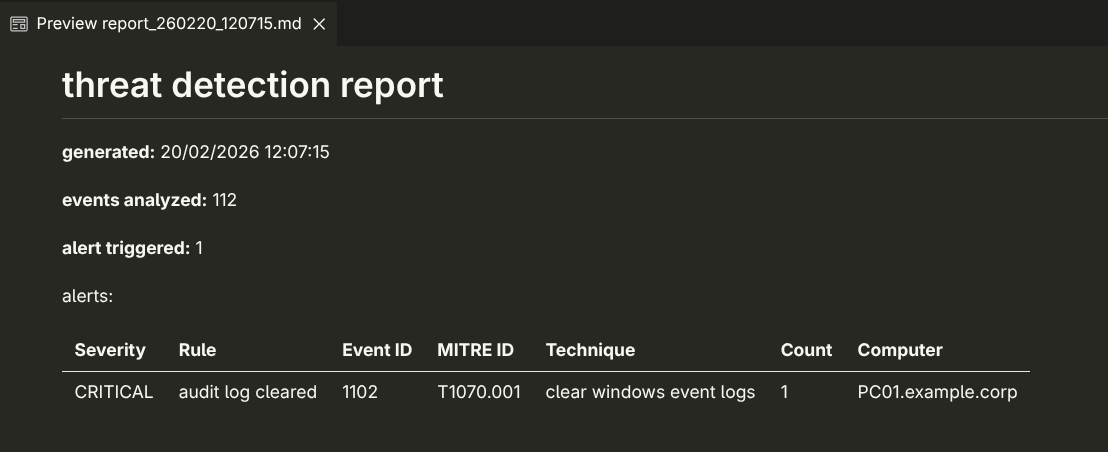
1. 解析二进制 `.evtx` Windows 事件日志文件
2. 将事件与 YAML 定义的检测规则进行匹配
3. 将每个警报映射到 MITRE ATT&CK 技术
## 检测规则
八条最常见的 Windows 系统攻击规则:
| Event ID | 规则 | MITRE 技术 | 严重性 |
| -------- | ------------------------- | --------------- | -------- |
| 4625 | 暴力破解登录尝试 | T1110 | HIGH |
| 4698 | 计划任务创建 | T1053 | MEDIUM |
| 7045 | 新服务安装 | T1543 | HIGH |
| 4720 | 新用户账户创建 | T1136 | MEDIUM |
| 4732 | 用户被添加到管理员组 | T1098 | HIGH |
| 1102 | 审计日志清除 | T1070 | CRITICAL |
要为新的攻击类型添加新规则或更新现有规则,请将 `.yml` 文件放入 `rules/` 文件夹中。
## 架构
基于 Clean Architecture 和 SOLID 原则构建,易于扩展
```
windows-threat-detector/
├── src/
│ ├── domain/
│ │ ├── entities.py
│ │ └── interfaces.py
│ ├── application/
│ │ └── use_cases.py
│ ├── infrastructure/
│ │ ├── parsers/evtx_parser.py
│ │ ├── loaders/yaml_rule_loader.py
│ │ ├── detectors/rule_based_detector.py
│ │ └── reporters/markdown_reporter.py
│ └── presentation/
│ └── cli.py
├── rules/
│ ├── brute_force.yml
│ ├── log_cleared.yml
│ └── ... (8 rules total)
├── tests/
│ ├── test_rule_based_detector.py
│ ├── test_yaml_rule_loader.py
│ └── test_use_case.py
├── samples/ # place .evtx files here (see above)
├── reports/ # generated reports saved here
└── requirements.txt
```
## 设置
**1. 克隆并设置 venv
```
git clone https://github.com/YOUR_USERNAME/windows-threat-detector.git
cd windows-threat-detector
python -m venv venv
venv\Scripts\activate # Windows
source venv/bin/activate # macOS / Linux
pip install -r requirements.txt
```
**2. 添加示例日志文件**
添加你自己的 `.evtx`
或者像我一样
从 [EVTX-ATTACK-SAMPLES](https://github.com/sbousseaden/EVTX-ATTACK-SAMPLES) (GPL-3.0, sbousseaden) 下载 `.evtx` 示例,并将它们放在 `samples/` 文件夹中。
我使用了:`Credential Access/`, `Defense Evasion/`, `Persistence/`, `Lateral Movement/` 文件夹
**3. 运行**
```
python src/presentation/cli.py -f samples/example.evtx
```
报告将保存到 `reports/report_TIMESTAMP.md`
**可选 — 自定义输出路径:**
```
python src/presentation/cli.py -f samples/example.evtx -o reports/my_report.md
```
**可选 — 自定义规则目录:**
```
python src/presentation/cli.py -f samples/example.evtx --rules-dir custom_rules/
```
## 添加自定义规则
在 `rules/` 中创建一个新的 `.yml` 文件,遵循以下结构:
```
name:
event_id:
description:
mitre_technique:
mitre_name:
severity:
threshold:
```
必填字段:`name`, `event_id`, `description`, `mitre_technique`, `mitre_name`, `severity`
可选字段:`threshold` (默认值为 1)
## 使用的库
|库|用途|
|---|---|
|[python-evtx](https://github.com/williballenthin/python-evtx)|解析 `.evtx` 二进制文件|
|[PyYAML](https://pyyaml.org/)|加载 YAML 检测规则|
|[lxml](https://lxml.de/)|解析事件记录的 XML|
标签:AMSI绕过, Python, 威胁检测, 子域名变形, 恶意代码分类, 无后门, 逆向工具