Moiraguard/moiraguard-eye-o-tea-scanner
GitHub: Moiraguard/moiraguard-eye-o-tea-scanner
基于Shodan API的IoT/IIoT安全侦察框架,支持主动协议验证和多格式报告输出
Stars: 2 | Forks: 0
# MOIRAGUARD - Eye O Tea (IoT) 扫描器
 ### 👁️ 全球 IoT/IIoT 基础设施侦察
**监控 IoT 侦察与防护**
## 📖 概述
**MOIRAGUARD** (Eye-O-Tea) 是一个先进的 IoT/IIoT 安全侦察框架,专为安全研究和教育目的而设计。该工具为 DEFCON GROUP CASABLANCA 2026 构建,使用 Shodan API 对全球 IoT 基础设施执行被动侦察。
### 🏷️ 当前版本 — v1.3
| 版本 | 亮点 |
|---------|-----------|
| **v1.3** ✅ | **主动协议验证** — MQTT, RTSP, Modbus, BACnet, HTTP/HTTPS 探测 |
| v1.2 ✅ | 模式选择菜单 — Scanner, Monitor, Intelligence 模式 |
| v1.1 ✅ | 导出引擎 — JSON, CSV, HTML 报告, PNG 图表 |
| v1.0 ✅ | 跨 6 个设备类别的核心 IoT/IIoT 侦察 |
### 作者
**Mohammed Amine Moulay (@MLY)**
DEFCON GROUP CASABLANCA 2026 | 安全研究
### 🔗 快速链接
- **Repository**: https://github.com/Moiraguard/moiraguard-eye-o-tea-scanner
- **Issues & Bug Reports**: https://github.com/Moiraguard/moiraguard-eye-o-tea-scanner/issues
- **Pull Requests**: https://github.com/Moiraguard/moiraguard-eye-o-tea-scanner/pulls
- **Releases**: https://github.com/Moiraguard/moiraguard-eye-o-tea-scanner/releases
## 📸 示例输出
### 👁️ 全球 IoT/IIoT 基础设施侦察
**监控 IoT 侦察与防护**
## 📖 概述
**MOIRAGUARD** (Eye-O-Tea) 是一个先进的 IoT/IIoT 安全侦察框架,专为安全研究和教育目的而设计。该工具为 DEFCON GROUP CASABLANCA 2026 构建,使用 Shodan API 对全球 IoT 基础设施执行被动侦察。
### 🏷️ 当前版本 — v1.3
| 版本 | 亮点 |
|---------|-----------|
| **v1.3** ✅ | **主动协议验证** — MQTT, RTSP, Modbus, BACnet, HTTP/HTTPS 探测 |
| v1.2 ✅ | 模式选择菜单 — Scanner, Monitor, Intelligence 模式 |
| v1.1 ✅ | 导出引擎 — JSON, CSV, HTML 报告, PNG 图表 |
| v1.0 ✅ | 跨 6 个设备类别的核心 IoT/IIoT 侦察 |
### 作者
**Mohammed Amine Moulay (@MLY)**
DEFCON GROUP CASABLANCA 2026 | 安全研究
### 🔗 快速链接
- **Repository**: https://github.com/Moiraguard/moiraguard-eye-o-tea-scanner
- **Issues & Bug Reports**: https://github.com/Moiraguard/moiraguard-eye-o-tea-scanner/issues
- **Pull Requests**: https://github.com/Moiraguard/moiraguard-eye-o-tea-scanner/pulls
- **Releases**: https://github.com/Moiraguard/moiraguard-eye-o-tea-scanner/releases
## 📸 示例输出
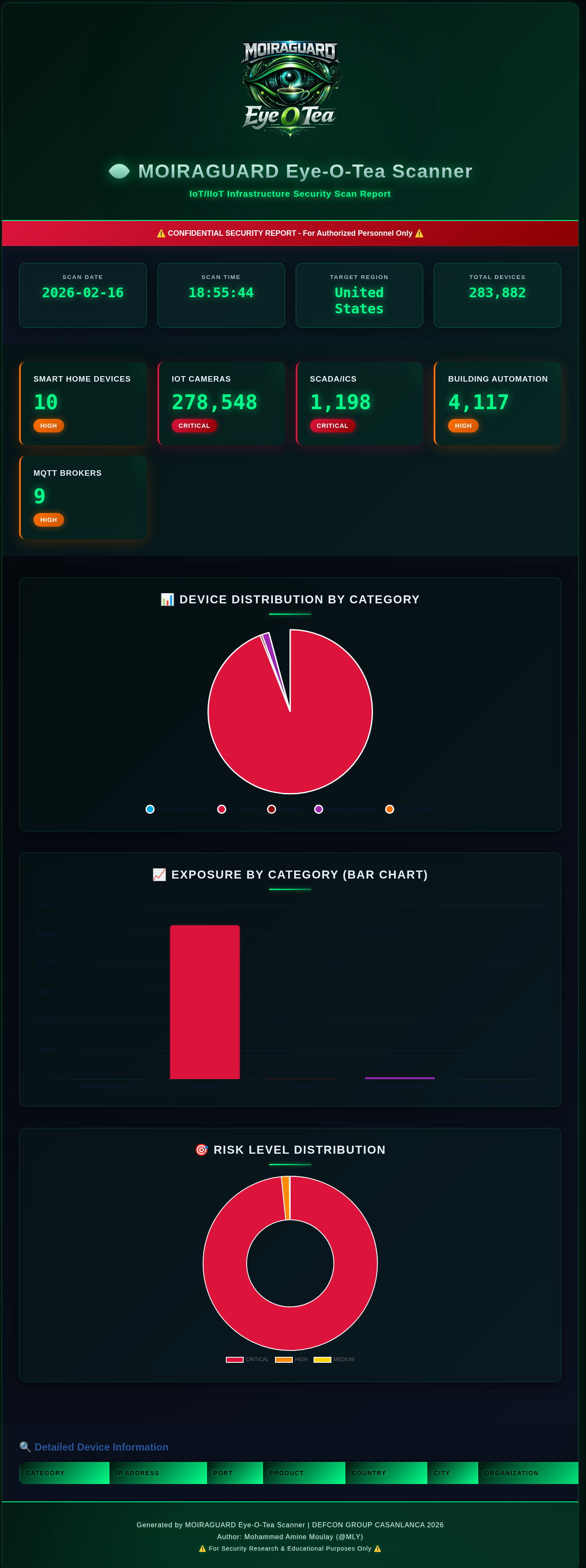
🎯 Example Report: United States IoT Infrastructure Scan - 283,882 Devices Discovered
HTML Report with Cyberpunk Neon Theme | Interactive Charts | Risk Analysis | Country-Targeted Reconnaissance
**报告亮点:**
- 👁️ **赛博朋克霓虹翡翠设计** - 带有发光装饰和玻璃拟态 UI 的暗色主题
- 📊 **交互式可视化** - 饼图、条形图和风险等级甜甜圈图
- 🎯 **多类别分析** - Smart Home (10) | Cameras (278K) | SCADA (1.2K) | Building (4K) | MQTT (9)
- 🚨 **风险分类** - 实时 CRITICAL/HIGH/MEDIUM 指示器
- 🌍 **特定国家定位** - 支持 50+ 个国家
- 💾 **多种导出格式** - JSON, CSV, HTML, PNG 截图
## ⚠️ 法律免责声明
```
╔═══════════════════════════════════════════════════════════════╗
║ ⚠️ LEGAL WARNING ⚠️ ║
╠═══════════════════════════════════════════════════════════════╣
║ ║
║ This tool is for SECURITY RESEARCH and EDUCATION ONLY ║
║ ║
║ • Unauthorized access to computer systems is ILLEGAL ║
║ • This tool performs PASSIVE reconnaissance only ║
║ • Do NOT attempt to access systems without authorization ║
║ • Use RESPONSIBLY and ETHICALLY ║
║ • The author is NOT responsible for misuse ║
║ ║
║ By using this tool, you agree to comply with all applicable ║
║ laws and regulations. The user assumes all responsibility. ║
║ ║
╚═══════════════════════════════════════════════════════════════╝
```
**合法用例:**
- 安全研究和漏洞评估
- 教育目的和 IoT 安全培训
- 防御性安全操作
- 授权的渗透测试
- 学术研究
**非法用例:**
- 未经授权访问系统
- 利用发现的漏洞
- 任何恶意活动
## 🎯 功能
### 当前功能 (v1.3)
- **主动协议验证** — 确认真实的未授权访问,而不仅仅是 Shodan 的估算
- 在 Verbose 扫描后直接通过扫描后菜单 (`[V]`) 运行
- 使用正确的协议包探测每个发现的 IP — **零 Shodan 积分消耗**
- 通过线程池(10 个 worker)并行探测 — 即使对于大型 IP 列表也很快
- 每个 IP 实时输出 `[CONFIRMED]` / `[protected]`
- 最终暴露率:*“X% 的抽样设备无认证”*
- 详见 [主动协议验证](#-active-protocol-verification)
- **四种操作模式** — 在任何扫描前的启动时选择
- **[1] Query Mode** — 搜索 Shodan 的索引数据库(原始行为)
- **[2] Scanner Mode** — 通过 `api.scan()` 提交针对 IP/CIDR 目标的按需主动扫描;带有 spinner 实时轮询状态;完成后可选择查询结果
- **[3] Monitor Mode** — 管理持久的 Shodan 网络警报:通过 `api.create_alert()` / `api.alerts()` 列出、创建、检查和删除警报
- **[4] Intelligence Mode** — 查看所有 Shodan 已知协议和按范围分组的扫描端口;IoT 相关端口(554, 1883, 502, 47808, 23, 80, 443)被高亮显示;**零积分消耗**
- **多类别 IoT 扫描**
- Smart Home Appliances & Consumer IoT
- IoT Cameras & Surveillance Systems (RTSP)
- SCADA/Industrial Control Systems (Modbus)
- Building Automation Systems (BACnet)
- IoT MQTT Messaging Brokers
- Industrial IoT Gateways & Automation
- **特定国家定位**
- 从 50+ 个预定义国家中选择
- 自定义国家代码输入选项
- 全球扫描模式(无国家过滤)
- 通过 `countries.json` 配置
- **双重详细模式**
- **Metrics Mode**: 快速扫描,仅收集计数和总数
- **Verbose Mode**: 详细扫描,包括 IP 地址、组织和设备详情
- **高级导出与报告**
- **JSON Export**: 用于 API 集成的结构化数据
- **CSV Export**: 电子表格友好格式
- **HTML Reports with Interactive Charts**:
- 显示设备分布的精美饼图
- 用于类别比较的条形图
- 风险等级甜甜圈图
- 使用 Chart.js 的响应式设计
- Verbose 模式下可选的详细设备表
- **PNG Charts Export** (NEW!):
- 高分辨率饼图 (300 DPI)
- 带有数值标签的条形图
- 风险等级甜甜圈图
- 组合摘要图
- 适合演示和报告
- 一次导出所有格式
- 组织在 `Moiraguard-Eye-O-Tea-Exports/` 目录中
- **高级侦察**
- 地理分布分析
- 供应商识别
- 风险等级评估
- 样本设备枚举
- 实时统计
- **Rich CLI Interface**
- 彩色输出
- 打字机效果
- 加载动画
- 进度指示器
- 精美的 ASCII art 横幅
- **安全功能**
- API key 存储在单独的文件中
- 凭证的 `.gitignore` 保护
- 仅被动侦察
- 法律警告和提醒
## 📁 项目结构
```
moiraguard-eye-o-tea-scanner/
├── moiraguard_iot_scanner.py # Main scanner application
├── check_setup.py # Setup verification tool
├── requirements.txt # Python dependencies
├── countries.json # Country code mappings (50+ countries)
├── targets.json # Scan profile configurations
├── shodan_api.key # Your Shodan API key (create this)
├── examples/ # Example files (tracked in git)
│ ├── MoiraGuard-Eye-O-Tea-logo.png
│ ├── moiraguard_report_20260216_185544.png
│ └── README.md
├── Moiraguard-Eye-O-Tea-Exports/ # Scan outputs (git ignored)
│ ├── *.json # JSON exports
│ ├── *.csv # CSV exports
│ ├── *.html # HTML reports
│ └── *.png # Chart/screenshot exports
└── README.md # This file
```
**注意:**
- `examples/` 文件夹包含用于文档的示例文件(包含在 git 中)
- `Moiraguard-Eye-O-Tea-Exports/` 文件夹是自动创建的并从 git 中排除(敏感数据)
- 你的 API key 文件 (`shodan_api.key`) 受 `.gitignore` 保护
## 🚀 安装
### 前置条件
- **Python 3.7 或更高版本**
- **Shodan API account** (建议会员资格)
- **Internet 连接**
### 分步设置
#### 1. 克隆仓库
```
git clone https://github.com/Moiraguard/moiraguard-eye-o-tea-scanner.git
cd moiraguard-eye-o-tea-scanner
```
#### 2. 安装 Python 依赖
```
# 使用 pip
pip install -r requirements.txt
# 或使用 pip3
pip3 install -r requirements.txt
# 或手动安装
pip install shodan matplotlib
```
#### 3. 获取你的 Shodan API Key
1. 访问:https://account.shodan.io/
2. 注册账户或登录
3. 导航到 "My Account" 部分
4. 复制你的 API key
**需要 Shodan Membership:**
此工具需要 **Shodan Membership** ($59/月 或 $899/终身) 才能获得最佳功能:
- **Query Credits**: 每月 10,000+(免费版为 100)
- **Results**: 完整结果集(免费版为 1 页)
- **Filters**: 高级国家和协议过滤器
- **Historical Data**: 访问历史扫描数据
- **API Features**: 此工具所需的完整 API 功能
**注意:** 免费账户非常有限,可能无法提供足够的数据进行有意义的扫描。将会员资格视为对你安全研究能力的投资。
#### 4. 配置你的 API Key
**选项 A:手动创建 key 文件**
```
# Linux/Mac
echo "YOUR_API_KEY_HERE" > shodan_api.key
# Windows (命令提示符)
echo YOUR_API_KEY_HERE > shodan_api.key
# Windows (PowerShell)
"YOUR_API_KEY_HERE" | Out-File -FilePath shodan_api.key -NoNewline
```
**选项 B:使用文本编辑器**
1. 在工具目录中创建一个名为 `shodan_api.key` 的新文件
2. 粘贴你的 API key(单行,无空格或引号)
3. 保存文件
**示例文件内容:**
```
Ab1Cd2Ef3Gh4Ij5Kl6Mn7Op8Qr9St0Uv
```
#### 5. 验证安装
**快速验证(自动):**
```
# 运行设置检查器 (推荐)
python3 check_setup.py
```
这将验证:
- ✓ Python 版本兼容性
- ✓ Shodan 模块安装
- ✓ API key 文件存在且有效
- ✓ 配置文件存在
- ✓ 主扫描脚本就绪
- ✓ API 连接工作正常
**手动验证:**
```
# 检查 Python 版本
python3 --version # Should be 3.7 or higher
# 检查 Shodan 安装
python3 -c "import shodan; print('Shodan installed successfully')"
# 验证 API key 文件是否存在
ls -l shodan_api.key # Linux/Mac
dir shodan_api.key # Windows
```
#### 6. 自定义配置(可选)
**编辑 `countries.json`** 以添加/删除国家:
```
{
"countries": {
"Your Country": "YC",
"Morocco": "MA",
"United States": "US"
}
}
```
**编辑 `targets.json`** 用于自定义扫描配置文件:
- 预配置的区域配置文件
- 自定义查询模板
- 特定行业扫描
## 📝 使用
### 快速开始
```
# 导航到 tools 目录
cd DEFCON-GROUP-CASA/tools
# 运行扫描器
python3 moiraguard_iot_scanner.py
```
### 完整使用演练
#### Step 1: 启动 Scanner
```
python3 moiraguard_iot_scanner.py
```
你将看到 MOIRAGUARD 横幅和初始化:
```
╔═══════════════════════════════════════════════════════════════════════╗
║ MOIRAGUARD Eye-O-Tea ║
╚═══════════════════════════════════════════════════════════════════════╝
[✓] API key loaded from shodan_api.key
[i] Key length: 32 characters
```
#### Step 2: 选择操作模式
加载 API key 后,MOIRAGUARD 显示模式菜单:
```
╔═══════════════════════════════════════════╗
║ SELECT OPERATION MODE ║
╚═══════════════════════════════════════════╝
[1] Query Mode — Search Shodan's indexed database (current behavior)
[2] Scanner Mode — On-demand active scan of IP/CIDR targets
[3] Monitor Mode — Set up persistent network alerts
[4] Intelligence — View Shodan protocols & active ports (free)
──────────────────────────────────────────────────
Select mode [1-4]:
```
**模式描述:**
| 模式 | 使用的积分 | 描述 |
|------|-------------|-------------|
| [1] Query Mode | ~6 query credits | 跨 6 个设备类别的完整 IoT/IIoT 侦察扫描 |
| [2] Scanner Mode | Scan credits | 向 Shodan 的分布式扫描器提交特定 IP/CIDR 的主动扫描 |
| [3] Monitor Mode | 0 | 管理持久警报,在有新 Shodan 发现时通知你 |
| [4] Intelligence | 0 | 浏览所有协议和 IoT 端口交叉引用的扫描端口 |
##### Scanner Mode 演练
1. 你的 scan-credit 余额会预先显示,如果为零会有警告
2. 输入逗号分隔的 IP 或 CIDR 范围(例如 `192.168.1.1, 10.0.0.0/24`)
3. 浏览可用的扫描协议(分页,按 Enter/q 导航)
4. 确认提交 — 显示扫描 ID、排队 IP 数和剩余积分
5. 实时 spinner 每 5 秒轮询 `api.scan_status()` 直到 `DONE`
6. 可选择在完成后立即查询 Shodan 获取扫描的 IP
##### Monitor Mode 演练
带有四个操作的子菜单循环:
```
[1] List active alerts
[2] Create new alert (name + IP/CIDR)
[3] Check alert results
[4] Delete alert
[0] Back
```
- **List**: 显示所有活动警报的 ID、名称、IP 范围和创建日期
- **Create**: 提示输入名称和 CIDR → 调用 `api.create_alert()`
- **Check**: 输入警报 ID 查看匹配的主机(最多显示 10 个)
- **Delete**: 输入警报 ID,确认,然后永久删除它
##### Intelligence Mode 演练
不消耗积分 — 在标题中标记为 `[FREE]`。
1. **Protocols table** — 所有 Shodan 已知的扫描协议,按字母顺序在双列布局中排序
2. **Ports list** — Shodan 主动扫描的所有端口,分为三个范围:
- Well-Known (0–1023)
- Registered (1024–49151)
- Dynamic (49152+)
3. **IoT cross-reference** — 以下端口在列表中带有星号 (`*`),并在专用表中汇总,显示每个端口当前在 Shodan 扫描器中是否活动:
| Port | Protocol | Purpose |
|------|----------|---------|
| 23 | Telnet | Legacy devices / default credentials |
| 80 | HTTP | Web management interfaces |
| 443 | HTTPS | Secure web interfaces |
| 502 | Modbus | Industrial SCADA/ICS |
| 554 | RTSP | IP camera streams |
| 1883 | MQTT | IoT message brokers |
| 47808 | BACnet | Building automation |
#### Step 3: 选择目标国家(仅 Query Mode)
当选择 **Query Mode [1]** 时,你将看到:
```
╔═══════════════════════════════════════════════════════════╗
║ SELECT TARGET COUNTRY ║
╚═══════════════════════════════════════════════════════════╝
[0] GLOBAL (All countries - no filter)
[1] Morocco (MA)
[2] United States (US)
[3] China (CN)
...
[C] Custom country code
Select option:
```
**选项:**
- 输入 `0` 进行全球扫描(所有国家)
- 输入数字 (1-N) 选择特定国家
- 输入 `C` 以输入自定义的 2 字母国家代码
#### Step 4: 选择详细级别
选择要收集的详细程度:
```
Scan Verbosity:
[1] Metrics Only (Fast - counts and totals only)
[2] Verbose Mode (Detailed - includes IPs and device info)
Select mode [1/2]:
```
**何时使用 Metrics Mode (1):**
-速概览扫描
- 节省 API 积分
- 仅需要统计信息
- 更快的处理
**何时使用 Verbose Mode (2):**
- 详细的安全评估
- 需要特定的 IP 地址
- 创建全面的报告
- 调查特定设备
#### Step 5: 扫描执行
扫描器现在将:
1. 连接到 Shodan API
2. 验证你的凭证
3. 顺序运行 6 个类别扫描
4. 实时显示结果
```
[✓] Shodan API connection established
[✓] API verified - Query credits: 100
[SCAN 1/6] ► SMART HOME APPLIANCES & CONSUMER IoT
Risk Level: HIGH ⚠️⚠️
[◆] Discovered 45,231 exposed smart home devices globally
[SCAN 2/6] ► IoT CAMERAS & SURVEILLANCE SYSTEMS (RTSP)
Risk Level: CRITICAL ⚠️⚠️⚠️
[!!!] Found 12,847 exposed camera streams
...
```
**扫描持续时间:** 每个类别大约 1-2 分钟(总共 6-12 分钟)
#### Step 6: 查看摘要
所有扫描完成后,你将看到:
- 发现的设备总数
- 带百分比的类别细分
- 风险等级分析
- 地理分布(如果适用)
#### Step 7: 导出结果(扫描后菜单)
选择如何导出你的发现:
```
╔═══════════════════════════════════════════════════════════╗
║ POST-SCAN OPTIONS ║
╚═══════════════════════════════════════════════════════════╝
[V] Verify Exposure — Active protocol probing (confirms unauthenticated access, 0 credits)
────────────────────────────────────────────────────────────
[1] Export to JSON (Metrics Only)
[2] Export to JSON (Verbose - with IP addresses)
[3] Export to CSV (Metrics Only)
[4] Export to CSV (Verbose - with device details)
[5] Export to HTML with Charts (Metrics Only)
[6] Export to HTML with Charts (Verbose - with device table)
[7] Export Charts as PNG (4 chart images)
[8] Export HTML as Long PNG (Metrics)
[9] Export HTML as Long PNG (Verbose)
[10] Export ALL formats (Metrics Only)
[11] Export ALL formats + Screenshots (Verbose)
[0] Exit
Select option:
```
**导出建议:**
| 用例 | 推荐选项 |
|----------|-------------------|
| PowerPoint 演示 | Option 7 (PNG charts) |
| 快速 web 报告 | Option 5 (HTML - Metrics) |
| 详细安全报告 | Option 6 (HTML - Verbose) |
| Excel 数据分析 | Option 4 (CSV - Verbose) |
| API 集成 | Option 2 (JSON - Verbose) |
| 完整文档 | Option 9 (All formats + PNG) |
**导出后:**
```
[✓] JSON exported to: Moiraguard-Eye-O-Tea-Exports/moiraguard_scan_20260216_163045.json
[✓] CSV exported to: Moiraguard-Eye-O-Tea-Exports/moiraguard_scan_20260216_163045.csv
[✓] HTML report exported to: Moiraguard-Eye-O-Tea-Exports/moiraguard_scan_20260216_163045.html
[✓] Pie chart exported: moiraguard_pie_chart_20260216_163045.png
[✓] Bar chart exported: moiraguard_bar_chart_20260216_163045.png
[✓] Risk chart exported: moiraguard_risk_chart_20260216_163045.png
[✓] Summary chart exported: moiraguard_summary_20260216_163045.png
[✓] All formats exported successfully!
```
#### Step 8: 查看报告
**打开 HTML Report:**
```
# Linux
xdg-open Moiraguard-Eye-O-Tea-Exports/moiraguard_scan_*.html
# Mac
open Moiraguard-Eye-O-Tea-Exports/moiraguard_scan_*.html
# Windows
start Moiraguard-Eye-O-Tea-Exports\moiraguard_scan_*.html
# 或者直接双击文件
```
**查看 PNG Charts:**
```
# Linux
xdg-open Moiraguard-Eye-O-Tea-Exports/moiraguard_summary_*.png
# Mac
open Moiraguard-Eye-O-Tea-Exports/moiraguard_summary_*.png
# Windows
start Moiraguard-Eye-O-Tea-Exports\moiraguard_summary_*.png
# 或一次查看所有图表
ls Moiraguard-Eye-O-Tea-Exports/*.png
```
**查看 JSON:**
```
cat Moiraguard-Eye-O-Tea-Exports/moiraguard_scan_*.json | jq .
```
**在 Excel 中打开 CSV:**
- 双击 .csv 文件
- 或在 Excel/LibreOffice Calc/Google Sheets 中打开
### 使用示例
#### 示例 1:快速全球扫描 (仅 Metrics)
```
python3 moiraguard_iot_scanner.py
# 选择:[0] Global
# 选择:[1] Metrics Only
# 扫描后:[5] Export to HTML with Charts
# 结果:带有精美可视化的快速概览
```
#### 示例 2:详细国家扫描 (Verbose)
```
python3 moiraguard_iot_scanner.py
# 选择:[1] Morocco (或你的国家)
# 选择:[2] Verbose Mode
# 扫描后:[6] Export to HTML with device table
# 结果:包含所有设备详情的综合报告
```
#### 示例 3:自定义国家代码
```
python3 moiraguard_iot_scanner.py
# 选择:[C] Custom country code
# 输入:DE (代表德国)
# 选择:[2] Verbose Mode
# 扫描后:[8] Export ALL formats
# 结果:所有格式的完整文档
```
#### 示例 4:多次导出
```
# 运行一次扫描,多次导出
python3 moiraguard_iot_scanner.py
# ... 完成扫描 ...
# 从扫描后菜单:
# [5] HTML Metrics → 用于演示
# [2] JSON Verbose → 用于分析
# [4] CSV Verbose → 用于电子表格
# [0] Exit
```
#### 示例 5:使用 Scanner Mode 进行主动扫描
```
python3 moiraguard_iot_scanner.py
# 选择:[2] Scanner Mode
# 输入目标:198.51.100.0/24
# 浏览协议列表 (按 Enter 或 'q')
# 确认:Y
# 等待微调器达到 DONE
# 可选择查询结果:Y
# 结果:主动扫描已提交;实时状态轮询;显示匹配的主机
```
#### 示例 6:免费情报概览
```
python3 moiraguard_iot_scanner.py
# 选择:[4] Intelligence
# 无进一步提示 —— 立即输出
# 结果:完整协议列表 + 端口范围,IoT 端口已高亮;消耗 0 积分
```
#### 示例 8:通过 Verification 确认未授权访问
```
python3 moiraguard_iot_scanner.py
# 选择:[1] Query Mode
# 选择:[1] Morocco (或任意国家)
# 选择:[2] Verbose Mode ← 必须收集 IP 以进行验证
# 扫描后:[V] Verify Exposure
# 继续?Y
# 每个类别的最大 IP 数:10
# 结果:每个 IP 的 [CONFIRMED] / [protected],最终暴露率 %
# 然后:[6] Export HTML Verbose ← 报告现在反映已确认的发现
```
#### 示例 7:使用 Monitor Mode 设置持久警报
```
python3 moiraguard_iot_scanner.py
# 选择:[3] Monitor Mode
# [2] Create new alert
# 名称:Lab Network
# IP/CIDR:10.0.0.0/24
# [1] List active alerts → 确认新警报出现
# [3] Check alert results → 输入 alert ID
# [0] Back
```
## 📁 项目结构
```
tools/
├── moiraguard_iot_scanner.py # Main scanner script (1,635 lines)
├── requirements.txt # Python dependencies
├── check_setup.py # Setup verification script
├── countries.json # Country configuration (50+ countries)
├── targets.json # Target profiles and custom queries
├── shodan_api.key # Your Shodan API key (not in repo)
├── .gitignore # Git ignore patterns
├── README.md # This documentation
├── MoiraGuard-Eye-O-Tea-logo.png # Project logo
└── Moiraguard-Eye-O-Tea-Exports/ # Export directory (auto-created)
├── moiraguard_scan_YYYYMMDD_HHMMSS.json # JSON data
├── moiraguard_scan_YYYYMMDD_HHMMSS.csv # CSV spreadsheet
├── moiraguard_scan_YYYYMMDD_HHMMSS.html # HTML report
├── moiraguard_pie_chart_YYYYMMDD_HHMMSS.png # Pie chart
├── moiraguard_bar_chart_YYYYMMDD_HHMMSS.png # Bar chart
├── moiraguard_risk_chart_YYYYMMDD_HHMMSS.png # Risk chart
└── moiraguard_summary_YYYYMMDD_HHMMSS.png # Combined summary
```
## ⚙️ 配置
### countries.json
通过编辑 `countries.json` 自定义国家列表:
```
{
"countries": {
"Morocco": "MA",
"United States": "US",
"France": "FR",
...
}
}
```
### Shodan API Key
工具从 `shodan_api.key` 读取你的 API key。保持此文件安全,永远不要将其提交到版本控制(它已在 `.gitignore` 中)。
## 🎨 扫描类别
| Category | Protocol/Port | Risk Level | 描述 |
|----------|--------------|------------|-------------|
| Smart Home | 80, 8080, 443 | HIGH ⚠️⚠️ | Consumer IoT devices, smart appliances |
| Cameras | 554 (RTSP) | CRITICAL ⚠️⚠️⚠️ | Surveillance systems, IP cameras |
| SCADA/ICS | 502 (Modbus) | CRITICAL ⚠️⚠️⚠️ | Industrial control systems |
| Building Automation | 47808 (BACnet) | HIGH ⚠️⚠️ | HVAC, lighting, access control |
| MQTT Brokers | 1883 | HIGH ⚠️⚠️ | IoT messaging infrastructure |
| Industrial IoT | Various | CRITICAL ⚠️⚠️⚠️ | IIoT gateways, PLCs, industrial systems |
## 🔍 主动协议验证
### 工作原理
在 **Verbose** Query Mode 扫描后,从扫描后菜单中选择 `[V]`。MOIRAGUARD 将:
1. 获取扫描期间收集的 IP(按类别存储)
2. 使用正确的协议直接连接到每个设备
3. 发送最小的握手包 — 刚好足以获得关于认证的确切是/否
4. 实时报告每个 IP 的 `[CONFIRMED]` (开放) 或 `[protected]` (已强制认证)
5. 显示所有类别的最终暴露率
**在此步骤期间不进行 Shodan API 调用 — 零积分消耗。**
### 协议探测
每个设备类别使用其被发现的协议进行探测:
| Category | Protocol | 发送内容 | 确认暴露的依据 |
|---|---|---|---|
| IoT Cameras | RTSP | `OPTIONS * RTSP/1.0` | `200 OK` — stream accessible without credentials |
| SCADA/ICS | Modbus TCP | Read Coils request (FC 0x01) | Any valid response — Modbus has no auth layer |
| Building Automation | BACnet/IP | UDP Who-Is packet | I-Am response received |
| MQTT Brokers | MQTT 3.1.1 | Anonymous CONNECT packet | CONNACK return code 0 |
| Smart Home Devices | HTTP/HTTPS | `GET /` | HTTP 200 — interface accessible |
| Industrial IoT | HTTP/HTTPS | `GET /` | HTTP 200 — management interface open |
### 为什么每个探测都有意义
- **MQTT CONNACK rc=0** — the broker explicitly told the client "you're in". No credentials were provided. This is an unambiguous confirmation.
- **RTSP 200** — the camera accepted the session negotiation. An attacker could immediately stream video using `rtsp://ip:554`.
- **Modbus any response** — Modbus has no authentication at the protocol level. If the PLC responds, it will execute any read/write command.
- **BACnet I-Am** — the device answered an unauthenticated broadcast-style query, exposing its object list and device ID.
- **HTTP 200** — the web interface loaded without triggering a login redirect or 401 challenge.
### 示例输出
```
╔═══════════════════════════════════════════════════════════╗
║ ACTIVE PROTOCOL VERIFICATION ENGINE ║
╚═══════════════════════════════════════════════════════════╝
[!] This makes DIRECT TCP/UDP connections to discovered IPs.
[i] Only probe systems you are authorised to test.
[i] 47 IPs available across 4 categories.
────────────────────────────────────────────────────────────
Proceed with active verification? [Y/n]: Y
Max IPs to probe per category [10]: 10
[MQTT] MQTT Brokers — probing 10 IP(s)
──────────────────────────────────────────────────
[CONFIRMED] 203.0.113.42:1883 CONNACK rc=0 — anonymous access accepted
[protected] 198.51.100.17:1883 CONNACK rc=5 — broker refused (auth required)
[CONFIRMED] 192.0.2.88:1883 CONNACK rc=0 — anonymous access accepted
[protected] 203.0.113.11:1883 No valid CONNACK received
→ 2/4 confirmed unauthenticated
[RTSP] IoT Cameras — probing 10 IP(s)
──────────────────────────────────────────────────
[CONFIRMED] 198.51.100.9:554 RTSP 200 OK — stream accessible without credentials
[protected] 203.0.113.55:554 RTSP 401 — authentication required
[CONFIRMED] 192.0.2.23:554 RTSP 200 OK — stream accessible without credentials
→ 2/3 confirmed unauthenticated
[Modbus] SCADA/ICS — probing 10 IP(s)
──────────────────────────────────────────────────
[CONFIRMED] 203.0.113.7:502 Modbus FC01 response — PLC answers reads without auth
[CONFIRMED] 192.0.2.14:502 Modbus exception fc=0x81 code=2 — PLC reachable, no transport auth
→ 2/2 confirmed unauthenticated
══════════════════════════════════════════════════════════════════════
VERIFICATION SUMMARY
──────────────────────────────────────────────────────────────────────
Devices probed : 9
Confirmed open : 6
Auth enforced : 3
⚠️ 66.7% of sampled devices have NO authentication.
These are CONFIRMED exposures — not just Shodan estimates.
══════════════════════════════════════════════════════════════════════
```
### 要求
- **Verbose scan required** — verification needs actual IPs, which are only collected in Verbose mode. Metrics mode stores counts only.
- **Network reachability** — the discovered IPs must be reachable from your machine. Internet-facing devices indexed by Shodan are reachable by definition.
- **No extra dependencies** — uses Python's standard `socket` and `ssl` modules only. No new packages to install.
### 限制
- **Sample size** — by default probes up to 10 IPs per category. You can increase this at the prompt, but Shodan's free result set is capped at a few matches per query, so verbose scans typically collect 3–100 IPs per category.
- **Timeouts count as protected** — if a device is firewalled or unreachable, it is marked `[protected]`. This is conservative: a timeout does not confirm auth is enforced, only that the probe did not complete.
- **HTTPS certificates** — HTTPS probes skip certificate validation (self-signed certs are common on IoT devices). The probe checks the HTTP response code only.
- **Modbus semantics** — any Modbus response (including exception codes) is marked confirmed, because Modbus has no transport-level authentication. An exception means the PLC rejected the *request*, not the *connection*.
## 🔮 即将推出的功能 (路线图)
### Version 1.1 ✅ (已完成)
- [x] **Export Functionality**
- CSV export of scan results
- JSON report generation
- HTML reports with interactive charts (Chart.js)
- Dual verbosity modes (Metrics vs Verbose)
### Version 1.2 ✅ (已完成)
- [x] **Scanner Mode** — Active on-demand scanning via `api.scan()`
- IP/CIDR target input with validation
- Protocol browser (paginated)
- Real-time scan-status polling with spinner
- Post-scan query of discovered hosts
- [x] **Monitor Mode** — Persistent network alert management via `api.alerts()`
- List, create, inspect, and delete alerts
- Interactive sub-menu loop
- [x] **Intelligence Mode** — Free API endpoints, zero credits consumed
- Full protocol directory (`api.protocols()`)
- All scanned ports grouped by range (`api.ports()`)
- IoT-relevant port cross-reference and activity status
- [x] **Mode Selection Menu** at startup — choose Query / Scanner / Monitor / Intelligence before any scan
### Version 1.3 ✅ (已完成)
- [x] **Active Protocol Verification** — confirms unauthenticated access with direct device probing
- MQTT: anonymous CONNECT → CONNACK return code check
- RTSP: OPTIONS request → HTTP 200 vs 401
- Modbus: Read Coils FC 0x01 → any response confirms no transport auth
- BACnet: UDP Who-Is → I-Am response
- HTTP/HTTPS: GET / → 200 vs 401/403
- Parallel probing via thread pool (zero Shodan credits)
- Integrated into post-scan menu as `[V]`
### Version 1.4 (计划中)
- [ ] **Multi-Target Scanning** (Query Mode)
- Select multiple countries in one scan
- Create target profiles/presets (`targets.json` ready)
- Save and load scan configurations
- [ ] **Enhanced Filtering**
- Filter by ISP/Organization
- Filter by specific vendors
- Custom Shodan query builder
- [ ] **Advanced Analytics**
- Historical data tracking
- Trend analysis over time
- Vulnerability scoring
- [ ] **Integration Features**
- Webhook notifications
- Slack/Discord alerts
### Version 2.0 (未来)
- [ ] **Web Dashboard**
- Real-time monitoring interface
- Interactive maps
- Visualization charts
- [ ] **Scheduled Scanning**
- Cron-style recurring scans
- Change detection alerts
- Email/webhook notifications on new findings
- [ ] **Extended Protocol Support**
- CoAP (Constrained Application Protocol)
- AMQP (Advanced Message Queuing Protocol)
- Additional industrial protocols
- [ ] **Threat Intelligence Integration**
- CVE database integration
- Known vulnerability matching
- Risk scoring algorithms
## 🛡️ 安全最佳实践
1. **API Key Protection**
- Never share your API key
- Never commit `shodan_api.key` to version control
- Rotate keys regularly
2. **Ethical Usage**
- Only scan systems you're authorized to test
- Respect rate limits and API quotas
- Follow responsible disclosure practices
3. **Data Handling**
- Be careful with collected reconnaissance data
- Don't publish sensitive findings publicly
- Follow coordinated disclosure timelines
## 🐛 故障排除
### 常见问题与解决方案
#### 1. 找不到 API Key
```
[✗] API key file not found: shodan_api.key
```
**Solution:**
```
# 创建 key 文件
echo "YOUR_ACTUAL_API_KEY" > shodan_api.key
# 验证是否已创建
cat shodan_api.key
```
#### 2. API Key 无效
```
[✗] Shodan API Error: Invalid API key
```
**Solutions:**
- Check for extra spaces or newlines in `shodan_api.key`
- Verify key is correct at https://account.shodan.io/
- Regenerate a new key if necessary
#### 3. API 积分已用尽
```
[✗] Shodan API Error: API rate limit exceeded
```
**Solutions:**
- Wait for monthly quota reset (1st of each month)
- Use more targeted country searches instead of global scans
- Space out your scans over multiple days
- Monitor your credit usage at https://account.shodan.io/
#### 4. 该国家无结果
```
[◆] Discovered 0 exposed devices
```
**Possible Reasons:**
- Country has very few IoT devices
- Country code might be wrong (check ISO 3166-1 alpha-2)
- Network connectivity issues
- Shodan hasn't indexed that region recently
**Solutions:**
- Try global scan ([0] Global option)
- Verify country code is correct
- Try a different country
#### 5. 导入错误
```
ModuleNotFoundError: No module named 'shodan'
```
**Solution:**
```
pip3 install -r requirements.txt
# 或
pip3 install shodan
```
#### 6. 权限被拒绝
```
Permission denied: shodan_api.key
```
**Solution:**
```
chmod 600 shodan_api.key
```
#### 7. 网络连接错误
```
[✗] Error: Connection timeout
```
**Solutions:**
- Check internet connection
- Verify firewall isn't blocking Python
- Try using a VPN if Shodan is blocked in your region
- Check if proxy settings are needed
#### 8. 导出目录错误
```
[✗] Error: Permission denied creating moiraguard_reports/
```
**Solution:**
```
# 手动创建目录
mkdir moiraguard_reports
chmod 755 moiraguard_reports
```
### 获取帮助
If you encounter issues not listed here:
1. **Check Shodan Status**: https://status.shodan.io/
2. **Verify API Key**: https://account.shodan.io/
3. **Review Logs**: Look at the error message carefully
4. **Report Issues**: https://github.com/Moiraguard/moiraguard-eye-o-tea-scanner/issues
### 性能提示
- **Use Metrics Mode** for faster scans and less data processing
- **Target specific countries** instead of global to conserve API credits
- **Run during off-peak hours** for better API response times
- **Wait between scans** to avoid rate limiting
- **Monitor your credits** regularly at https://account.shodan.io/
### API 积分使用
| Mode | Credit Type | Cost |
|------|-------------|------|
| **[1] Query Mode** — per category | Query credits | 1 each |
| **[1] Query Mode** — full scan (6 categories) | Query credits | **6 total** |
| **[V] Verify Exposure** — active probing | None (direct socket) | **0** |
| **[2] Scanner Mode** per submitted scan | Scan credits | varies by IP count |
| **[3] Monitor Mode** — alert management | None | **0** |
| **[4] Intelligence Mode** | None | **0** |
**Query Mode breakdown (6 credits per full run):**
- Smart Home Devices: 1 credit
- IoT Cameras: 1 credit
- SCADA/ICS: 1 credit
- Building Automation: 1 credit
- MQTT Brokers: 1 credit
- Industrial IoT: 1 credit
With Shodan Membership (10,000 query credits/month), you can run approximately **1,666 full Query Mode scans per month**.
Scanner Mode consumes **scan credits** (separate pool). Monitor Mode and Intelligence Mode are completely free — great for exploration without touching your quota.
## 📊 导出格式
### JSON 导出
Structured data format perfect for:
- API integration
- Data analysis with Python/R
- Feeding into security tools
**Example:**
```
{
"scan_timestamp": "2026-02-16T16:30:45",
"target_country": "Morocco",
"total_devices": 12345,
"categories": {
"Smart Home Devices": {
"count": 5000,
"devices": []
}
}
}
```
### CSV 导出
Spreadsheet-friendly format for:
- Excel/Google Sheets analysis
- Database imports
- Quick data review
**Includes:**
- Scan metadata (date, time, target)
- Category summaries with risk levels
- Detailed device table (verbose mode)
### HTML 报告
Beautiful visual reports featuring:
- **Responsive web design**
- **Interactive charts** (Chart.js)
- Pie chart: Device distribution
- Bar chart: Category comparison
- Doughnut chart: Risk levels
- **Professional styling**
- **Exportable to PDF** (browser print)
- **Shareable with stakeholders**
### PNG 图表导出 (新增!)
High-quality image files perfect for:
- PowerPoint/Keynote presentations
- Research papers and reports
- Social media sharing
- Documentation
**4 Charts Generated:**
1. **Pie Chart** - Device distribution by category
2. **Bar Chart** - Category comparison with counts
3. **Risk Chart** - Risk level breakdown (Critical/High/Medium)
4. **Summary Chart** - Combined view with both distributions
**Features:**
- **300 DPI resolution** - Print-quality images
- **Professional styling** - Clean, modern design
- **Color-coded** - Risk levels clearly visible
- **Labeled** - All values and percentages shown
- **Branded** - MOIRAGUARD footer on summary chart
## 📚 资源
### 官方文档
- **Shodan:** https://www.shodan.io/
- **Shodan API Docs:** https://developer.shodan.io/api
- **Chart.js:** https://www.chartjs.org/
- **Python Shodan Library:** https://shodan.readthedocs.io/
### IoT 安全资源
- **OWASP IoT Top 10:** https://owasp.org/www-project-internet-of-things/
- **NIST IoT Security:** https://www.nist.gov/programs-projects/nist-cybersecurity-iot-program
- **ICS-CERT:** https://www.cisa.gov/topics/industrial-control-systems
### 学习资料
- **Shodan Cheat Sheet:** https://www.osintme.com/index.php/2021/01/16/ultimate-osint-with-shodan-100-great-shodan-queries/
- **IoT Pentesting Guide:** Various online resources
- **DEFCON GROUP CASABLANCA:** https://www.linkedin.com/company/defcon-group-casablanca/
## 🤝 贡献
Contributions are welcome for legitimate security research purposes! We appreciate your help in making MOIRAGUARD better.
### 如何贡献
1. **Fork the repository**: https://github.com/Moiraguard/moiraguard-eye-o-tea-scanner/fork
2. **Clone your fork**:
git clone https://github.com/YOUR_USERNAME/moiraguard-eye-o-tea-scanner.git
cd moiraguard-eye-o-tea-scanner
3. **Create a feature branch**:
git checkout -b feature/your-feature-name
4. **Make your changes** and commit them:
git add .
git commit -m "Add: your feature description"
5. **Push to your fork**:
git push origin feature/your-feature-name
6. **Submit a Pull Request**: https://github.com/Moiraguard/moiraguard-eye-o-tea-scanner/pulls
### 贡献指南
- All contributions must align with ethical security research practices
- Follow existing code style and conventions
- Add appropriate documentation for new features
- Test your changes thoroughly
- Ensure no sensitive information (API keys, credentials) is committed
**Note:** Contributions that facilitate malicious activities will be rejected.
## 📄 许可证
This tool is released under the **Research & Educational Use Only** license.
```
Copyright (c) 2026 Mohammed Amine Moulay (@MLY)
Permission is granted for research and educational purposes only.
Commercial use, malicious activities, and unauthorized system access
are strictly prohibited.
THE SOFTWARE IS PROVIDED "AS IS", WITHOUT WARRANTY OF ANY KIND.
```
## 👤 作者
**Mohammed Amine Moulay (@MLY)**
Security Engineer
DEFCON GROUP CASABLANCA 2026
## 🙏 鸣谢
- **Shodan.io** for providing the comprehensive IoT search engine API
- **DEFCON GROUP CASABLANCA** community for supporting security research
- **Open source security research community** for continuous innovation
- All contributors who help improve this tool
## ⭐ 支持项目
If you find this tool useful for your security research:
- ⭐ Star the repository: https://github.com/Moiraguard/moiraguard-eye-o-tea-scanner
- 🐛 Report bugs or suggest features via Issues
- 🤝 Contribute code improvements
- 📢 Share with the security research community
[](https://github.com/Moiraguard/moiraguard-eye-o-tea-scanner)
[](https://www.python.org/)
[](https://github.com/Moiraguard/moiraguard-eye-o-tea-scanner)
[](https://www.linkedin.com/company/defcon-group-casablanca)
### 👁️ 全球 IoT/IIoT 基础设施侦察
**监控 IoT 侦察与防护**
🎯 Example Report: United States IoT Infrastructure Scan - 283,882 Devices Discovered
HTML Report with Cyberpunk Neon Theme | Interactive Charts | Risk Analysis | Country-Targeted Reconnaissance
**Remember:** With great power comes great responsibility. Use this tool ethically and legally.
```
👁️ Eye-O-Tea 👁️
Stay curious, stay ethical
```
**[⬆ Back to Top](#moiraguard---eye-o-tea-iot-scanner)**
Made with 💚 by [Mohammed Amine Moulay](https://github.com/Moiraguard) | DEFCON GROUP CASABLANCA 2026
标签:BACnet, DEFCON, ESC6, GitHub, HTTP/HTTPS抓包, IIoT安全, IoT安全, Modbus安全, MQTT安全, PKINIT, Python, RTSP监控, SCADA安全, Shodan API, 主动协议验证, 侦察框架, 实时处理, 密码管理, 工控安全, 态势感知, 插件系统, 教育用途, 无后门, 混合加密, 蓝队防御, 逆向工具