为 AI 编程 agent 提供持久化记忆
一个大脑。本地或云端。与 agent 无关,单一二进制文件,零依赖。
安装 •
Engram Cloud •
Agent 配置 •
代码库指南 •
架构 •
插件 •
团队使用 •
贡献 •
完整文档
你的 AI 编程 agent 在会话结束时会忘记一切。Engram 赋予了它一个大脑。
一个 **Go 二进制文件**,内置 SQLite + FTS5 全文搜索,通过 CLI、HTTP API、MCP 服务器和交互式 TUI 对外提供服务。可与**任何**支持 MCP 的 agent 协同工作 —— Claude Code、OpenCode、Gemini CLI、Codex、VS Code (Copilot)、Antigravity、Cursor、Windsurf 等等。
```
Agent (Claude Code / OpenCode / Gemini CLI / Codex / VS Code / Antigravity / ...)
↓ MCP stdio
Engram (single Go binary)
↓
SQLite + FTS5 (~/.engram/engram.db)
```
## 快速开始
### 安装
```
brew install gentleman-programming/tap/engram
```
Windows、Linux 及其他安装方式 → [docs/INSTALLATION.md](docs/INSTALLATION.md)
### 配置你的 Agent
| Agent | 一行命令 |
| --------------------------- | --------------------------------------------------------------------------------------------- |
| Claude Code | `claude plugin marketplace add Gentleman-Programming/engram && claude plugin install engram` |
| Pi | `engram setup pi` |
| OpenCode | `engram setup opencode` |
| Gemini CLI | `engram setup gemini-cli` |
| Codex | `engram setup codex` |
| Antigravity CLI | `engram setup antigravity-cli` |
| Windsurf | `engram setup windsurf` |
| Qwen Code | `engram setup qwen` |
| Kiro | `engram setup kiro` |
| Cursor | `engram setup cursor` |
| VS Code (Copilot) | `engram setup vscode-copilot` |
| Kilo Code | `engram setup kilocode` |
| 任何其他 MCP 客户端 | 参见 [docs/AGENT-SETUP.md](docs/AGENT-SETUP.md) |
针对各个 agent 的完整配置、Memory Protocol 和上下文压缩存活指南 → [docs/AGENT-SETUP.md](docs/AGENT-SETUP.md)
**`engram setup` 的作用** —— 它会为选定的 agent 写入 MCP 配置和插件文件。配置完成后,重启你的 agent 即可开始使用。无需手动启动服务器。
无需 Node.js,无需 Python,无需 Docker。**一个二进制文件,一个 SQLite 文件。**
### Pi 包
Engram 提供了一流的 Pi 包:[`gentle-engram`](plugin/pi/README.md)。
```
engram setup pi
```
它为 Pi 提供了持久化的项目记忆、上下文压缩恢复,以及通过相同的本地或云端 Engram 大脑与其他 MCP agent 共享记忆的能力。该包是 Gentleman Programming 智能编程生态系统的一部分,与 Gentle-AI、SDD、skills 和 Engram Cloud 并列。
### 配置常见问题
**什么时候我需要手动将配置添加到 agent 的提示词或设置中?**
`engram setup` 会自动处理 MCP 的连接。手动配置 —— 将 Memory Protocol 代码片段添加到你的 `CLAUDE.md`、`GEMINI.md`、`.cursorrules` 等文件中 —— 仅在你的 agent 在长时间会话或上下文压缩后一直忘记使用 Engram 时才需要。这个手动步骤在详细文档中被称为“核选项”,因为系统提示词可以幸免于任何操作,包括上下文压缩。对于重度用户来说,这是提升可靠性的手段,而不是必须的第一步。相关代码片段请参见 [Agent 配置 → 应对上下文压缩](docs/AGENT-SETUP.md#surviving-compaction-recommended)。
**Docker 中的 agent(或远程 agent)可以连接到 Engram 的 MCP 吗?**
Engram 的 MCP 传输方式**仅支持 stdio** —— 没有 HTTP 或网络 MCP endpoint。`engram mcp` 通过 stdin/stdout 进行 MCP 协议通信;无法通过 TCP 端口访问。
如果你在 Docker 中运行的 agent 需要向宿主机上的 Engram 写入数据,可采用以下途径:
- **HTTP REST API** (`engram serve`):请注意,`engram serve` 目前仅绑定到 `127.0.0.1`,因此开箱即用的情况下它是**无法**从容器内部访问的 —— 容器无法访问宿主机的回环地址,而且目前还没有绑定地址的 flag。`ENGRAM_URL` 允许 **Pi 插件**指向可在路由主机/端口上访问的 `engram serve`(例如 `ENGRAM_URL=http://host.docker.internal:7437 pi`),但这只有在服务器监听非回环接口时才有效,而目前尚不支持此功能。HTTP API 并不是 MCP 协议;Pi 将其用于会话捕获和 Pi 原生的 `mem_*` 工具。就目前的 Docker 环境而言,建议首选下方的 stdio 方式。
- **Stdio MCP** (挂载二进制文件):对于需要 MCP 工具的 Docker 化 agent,最简洁的方式是将 `engram` 二进制文件挂载到容器中,让 agent 通过 stdio 在本地启动 `engram mcp`,并将 `ENGRAM_DATA_DIR` 指向与宿主机共享的 volume。
完整环境变量参考 → [DOCS.md#environment-variables](DOCS.md#environment-variables)
## 工作原理
```
1. Agent completes significant work (bugfix, architecture decision, etc.)
2. Agent calls mem_save → title, type, What/Why/Where/Learned
3. Engram persists to SQLite with FTS5 indexing
4. Next session: agent searches memory, gets relevant context
```
关于会话生命周期、topic key 和记忆清理的完整详情 → [docs/ARCHITECTURE.md](docs/ARCHITECTURE.md)
## MCP 工具 (20个)
| 类别 | 工具 |
| ---------------------- | ---------------------------------------------------------------------------------------------------------------- |
| **保存与更新** | `mem_save`, `mem_update`, `mem_delete`, `mem_suggest_topic_key` |
| **搜索与检索** | `mem_search`, `mem_context`, `mem_timeline`, `mem_get_observation` |
| **会话生命周期** | `mem_session_start`, `mem_session_end`, `mem_session_summary` |
| **冲突呈现** | `mem_judge`, `mem_compare` |
| **生命周期审查** | `mem_review` |
| **实用工具** | `mem_save_prompt`, `mem_stats`, `mem_capture_passive`, `mem_merge_projects`, `mem_current_project`, `mem_doctor` |
包含参数的完整工具参考 → [DOCS.md#mcp-tools-20-tools](DOCS.md#mcp-tools-20-tools)
## 终端 UI
```
engram tui
```
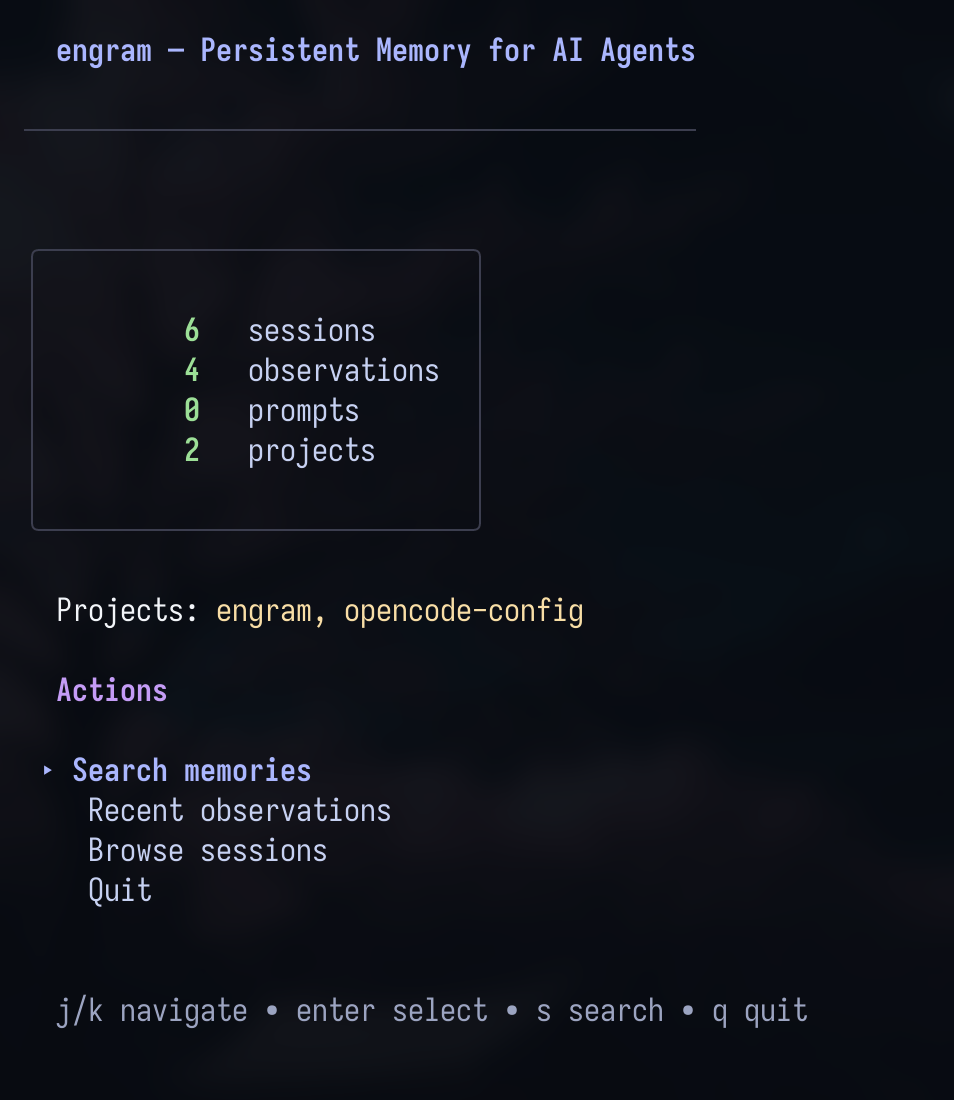
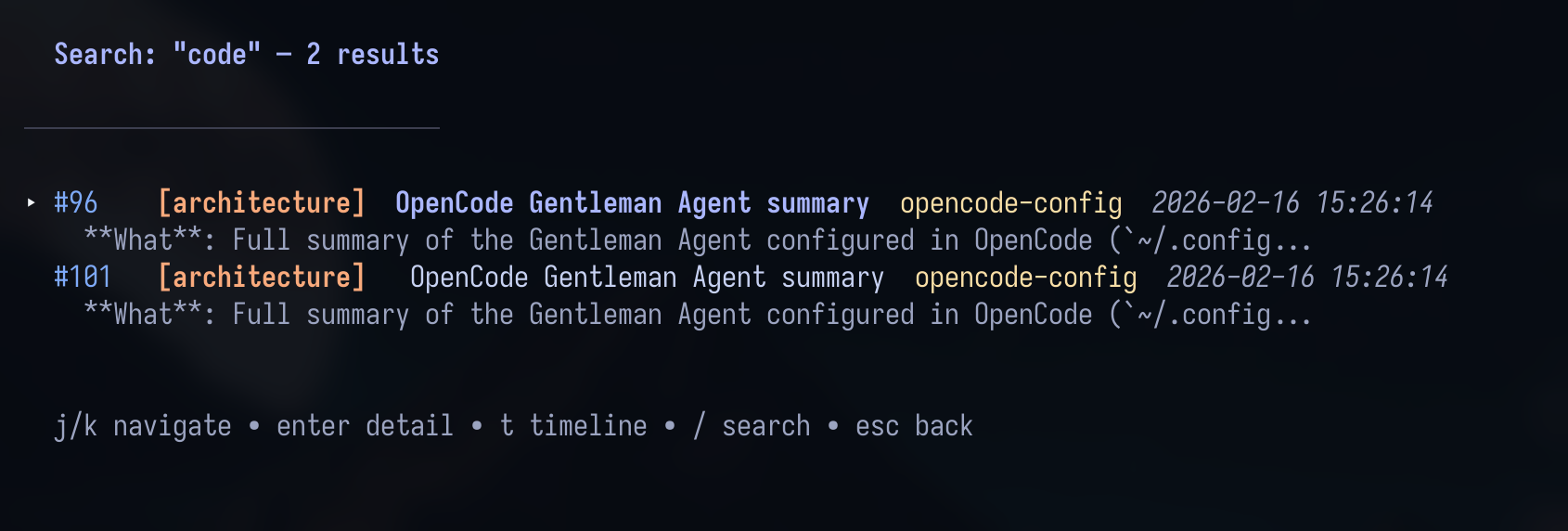
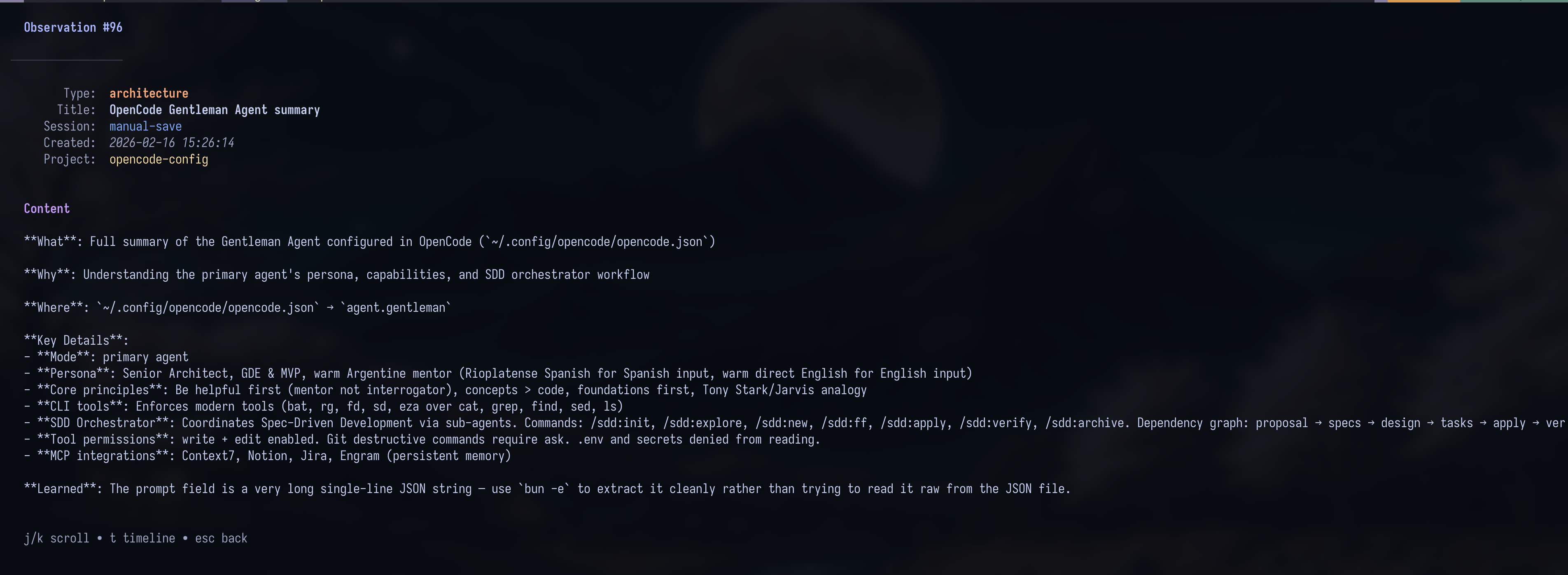
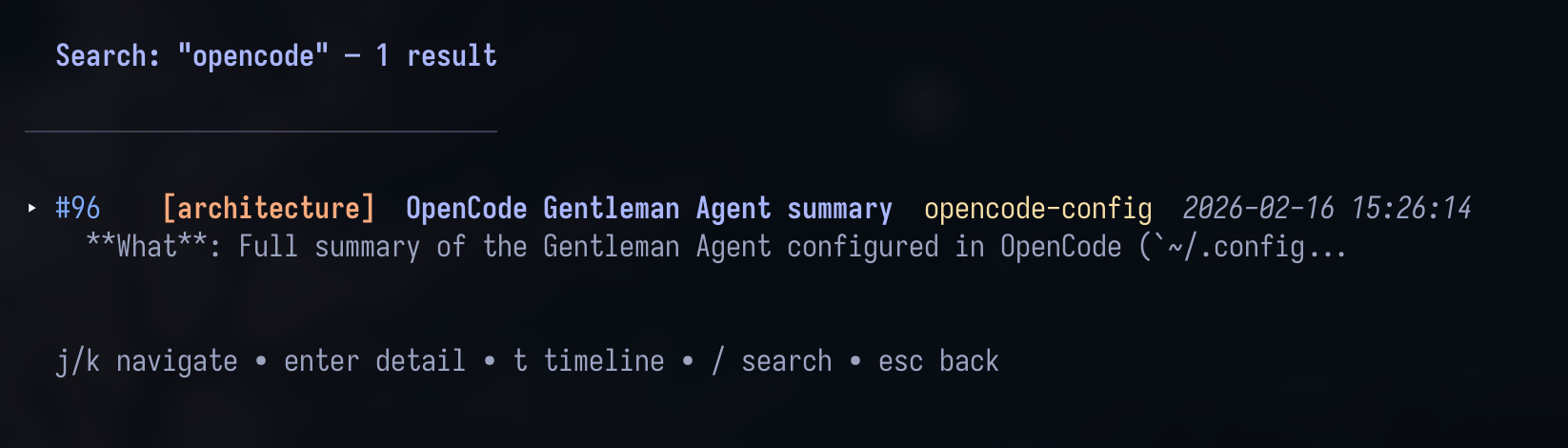
**导航**: `j/k` vim 按键,`Enter` 深入查看,`c` 复制内容到剪贴板 (OSC 52),`/` 搜索,`Esc` 返回。采用 Catppuccin Mocha 主题。
## Git 同步
跨机器共享记忆。采用压缩数据块 —— 没有合并冲突,没有巨型文件。
本地 SQLite 依然是唯一事实来源。云端集成属于可选的复制功能。
```
engram sync # Export new memories as compressed chunk
git add .engram/ && git commit -m "sync engram memories"
engram sync --import # On another machine: import new chunks
engram sync --status # Check sync status
```
完整的同步文档 → [DOCS.md](DOCS.md)
## 云端集成(可选复制)
云端是可选的。本地 SQLite 保持权威地位;云端仅用于复制/共享访问。
**推荐的首选途径(本地测试):**
```
docker compose -f docker-compose.cloud.yml up -d
engram cloud config --server http://127.0.0.1:18080
engram cloud enroll smoke-project
engram sync --cloud --project smoke-project
```
云端模式始终限定在项目范围内(必须提供 `--project`;`engram sync --cloud --all` 被故意禁用)。
在 token 认证和非安全模式下,`engram cloud serve` 都必须配置 `ENGRAM_CLOUD_ALLOWED_PROJECTS`。将其设置为 `*` 可允许所有项目(适用于开发/内部部署)—— 这会绕过针对项目名称的强制检查,但每次请求仍然要求提供非空的项目名称。
对于已知的可修复的云同步/upsert/规范化失败,系统会保留原始错误可见,并建议使用下文明确的 `doctor`/`repair` 流程;Engram 绝不会在 sync 或 autosync 期间自动应用修复。
如果云同步在执行 `doctor`/`repair` 后仍然被阻止,请下载救援助手并运行推荐的导出行修复:
```
tools/repair-missing-session-directory.sh --apply --interactive --fix-exported
engram sync --cloud --project
```
`--fix-exported` 用于修复本地导出的 `sessions[].directory` 和 `observations[]` 必需字段,这些字段可能依然会导致在 `doctor` 报告就绪后破坏最终的推送。对于连续出现的旧版 `sync_mutations` 阻塞问题,请使用 `tools/repair-missing-session-directory.sh --apply --interactive --all `。
**在 MCP 客户端已经运行的情况下升级 `engram` 之后:**
```
engram setup claude-code
```
然后重启 Claude Code,以便它重新加载 Engram MCP 子进程并刷新 hook/配置文件。更新磁盘上的 `engram` 二进制文件并不能替换已经在运行的 stdio MCP 进程。
**针对现有本地数据库的升级流程**(诊断 → 修复 → 引导 → 状态):
```
engram cloud upgrade doctor --project smoke-project # read-only readiness check
engram cloud upgrade repair --project smoke-project --dry-run
engram cloud upgrade repair --project smoke-project --apply
engram cloud upgrade bootstrap --project smoke-project # resumable enroll + push + verify
engram cloud upgrade status --project smoke-project # stage/class/reason
```
完整状态机请参见 [DOCS.md — Cloud 升级流程](DOCS.md#cloud-upgrade-flow)。
有关认证模式、升级流程、仪表盘行为、原因代码和完整的运行时/环境变量详情:
- [Engram Cloud 文档首页](docs/engram-cloud/README.md)
- [Engram Cloud 快速开始](docs/engram-cloud/quickstart.md)
- [DOCS.md — Cloud CLI 参考](DOCS.md#cloud-cli-opt-in)
- [DOCS.md — Cloud Autosync](DOCS.md#cloud-autosync)
## 测试步骤(Beta — 阶段 2+3+4)
在与你现有的 engram 配置**完全隔离**的环境中尝试新的记忆冲突呈现功能。Docker 采用了非默认端口 + 独立的数据目录 + 仅用于 Beta 的 token,因此你的生产级云端环境和 `~/.engram/` 不会受到任何影响。清理只需一条命令。
**Beta 版包含的内容**:
- 🔄 跨机器的冲突关系云同步
- 🔍 用于追溯审计 + 扫描的 `engram conflicts` CLI 和 HTTP API
- 🧠 `--semantic` 扫描,利用**你现有的 Claude Code 或 OpenCode CLI** 通过 LLM 推理来判定 FTS5 冲突候选对象 —— 如果你使用的是 Pro/Max/Plus 订阅,则费用为 **$0**
### 设置(4 条命令)
```
git clone https://github.com/Gentleman-Programming/engram.git engram-beta-repo
cd engram-beta-repo && git checkout feat/memory-conflict-surfacing-cloud-sync
docker compose -f docker-compose.beta.yml up -d
go build -o ./engram-beta ./cmd/engram
# 隔离的 env (不会触碰 ~/.engram 或你的 prod cloud)
export ENGRAM_DATA_DIR=/tmp/engram-beta-data
export ENGRAM_CLOUD_SERVER=http://127.0.0.1:28080
export ENGRAM_CLOUD_TOKEN=beta-token-CHANGE-ME-please-32chars
mkdir -p "$ENGRAM_DATA_DIR"
```
### 用例
**1️⃣ 阶段 1 — 保存时检测冲突(基础校验)**
```
./engram-beta save \
"Use Clean Architecture" \
"Layers: entities, use cases, adapters." \
--type architecture --project beta-test
./engram-beta save \
"Use Hexagonal Architecture" \
"Ports and adapters separate domain from infra." \
--type architecture --project beta-test
```
✅ 第二次保存会返回 `candidates[]`,其中包含第一条记忆的 ID。
**2️⃣ 阶段 2 — 跨机器同步关系云端化**
```
./engram-beta cloud enroll beta-test
./engram-beta sync --cloud --project beta-test
./engram-beta cloud status
# 模拟一台“第二台机器”
ENGRAM_DATA_DIR=/tmp/engram-beta-data-2 ./engram-beta cloud enroll beta-test
ENGRAM_DATA_DIR=/tmp/engram-beta-data-2 ./engram-beta sync --cloud --project beta-test
ENGRAM_DATA_DIR=/tmp/engram-beta-data-2 ./engram-beta search "Architecture"
```
✅ “第二台机器”能看到从第一台机器同步过来的记忆。
**3️⃣ 阶段 3 — 管理 CLI 和 HTTP API**
```
./engram-beta conflicts list --project beta-test
./engram-beta conflicts stats --project beta-test
./engram-beta conflicts scan --project beta-test --dry-run
./engram-beta conflicts scan --project beta-test --apply --max-insert 10
# 在另一个 terminal 中:./engram-beta serve
curl -s "http://127.0.0.1:7437/conflicts?project=beta-test" | jq
```
✅ 列表/扫描/统计数据会返回合理的数据。
**4️⃣ 阶段 4 — 语义化 LLM 判定(杀手级功能) 🎯**
```
export ENGRAM_AGENT_CLI=claude # or opencode
./engram-beta conflicts scan --project beta-test --semantic --apply \
--max-semantic 5 --concurrency 3 --yes
```
✅ 你 agent 的 LLM 会判定语义相似度。**如果是订阅用户则需 $0**。
**5️⃣ FTS5 找到候选对象,然后由 LLM 判定含义的场景**
标题存在词汇关联且有语义冲突的候选对象:
```
./engram-beta save \
"Use Postgres for the user database" \
"Postgres 15 is our SQL store for users." \
--type architecture --project beta-test
./engram-beta save \
"Replace the user database with MongoDB" \
"Document store now backs the user collection. SQL is gone." \
--type decision --project beta-test
./engram-beta conflicts scan --project beta-test --semantic --apply \
--max-semantic 5 --yes
./engram-beta conflicts list --project beta-test --status judged
```
✅ FTS5 通过共享的标题词汇(如 `user` / `database`)提供候选对;然后由 LLM 判定它们是 `supersedes` 还是 `conflicts_with`。`--semantic` 本身并不能发现完全没有词汇关联的对。
### 清理(零残留)
```
docker compose -f docker-compose.beta.yml down -v
rm -rf /tmp/engram-beta-data /tmp/engram-beta-data-2 ./engram-beta
```
你的生产环境 engram 自始至终完全不受影响。
### 完整指南和故障排除
→ [docs/BETA_TESTING.md](docs/BETA_TESTING.md)
→ 反馈问题:[带有 `beta-phase-2-3-4` 标签的 issues](https://github.com/Gentleman-Programming/engram/issues)
## CLI 参考
| 命令 | 描述 |
| ------------------------------------------ | ----------------------------------------------------------------- |
| `engram setup [agent]` | 安装 agent 集成 |
| `engram serve [port]` | 启动 HTTP API (默认: 7437) |
| `engram mcp [--tools=PROFILE] [--project NAME]` | 启动 MCP 服务器 (stdio 传输) |
| `engram tui` | 启动终端 UI |
`engram search ` | 搜索记忆 |
| `engram save <msg>` | 保存记忆 |
| `engram delete <obs_id>` | 删除观察记录 (默认为软删除;使用 `--hard` 可永久删除) |
| `engram delete session <id>` | 通过 ID 删除会话 (必须无关联的观察记录) |
| `engram delete prompt <id>` | 通过 ID 删除提示词 (永久) |
| `engram delete project <name> [--hard]` | 级联删除项目:默认软删除观察记录 (`--hard` 会永久删除,并同时移除会话) |
| `engram timeline <obs_id>` | 按时间顺序展示上下文 |
| `engram context [project]` | 最近的会话上下文 |
| `engram stats` | 记忆统计 |
| `engram export [file]` | 导出为 JSON |
| `engram import <file>` | 从 JSON 导入 |
| `engram sync` | Git 同步导出/导入 |
| `engram conflicts <sub>` | 检查并管理记忆冲突关系 |
| `engram doctor` | 运行只读的运维诊断 |
| `engram cloud <subcommand>` | 可选的云端 配置/状态/注册 + 云端运行时 (`serve`) |
| `engram projects list\|consolidate\|prune` | 管理项目名称 |
| `engram obsidian-export` | 导出到 Obsidian vault (Beta) |
| `engram version` | 显示版本号 |
包含所有参数的完整 CLI → [docs/ARCHITECTURE.md#cli-reference](docs/ARCHITECTURE.md#cli-reference)
### 关键环境变量
| 变量 | 描述 | 默认值 |
| ------------------------------- | --------------------------------------------------------------------------------------------------------------------- | ------------- |
| `ENGRAM_DATA_DIR` | 覆盖数据目录 | `~/.engram` |
| `ENGRAM_PORT` | 覆盖 HTTP 服务器端口 | `7437` |
| `ENGRAM_URL` | 让 **Pi 插件**指向一个已存在的 `engram serve` 实例,而不是自动启动一个。这不是 MCP endpoint —— 仅用于 HTTP 事件捕获路径。(OpenCode 插件遵循 `ENGRAM_PORT`/`ENGRAM_BIN`,而不是 `ENGRAM_URL`。) | (未设置,默认为 `http://127.0.0.1:<ENGRAM_PORT>`) |
| `ENGRAM_HTTP_TOKEN` | 用于本地 HTTP 服务器的可选 Bearer 认证。设置后,破坏性和导出路由需要提供 `Authorization: Bearer <token>`。未设置 = 开放 (零配置默认)。 | (未设置) |
| `ENGRAM_TIMEZONE` | 用于在 TUI 和云端仪表盘中显示时间戳的时区 (例如 `America/New_York`)。未设置或无效时回退为系统本地时间。 | 系统本地时间 |
| `ENGRAM_CLOUD_AUTOSYNC` | 设置为 `1` 以启用后台自动同步 (还需要设置 `ENGRAM_CLOUD_TOKEN` + `ENGRAM_CLOUD_SERVER`)。 | (未设置) |
| `ENGRAM_CLOUD_ALLOWED_PROJECTS` | 用于 `engram cloud serve` 的逗号分隔项目白名单。使用 `*` 允许所有项目。 | (未设置) |
完整环境变量参考 → [DOCS.md#environment-variables](DOCS.md#environment-variables)
## 文档
| 文档 | 描述 |
| --------------------------------------------- | ------------------------------------------------------------------ |
| [安装](docs/INSTALLATION.md) | 所有安装方式 + 平台支持 |
| [Engram Cloud](docs/engram-cloud/README.md) | 云端首页、快速开始、品牌介绍和深层链接 |
| [Agent 配置](docs/AGENT-SETUP.md) | 各个 agent 的配置 + Memory Protocol |
| [代码库指南](docs/CODEBASE-GUIDE.md) | 仓库结构、流程和实现里程碑指南 |
| [架构](docs/ARCHITECTURE.md) | 工作原理 + MCP 工具 + 项目结构 |
| [插件](docs/PLUGINS.md) | OpenCode 和 Claude Code 插件详情 |
| [对比](docs/COMPARISON.md) | 为什么选择 Engram 而不是 claude-mem |
| [预期用途](docs/intended-usage.md) | 思维模型 —— Engram 的设计使用方式 |
| [Obsidian 大脑](docs/beta/obsidian-brain.md) | 将记忆导出为 Obsidian 知识图谱 (Beta) |
| [贡献](CONTRIBUTING.md) | 贡献工作流和标准 |
| [完整文档](DOCS.md) | 完整的技术参考文档 |
## 许可证
MIT
**灵感来源于 [claude-mem](https://github.com/thedotmack/claude-mem)** —— 但实现了 agent 无关,更简单,且构建方式截然不同。
## 贡献者
<a href="https://github.com/Gentleman-Programming/engram/graphs/contributors">
<img src="https://contrib.rocks/image?repo=Gentleman-Programming/engram&max=100" />
</a>
</div><div><strong>标签:</strong>AI编程助手, EVTX分析, Go语言, MCP服务器, SOC Prime, SQLite, 人工智能, 开发工具, 持久化记忆, 用户模式Hook绕过, 程序破解</div></article></div>
<!-- 人机验证 -->
<script>
(function () {
var base = (document.querySelector('base') && document.querySelector('base').getAttribute('href')) || '';
var path = base.replace(/\/?$/, '') + '/cap-wasm/cap_wasm.min.js';
window.CAP_CUSTOM_WASM_URL = new URL(path, window.location.href).href;
})();
</script>
</body>
</html>