MetrPikeska/roundabout-exit-detection
GitHub: MetrPikeska/roundabout-exit-detection
基于 YOLOv8 和 ByteTrack 的环形交叉口视觉分析流水线,将车辆检测、轨迹跟踪与 GIS 空间分析整合,输出速度、流向、密度及冲突等多维交通指标。
Stars: 0 | Forks: 0
# 环形交叉路口交通分析 – 基于视觉的 GIS 流水线
使用 YOLOv8 + ByteTrack 结合地理参考单应性标定,对环形交叉路口的车辆和行人进行自动检测、跟踪和空间分析。输出包括 GeoPackage/GeoTIFF 图层,可直接导入 QGIS 或 PostGIS。
## 结果
处理了**5分钟**的航拍镜头(Kopřivnice,Obránců míru 交叉路口):
| 指标 | 值 |
|---|---|
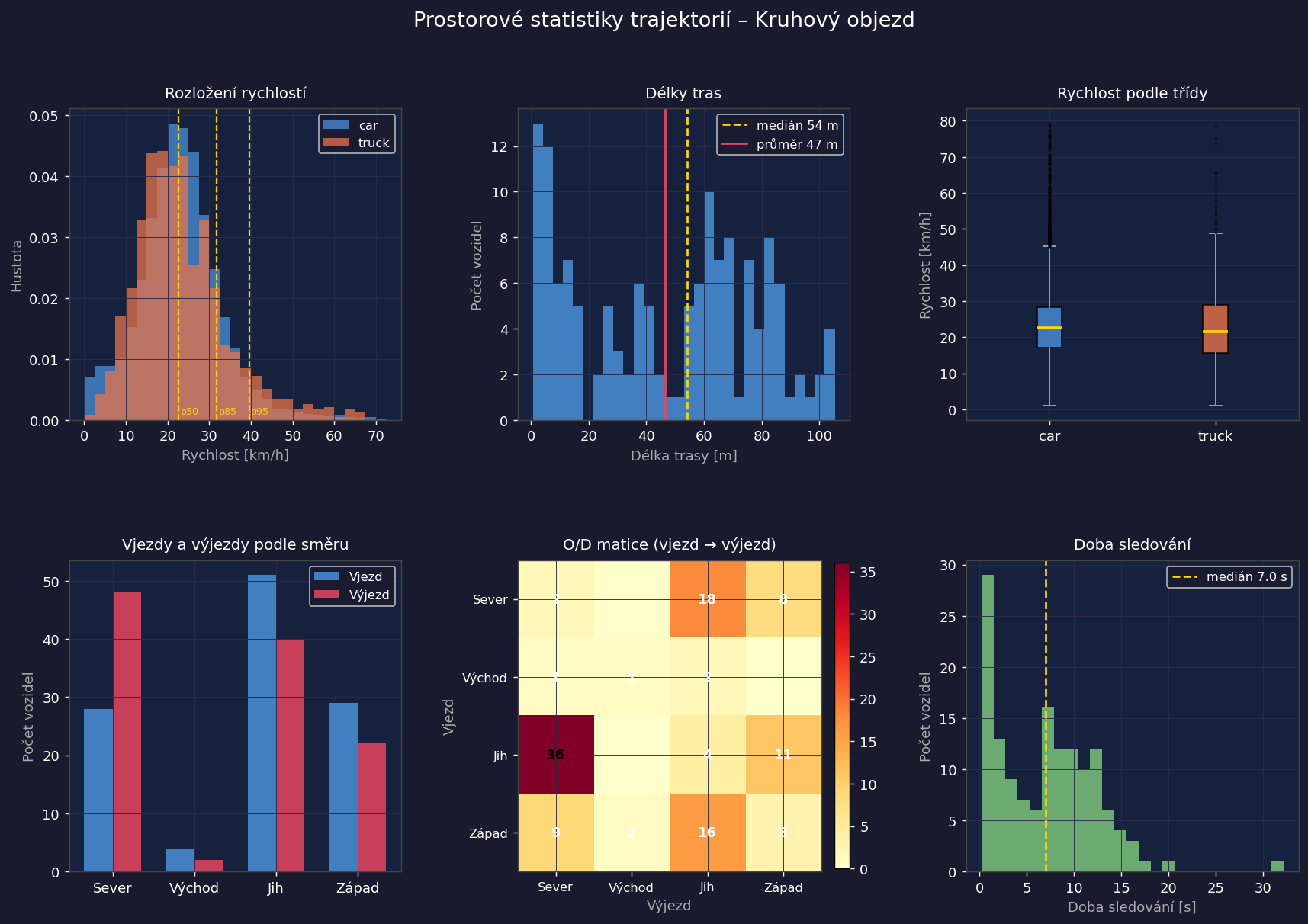
| 检测到的车辆(轨迹 ≥ 5 个点) | **142**(130辆乘用车,12辆卡车) |
| 平均运行速度 | **23.1 km/h** |
| 第85百分位速度 | **31.9 km/h** |
| 平均轨迹长度 | **46.6 m** |
| 记录的驶离交叉总次数 | 5分钟内 **93** 次 |
| 高峰流量 | **23 辆/分钟**(第4分钟) |
| 主要 O/D 流向 | SW(西南)入口 → NE(东北)入口(25辆车,26 %) |
| 出口加速度(驶离阶段) | **29.8 km/h**,而驶近时为 20.8 km/h |
| 检测到的车辆-行人冲突 | **139**(132次 SW 横穿,7次 NE 横穿) |
**单应性标定:** 来自 ČÚZK 正射影像的 11 个地面控制点(QGIS,S-JTSK EPSG:5514)。
平均重投影误差:**0.51 m**,最大 **0.97 m**。
速度估计未与 GPS 参考进行验证。对 3 个经过的样本进行人工比对:误差在约 ±3 km/h 范围内一致。
## 输出示例
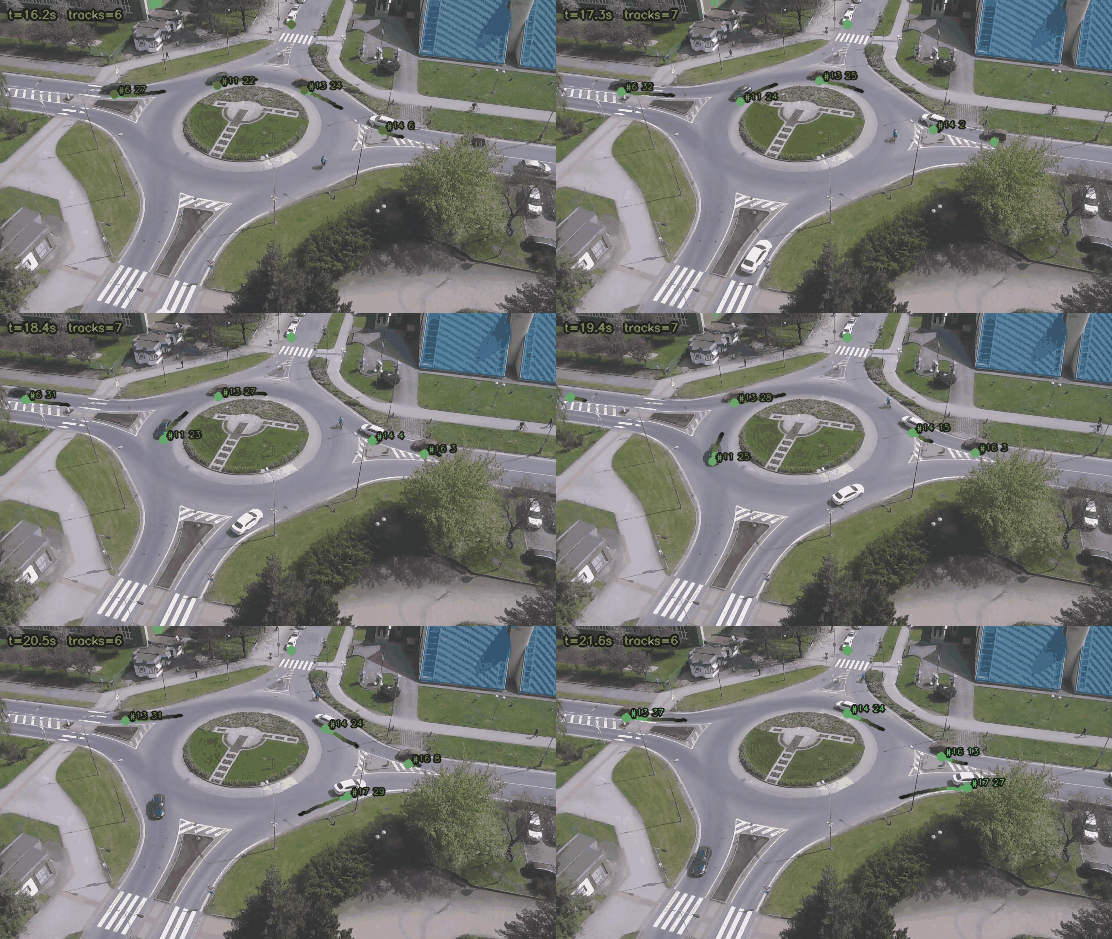
**车辆跟踪回放(YOLOv8 + ByteTrack,带有瞬时速度的轨迹拖尾):**
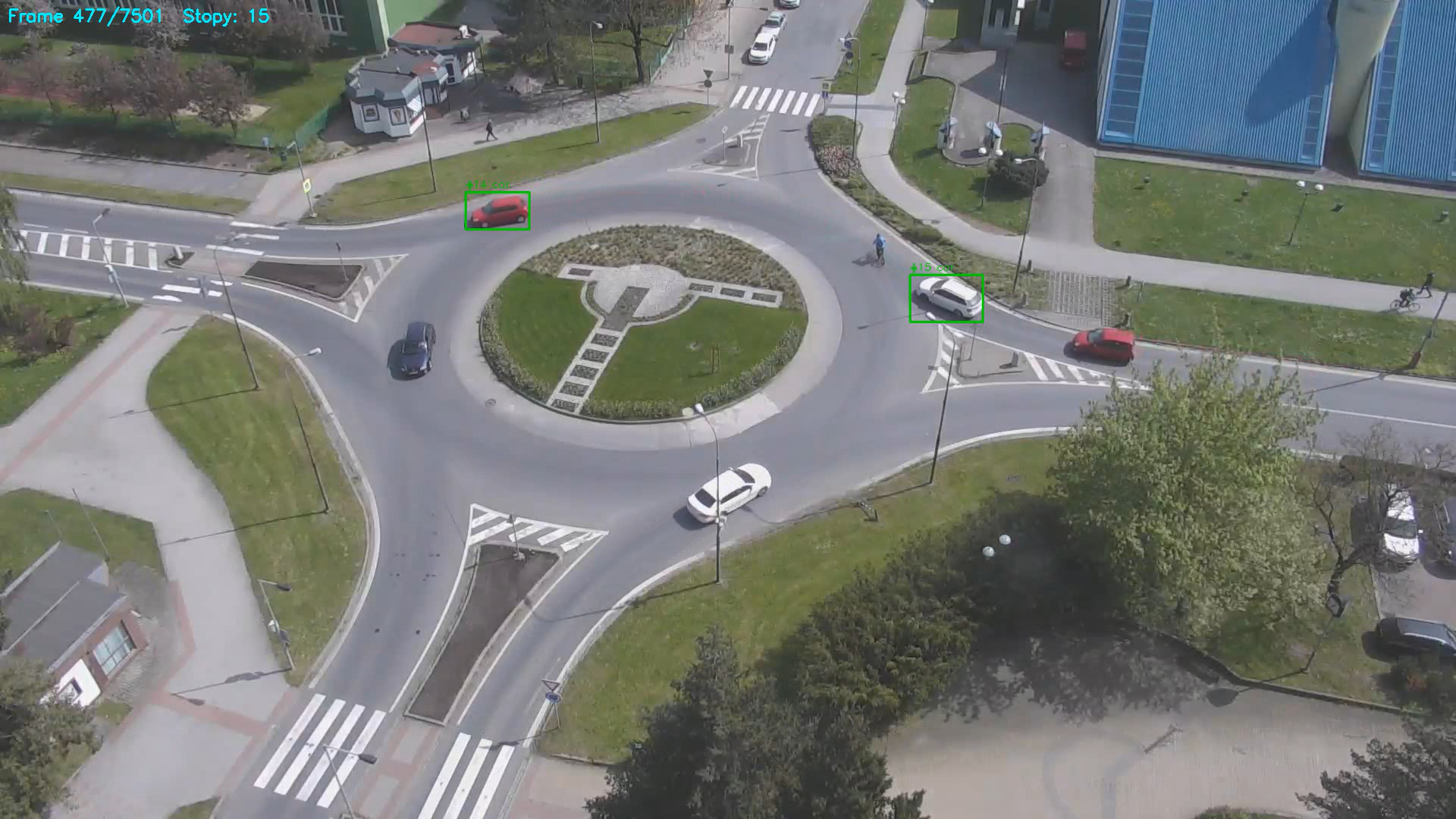
**检测输出帧:**
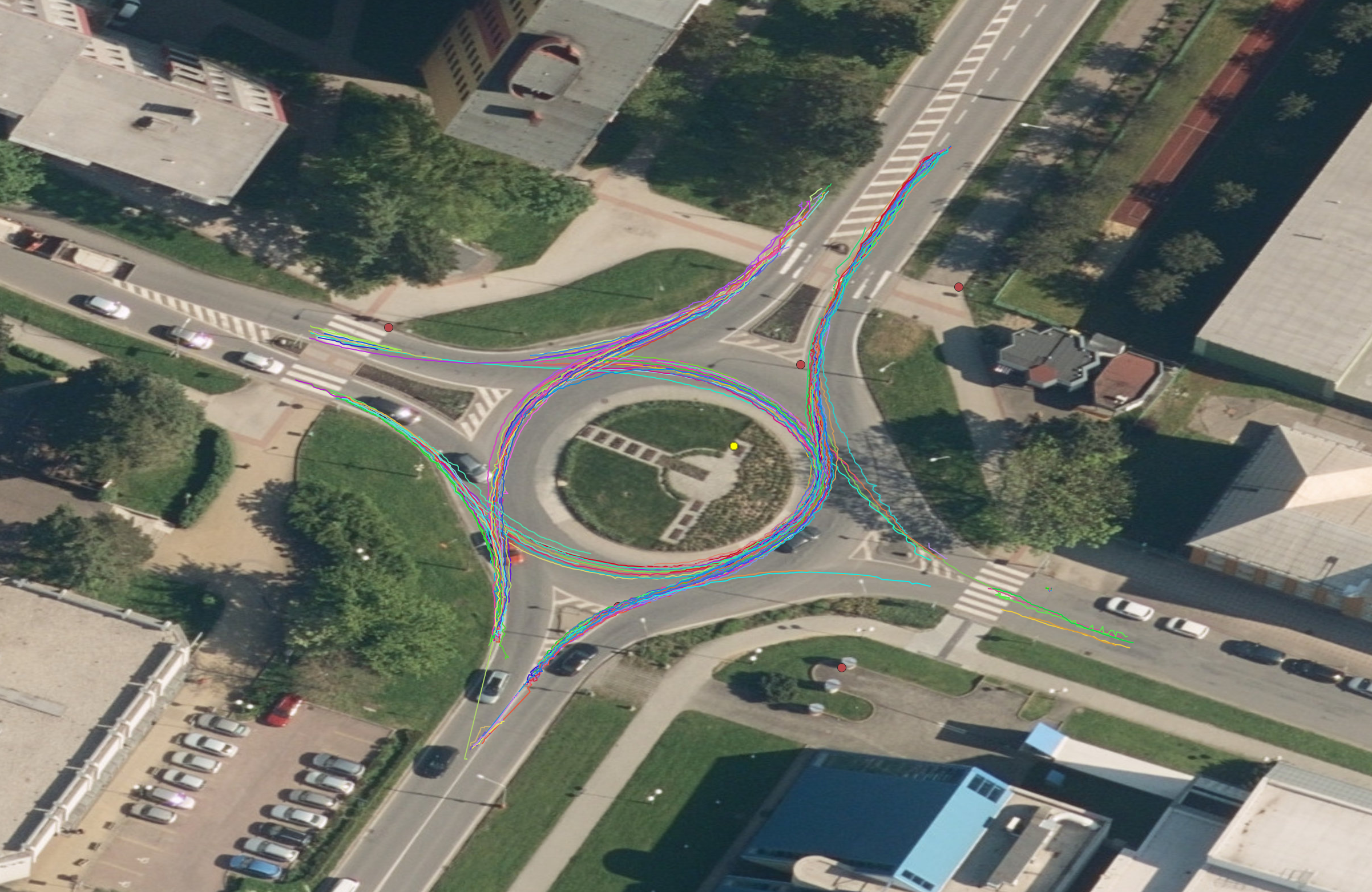
**GIS 可视化 – 正射影像上的轨迹(QGIS):**
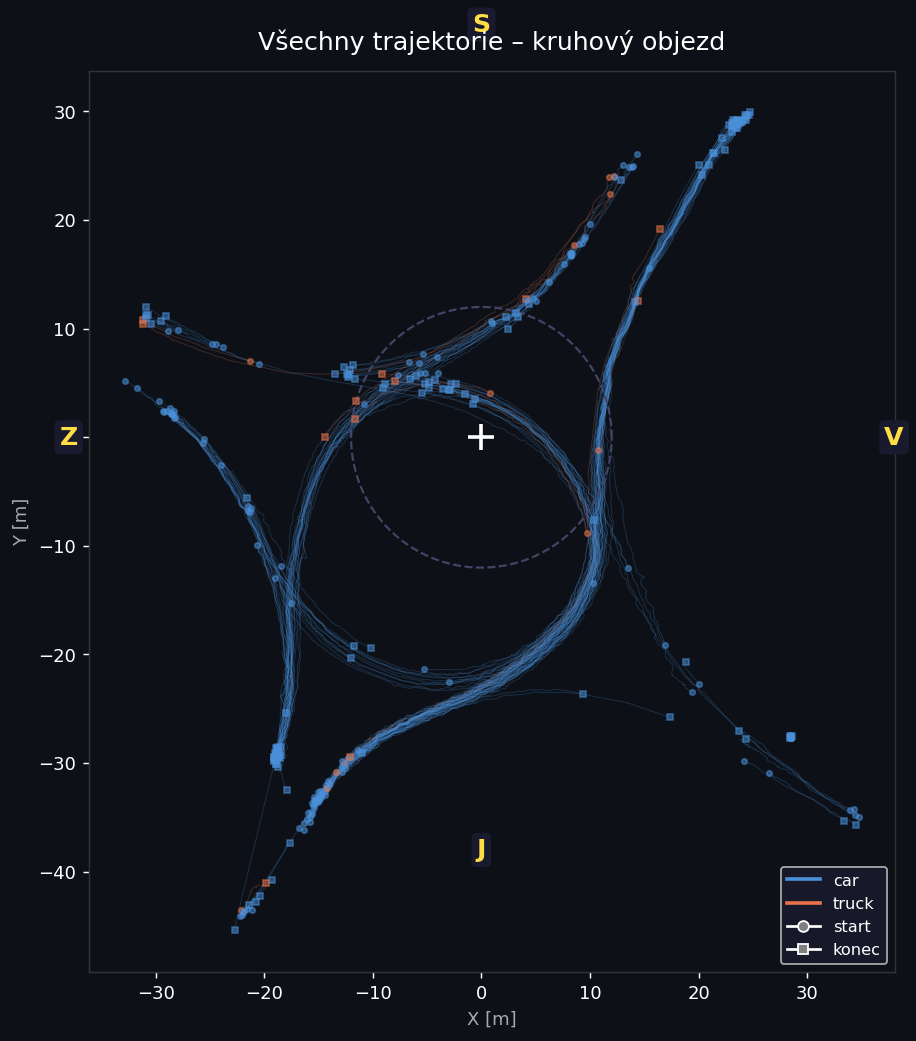
## 空间统计
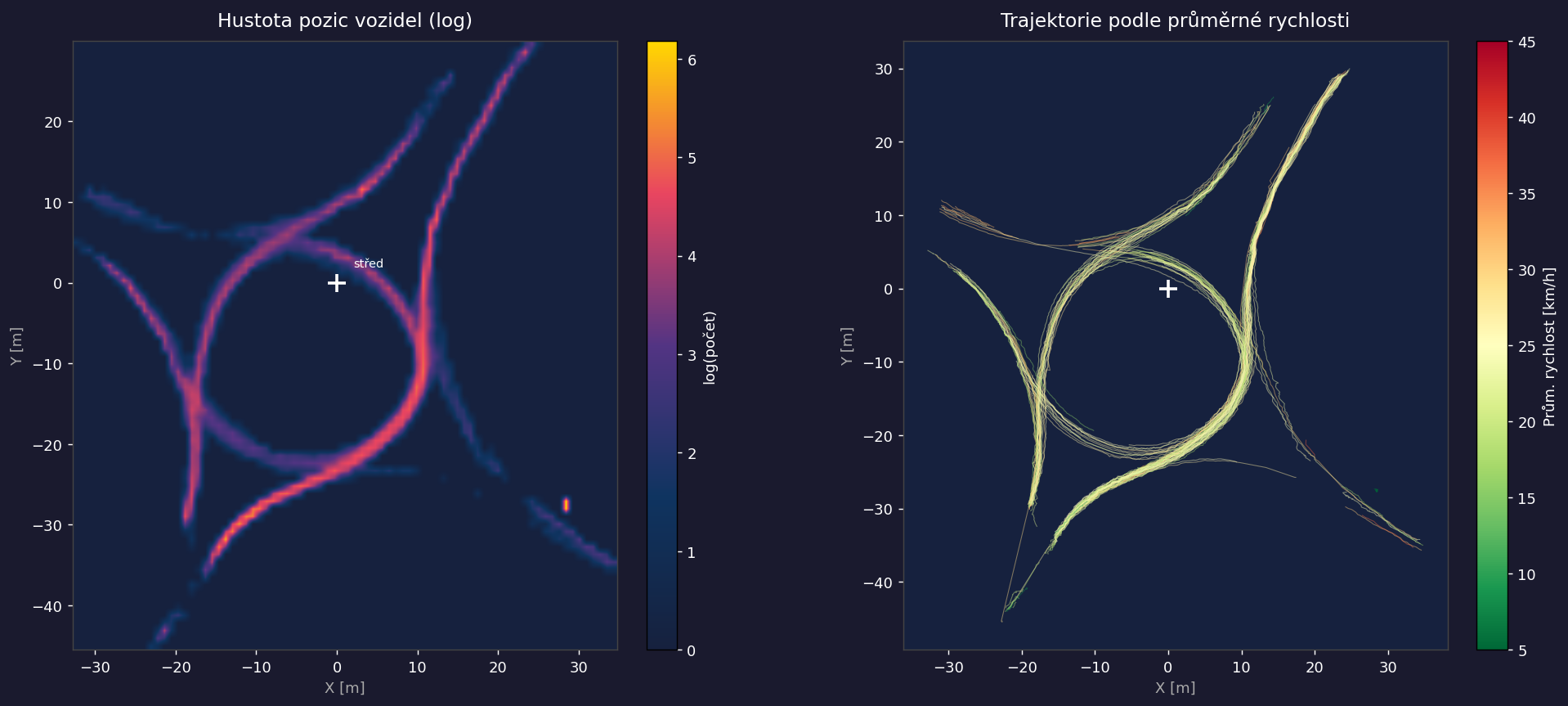
`spatial_stats.py` 读取 `data/tracks.pkl` 并在 `output/` 中生成三种可视化图表。
```
python spatial_stats.py
```
## 项目结构
该项目为不同的分析目标提供了**两个独立的工作流**:
```
roundabout-exit-detection/
│
│ ── Workflow A: Exit counting (pixel-space) ──────────────────
├── define_exclusion.py # interactive exclusion zone definition
├── 01_detect_and_count.py # YOLOv8 + pixel polygons → CSV
│ └── output/car_crossings.csv (flow per exit per minute)
│
│ ── Workflow B: GIS tracking pipeline ────────────────────────
├── extract_frame.py # frame extraction for calibration
├── calibrate.py # GCP clicking → homography.npy
├── detect_track.py # YOLOv8 + ByteTrack + homography → pkl
├── speed_estimator.py # speed computation module (importable)
├── export_geo.py # tracks.pkl → GeoPackage (QGIS/PostGIS)
│
│ ── Analysis modules ─────────────────────────────────────────
├── spatial_stats.py # spatial statistics + visualisations
│ └── output/stats_*.png
├── od_matrix.py # origin–destination matrix between arms
│ └── output/od_matrix.csv
├── speed_profile.py # speed profile per phase (approach/circulating/departure)
│ └── output/speed_profile.csv + speed_profile.png
├── heatmap.py # movement density → GeoTIFF + PNG preview
│ └── output/heatmap.tif (EPSG:4326) + heatmap_preview.png
├── pedestrian_conflicts.py # vehicle × pedestrian conflicts at crossings
│ └── output/conflicts.csv
├── export_postgis.py # export tracks + conflicts → PostGIS schema
│
├── data/
│ ├── frames/ # extracted calibration frames
│ ├── gcp/ # GCP shapefile (EPSG:4326, 11 points)
│ ├── gcps.csv # GCP table (pixel + world coordinates)
│ ├── homography.npy # 3×3 homography matrix (gitignored)
│ ├── tracks.pkl # track history {id: [(x, y, frame)]} (gitignored)
│ └── tracks.gpkg # GeoPackage: tracks + positions layers (gitignored)
├── output/
│ ├── car_crossings.csv
│ ├── od_matrix.csv
│ ├── speed_profile.csv + .png
│ ├── heatmap.tif + heatmap_preview.png
│ ├── conflicts.csv
│ └── stats_*.png
└── requirements.txt
```
## 安装说明
```
python -m venv .venv
source .venv/bin/activate # Linux / macOS
# .venv\Scripts\Activate.ps1 # Windows PowerShell
pip install -r requirements.txt
```
**GPU(推荐):**
```
pip install torch torchvision torchaudio --index-url https://download.pytorch.org/whl/cu121
pip install -r requirements.txt
```
## 流水线
### 步骤 1 – 帧提取
```
python extract_frame.py "data/recording.avi"
```
保存 `data/frames/frame_0000s.png`、`frame_0060s.png`、… 并将第 0 帧复制为 `frame_ref.png` 用于标定。
### 步骤 2 – 地面控制点
填充 `data/gcps.csv`。列 `world_x_m` 和 `world_y_m` 是相对于交叉路口中心的以米为单位的坐标:
```
id,description,pixel_x,pixel_y,world_x_m,world_y_m,lon_wgs84,lat_wgs84
1,ne_entry_kerb,,,−12.5,38.2,,
2,se_lane_marking,,,42.1,5.0,,
```
有关从 QGIS 获取坐标的信息,请参见**第 4 节**。
### 步骤 3 – 单应性标定
```
python calibrate.py
```
显示参考帧并提示按顺序点击 GCP。确认后保存:
- `data/homography.npy` – 单应性矩阵
- 像素坐标回写到 `data/gcps.csv`
目标重投影误差:平均值 < 0.5 m。数值高于 2 m 表示存在问题。
### 步骤 4 – 检测与跟踪
```
python detect_track.py
python detect_track.py --model yolov8s.pt --conf 0.30 --device 0
```
输出:
- `data/tracks.pkl` – 世界坐标系下的轨迹历史
- `data/tracks_annotated.mp4` – 标注后的视频
### 步骤 5 – GIS 导出
编辑 `export_geo.py`:将 `REF_X_SJTSK` 和 `REF_Y_SJTSK` 设置为交叉路口中心的实际 S-JTSK 坐标(见第 4 节)。
```
python export_geo.py
```
`data/tracks.gpkg` 包含两个图层:
- **tracks** – 每辆车一条 LineString(速度、类别、时间戳)
- **positions** – 每次检测为一个 Point
### 步骤 6 – 分析模块
独立运行任何模块:
```
python od_matrix.py # origin–destination matrix
python speed_profile.py # speed by phase
python heatmap.py # movement density GeoTIFF
python pedestrian_conflicts.py # vehicle × pedestrian conflicts (full video)
python spatial_stats.py # combined visualisations
```
### 步骤 7 – PostGIS 导出
```
python export_postgis.py --db gis --user postgres --drop
```
在 EPSG:4326 中创建带有空间索引的 `roundabout` 模式以及 `tracks`、`positions`、`conflicts` 表。有关连接选项,请参见 `export_postgis.py --help`。
## 从 QGIS 获取 GCP 坐标
### QGIS(推荐 – 亚米级精度)
1. 打开 QGIS → 项目 → 属性 → CRS → 设置为 **EPSG:5514**(S-JTSK/Krovak East North)
2. 添加正射影像底图(WMS/WMTS):
- ČÚZK 正射影像:`https://ags.cuzk.cz/arcgis1/services/ORTOFOTO/MapServer/WMSServer`
3. 导航至交叉路口
4. 从状态栏读取交叉路口中心坐标 → 这些即为 `REF_X_SJTSK`、`REF_Y_SJTSK`
5. 对于每个 GCP,在帧图像上点击并计算:
- `world_x_m = gcp_easting − REF_X_SJTSK`
- `world_y_m = gcp_northing − REF_Y_SJTSK`
### 坐标转换(Python)
```
from pyproj import Transformer
t = Transformer.from_crs("EPSG:4326", "EPSG:5514", always_xy=True)
x_sjtsk, y_sjtsk = t.transform(lon, lat)
```
## 在 QGIS 中打开 tracks.gpkg
1. **图层 → 添加图层 → 添加矢量图层** → 选择 `data/tracks.gpkg`
2. 添加两个图层(tracks + positions)
3. 将项目 CRS 设置为 **EPSG:4326** 或 **EPSG:5514**
4. 要可视化速度:右键点击 tracks 图层 → 属性 → 符号化 → 渐变 → 字段 `speed_avg_kmh`
## 注意事项
- 单应性精度仅限于道路表面平面。在具有强烈透视畸变的帧边缘附近的车辆,其位置精度可能会降低。
- `speed_estimator.py` 会过滤掉低于 1 km/h(静止车辆)和高于 80 km/h(错误检测)的速度。
- FPS 通过 `cap.get(cv2.CAP_PROP_FPS)` 从视频中自动读取。
- `yolov8n.pt` 在首次运行时自动下载(约 6 MB)。`yolov8s.pt`(约 22 MB)提供更高的检测精度。
标签:ByteTrack, GeoJSON, GeoPackage, GeoTIFF, GIS, PostGIS, QGIS, Shapely, YOLOv8, 交通流量分析, 冲突检测, 凭据扫描, 单应性矩阵, 地理配准, 多边形ROI, 数据导出CSV, 智能交通系统, 热力图, 状态机, 环形交叉路口, 目标检测, 空间分析, 行人检测, 计算机视觉, 车辆追踪, 轨迹分析, 逆向工具, 速度估算