zilliztech/memsearch
GitHub: zilliztech/memsearch
一个以 Markdown 为唯一事实来源、基于 Milvus 向量检索的跨平台 AI Agent 语义记忆系统。
Stars: 2399 | Forks: 209
 memsearch
面向 AI 编程助手的跨平台语义记忆。












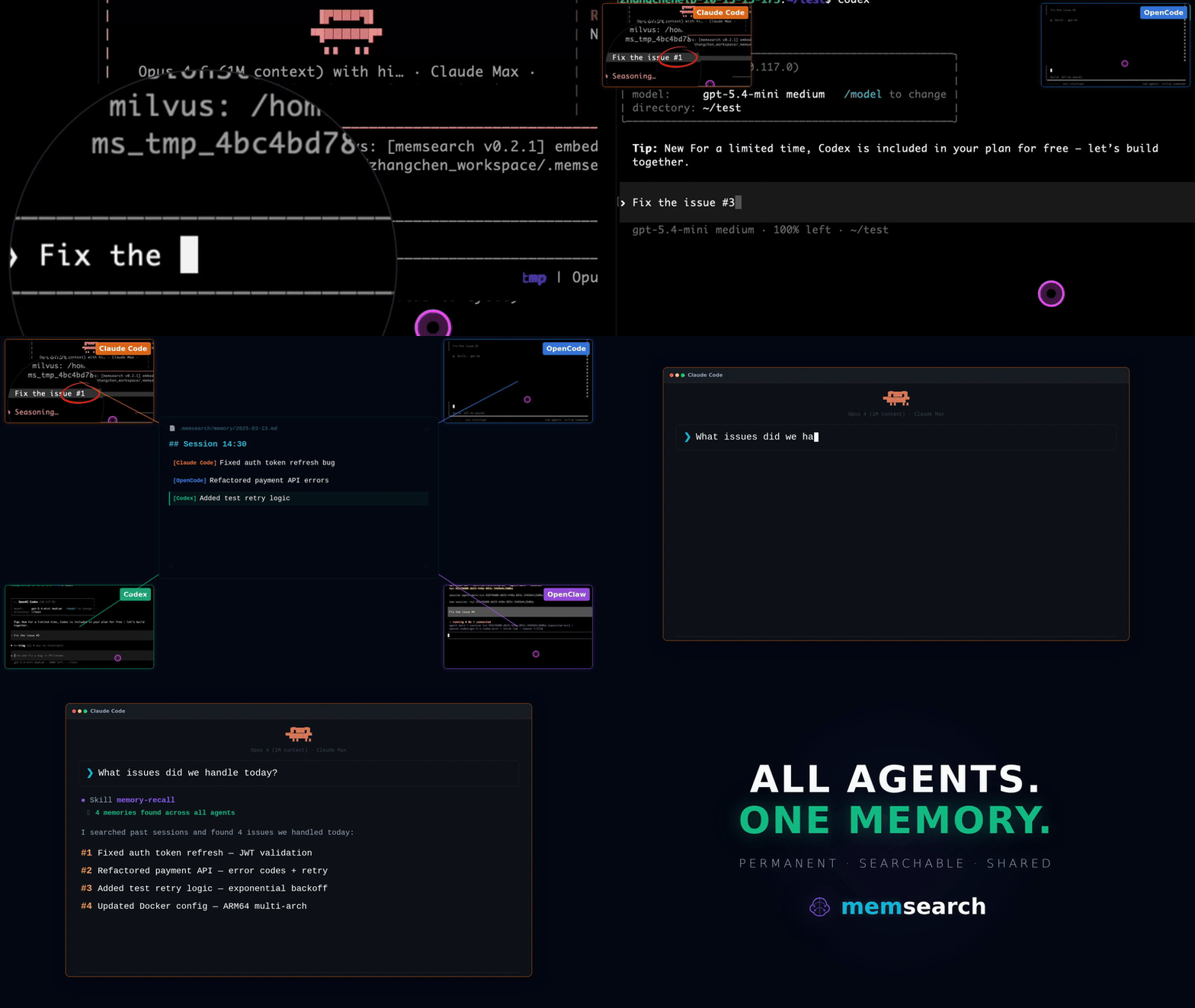
### 为什么选择 memsearch?
- 🌐 **全平台,同一记忆** — 记忆可在 [Claude Code](plugins/claude-code/README.md)、[OpenClaw](plugins/openclaw/README.md)、[OpenCode](plugins/opencode/README.md) 和 [Codex CLI](plugins/codex/README.md) 之间无缝流转。在某个 agent 中的对话会成为其他所有 agent 中可搜索的上下文——无需额外设置
- 👥 **面向 Agent 用户**,只需安装插件即可零配置获得持久化记忆;**面向 Agent 开发者**,可使用完整的 [CLI](https://zilliztech.github.io/memsearch/cli/) 和 [Python API](https://zilliztech.github.io/memsearch/python-api/),将记忆与 harness engineering 构建到你自己的 agent 中
- 📄 **Markdown 是唯一事实来源** — 灵感源自 [OpenClaw](https://github.com/openclaw/openclaw)。你的记忆只是普通的 `.md` 文件——人类可读、可编辑、可进行版本控制。Milvus 作为“影子索引”:一个派生的、可重建的缓存
- 🔍 **渐进式检索、混合搜索、智能去重、实时同步** — 3 层召回(search → expand → transcript);dense vector + BM25 sparse + RRF reranking;SHA-256 内容哈希跳过未更改的内容;文件监视器实时自动索引
## 🧑💻 面向 Agent 用户
选择你的平台,安装插件,即可完成。每个插件会自动捕获对话,并在零配置下提供语义检索。
### 面向 Claude Code 用户
```
# 安装
/plugin marketplace add zilliztech/memsearch
/plugin install memsearch
# 重启 Claude Code 以激活插件
```
重启后,只需像往常一样与 Claude Code 聊天。该插件会自动捕获每一轮对话。
**验证是否生效** — 在进行几次对话后,检查你的记忆文件:
```
ls .memsearch/memory/ # you should see daily .md files
cat .memsearch/memory/$(date +%Y-%m-%d).md
```
**召回记忆** — 两种触发方式:
```
/memory-recall what did we discuss about Redis?
```
或者直接自然地提问——当 Claude 感知到问题需要历史记录时,会自动调用该技能:
```
We discussed Redis caching before, what was the TTL we chose?
```
### 面向 OpenClaw 用户
```
# 从 ClawHub 安装
openclaw plugins install clawhub:memsearch
openclaw gateway restart
```
安装后,在 TUI 中像往常一样聊天即可。插件会自动捕获每一轮对话。
**验证是否生效** — 记忆文件存储在 agent 的工作区中:
```
# 对于主 agent:
ls ~/.openclaw/workspace/.memsearch/memory/
# 对于其他 agent(例如 work):
ls ~/.openclaw/workspace-work/.memsearch/memory/
```
**召回记忆** — 两种触发方式:
```
/memory-recall what was the batch size limit we set?
```
或者直接自然地提问——当 LLM 感知到问题需要历史记录时,会自动调用记忆工具:
```
We discussed batch size limits before, what did we decide?
```
🔧 面向 OpenCode 用户
```
// In ~/.config/opencode/opencode.json
{ "plugin": ["@zilliz/memsearch-opencode"] }
```
安装后,在 TUI 中像往常一样聊天即可。一个后台 daemon 会自动捕获对话。
**验证是否生效:**
```
ls .memsearch/memory/ # daily .md files appear after a few conversations
```
**召回记忆** — 两种触发方式:
```
/memory-recall what did we discuss about authentication?
```
或者直接自然地提问——当 LLM 感知到问题需要历史记录时,会自动调用记忆工具:
```
We discussed the authentication flow before, what was the approach?
```
🔧 面向 Codex CLI 用户
```
# 安装
bash memsearch/plugins/codex/scripts/install.sh
codex --yolo # needed for ONNX model network access
```
安装后,像往常一样聊天即可。Hooks 会自动捕获并总结每一轮对话。
**验证是否生效:**
```
ls .memsearch/memory/
```
**召回记忆** — 使用该技能:
```
$memory-recall what did we discuss about deployment?
```
### ⚙️ 配置(所有平台)
所有插件共享同一个 memsearch 后端。只需配置一次,即可在所有平台生效。
#### Embedding
默认使用 **ONNX bge-m3** — 在本地 CPU 上运行,无需 API key,完全免费。首次启动时,模型(约 558 MB)会从 HuggingFace Hub 下载。
```
memsearch config set embedding.provider onnx # default — local, free
memsearch config set embedding.provider openai # needs OPENAI_API_KEY
memsearch config set embedding.provider ollama # local, any model
```
#### Milvus 后端
只需更改 `milvus_uri`(以及可选的 `milvus_token`),即可在部署模式之间切换:
**Milvus Lite**(默认)— 零配置,单文件。非常适合新手入门:
```
# 开箱即用,无需设置
memsearch config get milvus.uri # → ~/.memsearch/milvus.db
```
⭐ **Zilliz Cloud**(推荐)— 完全托管,[提供免费套餐](https://cloud.zilliz.com/signup?utm_source=github&utm_medium=referral&utm_campaign=memsearch-readme) — [立即注册](https://cloud.zilliz.com/signup?utm_source=github&utm_medium=referral&utm_campaign=memsearch-readme) 👇:
```
memsearch config set milvus.uri "https://in03-xxx.api.gcp-us-west1.zillizcloud.com"
memsearch config set milvus.token "your-api-key"
```
⭐ 注册免费的 Zilliz Cloud 集群
你可以在 Zilliz Cloud [注册](https://cloud.zilliz.com/signup?utm_source=github&utm_medium=referral&utm_campaign=memsearch-readme),以获取免费的集群和 API key。
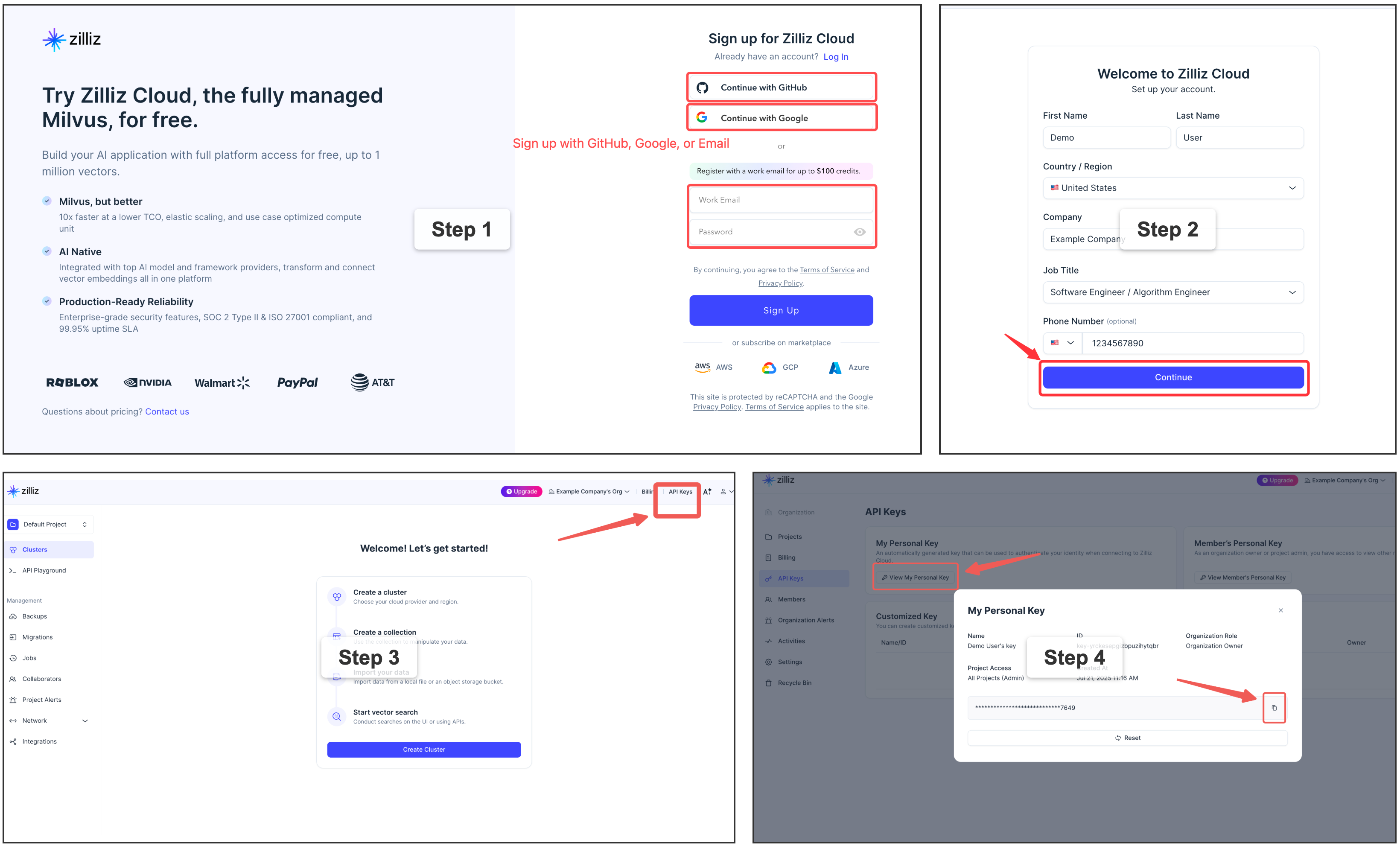
自托管 Milvus Server (Docker) — 适用于高级用户
适用于拥有专用 Milvus 实例的多用户或团队环境。需要 Docker。请参阅[官方安装指南](https://milvus.io/docs/install_standalone-docker-compose.md)。
```
memsearch config set milvus.uri http://localhost:19530
```
## 🛠️ 面向 Agent 开发者
除了即插即用的插件之外,memsearch 还提供了完整的 **CLI 和 Python API**,用于在你自己的 agent 中构建记忆功能。无论你是要为自定义 agent 添加持久化上下文、构建具有记忆增强的 RAG pipeline,还是进行 harness engineering——驱动这些插件的核心引擎都可以作为库来使用。
### 🏗️ 架构概览
```
┌──────────────────────────────────────────────────────────────┐
│ 🧑💻 For Agent Users (Plugins) │
│ ┌──────────┐ ┌──────────┐ ┌──────────┐ ┌────────┐ ┌──────┐ │
│ │ Claude │ │ OpenClaw │ │ OpenCode │ │ Codex │ │ Your │ │
│ │ Code │ │ Plugin │ │ Plugin │ │ Plugin │ │ App │ │
│ └────┬─────┘ └────┬─────┘ └────┬─────┘ └───┬────┘ └──┬───┘ │
│ └─────────────┴────────────┴───────────┴────────┘ │
├────────────────────────────┬─────────────────────────────────┤
│ 🛠️ For Agent Developers │ Build your own with ↓ │
│ ┌─────────────────────────┴──────────────────────────────┐ │
│ │ memsearch CLI / Python API │ │
│ │ index · search · expand · watch · compact │ │
│ └─────────────────────────┬──────────────────────────────┘ │
│ ┌─────────────────────────┴──────────────────────────────┐ │
│ │ Core: Chunker → Embedder → Milvus │ │
│ │ Hybrid Search (BM25 + Dense + RRF) │ │
│ └────────────────────────────────────────────────────────┘ │
├──────────────────────────────────────────────────────────────┤
│ 📄 Markdown Files (Source of Truth) │
│ memory/2026-03-27.md · memory/2026-03-26.md · ... │
└──────────────────────────────────────────────────────────────┘
```
插件位于 CLI/API 层之上。API 负责处理索引、搜索和 Milvus 同步。Markdown 文件始终是唯一事实来源——Milvus 是一个可重建的影子索引。插件层之下的所有内容,都是你作为 Agent 开发者将要使用的。
### 插件如何工作(以 Claude Code 为例)
**捕获 — 在每一轮对话之后:**
```
User asks question → Agent responds → Stop hook fires
│
┌────────────────────┘
▼
Parse last turn
│
▼
LLM summarizes (haiku)
"- User asked about X."
"- Claude did Y."
│
▼
Append to memory/2026-03-27.md
with anchor
│
▼
memsearch index → Milvus
```
**召回 — 3 层渐进式搜索:**
```
User: "What did we discuss about batch size?"
│
▼
L1 memsearch search "batch size" → ranked chunks
│ (need more?)
▼
L2 memsearch expand
→ full .md section
│ (need original?)
▼
L3 parse-transcript → raw dialogue
```
### 📄 Markdown 作为唯一事实来源
```
Plugins append ──→ .md files ←── human editable
│
▼
memsearch watch (live watcher)
│
detects file change
│
▼
re-chunk changed .md
│
hash each chunk (SHA-256)
│
┌───────────┴───────────┐
▼ ▼
hash unchanged? hash is new/changed?
→ skip (no API call) → embed → upsert to Milvus
│ │
└───────────┬───────────┘
▼
┌──────────────────┐
│ Milvus (shadow) │
│ always in sync │
│ rebuildable │
└──────────────────┘
```
### 📦 安装
```
# 安装为全局 CLI 工具 — 当您主要使用
# `memsearch` 命令或任何 agent 插件(Claude Code, Codex,
# OpenClaw, OpenCode)时推荐此方式,它们都会调用 CLI。
uv tool install memsearch # via uv
pipx install memsearch # via pipx
pip install memsearch # plain pip
# 安装为项目依赖 — 如果您想从自己的 Python 代码中导入
# `memsearch`,请使用此方式(例如通过 MemSearch 类)。
uv add memsearch # via uv, adds to pyproject.toml
pip install memsearch # into an activated venv
```
可选的 Embedding 提供商
```
# 作为 CLI 工具(推荐 — 本地 ONNX,无需 API key)
uv tool install "memsearch[onnx]"
pipx install "memsearch[onnx]"
pip install "memsearch[onnx]"
# 作为项目依赖
uv add "memsearch[onnx]"
# 其他选项:[openai], [google], [voyage], [jina], [mistral], [ollama], [local], [all]
```
### 🐍 Python API — 赋予你的 Agent 记忆
```
from memsearch import MemSearch
mem = MemSearch(paths=["./memory"])
await mem.index() # index markdown files
results = await mem.search("Redis config", top_k=3) # semantic search
scoped = await mem.search("pricing", top_k=3, source_prefix="./memory/product")
print(results[0]["content"], results[0]["score"]) # content + similarity
```
完整示例 — 带有记忆的 Agent (OpenAI) — 点击展开
```
import asyncio
from datetime import date
from pathlib import Path
from openai import OpenAI
from memsearch import MemSearch
MEMORY_DIR = "./memory"
llm = OpenAI() # your LLM client
mem = MemSearch(paths=[MEMORY_DIR]) # memsearch handles the rest
def save_memory(content: str):
"""Append a note to today's memory log (OpenClaw-style daily markdown)."""
p = Path(MEMORY_DIR) / f"{date.today()}.md"
p.parent.mkdir(parents=True, exist_ok=True)
with open(p, "a") as f:
f.write(f"\n{content}\n")
async def agent_chat(user_input: str) -> str:
# 1. Recall — search past memories for relevant context
memories = await mem.search(user_input, top_k=3)
context = "\n".join(f"- {m['content'][:200]}" for m in memories)
# 2. Think — call LLM with memory context
resp = llm.chat.completions.create(
model="gpt-4o-mini",
messages=[
{"role": "system", "content": f"You have these memories:\n{context}"},
{"role": "user", "content": user_input},
],
)
answer = resp.choices[0].message.content
# 3. Remember — save this exchange and index it
save_memory(f"## {user_input}\n{answer}")
await mem.index()
return answer
async def main():
# Seed some knowledge
save_memory("## Team\n- Alice: frontend lead\n- Bob: backend lead")
save_memory("## Decision\nWe chose Redis for caching over Memcached.")
await mem.index() # or mem.watch() to auto-index in the background
# Agent can now recall those memories
print(await agent_chat("Who is our frontend lead?"))
print(await agent_chat("What caching solution did we pick?"))
asyncio.run(main())
```
Anthropic Claude 示例 — 点击展开
```
pip install memsearch anthropic
```
```
import asyncio
from datetime import date
from pathlib import Path
from anthropic import Anthropic
from memsearch import MemSearch
MEMORY_DIR = "./memory"
llm = Anthropic()
mem = MemSearch(paths=[MEMORY_DIR])
def save_memory(content: str):
p = Path(MEMORY_DIR) / f"{date.today()}.md"
p.parent.mkdir(parents=True, exist_ok=True)
with open(p, "a") as f:
f.write(f"\n{content}\n")
async def agent_chat(user_input: str) -> str:
# 1. Recall
memories = await mem.search(user_input, top_k=3)
context = "\n".join(f"- {m['content'][:200]}" for m in memories)
# 2. Think — call Claude with memory context
resp = llm.messages.create(
model="claude-sonnet-4-5-20250929",
max_tokens=1024,
system=f"You have these memories:\n{context}",
messages=[{"role": "user", "content": user_input}],
)
answer = resp.content[0].text
# 3. Remember
save_memory(f"## {user_input}\n{answer}")
await mem.index()
return answer
async def main():
save_memory("## Team\n- Alice: frontend lead\n- Bob: backend lead")
await mem.index()
print(await agent_chat("Who is our frontend lead?"))
asyncio.run(main())
```
Ollama(完全本地化,无需 API key) — 点击展开
```
pip install "memsearch[ollama]"
ollama pull nomic-embed-text # embedding model
ollama pull llama3.2 # chat model
```
```
import asyncio
from datetime import date
from pathlib import Path
from ollama import chat
from memsearch import MemSearch
MEMORY_DIR = "./memory"
mem = MemSearch(paths=[MEMORY_DIR], embedding_provider="ollama")
def save_memory(content: str):
p = Path(MEMORY_DIR) / f"{date.today()}.md"
p.parent.mkdir(parents=True, exist_ok=True)
with open(p, "a") as f:
f.write(f"\n{content}\n")
async def agent_chat(user_input: str) -> str:
# 1. Recall
memories = await mem.search(user_input, top_k=3)
context = "\n".join(f"- {m['content'][:200]}" for m in memories)
# 2. Think — call Ollama locally
resp = chat(
model="llama3.2",
messages=[
{"role": "system", "content": f"You have these memories:\n{context}"},
{"role": "user", "content": user_input},
],
)
answer = resp.message.content
# 3. Remember
save_memory(f"## {user_input}\n{answer}")
await mem.index()
return answer
async def main():
save_memory("## Team\n- Alice: frontend lead\n- Bob: backend lead")
await mem.index()
print(await agent_chat("Who is our frontend lead?"))
asyncio.run(main())
```
### ⌨️ CLI 用法
**设置:**
```
memsearch config init # interactive setup wizard
memsearch config set embedding.provider onnx # switch embedding provider
memsearch config set milvus.uri http://localhost:19530 # switch Milvus backend
```
**索引与搜索:**
```
memsearch index ./memory/ # index markdown files
memsearch index ./memory/ ./notes/ --force # re-embed everything
memsearch search "Redis caching" # hybrid search (BM25 + vector)
memsearch search "auth flow" --top-k 10 --json-output # JSON for scripting
memsearch expand # show full section around a chunk
```
**实时同步与维护:**
```
memsearch watch ./memory/ # live file watcher (auto-index on change)
memsearch compact # LLM-powered chunk summarization
memsearch stats # show indexed chunk count
memsearch reset --yes # drop all indexed data and rebuild
```
## ⚙️ 配置
Embedding 和 Milvus 后端设置 → [配置(所有平台)](#️-configuration-all-platforms)
设置优先级:内置默认值 → `~/.memsearch/config.toml` → `.memsearch.toml` → CLI flags。
## 🔗 链接
- 📖 [文档](https://zilliztech.github.io/memsearch/) — 完整的指南、API 参考和架构细节
- 🔌 [平台插件](https://zilliztech.github.io/memsearch/platforms/) — Claude Code, OpenClaw, OpenCode, Codex CLI
- 💡 [设计哲学](https://zilliztech.github.io/memsearch/design-philosophy/) — 为什么选择 Markdown,为什么选择 Milvus,竞品对比
- 🦞 [OpenClaw](https://github.com/openclaw/openclaw) — 启发 memsearch 的记忆架构
- 🗄️ [Milvus](https://milvus.io/) | [Zilliz Cloud](https://cloud.zilliz.com/signup?utm_source=github&utm_medium=referral&utm_campaign=memsearch-readme) — 驱动 memsearch 的向量数据库
## 🤝 贡献
欢迎提交 Bug 报告、功能请求和 Pull Request!请参阅[贡献指南](CONTRIBUTING.md)以了解开发环境设置、测试和插件开发说明。如有问题或讨论,请加入我们的 [Discord](https://discord.com/invite/FG6hMJStWu)。
## 📄 许可证
[MIT](LICENSE)标签:AI插件, AI编程, Claude Code, CNCF毕业项目, Codex CLI, DLL 劫持, LLM, Markdown, memsearch, OpenClaw, OpenCode, PyPI, Python, Ruby, SOC Prime, Unmanaged PE, Zilliz, 向量搜索, 大语言模型, 威胁情报, 开发工具, 开发者工具, 开源, 无后门, 独立库, 知识库, 编程助手, 记忆系统, 语义记忆, 逆向工具, 防御加固