fynnfluegge/agtx
GitHub: fynnfluegge/agtx
agtx 是一个终端看板工具,让多个 AI 编码代理在隔离的 git worktree 中并行工作,实现从想法到合并的全流程自动化管理。
Stars: 1217 | Forks: 108
# agtx
[](https://github.com/fynnfluegge/agtx/actions/workflows/ci.yml)
[](https://github.com/fynnfluegge/agtx/releases)
[](CONTRIBUTING.md)
[](https://opensource.org/licenses/Apache-2.0)
快速开始 •
功能 •
用法 •
Brainstorm 与 Sweep 技能 •
MCP Server •
插件 •
Orchestrator •
配置
## 为什么选择 agtx?
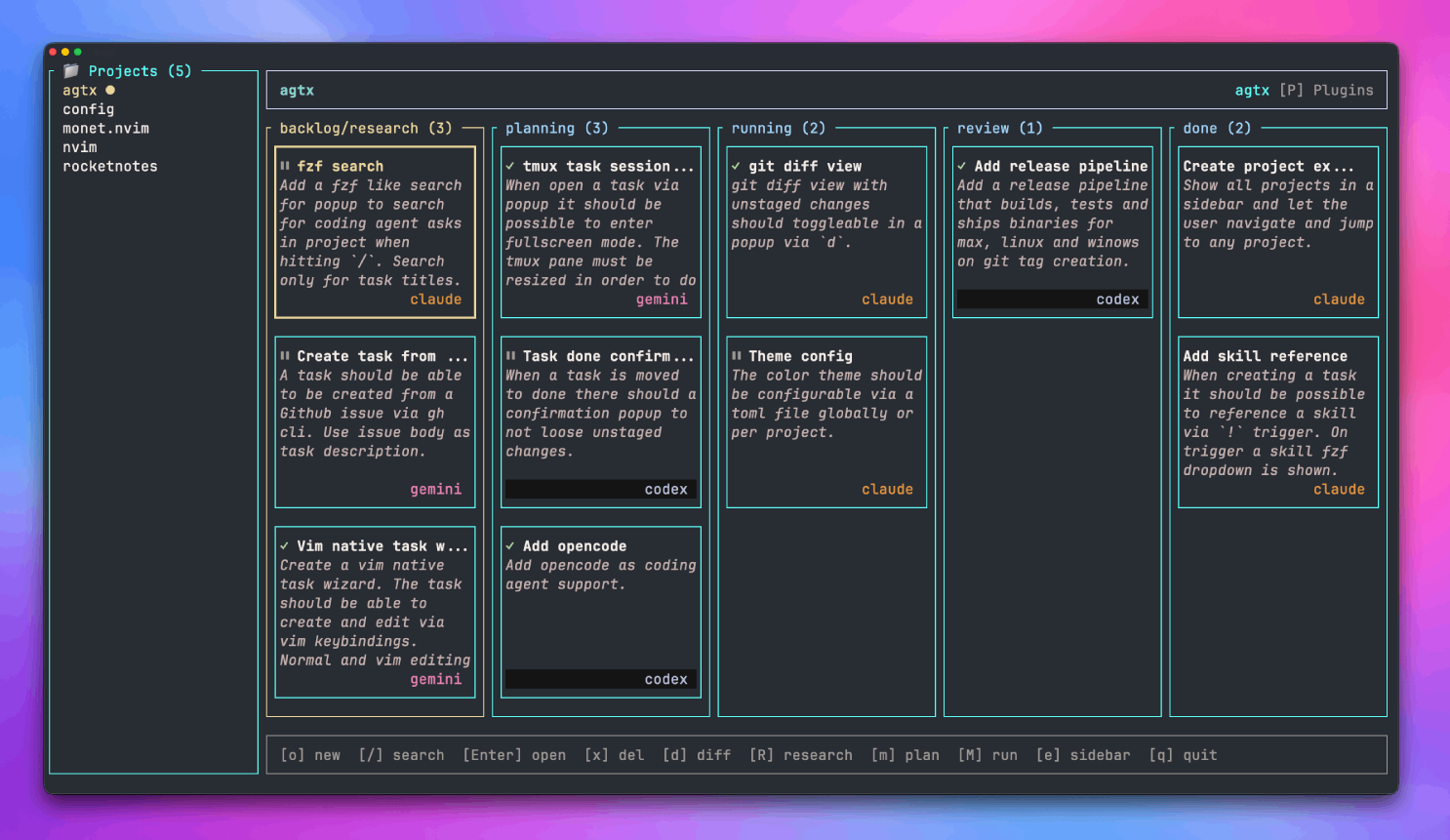
AI 编码工具通常提供单一 agent、单一任务和单一终端。agtx 为您提供了一个**看板,让多个编码 agent 并行工作**——每个 agent 都有自己的 git worktree,运行在各自的 tmux 窗口中,由一个 orchestrator agent 管理的规范驱动 (spec-driven) 工作流自主执行。
当您在会话中突然产生想法时,`/agtx:brainstorm` 可以让您的 agent 保持在探索模式——然后使用 `/agtx:sweep` 通过简单的确认步骤将对话转化为看板任务。**无需切换上下文,无需复制粘贴——想法可以直接转化为实际行动。**
借助 orchestrator,您甚至无需亲自管理看板。**AI agent 会接管任务、分配工作,并确保任务顺利完成**——涵盖规划、实现、审查和解决冲突等环节——而您只需专注于真正重要的事情:研究、定义任务以及合并更改。
## 功能
- **Orchestrator agent**:一个专门的 AI agent,通过 [MCP](https://modelcontextprotocol.io) 自主管理您的看板——将工作委派给编码 agent,推进阶段,检查合并冲突([实验性](#orchestrator-agent-experimental))
- **Brainstorm 与 Sweep 技能**:在任何编码 agent 会话中捕获想法并将其推送到看板——使用 `/agtx:brainstorm` 自由探索,使用 `/agtx:sweep` 分解并创建任务,只需一个确认步骤([详情](#brainstorm--sweep-skills))
- **多 agent 任务生命周期**:为不同的工作流阶段配置不同的 agent——例如,Gemini 负责研究,Claude 负责实现,Codex 负责审查——支持自动切换 agent
- **并行执行**:每个任务都有自己的 git worktree 和 tmux 窗口——可以同时运行任意数量的 agent
- **规范驱动插件**:支持接入 [GSD](https://github.com/fynnfluegge/get-shit-done-cc)、[Spec-kit](https://github.com/github/spec-kit)、[OpenSpec](https://github.com/Fission-AI/OpenSpec)、[BMAD](https://github.com/bmad-code-org/BMAD-METHOD)、[Superpowers](https://github.com/obra/superpowers)——或者只需一个 TOML 文件即可定义您自己的插件
- **多项目仪表盘**:通过单个 TUI 管理所有项目的 agent 会话
- **兼容工具**:[Claude Code](https://github.com/anthropics/claude-code) | [Codex](https://github.com/openai/codex) | [Gemini CLI](https://github.com/google-gemini/gemini-cli) | [OpenCode](https://github.com/sst/opencode) | [Cursor Agent](https://cursor.com/docs/cli/overview) | [Copilot](https://github.com/github/copilot-cli)
## 快速开始
```
# Install
curl -fsSL https://raw.githubusercontent.com/fynnfluegge/agtx/main/install.sh | bash
# Run in any git repository
cd your-project && agtx
```
```
# Dashboard mode — manage all projects
agtx -g
# Orchestrator mode — let an AI manage the board for you
agtx --experimental
```
```
# Install from source
cargo build --release
cp target/release/agtx ~/.local/bin/
```
### 环境要求
- **tmux** — agent 会话运行在专用的 tmux server 中
- **gh** (可选) — 用于 PR 操作的 GitHub CLI
## 用法
键盘快捷键
| 按键 | 操作 |
|-----|--------|
| `h/l` 或 `←/→` | 在列之间移动 |
| `j/k` 或 `↑/↓` | 在任务之间移动 |
| `o` | 创建新任务 |
| `R` | 进入研究模式 |
| `↩` | 打开任务(查看 agent 会话) |
| `Ctrl+f` | 全屏附加到任务的 tmux 会话 |
| `m` | 在工作流中向前移动任务 |
| `r` | 恢复任务 (Review → Running) / 向后移动 (Running → Planning) |
| `p` | 下一阶段 (Review → Planning,仅限循环插件) |
| `d` | 显示 git diff |
| `x` | 删除任务 |
| `/` | 搜索任务 |
| `P` | 选择规范驱动工作流插件 |
| `O` | 切换 orchestrator agent (`--experimental`) |
| `e` | 切换项目侧边栏 |
| `q` | 退出 |
任务创建向导
按 `o` 创建新任务。向导将引导您完成:
1. **标题** — 输入简短的任务名称
2. **插件** — 选择工作流插件(如果只有一个选项则自动跳过)
3. **提示词** — 编写包含内联引用的详细任务描述
agent 是通过 `config.toml` 在项目级别配置的(而非按任务配置)。
任务描述编辑器
在编写任务描述时,您可以内联引用文件、技能和其他任务:
| 按键 | 操作 |
|-----|--------|
| `#` 或 `@` | 模糊搜索并插入文件路径 |
| `/` | 模糊搜索并插入 agent 技能/命令(在行首或空格后) |
| `!` | 模糊搜索并插入任务引用(在行首或空格后) |
### Agent 会话
每个任务都在自己的 tmux 窗口中运行,并配有专门的编码 agent。该会话在整个任务生命周期内持久存在——您可以随时打开任务弹窗查看 agent 的实时输出,或按 `Ctrl+f` 进行全屏附加。
- **持久化上下文**:agent 的完整对话历史会在 Planning → Running → Review 期间保留
- **从 Review 恢复**:将任务移回 Running 只需重新连接到现有会话——无需重新初始化
- **内联视图**:在任何活动任务上按 `↩` 可在 TUI 内部打开可滚动的 tmux 视图
- **全屏**:按 `Ctrl+f` 直接附加到 agent 的 tmux 窗口
- **自动解决合并冲突**:当 Review 任务变为空闲时,agtx 会使用非破坏性的虚拟合并(`git merge-tree`)检查其与默认分支的合并冲突。如果检测到冲突,agent 会自动接收 `/agtx:merge-conflicts` 技能以解决冲突并重新提交
## Brainstorm 与 Sweep 技能
这两个配套技能用于在任何编码 agent 会话中捕获想法,并将其转化为 agtx 看板上的任务。
| 技能 | 命令 | 使用时机 |
|-------|---------|-------------|
| **Brainstorm** | `/agtx:brainstorm` | 探索功能想法——仅作讨论,不进行规划或实现 |
| **Sweep** | `/agtx:sweep` | 将对话结果作为任务推送到 agtx 看板 |
**典型流程:**
```
/agtx:brainstorm ← explore the idea freely
↓
/agtx:sweep ← extract tasks, confirm, push to board
↓
agtx board ← tasks appear in Backlog, ready to advance
```
Brainstorm 技能使 agent 保持在讨论模式——提出问题,探讨权衡利弊,不涉及代码或计划。当对话感觉已充分展开时,运行 `/agtx:sweep` 将结果分解为功能级别的任务,并通过单个确认步骤将它们推送到看板。
### 安装
Claude Code
```
claude plugin marketplace add fynnfluegge/agtx
claude plugin install agtx@agtx-marketplace
claude mcp add --scope user agtx -- agtx mcp-serve
```
Codex
```
codex mcp add agtx -- agtx mcp-serve
```
将其添加到您项目的 `.agents/plugins/marketplace.json` 中:
```
{
"name": "local-repo",
"plugins": [
{
"name": "agtx",
"source": {
"source": "local",
"path": "./plugins/agtx"
},
"policy": {
"installation": "AVAILABLE",
"authentication": "ON_INSTALL"
},
"category": "Productivity"
}
]
}
```
然后在任何 Codex 会话中:`@agtx:sweep` / `@agtx:brainstorm`
Gemini CLI
```
gemini mcp add agtx -- agtx mcp-serve
echo "@skills/sweep/SKILL.md" >> ~/GEMINI.md
```
Cursor
```
cursor mcp add agtx -- agtx mcp-serve
cp skills/sweep/SKILL.md ~/.cursor/rules/agtx-sweep.md
```
其他
将 `agtx mcp-serve` 注册为 MCP server,然后将 `skills/sweep/SKILL.md` 复制到您 agent 的上下文中。
## 配置
配置文件位置:`~/.config/agtx/config.toml`
### Worktree 基础分支
agtx 为每个任务创建一个新的 git worktree。默认情况下,它会按以下顺序自动检测基础分支:`main`,然后是 `master`,最后是当前分支。您可以覆盖此设置以强制指定特定基础分支(例如 `dev` 或 `develop`)。
全局 worktree 默认设置可以在此配置:
```
# ~/.config/agtx/config.toml
[worktree]
base_branch = "dev"
worktree_dir = ".worktrees" # default: ".agtx/worktrees"
```
`worktree_dir` 是创建任务 worktree 的目录(相对于项目根目录)。如果未设置,默认为 `.agtx/worktrees`。
### 项目配置
项目级设置可以放置在项目根目录的 `.agtx/config.toml` 中:
```
# Base branch used when creating new task worktrees (optional)
base_branch = "dev"
# Directory where worktrees are created (optional, default: ".agtx/worktrees")
worktree_dir = ".worktrees"
# Files to copy from project root into each new worktree (comma-separated)
# Paths are relative and preserve directory structure
copy_files = ".env, .env.local, web/.env.local"
# Shell command to run inside the worktree after creation and file copying
init_script = "scripts/init_worktree.sh"
# Shell command to run inside the worktree before removal
cleanup_script = "scripts/cleanup_worktree.sh"
```
`base_branch` 控制新任务 worktree 从哪个分支创建。如果省略或为空,agtx 会自动检测 `main`、`master`,或者回退到当前分支。
### 按阶段配置 Agent
默认情况下,所有阶段都使用 `default_agent`。您可以全局或在项目级别覆盖特定阶段的 agent:
```
# ~/.config/agtx/config.toml
default_agent = "claude"
[agents]
research = "gemini"
planning = "claude"
running = "claude"
review = "codex"
```
```
# .agtx/config.toml (project override — takes precedence over global)
[agents]
running = "codex"
```
## 插件
将任何规范驱动框架插入任务生命周期。定义命令、提示词和产物——agtx 负责阶段控制、产物轮询、worktree 同步、agent 切换和自主执行。
按 `P` 切换插件。内置 10 个插件:
| 插件 | 描述 |
|--------|-------------|
| **void** | 纯 agent 会话——无提示词或技能,任务描述预先填充到输入框中 |
| **agtx** (默认) | 内置工作流,包含各阶段的技能和提示词 |
| **agtx-terse** | 节省 token 的工作流——相同的工作流,但采用压缩输出和最少的 token |
| **gsd** | [Get Shit Done](https://github.com/fynnfluegge/get-shit-done-cc) - 带有交互式规划的结构化规范驱动开发 |
| **spec-kit** | GitHub 的 [Spec-Driven Development](https://github.com/github/spec-kit) - 规范转化为可执行产物 |
| **openspec** | [OpenSpec](https://github.com/Fission-AI/OpenSpec) - 轻量级 AI 引导的规范框架 |
| **bmad** | [BMAD Method](https://github.com/bmad-code-org/BMAD-METHOD) - 具有结构化阶段的 AI 驱动敏捷开发 |
| **superpowers** | [Superpowers](https://github.com/obra/superpowers) - 头脑风暴、计划、TDD、子 agent 驱动开发 |
| **oh-my-claudecode** | [oh-my-claudecode](https://github.com/Yeachan-Heo/oh-my-claudecode) - 包含 37 个技能和 22 个专业 agent 的多 agent 编排 |
| **agent-skills** | [Agent Skills](https://github.com/addyosmani/agent-skills) - 涵盖从规范到发布完整生命周期的生产级工程技能 |
### Agent 兼容性
命令以规范格式编写一次,并会按 agent 自动转换:
| 规范格式 (plugin.toml) | Claude / Gemini | Codex | OpenCode | Cursor |
|--------------------------|-----------------|-------|----------|--------|
| `/agtx:plan` | `/agtx:plan` | `$agtx-plan` | `/agtx-plan` | `/agtx-plan` |
| | Claude | Codex | Gemini | OpenCode | Cursor | Copilot |
|--|:------:|:-----:|:------:|:--------:|:------:|:-------:|
| **agtx** | ✅ | ✅ | ✅ | ✅ | ✅ | 🟡 |
| **gsd** | ✅ | ✅ | ✅ | ✅ | ✅ | ❌ |
| **spec-kit** | ✅ | ✅ | ✅ | ✅ | ✅ | 🟡 |
| **openspec** | ✅ | ✅ | ✅ | ✅ | ✅ | 🟡 |
| **bmad** | ✅ | ✅ | ✅ | ✅ | ✅ | 🟡 |
| **superpowers** | ✅ | ❌ | ❌ | ❌ | ❌ | ❌ |
| **oh-my-claudecode** | ✅ | ❌ | ❌ | ❌ | ❌ | ❌ |
| **agent-skills** | ✅ | 🟡 | 🟡 | 🟡 | 🟡 | 🟡 |
| **void** | ✅ | ✅ | ✅ | ✅ ✅ | ✅ |
✅ 完全支持技能、命令和提示词 · 🟡 仅支持提示词,不支持交互式技能 · ❌ 不支持
创建插件
将您的插件放置在项目根目录的 `.agtx/plugins//plugin.toml` 中(或全局路径 `~/.config/agtx/plugins//plugin.toml`)。它会自动出现在插件选择器中。
**极简示例** — 一个使用自定义斜杠命令的插件:
```
name = "my-plugin"
description = "My custom workflow"
[commands]
research = "/my-plugin:research {task}"
planning = "/my-plugin:plan"
running = "/my-plugin:execute"
review = "/my-plugin:review"
[prompts]
planning = "Task: {task}"
```
**完整参考** 包含所有可用字段:
```
name = "my-plugin"
description = "My custom workflow"
# Shell command to run in the worktree after creation, before the agent starts.
# {agent} is replaced with the agent name (claude, codex, gemini, etc.)
init_script = "npm install --prefix .my-plugin --{agent}"
# Restrict to specific agents (empty or omitted = all agents supported)
supported_agents = ["claude", "codex", "gemini", "opencode"]
# Extra directories to copy from project root into each worktree.
# Agent config dirs (.claude, .gemini, .codex, .github/agents, .config/opencode)
# are always copied automatically.
copy_dirs = [".my-plugin"]
# Individual files to copy from project root into each worktree.
# Merged with project-level copy_files from .agtx/config.toml.
copy_files = ["PROJECT.md", "REQUIREMENTS.md"]
# When true, enables Review → Planning transition via the `p` key.
# Each cycle increments the phase counter ({phase} placeholder).
# Use this for multi-milestone workflows (e.g. plan → execute → review → next milestone).
cyclic = false
# Artifact files that signal phase completion.
# When detected, the task shows a checkmark instead of the spinner.
# Supports * wildcard for one directory level (e.g. "specs/*/plan.md").
# Use {phase} for cycle-aware paths (replaced with the current cycle number).
# Omitted phases show no completion indicator.
[artifacts]
research = ".my-plugin/research.md"
planning = ".my-plugin/{phase}/plan.md"
running = ".my-plugin/{phase}/summary.md"
review = ".my-plugin/{phase}/review.md"
# Slash commands sent to the agent via tmux for each phase.
# Written in canonical format (Claude/Gemini style): /namespace:command
# Automatically transformed per agent:
# Claude/Gemini: /my-plugin:plan (unchanged)
# OpenCode: /my-plugin-plan (colon -> hyphen)
# Codex: $my-plugin-plan (slash -> dollar, colon -> hyphen)
# Omitted phases fall back to agent-native agtx skill invocation
# (e.g. /agtx:plan for Claude, $agtx-plan for Codex).
# Set to "" to skip sending a command for that phase.
# Use {phase} for cycle-aware commands (replaced with the current cycle number).
# Use {task} to inline the task description.
[commands]
preresearch = "/my-plugin:research {task}" # Used only when no research artifacts exist yet
research = "/my-plugin:discuss {phase}"
planning = "/my-plugin:plan {phase}"
running = "/my-plugin:execute {phase}"
review = "/my-plugin:review {phase}"
# Prompt templates sent as task content after the command.
# {task} = task title + description, {task_id} = unique task ID, {phase} = cycle number.
# Omitted phases send no prompt (the skill/command handles instructions).
[prompts]
research = "Task: {task}"
# Text patterns to wait for in the tmux pane before sending the prompt.
# Useful when a command triggers an interactive prompt that must appear first.
# Polls every 500ms, times out after 5 minutes.
[prompt_triggers]
research = "What do you want to build?"
# Files/dirs to copy from worktree back to project root after a phase completes.
# Triggered automatically when the phase artifact is detected (spinner → checkmark).
# Useful for sharing research artifacts (specs, plans) across worktrees.
[copy_back]
research = ["PROJECT.md", "REQUIREMENTS.md", ".my-plugin"]
# Auto-dismiss interactive prompts that appear before the prompt trigger.
# Each rule fires when ALL detect patterns are present and the pane is stable.
# Response is newline-separated keystrokes (e.g. "2\nEnter" sends "2" then Enter).
[[auto_dismiss]]
detect = ["Map codebase", "Skip mapping", "Enter to select"]
response = "2\nEnter"
```
**在每次阶段转换时会发生什么:**
1. **command** 通过 tmux 发送给 agent(例如,`/my-plugin:plan`)
2. 如果设置了 **prompt_trigger**,agtx 会等待该提示触发器出现在 tmux 面板中
3. 发送 **prompt**,其中 `{task}`、`{task_id}` 和 `{phase}` 被替换为实际值
4. agtx 轮询 **artifact** 文件——找到后,加载动画变为对勾
5. 如果配置了 **copy_back**,产物将在完成后从 worktree 复制到项目根目录
6. 如果 agent 显示为空闲(15 秒内无输出),加载动画变为暂停图标
**阶段控制:** 阶段是否可以直接从 Backlog 进入,取决于插件配置。如果某个阶段的命令或提示词包含 `{task}`,则它可以接收任务上下文并可从 Backlog 直接访问。如果两者都不包含 `{task}`,则该阶段依赖于先前的阶段,并将被阻塞直到该产物存在。例如,OpenSpec 的 `/opsx:propose {task}` 允许直接从 Backlog → Planning,但 `/opsx:apply`(无 `{task}`)会阻塞 Backlog → Running,直到 proposal 产物存在。
**预研究回退:** 当在任务上按 `R` 时,如果配置了 `preresearch` 且项目根目录中尚未存在来自 `copy_back` 的研究产物,则会使用 `preresearch` 命令代替 `research`。这允许插件在切换到常规研究命令处理后续任务之前,运行一次性项目设置(例如 `/gsd:new-project`)。如果插件根本没有研究命令(例如 OpenSpec),按 `R` 会显示警告。
**循环工作流:** 当 `cyclic = true` 时,在 Review 中按 `p` 会将任务移回 Planning,并增加阶段计数器。这支持多里程碑工作流,其中每个周期(计划 → 执行 → 审查)在单独的 `{phase}` 目录中生成产物。
**自定义技能:** 如果您的插件提供了自己的技能文件,请将它们放在插件目录中:
```
.agtx/plugins/my-plugin/
├── plugin.toml
└── skills/
├── agtx-plan/SKILL.md
├── agtx-execute/SKILL.md
└── agtx-review/SKILL.md
```
这些文件会覆盖内置的 agtx 技能,并自动部署到每个 worktree 中相应 agent 的原生发现路径(`.claude/commands/`、`.codex/skills/`、`.gemini/commands/` 等)。
## 工作原理
### 架构
```
┌─────────────────────────────────────────────────────────┐
│ agtx TUI │
├─────────────────────────────────────────────────────────┤
│ Backlog │ Planning │ Running │ Review │ Done │
│ ┌─────┐ │ ┌─────┐ │ ┌─────┐ │ ┌─────┐ │ │
│ │Task1│ │ │Task2│ │ │Task3│ │ │Task4│ │ │
│ └─────┘ │ └─────┘ │ └─────┘ │ └─────┘ │ │
└─────────────────────────────────────────────────────────┘
│ │
▼ ▼
┌─────────────────────────────────────────────────────────┐
│ tmux server "agtx" │
│ ┌────────────────────────────────────────────────────┐ │
│ │ Session: "my-project" │ │
│ │ ┌────────┐ ┌────────┐ ┌────────┐ │ │
│ │ │Window: │ │Window: │ │Window: │ │ │
│ │ │task2 │ │task3 │ │task4 │ │ │
│ │ │(Claude)│ │(Claude)│ │(Claude)│ │ │
│ │ └────────┘ └────────┘ └────────┘ │ │
│ └────────────────────────────────────────────────────┘ │
│ ┌────────────────────────────────────────────────────┐ │
│ │ Session: "other-project" │ │
│ │ ┌───────────────────┐ │ │
│ │ │ Window: │ │ │
│ │ │ some_other_task │ │ │
│ │ └───────────────────┘ │ │
│ └────────────────────────────────────────────────────┘ │
└─────────────────────────────────────────────────────────┘
│ │
▼ ▼
┌───────────────────────────┐
│ Git Worktrees │
│ .agtx/worktrees/task2/ │
│ .agtx/worktrees/task3/ │
│ .agtx/worktrees/task4/ │
└───────────────────────────┘
```
### Tmux 结构
- **Server**:所有会话都运行在名为 `agtx` 的专用 tmux 服务器上
- **Sessions**:每个项目都有自己的 tmux 会话(以项目命名)
- **Windows**:每个任务在项目的会话中都有自己的窗口
```
# List all sessions
tmux -L agtx list-sessions
# List all windows across sessions
tmux -L agtx list-windows -a
# Attach to the agtx server
tmux -L agtx attach
```
### 数据存储
- **数据库**:`~/Library/Application Support/agtx/` (macOS) 或 `~/.config/agtx/` (Linux)
- Config:`~/.config/agtx/config.toml`
- **Worktrees**:每个项目中的 `.agtx/worktrees/`
- **Tmux**:名为 `agtx` 的专用服务器,包含按项目划分的会话
## MCP Server
agtx MCP server(`agtx mcp-serve`)通过 [Model Context Protocol](https://modelcontextprotocol.io) 将看板暴露给任何编码 agent 会话。由 orchestrator agent 以及 Brainstorm 和 Sweep 技能使用。
### 模式
| 模式 | 命令 | 使用者 |
|------|---------|---------|
| **全局** | `agtx mcp-serve` | Sweep/Brainstorm 技能——适用于所有项目 |
| **项目范围** | `agtx mcp-serve
` | Orchestrator——启动时绑定到一个项目 |
在全局模式下,所有工具都需要 `project_id` 参数。请先调用 `list_projects` 来获取它。
### 工具
| 工具 | 描述 |
|------|-------------|
| `list_projects` | 列出 agtx 中索引的所有项目 |
| `list_tasks` | 列出任务,可按状态过滤 |
| `get_task` | 获取任务详情 + 用于有效转换的 `allowed_actions` |
| `create_task` | 创建单个 backlog 任务 |
| `create_tasks_batch` | 批量创建带有基于索引依赖关系的任务 |
| `update_task` | 修改 backlog 任务(标题、描述、依赖) |
| `delete_task` | 删除 backlog 任务 |
| `move_task` | 将阶段转换加入队列 |
| `get_transition_status` | 检查排队的转换是已完成还是出错 |
| `check_conflicts` | 针对默认分支的非破坏性合并冲突检查 |
| `get_notifications` | 获取待处理的 orchestrator 通知 |
| `read_pane_content` | 读取任务 tmux 面板的最后 N 行 |
| `send_to_task` | 向任务的 agent 面板发送消息 |
## Orchestrator Agent (实验性)
Orchestrator 是一个**驱动其他 AI agent 完成任务**的 AI agent。您只需将任务分拣到 Planning 或 Running——orchestrator 会接管剩余工作,推进每个任务完成其各个阶段,直到任务进入 Review 状态,等待您合并。
```
agtx --experimental # then press O
```
**它的职责:**
- 监控处于 Planning 和 Running 状态的任务
- 随着阶段完成自动推进任务 (Planning → Running → Review)
- 遵守插件阶段规则——在每次转换前检查 `allowed_actions`
- 检测卡住的任务(空闲超过 1 分钟且无阶段产物)并读取 agent 面板以诊断原因
- 推动卡住的 agent,自动回答 CLI 提示,或者在需要人类输入时向您提供原因进行升级
**您负责分拣。它负责执行。** 将任务从 Backlog 移至 Planning 或 Running——orchestrator 负责其余工作。合并由您决定。
### MCP 集成
Orchestrator 通过 [Model Context Protocol (MCP)](https://modelcontextprotocol.io) 与 agtx 通信。agtx 内置了 MCP server(`agtx serve`),通过 stdio 上的 JSON-RPC 将看板作为一组工具暴露出来。
```
┌─────────────-┐ MCP (stdio) ┌──────────────┐ SQLite ┌─────┐
│ Orchestrator │ ←─────────────────→ │ MCP Server │ ←────────────→ │ DB │
│ (Claude Code)│ │ (agtx serve) │ └──┬──┘
└──────┬───────┘ └──────────────┘ │
│ push-when-idle notifications │
┌──────┴───────┐ │
│ TUI (agtx) │ ←───────────────────────────────────────────────────--─┘
└──────────────┘
```
**工作原理:**
1. 当您按 `O` 时,TUI 会通过 `claude mcp add-json --scope local` 向 orchestrator agent 注册 MCP server
2. Orchestrator 在空闲时会接收到推送到其 tmux 面板的阶段完成通知
3. 它通过调用 `get_task` 检查 `allowed_actions`,然后调用 `move_task` 推进任务来做出反应
4. TUI 处理转换请求,执行所有副作用(agent 切换、技能部署、提示发送),并更新数据库
5. 如果某个任务已空闲超过 1 分钟且没有阶段产物,orchestrator 会收到通知——它会使用 `read_pane_content` 读取面板,然后使用 `send_to_task` 推动 agent,或者调用带有 `escalate_to_user` 的 `move_task` 来标记它以引起您的注意
6. 已升级的任务在看板上显示 `⚠` 标志;打开任务弹窗可查看原因并解除标志
7. orchestrator 停止时会清理 MCP 注册
## 贡献
欢迎贡献代码!无论是错误修复、新插件、agent 集成还是文档改进。
完整指南请参阅 [CONTRIBUTING.md](CONTRIBUTING.md)。以下是简略版:
```
# Fork & clone
git clone https://github.com//agtx && cd agtx
# Build & test
cargo build && cargo test --features test-mocks
```
### 适合新手的贡献
不知道从哪里开始?这里有一些建议:
- **编写插件** — 只需一个 `plugin.toml` 文件即可。完整参考请参见[创建插件](#plugins)
- **添加新 agent** — 集成您最喜欢的 AI 编码 CLI。有关 agent 结构的信息,请参见[架构文档](CLAUDE.md)
- **改进文档** — 发现什么不清楚的地方?通过改进它来帮助他人
- **报告 Bug** — 提交一个 [issue](https://github.com/fynnfluegge/agtx/issues)。我们总是非常感谢附带重现步骤的报告
- **浏览未解决的问题** — 查看 [`good first issue`](https://github.com/fynnfluegge/agtx/issues?q=is%3Aissue+is%3Aopen+label%3A%22good+first+issue%22) 标签以寻找适合新手的任务
## 开发
完整的架构文档和开发模式请参见 [CLAUDE.md](CLAUDE.md)。
```
# Build
cargo build
# Run tests (includes mock-based tests)
cargo test --features test-mocks
# Build release
cargo build --release
```
标签:AI编码代理, AI编程助手, Apache-2.0, Git工作树, PyRIT, Python安全, tmux, XML注入, 代码自动化, 任务编排, 可视化界面, 多智能体系统, 工作流自动化, 并行开发, 开源, 看板, 自主代理, 自动合并, 通知系统, 需求拆解