HexmosTech/git-lrc
GitHub: HexmosTech/git-lrc
一个在 Git 提交时自动触发 AI 代码审查的工具,防止 AI 生成代码引入未发现的缺陷。
Stars: 1433 | Forks: 190
| [🇩🇰 丹麦语](readme/README.da.md) | [🇪🇸 西班牙语](readme/README.es.md) | [🇮🇷 波斯语](readme/README.fa.md) | [🇫🇮 芬兰语](readme/README.fi.md) | [🇯🇵 日本語](readme/README.ja.md) | [🇳🇴 挪威语](readme/README.nn.md) | [🇵🇹 葡萄牙语](readme/README.pt.md) | [🇷🇺 俄语](readme/README.ru.md) | [🇦🇱 阿尔巴尼亚语](readme/README.sq.md) | [🇨🇳 中文](readme/README.zh.md) | [🇮🇳 印地语](readme/README.hi.md) |









git-lrc
免费的微型 AI 代码审查,在 commit 时运行
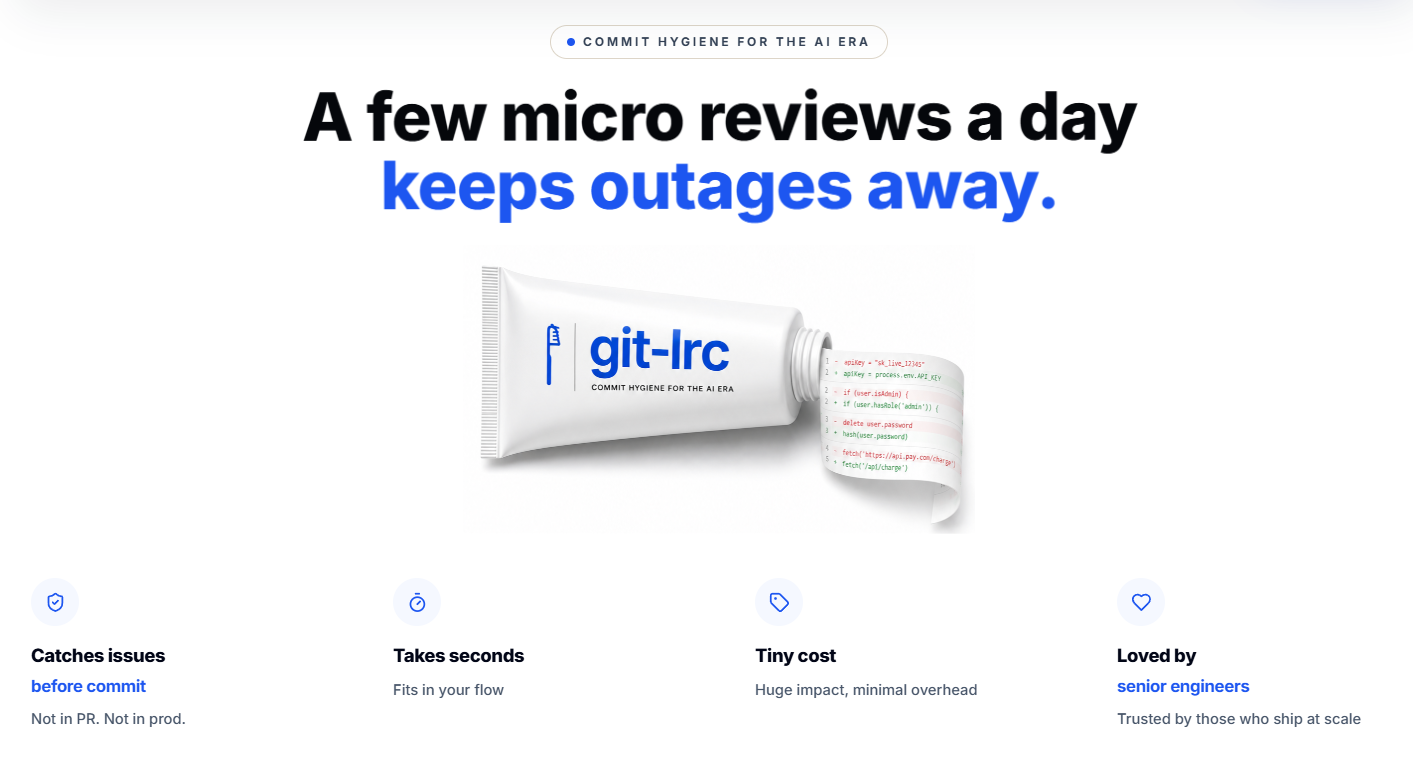 如今的 GenAI 就像是一辆**没有刹车的赛车**。它加速极快——你只需描述需求,大段代码就会瞬间出现。但是 AI agent 会_悄悄地搞砸一切_:它们会移除逻辑、放宽限制、引入昂贵的云服务调用、泄露凭证,并在不告知你的情况下改变行为——而你通常在生产环境中才发现这些问题。 **`git-lrc` 就是你的制动系统。** 它会挂钩到 `git commit`,并在每个 diff 提交_之前_运行 AI 审查。60 秒即可完成设置。完全免费。 简而言之,git-lrc 可以帮助你在**故障、安全漏洞和技术债务发生之前加以预防** **概览:** [10 个风险类别](#what-git-lrc-checks-for) · [追踪 100 多种故障模式](#what-git-lrc-checks-for) · 自动扫描每次 commit。 ``` # 立即试用 (Linux/macOS) curl -L https://hexmos.com/ipm-install | bash && ipm i HexmosTech/git-lrc ``` Windows、其他安装方式及完整设置流程:请参阅[入门指南](#get-started)。 ## Issue Navigator 满屏的行内评论很难进行分类处理。Issue Navigator 会将每次审查转换为跨越[10 个风险类别和 100 多种模式](#what-git-lrc-checks-for)的结构化、可筛选视图——让你清晰地看到问题出在哪里,并根据其可能造成的危害程度进行排名。 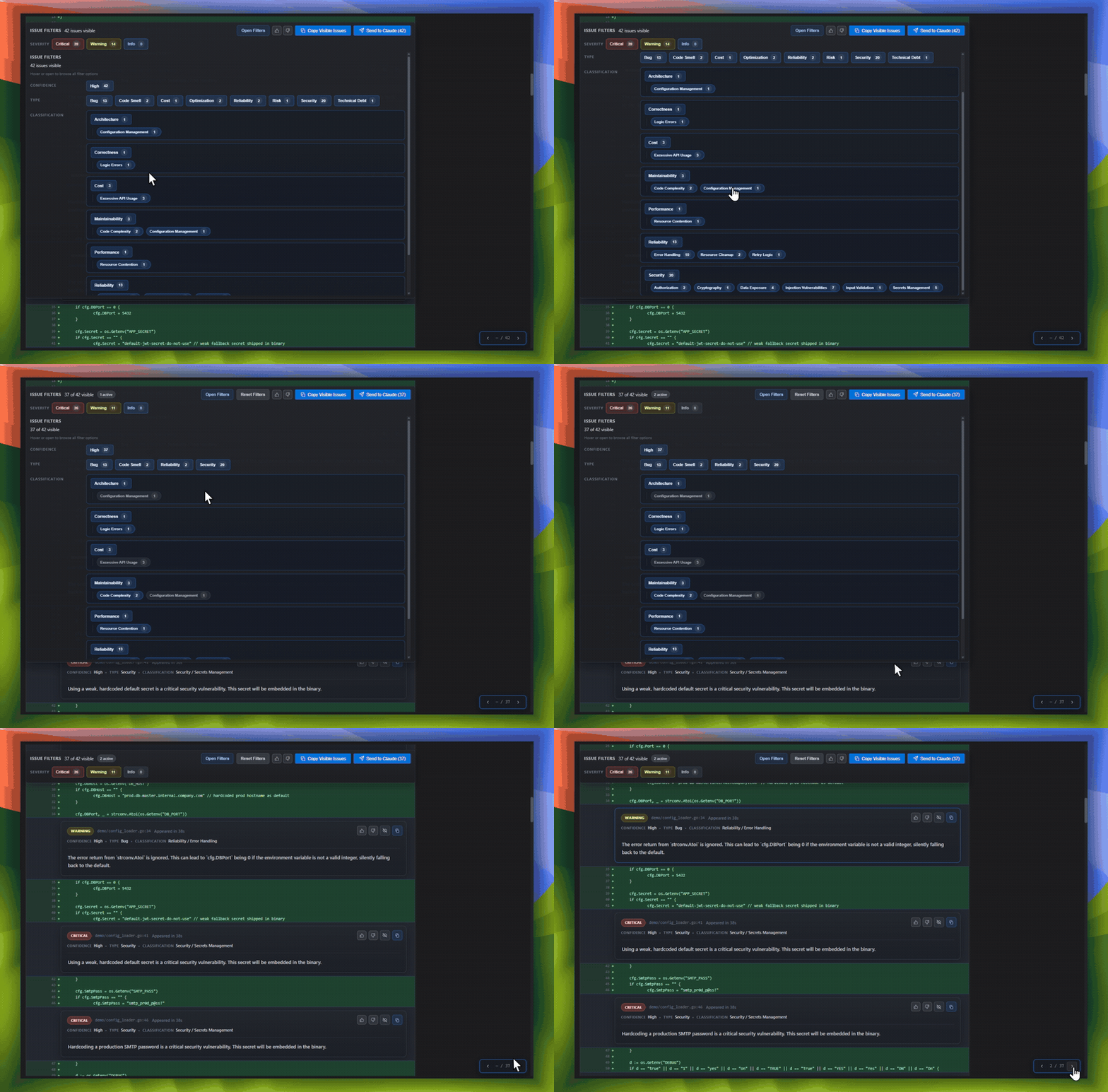 - **按严重程度筛选** — Critical、Warning、Info — 优先修复重要问题,而不是滚动浏览所有内容。 - **深入探究类别和子类别** — Security → Secrets Management,Reliability → Error Handling,以及另外 100 多种,每种都带有发现的问题数量的实时计数。 - **按类型和区域切片** — Bug、Code Smell、Reliability、Security — 精确查看 diff 中风险集中的位置。 - **直接发送给你的 AI agent** — 复制可见问题或选择“Send to Claude”,将其反馈到修复循环中,无需重新输入任何内容。 - **内置反馈循环** — 对每个发现进行点赞/点踩可调整未来的审查,因此你的团队使用得越多,信噪比就越高。 ## Summary Deck 每次完成的审查还会生成一份简短的幻灯片——用 60 秒总结更改的内容、原因以及标记了哪些风险,无需任何人手动撰写。 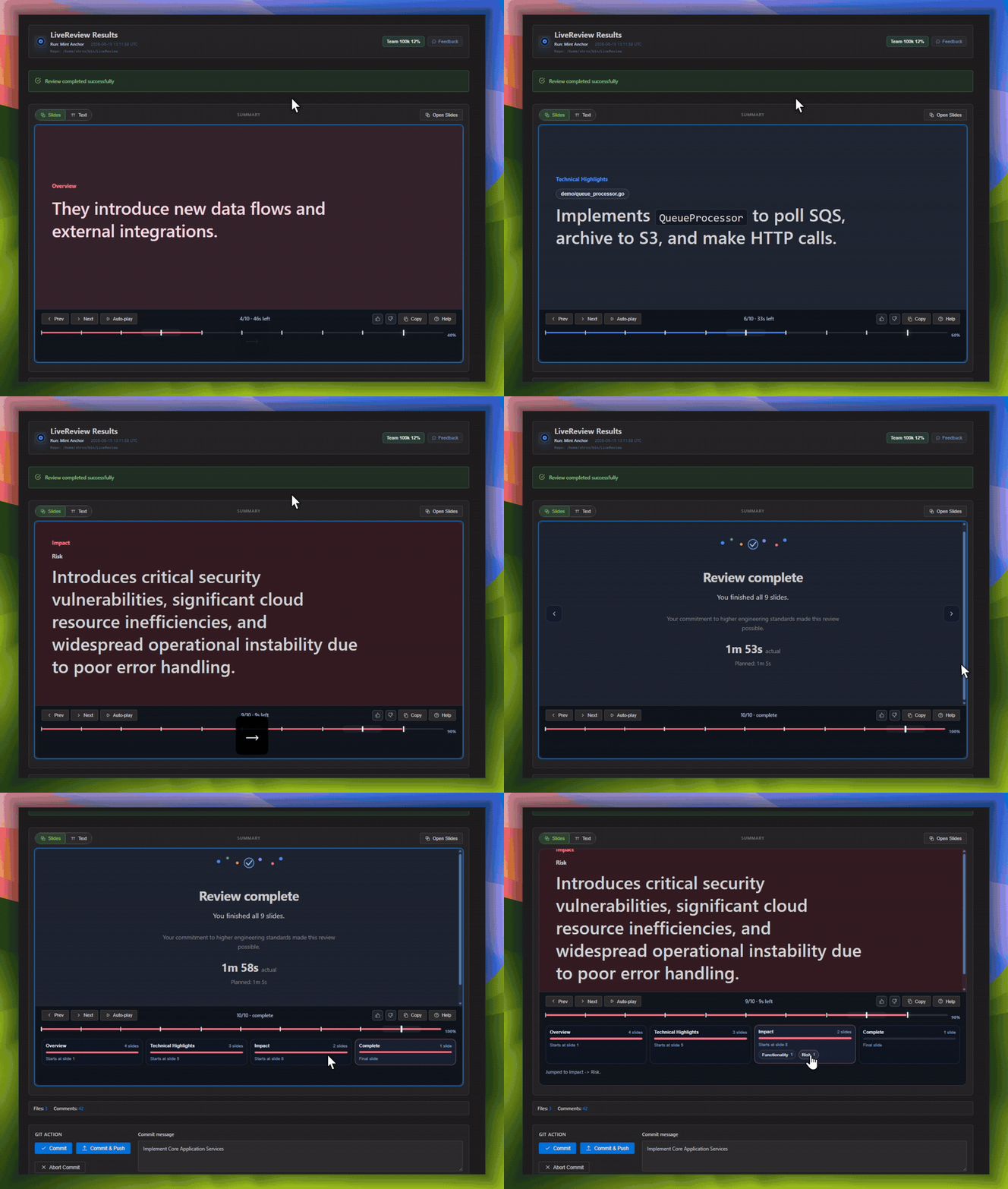 - **以通俗易懂的语言说明实现了什么** — 关于更改的简短叙述,而不仅仅是一个 diff。 - **提前指出风险** — 安全、成本和可靠性问题都有专门高亮显示的幻灯片,在问题严重时会以红色标出。 - **隔离的技术亮点** — 新的 config、新的 endpoint、新的数据流——这些是审查者(或未来的你)真正需要了解的内容。 - **与 [Git Log Tracking](#git-log-tracking) 配合使用** — 通过 git log 中的迭代/覆盖历史记录与每次审查的摘要幻灯片,你的团队可以获得每次更改的机构记忆,而无需任何人维护变更日志。 无论是引导新工程师入职、事故发生后进行复盘,还是仅仅想回忆起六个月前进行某项更改的原因,这都是最快的熟悉方式——无需重新阅读 diff。 ## 实际效果演示 https://github.com/user-attachments/assets/cc4aa598-a7e3-4a1d-998c-9f2ba4b4c66e ## 为什么选择它 - **AI agent 会悄悄地搞砸一切。** 代码被移除。逻辑被更改。边缘情况消失。直到部署到生产环境你才会察觉。 - **在发布前将其拦截。** 基于 AI 的行内评论会向你准确展示_发生了什么变化_以及_哪里看起来有问题_。 - **养成习惯,交付更好的代码。** 定期审查 → 更少的 Bug → 更健壮的代码 → 为你的团队带来更好的结果。 - **为什么不等到 PR 阶段?** 到了 PR 阶段,有问题的代码已经被 commit、push 并且可见了。对于那些你在更改刚完成、无需吸引团队注意力进行可避免的清理工作时就能自己修复的问题来说,这已经太晚了。 - **为什么不依赖 IDE 扩展?** 扩展只是一种便利工具,而不是通用的触发器。工程师可以自行选择是否运行它们,而且团队并不会共享一个编辑器。 - **为什么选择 commit?** Commit 是一个绝佳的平衡点:它足够早,可以在问题进入永久的 git 历史记录之前将其捕获;但也足够晚,不至于因为过早而让审查依赖于个人的主观判断或特殊工具。 - **Git 是最大公约数。** 你无法强制每个工程师使用同一个 IDE 或同一个 AI 助手——但每个人都要 commit。`git-lrc` 接入了每个团队都已经共享的这一个工作流步骤。 - **基于习惯,而非炒作。** 没有需要检查的新仪表板,也没有需要采纳的新仪式。它依附于你本来就要进行的 commit。 ## 入门指南 ### 安装 #### 通过 IPM(推荐): ``` # Linux/macOS curl -L https://hexmos.com/ipm-install | bash && ipm i HexmosTech/git-lrc # Windows iwr https://hexmos.com/ipm-install-ps | iex; ipm i HexmosTech/git-lrc ``` #### 替代方案(直接安装): **Linux / macOS:** ``` curl -fsSL https://hexmos.com/lrc-install.sh | bash ``` **Windows (PowerShell):** ``` iwr -useb https://hexmos.com/lrc-install.ps1 | iex ```
GitHub Codespaces
``` curl -fsSL https://git.new/lrc-install | bash ``` [Atlas Cloud](https://www.atlascloud.ai?utm_source=git-lrc)
配置方式:
- 从 UI 中选择 `Atlas Cloud` connector 选项。
- 输入你的 Atlas Cloud API key。
- 选择用于审查的模型(例如 `deepseek-ai/deepseek-v4-flash`)。
## Repository Rules — 让审查者了解你的代码库
一个优秀的审查者不仅了解你使用的语言和框架——它还了解
*你的代码库*:你的团队偏好哪些模式,哪些依赖是
禁止使用的,以及哪些快捷方式在这里可以接受,但在其他地方却不行。这些知识
大多从未被写进文档中,这就是为什么 AI 审查有时感觉像是
来自新员工的反馈的原因。
git-lrc 允许你将这些知识一次性记录下来,放在代码库
根目录下的一个 `.lrc/` 目录中,像其他所有内容一样受版本控制:
```
lrc config init
```
```
.lrc/
├── README.md # explains this setup
├── ignore # files/paths the reviewer should never see
└── rules/
├── INSTRUCTIONS.md # read first — your most important guidance
├── design.md
├── security.md
└── style.md # add as many *.md files as you need
```
- **`rules/*.md`** — 关于你的团队工作方式的简短说明,例如*“在处理
SQL 时,优先使用直接 SQL 而非 ORM 抽象”*或*“避免引入新的基础设施依赖。”*
首先会读取 `INSTRUCTIONS.md`;其他所有文件按顺序紧随其后。所有这些
内容会被组合成一套指令发送给审查者。
- **`ignore`** — 针对审查者应完全
跳过的文件(生成的代码、vendored 文件等)采用类 gitignore 模式。被忽略的文件不会发送
给 AI,也不计入计费行数。
- **`policy/`** — *(TODO,尚未强制执行)* 机器可读设置,例如
审查者允许使用哪些工具。
### 保持简短
`rules/` 包的内容上限为 3000 个字符。这是有意为之的——一份长达二十页的风格指南会被人类和 AI 草草略过。少数几句能反复改变审查结果的句子,其价值远胜于一整本手册:
- “可靠性比延迟更重要。”
- “相较于抽象层,更倾向于显式实现。”
- “避免引入新的基础设施依赖。”
- “相较于 ORM 抽象,更倾向于直接 SQL。”
### 没有任何隐藏内容
```
lrc config check # validate rules, ignore patterns, and bundle size — offline
lrc config preview # show the exact instructions that will be sent to the reviewer
```
只要发送给了模型,你就可以提前看到它。
## 你可以信赖的安全性
- 在 git-lrc 中,安全性被视为一项核心产品需求。
- 我们清晰地记录了报告渠道、响应承诺和操作保障措施。
- 自动化的安全检查和 SBOM 工作流支持透明度验证。
- 完整详情请参见 [SECURITY.md](SECURITY.md)。
## git-lrc 检查哪些内容
每次检查都会涵盖 **10 个风险类别**和 **100 多种特定的故障模式**,它们被分为三大支柱:什么会导致生产环境宕机、什么最终会出现在安全漏洞披露信中,以及什么会拖慢未来的每一次发布。展开任何一个支柱,然后再展开其中的任何一个类别,即可查看具体的模式以及为什么每种模式都很重要。
[Atlas Cloud](https://www.atlascloud.ai?utm_source=git-lrc)
配置方式:
- 从 UI 中选择 `Atlas Cloud` connector 选项。
- 输入你的 Atlas Cloud API key。
- 选择用于审查的模型(例如 `deepseek-ai/deepseek-v4-flash`)。
## Repository Rules — 让审查者了解你的代码库
一个优秀的审查者不仅了解你使用的语言和框架——它还了解
*你的代码库*:你的团队偏好哪些模式,哪些依赖是
禁止使用的,以及哪些快捷方式在这里可以接受,但在其他地方却不行。这些知识
大多从未被写进文档中,这就是为什么 AI 审查有时感觉像是
来自新员工的反馈的原因。
git-lrc 允许你将这些知识一次性记录下来,放在代码库
根目录下的一个 `.lrc/` 目录中,像其他所有内容一样受版本控制:
```
lrc config init
```
```
.lrc/
├── README.md # explains this setup
├── ignore # files/paths the reviewer should never see
└── rules/
├── INSTRUCTIONS.md # read first — your most important guidance
├── design.md
├── security.md
└── style.md # add as many *.md files as you need
```
- **`rules/*.md`** — 关于你的团队工作方式的简短说明,例如*“在处理
SQL 时,优先使用直接 SQL 而非 ORM 抽象”*或*“避免引入新的基础设施依赖。”*
首先会读取 `INSTRUCTIONS.md`;其他所有文件按顺序紧随其后。所有这些
内容会被组合成一套指令发送给审查者。
- **`ignore`** — 针对审查者应完全
跳过的文件(生成的代码、vendored 文件等)采用类 gitignore 模式。被忽略的文件不会发送
给 AI,也不计入计费行数。
- **`policy/`** — *(TODO,尚未强制执行)* 机器可读设置,例如
审查者允许使用哪些工具。
### 保持简短
`rules/` 包的内容上限为 3000 个字符。这是有意为之的——一份长达二十页的风格指南会被人类和 AI 草草略过。少数几句能反复改变审查结果的句子,其价值远胜于一整本手册:
- “可靠性比延迟更重要。”
- “相较于抽象层,更倾向于显式实现。”
- “避免引入新的基础设施依赖。”
- “相较于 ORM 抽象,更倾向于直接 SQL。”
### 没有任何隐藏内容
```
lrc config check # validate rules, ignore patterns, and bundle size — offline
lrc config preview # show the exact instructions that will be sent to the reviewer
```
只要发送给了模型,你就可以提前看到它。
## 你可以信赖的安全性
- 在 git-lrc 中,安全性被视为一项核心产品需求。
- 我们清晰地记录了报告渠道、响应承诺和操作保障措施。
- 自动化的安全检查和 SBOM 工作流支持透明度验证。
- 完整详情请参见 [SECURITY.md](SECURITY.md)。
## git-lrc 检查哪些内容
每次检查都会涵盖 **10 个风险类别**和 **100 多种特定的故障模式**,它们被分为三大支柱:什么会导致生产环境宕机、什么最终会出现在安全漏洞披露信中,以及什么会拖慢未来的每一次发布。展开任何一个支柱,然后再展开其中的任何一个类别,即可查看具体的模式以及为什么每种模式都很重要。
故障停机 — 什么会导致生产环境瘫痪,并影响你的轮班待命团队(4 个类别,40 种模式)
Reliability
- **Error Handling** — 未处理的错误会导致服务在处理请求时崩溃,让客户在流量高峰期只能盯着出错的页面。 - **Fault Tolerance** — 一个依赖项的小故障会引发连锁反应,导致全面瘫痪,而不是优雅降级。 - **Retry Logic** — 缺失的重试机制会将短暂的网络闪断变成支付失败、订单丢失和大量支持工单。 - **Timeout Management** — 请求永远挂起,耗尽连接资源,直到整个服务停滞不前。 - **Resilience Patterns** — 没有 circuit breaker 意味着一个缓慢的服务会拖垮与之相连的所有事物。 - **Availability Risks** — 单点故障会将一次常规的部署变成持续数小时的宕机。 - **Data Integrity** — 损坏或不一致的记录会悄无声息地破坏报告、计费和下游决策。 - **Race Conditions** — 两个请求发生冲突并覆盖了彼此的工作成果——这种情况间歇性发生,在生产环境中无法重现。 - **Resource Cleanup** — 泄漏的连接和文件句柄不断堆积,直到服务器在凌晨 2 点彻底崩溃。 - **Failure Recovery** — 没有回滚路径意味着糟糕的部署会一直在线上运行,直到有人手动修复它。Correctness
- **Logic Errors** — 错误的计算被推送到生产环境中,悄无声息地产生错误的发票、价格或报告。 - **Edge Cases** — 没有人测试过的那 1% 的情况,恰恰是你最大的客户最先遇到的。 - **Data Validation** — 糟糕的输入蒙混过关,破坏了记录,日后清理起来代价高昂。 - **State Management** — 陈旧或不同步的状态会向用户显示错误的余额、状态或库存数量。 - **Concurrency Bugs** — 并行操作互相干扰,导致重复收费或更新丢失。 - **Business Rule Violations** — 一个未经任何人批准的折扣、限制或策略被自动、大规模地应用。 - **Numerical Accuracy** — 舍入和精度误差随着时间的推移,会累积成真实的财务差异。 - **Null Handling** — 意料之外的 null 会在最糟糕的时刻导致结账流程崩溃。 - **Type Safety** — 类型不匹配会悄无声息地损坏数据,而不是在修复成本较低时大声报错。 - **API Contract Violations** — 后端的一次更改会破坏所有依赖于旧响应格式的客户端。Performance
- **Database Efficiency** — 今天运行良好的未加索引的查询,在你进行扩容的那一刻就会锁定数据库。 - **Algorithmic Complexity** — 处理 100 条记录时速度很快的代码,在处理 10 万条记录时会变得极其缓慢。 - **Memory Usage** — 内存泄漏迫使每天进行重启——并最终在无人察觉时导致一次系统崩溃。 - **CPU Utilization** — 热循环会悄无声息地消耗 CPU,直到自动扩容的账单飙升或 pod 被杀死。 - **Network Efficiency** — 频繁的调用会使延迟倍增,直到一个简单的页面需要几秒钟才能加载完毕。 - **Caching** — 每个请求都直接访问数据库,因此流量激增就会变成宕机。 - **Concurrency** — 如果没有适当的并发机制,你的服务在负载下一次只能为一个用户提供服务。 - **Resource Contention** — 线程争夺同一个锁,整个应用的速度就会变慢,以匹配最慢的那个线程。 - **Rendering Performance** — 卡顿的 UI 会让用户认为产品坏了,即使其实并没有。 - **Startup Performance** — 缓慢的启动时间意味着缓慢的部署、缓慢的回滚以及从事故中缓慢恢复。Scalability
- **Horizontal Scaling** — 应用无法在多个实例上运行,因此业务增长意味着必须重写。 - **Vertical Scaling** — 距离耗尽金钱能买到的最大服务器的极限,你只差一次病毒式传播的流量洪峰。 - **Distributed Systems** — 两个服务对事实的认知存在分歧,而且直到数据对不上时才会有人察觉。 - **Load Balancing** — 流量在一个节点上堆积如山,而其他节点却闲得发慌,直到那个节点崩溃。 - **Capacity Planning** — 没人知道系统的崩溃临界点,直到客户在生产环境中为你找到了它。 - **Bottleneck Risks** — 一个缓慢的组件会限制整个系统的吞吐量,无论你如何扩容其他部分。 - **Concurrency Limits** — 一个硬编码的限制会在你最繁忙的时刻,悄然限制你最活跃客户的处理速度。 - **Service Growth Constraints** — 适用于 10 个团队的架构,在 50 个团队时会因为协调开销过大而崩溃。 - **Database Scaling** — 支撑你产品发布的数据库,在规模扩大时会变成拖垮你的罪魁祸首。 - **Queue Backpressure** — 无限制的队列会掩盖不断增长的工作积压,直到它表现为长达数小时的延迟。安全漏洞 — 什么最终会出现在披露信和董事会会议中(2 个类别,20 种模式)
Security
- **Authentication** — 薄弱的登录流程就是一扇敞开的门——而攻击者会检查每一扇门。 - **Authorization** — 缺失的权限检查会让任何已登录的用户都能以管理员身份行事。 - **Secrets Management** — 源代码控制中硬编码的 API key 就像是一颗定时炸弹,等待有人去发现它。 - **Input Validation** — 未经验证的输入几乎是每一次成功攻击的第一步。 - **Injection Vulnerabilities** — 距离攻击者读取你整个数据库,只有一次未净化查询的差距。 - **Cryptography** — 脆弱或自制的加密会给人一种虚假的安全感——以及一次真实的被入侵经历。 - **Dependency Vulnerabilities** — 依赖项中已知的 CVE 对于攻击者来说就是一本已公开的指导手册。 - **Data Exposure** — 敏感字段泄漏到本不该出现的日志、响应或错误消息中。 - **Session Management** — 永不过期的 session 是一种攻击者可以永久使用的凭证。 - **Security Logging & Auditing** — 没有审计跟踪,你就无法说明在事件发生期间或之后发生了什么、何时发生以及谁应负责。Compliance & Governance
- **Privacy** — 处理不当的个人数据会将一条代码审查评论变成一次监管调查。 - **Regulatory Compliance** — 在 GDPR、HIPAA 或 SOC 2 中遗漏的要求会成为你下一次审计中的一项发现。 - **Auditability** — 当审计员询问“谁更改了这个以及为什么更改”时,必须能给出一个答案。 - **Data Retention** — 保留数据的时间超过允许范围会将存储决策变成法律责任。 - **Data Residency** — 存储在错误区域的数据可能会同时违反合同和当地法律。 - **Licensing** — 隐藏在依赖项中的不兼容的开源许可证可能会污染你的整个代码库。 - **Policy Enforcement** — 仅停留在纸面上的安全策略无法阻止真实的事故发生。 - **Access Controls** — 拥有活跃访问权限的前员工是一种公开邀请,而不仅仅是一时疏忽。 - **Change Management** — 未经审查的生产环境更改正是“小修复”演变成头条新闻级别事故的原因。 - **Governance Standards** — 各团队之间不一致的标准意味着你最薄弱的团队决定了你实际的风险水平。技术债务 — 在有人偿还债务之前,什么会拖慢未来的每一次发布(4 个类别,44 种模式)
Maintainability
- **Code Complexity** — 只有一个人能看懂的代码就是一个拥有名字和休假时间表的单点故障。 - **Readability** — 花费在解码晦涩代码上的每一分钟,都是未能用于交付产品的每一分钟。 - **Documentation** — 缺乏文档的系统会把每一次交接变成长达数周的新手起步过程。 - **Code Duplication** — 同一个 bug 在五个副本中的一个被修复了——然后又从另外四个中重新出现。 - **Dead Code** — 未被使用的代码仍然会被编译、审查,并在每次有人触碰它时让人感到担惊受怕。 - **Naming Quality** — 具有误导性的名称会导致所有人原以为不可能发生的那个确切的 bug。 - **Testability** — 无法测试的代码在默认情况下每次发布都不会被测试。 - **Technical Debt** — 从未被追踪的债务永远不会获得预算,因此永远不会被偿还。 - **Refactoring Opportunities** — 被推迟的清理工作会不断累积,直到“快速修复”需要一个季度才能完成。 - **Configuration Management** — 一个为预发环境硬编码的 config 值被悄然推送到了生产环境中。 - **UI/UX** — 不一致的 UI 模式会一点点侵蚀对产品的信任,每一次都会带来微小的困惑。 - **Accessibility** — 不可访问的界面会排斥真实的用户——而且这越来越多地成为一种法律风险。 >Architecture
- **Separation of Concerns** — 当所有事物都相互依赖时,一次微小的更改也需要对整个系统进行测试。 - **Modularity** — 一个没有边界的单体应用意味着每个团队都会被其他所有团队的代码所阻塞。 - **Coupling** — 紧密耦合的服务意味着在一个地方进行的更改会不可预测地破坏其他三个地方。 - **Cohesion** — 分散在代码库中的逻辑意味着修复一个 bug 需要在五个文件中寻找线索。 - **Layering Violations** — UI 层中的业务逻辑意味着你无法在不破坏另一个的情况下更改其中一个。 - **Dependency Management** — 未记录的依赖关系图意味着没人知道如果此服务宕机会破坏什么。 - **Service Boundaries** — 模糊的服务边界会将“添加一个功能”变成“协调四个团队”。 - **Domain Modeling** — 与业务不匹配的数据模型意味着每个新功能都要与模型作斗争。 - **API Design** — 设计糟糕的 API 会被固化到每个客户端中——并且其寿命比自身的实用性还要长。 - **Extensibility** — 无法扩展的系统会被重写——通常是在截止日期的压力下。Developer Experience
- **Testing** — 低测试覆盖率意味着每次发布都是一场赌博,而不是一种保证。 - **CI/CD** — 不稳定的 pipeline 会训练工程师忽略故障——包括真正的故障。 - **Build System** — 缓慢的构建是每个开发者每天、永远都要缴纳的税。 - **Local Development** — 如果在本地很难运行,那么就很难调试——而且 bug 会存活更长时间。 - **Debuggability** — 没有日志,没有追踪,没有线索——解决事故需要数小时而不是数分钟。 - **Observability** — 你无法修复你看不见的东西——而且直到有客户投诉,你才会看见它。 - **Deployment Process** — 手动、脆弱的部署过程正是“常规发布”变成“突发事故”的温床。 - **Automation** — 人工步骤是人为错误进入系统的入口——可靠地、重复地发生。 - **Developer Tooling** — 糟糕的工具不仅会拖慢开发者的速度——它还会将你最优秀的人才推向离职的边缘。 - **Documentation Quality** — 错误的文档比没有文档更糟糕——它们会主动误导下一个人。 - **UI/UX** — 令人困惑的内部工具每天都在浪费整个团队的时间。 - **Accessibility** — 不可访问的工具会悄悄排斥那些原本能胜任这项工作的队友。Cost
- **Cloud Resource Waste** — 闲置资源会维持 24/7 全天候计费,无论是否有人在使用它们。 - **Infrastructure Overprovisioning** — “以防万一”的容量支付是对不确定性的永久征税。 - **Storage Optimization** — 未经管理的存储增长会变成一个在季度末无人能解释的账目明细。 - **Database Cost Optimization** — 低效的查询不仅会拖慢速度——在托管数据库上,它们会直接体现在账单上。 - **Excessive API Usage** — 不必要的第三方 API 调用会变成一份令人震惊的五位数账单。 - **Third-Party Service Costs** — 被遗忘的集成在所有人都记不起它们存在的理由很久之后,仍在继续收费。 - **Redundant Computation** — 一遍又一遍地重新计算相同的结果会白白烧钱,却无法产生任何新东西。 - **LLM Token Consumption** — 无限制的 prompt 和重试会将一个 AI 功能变成你最大的基础设施成本。 - **Caching Opportunities** — 每个未缓存的请求都是你正在付双倍费用的请求。 - **Data Transfer Costs** — 跨区域或出口流量会迅速累加——而且很少在账单出现之前被察觉。标签:AI辅助编程, EVTX分析, Git, Go, Ruby工具, SOC Prime, 代码审查, 开发工具