ehewes/pyframe
GitHub: ehewes/pyframe
PyFrame 通过时间分段采样和可选的两阶段级联审核机制,大幅降低 GIF/视频内容审核的云端 API 调用成本。
Stars: 14 | Forks: 0
# PyFrame
使用本地 [HuggingFace](https://huggingface.co) 模型和/或 [AWS Rekognition](https://aws.amazon.com/rekognition/content-moderation/) 对 GIF、视频和图像进行 NSFW 审核。
PyFrame 使用**时间分段** (temporal segmentation) 来避免对每一帧进行审核:它将动画分割成相等的时间桶,并从每个桶中提取最重要的一帧,以极低的成本捕获多样的场景覆盖。它还提供了一个可选的**两阶段级联** (`--prescreen`):一个免费的本地模型进行密集的软筛选,只有被标记的时间窗口才会被升级到精确的(例如 AWS)后端。有关该方法的直观展示,请参见 [pipeline 流程图](#pipeline)。
[](https://pypi.org/project/pyframe-gif-video-image-moderation/)
[](https://pepy.tech/project/pyframe-gif-video-image-moderation)
[](https://pypi.org/project/pyframe-gif-video-image-moderation/)
[](https://github.com/ehewes/pyframe/blob/main/LICENSE)
[](https://github.com/ehewes/pyframe/actions/workflows/ci.yml)
[](https://www.eden.report/docs)
## 安装
```
pip install "pyframe-gif-video-image-moderation[local]" # free local HuggingFace backend
pip install "pyframe-gif-video-image-moderation[aws]" # AWS Rekognition backend
pip install "pyframe-gif-video-image-moderation[all]" # everything (local + aws + video)
```
或者使用 [uv](https://docs.astral.sh/uv/):
```
uv add "pyframe-gif-video-image-moderation[local]"
# 或者,临时运行: uv pip install "pyframe-gif-video-image-moderation[local]"
```
基础安装非常轻量(仅包含 `opencv-python-headless`、`numpy`、`Pillow`);沉重的后端(`boto3`、`transformers`/`torch`、`moviepy`)是可选的附加组件,仅在你需要使用时才拉取。
## Python API
`Pipe` 是高级接口:构建它,然后调用 `run()`。
```
from pyframe import Pipe
result = Pipe("clip.gif", backend="local").run()
print(result.verdict) # clean
print(result.is_nsfw) # False
```
切换后端,或开启两阶段级联:
```
Pipe("clip.gif", backend="aws").run() # AWS Rekognition
Pipe("clip.gif", backend="aws", prescreen=True).run() # local screens, AWS confirms
```
扫描原始字节(例如下载的内容),完全**不接触磁盘**:
```
from pyframe import scan_bytes
result = scan_bytes(gif_bytes, backend="local") # GIF/image decoded in memory
```
### 调优两阶段处理
每个旋钮都是 `Pipe` 的参数,并带有合理的默认值:
```
Pipe(
"clip.gif",
backend="aws", # precise backend used on escalation
prescreen=True, # two-pass cascade on
escalate_threshold=0.15, # escalate on the faintest local signal (lower = more recall, more cost)
max_escalations=2, # hard cap on AWS calls per file
frames_per_batch=2, # frames merged into each grid sent to AWS
screen_fps=2.0, # soft-screen sample rate
min_confidence=0.5, # NSFW threshold (defaults to the backend's recall-safe value)
).run()
```
## CLI
作为命令运行相同的 pipeline,无需编辑脚本:
```
pyframe clip.gif # auto backend, prints a verdict
pyframe clip.gif --backend local # free local model
pyframe clip.gif --backend aws --region us-east-1 # AWS Rekognition
pyframe clip.gif --prescreen --backend aws # cascade: local gate then AWS
pyframe a.gif b.gif c.png --json # batch, machine-readable
```
退出代码:`0` 表示正常,`1` 表示 NSFW(根据 `--fail-on` 设定),`2` 表示错误的输入,`3` 表示未安装后端,因此它可以直接作为 shell 拦截命令使用:`pyframe upload.gif || reject`。等效的模块形式为:`python -m pyframe clip.gif`。
### 选项
| 标志 | 默认值 | 含义 |
|------|---------|---------|
| `--backend` | `auto` | `local`、`aws` 或 `local:` |
| `--model` | 模型默认值 | HuggingFace 模型 ID(本地后端) |
| `--region` | `us-east-1` | AWS 区域(aws 后端) |
| `--max-frames` | `10` | 从 GIF/视频中提取的帧数 |
| `--min-confidence` | 后端默认值 | NSFW 阈值 (0-1);`0.5` 为 local,`0.8` 为 aws |
| `--sampler` | `motion` | `motion`(分桶)或 `dense`(均匀) |
| `--prescreen` | 关闭 | 启用两阶段级联 |
| `--escalate-threshold` | `0.15` | 级联阈值(低值 = 保证召回率) |
| `--max-escalations` | `2` | 每个文件调用精确 (AWS) 的硬性上限 |
| `--screen-fps` | `2.0` | 软筛选采样率 |
| `--use-merged` / `--frames-per-batch` | 关闭 / `2` | 在分类前将帧合并为网格 |
| `--json` / `--fail-on` | 关闭 / `nsfw` | 输出格式 / 退出代码策略 |
## 工作原理
- `Pipe` - 你构建的接口(映射了旧的 main.py 流程)
- `Scanner` - 引擎:单阶段,或两阶段级联
- `Backend` - local (HuggingFace) 或 aws (Rekognition),统一结果
- `Sampler` - 动态分桶、均匀密集采样,或可疑度采样
**单阶段**(默认):通过动态分桶提取 `max_frames`,然后使用同一个后端对每一帧进行分类。
**级联** (`--prescreen`):一个免费的本地模型对整个片段进行密集的软筛选;如果任何帧的得分高于 `--escalate-threshold`(一个刻意设定的*低*召回阈值),最可疑的帧将被合并成网格并发送到精确后端,每个文件的调用上限为 `--max-escalations` 次(默认为 2),这样即使是一个被大量标记的片段,其成本也不会超过单阶段扫描。干净的媒体会被短路处理,成本约为 $0,并且永远不会触及昂贵的后端。因为软筛选关注的是*内容*(而不是动态),所以它不会像动态分桶那样丢弃独特的可疑帧,并且它会*开放*失败:解码/推理错误会触发升级,而不是被静默清除。
## 成本
AWS Rekognition 的计费约为每 1,000 张图像 $1.00。一个 150 帧的 GIF 如果审核每一帧需要花费 $0.15;而 PyFrame 的 10 桶提取将其降至约 $0.01(减少了约 93%)。使用 `--prescreen` 时,干净的片段成本为 $0(仅限本地),而被标记的片段最多产生 `--max-escalations` 次 AWS 调用(默认为 2),因此级联的成本永远不会超过单阶段扫描。
## Pipeline
一个 150 帧的 GIF 通过时间分段被处理为少数几帧提取出来的帧,可选择将其合并为网格,然后发送到后端:
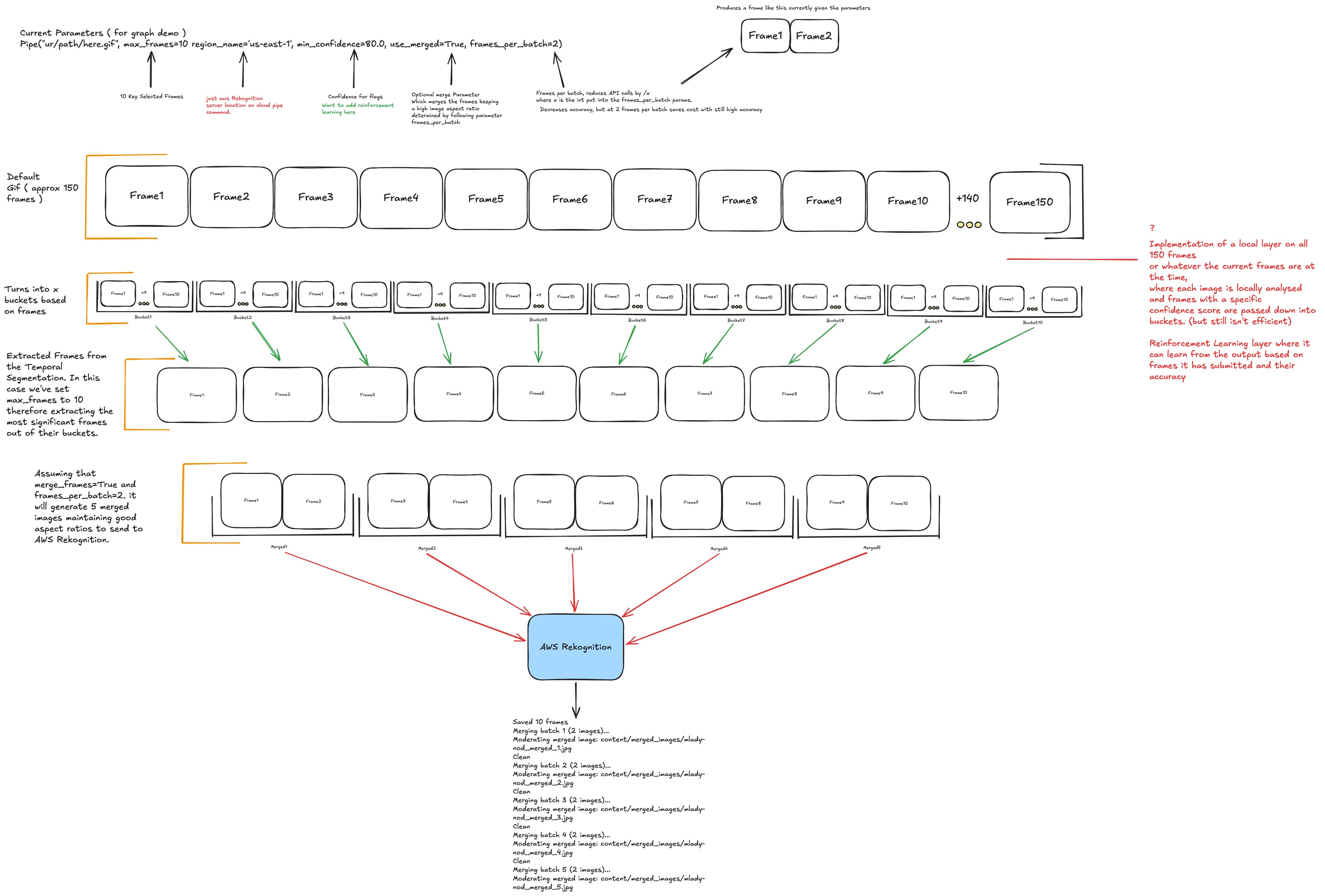
此图的简短带注释的**实时**版本位于 **[eden.report/docs](https://www.eden.report/docs)**。
## 文档
文档主页位于 **[eden.report/docs](https://www.eden.report/docs)**:提供最详尽的指南以及带注释的 pipeline 实时图解。
参考文档也位于 [`docs/`](https://github.com/ehewes/pyframe/tree/main/docs) 中;请从 [输出参考](https://github.com/ehewes/pyframe/blob/main/docs/output.md) 开始,查看完整的 JSON / `ScanResult` schema。
## 引用
PyFrame 的时间采样设计参考了 Ding、Sener 和 Yao([arXiv:2210.10352](https://arxiv.org/abs/2210.10352))的时间动作分割综述。完整的引用和 BibTeX:[`docs/README.md`](https://github.com/ehewes/pyframe/blob/main/docs/README.md#references)。
## 注意事项
- `aws` 后端需要凭证:使用 `pip install "pyframe-gif-video-image-moderation[aws]"` 安装,然后运行 `aws configure`(或设置 `AWS_ACCESS_KEY_ID`、`AWS_SECRET_ACCESS_KEY` 和 `AWS_DEFAULT_REGION`)。
- `[video]`(视频转 GIF)需要 `moviepy`,而这需要系统安装 **ffmpeg** (`brew install ffmpeg`)。
- HuggingFace **模型权重** 拥有各自的许可证,独立于本包的 MIT 许可证。
## 开发
```
uv pip install -e ".[dev]" # or: pip install -e ".[dev]"
pytest
python -m build # or: uv build
twine check dist/* # or: uv publish (to PyPI)
```
标签:AWS Rekognition, HuggingFace, NSFW检测, Python, 内容审核, 凭据扫描, 图像处理, 无后门, 视频处理, 逆向工具