rlacombe/distillate
GitHub: rlacombe/distillate
Distillate 是一个开源 ML 研究平台,通过自主 agent 编排实验运行与文献管理,帮助研究者实现「读论文—跑实验—提炼见解」的自动化研究闭环。
Stars: 74 | Forks: 2
# Distillate — 编排 ML 自动研究 agent
**你的研究炼金术士。** 变出能自动运行的 ML 实验。从你阅读的所有内容中提炼出见解。
[](https://pypi.org/project/distillate/)
[](https://www.python.org/downloads/)
[](LICENSE)
[distillate.dev](https://distillate.dev)
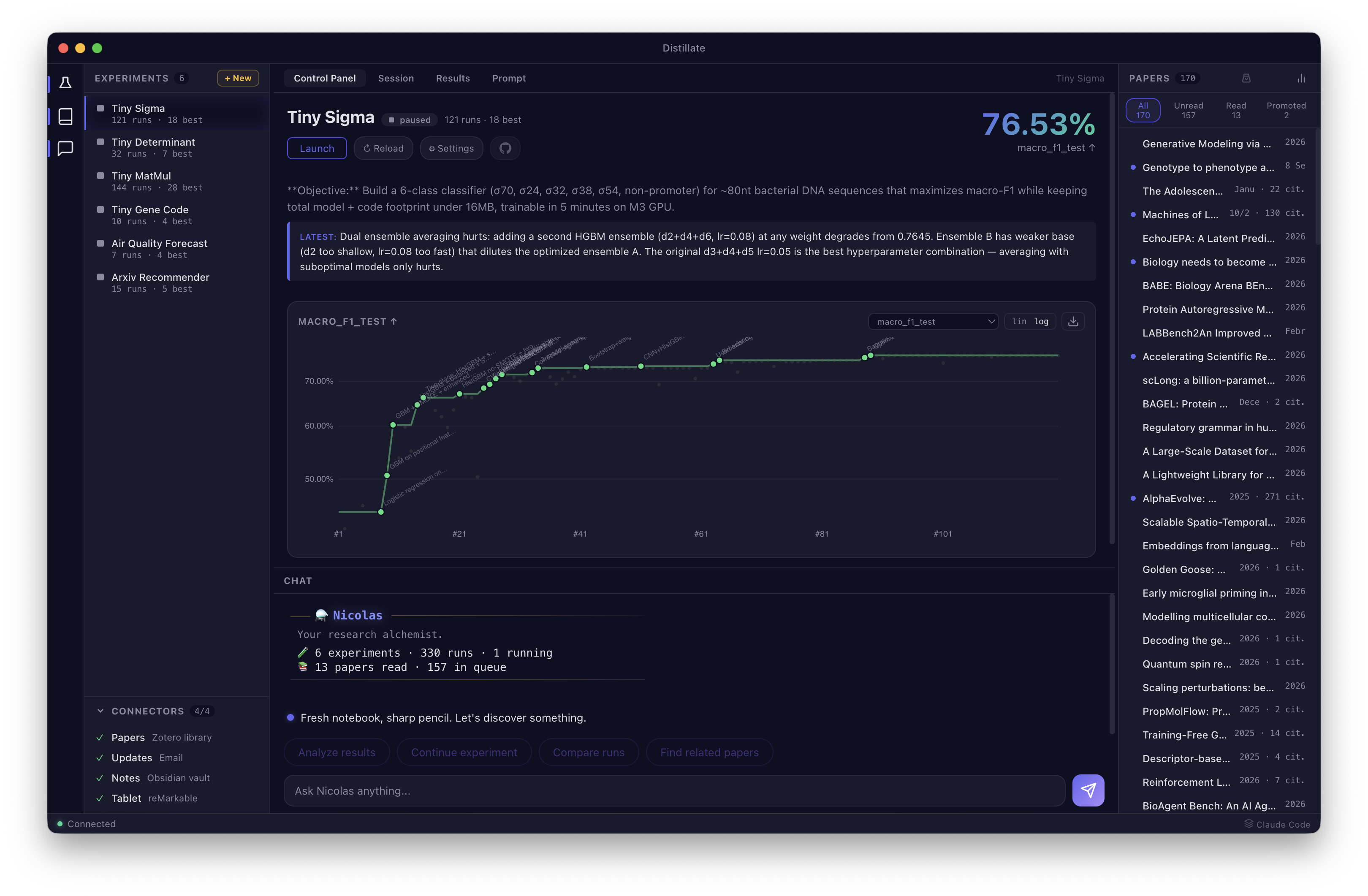 ## 什么是 Distillate?
Distillate 是一个开源研究平台,用于编排自主研究 agent。它可以将你的研究问题转化为能够运行 ML 实验、跟踪结果并汇报所发现的 agent,同时通过高亮和 AI 总结来保持你的论文库井井有条。
其核心是 **Nicolas**,你的研究炼金术士。他会创建存在于 tmux 会话中的**研究 agent**,迭代地改进你的模型并汇报结果。他还会打理**文献库**——这是你的论文集合,从 Zotero 流经任何阅读设备(reMarkable、iPad、桌面端),最终转化为结构化的笔记。
核心循环:**阅读论文,运行实验,在图表上观察它们改进,提炼你所学到的,然后重复。** 你所阅读的内容指导你尝试的方向。你所尝试的结果指导你接下来阅读的内容。
```
$ distillate
─── ⚗️ Nicolas ──────────────────────────────
Your research alchemist.
🧪 4 experiments · 12 runs · 1 running
📚 42 papers read · 7 in queue
> /conjure tiny-matmul --duration 30m
🧪 Spawning research agent...
Created distillate-xp-tiny-matmul
Research agent spawned — 30 min budget, will report when done.
> /distill tiny-matmul
🔬 Distilling 8 runs...
Best: run-7 (loss 0.0023, -42% from baseline)
Key insight: block size 64 with gradient accumulation
outperforms larger batches on this scale.
```
## 技能
Nicolas 响应分为三种角色的 9 项技能:
### 实验室 🧪
| 技能 | 描述 |
|-------|-------------|
| `/conjure` | 召唤一个研究 agent —— 从一个研究问题发起实验 |
| `/steer` | 引导正在运行的 agent —— 调整目标或改变方向 |
| `/assay` | 结合跨运行对比,对实验结果进行深度分析 |
| `/distill` | 从实验的会话历史中提取见解 |
| `/survey` | 扫描所有实验以发现新的运行和突破 |
| `/transmute` | 将论文见解转化为实验思路 |
### 文献库 📚
| 技能 | 描述 |
|-------|-------------|
| `/brew` | 同步论文,处理高亮,刷新文献库 |
| `/forage` | 发现热门论文和阅读建议 |
| `/tincture` | 从单篇论文的高亮和笔记中进行深度提取 |
## 快速开始
### 安装
```
pip install distillate
# 或
uv pip install distillate
```
### 前置要求
- **Claude Code**(`claude` CLI)—— Distillate 通过你的 Claude Code 订阅运行。无需单独的 API 密钥。
- **Zotero** —— 用于论文管理(如果你只运行实验,此项为可选)
### 启动
```
distillate # Start the Nicolas REPL
distillate --init # Run the setup wizard (first time)
distillate --sync # Classic sync-only workflow
```
或者使用[桌面应用](#desktop-app)以获得完整的 IDE 体验。
## 桌面应用
Distillate 桌面应用提供带有四个选项卡的 IDE 风格布局:
- **控制面板** —— 指标图表、会话计时器、目标跟踪、实验概览
- **会话** —— 附加到正在运行的 Claude Code agent 的实时终端
- **结果** —— 带有研究见解(关键突破、经验教训、死胡同)的运行网格
- **Prompt** —— 查看和编辑 PROMPT.md,支持 markdown 渲染
新用户可享有一键入门体验:从侧边栏启动演示实验,或从论文面板连接你的 Zotero 文献库。聊天中的上下文感知建议会根据你正在查看的内容进行调整——在查看实验时显示特定于实验的操作,在查看论文时显示特定于论文的操作。
桌面应用连接到与 CLI 相同的后端——一切保持同步。
## 工作原理
核心研究循环:
1. **📜 添加论文** —— 将论文保存到 Zotero,在任何设备上阅读和高亮。Nicolas 提取高亮内容,生成摘要,并构建你的知识库。
2. **⚗️ 召唤实验** —— 描述一个研究问题或指向一篇论文。Nicolas 草拟 prompt,设置 git 仓库,并生成一个自主研究 agent 来运行它。
3. **🔬 提炼见解** —— 随着实验的运行,Nicolas 会跟踪每一次迭代的指标、diff 和决策。提炼结果以了解哪些有效,哪些无效,以及原因。
4. **🔗 建立联系** —— 将论文与实验关联起来。当某次运行实现了一篇论文中的技术时,使用 `inspired_by` 注明其来源。使用 `/transmute` 将论文见解转化为实验思路。你所阅读的内容指导你下一步的尝试。
每个实验都存在于一个 git 仓库中。每篇论文都存在于你的 Zotero 文献库中。笔记是纯 markdown 格式。没有任何锁定——Distillate 只是在增强你现有的工具。
## 配置
所有设置都位于 `~/.config/distillate/.env` 中。有关完整列表,请参见 [.env.example](.env.example)。
设置向导(`distillate --init`)将引导你连接 Zotero、选择阅读设备以及配置可选功能。
有关高级配置、参与度评分、调度和 GitHub Actions 自动化——请参阅[高级用户指南](https://distillate.dev/power-users.html)。
## 开发
```
git clone https://github.com/rlacombe/distillate.git
cd distillate
uv venv --python 3.12
source .venv/bin/activate
uv pip install -e .
pytest tests/
```
## 许可证
MIT
## 什么是 Distillate?
Distillate 是一个开源研究平台,用于编排自主研究 agent。它可以将你的研究问题转化为能够运行 ML 实验、跟踪结果并汇报所发现的 agent,同时通过高亮和 AI 总结来保持你的论文库井井有条。
其核心是 **Nicolas**,你的研究炼金术士。他会创建存在于 tmux 会话中的**研究 agent**,迭代地改进你的模型并汇报结果。他还会打理**文献库**——这是你的论文集合,从 Zotero 流经任何阅读设备(reMarkable、iPad、桌面端),最终转化为结构化的笔记。
核心循环:**阅读论文,运行实验,在图表上观察它们改进,提炼你所学到的,然后重复。** 你所阅读的内容指导你尝试的方向。你所尝试的结果指导你接下来阅读的内容。
```
$ distillate
─── ⚗️ Nicolas ──────────────────────────────
Your research alchemist.
🧪 4 experiments · 12 runs · 1 running
📚 42 papers read · 7 in queue
> /conjure tiny-matmul --duration 30m
🧪 Spawning research agent...
Created distillate-xp-tiny-matmul
Research agent spawned — 30 min budget, will report when done.
> /distill tiny-matmul
🔬 Distilling 8 runs...
Best: run-7 (loss 0.0023, -42% from baseline)
Key insight: block size 64 with gradient accumulation
outperforms larger batches on this scale.
```
## 技能
Nicolas 响应分为三种角色的 9 项技能:
### 实验室 🧪
| 技能 | 描述 |
|-------|-------------|
| `/conjure` | 召唤一个研究 agent —— 从一个研究问题发起实验 |
| `/steer` | 引导正在运行的 agent —— 调整目标或改变方向 |
| `/assay` | 结合跨运行对比,对实验结果进行深度分析 |
| `/distill` | 从实验的会话历史中提取见解 |
| `/survey` | 扫描所有实验以发现新的运行和突破 |
| `/transmute` | 将论文见解转化为实验思路 |
### 文献库 📚
| 技能 | 描述 |
|-------|-------------|
| `/brew` | 同步论文,处理高亮,刷新文献库 |
| `/forage` | 发现热门论文和阅读建议 |
| `/tincture` | 从单篇论文的高亮和笔记中进行深度提取 |
## 快速开始
### 安装
```
pip install distillate
# 或
uv pip install distillate
```
### 前置要求
- **Claude Code**(`claude` CLI)—— Distillate 通过你的 Claude Code 订阅运行。无需单独的 API 密钥。
- **Zotero** —— 用于论文管理(如果你只运行实验,此项为可选)
### 启动
```
distillate # Start the Nicolas REPL
distillate --init # Run the setup wizard (first time)
distillate --sync # Classic sync-only workflow
```
或者使用[桌面应用](#desktop-app)以获得完整的 IDE 体验。
## 桌面应用
Distillate 桌面应用提供带有四个选项卡的 IDE 风格布局:
- **控制面板** —— 指标图表、会话计时器、目标跟踪、实验概览
- **会话** —— 附加到正在运行的 Claude Code agent 的实时终端
- **结果** —— 带有研究见解(关键突破、经验教训、死胡同)的运行网格
- **Prompt** —— 查看和编辑 PROMPT.md,支持 markdown 渲染
新用户可享有一键入门体验:从侧边栏启动演示实验,或从论文面板连接你的 Zotero 文献库。聊天中的上下文感知建议会根据你正在查看的内容进行调整——在查看实验时显示特定于实验的操作,在查看论文时显示特定于论文的操作。
桌面应用连接到与 CLI 相同的后端——一切保持同步。
## 工作原理
核心研究循环:
1. **📜 添加论文** —— 将论文保存到 Zotero,在任何设备上阅读和高亮。Nicolas 提取高亮内容,生成摘要,并构建你的知识库。
2. **⚗️ 召唤实验** —— 描述一个研究问题或指向一篇论文。Nicolas 草拟 prompt,设置 git 仓库,并生成一个自主研究 agent 来运行它。
3. **🔬 提炼见解** —— 随着实验的运行,Nicolas 会跟踪每一次迭代的指标、diff 和决策。提炼结果以了解哪些有效,哪些无效,以及原因。
4. **🔗 建立联系** —— 将论文与实验关联起来。当某次运行实现了一篇论文中的技术时,使用 `inspired_by` 注明其来源。使用 `/transmute` 将论文见解转化为实验思路。你所阅读的内容指导你下一步的尝试。
每个实验都存在于一个 git 仓库中。每篇论文都存在于你的 Zotero 文献库中。笔记是纯 markdown 格式。没有任何锁定——Distillate 只是在增强你现有的工具。
## 配置
所有设置都位于 `~/.config/distillate/.env` 中。有关完整列表,请参见 [.env.example](.env.example)。
设置向导(`distillate --init`)将引导你连接 Zotero、选择阅读设备以及配置可选功能。
有关高级配置、参与度评分、调度和 GitHub Actions 自动化——请参阅[高级用户指南](https://distillate.dev/power-users.html)。
## 开发
```
git clone https://github.com/rlacombe/distillate.git
cd distillate
uv venv --python 3.12
source .venv/bin/activate
uv pip install -e .
pytest tests/
```
## 许可证
MIT
## 什么是 Distillate?
Distillate 是一个开源研究平台,用于编排自主研究 agent。它可以将你的研究问题转化为能够运行 ML 实验、跟踪结果并汇报所发现的 agent,同时通过高亮和 AI 总结来保持你的论文库井井有条。
其核心是 **Nicolas**,你的研究炼金术士。他会创建存在于 tmux 会话中的**研究 agent**,迭代地改进你的模型并汇报结果。他还会打理**文献库**——这是你的论文集合,从 Zotero 流经任何阅读设备(reMarkable、iPad、桌面端),最终转化为结构化的笔记。
核心循环:**阅读论文,运行实验,在图表上观察它们改进,提炼你所学到的,然后重复。** 你所阅读的内容指导你尝试的方向。你所尝试的结果指导你接下来阅读的内容。
```
$ distillate
─── ⚗️ Nicolas ──────────────────────────────
Your research alchemist.
🧪 4 experiments · 12 runs · 1 running
📚 42 papers read · 7 in queue
> /conjure tiny-matmul --duration 30m
🧪 Spawning research agent...
Created distillate-xp-tiny-matmul
Research agent spawned — 30 min budget, will report when done.
> /distill tiny-matmul
🔬 Distilling 8 runs...
Best: run-7 (loss 0.0023, -42% from baseline)
Key insight: block size 64 with gradient accumulation
outperforms larger batches on this scale.
```
## 技能
Nicolas 响应分为三种角色的 9 项技能:
### 实验室 🧪
| 技能 | 描述 |
|-------|-------------|
| `/conjure` | 召唤一个研究 agent —— 从一个研究问题发起实验 |
| `/steer` | 引导正在运行的 agent —— 调整目标或改变方向 |
| `/assay` | 结合跨运行对比,对实验结果进行深度分析 |
| `/distill` | 从实验的会话历史中提取见解 |
| `/survey` | 扫描所有实验以发现新的运行和突破 |
| `/transmute` | 将论文见解转化为实验思路 |
### 文献库 📚
| 技能 | 描述 |
|-------|-------------|
| `/brew` | 同步论文,处理高亮,刷新文献库 |
| `/forage` | 发现热门论文和阅读建议 |
| `/tincture` | 从单篇论文的高亮和笔记中进行深度提取 |
## 快速开始
### 安装
```
pip install distillate
# 或
uv pip install distillate
```
### 前置要求
- **Claude Code**(`claude` CLI)—— Distillate 通过你的 Claude Code 订阅运行。无需单独的 API 密钥。
- **Zotero** —— 用于论文管理(如果你只运行实验,此项为可选)
### 启动
```
distillate # Start the Nicolas REPL
distillate --init # Run the setup wizard (first time)
distillate --sync # Classic sync-only workflow
```
或者使用[桌面应用](#desktop-app)以获得完整的 IDE 体验。
## 桌面应用
Distillate 桌面应用提供带有四个选项卡的 IDE 风格布局:
- **控制面板** —— 指标图表、会话计时器、目标跟踪、实验概览
- **会话** —— 附加到正在运行的 Claude Code agent 的实时终端
- **结果** —— 带有研究见解(关键突破、经验教训、死胡同)的运行网格
- **Prompt** —— 查看和编辑 PROMPT.md,支持 markdown 渲染
新用户可享有一键入门体验:从侧边栏启动演示实验,或从论文面板连接你的 Zotero 文献库。聊天中的上下文感知建议会根据你正在查看的内容进行调整——在查看实验时显示特定于实验的操作,在查看论文时显示特定于论文的操作。
桌面应用连接到与 CLI 相同的后端——一切保持同步。
## 工作原理
核心研究循环:
1. **📜 添加论文** —— 将论文保存到 Zotero,在任何设备上阅读和高亮。Nicolas 提取高亮内容,生成摘要,并构建你的知识库。
2. **⚗️ 召唤实验** —— 描述一个研究问题或指向一篇论文。Nicolas 草拟 prompt,设置 git 仓库,并生成一个自主研究 agent 来运行它。
3. **🔬 提炼见解** —— 随着实验的运行,Nicolas 会跟踪每一次迭代的指标、diff 和决策。提炼结果以了解哪些有效,哪些无效,以及原因。
4. **🔗 建立联系** —— 将论文与实验关联起来。当某次运行实现了一篇论文中的技术时,使用 `inspired_by` 注明其来源。使用 `/transmute` 将论文见解转化为实验思路。你所阅读的内容指导你下一步的尝试。
每个实验都存在于一个 git 仓库中。每篇论文都存在于你的 Zotero 文献库中。笔记是纯 markdown 格式。没有任何锁定——Distillate 只是在增强你现有的工具。
## 配置
所有设置都位于 `~/.config/distillate/.env` 中。有关完整列表,请参见 [.env.example](.env.example)。
设置向导(`distillate --init`)将引导你连接 Zotero、选择阅读设备以及配置可选功能。
有关高级配置、参与度评分、调度和 GitHub Actions 自动化——请参阅[高级用户指南](https://distillate.dev/power-users.html)。
## 开发
```
git clone https://github.com/rlacombe/distillate.git
cd distillate
uv venv --python 3.12
source .venv/bin/activate
uv pip install -e .
pytest tests/
```
## 许可证
MIT标签:AI智能体, Python, 人工智能, 安全规则引擎, 实验跟踪, 无后门, 用户模式Hook绕过, 科学研究, 自动化机器学习, 逆向工具