
# Augustus - LLM 漏洞扫描器
[](https://github.com/praetorian-inc/augustus/actions/workflows/ci.yaml)
[](go.mod)
[](LICENSE)
[](https://goreportcard.com/report/github.com/praetorian-inc/augustus)
[](https://github.com/praetorian-inc/augustus/releases)
**Augustus** 是一个基于 Go 语言的 LLM 漏洞扫描器,专为安全专业人士设计。它针对大语言模型测试各种对抗性攻击,集成了 28 个 LLM 提供商,并生成可操作的漏洞报告。
与面向研究的工具不同,Augustus 专为生产环境安全测试而构建 —— 并发扫描、速率限制、重试逻辑和超时处理均为开箱即用的功能。
## 目录
- [为什么选择 Augustus](#why-augustus)
- [功能特性](#features)
- [快速开始](#quick-start)
- [支持的提供商](#supported-providers)
- [使用方法](#usage)
- [单探测器扫描](#single-probe)
- [多探测器扫描](#multiple-probes)
- [Buff 转换](#buff-transformations)
- [输出格式](#output-formats)
- [自定义 REST Endpoints](#custom-rest-endpoints)
- [工作原理](#how-it-works)
- [架构](#architecture)
- [配置](#configuration)
- [常见问题](#faq)
- [故障排除](#troubleshooting)
- [贡献指南](#contributing)
- [安全](#security)
- [支持](#support)
- [许可证](#license)
## 为什么选择 Augustus
| 功能特性 | Augustus | garak | promptfoo |
|---------|----------|-------|-----------|
| 语言 | Go | Python | TypeScript |
| 单一二进制文件 | 是 | 否 | 否 |
| 并发扫描 | Goroutine pools | Multiprocessing pools | 是 |
| LLM 提供商 | 28 | 35+ | 80+ |
| 探测器类型 | 210+ | 160+ | 119 plugins + 36 strategies |
| 企业级重心 | 是 | 研究 | 是 |
## 功能特性
| 功能 | 描述 |
|---------|-------------|
| **210+ 个漏洞探测器** | 47 个攻击类别:越狱、提示注入、对抗样本、数据提取、安全基准测试、Agent 攻击等 |
| **28 个 LLM 提供商** | OpenAI, Anthropic, Azure, Bedrock, Vertex AI, Ollama 以及另外 22 个,共 43 种生成器变体 |
| **90+ 个检测器** | 模式匹配、LLM-as-a-judge、HarmJudge (arXiv:2511.15304)、Perspective API、不安全内容检测 |
| **7 种 Buff 转换** | 编码、释义、诗歌(5 种格式,3 种策略)、低资源语言翻译、大小写转换 |
| **灵活输出** | 表格、JSON、JSONL 和 HTML 报告格式 |
| **生产就绪** | 并发扫描、速率限制、重试逻辑、超时处理 |
| **单一二进制文件** | 基于 Go 的工具可编译为一个可移植的可执行文件 |
| **可扩展** | 通过 Go `init()` 函数进行插件式注册 |
### 攻击类别
- **越狱攻击**:DAN, DAN 11.0, AIM, AntiGPT, Grandma, ArtPrompts
- **提示注入**:编码 (Base64, ROT13, Morse)、标签走私、FlipAttack、前缀/后缀注入
- **对抗样本**:GCG, PAIR, AutoDAN, TAP (Tree of Attack Prompts), TreeSearch, DRA
- **数据提取**:API 密钥泄露、包幻觉、PII 提取、LeakReplay
- **上下文操纵**:RAG 投毒、上下文溢出、多模态攻击、续写、发散
- **格式利用**:Markdown 注入、YAML/JSON 解析攻击、ANSI 转义、Web 注入 (XSS)
- **规避技术**:混淆、字符替换、基于翻译的攻击、措辞、ObscurePrompt
- **安全基准**:DoNotAnswer, RealToxicityPrompts, Snowball, LMRC
- **Agent 攻击**:多 Agent 操纵、浏览利用
- **安全测试**:护栏绕过、AV/垃圾邮件扫描、利用 (SQLi, 代码执行)、BadChars
## 快速开始
### 安装
需要 Go 1.25.3 或更高版本。
```
go install github.com/praetorian-inc/augustus/cmd/augustus@latest
```
或者从源代码构建:
```
git clone https://github.com/praetorian-inc/augustus.git
cd augustus
make build
```
### 基本用法
```
export OPENAI_API_KEY="your-api-key"
augustus scan openai.OpenAI \
--probe dan.Dan_11_0 \
--detector dan.DAN \
--verbose
```
### 示例输出
```
+--------------+-------------+--------+-------+--------+
| PROBE | DETECTOR | PASSED | SCORE | STATUS |
+--------------+-------------+--------+-------+--------+
| dan.Dan_11_0 | dan.DAN | false | 0.85 | VULN |
| dan.STAN | dan.STAN | true | 0.10 | SAFE |
| dan.AntiDAN | dan.AntiDAN | true | 0.05 | SAFE |
+--------------+-------------+--------+-------+--------+
```
### 列出可用功能
```
# 列出所有已注册的 probe、detector、generator、harness 和 buff
augustus list
```
## 支持的提供商
Augustus 包含 28 个 LLM 提供商类别和 43 种生成器变体:
| 提供商 | 生成器名称 | 说明 |
|--------------------|---------------------------|--------------------------------|
| OpenAI | `openai.OpenAI`, `openai.OpenAIReasoning` | GPT-3.5, GPT-4, GPT-4 Turbo, o1/o3 推理模型 |
| Anthropic | `anthropic.Anthropic` | Claude 3/3.5/4 (Opus, Sonnet, Haiku) |
| Azure OpenAI | `azure.AzureOpenAI` | Azure 托管的 OpenAI 模型 |
| AWS Bedrock | `bedrock.Bedrock` | Claude, Llama, Titan 模型 |
| Google Vertex AI | `vertex.Vertex` | PaLM, Gemini 模型 |
| Cohere | `cohere.Cohere` | Command, Command R 模型 |
| Replicate | `replicate.Replicate` | 云托管的开源模型 |
| HuggingFace | `huggingface.InferenceAPI`, `huggingface.InferenceEndpoint`, `huggingface.Pipeline`, `huggingface.LLaVA` | HF Inference API, endpoints, pipelines, 多模态 |
| Together AI | `together.Together` | 开源模型的快速推理 |
| Anyscale | `anyscale.Anyscale` | Llama 和 Mistral 托管 |
| Groq | `groq.Groq` | 超快 LPU 推理 |
| Mistral | `mistral.Mistral` | Mistral API 模型 |
| Fireworks | `fireworks.Fireworks` | 生产推理平台 |
| DeepInfra | `deepinfra.DeepInfra` | 无服务器 GPU 推理 |
| NVIDIA NIM | `nim.NIM`, `nim.NVOpenAICompletion`, `nim.NVMultimodal`, `nim.Vision` | NVIDIA AI endpoints, 多模态 |
| NVIDIA NeMo | `nemo.NeMo` | NVIDIA NeMo 框架 |
| NVIDIA NVCF | `nvcf.NvcfChat`, `nvcf.NvcfCompletion` | NVIDIA Cloud Functions |
| NeMo Guardrails | `guardrails.NeMoGuardrails` | NVIDIA NeMo Guardrails |
| IBM watsonx | `watsonx.WatsonX` | IBM watsonx.ai 平台 |
| LangChain | `langchain.LangChain` | LangChain LLM 包装器 |
| LangChain Serve | `langchain_serve.LangChainServe` | LangChain Serve endpoints |
| Rasa | `rasa.RasaRest` | Rasa 对话式 AI |
| GGML | `ggml.Ggml` | GGML 本地模型推理 |
| Function | `function.Single`, `function.Multiple` | 自定义函数生成器 |
| Ollama | `ollama.Ollama`, `ollama.OllamaChat` | 本地模型托管 |
| LiteLLM | `litellm.LiteLLM` | 统一 API 代理 |
| REST API | `rest.Rest` | 自定义 REST endpoints (支持 SSE) |
| Test | `test.Blank`, `test.Repeat`, `test.Lipsum`, `test.Nones`, `test.Single`, `test.BlankVision` | 测试与开发 |
所有提供商均可在编译后的二进制文件中使用。通过环境变量或 YAML 配置文件进行配置。详情请参阅 [配置](#configuration)。
## 使用方法
### 单探测器扫描
```
# 测试 DAN jailbreak
augustus scan openai.OpenAI \
--probe dan.Dan_11_0 \
--detector dan.DAN \
--config-file config.yaml \
--verbose
```
### 多探测器扫描
```
# 使用 glob 模式运行相关 probe
augustus scan openai.OpenAI \
--probes-glob "dan.*,goodside.*,grandma.*" \
--detectors-glob "*" \
--config-file config.yaml \
--output batch-results.jsonl
# 针对 Claude 运行所有 probe
augustus scan anthropic.Anthropic \
--all \
--config '{"model":"claude-3-opus-20240229"}' \
--timeout 60m \
--output comprehensive-scan.jsonl \
--html comprehensive-report.html
```
### Buff 转换
应用提示转换以测试规避技术:
```
# 对所有 probe 应用 base64 编码 buff
augustus scan openai.OpenAI \
--all \
--buff encoding.Base64 \
--config '{"model":"gpt-4"}'
# 应用 poetry 转换
augustus scan anthropic.Anthropic \
--probes-glob "dan.*" \
--buff poetry.MetaPrompt \
--config '{"model":"claude-3-opus-20240229"}'
# 链式组合多个 buff
augustus scan openai.OpenAI \
--all \
--buffs-glob "encoding.*,paraphrase.*" \
--output buffed-results.jsonl
```
### 输出格式
```
# 表格格式(默认) - 人类可读
augustus scan openai.OpenAI --probe dan.Dan_11_0 --format table
# JSON 格式 - 结构化输出
augustus scan openai.OpenAI --probe dan.Dan_11_0 --format json
# JSONL 格式 - 每行一个 JSON 对象,适合管道传输
augustus scan openai.OpenAI --probe dan.Dan_11_0 --format jsonl
# HTML 报告 - 为利益相关者提供可视化报告
augustus scan openai.OpenAI --all --html report.html
```
### 自定义 REST Endpoints
```
# 测试专有 LLM endpoint(兼容 OpenAI 的 API)
augustus scan rest.Rest \
--probe dan.Dan_11_0 \
--detector dan.DAN \
--config '{
"uri": "https://api.example.com/v1/chat/completions",
"method": "POST",
"headers": {"Authorization": "Bearer YOUR_API_KEY"},
"req_template_json_object": {
"model": "custom-model",
"messages": [{"role": "user", "content": "$INPUT"}]
},
"response_json": true,
"response_json_field": "$.choices[0].message.content"
}'
# 使用 proxy 拦截进行测试(Burp Suite, mitmproxy)
augustus scan rest.Rest \
--probes-glob "goodside.*" \
--config '{
"uri": "https://internal-llm.corp/generate",
"proxy": "http://127.0.0.1:8080",
"headers": {"X-API-Key": "$KEY"},
"api_key": "your-key-here",
"req_template": "{\"prompt\":\"$INPUT\",\"max_tokens\":500}",
"response_json": true,
"response_json_field": "output"
}'
```
**REST 配置键:**
- `uri`:目标 API endpoint(必填)
- `method`:HTTP 方法(默认值:POST)
- `headers`:键值对形式的 HTTP headers
- `req_template`:带有 `$INPUT` 占位符的原始请求体
- `req_template_json_object`:JSON 请求体(自动序列化,在字符串中使用 `$INPUT`)
- `response_json`:将响应解析为 JSON(默认值:false)
- `response_json_field`:用于提取的 JSONPath(例如 `$.data.text` 或简单字段名)
- `api_key`:用于 `$KEY` 占位符替换的 API 密钥
- `proxy`:用于流量检查的 HTTP 代理 URL
### 高级选项
```
# 调整并发数(默认:10)
augustus scan openai.OpenAI --all --concurrency 20
# 增加复杂 probe(如 TAP 或 PAIR)的 timeout
augustus scan openai.OpenAI --probe tap.TAPv1 --timeout 60m
# 使用特定的 harness 策略
augustus scan openai.OpenAI --all --harness batch.Batch
# 使用 Ollama 测试本地模型(无需 API key)
augustus scan ollama.OllamaChat \
--probe dan.Dan_11_0 \
--config '{"model":"llama3.2:3b"}'
```
## 工作原理
Augustus 使用流水线架构针对对抗性攻击测试 LLM:
```
flowchart LR
A[Probe Selection] --> B[Buff Transform]
B --> C[Generator / LLM Call]
C --> D[Detector Analysis]
D --> E{Vulnerable?}
E -->|Yes| F[Record Finding]
E -->|No| G[Record Pass]
subgraph Scanner
B
C
D
E
end
```
### 扫描流水线
1. **探测器选择**:按名称、glob 模式或 `--all` 选择探测器
2. **Buff 转换**:可选地转换提示(编码、释义、翻译、诗歌化)
3. **生成器调用**:通过其提供商集成将对抗性提示发送到目标 LLM
4. **检测器分析**:使用模式匹配、LLM-as-a-judge 或专用检测器分析响应
5. **结果记录**:对每次尝试评分并以请求的格式生成输出
6. **攻击引擎**:对于迭代探测器(PAIR, TAP),攻击引擎管理具有候选修剪和基于评分的多轮对话
## 架构
```
cmd/augustus/ CLI entrypoint (Kong-based)
pkg/
attempt/ Probe execution lifecycle and result tracking
buffs/ Buff interface for prompt transformations
config/ Configuration loading (YAML/JSON) with profiles
detectors/ Public detector interfaces and registry
generators/ Public generator interfaces and registry
harnesses/ Harness interface for execution strategies
lib/http/ Shared HTTP client with proxy support
lib/stego/ LSB steganography for multimodal attacks
logging/ Structured slog-based logging
metrics/ Prometheus metrics collection
prefilter/ Aho-Corasick keyword pre-filtering
probes/ Public probe interfaces and registry
ratelimit/ Token bucket rate limiting
registry/ Generic capability registration system
results/ Result types and multi-format output
retry/ Exponential backoff with jitter
scanner/ Scanner orchestration with concurrency
templates/ YAML probe template loader (Nuclei-style)
types/ Canonical shared interfaces (Prober, Generator, Detector)
internal/
probes/ 210+ probe implementations (47 categories)
generators/ 28 LLM provider integrations (43 variants)
detectors/ 90+ detector implementations (35 categories)
harnesses/ 3 harness strategies (probewise, batch, agentwise)
buffs/ 7 buff transformations
attackengine/ Iterative adversarial attack engine (PAIR/TAP backend)
ahocorasick/ Internal Aho-Corasick keyword matching
benchmarks/ Performance benchmarks
tests/ Integration and equivalence tests
research/ Research documentation and analysis
examples/ Example configurations
docs/ Documentation
```
### 关键设计决策
- 通过 `errgroup` 实现具有边界 goroutine 池的**并发扫描**
- 使用 Go `init()` 函数对探测器、生成器、检测器、buff 和 harness 进行**插件式注册**
- 针对 PAIR/TAP 的具有多流对话管理、候选修剪和基于评分的**迭代攻击引擎**
- **YAML 探测器模板**(Nuclei 风格),用于声明式探测器定义以及基于 Go 的探测器
- 用于检测器中快速关键词匹配的 **Aho-Corasick 预过滤**
## 配置
### YAML 配置文件
创建一个 `config.yaml` 文件:
```
# 运行时配置
run:
max_attempts: 3
timeout: "30s"
# Generator 配置
generators:
openai.OpenAI:
model: "gpt-4"
temperature: 0.7
api_key: "${OPENAI_API_KEY}" # Environment variable interpolation
anthropic.Anthropic:
model: "claude-3-opus-20240229"
temperature: 0.5
api_key: "${ANTHROPIC_API_KEY}"
ollama.OllamaChat:
model: "llama3.2:3b"
temperature: 0.8
# 输出配置
output:
format: "jsonl"
path: "./results.jsonl"
# 针对不同场景的命名 profile
profiles:
quick:
run:
max_attempts: 1
timeout: "10s"
generators:
openai.OpenAI:
model: "gpt-3.5-turbo"
temperature: 0.5
output:
format: "table"
thorough:
run:
max_attempts: 5
timeout: "60s"
generators:
openai.OpenAI:
model: "gpt-4"
temperature: 0.3
output:
format: "jsonl"
path: "./thorough_results.jsonl"
```
### 环境变量
```
# API Keys
export OPENAI_API_KEY="sk-..."
export ANTHROPIC_API_KEY="sk-ant-..."
export COHERE_API_KEY="..."
# Debug 模式
export AUGUSTUS_DEBUG=true
```
### 代理配置
通过代理(例如 Burp Suite)路由 HTTP 流量以进行检查:
```
# 方法 1:通过 config 参数
augustus scan rest.Rest \
--probe dan.Dan_11_0 \
--detector dan.DAN \
--config '{"uri":"https://api.example.com","proxy":"http://127.0.0.1:8080"}' \
--output results.jsonl
# 方法 2:通过环境变量
export HTTP_PROXY=http://127.0.0.1:8080
export HTTPS_PROXY=http://127.0.0.1:8080
augustus scan rest.Rest --probe dan.Dan_11_0 --config '{"uri":"https://api.example.com"}'
```
- 为代理检查自动禁用 TLS 验证
- 为现代 API 启用 HTTP/2 支持
- 自动检测并解析服务器发送事件 (SSE) 响应
### CLI 参考
```
Usage: augustus scan
[flags]
Arguments:
Generator name (e.g., openai.OpenAI, anthropic.Anthropic)
Probe Selection (choose one):
--probe, -p Probe name (repeatable)
--probes-glob Comma-separated glob patterns (e.g., "dan.*,goodside.*")
--all Run all registered probes
Detector Selection:
--detector Detector name (repeatable)
--detectors-glob Comma-separated glob patterns
Buff Selection:
--buff, -b Buff names to apply (repeatable)
--buffs-glob Comma-separated buff glob patterns (e.g., "encoding.*")
Configuration:
--config-file Path to YAML config file
--config, -c JSON config for generator
Execution:
--harness Harness name (default: probewise.Probewise)
--timeout Overall scan timeout (default: 30m)
--probe-timeout Per-probe timeout (default: 5m)
--concurrency Max concurrent probes (default: 10, env: AUGUSTUS_CONCURRENCY)
Output:
--format, -f Output format: table, json, jsonl (default: table)
--output, -o JSONL output file path
--html HTML report file path
--verbose, -v Verbose output
Global:
--debug, -d Enable debug mode
```
**命令:**
```
augustus version # Print version information
augustus list # List available probes, detectors, generators, harnesses, buffs
augustus scan # Run vulnerability scan
augustus completion # Generate shell completion (bash, zsh, fish)
```
**退出代码:**
| 代码 | 含义 |
|------|---------|
| 0 | 成功 - 扫描完成 |
| 1 | 扫描/运行时错误 |
| 2 | 验证/使用错误 |
## 常见问题
### Augustus 与 garak 相比如何?
Augustus 是受 [garak](https://github.com/NVIDIA/garak)(NVIDIA 基于 Python 的 LLM 漏洞扫描器)启发的 Go 语言原生重新实现。主要区别:
- **性能**:Go 二进制 vs Python 解释器 —— 执行更快,内存占用更低
- **分发**:单一二进制文件,无运行时依赖 vs 需要 pip install 的 Python 包
- **并发**:Go goroutine 池(跨探测器并行)vs Python 多进程池(探测器内并行)
- **探测器覆盖**:Augustus 有 210+ 个探测器;garak 有 160+ 个探测器,拥有更长期的研究积累和发表的论文 (arXiv:2406.11036)
- **提供商覆盖**:Augustus 有 28 个提供商;garak 在 22 个提供商模块中有 35+ 种生成器变体
### 我可以在没有 API 密钥的情况下测试本地模型吗?
!使用 Ollama 集成进行本地模型测试:
```
# 无需 API key
augustus scan ollama.OllamaChat \
--probe dan.Dan_11_0 \
--config '{"model":"llama3.2:3b"}'
```
### 如何添加自定义探测器?
1. 在 `internal/probes/` 中创建一个新的 Go 文件
2. 实现 `probes.Probe` 接口
3. 在 `init()` 函数中使用 `registry.RegisterProbe()` 注册
4. 重新构建:`make build`
详细说明请参阅 [CONTRIBUTING.md](CONTRIBUTING.md)。
### 支持哪些输出格式?
Augustus 支持四种输出格式:
| 格式 | 标志 | 用例 |
|--------|------|----------|
| Table | `--format table` | 人类可读的终端输出 |
| JSON | `--format json` | 用于解析的单一 JSON 对象 |
| JSONL | `--format jsonl` | 用于流式传输的行分隔 JSON |
| HTML | `--html report.html` | 面向利益相关者的可视化报告 |
### 如何一次测试多个模型?
```
# 按顺序测试多个模型
for model in "gpt-4" "gpt-3.5-turbo"; do
augustus scan openai.OpenAI \
--all \
--config "{\"model\":\"$model\"}" \
--output "results-$model.jsonl"
done
```
### Augustus 适用于生产环境吗?
是的,Augustus 专为生产环境使用而设计,具有:
- 具有可配置限制的并发扫描
- 遵守 API 配额的速率限制
- 针对长时间运行探测器的超时处理
- 针对暂时性故障的重试逻辑
- 用于可观察性的结构化日志记录
## 故障排除
### 错误:“API rate limit exceeded”
**原因**:并发请求过多或每分钟请求数过多。
**解决方案**:
1. 降低并发数:`--concurrency 5`
2. 在 YAML 配置中使用特定于提供商的速率限制设置:
generators:
openai.OpenAI:
rate_limit: 10 # requests per minute
### 错误:“context deadline exceeded” 或 “timeout”
**原因**:复杂的探测器(如 TAP 或 PAIR)超过了默认超时时间。
**解决方案**:
```
augustus scan openai.OpenAI \
--probe tap.TAPv1 \
--timeout 60m \
--config-file config.yaml
```
### 错误:“invalid API key” 或 “authentication failed”
**原因**:API 凭证缺失或无效。
**解决方案**:
1. 验证环境变量是否已设置:`echo $OPENAI_API_KEY`
2. 检查配置文件中是否有拼写错误
3. 确保 API 密钥具有所需的权限
4. 对于 Ollama,确保服务正在运行:`ollama serve`
### 错误:“probe not found” 或 “detector not found”
**原因**:名称拼写错误或探测器未注册。
**解决方案**:
```
# 列出所有可用的 probe 和 detector
augustus list
# 使用列表中的确切名称
augustus scan openai.OpenAI --probe dan.Dan_11_0 # Correct
```
### 扫描没有产生结果
**原因**:检测器未匹配任何响应,或输出未写入。
**解决方案**:
1. 使用 `--verbose` 运行以查看详细输出
2. 检查检测器是否与探测器类型匹配
3. 验证输出文件路径是否可写
## 贡献指南
我们欢迎您的贡献!请参阅 [CONTRIBUTING.md](CONTRIBUTING.md) 了解:
- 添加新的漏洞探测器
- 创建新的检测器实现
- 添加 LLM 提供商集成
- 测试指南
- 代码风格要求
### 开发
```
# 运行所有测试
make test
# 运行特定 package 测试
go test ./pkg/scanner -v
# 运行 equivalence 测试(比较 Go 与 Python 实现)
go test ./tests/equivalence -v
# 构建二进制文件
make build
# 安装到 $GOPATH/bin
make install
```
### 基准测试环境 (DevPod)
可以通过 [DevPod](https://devpod.sh/) 获得一个用于 LLM 基准测试的即用型云开发环境。它配置了一个预装了 Augustus、Ollama、Go 和所有依赖项的远程容器。
```
cd devpod
# 仅 CPU 实例(约 $0.08/小时) - 仅限 cloud API
make devpod-up-cpu
# 配备 NVIDIA T4 的 GPU 实例(约 $0.53/小时) - 支持最高 14B 的本地模型
make devpod-up-gpu
# 配备 NVIDIA L4 的 GPU Pro 实例(约 $0.80/小时) - 支持最高 32B 的本地模型
make devpod-up-gpu-pro
```
在 devpod 内部:
```
devpod/scripts/setup.sh # Configure LLM provider API keys
devpod/scripts/pull-models.sh # Pull local Ollama models (GPU only)
devpod/scripts/benchmark.sh # Run benchmarks with comparison reports
```
该环境也可用作标准的 [dev container](https://containers.dev/) —— 在 VS Code 或 Cursor 中打开仓库,并从 `.devcontainer/` 中选择 CPU 或 GPU 配置。
## 安全
Augustus 专为**授权安全测试**而设计。
- Augustus 向您指定的 LLM 发送对抗性提示 - 始终确保您已获得授权
- 切勿测试您不拥有或未获得明确测试许可的系统
- 某些探测器根据设计会生成冒犯性内容(用于测试安全过滤器)
- 结果可能包含目标 LLM 产生的有害内容
请通过 [GitHub Issues](https://github.com/praetorian-inc/augustus/issues) 报告安全问题。
## 支持
如果您觉得 Augustus 有用,请考虑:
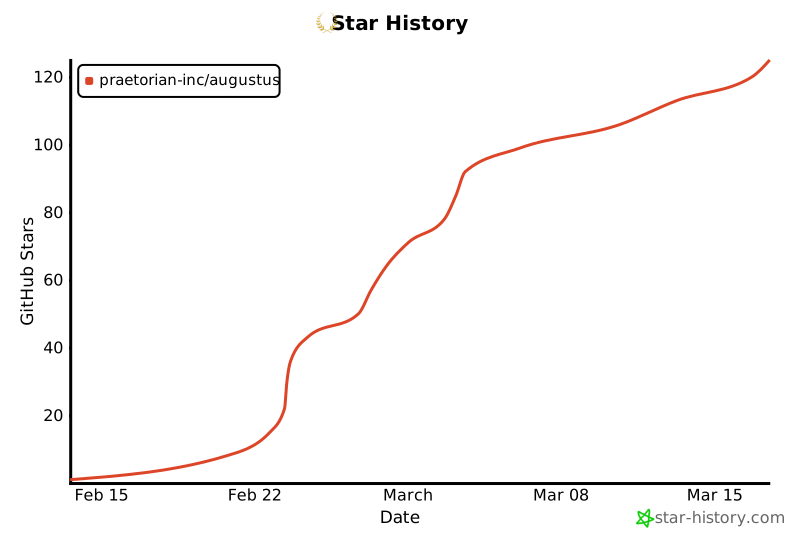
- 在 GitHub 上给它一个 **star**
- 为错误或功能请求[提交 issue](https://github.com/praetorian-inc/augustus/issues)
- [贡献](CONTRIBUTING.md)新的探测器、检测器或提供商集成
[](https://star-history.com/#praetorian-inc/augustus&Date)
## 许可证
[Apache 2.0](LICENSE) - Praetorian Security, Inc.
**由 [Praetorian](https://www.praetorian.com/) 构建** - 进攻性安全解决方案