GrafeoDB/grafeo-server
GitHub: GrafeoDB/grafeo-server
将 Grafeo 嵌入式图数据库引擎转化为支持多种查询语言和协议的独立数据库服务器,提供 REST API、Web UI 及 AI 搜索能力。
Stars: 13 | Forks: 3
[](https://github.com/GrafeoDB/grafeo-server/actions/workflows/ci.yml)
[](https://codecov.io/gh/GrafeoDB/grafeo-server)
[](https://hub.docker.com/r/grafeo/grafeo-server)
[](https://hub.docker.com/r/grafeo/grafeo-server)
[](https://hub.docker.com/r/grafeo/grafeo-server)
[](https://hub.docker.com/r/grafeo/grafeo-server)
[](LICENSE)
# Grafeo 服务器
[Grafeo](https://github.com/GrafeoDB/grafeo) 引擎的图数据库服务器。提供 REST API、嵌入式 Web UI、GQL Wire Protocol (gRPC) 以及 Bolt v5.x wire protocol 来访问 Grafeo 的多语言查询引擎。
纯 Rust 编写,单一二进制文件。提供四个层级以满足不同的部署需求。
[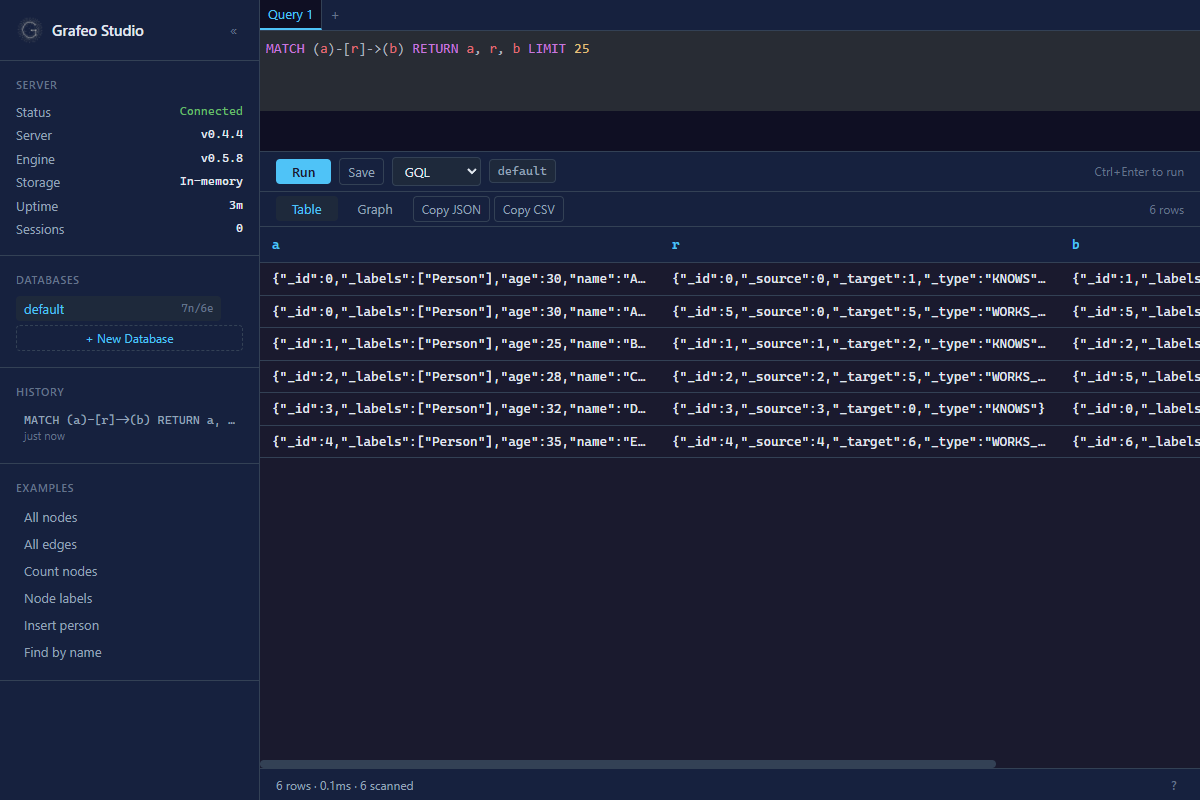](http://localhost:7474/studio/)
## 快速开始
### Docker Hub
```
# 标准 - HTTP + Studio UI,所有查询语言
docker run -p 7474:7474 grafeo/grafeo-server
# 带持久化存储
docker run -p 7474:7474 -v grafeo-data:/data grafeo/grafeo-server --data-dir /data
```
提供四个镜像层级:
| 层级 | 标签 | 传输层 | 语言 | AI/搜索 | Web UI | 二进制文件 |
| ------------ | ---------------------- | ----------------- | --------- | ----------- | ------ | ------- |
| **gwp** | `grafeo-server:gwp` | GWP (gRPC :7688) | GQL | No | No | ~7 MB |
| **bolt** | `grafeo-server:bolt` | Bolt v5 (:7687) | Cypher | No | No | ~8 MB |
| **standard** | `grafeo-server:latest` | HTTP (:7474) | 所有 6 种 | No | Studio | ~21 MB |
| **full** | `grafeo-server:full` | HTTP + GWP + Bolt | 所有 6 种 | Yes + embed | Studio | ~25 MB |
```
# GWP - gRPC 线协议,仅 GQL
docker run -p 7688:7688 grafeo/grafeo-server:gwp --data-dir /data
# Bolt - Neo4j 兼容的线协议,Cypher
docker run -p 7687:7687 grafeo/grafeo-server:bolt --data-dir /data
# 完整 - 包含 AI、auth、TLS、schemas 的所有内容
docker run -p 7474:7474 -p 7687:7687 -p 7688:7688 grafeo/grafeo-server:full
```
带版本号的标签:`grafeo-server:0.4.8`、`grafeo-server:0.4.8-gwp`、`grafeo-server:0.4.8-bolt`、`grafeo-server:0.4.8-full`。
请参阅 [Docker Hub 上的 grafeo/grafeo-server](https://hub.docker.com/r/grafeo/grafeo-server) 获取所有可用标签。
### Docker Compose
```
docker compose up -d
```
服务器访问地址为 `http://localhost:7474`。Web UI 访问地址为 `http://localhost:7474/studio/`。
### 从源码构建
```
# 构建 web UI(可选,编译时嵌入)
cd client && npm ci && npm run build && cd ..
# 构建并运行(默认:HTTP + Studio + 所有语言)
cargo run -- --data-dir ./data
# 或用于快速实验的内存模式
cargo run
```
## API
### 查询(自动提交)
```
# GQL(默认)
curl -X POST http://localhost:7474/query \
-H "Content-Type: application/json" \
-d '{"query": "INSERT (:Person {name: '\''Alice'\'', age: 30})"}'
curl -X POST http://localhost:7474/query \
-H "Content-Type: application/json" \
-d '{"query": "MATCH (p:Person) RETURN p.name, p.age"}'
# Cypher
curl -X POST http://localhost:7474/cypher \
-H "Content-Type: application/json" \
-d '{"query": "MATCH (n) RETURN count(n)"}'
# GraphQL
curl -X POST http://localhost:7474/graphql \
-H "Content-Type: application/json" \
-d '{"query": "{ Person { name age } }"}'
# Gremlin
curl -X POST http://localhost:7474/gremlin \
-H "Content-Type: application/json" \
-d '{"query": "g.V().hasLabel('\''Person'\'').values('\''name'\'')"}'
# SQL/PGQ
curl -X POST http://localhost:7474/sql \
-H "Content-Type: application/json" \
-d '{"query": "CALL grafeo.procedures() YIELD name, description"}'
# SPARQL(在 RDF 三元组存储上操作,与属性图分离)
curl -X POST http://localhost:7474/sparql \
-H "Content-Type: application/json" \
-d '{"query": "PREFIX foaf: ` 或 `X-API-Key: `。`/health`、`/metrics` 和 `/studio/` 豁免此要求。
```
# Bearer token
grafeo-server --auth-token my-secret-token
# Basic auth
grafeo-server --auth-user admin --auth-password secret
# 这两种方法可以同时配置
```
### TLS(特性:`tls`)
需要使用 `--features tls` 或 `--features full` 进行构建。
| 变量 | CLI 标志 | 默认值 | 描述 |
|----------|----------|---------|-------------|
| `GRAFEO_TLS_CERT` | `--tls-cert` | _(无)_ | TLS 证书 (PEM) 路径 |
| `GRAFEO_TLS_KEY` | `--tls-key` | _(无)_ | TLS 私钥 (PEM) 路径 |
```
grafeo-server --tls-cert cert.pem --tls-key key.pem
```
### 示例
```
# 最小化(内存模式,无 auth)
grafeo-server
# 带 auth 和速率限制的持久化
grafeo-server --data-dir ./data --auth-token my-token --rate-limit 100
# 带 TLS 的生产环境
grafeo-server --data-dir /data --tls-cert /certs/cert.pem --tls-key /certs/key.pem \
--auth-token $API_TOKEN --rate-limit 1000 --cors-origins "https://app.example.com" \
--log-format json
```
## 特性标志
Grafeo Server 使用 Cargo 特性标志来控制编译时包含的功能。该架构将传输层(`http`、`gwp`)与核心数据库功能分离,从而允许为不同的部署场景构建最小化的版本。
### 层级
| 层级 | Cargo 命令 | 传输层 | 内容 |
|------|--------------|-----------|--------------|
| **GWP** | `--no-default-features --features gwp` | GWP (gRPC) | GQL + 存储, ~7 MB |
| **Bolt** | `--no-default-features --features bolt` | Bolt v5 | Cypher + 存储, ~8 MB |
| **Standard** | _(默认)_ | HTTP | 所有语言,Studio UI,算法, ~21 MB |
| **Full** | `--features full` | HTTP + GWP + Bolt | 包含 AI、auth、TLS 在内的一切功能, ~25 MB |
```
# 标准(默认)
cargo build --release
# GWP - gRPC 线协议,仅 GQL
cargo build --release --no-default-features --features gwp
# Bolt - Neo4j 兼容,仅 Cypher
cargo build --release --no-default-features --features bolt
# 完整 - 包含所有内容
cargo build --release --features full
```
### 自定义构建
使用 `--no-default-features` 开始,然后根据需要挑选。下方的矩阵展示了各特性的兼容性。
**传输层**(选择一个或多个):
| 特性 | 描述 | 端口 |
|---------|-------------|------|
| `http` | 通过 axum 提供 REST API (Swagger, OpenAPI, WebSocket) | 7474 |
| `gwp` | GQL Wire Protocol (gRPC) | 7688 |
| `bolt` | Bolt v5 wire protocol(兼容 Neo4j) | 7687 |
**查询语言**(单独选择或使用 `all-languages`):
| 特性 | 描述 | 备注 |
|---------|-------------|-------|
| `gql` | GQL (ISO/IEC 39075) | 适用于所有传输层 |
| `cypher` | Cypher (openCypher 9.0) | 适用于所有传输层 |
| `sparql` | SPARQL (W3C 1.1) | 隐含 `rdf` |
| `gremlin` | Gremlin (Apache TinkerPop) | 适用于所有传输层 |
| `graphql` | GraphQL | 适用于所有传输层 |
| `sql-pgq` | SQL/PGQ (SQL:2023 GRAPH_TABLE) | 适用于所有传输层 |
**引擎能力**:
| 特性 | 描述 | 依赖 |
|---------|-------------|----------|
| `storage` | parallel + wal + spill + mmap | 无(推荐所有构建使用) |
| `algos` | 通过 CALL 存储过程提供 22 种以上图算法 | 无 |
| `ai` | vector-index + text-index + hybrid-search + cdc | 无 |
| `rdf` | RDF 三元组存储 | 由 `sparql` 自动启用 |
| `embed` | 进程内 ONNX 嵌入生成(~17 MB) | 无 |
| `temporal` | 仅追加的版本化属性 | 无 |
| `import` | LOAD DATA 格式支持 (jsonl-import + parquet-import) | 无 |
| `metrics` | 引擎级别的 Prometheus 指标 | 无 |
**服务器扩展**(需要 `http`):
| 特性 | 描述 | 依赖 |
|---------|-------------|----------|
| `studio` | 嵌入式 Web UI | `http` |
| `auth` | Bearer token + HTTP Basic 认证 | 任意传输层 |
| `tls` | 通过 rustls 提供内置 HTTPSRPCS | 任意传输层 |
| `owl-schema` | OWL/Turtle 模式加载 | 无 |
| `rdfs-schema` | RDFS 模式支持 | `owl-schema`(隐含) |
| `json-schema` | JSON Schema 验证 | 无 |
**兼容性说明**:
- `studio` 需要 `http`(无独立 Studio)
- `sparql` 隐含 `rdf`(始终会创建 RDF 存储)
- `gwp` 使用端口 7688,`bolt` 默认使用端口 7687,可通过 `--gwp-port` / `--bolt-port` 配置
- `auth` 和 `tls` 适用于任何已启用的传输层
- 所有其他特性均可自由组合
**示例**:
```
# 无 Studio UI 的 HTTP API
cargo build --release --no-default-features --features "http,all-languages,storage"
# 标准 + auth
cargo build --release --features auth
# GWP + Bolt(两种线协议,无 HTTP)
cargo build --release --no-default-features --features "gwp,bolt,gql,cypher,storage"
# 最小化 AI 服务器(HTTP + GQL + 向量/文本搜索)
cargo build --release --no-default-features --features "http,gql,storage,ai"
# 边缘部署(GWP + GQL,无算法)
cargo build --release --no-default-features --features "gwp,gql,storage"
```
### Docker 构建目标
Dockerfile 支持与层级相匹配的四个构建目标:
```
docker build --target gwp -t grafeo-server:gwp . # GWP-only, port 7688
docker build --target bolt -t grafeo-server:bolt . # Bolt-only, port 7687
docker build --target standard -t grafeo-server:standard . # HTTP + UI, port 7474 (default)
docker build --target full -t grafeo-server:full . # All ports
```
### 特性发现
`/health` endpoint 会报告已编译到运行中服务器的特性:
```
{
"status": "ok",
"features": {
"languages": ["gql", "cypher", "sparql", "gremlin", "graphql", "sql-pgq"],
"engine": ["parallel", "wal", "spill", "mmap"],
"server": ["gwp"]
}
}
```
## 开发
```
cargo build # Debug build
cargo test # Run tests (default features)
cargo test --features auth # Run tests including auth tests
cargo fmt --all -- --check # Check formatting
cargo clippy --all-targets -- -D warnings # Lint
cargo deny check # License/advisory audit
```
### Web UI 开发
```
# 终端 1:服务器
cargo run
# 终端 2:带 HMR 的 UI 开发服务器(将 API 代理到 :7474)
cd client && npm run dev
# 打开 http://localhost:5173
```
## 相关项目
- [Grafeo](https://github.com/GrafeoDB/grafeo),可嵌入式图数据库引擎
- [grafeo-web](https://github.com/GrafeoDB/grafeo-web),通过 WebAssembly 在浏览器中运行的 Grafeo
- [anywidget-graph](https://github.com/GrafeoDB/anywidget-graph),用于 Notebook 的交互式图可视化组件
## 许可证
Apache-2.0
标签:Apache-2.0许可, Bolt协议, CNCF毕业项目, DNS解析, Docker容器, GQL查询语言, Grafeo数据库, gRPC协议, HTTP服务器, IP 地址批量处理, Python工具, REST API, Rust编程语言, TCP SYN 扫描, Web UI, 中间件, 单文件二进制, 可视化界面, 后端开发, 开源项目, 攻击面发现, 数据库引擎, 数据持久化, 暗色界面, 独立部署, 网络信息收集, 请求拦截, 远程访问