l4rm4nd/PyADRecon
GitHub: l4rm4nd/PyADRecon
PyADRecon 是一款用 Python3 实现的 Active Directory 侦察工具,通过 LDAP 查询提取域环境信息并生成多格式安全报告。
Stars: 64 | Forks: 4

面向渗透测试人员和蓝队的改进版 [ADRecon](https://github.com/sense-of-security/ADRecon) 的 Python3 实现。
## 目录
- [安装说明](#installation)
- [用法](#usage)
- [Docker](#docker)
- [收集模块](#collection-modules)
- [HTML 仪表盘](#html-dashboard)
- [鸣谢](#acknowledgements)
- [许可证](#license)
## 安装说明
```
# 来自 pypi 的 stable release
pipx install pyadrecon
# 来自 github 的最新 commit
pipx install git+https://github.com/l4rm4nd/PyADRecon
```
然后验证安装:
```
pyadrecon --version
```
## 用法
```
usage: pyadrecon.py [-h] [--version] [--generate-excel-from CSV_DIR] [-dc DOMAIN_CONTROLLER] [-u USERNAME] [-p [PASSWORD]] [-d DOMAIN] [--auth {ntlm,kerberos}] [--tgt-file TGT_FILE] [--tgt-base64 TGT_BASE64]
[--ssl] [--port PORT] [-o OUTPUT] [--page-size PAGE_SIZE] [--threads THREADS] [--dormant-days DORMANT_DAYS] [--password-age PASSWORD_AGE] [--only-enabled] [--collect COLLECT]
[--no-excel] [-v]
PyADRecon - Python Active Directory Reconnaissance Tool
options:
-h, --help show this help message and exit
--version show program's version number and exit
--generate-excel-from CSV_DIR
Generate Excel report from CSV directory (standalone mode, no AD connection needed)
--generate-dashboard-from CSV_DIR
Generate HTML dashboard from existing CSV files (standalone mode)
-dc, --domain-controller DOMAIN_CONTROLLER
Domain Controller IP or hostname
-u, --username USERNAME
Username for authentication
-p, --password [PASSWORD]
Password for authentication (optional if using TGT)
-d, --domain DOMAIN Domain name (e.g., DOMAIN.LOCAL) - Required for Kerberos auth
--auth {ntlm,kerberos}
Authentication method (default: ntlm)
--tgt-file TGT_FILE Path to Kerberos TGT ccache file (for Kerberos auth)
--tgt-base64 TGT_BASE64
Base64-encoded Kerberos TGT ccache (for Kerberos auth)
--ssl Force SSL/TLS (LDAPS). No LDAP fallback allowed.
--port PORT LDAP port (default: 389, use 636 for LDAPS)
-o, --output OUTPUT Output directory (default: PyADRecon-Report-
)
--page-size PAGE_SIZE
LDAP page size (default: 500)
--dormant-days DORMANT_DAYS
Days for dormant account threshold (default: 90)
--password-age PASSWORD_AGE
Days for password age threshold (default: 180)
--only-enabled Only collect enabled objects
--collect COLLECT Comma-separated modules to collect (default: all)
--workstation WORKSTATION
Explicitly spoof workstation name for NTLM authentication (default: empty string, bypasses userWorkstations restrictions)
--no-excel Skip Excel report generation
--no-dashboard Skip interactive HTML dashboard generation
-v, --verbose Verbose output
Examples:
# Basic usage with NTLM authentication
pyadrecon.py -dc 192.168.1.1 -u admin -p password123 -d DOMAIN.LOCAL
# With Kerberos authentication (bypasses channel binding)
pyadrecon.py -dc dc01.domain.local -u admin -p password123 -d DOMAIN.LOCAL --auth kerberos
# With Kerberos using TGT from file (bypasses channel binding)
pyadrecon.py -dc dc01.domain.local -u admin -d DOMAIN.LOCAL --auth kerberos --tgt-file /tmp/admin.ccache
# With Kerberos using TGT from base64 string (bypasses channel binding)
pyadrecon.py -dc dc01.domain.local -u admin -d DOMAIN.LOCAL --auth kerberos --tgt-base64 BQQAAAw...
# Only collect specific modules
pyadrecon.py -dc 192.168.1.1 -u admin -p pass -d DOMAIN.LOCAL --collect users,groups,computers
# Output to specific directory
pyadrecon.py -dc 192.168.1.1 -u admin -p pass -d DOMAIN.LOCAL -o /tmp/adrecon_output
# Generate Excel report from existing CSV files (standalone mode)
pyadrecon.py --generate-excel-from /path/to/CSV-Files -o report.xlsx
```
## Docker
GHCR.IO 上还提供了 Docker 镜像。
```
docker run --rm -v /etc/krb5.conf:/etc/krb5.conf:ro -v /etc/hosts:/etc/hosts:ro -v ./:/tmp/pyadrecon_output ghcr.io/l4rm4nd/pyadrecon:latest -dc dc01.domain.local -u admin -p password123 -d DOMAIN.LOCAL -o /tmp/pyadrecon_output
```
## 收集模块
默认情况下,PyADRecon 会运行所有收集模块。它们被称为 `default` 或 `all`。
不过,您可以自由选择要运行的模块集合:
| 图标 | 含义 |
|------|---------|
| 🛑 | 需要域管理员权限(例如 Domain Admins) |
| ✅ | 需要常规域权限(例如 Authenticated Users) |
| 💥 | 处于 Beta 状态的新收集模块。结果可能不准确。 |
**Forest 与 Domain**
- `forest` ✅
- `domain` ✅
- `trusts` ✅
- `sites` ✅
- `subnets` ✅
- `schema` 或 `schemahistory` ✅
**Domain Controllers**
- `dcs` 或 `domaincontrollers` ✅
**用户与组**
- `users` ✅
- `userspns` ✅
- `groups` ✅
- `groupmembers` ✅
- `protectedgroups` ✅💥
- `krbtgt` ✅
- `asreproastable` ✅
- `kerberoastable` ✅
**计算机与打印机**
- `computers` ✅
- `computerspns` ✅
- `printers` ✅
**OU 与组策略**
- `ous` ✅
- `gpos` ✅
- `gplinks` ✅
**密码与凭据**
- `passwordpolicy` ✅
- `fgpp` 或 `finegrainedpasswordpolicy` 🛑
- `laps` 🛑
- `bitlocker` 🛑💥
**托管服务账户**
- `gmsa` 或 `groupmanagedserviceaccounts` ✅💥
- `dmsa` 或 `delegatedmanagedserviceaccounts` ✅💥
- 仅适用于 Windows Server 2025+ AD schema
**证书**
- `adcs` 或 `certificates` ✅💥
- 检测 ESC1、ESC2、ESC3、ESC4 和 ESC9
**DNS**
- `dnszones` ✅
- `dnsrecords` ✅
## HTML 仪表盘
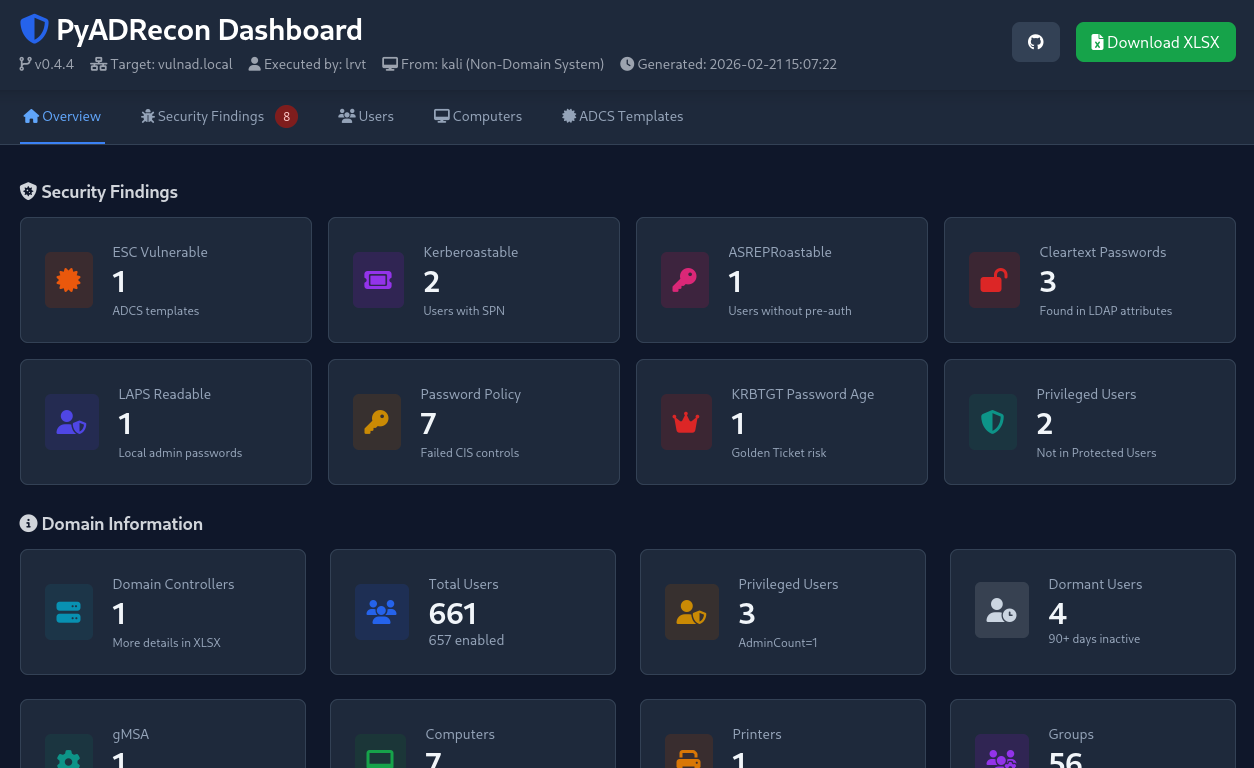
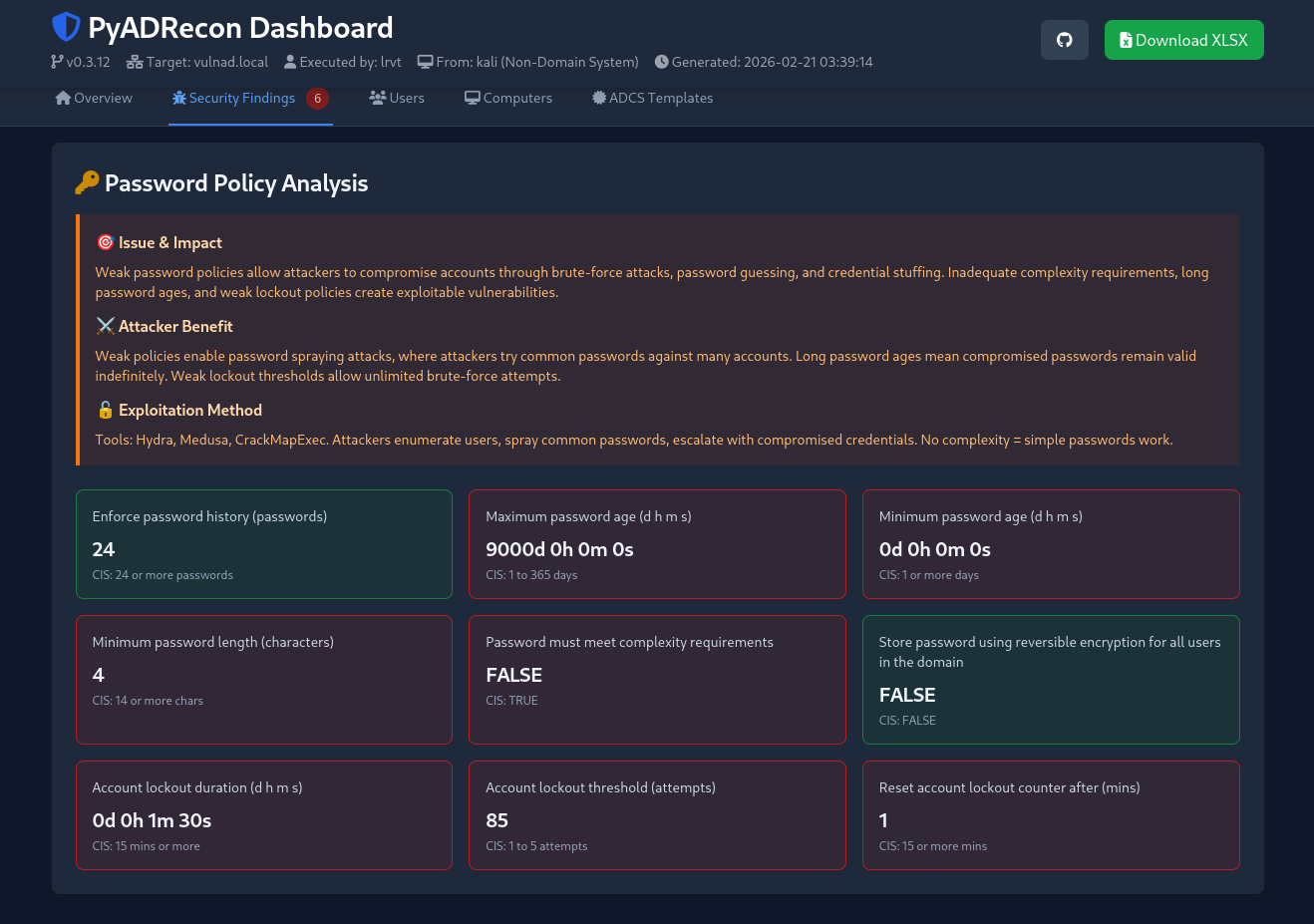
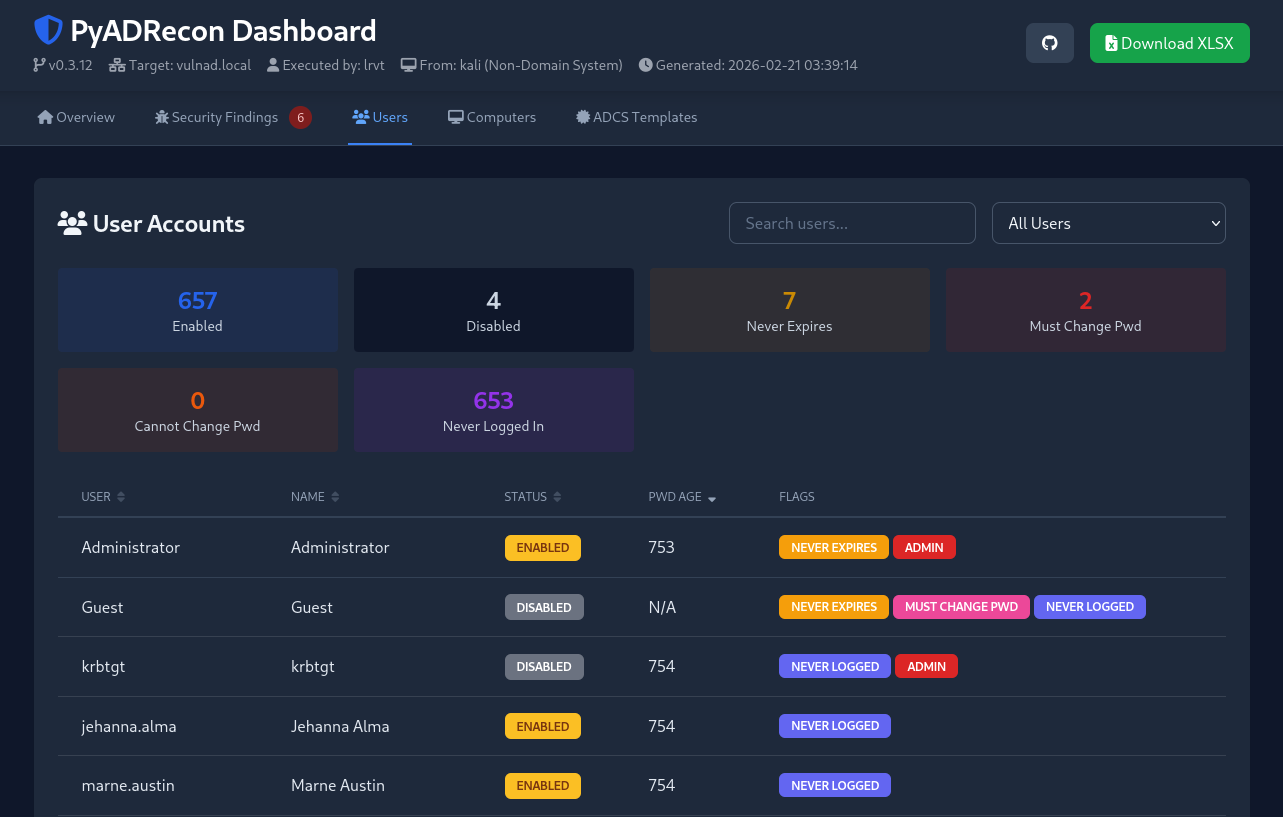
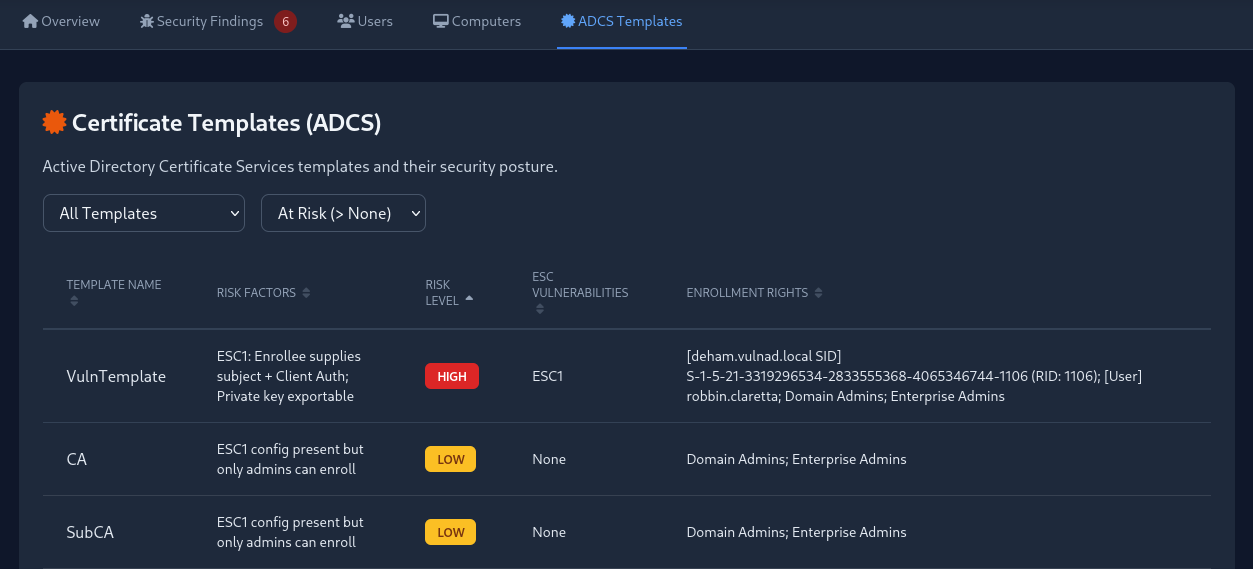
当执行所有收集模块时,PyADRecon 会自动生成包含关键统计信息和安全发现的 HTML 仪表盘。
如有需要,您可以在初始数据收集期间使用 `--no-dashboard` 禁用仪表盘创建。随后可以使用 `--generate-dashboard-from ` 从现有的 CSV 文件生成仪表盘。
## 许可证
**PyADRecon** 在 **MIT License** 下发布。
使用了以下第三方库:
| 库 | 许可证 |
|-------------|----------------|
| ldap3 | LGPL v3 |
| openpyxl | MIT |
| gssapi | MIT |
| impacket | Apache 2.0 |
| winkerberos | Apache 2.0 |
在使用或重新分发本软件时,请参阅这些库各自对应的许可证。标签:Active Directory, Checkov, HTTP, LDAP, Plaso, Python3, StruQ, 域环境, 请求拦截