kailas-rathod/react-native-otp-auto-verify
GitHub: kailas-rathod/react-native-otp-auto-verify
一款基于 Google SMS Retriever API 的轻量级 React Native 库,无需短信权限即可实现 Android 平台的 OTP 自动检测与填充。
Stars: 3 | Forks: 3
# react-native-otp-auto-verify
[](https://www.npmjs.com/package/react-native-otp-auto-verify) [](https://www.npmjs.com/package/react-native-otp-auto-verify) [](https://github.com/kailas-rathod/react-native-otp-auto-verify/blob/main/LICENSE) [](https://www.typescriptlang.org/)
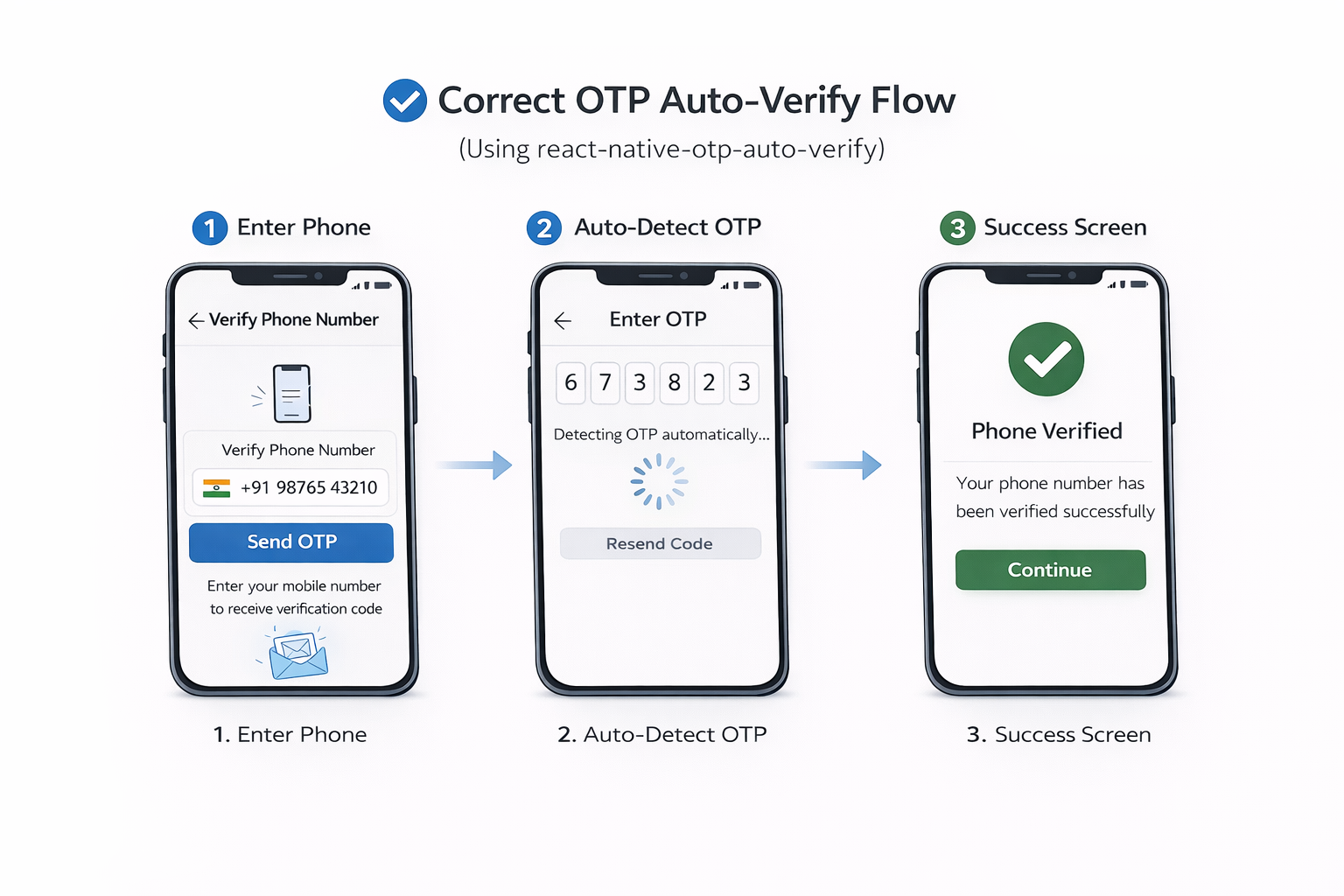
**react-native-otp-auto-verify** 是一个轻量级且安全的 Android React Native OTP 自动验证库,基于官方 Google SMS Retriever API 构建。它无需 READ_SMS 或 RECEIVE_SMS 权限即可实现自动 OTP 检测,确保完全符合 Google Play Store 政策并增强用户信任。该库专为现代身份验证流程而设计,是金融科技应用、银行应用程序、电子商务平台和安全登录系统的理想选择。
无权限:它不需要用户授予任何 SMS 权限,符合严格的 Google Play Store 政策。
凭借极少的依赖和简洁的架构,它可以无缝集成到 React Native 旧架构和新架构(TurboModule)环境中。该解决方案通过消除 Android 上的手动 OTP 输入来改善用户体验,同时保持强大的服务端验证标准。
最适用于**银行**、**金融科技**和身份验证密集型应用的引导/登录流程。
支持 RN 旧架构和 React Native **新架构**(TurboModule)。
**Android**:自动 OTP 检测。
**iOS**:使用 iOS Security Code AutoFill(需要手动点击)。
**联系:** [GitHub](https://github.com/kailas-rathod/react-native-otp-auto-verify) · [npm](https://www.npmjs.com/package/react-native-otp-auto-verify) · [问题](https://github.com/kailas-rathod/react-native-otp-auto-verify/issues) · [许可证](https://github.com/kailas-rathod/react-native-otp-auto-verify/blob/main/LICENSE)
 ## 功能
- ✅ **自动 OTP 检测**:从匹配的 SMS 中接收 OTP,并将其作为 `otp`(hook)或 `extractedOtp`(监听器)暴露出来
- ✅ **无 SMS 权限**:不访问收件箱,避免敏感权限并减少合规摩擦
- ✅ **App Hash 安全性**:OTP SMS 必须以您的 **11 位 hash** 结尾(只有您的应用才能接收)
- ✅ **Hook + 命令式 API**:用于屏幕的 `useOtpVerification()`,用于自定义流程的 `activateOtpListener()`
- ✅ **TypeScript**:类型化的选项和返回值
- ✅ **新架构就绪**:TurboModule 实现;同时也适用于旧架构
## 平台支持
| 平台 | 支持 | 备注 |
|----------|----------|-------|
| Android | ✅ | 设备需要安装 Google Play Services |
| iOS | ✅ 仅原生 | 使用 iOS Security Code AutoFill(需要手动点击) |
## 环境要求
- React Native:**0.60+**(自动链接)
- Android:**minSdkVersion 24+**
## 安装
```
npm install react-native-otp-auto-verify
```
# 或者
```
yarn add react-native-otp-auto-verify
```
# 或者
```
pnpm add react-native-otp-auto-verify
```
## 用法
### 1) 获取您的 App Hash
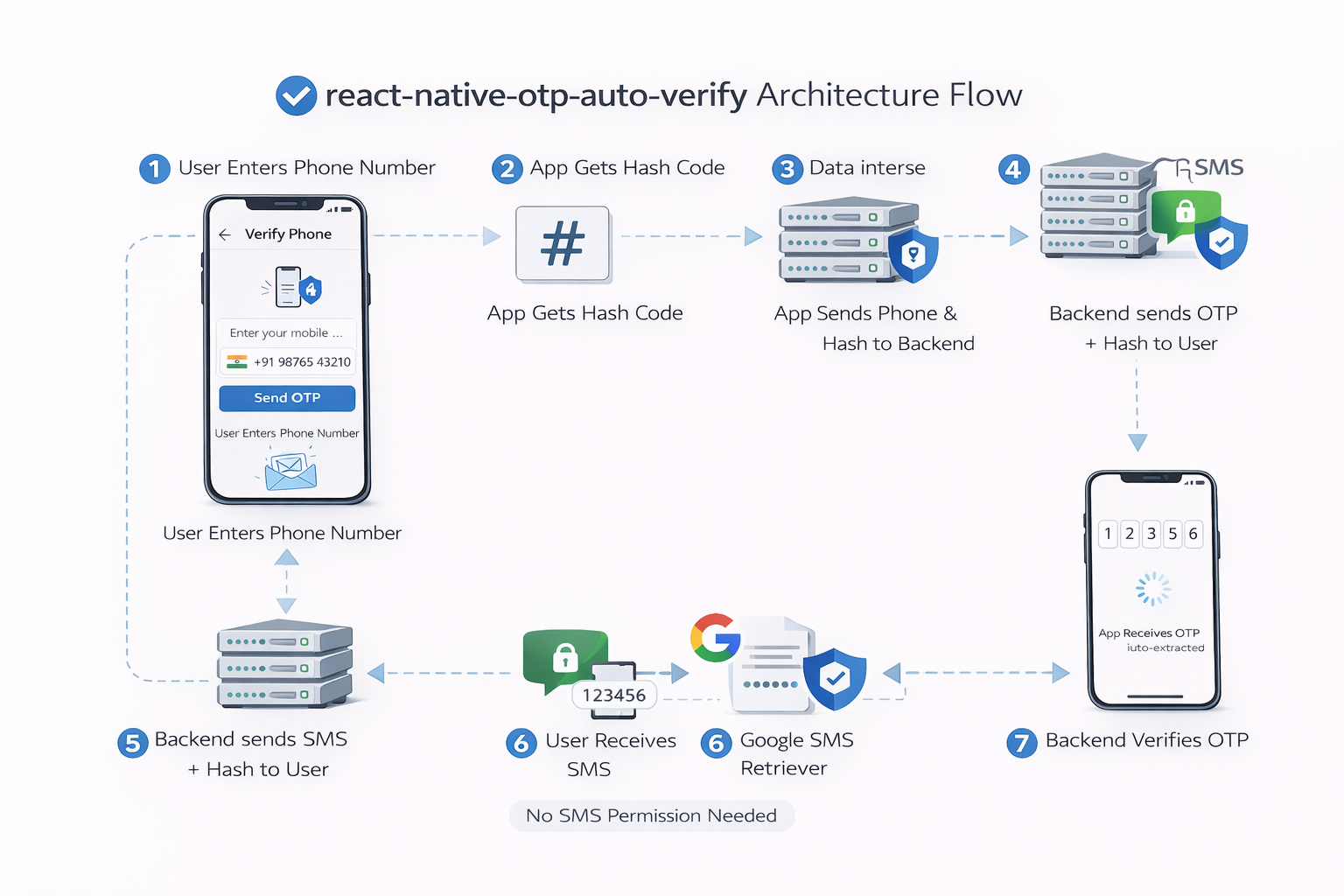
SMS Retriever 仅投递包含您 **11 位 App Hash** 的消息。
```
import { getHash } from 'react-native-otp-auto-verify';
const hashes = await getHash();
const appHash = hashes[0]; // send this to your backend
```
### 2) 格式化您的 OTP SMS
您的后端**必须**在 SMS 的**末尾**包含 App Hash。
要求:
- 消息必须 **≤ 140 字节**
- 必须包含 **4–6 位** OTP
- 必须**以** `getHash()` 获取的 App Hash **结尾**
推荐格式:
```
Dear Kailas Rathod, 321500 is your OTP for mobile authentication. This OTP is valid for the next 15 minutes. Please DO NOT share it with anyone.
uW87Uq6teXc
```
注意:您不需要在消息开头添加 `<#>`。
### 3) Hook 用法(推荐)
仅在 OTP 屏幕可见(前台)时开始监听。
```
import React from 'react';
import { Text, View } from 'react-native';
import { useOtpVerification } from 'react-native-otp-auto-verify';
export function OtpScreen() {
const { hashCode, otp, timeoutError, error, startListening, stopListening } =
useOtpVerification({ numberOfDigits: 6 });
React.useEffect(() => {
void startListening();
return () => stopListening();
}, [startListening, stopListening]);
return (
## 功能
- ✅ **自动 OTP 检测**:从匹配的 SMS 中接收 OTP,并将其作为 `otp`(hook)或 `extractedOtp`(监听器)暴露出来
- ✅ **无 SMS 权限**:不访问收件箱,避免敏感权限并减少合规摩擦
- ✅ **App Hash 安全性**:OTP SMS 必须以您的 **11 位 hash** 结尾(只有您的应用才能接收)
- ✅ **Hook + 命令式 API**:用于屏幕的 `useOtpVerification()`,用于自定义流程的 `activateOtpListener()`
- ✅ **TypeScript**:类型化的选项和返回值
- ✅ **新架构就绪**:TurboModule 实现;同时也适用于旧架构
## 平台支持
| 平台 | 支持 | 备注 |
|----------|----------|-------|
| Android | ✅ | 设备需要安装 Google Play Services |
| iOS | ✅ 仅原生 | 使用 iOS Security Code AutoFill(需要手动点击) |
## 环境要求
- React Native:**0.60+**(自动链接)
- Android:**minSdkVersion 24+**
## 安装
```
npm install react-native-otp-auto-verify
```
# 或者
```
yarn add react-native-otp-auto-verify
```
# 或者
```
pnpm add react-native-otp-auto-verify
```
## 用法
### 1) 获取您的 App Hash
SMS Retriever 仅投递包含您 **11 位 App Hash** 的消息。
```
import { getHash } from 'react-native-otp-auto-verify';
const hashes = await getHash();
const appHash = hashes[0]; // send this to your backend
```
### 2) 格式化您的 OTP SMS
您的后端**必须**在 SMS 的**末尾**包含 App Hash。
要求:
- 消息必须 **≤ 140 字节**
- 必须包含 **4–6 位** OTP
- 必须**以** `getHash()` 获取的 App Hash **结尾**
推荐格式:
```
Dear Kailas Rathod, 321500 is your OTP for mobile authentication. This OTP is valid for the next 15 minutes. Please DO NOT share it with anyone.
uW87Uq6teXc
```
注意:您不需要在消息开头添加 `<#>`。
### 3) Hook 用法(推荐)
仅在 OTP 屏幕可见(前台)时开始监听。
```
import React from 'react';
import { Text, View } from 'react-native';
import { useOtpVerification } from 'react-native-otp-auto-verify';
export function OtpScreen() {
const { hashCode, otp, timeoutError, error, startListening, stopListening } =
useOtpVerification({ numberOfDigits: 6 });
React.useEffect(() => {
void startListening();
return () => stopListening();
}, [startListening, stopListening]);
return (
{!!hashCode && Hash: {hashCode} }
{!!otp && OTP: {otp} }
{timeoutError && Timeout. Tap resend and try again. }
{!!error && Error: {error.message} }
);
}
```
### 4) 命令式用法
```
import {
activateOtpListener,
removeListener,
} from 'react-native-otp-auto-verify';
const sub = await activateOtpListener(
(sms, extractedOtp) => {
if (extractedOtp) {
console.log('OTP:', extractedOtp);
}
},
{ numberOfDigits: 6 }
);
// cleanup
sub.remove();
// or
removeListener();
```
🔹 步骤 1 – 启动 OTP 监听器
```
import { useOtpVerification } from 'react-native-otp-auto-verify';
const { startOtpListener, stopListener, otp } = useOtpVerification();
useEffect(() => {
startOtpListener();
return () => stopListener();
}, []);
```
## 创建 OTP 屏幕(推荐的 Hook 方法)
```
import React, { useEffect, useState } from 'react';
import {
View,
Text,
TextInput,
Button,
Platform,
} from 'react-native';
import { useOtpVerification } from 'react-native-otp-auto-verify';
const OtpScreen = () => {
const [otpValue, setOtpValue] = useState('');
const {
otp,
hashCode,
timeoutError,
error,
startListening,
stopListening,
} = useOtpVerification({ numberOfDigits: 6 });
// Start listener when screen opens
useEffect(() => {
if (Platform.OS === 'android') {
startListening();
}
return () => {
stopListening();
};
}, []);
// Auto verify when OTP received
useEffect(() => {
if (otp) {
setOtpValue(otp);
verifyOtp(otp);
}
}, [otp]);
const verifyOtp = async (code: string) => {
console.log('Verifying OTP:', code);
// Call your backend API here
// await api.post('/verify-otp', { otp: code })
};
return (
Enter OTP
);
};
export default OtpScreen;
```
# 在屏幕中启动 OTP 监听器
```
import React, { useEffect, useState } from 'react';
import { View, TextInput, Text } from 'react-native';
import { useOtpVerification } from 'react-native-otp-auto-verify';
export default function OtpScreen() {
const [otpValue, setOtpValue] = useState('');
const {
otp,
startListening,
stopListening,
} = useOtpVerification({ numberOfDigits: 6 });
useEffect(() => {
startListening(); // Start listening
return () => {
stopListening(); // Cleanup
};
}, []);
useEffect(() => {
if (otp) {
setOtpValue(otp); // OTP automatically retrieved here
console.log('Retrieved OTP:', otp);
}
}, [otp]);
return (
);
}
```
# iOS OTP AutoFill(原生)
iOS **不**允许第三方库读取 SMS 消息。
出于隐私和安全原因,Apple 限制了自动读取 SMS。
相反,iOS 提供了一个名为 **Security Code AutoFill** 的原生功能,在正确配置时,会在键盘上方建议 OTP。
此库在 iOS 上**不会**自动读取 OTP。
## iOS OTP AutoFill 如何工作
1. 用户收到包含 OTP 的 SMS。
2. iOS 检测到验证码。
3. OTP 出现在键盘上方。
4. 用户点击建议。
5. 验证码自动填入输入框。
无需 SMS 权限。
## React Native 设置
在您的 OTP 输入框中使用以下配置:
```
 ## API 参考
### `useOtpVerification(options?)`
在您的 OTP 屏幕上使用此功能。它管理:
- 获取 App Hash (`hashCode`)
- 启动/停止 SMS Retriever 监听器
- 提取 OTP 并将其作为 `otp` 暴露出来
| 属性 | 类型 | 默认值 | 描述 |
|----------|------|---------|-------------|
| `numberOfDigits` | `4 \| 5 \| 6` | `6` | 要提取的 OTP 长度 |
| `hashCode` | `string` | `''` | App Hash(发送给后端) |
| `otp` | `string \| null` | `null` | 提取的 OTP |
| `sms` | `string \| null` | `null` | 完整的 SMS 文本 |
| `timeoutError` | `boolean` | `false` | 是否发生超时 |
| `error` | `Error \| null` | `null` | 当 getHash 或 startListening 失败时设置 |
| `startListening` | `() => Promise
## API 参考
### `useOtpVerification(options?)`
在您的 OTP 屏幕上使用此功能。它管理:
- 获取 App Hash (`hashCode`)
- 启动/停止 SMS Retriever 监听器
- 提取 OTP 并将其作为 `otp` 暴露出来
| 属性 | 类型 | 默认值 | 描述 |
|----------|------|---------|-------------|
| `numberOfDigits` | `4 \| 5 \| 6` | `6` | 要提取的 OTP 长度 |
| `hashCode` | `string` | `''` | App Hash(发送给后端) |
| `otp` | `string \| null` | `null` | 提取的 OTP |
| `sms` | `string \| null` | `null` | 完整的 SMS 文本 |
| `timeoutError` | `boolean` | `false` | 是否发生超时 |
| `error` | `Error \| null` | `null` | 当 getHash 或 startListening 失败时设置 |
| `startListening` | `() => Promise` | — | 开始监听 |
| `stopListening` | `() => void` | — | 停止监听 |
### `getHash(): Promise`
仅限 Android。在 iOS 上返回 `[]`。
### `activateOtpListener(handler, options?): Promise<{ remove(): void }>`
仅限 Android。在 iOS 上会抛出异常。
### `removeListener(): void`
仅限 Android。移除原生监听器。
### `extractOtp(sms: string, numberOfDigits?: 4 | 5 | 6): string | null`
用于从 SMS 字符串中提取 OTP 的纯辅助函数。
## 超时行为
SMS Retriever 最多等待 **5 分钟**。超时时:
- `timeoutError` 变为 `true`
- 再次调用 `startListening()` 以重试
## React Native 新架构
此库使用 **TurboModules** 构建,并完全支持 React Native 的**新架构**。
### 什么是新架构?
新架构(也称为 Fabric + TurboModules)是 React Native 的新渲染系统和原生模块架构,它提供:
- 更好的性能和类型安全性
- 同步原生模块调用
- 改进与原生代码的互操作性
## ✨ 功能对比
| 功能 | react-native-otp-auto-verify | 其他包/库|
|---------------------------|------------------------------|---------------------------|
| SMS Retriever API | ✅ 是 | ✅ 是 |
| 需要 SMS 权限 | ❌ 否 | ❌ 否 |
| TurboModule 支持 | ✅ 是 | ❌ 通常不支持 |
| TypeScript 支持 | ✅ 完整 | ⚠️ 部分 |
| Hook API | ✅ `useOtpVerification` | ❌ 不可用 |
| App Hash 工具 | ✅ 内置 | ⚠️ 基础 |
| 架构就绪 | ✅ 旧 + 新 | ⚠️ 大多仅限旧版 |
| 维护 | ✅ 积极维护 | ⚠️ 不定 |
### 启用新架构
该库自动兼容**旧架构**和**新架构**。无需更改代码。
**对于 Android:**
在 `android/gradle.properties` 中启用新架构:
```
newArchEnabled=true
```
**对于 iOS:**
在 `ios/Podfile` 中启用新架构:
```
use_react_native!(
:fabric_enabled => true,
# ... other options
)
```
或设置环境变量:
```
RCT_NEW_ARCH_ENABLED=1 pod install
```
### 兼容性
- ✅ 适用于**旧架构**(React Native < 0.68)
- ✅ 适用于**新架构**(React Native 0.68+)
- ✅ 自动检测并使用正确的架构
- ✅ 迁移时无破坏性变更
## 故障排除
- OTP 未被检测到
- 确保 SMS **以** App Hash 结尾
- 保持 SMS **≤ 140 字节**
- 使 `numberOfDigits` 与您的 OTP 长度匹配
- 保持应用在**前台**
- 监听器启动失败
- 确保设备上安装了 Google Play Services
- 避免同时存在多个活动监听器
## 示例应用
参见 [`./example`](./example)。
## 发布
维护者:在向 npm 发布新版本之前,请参阅 [RELEASE_CHECKLIST.md](./RELEASE_CHECKLIST.md)。
## 关键词
react native otp auto verify, react native sms retriever api, automatic otp detection android, react native otp autofill, sms retriever react native, otp verification library react native, google play compliant otp library
## 许可证
[MIT](./LICENSE) — 参见仓库中的 [LICENSE](./LICENSE)。
## 功能
- ✅ **自动 OTP 检测**:从匹配的 SMS 中接收 OTP,并将其作为 `otp`(hook)或 `extractedOtp`(监听器)暴露出来
- ✅ **无 SMS 权限**:不访问收件箱,避免敏感权限并减少合规摩擦
- ✅ **App Hash 安全性**:OTP SMS 必须以您的 **11 位 hash** 结尾(只有您的应用才能接收)
- ✅ **Hook + 命令式 API**:用于屏幕的 `useOtpVerification()`,用于自定义流程的 `activateOtpListener()`
- ✅ **TypeScript**:类型化的选项和返回值
- ✅ **新架构就绪**:TurboModule 实现;同时也适用于旧架构
## 平台支持
| 平台 | 支持 | 备注 |
|----------|----------|-------|
| Android | ✅ | 设备需要安装 Google Play Services |
| iOS | ✅ 仅原生 | 使用 iOS Security Code AutoFill(需要手动点击) |
## 环境要求
- React Native:**0.60+**(自动链接)
- Android:**minSdkVersion 24+**
## 安装
```
npm install react-native-otp-auto-verify
```
# 或者
```
yarn add react-native-otp-auto-verify
```
# 或者
```
pnpm add react-native-otp-auto-verify
```
## 用法
### 1) 获取您的 App Hash
SMS Retriever 仅投递包含您 **11 位 App Hash** 的消息。
```
import { getHash } from 'react-native-otp-auto-verify';
const hashes = await getHash();
const appHash = hashes[0]; // send this to your backend
```
### 2) 格式化您的 OTP SMS
您的后端**必须**在 SMS 的**末尾**包含 App Hash。
要求:
- 消息必须 **≤ 140 字节**
- 必须包含 **4–6 位** OTP
- 必须**以** `getHash()` 获取的 App Hash **结尾**
推荐格式:
```
Dear Kailas Rathod, 321500 is your OTP for mobile authentication. This OTP is valid for the next 15 minutes. Please DO NOT share it with anyone.
uW87Uq6teXc
```
注意:您不需要在消息开头添加 `<#>`。
### 3) Hook 用法(推荐)
仅在 OTP 屏幕可见(前台)时开始监听。
```
import React from 'react';
import { Text, View } from 'react-native';
import { useOtpVerification } from 'react-native-otp-auto-verify';
export function OtpScreen() {
const { hashCode, otp, timeoutError, error, startListening, stopListening } =
useOtpVerification({ numberOfDigits: 6 });
React.useEffect(() => {
void startListening();
return () => stopListening();
}, [startListening, stopListening]);
return (
## API 参考
### `useOtpVerification(options?)`
在您的 OTP 屏幕上使用此功能。它管理:
- 获取 App Hash (`hashCode`)
- 启动/停止 SMS Retriever 监听器
- 提取 OTP 并将其作为 `otp` 暴露出来
| 属性 | 类型 | 默认值 | 描述 |
|----------|------|---------|-------------|
| `numberOfDigits` | `4 \| 5 \| 6` | `6` | 要提取的 OTP 长度 |
| `hashCode` | `string` | `''` | App Hash(发送给后端) |
| `otp` | `string \| null` | `null` | 提取的 OTP |
| `sms` | `string \| null` | `null` | 完整的 SMS 文本 |
| `timeoutError` | `boolean` | `false` | 是否发生超时 |
| `error` | `Error \| null` | `null` | 当 getHash 或 startListening 失败时设置 |
| `startListening` | `() => Promise标签:Android, App安全, DSL, Fintech, Google Play合规, iOS Security Code AutoFill, npm包, OTP自动验证, React Native, SMS Retriever API, TurboModule, TypeScript, 前端组件, 安全插件, 无权限读取短信, 用户体验优化, 用户认证, 电商, 登录注册, 短信验证码, 移动开发, 自动化攻击, 自动填充, 轻量级库, 金融科技, 银行App