zilliztech/vector-graph-rag
GitHub: zilliztech/vector-graph-rag
这是一种基于纯向量搜索的Graph RAG方案,无需图数据库即可在知识密集型领域的多跳推理场景中实现顶尖性能。
Stars: 232 | Forks: 33
Vector Graph RAG
纯向量搜索实现的 Graph RAG — 无需图数据库。






## ✨ 功能
- **无需图数据库** — 使用 Milvus 进行纯向量搜索,不需要 Neo4j 或其他图数据库
- **单次 LLM 重排序** — 一次 LLM 调用即可完成重排序,无需迭代式 Agent 循环(不同于 IRCoT 或多步反思)
- **知识密集型友好** — 针对事实内容密集的领域进行了优化:法律、金融、医疗、文学等
- **零配置** — 默认使用 Milvus Lite,单文件即可开箱即用
- **多跳推理** — 子图扩展支持复杂的多跳问答
- **最先进的性能** — 在多跳问答基准测试中平均 Recall@5 达到 87.8%,优于 HippoRAG
## 📦 安装
```
pip install vector-graph-rag
# 或
uv add vector-graph-rag
```
含文档加载器(PDF、DOCX、网页)
```
pip install "vector-graph-rag[loaders]"
# 或
uv add "vector-graph-rag[loaders]"
```
## 🚀 快速开始
```
from vector_graph_rag import VectorGraphRAG
rag = VectorGraphRAG() # reads OPENAI_API_KEY from environment
rag.add_texts([
"Albert Einstein developed the theory of relativity.",
"The theory of relativity revolutionized our understanding of space and time.",
])
result = rag.query("What did Einstein develop?")
print(result.answer)
```
📄 使用预提取的三元组 — 点击展开
如果您已有知识图谱三元组,则跳过 LLM 提取:
```
rag.add_documents_with_triplets([
{
"passage": "Einstein developed relativity at Princeton.",
"triplets": [
["Einstein", "developed", "relativity"],
["Einstein", "worked at", "Princeton"],
],
},
])
```
🌐 从 URL 和文件导入 — 点击展开
```
from vector_graph_rag import VectorGraphRAG
from vector_graph_rag.loaders import DocumentImporter
# Import from URLs, PDFs, DOCX, etc. (with automatic chunking)
importer = DocumentImporter(chunk_size=1000, chunk_overlap=200)
result = importer.import_sources([
"https://en.wikipedia.org/wiki/Albert_Einstein",
"/path/to/document.pdf",
"/path/to/report.docx",
])
rag = VectorGraphRAG(milvus_uri="./my_graph.db")
rag.add_documents(result.documents, extract_triplets=True)
result = rag.query("What did Einstein discover?")
print(result.answer)
```
⚙️ 自定义配置 — 点击展开
```
rag = VectorGraphRAG(
milvus_uri="./my_data.db", # or remote Milvus / Zilliz Cloud
llm_model="gpt-4o",
embedding_model="text-embedding-3-large",
collection_prefix="my_project", # isolate multiple datasets
)
```
所有设置也可以通过带 `VGRAG_` 前缀的环境变量或 `.env` 文件进行配置:
```
VGRAG_LLM_MODEL=gpt-4o
VGRAG_EMBEDDING_MODEL=text-embedding-3-large
VGRAG_MILVUS_URI=http://localhost:19530
```
## 🔬 工作原理
**索引构建:**
```
Documents → Triplet Extraction (LLM) → Entities + Relations → Embedding → Milvus
```
**查询:**
```
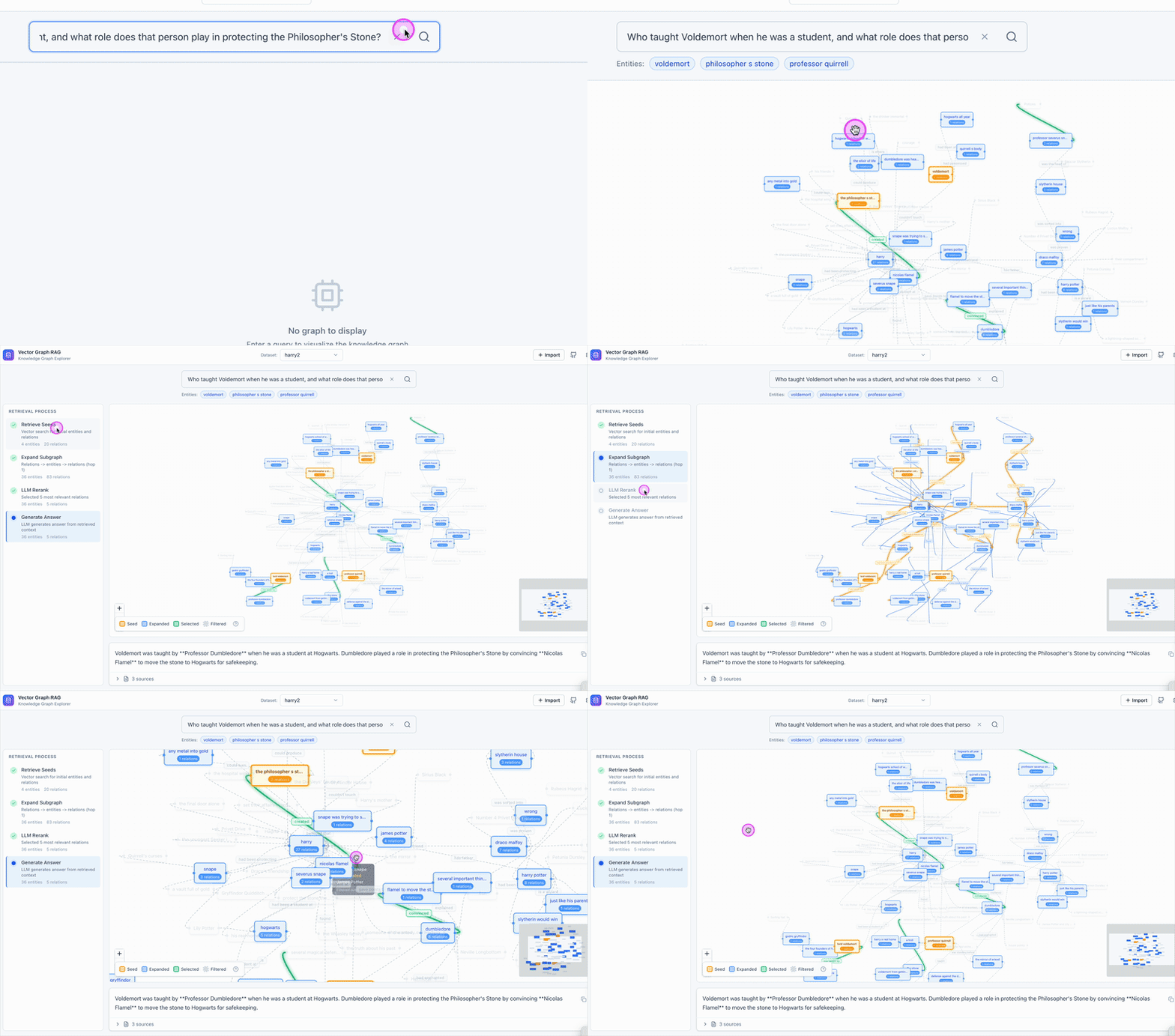
Question → Entity Extraction → Vector Search → Subgraph Expansion → LLM Reranking → Answer
```
**示例:** *"Einstein 开发了什么?"*
1. 提取实体:`Einstein`
2. 向量搜索在 Milvus 中找到相似的实体和关系
3. 子图扩展收集相邻的关系
4. **单次 LLM 重排序** 选取最相关的段落
5. 根据选定的段落生成答案
## 📊 评估结果
在三个多跳问答基准测试上进行评估(Recall@5):
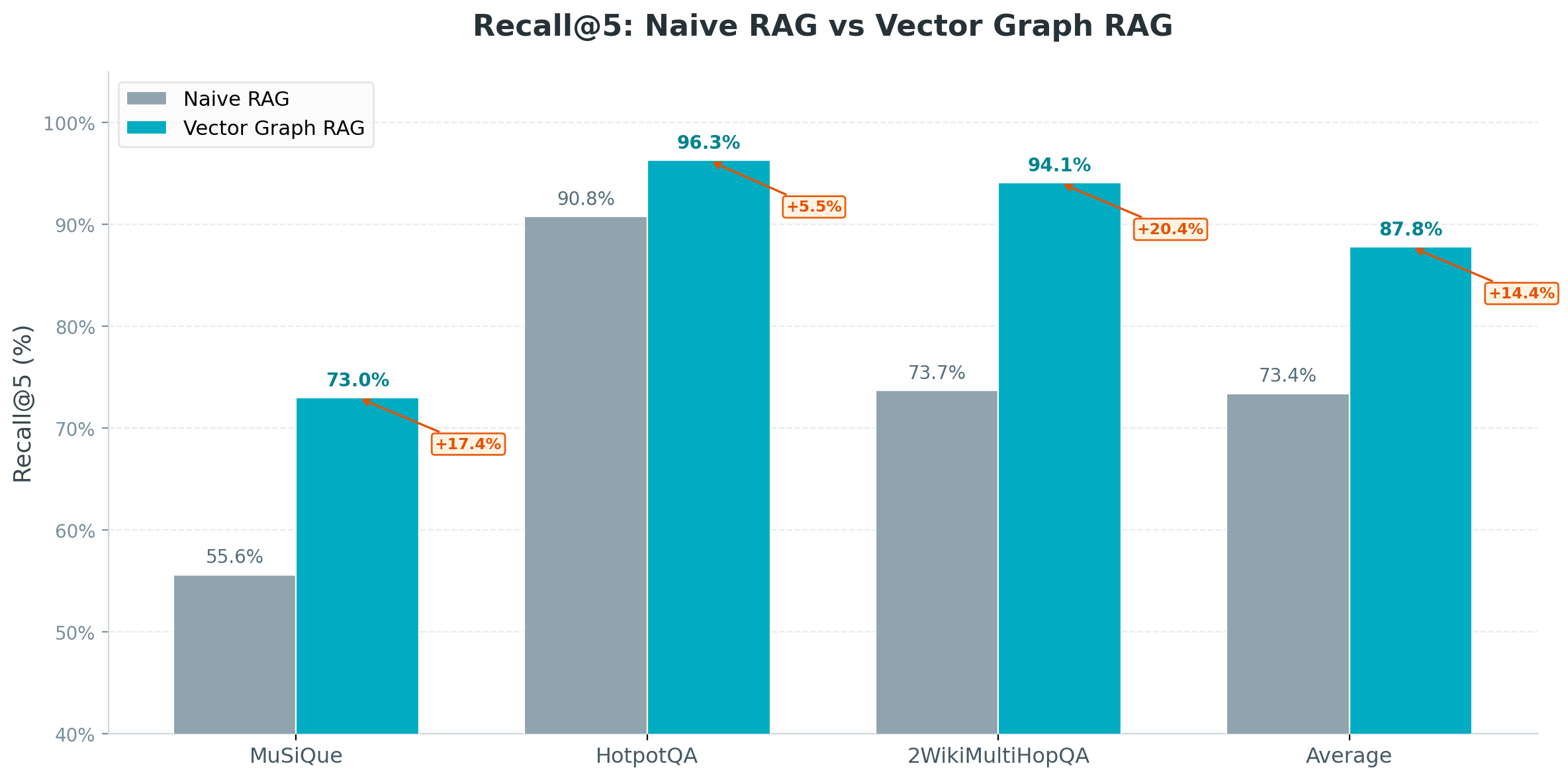
| Method | MuSiQue | HotpotQA | 2WikiMultiHopQA | Average |
|--------|---------|----------|-----------------|---------|
| Naive RAG | 55.6% | 90.8% | 73.7% | 73.4% |
| IRCoT + HippoRAG¹ | 57.6% | 83.0% | 93.9% | 78.2% |
| HippoRAG 2² | **74.7%** | **96.3%** | 90.4% | 87.1% |
| **Vector Graph RAG** | 73.0% | **96.3%** | **94.1%** | **87.8%** |
¹ [HippoRAG (NeurIPS 2024)](https://arxiv.org/abs/2405.14831) ² [HippoRAG 2 (2025)](https://arxiv.org/abs/2502.14802)
## 🗄️ Milvus 后端
只需修改 `milvus_uri` 即可在不同部署模式之间切换:
**Milvus Lite**(默认)— 零配置,单进程,数据存储在本地文件中。非常适合原型开发和小规模数据集:
```
rag = VectorGraphRAG(milvus_uri="./my_graph.db") # just works
```
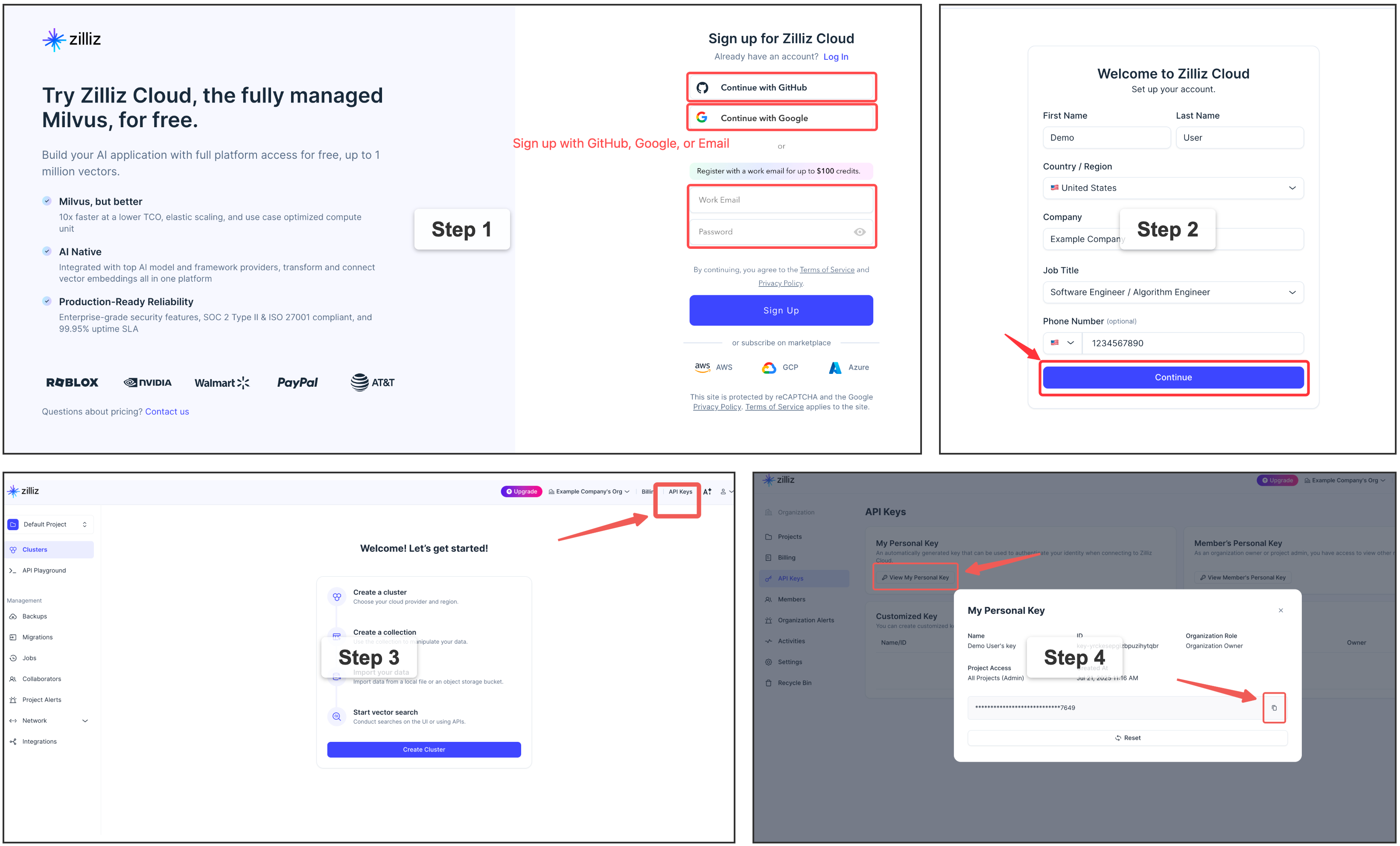
⭐ **Zilliz Cloud** — 全托管服务,[提供免费层](https://cloud.zilliz.com/signup?utm_source=github&utm_medium=referral&utm_campaign=vector-graph-rag-readme) — [注册](https://cloud.zilliz.com/signup?utm_source=github&utm_medium=referral&utm_campaign=vector-graph-rag-readme) 👇:
```
rag = VectorGraphRAG(
milvus_uri="https://in03-xxx.api.gcp-us-west1.zillizcloud.com",
milvus_token="your-api-key",
)
```
⭐ 注册免费 Zilliz Cloud 集群
您可以在 Zilliz Cloud 上 [注册](https://cloud.zilliz.com/signup?utm_source=github&utm_medium=referral&utm_campaign=vector-graph-rag-readme) 以获取免费集群和 API 密钥。
自托管 Milvus 服务器 — 面向高级用户
如果您需要为多用户或团队环境提供专用的 Milvus 实例,可以使用 Docker Compose 部署 Milvus Standalone。这需要 Docker 和一些基础设施知识。有关详细步骤,请参阅 [官方安装指南](https://milvus.io/docs/install_standalone-docker-compose.md)。
```
rag = VectorGraphRAG(milvus_uri="http://localhost:19530")
```
## 🖥️ 前端与 REST API
Vector Graph RAG 包含一个基于 React 的前端,用于交互式图谱可视化,以及一个 FastAPI 后端。
```
# Backend
uv sync --extra api
uv run uvicorn vector_graph_rag.api.app:app --host 0.0.0.0 --port 8000
# Frontend
cd frontend && npm install && npm run dev
```
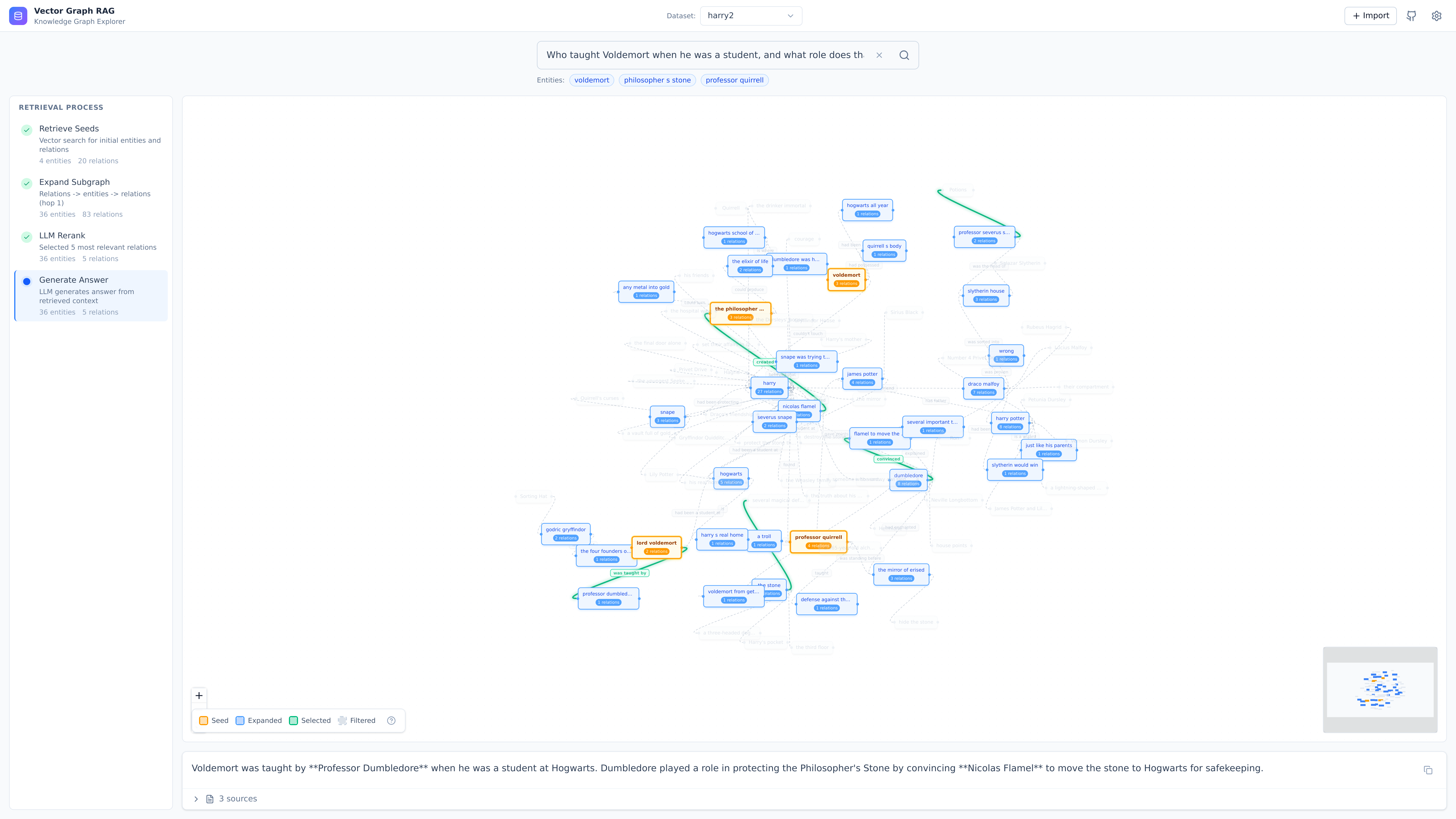
| Endpoint | Method | Description |
|----------|--------|-------------|
| `/api/health` | GET | 健康检查 |
| `/api/graphs` | GET | 列出可用的图谱 |
| `/api/graph/{name}/stats` | GET | 获取图谱统计信息 |
| `/api/query` | POST | 查询知识图谱 |
| `/api/documents` | POST | 添加文档 |
| `/api/import` | POST | 从 URL/路径导入 |
| `/api/upload` | POST | 上传文件 |
启动服务器后,可在 `http://localhost:8000/docs` 查看 API 文档。
## 📚 链接
- [文档](https://zilliztech.github.io/vector-graph-rag/) — 完整指南、API 参考和架构详情
- [工作原理](https://zilliztech.github.io/vector-graph-rag/how-it-works/) — 附有图解的流程说明
- [设计理念](https://zilliztech.github.io/vector-graph-rag/design-philosophy/) — 为什么选择纯向量搜索,不使用图数据库
- [Milvus](https://milvus.io/) — 为 Vector Graph RAG 提供支持的向量数据库
- [常见问题](https://zilliztech.github.io/vector-graph-rag/faq/) — 常见问题与故障排除
## 贡献
欢迎提交错误报告、功能请求和拉取请求!如有疑问和讨论,请通过 [Discord](https://discord.com/invite/FG6hMJStWu) 加入我们。
## 📄 许可证
[MIT](LICENSE)
标签:AI, C2, DLL 劫持, GraphRAG, LLM, Milvus, Milvus Lite, Neo4j, NLP, PyPI, Python, RAG, Rerank, SOTA, Unmanaged PE, 人工智能, 医疗, 向量搜索, 向量数据库, 图谱, 多跳推理, 多跳查询, 大语言模型, 开源, 无后门, 检索增强生成, 法律, 用户模式Hook绕过, 知识密集型, 自动化代码审查, 逆向工具, 重排序, 金融, 零配置