praetorian-inc/titus
GitHub: praetorian-inc/titus
高性能密钥扫描器,支持 CLI、Go 库、Burp 和 Chrome 扩展多种形态,可检测并实时验证源代码、Git 历史及二进制文件中的泄露凭证。
Stars: 592 | Forks: 62

# Titus:高性能密钥扫描器
[](https://go.dev)
[](LICENSE)
[](https://github.com/praetorian-inc/titus/actions)
**Titus** 是一款高性能密钥扫描器,用于检测源代码、文件和 git 历史中的凭证、API key 和 token。它内置了 484 条检测规则,涵盖了数百种服务和凭证类型,这些规则源自 [NoseyParker](https://github.com/praetorian-inc/noseyparker) 和 [Kingfisher](https://github.com/mongodb/kingfisher)。Titus 可以作为 CLI 运行,也可以作为 Go 库、Burp Suite 扩展和 Chrome 浏览器扩展运行——所有这些形式都共享相同的检测引擎和规则集。
Titus 专为安全工程师、渗透测试人员和 DevSecOps 团队打造,结合了 [Hyperscan](https://github.com/intel/hyperscan)/[Vectorscan](https://github.com/VectorCamp/vectorscan) 加速的正则匹配与实时凭证验证功能,可在整个代码库中查找并验证泄露的密钥。
## 目录
- [为什么选择 Titus?](#why-titus)
- [安装](#installation)
- [快速入门](#quick-start)
- [扫描选项](#scanning-options)
- [Go 库](#go-library-for-secrets-detection)
- [Burp Suite 扩展](#burp-suite-extension-for-secret-scanning)
- [浏览器扩展](#chrome-browser-extension-for-secret-scanning)
- [从源码构建](#building-from-source)
- [贡献](#contributing)
- [许可证](#license)
## 为什么选择 Titus?
- **快速密钥扫描**:在可用的情况下,通过 [Hyperscan](https://github.com/intel/hyperscan)/[Vectorscan](https://github.com/VectorCamp/vectorscan) 加速正则匹配,并提供纯 Go 回退方案以支持任何平台。
- **广泛的凭证检测覆盖范围**:484 条规则可检测 AWS、GCP、Azure、GitHub、Slack、数据库、CI/CD 系统以及数百种其他服务的 API key、token 和凭证。
- **实时密钥验证**:检测到的密钥会根据其源 API 进行检查,以确认它们是否处于活跃状态,从而减少误报并确定修复优先级。
- **适用于各种工作流的多重界面**:可通过 CLI 扫描,作为 Go 库嵌入,在 Burp Suite 中被动扫描 HTTP 流量,或在 Chrome 中扫描网页以进行应用程序安全测试。
- **二进制文件提取**:从 Office 文档、PDF、压缩包(zip, tar, 7z)、移动应用(APK, IPA)、浏览器扩展等文件中提取并扫描密钥。
## 安装
从 [Releases](../../releases) 页面下载预构建的二进制文件,或从源码构建:
```
make build
```
二进制文件将位于 `dist/titus`。
## 快速入门
```
# 扫描文件以查找 secrets
titus scan path/to/file.txt
# 扫描目录以查找泄露的 credentials
titus scan path/to/directory
# 扫描公共 GitHub repository (无需 token)
titus scan github.com/org/repo
# 扫描公共 GitLab project (无需 token)
titus scan gitlab.com/namespace/project
# 扫描 git history 以查找过往 commits 中的 secrets
titus scan --git path/to/repo
# 根据 source APIs 验证检测到的 secrets
titus scan path/to/code --validate
```
结果将写入数据存储(默认为 `titus.ds`)并打印到控制台。
## 扫描选项
### GitHub & GitLab 扫描
直接通过 URL 扫描公共仓库 —— 无需 API token:
```
# 扫描 GitHub repository
titus scan github.com/kubernetes/kubernetes
# 扫描 GitLab project
titus scan gitlab.com/gitlab-org/cli
# 完整 URLs 也适用
titus scan https://github.com/org/repo
titus scan https://gitlab.com/namespace/project.git
```
对于组织级或用户级扫描,请使用专用的子命令:
```
# 扫描 GitHub org 中的所有 repos
titus github --org kubernetes --token $GITHUB_TOKEN
# 扫描 GitLab group 中的所有 projects
titus gitlab scan --group mygroup --token $GITLAB_TOKEN
# 扫描带有 git history 的单个 repo (查找已删除的 secrets)
titus github owner/repo --git
```
对于公共仓库,token 是可选的。设置 `GITHUB_TOKEN` 或 `GITLAB_TOKEN`(或使用 `--token`)以访问私有仓库并获得更高的 API 速率限制。
### 查看扫描结果
使用 `report` 重新读取上一次扫描的发现:
```
# 检测到的 secrets 的可读性摘要
titus report
# 用于程序化处理的 JSON output
titus report --format json
# 用于与 GitHub Advanced Security 进行 CI/CD 集成的 SARIF output
titus report --format sarif
# 从特定 datastore 生成报告
titus report --datastore path/to/titus.ds
```
你也可以在扫描时使用 `--format` 控制输出格式:
```
titus scan path/to/code --format json
```
### 验证检测到的密钥
在扫描期间传递 `--validate` 以根据源 API 检查检测到的密钥:
```
titus scan path/to/code --validate
```
验证并发运行(默认 4 个 worker,可通过 `--validate-workers` 配置),并将每个发现标记为 confirmed(已确认)、denied(已拒绝)或 unknown(未知)。
### 过滤检测规则
```
# 列出所有可用的 detection rules
titus rules list
# 仅使用特定 rules 进行扫描 (例如, AWS 和 GCP credentials)
titus scan path/to/code --rules-include "aws,gcp"
# 按 pattern 排除 rules
titus scan path/to/code --rules-exclude "kingfisher.generic"
# 使用自定义 rules file 处理组织特定的 secrets
titus scan path/to/code --rules path/to/custom-rules.yaml
```
### 从二进制文件中提取密钥
Titus 可以从二进制文件格式中提取文本并扫描其中的密钥:
```
# 提取并扫描所有受支持的 binary formats
titus scan path/to/files --extract=all
# 针对特定 formats
titus scan path/to/files --extract=xlsx,docx,pdf,zip
```
支持的格式包括 Office 文档(xlsx, docx, pptx, odp, ods, odt)、PDF、Jupyter notebook、SQLite 数据库、电子邮件(eml, rtf)和压缩包(zip, tar, tar.gz, jar, war, ear, apk, ipa, crx, xpi, 7z)。压缩包会递归提取,直至达到可配置的深度和大小限制。
```
# 针对大型 codebases 调整 extraction limits
titus scan path/to/files --extract=all \
--extract-max-size 10MB \
--extract-max-total 100MB \
--extract-max-depth 5
```
对于 SQLite 数据库,Titus 从所有表中提取文本(默认每张表 1000 行)。使用 `--sqlite-row-limit` 进行调整:
```
# 所有 SQLite tables 的完整转储 (无 row limit)
titus scan path/to/files --extract=all --sqlite-row-limit 0
# 每个 table 的自定义 row limit
titus scan path/to/files --extract=all --sqlite-row-limit 5000
```
## 用于密钥检测的 Go 库
Titus 可以作为 Go 库导入,以将密钥检测添加到你自己的工具和流水线中。
```
go get github.com/praetorian-inc/titus
```
```
package main
import (
"fmt"
"log"
"github.com/praetorian-inc/titus"
)
func main() {
// Initialize the secrets scanner with default rules
scanner, err := titus.NewScanner()
if err != nil {
log.Fatal(err)
}
defer scanner.Close()
// Scan a string for API keys, tokens, and credentials
matches, err := scanner.ScanString(`aws_access_key_id = AKIAIOSFODNN7EXAMPLE`)
if err != nil {
log.Fatal(err)
}
for _, match := range matches {
fmt.Printf("%s (rule: %s) at line %d\n",
match.RuleName, match.RuleID,
match.Location.SourceSpan.Start.Line,
)
}
}
```
该库还支持扫描字节和文件、验证检测到的密钥以及加载自定义规则:
```
// Scan a file for leaked credentials
matches, err := scanner.ScanFile("/path/to/config.json")
// Enable validation to check if detected secrets are live
scanner, err := titus.NewScanner(titus.WithValidation())
// Load custom detection rules for organization-specific secrets
rules, err := titus.LoadRulesFromFile("/path/to/rules.yaml")
scanner, err := titus.NewScanner(titus.WithRules(rules))
```
完整 API 参考、并发模式及更多示例请参见 [docs/library-usage.md](docs/library-usage.md)。
## 用于密钥扫描的 Burp Suite 扩展
该 Burp 扩展在代理流量和主动渗透测试期间扫描 HTTP 响应中的密钥。
### 设置
#### Linux / macOS(从源码构建)
```
# 构建 CLI 和 Burp extension JAR,将 CLI 安装到 ~/.titus/
make install-burp
```
然后在 Burp Suite 的 Extensions > Add 中加载 `dist/titus-burp-1.0.0-all.jar`。
#### Windows(从 Releases 下载)
1. 从 [Releases](../../releases) 下载 `titus-windows-amd64.exe` 和 `titus-burp-
.jar`
2. 创建 Titus 目录并安装二进制文件:
mkdir %USERPROFILE%\.titus
copy titus-windows-amd64.exe %USERPROFILE%\.titus\titus.exe
3. 在 Burp Suite 的 Extensions > Add 中加载该 JAR
#### Linux / macOS(从 Releases 下载)
1. 从 [Releases](../../releases) 下载适用于你平台的二进制文件和 `titus-burp-.jar`:
- Linux 系统选择 `titus-linux-amd64` 或 `titus-linux-arm64`
- macOS 系统选择 `titus-darwin-amd64` 或 `titus-darwin-arm64`
2. 安装二进制文件:
mkdir -p ~/.titus
cp titus- ~/.titus/titus
chmod +x ~/.titus/titus
3. 在 Burp Suite 的 Extensions > Add 中加载该 JAR
该扩展在后台启动一个 `titus serve` 进程,并使用 NDJSON 通过 stdin/stdout 进行通信。检测规则在启动时加载一次。
### Burp 扩展功能
- **被动密钥扫描**:随着流量通过 Burp,自动扫描代理流量
- **主动密钥扫描**:右键上下文菜单扫描选中的请求
- **去重**:每次任务中相同的密钥仅报告一次
- **快速路径过滤**:跳过二进制内容、图像和非文本响应
- **实时凭证验证**:根据源 API 检查检测到的密钥以确认其是否活跃
- **误报管理**:将发现标记为误报以过滤噪音
- **严重性分类**:根据风险(高/中/低)对发现进行颜色编码
- **导出**:将发现保存为 JSON 以便报告
### Burp 扩展界面
该扩展在 Burp 中添加了一个 **Titus** 标签页,其中包含三个子标签页:
**Secrets**:所有检测到的密钥,可按类型、主机和验证状态进行过滤。
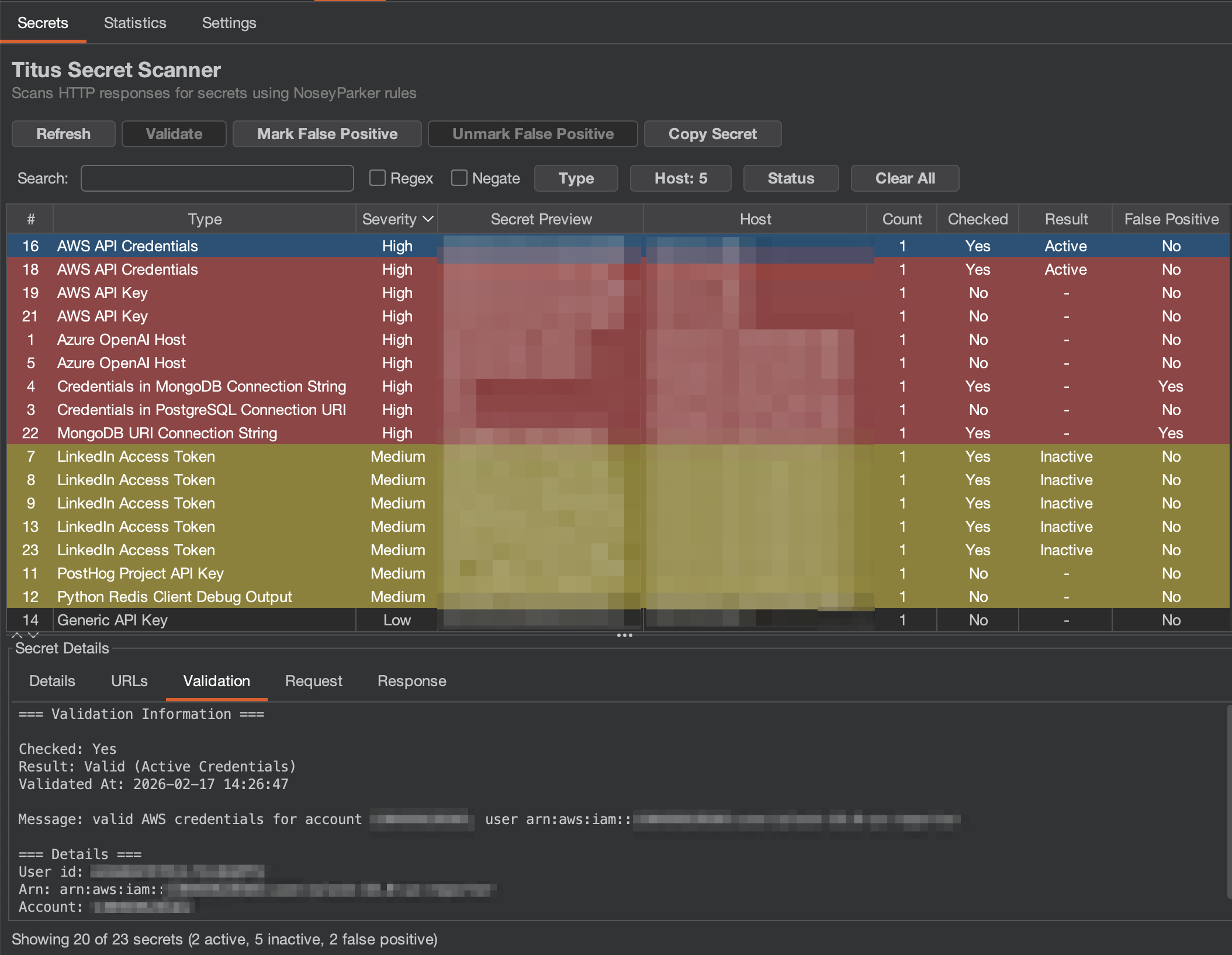 - **验证状态**:显示密钥是否已被检查(Active/Inactive/Unknown)
- **过滤**:点击 Type、Host 或 Status 按钮按特定值过滤;使用搜索框进行文本和正则匹配
- **批量操作**:选择多行以批量验证或标记为误报
- **密钥详情面板**:选择一个发现以查看:
- **Details**:规则信息、类别、完整密钥值、首次发现时间戳
- **URLs**:发现该密钥的所有位置
- **Validation**:带有详细信息的验证结果(例如 AWS 账户 ID、ARN)
- **Request/Response**:完整的 HTTP 流量,高亮显示密钥
**Statistics**:按类型和主机分组的密钥聚合视图。
- **验证状态**:显示密钥是否已被检查(Active/Inactive/Unknown)
- **过滤**:点击 Type、Host 或 Status 按钮按特定值过滤;使用搜索框进行文本和正则匹配
- **批量操作**:选择多行以批量验证或标记为误报
- **密钥详情面板**:选择一个发现以查看:
- **Details**:规则信息、类别、完整密钥值、首次发现时间戳
- **URLs**:发现该密钥的所有位置
- **Validation**:带有详细信息的验证结果(例如 AWS 账户 ID、ARN)
- **Request/Response**:完整的 HTTP 流量,高亮显示密钥
**Statistics**:按类型和主机分组的密钥聚合视图。
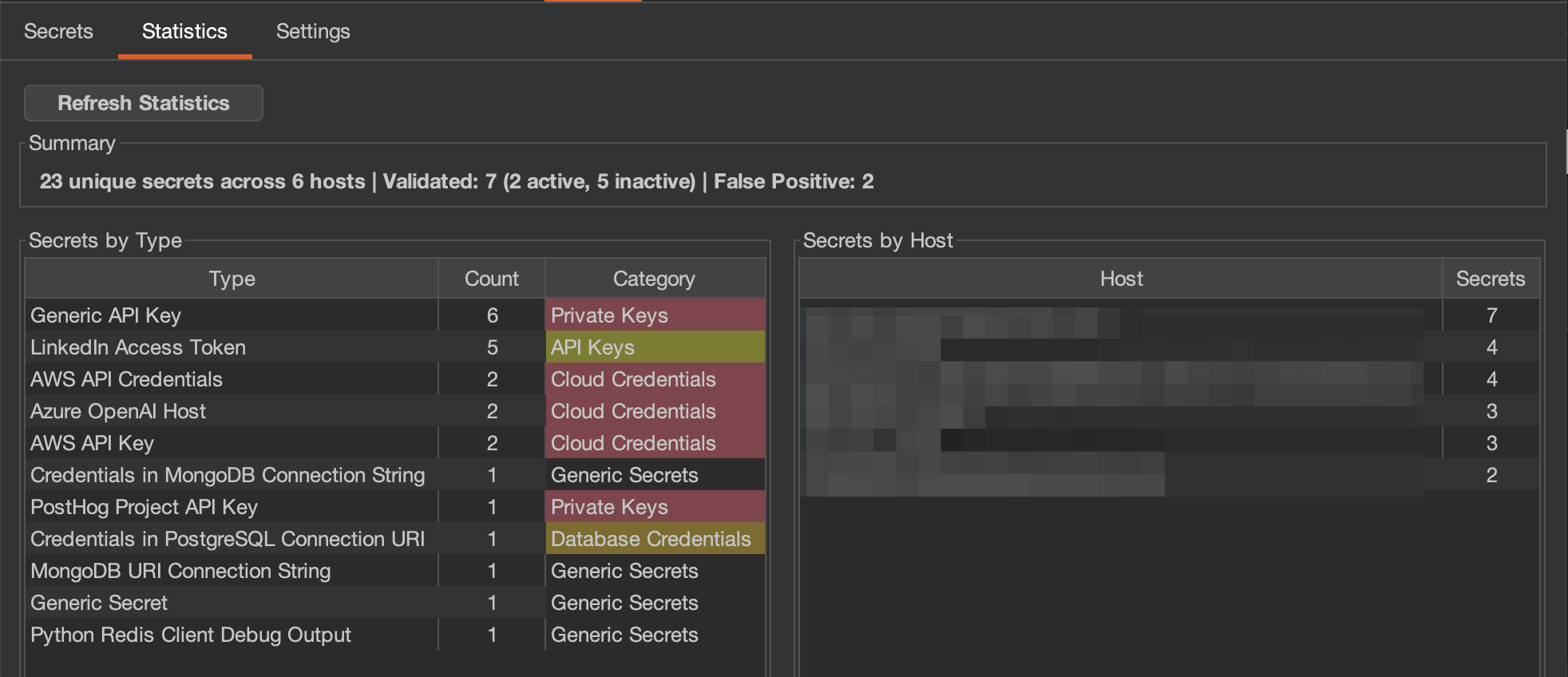 - **Summary**:唯一密钥总数、扫描的主机数、验证细分(活跃与不活跃)以及误报数量
- **Secrets by Type**:每种密钥类型的计数及其类别分类
- **Secrets by Host**:每台主机上发现的密钥数量
**Settings**:配置扫描选项、验证和严重性映射。
- **Summary**:唯一密钥总数、扫描的主机数、验证细分(活跃与不活跃)以及误报数量
- **Secrets by Type**:每种密钥类型的计数及其类别分类
- **Secrets by Host**:每台主机上发现的密钥数量
**Settings**:配置扫描选项、验证和严重性映射。
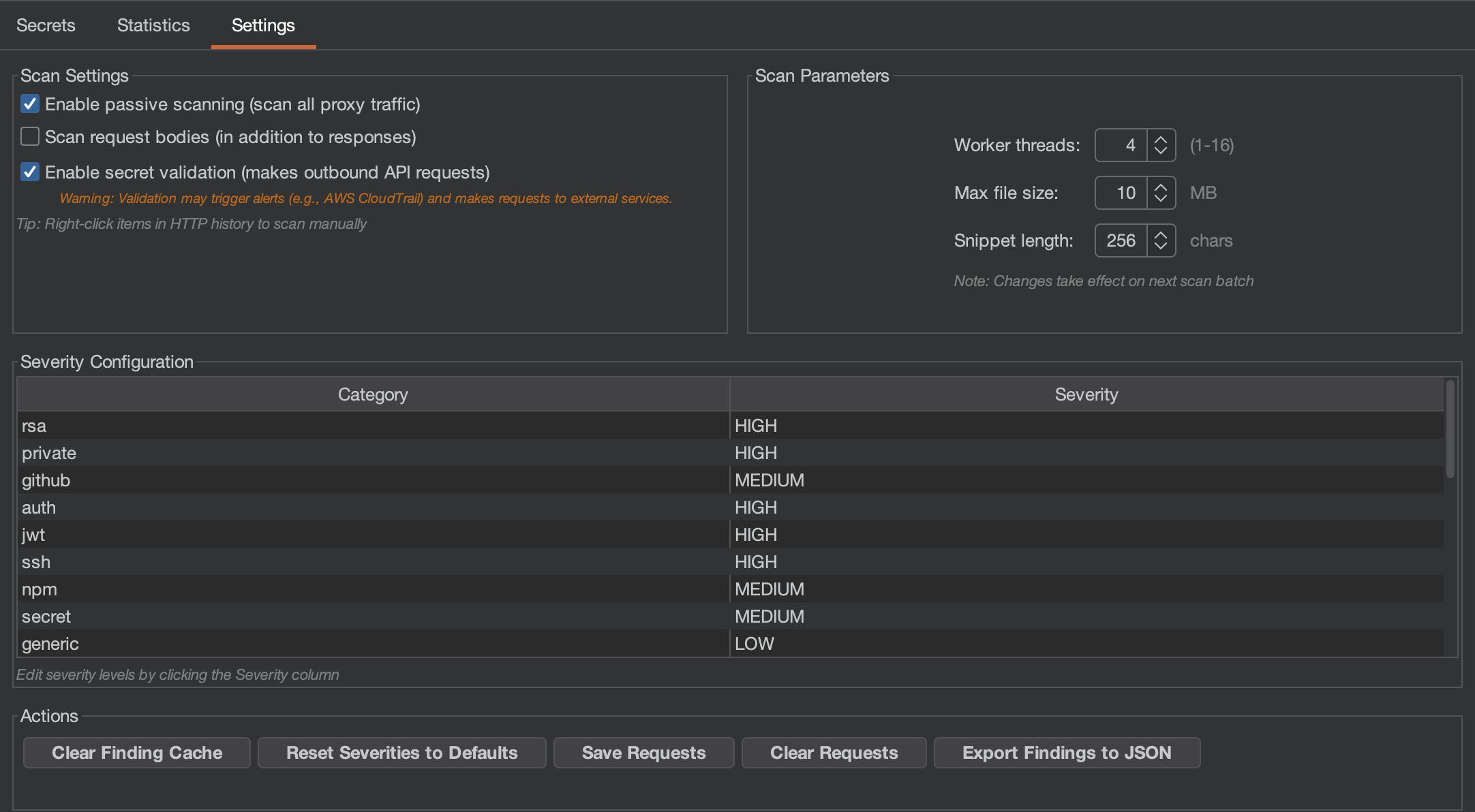 - **扫描设置**:
- *Passive scanning*:自动扫描所有代理流量(默认启用)
- *Request body scanning*:同时扫描应用程序发送的请求体中的密钥
- *Validation*:启用后根据源 API 检查密钥(会发出站外请求,可能会触发警报)
- **扫描参数**:工作线程数、最大文件大小、上下文片段长度
- **严重性配置**:自定义每个密钥类别的严重性级别
- **操作**:清除缓存、重置设置、保存/导出发现到 JSON
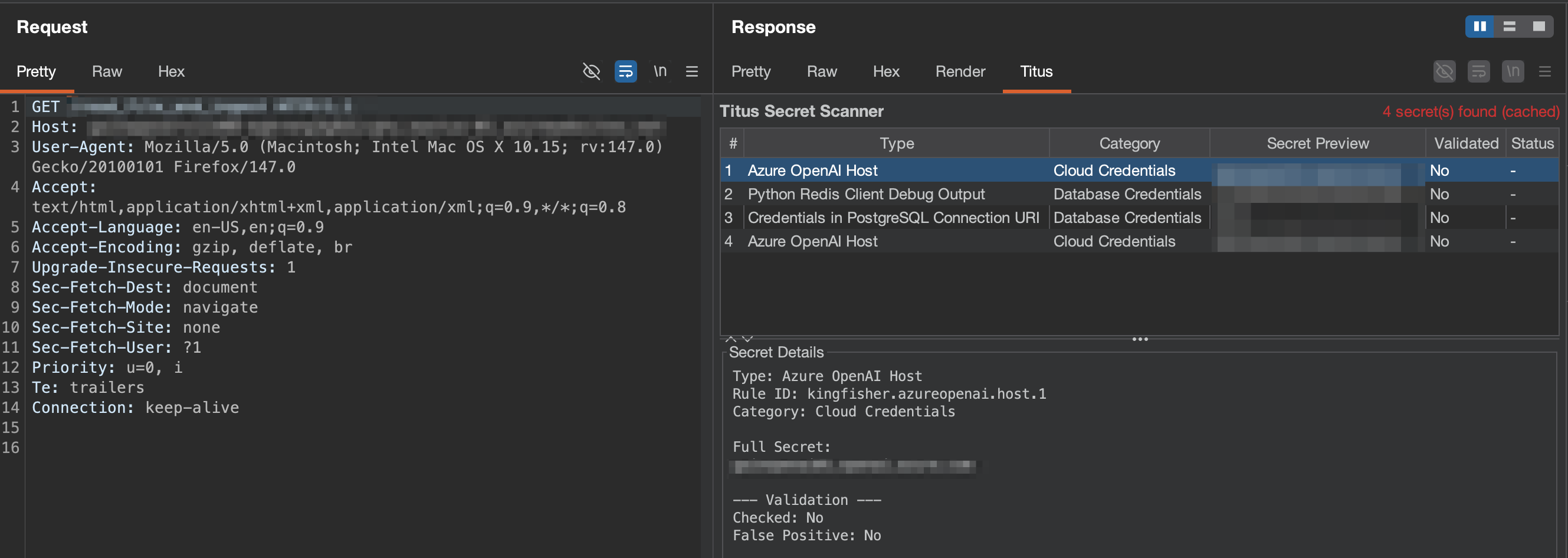
在 Burp 中查看任何请求时,如果检测到密钥,响应检查器中会出现一个 **Titus** 标签页,无需切换到主 Titus 标签页即可快速访问发现。
- **扫描设置**:
- *Passive scanning*:自动扫描所有代理流量(默认启用)
- *Request body scanning*:同时扫描应用程序发送的请求体中的密钥
- *Validation*:启用后根据源 API 检查密钥(会发出站外请求,可能会触发警报)
- **扫描参数**:工作线程数、最大文件大小、上下文片段长度
- **严重性配置**:自定义每个密钥类别的严重性级别
- **操作**:清除缓存、重置设置、保存/导出发现到 JSON
在 Burp 中查看任何请求时,如果检测到密钥,响应检查器中会出现一个 **Titus** 标签页,无需切换到主 Titus 标签页即可快速访问发现。
 ## 用于密钥扫描的 Chrome 浏览器扩展
该 Chrome 扩展在 Web 应用程序安全评估期间扫描网页中的密钥。
### 设置
```
make build-extension
```
1. 导航到 `chrome://extensions/`
2. 启用 **Developer mode**
3. 点击 **Load unpacked** 并选择 `extension/` 目录
### 浏览器扩展功能
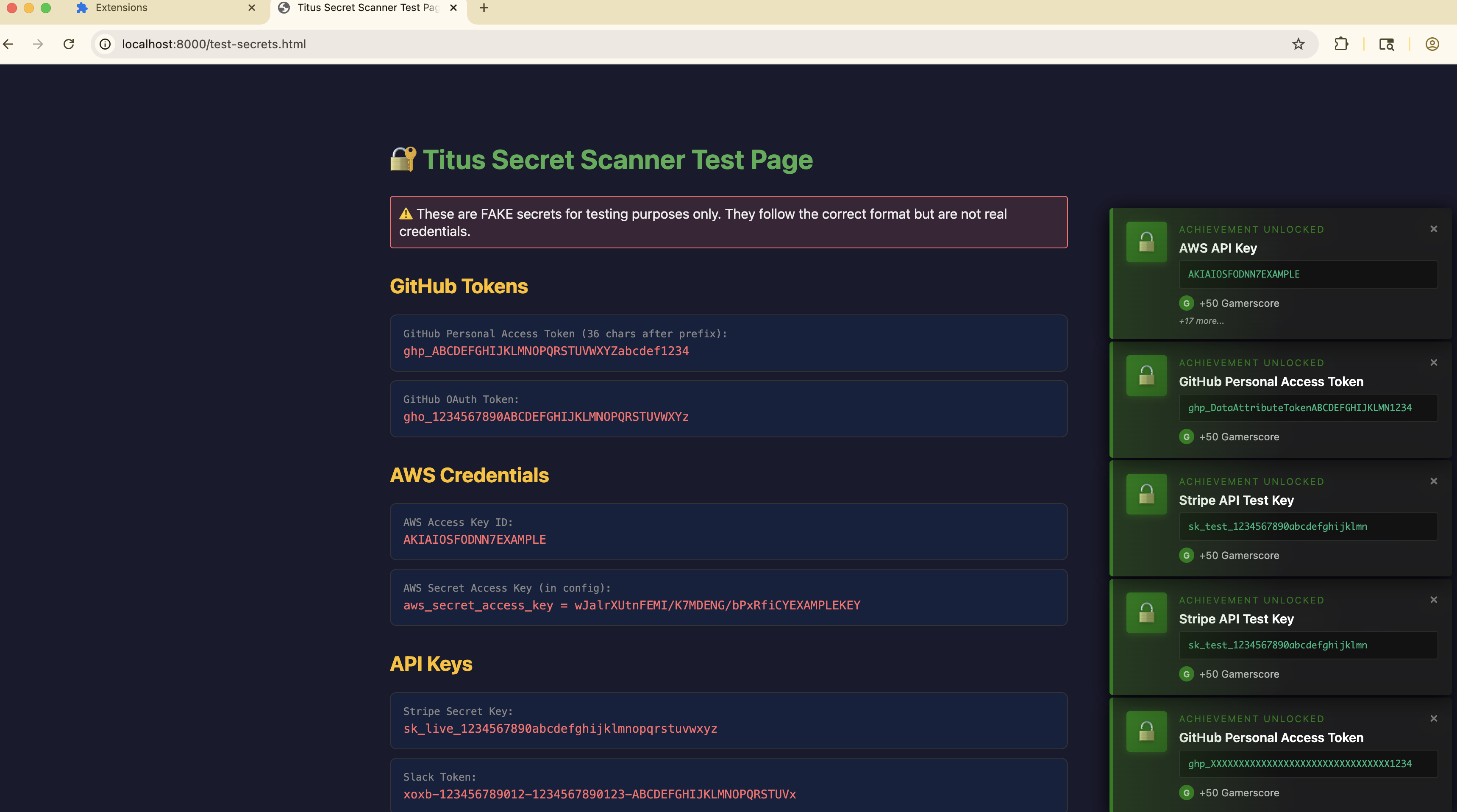
- 扫描内联和外部 JavaScript 和样式表中的 API key 和 token
- 扫描 localStorage 和 sessionStorage 中的泄露凭证
- 可选的网络响应捕获,用于全面的密钥检测
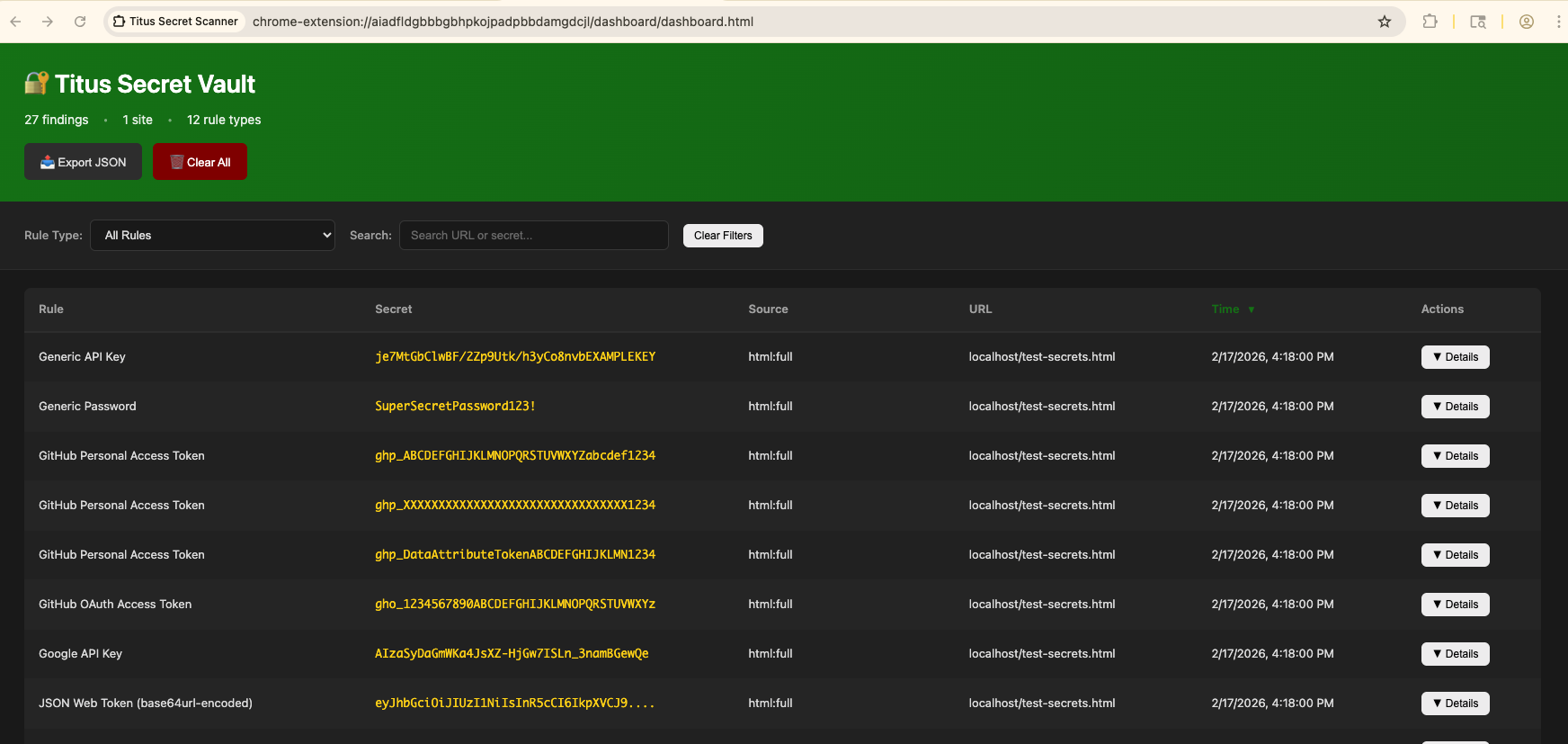
- 结果显示在弹出窗口和仪表板中
## 用于密钥扫描的 Chrome 浏览器扩展
该 Chrome 扩展在 Web 应用程序安全评估期间扫描网页中的密钥。
### 设置
```
make build-extension
```
1. 导航到 `chrome://extensions/`
2. 启用 **Developer mode**
3. 点击 **Load unpacked** 并选择 `extension/` 目录
### 浏览器扩展功能
- 扫描内联和外部 JavaScript 和样式表中的 API key 和 token
- 扫描 localStorage 和 sessionStorage 中的泄露凭证
- 可选的网络响应捕获,用于全面的密钥检测
- 结果显示在弹出窗口和仪表板中
 ### 安全须知
该浏览器扩展会移除所访问页面的 Content Security Policy 和 CORS 标头,以扫描外部资源。这会削弱扩展激活时您所访问网站的安全态势。**请仅在主动安全测试期间启用。**
## 从源码构建
### 标准构建(纯 Go)
默认构建使用纯 Go 正则引擎 —— 无需 C 依赖:
```
# 构建 CLI binary (输出到 dist/titus)
make build
# 构建 Burp Suite extension JAR
make build-burp
# 构建 Chrome browser extension
make build-extension
# 运行 unit tests
make test
# 运行 integration tests
make integration-test
```
### Vectorscan/Hyperscan 构建(推荐用于性能)
为了获得更快的正则匹配速度,请使用 [Vectorscan](https://github.com/VectorCamp/vectorscan)(ARM)或 [Hyperscan](https://github.com/intel/hyperscan)(x86)构建。这需要安装 C 库并启用 CGO。
**安装 Vectorscan:**
```
# macOS (Homebrew)
brew install vectorscan
# Ubuntu/Debian
sudo apt-get install libhyperscan-dev
# Fedora/RHEL
sudo dnf install hyperscan-devel
# 或从 source 构建:
git clone --depth 1 --branch vectorscan/5.4.11 https://github.com/VectorCamp/vectorscan.git
cd vectorscan && cmake -B build -DCMAKE_INSTALL_PREFIX=/usr/local && cmake --build build && sudo cmake --install build
```
**使用 Vectorscan 构建:**
```
# macOS (Homebrew) — 根据安装版本调整 PKG_CONFIG_PATH
CGO_ENABLED=1 PKG_CONFIG_PATH="$(brew --prefix vectorscan)/lib/pkgconfig" \
go build -tags vectorscan -o dist/titus ./cmd/titus
# Linux (system-installed)
CGO_ENABLED=1 go build -tags vectorscan -o dist/titus ./cmd/titus
```
当加速引擎处于活动状态时,启动时你会看到 `[vectorscan] N/N rules compiled for Hyperscan`。如果没有 vectorscan,Titus 会自动回退到纯 Go 正则引擎。
## 贡献
欢迎贡献代码!请参阅 [CONTRIBUTING.md](CONTRIBUTING.md) 了解如何为 Titus 做出贡献的指南。
## 许可证
Apache License 2.0 —— 详见 [LICENSE](LICENSE)。
检测规则源自 [NoseyParker](https://github.com/praetorian-inc/noseyparker)(Praetorian Security, Inc.)和 [Kingfisher](https://github.com/mongodb/kingfisher)(MongoDB, Inc.),两者均根据 Apache 2.0 授权。完整归属说明请见 [NOTICE](NOTICE)。
### 安全须知
该浏览器扩展会移除所访问页面的 Content Security Policy 和 CORS 标头,以扫描外部资源。这会削弱扩展激活时您所访问网站的安全态势。**请仅在主动安全测试期间启用。**
## 从源码构建
### 标准构建(纯 Go)
默认构建使用纯 Go 正则引擎 —— 无需 C 依赖:
```
# 构建 CLI binary (输出到 dist/titus)
make build
# 构建 Burp Suite extension JAR
make build-burp
# 构建 Chrome browser extension
make build-extension
# 运行 unit tests
make test
# 运行 integration tests
make integration-test
```
### Vectorscan/Hyperscan 构建(推荐用于性能)
为了获得更快的正则匹配速度,请使用 [Vectorscan](https://github.com/VectorCamp/vectorscan)(ARM)或 [Hyperscan](https://github.com/intel/hyperscan)(x86)构建。这需要安装 C 库并启用 CGO。
**安装 Vectorscan:**
```
# macOS (Homebrew)
brew install vectorscan
# Ubuntu/Debian
sudo apt-get install libhyperscan-dev
# Fedora/RHEL
sudo dnf install hyperscan-devel
# 或从 source 构建:
git clone --depth 1 --branch vectorscan/5.4.11 https://github.com/VectorCamp/vectorscan.git
cd vectorscan && cmake -B build -DCMAKE_INSTALL_PREFIX=/usr/local && cmake --build build && sudo cmake --install build
```
**使用 Vectorscan 构建:**
```
# macOS (Homebrew) — 根据安装版本调整 PKG_CONFIG_PATH
CGO_ENABLED=1 PKG_CONFIG_PATH="$(brew --prefix vectorscan)/lib/pkgconfig" \
go build -tags vectorscan -o dist/titus ./cmd/titus
# Linux (system-installed)
CGO_ENABLED=1 go build -tags vectorscan -o dist/titus ./cmd/titus
```
当加速引擎处于活动状态时,启动时你会看到 `[vectorscan] N/N rules compiled for Hyperscan`。如果没有 vectorscan,Titus 会自动回退到纯 Go 正则引擎。
## 贡献
欢迎贡献代码!请参阅 [CONTRIBUTING.md](CONTRIBUTING.md) 了解如何为 Titus 做出贡献的指南。
## 许可证
Apache License 2.0 —— 详见 [LICENSE](LICENSE)。
检测规则源自 [NoseyParker](https://github.com/praetorian-inc/noseyparker)(Praetorian Security, Inc.)和 [Kingfisher](https://github.com/mongodb/kingfisher)(MongoDB, Inc.),两者均根据 Apache 2.0 授权。完整归属说明请见 [NOTICE](NOTICE)。标签:API安全, Burp Suite插件, DevSecOps, EVTX分析, EVTX分析, Git历史扫描, Go语言, Hyperscan, JSON输出, Redis利用, 上游代理, 云安全监控, 凭据验证, 多平台, 安全助手, 日志审计, 机密检测, 正则匹配, 源码安全, 程序破解, 网络安全, 隐私保护, 静态分析