Charlie85270/Dorothy
GitHub: Charlie85270/Dorothy
Dorothy 是一款 AI 编程助手编排平台,解决多 Agent 并行管理、自动化工作流触发和远程控制的需求,让开发者能像管理团队一样调度 AI Agent。
Stars: 305 | Forks: 57
# Dorothy

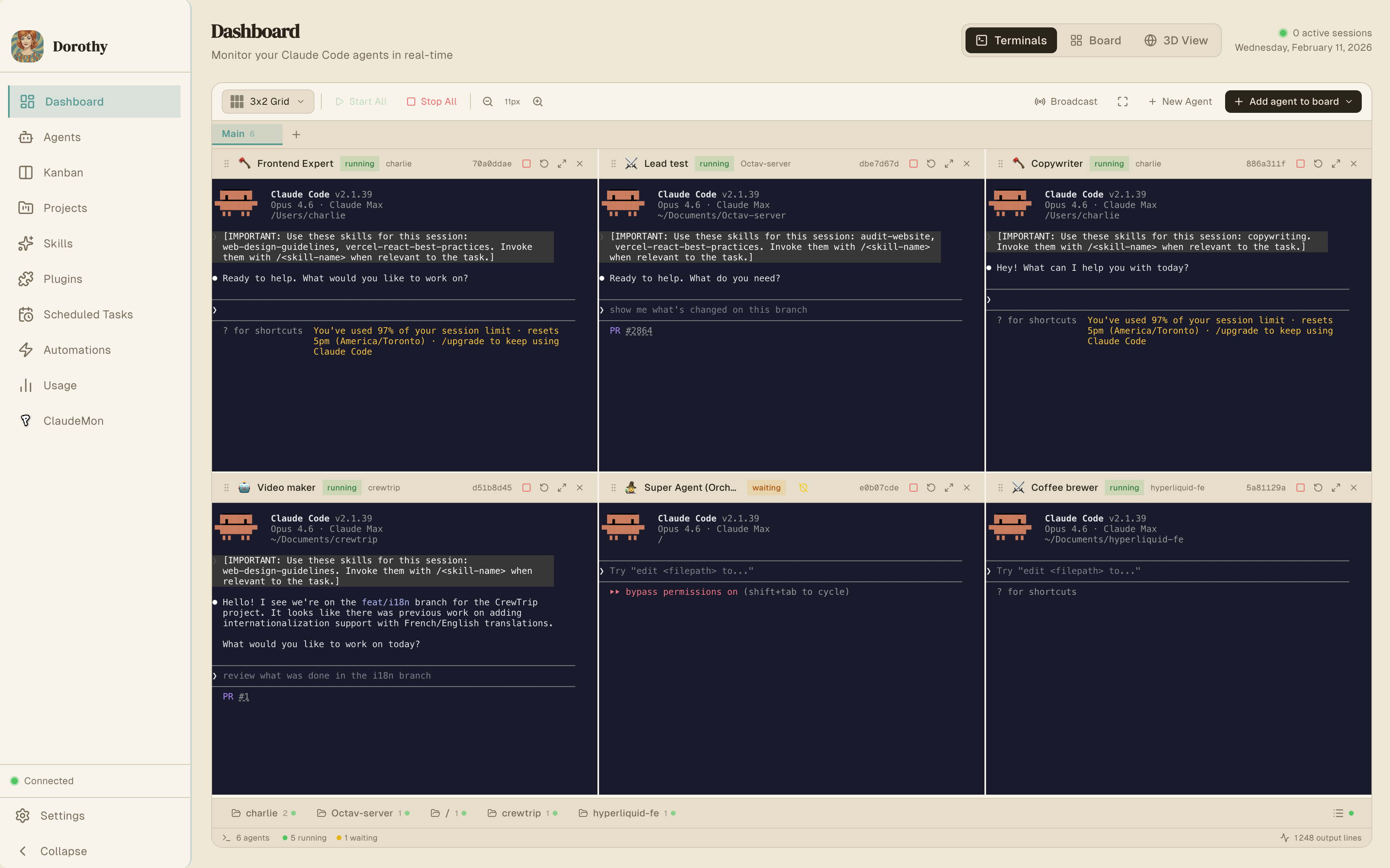
一款优雅的桌面应用,用于编排您的 [Claude Code](https://claude.ai/code)、[Codex](https://chatgpt.com/codex)、[Gemini](https://geminicli.com/) 和本地 Agent。部署、监控、调试——尽在一个令人愉悦的界面中。免费且开源。
## 目录
- [为什么选择 Dorothy](#why-dorothy)
- [核心功能](#core-features)
- [自动化](#automations)
- [看板任务管理](#kanban-task-management)
- [计划任务](#scheduled-tasks)
- [远程控制](#remote-control)
- [Vault](#vault)
- [SocialData (Twitter/X)](#socialdata-twitterx)
- [Google Workspace](#google-workspace)
- [MCP Servers & Tools](#mcp-servers--tools)
- [安装说明](#installation)
- [架构](#architecture)
- [项目结构](#project-structure)
- [技术栈](#tech-stack)
- [配置与存储](#configuration--storage)
- [开发](#development)
- [贡献](#contributing)
- [许可证](#license)
## 为什么选择 Dorothy
AI CLI 工具虽然强大——但它一次只能在一个终端中运行一个 Agent。Dorothy 打破了这个限制:
- **同时运行 10 个以上的 Agent**,跨不同项目和代码库
- **自动化 Agent 工作流**——在 GitHub PR、Issue 和外部事件上触发 Agent
- **委托与协调**——一个 Super Agent 通过 MCP 工具编排其他 Agent
- **可视化管理任务**——带有自动 Agent 分配的看板
- **安排周期性工作**——基于 Cron 的自主运行任务
- **随处掌控**——集成 Telegram 和 Slack 以实现远程管理
## 核心功能
### 并行 Agent 管理
同时运行多个 Agent,每个都在其独立的 PTY 终端会话中。Agent 在不同的项目、代码库和任务中独立运作。
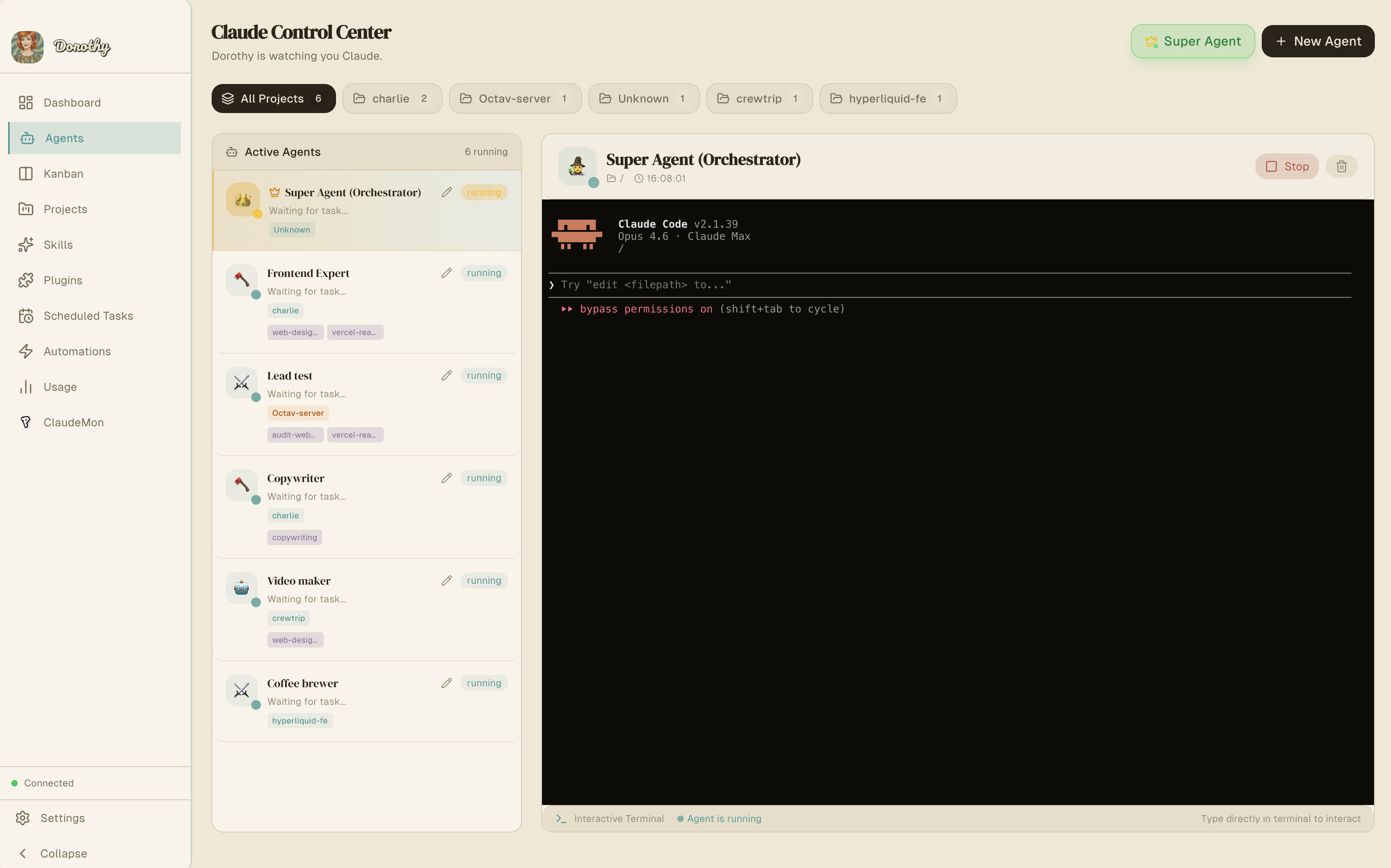
**能力:**
- 跨多个项目生成无限并发 Agent
- 每个 Agent 在具有完整 PTY 支持的隔离终端中运行
- 为每个 Agent 分配技能、模型选择(sonnet、opus、haiku)和项目上下文
- 实时向任何运行中的 Agent 发送交互输入
- 每个 Agent 的实时终端输出流
- Agent 生命周期管理:`idle`(空闲)→ `running`(运行中)→ `completed`(已完成)/ `error`(错误)/ `waiting`(等待)
- 通过 `--add-dir` 设置辅助项目路径,用于多仓库上下文
- 支持 Git worktree,实现分支隔离开发
- 应用重启后 Agent 状态持久化
- 自主执行模式(`--dangerously-skip-permissions`),用于无人值守操作
### Super Agent(编排器)
一个可以程序化控制所有其他 Agent 的元 Agent。给它一个高级任务,它就会在你的 Agent 池中委托、监控和协调工作。
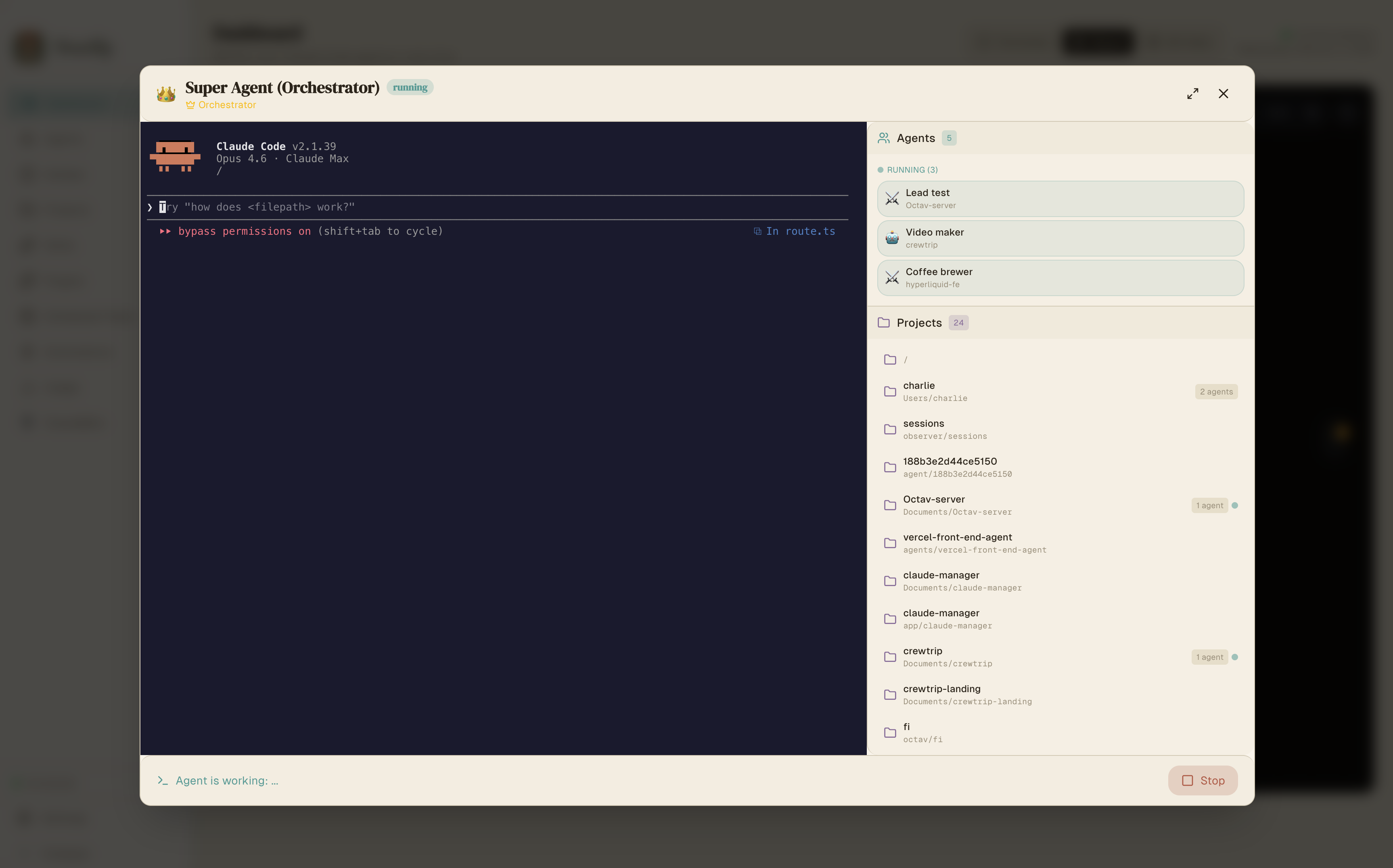
- 通过 MCP 工具程序化地创建、启动和停止 Agent
- 根据 Agent 能力和分配的技能委托任务
- 监控进度、捕获输出并处理错误
- 响应 Telegram 和 Slack 消息以进行远程编排
- 可以为一次性任务启动临时 Agent,并在完成后清理
### 使用量追踪
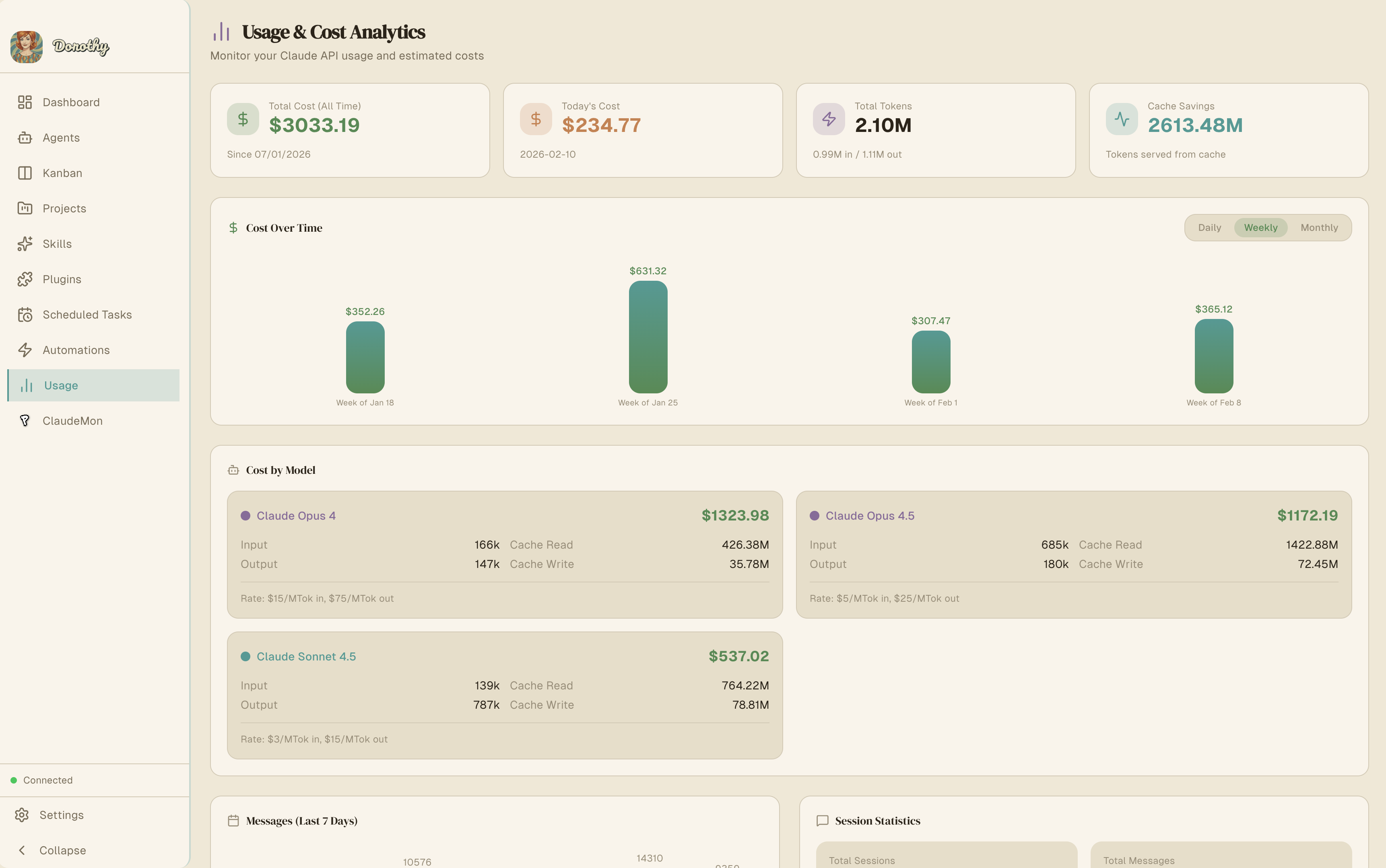
监控所有 Agent 的 Claude Code API 使用情况——Token 消耗、对话历史、成本追踪和活动模式。
### 技能与插件系统
使用来自 [skills.sh](https://skills.sh) 的技能和内置插件市场扩展 Agent 能力。
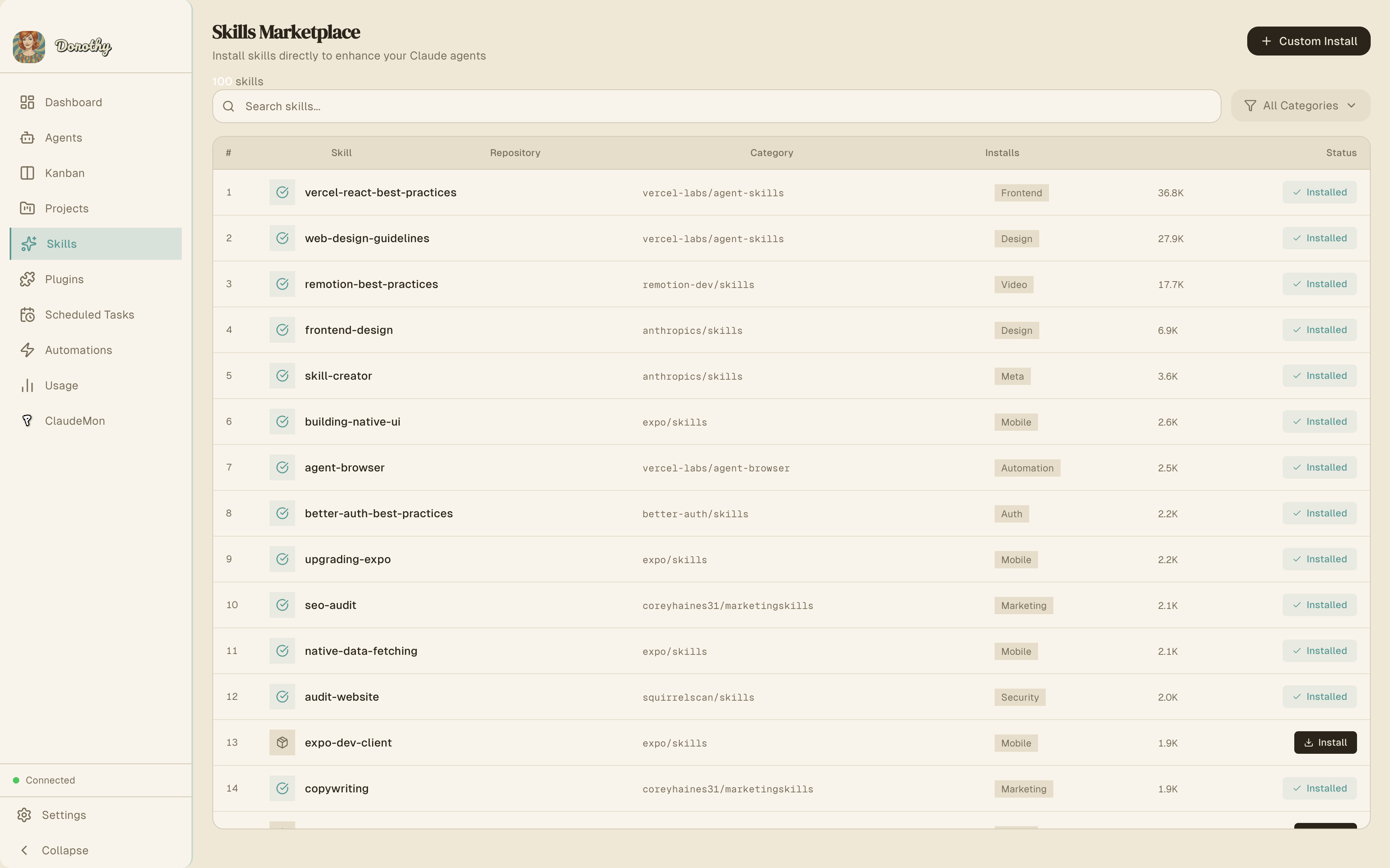
- **代码智能**:用于 TypeScript、Python、Rust、Go 等的 LSP 插件
- **外部集成**:GitHub、GitLab、Jira、Figma、Slack、Vercel
- **开发工作流**:Commit 命令、PR 审查工具
- 为每个 Agent 安装技能以处理专门任务
### 设置管理
直接配置 Claude Code 设置——权限、环境变量、钩子和模型默认值。
## 自动化
自动化功能会轮询外部来源,检测新增或更新的条目,并生成 Claude Agent 自主处理每个条目。这实现了由 AI 驱动的完全自动化类 CI/CD 工作流。
### 支持的来源
| 来源 | 状态 | 轮询方式 |
|--------|--------|---------------|
| **GitHub** | 活跃 | `gh` CLI — Pull Request、Issue、Release |
| **JIRA** | 活跃 | REST API v3 — Issue、Bug、Story、Task |
| **Pipedrive** | 计划中 | — |
| **Twitter** | 计划中 | — |
| **RSS** | 计划中 | — |
| **自定义** | 计划中 | Webhook 支持 |
### 执行流程
1. **调度器** 按其 Cron 时间表或间隔触发自动化
2. **轮询器** 从来源获取条目(例如,通过 `gh` CLI 获取 GitHub PR)
3. **过滤器** 应用触发条件(事件类型、新增 vs 更新)
4. **去重** 使用内容哈希跳过已处理的条目
5. **Agent 生成** —— 为每个条目创建一个临时 Agent
6. **Prompt 注入** —— 通过模板变量注入条目数据
7. **自主执行** —— Agent 在拥有完整 MCP 工具访问权限的情况下运行
8. **输出投递** —— Agent 将结果发布到 Telegram、Slack 或 GitHub 评论
9. **清理** —— 完成后删除临时 Agent
### 模板变量
在您的 `agentPrompt` 和 `outputTemplate` 中使用这些变量:
#### GitHub 变量
| 变量 | 描述 |
|----------|-------------|
| `{{title}}` | 条目标题(PR 标题、Issue 标题等) |
| `{{url}}` | 条目 URL |
| `{{author}}` | 条目作者 |
| `{{body}}` | 条目正文/描述 |
| `{{labels}}` | 条目标签 |
| `{{repo}}` | 仓库名称 |
| `{{number}}` | 条目编号(PR #, Issue #) |
| `{{type}}` | 条目类型(pull_request, issue 等) |
#### JIRA 变量
| 变量 | 描述 |
|----------|-------------|
| `{{key}}` | Issue 键(例如,`PROJ-123`) |
| `{{summary}}` | Issue 摘要 |
| `{{status}}` | 当前 Issue 状态 |
| `{{issueType}}` | Issue 类型(Task, Bug, Story 等) |
| `{{priority}}` | Issue 优先级 |
| `{{assignee}}` | 指派用户 |
| `{{reporter}}` | 报告人姓名 |
| `{{url}}` | Issue URL |
| `{{body}}` | Issue 描述 |
### 示例:自动化 PR 审查机器人
```
create_automation({
name: "PR Code Reviewer",
sourceType: "github",
sourceConfig: '{"repos": ["myorg/myrepo"], "pollFor": ["pull_requests"]}',
scheduleMinutes: 15,
agentEnabled: true,
agentPrompt: "Review this PR for code quality, security issues, and performance. PR: {{title}} ({{url}}). Description: {{body}}",
agentProjectPath: "/path/to/myrepo",
outputGitHubComment: true,
outputSlack: true
})
```
### 示例:JIRA Issue 处理器
```
create_automation({
name: "JIRA Task Agent",
sourceType: "jira",
sourceConfig: '{"projectKeys": ["PROJ"], "jql": "status = Open"}',
scheduleMinutes: 5,
agentEnabled: true,
agentPrompt: "Work on JIRA issue {{key}}: {{summary}}. Description: {{body}}. Priority: {{priority}}.",
agentProjectPath: "/path/to/project",
outputJiraComment: true,
outputJiraTransition: true,
outputTelegram: true
})
```
JIRA 自动化还会在 Backlog 中自动创建看板任务,允许 Agent 通过自动分配系统接收它们。
## 看板任务管理
一个与 Agent 系统集成的任务板。任务在各列之间流转,并可根据技能匹配自动分配给 Agent。
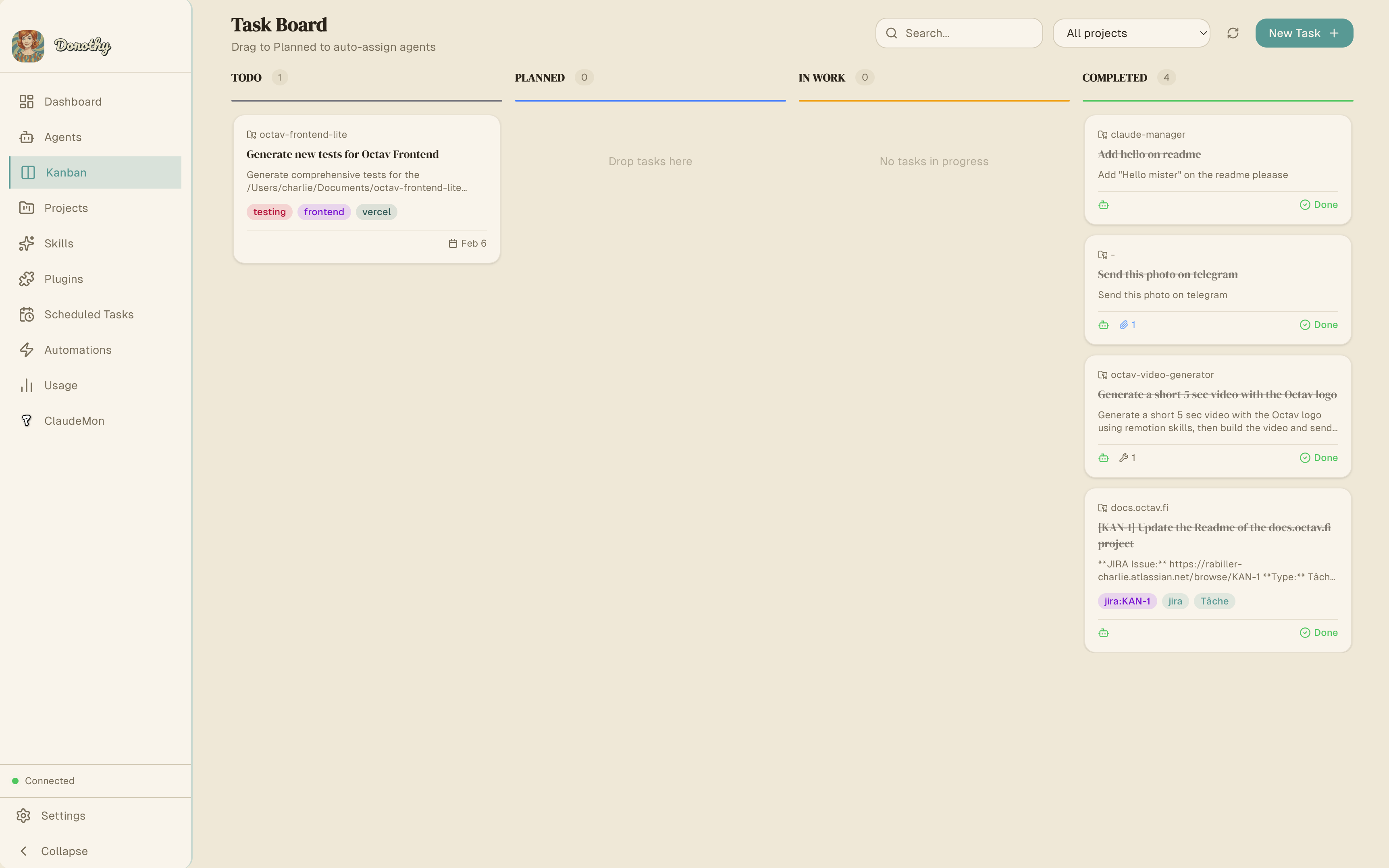
### 工作流
```
Backlog → Planned → Ongoing → Done
```
- **优先级**:低、中、高
- **进度追踪**:每项任务 0-100%
- **Agent 分配**:将任务分配给特定 Agent 或让系统自动分配
- **标签**:组织和筛选任务
- **技能要求**:定义所需技能——系统将任务匹配给有能力的 Agent
### 自动 Agent 分配
`kanban-automation` 服务持续监控新任务,并:
1. 将任务技能要求与可用 Agent 进行匹配
2. 如果不存在匹配的 Agent,则创建新 Agent
3. 分配任务并将其移动到 `ongoing`(进行中)
4. 在 Agent 工作时追踪进度
5. 当 Agent 完成时将任务标记为 `done`(完成)
这实现了一个**自我管理的任务管道**——将任务添加到 Backlog,Agent 会自动接收它们。
## 计划任务
按 Cron 时间表自主运行 Claude Code。适用于定期维护、报告、监控或任何周期性任务。
### Cron 格式
```
┌───────────── minute (0-59)
│ ┌───────────── hour (0-23)
│ │ ┌───────────── day of month (1-31)
│ │ │ ┌───────────── month (1-12)
│ │ │ │ ┌───────────── day of week (0-7, 0 and 7 = Sunday)
│ │ │ │ │
* * * * *
```
| 表达式 | 时间表 |
|-----------|----------|
| `0 9 * * *` | 每天上午 9:00 |
| `0 9 * * 1-5` | 工作日(周一至周五)上午 9:00 |
| `*/15 * * * *` | 每 15 分钟 |
| `0 */2 * * *` | 每 2 小时 |
| `30 14 * * 1` | 每周一下午 2:30 |
### 平台支持
- **macOS**:使用 `launchd` (launchctl) 进行可靠的后台执行
- **Linux**:使用 `cron` (crontab)
### 存储
- 任务定义:`~/.claude/schedules.json`
- 生成的脚本:`~/.dorothy/scripts/`
- 执行日志:`~/.claude/logs/`
## 远程控制
### Telegram 集成
从 Telegram 控制您的整个 Agent 集群。启动 Agent、检查状态、向 Super Agent 委托任务——一切皆可在手机上完成。
| 命令 | 描述 |
|---------|-------------|
| `/status` | 所有 Agent 及其状态概览 |
| `/agents` | 详细 Agent 列表及当前任务 |
| `/projects` | 列出所有项目及其 Agent |
| `/start_agent ` | 生成并启动一个带有任务的 Agent |
| `/stop_agent ` | 停止一个运行中的 Agent |
| `/ask ` | 向 Super Agent 委托任务 |
| `/usage` | API 使用量和成本统计 |
| `/help` | 命令参考 |
发送任何不带命令的消息可直接与 Super Agent 对话。
通过 `mcp-telegram` 服务器支持**媒体**:发送照片、视频和文档。
**设置:**
1. 通过 [@BotFather](https://t.me/botfather) 创建一个机器人并复制 Token
2. 将机器人 Token 粘贴到 **设置** 中
3. 向您的机器人发送 `/start` 以注册您的 Chat ID
4. 多个用户可以通过发送 `/start` 进行授权
### Slack 集成
功能与 Telegram 相同,可通过 @提及或直接消息访问。
| 命令 | 描述 |
|---------|-------------|
| `status` | 所有 Agent 概览 |
| `agents` | 详细 Agent 列表 |
| `projects` | 列出项目及其 Agent |
| `start ` | 生成并启动一个 Agent |
| `stop ` | 停止一个运行中的 Agent |
| `usage` | API 使用量和成本统计 |
| `help` | 命令参考 |
**功能**:频道内 @提及、DM、Socket Mode(无需公网 URL)、线程感知响应。
**设置:**
1. 访问 [api.slack.com/apps](https://api.slack.com/apps) → **Create New App** → **From scratch**
2. 将其命名为 "Dorothy" 并选择您的工作区
3. **Socket Mode** → Enable → 生成具有 `connections:write` 权限的 App Token (`xapp-...`)
4. **OAuth & Permissions** → 添加权限范围:`app_mentions:read`、`chat:write`、`im:history`、`im:read`、`im:write`
5. **Install to Workspace** → 复制 Bot Token (`xoxb-...`)
6. **Event Subscriptions** → Enable → 订阅:`app_mention`、`message.im`
7. **App Home** → 启用 "Messages Tab"
8. 将两个 Token 粘贴到 **设置 → Slack** 并启用
## Vault
一个持久的文档存储系统,Agent 可以跨会话读取、写入和搜索。将其用作共享知识库——Agent 存储报告、分析、研究发现和结构化笔记,任何其他 Agent 稍后都可以访问。
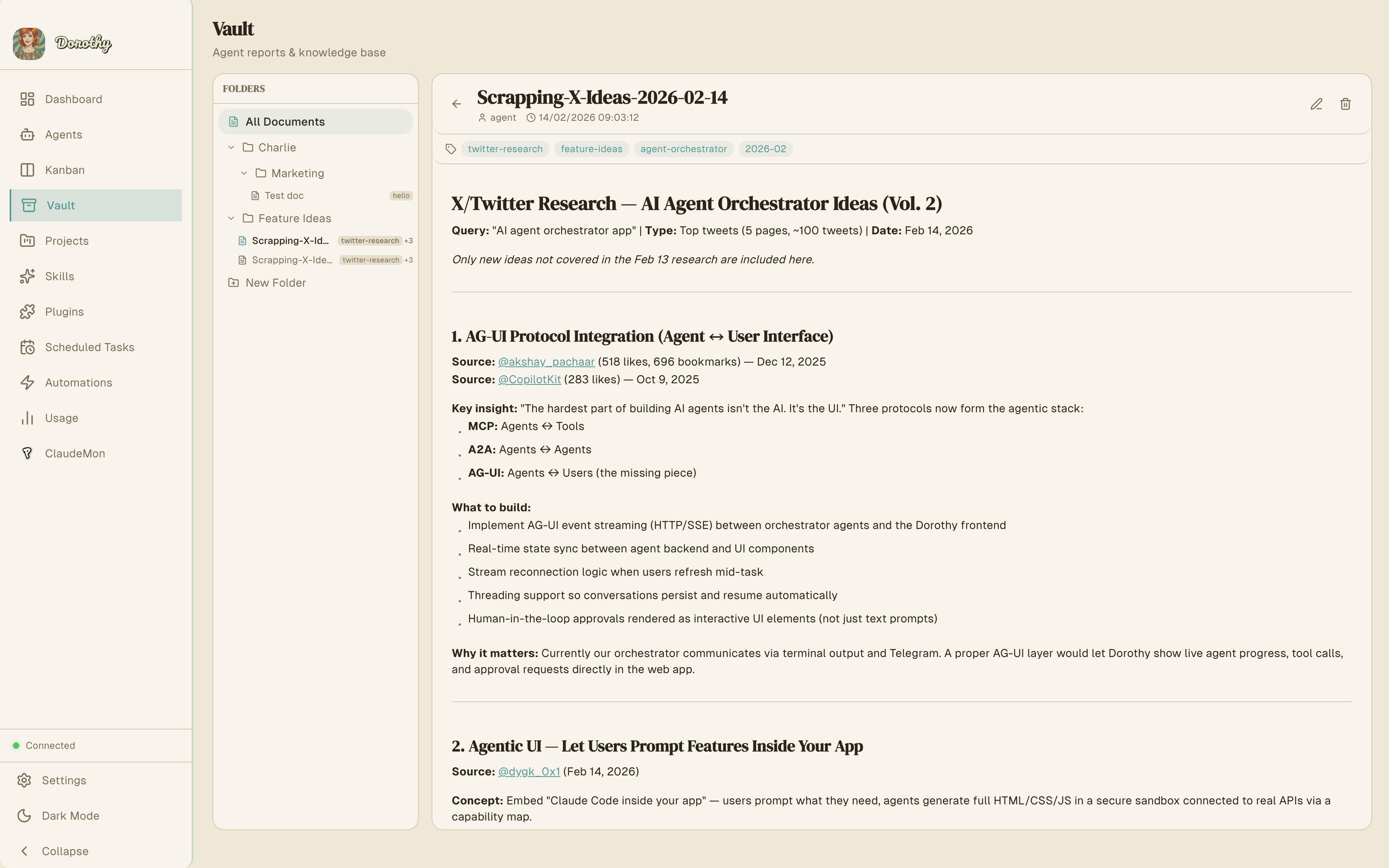
### 功能
- **Markdown 文档**,包含标题、内容、标签和文件附件
- **文件夹组织**,支持嵌套层级(创建文档时自动创建文件夹)
- **全文搜索**,由 SQLite FTS5 驱动——搜索标题、内容和标签
- **跨 Agent 访问** —— 任何 Agent 都可以读取由另一个 Agent 创建的文档
- **文件附件** —— 将文件附加到文档以供参考
### MCP 工具
| 工具 | 参数 | 描述 |
|------|-----------||
| `vault_create_document` | `title`, `content`, `folder`, `tags?` | 创建文档(如需要会自动创建文件夹) |
| `vault_update_document` | `document_id`, `title?`, `content?`, `tags?`, `folder_id?` | 更新现有文档 |
| `vault_get_document` | `document_id` | 读取包含完整内容和元数据的文档 |
| `vault_list_documents` | `folder_id?`, `tags?` | 列出文档,可按文件夹或标签筛选 |
| `vault_delete_document` | `document_id` | 删除文档 |
| `vault_attach_file` | `document_id`, `file_path` | 将文件附加到文档 |
| `vault_search` | `query`, `limit?` | 全文搜索(支持 AND, OR, NOT, 短语匹配) |
| `vault_create_folder` | `name`, `parent_id?` | 创建文件夹(支持嵌套) |
| `vault_list_folders` | — | 以树状结构列出所有文件夹 |
| `vault_delete_folder` | `folder_id`, `recursive?` | 删除文件夹(可选包含所有内容) |
## SocialData (Twitter/X)
通过 [SocialData API](https://socialdata.tools) 搜索推文、获取用户资料和检索互动数据。适用于社交媒体研究、监控和分析任务。
### 设置
1. 从 [socialdata.tools](https://socialdata.tools) 获取 API Key
2. 将其粘贴到 **设置 → SocialData API Key**
### MCP 工具
| 工具 | 参数 | 描述 |
|------|-----------|-------------|
| `twitter_search` | `query`, `type?`, `cursor?` | 使用高级操作符搜索推文(`from:`, `min_faves:`, `filter:images` 等) |
| `twitter_get_tweet` | `tweet_id` | 获取包含互动指标的完整推文详情 |
| `twitter_get_tweet_comments` | `tweet_id`, `cursor?` | 获取推文的回复/评论 |
| `twitter_get_user` | `username` | 获取用户资料(简介、粉丝、统计) |
| `twitter_get_user_tweets` | `user_id`, `include_replies?`, `cursor?` | 获取用户的近期推文 |
所有工具都支持基于游标的大结果集分页。
## Google Workspace
通过 [Google Workspace CLI](https://github.com/googleworkspace/cli) (`gws`) 直接从您的 Agent 访问 Gmail、Drive、Sheets、Docs、Calendar 等。Dorothy 将 `gws` 集成为 MCP 服务器,以便 Agent 可以读取邮件、管理文件、创建文档并与 Google API 交互。
### 设置
1. 安装 **gcloud CLI** —— OAuth 设置所需(`brew install google-cloud-sdk`)
2. 安装 **gws CLI** —— `npm install -g @googleworkspace/cli`
3. 打开 **设置 → Google Workspace** 并按照引导设置:
- 点击 **Auth Setup** 创建 Google Cloud 项目和 OAuth 客户端
- 点击 **Auth Login** 使用您的 Google 账号进行身份验证
- 启用开关以向您的 Agent 注册 MCP 服务器
4. 可选择安装 **Agent Skills**,包含 100 多项专门的 Google Workspace 技能
### 功能
- **MCP 服务器**:通过 stdio 运行 `gws mcp`,将 Google API 作为工具公开(每项服务 10-80 个工具)
- **多提供商**:MCP 服务器向所有已配置的提供商(Claude, Codex, Gemini)注册
- **服务徽章**:设置页面显示已连接的服务及其访问级别(读 / 读写)
- **Agent 技能**:检测并列出已安装的 `gws-*` 技能(例如 `gws-gmail`, `gws-drive`, `gws-calendar`)
- **更新访问权限**:重新运行 `gws auth login` 以添加或更改 OAuth 权限范围,无需重新运行设置
### 默认服务
| 服务 | 权限范围 | 描述 |
|---------|-------|-------------|
| **Gmail** | 读/写 | 发送、阅读和管理邮件 |
| **Drive** | 读/写 | 管理文件、文件夹和共享云端硬盘 |
| **Sheets** | 读/写 | 读写电子表格 |
| **Calendar** | 读/写 | 管理日历和活动 |
| **Docs** | 读/写 | 读写文档 |
根据 OAuth 权限范围,还提供其他服务。
## MCP Servers & Tools
Dorothy 暴露了 **五个 MCP (Model Context Protocol) 服务器**,包含 **40 多个工具**用于程序化 Agent 控制。这些由 Super Agent 内部使用,并可通过 `~/.claude/settings.json` 在任何 Claude Code 会话中注册。
### mcp-orchestrator
主编排服务器——Agent 管理、消息传递、调度和自动化。
#### Agent 管理工具
| 工具 | 参数 | 描述 |
|------|-----------|-------------|
| `list_agents` | — | 列出所有 Agent 的状态、ID、名称、项目和当前任务 |
| `get_agent` | `id` | 获取特定 Agent 的详细信息,包括输出历史 |
| `get_agent_output` | `id`, `lines?` (默认: 100) | 读取 Agent 的近期终端输出 |
| `create_agent` | `projectPath`, `name?`, `skills?`, `character?`, `skipPermissions?` (默认: true), `secondaryProjectPath?` | 以空闲状态创建新 Agent |
| `start_agent` | `id`, `prompt`, `model?` | 启动带有任务的 Agent(如果已在运行则发送消息) |
| `send_message` | `id`, `message` | 向运行中的 Agent 发送输入(自动启动空闲 Agent) |
| `stop_agent` | `id` | 终止运行中的 Agent(恢复为空闲) |
| `remove_agent` | `id` | 永久删除 Agent |
| `wait_for_agent` | `id`, `timeoutSeconds?` (300), `pollIntervalSeconds?` (5) | 轮询 Agent 直到完成、出错或等待状态 |
#### 消息工具
| 工具 | 参数 | 描述 |
|------|-----------|-------------|
| `send_telegram` | `message` | 向 Telegram 发送文本消息(在 4096 字符处截断) |
| `send_slack` | `message` | 向 Slack 发送文本消息(在 4000 字符处截断) |
#### 调度工具
| 工具 | 参数 | 描述 |
|------|-----------|-------------|
| `list_scheduled_tasks` | — | 列出所有具有时间表和下次运行时间的周期性任务 |
| `create_scheduled_task` | `prompt`, `schedule` (cron), `projectPath`, `autonomous?` (true) | 创建周期性任务 |
| `delete_scheduled_task` | `taskId` | 移除计划任务 |
| `run_scheduled_task` | `taskId` | 立即执行任务 |
| `get_scheduled_task_logs` | `taskId`, `lines?` (50) | 获取执行日志 |
#### 自动化工具
| 工具 | 参数 | 描述 |
|------|-----------|-------------|
| `list_automations` | — | 列出所有具有状态、来源、时间表的自动化 |
| `get_automation` | `id` | 获取详细信息,包括近期运行 |
| `create_automation` | `name`, `sourceType`, `sourceConfig`, + [选项](#automation-create-options) | 创建新自动化 |
| `update_automation` | `id`, + 可选字段 | 更新配置 |
| `delete_automation` | `id` | 移除自动化 |
| `run_automation` | `id` | 立即触发 |
| `pause_automation` | `id` | 暂停计划执行 |
| `resume_automation` | `id` | 恢复已暂停的自动化 |
| `run_due_automations` | — | 检查并运行所有到期的自动化 |
| `get_automation_logs` | `id`, `limit?` (10) | 获取执行历史 |
| `update_jira_issue` | `issueKey`, `transitionName?`, `comment?` | 更新 JIRA Issue 状态和/或添加评论 |
##### 自动化创建选项
| 参数 | 类型 | 描述 |
|-----------|------|-------------|
| `sourceType` | enum | `github`, `jira`, `pipedrive`, `twitter`, `rss`, `custom` |
| `sourceConfig` | JSON string | 来源配置(例如 `{"repos": ["owner/repo"], "pollFor": ["pull_requests"]}`) |
| `scheduleMinutes` | number | 轮询间隔(分钟)(默认:30) |
| `scheduleCron` | string | Cron 表达式(替代间隔) |
| `eventTypes` | string[] | 按事件类型筛选(例如 `["pr", "issue"]`) |
| `onNewItem` | boolean | 触发新条目(默认:true) |
| `onUpdatedItem` | boolean | 触发更新条目 |
| `agentEnabled` | boolean | 启用 Agent 处理(默认:true) |
| `agentPrompt` | string | 带有 `{{variables}}` 的 Prompt 模板 |
| `agentProjectPath` | string | Agent 的项目路径 |
| `agentModel` | enum | `sonnet`, `opus`, 或 `haiku` |
| `outputTelegram` | boolean | 将输出发布到 Telegram |
| `outputSlack` | boolean | 将输出发布到 Slack |
| `outputGitHubComment` | boolean | 将输出作为 GitHub 评论发布 |
| `outputJiraComment` | boolean | 在 JIRA Issue 上发布评论 |
| `outputJiraTransition` | boolean | 转换 JIRA Issue 状态 |
| `outputTemplate` | string | 自定义输出消息模板 |
### mcp-telegram
独立的 Telegram 消息 MCP 服务器,支持媒体。
| 工具 | 参数 | 描述 |
|------|-----------|-------------|
| `send_telegram` | `message`, `chat_id?` | 发送文本消息 |
| `send_telegram_photo` | `photo_path`, `chat_id?`, `caption?` | 发送照片/图片 |
| `send_telegram_video` | `video_path`, `chat_id?`, `caption?` | 发送视频 |
| `send_telegram_document` | `document_path`, `chat_id?`, `caption?` | 发送文档/文件 |
直接 HTTPS API 调用。通过 multipart form data 上传文件。支持 Markdown 格式。
### mcp-kanban
用于程序化看板任务管理的 MCP 服务器。
| 工具 | 参数 | 描述 |
|------|-----------|-------------|
| `list_tasks` | `column?`, `assigned_to_me?` | 列出任务,按列或分配筛选 |
| `get_task` | `task_id` (前缀匹配) | 获取完整任务详情 |
| `create_task` | `title`, `description`, `project_path?`, `priority?`, `labels?` | 在 Backlog 中创建任务 |
| `move_task` | `task_id`, `column` | 在各列之间移动任务 |
| `update_task_progress` | `task_id`, `progress` (0-100) | 更新进度 |
| `mark_task_done` | `task_id`, `summary` | 完成任务并附带摘要 |
| `assign_task` | `task_id`, `agent_id?` | 将任务分配给 Agent |
| `delete_task` | `task_id` | 移除任务 |
**列:** `backlog` → `planned` → `ongoing` → `done`
### mcp-vault
用于持久化文档管理的 MCP 服务器。完整工具参考请见 [Vault](#vault)。
### mcp-socialdata
通过 SocialData API 获取 Twitter/X 数据的 MCP 服务器。完整工具参考请见 [SocialData (Twitter/X)](#socialdata-twitterx)。
## 安装说明
### 前置条件
- **Node.js** 18+
- **npm** 或 yarn
- **Claude Code CLI**: `npm install -g @anthropic-ai/claude-code`
- **GitHub CLI** (`gh`) —— GitHub 自动化所需
### 下载
从 [GitHub Releases](https://github.com/Charlie85270/Dorothy/releases) 下载最新版本。
### 从源码构建
```
git clone https://github.com/Charlie85270/Dorothy.git
cd Dorothy/app/dorothy
npm install
npx @electron/rebuild # Rebuild native modules for Electron
npm run electron:dev # Development mode
npm run electron:build # Production build (DMG)
```
输出位于 `release/`:
- **macOS**: `release/mac-arm64/Dorothy.app` (Apple Silicon) 或 `release/mac/Dorothy.app` (Intel)
- 包含 DMG 安装包
### Web 浏览器(开发)
```
npm install
npm run dev
```
打开 [http://localhost:3000](http://localhost:3000)。Agent 管理和终端功能需要 Electron 应用。
## 架构
### 系统概览
```
┌──────────────────────────────────────────────────────────┐
│ Electron App │
│ │
│ ┌───────────────────┐ ┌──────────────────────────────┐ │
│ │ React / Next.js │ │ Electron Main Process │ │
│ │ (Renderer) │←→│ │ │
│ │ │ │ ┌──────────────────────────┐ │ │
│ │ - Agent Dashboard │ │ │ Agent Manager │ │ │
│ │ - Kanban Board │ │ │ (node-pty, N parallel) │ │ │
│ │ - Automations │ │ ├──────────────────────────┤ │ │
│ │ - Scheduled Tasks │ │ │ PTY Manager │ │ │
│ │ - Usage Stats │ │ │ (terminal multiplexing) │ │ │
│ │ - Skills/Plugins │ │ ├──────────────────────────┤ │ │
│ │ - Settings │ │ │ Services: │ │ │
│ │ │ │ │ - Telegram Bot │ │ │
│ └───────────────────┘ │ │ - Slack Bot │ │ │
│ ↕ IPC │ │ - Kanban Automation │ │ │
│ ┌───────────────────┐ │ │ - MCP Server Launcher │ │ │
│ │ API Routes │ │ │ - API Server │ │ │
│ │ (Next.js) │←→│ └──────────────────────────┘ │ │
│ └───────────────────┘ └──────────────────────────────┘ │
└──────────────────────────────────────────────────────────┘
↕ stdio ↕ stdio
┌──────────────────┐ ┌──────────────┐ ┌──────────────┐
│ mcp-orchestrator │ │ mcp-telegram │ │ mcp-kanban │
│ (26+ tools) │ │ (4 tools) │ │ (8 tools) │
└──────────────────┘ └──────────────┘ └──────────────┘
┌──────────────────┐ ┌──────────────┐
│ mcp-vault │ │mcp-socialdata│
│ (10 tools) │ │ (5 tools) │
└──────────────────┘ └──────────────┘
```
### 数据流:并行 Agent 执行
1. 用户(或 Super Agent)创建 Agent → API 路由 → Agent 管理器
2. Agent 管理器通过-pty 生成 `claude` CLI 进程(每个 Agent 一个)
3. 多个 Agent 并发运行,每个都在隔离的 PTY 会话中
4. 输出通过 IPC 实时流式传输到渲染进程
5. 通过解析输出模式检测状态
6. 状态变更时通知服务
7. Agent 状态持久化到 `~/.dorothy/agents.json`
### 数据流:自动化管道
1. 调度器按 Cron 时间表触发自动化
2. 轮询器从来源获取条目(通过 `gh` CLI 获取 GitHub,通过 REST API 获取 JIRA)
3. 过滤器应用触发条件,通过内容哈希去重
4. 为每个新增/更新的条目生成临时 Agent
5. 通过模板变量将条目数据注入 Prompt
6. Agent 在拥有完整 MCP 工具访问权限的情况下自主执行
7. Agent 通过 MCP 工具交付输出
8. 对于 JIRA 自动化,会在 Backlog 中自动创建看板任务
9. 临时 Agent 被删除,条目标记为已处理
### MCP 通信
所有 MCP 服务器通过 **stdio**(标准输入/输出)通信:
```
Claude Code ←→ stdio ←→ MCP Server
├── Tool handlers (Zod-validated schemas)
└── @modelcontextprotocol/sdk
```
## 项目结构
```
dorothy/
├── src/ # Next.js frontend (React)
│ ├── app/ # Page routes
│ │ ├── agents/ # Agent management UI
│ │ ├── kanban/ # Kanban board UI
│ │ ├── automations/ # Automation management UI
│ │ ├── recurring-tasks/ # Scheduled tasks UI
│ │ ├── settings/ # Settings page
│ │ ├── skills/ # Skills management
│ │ ├── usage/ # Usage statistics
│ │ ├── projects/ # Projects overview
│ │ ├── plugins/ # Plugin marketplace
│ │ └── api/ # Backend API routes
│ ├── components/ # React components
│ ├── hooks/ # Custom React hooks
│ ├── lib/ # Utility functions
│ ├── store/ # Zustand state management
│ └── types/ # TypeScript type definitions
├── electron/ # Electron main process
│ ├── main.ts # Entry point
│ ├── preload.ts # Preload script
│ ├── core/
│ │ ├── agent-manager.ts # Agent lifecycle & parallel execution
│ │ ├── pty-manager.ts # Terminal session multiplexing
│ │ └── window-manager.ts # Window management
│ ├── services/
│ │ ├── telegram-bot.ts # Telegram bot integration
│ │ ├── slack-bot.ts # Slack bot integration
│ │ ├── api-server.ts # HTTP API server
│ │ ├── mcp-orchestrator.ts # MCP server launcher
│ │ ├── claude-service.ts # Claude Code CLI integration
│ │ ├── hooks-manager.ts # Git hooks management
│ │ └── kanban-automation.ts # Task → Agent auto-assignment
│ ├── handlers/ # IPC handlers
│ │ ├── ipc-handlers.ts # Agent, skill, plugin IPC
│ │ └── gws-handlers.ts # Google Workspace integration
├── mcp-orchestrator/ # MCP server (orchestration)
│ └── src/tools/
│ ├── agents.ts # Agent management tools (9)
│ ├── messaging.ts # Telegram/Slack tools (2)
│ ├── scheduler.ts # Scheduled task tools (5)
│ └── automations.ts # Automation tools (10+)
├── mcp-telegram/ # MCP server (Telegram media)
│ └── src/index.ts # Text, photo, video, document (4)
├── mcp-kanban/ # MCP server (task management)
│ └── src/index.ts # Kanban CRUD tools (8)
├── mcp-vault/ # MCP server (document management)
│ └── src/index.ts # Vault CRUD + search tools (10)
├── mcp-socialdata/ # MCP server (Twitter/X data)
│ └── src/index.ts # Twitter search + user tools (5)
└── landing/ # Marketing landing page
```
## 技术栈
| 类别 | 技术 | 版本 |
|----------|-----------|---------|
| **框架** | Next.js (App Router) | 16 |
| **前端** | React | 19 |
| **桌面** | Electron | 33 |
| **样式** | Tailwind CSS | 4 |
| **状态** | Zustand | 5 |
| **动画** | Framer Motion | 12 |
| **终端** | xterm.js + node-pty | 5 / 1.1 |
| **数据库** | better-sqlite3 | 11 |
| **MCP** | @modelcontextprotocol/sdk | 1.0 |
| **Telegram** | node-telegram-bot-api | 0.67 |
| **Slack** | @slack/bolt | 4.0 |
| **校验** | Zod | 3.22 |
| **语言** | TypeScript | 5 |
## 配置与存储
### 配置文件
| 文件 | 描述 |
|------|-------------|
| `~/.dorothy/app-settings.json` | 应用设置(Telegram Token、Slack Token、偏好设置) |
| `~/.dorothy/cli-paths.json` | 自动化的 CLI 工具路径 |
| `~/.claude/settings.json` | Claude Code 用户设置 |
### 数据文件
| 文件 | 描述 |
|------|-------------|
| `~/.dorothy/agents.json` | 持久化的 Agent 状态(所有 Agent、所有会话) |
| `~/.dorothy/kanban-tasks.json` | 看板任务 |
| `~/.dorothy/automations.json` | 自动化定义和状态 |
| `~/.dorothy/processed-items.json` | 自动化去重追踪 |
| `~/.dorothy/vault.db` | Vault 文档、文件夹和 FTS 索引 |
| `~/.claude/schedules.json` | 计划任务定义 |
### 生成文件
| 位置 | 描述 |
|----------|-------------|
| `~/.dorothy/scripts/` | 生成的任务运行脚本 |
| `~/.claude/logs/` | 任务执行日志 |
## 开发
### 脚本
```
npm run dev # Next.js dev server
npm run electron:dev # Electron + Next.js concurrent dev mode
npm run build # Next.js production build
npm run electron:build # Distributable Electron app (DMG)
npm run electron:pack # Electron directory package
npm run lint # ESLint
```
### 构建管道
1. Next.js 生产构建
2. TypeScript 编译(Electron + MCP 服务器)
3. MCP 服务器独立构建
4. `electron-builder` 打包成可分发文件
### 环境
应用从以下位置读取 Claude Code 配置:
- `~/.claude/settings.json` —— 用户设置
- `~/.claude/statsig_metadata.json` —— 使用统计
- `~/.claude/projects/` —— 项目特定数据
## 贡献
欢迎贡献。请提交 Pull Request。
1. Fork 本仓库
2. 创建您的功能分支 (`git checkout -b feature/my-feature`)
3. 提交您的更改
4. 推送到分支
5. 打开 Pull Request
## 许可证
本项目是开源的,基于 [MIT License](LICENSE) 发布。
## 致谢
- [Anthropic](https://anthropic.com) 提供 Claude Code
- [skills.sh](https://skills.sh) 提供技能生态系统
标签:AI代理编排, Claude Code, Electron, Gemini CLI, GNU通用公共许可证, LLM协调器, MCP服务器, Node.js, OpenAI Codex, PTY终端, React, Syscalls, 代码生成, 任务自动化, 多代理系统, 大语言模型工具, 开发运维, 机器人集成, 桌面应用, 渗透测试工具, 看板管理, 自动化攻击, 调度任务, 超级代理, 远程监控