icepaule/IcePorge-CAPE-Mailer
GitHub: icepaule/IcePorge-CAPE-Mailer
该项目是一个基于邮件触发的自动化恶意软件与钓鱼邮件分析管道,集成 CAPE 沙箱、多源 OSINT 情报和 Ollama LLM 评估,实现从提交到报告和 MISP 共享的全流程自动化。
Stars: 0 | Forks: 0
# IcePorge CAPE-Mailer
**通过邮件触发的 CAPE 分析与自动响应**
[](LICENSE)
# CAPE Mailer 操作手册 - 基于电子邮件的恶意软件分析
**文档信息**
| 属性 | 值 |
|----------|------|
| 文档版本 | 1.0 |
| 创建日期 | 2026-01-19 |
| 最后修改 | 2026-01-19 |
| 分类级别 | 内部 (INTERN) |
| 目标受众 | ITSO / 网络安全分析师 Level 3 |
| 文档负责人 | IT安全运营 |
| 审查周期 | 每季度 |
## 目录
1. [目的与适用范围](#1-zweck-und-geltungsbereich)
2. [系统概述与架构](#2-systemübersicht-und-architektur)
3. [合规性要求](#3-regulatorische-anforderungen)
4. [安装与配置](#4-installation-und-konfiguration)
5. [操作流程](#5-betriebsverfahren)
6. [维护流程](#6-wartungsverfahren)
7. [事件响应程序](#7-incident-response-prozeduren)
8. [故障排除](#8-troubleshooting)
9. [安全考量](#9-sicherheitsaspekte)
10. [附录](#10-anhänge)
## 1. 目的与适用范围
### 1.1 文档目的
本操作手册记录了 CAPE Mailer 的操作流程——这是一个用于检测恶意软件和网络钓鱼攻击的自动化邮件分析 pipeline。该系统允许员工轻松提交可疑的电子邮件附件,以便进行自动化分析。
### 1.2 适用范围
本手册适用于:
- 位于 `/opt/cape-mailer/` 的 CAPE Mailer 安装
- 连接到 `malware@mpauli.de` 的 IMAP/SMTP 接口
- 所有集成的 OSINT 服务(OTX, AbuseIPDB, VirusTotal, Google Safe Browsing)
- 用于 Threat Intelligence 的 MISP 集成
### 1.3 系统目的
CAPE Mailer 自动化了可疑电子邮件分析的完整 workflow:
1. **接收处理**:通过 IMAP 从 `malware@mpauli.de` 获取
2. **分类**:自动识别恶意软件与钓鱼邮件
3. **分析**:CAPE Sandbox(恶意软件)或多源 OSINT(网络钓鱼)
4. **评估**:通过 Ollama LLM 进行 AI 辅助风险评估
5. **报告**:通过电子邮件向提交者发送 HTML 报告
6. **Threat Intelligence**:自动创建 MISP 事件
**来源**:`/opt/cape-mailer/bin/cape_mailer.py:1-76`(文档)
## 2. 系统概述与架构
### 2.1 架构图
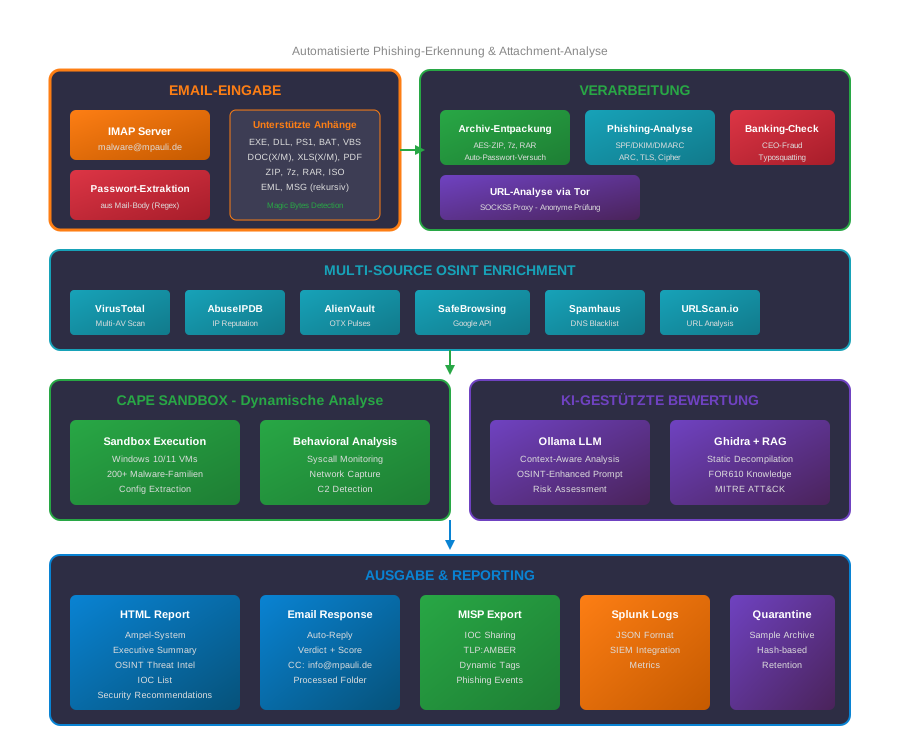
malware@mpauli.de] PWD[Passwort-Extraktion
aus Mail-Body] ATTACH[Anhänge
EXE, DLL, ZIP, 7z, RAR
DOC, PDF, EML, MSG] end subgraph PROCESS["VERARBEITUNG"] UNZIP[Archiv-Entpackung
AES-ZIP, 7z, RAR
Auto-Passwort] PHISH[Phishing-Analyse
SPF/DKIM/DMARC
ARC, TLS] BANK[Banking-Check
CEO-Fraud
Typosquatting] URL[URL-Analyse
via Tor Proxy] end subgraph OSINT["MULTI-SOURCE OSINT"] VT[VirusTotal] ABUSE[AbuseIPDB] OTX[AlienVault OTX] SAFE[Google SafeBrowsing] SPAM[Spamhaus] URLSCAN[URLScan.io] end subgraph SANDBOX["CAPE SANDBOX"] EXEC[Sandbox Execution
Windows 10/11 VMs] BEHAV[Behavioral Analysis
200+ Malware-Familien] end subgraph AI["KI-BEWERTUNG"] LLM[Ollama LLM
Context-Aware] RAG[Ghidra + RAG
FOR610 Knowledge] end subgraph OUTPUT["AUSGABE"] HTML[HTML Report
Ampel-System] MAIL[Email Response
Auto-Reply] MISP[MISP Export
IOC Sharing] SPLUNK[Splunk Logs
JSON Format] end INPUT --> PROCESS PWD --> UNZIP PROCESS --> OSINT PROCESS --> SANDBOX OSINT --> AI SANDBOX --> AI AI --> OUTPUT ```
**核心特性:**
- **邮件输入**:自动 IMAP 获取并从邮件正文中提取密码
- **归档文件处理**:ZIP(AES 加密)、7z、RAR,自动尝试密码
- **钓鱼分析**:多源 Auth-Header 解析(SPF/DKIM/DMARC/ARC)
- **OSINT-Enrichment**:6+ Threat Intelligence 来源
- **AI 评估**:结合 OSINT 上下文的 Ollama LLM,实现精准风险评估
### 2.2 系统组件
| 组件 | 描述 | 来源 |
|------------|--------------|--------|
| cape_mailer.py | 主脚本(3459 行) | `/opt/cape-mailer/bin/cape_mailer.py` |
| config.yaml | 配置文件 | `/opt/cape-mailer/config/config.yaml` |
| phishing_prompt.txt | 用于钓鱼评估的 Ollama prompt | `/opt/cape-mailer/config/phishing_prompt.txt` |
| cleanup_logs.sh | 日志清理 | `/opt/cape-mailer/bin/cleanup_logs.sh` |
### 2.3 目录结构
```
/opt/cape-mailer/
├── bin/
│ ├── cape_mailer.py # Hauptskript
│ └── cleanup_logs.sh # Log-Cleanup
├── config/
│ ├── config.yaml # Hauptkonfiguration
│ └── phishing_prompt.txt # Ollama LLM-Prompt
├── logs/
│ ├── cape_mailer_YYYY-MM-DD.log # Tägliche Logs
│ └── splunk/ # JSON-Logs für SIEM
├── reports/ # HTML-Reports
├── work/ # Temporäre Arbeitsdateien
├── processed/ # Verarbeitete Samples
├── quarantine/ # Quarantäne-Dateien
├── venv/ # Python Virtual Environment
└── cape-mailer.lock # Process-Lock-Datei
```
**来源**:`/opt/cape-mailer/bin/cape_mailer.py:135-142`
### 2.4 分析模式
| 模式 | 触发条件 | 分析步骤 |
|-------|---------|------------------|
| **恶意软件** | 非 EML/MSG 附件(.exe, .dll, .pdf 等) | CAPE Sandbox → 行为分析 → Ghidra → Ollama |
| **网络钓鱼** | EML/MSG 附件 | Header 分析 → OSINT → URL 检查 → Ollama |
**来源**:`/opt/cape-mailer/bin/cape_mailer.py:150-152`(EML_EXTENSIONS)
## 3. 合规性要求
### 3.1 BaFin / MaRisk
| MaRisk 要求 | 实施方式 |
|-------------------|-----------|
| AT 7.2(IT 风险管理) | 自动化的网络钓鱼/恶意软件检测 |
| AT 8.2(外包) | 将 OSINT API 记录为外部服务 |
| BT 3.2(监控) | 完整的日志记录(Splunk JSON) |
### 3.2 BAIT(对银行业 IT 的监管要求)
| BAIT 章节 | 相关性 | 措施 |
|--------------|----------|----------|
| IV. 信息安全 | 威胁检测 | 多源 Threat Intelligence |
| VI. IT 运营 | 自动化 | 全自动分析 pipeline |
| VIII. 外包 | API 服务 | 记录在案的 OSINT 提供商 |
### 3.3 DORA(数字运营韧性法案)
| DORA 条款 | 要求 | 实施方式 |
|--------------|-------------|-----------|
| Art. 5 | ICT 风险管理 | 自动化威胁分析 |
| Art. 8 | 检测 | 实时网络钓鱼检测 |
| Art. 11 | 事件响应 | 用于 Threat Sharing 的 MISP 集成 |
### 3.4 ISO 27001 控制措施
| ISO 27001 控制 | 实施方式 |
|-------------------|-----------|
| A.7.2.2 意识培训 | 员工可以轻松提交可疑电子邮件 |
| A.12.2 恶意软件防护 | 自动化分析 pipeline |
| A.16.1.4 事件评估 | 自动风险评估(红绿灯系统) |
## 4. 安装与配置
### 4.1 系统要求
**硬件**:
- CPU:2 核(用于 OSINT 并行处理)
- RAM:4 GB
- 存储:50 GB(用于报告和日志)
**软件**:
- Python 3.12 及 Virtual Environment
- 访问 IMAP/SMTP 服务器的权限
- Tor-Proxy(用于安全的 URL 检查)
### 4.2 主配置
配置位于 `/opt/cape-mailer/config/config.yaml`:
**IMAP 配置**(第 8-16 行):
```
imap:
host: "10.1.1.11"
port: 143
ssl: false
starttls: true
verify_ssl: false
user: "malware@mpauli.de"
pass: "onlyinfected"
folder: "INBOX"
```
**SMTP 配置**(第 21-29 行):
```
smtp:
host: "10.1.1.11"
port: 25
ssl: false
starttls: true
verify_ssl: false
user: "malware@mpauli.de"
pass: "onlyinfected"
from: "CAPE Sandbox "
```
**来源**:`/opt/cape-mailer/config/config.yaml:8-29`
### 4.3 红绿灯系统
红绿灯系统根据 Malscore 对威胁进行分类:
```
# /opt/cape-mailer/config/config.yaml:86-88
ampel:
green_max_malscore: 1.9 # 🟢 CLEAN: 0-1.9
yellow_max_malscore: 4.9 # 🟡 VERDÄCHTIG: 2.0-4.9
# 🔴 MALICIOUS: 5.0+
```
| 红绿灯 | Malscore | 含义 | 操作 |
|-------|----------|-----------|--------|
| 🟢 绿色 | 0-1.9 | 无可疑 | 提供信息 |
| 🟡 黄色 | 2.0-4.9 | 可疑 | 建议人工检查 |
| 🔴 红色 | 5.0+ | 恶意 | 创建 MISP 事件并升级上报 |
### 4.4 OSINT 集成
CAPE Mailer 利用多个 OSINT 来源获取全面的 Threat Intelligence:
```
# /opt/cape-mailer/config/config.yaml:123-172
osint:
# AlienVault OTX - Threat Intelligence
otx:
enabled: true
api_key: ""
timeout: 10
# AbuseIPDB - IP Reputation
abuseipdb:
enabled: true
api_key: ""
timeout: 10
max_age_days: 90
# VirusTotal - Multi-Engine Scanner
virustotal:
enabled: true
api_key: ""
timeout: 15
# Google Safe Browsing
google_safe_browsing:
enabled: true
api_key: ""
timeout: 10
# Spamhaus (DNS-basiert, kostenlos)
spamhaus:
enabled: true
```
**来源**:`/opt/cape-mailer/config/config.yaml:123-172`
### 4.5 MISP 集成
在发现关键结果时自动创建事件:
```
# /opt/cape-mailer/config/config.yaml:176-208
misp:
enabled: true
url: "https://10.10.0.204"
api_key: ""
verify_ssl: false
# Event Settings
publish: false # Manuelles Review erforderlich!
distribution: 0 # Your organization only
threat_level_id: 4 # 1=High, 2=Medium, 3=Low, 4=Undefined
# IOC Export
export_hashes: true
export_urls: true
export_domains: true
export_ips: true
export_registry_keys: true
export_mutexes: true
```
**钓鱼专项 MISP 触发器**(第 210-258 行):
```
misp_phishing:
trigger:
min_verdict: "suspicious" # Ab "suspicious" Event erstellen
min_risk_score: 40 # Oder ab Risk Score 40
ollama_keywords: # Oder wenn Ollama diese Keywords nutzt
- "high"
- "critical"
- "phishing"
- "credential theft"
```
**来源**:`/opt/cape-mailer/config/config.yaml:176-258`
## 5. 操作流程
### 5.1 自动运行
CAPE Mailer 通过 Systemd Timer 自动运行:
**Timer 配置**(`/etc/systemd/system/cape-mailer.timer`):
```
[Timer]
OnBootSec=45s # Erster Start 45s nach Boot
OnUnitActiveSec=60s # Dann alle 60 Sekunden
Persistent=true
```
**Service 配置**(`/etc/systemd/system/cape-mailer.service`):
```
[Service]
Type=oneshot
User=cape
Group=cape
WorkingDirectory=/opt/cape-mailer
ExecStart=/opt/cape-mailer/venv/bin/python3 /opt/cape-mailer/bin/cape_mailer.py
# 加固
NoNewPrivileges=true
PrivateTmp=true
ProtectSystem=strict
ProtectHome=true
```
**来源**:`/etc/systemd/system/cape-mailer.service`
### 5.2 Service 管理
```
# 启动 Timer
sudo systemctl start cape-mailer.timer
# 停止 Timer
sudo systemctl stop cape-mailer.timer
# 检查 Timer 状态
systemctl status cape-mailer.timer
# 手动单次运行
sudo systemctl start cape-mailer.service
# 查看 Logs
journalctl -u cape-mailer -f
```
### 5.3 员工提交电子邮件
**员工操作步骤**:
1. 将可疑电子邮件另存为 `.eml` 或 `.msg`(或提取附件)
2. 创建新电子邮件发送至 `malware@mpauli.de`
3. 附上可疑文件
4. 可选:在正文中提供加密存档的密码
- 格式:`Passwort: infected` 或 `Password: malware`
5. 发送电子邮件
6. 将在约 5-30 分钟内收到自动报告
**支持的文件类型**(`/opt/cape-mailer/config/config.yaml:34-61`):
- 可执行文件:`.exe`、`.dll`、`.msi`
- 脚本:`.ps1`、`.js`、`.vbs`、`.bat`、`.cmd`
- 文档:`.pdf`、`.doc(x/m)`、`.xls(x/m)`、`.ppt(x/m)`
- 存档:`.zip`、`.7z`、`.rar`、`.iso`
- 电子邮件:`.eml`、`.msg`
### 5.4 邮箱管理
已处理的电子邮件将自动管理:
| 状态 | 操作 | 目标文件夹 |
|--------|--------|------------|
| 分析成功 | 移动 | `Processed` |
| 分析出错 | 标记为已读 | `INBOX`(已标记) |
| 循环检测 | 忽略 | - |
**防止循环**:不回复来自 `malware@mpauli.de` 的电子邮件(防止邮件循环)。
**来源**:`/opt/cape-mailer/bin/cape_mailer.py:63`(Changelog v2.3.1)
### 5.5 报告解读
HTML 报告包含以下部分:
**恶意软件报告**:
- 执行摘要(红绿灯评估)
- AI 分析(Ollama LLM)
- MITRE ATT&CK 映射
- OTX Threat Intelligence
- 行为序列
- Ghidra 静态分析
- OSINT 信誉
**网络钓鱼报告**:
- 风险评估(0-100)
- Header 分析(SPF/DKIM/DMARC)
- 邮件路由链(TLS 加密)
- URL 分析及 OSINT 信誉
- 银行专项检查(域名抢注、CEO 欺诈)
- 包含建议的 AI 评估
## 6. 维护流程
### 6.1 日志轮转
日志每天轮转并压缩:
**清理脚本**(`/opt/cape-mailer/bin/cleanup_logs.sh`):
```
#!/bin/bash
LOG_DIR="/opt/cape-mailer/logs"
RETENTION_DAYS=180
# 1天后压缩
find "$LOG_DIR" -name "cape_mailer_*.log" -type f -mtime +1 ! -name "*.gz" -exec gzip -9 {} \;
# 180天后删除
find "$LOG_DIR" -name "cape_mailer_*.log.gz" -type f -mtime +$RETENTION_DAYS -delete
# Splunk JSON-Logs
find "$LOG_DIR/splunk" -name "*.json" -type f -mtime +1 ! -name "*.gz" -exec gzip -9 {} \;
find "$LOG_DIR/splunk" -name "*.json.gz" -type f -mtime +$RETENTION_DAYS -delete
```
**Cron-Job**(`/etc/cron.daily/cape-log-cleanup`):
```
#!/bin/bash
/opt/cape-mailer/bin/cleanup_logs.sh >> /var/log/cape-log-cleanup.log 2>&1
```
**保留期**:180 天(6 个月)
**来源**:`/opt/cape-mailer/bin/cleanup_logs.sh`
### 6.2 OSINT API 密钥
应定期检查 API 密钥的有效性:
| 服务 | API 密钥位置 | 更新 |
|---------|------------------|------------|
| OTX | config.yaml:128 | 无限期(免费) |
| AbuseIPDB | config.yaml:135 | 每年检查 |
| VirusTotal | config.yaml:143 | 注意速率限制 |
| Google Safe Browsing | config.yaml:157 | Google Cloud Console |
**API 密钥测试**:
```
# OTX 测试
curl -H "X-OTX-API-KEY: " "https://otx.alienvault.com/api/v1/user/me"
# VirusTotal 测试
curl -H "x-apikey: " "https://www.virustotal.com/api/v3/users/current"
```
### 6.3 Python 依赖项更新
```
# 激活 Virtual Environment
source /opt/cape-mailer/venv/bin/activate
# 查看当前 Dependencies
pip list --outdated
# Security-Updates
pip install --upgrade requests urllib3 pyopenssl
# 更新后:Service-Test
/opt/cape-mailer/venv/bin/python3 -c "import cape_mailer; print('OK')"
```
## 7. 事件响应程序
### 7.1 检测到钓鱼活动
**指标**:
- 收到多名员工发来的多封类似电子邮件
- 包含相同 IOC 的 MISP 事件
- Splunk 在频繁出现红色评估时发出警报
**紧急措施**:
1. **合并 MISP 事件**:
# 过去 24 小时内的所有钓鱼事件
curl -k -H "Authorization: " \
"https://10.10.0.204/events/restSearch" \
-d '{"tags":["phishing"],"from":"1d"}'
2. **将 IOC 导出到邮件网关**:
- 屏蔽发件人域名
- 在 Web Proxy 中封锁 URL
- 通知受影响的员工
3. **意识防范措施**:
- 向受影响的部门发送钓鱼报告
- 必要时进行测试性网络钓鱼以提高警惕
### 7.2 恶意软件爆发
**在 Malscore 较(>8)的红色评估下**:
1. **分析 CAPE 报告**:
# 打开报告
firefox /opt/cape-mailer/reports/cape_.html
2. **从 MISP 提取 IOC**:
- 用于 EDR 搜索的哈希值
- 用于 Proxy 封锁的 C2 域名
- 用于取证的注册表项
3. **升级上报**:
- 通知 CERT 团队
- 隔离受影响的系统
- 启动取证
### 7.3 服务中断
**症状**:无报告,Timer 未运行
**诊断**:
```
# Timer 状态
systemctl status cape-mailer.timer
# 最近执行
journalctl -u cape-mailer --since "1 hour ago"
# 检查 Lock-File
ls -la /opt/cape-mailer/cape-mailer.lock
cat /opt/cape-mailer/cape-mailer.lock # Zeigt PID
# 检查进程(如果 Lock 存在)
ps aux | grep cape_mailer
```
**修复**:
```
# 对于孤立的 Lock 文件
rm /opt/cape-mailer/cape-mailer.lock
# 重启 Timer
sudo systemctl restart cape-mailer.timer
```
## 8. 故障排除
### 8.1 常见错误
| 错误 | 原因 | 解决方案 |
|--------|---------|--------|
| `Lock file exists` | 前一个进程仍在运行 | 等待或手动删除锁定文件 |
| `IMAP connection failed` | 网络/认证问题 | 检查 config.yaml 中的凭证 |
| `CAPE API timeout` | CAPE 过载 | 在 config.yaml 中增加 max_wait |
| `OSINT rate limit` | 达到 API 限制 | 增加等待时间或升级 API 密钥 |
| `Ollama timeout` | LLM 服务器过载 | 在 config.yaml 中增加 timeout |
### 8.2 日志分析
```
# 今日 Log
tail -f /opt/cape-mailer/logs/cape_mailer_$(date +%Y-%m-%d).log
# 搜索错误
grep -i "error\|exception\|failed" /opt/cape-mailer/logs/cape_mailer_*.log
# 搜索特定 Mail-ID
grep "Mail #123" /opt/cape-mailer/logs/cape_mailer_*.log
```
### 8.3 IMAP 连接测试
```
# Python 测试
/opt/cape-mailer/venv/bin/python3 << 'EOF'
from imapclient import IMAPClient
with IMAPClient('10.1.1.11', port=143, ssl=False) as c:
c.starttls()
c.login('malware@mpauli.de', 'onlyinfected')
print("Verbindung erfolgreich!")
print(f"Mails in INBOX: {c.select_folder('INBOX')}")
EOF
```
### 8.4 手动测试运行
```
# 带 Debug-Output
cd /opt/cape-mailer
/opt/cape-mailer/venv/bin/python3 /opt/cape-mailer/bin/cape_mailer.py 2>&1 | tee /tmp/cape_mailer_debug.log
```
## 9. 安全考量
### 9.1 Systemd 加固
该 Service 以严格限制的权限运行:
```
# /etc/systemd/system/cape-mailer.service
NoNewPrivileges=true # Keine Privilege Escalation
PrivateTmp=true # Isoliertes /tmp
ProtectSystem=strict # Nur explizit erlaubte Pfade schreibbar
ProtectHome=true # Kein Zugriff auf /home
ReadWritePaths=/opt/cape-mailer /opt/CAPEv2/storage /opt/CAPEv2/log /opt/CAPEv2/conf
RestrictAddressFamilies=AF_INET AF_INET6 AF_UNIX
LockPersonality=true # Keine Personality-Änderung
```
**来源**:`/etc/systemd/system/cape-mailer.service`
### 9.2 凭证管理
| 凭证 | 存储位置 | 保护机制 |
|------------|-------------|-------------------|
| IMAP 密码 | config.yaml | 文件权限 (640) |
| SMTP 密码 | config.yaml | 文件权限 (640) |
| MISP API 密钥 | config.yaml | TLS 加密 |
| OSINT API 密钥 | config.yaml | 速率限制 |
**建议**:在生产环境中实施 HashiCorp Vault 或类似的 Secret 管理解决方案。
### 9.3 网络安全
| 连接 | 协议 | 加密 |
|------------|-----------|-----------------|
| IMAP (10.1.1.11) | STARTTLS | TLS 1.2+ |
| SMTP (10.1.1.11) | STARTTLS | TLS 1.2+ |
| MISP (10.10.0.204) | HTTPS | TLS 1.2+ |
| Ollama (10.10.0.113) | HTTP | 内部(无 TLS) |
| OSINT APIs | HTTPS | TLS 1.2+ |
| URL 检查 | Tor SOCKS5 | 匿名化 |
### 9.4 用于 URL 检查的 Tor-Proxy
通过 Tor 检查 URL,以保护分析师的 IP:
```
# /opt/cape-mailer/bin/cape_mailer.py:148
TOR_PROXY = "socks5h://127.0.0.1:9050"
```
## 10. 附录
### 10.1 配置文件参考
| 文件 | 目的 |
|-------|-------|
| `/opt/cape-mailer/config/config.yaml` | 主配置 |
| `/opt/cape-mailer/config/phishing_prompt.txt` | 用于钓鱼评估的 Ollama prompt |
| `/etc/systemd/system/cape-mailer.service` | Systemd Service |
| `/etc/systemd/system/cape-mailer.timer` | Timer(60 秒间隔) |
| `/etc/cron.daily/cape-log-cleanup` | 日志清理 |
| `/etc/logrotate.d/opt-logs` | Logrotate 配置 |
### 10.2 命令参考
```
# Service-Management
systemctl {start|stop|restart|status} cape-mailer.timer
systemctl {start|stop|restart|status} cape-mailer.service
# Logs
tail -f /opt/cape-mailer/logs/cape_mailer_$(date +%Y-%m-%d).log
journalctl -u cape-mailer -f
# Lock-Management
cat /opt/cape-mailer/cape-mailer.lock # PID anzeigen
rm /opt/cape-mailer/cape-mailer.lock # Lock entfernen (Vorsicht!)
# 手动测试
/opt/cape-mailer/venv/bin/python3 /opt/cape-mailer/bin/cape_mailer.py
```
### 10.3 银行专项检查
CAPE Mailer 可识别针对银行的钓鱼企图:
**德国银行关键词**(`/opt/cape-mailer/bin/cape_mailer.py:166-171`):
```
GERMAN_BANKS = [
"sparkasse", "volksbank", "raiffeisenbank", "commerzbank", "deutsche bank",
"postbank", "ing-diba", "ing", "dkb", "comdirect", "hypovereinsbank", "unicredit",
"targobank", "santander", "n26", "bunq", "consorsbank", "norisbank", "sparda",
"apobank", "psd bank", "bw bank", "lbbw", "helaba", "landesbank", "kfw"
]
```
**CEO 欺诈关键词**(`/opt/cape-mailer/bin/cape_mailer.py:174-179`):
```
CEO_FRAUD_KEYWORDS = [
"dringend", "vertraulich", "geheim", "überweisung", "wire transfer",
"geschäftsführer", "ceo", "vorstand", "chef", "direktor",
"sofort", "immediately", "urgent", "asap", "zeitkritisch",
"nicht weiterleiten", "nur für sie", "persönlich"
]
```
### 10.4 联系信息
| 角色 | 联系方式 |
|-------|---------|
| IT 安全运营(1st Level) | security-ops@bank.de |
| CERT/事件响应(2nd Level) | cert@bank.de |
| 系统管理(3rd Level) | sysadmin@bank.de |
| 恶意软件分析邮箱 | malware@mpauli.de |
### 10.5 修改历史
| 版本 | 日期 | 作者 | 修改内容 |
|---------|-------|-------|----------|
| 1.2 | 2026-01-23 | IcePorge | SVG 架构图,Mermaid 图表,集成 TruffleHog 安全扫描 |
| 1.1 | 2026-01-22 | IcePorge | 为 GitHub Push 添加 Secret 掩码,清理 Git History |
| 1.0 | 2026-01-19 | IT 安全 | 初始创建 |
**文档结束**
*本文档分类级别为内部 (INTERN),仅限机构内部使用。*
Mermaid 图表(点击展开)
``` flowchart TB subgraph INPUT["EMAIL-EINGABE"] IMAP[IMAP Servermalware@mpauli.de] PWD[Passwort-Extraktion
aus Mail-Body] ATTACH[Anhänge
EXE, DLL, ZIP, 7z, RAR
DOC, PDF, EML, MSG] end subgraph PROCESS["VERARBEITUNG"] UNZIP[Archiv-Entpackung
AES-ZIP, 7z, RAR
Auto-Passwort] PHISH[Phishing-Analyse
SPF/DKIM/DMARC
ARC, TLS] BANK[Banking-Check
CEO-Fraud
Typosquatting] URL[URL-Analyse
via Tor Proxy] end subgraph OSINT["MULTI-SOURCE OSINT"] VT[VirusTotal] ABUSE[AbuseIPDB] OTX[AlienVault OTX] SAFE[Google SafeBrowsing] SPAM[Spamhaus] URLSCAN[URLScan.io] end subgraph SANDBOX["CAPE SANDBOX"] EXEC[Sandbox Execution
Windows 10/11 VMs] BEHAV[Behavioral Analysis
200+ Malware-Familien] end subgraph AI["KI-BEWERTUNG"] LLM[Ollama LLM
Context-Aware] RAG[Ghidra + RAG
FOR610 Knowledge] end subgraph OUTPUT["AUSGABE"] HTML[HTML Report
Ampel-System] MAIL[Email Response
Auto-Reply] MISP[MISP Export
IOC Sharing] SPLUNK[Splunk Logs
JSON Format] end INPUT --> PROCESS PWD --> UNZIP PROCESS --> OSINT PROCESS --> SANDBOX OSINT --> AI SANDBOX --> AI AI --> OUTPUT ```
标签:CISA项目, 威胁情报, 开发者工具, 沙箱, 自动化恶意软件分析, 逆向工具, 邮件安全