PerryTS/perry

GitHub: PerryTS/perry

用 Rust 编写的原生 TypeScript 编译器,借助 SWC 和 LLVM 将 TypeScript 直接编译为跨平台独立可执行文件,无需 Node.js 运行时。

Stars: 3622 | Forks: 122

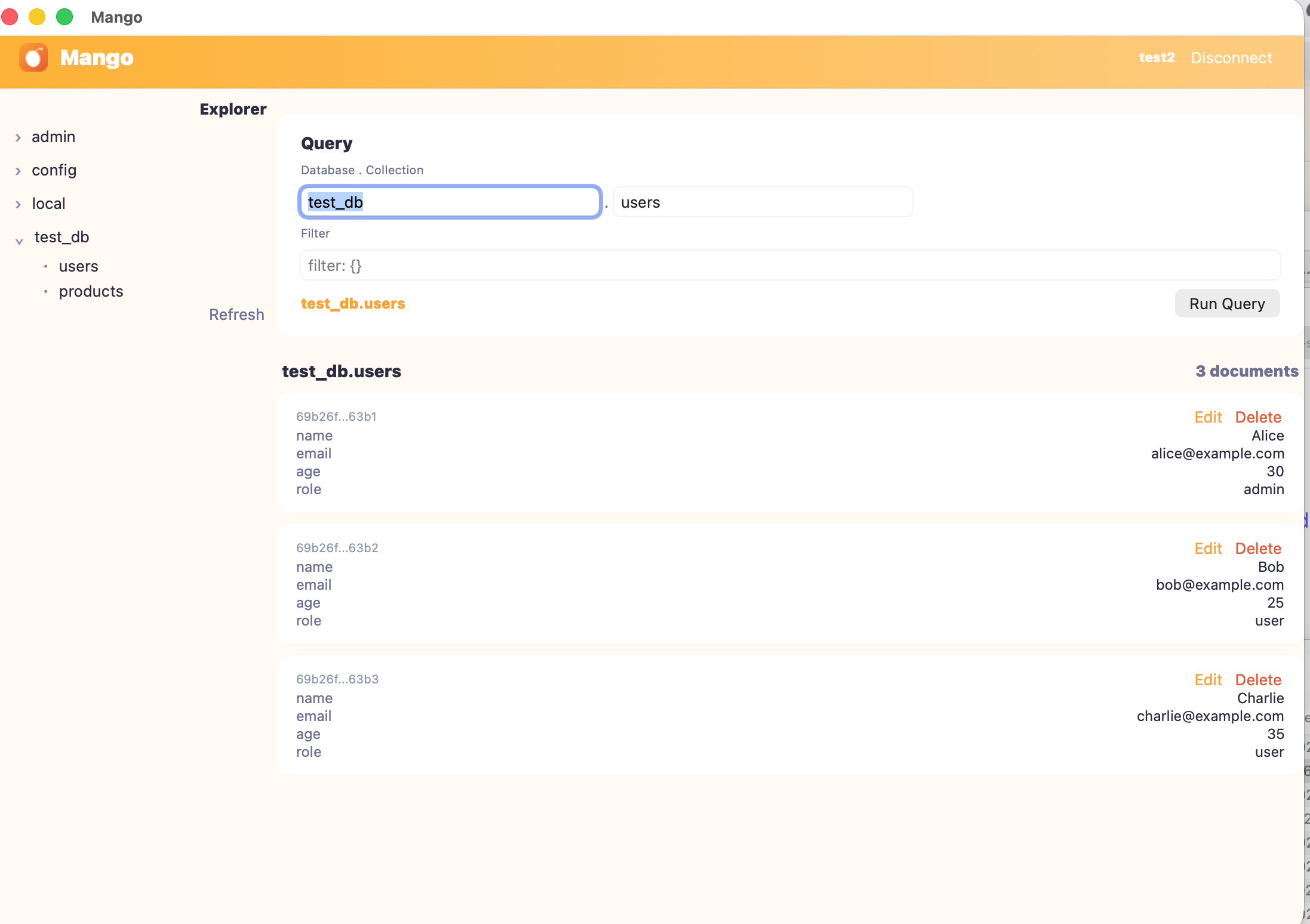
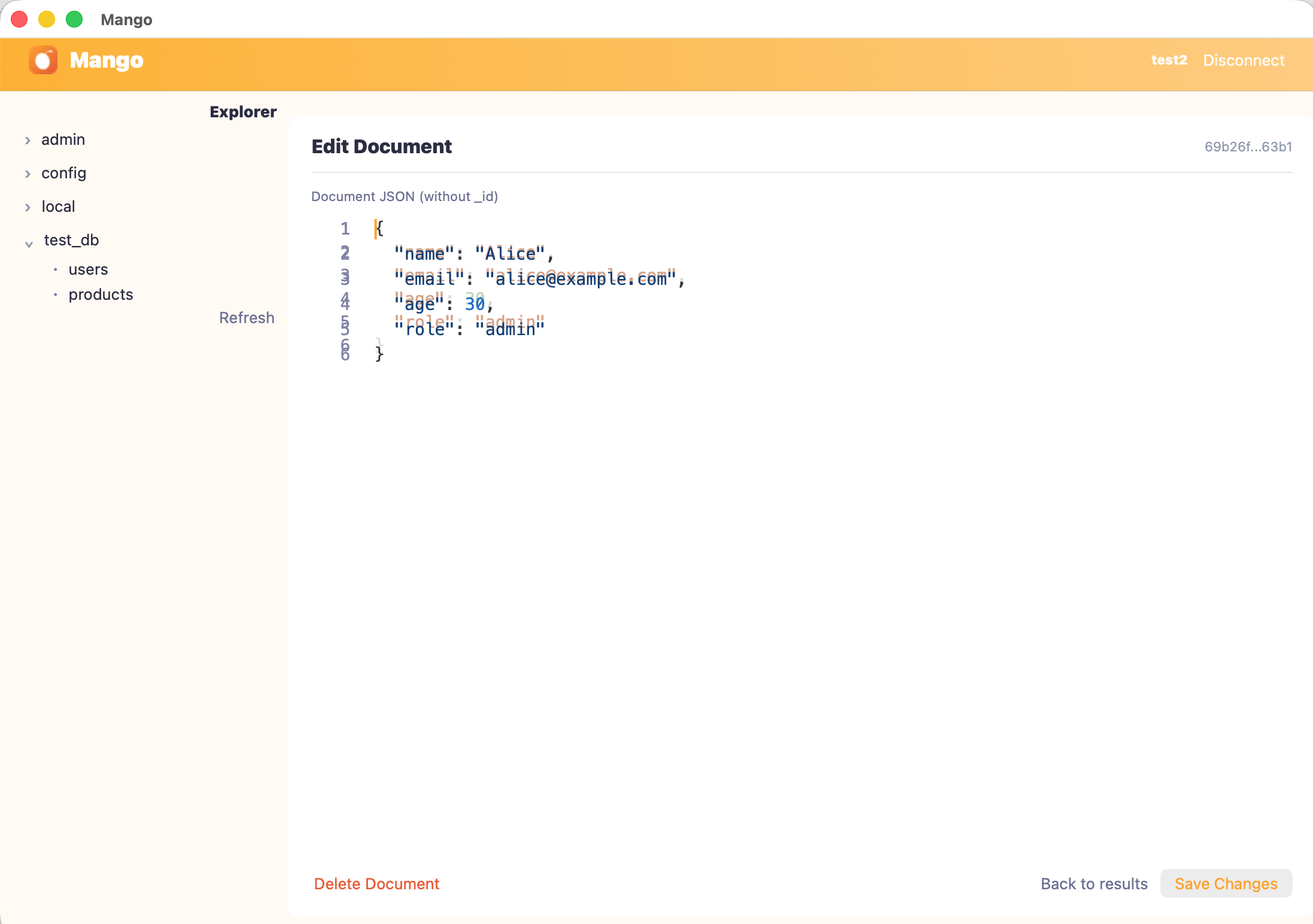
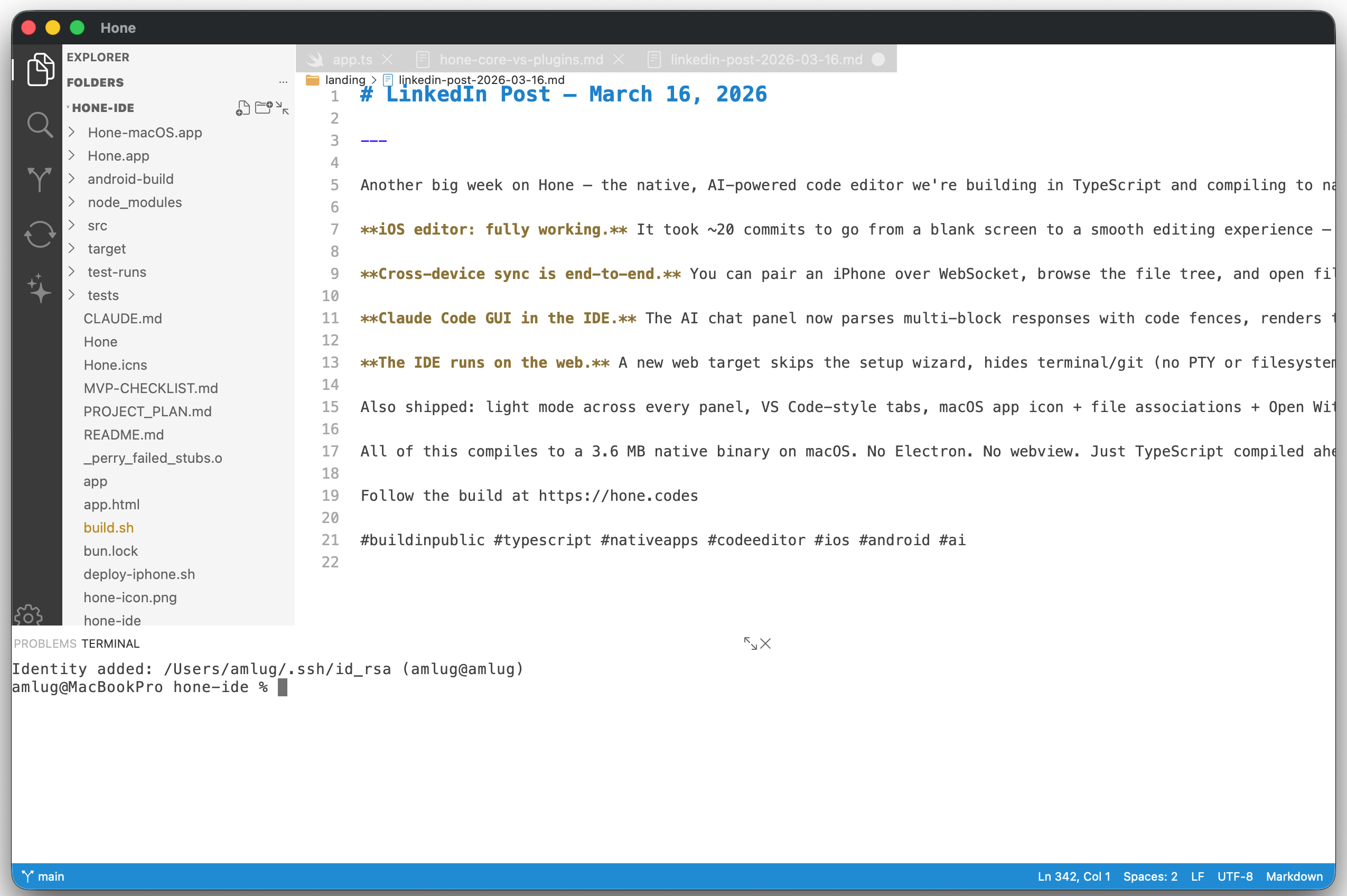
# Perry **一个代码库,全平台原生性能。** Perry 是一个用 Rust 编写的原生 TypeScript 编译器。它接收你的 TypeScript 并将其直接编译为原生可执行文件 —— 不需要 Node.js,不需要 Electron,也不需要浏览器引擎。只有能够在任何地方运行的快速、小型二进制文件。 **当前版本:** 0.5.152 | [网站](https://perryts.com) | [文档](https://perryts.github.io/perry/) | [案例展示](https://perryts.com/showcase) ``` perry compile src/main.ts -o myapp ./myapp # that's it — a standalone native binary ``` Perry 使用 [SWC](https://swc.rs/) 进行 TypeScript 解析,使用 [LLVM](https://llvm.org/) 进行原生代码生成。最终输出是一个没有任何运行时依赖的单一二进制文件。 ## 使用 Perry 构建的项目 如今人们正在使用 Perry 构建真正的应用程序。以下是一些亮点: | 项目 | 项目简介 | 平台 | |---------|-----------|-----------| | [**Bloom Engine**](https://bloomengine.dev) | 原生 TypeScript 游戏引擎 —— 支持 Metal、DirectX 12、Vulkan、OpenGL。使用 TS 编写游戏,发布原生应用。 | macOS, Windows, Linux, iOS, tvOS, Android | | [**Mango**](https://github.com/MangoQuery/app) | 原生 MongoDB GUI。约 7 MB 二进制文件,小于 100 MB 内存,亚秒级冷启动。 | macOS, Windows, Linux, iOS, Android | | [**Hone**](https://hone.codes) | 由 AI 驱动的原生代码编辑器,内置终端、Git 和 LSP。 | macOS, Windows, Linux, iOS, Android, Web | | [**Pry**](https://github.com/PerryTS/pry) | 快速的原生 JSON 查看器,支持树状导航和搜索。 | macOS, iOS, Android | | [**dB Meter**](https://dbmeter.app) | 实时声级测量,支持 60fps 更新和按设备校准。 | iOS, macOS, Android | ### 截图 **Mango** — 原生 MongoDB GUI ([源码](https://github.com/MangoQuery/app))

Mango — database explorer view

Mango — document editor view

**Hone** — 由 AI 驱动的原生代码编辑器 ([hone.codes](https://hone.codes))

Hone — AI code editor built with Perry

## 性能 以下关于 Perry 的数据来自 2026-05-06 在 macOS ARM64 (M1 Max, RUNS=11 中位数,`taskpolicy -t 0 -l 0`) 上的测试。其他语言的数据来自同一硬件上 2026-04-25 的 v0.5.249 测试(编译器版本保持不变——这些数字不会因 Perry 端的工作而变动)。源码与方法论详见 [`benchmarks/polyglot/`](benchmarks/polyglot/)。 | 基准测试 | Perry | Rust | C++ | Go | Swift | Java | Node | Bun | 测试内容 | |---------------------|------:|------:|------:|------:|------:|------:|------:|------:|---------------| | fibonacci | 304 | 330 | 315 | 451 | 406 | 282 | 1022 | 589 | 递归函数调用(i64 特化) | | loop_data_dependent | 221 | 229 | 129 | 128 | 233 | 229 | 322 | 232 | 通过 `sum` 的乘法进位(不可折叠的 f64) | | object_create | 2 | 0 | 0 | 0 | 0 | 5 | 11 | 6 | 对象分配(1M 个对象,标量替换) | | nested_loops | 17 | 8 | 8 | 10 | 8 | 11 | 18 | 21 | 嵌套数组访问(受限于缓存) | | array_read | 11 | 9 | 9 | 11 | 9 | 12 | 13 | 16 | 顺序读取(10M 个元素) | | array_write | 4 | 7 | 3 | 9 | 2 | 7 | 9 | 6 | 顺序写入(10M 个元素) | 默认情况下,Perry 在每一行测试中的表现都与 Rust 默认的 `-O`、C++ 的 `-o3` 和 Swift 的 `-O` 处于同一水平——在整数递归(`fibonacci`)上具有竞争力,由于标量替换(`object_create`)在对象分配方面与原生性能仅有一线之差,在受限于缓存的工作(`nested_loops`、`array_read`/`array_write`)上仅有几毫秒之差,并且在真正不可折叠的 f64(`loop_data_dependent`)上与无契约编译组表现一致。Go 和 `clang -O3` 通过将 `sum * a + b` 融合为单条 `FMADDD` 指令在 `loop_data_dependent` 行胜出(FMA 收缩为 `-ffp-contract=fast`——这是一个独立的开关,`--fast-math` 故意不会切换它)。为了保持表格可读性,省略了 Python 列;完整数据见 [`benchmarks/polyglot/RESULTS.md`](benchmarks/polyglot/RESULTS.md)。 我们故意没有将 Perry 在 v0.5.584 版本中曾发布过高数值的那些极其容易折叠的累加器微基准测试(`loop_overhead` / `math_intensive` / `accumulate`)放在首位。这些测试是标志激进程度的探针——它们测量的是每个编译器是否将 `reassoc + autovectorize` 应用于一个 `sum += 1.0` 形式的循环,而不是生成的循环在负载下的计算速度有多快。在这三项测试中,Perry 默认配置处于无标志组(约 95 ms);`--fast-math` 可挽回 12 / 14 / 33 ms。在相同的核心计算上,C++ `-O3 -ffast-math` 与 Perry `--fast-math` 的表现精确到毫秒级完全一致——同宗同源的 LLVM pipeline,只是一个标志之差。完整的详细分析见 [`benchmarks/README.md`](benchmarks/README.md#optimization-probes-compiler-flag-aggressiveness-not-runtime-perf) 和 [`polyglot/RESULTS_OPT.md`](benchmarks/polyglot/RESULTS_OPT.md)。 ### 对比 Node.js 和 Bun Perry 更广泛的基准测试套件涵盖了多语言集合之外的工作负载——闭包、类、JSON、素数筛等。**以下数据来自 2026-04-23 v0.5.173 基线运行;v0.5.585 的重跑已在后续计划中。** 其中大多数不是 FP 可折叠的累加器模式(factorial 是整数取模,method_calls 通过闭包进行调度,json_roundtrip 受限于解析/序列化),因此 v0.5.585 默认模式的数值应与所示数据相近。 | 基准测试 | Perry (v0.5.173) | Node.js | Bun | 测试内容 | |-----------|-----------------:|--------:|----:|---------------| | factorial | 31ms | 596ms | 98ms | 模累加(整数快速路径) | | method_calls | 1ms | 11ms | 9ms | 类方法调度(10M 次调用) | | closure | 10ms | 309ms | 51ms | 闭包创建 + 调用(10M 次调用) | | binary_trees | 3ms | 10ms | 7ms | 树分配 + 遍历(1M 个节点,标量替换) | | string_concat | 0ms | 3ms | 2ms | 100K 次字符串追加 | | prime_sieve | 5ms | 8ms | 7ms | 埃拉托斯特尼筛法 | | mandelbrot | 23ms | 25ms | 30ms | 复数 f64 迭代 (800x800) | | matrix_multiply | 24ms | 34ms | 35ms | 256x256 矩阵乘法 | | json_roundtrip | 314ms | 377ms | 250ms | 对约 1MB、10K 条目的数据块进行 50× `JSON.parse` + `JSON.stringify` | Perry 通过 LLVM 编译为原生机器码——没有 JIT 预热,没有解释器开销。在两种模式下都适用的关键优化包括:非转义对象的**标量替换**(逃逸分析完全消除了堆分配——对象字段转变为寄存器),针对确实发生逃逸的对象的内联碰撞分配器,针对有界数组访问的 i32 循环计数器,整数取模快速路径(使用 `fptosi → srem → sitofp` 代替 `fmod`),消除数字函数返回时冗余的 `js_number_coerce` 调用,以及对纯数字递归函数进行 i64 特化。 自行运行基准测试:`cd benchmarks/suite && ./run_benchmarks.sh`(需要 node、cargo;可选:bun、shermes)。 ## 二进制文件大小 Perry 生成小型、独立的二进制文件,运行时没有任何外部依赖: | 程序 | 二进制大小 | |---------|-------------| | `console.log("Hello, world!")` | **~330KB** | | hello world + `fs` / `path` / `process` 导入 | ~380KB | | 完整 stdlib 应用(fastify、mysql2 等) | ~48MB | | 包含 `--enable-js-runtime` (内嵌 V8) | +~15MB | Perry 会自动检测您的程序使用了运行时的哪些部分,并仅链接所需内容。 ## 安装 ### npm / npx(全平台) Perry 以预编译二进制文件的 npm 包形式发布——这是试用它的最快方式,也是唯一一个只需一条命令即可在所有七个受支持平台(macOS arm64/x64、Linux x64/arm64 glibc + musl、Windows x64)上运行的安装途径: ``` # 项目本地(推荐 — 将 Perry 的版本与您的 deps 一起锁定) npm install @perryts/perry npx perry compile src/main.ts -o myapp && ./myapp # 全局 npm install -g @perryts/perry perry compile src/main.ts -o myapp # 零安装、一次性 npx -y @perryts/perry compile src/main.ts -o myapp ``` [`@perryts/perry`](https://www.npmjs.com/package/@perryts/perry) 是一个精简的启动器;npm 会根据你的 `os` / `cpu` / `libc` 通过 `optionalDependencies`(`@perryts/perry-darwin-arm64`、`@perryts/perry-linux-x64-musl` 等)自动选取匹配的预编译版本。需要 Node.js ≥ 16 和用于链接的系统 C 工具链(与任何 Perry 安装相同——参见[要求](#requirements))。 ### macOS (Homebrew) ``` brew install perryts/perry/perry ``` ### Windows (winget) ``` winget install PerryTS.Perry ``` ### Windows (Scoop) ``` scoop bucket add perry-ts https://github.com/PerryTS/perry scoop install perry-ts/perry ``` Scoop 清单将 `main/llvm` 声明为依赖项,因此 `scoop install` 会自动拉取 Perry 进行 Windows 原生对象发射所需的官方 MSVC 默认 LLVM 工具链。安装后使用 `perry doctor` 进行验证。 ### Debian / Ubuntu (APT) ``` curl -fsSL https://perryts.github.io/perry-apt/perry.gpg.pub | sudo gpg --dearmor -o /usr/share/keyrings/perry.gpg echo "deb [signed-by=/usr/share/keyrings/perry.gpg] https://perryts.github.io/perry-apt stable main" | sudo tee /etc/apt/sources.list.d/perry.list sudo apt update && sudo apt install perry ``` ### 快速安装 ``` curl -fsSL https://raw.githubusercontent.com/PerryTS/perry/main/packaging/install.sh | sh ``` ### 从源码构建 ``` git clone https://github.com/PerryTS/perry.git cd perry cargo build --release # 二进制文件位于:target/release/perry ``` ### 环境要求 Perry 需要 C 链接器来链接编译后的可执行文件: - **macOS:** Xcode Command Line Tools (`xcode-select --install`) - **Linux:** GCC 或 Clang (`sudo apt install build-essential`) - **Windows:** MSVC (Visual Studio Build Tools) 运行 `perry doctor` 以验证您的环境。 ## 快速开始 ``` # 初始化一个新项目 perry init my-project cd my-project # 编译并运行 perry compile src/main.ts -o myapp ./myapp # 或者一步完成编译并运行 perry run . # 检查 TypeScript 兼容性 perry check src/ # 诊断环境 perry doctor ``` ## 实战示例:使用 ESM 模块的 API 服务器 Perry 支持标准的 ES 模块导入和 npm 包。以下是一个具有多文件项目结构的真实 API 服务器: **项目布局:** ``` my-api/ ├── package.json ├── src/ │ ├── main.ts │ ├── config.ts │ └── routes/ │ └── users.ts └── node_modules/ ``` **src/config.ts** ``` export const config = { port: 3000, dbHost: process.env.DB_HOST || 'localhost', }; ``` **src/routes/users.ts** ``` export function getUsers(): object[] { return [ { id: 1, name: 'Alice' }, { id: 2, name: 'Bob' }, ]; } export function getUserById(id: number): object | undefined { return getUsers().find((u: any) => u.id === id); } ``` **src/main.ts** ``` import fastify from 'fastify'; import { config } from './config'; import { getUsers, getUserById } from './routes/users'; const app = fastify(); app.get('/api/users', async () => { return getUsers(); }); app.get('/api/users/:id', async (request) => { const { id } = request.params as { id: string }; return getUserById(parseInt(id)); }); app.listen({ port: config.port }, () => { console.log(`Server running on port ${config.port}`); }); ``` **编译并运行:** ``` perry compile src/main.ts -o my-api && ./my-api # 或者:perry run . ``` 输出是一个独立的二进制文件——运行时不需要 `node_modules`。 ## 示例项目 即下即用的演示项目位于其独立的仓库中:**[PerryTS/perry-examples](https://github.com/PerryTS/perry-examples)**。 | 示例 | 技术栈 | 演示内容 | |---------|-------|---------------------| | **[express-postgres](https://github.com/PerryTS/perry-examples/tree/main/express-postgres)** | Express + PostgreSQL | 多文件路由、中间件、连接池、错误处理 | | **[fastify-redis-mysql](https://github.com/PerryTS/perry-examples/tree/main/fastify-redis-mysql)** | Fastify + Redis + MySQL | 速率限制、缓存层、数据库查询、dotenv 配置 | | **[hono-mongodb](https://github.com/PerryTS/perry-examples/tree/main/hono-mongodb)** | Hono + MongoDB | 轻量级 HTTP 框架结合文档数据库 | | **[nestjs-typeorm](https://github.com/PerryTS/perry-examples/tree/main/nestjs-typeorm)** | NestJS + Type | 基于装饰器的架构、依赖注入 | | **[nextjs-prisma](https://github.com/PerryTS/perry-examples/tree/main/nextjs-prisma)** | Next.js-style + Prisma | ORM 集成、数据库迁移 | | **[koa-redis](https://github.com/PerryTS/perry-examples/tree/main/koa-redis)** | Koa + Redis | 中间件组合、会话存储 | | **[blockchain-demo](https://github.com/PerryTS/perry-examples/tree/main/blockchain-demo)** | Custom | 纯 TypeScript 实现的区块链 | ``` git clone https://github.com/PerryTS/perry-examples cd perry-examples/fastify-redis-mysql npm install perry compile src/index.ts -o server && ./server ``` ## 原生 UI Perry 包含一个声明式 UI 系统 (`perry/ui`),可直接编译为原生平台组件——没有 WebView,没有 Electron。其编程模型类似于 SwiftUI:使用基于栈的布局、对齐和分布来组合原生组件——而不是 CSS/HTML。 ``` import { App, VStack, HStack, Text, Button, Spacer, SplitView, splitViewAddChild, stackSetAlignment, stackSetDistribution, widgetAddChild, widgetMatchParentWidth, } from 'perry/ui'; // Sidebar + content layout with a split view const sidebar = VStack(8, [Text("Projects"), Text("Settings"), Spacer()]); sidebar.setEdgeInsets(12, 12, 12, 12); sidebar.setBackgroundColor("#F5F5F5"); const header = HStack(8, [Text("Dashboard"), Spacer(), Button("New", () => {})]); const actions = HStack(8, [Button("Cancel", () => {}), Button("Save", () => {})]); stackSetDistribution(actions, 1); // FillEqually — both buttons get equal width const content = VStack(16, [header, Text("Welcome back!"), Spacer(), actions]); content.setEdgeInsets(20, 20, 20, 20); stackSetAlignment(content, 5); // Leading — children align left const split = SplitView(); splitViewAddChild(split, sidebar); splitViewAddChild(split, content); App({ title: 'My App', width: 800, height: 500, body: split }); ``` **一套代码库,十个目标输出:** | 平台 | 后端 | 目标标志 | |----------|---------|-------------| | macOS | AppKit (NSView) | *(在 macOS 上默认)* | | iOS / iPadOS | UIKit | `--target ios` / `--target ios-simulator` | | visionOS | UIKit (2D 窗口) | `--target visionos` / `--target visionos-simulator` | | tvOS | UIKit | `--target tvos` / `--target tvos-simulator` | | watchOS | WatchKit | `--target watchos` / `--target watchos-simulator` | | Android | Android Views (JNI) | `--target android` | | Windows | Win32 | *(在 Windows 上默认)* | | Linux | GTK4 | *(在 Linux 上默认)* | | Web | DOM (JS 代码生成) | `--target web` | | WebAssembly | DOM (WASM) | `--target wasm` | **127+ UI 函数** —— 组件(Button、Text、TextField、Toggle、Slider、Picker、Table、Canvas、Image、ProgressView、SecureField、NavigationStack、ZStack、LazyVStack、Form/Section、CameraView、SplitView),布局控制(对齐、分布、匹配父元素、内容吸附、覆盖定位、边缘 insets),以及系统 API(keychain、通知、文件对话框、剪贴板、暗黑模式、openURL、音频捕获)。 ## 多线程 `perry/thread` 模块提供具有编译时安全性的真正操作系统线程——没有共享的可变状态,没有数据竞争: ``` import { parallelMap, parallelFilter, spawn } from 'perry/thread'; // Data-parallel array processing across all CPU cores const results = parallelMap([1, 2, 3, 4, 5], n => fibonacci(n)); // Parallel filtering const evens = parallelFilter(numbers, n => n % 2 === 0); // Background thread with Promise const result = await spawn(() => expensiveComputation()); ``` 值通过深拷贝跨线程传递。每个线程都有自己的 arena 和 GC。编译器强制闭包不能捕获可变状态。 ## 国际化 (i18n) 零运行时开销的编译时本地化: ``` import { t, Currency, ShortDate } from 'perry/i18n'; console.log(t('hello')); // "Hallo" (German locale) console.log(t('items', { count: 3 })); // "3 Artikel" (CLDR plural rules) console.log(Currency(9.99, 'EUR')); // "9,99 €" console.log(ShortDate(Date.now())); // "24.03.2026" ``` 在 `perry.toml` 中配置: ``` [i18n] default_locale = "en" locales = ["en", "de", "fr", "ja"] ``` 所有区域设置字符串在编译时都被烘焙进二进制文件中。在所有 6 个平台上进行原生区域设置检测。支持 30 多种语言的 CLDR 复数规则。 ## 主屏幕小组件 使用 TypeScript 构建原生主屏幕小组件——支持 iOS、Android、watchOS 和 Wear OS: ``` perry compile src/widget.ts --target ios-widget -o MyWidget perry compile src/widget.ts --target android-widget -o MyWidget perry compile src/widget.ts --target watchos-widget -o MyWidget perry compile src/widget.ts --target wearos-tile -o MyWidget ``` ## 跨平台目标 ``` # 桌面(宿主平台默认) perry compile src/main.ts -o myapp # 移动端 perry compile src/main.ts --target ios -o MyApp perry compile src/main.ts --target ios-simulator -o MyApp perry compile src/main.ts --target visionos -o MyApp perry compile src/main.ts --target visionos-simulator -o MyApp perry compile src/main.ts --target android -o MyApp # 电视 / 手表 perry compile src/main.ts --target tvos -o MyApp perry compile src/main.ts --target watchos -o MyApp # Web perry compile src/main.ts --target web -o app.html # JavaScript output perry compile src/main.ts --target wasm -o app.wasm # WebAssembly output # 主屏幕小组件 perry compile src/widget.ts --target ios-widget -o MyWidget perry compile src/widget.ts --target android-widget -o MyWidget perry compile src/widget.ts --target wearos-tile -o MyWidget ``` ## 发布 ``` perry publish macos # or: ios / android / linux ``` `perry publish` 会将您的 TypeScript 源码发送到 perry-hub(云构建服务器),后者会为每个目标平台进行交叉编译和签名。 ## 支持的语言特性 ### 核心 TypeScript | 特性 | 状态 | |---------|--------| | 变量| ✅ | | 所有运算符 (+, -, *, /, %, **, &, \|, ^, <<, >>, ???, ?., 三元运算符) | ✅ | | 控制流| ✅ | | Try-catch-finally, throw | ✅ | | 函数、箭头函数、剩余参数、默认值 | ✅ | | 带有可变捕获的闭包 | ✅ | | 类(继承、私有字段 #、静态属性、getter/setter、super) | ✅ | | 泛型(在编译时单态化) | ✅ | | 接口、类型别名、联合类型、类型守卫 | ✅ | | Async/await, Promise | ✅ | | 生成器 (function*) | ✅ | | ES 模块(import/export、重新导出、`import * as`) | ✅ | | 解构(数组、对象、剩余参数、默认值、重命名) | ✅ | | 在函数调用和字面量中使用扩展运算符 | ✅ | | RegExp (test, match, replace) | ✅ | | BigInt (256位) | ✅ | | 装饰器 | ❌ ([不支持](docs/src/language/limitations.md#no-decorators)) | ### 标准库 | 模块 | 函数 | |--------|-----------| | `console` | log, error, warn, debug | | `fs` | readFileSync, writeFileSync, existsSync, mkdirSync, unlinkSync, readdirSync, statSync, readFileBuffer, rmRecursive | | `path` | join, dirname, basename, extname, resolve | | `process` | env, exit, cwd, argv, uptime, memoryUsage | | `JSON` | parse, stringify | | `Math` | floor, ceil, round, abs, sqrt, pow, min, max, random, log, sin, cos, tan, PI | | `Date` | Date.now(), new Date(), toISOString(), 组件 getter | | `crypto` | randomBytes, randomUUID, sha256, md5 | | `os` | platform, arch, hostname, homedir, tmpdir, totalmem, freemem, uptime, type, release | | `Buffer` | from, alloc, allocUnsafe, byteLength, isBuffer, concat; 实例方法 | | `child_process` | execSync, spawnSync, spawnBackground, getProcessStatus, killProcess | | `Map` | get, set, has, delete, size, clear, forEach, keys, values, entries | | `Set` | add, has, delete, size, clear, forEach | | `setTimeout/clearTimeout` | ✅ | | `setInterval/clearInterval` | ✅ | | `worker_threads` | parentPort, workerData | ### 原生 npm 包实现 这些包由 Rust 原生实现——无需 Node.js: | 类别 | 包 | |----------|----------| | **HTTP** | fastify, axios, node-fetch, ws (WebSocket) | | **数据库** | mysql2, pg, ioredis | | **安全** | bcrypt, argon2, jsonwebtoken | | **实用工具** | dotenv, uuid, nodemailer, zlib, node-cron | ## 原生编译 npm 包 Perry 可以将纯 TypeScript/JavaScript npm 包直接编译为原生代码,而无需通过 V8 运行时路由。在你的 `package.json` 中添加 `perry.compilePackages` 数组: ``` { "perry": { "compilePackages": [ "@noble/curves", "@noble/hashes", "superstruct" ] } } ``` 然后像往常一样使用 `--enable-js-runtime` 进行编译。列表中的包将被原生编译;所有其他的则使用 V8 运行时。 **合适的候选包:** 纯数学/加密库、序列化/编码、无 I/O 的数据结构。 **保持 V8 解释执行:** 使用 HTTP/WebSocket 的包、原生插件或不支持的 Node.js 内置模块。 ## 编译器优化 - **标量替换** —— 逃逸分析识别非逃逸对象(`let p = new Point(x, y); sum += p.x + p.y`);字段被分解为 LLVM 提升为寄存器的栈 allocas——实现零堆分配 - **NaN-Boxing** —— 所有值都是 64 位字 (f64/u64);数字没有装箱开销 - **标记-清除 GC** —— 保守式栈扫描、arena 块遍历、每次分配 8 字节的 GcHeader - **内联碰撞分配器** —— 确实逃逸的对象使用 13 周期的内联 arena 碰撞(热路径上没有函数调用) - **并行编译** —— 跨 CPU 核心的基于 rayon 的模块代码生成、变换 pass 和符号扫描 - **FMA / CSE / 循环展开** —— 乘加融合、公共子表达式消除、8 倍循环展开 - **快速数学标志** —— 对所有 f64 操作应用 `reassoc contract`,使 LLVM 能够将串行累加器链拆分为并行累加器 + NEON 向量化 - **整数取模快速路径** —— 对可证明为整数的局部变量使用 `fptosi → srem → sitofp` 代替 `fmod`(在 factorial 上有 64 倍加速) - **i64 特化** —— 纯数字递归函数编译为原生 `i64` 寄存器(无 f64 往返转换) - **i32 循环计数器** —— 循环变量使用整数寄存器(无 f64 往返转换) - **LICM** —— 针对嵌套循环的循环不变代码外提 - **形状缓存对象** —— 转义对象的分配速度提升 5-6 倍 - **TimSort** —— 为 `Array.sort()` 提供的 O(n log n) 混合排序 - **`__platform__` 常量** —— 编译时平台消除(按目标进行死代码删除) ## 插件系统 将 TypeScript 编译为原生共享库插件: ``` perry compile my-plugin.ts --output-type dylib -o my-plugin.dylib ``` ``` import { PluginRegistry } from 'perry/plugin'; export function activate(api: any) { api.registerTool('my-tool', (args: any) => { /* ... */ }); api.on('event', (data: any) => { /* ... */ }); } ``` ## 测试 Perry 包含 Geisterhand,这是一个进程内 UI 测试框架,具有 HTTP 驱动的交互和屏幕截图捕获功能: ``` perry compile src/main.ts --enable-geisterhand -o myapp ./myapp # UI 测试服务器运行在 http://localhost:7676 ``` 支持在所有原生平台上捕获屏幕截图。详情请参阅 [Geisterhand 文档](https://perryts.github.io/perry/testing/geisterhand.html)。 ## 生态系统 | 包 | 描述 | |---------|-------------| | [**Bloom Engine**](https://bloomengine.dev) | 原生 TypeScript 游戏引擎——2D/3D 渲染、骨骼动画、空间音频、物理模拟。支持 Metal/DirectX 12/Vulkan/OpenGL。 | | [perry-react](https://github.com/PerryTS/react) | 编译为原生组件的 React/JSX。标准 React 组件 → 原生 macOS/iOS/Android 应用。 | | [perry-sqlite](https://github.com/PerryTS/sqlite) | 具备 Prisma 兼容 API 的 SQLite (`findMany`、`create`、`upsert`、`$transaction` 等) | | [perry-postgres](https://github.com/PerryTS/postgres) | 具备相同 Prisma 兼容 API 的 PostgreSQL | | [perry-prisma](https://github.com/PerryTS/prisma) | 具备相同 Prisma 兼容 API 的 MySQL | | [perry-apn](https://github.com/PerryTS/push) | Apple Push Notifications (APNs) 原生库 | | [@perryts/threads](https://github.com/PerryTS/perry/tree/main/packages/perry-threads) | 面向浏览器/Node.js 的 Web Worker 并行计算 (`parallelMap`、`parallelFilter`、`spawn`) | | [perry-starter](https://github.com/PerryTS/starter) | 精简的启动项目——30 秒内即可启动并运行 | | [perry-demo](https://demo.perryts.com) | 实时基准测试仪表板,对比 Perry、Node.js 和 Bun | | [perry-react-dom](https://github.com/PerryTS/react-dom) | Perry React DOM 桥接 | ### perry-react 编写编译为原生组件的 React 组件——没有 DOM,没有浏览器: ``` import { useState } from 'react'; import { createRoot } from 'react-dom/client'; function Counter() { const [n, setN] = useState(0); return (

Count: {n}

); } createRoot(null, { title: 'Counter', width: 300, height: 200 }).render(); ``` ### perry-sqlite / perry-postgres / perry-prisma 由 Rust (sqlx) 支持的 `@prisma/client` 直接替代品: ``` import { PrismaClient } from 'perry-sqlite'; const prisma = new PrismaClient(); await prisma.$connect(); const users = await prisma.user.findMany({ where: { email: { contains: '@example.com' } }, orderBy: { createdAt: 'desc' }, take: 20, }); await prisma.$disconnect(); ``` ## 命令 | 命令 | 功能说明 | |---------|-------------| | `perry compile -o ` | 将 TypeScript 编译为原生二进制文件 | | `perry run [platform]` | 一步完成编译和运行(支持 `ios`、`android` 等) | | `perry init ` | 初始化并搭建一个新项目 | | `perry check ` | 在不编译的情况下验证 TypeScript 兼容性 | | `perry publish ` | 通过云构建服务器进行构建、签名和发布 | | `perry doctor` | 检查您的开发环境 | | `perry i18n extract` | 从源码中提取可翻译的字符串 | ### 编译器标志 ``` -o, --output Output file name --target ios | ios-simulator | visionos | visionos-simulator | tvos | tvos-simulator | watchos | watchos-simulator | android | web | wasm | ios-widget | android-widget | wearos-tile | watchos-widget --output-type executable | dylib --enable-js-runtime Embed V8 for npm package compatibility (+~15MB) --enable-geisterhand Enable UI testing server --print-hir Print HIR for debugging ``` ## 项目结构 ``` perry/ ├── crates/ │ ├── perry/ # CLI (compile, run, check, init, doctor, publish) │ ├── perry-parser/ # SWC TypeScript parser │ ├── perry-types/ # Type system │ ├── perry-hir/ # HIR data structures and AST→HIR lowering │ ├── perry-transform/ # IR passes (closure conversion, async, inlining) │ ├── perry-codegen/ # LLVM native codegen │ ├── perry-codegen-js/ # JavaScript codegen (--target web) │ ├── perry-codegen-wasm/ # WebAssembly codegen (--target wasm) │ ├── perry-codegen-swiftui/ # SwiftUI codegen (iOS/watchOS widgets) │ ├── perry-codegen-glance/ # Android Glance widget codegen │ ├── perry-codegen-wear-tiles/ # Wear OS Tiles codegen │ ├── perry-runtime/ # Runtime (NaN-boxing, GC, arena, strings) │ ├── perry-stdlib/ # Node.js API support (fastify, mysql2, redis, etc.) │ ├── perry-ui-*/ # Native UI (macOS, iOS, tvOS, watchOS, Android, GTK4, Windows) │ ├── perry-ui-geisterhand/ # UI testing framework │ ├── perry-jsruntime/ # Optional V8 interop via QuickJS │ └── perry-diagnostics/ # Error reporting ├── docs/ # Documentation site (mdBook) ├── benchmarks/ # Benchmark suite (Perry vs Node.js vs Bun) ├── packages/ # npm packages (@perryts/threads) └── test-files/ # Test suite ``` ## 运行时特性 - **垃圾回收** —— 具有保守式栈扫描的标记-清除 GC、arena 块遍历、每次分配 8 字节的 GcHeader - **默认单线程** —— Tokio worker 上的异步 I/O,主线程上的回调。使用 `perry/thread` 进行显式多线程处理。 - **无运行时类型检查** —— 类型在编译时被擦除。使用 `typeof` 和 `instanceof` 进行运行时检查。 - **小型二进制文件** —— hello world 约 330KB,包含完整 stdlib 约 48MB。自动剥离调试符号。 ## 开发 ``` cargo build --release # Build everything cargo build --release -p perry-runtime -p perry-stdlib # Rebuild runtime (after changes) cargo test --workspace --exclude perry-ui-ios # Run tests cargo run --release -- compile file.ts -o out && ./out # Compile and run cargo run --release -- compile file.ts --print-hir # Debug HIR ``` ### 新功能 1. **HIR** —— 在 `crates/perry-hir/src/ir.rs` 中添加节点类型 2. **降阶** —— 在 `crates/perry-hir/src/lower.rs` 中处理 AST→HIR 3. **代码生成** —— 在 `crates/perry-codegen/src/codegen.rs` 中生成 LLVM IR 4. **运行时** —— 如有需要,在 `crates/perry-runtime/` 中添加运行时函数 5. **测试** —— 添加 `test-files/test_feature.ts` ## 发布 Perry 发布节奏:补丁版本(`0.5.118 → 0.5.119`)每周左右在 macOS CI 门禁后发布。**主要版本** —— 任何主要或次要版本号的提升 (例如 `0.5.x → 0.6.0`,以及即将推出的 `1.0.0`)—— **在推送标签之前必须在所有受支持 的平台上进行验证**。补丁版本仅需要默认的 CI 门禁。 ### 1. 发布前检查清单(每次发布) 在 macOS(权威的开发主机)上运行: ``` # 完全重建 — runtime/stdlib/UI 库必须与编译器版本匹配。 cargo build --release # Core gates。 cargo test --workspace --exclude perry-ui-ios --exclude perry-ui-tvos \ --exclude perry-ui-watchos --exclude perry-ui-gtk4 \ --exclude perry-ui-android --exclude perry-ui-windows ./run_parity_tests.sh # Perry vs node stdout parity ./scripts/run_doc_tests.sh # Compile + run every docs/examples/*.ts ``` 然后进行版本提升并打标签: ``` # 编辑 Cargo.toml workspace.package.version + CLAUDE.md "Current Version"。 # 在 CLAUDE.md 中添加 "Recent Changes" 条目。 git commit -am "release: v0.x.y" git tag v0.x.y && git push --tags ``` `release-packages.yml` 工作流会在推送标签时触发,并构建 跨平台矩阵(见 §3)。 ### 2. 主版本验证(所有平台) 在为次要/主版本提升打标签之前,以下各项必须全部通过: | 平台 | 运行内容 | 是否在 CI 中运行? | |---|---|---| | **macOS** (arm64 + x86_64) | `cargo test` + `run_parity_tests.sh` + `scripts/run_doc_tests.sh` | 是,`test.yml`(仅 arm64) | | **Linux glibc** (x86_64 + aarch64) | 相同内容,在 `xvfb-run -a` 下运行用于 UI;预先执行 `apt install libgtk-4-dev libadwaita-1-dev xvfb` | 部分——仅发布构建 | | **Linux musl** (x86_64 + aarch64) | 通过 `release-packages.yml` 进行发布构建;抽检编译后的 `hello.ts` 能否在 Alpine 上运行 | 仅构建 | | **Windows** (x86_64 MSVC) | `scripts/run_doc_tests.ps1`;冒烟测试 `perry compile hello.ts -o hello.exe && .\hello.exe` | 仅构建 | | **iOS 模拟器** | `perry compile --target ios-simulator examples/widget_demo.ts && xcrun simctl install booted out.app` | 否(需要 Xcode) | | **visionOS 模拟器** | `perry compile --target visionos-simulator ...`,在 Apple Vision Pro 模拟器中启动 | 否(需要 Xcode) | | **tvOS 模拟器** | `perry compile --target tvos-simulator ...`,在模拟器中启动 | 否(需要 Xcode) | | **watchOS 模拟器** | `perry compile --target watchos-simulator ...` —— 需要 `rustup toolchain install nightly` + `cargo +nightly -Zbuild-std` | 否(需要 Xcode + nightly) | | **Android** | `perry compile --target android examples/widget_demo.ts`;在模拟器上安装 APK | 否(需要 NDK) | | **Web / WASM** | `perry compile --target web examples/wasm_ui_demo.ts`,在浏览器中打开 `out.html` | 否 | | **主屏幕小组件** | `perry compile --target widgetkit ... && perry publish ios` | 否 | 对于 v1.0,预计需要花半天时间在本地四个操作系统的虚拟机上进行轮询测试。 Linux + Windows 的文档测试已在 `test.yml` 中实现自动化;由于缺少二级模拟器编排, 移动端/watch/Web 路线仍需手动进行。 ### 2a. 模拟器运行方案 `perry-ui-ios` 和 `perry-ui-tvos` 遵循 `PERRY_UI_TEST_MODE=1` —— 设置后, 应用程序将渲染一帧,可选择将截图写入 `$PERRY_UI_SCREENSHOT_PATH`,然后干净地退出。结合 `xcrun simctl` 可在没有人工干预的情况下验证文档示例的运行: ``` # 为模拟器编译 perry compile --target ios-simulator docs/examples/ui/counter.ts -o counter.app # 启动设备(一次性;在多次运行间复用 UDID) xcrun simctl boot "iPhone 15" open -a Simulator # 以测试模式安装 + 启动 xcrun simctl install booted counter.app PERRY_UI_TEST_MODE=1 \ PERRY_UI_TEST_EXIT_AFTER_MS=500 \ PERRY_UI_SCREENSHOT_PATH="$PWD/counter-ios.png" \ xcrun simctl launch --console booted com.example.counter # App 在渲染后以代码 0 退出;屏幕截图保存在 counter-ios.png ``` 相同的配方也适用于 `tvos-simulator` + `"Apple TV"` 设备。在 watchOS 上, Rust Tier-3 工具链需要 `+nightly -Zbuild-std` —— 请参见 上文矩阵中的 `watchos-simulator` 行。 ### 3. CI 在打标签时执行的操作 `Release Packages` 工作流(`.github/workflows/release-packages.yml`) 在发布 GitHub Release 或手动触发 `workflow_dispatch` 时触发。矩阵 运行器将构建: - `macos-14` / `macos-15` —— arm64 + x86_64 Darwin 二进制文件 - `ubuntu-22.04` / `ubuntu-24.04-arm` —— glibc x86_64 + aarch64 - `ubuntu-22.04` / `ubuntu-24.04-arm` —— musl x86_64 + aarch64 - `windows-latest` —— x86_64 MSVC 产物将发布到: 1. **npm** (`@perryts/perry` + 七个按平台划分的 optional-deps) —— 通过 OIDC Trusted Publisher 2. **Homebrew** —— formula 自动更新 3. **APT** (Debian/Ubuntu) —— GPG 签名仓库 4. **winget** —— manifest 自动更新 5. **hub.perryts.com** —— worker 通知,以便云构建 worker 刷新 如果带有失败平台构建的标签被推送,它只会中止该平台的发布步骤; 请使用新的补丁标签(例如 `v0.6.1`)进行前向修复,而不是修改现有的标签。 ### 4. 发布门禁(阻碍发布的因素) - 一致性测试必须达到 `test-parity/threshold.json` 中的阈值 - `cargo test --workspace`(如上所述的 macOS 排除列表)必须全部通过 - `compile-smoke` 必须能编译 `test-files/` 下的所有文件 - `doc-tests` 必须能编译并运行 `docs/examples/` 下的所有示例 - 发布标签上基准测试回归会在 `benchmark.yml` 中导致硬性失败(在主分支推送时仅警告) ### 5. 如果发布出现问题怎么办 - **发布了错误的产物**:打一个包含修复的新补丁版本标签;反正 npm 也会拒绝重新发布相同的版本。 - **某个平台上的二进制文件损坏**:`release-packages.yml` 矩阵未设置 `fail-fast: true`,因此其他平台仍会发布。为损坏的平台发布一个后续补丁。 - **打标签后 CI 钩子失败**:运行带有 `publish_npm: true` 的 `workflow_dispatch` 以重试 npm 步骤。 ## 许可证 MIT
标签:LLVM, Rust, SEO词: TS转原生, SEO词: 编译执行文件, SOC Prime, SWC, TypeScript, 代码解析, 全平台, 原生二进制, 可视化界面, 安全插件, 开发工具, 无运行时依赖, 桌面应用开发, 游戏引擎, 编程语言, 编译器, 网络流量审计, 通知系统