colbymchenry/codegraph
GitHub: colbymchenry/codegraph
CodeGraph 是一个为 Claude Code 构建的本地语义代码知识图谱,通过预索引大幅减少 AI 编程助手的工具调用和 token 消耗。
Stars: 60884 | Forks: 3813
# CodeGraph
### 利用语义代码智能增强 Claude Code
**减少 94% 的工具调用 · 提升 77% 的探索速度 · 100% 本地运行**
[](https://www.npmjs.com/package/@colbymchenry/codegraph)
[](https://opensource.org/licenses/MIT)
[](https://nodejs.org/)
[](#)
[](#)
[](#)
### 开始使用
```
npx @colbymchenry/codegraph
```
交互式安装程序会自动配置 Claude Code
#### 初始化项目
```
cd your-project
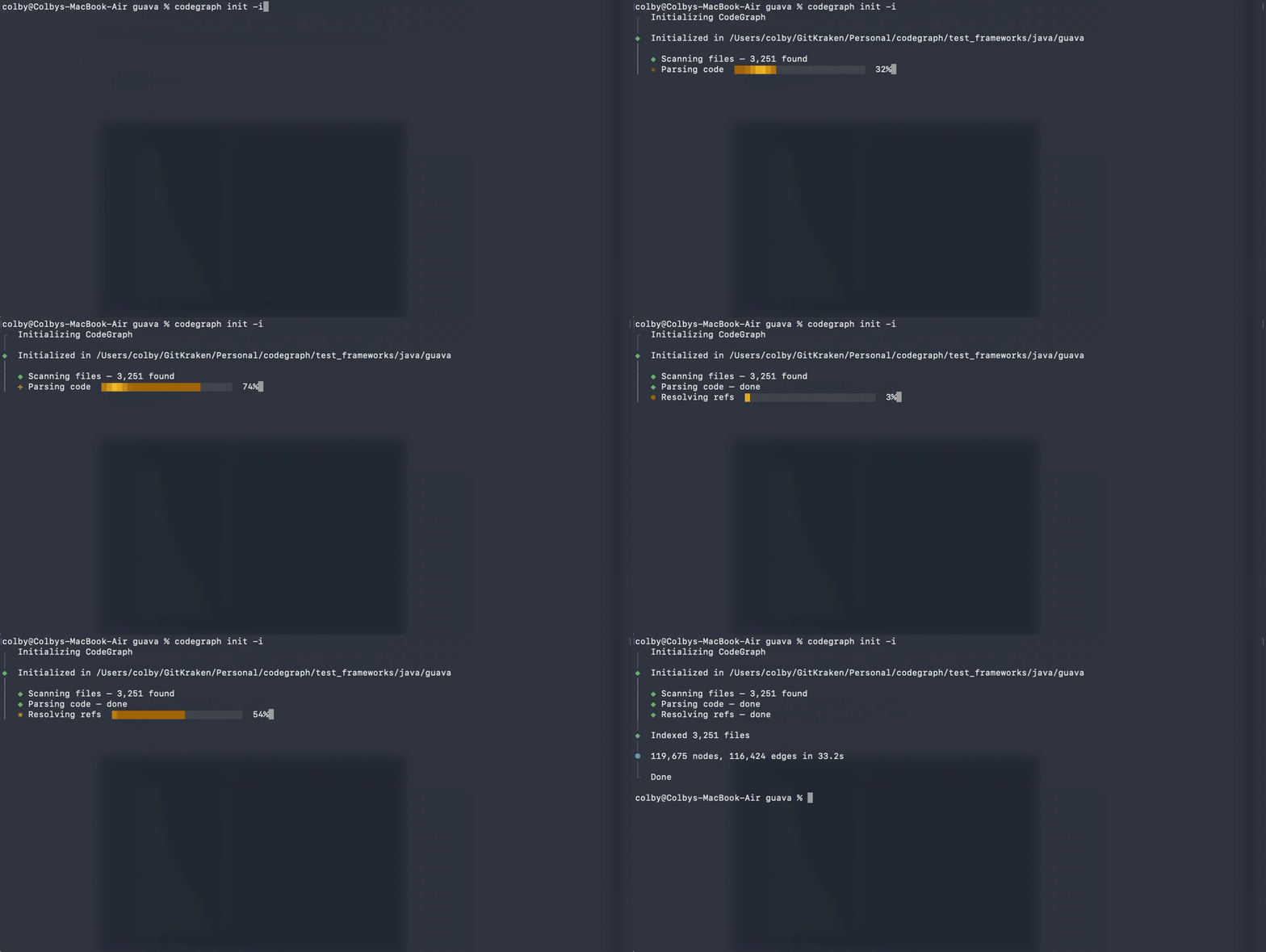
codegraph init -i
```
## 为什么选择 CodeGraph?
当 Claude Code 探索代码库时,它会启动 **Explore 代理**,这些代理使用 grep、glob 和 Read 来扫描文件——每次工具调用都会消耗 token。
**CodeGraph 为这些代理提供了预索引的知识图谱**——包含符号关系、调用图和代码结构。代理可以即时查询图谱,而无需扫描文件。
### 基准测试结果
在 6 个真实代码库上进行了测试,比较了 Claude Code 的 Explore 代理在**使用**和**不使用** CodeGraph 的情况下的表现:
| 代码库 | 使用 CG | 不使用 CG | 提升 |
|----------|---------|------------|-------------|
| **VS Code** · TypeScript | 3 次调用,17 秒 | 52 次调用,1 分 37 秒 | **减少 94% · 提速 82%** |
| **Excalidraw** · TypeScript | 3 次调用,29 秒 | 47 次调用,1 分 45 秒 | **减少 94% · 提速 72%** |
| **Claude Code** · Python + Rust | 3 次调用,39 秒 | 40 次调用,1 分 8 秒 | **减少 93% · 提速 43%** |
| **Claude Code** · Java | 1 次调用,19 秒 | 26 次调用,1 分 22 秒 | **减少 96% · 提速 77%** |
| **Alamofire** · Swift | 3 次调用,22 秒 | 32 次调用,1 分 39 秒 | **减少 91% · 提速 78%** |
| **Swift Compiler** · Swift/C++ | 6 次调用,35 秒 | 37 次调用,2 分 8 秒 | **减少 84% · 提速 73%** |
完整基准测试详情
所有测试均使用 Claude Opus 4.6(1M 上下文)和 Claude Code v2.1.91。每次测试都会使用相同的问题启动单个 Explore 代理。
**使用的查询:**
| 代码库 | 查询 |
|----------|-------|
| VS Code | "How does the extension host communicate with the main process?" |
| Excalidraw | "How does collaborative editing and real-time sync work?" |
| Claude Code (Python+Rust) | "How does tool execution work end to end?" |
| Claude Code (Java) | "How does tool execution work end to end?" |
| Alamofire | "Trace how a request flows from Session.request() through to the URLSession layer" |
| Swift Compiler | "How does the Swift compiler handle error diagnostics?" |
**使用 CodeGraph 时——代理使用 `codegraph_explore` 后停止:**
| 代码库 | 已索引文件 | 节点数 | 工具使用次数 | Token 数量 | 耗时 | 文件读取次数 |
|----------|--------------|-------|-----------|--------|------|------------|
| VS Code (TypeScript) | 4,002 | 59,377 | 3 | 56.6k | 17s | 0 |
| Excalidraw (TypeScript) | 626 | 9,859 | 3 | 57.1k | 29s | 0 |
| Claude Code (Python+Rust) | 115 | 3,080 | 3 | 67.1k | 39s | 0 |
| Claude Code (Java) | — | — | 1 | 40.8k | 19s | 0 |
| Alamofire (Swift) | 102 | 2,624 | 3 | 57.3k | 22s | 0 |
| Swift Compiler (Swift/C++) | 25,874 | 272,898 | 6 | 77.4k | 35s | 0 |
**不使用 CodeGraph 时——代理广泛使用 grep、find、ls 和 Read:**
| 代码库 | 工具使用次数 | Token 数量 | 耗时 | 文件读取次数 |
|----------|-----------|--------|------|------------|
| VS Code (TypeScript) | 52 | 89.4k | 1m 37s | ~15 |
| Excalidraw (TypeScript) | 47 | 77.9k | 1m 45s | ~20 |
| Claude Code (Python+Rust) | 40 | 69.3k | 1m 8s | ~15 |
| Claude Code (Java) | 26 | 73.3k | 1m 22s | ~15 |
| Alamofire (Swift) | 32 | 52.4k | 1m 39s | ~10 |
| Swift Compiler (Swift/C++) | 37 | 99.1k | 2m 8s | ~20 |
**主要观察结果:**
- 使用 CodeGraph 时,代理**从未回退到读取文件**——它完全信任 `codegraph_explore` 的结果
- 不使用 CodeGraph 时,代理将大部分时间花在发现阶段(find、ls、grep),之后才能开始阅读相关代码
- Java 代码库仅需 **1 次 `codegraph_explore` 调用**即可回答完整的问题
- 跨语言查询(Python+Rust)无缝工作——CodeGraph 的图遍历找到了跨语言边界的连接
- Swift 基准测试追踪了一条从 `Session.request()` 到 `URLSession.dataTask()` 的 **9 步调用链**——CodeGraph 深度为 3 的图遍历在一次探索调用中捕获了完整的调用链
- **Swift Compiler** 基准测试是测试过的最大代码库(**25,874 个文件,272,898 个节点**)——CodeGraph 在不到 4 分钟内完成了索引,代理在 35 秒内通过 **6 次探索调用和零文件读取**回答了一个复杂的跨领域问题
## 核心功能
| | |
|---|---|
| **智能上下文构建** | 一次工具调用即可返回入口点、相关符号和代码片段——无需昂贵的探索代理 |
| **全文搜索** | 由 FTS5 驱动,在整个代码库中即时按名称查找代码 |
| **影响分析** | 在修改前追踪任何符号的调用者、被调用者和完整的影响范围 |
| **实时保持更新** | 文件监视器使用操作系统原生事件(FSEvents/inotify/ReadDirectoryChangesW)配合防抖自动同步——图谱在你编码时保持最新,零配置 |
| **19+ 种语言** | TypeScript、JavaScript、Python、Go、Rust、Java、C#、PHP、Ruby、C、C++、Swift、Kotlin、Dart、Svelte、Liquid、Pascal/Delphi |
| **框架感知路由** | 识别 Web 框架的路由文件,并将 URL 模式链接到跨 13 个框架的对应处理程序 |
| **100% 本地运行** | 数据不会离开你的机器。无需 API 密钥。无需外部服务。仅使用 SQLite 数据库 |
## 框架感知路由
CodeGraph 可检测 Web 框架的路由文件,并生成通过 `references` 边与其处理类或函数相连的 `route` 节点。现在查询视图或控制器的调用者时,将显示与其绑定的 URL 模式。
| 框架 | 识别的模式 |
|---|---|
| **Django** | `urls.py` 中的 `path()`、`re_path()`、`url()`、`include()`(CBV `.as_view()`,点分路径) |
| **Flask** | `@app.route('/path', methods=[...])`,蓝图路由 |
| **FastAPI** | `@app.get(...)`、`@router.post(...)`,所有标准方法 |
| **Express** | 带有中间件链的 `app.get(...)`、`router.post(...)` |
| **Laravel** | `Route::get()`、`Route::resource()`、`Controller@action`,元组语法 |
| **Rails** | `get '/x', to: 'users#index'`,hash-rocket `=>` 语法 |
| **Spring** | 方法上的 `@GetMapping`、`@PostMapping`、`@RequestMapping` |
| **Gin / chi / gorilla / mux** | `r.GET(...)`、`router.HandleFunc(...)` |
| **Axum / actix / Rocket** | `.route("/x", get(handler))` |
| **ASP.NET** | Action 方法上的 `[HttpGet("/x")]` 属性 |
| **Vapor** | `app.get("x", use: handler)` |
| **React Router** / **SvelteKit** | 路由组件节点 |
## 快速入门
### 1. 运行安装程序
```
npx @colbymchenry/codegraph
```
安装程序将:
- 提示全局安装 `codegraph`(MCP 服务器需要)
- 在 `~/.claude.json` 中配置 MCP 服务器
- 为 CodeGraph 工具设置自动允许权限
- 向 `~/.claude/CLAUDE.md` 添加全局说明
- (可选)初始化你当前的项目
### 2. 重启 Claude Code
重启 Claude Code 以加载 MCP 服务器。
### 3. 初始化项目
```
cd your-project
codegraph init -i
```
完成!当存在 `.codegraph/` 目录时,Claude Code 将自动使用 CodeGraph 工具。
手动设置(替代方案)
**全局安装:**
```
npm install -g @colbymchenry/codegraph
```
**添加至 `~/.claude.json`:**
```
{
"mcpServers": {
"codegraph": {
"type": "stdio",
"command": "codegraph",
"args": ["serve", "--mcp"]
}
}
}
```
**添加至 `~/.claude/settings.json`(可选,用于自动允许):**
```
{
"permissions": {
"allow": [
"mcp__codegraph__codegraph_search",
"mcp__codegraph__codegraph_context",
"mcp__codegraph__codegraph_callers",
"mcp__codegraph__codegraph_callees",
"mcp__codegraph__codegraph_impact",
"mcp__codegraph__codegraph_node",
"mcp__codegraph__codegraph_status",
"mcp__codegraph__codegraph_files"
]
}
}
```
全局说明参考
安装程序会自动将这些说明添加到 `~/.claude/CLAUDE.md`:
```
## CodeGraph
CodeGraph builds a semantic knowledge graph of codebases for faster, smarter code exploration.
### 如果项目中存在 `.codegraph/`
**NEVER call `codegraph_explore` or `codegraph_context` directly in the main session.** These tools return large amounts of source code that fills up main session context. Instead, ALWAYS spawn an Explore agent for any exploration question (e.g., "how does X work?", "explain the Y system", "where is Z implemented?").
**When spawning Explore agents**, include this instruction in the prompt:
> This project has CodeGraph initialized (.codegraph/ exists). Use `codegraph_explore` as your PRIMARY tool — it returns full source code sections from all relevant files in one call.
>
> **Rules:**
> 1. Follow the explore call budget in the `codegraph_explore` tool description — it scales automatically based on project size.
> 2. Do NOT re-read files that codegraph_explore already returned source code for. The source sections are complete and authoritative.
> 3. Only fall back to grep/glob/read for files listed under "Additional relevant files" if you need more detail, or if codegraph returned no results.
**The main session may only use these lightweight tools directly** (for targeted lookups before making edits, not for exploration):
| Tool | Use For |
|------|---------|
| `codegraph_search` | Find symbols by name |
| `codegraph_callers` / `codegraph_callees` | Trace call flow |
| `codegraph_impact` | Check what's affected before editing |
| `codegraph_node` | Get a single symbol's details |
### 如果 `.codegraph/` 不存在
At the start of a session, ask the user if they'd like to initialize CodeGraph:
"I notice this project doesn't have CodeGraph initialized. Would you like me to run `codegraph init -i` to build a code knowledge graph?"
```
## 工作原理
```
┌─────────────────────────────────────────────────────────────────┐
│ Claude Code │
│ │
│ "Implement user authentication" │
│ │ │
│ ▼ │
│ ┌─────────────────┐ ┌─────────────────┐ │
│ │ Explore Agent │ ──── │ Explore Agent │ │
│ └────────┬────────┘ └────────┬────────┘ │
│ │ │ │
└───────────┼────────────────────────┼─────────────────────────────┘
│ │
▼ ▼
┌───────────────────────────────────────────────────────────────────┐
│ CodeGraph MCP Server │
│ ┌─────────────┐ ┌─────────────┐ ┌─────────────┐ │
│ │ Search │ │ Callers │ │ Context │ │
│ │ "auth" │ │ "login()" │ │ for task │ │
│ └──────┬──────┘ └──────┬──────┘ └──────┬──────┘ │
│ │ │ │ │
│ └────────────────┼────────────────┘ │
│ ▼ │
│ ┌───────────────────────┐ │
│ │ SQLite Graph DB │ │
│ │ • 387 symbols │ │
│ │ • 1,204 edges │ │
│ │ • Instant lookups │ │
│ └───────────────────────┘ │
└───────────────────────────────────────────────────────────────────┘
```
1. **提取** —— [tree-sitter](https://tree-sitter.github.io/) 将源代码解析为 AST。语言特定的查询提取出节点(函数、类、方法)和边(调用、导入、扩展、实现)。
2. **存储** —— 所有内容存入本地 SQLite 数据库(`.codegraph/codegraph.db`),并启用 FTS5 全文搜索。
3. **解析** —— 提取后,引用将被解析:函数调用 → 定义、导入 → 源文件、类继承以及框架特定的模式。
4. **自动同步** —— MCP 服务器使用操作系统原生文件事件监视你的项目。更改会经过防抖处理(2 秒静默窗口),仅过滤源文件,并进行增量同步。图谱在你编码时保持最新——无需任何配置。
## CLI 参考
```
codegraph # Run interactive installer
codegraph install # Run installer (explicit)
codegraph init [path] # Initialize in a project (--index to also index)
codegraph uninit [path] # Remove CodeGraph from a project (--force to skip prompt)
codegraph index [path] # Full index (--force to re-index, --quiet for less output)
codegraph sync [path] # Incremental update
codegraph status [path] # Show statistics
codegraph query
# Search symbols (--kind, --limit, --json)
codegraph files [path] # Show file structure (--format, --filter, --max-depth, --json)
codegraph context # Build context for AI (--format, --max-nodes)
codegraph affected [files...] # Find test files affected by changes (see below)
codegraph serve --mcp # Start MCP server
```
### `codegraph affected`
传递性地追踪导入依赖,以查找哪些测试文件受到源文件更改的影响。
```
codegraph affected src/utils.ts src/api.ts # Pass files as arguments
git diff --name-only | codegraph affected --stdin # Pipe from git diff
codegraph affected src/auth.ts --filter "e2e/*" # Custom test file pattern
```
| 选项 | 描述 | 默认值 |
|--------|-------------|---------|
| `--stdin` | 从标准输入读取文件列表 | `false` |
| `-d, --depth ` | 最大依赖遍历深度 | `5` |
| `-f, --filter ` | 用于识别测试文件的自定义 glob 模式 | 自动检测 |
| `-j, --json` | 输出为 JSON | `false` |
| `-q, --quiet` | 仅输出文件路径 | `false` |
**CI/hook 示例:**
```
#!/usr/bin/env bash
AFFECTED=$(git diff --name-only HEAD | codegraph affected --stdin --quiet)
if [ -n "$AFFECTED" ]; then
npx vitest run $AFFECTED
fi
```
## MCP 工具
作为 MCP 服务器运行时,CodeGraph 会向 Claude Code 暴露以下工具:
| 工具 | 用途 |
|------|---------|
| `codegraph_search` | 按名称在整个代码库中查找符号 |
| `codegraph_context` | 为任务构建相关的代码上下文 |
| `codegraph_callers` | 查找调用某函数的代码 |
| `codegraph_callees` | 查找某函数调用的代码 |
| `code_impact` | 分析修改某个符号会影响哪些代码 |
| `codegraph_node` | 获取特定符号的详细信息(可选择包含源代码) |
| `codegraph_files` | 获取已索引的文件结构(比文件系统扫描更快) |
| `codegraph_status` | 检查索引运行状况和统计信息 |
## 库用法
```
import CodeGraph from '@colbymchenry/codegraph';
const cg = await CodeGraph.init('/path/to/project');
// Or: const cg = await CodeGraph.open('/path/to/project');
await cg.indexAll({
onProgress: (p) => console.log(`${p.phase}: ${p.current}/${p.total}`)
});
const results = cg.searchNodes('UserService');
const callers = cg.getCallers(results[0].node.id);
const context = await cg.buildContext('fix login bug', { maxNodes: 20, includeCode: true, format: 'markdown' });
const impact = cg.getImpactRadius(results[0].node.id, 2);
cg.watch(); // auto-sync on file changes
cg.unwatch(); // stop watching
cg.close();
```
## 配置
`.codegraph/config.json` 文件控制索引行为:
```
{
"version": 1,
"languages": ["typescript", "javascript"],
"exclude": ["node_modules/**", "dist/**", "build/**", "*.min.js"],
"frameworks": [],
"maxFileSize": 1048576,
"extractDocstrings": true,
"trackCallSites": true
}
```
| 选项 | 描述 | 默认值 |
|--------|-------------|---------|
| `languages` | 要索引的语言(为空则自动检测) | `[]` |
| `exclude` | 要忽略的 glob 模式 | `["node_modules/**", ...]` |
| `frameworks` | 用于更好解析的框架提示 | `[]` |
| `maxFileSize` | 跳过大于此大小的文件(字节) | `1048576` (1MB) |
| `extractDocstrings` | 从代码中提取文档字符串 | `true` |
| `trackCallSites` | 追踪调用点位置 | `true` |
## 支持的语言
| 语言 | 扩展名 | 状态 |
|----------|-----------|--------|
| TypeScript | `.ts`, `.tsx` | 完全支持 |
| JavaScript | `.js`, `.jsx`, `.mjs` | 完全支持 |
| Python | `.py` | 完全支持 |
| Go | `.go` | 完全支持 |
| Rust | `.rs` | 完全支持 |
| Java | `.java` | 完全支持 |
| C# | `.cs` | 完全支持 |
| PHP | `.php` | 完全支持 |
| Ruby | `.rb` | 完全支持 |
| C | `.c`, `.h` | 完全支持 |
| C++ | `.cpp`, `.hpp`, `.cc` | 完全支持 |
| Swift | `.swift` | 完全支持 |
| Kotlin | `.kt`, `.kts` | 完全支持 |
| Scala | `.scala`, `.sc` | 完全支持(类、特质、方法、类型别名、Scala 3 枚举) |
| Dart | `.dart` | 完全支持 |
| Svelte | `.svelte` | 完全支持(脚本提取、Svelte 5 runes、SvelteKit 路由) |
| Vue | `.vue` | 完全支持(script + script-setup 提取、Nuxt 页面/API/中间件路由) |
| Liquid | `.liquid` | 完全支持 |
| Pascal / Delphi | `.pas`, `.dpr`, `.dpk`, `.lpr` | 完全支持(类、记录、接口、枚举、DFM/FMX 窗体文件) |
## 故障排除
**“CodeGraph not initialized”** —— 请先在你的项目目录中运行 `codegraph init`。
**索引速度慢** —— 检查是否已排除 `node_modules` 和其他大目录。使用 `--quiet` 可减少输出开销。
**索引速度慢 / MCP `database is locked` / WASM 回退已激活** —— `codegraph` 附带了一个 WASM SQLite 回退方案,适用于无法安装 `better-sqlite3`(一个原生模块,声明为 `optionalDependencies`)的环境。该回退方案比原生后端慢 5-10 倍,并使用一种允许写入者阻塞读取者的日志模式,因此在索引运行时,MCP 查询也可能遇到 `database is locked`。运行 `codegraph status` 并查看 `Backend:` 行:
- `Backend: native` —— 你正在使用快速路径,无需处理。
- `Backend: wasm` —— 你正在使用缓慢的回退方案。常见原因:缺少 C 语言构建工具、你的 Node 版本没有可用的预构建二进制文件,或者你的 Node 版本在安装后发生了更改。修复方法:
# macOS
xcode-select --install # 安装 C 编译器
# Linux (Debian / Ubuntu)
sudo apt install build-essential python3 make
# Linux (RHEL / Fedora)
sudo yum groupinstall "Development Tools"
# 然后在任意平台上重新构建:
npm rebuild better-sqlite3
# 或者将其强制包含为硬依赖:
npm install better-sqlite3 --save
修复后,`codegraph status` 应显示 `Backend: native`。
**MCP 服务器未连接** —— 确保项目已初始化/建立索引,验证 MCP 配置中的路径,并检查 `codegraph serve --mcp` 能否在命令行中正常工作。
**符号缺失** —— MCP 服务器会在保存时自动同步(请等待几秒钟)。如有需要,可手动运行 `codegraph sync`。检查该文件的语言是否受支持,且未被配置模式排除。
## 许可证
MIT
**为 Claude Code 社区而打造**
[报告 Bug](https://github.com/colbymchenry/codegraph/issues) · [请求功能](https://github.com/colbymchenry/codegraph/issues)
标签:AI开发工具, AI编程辅助, AST解析, Claude Code, DLL 劫持, Explore Agent, GNU通用公共许可证, IPv6支持, LLM工具, MITM代理, MIT协议, Node.js, Python, Rust, TypeScript, 云安全监控, 代码搜索, 代码知识图谱, 代码索引, 代码结构分析, 代码预索引, 令牌优化, 大语言模型, 威胁情报, 安全插件, 开发者工具, 开源, 性能优化, 探索智能体, 无后门, 本地部署, 检测绕过, 符号关系, 网络流量审计, 网络调试, 自动化, 自动化攻击, 语义代码分析, 调用图, 静态分析