nwclasantha/AI-Cerberus
GitHub: nwclasantha/AI-Cerberus
一款融合机器学习、YARA签名与行为分析三种检测引擎的企业级恶意软件分析平台,提供跨格式二进制静态分析能力。
Stars: 2 | Forks: 0
# AI-Cerberus
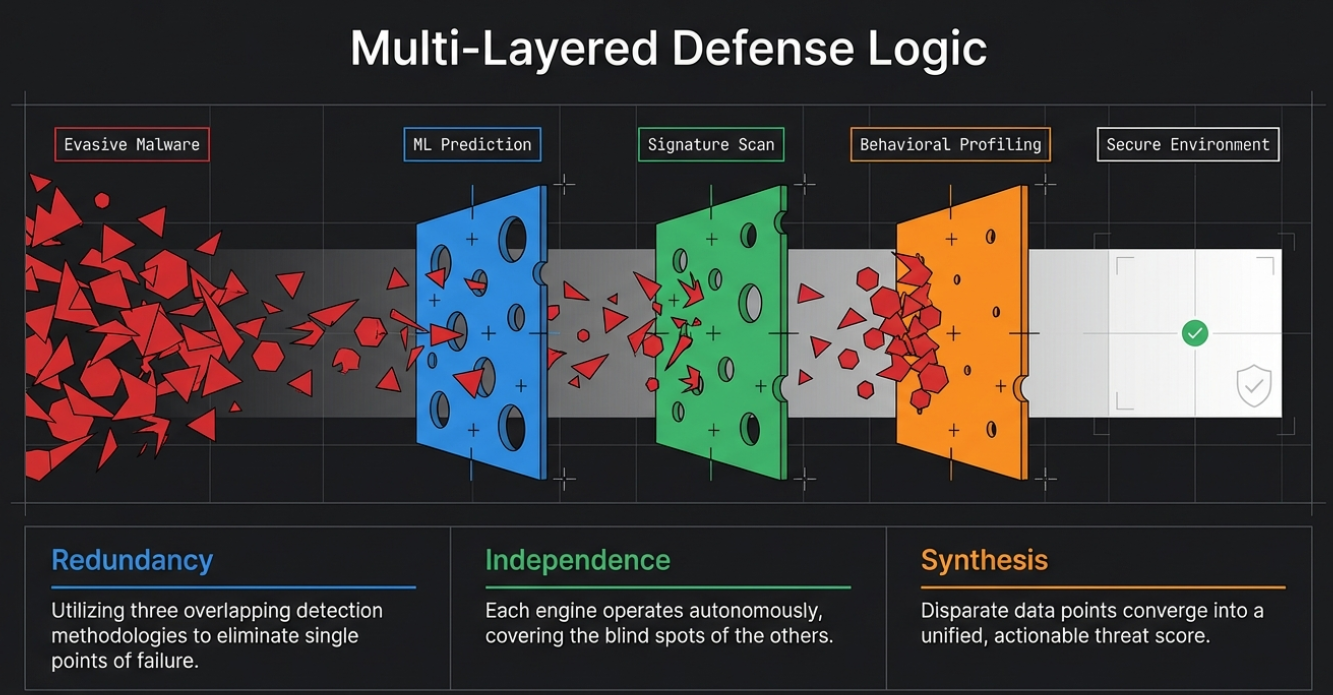 ## 抵御恶意代码的三头守护者



**AI-Cerberus** 是一个企业级恶意软件分析平台,具有由人工智能驱动的多层威胁检测功能。就像神话中的三头守护犬一样,它采用三个独立的检测引擎,确保没有威胁能够逃脱。
https://github.com/user-attachments/assets/48a7e30a-3b78-45b9-988e-a470c414cabe
```
╔═══════════════════════════════════════════════════════════════╗
║ ║
║ ██████╗███████╗██████╗ ██████╗ ███████╗██████╗ ██╗ ██╗ ║
║ ██╔════╝██╔════╝██╔══██╗██╔══██╗██╔════╝██╔══██╗██║ ██║ ║
║ ██║ █████╗ ██████╔╝██████╔╝█████╗ ██████╔╝██║ ██║ ║
║ ██║ ██╔══╝ ██╔══██╗██╔══██╗██╔══╝ ██╔══██╗██║ ██║ ║
║ ╚██████╗███████╗██║ ██║██████╔╝███████╗██║ ██║╚██████╔╝ ║
║ ╚═════╝╚══════╝╚═╝ ╚═╝╚═════╝ ╚══════╝╚═╝ ╚═╝ ╚═════╝ ║
║ ║
║ AI-Powered Malware Analysis Platform ║
║ ║
╚═══════════════════════════════════════════════════════════════╝
```
## 目录
1. [功能特性](#features)
2. [架构概览](#architecture-overview)
3. [系统架构](#system-architecture)
4. [组件详情](#component-details)
5. [安装说明](#installation)
6. [快速入门](#quick-start)
7. [使用指南](#usage-guide)
8. [配置说明](#configuration)
9. [API 参考](#api-reference)
10. [开发指南](#development)
11. [故障排除](#troubleshooting)
12. [贡献指南](#contributing)
13. [许可证](#license)
## 功能特性
### 三个检测头
| 检测头 | 引擎 | 颜色 | 描述 |
|------|--------|-------|-------------|
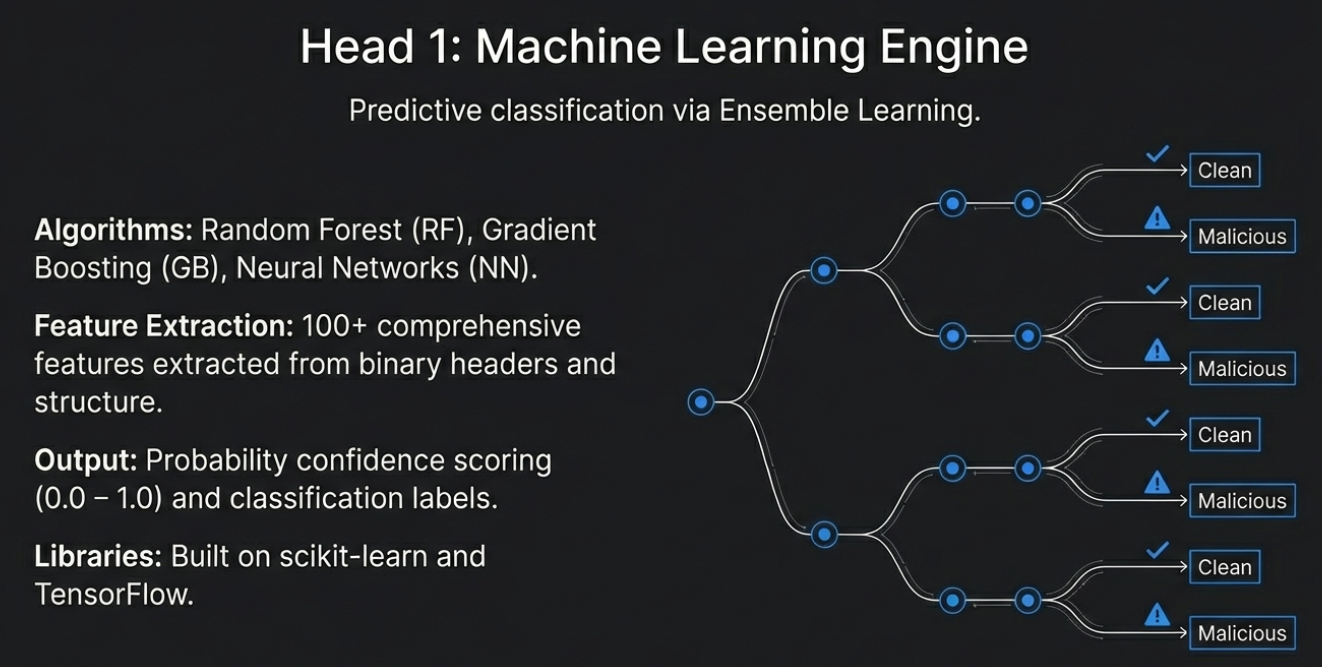
| **ML** | Machine Learning | Blue | 神经网络与集成分类器 (RF, GB, NN) |
## 抵御恶意代码的三头守护者



**AI-Cerberus** 是一个企业级恶意软件分析平台,具有由人工智能驱动的多层威胁检测功能。就像神话中的三头守护犬一样,它采用三个独立的检测引擎,确保没有威胁能够逃脱。
https://github.com/user-attachments/assets/48a7e30a-3b78-45b9-988e-a470c414cabe
```
╔═══════════════════════════════════════════════════════════════╗
║ ║
║ ██████╗███████╗██████╗ ██████╗ ███████╗██████╗ ██╗ ██╗ ║
║ ██╔════╝██╔════╝██╔══██╗██╔══██╗██╔════╝██╔══██╗██║ ██║ ║
║ ██║ █████╗ ██████╔╝██████╔╝█████╗ ██████╔╝██║ ██║ ║
║ ██║ ██╔══╝ ██╔══██╗██╔══██╗██╔══╝ ██╔══██╗██║ ██║ ║
║ ╚██████╗███████╗██║ ██║██████╔╝███████╗██║ ██║╚██████╔╝ ║
║ ╚═════╝╚══════╝╚═╝ ╚═╝╚═════╝ ╚══════╝╚═╝ ╚═╝ ╚═════╝ ║
║ ║
║ AI-Powered Malware Analysis Platform ║
║ ║
╚═══════════════════════════════════════════════════════════════╝
```
## 目录
1. [功能特性](#features)
2. [架构概览](#architecture-overview)
3. [系统架构](#system-architecture)
4. [组件详情](#component-details)
5. [安装说明](#installation)
6. [快速入门](#quick-start)
7. [使用指南](#usage-guide)
8. [配置说明](#configuration)
9. [API 参考](#api-reference)
10. [开发指南](#development)
11. [故障排除](#troubleshooting)
12. [贡献指南](#contributing)
13. [许可证](#license)
## 功能特性
### 三个检测头
| 检测头 | 引擎 | 颜色 | 描述 |
|------|--------|-------|-------------|
| **ML** | Machine Learning | Blue | 神经网络与集成分类器 (RF, GB, NN) |
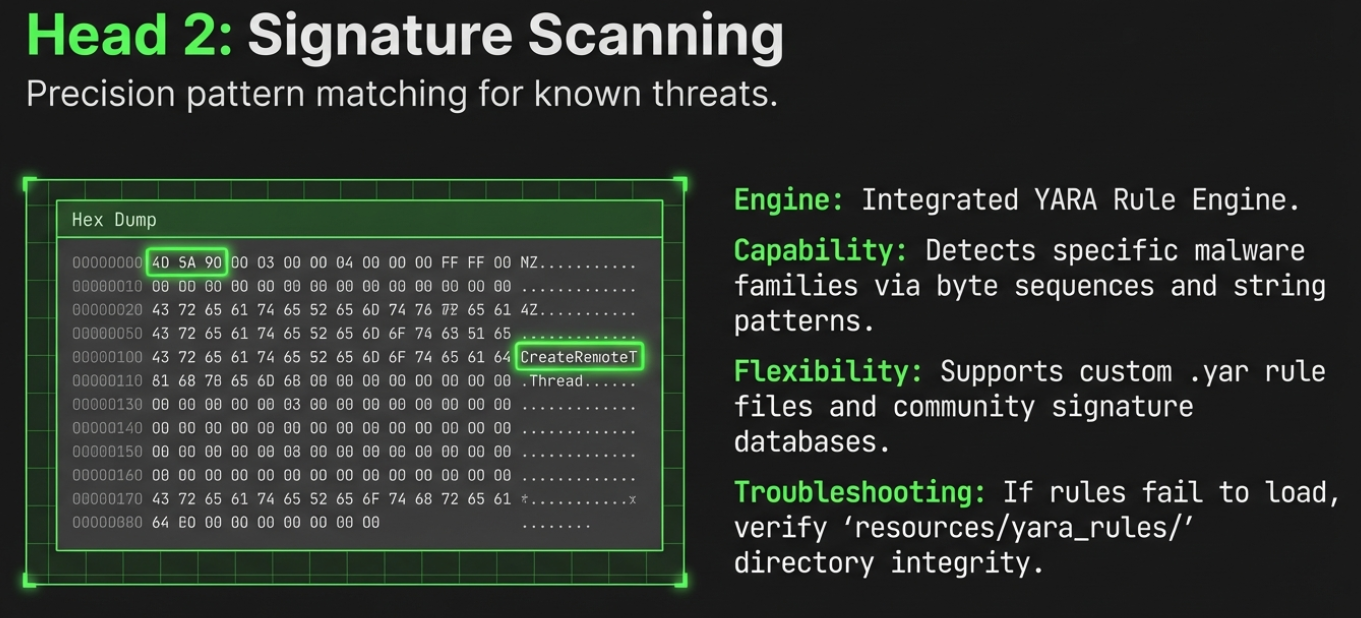
 | **YARA** | Signature Scanning | Green | 基于模式的恶意软件家族检测 |
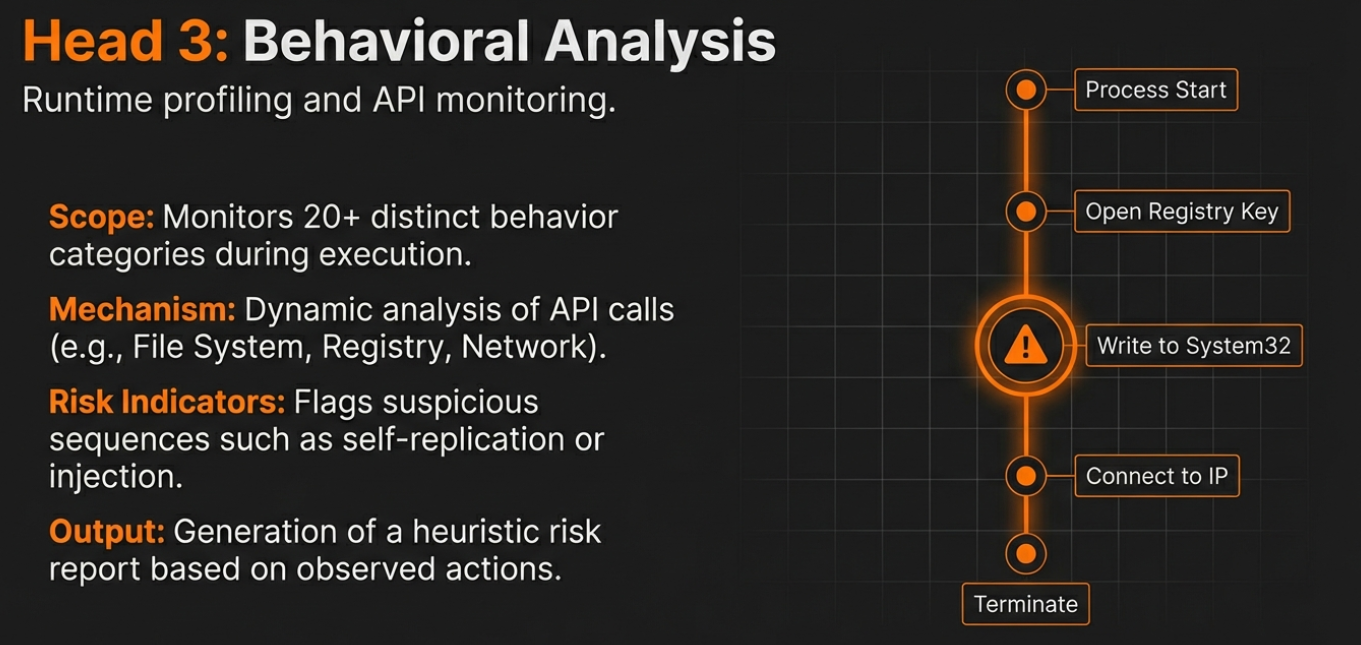
 | **BEH** | Behavioral Analysis | Orange | Runtime 行为分析与 API 分析 |
 ### 核心能力
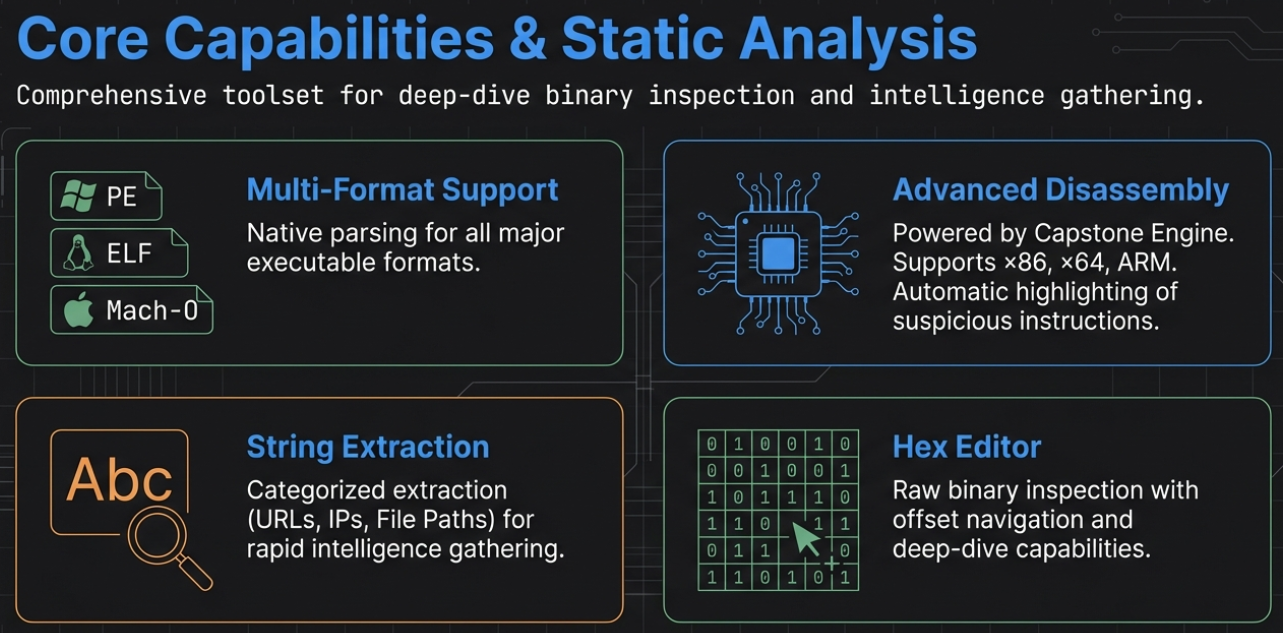 - **多格式二进制分析** - 支持 PE, ELF, Mach-O
- **高级反汇编** - x86, x64, ARM 架构,带可疑代码高亮
- **100+ ML 特征** - 用于分类的全面特征提取
- **YARA 规则引擎** - 自定义规则 + 恶意软件家族签名
- **行为分析** - 检测 20+ 种行为类别
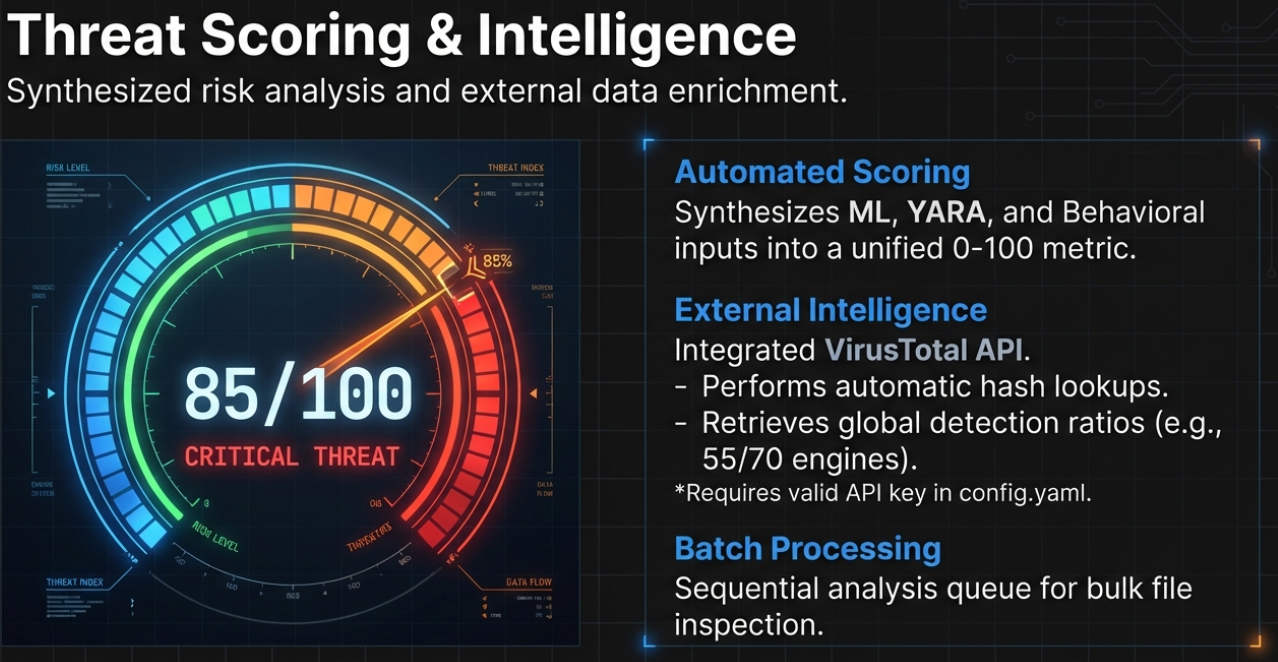
- **VirusTotal 集成** - 自动哈希查找与检测率统计
- **自动化威胁评分** - 0-100 分制,含详细细分
- **批量处理** - 顺序分析多个文件
- **插件架构** - 使用自定义分析器扩展功能
- **深色主题 UI** - 专业的 PyQt6 界面
### 检测类别
- **多格式二进制分析** - 支持 PE, ELF, Mach-O
- **高级反汇编** - x86, x64, ARM 架构,带可疑代码高亮
- **100+ ML 特征** - 用于分类的全面特征提取
- **YARA 规则引擎** - 自定义规则 + 恶意软件家族签名
- **行为分析** - 检测 20+ 种行为类别
- **VirusTotal 集成** - 自动哈希查找与检测率统计
- **自动化威胁评分** - 0-100 分制,含详细细分
- **批量处理** - 顺序分析多个文件
- **插件架构** - 使用自定义分析器扩展功能
- **深色主题 UI** - 专业的 PyQt6 界面
### 检测类别
 ```
┌─────────────────────────────────────────────────────────────────────┐
│ BEHAVIORAL DETECTION CAPABILITIES │
├─────────────────────────────────────────────────────────────────────┤
│ ✓ Process Injection ✓ Persistence Mechanisms │
│ ✓ Anti-Debugging ✓ Anti-VM Detection │
│ ✓ Network Operations ✓ Cryptographic Activity │
│ ✓ Keylogging ✓ Screen Capture │
│ ✓ Privilege Escalation ✓ Registry Manipulation │
│ ✓ File Operations ✓ Service Installation │
│ ✓ Backdoor Detection ✓ C2 Communication │
│ ✓ Code Injection ✓ DLL Hijacking │
│ ✓ Rootkit Indicators ✓ Data Exfiltration │
└─────────────────────────────────────────────────────────────────────┘
```
## 架构概览
### 高层架构
```
╔══════════════════════════════════════════════════════════════════════════════╗
║ AI-CERBERUS ARCHITECTURE ║
╠══════════════════════════════════════════════════════════════════════════════╣
║ ║
║ ┌─────────────────────────────────────────────────────────────────────────┐ ║
║ │ PRESENTATION LAYER │ ║
║ │ ┌──────────────┐ ┌──────────────┐ ┌──────────────┐ ┌──────────────┐ │ ║
║ │ │ PyQt6 │ │ Views │ │ Components │ │ Theme │ │ ║
║ │ │ App │ │ (11 views) │ │ (Sidebar, │ │ (Dark) │ │ ║
║ │ │ │ │ │ │ Toolbar) │ │ │ │ ║
║ │ └──────────────┘ └──────────────┘ └──────────────┘ └──────────────┘ │ ║
║ └─────────────────────────────────────────────────────────────────────────┘ ║
║ │ ║
║ ▼ ║
║ ┌─────────────────────────────────────────────────────────────────────────┐ ║
║ │ CONTROLLER LAYER │ ║
║ │ ┌─────────────────────────────────────────────────────────────────┐ │ ║
║ │ │ MainWindow │ │ ║
║ │ │ • Analysis orchestration • Threat scoring │ │ ║
║ │ │ • Background threading • Signal/slot coordination │ │ ║
║ │ │ • Batch processing • Drag-and-drop handling │ │ ║
║ │ └─────────────────────────────────────────────────────────────────┘ │ ║
║ └─────────────────────────────────────────────────────────────────────────┘ ║
║ │ ║
║ ▼ ║
║ ┌─────────────────────────────────────────────────────────────────────────┐ ║
║ │ THREE-HEADED DETECTION ENGINE │ ║
║ │ │ ║
║ │ ┌────────────────┐ ┌────────────────┐ ┌────────────────┐ │ ║
║ │ │ HEAD 1 │ │ HEAD 2 │ │ HEAD 3 │ │ ║
║ │ │ ML DETECTION │ │ YARA SCANNING │ │ BEHAVIORAL │ │ ║
║ │ │ │ │ │ │ │ │ ║
║ │ │ • RandomForest │ │ • Signatures │ │ • API Analysis │ │ ║
║ │ │ • GradBoost │ │ • Packers │ │ • Indicators │ │ ║
║ │ │ • Neural Net │ │ • Families │ │ • Risk Score │ │ ║
║ │ │ • 100+ features│ │ • Custom rules │ │ • 20+ patterns │ │ ║
║ │ │ │ │ │ │ │ │ ║
║ │ │ [BLUE] │ │ [GREEN] │ │ [ORANGE] │ │ ║
║ │ └────────────────┘ └────────────────┘ └────────────────┘ │ ║
║ │ │ ║
║ └─────────────────────────────────────────────────────────────────────────┘ ║
║ │ ║
║ ▼ ║
║ ┌─────────────────────────────────────────────────────────────────────────┐ ║
║ │ CORE ANALYSIS LAYER │ ║
║ │ │ ║
║ │ ┌──────────┐ ┌──────────┐ ┌──────────┐ ┌──────────┐ ┌──────────┐ │ ║
║ │ │ Hash │ │ Entropy │ │ String │ │ PE │ │ Disasm │ │ ║
║ │ │ Calc │ │ Analyzer │ │ Extractor│ │ Analyzer │ │ Engine │ │ ║
║ │ └──────────┘ └──────────┘ └──────────┘ └──────────┘ └──────────┘ │ ║
║ │ │ ║
║ └─────────────────────────────────────────────────────────────────────────┘ ║
║ │ ║
║ ▼ ║
║ ┌─────────────────────────────────────────────────────────────────────────┐ ║
║ │ DATA LAYER │ ║
║ │ ┌──────────────────┐ ┌──────────────────┐ ┌──────────────────┐ │ ║
║ │ │ SQLAlchemy │ │ Config YAML │ │ File System │ │ ║
║ │ │ (SQLite) │ │ │ │ │ │ ║
║ │ └──────────────────┘ └──────────────────┘ └──────────────────┘ │ ║
║ └─────────────────────────────────────────────────────────────────────────┘ ║
║ │ ║
║ ▼ ║
║ ┌─────────────────────────────────────────────────────────────────────────┐ ║
║ │ INTEGRATION LAYER │ ║
║ │ ┌──────────────┐ ┌──────────────┐ ┌──────────────┐ ┌──────────────┐ │ ║
║ │ │ VirusTotal │ │ Hybrid │ │ Custom │ │ Plugins │ │ ║
║ │ │ API │ │ Analysis │ │ Sandbox │ │ SDK │ │ ║
║ │ └──────────────┘ └──────────────┘ └──────────────┘ └──────────────┘ │ ║
║ └─────────────────────────────────────────────────────────────────────────┘ ║
║ ║
╚══════════════════════════════════════════════════════════════════════════════╝
```
## 系统架构
### 目录结构
```
MalwareAnalyzer/
│
├── main.py # Application entry point
├── config.yaml # Global configuration
├── requirements.txt # Python dependencies
├── create_icon_simple.py # Icon generation script
│
├── resources/ # Application resources
│ ├── icons/ # UI icons
│ │ ├── cerberus.ico # Main application icon
│ │ └── cerberus_hq.svg # High-quality vector icon
│ ├── fonts/ # Custom fonts
│ └── yara_rules/ # YARA signature rules
│ ├── malware/ # Generic malware signatures
│ ├── packers/ # Packer detection rules
│ └── suspicious/ # Suspicious behavior patterns
│
├── src/ # Main source code
│ │
│ ├── core/ # Analysis engines (10 modules)
│ │ ├── __init__.py
│ │ ├── base_analyzer.py # Abstract base class
│ │ ├── hash_calculator.py # MD5/SHA/SSDEEP/TLSH hashing
│ │ ├── entropy_analyzer.py # Entropy & packing detection
│ │ ├── string_extractor.py # String extraction & categorization
│ │ ├── pe_analyzer.py # PE file parsing
│ │ ├── elf_analyzer.py # ELF file parsing
│ │ ├── yara_engine.py # YARA rule scanning
│ │ ├── behavior_analyzer.py # Behavioral analysis
│ │ ├── disassembler.py # Capstone disassembly
│ │ └── analysis_modes.py # Analysis mode presets
│ │
│ ├── ml/ # Machine Learning (4 modules)
│ │ ├── __init__.py
│ │ ├── feature_extractor.py # 100+ feature extraction
│ │ ├── classifier.py # Ensemble classifier (RF/GB/NN)
│ │ ├── neural_classifier.py # TensorFlow neural network
│ │ └── auto_trainer.py # Automatic model training
│ │
│ ├── ui/ # User Interface (PyQt6)
│ │ ├── __init__.py
│ │ ├── app.py # Application initialization
│ │ ├── main_window.py # Central UI controller
│ │ ├── theme/ # Theme system
│ │ │ ├── colors.py # Color palette
│ │ │ ├── dark_theme.py # Dark mode stylesheet
│ │ │ └── theme_manager.py # Theme switching
│ │ ├── components/ # Reusable UI components
│ │ │ ├── sidebar.py # Navigation sidebar
│ │ │ ├── toolbar.py # Main toolbar
│ │ │ ├── tab_manager.py # Tab management
│ │ │ ├── status_bar.py # Status information
│ │ │ ├── progress_overlay.py # Progress modal
│ │ │ ├── toast.py # Notifications
│ │ │ └── charts/ # Visualization charts
│ │ │ ├── threat_gauge.py # Threat score gauge
│ │ │ ├── entropy_chart.py # Entropy graph
│ │ │ └── pie_chart.py # Statistics pie chart
│ │ └── views/ # Main view panels (11 views)
│ │ ├── dashboard_view.py # Landing page
│ │ ├── analysis_view.py # Analysis results
│ │ ├── hex_view.py # Hex dump viewer
│ │ ├── disasm_view.py # Disassembly viewer
│ │ ├── strings_view.py # String listing
│ │ ├── yara_view.py # YARA rule manager
│ │ ├── ml_view.py # ML model management
│ │ ├── virustotal_view.py # VirusTotal integration
│ │ ├── sandbox_view.py # Sandbox integration
│ │ ├── history_view.py # Analysis history
│ │ └── plugin_view.py # Plugin manager
│ │
│ ├── database/ # Data persistence
│ │ ├── __init__.py
│ │ ├── models.py # SQLAlchemy ORM schema
│ │ └── repository.py # Data access layer
│ │
│ ├── integrations/ # Third-party services
│ │ ├── __init__.py
│ │ ├── virustotal.py # VirusTotal API v3
│ │ ├── hybrid_analysis.py # Hybrid Analysis sandbox
│ │ └── custom_sandbox.py # Custom sandbox (SSH)
│ │
│ ├── plugins/ # Plugin system
│ │ ├── __init__.py
│ │ ├── base_plugin.py # Plugin interface
│ │ └── plugin_manager.py # Plugin loader
│ │
│ └── utils/ # Utilities
│ ├── __init__.py
│ ├── config.py # Configuration management
│ ├── logger.py # Structured logging
│ ├── exceptions.py # Custom exceptions
│ └── helpers.py # Utility functions
│
├── tests/ # Test suite
│ ├── test_analyzers.py
│ ├── test_ml.py
│ └── test_ui.py
│
└── docs/ # Documentation
├── API.md
├── PLUGINS.md
└── CONTRIBUTING.md
```
## 组件详情
### 1. 核心分析引擎
#### 哈希计算器 (`hash_calculator.py`)
```
# 计算每个样本的哈希值:
┌────────────────────────────────────────────────┐
│ Hash Type │ Purpose │
├────────────────────────────────────────────────┤
│ MD5 │ Legacy identification │
│ SHA1 │ Legacy identification │
│ SHA256 │ Primary identification │
│ SHA512 │ Extended hash │
│ SSDEEP │ Fuzzy hashing (similarity) │
│ TLSH │ Locality-sensitive hash │
│ IMPHASH │ Import table hash (PE) │
└────────────────────────────────────────────────┘
```
#### PE 分析器 (`pe_analyzer.py`)
```
┌─────────────────────────────────────────────────────────────────────┐
│ PE FILE ANALYSIS │
├─────────────────────────────────────────────────────────────────────┤
│ │
│ ┌─────────────┐ ┌─────────────┐ ┌─────────────┐ │
│ │ DOS Header │───▶│ PE Header │───▶│ Optional │ │
│ │ │ │ │ │ Header │ │
│ └─────────────┘ └─────────────┘ └─────────────┘ │
│ │ │
│ ┌─────────────────────────────────────┘ │
│ ▼ │
│ ┌───────────────────────────────────────────────────────────┐ │
│ │ SECTIONS │ │
│ │ ┌──────┐ ┌──────┐ ┌──────┐ ┌──────┐ ┌──────┐ │ │
│ │ │.text │ │.data │ │.rdata│ │.rsrc │ │.reloc│ ... │ │
│ │ │ │ │ │ │ │ │ │ │ │ │ │
│ │ │ CODE │ │ DATA │ │CONST │ │ RES │ │RELOC │ │ │
│ │ └──────┘ └──────┘ └──────┘ └──────┘ └──────┘ │ │
│ └───────────────────────────────────────────────────────────┘ │
│ │
│ ┌─────────────────────┐ ┌─────────────────────┐ │
│ │ IMPORTS │ │ EXPORTS │ │
│ │ │ │ │ │
│ │ kernel32.dll │ │ DllMain │ │
│ │ - CreateFile │ │ ExportedFunc1 │ │
│ │ - WriteFile │ │ ExportedFunc2 │ │
│ │ ws2_32.dll │ │ │ │
│ │ - socket │ │ │ │
│ │ - connect │ │ │ │
│ └─────────────────────┘ └─────────────────────┘ │
│ │
│ ANOMALY DETECTION: │
│ ✓ Executable + Writable sections │
│ ✓ Unusual section names (.upx, .themida, .aspack) │
│ ✓ Zero raw size / non-zero virtual size │
│ ✓ Entry point outside code section │
│ ✓ High entropy sections (packed/encrypted) │
│ │
└─────────────────────────────────────────────────────────────────────┘
```
#### 行为分析器 (`behavior_analyzer.py`)
```
┌─────────────────────────────────────────────────────────────────────┐
│ BEHAVIORAL ANALYSIS ENGINE │
├─────────────────────────────────────────────────────────────────────┤
│ │
│ ┌───────────────────┐ ┌───────────────────┐ ┌───────────────┐ │
│ │ PROCESS INJECTION │ │ PERSISTENCE │ │ NETWORK │ │
│ │ │ │ │ │ │ │
│ │ WriteProcessMemory│ │ RegSetValue │ │ WSAStartup │ │
│ │ VirtualAllocEx │ │ CreateService │ │ socket │ │
│ │ CreateRemoteThread│ │ SchTaskCreate │ │ connect │ │
│ │ NtUnmapView │ │ Run/RunOnce keys │ │ send/recv │ │
│ └───────────────────┘ └───────────────────┘ └───────────────┘ │
│ │
│ ┌───────────────────┐ ┌───────────────────┐ ┌───────────────┐ │
│ │ ANTI-DEBUGGING │ │ ANTI-VM │ │ CRYPTOGRAPHY │ │
│ │ │ │ │ │ │ │
│ │ IsDebuggerPresent │ │ VMware detection │ │ CryptEncrypt │ │
│ │ CheckRemoteDebug │ │ VirtualBox detect │ │ CryptDecrypt │ │
│ │ NtQueryInfoProcess│ │ Sandbox evasion │ │ AES/RSA calls │ │
│ └───────────────────┘ └───────────────────┘ └───────────────┘ │
│ │
│ ┌───────────────────┐ ┌───────────────────┐ ┌───────────────┐ │
│ │ KEYLOGGING │ │ SCREEN CAPTURE │ │ BACKDOOR │ │
│ │ │ │ │ │ │ │
│ │ GetAsyncKeyState │ │ BitBlt │ │ cmd.exe spawn │ │
│ │ SetWindowsHookEx │ │ CreateCompatibleDC│ │ Shell reverse │ │
│ │ GetKeyboardState │ │ GetDC/GetDCEx │ │ Remote access │ │
│ └───────────────────┘ └───────────────────┘ └───────────────┘ │
│ │
│ RISK CALCULATION: │
│ • Each indicator weighted by severity │
│ • Combined score: 0-100 │
│ • Mapped to threat level: LOW/MEDIUM/HIGH/CRITICAL │
│ │
└─────────────────────────────────────────────────────────────────────┘
```
#### 反汇编器 (`disassembler.py`)
```
┌─────────────────────────────────────────────────────────────────────┐
│ DISASSEMBLY ENGINE (Capstone) │
├─────────────────────────────────────────────────────────────────────┤
│ │
│ SUPPORTED ARCHITECTURES: │
│ ┌──────────┐ ┌──────────┐ ┌──────────┐ ┌──────────┐ │
│ │ x86 │ │ x64 │ │ ARM │ │ ARM64 │ │
│ │ 32-bit │ │ 64-bit │ │ 32-bit │ │ 64-bit │ │
│ └──────────┘ └──────────┘ └──────────┘ └──────────┘ │
│ │
│ DISASSEMBLY OUTPUT: │
│ ┌────────────────────────────────────────────────────────────────┐ │
│ │ ADDRESS BYTES MNEMONIC OPERANDS │ │
│ │ ──────────────────────────────────────────────────────────────│ │
│ │ 0x00401000 55 push rbp │ │
│ │ 0x00401001 48 89 e5 mov rbp, rsp │ │
│ │ 0x00401004 48 83 ec 20 sub rsp, 0x20 │ │
│ │ 0x00401008 e8 00 10 00 00 call CreateProcessA [!] │ │
│ │ ^^^^^^^^^^^^^^^^ │ │
│ │ SUSPICIOUS - RED BG │ │
│ └────────────────────────────────────────────────────────────────┘ │
│ │
│ SUSPICIOUS PATTERNS DETECTED: │
│ • Dangerous API calls (CreateProcess, VirtualAlloc, etc.) │
│ • Self-modifying code │
│ • Direct syscalls (evasion) │
│ • XOR encoding/decoding loops │
│ • Anti-debugging instructions │
│ │
│ VISUAL HIGHLIGHTING: │
│ • CRITICAL - Red background │
│ • HIGH - Orange background │
│ • MEDIUM - Yellow background │
│ • LOW - Light yellow background │
│ │
└─────────────────────────────────────────────────────────────────────┘
```
### 2. 机器学习模块
```
┌─────────────────────────────────────────────────────────────────────┐
│ MACHINE LEARNING PIPELINE │
├─────────────────────────────────────────────────────────────────────┤
│ │
│ ┌─────────────────────────────────────────────────────────────┐ │
│ │ FEATURE EXTRACTION (100+ features) │ │
│ │ │ │
│ │ FILE METADATA ENTROPY PE HEADERS │ │
│ │ • File size • Overall • Architecture │ │
│ │ • Type detection • Per-section • Subsystem │ │
│ │ • Timestamp • Variance • Entry point │ │
│ │ • Max/Min • Image base │ │
│ │ │ │
│ │ SECTIONS IMPORTS STRINGS │ │
│ │ • Count • By category • URLs count │ │
│ │ • Entropy stats • Networking • IPs count │ │
│ │ • Executable flags • Crypto APIs • Registry paths │ │
│ │ • Writable flags • Anti-debug • Suspicious count │ │
│ │ • Injection • Base64 count │ │
│ │ │ │
│ │ BYTE STATISTICS RESOURCES PACKER INDICATORS │ │
│ │ • Mean value • Count • Section names │ │
│ │ • Standard dev • Entropy • Entry point loc │ │
│ │ • Null byte ratio • Version info • Overlay data │ │
│ │ • High byte ratio • Manifest • Import count │ │
│ │ │ │
│ └─────────────────────────────────────────────────────────────┘ │
│ │ │
│ ▼ │
│ ┌─────────────────────────────────────────────────────────────┐ │
│ │ ENSEMBLE CLASSIFIER │ │
│ │ │ │
│ │ ┌───────────────┐ │ │
│ │ │ StandardScaler │ ← Feature Normalization │ │
│ │ └───────────────┘ │ │
│ │ │ │ │
│ │ ┌─────────┼─────────┬─────────┐ │ │
│ │ ▼ ▼ ▼ ▼ │ │
│ │ ┌──────┐ ┌──────┐ ┌──────┐ ┌──────────┐ │ │
│ │ │Random│ │Grad │ │Neural│ │Heuristic │ │ │
│ │ │Forest│ │Boost │ │ Net │ │(Fallback)│ │ │
│ │ │ │ │ │ │ │ │ │ │ │
│ │ │ 100 │ │ 100 │ │TFlow │ │ Rules │ │ │
│ │ │trees │ │ est. │ │Keras │ │ Based │ │ │
│ │ └──────┘ └──────┘ └──────┘ └──────────┘ │ │
│ │ │ │ │ │ │
│ │ └─────────┴─────────┘ │ │
│ │ │ │ │
│ │ ▼ │ │
│ │ ┌───────────────┐ │ │
│ │ │ Voting Average │ ← Probability Averaging │ │
│ │ └───────────────┘ │ │
│ │ │ │ │
│ │ ▼ │ │
│ │ ┌─────────────────────────────────────────────────────┐ │ │
│ │ │ OUTPUT: benign | suspicious | malicious │ │ │
│ │ │ + confidence score (0.0 - 1.0) │ │ │
│ │ └─────────────────────────────────────────────────────┘ │ │
│ │ │ │
│ └─────────────────────────────────────────────────────────────┘ │
│ │
└─────────────────────────────────────────────────────────────────────┘
```
### 3. 威胁评分算法
```
┌─────────────────────────────────────────────────────────────────────┐
│ THREAT SCORE CALCULATION │
├─────────────────────────────────────────────────────────────────────┤
│ │
│ SCORING COMPONENTS: │
│ ───────────────────────────────────────────────────────────────── │
│ │
│ ┌────────────────────┬───────────────────┬───────────────────────┐│
│ │ COMPONENT │ MAX POINTS │ CALCULATION ││
│ ├────────────────────┼───────────────────┼───────────────────────┤│
│ │ YARA Matches │ 25+ points │ critical=25, high=15, ││
│ │ │ │ medium=8, low=3 ││
│ ├────────────────────┼───────────────────┼───────────────────────┤│
│ │ Behavioral │ 70 points │ behavior_score × 0.7 ││
│ │ │ │ ││
│ ├────────────────────┼───────────────────┼───────────────────────┤│
│ │ Entropy │ 15 points │ packed=10, encrypted=15││
│ │ │ │ ││
│ ├────────────────────┼───────────────────┼───────────────────────┤│
│ │ ML Classification │ 20 points │ malicious=20×conf ││
│ │ │ │ suspicious=10×conf ││
│ ├────────────────────┼───────────────────┼───────────────────────┤│
│ │ VirusTotal │ 20 points │ detections/total × 20 ││
│ │ │ │ ││
│ ├────────────────────┼───────────────────┼───────────────────────┤│
│ │ Suspicious Strings │ 10 points │ min(count, 10) ││
│ │ │ │ ││
│ ├────────────────────┼───────────────────┼───────────────────────┤│
│ │ PE Anomalies │ 10 points │ 2 points per anomaly ││
│ │ │ │ (max 5 anomalies) ││
│ └────────────────────┴───────────────────┴───────────────────────┘│
│ │
│ TOTAL POSSIBLE: 170+ points (capped at 100) │
│ │
│ CLASSIFICATION THRESHOLDS: │
│ ───────────────────────────────────────────────────────────────── │
│ │
│ SCORE CLASSIFICATION COLOR │
│ ───── ────────────── ───── │
│ ≥ 70 MALICIOUS Red │
│ 40 - 69 SUSPICIOUS Orange │
│ < 40 BENIGN Green │
│ │
│ VISUAL REPRESENTATION (Threat Gauge): │
│ ───────────────────────────────────────────────────────────────── │
│ │
│ BENIGN SUSPICIOUS MALICIOUS │
│ ┌────────────────┬────────────────┬────────────────┐ │
│ │ 0 - 39 │ 40 - 69 │ 70 - 100 │ │
│ │ GREEN │ ORANGE │ RED │ │
│ └────────────────┴────────────────┴────────────────┘ │
│ │
└─────────────────────────────────────────────────────────────────────┘
```
### 4. 数据流图
```
┌─────────────────────────────────────────────────────────────────────┐
│ DATA FLOW DIAGRAM │
├─────────────────────────────────────────────────────────────────────┤
│ │
│ ┌─────────────────┐ │
│ │ USER INPUT │ │
│ │ • File dialog │ │
│ │ • Drag & drop │ │
│ │ • Command line │ │
│ │ • Batch mode │ │
│ └────────┬────────┘ │
│ │ │
│ ▼ │
│ ┌─────────────────────────────────────────────────────────────┐ │
│ │ MAIN WINDOW │ │
│ │ (Controller) │ │
│ │ │ │
│ │ 1. Validate file (size, type, permissions) │ │
│ │ 2. Load file data into memory │ │
│ │ 3. Create AnalysisWorker thread │ │
│ │ 4. Emit progress signals │ │
│ │ │ │
│ └─────────────────────────────────────────────────────────────┘ │
│ │ │
│ ▼ │
│ ┌─────────────────────────────────────────────────────────────┐ │
│ │ ANALYSIS WORKER (Background Thread) │ │
│ │ │ │
│ │ ┌─────────────────────────────────────────────────────────┐│ │
│ │ │ STAGE 1: File Identification (5%) ││ │
│ │ │ • HashCalculator → MD5, SHA256, SSDEEP, TLSH ││ │
│ │ └─────────────────────────────────────────────────────────┘│ │
│ │ │ │ │
│ │ ▼ │ │
│ │ ┌─────────────────────────────────────────────────────────┐│ │
│ │ │ STAGE 2: VirusTotal Lookup (15%) ││ │
│ │ │ • Check SHA256 against VT database ││ │
│ │ │ • Retrieve detection count & engine results ││ │
│ │ └─────────────────────────────────────────────────────────┘│ │
│ │ │ │ │
│ │ ▼ │ │
│ │ ┌─────────────────────────────────────────────────────────┐│ │
│ │ │ STAGE 3: Static Analysis (20-60%) ││ │
│ │ │ • EntropyAnalyzer → Entropy calculation ││ │
│ │ │ • StringExtractor → String extraction & categorization ││ │
│ │ │ • PEAnalyzer → Headers, sections, imports, exports ││ │
│ │ │ • YaraEngine → Rule matching ││ │
│ │ └─────────────────────────────────────────────────────────┘│ │
│ │ │ │ │
│ │ ▼ │ │
│ │ ┌─────────────────────────────────────────────────────────┐│ │
│ │ │ STAGE 4: Behavioral Analysis (70%) ││ │
│ │ │ • BehaviorAnalyzer → API pattern detection ││ │
│ │ │ • Risk indicator calculation ││ │
│ │ └─────────────────────────────────────────────────────────┘│ │
│ │ │ │ │
│ │ ▼ │ │
│ │ ┌─────────────────────────────────────────────────────────┐│ │
│ │ │ STAGE 5: Disassembly (80%) ││ │
│ │ │ • Disassembler → Entry point detection ││ │
│ │ │ • RVA to file offset conversion ││ │
│ │ │ • Suspicious instruction highlighting ││ │
│ │ └─────────────────────────────────────────────────────────┘│ │
│ │ │ │ │
│ │ ▼ │ │
│ │ ┌─────────────────────────────────────────────────────────┐│ │
│ │ │ STAGE 6: ML Classification (90%) ││ │
│ │ │ • FeatureExtractor → 100+ features ││ │
│ │ │ • MalwareClassifier → Ensemble prediction ││ │
│ │ │ • Confidence scoring ││ │
│ │ └─────────────────────────────────────────────────────────┘│ │
│ │ │ │ │
│ │ ▼ │ │
│ │ ┌─────────────────────────────────────────────────────────┐│ │
│ │ │ STAGE 7: Threat Scoring (95%) ││ │
│ │ │ • Combine all analysis results ││ │
│ │ │ • Calculate weighted threat score ││ │
│ │ │ • Determine final classification ││ │
│ │ └─────────────────────────────────────────────────────────┘│ │
│ │ │ │
│ └─────────────────────────────────────────────────────────────┘ │
│ │ │
│ ▼ │
│ ┌─────────────────────────────────────────────────────────────┐ │
│ │ OUTPUT & STORAGE │ │
│ │ │ │
│ │ ┌───────────────┐ ┌───────────────┐ ┌───────────────┐ │ │
│ │ │ Database │ │ UI │ │ Export │ │ │
│ │ │ (SQLite) │ │ Display │ │ (JSON) │ │ │
│ │ │ │ │ │ │ │ │ │
│ │ │ • samples │ │ • Dashboard │ │ • Reports │ │ │
│ │ │ • analyses │ │ • Analysis │ │ • IoCs │ │ │
│ │ │ • yara_match │ │ • Hex view │ │ • CSV │ │ │
│ │ │ • strings │ │ • Disasm │ │ │ │ │
│ │ │ • network_ioc │ │ • Strings │ │ │ │ │
│ │ └───────────────┘ └───────────────┘ └───────────────┘ │ │
│ │ │ │
│ └─────────────────────────────────────────────────────────────┘ │
│ │
└─────────────────────────────────────────────────────────────────────┘
```
## 安装说明
### 前置条件
- **Python 3.10+** (推荐 3.11 或 3.12)
- **Windows 10/11** 或 **Linux** (Ubuntu 20.04+)
- **4GB RAM 最低** (推荐 8GB)
- **500MB 磁盘空间**
### 步骤 1: 克隆仓库
```
git clone https://github.com/yourusername/ai-cerberus.git
cd ai-cerberus
```
### 步骤 2: 创建虚拟环境
```
# Windows
python -m venv venv
venv\Scripts\activate
# Linux/macOS
python3 -m venv venv
source venv/bin/activate
```
### 步骤 3: 安装依赖
```
# 核心依赖
pip install -r requirements.txt
# 可选:用于神经网络分类器的 TensorFlow
pip install tensorflow>=2.13.0
# 可选:YARA(如果未包含)
pip install yara-python
```
### 步骤 4: 初始化数据库
```
# 首次运行时自动创建数据库
python main.py --init
```
### 步骤 5: 配置 API 密钥 (可选)
编辑 `config.yaml`:
```
integrations:
virustotal:
api_key: "YOUR_VIRUSTOTAL_API_KEY"
enabled: true
```
### 步骤 6: 运行应用
```
python main.py
```
## 快速入门
### 方法 1: GUI 启动
```
python main.py
```
### 方法 2: 直接分析文件
```
python main.py /path/to/suspicious_file.exe
```
### 方法 3: 拖放操作
1. 启动应用程序
2. 将任意文件拖放到窗口上
3. 自动开始分析
### 方法 4: 批量分析
```
python main.py --batch /path/to/samples/directory
```
## 使用指南
### 主界面
```
┌─────────────────────────────────────────────────────────────────────────┐
│ AI-Cerberus | Advanced Malware Analysis Platform │
├─────────────────────────────────────────────────────────────────────────┤
│ ┌────────┐ ┌─────────────────────────────────────────────────────────┐ │
│ │ │ │ [Open] [Folder] [Search... ] [Settings] │ │
│ │ SIDEBAR│ ├─────────────────────────────────────────────────────────┤ │
│ │ │ │ │ │
│ │ ▸ Dash │ │ ┌─────────────────────────────────────────────────┐ │ │
│ │ ▸ Hist │ │ │ ANALYSIS RESULTS │ │ │
│ │ ▸ YARA │ │ │ │ │ │
│ │ ▸ ML │ │ │ File: malware.exe │ │ │
│ │ ▸ VT │ │ │ Size: 45.2 KB │ │ │
│ │ ▸ Sand │ │ │ Type: PE32 Executable │ │ │
│ │ ▸ Plugs│ │ │ │ │ │
│ │ │ │ │ ╔═══════════════════════════════════════════╗ │ │ │
│ │ ───── │ │ │ ║ THREAT SCORE: 85/100 ║ │ │ │
│ │ ▸ Sett │ │ │ ║ ║ │ │ │
│ │ ▸ About│ │ │ ║ ████████████████░░░░ ║ │ │ │
│ │ │ │ │ ║ ║ │ │ │
│ │ │ │ │ ║ CLASSIFICATION: MALICIOUS ║ │ │ │
│ │ │ │ │ ╚═══════════════════════════════════════════╝ │ │ │
│ │ │ │ │ │ │ │
│ │ │ │ │ TABS: [Overview][PE Info][Imports][YARA][BEH] │ │ │
│ │ │ │ │ [Disasm][Strings][Hex][ML] │ │ │
│ │ │ │ │ │ │ │
│ │ │ │ └─────────────────────────────────────────────────┘ │ │
│ │ │ │ │ │
│ └────────┘ └─────────────────────────────────────────────────────────┘ │
│ ┌─────────────────────────────────────────────────────────────────────┐│
│ │ Status: Analysis complete | Samples: 156 | VT: Connected ││
│ └─────────────────────────────────────────────────────────────────────┘│
└─────────────────────────────────────────────────────────────────────────┘
```
### 分析标签页
| 标签页 | 描述 |
|-----|-------------|
| **Overview** | 文件信息、威胁评分、快速摘要 |
| **PE Info** | 头信息、节区、特征 |
| **Imports** | 导入的 DLL 和函数 |
| **YARA** | 匹配的 YARA 规则及详情 |
| **Behavioral** | 检测到的行为及风险指标 |
| **Disasm** | 反汇编代码,带可疑高亮 |
| **Strings** | 按类别提取的字符串 |
| **Hex** | 原始十六进制转储,带偏移导航 |
| **ML** | ML 分类详情及置信度 |
### 键盘快捷键
| 按键 | 操作 |
|-----|--------|
| `Ctrl+O` | 打开文件 |
| `Ctrl+Shift+O` | 打开文件夹 (批量) |
| `Ctrl+F` | 聚焦搜索 |
| `Ctrl+S` | 保存报告 |
| `Ctrl+,` | 设置 |
| `F5` | 重新分析当前文件 |
| `Esc` | 取消分析 |
## 配置说明
### config.yaml
```
# AI-Cerberus 配置
# 分析设置
analysis:
entropy_block_size: 256
max_file_size: 104857600 # 100MB
timeout: 300
yara_timeout: 60
max_strings: 10000
max_instructions: 50000
# 用户界面
ui:
theme: "dark"
font_family: "Segoe UI"
font_size: 13
window_width: 1600
window_height: 1000
# 机器学习
ml:
confidence_threshold: 0.7
models:
random_forest:
n_estimators: 100
max_depth: 15
gradient_boosting:
n_estimators: 100
neural_network:
enabled: true
# 集成
integrations:
virustotal:
api_key: ""
enabled: true
rate_limit: 4 # requests per minute
hybrid_analysis:
api_key: ""
enabled: false
custom_sandbox:
enabled: false
host: ""
port: 22
username: ""
key_path: ""
# 数据库
database:
path: "~/.malware_analyzer/analysis.db"
pool_size: 5
# 日志
logging:
level: "INFO"
format: "json"
file: "~/.malware_analyzer/logs/cerberus.log"
max_size: 52428800 # 50MB
backup_count: 5
```
## API 参考
### 核心分析器
```
from src.core import (
HashCalculator,
EntropyAnalyzer,
StringExtractor,
PEAnalyzer,
YaraEngine,
BehaviorAnalyzer,
Disassembler,
)
# 哈希计算
hasher = HashCalculator()
result = hasher.analyze(file_path, data)
print(result.sha256, result.md5, result.ssdeep)
# 熵分析
entropy = EntropyAnalyzer()
result = entropy.analyze(file_path, data)
print(result.overall_entropy, result.assessment)
# 字符串提取
strings = StringExtractor()
result = strings.analyze(file_path, data)
print(result.strings, result.suspicious_strings)
# PE 分析
pe = PEAnalyzer()
result = pe.analyze(file_path, data)
print(result.sections, result.imports, result.entry_point)
# YARA 扫描
yara = YaraEngine()
matches = yara.analyze(file_path, data)
for match in matches:
print(match.rule_name, match.severity)
# 行为分析
behavior = BehaviorAnalyzer()
result = behavior.analyze(file_path, data, imports=import_list)
print(result.indicators, result.risk_score)
# 反汇编
disasm = Disassembler(max_instructions=50000)
result = disasm.analyze(file_path, data, architecture="x64", offset=entry_point)
for insn in result.instructions:
print(f"{insn.address:08x}: {insn.mnemonic} {insn.op_str}")
```
### ML 分类
```
from src.ml import MalwareClassifier, FeatureExtractor
# 提取特征
extractor = FeatureExtractor()
features = extractor.extract(file_path, analysis_results)
# 分类
classifier = MalwareClassifier()
result = classifier.classify(file_path, data)
print(result.classification) # benign, suspicious, malicious
print(result.confidence) # 0.0 - 1.0
print(result.probabilities) # {'benign': 0.1, 'suspicious': 0.2, 'malicious': 0.7}
```
### 数据库操作
```
from src.database import get_repository
repo = get_repository()
# 保存样本
with repo.session_scope() as session:
sample = Sample(
sha256=hash_result.sha256,
classification="malicious",
threat_score=85,
)
session.add(sample)
# 查询样本
samples = repo.get_samples_by_classification("malicious")
sample = repo.get_sample_by_hash(sha256)
```
## 开发指南
### 运行测试
```
# 运行所有测试
pytest tests/
# 运行覆盖率
pytest --cov=src tests/
# 运行特定测试文件
pytest tests/test_analyzers.py
```
### 代码风格
```
# 格式化代码
black src/
# 排序导入
isort src/
# Lint
flake8 src/
```
### 构建可执行文件
```
# Windows 可执行文件
pyinstaller --name "AI-Cerberus" \
--icon "resources/icons/cerberus.ico" \
--windowed \
--add-data "resources;resources" \
--add-data "config.yaml;." \
main.py
```
### 创建插件
```
# plugins/my_plugin.py
from src.plugins import BasePlugin
class MyPlugin(BasePlugin):
name = "My Custom Plugin"
version = "1.0.0"
description = "Custom analysis plugin"
def analyze(self, file_path, data, results):
# Custom analysis logic
custom_result = self.custom_analysis(data)
results["my_plugin"] = custom_result
return results
def custom_analysis(self, data):
# Implementation
pass
```
## 故障排除
### 常见问题
| 问题 | 解决方案 |
|-------|----------|
| **TensorFlow not found** | `pip install tensorflow>=2.13.0` |
| **YARA rules not loading** | 检查 `resources/yara_rules/` 目录 |
| **VirusTotal errors** | 在 `config.yaml` 中验证 API 密钥 |
| **Database locked** | 关闭其他实例,删除 `.db-journal` |
| **Out of memory** | 在配置中减少 `max_instructions` |
| **Icon not showing** | 使用 `python create_icon_simple.py` 重新生成 |
### 性能调优
```
# 对于大文件 (config.yaml)
analysis:
max_instructions: 25000 # Reduce for faster analysis
max_strings: 5000 # Limit string extraction
timeout: 600 # Increase timeout
```
## 贡献指南
我们欢迎各种贡献!请参阅 [CONTRIBUTING.md](docs/CONTRIBUTING.md) 了解指南。
### 开发环境设置
1. Fork 本仓库
2. 创建特性分支: `git checkout -b feature/amazing-feature`
3. 提交更改: `git commit -m 'Add amazing feature'`
4. 推送到分支: `git push origin feature/amazing-feature`
5. 发起 Pull Request
## 许可证
本项目基于 MIT 许可证授权 - 详情请参阅 [LICENSE](LICENSE) 文件。
## 致谢
- **Capstone Engine** - 反汇编框架
- **YARA** - 模式匹配引擎
- **scikit-learn** - 机器学习库
- **PyQt6** - GUI 框架
- **pefile** - PE 文件解析
- **VirusTotal** - 威胁情报 API
## 联系方式
- **项目**: AI-Cerberus
- **作者**: Your Name
- **邮箱**: your.email@example.com
- **GitHub**: [github.com/yourusername/ai-cerberus](https://github.com/yourusername/ai-cerberus)
```
┌─────────────────────────────────────────────────────────────────────┐
│ BEHAVIORAL DETECTION CAPABILITIES │
├─────────────────────────────────────────────────────────────────────┤
│ ✓ Process Injection ✓ Persistence Mechanisms │
│ ✓ Anti-Debugging ✓ Anti-VM Detection │
│ ✓ Network Operations ✓ Cryptographic Activity │
│ ✓ Keylogging ✓ Screen Capture │
│ ✓ Privilege Escalation ✓ Registry Manipulation │
│ ✓ File Operations ✓ Service Installation │
│ ✓ Backdoor Detection ✓ C2 Communication │
│ ✓ Code Injection ✓ DLL Hijacking │
│ ✓ Rootkit Indicators ✓ Data Exfiltration │
└─────────────────────────────────────────────────────────────────────┘
```
## 架构概览
### 高层架构
```
╔══════════════════════════════════════════════════════════════════════════════╗
║ AI-CERBERUS ARCHITECTURE ║
╠══════════════════════════════════════════════════════════════════════════════╣
║ ║
║ ┌─────────────────────────────────────────────────────────────────────────┐ ║
║ │ PRESENTATION LAYER │ ║
║ │ ┌──────────────┐ ┌──────────────┐ ┌──────────────┐ ┌──────────────┐ │ ║
║ │ │ PyQt6 │ │ Views │ │ Components │ │ Theme │ │ ║
║ │ │ App │ │ (11 views) │ │ (Sidebar, │ │ (Dark) │ │ ║
║ │ │ │ │ │ │ Toolbar) │ │ │ │ ║
║ │ └──────────────┘ └──────────────┘ └──────────────┘ └──────────────┘ │ ║
║ └─────────────────────────────────────────────────────────────────────────┘ ║
║ │ ║
║ ▼ ║
║ ┌─────────────────────────────────────────────────────────────────────────┐ ║
║ │ CONTROLLER LAYER │ ║
║ │ ┌─────────────────────────────────────────────────────────────────┐ │ ║
║ │ │ MainWindow │ │ ║
║ │ │ • Analysis orchestration • Threat scoring │ │ ║
║ │ │ • Background threading • Signal/slot coordination │ │ ║
║ │ │ • Batch processing • Drag-and-drop handling │ │ ║
║ │ └─────────────────────────────────────────────────────────────────┘ │ ║
║ └─────────────────────────────────────────────────────────────────────────┘ ║
║ │ ║
║ ▼ ║
║ ┌─────────────────────────────────────────────────────────────────────────┐ ║
║ │ THREE-HEADED DETECTION ENGINE │ ║
║ │ │ ║
║ │ ┌────────────────┐ ┌────────────────┐ ┌────────────────┐ │ ║
║ │ │ HEAD 1 │ │ HEAD 2 │ │ HEAD 3 │ │ ║
║ │ │ ML DETECTION │ │ YARA SCANNING │ │ BEHAVIORAL │ │ ║
║ │ │ │ │ │ │ │ │ ║
║ │ │ • RandomForest │ │ • Signatures │ │ • API Analysis │ │ ║
║ │ │ • GradBoost │ │ • Packers │ │ • Indicators │ │ ║
║ │ │ • Neural Net │ │ • Families │ │ • Risk Score │ │ ║
║ │ │ • 100+ features│ │ • Custom rules │ │ • 20+ patterns │ │ ║
║ │ │ │ │ │ │ │ │ ║
║ │ │ [BLUE] │ │ [GREEN] │ │ [ORANGE] │ │ ║
║ │ └────────────────┘ └────────────────┘ └────────────────┘ │ ║
║ │ │ ║
║ └─────────────────────────────────────────────────────────────────────────┘ ║
║ │ ║
║ ▼ ║
║ ┌─────────────────────────────────────────────────────────────────────────┐ ║
║ │ CORE ANALYSIS LAYER │ ║
║ │ │ ║
║ │ ┌──────────┐ ┌──────────┐ ┌──────────┐ ┌──────────┐ ┌──────────┐ │ ║
║ │ │ Hash │ │ Entropy │ │ String │ │ PE │ │ Disasm │ │ ║
║ │ │ Calc │ │ Analyzer │ │ Extractor│ │ Analyzer │ │ Engine │ │ ║
║ │ └──────────┘ └──────────┘ └──────────┘ └──────────┘ └──────────┘ │ ║
║ │ │ ║
║ └─────────────────────────────────────────────────────────────────────────┘ ║
║ │ ║
║ ▼ ║
║ ┌─────────────────────────────────────────────────────────────────────────┐ ║
║ │ DATA LAYER │ ║
║ │ ┌──────────────────┐ ┌──────────────────┐ ┌──────────────────┐ │ ║
║ │ │ SQLAlchemy │ │ Config YAML │ │ File System │ │ ║
║ │ │ (SQLite) │ │ │ │ │ │ ║
║ │ └──────────────────┘ └──────────────────┘ └──────────────────┘ │ ║
║ └─────────────────────────────────────────────────────────────────────────┘ ║
║ │ ║
║ ▼ ║
║ ┌─────────────────────────────────────────────────────────────────────────┐ ║
║ │ INTEGRATION LAYER │ ║
║ │ ┌──────────────┐ ┌──────────────┐ ┌──────────────┐ ┌──────────────┐ │ ║
║ │ │ VirusTotal │ │ Hybrid │ │ Custom │ │ Plugins │ │ ║
║ │ │ API │ │ Analysis │ │ Sandbox │ │ SDK │ │ ║
║ │ └──────────────┘ └──────────────┘ └──────────────┘ └──────────────┘ │ ║
║ └─────────────────────────────────────────────────────────────────────────┘ ║
║ ║
╚══════════════════════════════════════════════════════════════════════════════╝
```
## 系统架构
### 目录结构
```
MalwareAnalyzer/
│
├── main.py # Application entry point
├── config.yaml # Global configuration
├── requirements.txt # Python dependencies
├── create_icon_simple.py # Icon generation script
│
├── resources/ # Application resources
│ ├── icons/ # UI icons
│ │ ├── cerberus.ico # Main application icon
│ │ └── cerberus_hq.svg # High-quality vector icon
│ ├── fonts/ # Custom fonts
│ └── yara_rules/ # YARA signature rules
│ ├── malware/ # Generic malware signatures
│ ├── packers/ # Packer detection rules
│ └── suspicious/ # Suspicious behavior patterns
│
├── src/ # Main source code
│ │
│ ├── core/ # Analysis engines (10 modules)
│ │ ├── __init__.py
│ │ ├── base_analyzer.py # Abstract base class
│ │ ├── hash_calculator.py # MD5/SHA/SSDEEP/TLSH hashing
│ │ ├── entropy_analyzer.py # Entropy & packing detection
│ │ ├── string_extractor.py # String extraction & categorization
│ │ ├── pe_analyzer.py # PE file parsing
│ │ ├── elf_analyzer.py # ELF file parsing
│ │ ├── yara_engine.py # YARA rule scanning
│ │ ├── behavior_analyzer.py # Behavioral analysis
│ │ ├── disassembler.py # Capstone disassembly
│ │ └── analysis_modes.py # Analysis mode presets
│ │
│ ├── ml/ # Machine Learning (4 modules)
│ │ ├── __init__.py
│ │ ├── feature_extractor.py # 100+ feature extraction
│ │ ├── classifier.py # Ensemble classifier (RF/GB/NN)
│ │ ├── neural_classifier.py # TensorFlow neural network
│ │ └── auto_trainer.py # Automatic model training
│ │
│ ├── ui/ # User Interface (PyQt6)
│ │ ├── __init__.py
│ │ ├── app.py # Application initialization
│ │ ├── main_window.py # Central UI controller
│ │ ├── theme/ # Theme system
│ │ │ ├── colors.py # Color palette
│ │ │ ├── dark_theme.py # Dark mode stylesheet
│ │ │ └── theme_manager.py # Theme switching
│ │ ├── components/ # Reusable UI components
│ │ │ ├── sidebar.py # Navigation sidebar
│ │ │ ├── toolbar.py # Main toolbar
│ │ │ ├── tab_manager.py # Tab management
│ │ │ ├── status_bar.py # Status information
│ │ │ ├── progress_overlay.py # Progress modal
│ │ │ ├── toast.py # Notifications
│ │ │ └── charts/ # Visualization charts
│ │ │ ├── threat_gauge.py # Threat score gauge
│ │ │ ├── entropy_chart.py # Entropy graph
│ │ │ └── pie_chart.py # Statistics pie chart
│ │ └── views/ # Main view panels (11 views)
│ │ ├── dashboard_view.py # Landing page
│ │ ├── analysis_view.py # Analysis results
│ │ ├── hex_view.py # Hex dump viewer
│ │ ├── disasm_view.py # Disassembly viewer
│ │ ├── strings_view.py # String listing
│ │ ├── yara_view.py # YARA rule manager
│ │ ├── ml_view.py # ML model management
│ │ ├── virustotal_view.py # VirusTotal integration
│ │ ├── sandbox_view.py # Sandbox integration
│ │ ├── history_view.py # Analysis history
│ │ └── plugin_view.py # Plugin manager
│ │
│ ├── database/ # Data persistence
│ │ ├── __init__.py
│ │ ├── models.py # SQLAlchemy ORM schema
│ │ └── repository.py # Data access layer
│ │
│ ├── integrations/ # Third-party services
│ │ ├── __init__.py
│ │ ├── virustotal.py # VirusTotal API v3
│ │ ├── hybrid_analysis.py # Hybrid Analysis sandbox
│ │ └── custom_sandbox.py # Custom sandbox (SSH)
│ │
│ ├── plugins/ # Plugin system
│ │ ├── __init__.py
│ │ ├── base_plugin.py # Plugin interface
│ │ └── plugin_manager.py # Plugin loader
│ │
│ └── utils/ # Utilities
│ ├── __init__.py
│ ├── config.py # Configuration management
│ ├── logger.py # Structured logging
│ ├── exceptions.py # Custom exceptions
│ └── helpers.py # Utility functions
│
├── tests/ # Test suite
│ ├── test_analyzers.py
│ ├── test_ml.py
│ └── test_ui.py
│
└── docs/ # Documentation
├── API.md
├── PLUGINS.md
└── CONTRIBUTING.md
```
## 组件详情
### 1. 核心分析引擎
#### 哈希计算器 (`hash_calculator.py`)
```
# 计算每个样本的哈希值:
┌────────────────────────────────────────────────┐
│ Hash Type │ Purpose │
├────────────────────────────────────────────────┤
│ MD5 │ Legacy identification │
│ SHA1 │ Legacy identification │
│ SHA256 │ Primary identification │
│ SHA512 │ Extended hash │
│ SSDEEP │ Fuzzy hashing (similarity) │
│ TLSH │ Locality-sensitive hash │
│ IMPHASH │ Import table hash (PE) │
└────────────────────────────────────────────────┘
```
#### PE 分析器 (`pe_analyzer.py`)
```
┌─────────────────────────────────────────────────────────────────────┐
│ PE FILE ANALYSIS │
├─────────────────────────────────────────────────────────────────────┤
│ │
│ ┌─────────────┐ ┌─────────────┐ ┌─────────────┐ │
│ │ DOS Header │───▶│ PE Header │───▶│ Optional │ │
│ │ │ │ │ │ Header │ │
│ └─────────────┘ └─────────────┘ └─────────────┘ │
│ │ │
│ ┌─────────────────────────────────────┘ │
│ ▼ │
│ ┌───────────────────────────────────────────────────────────┐ │
│ │ SECTIONS │ │
│ │ ┌──────┐ ┌──────┐ ┌──────┐ ┌──────┐ ┌──────┐ │ │
│ │ │.text │ │.data │ │.rdata│ │.rsrc │ │.reloc│ ... │ │
│ │ │ │ │ │ │ │ │ │ │ │ │ │
│ │ │ CODE │ │ DATA │ │CONST │ │ RES │ │RELOC │ │ │
│ │ └──────┘ └──────┘ └──────┘ └──────┘ └──────┘ │ │
│ └───────────────────────────────────────────────────────────┘ │
│ │
│ ┌─────────────────────┐ ┌─────────────────────┐ │
│ │ IMPORTS │ │ EXPORTS │ │
│ │ │ │ │ │
│ │ kernel32.dll │ │ DllMain │ │
│ │ - CreateFile │ │ ExportedFunc1 │ │
│ │ - WriteFile │ │ ExportedFunc2 │ │
│ │ ws2_32.dll │ │ │ │
│ │ - socket │ │ │ │
│ │ - connect │ │ │ │
│ └─────────────────────┘ └─────────────────────┘ │
│ │
│ ANOMALY DETECTION: │
│ ✓ Executable + Writable sections │
│ ✓ Unusual section names (.upx, .themida, .aspack) │
│ ✓ Zero raw size / non-zero virtual size │
│ ✓ Entry point outside code section │
│ ✓ High entropy sections (packed/encrypted) │
│ │
└─────────────────────────────────────────────────────────────────────┘
```
#### 行为分析器 (`behavior_analyzer.py`)
```
┌─────────────────────────────────────────────────────────────────────┐
│ BEHAVIORAL ANALYSIS ENGINE │
├─────────────────────────────────────────────────────────────────────┤
│ │
│ ┌───────────────────┐ ┌───────────────────┐ ┌───────────────┐ │
│ │ PROCESS INJECTION │ │ PERSISTENCE │ │ NETWORK │ │
│ │ │ │ │ │ │ │
│ │ WriteProcessMemory│ │ RegSetValue │ │ WSAStartup │ │
│ │ VirtualAllocEx │ │ CreateService │ │ socket │ │
│ │ CreateRemoteThread│ │ SchTaskCreate │ │ connect │ │
│ │ NtUnmapView │ │ Run/RunOnce keys │ │ send/recv │ │
│ └───────────────────┘ └───────────────────┘ └───────────────┘ │
│ │
│ ┌───────────────────┐ ┌───────────────────┐ ┌───────────────┐ │
│ │ ANTI-DEBUGGING │ │ ANTI-VM │ │ CRYPTOGRAPHY │ │
│ │ │ │ │ │ │ │
│ │ IsDebuggerPresent │ │ VMware detection │ │ CryptEncrypt │ │
│ │ CheckRemoteDebug │ │ VirtualBox detect │ │ CryptDecrypt │ │
│ │ NtQueryInfoProcess│ │ Sandbox evasion │ │ AES/RSA calls │ │
│ └───────────────────┘ └───────────────────┘ └───────────────┘ │
│ │
│ ┌───────────────────┐ ┌───────────────────┐ ┌───────────────┐ │
│ │ KEYLOGGING │ │ SCREEN CAPTURE │ │ BACKDOOR │ │
│ │ │ │ │ │ │ │
│ │ GetAsyncKeyState │ │ BitBlt │ │ cmd.exe spawn │ │
│ │ SetWindowsHookEx │ │ CreateCompatibleDC│ │ Shell reverse │ │
│ │ GetKeyboardState │ │ GetDC/GetDCEx │ │ Remote access │ │
│ └───────────────────┘ └───────────────────┘ └───────────────┘ │
│ │
│ RISK CALCULATION: │
│ • Each indicator weighted by severity │
│ • Combined score: 0-100 │
│ • Mapped to threat level: LOW/MEDIUM/HIGH/CRITICAL │
│ │
└─────────────────────────────────────────────────────────────────────┘
```
#### 反汇编器 (`disassembler.py`)
```
┌─────────────────────────────────────────────────────────────────────┐
│ DISASSEMBLY ENGINE (Capstone) │
├─────────────────────────────────────────────────────────────────────┤
│ │
│ SUPPORTED ARCHITECTURES: │
│ ┌──────────┐ ┌──────────┐ ┌──────────┐ ┌──────────┐ │
│ │ x86 │ │ x64 │ │ ARM │ │ ARM64 │ │
│ │ 32-bit │ │ 64-bit │ │ 32-bit │ │ 64-bit │ │
│ └──────────┘ └──────────┘ └──────────┘ └──────────┘ │
│ │
│ DISASSEMBLY OUTPUT: │
│ ┌────────────────────────────────────────────────────────────────┐ │
│ │ ADDRESS BYTES MNEMONIC OPERANDS │ │
│ │ ──────────────────────────────────────────────────────────────│ │
│ │ 0x00401000 55 push rbp │ │
│ │ 0x00401001 48 89 e5 mov rbp, rsp │ │
│ │ 0x00401004 48 83 ec 20 sub rsp, 0x20 │ │
│ │ 0x00401008 e8 00 10 00 00 call CreateProcessA [!] │ │
│ │ ^^^^^^^^^^^^^^^^ │ │
│ │ SUSPICIOUS - RED BG │ │
│ └────────────────────────────────────────────────────────────────┘ │
│ │
│ SUSPICIOUS PATTERNS DETECTED: │
│ • Dangerous API calls (CreateProcess, VirtualAlloc, etc.) │
│ • Self-modifying code │
│ • Direct syscalls (evasion) │
│ • XOR encoding/decoding loops │
│ • Anti-debugging instructions │
│ │
│ VISUAL HIGHLIGHTING: │
│ • CRITICAL - Red background │
│ • HIGH - Orange background │
│ • MEDIUM - Yellow background │
│ • LOW - Light yellow background │
│ │
└─────────────────────────────────────────────────────────────────────┘
```
### 2. 机器学习模块
```
┌─────────────────────────────────────────────────────────────────────┐
│ MACHINE LEARNING PIPELINE │
├─────────────────────────────────────────────────────────────────────┤
│ │
│ ┌─────────────────────────────────────────────────────────────┐ │
│ │ FEATURE EXTRACTION (100+ features) │ │
│ │ │ │
│ │ FILE METADATA ENTROPY PE HEADERS │ │
│ │ • File size • Overall • Architecture │ │
│ │ • Type detection • Per-section • Subsystem │ │
│ │ • Timestamp • Variance • Entry point │ │
│ │ • Max/Min • Image base │ │
│ │ │ │
│ │ SECTIONS IMPORTS STRINGS │ │
│ │ • Count • By category • URLs count │ │
│ │ • Entropy stats • Networking • IPs count │ │
│ │ • Executable flags • Crypto APIs • Registry paths │ │
│ │ • Writable flags • Anti-debug • Suspicious count │ │
│ │ • Injection • Base64 count │ │
│ │ │ │
│ │ BYTE STATISTICS RESOURCES PACKER INDICATORS │ │
│ │ • Mean value • Count • Section names │ │
│ │ • Standard dev • Entropy • Entry point loc │ │
│ │ • Null byte ratio • Version info • Overlay data │ │
│ │ • High byte ratio • Manifest • Import count │ │
│ │ │ │
│ └─────────────────────────────────────────────────────────────┘ │
│ │ │
│ ▼ │
│ ┌─────────────────────────────────────────────────────────────┐ │
│ │ ENSEMBLE CLASSIFIER │ │
│ │ │ │
│ │ ┌───────────────┐ │ │
│ │ │ StandardScaler │ ← Feature Normalization │ │
│ │ └───────────────┘ │ │
│ │ │ │ │
│ │ ┌─────────┼─────────┬─────────┐ │ │
│ │ ▼ ▼ ▼ ▼ │ │
│ │ ┌──────┐ ┌──────┐ ┌──────┐ ┌──────────┐ │ │
│ │ │Random│ │Grad │ │Neural│ │Heuristic │ │ │
│ │ │Forest│ │Boost │ │ Net │ │(Fallback)│ │ │
│ │ │ │ │ │ │ │ │ │ │ │
│ │ │ 100 │ │ 100 │ │TFlow │ │ Rules │ │ │
│ │ │trees │ │ est. │ │Keras │ │ Based │ │ │
│ │ └──────┘ └──────┘ └──────┘ └──────────┘ │ │
│ │ │ │ │ │ │
│ │ └─────────┴─────────┘ │ │
│ │ │ │ │
│ │ ▼ │ │
│ │ ┌───────────────┐ │ │
│ │ │ Voting Average │ ← Probability Averaging │ │
│ │ └───────────────┘ │ │
│ │ │ │ │
│ │ ▼ │ │
│ │ ┌─────────────────────────────────────────────────────┐ │ │
│ │ │ OUTPUT: benign | suspicious | malicious │ │ │
│ │ │ + confidence score (0.0 - 1.0) │ │ │
│ │ └─────────────────────────────────────────────────────┘ │ │
│ │ │ │
│ └─────────────────────────────────────────────────────────────┘ │
│ │
└─────────────────────────────────────────────────────────────────────┘
```
### 3. 威胁评分算法
```
┌─────────────────────────────────────────────────────────────────────┐
│ THREAT SCORE CALCULATION │
├─────────────────────────────────────────────────────────────────────┤
│ │
│ SCORING COMPONENTS: │
│ ───────────────────────────────────────────────────────────────── │
│ │
│ ┌────────────────────┬───────────────────┬───────────────────────┐│
│ │ COMPONENT │ MAX POINTS │ CALCULATION ││
│ ├────────────────────┼───────────────────┼───────────────────────┤│
│ │ YARA Matches │ 25+ points │ critical=25, high=15, ││
│ │ │ │ medium=8, low=3 ││
│ ├────────────────────┼───────────────────┼───────────────────────┤│
│ │ Behavioral │ 70 points │ behavior_score × 0.7 ││
│ │ │ │ ││
│ ├────────────────────┼───────────────────┼───────────────────────┤│
│ │ Entropy │ 15 points │ packed=10, encrypted=15││
│ │ │ │ ││
│ ├────────────────────┼───────────────────┼───────────────────────┤│
│ │ ML Classification │ 20 points │ malicious=20×conf ││
│ │ │ │ suspicious=10×conf ││
│ ├────────────────────┼───────────────────┼───────────────────────┤│
│ │ VirusTotal │ 20 points │ detections/total × 20 ││
│ │ │ │ ││
│ ├────────────────────┼───────────────────┼───────────────────────┤│
│ │ Suspicious Strings │ 10 points │ min(count, 10) ││
│ │ │ │ ││
│ ├────────────────────┼───────────────────┼───────────────────────┤│
│ │ PE Anomalies │ 10 points │ 2 points per anomaly ││
│ │ │ │ (max 5 anomalies) ││
│ └────────────────────┴───────────────────┴───────────────────────┘│
│ │
│ TOTAL POSSIBLE: 170+ points (capped at 100) │
│ │
│ CLASSIFICATION THRESHOLDS: │
│ ───────────────────────────────────────────────────────────────── │
│ │
│ SCORE CLASSIFICATION COLOR │
│ ───── ────────────── ───── │
│ ≥ 70 MALICIOUS Red │
│ 40 - 69 SUSPICIOUS Orange │
│ < 40 BENIGN Green │
│ │
│ VISUAL REPRESENTATION (Threat Gauge): │
│ ───────────────────────────────────────────────────────────────── │
│ │
│ BENIGN SUSPICIOUS MALICIOUS │
│ ┌────────────────┬────────────────┬────────────────┐ │
│ │ 0 - 39 │ 40 - 69 │ 70 - 100 │ │
│ │ GREEN │ ORANGE │ RED │ │
│ └────────────────┴────────────────┴────────────────┘ │
│ │
└─────────────────────────────────────────────────────────────────────┘
```
### 4. 数据流图
```
┌─────────────────────────────────────────────────────────────────────┐
│ DATA FLOW DIAGRAM │
├─────────────────────────────────────────────────────────────────────┤
│ │
│ ┌─────────────────┐ │
│ │ USER INPUT │ │
│ │ • File dialog │ │
│ │ • Drag & drop │ │
│ │ • Command line │ │
│ │ • Batch mode │ │
│ └────────┬────────┘ │
│ │ │
│ ▼ │
│ ┌─────────────────────────────────────────────────────────────┐ │
│ │ MAIN WINDOW │ │
│ │ (Controller) │ │
│ │ │ │
│ │ 1. Validate file (size, type, permissions) │ │
│ │ 2. Load file data into memory │ │
│ │ 3. Create AnalysisWorker thread │ │
│ │ 4. Emit progress signals │ │
│ │ │ │
│ └─────────────────────────────────────────────────────────────┘ │
│ │ │
│ ▼ │
│ ┌─────────────────────────────────────────────────────────────┐ │
│ │ ANALYSIS WORKER (Background Thread) │ │
│ │ │ │
│ │ ┌─────────────────────────────────────────────────────────┐│ │
│ │ │ STAGE 1: File Identification (5%) ││ │
│ │ │ • HashCalculator → MD5, SHA256, SSDEEP, TLSH ││ │
│ │ └─────────────────────────────────────────────────────────┘│ │
│ │ │ │ │
│ │ ▼ │ │
│ │ ┌─────────────────────────────────────────────────────────┐│ │
│ │ │ STAGE 2: VirusTotal Lookup (15%) ││ │
│ │ │ • Check SHA256 against VT database ││ │
│ │ │ • Retrieve detection count & engine results ││ │
│ │ └─────────────────────────────────────────────────────────┘│ │
│ │ │ │ │
│ │ ▼ │ │
│ │ ┌─────────────────────────────────────────────────────────┐│ │
│ │ │ STAGE 3: Static Analysis (20-60%) ││ │
│ │ │ • EntropyAnalyzer → Entropy calculation ││ │
│ │ │ • StringExtractor → String extraction & categorization ││ │
│ │ │ • PEAnalyzer → Headers, sections, imports, exports ││ │
│ │ │ • YaraEngine → Rule matching ││ │
│ │ └─────────────────────────────────────────────────────────┘│ │
│ │ │ │ │
│ │ ▼ │ │
│ │ ┌─────────────────────────────────────────────────────────┐│ │
│ │ │ STAGE 4: Behavioral Analysis (70%) ││ │
│ │ │ • BehaviorAnalyzer → API pattern detection ││ │
│ │ │ • Risk indicator calculation ││ │
│ │ └─────────────────────────────────────────────────────────┘│ │
│ │ │ │ │
│ │ ▼ │ │
│ │ ┌─────────────────────────────────────────────────────────┐│ │
│ │ │ STAGE 5: Disassembly (80%) ││ │
│ │ │ • Disassembler → Entry point detection ││ │
│ │ │ • RVA to file offset conversion ││ │
│ │ │ • Suspicious instruction highlighting ││ │
│ │ └─────────────────────────────────────────────────────────┘│ │
│ │ │ │ │
│ │ ▼ │ │
│ │ ┌─────────────────────────────────────────────────────────┐│ │
│ │ │ STAGE 6: ML Classification (90%) ││ │
│ │ │ • FeatureExtractor → 100+ features ││ │
│ │ │ • MalwareClassifier → Ensemble prediction ││ │
│ │ │ • Confidence scoring ││ │
│ │ └─────────────────────────────────────────────────────────┘│ │
│ │ │ │ │
│ │ ▼ │ │
│ │ ┌─────────────────────────────────────────────────────────┐│ │
│ │ │ STAGE 7: Threat Scoring (95%) ││ │
│ │ │ • Combine all analysis results ││ │
│ │ │ • Calculate weighted threat score ││ │
│ │ │ • Determine final classification ││ │
│ │ └─────────────────────────────────────────────────────────┘│ │
│ │ │ │
│ └─────────────────────────────────────────────────────────────┘ │
│ │ │
│ ▼ │
│ ┌─────────────────────────────────────────────────────────────┐ │
│ │ OUTPUT & STORAGE │ │
│ │ │ │
│ │ ┌───────────────┐ ┌───────────────┐ ┌───────────────┐ │ │
│ │ │ Database │ │ UI │ │ Export │ │ │
│ │ │ (SQLite) │ │ Display │ │ (JSON) │ │ │
│ │ │ │ │ │ │ │ │ │
│ │ │ • samples │ │ • Dashboard │ │ • Reports │ │ │
│ │ │ • analyses │ │ • Analysis │ │ • IoCs │ │ │
│ │ │ • yara_match │ │ • Hex view │ │ • CSV │ │ │
│ │ │ • strings │ │ • Disasm │ │ │ │ │
│ │ │ • network_ioc │ │ • Strings │ │ │ │ │
│ │ └───────────────┘ └───────────────┘ └───────────────┘ │ │
│ │ │ │
│ └─────────────────────────────────────────────────────────────┘ │
│ │
└─────────────────────────────────────────────────────────────────────┘
```
## 安装说明
### 前置条件
- **Python 3.10+** (推荐 3.11 或 3.12)
- **Windows 10/11** 或 **Linux** (Ubuntu 20.04+)
- **4GB RAM 最低** (推荐 8GB)
- **500MB 磁盘空间**
### 步骤 1: 克隆仓库
```
git clone https://github.com/yourusername/ai-cerberus.git
cd ai-cerberus
```
### 步骤 2: 创建虚拟环境
```
# Windows
python -m venv venv
venv\Scripts\activate
# Linux/macOS
python3 -m venv venv
source venv/bin/activate
```
### 步骤 3: 安装依赖
```
# 核心依赖
pip install -r requirements.txt
# 可选:用于神经网络分类器的 TensorFlow
pip install tensorflow>=2.13.0
# 可选:YARA(如果未包含)
pip install yara-python
```
### 步骤 4: 初始化数据库
```
# 首次运行时自动创建数据库
python main.py --init
```
### 步骤 5: 配置 API 密钥 (可选)
编辑 `config.yaml`:
```
integrations:
virustotal:
api_key: "YOUR_VIRUSTOTAL_API_KEY"
enabled: true
```
### 步骤 6: 运行应用
```
python main.py
```
## 快速入门
### 方法 1: GUI 启动
```
python main.py
```
### 方法 2: 直接分析文件
```
python main.py /path/to/suspicious_file.exe
```
### 方法 3: 拖放操作
1. 启动应用程序
2. 将任意文件拖放到窗口上
3. 自动开始分析
### 方法 4: 批量分析
```
python main.py --batch /path/to/samples/directory
```
## 使用指南
### 主界面
```
┌─────────────────────────────────────────────────────────────────────────┐
│ AI-Cerberus | Advanced Malware Analysis Platform │
├─────────────────────────────────────────────────────────────────────────┤
│ ┌────────┐ ┌─────────────────────────────────────────────────────────┐ │
│ │ │ │ [Open] [Folder] [Search... ] [Settings] │ │
│ │ SIDEBAR│ ├─────────────────────────────────────────────────────────┤ │
│ │ │ │ │ │
│ │ ▸ Dash │ │ ┌─────────────────────────────────────────────────┐ │ │
│ │ ▸ Hist │ │ │ ANALYSIS RESULTS │ │ │
│ │ ▸ YARA │ │ │ │ │ │
│ │ ▸ ML │ │ │ File: malware.exe │ │ │
│ │ ▸ VT │ │ │ Size: 45.2 KB │ │ │
│ │ ▸ Sand │ │ │ Type: PE32 Executable │ │ │
│ │ ▸ Plugs│ │ │ │ │ │
│ │ │ │ │ ╔═══════════════════════════════════════════╗ │ │ │
│ │ ───── │ │ │ ║ THREAT SCORE: 85/100 ║ │ │ │
│ │ ▸ Sett │ │ │ ║ ║ │ │ │
│ │ ▸ About│ │ │ ║ ████████████████░░░░ ║ │ │ │
│ │ │ │ │ ║ ║ │ │ │
│ │ │ │ │ ║ CLASSIFICATION: MALICIOUS ║ │ │ │
│ │ │ │ │ ╚═══════════════════════════════════════════╝ │ │ │
│ │ │ │ │ │ │ │
│ │ │ │ │ TABS: [Overview][PE Info][Imports][YARA][BEH] │ │ │
│ │ │ │ │ [Disasm][Strings][Hex][ML] │ │ │
│ │ │ │ │ │ │ │
│ │ │ │ └─────────────────────────────────────────────────┘ │ │
│ │ │ │ │ │
│ └────────┘ └─────────────────────────────────────────────────────────┘ │
│ ┌─────────────────────────────────────────────────────────────────────┐│
│ │ Status: Analysis complete | Samples: 156 | VT: Connected ││
│ └─────────────────────────────────────────────────────────────────────┘│
└─────────────────────────────────────────────────────────────────────────┘
```
### 分析标签页
| 标签页 | 描述 |
|-----|-------------|
| **Overview** | 文件信息、威胁评分、快速摘要 |
| **PE Info** | 头信息、节区、特征 |
| **Imports** | 导入的 DLL 和函数 |
| **YARA** | 匹配的 YARA 规则及详情 |
| **Behavioral** | 检测到的行为及风险指标 |
| **Disasm** | 反汇编代码,带可疑高亮 |
| **Strings** | 按类别提取的字符串 |
| **Hex** | 原始十六进制转储,带偏移导航 |
| **ML** | ML 分类详情及置信度 |
### 键盘快捷键
| 按键 | 操作 |
|-----|--------|
| `Ctrl+O` | 打开文件 |
| `Ctrl+Shift+O` | 打开文件夹 (批量) |
| `Ctrl+F` | 聚焦搜索 |
| `Ctrl+S` | 保存报告 |
| `Ctrl+,` | 设置 |
| `F5` | 重新分析当前文件 |
| `Esc` | 取消分析 |
## 配置说明
### config.yaml
```
# AI-Cerberus 配置
# 分析设置
analysis:
entropy_block_size: 256
max_file_size: 104857600 # 100MB
timeout: 300
yara_timeout: 60
max_strings: 10000
max_instructions: 50000
# 用户界面
ui:
theme: "dark"
font_family: "Segoe UI"
font_size: 13
window_width: 1600
window_height: 1000
# 机器学习
ml:
confidence_threshold: 0.7
models:
random_forest:
n_estimators: 100
max_depth: 15
gradient_boosting:
n_estimators: 100
neural_network:
enabled: true
# 集成
integrations:
virustotal:
api_key: ""
enabled: true
rate_limit: 4 # requests per minute
hybrid_analysis:
api_key: ""
enabled: false
custom_sandbox:
enabled: false
host: ""
port: 22
username: ""
key_path: ""
# 数据库
database:
path: "~/.malware_analyzer/analysis.db"
pool_size: 5
# 日志
logging:
level: "INFO"
format: "json"
file: "~/.malware_analyzer/logs/cerberus.log"
max_size: 52428800 # 50MB
backup_count: 5
```
## API 参考
### 核心分析器
```
from src.core import (
HashCalculator,
EntropyAnalyzer,
StringExtractor,
PEAnalyzer,
YaraEngine,
BehaviorAnalyzer,
Disassembler,
)
# 哈希计算
hasher = HashCalculator()
result = hasher.analyze(file_path, data)
print(result.sha256, result.md5, result.ssdeep)
# 熵分析
entropy = EntropyAnalyzer()
result = entropy.analyze(file_path, data)
print(result.overall_entropy, result.assessment)
# 字符串提取
strings = StringExtractor()
result = strings.analyze(file_path, data)
print(result.strings, result.suspicious_strings)
# PE 分析
pe = PEAnalyzer()
result = pe.analyze(file_path, data)
print(result.sections, result.imports, result.entry_point)
# YARA 扫描
yara = YaraEngine()
matches = yara.analyze(file_path, data)
for match in matches:
print(match.rule_name, match.severity)
# 行为分析
behavior = BehaviorAnalyzer()
result = behavior.analyze(file_path, data, imports=import_list)
print(result.indicators, result.risk_score)
# 反汇编
disasm = Disassembler(max_instructions=50000)
result = disasm.analyze(file_path, data, architecture="x64", offset=entry_point)
for insn in result.instructions:
print(f"{insn.address:08x}: {insn.mnemonic} {insn.op_str}")
```
### ML 分类
```
from src.ml import MalwareClassifier, FeatureExtractor
# 提取特征
extractor = FeatureExtractor()
features = extractor.extract(file_path, analysis_results)
# 分类
classifier = MalwareClassifier()
result = classifier.classify(file_path, data)
print(result.classification) # benign, suspicious, malicious
print(result.confidence) # 0.0 - 1.0
print(result.probabilities) # {'benign': 0.1, 'suspicious': 0.2, 'malicious': 0.7}
```
### 数据库操作
```
from src.database import get_repository
repo = get_repository()
# 保存样本
with repo.session_scope() as session:
sample = Sample(
sha256=hash_result.sha256,
classification="malicious",
threat_score=85,
)
session.add(sample)
# 查询样本
samples = repo.get_samples_by_classification("malicious")
sample = repo.get_sample_by_hash(sha256)
```
## 开发指南
### 运行测试
```
# 运行所有测试
pytest tests/
# 运行覆盖率
pytest --cov=src tests/
# 运行特定测试文件
pytest tests/test_analyzers.py
```
### 代码风格
```
# 格式化代码
black src/
# 排序导入
isort src/
# Lint
flake8 src/
```
### 构建可执行文件
```
# Windows 可执行文件
pyinstaller --name "AI-Cerberus" \
--icon "resources/icons/cerberus.ico" \
--windowed \
--add-data "resources;resources" \
--add-data "config.yaml;." \
main.py
```
### 创建插件
```
# plugins/my_plugin.py
from src.plugins import BasePlugin
class MyPlugin(BasePlugin):
name = "My Custom Plugin"
version = "1.0.0"
description = "Custom analysis plugin"
def analyze(self, file_path, data, results):
# Custom analysis logic
custom_result = self.custom_analysis(data)
results["my_plugin"] = custom_result
return results
def custom_analysis(self, data):
# Implementation
pass
```
## 故障排除
### 常见问题
| 问题 | 解决方案 |
|-------|----------|
| **TensorFlow not found** | `pip install tensorflow>=2.13.0` |
| **YARA rules not loading** | 检查 `resources/yara_rules/` 目录 |
| **VirusTotal errors** | 在 `config.yaml` 中验证 API 密钥 |
| **Database locked** | 关闭其他实例,删除 `.db-journal` |
| **Out of memory** | 在配置中减少 `max_instructions` |
| **Icon not showing** | 使用 `python create_icon_simple.py` 重新生成 |
### 性能调优
```
# 对于大文件 (config.yaml)
analysis:
max_instructions: 25000 # Reduce for faster analysis
max_strings: 5000 # Limit string extraction
timeout: 600 # Increase timeout
```
## 贡献指南
我们欢迎各种贡献!请参阅 [CONTRIBUTING.md](docs/CONTRIBUTING.md) 了解指南。
### 开发环境设置
1. Fork 本仓库
2. 创建特性分支: `git checkout -b feature/amazing-feature`
3. 提交更改: `git commit -m 'Add amazing feature'`
4. 推送到分支: `git push origin feature/amazing-feature`
5. 发起 Pull Request
## 许可证
本项目基于 MIT 许可证授权 - 详情请参阅 [LICENSE](LICENSE) 文件。
## 致谢
- **Capstone Engine** - 反汇编框架
- **YARA** - 模式匹配引擎
- **scikit-learn** - 机器学习库
- **PyQt6** - GUI 框架
- **pefile** - PE 文件解析
- **VirusTotal** - 威胁情报 API
## 联系方式
- **项目**: AI-Cerberus
- **作者**: Your Name
- **邮箱**: your.email@example.com
- **GitHub**: [github.com/yourusername/ai-cerberus](https://github.com/yourusername/ai-cerberus)
## 抵御恶意代码的三头守护者



**AI-Cerberus** 是一个企业级恶意软件分析平台,具有由人工智能驱动的多层威胁检测功能。就像神话中的三头守护犬一样,它采用三个独立的检测引擎,确保没有威胁能够逃脱。
https://github.com/user-attachments/assets/48a7e30a-3b78-45b9-988e-a470c414cabe
```
╔═══════════════════════════════════════════════════════════════╗
║ ║
║ ██████╗███████╗██████╗ ██████╗ ███████╗██████╗ ██╗ ██╗ ║
║ ██╔════╝██╔════╝██╔══██╗██╔══██╗██╔════╝██╔══██╗██║ ██║ ║
║ ██║ █████╗ ██████╔╝██████╔╝█████╗ ██████╔╝██║ ██║ ║
║ ██║ ██╔══╝ ██╔══██╗██╔══██╗██╔══╝ ██╔══██╗██║ ██║ ║
║ ╚██████╗███████╗██║ ██║██████╔╝███████╗██║ ██║╚██████╔╝ ║
║ ╚═════╝╚══════╝╚═╝ ╚═╝╚═════╝ ╚══════╝╚═╝ ╚═╝ ╚═════╝ ║
║ ║
║ AI-Powered Malware Analysis Platform ║
║ ║
╚═══════════════════════════════════════════════════════════════╝
```
## 目录
1. [功能特性](#features)
2. [架构概览](#architecture-overview)
3. [系统架构](#system-architecture)
4. [组件详情](#component-details)
5. [安装说明](#installation)
6. [快速入门](#quick-start)
7. [使用指南](#usage-guide)
8. [配置说明](#configuration)
9. [API 参考](#api-reference)
10. [开发指南](#development)
11. [故障排除](#troubleshooting)
12. [贡献指南](#contributing)
13. [许可证](#license)
## 功能特性
### 三个检测头
| 检测头 | 引擎 | 颜色 | 描述 |
|------|--------|-------|-------------|
| **ML** | Machine Learning | Blue | 神经网络与集成分类器 (RF, GB, NN) |
| **YARA** | Signature Scanning | Green | 基于模式的恶意软件家族检测 |
| **BEH** | Behavioral Analysis | Orange | Runtime 行为分析与 API 分析 |
### 核心能力
- **多格式二进制分析** - 支持 PE, ELF, Mach-O
- **高级反汇编** - x86, x64, ARM 架构,带可疑代码高亮
- **100+ ML 特征** - 用于分类的全面特征提取
- **YARA 规则引擎** - 自定义规则 + 恶意软件家族签名
- **行为分析** - 检测 20+ 种行为类别
- **VirusTotal 集成** - 自动哈希查找与检测率统计
- **自动化威胁评分** - 0-100 分制,含详细细分
- **批量处理** - 顺序分析多个文件
- **插件架构** - 使用自定义分析器扩展功能
- **深色主题 UI** - 专业的 PyQt6 界面
### 检测类别
```
┌─────────────────────────────────────────────────────────────────────┐
│ BEHAVIORAL DETECTION CAPABILITIES │
├─────────────────────────────────────────────────────────────────────┤
│ ✓ Process Injection ✓ Persistence Mechanisms │
│ ✓ Anti-Debugging ✓ Anti-VM Detection │
│ ✓ Network Operations ✓ Cryptographic Activity │
│ ✓ Keylogging ✓ Screen Capture │
│ ✓ Privilege Escalation ✓ Registry Manipulation │
│ ✓ File Operations ✓ Service Installation │
│ ✓ Backdoor Detection ✓ C2 Communication │
│ ✓ Code Injection ✓ DLL Hijacking │
│ ✓ Rootkit Indicators ✓ Data Exfiltration │
└─────────────────────────────────────────────────────────────────────┘
```
## 架构概览
### 高层架构
```
╔══════════════════════════════════════════════════════════════════════════════╗
║ AI-CERBERUS ARCHITECTURE ║
╠══════════════════════════════════════════════════════════════════════════════╣
║ ║
║ ┌─────────────────────────────────────────────────────────────────────────┐ ║
║ │ PRESENTATION LAYER │ ║
║ │ ┌──────────────┐ ┌──────────────┐ ┌──────────────┐ ┌──────────────┐ │ ║
║ │ │ PyQt6 │ │ Views │ │ Components │ │ Theme │ │ ║
║ │ │ App │ │ (11 views) │ │ (Sidebar, │ │ (Dark) │ │ ║
║ │ │ │ │ │ │ Toolbar) │ │ │ │ ║
║ │ └──────────────┘ └──────────────┘ └──────────────┘ └──────────────┘ │ ║
║ └─────────────────────────────────────────────────────────────────────────┘ ║
║ │ ║
║ ▼ ║
║ ┌─────────────────────────────────────────────────────────────────────────┐ ║
║ │ CONTROLLER LAYER │ ║
║ │ ┌─────────────────────────────────────────────────────────────────┐ │ ║
║ │ │ MainWindow │ │ ║
║ │ │ • Analysis orchestration • Threat scoring │ │ ║
║ │ │ • Background threading • Signal/slot coordination │ │ ║
║ │ │ • Batch processing • Drag-and-drop handling │ │ ║
║ │ └─────────────────────────────────────────────────────────────────┘ │ ║
║ └─────────────────────────────────────────────────────────────────────────┘ ║
║ │ ║
║ ▼ ║
║ ┌─────────────────────────────────────────────────────────────────────────┐ ║
║ │ THREE-HEADED DETECTION ENGINE │ ║
║ │ │ ║
║ │ ┌────────────────┐ ┌────────────────┐ ┌────────────────┐ │ ║
║ │ │ HEAD 1 │ │ HEAD 2 │ │ HEAD 3 │ │ ║
║ │ │ ML DETECTION │ │ YARA SCANNING │ │ BEHAVIORAL │ │ ║
║ │ │ │ │ │ │ │ │ ║
║ │ │ • RandomForest │ │ • Signatures │ │ • API Analysis │ │ ║
║ │ │ • GradBoost │ │ • Packers │ │ • Indicators │ │ ║
║ │ │ • Neural Net │ │ • Families │ │ • Risk Score │ │ ║
║ │ │ • 100+ features│ │ • Custom rules │ │ • 20+ patterns │ │ ║
║ │ │ │ │ │ │ │ │ ║
║ │ │ [BLUE] │ │ [GREEN] │ │ [ORANGE] │ │ ║
║ │ └────────────────┘ └────────────────┘ └────────────────┘ │ ║
║ │ │ ║
║ └─────────────────────────────────────────────────────────────────────────┘ ║
║ │ ║
║ ▼ ║
║ ┌─────────────────────────────────────────────────────────────────────────┐ ║
║ │ CORE ANALYSIS LAYER │ ║
║ │ │ ║
║ │ ┌──────────┐ ┌──────────┐ ┌──────────┐ ┌──────────┐ ┌──────────┐ │ ║
║ │ │ Hash │ │ Entropy │ │ String │ │ PE │ │ Disasm │ │ ║
║ │ │ Calc │ │ Analyzer │ │ Extractor│ │ Analyzer │ │ Engine │ │ ║
║ │ └──────────┘ └──────────┘ └──────────┘ └──────────┘ └──────────┘ │ ║
║ │ │ ║
║ └─────────────────────────────────────────────────────────────────────────┘ ║
║ │ ║
║ ▼ ║
║ ┌─────────────────────────────────────────────────────────────────────────┐ ║
║ │ DATA LAYER │ ║
║ │ ┌──────────────────┐ ┌──────────────────┐ ┌──────────────────┐ │ ║
║ │ │ SQLAlchemy │ │ Config YAML │ │ File System │ │ ║
║ │ │ (SQLite) │ │ │ │ │ │ ║
║ │ └──────────────────┘ └──────────────────┘ └──────────────────┘ │ ║
║ └─────────────────────────────────────────────────────────────────────────┘ ║
║ │ ║
║ ▼ ║
║ ┌─────────────────────────────────────────────────────────────────────────┐ ║
║ │ INTEGRATION LAYER │ ║
║ │ ┌──────────────┐ ┌──────────────┐ ┌──────────────┐ ┌──────────────┐ │ ║
║ │ │ VirusTotal │ │ Hybrid │ │ Custom │ │ Plugins │ │ ║
║ │ │ API │ │ Analysis │ │ Sandbox │ │ SDK │ │ ║
║ │ └──────────────┘ └──────────────┘ └──────────────┘ └──────────────┘ │ ║
║ └─────────────────────────────────────────────────────────────────────────┘ ║
║ ║
╚══════════════════════════════════════════════════════════════════════════════╝
```
## 系统架构
### 目录结构
```
MalwareAnalyzer/
│
├── main.py # Application entry point
├── config.yaml # Global configuration
├── requirements.txt # Python dependencies
├── create_icon_simple.py # Icon generation script
│
├── resources/ # Application resources
│ ├── icons/ # UI icons
│ │ ├── cerberus.ico # Main application icon
│ │ └── cerberus_hq.svg # High-quality vector icon
│ ├── fonts/ # Custom fonts
│ └── yara_rules/ # YARA signature rules
│ ├── malware/ # Generic malware signatures
│ ├── packers/ # Packer detection rules
│ └── suspicious/ # Suspicious behavior patterns
│
├── src/ # Main source code
│ │
│ ├── core/ # Analysis engines (10 modules)
│ │ ├── __init__.py
│ │ ├── base_analyzer.py # Abstract base class
│ │ ├── hash_calculator.py # MD5/SHA/SSDEEP/TLSH hashing
│ │ ├── entropy_analyzer.py # Entropy & packing detection
│ │ ├── string_extractor.py # String extraction & categorization
│ │ ├── pe_analyzer.py # PE file parsing
│ │ ├── elf_analyzer.py # ELF file parsing
│ │ ├── yara_engine.py # YARA rule scanning
│ │ ├── behavior_analyzer.py # Behavioral analysis
│ │ ├── disassembler.py # Capstone disassembly
│ │ └── analysis_modes.py # Analysis mode presets
│ │
│ ├── ml/ # Machine Learning (4 modules)
│ │ ├── __init__.py
│ │ ├── feature_extractor.py # 100+ feature extraction
│ │ ├── classifier.py # Ensemble classifier (RF/GB/NN)
│ │ ├── neural_classifier.py # TensorFlow neural network
│ │ └── auto_trainer.py # Automatic model training
│ │
│ ├── ui/ # User Interface (PyQt6)
│ │ ├── __init__.py
│ │ ├── app.py # Application initialization
│ │ ├── main_window.py # Central UI controller
│ │ ├── theme/ # Theme system
│ │ │ ├── colors.py # Color palette
│ │ │ ├── dark_theme.py # Dark mode stylesheet
│ │ │ └── theme_manager.py # Theme switching
│ │ ├── components/ # Reusable UI components
│ │ │ ├── sidebar.py # Navigation sidebar
│ │ │ ├── toolbar.py # Main toolbar
│ │ │ ├── tab_manager.py # Tab management
│ │ │ ├── status_bar.py # Status information
│ │ │ ├── progress_overlay.py # Progress modal
│ │ │ ├── toast.py # Notifications
│ │ │ └── charts/ # Visualization charts
│ │ │ ├── threat_gauge.py # Threat score gauge
│ │ │ ├── entropy_chart.py # Entropy graph
│ │ │ └── pie_chart.py # Statistics pie chart
│ │ └── views/ # Main view panels (11 views)
│ │ ├── dashboard_view.py # Landing page
│ │ ├── analysis_view.py # Analysis results
│ │ ├── hex_view.py # Hex dump viewer
│ │ ├── disasm_view.py # Disassembly viewer
│ │ ├── strings_view.py # String listing
│ │ ├── yara_view.py # YARA rule manager
│ │ ├── ml_view.py # ML model management
│ │ ├── virustotal_view.py # VirusTotal integration
│ │ ├── sandbox_view.py # Sandbox integration
│ │ ├── history_view.py # Analysis history
│ │ └── plugin_view.py # Plugin manager
│ │
│ ├── database/ # Data persistence
│ │ ├── __init__.py
│ │ ├── models.py # SQLAlchemy ORM schema
│ │ └── repository.py # Data access layer
│ │
│ ├── integrations/ # Third-party services
│ │ ├── __init__.py
│ │ ├── virustotal.py # VirusTotal API v3
│ │ ├── hybrid_analysis.py # Hybrid Analysis sandbox
│ │ └── custom_sandbox.py # Custom sandbox (SSH)
│ │
│ ├── plugins/ # Plugin system
│ │ ├── __init__.py
│ │ ├── base_plugin.py # Plugin interface
│ │ └── plugin_manager.py # Plugin loader
│ │
│ └── utils/ # Utilities
│ ├── __init__.py
│ ├── config.py # Configuration management
│ ├── logger.py # Structured logging
│ ├── exceptions.py # Custom exceptions
│ └── helpers.py # Utility functions
│
├── tests/ # Test suite
│ ├── test_analyzers.py
│ ├── test_ml.py
│ └── test_ui.py
│
└── docs/ # Documentation
├── API.md
├── PLUGINS.md
└── CONTRIBUTING.md
```
## 组件详情
### 1. 核心分析引擎
#### 哈希计算器 (`hash_calculator.py`)
```
# 计算每个样本的哈希值:
┌────────────────────────────────────────────────┐
│ Hash Type │ Purpose │
├────────────────────────────────────────────────┤
│ MD5 │ Legacy identification │
│ SHA1 │ Legacy identification │
│ SHA256 │ Primary identification │
│ SHA512 │ Extended hash │
│ SSDEEP │ Fuzzy hashing (similarity) │
│ TLSH │ Locality-sensitive hash │
│ IMPHASH │ Import table hash (PE) │
└────────────────────────────────────────────────┘
```
#### PE 分析器 (`pe_analyzer.py`)
```
┌─────────────────────────────────────────────────────────────────────┐
│ PE FILE ANALYSIS │
├─────────────────────────────────────────────────────────────────────┤
│ │
│ ┌─────────────┐ ┌─────────────┐ ┌─────────────┐ │
│ │ DOS Header │───▶│ PE Header │───▶│ Optional │ │
│ │ │ │ │ │ Header │ │
│ └─────────────┘ └─────────────┘ └─────────────┘ │
│ │ │
│ ┌─────────────────────────────────────┘ │
│ ▼ │
│ ┌───────────────────────────────────────────────────────────┐ │
│ │ SECTIONS │ │
│ │ ┌──────┐ ┌──────┐ ┌──────┐ ┌──────┐ ┌──────┐ │ │
│ │ │.text │ │.data │ │.rdata│ │.rsrc │ │.reloc│ ... │ │
│ │ │ │ │ │ │ │ │ │ │ │ │ │
│ │ │ CODE │ │ DATA │ │CONST │ │ RES │ │RELOC │ │ │
│ │ └──────┘ └──────┘ └──────┘ └──────┘ └──────┘ │ │
│ └───────────────────────────────────────────────────────────┘ │
│ │
│ ┌─────────────────────┐ ┌─────────────────────┐ │
│ │ IMPORTS │ │ EXPORTS │ │
│ │ │ │ │ │
│ │ kernel32.dll │ │ DllMain │ │
│ │ - CreateFile │ │ ExportedFunc1 │ │
│ │ - WriteFile │ │ ExportedFunc2 │ │
│ │ ws2_32.dll │ │ │ │
│ │ - socket │ │ │ │
│ │ - connect │ │ │ │
│ └─────────────────────┘ └─────────────────────┘ │
│ │
│ ANOMALY DETECTION: │
│ ✓ Executable + Writable sections │
│ ✓ Unusual section names (.upx, .themida, .aspack) │
│ ✓ Zero raw size / non-zero virtual size │
│ ✓ Entry point outside code section │
│ ✓ High entropy sections (packed/encrypted) │
│ │
└─────────────────────────────────────────────────────────────────────┘
```
#### 行为分析器 (`behavior_analyzer.py`)
```
┌─────────────────────────────────────────────────────────────────────┐
│ BEHAVIORAL ANALYSIS ENGINE │
├─────────────────────────────────────────────────────────────────────┤
│ │
│ ┌───────────────────┐ ┌───────────────────┐ ┌───────────────┐ │
│ │ PROCESS INJECTION │ │ PERSISTENCE │ │ NETWORK │ │
│ │ │ │ │ │ │ │
│ │ WriteProcessMemory│ │ RegSetValue │ │ WSAStartup │ │
│ │ VirtualAllocEx │ │ CreateService │ │ socket │ │
│ │ CreateRemoteThread│ │ SchTaskCreate │ │ connect │ │
│ │ NtUnmapView │ │ Run/RunOnce keys │ │ send/recv │ │
│ └───────────────────┘ └───────────────────┘ └───────────────┘ │
│ │
│ ┌───────────────────┐ ┌───────────────────┐ ┌───────────────┐ │
│ │ ANTI-DEBUGGING │ │ ANTI-VM │ │ CRYPTOGRAPHY │ │
│ │ │ │ │ │ │ │
│ │ IsDebuggerPresent │ │ VMware detection │ │ CryptEncrypt │ │
│ │ CheckRemoteDebug │ │ VirtualBox detect │ │ CryptDecrypt │ │
│ │ NtQueryInfoProcess│ │ Sandbox evasion │ │ AES/RSA calls │ │
│ └───────────────────┘ └───────────────────┘ └───────────────┘ │
│ │
│ ┌───────────────────┐ ┌───────────────────┐ ┌───────────────┐ │
│ │ KEYLOGGING │ │ SCREEN CAPTURE │ │ BACKDOOR │ │
│ │ │ │ │ │ │ │
│ │ GetAsyncKeyState │ │ BitBlt │ │ cmd.exe spawn │ │
│ │ SetWindowsHookEx │ │ CreateCompatibleDC│ │ Shell reverse │ │
│ │ GetKeyboardState │ │ GetDC/GetDCEx │ │ Remote access │ │
│ └───────────────────┘ └───────────────────┘ └───────────────┘ │
│ │
│ RISK CALCULATION: │
│ • Each indicator weighted by severity │
│ • Combined score: 0-100 │
│ • Mapped to threat level: LOW/MEDIUM/HIGH/CRITICAL │
│ │
└─────────────────────────────────────────────────────────────────────┘
```
#### 反汇编器 (`disassembler.py`)
```
┌─────────────────────────────────────────────────────────────────────┐
│ DISASSEMBLY ENGINE (Capstone) │
├─────────────────────────────────────────────────────────────────────┤
│ │
│ SUPPORTED ARCHITECTURES: │
│ ┌──────────┐ ┌──────────┐ ┌──────────┐ ┌──────────┐ │
│ │ x86 │ │ x64 │ │ ARM │ │ ARM64 │ │
│ │ 32-bit │ │ 64-bit │ │ 32-bit │ │ 64-bit │ │
│ └──────────┘ └──────────┘ └──────────┘ └──────────┘ │
│ │
│ DISASSEMBLY OUTPUT: │
│ ┌────────────────────────────────────────────────────────────────┐ │
│ │ ADDRESS BYTES MNEMONIC OPERANDS │ │
│ │ ──────────────────────────────────────────────────────────────│ │
│ │ 0x00401000 55 push rbp │ │
│ │ 0x00401001 48 89 e5 mov rbp, rsp │ │
│ │ 0x00401004 48 83 ec 20 sub rsp, 0x20 │ │
│ │ 0x00401008 e8 00 10 00 00 call CreateProcessA [!] │ │
│ │ ^^^^^^^^^^^^^^^^ │ │
│ │ SUSPICIOUS - RED BG │ │
│ └────────────────────────────────────────────────────────────────┘ │
│ │
│ SUSPICIOUS PATTERNS DETECTED: │
│ • Dangerous API calls (CreateProcess, VirtualAlloc, etc.) │
│ • Self-modifying code │
│ • Direct syscalls (evasion) │
│ • XOR encoding/decoding loops │
│ • Anti-debugging instructions │
│ │
│ VISUAL HIGHLIGHTING: │
│ • CRITICAL - Red background │
│ • HIGH - Orange background │
│ • MEDIUM - Yellow background │
│ • LOW - Light yellow background │
│ │
└─────────────────────────────────────────────────────────────────────┘
```
### 2. 机器学习模块
```
┌─────────────────────────────────────────────────────────────────────┐
│ MACHINE LEARNING PIPELINE │
├─────────────────────────────────────────────────────────────────────┤
│ │
│ ┌─────────────────────────────────────────────────────────────┐ │
│ │ FEATURE EXTRACTION (100+ features) │ │
│ │ │ │
│ │ FILE METADATA ENTROPY PE HEADERS │ │
│ │ • File size • Overall • Architecture │ │
│ │ • Type detection • Per-section • Subsystem │ │
│ │ • Timestamp • Variance • Entry point │ │
│ │ • Max/Min • Image base │ │
│ │ │ │
│ │ SECTIONS IMPORTS STRINGS │ │
│ │ • Count • By category • URLs count │ │
│ │ • Entropy stats • Networking • IPs count │ │
│ │ • Executable flags • Crypto APIs • Registry paths │ │
│ │ • Writable flags • Anti-debug • Suspicious count │ │
│ │ • Injection • Base64 count │ │
│ │ │ │
│ │ BYTE STATISTICS RESOURCES PACKER INDICATORS │ │
│ │ • Mean value • Count • Section names │ │
│ │ • Standard dev • Entropy • Entry point loc │ │
│ │ • Null byte ratio • Version info • Overlay data │ │
│ │ • High byte ratio • Manifest • Import count │ │
│ │ │ │
│ └─────────────────────────────────────────────────────────────┘ │
│ │ │
│ ▼ │
│ ┌─────────────────────────────────────────────────────────────┐ │
│ │ ENSEMBLE CLASSIFIER │ │
│ │ │ │
│ │ ┌───────────────┐ │ │
│ │ │ StandardScaler │ ← Feature Normalization │ │
│ │ └───────────────┘ │ │
│ │ │ │ │
│ │ ┌─────────┼─────────┬─────────┐ │ │
│ │ ▼ ▼ ▼ ▼ │ │
│ │ ┌──────┐ ┌──────┐ ┌──────┐ ┌──────────┐ │ │
│ │ │Random│ │Grad │ │Neural│ │Heuristic │ │ │
│ │ │Forest│ │Boost │ │ Net │ │(Fallback)│ │ │
│ │ │ │ │ │ │ │ │ │ │ │
│ │ │ 100 │ │ 100 │ │TFlow │ │ Rules │ │ │
│ │ │trees │ │ est. │ │Keras │ │ Based │ │ │
│ │ └──────┘ └──────┘ └──────┘ └──────────┘ │ │
│ │ │ │ │ │ │
│ │ └─────────┴─────────┘ │ │
│ │ │ │ │
│ │ ▼ │ │
│ │ ┌───────────────┐ │ │
│ │ │ Voting Average │ ← Probability Averaging │ │
│ │ └───────────────┘ │ │
│ │ │ │ │
│ │ ▼ │ │
│ │ ┌─────────────────────────────────────────────────────┐ │ │
│ │ │ OUTPUT: benign | suspicious | malicious │ │ │
│ │ │ + confidence score (0.0 - 1.0) │ │ │
│ │ └─────────────────────────────────────────────────────┘ │ │
│ │ │ │
│ └─────────────────────────────────────────────────────────────┘ │
│ │
└─────────────────────────────────────────────────────────────────────┘
```
### 3. 威胁评分算法
```
┌─────────────────────────────────────────────────────────────────────┐
│ THREAT SCORE CALCULATION │
├─────────────────────────────────────────────────────────────────────┤
│ │
│ SCORING COMPONENTS: │
│ ───────────────────────────────────────────────────────────────── │
│ │
│ ┌────────────────────┬───────────────────┬───────────────────────┐│
│ │ COMPONENT │ MAX POINTS │ CALCULATION ││
│ ├────────────────────┼───────────────────┼───────────────────────┤│
│ │ YARA Matches │ 25+ points │ critical=25, high=15, ││
│ │ │ │ medium=8, low=3 ││
│ ├────────────────────┼───────────────────┼───────────────────────┤│
│ │ Behavioral │ 70 points │ behavior_score × 0.7 ││
│ │ │ │ ││
│ ├────────────────────┼───────────────────┼───────────────────────┤│
│ │ Entropy │ 15 points │ packed=10, encrypted=15││
│ │ │ │ ││
│ ├────────────────────┼───────────────────┼───────────────────────┤│
│ │ ML Classification │ 20 points │ malicious=20×conf ││
│ │ │ │ suspicious=10×conf ││
│ ├────────────────────┼───────────────────┼───────────────────────┤│
│ │ VirusTotal │ 20 points │ detections/total × 20 ││
│ │ │ │ ││
│ ├────────────────────┼───────────────────┼───────────────────────┤│
│ │ Suspicious Strings │ 10 points │ min(count, 10) ││
│ │ │ │ ││
│ ├────────────────────┼───────────────────┼───────────────────────┤│
│ │ PE Anomalies │ 10 points │ 2 points per anomaly ││
│ │ │ │ (max 5 anomalies) ││
│ └────────────────────┴───────────────────┴───────────────────────┘│
│ │
│ TOTAL POSSIBLE: 170+ points (capped at 100) │
│ │
│ CLASSIFICATION THRESHOLDS: │
│ ───────────────────────────────────────────────────────────────── │
│ │
│ SCORE CLASSIFICATION COLOR │
│ ───── ────────────── ───── │
│ ≥ 70 MALICIOUS Red │
│ 40 - 69 SUSPICIOUS Orange │
│ < 40 BENIGN Green │
│ │
│ VISUAL REPRESENTATION (Threat Gauge): │
│ ───────────────────────────────────────────────────────────────── │
│ │
│ BENIGN SUSPICIOUS MALICIOUS │
│ ┌────────────────┬────────────────┬────────────────┐ │
│ │ 0 - 39 │ 40 - 69 │ 70 - 100 │ │
│ │ GREEN │ ORANGE │ RED │ │
│ └────────────────┴────────────────┴────────────────┘ │
│ │
└─────────────────────────────────────────────────────────────────────┘
```
### 4. 数据流图
```
┌─────────────────────────────────────────────────────────────────────┐
│ DATA FLOW DIAGRAM │
├─────────────────────────────────────────────────────────────────────┤
│ │
│ ┌─────────────────┐ │
│ │ USER INPUT │ │
│ │ • File dialog │ │
│ │ • Drag & drop │ │
│ │ • Command line │ │
│ │ • Batch mode │ │
│ └────────┬────────┘ │
│ │ │
│ ▼ │
│ ┌─────────────────────────────────────────────────────────────┐ │
│ │ MAIN WINDOW │ │
│ │ (Controller) │ │
│ │ │ │
│ │ 1. Validate file (size, type, permissions) │ │
│ │ 2. Load file data into memory │ │
│ │ 3. Create AnalysisWorker thread │ │
│ │ 4. Emit progress signals │ │
│ │ │ │
│ └─────────────────────────────────────────────────────────────┘ │
│ │ │
│ ▼ │
│ ┌─────────────────────────────────────────────────────────────┐ │
│ │ ANALYSIS WORKER (Background Thread) │ │
│ │ │ │
│ │ ┌─────────────────────────────────────────────────────────┐│ │
│ │ │ STAGE 1: File Identification (5%) ││ │
│ │ │ • HashCalculator → MD5, SHA256, SSDEEP, TLSH ││ │
│ │ └─────────────────────────────────────────────────────────┘│ │
│ │ │ │ │
│ │ ▼ │ │
│ │ ┌─────────────────────────────────────────────────────────┐│ │
│ │ │ STAGE 2: VirusTotal Lookup (15%) ││ │
│ │ │ • Check SHA256 against VT database ││ │
│ │ │ • Retrieve detection count & engine results ││ │
│ │ └─────────────────────────────────────────────────────────┘│ │
│ │ │ │ │
│ │ ▼ │ │
│ │ ┌─────────────────────────────────────────────────────────┐│ │
│ │ │ STAGE 3: Static Analysis (20-60%) ││ │
│ │ │ • EntropyAnalyzer → Entropy calculation ││ │
│ │ │ • StringExtractor → String extraction & categorization ││ │
│ │ │ • PEAnalyzer → Headers, sections, imports, exports ││ │
│ │ │ • YaraEngine → Rule matching ││ │
│ │ └─────────────────────────────────────────────────────────┘│ │
│ │ │ │ │
│ │ ▼ │ │
│ │ ┌─────────────────────────────────────────────────────────┐│ │
│ │ │ STAGE 4: Behavioral Analysis (70%) ││ │
│ │ │ • BehaviorAnalyzer → API pattern detection ││ │
│ │ │ • Risk indicator calculation ││ │
│ │ └─────────────────────────────────────────────────────────┘│ │
│ │ │ │ │
│ │ ▼ │ │
│ │ ┌─────────────────────────────────────────────────────────┐│ │
│ │ │ STAGE 5: Disassembly (80%) ││ │
│ │ │ • Disassembler → Entry point detection ││ │
│ │ │ • RVA to file offset conversion ││ │
│ │ │ • Suspicious instruction highlighting ││ │
│ │ └─────────────────────────────────────────────────────────┘│ │
│ │ │ │ │
│ │ ▼ │ │
│ │ ┌─────────────────────────────────────────────────────────┐│ │
│ │ │ STAGE 6: ML Classification (90%) ││ │
│ │ │ • FeatureExtractor → 100+ features ││ │
│ │ │ • MalwareClassifier → Ensemble prediction ││ │
│ │ │ • Confidence scoring ││ │
│ │ └─────────────────────────────────────────────────────────┘│ │
│ │ │ │ │
│ │ ▼ │ │
│ │ ┌─────────────────────────────────────────────────────────┐│ │
│ │ │ STAGE 7: Threat Scoring (95%) ││ │
│ │ │ • Combine all analysis results ││ │
│ │ │ • Calculate weighted threat score ││ │
│ │ │ • Determine final classification ││ │
│ │ └─────────────────────────────────────────────────────────┘│ │
│ │ │ │
│ └─────────────────────────────────────────────────────────────┘ │
│ │ │
│ ▼ │
│ ┌─────────────────────────────────────────────────────────────┐ │
│ │ OUTPUT & STORAGE │ │
│ │ │ │
│ │ ┌───────────────┐ ┌───────────────┐ ┌───────────────┐ │ │
│ │ │ Database │ │ UI │ │ Export │ │ │
│ │ │ (SQLite) │ │ Display │ │ (JSON) │ │ │
│ │ │ │ │ │ │ │ │ │
│ │ │ • samples │ │ • Dashboard │ │ • Reports │ │ │
│ │ │ • analyses │ │ • Analysis │ │ • IoCs │ │ │
│ │ │ • yara_match │ │ • Hex view │ │ • CSV │ │ │
│ │ │ • strings │ │ • Disasm │ │ │ │ │
│ │ │ • network_ioc │ │ • Strings │ │ │ │ │
│ │ └───────────────┘ └───────────────┘ └───────────────┘ │ │
│ │ │ │
│ └─────────────────────────────────────────────────────────────┘ │
│ │
└─────────────────────────────────────────────────────────────────────┘
```
## 安装说明
### 前置条件
- **Python 3.10+** (推荐 3.11 或 3.12)
- **Windows 10/11** 或 **Linux** (Ubuntu 20.04+)
- **4GB RAM 最低** (推荐 8GB)
- **500MB 磁盘空间**
### 步骤 1: 克隆仓库
```
git clone https://github.com/yourusername/ai-cerberus.git
cd ai-cerberus
```
### 步骤 2: 创建虚拟环境
```
# Windows
python -m venv venv
venv\Scripts\activate
# Linux/macOS
python3 -m venv venv
source venv/bin/activate
```
### 步骤 3: 安装依赖
```
# 核心依赖
pip install -r requirements.txt
# 可选:用于神经网络分类器的 TensorFlow
pip install tensorflow>=2.13.0
# 可选:YARA(如果未包含)
pip install yara-python
```
### 步骤 4: 初始化数据库
```
# 首次运行时自动创建数据库
python main.py --init
```
### 步骤 5: 配置 API 密钥 (可选)
编辑 `config.yaml`:
```
integrations:
virustotal:
api_key: "YOUR_VIRUSTOTAL_API_KEY"
enabled: true
```
### 步骤 6: 运行应用
```
python main.py
```
## 快速入门
### 方法 1: GUI 启动
```
python main.py
```
### 方法 2: 直接分析文件
```
python main.py /path/to/suspicious_file.exe
```
### 方法 3: 拖放操作
1. 启动应用程序
2. 将任意文件拖放到窗口上
3. 自动开始分析
### 方法 4: 批量分析
```
python main.py --batch /path/to/samples/directory
```
## 使用指南
### 主界面
```
┌─────────────────────────────────────────────────────────────────────────┐
│ AI-Cerberus | Advanced Malware Analysis Platform │
├─────────────────────────────────────────────────────────────────────────┤
│ ┌────────┐ ┌─────────────────────────────────────────────────────────┐ │
│ │ │ │ [Open] [Folder] [Search... ] [Settings] │ │
│ │ SIDEBAR│ ├─────────────────────────────────────────────────────────┤ │
│ │ │ │ │ │
│ │ ▸ Dash │ │ ┌─────────────────────────────────────────────────┐ │ │
│ │ ▸ Hist │ │ │ ANALYSIS RESULTS │ │ │
│ │ ▸ YARA │ │ │ │ │ │
│ │ ▸ ML │ │ │ File: malware.exe │ │ │
│ │ ▸ VT │ │ │ Size: 45.2 KB │ │ │
│ │ ▸ Sand │ │ │ Type: PE32 Executable │ │ │
│ │ ▸ Plugs│ │ │ │ │ │
│ │ │ │ │ ╔═══════════════════════════════════════════╗ │ │ │
│ │ ───── │ │ │ ║ THREAT SCORE: 85/100 ║ │ │ │
│ │ ▸ Sett │ │ │ ║ ║ │ │ │
│ │ ▸ About│ │ │ ║ ████████████████░░░░ ║ │ │ │
│ │ │ │ │ ║ ║ │ │ │
│ │ │ │ │ ║ CLASSIFICATION: MALICIOUS ║ │ │ │
│ │ │ │ │ ╚═══════════════════════════════════════════╝ │ │ │
│ │ │ │ │ │ │ │
│ │ │ │ │ TABS: [Overview][PE Info][Imports][YARA][BEH] │ │ │
│ │ │ │ │ [Disasm][Strings][Hex][ML] │ │ │
│ │ │ │ │ │ │ │
│ │ │ │ └─────────────────────────────────────────────────┘ │ │
│ │ │ │ │ │
│ └────────┘ └─────────────────────────────────────────────────────────┘ │
│ ┌─────────────────────────────────────────────────────────────────────┐│
│ │ Status: Analysis complete | Samples: 156 | VT: Connected ││
│ └─────────────────────────────────────────────────────────────────────┘│
└─────────────────────────────────────────────────────────────────────────┘
```
### 分析标签页
| 标签页 | 描述 |
|-----|-------------|
| **Overview** | 文件信息、威胁评分、快速摘要 |
| **PE Info** | 头信息、节区、特征 |
| **Imports** | 导入的 DLL 和函数 |
| **YARA** | 匹配的 YARA 规则及详情 |
| **Behavioral** | 检测到的行为及风险指标 |
| **Disasm** | 反汇编代码,带可疑高亮 |
| **Strings** | 按类别提取的字符串 |
| **Hex** | 原始十六进制转储,带偏移导航 |
| **ML** | ML 分类详情及置信度 |
### 键盘快捷键
| 按键 | 操作 |
|-----|--------|
| `Ctrl+O` | 打开文件 |
| `Ctrl+Shift+O` | 打开文件夹 (批量) |
| `Ctrl+F` | 聚焦搜索 |
| `Ctrl+S` | 保存报告 |
| `Ctrl+,` | 设置 |
| `F5` | 重新分析当前文件 |
| `Esc` | 取消分析 |
## 配置说明
### config.yaml
```
# AI-Cerberus 配置
# 分析设置
analysis:
entropy_block_size: 256
max_file_size: 104857600 # 100MB
timeout: 300
yara_timeout: 60
max_strings: 10000
max_instructions: 50000
# 用户界面
ui:
theme: "dark"
font_family: "Segoe UI"
font_size: 13
window_width: 1600
window_height: 1000
# 机器学习
ml:
confidence_threshold: 0.7
models:
random_forest:
n_estimators: 100
max_depth: 15
gradient_boosting:
n_estimators: 100
neural_network:
enabled: true
# 集成
integrations:
virustotal:
api_key: ""
enabled: true
rate_limit: 4 # requests per minute
hybrid_analysis:
api_key: ""
enabled: false
custom_sandbox:
enabled: false
host: ""
port: 22
username: ""
key_path: ""
# 数据库
database:
path: "~/.malware_analyzer/analysis.db"
pool_size: 5
# 日志
logging:
level: "INFO"
format: "json"
file: "~/.malware_analyzer/logs/cerberus.log"
max_size: 52428800 # 50MB
backup_count: 5
```
## API 参考
### 核心分析器
```
from src.core import (
HashCalculator,
EntropyAnalyzer,
StringExtractor,
PEAnalyzer,
YaraEngine,
BehaviorAnalyzer,
Disassembler,
)
# 哈希计算
hasher = HashCalculator()
result = hasher.analyze(file_path, data)
print(result.sha256, result.md5, result.ssdeep)
# 熵分析
entropy = EntropyAnalyzer()
result = entropy.analyze(file_path, data)
print(result.overall_entropy, result.assessment)
# 字符串提取
strings = StringExtractor()
result = strings.analyze(file_path, data)
print(result.strings, result.suspicious_strings)
# PE 分析
pe = PEAnalyzer()
result = pe.analyze(file_path, data)
print(result.sections, result.imports, result.entry_point)
# YARA 扫描
yara = YaraEngine()
matches = yara.analyze(file_path, data)
for match in matches:
print(match.rule_name, match.severity)
# 行为分析
behavior = BehaviorAnalyzer()
result = behavior.analyze(file_path, data, imports=import_list)
print(result.indicators, result.risk_score)
# 反汇编
disasm = Disassembler(max_instructions=50000)
result = disasm.analyze(file_path, data, architecture="x64", offset=entry_point)
for insn in result.instructions:
print(f"{insn.address:08x}: {insn.mnemonic} {insn.op_str}")
```
### ML 分类
```
from src.ml import MalwareClassifier, FeatureExtractor
# 提取特征
extractor = FeatureExtractor()
features = extractor.extract(file_path, analysis_results)
# 分类
classifier = MalwareClassifier()
result = classifier.classify(file_path, data)
print(result.classification) # benign, suspicious, malicious
print(result.confidence) # 0.0 - 1.0
print(result.probabilities) # {'benign': 0.1, 'suspicious': 0.2, 'malicious': 0.7}
```
### 数据库操作
```
from src.database import get_repository
repo = get_repository()
# 保存样本
with repo.session_scope() as session:
sample = Sample(
sha256=hash_result.sha256,
classification="malicious",
threat_score=85,
)
session.add(sample)
# 查询样本
samples = repo.get_samples_by_classification("malicious")
sample = repo.get_sample_by_hash(sha256)
```
## 开发指南
### 运行测试
```
# 运行所有测试
pytest tests/
# 运行覆盖率
pytest --cov=src tests/
# 运行特定测试文件
pytest tests/test_analyzers.py
```
### 代码风格
```
# 格式化代码
black src/
# 排序导入
isort src/
# Lint
flake8 src/
```
### 构建可执行文件
```
# Windows 可执行文件
pyinstaller --name "AI-Cerberus" \
--icon "resources/icons/cerberus.ico" \
--windowed \
--add-data "resources;resources" \
--add-data "config.yaml;." \
main.py
```
### 创建插件
```
# plugins/my_plugin.py
from src.plugins import BasePlugin
class MyPlugin(BasePlugin):
name = "My Custom Plugin"
version = "1.0.0"
description = "Custom analysis plugin"
def analyze(self, file_path, data, results):
# Custom analysis logic
custom_result = self.custom_analysis(data)
results["my_plugin"] = custom_result
return results
def custom_analysis(self, data):
# Implementation
pass
```
## 故障排除
### 常见问题
| 问题 | 解决方案 |
|-------|----------|
| **TensorFlow not found** | `pip install tensorflow>=2.13.0` |
| **YARA rules not loading** | 检查 `resources/yara_rules/` 目录 |
| **VirusTotal errors** | 在 `config.yaml` 中验证 API 密钥 |
| **Database locked** | 关闭其他实例,删除 `.db-journal` |
| **Out of memory** | 在配置中减少 `max_instructions` |
| **Icon not showing** | 使用 `python create_icon_simple.py` 重新生成 |
### 性能调优
```
# 对于大文件 (config.yaml)
analysis:
max_instructions: 25000 # Reduce for faster analysis
max_strings: 5000 # Limit string extraction
timeout: 600 # Increase timeout
```
## 贡献指南
我们欢迎各种贡献!请参阅 [CONTRIBUTING.md](docs/CONTRIBUTING.md) 了解指南。
### 开发环境设置
1. Fork 本仓库
2. 创建特性分支: `git checkout -b feature/amazing-feature`
3. 提交更改: `git commit -m 'Add amazing feature'`
4. 推送到分支: `git push origin feature/amazing-feature`
5. 发起 Pull Request
## 许可证
本项目基于 MIT 许可证授权 - 详情请参阅 [LICENSE](LICENSE) 文件。
## 致谢
- **Capstone Engine** - 反汇编框架
- **YARA** - 模式匹配引擎
- **scikit-learn** - 机器学习库
- **PyQt6** - GUI 框架
- **pefile** - PE 文件解析
- **VirusTotal** - 威胁情报 API
## 联系方式
- **项目**: AI-Cerberus
- **作者**: Your Name
- **邮箱**: your.email@example.com
- **GitHub**: [github.com/yourusername/ai-cerberus](https://github.com/yourusername/ai-cerberus)
AI-Cerberus - 抵御恶意代码的三头守护者
"守护您的系统,抵御数字威胁"
标签:AI安全, AMSI绕过, Apex, Chat Copilot, DAST, DNS 反向解析, IP 地址批量处理, Python, 人工智能, 企业级安全, 多层检测引擎, 威胁情报, 威胁检测, 安全防护, 开发者工具, 恶意样本分析, 恶意软件分析, 搜索语句(dork), 无后门, 无监督学习, 机器学习, 用户模式Hook绕过, 网络信息收集, 网络安全, 网络安全审计, 自动化分析, 跨站脚本, 隐私保护