jamesrochabrun/AgentHub
GitHub: jamesrochabrun/AgentHub
AgentHub 是一款 macOS 原生应用,用于统一管理、监控和编排 Claude Code 与 Codex 的多个 AI 编程会话,并提供 diff 审查、worktree 管理、GitHub 集成、iOS Simulator 预览等开发者工作流功能。
Stars: 462 | Forks: 32
# AgentHub
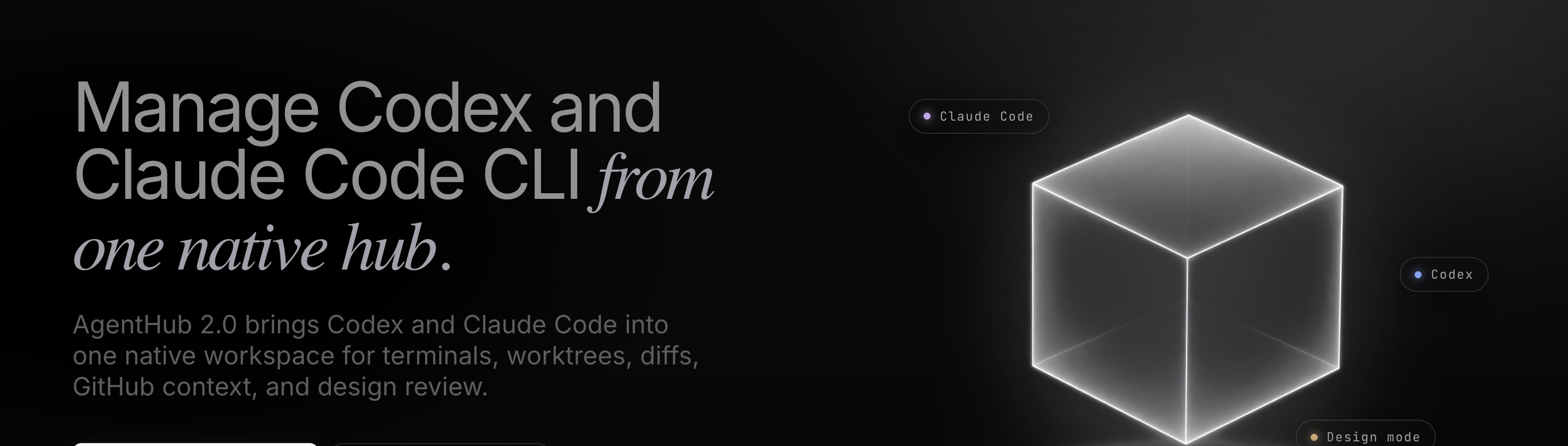 ## 功能
## 功能
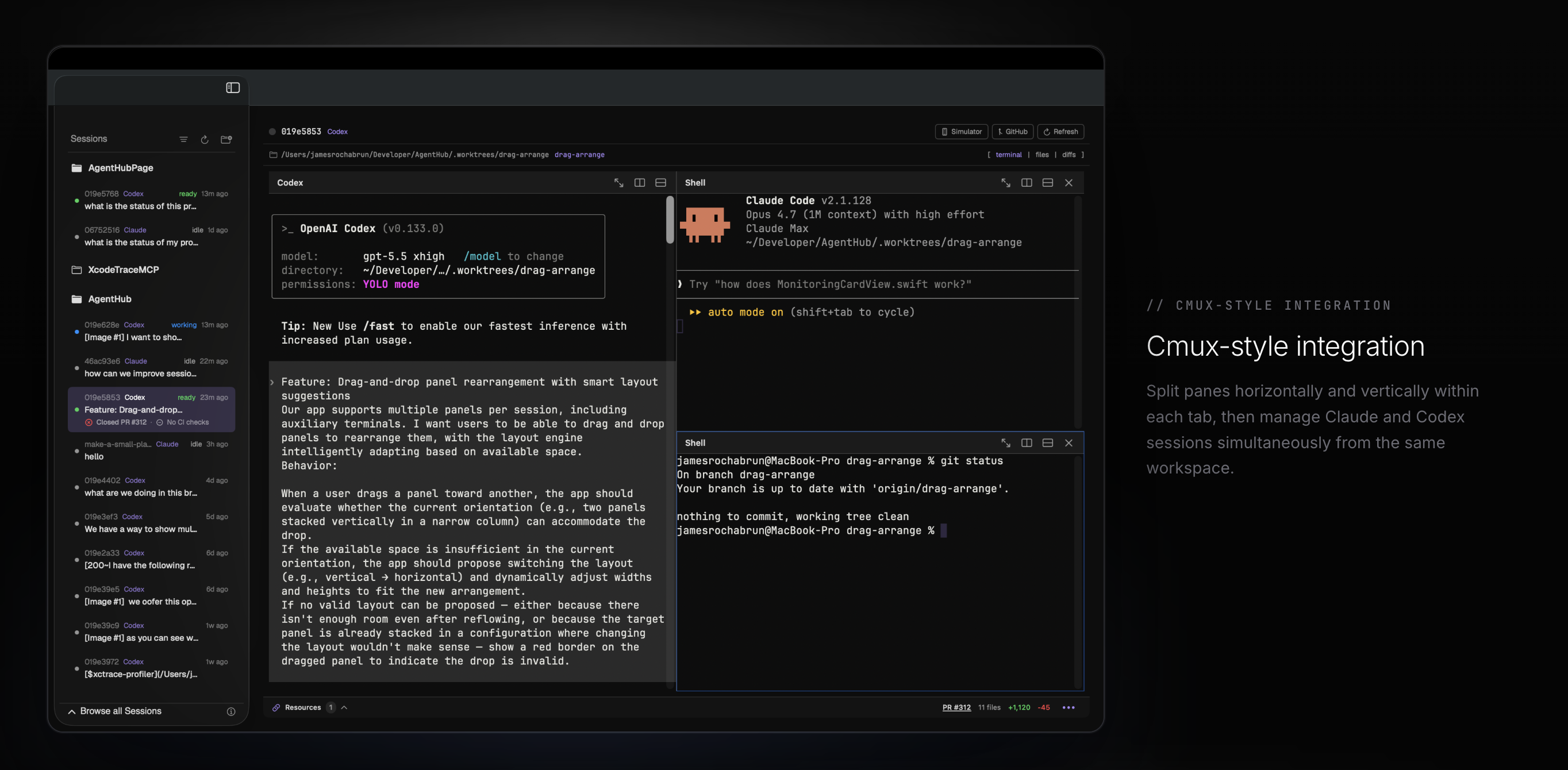
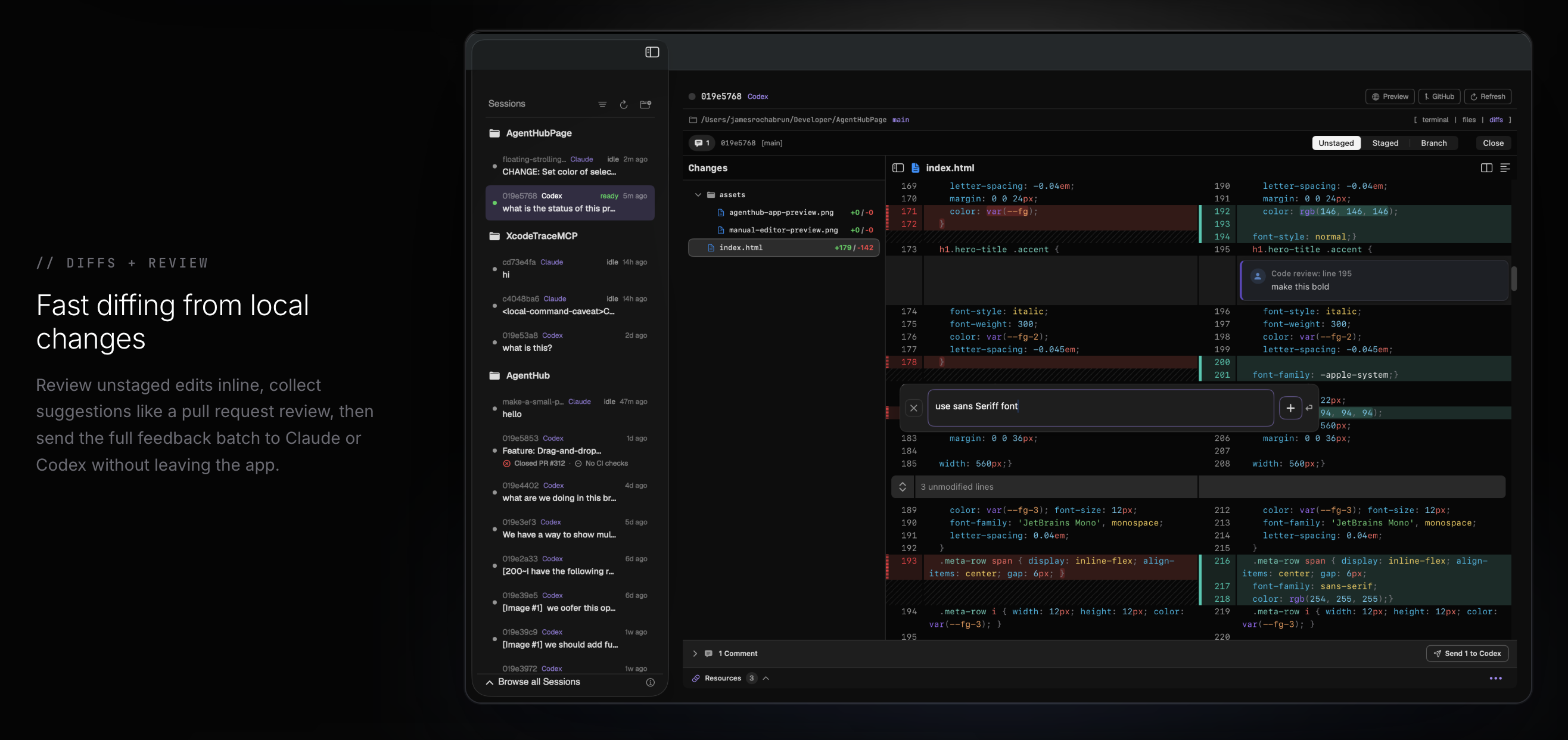
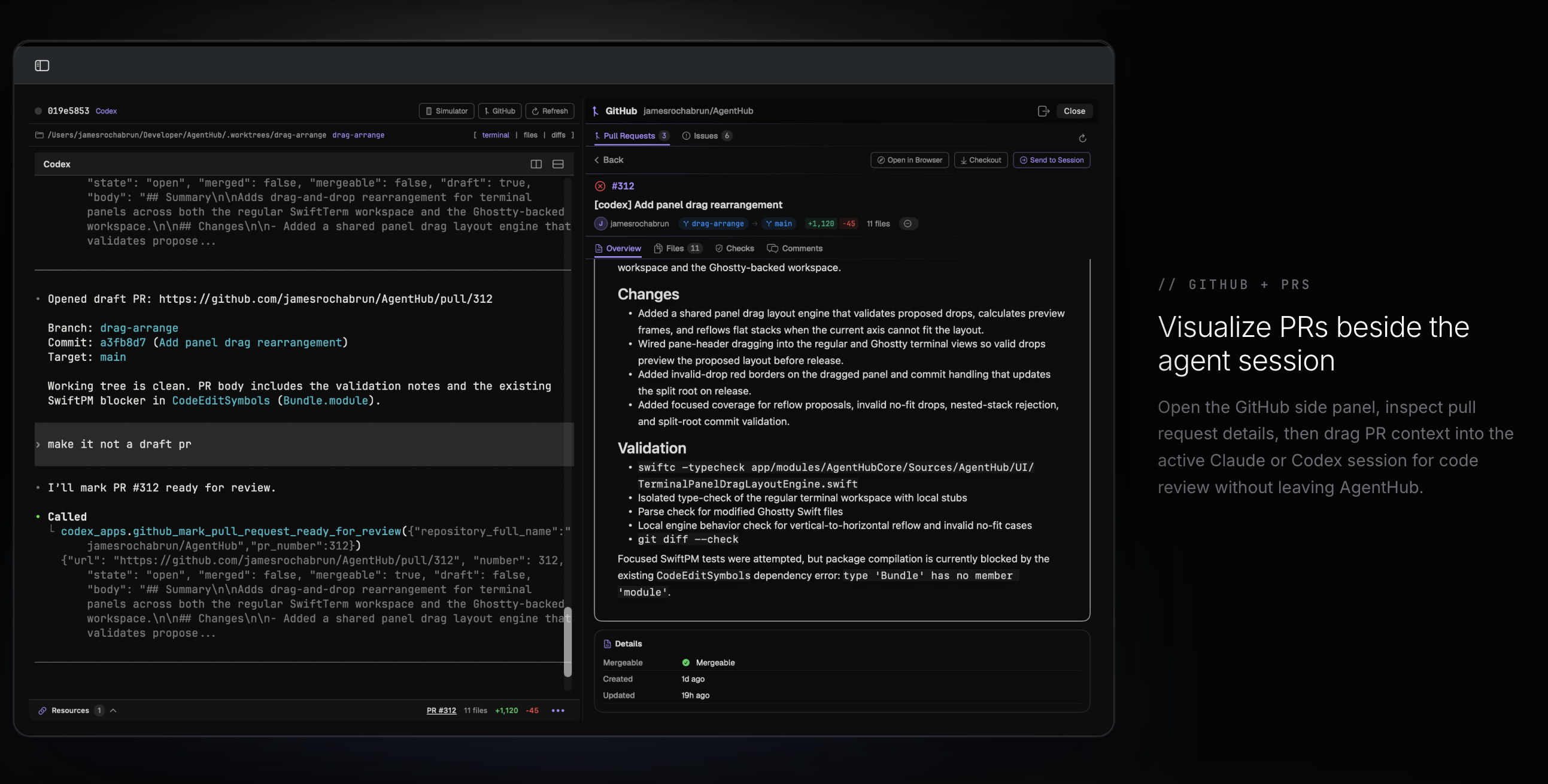
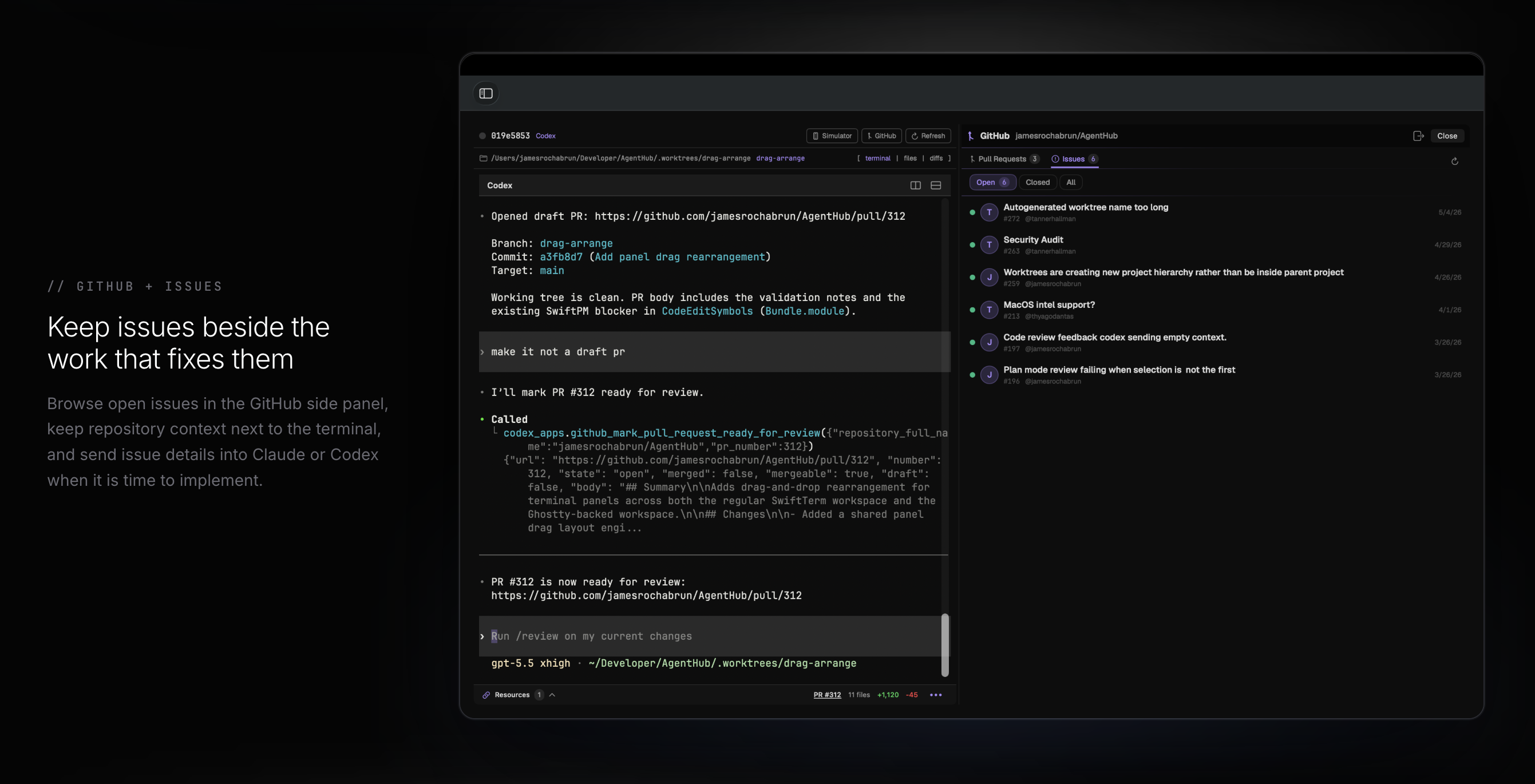
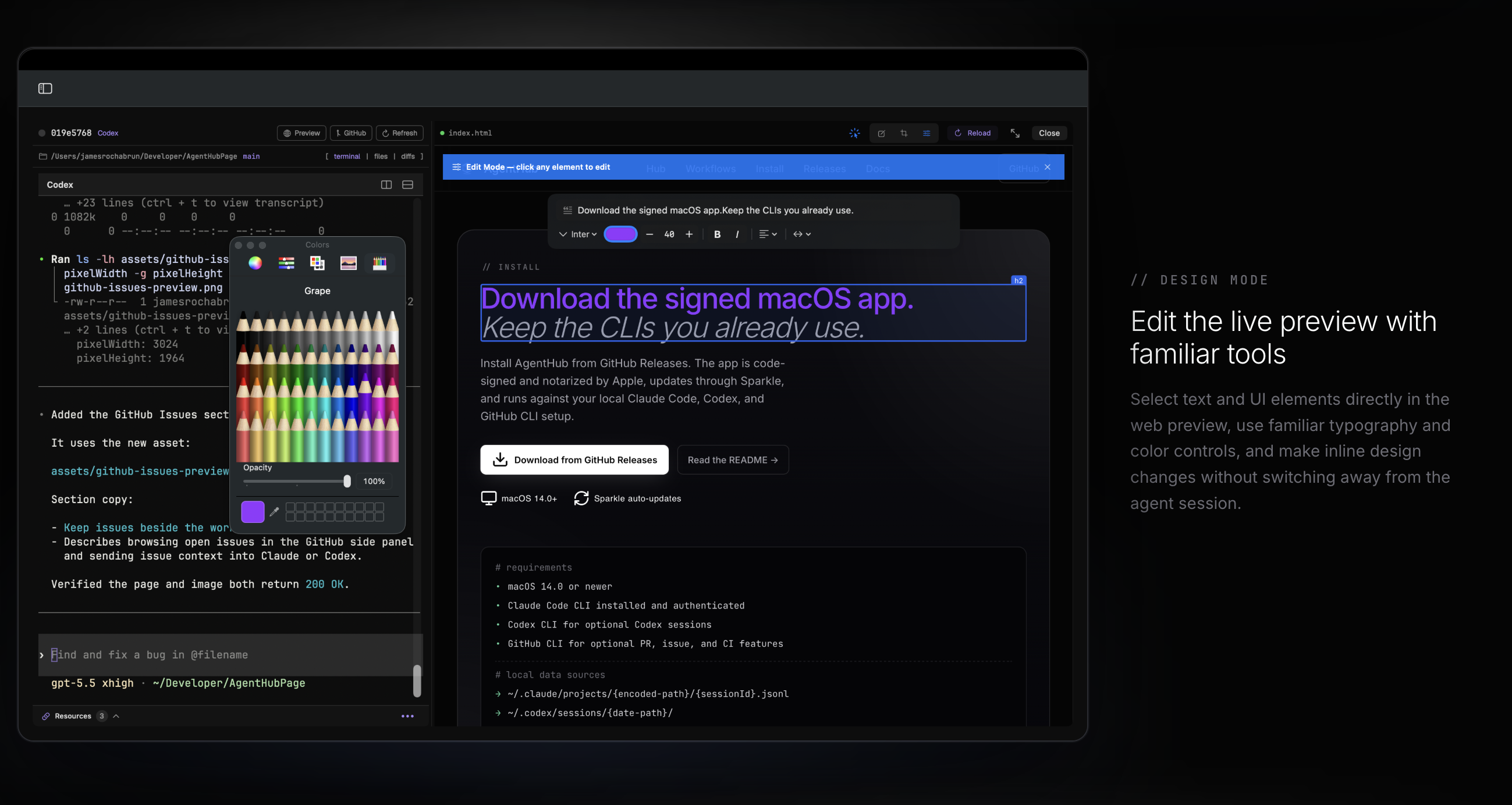
 - **多 Provider 支持** — 并排监控和启动 Claude Code 与 Codex 会话
- **实时会话监控** — 通过文件系统 watcher 实时查看所有会话更新(无轮询)
- **嵌入式终端** — 每个监控卡片内集成全 PTY 终端 (SwiftTerm);无需离开应用即可恢复或启动会话
- **Hub 面板** — 统一查看各个 Provider 的所有会话,支持单体、列表、双列和三列网格布局
- **辅助 Hub shell** — 通过 **Cmd+J** 从 Hub 切换会话级 shell dock;它会跟随所选会话的 worktree,并为每个会话保留 shell 状态
- **可调整大小的列表卡片** — 在列表模式下,监控卡片可调整大小,并提供预览参考线,带来更流畅、干扰更小的缩放体验
- **内联 Diff 审查** — 完整的分割面板 diff 视图与内联编辑器,可将修改请求直接发送给 Claude
- **GitHub 支持** — 浏览当前仓库的 Pull Request 和 Issue,检查 PR diff 和 CI 检查,从会话行监控当前分支的 PR 状态f![Uploading Screenshot 2026-05-26 at 4.23.24 PM.png…]()
rom session rows,并将 GitHub 上下文发回会话中
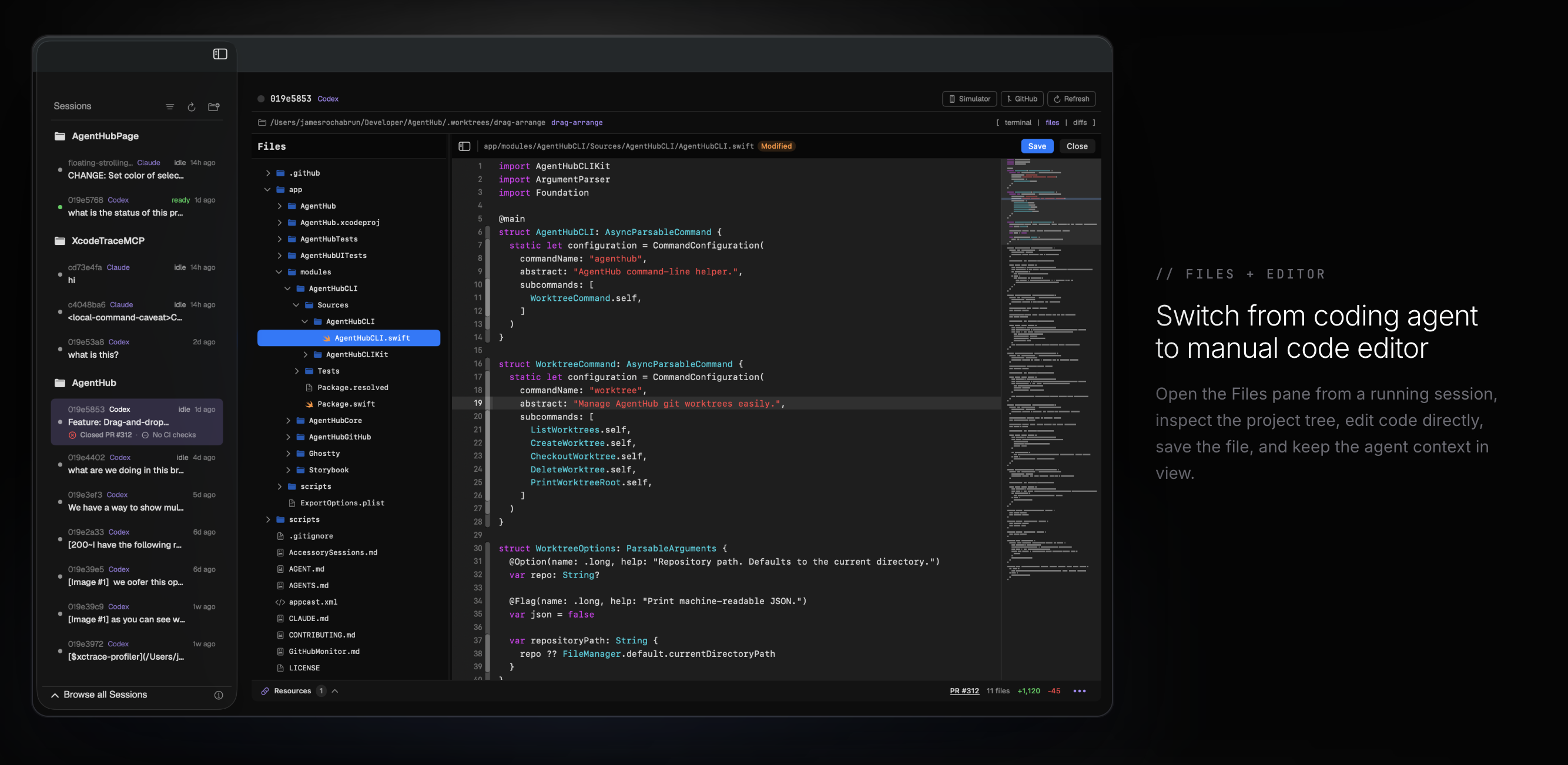
- **文件浏览器和内置编辑器** — 浏览项目树,使用 Cmd+P 跳转文件,在应用内高亮显示语法并编辑文件,无需离开 AgentHub 即可保存更改
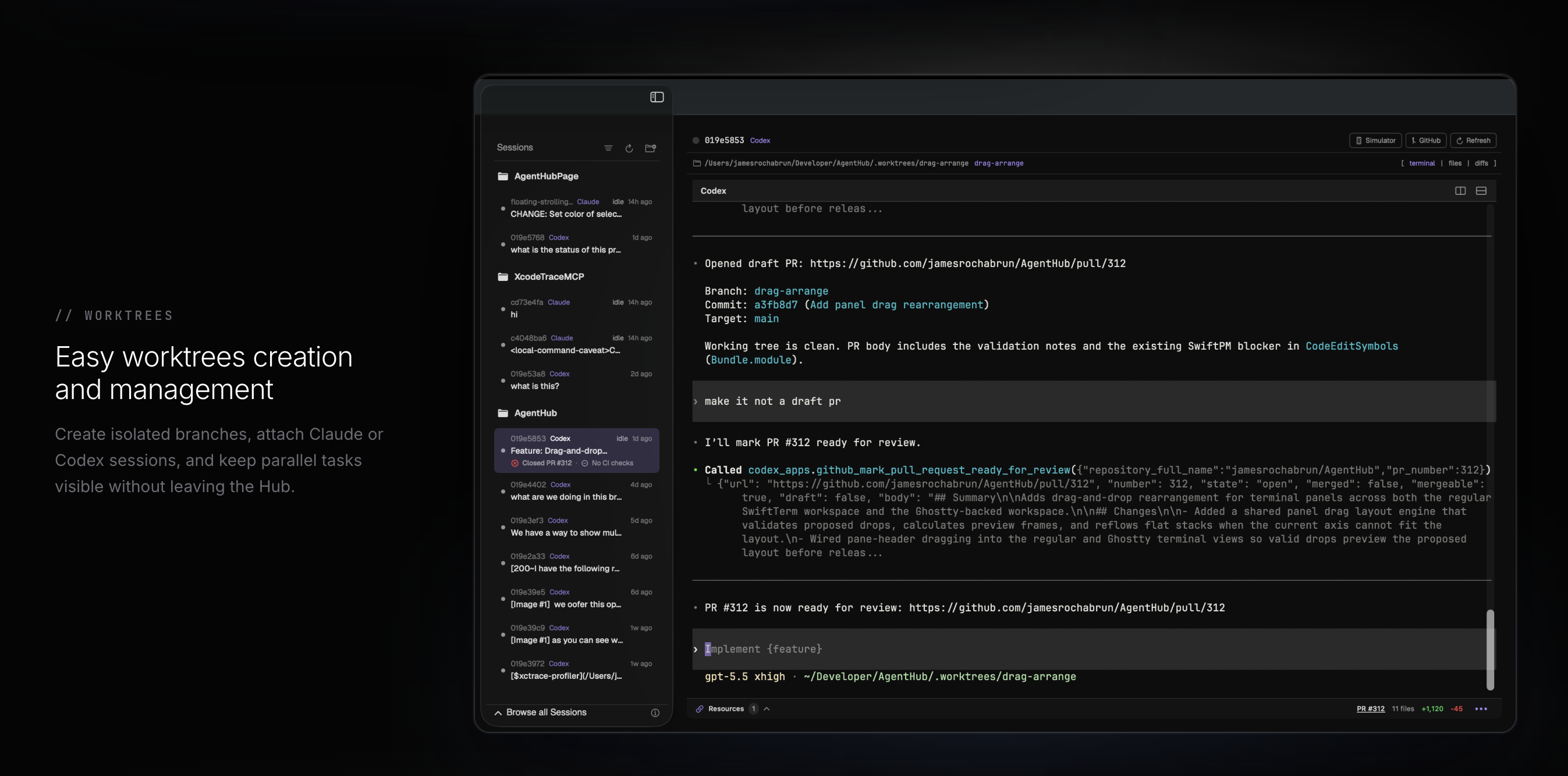
- **Git worktree 管理** — 在 UI 中创建和删除同级 worktree,在新分支上启动会话,并可选择 AgentHub 管理的 worktree 会话显示在父模块下还是作为独立模块
- **使用 Provider 选择器进行 Remix** — 将任意会话分支到独立的 git worktree 中,并在 Claude 或 Codex 中继续;原会话的记录将作为上下文传递给新会话
- **多会话启动器** — 通过手动 prompt 或 AI 计划的编排(Smart 模式)在 Claude 和 Codex 中并行启动会话
- **Mermaid 图表** — 检测会话输出中的 Mermaid 图表语法并进行原生渲染;图表可导出为图像
- **Web 预览** — 优先使用 agent 启动的 localhost 服务器,需要时从会话文件恢复最近的 localhost URL,无实时预览时回退到静态 HTML(优先使用 `index.html`)
- **Web 预览批量更新** — 在实时 Web 预览中检查元素或裁剪区域,将多个请求更新与结构化上下文排入队列,并将批次附加到你的下一条终端消息中 — 无需复制粘贴
- **Storybook 支持** — 自动检测启用 Storybook 的项目(`.storybook/` 配置、`storybook` npm 脚本或 `@storybook/*` devDependencies),并将预览按钮替换为一键 Storybook 启动器;dev server 在复合键下启动,因此可与你的主应用服务器并存运行
- **iOS Simulator 运行目标** — 直接从会话卡片在任何已启动的 iOS Simulator 上构建、安装并运行你的应用;可通过停止按钮在任何阶段(构建/安装/启动)取消;启动就绪检查会在 90 秒后超时以防止挂起
- **实时 iOS Simulator 预览** — 在 AgentHub 内镜像和控制已启动的 Simulator,注释模拟 UI 元素,热重载已保存的 Swift 文件,并从同一运行中的应用进程渲染匹配的 SwiftUI 预览
- **MCP Apps** — 当 Claude 或 Codex 会话中的 agent 产生 MCP 应用 UI(例如通过 `mcp__excalidraw__create_view` 生成的 Excalidraw 图表)时,AgentHub 会在专用的侧边栏中实时渲染它;渲染过程由 agent 的 tool call 驱动,并对其真正使用的 MCP server 进行延迟且需经同意的访问
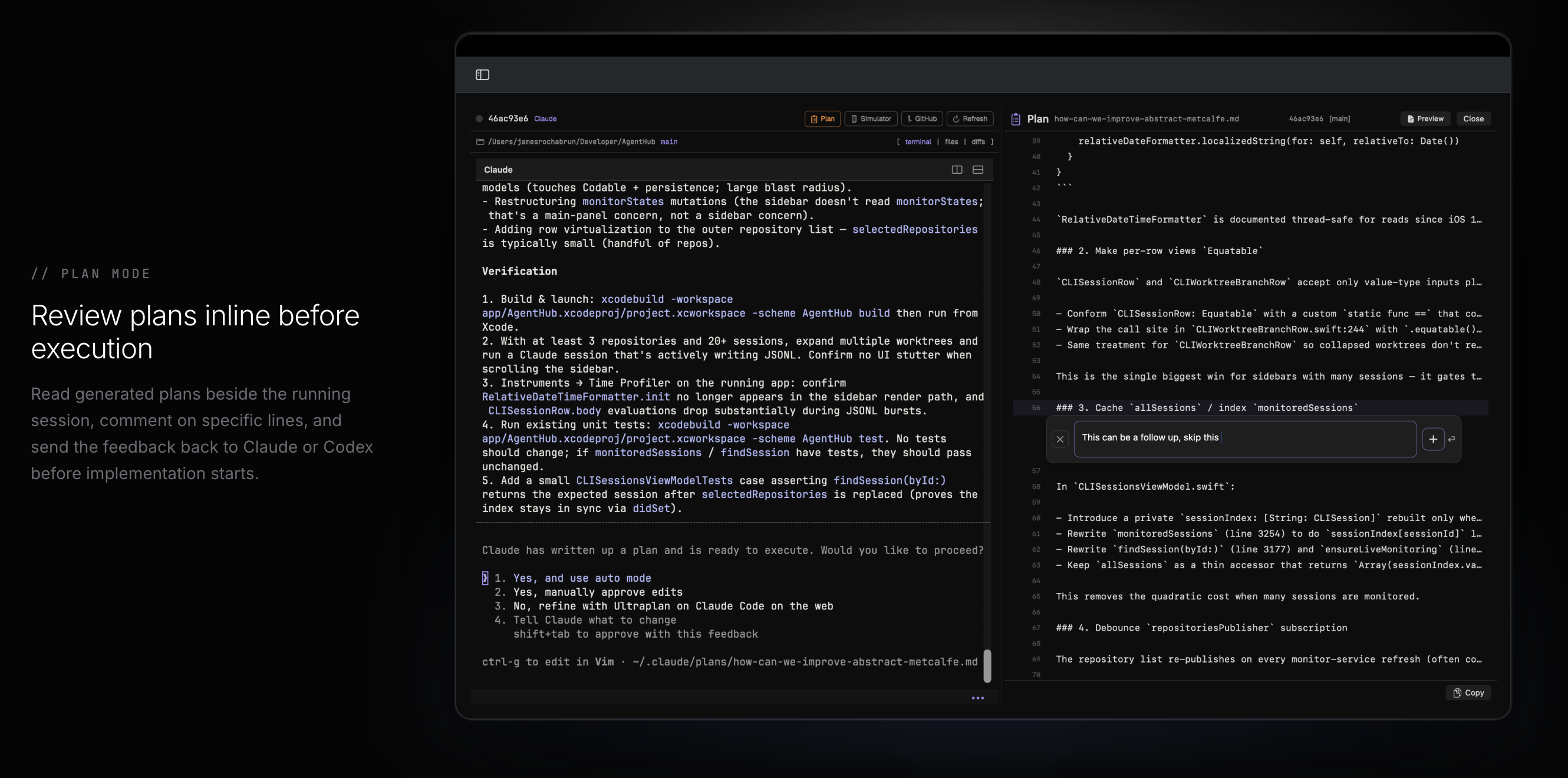
- **计划视图** — 以 Markdown 和语法高亮渲染 Claude 生成的计划文件;切换到审查模式可注释单行,并将批量反馈直接发送至 Claude 的交互式计划 prompt
- **全局搜索** — 搜索所有会话文件并提供排序结果
- **使用统计** — 跟踪每个 Provider 的 token 计数、成本和每日活动(菜单栏或弹出窗口)
- **命令面板** — 通过 Cmd+K 快速访问会话、仓库和操作
- **待处理更改预览** — 在接受前审查 Edit/Write/MultiEdit 工具 diff
- **自定义主题** — 内置 YAML 主题(Singularity、Nebula、Helios、Rigel、Vela、Antares、Sentry 以及仅限 Ghostty 的主题),包含终端 ANSI 调色板、适用的自定义背景和符合 WCAG 的对比度;支持热加载自定义 YAML 主题
- **终端字体选择器** — 从 9 种等宽字体中选择:SF Mono、JetBrains Mono、GeistMono、Fira Code、Cascadia Mono、Source Code Pro、Menlo、Monaco、Courier New
- **图像和文件附件** — 将文件拖放到会话中
- **会话命名** — 使用自定义名称重命名任何会话(由 SQLite 支持)
- **通知声音** — 在 tool call 等待批准时可配置音频提醒
- **隐私优先** — 完全在你的机器上运行;不收集或传输任何数据
- **进程清理** — 当被监控的 Hub 卡片被移除时,AgentHub 会同时终止卡片终端和辅助 Hub shell 进程树,确保不会残留孤立的 shell/CLI 会话
## GitHub 支持
AgentHub 可通过 GitHub CLI 直接在应用内展示仓库的 GitHub 数据。在 AgentHub 中使用 GitHub 访问功能需要安装并验证 `gh`。
- 浏览当前活跃仓库的 Pull Request 和 Issue
- 直接从会话卡片打开当前分支的 PR
- 当存在 PR 时,在活跃会话行上查看当前分支的 PR 状态和 CI 状态
- 从会话列表标题强制刷新 GitHub PR/CI 状态
- 审查 PR 概览内容、更改文件、CI 检查和评论
- 使用与 AgentHub 其他地方相同的内联 diff 查看器渲染 PR 文件 diff
- 将 PR 或 Issue 上下文发送回当前活跃的 Claude Code 或 Codex 会话
### GitHub 监控
AgentHub 可以为每个可见会话监控当前分支的 PR,并在会话行中显示其 PR 状态和 CI 概览。没有 Pull Request 的分支保持安静,因此仅当有可操作内容时,列表才会添加 GitHub 上下文。
监控机制旨在避免拖慢启动速度:初始 GitHub 刷新工作会在应用显示后延迟进行,会话行通过共享服务进行观察,而会话列表标题中的刷新按钮可以在你需要最新 GitHub 状态时随时强制更新。
### GitHub 设置
GitHub 功能是可选的,但 AgentHub 中的任何 GitHub 访问都依赖于 GitHub CLI:
1. 安装 [`gh`](https://cli.github.com/)。
2. 使用 `gh auth login` 进行身份验证。
3. 在 AgentHub 中打开任何 GitHub 仓库,并从会话 UI 中使用 `GitHub` 操作。
## 文件浏览器
AgentHub 包含一个内置的文件浏览器和编辑器,支持受支持的文本文件。按 **Cmd+P** 打开快速文件选择器,直接跳转到某个文件,然后在侧边栏内编辑并保存更改,无需离开应用。
文件浏览器、快速打开和内置编辑器
## MCP Apps
当受监控的 **Claude 或 Codex** 会话中的 agent 产生 MCP 应用 UI 时(例如通过 `mcp__excalidraw__create_view` 生成的 excalidraw 图表),AgentHub 会在专用的侧边栏中渲染它。MCP 应用被视为 *tool call 的输出*:一旦 agent 发起这样的调用,会话卡片上就会出现 **MCP** 按钮,打开它会显示以该调用数据初始化的实时应用。这里没有主动的服务器发现过程;AgentHub 仅以一种延迟的方式,且范围严格限制在 agent 实际使用的服务器内,去联系 MCP server 以获取应用外壳并在应用内提供回调(需提示征得同意)。
支持的 MCP 配置形式:
- Claude `~/.claude.json`:顶层或针对单个项目的 `mcpServers`,包含带有 `command`、`args`、`env` 和 `cwd`/`workingDirectory` 的 stdio 服务器。
- Codex `~/.codex/config.toml`:具有 `command`、`args`、`cwd`、`env = { ... }` 以及 `[mcp_servers.
- **多 Provider 支持** — 并排监控和启动 Claude Code 与 Codex 会话
- **实时会话监控** — 通过文件系统 watcher 实时查看所有会话更新(无轮询)
- **嵌入式终端** — 每个监控卡片内集成全 PTY 终端 (SwiftTerm);无需离开应用即可恢复或启动会话
- **Hub 面板** — 统一查看各个 Provider 的所有会话,支持单体、列表、双列和三列网格布局
- **辅助 Hub shell** — 通过 **Cmd+J** 从 Hub 切换会话级 shell dock;它会跟随所选会话的 worktree,并为每个会话保留 shell 状态
- **可调整大小的列表卡片** — 在列表模式下,监控卡片可调整大小,并提供预览参考线,带来更流畅、干扰更小的缩放体验
- **内联 Diff 审查** — 完整的分割面板 diff 视图与内联编辑器,可将修改请求直接发送给 Claude
- **GitHub 支持** — 浏览当前仓库的 Pull Request 和 Issue,检查 PR diff 和 CI 检查,从会话行监控当前分支的 PR 状态f![Uploading Screenshot 2026-05-26 at 4.23.24 PM.png…]()
rom session rows,并将 GitHub 上下文发回会话中
- **文件浏览器和内置编辑器** — 浏览项目树,使用 Cmd+P 跳转文件,在应用内高亮显示语法并编辑文件,无需离开 AgentHub 即可保存更改
- **Git worktree 管理** — 在 UI 中创建和删除同级 worktree,在新分支上启动会话,并可选择 AgentHub 管理的 worktree 会话显示在父模块下还是作为独立模块
- **使用 Provider 选择器进行 Remix** — 将任意会话分支到独立的 git worktree 中,并在 Claude 或 Codex 中继续;原会话的记录将作为上下文传递给新会话
- **多会话启动器** — 通过手动 prompt 或 AI 计划的编排(Smart 模式)在 Claude 和 Codex 中并行启动会话
- **Mermaid 图表** — 检测会话输出中的 Mermaid 图表语法并进行原生渲染;图表可导出为图像
- **Web 预览** — 优先使用 agent 启动的 localhost 服务器,需要时从会话文件恢复最近的 localhost URL,无实时预览时回退到静态 HTML(优先使用 `index.html`)
- **Web 预览批量更新** — 在实时 Web 预览中检查元素或裁剪区域,将多个请求更新与结构化上下文排入队列,并将批次附加到你的下一条终端消息中 — 无需复制粘贴
- **Storybook 支持** — 自动检测启用 Storybook 的项目(`.storybook/` 配置、`storybook` npm 脚本或 `@storybook/*` devDependencies),并将预览按钮替换为一键 Storybook 启动器;dev server 在复合键下启动,因此可与你的主应用服务器并存运行
- **iOS Simulator 运行目标** — 直接从会话卡片在任何已启动的 iOS Simulator 上构建、安装并运行你的应用;可通过停止按钮在任何阶段(构建/安装/启动)取消;启动就绪检查会在 90 秒后超时以防止挂起
- **实时 iOS Simulator 预览** — 在 AgentHub 内镜像和控制已启动的 Simulator,注释模拟 UI 元素,热重载已保存的 Swift 文件,并从同一运行中的应用进程渲染匹配的 SwiftUI 预览
- **MCP Apps** — 当 Claude 或 Codex 会话中的 agent 产生 MCP 应用 UI(例如通过 `mcp__excalidraw__create_view` 生成的 Excalidraw 图表)时,AgentHub 会在专用的侧边栏中实时渲染它;渲染过程由 agent 的 tool call 驱动,并对其真正使用的 MCP server 进行延迟且需经同意的访问
- **计划视图** — 以 Markdown 和语法高亮渲染 Claude 生成的计划文件;切换到审查模式可注释单行,并将批量反馈直接发送至 Claude 的交互式计划 prompt
- **全局搜索** — 搜索所有会话文件并提供排序结果
- **使用统计** — 跟踪每个 Provider 的 token 计数、成本和每日活动(菜单栏或弹出窗口)
- **命令面板** — 通过 Cmd+K 快速访问会话、仓库和操作
- **待处理更改预览** — 在接受前审查 Edit/Write/MultiEdit 工具 diff
- **自定义主题** — 内置 YAML 主题(Singularity、Nebula、Helios、Rigel、Vela、Antares、Sentry 以及仅限 Ghostty 的主题),包含终端 ANSI 调色板、适用的自定义背景和符合 WCAG 的对比度;支持热加载自定义 YAML 主题
- **终端字体选择器** — 从 9 种等宽字体中选择:SF Mono、JetBrains Mono、GeistMono、Fira Code、Cascadia Mono、Source Code Pro、Menlo、Monaco、Courier New
- **图像和文件附件** — 将文件拖放到会话中
- **会话命名** — 使用自定义名称重命名任何会话(由 SQLite 支持)
- **通知声音** — 在 tool call 等待批准时可配置音频提醒
- **隐私优先** — 完全在你的机器上运行;不收集或传输任何数据
- **进程清理** — 当被监控的 Hub 卡片被移除时,AgentHub 会同时终止卡片终端和辅助 Hub shell 进程树,确保不会残留孤立的 shell/CLI 会话
## GitHub 支持
AgentHub 可通过 GitHub CLI 直接在应用内展示仓库的 GitHub 数据。在 AgentHub 中使用 GitHub 访问功能需要安装并验证 `gh`。
- 浏览当前活跃仓库的 Pull Request 和 Issue
- 直接从会话卡片打开当前分支的 PR
- 当存在 PR 时,在活跃会话行上查看当前分支的 PR 状态和 CI 状态
- 从会话列表标题强制刷新 GitHub PR/CI 状态
- 审查 PR 概览内容、更改文件、CI 检查和评论
- 使用与 AgentHub 其他地方相同的内联 diff 查看器渲染 PR 文件 diff
- 将 PR 或 Issue 上下文发送回当前活跃的 Claude Code 或 Codex 会话
### GitHub 监控
AgentHub 可以为每个可见会话监控当前分支的 PR,并在会话行中显示其 PR 状态和 CI 概览。没有 Pull Request 的分支保持安静,因此仅当有可操作内容时,列表才会添加 GitHub 上下文。
监控机制旨在避免拖慢启动速度:初始 GitHub 刷新工作会在应用显示后延迟进行,会话行通过共享服务进行观察,而会话列表标题中的刷新按钮可以在你需要最新 GitHub 状态时随时强制更新。
### GitHub 设置
GitHub 功能是可选的,但 AgentHub 中的任何 GitHub 访问都依赖于 GitHub CLI:
1. 安装 [`gh`](https://cli.github.com/)。
2. 使用 `gh auth login` 进行身份验证。
3. 在 AgentHub 中打开任何 GitHub 仓库,并从会话 UI 中使用 `GitHub` 操作。
## 文件浏览器
AgentHub 包含一个内置的文件浏览器和编辑器,支持受支持的文本文件。按 **Cmd+P** 打开快速文件选择器,直接跳转到某个文件,然后在侧边栏内编辑并保存更改,无需离开应用。
文件浏览器、快速打开和内置编辑器
## MCP Apps
当受监控的 **Claude 或 Codex** 会话中的 agent 产生 MCP 应用 UI 时(例如通过 `mcp__excalidraw__create_view` 生成的 excalidraw 图表),AgentHub 会在专用的侧边栏中渲染它。MCP 应用被视为 *tool call 的输出*:一旦 agent 发起这样的调用,会话卡片上就会出现 **MCP** 按钮,打开它会显示以该调用数据初始化的实时应用。这里没有主动的服务器发现过程;AgentHub 仅以一种延迟的方式,且范围严格限制在 agent 实际使用的服务器内,去联系 MCP server 以获取应用外壳并在应用内提供回调(需提示征得同意)。
支持的 MCP 配置形式:
- Claude `~/.claude.json`:顶层或针对单个项目的 `mcpServers`,包含带有 `command`、`args`、`env` 和 `cwd`/`workingDirectory` 的 stdio 服务器。
- Codex `~/.codex/config.toml`:具有 `command`、`args`、`cwd`、`env = { ... }` 以及 `[mcp_servers..env]` 的 `[mcp_servers.]` 表。
- 远程 MCP 服务器:使用 `url`、`serverUrl`、`serverURL`、`server_url`、`endpoint` 或 `uri` 的未经验证的 HTTP/streamable HTTP 或旧版 SSE,以及诸如 `http`、`streamable-http` 或 `sse` 等 `type`/`transport`/`transportType` 值。
注意事项与当前限制:
- 此版本不支持经过身份验证的远程 MCP 服务器。AgentHub 不会持久化 MCP 密钥,也不会修改仓库配置以添加凭据。
- 应用内的 tool call、资源读取和外部链接需要征得同意;同意仅对当前面板实例有效。
- CSP 由可复用的 `AgentHubMCPUI` 渲染器强制执行;会话/服务器路由保留在 AgentHubCore 中。
- Codex 主机渲染要求 MCP 服务器位于 `~/.codex/config.toml` 中(无论配置如何,捕获功能均可正常工作)。
有关架构、数据流、关键文件、不变量、当前状态以及待办工作清单,请参见 **[`MCPApps.md`](MCPApps.md)**。已知正确的构建路径为 `xcodebuild -workspace app/AgentHub.xcodeproj/project.xcworkspace -scheme AgentHub build`。
## Storybook
当 AgentHub 在项目中检测到 Storybook 配置时,每个会话卡片上常规的 **Preview** 按钮将被替换为专用的 **Storybook** 按钮。点击它会启动 Storybook dev server(通过 `npm run storybook`),并打开固定在 Storybook URL 上的 Web 预览面板 — 这独立于 agent 正在运行的任何其他 dev server。
### 检测
如果满足以下**任意**条件,则该项目将被视为已启用 Storybook:
- 项目根目录下存在 `.storybook/` 目录
- `package.json` 包含 `"storybook"` 或 `"storybook:dev"` 脚本条目
- `package.json` devDependencies 包含任何 `@storybook/*` 包
检测逻辑位于独立的 `Storybook` Swift 模块(`app/modules/Storybook/`)中,该模块零依赖,可在 `AgentHubCore` 之外复用。
### 运行方式
- Storybook 服务器在 `DevServerManager` 中以 `"{sessionId}:storybook"` 作为键进行标记,因此它可以与由普通 `sessionId` 键标记的主 dev server(Vite、Next 等)共存。
- 如果你的 `storybook` npm 脚本已经固定了端口(例如 `storybook dev -p 6006`),AgentHub 会遵循该端口而不会尝试覆盖它 — npm 会在脚本的参数后追加额外的参数,而 Storybook 只会遵守第一个 `-p`,因此传递我们自己的参数会导致绑定端口与跟踪端口不同步。
- 如果 6006 端口被占用并且 Storybook 提示使用备用端口,AgentHub 会自动接受;实际端口将从 Storybook 的 `Local: http://localhost:N/` 就绪横幅中捕获。
- Storybook 模式下的 Web 预览面板仅从 Storybook 服务器槽位解析 URL;它不会跟随 agent 的应用服务器 URL 变化,因此即使 agent 重启主 dev server,Storybook 视图也会保持固定。
## iOS Simulator 预览
对于 Xcode 项目,**Simulator** 操作会打开应用内的侧边面板,而不会将你引导至 Simulator.app。该面板可以启动选定的 iOS Simulator,构建并运行会话的应用程序,镜像实时 framebuffer,并将鼠标/键盘输入转发回设备。
**Annotate** 工具会暂停触摸转发,读取模拟应用的辅助功能树(accessibility tree),并允许你将反馈固定到真实的 UI 元素上。发送注释会向活跃的 agent 会话写入一张带有临时标记的屏幕截图和一个结构化的 prompt;在查看时,帧不会通过网络传输或被持久化保存。
### 热重载和预览
当 AgentHub 的支持库可用时,从 Simulator 面板进行 Build & Run 会激活热重载和 Previews 标签页。保存的 Swift 文件会被注入到运行中的应用中,如果 InjectionLite 能够重载它们,则可保留进程状态;结构性更改、编译失败或不受支持的编辑将回退到增量重建。热重载指示器会报告实际状态:准备中、已武装、重载中、已重建、失败或不可用。
views 标签页通过生成的 preview-host 库,在同一运行中的 simulator 应用内渲染 SwiftUI 预览。当标签页可见时,打开或保存 Swift 文件可以自动激活预览:冷启动设备会运行完整的 Build & Run 流程,而已运行但未激活的应用将插入 preview host 重新启动。
首次使用会在 `~/Library/Application Support/AgentHub/HotReloadHost/` 下构建热重载和 preview-host 支持包。在解析 Swift Package 依赖项时,该构建可能需要一两分钟;AgentHub 会在准备期间正常启动应用,然后在下一次 Build & Run 时激活热重载。
为了在注入后能够看到 SwiftUI body 的刷新,目标应用应使用 [`Inject`](https://github.com/krzysztofzablocki/Inject) package 或 InjectionLite 的 `injected()` 约定进行选择启用。如果不进行选择启用,代码可能会成功注入,但在应用状态更改之前,某些视图不会重绘。
当前限制:一个固定的 preview-host 回环端口意味着同一时间只能有一个激活的预览会话;应用崩溃可能会导致状态指示器在执行下一次操作前变得陈旧;热重载的 derived-data 路径使用单独的构建缓存;并且 Application Support 下的控制台日志目前还没有清理策略。
有关模块架构、隐私和私有 API 契约、热重载 + Previews 内部机制以及待办工作清单,请参见 **[`SimulatorPreview.md`](SimulatorPreview.md)**。
## 环境要求
- macOS 14.0+
- 已安装并验证 [Claude Code CLI](https://claude.ai/claude-code)
- 已安装 [Codex CLI](https://openai.com/index/introducing-codex/)(可选,用于 Codex 功能)
- 已安装并验证 [GitHub CLI](https://cli.github.com/)(总体可选,使用 GitHub 访问/功能时必需)
## 安装与更新
从 [GitHub Releases](https://github.com/jamesrochabrun/AgentHub/releases) 下载最新版本。该应用程序已通过 Apple 代码签名和公证。
更新通过 [Sparkle](https://sparkle-project.org/) 及 EdDSA 签名验证自动交付。当有新版本可用时,系统会提示你。
## 键盘快捷键
| 快捷键 | 操作 |
|---|---|
| **Cmd+K** | 打开命令面板 |
| **Cmd+P** | 快速打开文件 |
| **Cmd+N** | 新建会话 |
| **Cmd+B** | 切换侧边栏 |
| **Cmd+J** | 切换 Hub 辅助 shell |
| **Cmd+,** | 打开设置 |
| **Cmd+Shift+O** | 展开/收起嵌入式 Web 预览 |
| **Cmd+[** | 导航到上一个会话 |
| **Cmd+]** | 导航到下一个会话 |
| **Cmd+\\** | 切换专注模式(单体 ↔ 上一个布局) |
| **Cmd++** | 增大终端字体大小 |
| **Cmd+-** | 减小终端字体大小 |
| **Escape** | 退出最大化的卡片 / 侧边面板 / 表格 |
### Diff 视图
| 快捷键 | 操作 |
|---|---|
| **Return** | 将内联评论添加到审查集合中 |
| **Cmd+Return** | 将内联反馈直接发送给 agent 会话 |
| **Shift+Return** | 在编辑器中插入换行符 |
| **Escape** | 关闭内联编辑器或 diff 视图 |
### 文件浏览器
| 快捷键 | 操作 |
|---|---|
| **Cmd+P** | 打开快速文件选择器 |
| **Cmd+S** | 在文件编辑器中保存当前文件 |
| **Escape** | 关闭快速文件选择器或文件编辑器 |
### Web 预览
| 快捷键 | 操作 |
|---|---|
| **Cmd+Shift+O** | 展开/收起嵌入式 Web 预览 |
| **Cmd+Shift+I** | 循环切换检查、裁剪、编辑和关闭 |
| **Cmd+R** | 重新加载预览 |
| **Cmd+Return** | 发送排队的画布反馈或更新预览 |
| **Escape** | 关闭预览 |
### 嵌入式终端
当嵌入的 Claude 或 Codex 终端获得焦点时,文本编辑快捷键遵循 macOS 终端风格的行编辑方式。
| 快捷键 | 操作 |
|---|---|
| **Cmd+C** | 复制选中文本 |
| **Cmd+V** | 粘贴 |
| **Cmd+A** | 全选 |
| **Cmd+Left / Cmd+Up** | 移至行首 |
| **Cmd+Right / Cmd+Down** | 移至行尾 |
| **Cmd+Backspace** | 删除至行首 |
| **Cmd+Forward Delete** | 删除至行尾 |
| **Option+Left** | 向后移动一个单词 |
| **Option+Right** | 向前移动一个单词 |
| **Option+Backspace** | 删除前一个单词 |
| **Option+Forward Delete** | 删除后一个单词 |
| **Cmd+Ctrl+Arrow** | 聚焦相邻的终端面板 |
| **Cmd+Ctrl+Shift+Left / Right** | 选择上一个 / 下一个终端标签页 |
| **⌥↩ / ⌘↩ / ⇧↩** | 插入换行符(可在设置 → 终端中配置) |
### 命令面板
| 快捷键 | 操作 |
|---|---|
| **Up / Down** | 导航项目 |
| **Return** | 执行选定的操作 |
| **Escape** | 关闭面板 |
## Hub 布局
监控面板支持多种布局模式:
| 模式 | 描述 |
|---|---|
| **单体** | 全屏显示一个会话,带有可选侧边栏(diff、计划、Web 预览) |
| **列表** | 按 Provider 分组的垂直卡片列表 |
| **双列** | 两列网格 |
| **三列** | 三列网格 |
任何卡片都可以通过单击最大化到整个面板(按 Escape 恢复)。
在列表模式下,可以通过拖动预览来调整卡片大小,并在释放鼠标时提交更改。
## 会话状态
| 状态 | 描述 |
|---|---|
| Thinking | Claude/Codex 正在处理 |
| Executing Tool | 正在运行 tool call |
| Awaiting Approval | 工具需要用户确认 |
| Waiting for User | 等待输入 |
| Idle | 会话不活跃 |
## 计划模式
计划模式允许 Claude 阅读和分析你的代码库,而无需执行任何更改。
在多会话启动器的 prompt 编辑器中,使用 **Shift+Tab** 可开启或关闭该模式。
当激活时,prompt 下方会出现一个青色的指示器。
| Provider | 行为 |
|---|---|
| **Claude** | 以 `--permission-mode plan` 启动;读取文件并进行计划,但不写入或执行 |
| **Codex** | 不可用 — Codex CLI 没有以计划模式启动的标志 |
## 配置
AgentHub 的设置窗口分为四个标签页:
- **通用** — 通知和全局应用行为,例如在模态窗口中打开文件浏览器
- **配置** — Claude 和 Codex CLI 命令、特定于 Provider 的默认值以及 Smart 模式
- **Worktrees** — Worktree 模块分组和生成的分支命名
- **外观** — 扁平化会话布局、终端偏好设置和主题选择
### 显示模式
AgentHub 支持两种显示模式:
- **菜单栏模式**(默认) — 统计信息显示在系统菜单栏中
- **弹出模式** — 统计信息显示为应用窗口中的工具栏按钮
在应用设置中切换模式。
### AgentHub 如何配合 Worktrees
AgentHub 使用原生 Git 链接 worktree 来执行隔离的 agent 任务。Worktree 的 Git 根目录始终是 Git 通过 `git rev-parse --show-toplevel` 报告的仓库根目录;对于 monorepo,这意味着即使是 iOS 或 Android 任务,只要 agent 是在 `ios/...` 或 `android/...` 内部启动的,它也会有一个位于仓库根目录的 worktree。
**存储位置。** AgentHub 创建的 worktree 作为同级目录存在于主仓库旁边,直接使用生成或手动指定的目录名放在仓库的父目录下。AgentHub 不会创建仓库本地的 `.worktrees` 文件夹,也不会将 `.worktrees/` 添加到 Git 忽略文件中。
**Agent 启动目录。** 当任务从子目录启动时,AgentHub 仍会将 worktree 根目录用于侧边栏分组、删除和清理,但会从 worktree 内请求的启动路径启动嵌入的 Claude 或 Codex 终端。例如,agent 可以从 `/worktrees/my-task/ios/features/foo` 启动,而 Git 操作仍将 `/worktrees/my-task` 视为仓库根目录。
**针对子目录启动的 Sparse checkout。** 对于从受跟踪子目录启动的 agent worktree,AgentHub 会使用 `git worktree add --no-checkout` 创建 worktree,从启动路径附近的项目标记推断稀疏所有者路径,在具体化文件之前配置 sparse checkout,然后在请求的子目录中启动 agent。当共享的 agent/工具支持路径存在时,推断配置文件会包含这些路径;当检测到 Gradle 项目标记时,会包含 Gradle 支持。
**根目录启动无 Sparse 意外。** 仓库根目录启动保留旧的完全检出行为,除非调用者显式传递稀疏配置文件。当必须具体化整个仓库时,子目录启动仍可以请求 `fullCheckout`。
**分组和清理。** Worktree 会话默认分组在其父模块下,因此 `ModuleA` 会显示其常规会话以及 AgentHub 拥有的 worktree 会话。Worktrees 设置标签页可以切换到独立模块,此时根模块及其 AgentHub 拥有的 worktree 将作为按仓库分组的同级模块行显示。在提供清理建议或删除操作之前,嵌套的 agent 启动路径将被解析回已注册的 worktree 根目录。
**所有权。** AgentHub 仅将其创建的、显式添加的或通过受监控会话关注的 worktree 视为自有。从仓库中发现的外部 Git worktree 将被忽略以用于会话分组,这可以防止大型本地 worktree 设置塞满会话列表。Worktrees 设置清单仍会列出受跟踪仓库的所有 Git worktree:受关注的行参与 AgentHub 分组,而外部行可以在不被关注的情况下被删除。
### Provider 默认设置
Provider 默认设置仅在 AgentHub 启动新的嵌入式 CLI 会话时应用。恢复流程会保留原始会话配置,并且不会注入新的 model 或批准标志。
这些设置在本地持久化保存在 AgentHub 的 SQLite 元数据存储中。
#### Claude
AgentHub 将 Claude 默认设置映射到已安装的 CLI 标志:
- `Model` → `--model `
- `Effort` → `--effort `
- `Allowed Tools` → `--allowedTools `
- `Denied Tools` → `--disallowedTools `
设置中的 Claude 工具列表接受逗号分隔的值或每行一个模式。AgentHub 会在启动会话之前将两种形式标准化。
#### Codex
AgentHub 将 Codex 默认设置映射到当前交互式的 CLI 标志:
- `Model` → `--model `
- `Approval` → `-a untrusted|on-request|never`;`Full-Auto` 映射到 `--sandbox workspace-write`
- `Effort` → `-c model_reasoning_effort="low|medium|high|xhigh"`
这些映射已通过单元测试验证,测试基于 `codex --help` 和 `claude --help` 暴露的当前 CLI 接口。
### Claude Code 批准 hook
AgentHub 通过安装一个小型 **Claude Code hook** 来实时检测待处理的 `Edit` / `Write` / `MultiEdit` / `Bash` 等批准操作。`PermissionRequest` 事件标记真实的批准提示,而 `PreToolUse` 会记录当前的权限模式,以便当 Claude Code 处于 `auto` 模式时,AgentHub 可以抑制虚假的“Awaiting Approval”状态。如果没有该 hook,Claude Code 的 CLI 只会在回合提交*之后*才将挂起的 `tool_use` 块写入磁盘 — 这意味着 AgentHub 在你回答提示*之后*才能显示“Awaiting Approval”状态(或预览待处理的 diff)。启用该 hook 是让 `eye` / Edits 按钮和 `awaitingApproval` 侧边栏状态在批准窗口*期间*出现的关键。
**写入到你的仓库的内容。** 恰好是 **`{project}/.claude/settings.local.json`** 中的一个键,Claude Code 默认将其视为个人/被 gitignore 忽略的内容。我们绝不会触碰 `.claude/settings.json`(共享的、已签入的文件),绝不会在 `.claude/hooks/` 下添加文件,也绝不会修改你的 `.gitignore`。Hook 脚本本身位于你的仓库之外的 `~/Library/Application/AgentHub/hooks/agenthub-approval.sh`。
**我们承诺保留的内容。** `settings.local.json` 中的所有其他键 — `permissions`、`env`、`mcpServers`,以及你或其他工具添加的任何 hook 条目 — 都将逐字节保留。我们的条目是通过已安装脚本的绝对路径进行标识的,因此卸载操作只会移除该条目,而其他内容将保持不变。
**生命周期。** 当仓库被添加到 AgentHub 时,Hook 会按 worktree 进行安装;在仓库被跟踪期间保持安装状态;当你移除仓库、在 **Settings → General → Enable approval hooks** 中关闭该功能或退出应用时,Hook 将被移除。同一 worktree 中的外部 Claude Code 会话(例如从 Terminal.app 启动)会运行此 hook,但它会静默退出 — 一个约 50ms 的 claim-file 检查确保 AgentHub 仅观察其正在主动跟踪的会话。
### 会话数据
AgentHub 从以下位置读取 Claude Code 会话数据:
```
~/.claude/projects/{encoded-path}/{sessionId}.jsonl
```
### Codex 数据
AgentHub 从 `~/.codex/` 读取 Codex 会话数据:
- **会话文件:** `~/.codex/sessions/{date-path}/`(JSONL 格式)
- **历史文件:** `~/.codex/history.jsonl`
### 自定义主题
将 YAML 主题文件放在 `~/Library/Application Support/AgentHub/themes/` 中。主题会在保存时进行热重载。
```
name: My Theme
version: 1
author: Your Name
colors:
brand:
primary: "#7C3AED"
secondary: "#6D28D9"
tertiary: "#5B21B6"
backgrounds:
dark: "#1A1A2E"
light: "#FFFFFF"
```
## 贡献
- **每个功能或错误修复对应一个 PR。** 每个 Pull Request 应只处理一个集中的更改。
- **保持 PR 精简。** 小巧、可审查的 diff 合并速度更快,也更容易理解。
- **欢迎 AI 生成的代码**,前提是该 PR 代表一个连贯的功能或修复。
- **捆绑在一起的无关更改将不予审查或接受。** 如果你有多个修复,请为每个修复分别提交 PR。
## 隐私
AgentHub 完全在你的机器上运行。它不会收集、传输或在外部存储任何数据。该应用程序只是读取你本地的 CLI 会话文件以显示它们的状态。
## 许可证
MIT
## 功能
- **多 Provider 支持** — 并排监控和启动 Claude Code 与 Codex 会话
- **实时会话监控** — 通过文件系统 watcher 实时查看所有会话更新(无轮询)
- **嵌入式终端** — 每个监控卡片内集成全 PTY 终端 (SwiftTerm);无需离开应用即可恢复或启动会话
- **Hub 面板** — 统一查看各个 Provider 的所有会话,支持单体、列表、双列和三列网格布局
- **辅助 Hub shell** — 通过 **Cmd+J** 从 Hub 切换会话级 shell dock;它会跟随所选会话的 worktree,并为每个会话保留 shell 状态
- **可调整大小的列表卡片** — 在列表模式下,监控卡片可调整大小,并提供预览参考线,带来更流畅、干扰更小的缩放体验
- **内联 Diff 审查** — 完整的分割面板 diff 视图与内联编辑器,可将修改请求直接发送给 Claude
- **GitHub 支持** — 浏览当前仓库的 Pull Request 和 Issue,检查 PR diff 和 CI 检查,从会话行监控当前分支的 PR 状态f![Uploading Screenshot 2026-05-26 at 4.23.24 PM.png…]()
rom session rows,并将 GitHub 上下文发回会话中
- **文件浏览器和内置编辑器** — 浏览项目树,使用 Cmd+P 跳转文件,在应用内高亮显示语法并编辑文件,无需离开 AgentHub 即可保存更改
- **Git worktree 管理** — 在 UI 中创建和删除同级 worktree,在新分支上启动会话,并可选择 AgentHub 管理的 worktree 会话显示在父模块下还是作为独立模块
- **使用 Provider 选择器进行 Remix** — 将任意会话分支到独立的 git worktree 中,并在 Claude 或 Codex 中继续;原会话的记录将作为上下文传递给新会话
- **多会话启动器** — 通过手动 prompt 或 AI 计划的编排(Smart 模式)在 Claude 和 Codex 中并行启动会话
- **Mermaid 图表** — 检测会话输出中的 Mermaid 图表语法并进行原生渲染;图表可导出为图像
- **Web 预览** — 优先使用 agent 启动的 localhost 服务器,需要时从会话文件恢复最近的 localhost URL,无实时预览时回退到静态 HTML(优先使用 `index.html`)
- **Web 预览批量更新** — 在实时 Web 预览中检查元素或裁剪区域,将多个请求更新与结构化上下文排入队列,并将批次附加到你的下一条终端消息中 — 无需复制粘贴
- **Storybook 支持** — 自动检测启用 Storybook 的项目(`.storybook/` 配置、`storybook` npm 脚本或 `@storybook/*` devDependencies),并将预览按钮替换为一键 Storybook 启动器;dev server 在复合键下启动,因此可与你的主应用服务器并存运行
- **iOS Simulator 运行目标** — 直接从会话卡片在任何已启动的 iOS Simulator 上构建、安装并运行你的应用;可通过停止按钮在任何阶段(构建/安装/启动)取消;启动就绪检查会在 90 秒后超时以防止挂起
- **实时 iOS Simulator 预览** — 在 AgentHub 内镜像和控制已启动的 Simulator,注释模拟 UI 元素,热重载已保存的 Swift 文件,并从同一运行中的应用进程渲染匹配的 SwiftUI 预览
- **MCP Apps** — 当 Claude 或 Codex 会话中的 agent 产生 MCP 应用 UI(例如通过 `mcp__excalidraw__create_view` 生成的 Excalidraw 图表)时,AgentHub 会在专用的侧边栏中实时渲染它;渲染过程由 agent 的 tool call 驱动,并对其真正使用的 MCP server 进行延迟且需经同意的访问
- **计划视图** — 以 Markdown 和语法高亮渲染 Claude 生成的计划文件;切换到审查模式可注释单行,并将批量反馈直接发送至 Claude 的交互式计划 prompt
- **全局搜索** — 搜索所有会话文件并提供排序结果
- **使用统计** — 跟踪每个 Provider 的 token 计数、成本和每日活动(菜单栏或弹出窗口)
- **命令面板** — 通过 Cmd+K 快速访问会话、仓库和操作
- **待处理更改预览** — 在接受前审查 Edit/Write/MultiEdit 工具 diff
- **自定义主题** — 内置 YAML 主题(Singularity、Nebula、Helios、Rigel、Vela、Antares、Sentry 以及仅限 Ghostty 的主题),包含终端 ANSI 调色板、适用的自定义背景和符合 WCAG 的对比度;支持热加载自定义 YAML 主题
- **终端字体选择器** — 从 9 种等宽字体中选择:SF Mono、JetBrains Mono、GeistMono、Fira Code、Cascadia Mono、Source Code Pro、Menlo、Monaco、Courier New
- **图像和文件附件** — 将文件拖放到会话中
- **会话命名** — 使用自定义名称重命名任何会话(由 SQLite 支持)
- **通知声音** — 在 tool call 等待批准时可配置音频提醒
- **隐私优先** — 完全在你的机器上运行;不收集或传输任何数据
- **进程清理** — 当被监控的 Hub 卡片被移除时,AgentHub 会同时终止卡片终端和辅助 Hub shell 进程树,确保不会残留孤立的 shell/CLI 会话
## GitHub 支持
AgentHub 可通过 GitHub CLI 直接在应用内展示仓库的 GitHub 数据。在 AgentHub 中使用 GitHub 访问功能需要安装并验证 `gh`。
- 浏览当前活跃仓库的 Pull Request 和 Issue
- 直接从会话卡片打开当前分支的 PR
- 当存在 PR 时,在活跃会话行上查看当前分支的 PR 状态和 CI 状态
- 从会话列表标题强制刷新 GitHub PR/CI 状态
- 审查 PR 概览内容、更改文件、CI 检查和评论
- 使用与 AgentHub 其他地方相同的内联 diff 查看器渲染 PR 文件 diff
- 将 PR 或 Issue 上下文发送回当前活跃的 Claude Code 或 Codex 会话
### GitHub 监控
AgentHub 可以为每个可见会话监控当前分支的 PR,并在会话行中显示其 PR 状态和 CI 概览。没有 Pull Request 的分支保持安静,因此仅当有可操作内容时,列表才会添加 GitHub 上下文。
监控机制旨在避免拖慢启动速度:初始 GitHub 刷新工作会在应用显示后延迟进行,会话行通过共享服务进行观察,而会话列表标题中的刷新按钮可以在你需要最新 GitHub 状态时随时强制更新。
### GitHub 设置
GitHub 功能是可选的,但 AgentHub 中的任何 GitHub 访问都依赖于 GitHub CLI:
1. 安装 [`gh`](https://cli.github.com/)。
2. 使用 `gh auth login` 进行身份验证。
3. 在 AgentHub 中打开任何 GitHub 仓库,并从会话 UI 中使用 `GitHub` 操作。
## 文件浏览器
AgentHub 包含一个内置的文件浏览器和编辑器,支持受支持的文本文件。按 **Cmd+P** 打开快速文件选择器,直接跳转到某个文件,然后在侧边栏内编辑并保存更改,无需离开应用。
文件浏览器、快速打开和内置编辑器
## MCP Apps
当受监控的 **Claude 或 Codex** 会话中的 agent 产生 MCP 应用 UI 时(例如通过 `mcp__excalidraw__create_view` 生成的 excalidraw 图表),AgentHub 会在专用的侧边栏中渲染它。MCP 应用被视为 *tool call 的输出*:一旦 agent 发起这样的调用,会话卡片上就会出现 **MCP** 按钮,打开它会显示以该调用数据初始化的实时应用。这里没有主动的服务器发现过程;AgentHub 仅以一种延迟的方式,且范围严格限制在 agent 实际使用的服务器内,去联系 MCP server 以获取应用外壳并在应用内提供回调(需提示征得同意)。
支持的 MCP 配置形式:
- Claude `~/.claude.json`:顶层或针对单个项目的 `mcpServers`,包含带有 `command`、`args`、`env` 和 `cwd`/`workingDirectory` 的 stdio 服务器。
- Codex `~/.codex/config.toml`:具有 `command`、`args`、`cwd`、`env = { ... }` 以及 `[mcp_servers.标签:AI开发工具, Claude Code, Codex, Git Worktree, 会话管理, 开发效率, 终端工具, 网络可观测性