praetorian-inc/julius
GitHub: praetorian-inc/julius
LLM服务指纹识别工具,通过HTTP探测快速识别网络端点上运行的AI服务器软件类型。
Stars: 70 | Forks: 6
 # Julius: LLM 服务指纹识别工具
[](https://golang.org/)
[](LICENSE)
[](https://github.com/praetorian-inc/julius/actions)
[](https://goreportcard.com/report/github.com/praetorian-inc/julius)
**Julius** 是一款专为安全专业人士设计的 LLM 服务指纹识别工具。它能在渗透测试、攻击面发现和安全评估过程中,检测网络端点上运行的 AI 服务器软件。
与识别生成文本的具体 LLM 模型的指纹识别工具不同,Julius 识别的是**服务器基础设施**:该端点运行的是 Ollama?vLLM?LiteLLM?还是 Hugging Face 部署?Julius 能在几秒钟内给出答案。
## 目录
- [问题背景](#the-problem)
- [功能特性](#features)
- [快速开始](#quick-start)
- [支持的 LLM 服务](#supported-llm-services)
- [用法](#usage)
- [单个目标](#single-target)
- [多个目标](#multiple-targets)
- [输出格式](#output-formats)
- [模型发现](#model-discovery)
- [工作原理](#how-it-works)
- [架构](#architecture)
- [添加自定义探针](#adding-custom-probes)
- [常见问题](#faq)
- [故障排除](#troubleshooting)
- [贡献](#contributing)
- [安全](#security)
- [支持](#support)
- [许可证](#license)
## 问题背景
你在安全评估中发现了一个开放端口。它是 11434 端口上的 Ollama 吗?是 vLLM?LiteLLM?Hugging Face 端点?还是其他某种 AI 服务?
**手动检查每种可能性既缓慢又容易出错。** 不同的 LLM 服务具有不同的 API 签名、默认端口和响应模式。
**Julius 通过自动识别 LLM 服务指纹解决了这个问题** —— 发送针对性的 HTTP 探针并匹配响应签名,以识别正在运行的确切服务。
## 功能特性
| 功能 | 描述 |
|---------|-------------|
| **33 种 LLM 服务** | 检测 Ollama、vLLM、LiteLLM、LocalAI、Hugging Face TGI 等 33 种服务 |
| **快速扫描** | 并发探测,采用基于端口的智能优先级排序 |
| **模型发现** | 从识别出的端点提取可用模型 |
| **特异性评分** | 1-100 分评分,按最具体的匹配对结果进行排名(例如,优先识别为 LiteLLM 而非通用 OpenAI 兼容服务) |
| **多种输入方式** | 支持单个目标、文件输入或 stdin 管道输入 |
| **灵活输出** | 支持表格、JSON 或 JSONL 格式,便于集成 |
| **可扩展** | 通过简单的 YAML 探针文件添加新服务检测 |
| **离线运行** | 无云依赖 —— 完全在本地运行 |
| **单一二进制** | 基于 Go 的工具,编译为一个可移植的可执行文件 |
## 快速开始
### 安装
```
go install github.com/praetorian-inc/julius/cmd/julius@latest
```
### 基本用法
```
julius probe https://target.example.com
```
### 示例输出
```
+----------------------------+---------+-------------+-------------+--------+-------+
| TARGET | SERVICE | SPECIFICITY | CATEGORY | MODELS | ERROR |
+----------------------------+---------+-------------+-------------+--------+-------+
| https://target.example.com | ollama | 100 | self-hosted | | |
+----------------------------+---------+-------------+-------------+--------+-------+
```
## 支持的 LLM 服务
Julius 可识别自托管、网关、RAG/编排和云管理类别下的 33 个 LLM 平台:
### 自托管 LLM 服务器
| 服务 | 默认端口 | 描述 |
|---------|--------------|-------------|
| [Ollama](https://ollama.ai) | 11434 | 流行的本地 LLM 服务器,易于模型管理 |
| [vLLM](https://github.com/vllm-project/vllm) | 8000 | 高吞吐量 LLM 推理引擎 |
| [LocalAI](https://localai.io) | 8080 | 兼容 OpenAI 的本地 AI 服务器 |
| [llama.cpp](https://github.com/ggerganov/llama.cpp) | 8080 | CPU 优化的 LLM 推理 |
| [Hugging Face TGI](https://huggingface.co/docs/text-generation-inference) | 3000 | 文本生成推理服务器 |
| [LM Studio](https://lmstudio.ai) | 1234 | 带 API 服务器的桌面 LLM 应用程序 |
| [Aphrodite Engine](https://github.com/PygmalionAI/aphrodite-engine) | 2242 | 大规模 LLM 推理引擎,提供兼容 OpenAI 的 API |
| [FastChat](https://github.com/lm-sys/FastChat) | 21001 | 用于训练、服务和评估 LLM 聊天机器人的开放平台 |
| [GPT4All](https://gpt4all.io) | 4891 | 在任何设备上运行本地模型 |
| [Gradio](https://gradio.app) | 7860 | ML 模型演示界面 |
| [Jan](https://jan.ai) | 1337 | 本地兼容 OpenAI 的 API 服务器 |
| [KoboldCpp](https://github.com/LostRuins/koboldcpp) | 5001 | 易于使用的 AI 文本生成软件,适用于 GGML/GGUF 模型 |
| [NVIDIA NIM](https://developer.nvidia.com/nim) | 8000 | NVIDIA 的企业推理微服务 |
| [TabbyAPI](https://github.com/theroyallab/tabbyAPI) | 5000 | 基于 FastAPI 的 ExLlama LLM 服务器 |
| [Text Generation WebUI](https://github.com/oobabooga/text-generation-webui) | 5000 | 具有兼容 OpenAI API 的本地 LLM 界面 |
### 网关/代理服务
| 服务 | 默认端口 | 描述 |
|---------|--------------|-------------|
| [LiteLLM](https://github.com/BerriAI/litellm) | 4000 | 100 多个 LLM 提供商的统一代理 |
| [Kong AI Gateway](https://konghq.com) | 8000 | 具有 AI 插件的企业 API 网关 |
| [Envoy AI Gateway](https://gateway.envoyproxy.io) | 80 | 基于 Envoy Gateway 构建的生成式 AI 服务统一访问入口 |
### RAG 与编排平台
| 服务 | 默认端口 | 描述 |
|---------|--------------|-------------|
| [AnythingLLM](https://anythingllm.com) | 3001 | 集成 RAG、代理和多模型支持的一体化 AI 应用程序 |
| [AstrBot](https://github.com/Soulter/AstrBot) | 6185 | 多平台 LLM 聊天机器人框架,带有仪表板和插件系统 |
| [BetterChatGPT](https://github.com/ztjhz/BetterChatGPT) | 3000 | 增强型 ChatGPT 界面 |
| [Dify](https://dify.ai) | 80 | 具有工作流编排功能的开源 LLM 应用开发平台 |
| [Flowise](https://flowiseai.com) | 3000 | 用于构建 AI 代理和 LLM 工作流的低代码平台 |
| [HuggingFace Chat UI](https://github.com/huggingface/chat-ui) | 3000 | 支持 HuggingChat 的开源 ChatGPT 风格界面 |
| [LibreChat](https://librechat.ai) | 3080 | 支持 RAG 的多提供商聊天界面 |
| [LobeHub](https://lobehub.com) | 3210 | 具有聊天 UI 的多代理 AI 协作平台 |
| [NextChat](https://github.com/ChatGPTNextWeb/ChatGPT-Next-Web) | 3000 | 支持多个 AI 提供商的自托管 ChatGPT 风格界面 |
| [Onyx](https://github.com/onyx-dot-app/onyx) | 3000 | 用于企业搜索和带 RAG 聊天的开源 AI 平台 |
| [OpenClaw](https://github.com/openclaw/openclaw) | 18789 | AI 代理网关和控制平面(前身为 Clawdbot/Moltbot) |
| [Open WebUI](https://github.com/open-webui/open-webui) | 3000 | 面向本地 LLM 的 ChatGPT 风格界面 |
| [SillyTavern](https://sillytavernai.com) | 8000 | 基于角色的聊天应用程序 |
### 云托管服务
| 服务 | 默认端口 | 描述 |
|---------|--------------|-------------|
| [Salesforce Einstein](https://www.salesforce.com/einstein/) | 443 | Salesforce AI 平台 |
### 通用检测
| 服务 | 描述 |
|---------|-------------|
| OpenAI-compatible | 任何实现 OpenAI API 规范的服务器 |
## 用法
### 单个目标
扫描单个端点以查找 LLM 服务:
```
julius probe https://target.example.com
julius probe https://target.example.com:11434
julius probe 192.168.1.100:8080
```
### 多个目标
高效扫描多个端点:
```
# 命令行参数
julius probe https://target1.example.com https://target2.example.com
# 从文件(每行一个 target)
julius probe -f targets.txt
# 从 stdin(从其他工具 pipe)
cat targets.txt | julius probe -
echo "https://target.example.com" | julius probe -
```
### 输出格式
选择适合你工作流程的输出格式:
```
# Table 格式(默认)- 人类可读
julius probe https://target.example.com
# JSON 格式 - 结构化输出
julius probe -o json https://target.example.com
# JSONL 格式 - 每行一个 JSON 对象,适合 pipe
julius probe -o jsonl https://target.example.com | jq '.service'
```
### 模型发现
当 Julius 识别出 LLM 服务时,它还可以提取可用模型:
```
julius probe -o json https://ollama.example.com | jq '.models'
```
```
{
"target": "https://ollama.example.com",
"service": "ollama",
"models": ["llama2", "mistral", "codellama"]
}
```
### 高级选项
```
# 调整 concurrency(默认:10)
julius probe -c 20 https://target.example.com
# 增加 slow endpoints 的 timeout(默认:5 秒)
julius probe -t 10 https://target.example.com
# 使用自定义 probe 定义
julius probe -p ./my-probes https://target.example.com
# 调试用的 Verbose 输出
julius probe -v https://target.example.com
# Quiet 模式 - 仅显示 matches
julius probe -q https://target.example.com
# 列出所有可用的 probes
julius list
```
## 工作原理
Julius 使用基于 HTTP 的服务指纹识别技术来识别 LLM 平台:
```
flowchart LR
A[Target URL] --> B[Load Probes]
B --> C[HTTP Requests]
C --> D[Rule Matching]
D --> E{Match?}
E -->|Yes| F[Report Service]
E -->|No| G[Try Next Probe]
G --> C
subgraph Scanner
C
D
E
end
```
### 检测流程
1. **目标规范化**:验证并规范化输入的 URL
2. **探针选择**:优先匹配目标端口的探针
3. **HTTP 探测**:向特定服务的端点发送请求
4. **规则匹配**:将响应与签名模式进行比较
5. **特异性评分**:按最具体的匹配优先排序结果
6. **模型提取**:可选地通过 JQ 表达式检索可用模型
### 匹配规则
每个探针定义的规则必须全部匹配才能进行识别:
| 规则类型 | 描述 | 示例 |
|-----------|-------------|---------|
| `status` | HTTP 状态码 | `200`, `404` |
| `body.contains` | 响应主体包含字符串 | `"models":` |
| `body.prefix` | 响应主体以...开头 | `{"object":` |
| `content-type` | Content-Type 标头等于值 | `application/json` |
| `header.contains` | 标头包含值 | `X-Custom: foo` |
| `header.prefix` | 标头以值开头 | `text/` |
所有规则都支持使用 `not: true` 进行否定。
## 架构
```
cmd/julius/ CLI entrypoint
pkg/
runner/ Command execution (probe, list, validate)
scanner/ HTTP client, response caching, model extraction
rules/ Match rule engine (status, body, header patterns)
output/ Formatters (table, JSON, JSONL)
probe/ Probe loader (embedded YAML + filesystem)
types/ Core data structures
probes/ YAML probe definitions (one per service)
```
### 关键设计决策
- 通过 `errgroup` 实现**并发扫描**及有界 goroutine 池
- **响应缓存**,采用 MD5 去重和 `singleflight`
- **嵌入式探针**编译进二进制文件以实现可移植性
- **插件式规则**,易于扩展
- **基于端口的优先级排序**,实现更快的识别
## 添加自定义探针
在 `probes/` 中创建一个 YAML 文件以检测新的 LLM 服务:
```
name: my-llm-service
description: My custom LLM service detection
category: self-hosted
port_hint: 8080
api_docs: https://example.com/api-docs
requests:
- path: /health
method: GET
match:
- type: status
value: 200
- type: body.contains
value: '"service":"my-llm"'
- path: /api/version
method: GET
match:
- type: status
value: 200
- type: content-type
value: application/json
models:
path: /api/models
method: GET
extract: ".models[].name"
```
验证你的探针:
```
julius validate ./probes
```
有关完整的探针规范,请参阅 [CONTRIBUTING.md](CONTRIBUTING.md)。
## 常见问题
### 什么是 LLM 服务指纹识别?
LLM 服务指纹识别旨在识别网络端点上运行的是哪种 **LLM 服务器软件**(如 Ollama、vLLM、LiteLLM 等)。这与**模型指纹识别**不同,后者是识别哪段文本由哪个 AI 模型生成的。
**Julius 回答的是**:“这个端口上运行的是什么服务器?”
**模型指纹识别回答的是**:“这段文字是哪个 LLM 写的?”
### Julius 与基于 Shodan 的检测有何不同?
像 Cisco 基于 Shodan 的 Ollama 检测器这样的工具查询的是互联网范围的扫描数据库。Julius 对你控制的特定目标执行**主动探测**,无需外部依赖即可离线工作。此外,它能检测 30 多种服务,而不仅仅是单一服务检测。
### Julius 用于渗透测试安全吗?
是的。Julius 仅发送标准的 HTTP 请求 —— 就像 Web 浏览器或 curl 一样。它不会:
- 利用漏洞
- 尝试绕过身份验证
- 执行拒绝服务攻击
- 修改或删除数据
- 在目标上执行代码
在扫描目标之前,请务必确保你已获得授权。
### 如何为新的 LLM 服务添加支持?
1. 在 `probes/` 中创建一个 YAML 探针文件(例如 `probes/my-service.yaml`)
2. 定义带有匹配规则的 HTTP 请求
3. 使用 `julius validate ./probes` 进行验证
4. 针对实时实例进行测试
5. 提交 Pull Request
有关详细示例,请参阅 [CONTRIBUTING.md](CONTRIBUTING.md)。
### 为什么 Julius 没有检测到我的 LLM 服务?
常见原因:
1. **非默认端口**:尝试指定带端口的完整 URL
2. **需要身份验证**:Julius 不处理身份验证;端点可能受保护
3. **自定义配置**:服务可能具有非标准的 API 路径
4. **不支持的服务**:考虑[添加自定义探针](#adding-custom-probes)
### Julius 能检测反向代理背后的服务吗?
是的,如果代理将请求转发到后端 L 服务端点。Julius 匹配的是响应内容,而不是网络层签名。
### 为什么叫 "Julius"?
以 Julius Caesar(尤利乌斯·凯撒)命名 —— 罗马政治中最初的指纹识别者。
## 故障排除
### 错误: "no matches found"
**原因**:没有探针签名匹配目标的响应。
**解决方案**:
1. 验证目标 URL 正确且可访问
2. 检查服务是否需要身份验证
3. 尝试使用详细模式:`julius probe -v https://target`
4. 该服务可能不在 Julius 的探针数据库中 —— 考虑添加自定义探针
### 错误: "connection refused"
**原因**:目标未接受指定端口上的连接。
**解决方案**:
1. 验证目标主机和端口正确
2. 检查防火墙是否阻止了连接
3. 确保 LLM 服务正在运行
### 错误: "timeout"
**原因**:目标在超时期限内未响应。
**解决方案**:
1. 增加超时时间:`julius probe -t 15 https://target`
2. 检查到目标的网络连接
3. 服务可能已过载或无响应
### 扫描性能缓慢
**原因**:默认并发度对于许多目标来说可能太低。
**解决方案**:
1. 增加并发数:`julius probe -c 50 -f targets.txt`
2. 使用 JSONL 输出以实现更快的流式处理:`julius probe -o jsonl -f targets.txt`
## 贡献
我们欢迎贡献!有关以下内容,请参阅 [CONTRIBUTING.md](CONTRIBUTING.md):
- 添加新的 LLM 服务探针
- 创建新的匹配规则类型
- 测试指南
- 代码风格要求
## 安全
Julius 专为**授权的安全测试**而设计。有关以下内容,请参阅 [SECURITY.md](SECURITY.md):
- 安全注意事项和负责任的使用
- Julius 做什么和不做什么
- 报告安全问题
## 支持
如果你觉得 Julius 有用,请考虑:
- 在 GitHub 上给它点个 **star**
- [提出 Issue](https://github.com/praetorian-inc/julius/issues) 报告 Bug 或功能请求
- [贡献](CONTRIBUTING.md)新的 LLM 服务探针
- 加入 [GitHub Discussions](https://github.com/praetorian-inc/julius/discussions) 进行提问
[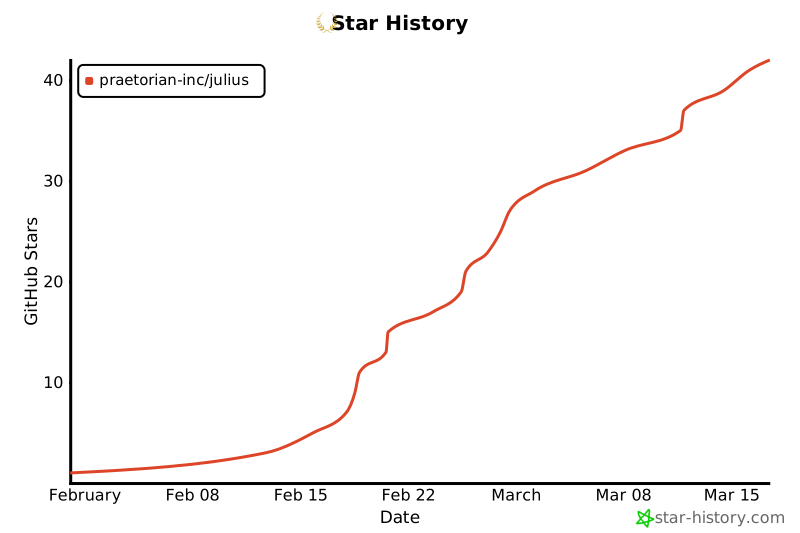](https://star-history.com/#praetorian-inc/julius&Date)
## 许可证
[Apache 2.0](LICENSE) - Praetorian Security, Inc.
**由 [Praetorian](https://www.praetorian.com/) 构建** - 进攻性安全解决方案
# Julius: LLM 服务指纹识别工具
[](https://golang.org/)
[](LICENSE)
[](https://github.com/praetorian-inc/julius/actions)
[](https://goreportcard.com/report/github.com/praetorian-inc/julius)
**Julius** 是一款专为安全专业人士设计的 LLM 服务指纹识别工具。它能在渗透测试、攻击面发现和安全评估过程中,检测网络端点上运行的 AI 服务器软件。
与识别生成文本的具体 LLM 模型的指纹识别工具不同,Julius 识别的是**服务器基础设施**:该端点运行的是 Ollama?vLLM?LiteLLM?还是 Hugging Face 部署?Julius 能在几秒钟内给出答案。
## 目录
- [问题背景](#the-problem)
- [功能特性](#features)
- [快速开始](#quick-start)
- [支持的 LLM 服务](#supported-llm-services)
- [用法](#usage)
- [单个目标](#single-target)
- [多个目标](#multiple-targets)
- [输出格式](#output-formats)
- [模型发现](#model-discovery)
- [工作原理](#how-it-works)
- [架构](#architecture)
- [添加自定义探针](#adding-custom-probes)
- [常见问题](#faq)
- [故障排除](#troubleshooting)
- [贡献](#contributing)
- [安全](#security)
- [支持](#support)
- [许可证](#license)
## 问题背景
你在安全评估中发现了一个开放端口。它是 11434 端口上的 Ollama 吗?是 vLLM?LiteLLM?Hugging Face 端点?还是其他某种 AI 服务?
**手动检查每种可能性既缓慢又容易出错。** 不同的 LLM 服务具有不同的 API 签名、默认端口和响应模式。
**Julius 通过自动识别 LLM 服务指纹解决了这个问题** —— 发送针对性的 HTTP 探针并匹配响应签名,以识别正在运行的确切服务。
## 功能特性
| 功能 | 描述 |
|---------|-------------|
| **33 种 LLM 服务** | 检测 Ollama、vLLM、LiteLLM、LocalAI、Hugging Face TGI 等 33 种服务 |
| **快速扫描** | 并发探测,采用基于端口的智能优先级排序 |
| **模型发现** | 从识别出的端点提取可用模型 |
| **特异性评分** | 1-100 分评分,按最具体的匹配对结果进行排名(例如,优先识别为 LiteLLM 而非通用 OpenAI 兼容服务) |
| **多种输入方式** | 支持单个目标、文件输入或 stdin 管道输入 |
| **灵活输出** | 支持表格、JSON 或 JSONL 格式,便于集成 |
| **可扩展** | 通过简单的 YAML 探针文件添加新服务检测 |
| **离线运行** | 无云依赖 —— 完全在本地运行 |
| **单一二进制** | 基于 Go 的工具,编译为一个可移植的可执行文件 |
## 快速开始
### 安装
```
go install github.com/praetorian-inc/julius/cmd/julius@latest
```
### 基本用法
```
julius probe https://target.example.com
```
### 示例输出
```
+----------------------------+---------+-------------+-------------+--------+-------+
| TARGET | SERVICE | SPECIFICITY | CATEGORY | MODELS | ERROR |
+----------------------------+---------+-------------+-------------+--------+-------+
| https://target.example.com | ollama | 100 | self-hosted | | |
+----------------------------+---------+-------------+-------------+--------+-------+
```
## 支持的 LLM 服务
Julius 可识别自托管、网关、RAG/编排和云管理类别下的 33 个 LLM 平台:
### 自托管 LLM 服务器
| 服务 | 默认端口 | 描述 |
|---------|--------------|-------------|
| [Ollama](https://ollama.ai) | 11434 | 流行的本地 LLM 服务器,易于模型管理 |
| [vLLM](https://github.com/vllm-project/vllm) | 8000 | 高吞吐量 LLM 推理引擎 |
| [LocalAI](https://localai.io) | 8080 | 兼容 OpenAI 的本地 AI 服务器 |
| [llama.cpp](https://github.com/ggerganov/llama.cpp) | 8080 | CPU 优化的 LLM 推理 |
| [Hugging Face TGI](https://huggingface.co/docs/text-generation-inference) | 3000 | 文本生成推理服务器 |
| [LM Studio](https://lmstudio.ai) | 1234 | 带 API 服务器的桌面 LLM 应用程序 |
| [Aphrodite Engine](https://github.com/PygmalionAI/aphrodite-engine) | 2242 | 大规模 LLM 推理引擎,提供兼容 OpenAI 的 API |
| [FastChat](https://github.com/lm-sys/FastChat) | 21001 | 用于训练、服务和评估 LLM 聊天机器人的开放平台 |
| [GPT4All](https://gpt4all.io) | 4891 | 在任何设备上运行本地模型 |
| [Gradio](https://gradio.app) | 7860 | ML 模型演示界面 |
| [Jan](https://jan.ai) | 1337 | 本地兼容 OpenAI 的 API 服务器 |
| [KoboldCpp](https://github.com/LostRuins/koboldcpp) | 5001 | 易于使用的 AI 文本生成软件,适用于 GGML/GGUF 模型 |
| [NVIDIA NIM](https://developer.nvidia.com/nim) | 8000 | NVIDIA 的企业推理微服务 |
| [TabbyAPI](https://github.com/theroyallab/tabbyAPI) | 5000 | 基于 FastAPI 的 ExLlama LLM 服务器 |
| [Text Generation WebUI](https://github.com/oobabooga/text-generation-webui) | 5000 | 具有兼容 OpenAI API 的本地 LLM 界面 |
### 网关/代理服务
| 服务 | 默认端口 | 描述 |
|---------|--------------|-------------|
| [LiteLLM](https://github.com/BerriAI/litellm) | 4000 | 100 多个 LLM 提供商的统一代理 |
| [Kong AI Gateway](https://konghq.com) | 8000 | 具有 AI 插件的企业 API 网关 |
| [Envoy AI Gateway](https://gateway.envoyproxy.io) | 80 | 基于 Envoy Gateway 构建的生成式 AI 服务统一访问入口 |
### RAG 与编排平台
| 服务 | 默认端口 | 描述 |
|---------|--------------|-------------|
| [AnythingLLM](https://anythingllm.com) | 3001 | 集成 RAG、代理和多模型支持的一体化 AI 应用程序 |
| [AstrBot](https://github.com/Soulter/AstrBot) | 6185 | 多平台 LLM 聊天机器人框架,带有仪表板和插件系统 |
| [BetterChatGPT](https://github.com/ztjhz/BetterChatGPT) | 3000 | 增强型 ChatGPT 界面 |
| [Dify](https://dify.ai) | 80 | 具有工作流编排功能的开源 LLM 应用开发平台 |
| [Flowise](https://flowiseai.com) | 3000 | 用于构建 AI 代理和 LLM 工作流的低代码平台 |
| [HuggingFace Chat UI](https://github.com/huggingface/chat-ui) | 3000 | 支持 HuggingChat 的开源 ChatGPT 风格界面 |
| [LibreChat](https://librechat.ai) | 3080 | 支持 RAG 的多提供商聊天界面 |
| [LobeHub](https://lobehub.com) | 3210 | 具有聊天 UI 的多代理 AI 协作平台 |
| [NextChat](https://github.com/ChatGPTNextWeb/ChatGPT-Next-Web) | 3000 | 支持多个 AI 提供商的自托管 ChatGPT 风格界面 |
| [Onyx](https://github.com/onyx-dot-app/onyx) | 3000 | 用于企业搜索和带 RAG 聊天的开源 AI 平台 |
| [OpenClaw](https://github.com/openclaw/openclaw) | 18789 | AI 代理网关和控制平面(前身为 Clawdbot/Moltbot) |
| [Open WebUI](https://github.com/open-webui/open-webui) | 3000 | 面向本地 LLM 的 ChatGPT 风格界面 |
| [SillyTavern](https://sillytavernai.com) | 8000 | 基于角色的聊天应用程序 |
### 云托管服务
| 服务 | 默认端口 | 描述 |
|---------|--------------|-------------|
| [Salesforce Einstein](https://www.salesforce.com/einstein/) | 443 | Salesforce AI 平台 |
### 通用检测
| 服务 | 描述 |
|---------|-------------|
| OpenAI-compatible | 任何实现 OpenAI API 规范的服务器 |
## 用法
### 单个目标
扫描单个端点以查找 LLM 服务:
```
julius probe https://target.example.com
julius probe https://target.example.com:11434
julius probe 192.168.1.100:8080
```
### 多个目标
高效扫描多个端点:
```
# 命令行参数
julius probe https://target1.example.com https://target2.example.com
# 从文件(每行一个 target)
julius probe -f targets.txt
# 从 stdin(从其他工具 pipe)
cat targets.txt | julius probe -
echo "https://target.example.com" | julius probe -
```
### 输出格式
选择适合你工作流程的输出格式:
```
# Table 格式(默认)- 人类可读
julius probe https://target.example.com
# JSON 格式 - 结构化输出
julius probe -o json https://target.example.com
# JSONL 格式 - 每行一个 JSON 对象,适合 pipe
julius probe -o jsonl https://target.example.com | jq '.service'
```
### 模型发现
当 Julius 识别出 LLM 服务时,它还可以提取可用模型:
```
julius probe -o json https://ollama.example.com | jq '.models'
```
```
{
"target": "https://ollama.example.com",
"service": "ollama",
"models": ["llama2", "mistral", "codellama"]
}
```
### 高级选项
```
# 调整 concurrency(默认:10)
julius probe -c 20 https://target.example.com
# 增加 slow endpoints 的 timeout(默认:5 秒)
julius probe -t 10 https://target.example.com
# 使用自定义 probe 定义
julius probe -p ./my-probes https://target.example.com
# 调试用的 Verbose 输出
julius probe -v https://target.example.com
# Quiet 模式 - 仅显示 matches
julius probe -q https://target.example.com
# 列出所有可用的 probes
julius list
```
## 工作原理
Julius 使用基于 HTTP 的服务指纹识别技术来识别 LLM 平台:
```
flowchart LR
A[Target URL] --> B[Load Probes]
B --> C[HTTP Requests]
C --> D[Rule Matching]
D --> E{Match?}
E -->|Yes| F[Report Service]
E -->|No| G[Try Next Probe]
G --> C
subgraph Scanner
C
D
E
end
```
### 检测流程
1. **目标规范化**:验证并规范化输入的 URL
2. **探针选择**:优先匹配目标端口的探针
3. **HTTP 探测**:向特定服务的端点发送请求
4. **规则匹配**:将响应与签名模式进行比较
5. **特异性评分**:按最具体的匹配优先排序结果
6. **模型提取**:可选地通过 JQ 表达式检索可用模型
### 匹配规则
每个探针定义的规则必须全部匹配才能进行识别:
| 规则类型 | 描述 | 示例 |
|-----------|-------------|---------|
| `status` | HTTP 状态码 | `200`, `404` |
| `body.contains` | 响应主体包含字符串 | `"models":` |
| `body.prefix` | 响应主体以...开头 | `{"object":` |
| `content-type` | Content-Type 标头等于值 | `application/json` |
| `header.contains` | 标头包含值 | `X-Custom: foo` |
| `header.prefix` | 标头以值开头 | `text/` |
所有规则都支持使用 `not: true` 进行否定。
## 架构
```
cmd/julius/ CLI entrypoint
pkg/
runner/ Command execution (probe, list, validate)
scanner/ HTTP client, response caching, model extraction
rules/ Match rule engine (status, body, header patterns)
output/ Formatters (table, JSON, JSONL)
probe/ Probe loader (embedded YAML + filesystem)
types/ Core data structures
probes/ YAML probe definitions (one per service)
```
### 关键设计决策
- 通过 `errgroup` 实现**并发扫描**及有界 goroutine 池
- **响应缓存**,采用 MD5 去重和 `singleflight`
- **嵌入式探针**编译进二进制文件以实现可移植性
- **插件式规则**,易于扩展
- **基于端口的优先级排序**,实现更快的识别
## 添加自定义探针
在 `probes/` 中创建一个 YAML 文件以检测新的 LLM 服务:
```
name: my-llm-service
description: My custom LLM service detection
category: self-hosted
port_hint: 8080
api_docs: https://example.com/api-docs
requests:
- path: /health
method: GET
match:
- type: status
value: 200
- type: body.contains
value: '"service":"my-llm"'
- path: /api/version
method: GET
match:
- type: status
value: 200
- type: content-type
value: application/json
models:
path: /api/models
method: GET
extract: ".models[].name"
```
验证你的探针:
```
julius validate ./probes
```
有关完整的探针规范,请参阅 [CONTRIBUTING.md](CONTRIBUTING.md)。
## 常见问题
### 什么是 LLM 服务指纹识别?
LLM 服务指纹识别旨在识别网络端点上运行的是哪种 **LLM 服务器软件**(如 Ollama、vLLM、LiteLLM 等)。这与**模型指纹识别**不同,后者是识别哪段文本由哪个 AI 模型生成的。
**Julius 回答的是**:“这个端口上运行的是什么服务器?”
**模型指纹识别回答的是**:“这段文字是哪个 LLM 写的?”
### Julius 与基于 Shodan 的检测有何不同?
像 Cisco 基于 Shodan 的 Ollama 检测器这样的工具查询的是互联网范围的扫描数据库。Julius 对你控制的特定目标执行**主动探测**,无需外部依赖即可离线工作。此外,它能检测 30 多种服务,而不仅仅是单一服务检测。
### Julius 用于渗透测试安全吗?
是的。Julius 仅发送标准的 HTTP 请求 —— 就像 Web 浏览器或 curl 一样。它不会:
- 利用漏洞
- 尝试绕过身份验证
- 执行拒绝服务攻击
- 修改或删除数据
- 在目标上执行代码
在扫描目标之前,请务必确保你已获得授权。
### 如何为新的 LLM 服务添加支持?
1. 在 `probes/` 中创建一个 YAML 探针文件(例如 `probes/my-service.yaml`)
2. 定义带有匹配规则的 HTTP 请求
3. 使用 `julius validate ./probes` 进行验证
4. 针对实时实例进行测试
5. 提交 Pull Request
有关详细示例,请参阅 [CONTRIBUTING.md](CONTRIBUTING.md)。
### 为什么 Julius 没有检测到我的 LLM 服务?
常见原因:
1. **非默认端口**:尝试指定带端口的完整 URL
2. **需要身份验证**:Julius 不处理身份验证;端点可能受保护
3. **自定义配置**:服务可能具有非标准的 API 路径
4. **不支持的服务**:考虑[添加自定义探针](#adding-custom-probes)
### Julius 能检测反向代理背后的服务吗?
是的,如果代理将请求转发到后端 L 服务端点。Julius 匹配的是响应内容,而不是网络层签名。
### 为什么叫 "Julius"?
以 Julius Caesar(尤利乌斯·凯撒)命名 —— 罗马政治中最初的指纹识别者。
## 故障排除
### 错误: "no matches found"
**原因**:没有探针签名匹配目标的响应。
**解决方案**:
1. 验证目标 URL 正确且可访问
2. 检查服务是否需要身份验证
3. 尝试使用详细模式:`julius probe -v https://target`
4. 该服务可能不在 Julius 的探针数据库中 —— 考虑添加自定义探针
### 错误: "connection refused"
**原因**:目标未接受指定端口上的连接。
**解决方案**:
1. 验证目标主机和端口正确
2. 检查防火墙是否阻止了连接
3. 确保 LLM 服务正在运行
### 错误: "timeout"
**原因**:目标在超时期限内未响应。
**解决方案**:
1. 增加超时时间:`julius probe -t 15 https://target`
2. 检查到目标的网络连接
3. 服务可能已过载或无响应
### 扫描性能缓慢
**原因**:默认并发度对于许多目标来说可能太低。
**解决方案**:
1. 增加并发数:`julius probe -c 50 -f targets.txt`
2. 使用 JSONL 输出以实现更快的流式处理:`julius probe -o jsonl -f targets.txt`
## 贡献
我们欢迎贡献!有关以下内容,请参阅 [CONTRIBUTING.md](CONTRIBUTING.md):
- 添加新的 LLM 服务探针
- 创建新的匹配规则类型
- 测试指南
- 代码风格要求
## 安全
Julius 专为**授权的安全测试**而设计。有关以下内容,请参阅 [SECURITY.md](SECURITY.md):
- 安全注意事项和负责任的使用
- Julius 做什么和不做什么
- 报告安全问题
## 支持
如果你觉得 Julius 有用,请考虑:
- 在 GitHub 上给它点个 **star**
- [提出 Issue](https://github.com/praetorian-inc/julius/issues) 报告 Bug 或功能请求
- [贡献](CONTRIBUTING.md)新的 LLM 服务探针
- 加入 [GitHub Discussions](https://github.com/praetorian-inc/julius/discussions) 进行提问
[](https://star-history.com/#praetorian-inc/julius&Date)
## 许可证
[Apache 2.0](LICENSE) - Praetorian Security, Inc.
**由 [Praetorian](https://www.praetorian.com/) 构建** - 进攻性安全解决方案标签:AES-256, AI基础设施, DLL 劫持, EVTX分析, Go, Golang, Hugging Face, Linux安全, LiteLLM, LLM, LLM评估, Ollama, Ruby工具, Scrypt密钥派生, Unmanaged PE, URL短链接分析, vLLM, 云存储安全, 大语言模型, 安全编程, 实时处理, 密码管理, 开源安全工具, 插件系统, 日志审计, 服务指纹识别, 服务探测, 模型服务检测, 漏洞评估, 端口识别, 网络安全, 网络扫描, 逆向工程平台, 隐私保护