gen0sec/jailer
GitHub: gen0sec/jailer
基于 eBPF LSM 的 Linux 进程强制访问控制系统,通过角色策略在内核层面限制进程的文件访问、网络连接和执行权限。
Stars: 55 | Forks: 2
# Jailer - eBPF 强制访问控制
## 功能特性(当前版本)
| Feature | Status | Description |
|---------|--------|-------------|
| 进程追踪 | ✅ 正常 | 使用 `task_storage` BPF map 追踪进程 |
| Socket 注册 | ✅ 正常 | 进程通过 Unix socket API 进行注册 |
| 基于角色的策略 | ✅ 正常 | 受限 (restricted) 和 宽松 (permissive) 角色 |
| 文件访问控制 | ✅ 正常 | 阻止/允许文件打开操作 |
| Jail 继承 | ✅ 正常 | 子进程继承父进程的 jail |
| 网络控制 | ✅ 正常 | 阻止/允许 socket bind/connect |
| 端口/协议过滤 | ✅ 正常 | 基于端口的 TCP/UDP 允许/拒绝规则 |
| 执行控制 | ✅ 正常 | 阻止/允许进程执行 |
| 路径匹配 | ✅ 正常 | 带缓存失效机制的 Dentry 遍历 |
| 签名二进制文件 | 🚧 桩 | 二进制签名验证(未实现) |
| 替代注册方式 | ✅ 正常 | 按可执行文件、cgroup 或 xattr 自动注册 |
| 无守护进程模式 | ✅ 正常 | 引导二进制文件在启动早期 pin 程序 |
| 审计事件 | ✅ 正常 | 用于 systemd-journald 集成的 Perf buffer |
## Nginx 演示
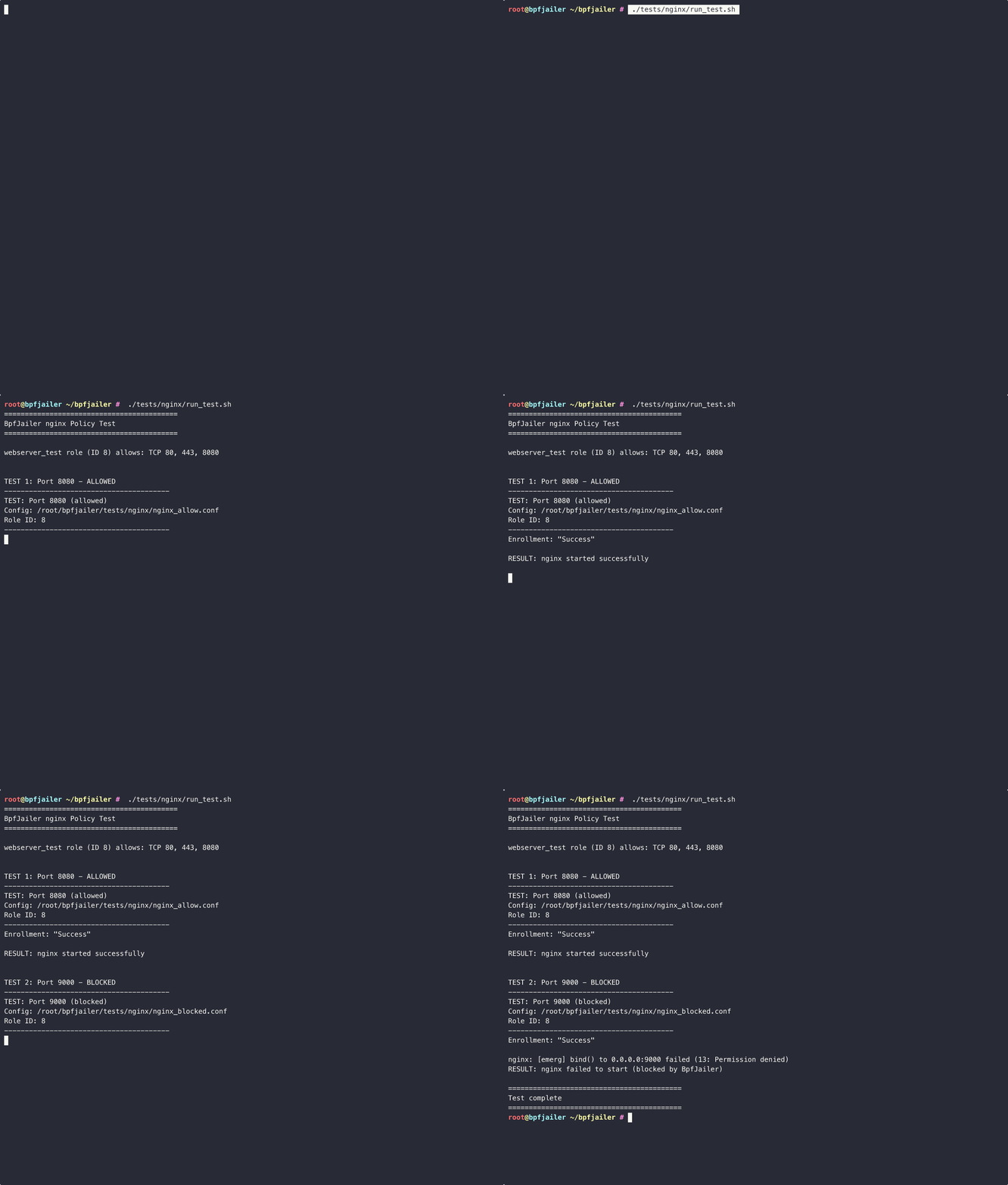
## 复杂场景演示
[](https://asciinema.org/a/767420)
## 内核要求
### 最低内核版本
- **Linux 5.11+**(用于支持 `BPF_MAP_TYPE_TASK_STORAGE`)
- **推荐:Linux 6.1+**(更好的 BTF 支持)
### 必需的内核配置
```
# 检查当前内核配置
zcat /proc/config.gz 2>/dev/null || cat /boot/config-$(uname -r)
```
必需选项:
```
CONFIG_BPF=y
CONFIG_BPF_SYSCALL=y
CONFIG_BPF_LSM=y
CONFIG_DEBUG_INFO_BTF=y
```
### 启用 BPF LSM
必须在内核启动参数中启用 BPF LSM:
```
# 检查 BPF LSM 是否处于活动状态
cat /sys/kernel/security/lsm
# 列表中应包含 "bpf"
# 若未包含,添加到内核启动参数:
# 编辑 /etc/default/grub 并添加到 GRUB_CMDLINE_LINUX:
# lsm=lockdown,capability,landlock,yama,apparmor,bpf
# 然后更新 grub 并重启:
sudo update-grub
sudo reboot
```
对于 Ubuntu/Debian 系统,您也可以使用:
```
# 创建脚本以启用 BPF LSM
cat > /tmp/enable_bpf_lsm.sh << 'EOF'
#!/bin/bash
GRUB_FILE="/etc/default/grub"
if grep -q "lsm=" "$GRUB_FILE"; then
sudo sed -i 's/lsm=[^""]*/lsm=lockdown,capability,landlock,yama,apparmor,bpf/' "$GRUB_FILE"
else
sudo sed -i 's/GRUB_CMDLINE_LINUX="\(.*\)"/GRUB_CMDLINE_LINUX="\1 lsm=lockdown,capability,landlock,yama,apparmor,bpf"/' "$GRUB_FILE"
fi
sudo update-grub
echo "BPF LSM enabled. Please reboot."
EOF
chmod +x /tmp/enable_bpf_lsm.sh
sudo /tmp/enable_bpf_lsm.sh
```
## 构建
### 前置条件
```
# 安装 Rust
curl --proto '=https' --tlsv1.2 -sSf https://sh.rustup.rs | sh
# 安装构建依赖 (Ubuntu/Debian)
sudo apt-get install -y clang llvm libelf-dev linux-headers-$(uname -r)
# 为 Rust 安装 BPF target
rustup target add bpfel-unknown-none
```
### 构建所有组件
```
cd bpfjail
# 构建 BPF programs
cd bpfjailer-bpf && cargo build --release && cd ..
# 构建 daemon 和 client
cargo build --release
```
## 快速开始
### 1. 启动 Daemon
```
# 以 root 运行 (若存在则加载 config/policy.json)
sudo RUST_LOG=info ./target/release/bpfjailer-daemon
```
预期输出:
```
[INFO] BpfJailer daemon starting...
[INFO] Loading BpfJailer eBPF programs with libbpf-rs...
[INFO] ✓ pending_enrollments map available for enrollment
[INFO] ✓ network_rules map available for port/protocol filtering
[INFO] ✓ task_storage map created successfully
[INFO] ✓ Program task_alloc attached
[INFO] ✓ Program file_open attached
[INFO] ✓ Program socket_bind attached
[INFO] ✓ Program socket_connect attached
[INFO] ✓ Program bprm_check_security attached
[INFO] Initialized with default roles: restricted (1), permissive (2)
[INFO] Loaded policy from config/policy.json
[INFO] Loaded 5 roles
[INFO] Enrollment server listening on /run/bpfjailer/enrollment.sock
```
### 2. 运行安全测试
```
# 运行漏洞测试且不使用 jailing (显示攻击成功)
sudo python3 tests/vulnerable_apps/run_tests.py
# 运行漏洞测试且使用 restricted role (显示攻击被阻止)
sudo python3 tests/vulnerable_apps/run_tests.py --role 1
# 运行特定测试
sudo python3 tests/vulnerable_apps/run_tests.py --role 1 --test path
# 列出可用测试和 roles
sudo python3 tests/vulnerable_apps/run_tests.py --list
```
**受限角色下的示例输出:**
```
============================================================
TEST: Path Traversal / Arbitrary File Read
============================================================
Attempting to read /etc/passwd via path traversal...
BLOCKED - Permission denied (BpfJailer blocked file access)
============================================================
TEST: Command Injection
============================================================
Attempting command injection...
BLOCKED - Permission denied (BpfJailer blocked exec)
============================================================
TEST: Reverse Shell / Data Exfiltration
============================================================
Test 1: Reverse shell connection to 127.0.0.1:4444
BLOCKED - Permission denied (BpfJailer blocked connect)
```
### 可用的安全测试
| Test | Vulnerability | Mitigated By |
|------|--------------|--------------|
| `path_traversal` | 通过 `../` 任意文件读取 | restricted, isolated |
| `command_injection` | Shell 命令执行 | restricted, webserver, isolated |
| `reverse_shell` | 向攻击者发起的出站连接 | restricted, isolated |
| `ssrf` | 访问内部服务/云元数据 | restricted, isolated |
| `arbitrary_write` | 写入敏感路径 | restricted |
| `crypto_miner` | 下载 + 执行 + 连接到矿池 | restricted, webserver |
| `privilege_escalation` | 读取 shadow,写入 sudoers | restricted |
### 3. 手动注册测试
```
#!/usr/bin/env python3
import socket
import json
import os
# 连接到 daemon
sock = socket.socket(socket.AF_UNIX, socket.SOCK_STREAM)
sock.connect("/run/bpfjailer/enrollment.sock")
# 使用 restricted role (ID 1) 注册
request = {"Enroll": {"pod_id": 1, "role_id": 1}}
sock.send((json.dumps(request) + "\n").encode())
response = sock.recv(4096).decode()
print(f"Enrollment: {response}")
sock.close()
# 尝试读取文件 (应被阻止)
try:
open("/etc/passwd").read()
print("File access: ALLOWED")
except PermissionError:
print("File access: BLOCKED")
```
## 策略文件
BpfJailer 从 JSON 策略文件加载角色。守护进程按以下顺序搜索策略文件:
1. `$BPFJAILER_POLICY` 环境变量
2. `/etc/bpfjailer/policy.json`
3. `config/policy.json`(相对于工作目录)
### 示例策略文件
```
{
"roles": {
"restricted": {
"id": 1,
"name": "restricted",
"flags": {
"allow_file_access": false,
"allow_network": false,
"allow_exec": false
},
"network_rules": []
},
"webserver": {
"id": 3,
"name": "webserver",
"flags": {
"allow_file_access": true,
"allow_network": true,
"allow_exec": false
},
"network_rules": [
{"protocol": "tcp", "port": 80, "allow": true},
{"protocol": "tcp", "port": 443, "allow": true}
]
}
},
"pods": []
}
```
### 策略标志位
| Flag | Description |
|------|-------------|
| `allow_file_access` | 允许文件打开操作 |
| `allow_network` | 允许 socket bind/connect |
| `allow_exec` | 允许进程执行 |
| `allow_setuid` | 允许 setuid 操作 |
| `allow_ptrace` | 允许 ptrace 操作 |
## 默认角色
| Role ID | Name | File Access | Network | Exec |
|---------|------|-------------|---------|------|
| 1 | restricted | 已阻止 | 已阻止 | 已阻止 |
| 2 | permissive | 已允许 | 已允许 | 已允许 |
| 3 | webserver | 已允许 | 端口 80, 443, 8080 | 已阻止 |
| 4 | database | 已允许 | 端口 5432, 6379 | 已阻止 |
| 5 | isolated | 已允许 | 已阻止 | 已阻止 |
| 6 | web_with_db | 已允许 | 端口 80, 443, 5432, 3306, 6379 | 已阻止 |
| 7 | worker | 已允许 | 端口 443, 5432, 6379, 5672 | 已允许 |
## 网络端口/协议过滤
BpfJailer 支持基于端口的 TCP/UDP 规则,实现细粒度网络控制。
### 规则结构
```
network_rules map:
Key: { role_id, port, protocol, direction }
Value: allowed (1) or denied (0)
```
- **protocol**: 6 = TCP, 17 = UDP
- **direction**: 0 = bind, 1 = connect
- **port**: 0 = 通配符(所有端口)
### 规则评估顺序
1. 检查该角色的特定端口规则
2. 检查该角色的通配符端口规则 (port=0)
3. 回退到 role_flags(位 1 = 允许网络)
### 示例:为受限角色仅允许 HTTP/HTTPS
```
// In daemon code:
use bpfjailer_daemon::process_tracker::{PROTO_TCP, DIR_CONNECT};
// Allow TCP connect to ports 80 and 443 only
process_tracker.add_network_rule(RoleId(1), 80, PROTO_TCP, DIR_CONNECT, true)?;
process_tracker.add_network_rule(RoleId(1), 443, PROTO_TCP, DIR_CONNECT, true)?;
```
### 协议常量
| Constant | Value | Description |
|----------|-------|-------------|
| `PROTO_TCP` | 6 | TCP 协议 |
| `PROTO_UDP` | 17 | UDP 协议 |
| `DIR_BIND` | 0 | socket bind() |
| `DIR_CONNECT` | 1 | socket connect() |
### 端口范围
可以在 policy.json 中使用 `port_start` 和 `port_end` 指定端口范围:
```
{
"network_rules": [
{"protocol": "tcp", "port": 443, "allow": true},
{"protocol": "tcp", "port_start": 8000, "port_end": 8100, "allow": true}
]
}
```
| Field | Description |
|-------|-------------|
| `port` | 单个端口(例如 80) |
| `port_start` + `port_end` | 端口范围(例如 8000-8100) |
## 架构
```
┌─────────────────────────────────────────────────────────────┐
│ User Space │
├─────────────────────────────────────────────────────────────┤
│ ┌─────────────┐ ┌──────────────────┐ │
│ │ Client │───▶│ bpfjailer-daemon │ │
│ │ (enroll) │ │ │ │
│ └─────────────┘ │ - PolicyManager │ │
│ │ - ProcessTracker│ │
│ │ - EnrollmentSvr │ │
│ └────────┬─────────┘ │
│ │ writes to │
│ ▼ │
├─────────────────────────────────────────────────────────────┤
│ BPF Maps │
│ ┌──────────────────┐ ┌─────────────┐ ┌──────────────┐ │
│ │pending_enrollments│ │ role_flags │ │ task_storage │ │
│ │ (PID → info) │ │ (role→flags)│ │(task→info) │ │
│ └──────────────────┘ └─────────────┘ └──────────────┘ │
├─────────────────────────────────────────────────────────────┤
│ BPF LSM Hooks │
│ ┌────────────┐ ┌───────────┐ ┌─────────────┐ ┌──────────┐ │
│ │ task_alloc │ │ file_open │ │socket_bind/ │ │bprm_check│ │
│ │(inheritance│ │(migration │ │ connect │ │_security │ │
│ │ + init) │ │ + check) │ │ (check) │ │ (check) │ │
│ └────────────┘ └───────────┘ └─────────────┘ └──────────┘ │
└─────────────────────────────────────────────────────────────┘
```
## 注册流程
1. 进程连接到 `/run/bpfjailer/enrollment.sock`
2. 发送 JSON:`{"Enroll": {"pod_id": N, "role_id": M}}`
3. 守护进程写入 `pending_enrollments[PID]` 和 `role_flags[role_id]`
4. 在下一次系统调用(file_open, exec)时,BPF 将注册迁移到 `task_storage`
5. 所有未来的系统调用检查 `task_storage` + `role_flags` 以进行强制执行
6. 子进程通过 `task_alloc` 钩子继承
## 安装模式
BpfJailer 支持两种安装模式:
### 1. Daemon 模式(标准)
使用运行中的守护进程进行注册和策略管理:
```
# 安装 systemd 服务
sudo cp config/bpfjailer-daemon.service /etc/systemd/system/
sudo cp target/release/bpfjailer-daemon /usr/sbin/
sudo mkdir -p /etc/bpfjailer
sudo cp config/policy.json /etc/bpfjailer/
# 启用并启动
sudo systemctl daemon-reload
sudo systemctl enable bpfjailer-daemon
sudo systemctl start bpfjailer-daemon
```
**特性:**
- 基于 Socket 的注册 API
- 策略热加载(停止/启动守护进程)
- 守护进程中的完整日志记录
### 2. 无守护进程模式
在启动早期加载 BPF 程序并退出。程序保持活动状态直到重启:
```
# 安装 bootstrap 服务
sudo cp config/bpfjailer-bootstrap.service /etc/systemd/system/
sudo cp target/release/bpfjailer-bootstrap /usr/sbin/
sudo mkdir -p /etc/bpfjailer
sudo cp config/policy.json /etc/bpfjailer/
# 启用 (将在下次启动时运行)
sudo systemctl daemon-reload
sudo systemctl enable bpfjailer-bootstrap
# 或者立即手动运行
sudo bpfjailer-bootstrap
```
**特性:**
- 无运行中的守护进程(减少攻击面)
- BPF 程序被 pin 到 `/sys/fs/bpf/bpfjailer/`
- 不重启无法停止
- 审计事件通过 perf buffer 发送到 systemd-journald
- 仅替代注册方法有效
**检查 pinned 程序:**
```
ls -la /sys/fs/bpf/bpfjailer/
ls -la /sys/fs/bpf/bpfjailer/maps/
ls -la /sys/fs/bpf/bpfjailer/progs/
```
**查看审计事件:**
```
# 事件发送到 perf buffer,由 journald 收集
journalctl -f | grep bpfjailer
```
### 模式对比
| Aspect | Daemon Mode | Daemonless Mode |
|--------|-------------|-----------------|
| 攻击面 | 运行中的守护进程 | 无运行中的进程 |
| 注册方式 | Unix socket + 替代方案 | 仅替代方案 |
| 策略更新 | 热加载 | 需要重启 |
| 审计日志 | 守护进程读取 ringbuf | 通过 perf buffer 发送至 journald |
| 程序移除 | 停止守护进程 | 仅限重启 |
| 启动顺序 | network.target 之后 | basic.target 之前 |
## 故障排除
### "task_storage map creation failed"
```
# 检查内核版本 (需要 5.11+)
uname -r
# 检查 BPF LSM 是否处于活动状态
cat /sys/kernel/security/lsm | grep bpf
# 检查 BTF 是否可用
ls -la /sys/kernel/btf/vmlinux
```
### "Failed to attach program"
```
# 检查 BPF programs 是否可加载
sudo bpftool prog list
# 检查 capabilities
sudo capsh --print | grep cap_bpf
```
### 注册时权限被拒绝
```
# 确保 daemon 正以 root 运行
ps aux | grep bpfjailer
# 检查 socket 权限
ls -la /run/bpfjailer/enrollment.sock
```
## 替代注册方法
除了 Unix socket 注册外,BpfJailer 还支持基于以下方式的自动注册:
### 基于可执行文件的注册
自动注册所有执行特定二进制文件的进程:
```
{
"exec_enrollments": [
{
"executable_path": "/usr/bin/nginx",
"pod_id": 1000,
"role": "webserver"
}
]
}
```
当任何进程执行 `/usr/bin/nginx` 时,它会自动注册为 `webserver` 角色。这是通过可执行文件的 inode 进行匹配的,因此可以正确处理符号链接和硬链接。
### 基于 Cgroup 的注册
自动注册特定 cgroup 中的所有进程:
```
{
"cgroup_enrollments": [
{
"cgroup_path": "/sys/fs/cgroup/bpfjailer/sandbox",
"pod_id": 2000,
"role": "sandbox"
}
]
}
```
创建 cgroup 并将进程移入其中:
```
# 创建 cgroup
sudo mkdir -p /sys/fs/cgroup/bpfjailer/sandbox
# 将进程移动到 cgroup
echo $$ | sudo tee /sys/fs/cgroup/bpfjailer/sandbox/cgroup.procs
# 进程现已使用 sandbox role 自动注册
```
### 基于 Xattr 的注册
在可执行文件上设置扩展属性以存储注册信息:
```
# 设置注册 xattrs
sudo setfattr -n user.bpfjailer.pod_id -v $(printf '\x01\x00\x00\x00\x00\x00\x00\x00') /path/to/binary
sudo setfattr -n user.bpfjailer.role_id -v $(printf '\x03\x00\x00\x00') /path/to/binary
# 检查 xattrs
getfattr -d /path/to/binary
```
### 自动注册的工作原理
1. **在 exec 时**(`bprm_check_security` LSM 钩子):
- 检查可执行文件的 inode 是否在 `exec_enrollment` map 中
- 检查进程的 cgroup ID 是否在 `cgroup_enrollment` map 中
- 如果找到,自动设置 `task_storage` 中的 pod_id 和 role_id
2. **注册通过** `task_alloc` 钩子在 fork/exec 过程中**持久保留**
3. **策略规则**(网络、路径、执行)根据 role_id 应用
## 许可证
GPL-2.0(BPF 程序必需)
标签:0day挖掘, Cloud Native, Docker镜像, Jailer, LSM, MAC, RBAC, Role-Based Access Control, Web截图, 入侵防御, 内核安全, 可视化界面, 子域名枚举, 客户端加密, 容器安全, 强制访问控制, 文件访问控制, 权限控制, 系统安全, 网络安全, 进程沙箱, 隐私保护