Yeachan-Heo/oh-my-claudecode
GitHub: Yeachan-Heo/oh-my-claudecode
为 Claude Code 打造的多智能体编排框架,通过团队分阶段流水线和跨模型协作实现复杂开发任务的自动化执行。
Stars: 37115 | Forks: 3356
English | [한국어](README.ko.md) | [中文](README.zh.md) | [日本語](README.ja.md) | [Español](README.es.md) | [Tiếng Việt](README.vi.md) | [Português](README.pt.md)
# oh-my-claudecode
[](https://www.npmjs.com/package/oh-my-claude-sisyphus)
[](https://www.npmEnglish | [한국어](README.ko.md) | [中文](README.zh.md) | [日本語](README.ja.md) | [Español](README.es.md) | [Tiếng Việt](README.vi.md) | [Português](README.pt.md)
# oh-my-claudecode
[](https://www.npmjs.com/package/oh-my-claude-sisyphus)
[](https://www.npmjs.com/package/oh-my-claude-sisyphus)
[](https://github.com/Yeachan-Heo/oh-my-claudecode/stargazers)
[](https://opensource.org/licenses/MIT)
[](https://github.com/sponsors/Yeachan-Heo)
[](https://discord.gg/PUwSMR9XNk)
**为 Claude Code 打造的多智能体编排。零学习成本。**
_无需学习 Claude Code。直接使用 OMC。_
[入门指南](#quick-start) • [文档](https://yeachan-heo.github.io/oh-my-claudecode-website) • [CLI 参考](https://yeachan-heo.github.io/oh-my-claudecode-website/docs.html#cli-reference) • [工作流](https://yeachan-heo.github.io/oh-my-claudecode-website/docs.html#workflows) • [迁移指南](docs/MIGRATION.md) • [Discord](https://discord.gg/PUwSMR9XNk)
## 快速开始
**第 1 步:安装**
Marketplace/插件安装(推荐大多数 Claude Code 用户使用):
```
/plugin marketplace add https://github.com/Yeachan-Heo/oh-my-claudecode
/plugin install oh-my-claudecode
```
如果你更倾向于使用 npm CLI/运行时路径而不是 Marketplace 流程:
```
npm i -g oh-my-claude-sisyphus@latest
```
**第 2 步:设置**
```
/setup
/omc-setup
```
**第 3 步:开始构建**
```
autopilot: build a REST API for managing tasks
```
就是这样。其余一切都是自动化的。
### 不知道从哪里开始?
如果你对需求不确定、只有模糊的想法,或者想要对设计进行微管理:
```
/deep-interview "I want to build a task management app"
```
深度访谈使用苏格拉底式提问,在任何代码编写之前厘清你的思路。它会揭示隐藏的假设,并跨加权维度衡量清晰度,确保你在执行开始前确切知道要构建什么。
## 团队模式(推荐)
从 **v4.1.7** 开始,**Team** 是 OMC 中标准的编排界面。旧的 `swarm` 关键词/技能已被移除;请直接使用 `team`。
```
/team 3:executor "fix all TypeScript errors"
```
Team 以分阶段的流水线方式运行:
`team-plan → team-prd → team-exec → team-verify → team-fix (loop)`
在 `~/.claude/settings.json` 中启用 Claude Code 原生团队:
```
{
"env": {
"CLAUDE_CODE_EXPERIMENTAL_AGENT_TEAMS": "1"
}
}
```
### tmux CLI 工作进程 — Codex 和 Gemini (v4.4.0+)
**v4.4.0 移除了 Codex/Gemini MCP 服务器**(`x`、`g` 提供商)。使用优先基于 CLI 的 Team 运行时(`omc team ...`)来生成真实的 tmux 工作面板:
```
omc team 2:codex "review auth module for security issues"
omc team 2:gemini "redesign UI components for accessibility"
omc team 1:claude "implement the payment flow"
omc team status auth-review
omc team shutdown auth-review
```
`/omc-teams` 作为旧版兼容技能保留,现在会路由到 `omc team ...`。
要在单个命令中混合使用 Codex 和 Gemini 工作,请使用 **`/ccg`** 技能(通过 `/ask codex` + `/ask gemini` 路由,然后由 Claude 综合处理):
```
/ccg Review this PR — architecture (Codex) and UI components (Gemini)
```
| 界面 | 工作进程 | 最适用场景 |
| ------------------------- | ---------------------- | ------------------------------------------------ |
| `omc team N:codex "..."` | N 个 Codex CLI 面板 | 代码审查、安全分析、架构 |
| `omc team N:gemini "..."` | N 个 Gemini CLI 面板 | UI/UX 设计、文档、大上下文任务 |
| `omc team N:claude "..."` | N 个 Claude CLI 面板 | tmux 中通过 Claude CLI 处理的通用任务 |
| `/ccg` | /ask codex + /ask gemini | 三模型顾问综合分析 |
工作进程按需生成,并在任务完成后消亡——不占用闲置资源。需要安装 `codex` / `gemini` CLI 并具有活跃的 tmux 会话。
### 更新
如果你通过 npm 安装了 OMC,请使用已发布的包名进行升级:
```
npm i -g oh-my-claude-sisyphus@latest
```
如果你通过 Claude Code Marketplace/插件流程安装了 OMC,请使用以下方式更新:
```
# 1. 更新 marketplace clone
/plugin marketplace update omc
# 2. 重新运行 setup 以刷新配置
/setup
```
如果你正在从本地检出或 git 工作树进行开发,请先更新检出,然后从该工作树重新运行设置,以便活跃的运行时与你正在测试的代码相匹配。
如果你在更新后遇到问题,请清除旧的插件缓存:
```
/omc-doctor
```
--chat --tag-list "@alice,bob"
omc config-stop-callback discord --enable --webhook --tag-list "@here,123456789012345678,role:987654321098765432"
omc config-stop-callback slack --enable --webhook --tag-list ",<@U1234567890>"
# 增量更新
omc config-stop-callback telegram --add-tag charlie
omc config-stop-callback discord --remove-tag @here
omc config-stop-callback discord --clear-tags
```
标签行为:
- Telegram:`alice` 变为 `@alice`
- Discord:支持 `@here`、`@everyone`、数字用户 ID 和 `role:`
- Slack:支持 `<@MEMBER_ID>`、`channel>`、``、``、``
- `file` 回调会忽略标签选项
### OpenClaw 集成
将 Claude Code 会话事件转发到 [OpenClaw](https://openclaw.ai/) 网关,以通过你的 OpenClaw 智能体启用自动化响应和工作流。
**快速设置(推荐):**
```
/oh-my-claudecode:configure-notifications
# → 出现提示时,输入 "openclaw" → 选择 "OpenClaw Gateway"
```
**手动设置:** 创建 `~/.claude/omc_config.openclaw.json`:
```
{
"enabled": true,
"gateways": {
"my-gateway": {
"url": "https://your-gateway.example.com/wake",
"headers": { "Authorization": "Bearer YOUR_TOKEN" },
"method": "POST",
"timeout": 10000
}
},
"hooks": {
"session-start": { "gateway": "my-gateway", "instruction": "Session started for {{projectName}}", "enabled": true },
"stop": { "gateway": "my-gateway", "instruction": "Session stopping for {{projectName}}", "enabled": true }
}
}
```
**环境变量:**
| 变量 | 描述 |
|------|------|
| `OMC_OPENCLAW=1` | 启用 OpenClaw |
| `OMC_OPENCLAW_DEBUG=1` | 启用调试日志 |
| `OMC_OPENCLAW_CONFIG=/path/to/config.json` | 覆盖配置文件路径 |
**支持的钩子事件(bridge.ts 中有 6 个活跃):**
| 事件 | 触发器 | 关键模板变量 |
|------|--------|--------------|
| `session-start` | 会话开始 | `{{sessionId}}`, `{{projectName}}`, `{{projectPath}}` |
| `stop` | Claude 响应完成 | `{{sessionId}}`, `{{projectName}}` |
| `keyword-detector` | 每次提示提交 | `{{prompt}}`, `{{sessionId}}` |
| `ask-user-question` | Claude 请求用户输入 | `{{question}}`, `{{sessionId}}` |
| `pre-tool-use` | 工具调用前(高频) | `{{toolName}}`, `{{sessionId}}` |
| `post-tool-use` | 工具调用后(高频) | `{{toolName}}`, `{{sessionId}}` |
**回复频道环境变量:**
| 变量 | 描述 |
|------|------|
| `OPENCLAW_REPLY_CHANNEL` | 回复频道(例如 `discord`) |
| `OPENCLAW_REPLY_TARGET` | 频道 ID |
| `OPENCLAW_REPLY_THREAD` | 线程 ID |
请参阅 `scripts/openclaw-gateway-demo.mjs`,这是一个通过 ClawdBot 将 OpenClaw 负载中继到 Discord 的参考网关。
## 文档
- **[完整参考](docs/REFERENCE.md)** - 完整的功能文档
- **[CLI 参考](https://yeachan-heo.github.io/oh-my-claudecode-website/docs.html#cli-reference)** - 所有 `omc` 命令、标志和工具
- **[通知指南](https://yeachan-heo.github.io/oh-my-claudecode-website/docs.html#notifications)** - Discord、Telegram、Slack 和 webhook 设置
- **[推荐工作流](https://yeachan-heo.github.io/oh-my-claudecode-website/docs.html#workflows)** - 针对常见任务经过实战检验的技能链
- **[发行说明](https://yeachan-heo.github.io/oh-my-claudecode-website/docs.html#release-notes)** - 每个版本的新功能
- **[网站](https://yeachan-heo.github.io/oh-my-claudecode-website)** - 交互式指南和示例
- **[迁移指南](docs/MIGRATION.md)** - 从 v2.x 升级
- **[架构](docs/ARCHITECTURE.md)** - 底层工作原理
- **[性能监控](docs/PERFORMANCE-MONITORING.md)** - 智能体跟踪、调试和优化
## 要求
- [Claude Code](https://docs.anthropic.com/claude-code) CLI
- Claude Max/Pro 订阅 或 Anthropic API 密钥
### 平台和 tmux
OMC 的某些功能(如 `omc team` 和速率限制检测)需要 **tmux**:
| 平台 | tmux 提供商 | 安装方式 |
| -------------- | ------------------------------------------------------ | ----------------------- |
| macOS | [tmux](https://github.com/tmux/tmux) | `brew install tmux` |
| Ubuntu/Debian | tmux | `sudo apt install tmux` |
| Fedora | tmux | `sudo dnf install tmux` |
| Arch | tmux | `sudo pacman -S tmux` |
| Windows | [psmux](https://github.com/marlocarlo/psmux) (原生) | `winget install psmux` |
| Windows (WSL2) | tmux (在 WSL 内) | `sudo apt install tmux` |
### 可选:多 AI 编排
OMC 可以选择编排外部 AI 提供商,以进行交叉验证和设计一致性。这些**不是必需的**——没有它们 OMC 也能完全正常工作。
| 提供商 | 安装方式 | 启用的功能 |
| --------------------------------------------------------- | -------------------------------------- | -------------------------------------------------- |
| [Gemini CLI](https://github.com/google-gemini/gemini-cli) | `npm install -g @google/gemini-cli` | 设计审查、UI 一致性(100 万 token 上下文) |
| [Codex CLI](https://github.com/openai/codex) | `npm install -g @openai/codex` | 架构验证、代码审查交叉检查 |
**成本:** 3 个 Pro 计划(Claude + Gemini + ChatGPT)每月约 60 美元即可覆盖所有内容。
## 许可证
MIT
你的 Claude 现已火力全开。

**灵感来源:** [oh-my-opencode](https://github.com/code-yeongyu/oh-my-opencode) • [claude-hud](https://github.com/ryanjoachim/claude-hud) • [Superpowers](https://github.com/obra/superpowers) • [everything-claude-code](https://github.com/affaan-m/everything-claude-code) • [Ouroboros](https://github.com/Q00/ouroboros)
**零学习成本。极致性能。**
## OMC 贡献者精选
来自所有时代 OMC 贡献者的顶级个人非 fork、非归档仓库(GitHub 星标 100+)。
- [@Yeachan-Heo](https://github.com/Yeachan-Heo) — [oh-my-claudecode](https://github.com/Yeachan-Heo/oh-my-claudecode) (⭐ 11k)
- [@junhoyeo](https://github.com/junhoyeo) — [tokscale](https://github.com/junhoyeo/tokscale) (⭐ 1.3k)
- [@psmux](https://github.com/psmux) — [psmux](https://github.com/psmux/psmux) (⭐ 695)
- [@BowTiedSwan](https://github.com/BowTiedSwan) — [buildflow](https://github.com/BowTiedSwan/buildflow) (⭐ 284)
- [@alohays](https://github.com/alohays) — [awesome-visual-representation-learning-with-transformers](https://github.com/alohays/awesome-visual-representation-learning-with-transformers) (⭐ 268)
- [@jcwleo](https://github.com/jcwleo) — [random-network-distillation-pytorch](https://github.com/jcwleo/random-network-distillation-pytorch) (⭐ 260)
- [@emgeee](https://github.com/emgeee) — [mean-tutorial](https://github.com/emgeee/mean-tutorial) (⭐ 200)
- [@anduinnn](https://github.com/anduinnn) — [HiFiNi-Auto-CheckIn](https://github.com/anduinnn/HiFiNi-Auto-CheckIn) (⭐ 172)
- [@Znuff](https://github.com/Znuff) — [consolas-powerline](https://github.com/Znuff/consolas-powerline) (⭐ 145)
- [@shaun0927](https://github.com/shaun0927) — [openchrome](https://github.com/shaun0927/openchrome) (⭐ 144)
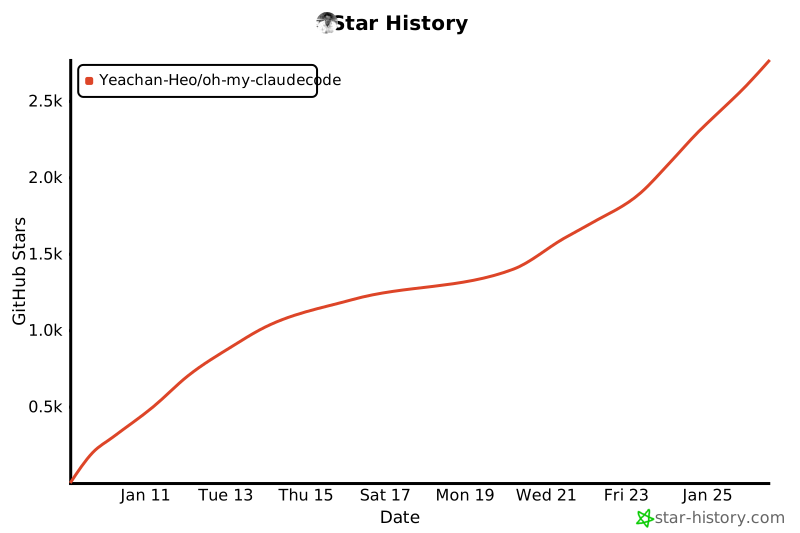
## Star 历史
[](https://www.star-history.com/#Yeachan-Heo/oh-my-claudecode&type=date&legend=top-left)
## 💖 支持本项目
如果 Oh-My-ClaudeCode 对你的工作流有所帮助,请考虑赞助:
[](https://github.com/sponsors/Yeachan-Heo)
### 为什么要赞助?
- 保持开发的活跃度
- 为赞助者提供优先支持
- 影响路线图和功能
- 帮助维持免费和开源
### 其他帮助方式
- ⭐ 为仓库加星
- 🐛 报告 Bug
- 💡 提出功能建议
- 📝 贡献代码标签:AI 辅助编程, Anthropic, API 构建, Autopilot, CIS基准, Claude Code, CLI, LLM 开发工具, MITM代理, Multi-agent Orchestration, NPM 包, Sisyphus, WiFi技术, 任务管理, 低代码, 团队协作, 多智能体编排, 工作流自动化, 数据管道, 暗色界面, 网络调试, 自动化, 自动化攻击, 自动驾驶模式, 软件工程, 零学习曲线