OthmanAdi/planning-with-files
GitHub: OthmanAdi/planning-with-files
一个基于文件持久化规划的 Claude Code 技能,解决上下文易失性、目标漂移与错误追溯难题。
Stars: 25619 | Forks: 2157
# 使用文件进行规划
[](docs/evals.md)
[](docs/evals.md)
[](https://loaditout.ai/skills/OthmanAdi/planning-with-files)
[](https://getskillcheck.com)
[](docs/evals.md)
[](https://skillsplayground.com/skills/othmanadi-planning-with-files-planning-with-files/)
[](https://skill-history.com/othmanadi/planning-with-files)
[](https://github.com/OthmanAdi/planning-with-files/releases)
[](https://opensource.org/licenses/MIT)
[](https://github.com/OthmanAdi/planning-with-files/issues?q=is%3Aissue+is%3Aclosed)
[](https://github.com/OthmanAdi/planning-with-files/pulls?q=is%3Apr+is%3Aclosed)
参见 [CONTRIBUTORS.md](./CONTRIBUTORS.md) 了解所有为项目做出贡献的人员。
一个 Claude Code 插件,将你的工作流转变为使用持久的 Markdown 文件进行规划、进度跟踪和知识存储 — 这正是让 Manus 价值数十亿美元的相同模式。
[](https://code.claude.com/docs/en/plugins)
[](https://code.claude.com/docs/en/skills)
[](https://docs.cursor.com/context/skills)
[](https://kilo.ai/docs/agent-behavior/skills)
[](https://geminicli.com/docs/cli/skills/)
[](https://openclaw.ai)
[](https://kiro.dev/docs/skills/)
[](https://docs.sylph.ai/features/plugins-and-skills)
[](https://pi.dev)
[](https://docs.github.com/en/copilot/reference/hooks-configuration)
[](https://code.mastra.ai)
[](https://boxlite.ai)
## 快速安装
```
npx skills add OthmanAdi/planning-with-files --skill planning-with-files -g
```
这就是全部!现在可以在 Claude Code 中使用以下命令之一:
| 命令 | 自动补全 | 描述 |
|---------|--------------|-------------|
| `/planning-with-files:plan` | 输入 `/plan` | 开始规划会话(v2.11.0+) |
| `/planning-with-files:status` | 输入 `/plan:status` | 一瞥规划进度(v2.15.0+) |
| `/planning-with-files:start` | 输入 `/planning` | 原始开始命令 |
**替代方案:** 如果你想要 `/planning-with-files`(不带前缀),将技能复制到本地文件夹:
**macOS/Linux:**
```
cp -r ~/.claude/plugins/cache/planning-with-files/planning-with-files/*/skills/planning-with-files ~/.claude/skills/
```
**Windows (PowerShell):**
```
Copy-Item -Recurse -Path "$env:USERPROFILE\.claude\plugins\cache\planning-with-files\planning-with-files\*\skills\planning-with-files" -Destination "$env:USERPROFILE\.claude\skills\"
```
请参阅 [docs/installation.md](docs/installation.md) 了解所有安装方法。
## 为何选择此技能?
2025 年 12 月 29 日,[Meta 以 20 亿美元收购 Manus](https://github.com/OthmanAdi/planning-with-files#meta-acquires-manus-for-2-billion)。短短 8 个月内,Manus 从推出到收入超过 1 亿美元。他们的秘密是什么?**上下文工程**。
### 问题
Claude Code(以及大多数 AI 代理)存在以下问题:
- **易失性内存** — TodoWrite 工具在上下文重置时消失
- **目标漂移** — 在 50 多次工具调用后,原始目标会被遗忘
- **隐藏错误** — 错误未被跟踪,因此同样的错误会重复发生
- **上下文堆积** — 所有内容都挤在上下文里,而不是存储起来
### 解决方案:3 文件模式
对于每个复杂任务,创建三个文件:
```
task_plan.md → Track phases and progress
findings.md → Store research and findings
progress.md → Session log and test results
```
### 核心原则
```
Context Window = RAM (volatile, limited)
Filesystem = Disk (persistent, unlimited)
→ Anything important gets written to disk.
```
## Manus 原则
| 原则 | 实现方式 |
|-----------|----------------|
| 文件系统作为内存 | 存储在文件中,而非上下文 |
| 注意力操控 | 在决策前重新读取计划(通过钩子) |
| 错误持久化 | 在计划文件中记录失败 |
| 目标跟踪 | 复选框显示进度 |
| 完成验证 | 停止钩子检查所有阶段 |
## 用法
安装后,AI 代理将:
1. **如果没有提供描述,则询问你的任务**
2. **在项目目录中创建 `task_plan.md`、`findings.md` 和 `progress.md`**
3. **在主要决策前重新读取计划(通过 PreToolUse 钩子)**
4. **在文件写入后提醒你更新状态(通过 PostToolUse 钩子)**
5. **将发现存储在 `findings.md` 中,而不是堆积上下文**
6. **记录错误以供将来参考**
7. **在停止前验证完成情况(通过 Stop 钩子)**
通过以下方式调用:
- `/planning-with-files:plan` — 输入 `/plan` 在自动补全中查找(v2.11.0+)
- `/planning-with-files:start` — 输入 `/planning` 在自动补全中查找
- `/planning-with-files` — 仅当你将技能复制到 `~/.claude/skills/` 时
请参阅 [docs/quickstart.md](docs/quickstart.md) 获取完整的 5 步指南。
## 基准测试结果
使用 Anthropic 的 [skill-creator](https://github.com/OthmanAdi/planning-with-files#meta-acquires-manus-for-2-billion) 框架(v2.22.0)进行正式评估。10 个并行子代理,5 种任务类型,30 个可客观验证的断言,3 次盲 A/B 比较。
| 测试 | 使用技能 | 不使用技能 |
|------|-----------|---------------|
| 通过率(30 个断言) | **96.7%** (29/30) | 6.7% (2/30) |
| 遵循 3 文件模式 | 5/5 评估 | 0/5 评估 |
| 盲 A/B 获胜 | **3/3 (100%)** | 0/3 |
| 平均评分 | **10.0/10** | 6.8/10 |
[完整方法和结果](docs/evals.md) · [技术说明](docs/article.md)
## 关键规则
1. **先创建计划** — 没有 `task_plan.md` 绝不开始
2. **2 操作规则** — 每进行 2 次查看/浏览器操作后保存发现
3. **记录所有错误** — 它们有助于避免重复
4. **永不重复失败** — 跟踪尝试并修改方法
## 适用场景
**在此模式中使用:**
- 多步骤任务(3 步以上)
- 研究任务
- 构建/创建项目
- 涉及大量工具调用的任务
**跳过:**
- 简单问题
- 单一文件编辑
- 快速查找
## 文件结构
```
planning-with-files/
├── commands/ # Plugin commands
│ ├── plan.md # /planning-with-files:plan command (v2.11.0+)
│ ├── plan-ar.md # Arabic /plan command (v2.33.0+)
│ ├── plan-de.md # German /plan command (v2.33.0+)
│ ├── plan-es.md # Spanish /plan command (v2.33.0+)
│ └── start.md # /planning-with-files:start command
├── templates/ # Root-level templates (for CLAUDE_PLUGIN_ROOT)
├── scripts/ # Root-level scripts (for CLAUDE_PLUGIN_ROOT)
├── docs/ # Documentation
│ ├── installation.md
│ ├── quickstart.md
│ ├── workflow.md
│ ├── troubleshooting.md
│ ├── gemini.md # Gemini CLI setup
│ ├── cursor.md
│ ├── windows.md
│ ├── kilocode.md
│ ├── codex.md
│ ├── opencode.md
│ ├── mastra.md # Mastra Code setup
│ └── boxlite.md # BoxLite sandbox setup
├── examples/ # Integration examples
│ └── boxlite/ # BoxLite quickstart
│ ├── README.md
│ └── quickstart.py
├── planning-with-files/ # Plugin skill folder
│ ├── SKILL.md
│ ├── templates/
│ └── scripts/
├── skills/ # Skill variants
│ ├── planning-with-files/ # English (default)
│ │ ├── SKILL.md
│ │ ├── examples.md
│ │ ├── reference.md
│ │ ├── templates/
│ │ └── scripts/
│ │ ├── init-session.sh
│ │ ├── check-complete.sh
│ │ ├── init-session.ps1 # Windows PowerShell
│ │ └── check-complete.ps1 # Windows PowerShell
│ ├── planning-with-files-ar/ # Arabic (v2.33.0+)
│ │ ├── SKILL.md
│ │ ├── templates/
│ │ └── scripts/
│ ├── planning-with-files-de/ # German (v2.33.0+)
│ │ ├── SKILL.md
│ │ ├── templates/
│ │ └── scripts/
│ ├── planning-with-files-es/ # Spanish (v2.33.0+)
│ │ ├── SKILL.md
│ │ ├── templates/
│ │ └── scripts/
│ ├── planning-with-files-zh/ # Chinese Simplified (v2.25.0+)
│ └── planning-with-files-zht/ # Chinese Traditional (v2.28.0+)
├── .gemini/ # Gemini CLI skills + hooks
│ ├── settings.json # Hook configuration (v2.26.0)
│ ├── hooks/ # Hook scripts (SessionStart, BeforeTool, AfterTool, BeforeModel, SessionEnd)
│ └── skills/
│ └── planning-with-files/
├── .codex/ # Codex CLI skills + hooks
│ └── skills/
├── .opencode/ # OpenCode skills (custom session storage)
│ └── skills/
├── .claude-plugin/ # Plugin manifest
├── .cursor/ # Cursor skills + hooks
│ ├── hooks.json # Hook configuration
│ ├── hooks/ # Hook scripts (bash + PowerShell)
│ └── skills/
├── .codebuddy/ # CodeBuddy skills + hooks
│ └── skills/
├── .factory/ # FactoryAI Droid skills + hooks (v2.26.0)
│ └── skills/
├── .pi/ # Pi Agent skills (npm package)
│ └── skills/
│ └── planning-with-files/
├── .continue/ # Continue.dev skills + prompt files
│ ├── prompts/ # .prompt file for slash commands
│ └── skills/
├── .github/ # GitHub Copilot hooks (incl. errorOccurred)
│ └── hooks/
│ ├── planning-with-files.json # Hook configuration
│ └── scripts/ # Hook scripts (bash + PowerShell)
├── .mastracode/ # Mastra Code skills + hooks
│ └── skills/
├── .kiro/ # Kiro Agent Skills (v2.27.0+)
│ └── skills/
├── CHANGELOG.md
├── CITATION.cff
├── LICENSE
└── README.md
```
## 文档
所有平台安装指南和文档都在 [docs/](./docs/) 文件夹中。
## 感谢
- **Manus AI** — 开创上下文工程模式
- **Anthropic** — 提供 Claude Code、代理技能和插件系统
- **Lance Martin** — 详细的 Manus 架构分析
- 基于 [面向 AI 代理的上下文工程](https://github.com/OthmanAdi/planning-with-files#meta-acquires-manus-for-2-billion)
## 贡献
欢迎贡献!请:
1. 叉取仓库
2. 创建功能分支
3. 提交拉取请求
## 许可证
MIT 许可证 — 可自由使用、修改和分发。
**作者:** [Ahmad Othman Ammar Adi](https://github.com/OthmanAdi)
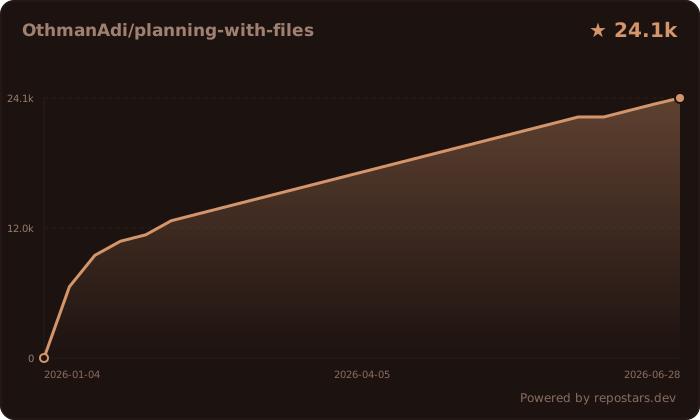
## 星标历史
💬 作者的话
如果这个技能能帮助你更高效地工作,这就是我想要的。🌍 社区贡献
### 分支与扩展 | 分支 | 作者 | 构建内容 | |------|--------|-----------------| | [devis](https://github.com/st01cs/devis) | [@st01cs](https://github.com/st01cs) | 面试优先工作流,`/devis:intv` 和 `/devis:impl` 命令,保证激活 | | [multi-manus-planning](https://github.com/kmichels/multi-manus-planning) | [@kmichels](https://github.com/kmichels) | 多项目支持,SessionStart Git 同步 | | [plan-cascade](https://github.com/Taoidle/plan-cascade) | [@Taoidle](https://github.com/Taoidle) | 多级任务编排,并行执行,多智能体协作 | | [agentfund-skill](https://github.com/RioTheGreat-ai/agentfund-skill) | [@RioTheGreat-ai](https://github.com/RioTheGreat-ai) | 基于 Base 的里程碑托管众筹 AI 代理 | | [openclaw-github-repo-commander](https://github.com/wd041216-bit/openclaw-github-repo-commander) | [@wd041216-bit](https://github.com/wd041216-bit) | 7 阶段 GitHub 仓库审计、优化与清理工作流 | ### 实际应用案例 | 项目 | 说明 | |---------|-----------| | [lincolnwan/Planning-with-files-copilot-agent](https://github.com/lincolnwan/Planning-with-files-copilot-agent) | 围绕 planning-with-files 技能构建的完整 Copilot 代理仓库 | | [cooragent/ClarityFinance](https://github.com/cooragent/ClarityFinance) | AI 金融代理框架 — 直接归功于 planning-with-Files 方法 | | [oeftimie/vv-claude-harness](https://github.com/oeftimie/vv-claude-harness) | 基于 Manus 风格持久化 Markdown 规划的 Claude Code 框架 | | [jessepwj/CCteam-creator](https://github.com/jessepwj/CCteam-creator) | 使用基于文件的规划进行多智能体团队编排的技能 |📦 发布与会话恢复
### 当前版本:v2.34.1 | 版本 | 亮点 | |---------|------------| | **v2.34.1** | **停止钩子的 Windows 便携性修复**(关闭 #133):`export SD=` 在 Windows Git Bash 钩子上下文中失败;插件缓存结构的备用路径不正确。已修复所有 13 个 SKILL.md 变体。(感谢 @nazeshinjite!) | | **v2.34.0** | **完全恢复 Codex 钩子**(关闭 #132):`.codex/hooks.json` + 生命周期脚本恢复 — SessionStart、UserPromptSubmit、PreToolUse、PostToolUse、Stop。Tessl CI 用于 SKILL.md 质量审查。执行位修复。已添加 4 位缺失的贡献者。(感谢 @Leon-Algo、@popey!) | | **v2.33.0** | **多语言扩展**:添加了阿拉伯语、德语和西班牙语技能变体(感谢社区贡献者!) | | **v2.32.0** | Codex 会话追赶重写(感谢 @ebrevdo!),Loaditout A 级安全徽章,停止钩子的 Git Bash 修复 | | **v2.31.0** | Codex hooks.json 集成与完整生命周期钩子(感谢 @Leon-Algo!) | | **v2.30.1** | 修复:Codex 脚本可执行位恢复(感谢 @Leon-Algo!) | | **v2.30.0** | `CLAUDE_SKILL_DIR` 变量,IDE 配置移至各 IDE 分支,plugin.json 从 2.23.0 升级 | | **v2.29.0** | 分析工作流模板:`--template analytics` 标志用于数据探索会话(感谢 @mvanhorn!) | | **v2.28.0** | 繁体中文(zh-TW)技能变体(感谢 @waynelee2048!) | | **v2.26.2** | 修复:钩子命令中的 `---` 破坏了 YAML 前置元数据解析,钩子现在正确注册 | | **v2.26.1** | 修复:`/clear` 后的会话追赶,Windows 路径清理和内容注入(感谢 @tony-stark-eth!) | | **v2.26.0** | IDE 审计:工厂钩子、复制代码错误Occurred 钩子、Gemini 钩子、错误修复 | | **v2.18.2** | Mastra Code 钩子修复(hooks.json + 文档准确性) | | **v2.18.1** | 复制代码乱码字符完全修复 | | **v2.18.0** | BoxLite 沙箱运行时集成 | | **v2.17.0** | Mastra Code 支持以及所有 IDE SKILL.md 规范修复 | | **v2.16.1** | 复制代码乱码字符修复:PS1 UTF-8 编码 + bash 确保 ASCII(感谢 @Hexiaopi!) | | **v2.16.0** | GitHub Copilot 钩子支持(感谢 @lincolnwan!) | | **v2.27.0** | Kiro 代理技能布局(感谢 @EListenX!) | | **v2.15.1** | 会话追赶误报修复(感谢 @gydx6!) | | **v2.15.0** | `/plan:status` 命令,OpenCode 兼容性修复 | | **v2.14.0** | Pi 代理支持,OpenClaw 文档更新,Codex 路径修复 | | **v2.11.0** | `/plan` 命令,用于更简单的自动补全 | | **v2.10.0** | Kiro 转向文件支持 | | **v2.7.0** | Gemini CLI 支持 | | **v2.2.0** | 会话恢复、Windows PowerShell、OS 感知钩子 | [查看所有版本](https://github.com/OthmanAdi/planning-with-files/releases) · [变更日志](CHANGELOG.md) ### 会话恢复 当你的上下文填满并运行 `/clear` 时,此技能会**自动恢复**你之前的会话。 **工作原理:** 1. 在活动 IDE 的会话存储中检查之前的会话数据(Claude Code 为 `~/.claude/projects/`,Codex 为 `~/.codex/sessions/`) 2. 查找规划文件上次更新的时间 3. 提取(可能丢失的)上下文之后发生的对话 4. 显示追赶报告以便你同步 **专业提示:** 禁用自动压缩以在清除前最大化上下文: ``` { "autoCompact": false } ```🛠️ 支持的 IDE(16+ 平台)
#### 增强支持(钩子 + 生命周期自动化) 以下 IDE 具有专用的钩子配置,可自动在工具使用前重新读取你的计划,提醒你更新进度,并在停止前验证完成情况: | IDE | 安装指南 | 集成 | |-----|-------------------|-------------| | Claude Code | [安装](docs/installation.md) | 插件 + SKILL.md + 钩子 | | Cursor | [Cursor 设置](docs/cursor.md) | 技能 + [hooks.json](https://cursor.com/docs/hooks) | | GitHub Copilot | [Copilot 设置](docs/copilot.md) | [钩子](https://docs.github.com/en/copilot/reference/hooks-configuration)(包括 errorOccurred) | | Mastra Code | [Mastra 设置](docs/mastra.md) | 技能 + [钩子](https://mastra.ai/docs/mastra-code/configuration) | | Gemini CLI | [Gemini 设置](docs/gemini.md) | 技能 + [钩子](https://geminicli.com/docs/hooks/) | | Kiro | [Kiro 设置](docs/kiro.md) | [代理技能](https://kiro.dev/docs/skills/) | | Codex | [Codex 设置](docs/codex.md) | [技能 + 钩子](https://developers.openai.com/codex/skills) | | CodeBuddy | [CodeBuddy 设置](docs/codebuddy.md) | [技能 + 钩子](https://www.codebuddy.ai/docs/cli/skills) | | FactoryAI Droid | [Factory 设置](docs/factory.md) | [技能 + 钩子](https://docs.factory.ai/cli/configuration/skills) | | OpenCode | [OpenCode 设置](docs/opencode.md) | 技能 + 自定义会话存储 | #### 标准代理技能支持 这些 IDE 实现了 [代理技能](https://github.com/OthmanAdi/agent-skills) 开放规范。使用 `npx skills add` 安装 — 安装程序会自动将技能放置到每个 IDE 的发现路径中: | IDE | 安装指南 | 技能发现路径 | |-----|-------------------|---------------------| | Continue | [Continue 设置](docs/continue.md) | `.continue/skills/` + [.prompt 文件](https://docs.continue.dev/customize/deep-dives/prompts) | | Pi Agent | [Pi Agent 设置](docs/pi-agent.md) | `.pi/skills/` ([npm 包](https://www.npmjs.com/package/@mariozechner/pi-coding-agent)) | | OpenClaw | [OpenClaw 设置](docs/openclaw.md) | `.openclaw/skills/` ([文档](https://docs.openclaw.ai/tools/skills)) | | Antigravity | [Antigravity 设置](docs/antigravity.md) | `.agent/skills/` ([文档](https://codelabs.developers.google.com/getting-started-with-antigravity-skills)) | | Kilocode | [Kilocode 设置](docs/kilocode.md) | `.kilocode/skills/` ([文档](https://kilo.ai/docs/agent-behavior/skills)) | | AdaL CLI (Sylph AI) | [AdaL 设置](docs/adal.md) | `.adal/skills/` ([文档](https://docs.sylph.ai/features/plugins-and-skills)) | ---🧱 沙箱运行时(1 个平台)
| 运行时 | 状态 | 指南 | 备注 | |---------|--------|-------|-------| | BoxLite | ✅ 已记录 | [BoxLite 设置](docs/boxlite.md) | 在硬件隔离的微型虚拟机中运行 Claude Code + planning-with-files | ---🌐 提供 5 种其他语言版本
**🇸🇦 العربية / Arabic** ``` npx skills add OthmanAdi/planning-with-files --skill planning-with-files-ar -g ``` **🇩🇪 Deutsch / German** ``` npx skills add OthmanAdi/planning-with-files --skill planning-with-files-de -g ``` **🇪🇸 Español / Spanish** ``` npx skills add OthmanAdi/planning-with-files --skill planning-with-files-es -g ``` **🇨🇳 中文版 / Chinese (Simplified)** ``` npx skills add OthmanAdi/planning-with-files --skill planning-with-files-zh -g ``` **🇹🇼 正體中文版 / Chinese (Traditional)** ``` npx skills add OthmanAdi/planning-with-files --skill planning-with-files-zht -g ``` 适用于 Claude Code、Cursor、Codex、Gemini CLI 以及 40 多个支持 [代理技能](https://github.com/OthmanAdi/agent-skills) 规范的代理。🔧 Claude Code 插件(高级功能)
针对 Claude Code 特定功能(如 `/plan` 自动补全命令): ``` /plugin marketplace add OthmanAdi/planning-with-files /plugin install planning-with-files@planning-with-files ```标签:A/B 测试, AI 编程助手, Benchmark, Claude Code, Cutter, IPv6支持, Manus, Markdown 规划, SEO 检索, 下载统计, 工作流模式, 开源技能, 技能实现, 技能验证, 持久化存储, 持久化规划, 文件管理, 版本发布, 规划引擎, 逆向工具, 防御加固